INTERNATIONAL CONFERENCE ON ENGINEERING AND PRODUCT DESIGN EDUCATION 7 & 8 SEPTEMBER 2017, OSLO AND AKERSHUS UNIVERSITY COLLEGE OF APPLIED SCIENCES, NORWAY
USING SLACK FOR ASYNCHRONOUS
COMMUNICATION IN A GLOBAL DESIGN PROJECT
Kim WHITE, Hilary GRIERSON and Andrew WODEHOUSE
Department of Design, Manufacture and Engineering Management, University of Strathclyde, Glasgow, United Kingdom
ABSTRACT
Innovations in technology and the growth of the global economy are changing the way companies work. With an increasing number of workers distributed across the world, the communication tools teams have traditionally used are transforming to suit these changes (Kiesler et al., 2002). Design educators are aware of these changes and design students are subject to them. This paper examines the use of the increasingly popular cloud-based team collaboration tool, Slack (Rafter, 2015) in the context of a global design project and assesses some of its benefits and drawbacks compared to other communication technologies available, including social media. Educators who seek to provide guidance for students, and students who seek to learn about tools that are increasingly being adopted by businesses that need to effectively communicate asynchronously will be interested in this assessment of Slack and the report’s recommendations for its application in similar projects.
Keywords: asynchronous communication, Slack, social media
1 INTRODUCTION
How well information is understood and processed (cognition), and how people react and respond to communication is influenced by the quality of that communication (Liu,Chua and Stahl, 2010). Face-to-face communication has a different quality to e-communication. It allows team members to gain greater understanding based on tone of voice and facial expressions. Relying on electronic communication can result in misunderstandings occurring that limit a team by preventing the type of team social interactions that can lead to innovation and success (Daim et al., 2012).
However, other authors have reflected that e-communication may enhance communication in other areas as it provides the benefits of being able to review and revise information that face-to-face communication does not (Friedman and Currall, 2003). Another extremely important aspect of e-communication is that it may allow work to be conducted synchronously or asynchronously. The ability to use instant messaging for synchronous communication means that dispersed teams do not need to communicate face-to-face (Pesendorfer and Koeszegi, 2006). This e-communication may be superior to face-to-face communication as it allows team members to revise and review communication but also benefit from three important characteristics that improve the quality of e-communications: co-preserve, co-temporality, and simultaneity (Pesendorfer and Koeszegi, 2006).
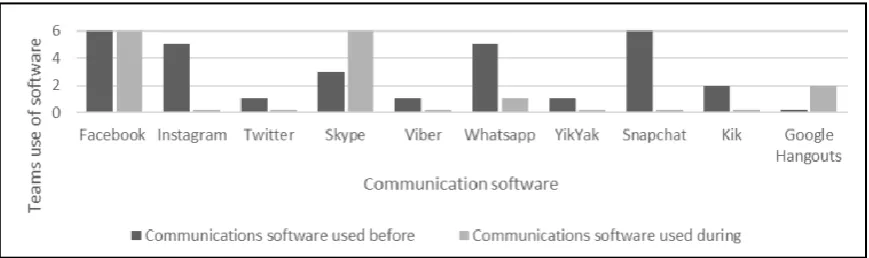
Figure 1: Previous study of student use of communication software before and during a global design project (Brisco et al., 2016)
(Brisco et al., 2016) suggest that students are more likely to use the software listed above in a global design project due to their familiarity with it. Unfortunately, these social media platforms may not adequately meet the requirements for the complexity of such a project. These key requirements are the ability to represent the design that the communication is based around, to record the engineering context, to enable expressive multi-threaded discussion, and to ensure that relevant engineers are notified of the right communication (Gopsill et al., 2013).
A solution to this is Slack, an increasingly popular team collaboration tool (Rafter, 2015). It has emerged as a hybrid between social media, email, and paid-for group team collaboration tools such as Microsoft Enterprise. Slack can be grouped with several competitors such as HipChat.com, Azendoo.com and Bitrix24.com. These tools offer many benefits over traditional communication tools and mainstream social media for communicating synchronously and asynchronously. Slack also has an Enterprise version of its software that is been adopted by big companies such as IBM.
In the last year Slack has started been used by students as a novel technology for supporting communication in the global design projects.
2 METHODOLOGY
The use of Slack was assessed amongst five teams participating in an eight week long global design project which involved the design an attachment for carry-on luggage to facilitate mobile working. Each team was multicultural and consisted of members from the University of Strathclyde, City University of London and the University of Malta.
Evaluation of Slack usage was conducted via a questionnaire that was completed by a total of 16 team members across the five teams. All used Slack as their main communication tool. Greater observation of Slack usage was made in the author’s team.
3 RESULTS
Slack’s strengths and weaknesses are listed below, based on the students experiences during the global design project.
Strengths
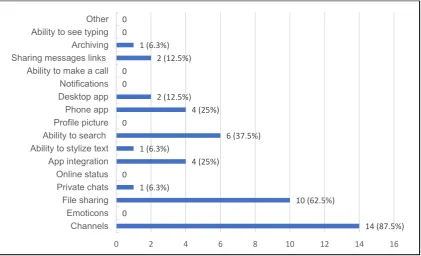
Figure 2: Most useful features of Slack
1 Channels
The channel feature allows team members to create multiple conversations based on different stages of the project, sub-teams, or activities. 87.5% of team members questioned identified channels as Slack’s most useful feature. These channels were found to help in five ways:
Firstly, they allow for concurrent communication that is mainly asynchronous. For example, a team might be discussing scheduling deliverables for the Prototyping Stage in one channel dedicated to ‘Scheduling’ while concurrently discussing a specific prototyping task such as rough prototyping in another channel; making it easy to track multiple conversations and make multiple decisions in parallel. This allowed teams to avoid repetition and confusion in communication. Team members stated that it is the main reason they used Slack.
Channels also provide structure to team communication since they can be used for different aspects of the project, and are often based on the project plan stages or sub-teams. This allows team members to visualize progress of the project and co-ordinate work in sub-groups.
Team members can join or leave the channels which means that they only need to be in those that are relevant to them or that they want to contribute too. This reduces the amount of unnecessary information that team members need to process and their cognitive load is reduced thereby allowing them to perform better.
The customizable notifications in the channels also help as a team member can communicate synchronously, responding quickly, having opted for notifications to be received on their phone, desktop, or email. Notifications of unread messages are also useful for asynchronous communication, allowing a team member to easily catch up on new messages.
Finally, Slack affords the archiving of channels once they are no longer relevant to the project, which cleans up the communication work space. This improves both synchronous and asynchronous communication as it allows users to focus on current and relevant information.
2 File Sharing
62.5% of questionnaire respondents listed file sharing as a beneficial feature in Slack. The author’s team 14 (87.5%)
0
10 (62.5%) 1 (6.3%)
0
4 (25%) 1 (6.3%)
6 (37.5%) 0
4 (25%) 2 (12.5%) 0
0
2 (12.5%) 1 (6.3%) 0
0
0 2 4 6 8 10 12 14 16
Channels Emoticons File sharing Private chats Online status App integration Ability to stylize text Ability to search
Profile picture Phone app Desktop app Notifications Ability to make a call Sharing messages links
documents which assisted with asynchronous communication as completed work could be uploaded for the next person or team to use or continue to develop.
When files are shared on Facebook, or emailed, team members can download them and may work with a unique copy of that file on their own device. This can lead to time wastage, loss of data and miscommunication around different document versions. Integration of Slack with Google Drive allows for control of document versions by always having a single cloud-based document.
3 Ability to Search and Retrieve
All text and filenames can be searched for in different Slack channels, a feature favoured by 37.5% of respondents. To further support retrieval, ‘favourite messages’ can be starred by individuals. Important messages can be ‘pinned’ in channels to ensure that all team members are aware of them and can find them. Finally, all messages have unique hyperlinks so team members can add context to a conversation without spending time searching for a referred-to message or file.
4 Phone App
20% of all the team members questioned identified the availability of a phone app as an important feature of Slack. The app assists with asynchronous and synchronous communication. For example, it allowed team members to respond to urgent messages quickly or when team members were running late for a meeting they could quickly update the team. Another example where it was useful was for sharing videos and pictures taken of sketches and prototypes during online chats or Skype calls.
5 App/Bot Integration
Besides Google Drive, Slack can integrate with many external apps or “bots”. An example is Meekan, the scheduling tool, which links all team members’ calendars to Slack and supporting scheduling of meetings.
The author’s team found that this and other apps have the potential to reduce the need for synchronous communication to clarify issues, and allowed more decisions to be made asynchronously, thus reducing bottlenecks in communication.
Weaknesses
A high percentage of the members (69%) who were questioned from the five teams reported that they would use Slack instead of other social media in future projects. This is significant considering that most team members had not used Slack previously and were initially skeptical about its use as it was not a software tool that was suggested by course lecturers.
However, team members did point out that Slack could still be improved. The diagram below shows some of the features that team members in the global design project thought would improve Slack.
Figure 3: Missing features on Slack 8 (50%) 5 (31.3%)
3 (18.8%)
10 (62.5%) 12 (75%) 1 (6.3%)
0
0 2 4 6 8 10 12 14
1 Built-In Polls
Polls are an extremely useful way of making group decisions asynchronously. Slack allows for the connection to external polling sites, via App integration, however, the author’s team tried to use Doodle but found it ineffective as team members were reluctant to adopt yet another app. Facebook page polls are somewhat easier to use due to familiarity and 75% of team members questioned agreed that having a similar system on Slack would be beneficial.
2 Built-in To-Do List
Two important aspects of keeping track of project progress is monitoring which tasks need to be performed and keeping track of the work done on each of these tasks. To-do lists assist with this for asynchronous work since meetings are not required to update team members on progress. The author’s team noted action items in meeting minutes but because they were not in an easy-to-find, clearly visible location it was felt that team members did not refer to them frequently. Slack, social media and email do not have any efficient and simple way of doing this and 62.5% of team members thought it would be a useful feature.
3 Ability to Tell If a Message Is Read
Facebook, Whatsapp and some other social media have indicators next to messages that allow a message sender to see if a team member has read their message. Once a message has been ‘seen’ there is an unwritten time limit that is deemed to be socially acceptable for the target of a message to respond. Whether this peer pressure is healthy for team cooperation is debatable but 50% of questionnaire respondents said they missed it on Slack.
4 Video Calling
31% of poll respondents listed ‘video calling’ as a feature that was lacking in Slack and required the use of an external app such as Skype. Experience found, the transfer from communicating in Slack to communicating in a video call was not seamless and resulted in wasted time.
4 RECOMMENDATIONS
Future global design students and educators are encouraged to use Slack as a communication tool in global design projects. There are several key steps that they should take to benefit from its use:
1. Educators should recommend Slack or similar tools for communication as many students require this endorsement before they will attempt to use new software. This is especially important for short-term projects.
2. Setup the team to use Slack:
(i) Ensure team members all agree on the use of the use of the technology.
(ii) Ensure all team members have installed at least the phone app and if possible the desktop app too.
(iii) Educate team members about the use of notifications.
(iv) Educate team members about the features that ease the ability to search and retrieve information.
(v) Teams must identify Slack’s weaknesses and create strategies for dealing with shortcomings of the software and
(vi) Assign a software champion to find the best apps to assist in achieving different activities in the project. This champion needs to actively find the best apps (and features in Slack) and then educate other team members how to use them.
3. Avoid repetition and confusion in communication by creating channels that have a clear purpose that is understood by the team.
4. Quickly develop a team structure and project plan and use Slack’s channels to represent and co-ordinate this virtually.
7. Archive channels that are no longer relevant to help the team focus on fresh information and move the project along.
8. Encourage team members to upload files to complement and clarify communication.
5 CONCLUSIONS
The exposure to Slack is highly beneficial to students who may only have prior experience of using social media and email for communication. This will prepare students for working in a global economy where design projects are going to be supported by a combination of synchronous and asynchronous communication. Small businesses will increasingly use Slack or similar free software to do this, and larger companies may use Slack’s enterprise version. Educators should guide students towards using these communications tools that are more sophisticated than social media, and students are urged to become proficient in using these new tools.
While social media is easy and convenient to use, Slack has the same benefits with the added ability to support multi-channel communication, enable the communication required for concurrent engineering, aid effective and efficient communication, and facilitate the collection of project knowledge and data in a single, easy-to-search location.
REFERENCES
Brisco, R., Whitfield, R.I. and Grierson, H. (2016), “Recommendations for the use of social network sites and mobile devices in a collaborative engineering design project”, Proceedings of the 18th International Conference on Engineering and Product Design Education (E&PDE16), Design Education: Collaboration and Cross-Disciplinarity, The Design Society, Aalborg, Denmark, pp. 394–399.
Daim, T.U. et al. (2012) 'Exploring the communication breakdown in global virtual teams'. International Journal of Project Management, 30 (2), pp. 199-212.
Friedman, R.A. and Currall, S.C. (2003) 'Conflict escalation: Dispute exacerbating elements of e-mail communication'. Human relations, 56 (11), pp. 1325-1347.
Gopsill, J.A., McAlpine, H.C. and Hicks, B.J. (2013) 'A Social Media framework to support Engineering Design Communication'. Advanced Engineering Informatics, 27 (4), pp. 580-597.
Kiesler, S. et al. (2002) Distributed work / [internet resource]. Cambridge, Massachusetts : MIT Press. Liu, L.A., Chua, C.H. and Stahl, G.K. (2010) 'Quality of communication experience: definition, measurement, and implications for intercultural negotiations'. Journal of Applied Psychology, 95 (3), pp. 469.
Pesendorfer, E.-M. and Koeszegi, S.T. (2006) 'Hot versus cool behavioural styles in electronic negotiations: the impact of communication mode'. Group Decision and Negotiation, 15 (2), pp. 141-155.
Rafter, M.V. (2015) 'Slack attack: is this the workforce messaging and group chat app that finally does in email? Some users think so.(TRENDING)'. Workforce (Media Tech Publishing, Inc.), 94 (6), pp. 10.
Walther, J.B. and D’Addario, K.P. (2001) 'The impacts of emoticons on message interpretation in computer-mediated communication'. Social science computer review, 19 (3), pp. 324-347.