Weir, G.R.S. (2001) Helping out by helping in: approaches to electronic
submission of coursework. In: 2nd International Conference on Technology in
Teaching and Learning in Higher Education, 27-29 June 2001, Greece.
http://eprints.cdlr.strath.ac.uk/2800/
This is an author-produced version of a paper
from the 2nd International
Conference on Technology in Teaching and Learning in Higher Education
.
Strathprints is designed to allow users to access the research
output of the University of Strathclyde. Copyright © and Moral
Rights for the papers on this site are retained by the individual
authors and/or other copyright owners. Users may download
and/or print one copy of any article(s) in Strathprints to facilitate
their private study or for non-commercial research. You may not
engage in further distribution of the material or use it for any
profitmaking activities or any commercial gain. You may freely
distribute the url (
http://eprints.cdlr.strath.ac.uk
) of the Strathprints
website.
HELPING OUT BY HELPING IN:
APPROACHES TO ELECTRONIC SUBMISSION OF COURSEWORK
George R S Weir
Department of Computer Science University of Strathclyde
Glasgow G1 1XH UK
Tel. +44 141 548 3915 Fax. +44 141 552 5330 Email. [email protected]
1. INTRODUCTION
Many teaching contexts require mass submission of coursework. Often, this entails significant overheads on staff and secretarial support. The submission procedure, largely due to its deadline nature, also imposes pressures on students. Educators often have experience of student work compromised as a result of faulty submission or faulty submission procedures. Using electronic means of submission seems ideally suited to the coursework context.
From a teacher's perspective, having coursework submitted electronically is appealing. The resulting body of submitted work may be accurately time-stamped, receipted, duplicated easily and readily placed on CD-ROM for transport or long-term storage. From a student's perspective, electronic submission of coursework is also appealing. Printing bottlenecks and queues outside submission offices are eliminated. Immediate feedback on the integrity of submissions may also be available.
The desirability of electronic submission must be tempered by realistic appraisal of the available means, their strengths and their weaknesses. Inevitably, some educators will clutch at such methods for their perceived convenience, without the benefit of measured insight and experience. In such cases, the result may be complete failure of the student evaluation process.
In the present paper, we seek to address a range of issues that affect the use and applicability of such coursework submission. Key among these issues is the need to characterise the available mechanisms for supporting such submission. Allied to this, we require an appraisal of the strengths and weaknesses that would enable us to distinguish and choose wisely among the alternatives.
2. SUBMISSION MECHANISMS
A simple means of coursework submission is to use a transportable medium such as floppy disk, ZIP™ disk or CD-ROM. Students may prepare their papers, essays, software programs, or whatever the coursework entails, place these on the required medium and submit the disk by the deadline to the required location. Although this approach has some merits, it is not further considered here since it suffers from the fundamental problem facing all non-electronic submission, viz., the need to physically deliver material to a specific location.
While there are numerous protocols that will support the exchange of information required for coursework submission, we will focus here upon four fundamental techniques: (1) shared file locations; (2) file transfer protocol; (3) electronic mail; (4) Web upload.
2.1 Shared file locations
There are several ways in which shared file locations may facilitate coursework submission. The main difference lies in the use of read and write file permissions. Either, students write to their own file locations that are subsequently read (copied) by system staff, or students write directly to a system area for which access permission has been established.
In the first case, each student will have an area of file system that is set aside for his or her use. This allows us to establish a personal location where each student can place completed coursework. Use of a common naming convention means that support staff can readily 'farm' the submitted work from the appropriate file locations. In this way, the identity of each student is also established via the location of his or her files and lists of submitting students can be generated from system user names.
[image:3.595.198.401.545.697.2]The second approach to submission via shared file locations requires that each student place their work in a common area of file space. In this case, submissions are not gathered from student locations but are directly placed in a specific target directory by the students.
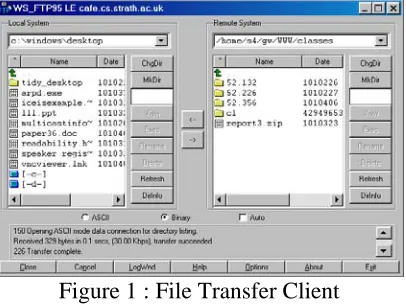
Figure 1 : File Transfer Client
All coursework submission methods entail the transfer of data (the coursework) from the student to the tutor. File transfer protocol (FTP) affords a relatively simple mechanism for placing copies of local files on a remote location. Unlike the shared file method, FTP employs a client-server facility. In this instance, students use an FTP client program to connect to a remote FTP server, navigate to any required file location and upload their coursework files. Such file transfer can be affected from a command line client, as found in operating systems such as Unix and Windows, or through window-based 'point and click' clients such as WS_FTP (Figure 1). Clearly, the prior level of student familiarity with FTP will affect the convenience of employing this approach to electronic submission.
2.3 Electronic mail
Submission by means of email may be attractive on a number of counts. Primarily, there is greater likelihood that students will be familiar with this technology. Documents may be submitted within the body of a plain text message, or as encoded attachments to the message body (e.g., using the MIME standard defined in Borenstein & Freed, 1993). Furthermore, submission addresses can change to accommodate differing items of coursework and, for ease of reference incoming emails carry details of the submitter's identity.
2.4 Web upload
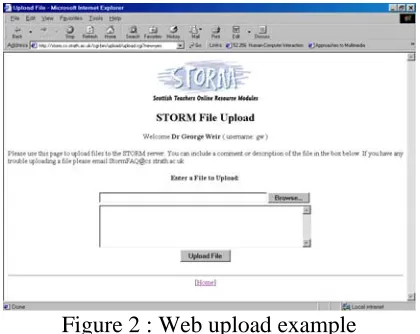
[image:4.595.193.403.507.674.2]In common with email, exposure to the World Wide Web is likely to be extensive among student populations. The technical demands on students required to submit documents via Web upload is less than most of the earlier methods. Usually, Web uploads are managed through a Web page with underlying program script (e.g., a CGI script). By this means, the student need only browse and locate the desired file(s) for upload and the browser will effect the transfer to the remote server (normally, using the HTTP 'put' method, Fielding et al, 1997). Such a facility is shown in Figure 2.
Figure 2 : Web upload example
The use of shared files is technically undemanding since it requires merely a facility to copy files from one local directory to another. Operating systems automatically time stamp files on creation and this may serve to validate the file against the submission deadline. Furthermore, the identity of the submitter should match the file owner.
File sharing may work well in most cases but there will be contexts in which it is less than ideal. In common with all electronic submission facilities, feedback to students may be important. One prominent drawback in file sharing is the absence of any confirmation to students that files have been collected. Similarly, if a student places a file in the wrong location, there may be no error indication.
Other 'non-standard' situations can generate problems with the file sharing approach. For example, submission to a deadline requires that files be 'collected' shortly after the deadline. Students who submit late may be uncertain whether their files have been collected or accepted. The best solution is to set a primary deadline and subsequent times at which collection of further (late) submissions will be made. This clarifies the student position but generates an information management problem, associated with collections at different times. Care must be taken to identify late files and also to avoid corruption of the earlier collections through amendment or deletion of files initially submitted in a timely fashion.
3.2 File transfer protocol
FTP appears to offer a simple and clean method of electronic submission. Obviously, students may initially be less acquainted with FTP use than either email or the Web, but this may easily be addressed through a simple introduction to use of an FTP client. A more significant overhead to the use of FTP for coursework submission is the need to uniquely identify each student's work. This requires either the use of unique names for each item of submitted work – an approach that multiplies in complexity if assignments entail multiple file submissions from each student – or separate file locations must be assigned to each student – another administrative overhead. A further minor drawback to FTP submission is the lack of any feedback to the student submitter. A document may have been successfully uploaded but was it uploaded correctly, e.g., was binary mode used? Was the document uploaded to the correct location?
3.3 Submission by email
Ostensibly, electronic mail has many benefits for coursework submission. Email experience is a reasonable presumption in many student contexts. Non-ASCII files are readily handled as attachments, student identities are conveyed as part of the incoming mail and receiving mail systems are readily configured to filter incoming messages into appropriate folders. Furthermore, receipts for submitted messages may be triggered automatically.
is to require that students send a copy of the submission, in like fashion, to themselves. This gives an extra measure of feedback on successful transmission.
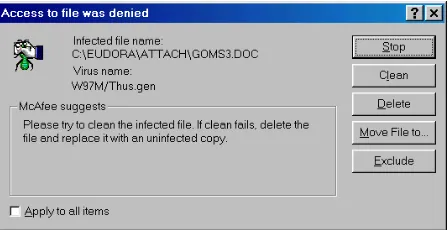
[image:6.595.186.410.272.387.2]One worrying aspect to email submissions is the increased prevalence of email-based viruses and worms. Viruses are malicious programs that may damage local data and resources if executed. Worms may have similar characteristics, but are so-called for their ability to spread via networks, e.g., through further email transfers. The need for students to work on deadlined assignments may result in some materials being prepared outwith controlled machines (i.e., without the benefit of anti-virus checking). Figure 3 shows a likely result: virus transfer via mail attachment. Interestingly, in this case, two separate instances of the same virus on documents from two different students gave a clue to collusion.
Figure 3 : Virus detection on submitted email
3.4 Web upload
Use of a Web-based upload to support coursework submission seems to have the edge over other methods for its simplicity and familiarity. Users are very likely to have experience of Web page interaction and the transfer automatically handles non-ASCII uploads.
Again, we face the management issue of keeping separate the submissions from each individual student. This may be facilitated via unique student logins and passwords. Ideally, these will already exist within the teaching context; otherwise they may be added for this specific purpose. A more awkward aspect of Web upload is the problem facing students who wish to upload multiple files. Web upload only supports individual file transfer. Five separate files require five separate transfer sequences. This can be ameliorated through use of a program such as WinZip that allows students to create a single compressed archive from multiple files. In turn, the single file can be uploaded via the Web form. The measure of feedback afforded by the Web context is also valuable. Immediate confirmation may be apparent either as a new visible file link on the upload page, or as a successful upload message on the same page.
4. CONCLUSION
downsides in each case. Inevitably, the end-user must select a technique or variant best honed to local circumstances.
REFERENCES
Borenstein N., & Freed N., 'MIME (Multipurpose Internet Mail Extensions) Part One: Mechanisms for Specifying and Describing the Format of Internet Message Bodies', RFC 1521, 1993.