Rochester Institute of Technology
RIT Scholar Works
Theses
Thesis/Dissertation Collections
1999
Telephony-based email application
Perdana Darta
Follow this and additional works at:
http://scholarworks.rit.edu/theses
This Thesis is brought to you for free and open access by the Thesis/Dissertation Collections at RIT Scholar Works. It has been accepted for inclusion in Theses by an authorized administrator of RIT Scholar Works. For more information, please [email protected].
Recommended Citation
Telephony-based
Email Application
By
Perdana Darta
Project
submittedin
partialfulfillment
ofthe
requirementsfor
the
degree
ofMaster
ofScience in Information
Technology
Department
ofInformation
Technology
Rochester Institute
ofTechnology
Rochester Institute of Technology
Department of Information Technology
Master of Science in Information Technology
Project Approval Form
Student Name
:_--,P,-,e~r-=d~an....!.::a~D=:...a~rt~a::!--
_ _
Student Number:
_
Thesis Title:
Name
Telephony-based Email Application
Project Committee
Signature
Date
Prof. Rayno Niemi
Chair
Mr. Robert Hermanns
Committee Member
Copyright 1999 Perdana Darta
Table
ofContents
I. Abstract 1
II. Goals oftheProject 2
III. ProjectOverview 3
in. 1. HardwareRequirements 3
in. 1.1. Voice Modem Driver 3
DI.2.
Programming
Language 3m.2. 1. TAPIBrowserver. 1.4 4
HI. 3. Windows Application
Programming
Interface(API)
4m. 3.1. Windows API Text Viewer 5
ni.3.2. ImplementationsofWindows APIs 5
IV. FunctionalDesign 8
IV. 1. Configuration Steps 10
IV.2. Placean
Outgoing
Call 14IV. 3. Handlean
Incoming
Call 16IV. 3.1. Answeran
Incoming
CallManually
16IV.3.2. Answeran
Incoming
CallAutomatically
16rV.4. SendtheCaller's MessagetoanEmail Address 18
IV.5. CallAdministrations 22
IV.5. 1. Playback New / Old Messages or
Greeting
Messages 22IV.5.2. Delete Old Messages 23
IV.5. 3. ChangetheAnnouncement
(Greeting Message)
23V.
Telephony
ApplicationProgramming
Interface(TAPI)
25V. 1. Basic Typical TAPI Functions 25
V.2. Media Stream 26
V.3.DataStructure 26
V.4. InitializeTAPI 27
V.5.MonitorMessages from TAPI 27
V.6. Open Line / Phone Devices 27
V.7.ReceiveCalls 28
V.8. Monitor Digit DTMF 28
V.9. PlacetheCall 28
V.ll.Toll Saver 29
V.12.
Drop
theCall 29V. 13. Deallocate Call Handles 29
V. 14. Close Line / Phone Device 30
VI. Multimedia Control Interface
(MCI)
31VI. 1. MCICommand Messages 3 1
VI.2.WAV Audio File Format 32
VI.3.
Detecting
aProperRecording
andPlayback Modem Device 32VI.4.
Recording
aMessage 32VI.5.
Saving
aMessage 33VI.6. PlaybackanAnnouncement
(Greeting Message)
33VI.7. Detectand
Display
MCI Error Codes 34VII. Remote Access Service Application
Programming
Interface (RASAPI)
35VII. 1.
Starting
aConnection 35VII.2.
Terminating
aConnection 35VII.3.
Detecting
RAS Error Messages 36VE.4. Timer 36
VIII. Mailer 37
VIII. 1. Windows Sockets
(Winsocks)
Control 37VIII. 1.1. Multipurpose Internet Mail Extensions
(MIME)
37VUI. 1.2. Base64
Encoding
38Vm. 1.3MIME
- base64
Encoding
38VIII.2.
Messaging
ApplicationProgramming
Interface(MAPI)
as aMAPI Client 39 VHI.2. 1. MAPIClient- MAPIServer (Netscape
Messenger)
40IX. Conclusions 41
Citations
Appendix
Attachment
"Incoming
Call Flow Chart"I.
Abstract
The aim ofthis project is to provide user to gain access of
telephony
services such asplacing an outgoing calls, answering calls, playing back an announcement to the callers, recording caller's messages, playing back recorded messages and
finally
establishing a dial up connectiontosendtherecordedmessageto an e-mail address.To do that, the application will be
implementing
and combining some of WindowsApplication
Programming
Interface(API)
functions asfollows :1.
Telephony Programming
Interface(TAPI)
ver. 1.4.2. Multimedia Control Interface (MCI VisualBasic 6's Multimediacontrol).
3. Remote Access Service (RAS
API)
4.
Messaging
ApplicationProgramming
Interface (MAPI Visual Basic 6's MAPIcontrol).II.
Goals
ofthe
Project
The primary focus ofthe above integration isto develope aclient-side application
(using
Visual Basic
6)
within the Windows 95 operating system that can function like a telephoneanswering machine where attheend ofthecall session the caller can sendtherecorded message outtoanemail address.
2-III. Project
Overview
II.l. Hardware
Requirements
This application needs an analog line telephone device and runs on a workstation with
Windows 95. Besides that the applicationneeds a speakerphone voice-data modem supported
by
Voice Modem driverand a sound card as well (withexternal speakers and amicrophone) toplay backandrecord
callers'
messages.
IH.1.1. Voice Modem Driver (Unimodem/Voice
version4.10.1343)
There are two common types of modem drivers i.e. Unimodem and Unimodem I Voice.
Both are called a TAPI Service provider
(TSP)
that isbasically
a driver to allow TAPI to communicate withtelephony
hardware.Unimodem driver is a standard TSP provided
by
Windows that supports any modemwhenplacing datacalls. IftheTAPIcompliant applicationis usingtheUnimodem drivertoplace a voicecall, theuserhastodeterminetheprogress ofthecall (whetherthecall completes ornot)
by invoking
a certainbuttontoendthevoice call. It showsthatnot all modems canhandlevoice calls.Instead, Unimodem/Voice,
a released version of Unimodem to support voice modems under Windows95,
is designed to answer calls and be able to play/record wave files over the phone line andthe handset. It also detects adisconnecting
signal whenthe call session ends so the application does not rely on human intervention to press a certain button when the call completes.TAPI Browserversion 1.4underWindows 95 willbe helpful forthedevelopertoobserve
exactly what a given TSP is capable of, how it works and its behaviors especially using
Unimodem/Voice. The behavior of other service providers will vary
depending
on thecapabilitiesofthehardware
being
used.The developers can check the TSP version
(especially Unimodem/Voice)
being
used in theirmachineby
clicking the "version" tab atthe properties oftheUnimdm.tsp
file indirectory
Windows/Systems. This application is using Unimodem / Voice version 4.10.1343 that can be
downloaded from ftp://ftp.microsoft.com/Softlib/MSLFILES/UNIMODV.EXE
III.2.
Programming
Language
Even though the Windows API based application can be developed using
C++, Java,
etc.,the authorfeels moreknowledgeable using Visual Basic version 6than thoseprogramming languages above.3-The VB 6 also provides some controls which
directly
manage low levelWindows' API
functions.
By
setting properties andinvoking
methods ofthe controls, it is much easier to buildWindows'
API
-basedapplication.
For example, the VB 6's Multimedia control
(MCI)
manages recording and play back messages rather thanbuilding
low level wave form APIs. The VB 6's MAPI control provides messaging services to allow an application to compose and send an email rather thanbuilding
low level messaging APIs.Finally
the VB 6's Winsocks control will let the application establish and maintain a direct connection to a remote server so the application can exchange data (i.e. emailmessages) ratherthanbuilding
low level Winsock APIs.This application also needs Netscape Messenger version 4.5 or newer (one of MAPI
compliant mail servers) when sendingan email. It functions as a messagetransport (mailer the
mail server) that delivers an email composed
by
this application (the mail client) to a remoteserver.
m.2.1. TAPI Browser
ver.1.4
To observe how TSP works, theTAPIbrowser version 1.4 for Windows 95 is atool to
query all available TAPIfunctions so theuserwill know howto properlymanage and use each TAPIfunction such as TAPI'sconstants, data structures in responseto the
telephony
signal sentby
alocal exchange. The TAPI Browser (included inthisprojectas an attachment) willreturn all required parameters ineach requireddatastructure.By
usingthis,theuser candirectly
get access totelephony
services such as how to place an outgoing calls(lineMakeCalls(
)),
to query themodem capabilities
(lineGetDevCaps(
)),
to detect total modems in associated machine(linelnitialize(
)),
etc.Thisis an exampletomake some standardTAPIcallsusing asinglemodem :
linelnitialize(
),
lineOpen( )
/*usedevice 0
*/,
HneMakeCall( )
,lineDrop(
)
lineDeallocateCall(
),
lineClose(
),
lineShutdown( )
This browsercanbe downloaded from
FTP://ftp.microsoft.com/developr/TAPI)
III.3. Windows
Application
Programming
Interface
(API)
The Windows Application
Programming
Interface(API)
is a set ofpredefined functions built into the DLLs such asTAPI32.DLL,
RasApi32.DLL,
winmm.dll, etc. that make up the Windows operatingsystem. A DLL (dynamic linklibrary)
iscompiled codethatcanbe accessedonly
by
other applications at runtime. This standardizes the programming community, as it allows the same code to be used repeatedly. End users can'tdirectly
access these functions.However,
developerscanaccess thecode writteninthe DLLsthrough theAPI and usethis codein theirprograms. This allows developerstouse existing codein theDLLs and savetime in the
programming developmentcycle.
Touse andaccess theWindows APIs in Visual
Basic,
the developerscan use theDeclareDeclare Function lineMakeCall Lib "TAPI32.DLL"
(ByVal hLine As Long, lphCall As Long, ByVal IpszDestAddressAs
String,
ByValdwCountryCodeAsLong,
lpCallParams AsAny)
As Long.Syntax :
Declare : A keyword
indicating
an external procedure declarationFunction : Theproceduretype
LineMakeCall : Thename ofthisparticular external procedure
Lib : Akeyword
indicating
theDLL inwhichto locatethefunctionhLine,
lphCall : AnargumentvariablelpCallParams : whichis aWindows-defined type, CALLPARAMS
As
String
/ AsLong,
AsAny
:keywordsindicating
argumenttypeLong
: A functionreturntypeWindows- definedtypes/
structures
A structure is a group of variables organized under one name. This is used to pass
information between the Windows API and the requesting application. When certain variables
are grouped, the application can create instances of the type, as the application would create a variable. For example : line Make Call function needs the CALLPARAMS datastructure. The
developers can find the definition of that Windows-defined types within the API Viewer tool provided
by
VB orwithinthedocumentation oftheWindows Software Development Kit(SDK),
whichcomes ontheMicrosoft Developers Network CD-ROM included in VB.
IH.3.1.
Windows
API Text Viewer
To avoid an error when
inadvertently
writing parameters of Windows API and to savevaluable programming time, the developers can make use of the TAPI Text Viewer shipped
which Visual Basic (in
"add-ins"
menu), which enables developers to cut and paste API
functions,
constants,andWindows-definedtypes rightintothecode.III.3.2.
Implementations
ofWindows
APIs
Thisproject uses five Windows
APIs,
which arebriefly
described inthefollowing
section1. The
Telephony
API(TAPI)
:The TAPI is an application programming interface in the Windowsplatform that allows an application to provide access to
telephony
services such as, making a call, answeringincoming
call,detecting
andgenerating DTMF digit from /to localexchange, etc.The TAPIwillneeds to query the TAPI functions to determine the capabilities of both that are actually available.
2. The Windows Multimedia Control Interface
(MCI)
:This application uses the Windows Multimedia Control Interface to interact with
multimedia hardware. Hardware can consist of any media devices that Windows supports i.e.
audio CD players, wave audio, etc. The application issues theMCI's standard commands, works
with the specific driver
(Unimodem/Voice)
to supportthe voice modem device in use, and thentranslates these commandsto theexactsignals required to carry outthe action such asplay back aWAV
file,
recordacallers'
message, andsaveit.
One wayto send commandsto theMCI device is touse thefunction mciSendCommand. Although this function is not a part of
VB,
this function is part of Windows ApplicationProgramming
Interface(API),
the huge collection offunctions thatprovides most ofWindows' capabilities.
The second method for sending MCI commands is using Visual Basic's Multimedia
control. When displayed on a
form,
this control provides an array ofbuttons for controlling a multimediadevice.3. The
Messaging
API interface(MAPI)
:Visual Basic'sMAPIcontrol willallowtheapplicationto send a message with or without
an attachment to a recipient mail address. This application, called the MAPI client, will work
togetherwith aMAPIServer (i.e. Netscape Messengeror othermailer)thathas responsibility for
messagetransport
(moving
messagesto andfromremoteservers andclients), message storage(a mailbox before mail clientreads theincoming
message) and address book (contains a particular mailingaddress/addressee).After the callers press # 3 (to send their message to an email address), the application
willbe activatingtheVB's MAPIcontrol,onceaninternetconnection exists.
4. The WindowsSockets
(Winsocks)
As analternativeusingtheMAPIservices to send an email, theapplication can make use
of VB's Winsocks control. It allows the application to create and maintain a connection to a remote server
by
opening sockets on other computers and accessing Transport Control Protocol(TCP)
networks services.Using
the connection, both computers can transfer data between themselvesusingthesocketwhich theapplicationhas opened.5. The Remote Access Service (RAS
API)
:The RAS API functions will let the applications establish and terminate a dial up
connection to theremote serverwithout
displaying
aDialUp Networking dialog
box. The RAS functions will query a connection information such as the name ofthephone-book entry (whichmodem)usedtoestablishtheconnection,user name and passwordto
log
ontoremote server, andalsoremoteserver's phonenumberfrom
"Login"
IV. Functional Design
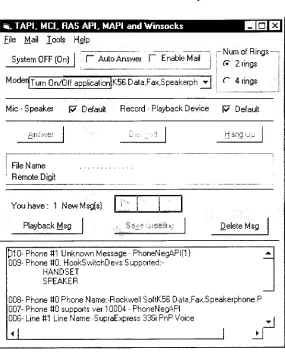
This is themain menu whentheapplicationruns.
TAPI. MCI.RASAPI.MAPI andWinsocks File Mail Tools Help
System OFF{On}
I
f AutoAnswer l~~EnableMail
?m
pNumofRings I { 2rings
ModerjTurn
0n/0ffapplication[K56Data,Fa:<,Speakerph^|
1
r 4ringsMic
-Speaker F Default Record-Playback Device
17 Default
Answer Dialr3u HangUp
1 Fie Name
'
Remote Digit
.
You have: 1 NewMsg[s)
PlaybackMsg DeleteMsg
p10-Phone 81 Unknown Message
-PhoneNegAF'Ifl} 009-Phone80,HookSwitchDevsSupported:
-HANDSET SPEAKER
008-Phone 80PhoneName:-RockwellSoftK5GData.Fax,SpeakerphoneP 007-Phone 80supports ver1 0004-PhoneNegAPI
00S-Line 81 LineName:-SupraExpress336i PnP Voice
Ti
+
l
I
?!Figure4.1. The MainMenu
Thesearefunctionsthat theuserscanperform :
1. Placean outgoingcall.
2. Answeran
incoming
call(manually
-press"Answer"
buttonor automatically).
3. Playbackan announcer withthreemenustothecallers. Press #1 :to
hang
upthecall.Press #2 : toplaybackacaller'smessage.
Press #3 :tosendtherecorded messagetorecipient mailaddress.
4. Recordcaller's message and saveitinthesamefolderwheretheapplication resides.
[image:14.589.190.475.150.506.2]6. Playbackrecorded message
directly
fromthe application orfromthe telephone lineby
press #2.7. Deleteoldmessages
8. If necessary user can change the greeting message
by
recording the new greeting andoverwritingto theold one.
9.
Automatically
launch dial up connection and end the recorded message to specified emailaddressusingeitherNetscape MessengerorWindowssockets.
IV.
1.
Configuration Steps
This flowchart details how the user accesses to the
functionality
of the application(menus). Seetheflowchartasfollows :
Run Application 1.
3.
5.
6.
enumerate,initializeand
display
thevarious modem's capabilities(calllinelnitializeO,callphonelnitializeO, callEnumLineDev(),
callEnumPhoneDev() inmdlTAPIFunction.bas).
countand
display
unreadmessage(s) thatresidesinapplication'sfolder(Dir()
infrmTAPLfrm).detectand
display
wave audiodevice-soundcard/voicemodem
(waveOutGetDevCaps()
in frmTAPLfrm).terminateallactivedial upconnections
(callHangUp()
in mdlTAPIFunction.bas).closeWinsocks TCPconnection.
set applicationdefault : manual answer, disabled mail, length of recordable message= 10sees,number of rings=2rings.
System ON
1. openline /phonedevice(calllineOpenO,callphoneOpen())togetline
(lphLine)
/phone(lphPhone)
handletobeusedforsubsequent operations.System OFF
1. terminateall activedial upconnections
(callHangUp()
inmdlTAPIFunction.bas).
2. closeWinsocks TCPconnection.
3. close an openMIMEbase64encodedfile.
4. close an open line / phone device
(calllineCloseO,
callphoneClose() in mdlTAPIFunction.bas).Select :line,
phone, wave device
1. selectmodem,mic
- speaker
phone,wavedeviceoftheavailable modeminassociatecombobox.
2. Ifnotusingthe default userhasto select mic speaker modem device wavedevice thatallows theapplication to play backand record greeting /
incoming
message over the telephone line otherwise all greetings will be played back in the local sound cardForexample:
Select : "Voice Modem to play back greetings and record
caller's messageto/ fromoverthetelephoneline.
Select : "Sound Card To play backgreetings tolocal sound card andthiswon't recordcaller's message
if "AutoAnswer1'
ischecked :
-. the application will automatically answer an
incoming
callbasedonnumber of rings(the default is 2rings)..
Play
back greeting ("greeting.wav")tothecaller. . After greeting ends it willautomatically record caller's message based on
predetennined length of message in
"Msg
Length"of "Mail" menu (the length
messagedefaultis 10sees).
. An
incoming
message will be saved with thebeginning
of the file name is "New_& date &time&p/m.wav"basedonthedateandtimeitrecorded.
. After saving the recorded message, it plays back the second greeting
("greeting2.wav")
to informthe callerif he wants to play backrecorded message(by
pressing digit # 2). . Thecallercanhang
upthecall session
by
pressing digit # 1.. If the caller does not make an action within 40 seconds
(tmrHangUp
infrmTAPLfrm)
after the second greeting message played, the application willautomaticallyterminatethecall.
if "EnableMail"
ischecked :
The application willplay back
"greeting23.wav"
to tell the caller thathe can play
back his recorded message (press digit
#2)
ordirectly
send it out to the ownerapplication email address(press digit #3).
. The application will send it out using either Netscape Messenger or Windows Sockets basedon user's choicein "SetUp"
of "Mail" menu.
-. Ittakes15 sees(aftercaller pressesdigit
#3)
beforetheapplicationfiresup dial up connection(callRasDialO).-. User hastoprovide username, passwordand phone number oftheremote server in "SetUp"
of
"Mail"
menu. Theseparameterswillbeusedfor establishing dial
upconnection.
. Once dial up connection established, either Netscape Messenger or WinSocks control will send it out based on mailer parameters (such as destination /
originatingemail address and server name).
-. After sending message, it automatically close MAPI services (if using Netscape
Messenger)
orTCP connection (if using WinSocks control) and terminates the dial upconnection(callHangUpO). Sothe aplication willbe ready toreceive anincoming
callorplace anoutgoingcall.Set the number of rings before the application will
automaticallyansweran
incoming
call(the default is 2 rings)From "Mail"
menu:
X
Setthelength ofthe recordable messageforeither 10sees (154
kb)
or35 sees(544 kb).From "SetUp"
in"Mail" menu
The defaultofthemaileris Windows Sockets.
1. Iftheuser choosesWinsocksasamailer,
Theusermust providetheremoteservername.
Theuserdoesn'tneedtoconfigureNetscape Messenger.
2. iftheuserchooseNetscape Messengeras amailer :
. Usermust configureNetscape Messenger firstasfollows : a. Open Netscape (ver
4.5)
->click"Edit"
menu->click
"Preferences" ->
->click "Mail &Newsgroups''
->locate "Use Netscape Messenger from MAPI basedapplication"
and checkit if it'sunchecked->closeNetscape.
b. Make sure that destination email address is already available in Netscape AddressBook,ifnottrytocreateit in it.
. Netscape Messengerasamail serverwilltake80 sees(basedonpredetermined
timer
#2)
tosend the recorded message. This timerwill give an enough time to allowtheNetscape Messengertosendthemessagetotheremoteserver.From "SetUp"
in "Mail"
menu
User name,Password,
Phone#, Modem,
Destinationmailaddr, Originatingmail addr
Servername
Usermust provide all mailerparameters.
The defaults are available
by
alternatingbutton.
'Cancel / Default"
Answer -phisbutton isenabled whenthereis
an
incoming
call. If "AutoAnswer"ischecked, thisbuttonwillautomaticallycall a
specificfunctionasfollows (seeatmdlTAPILine.bas)
1. CallphoneSetHookSwitch() to enablemodem speaker so theuser canhear a caller voice andtodisablemic ofthemodemso thecallercan't monitor user voice.
2. CalllineAnswer
())
toopen a connectionbetweenapplication andthecaller.3.
CalllineMonDigits()
tomonitor callerresponse whenpressing a certain digitDTMF
4.
CallGreetingO
toplaygreeting("greeting.wav")
5.
CallMCIRecMsgO
torecordcaller message fora certain message length (10 sees as adefault)
12-If "Auto Answer"
is unchecked, the application will alert user
by
sounding aringingcallsotheuser can pressthisbuttontoansweran
incoming
call.Dial Pad
Toplace anoutgoingcall.
This action will launch "Dial Pad"
window so the user can
enter a letter or numeric digit of the phone number (phone # default is 1800Marinel).
All letter entries will be converted to numeric value in
mdlSupport.bas(callConvertStringToDigits())
Hang Up This action will
hang
up the call sessionby
callingcalllineDropO(seeatmdlTAPIFunction.bas)
PlayBackMsg
. To play back a greeting file or a caller message "New_ &
date &time&a/p.
wav"
- prefixedfilename.
. Itwill openMultimedia Control Interface
(MCI)
control and a certain folderwhere allrecordedmessageandgreeting filesreside.
. It will rename the
"New_*.wav"
prefixed file name to "Del_*.wav"
prefixed file name
(callRenameMsgO
in mdlSupport.bas) and also subtract new messagecounter.SaveGreeting -.Tosaveagreetingcreated
by
theuser(seeatfrmTAPLfrm).-.Itwill open a certainfolderwheretheuser cansavethe
greeting
by
overwritingtheoldgreeting (forex."greeting.wav", "greeting2.wav" and"greeting23.wav").
DeleteMsg -. To deleteall recorded messages
("Del_*.wav)
thathave been playedback(callDeleteMsgQ
inmdlSupport.bas)From "Modem SetUp"
in"Tools"menu
Modem SetUp
. To configure a particular modem
(calllineConfigDialogO
in mdlTAPIFunction.bas)by
launching
cofigurationdialog
window.
From "Exit"in"File"
menu
Exit To exitfromthe activeapplication.This action will terminate
line / phone device, dial up connection
(calllineCloseO,
callphoneClose(), caliHangUpO), close TCP connection if it existsandunloadallopenforms (seeatfrmTAPLfrm).
IV.2.
Place
anOutgoing
Call
1. Runtheapplication (Fig. 4. 1. The Main Menu).
2. Selectthe available modemtobeusedtoplace an outgoingcalls (ifthe application has more
than one modem installed). Onceselectedthis modem will be answering
incoming
call (Fig. 4.2. Modem Option).TAPI, MCI,RASAPI. MAPIandWinsocks
File Mail Tools Help
UHxj
System OFF(On)
I
f
Auto Answer f Enable MailModem 5b Data.Faa.bDeakerDhonePC Moder
RockwellSoftK5bData.Fax.SDeakerDhone
Mic Sneaker SupraExpress 336iPnP Voice
Numof
Rings-( 2rings
C 4rings
[image:20.589.159.457.211.317.2]17 Default
Figure 4.2. Modem Option
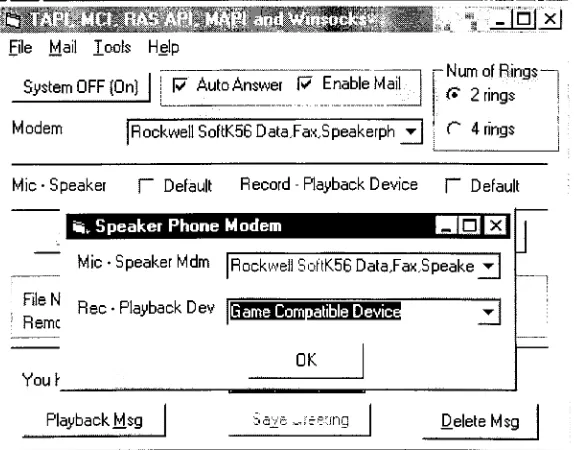
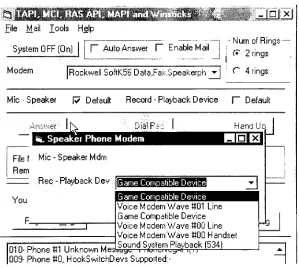
3. Checkthe "Microphone Speaker" and "Record
-Playback Device" checkbox as a default
instead of selecting the microphone speaker and wave device option (Fig. 4.3.1. and Fig.
4.3.2.). This will let the application automatically specify the associated microphone
speaker and wave device based on the selected modem (Fig. 4.3. Microphone Speaker and
Wave Device Option).
? x
File Mail Joels Help
System OFF(On) 17 Auto Answer 17 EnableMail
Numof
Rings-(* 2 rings
Modem [RockwellSoftK56Data,Fax,Speakerph ?!
j
r bringsMic-Speaker
f~
Default Record- Playback Device j~"
Default
iii. SpeakerPhone Modem
Mic-SpeakerMdm
[RockwellSoftKSG
DataJax.SpeakeJ
Ej
FileN
Remc
Rec-PlaybackDev
GameCompatibleDevic
OK Youh
PlaybackMsg DeleteMsg
Figure4.3. Microphone- Speaker
andWave Device Option
[image:20.589.158.445.439.664.2].Speaker Phone Modem
?H
Mic
-Speaker Mdrn
Rec-Playback Dev
[Modem
lata.Fax.SoeakerohonePC Moderr
Rockwell SoftK5GDataFax.SoeakerDhc
[image:21.589.171.399.121.221.2]OK
Figure 4.3.1. Microphone- SpeakerOption
File Mail Tools Help
SystemOFF(On]
?IX
f"
Auto Answer V EnableMail
-Numof
Rings-f 2rings
Modem [RockwellSoftK.56 Data,Fa:-:,Speakerph
j^J r 4rings
Mic-Speaker [7 Default Record- Playback Device
F" Default
Answer IK DialPi:
SpeakerPhone Modem
File I Mic- Speaker Mdrn
Rem
Rec-PlaybackD ev
NanaU
ma
d
You
GameComDahbe Device
Game ComDatible Device Voice Modem Wave #01 Line GameCompatible Device Voice ModernWave tiOO Line Voice ModemWave ttOO Handset Sound System Playback(534)
xjyL, i iruiil-i *i_u~^ n.iJ
-s
010-Phone#1 Unknown Mes
009-PhoneSO,HookSwitchDevs Supported:
-Figure4.3.2. Wave Device Option
4. Turnonthe application(press "System OFF
(On)"
button).
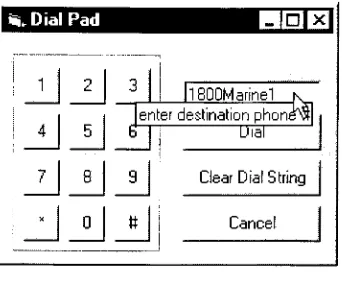
5. Press "Dial Pad" button andthe application will be
launching
the "Login" pop up window(4.4. Dial Pad).
[image:21.589.142.441.260.527.2]1Si, Dial Pad ^1^1 1 ?
|x|
1 2
5
8
0 3
i
ll800Marine1 k
enterdestination phonevt|
i 4 b Dial
7 9 Clear DialString
[image:22.589.224.395.95.237.2]: Cancel
Figure 4.4. Dial Pad
6. Enterthedestinationphonenumber andpress
"Dial"
button.
IV.3.
Handle
anIncoming
Call
If the "Enable Mail"
is unchecked, there are two ways the application can handle an
incoming
call(see attachment"Incoming
Call FlowChart")
:a.
Manually
: the "AutoAnswer"optionisuncheckedb.
Automatically
: the"AutoAnswer"optionis checked.
IV.3.1.
Answer
anIncoming
Call
Manually
Theuserdoesn't letthe application perform as answeringmachine (itdoes not recordthe
caller's message). It means the user can
directly
handle anincoming
callby
pressing "Answer"buttonas showsinthe
following
steps :1. Repeat step 1
- 4 in IV. 1
.
2. Ifthe caller calls
in,
the application will be ringing the user(play
back"Ringin.wav")
andenable
"Answer"
button.
3. Press itandget connectedto thecaller.
4. Press
"Hang
Up"buttontoendthecall session.IV.3.2. Answer
anIncoming
Call
Automatically
The user lets the application perform as an answering machine
by
checking the "AutoAnswer"
option (Fig. 4.5. Auto Answer- Number
ofRings"). The application will playback the
greetingmessages and recordthecaller'smessage.
1. Repeat step 1
-4in TV. 1. 2. Checkthe "AutoAnswer"
checkbox.
3. Choose the number of rings (Fig. 4.5. Auto Answer Number of
Rings)
before theapplication automaticallyactivate answeringmachine(Toll Saver).
TAPI, MCI,RASAPI.MAPI andWinsocks
File Mail Tools Help
2aJH
(ISliiHEISH]
Modem
J7 Auto Answer
f-Enable Mail
~5
j- Num ofRings
-(* 2rings
[image:23.589.146.444.187.268.2]C 4rings
Figure 4.5. Auto Answer- Number
ofRings
4. Ifthe caller calls
in,
the application will playback an announcement("greeting.wav")
to thecaller. Thistells the caller to press# 1 to
hang
up the call or press # 2 to play back messageafterthemessagelength (10
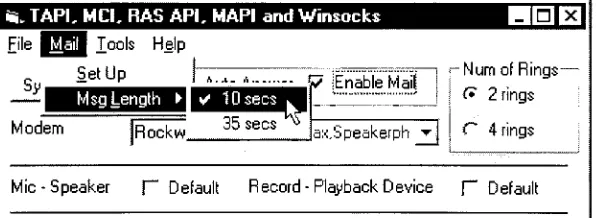
-thedefaultor35seconds)has beenelapsed(Fig. 4.6. Length of
theMessage).
TAPI. MCI.RASAPI.MAPIandWinsocks File
Sy
Modem
Tools Help
SetUp
MsgLength ?! ? 10sees 35sees Rockw EnableMail
njx]
ax.Speakerph ?]
NumofRings
( 2rings
C 4rings
Mic- Speaker f~
Default Record
-Playback Device |~"
Default
Figure 4.6. Lengthofthe Message
5. Theapplicationwillbe recordingthecaller's messagefor 10or35 seconds accordingly. 6. Save it the caller's message in the sane folder withthe application resides andname the file
with
"New_"
prefix follows
by
the date and time it was recorded (Fig. 4.7. Playback Message). [image:23.589.148.446.378.487.2]Look in: S0fficialProject4
3
<S|
gfr]
[ij"j
^Beeprnono
|?]Del_081
799-01 0031a#J
greeting iJgreeting24}]
greeting23ffil
greetingsiiNew 031 799-01 0529a
Filename: New 081 799-01 0529a Open
Filesoftype:
|
Wave File (".wav)
I-Openasread-only
Cancel
4.7. PlaybackMessage
7. Playbackthesecond announcement("greeting2.wav").
8. Playbackthecaller's recorded message ifthecaller presses# 2.
9.
Hang
upthecallsession ifthecaller presses# 1 or does onhookIV.4.
Send
the
Caller's
Message to
anAddress
If the "Auto Answer" and "Enable
Mail"
options are checked, the application will
perform steps IV. 3. 2. and it also allows thecallerto send the messageto a predetermined email
address.
Afterthe callerpresses #
3,
the application will get readyto sendthe caller's messagetotherecipientmail address. Before
firing
up adial upconnection (after 15 secondsthecallerhang
up the connection),itwillcollectall connectioninformation inthe
"Login"
form fromtheuser.
Theuser can eitherselectNetscape Messenger orWindows Sockets asamailer(message
transport) to move out the message to the remote server. The mailer's default is Windows
Sockets. If using the Netscape
Messenger,
the user must configure the Netscape Messenger.Please click
"Instruction"
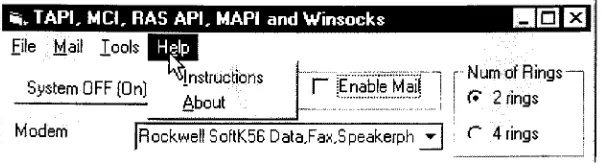
inthe "Help" menu(Fig. 4.8.
Help
Menu)
and will guideto dothat.18-Si, TAPI, M CI, RAS API, MAPI andWinsocks
Hill
B
\
File Mail J_ools|B|J
c nrr ,n
^Instructions
SystemOFF(On)
About
-NumofRings i t* 2rings
f"
Enable Mail 1
Modern
[Rockwell
SoftKSS Data,Fa:-:,Speakerph [image:25.589.159.460.96.180.2]j*j C 4rings
Figure 4.8.
Help
MenuTheseare steps toenabletheapplication sendingthecaller'smessage :
1. Repeat step 1 - 4
in IV.2. andcheck "Enable
Mail"
checkbox (Fig. 4.9. Enable Mail).
TAPI. MCI.RASAPI.MAPI andWinsocks
File Mail J_ools Help
Six]
(SystemOF! F Auto Answer R Enable Mail
Modem lockwell SoftK56 Data,Fa>
,E . salerf
|
Figure4.9. Enable Mail
NumofRings
-( 2rings
C 4rings
[image:25.589.163.460.273.352.2]19-2. Theapplication willpop upthe "Login"window(Fig. 4.9.1. LoginWindow).
\Login
Mailer-C NetscapeMsg (* |W/indowsSockets;
^
User Name: |Pyd0023
Password:
[
IfusingPBX, first dial digit
|
Phone Number 14272000
-DialAttemtps
C 2 Attempts {* 4Attemtps
Modem
Mail To
RIT2
"3
ServerName lvmsmaiLrit.edu
From [email protected]
[image:26.589.192.371.125.421.2]OK. Cancel
Figure 4.9.1.Login Window
3. Selectthemailer(Netscape MessengerorWindows Sockets
-the
default)
4. Entertheusername,password and phone numberto
log
ontoremote servername.5. Enter the first digit the text box available if the application is connected to the PBX (Fig.
4.9.2. PBX Digit- Dial Attempts).
IfusingPBX, first dial digit (~~
Phone Number
I
toaccessanonline phonett,first-DialAttemtps
C 2 Attempts (* 4 Attemtps
4.9.2. PBX Digit- Dial Attempts
6.
Specify
the maximum number oftones that the application will attemptto dial up to get aninternet connection (Fig. 4.9.2. PBX Digit Dial Attempts). It would be performed if the
application (RAS
API)
failedtofire upaninternetconnectionto theremote server.7.
Specify
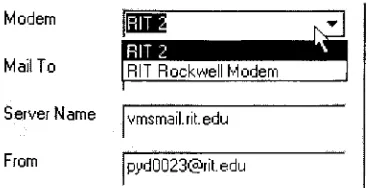
amodemtobeusedtodial upaninternetconnection(Fig
4.9.3. ModemOption).Modem
Mail To
Server Name lvmsmail.rit.edu
[image:27.589.200.385.122.216.2]From [email protected]
Figure 4.9.3. Modem Option
8.
Specify
recipientmailaddress,remote server name and senderaddress.Having
sent the message out, the application will automatically terminate the internetconnection and get ready to answer
incoming
calls or place outgoing calls. If using NetscapeMessenger,
theapplicationtakes around 80 seconds (after it got aconnection) to send amessageout.
Theseare some actionsperformed
by
theapplication whenhandling
anincoming
call and followedby
sending the message to an email address (see attachment"Incoming
Call FlowChart")
:1. When user presses "System Off /
On"
button,
the application will initialize and open theselectedmodem, setthenumber ofringsand setthe speaker phone on. 2. Ifthe"Auto Answer"and"Enable
Mail"
options arechecked, the applicationwill receive an
incoming
call after2 or4rings.3. Thecaller willbepromptedto theannouncementcontainingthree menus : Press #1 : to
hang
upthecall.Press #2 : tolistento thecaller's message.
Press #3 : tosendthemessagetotheemailaddress.
The application willcallcallGreeting(
)
functions inmdlTAPIFunc.bas4. Afterplaying backthegreetingmessageto the caller, the application startsrecordingcaller's
messagefor 10 or35 secondsbasedonuserselection.
The application will set up the MCI device with the specific recording audio i.e. standard
Windows wave file format
(PCM,
16 bitresolution with sampling rate 8 kHz).Finally
storethe recorded message to the specific file name based on the data and time it was recorded
(callMCIsaveMsg(
)).5. If the user presses #
3,
the application will terminate the call session. Fifteen seconds afterthecall session was closed, the application will invoke Ras APIfunctions to establish a dial
upconnection.
6. After collecting the connection information from the "Login"
dialog
box,
theRasDial(
)
function tries to establish a dial up connection to the remote server. Ifit
failed,
it redials upup to2or4attempts.
7. Ifthe application successfully makes the dial up connection, it starts
invoking
the Nestcape MessengerorWindowsSocketstosendthemessageout.IftheuserselectstheWinsocks asmailer,theapplicationwill performaconversionof
binary
format (attachment
file)
to ASCIItext (in module mdlMIME.bas). On the otherhand,
iftheuser selects the Netscape Messenger
(MAPI),
the application will launch the Netscape anddoesn'tneedtoperform a
binary
formatconversion.8. After successfully sending the message, the application terminates the dial up connection
(RasEnumEntries(
),
RasHangUp(
)).9. And
finally
the application invokeslineDrop(
),
lineDealloCall(
),
lineClose(
),
lineShutDown(
),
phoneclose()
andphoneShutDown()
toclosethecall session.IV.5.
Call Administrations
Theapplicationofferstheusertomanagethecaller's message andthegreetingmessages
asfollows :
1. PlaybackaNew / Old Messageor
Greeting
Message2. DeleteOld Messages
3. ChangetheAnnouncement
(Greeting Message)
IV.5.1. Playback
aNew
/ Old
Message
andGreeting
Message
1. When starting the application, it will
display
the new message(s) to the user (Fig. 4.10.Playback New / Old MessageandGreetings
-userhas 1 newmessage)
2. Press "PlaybackMsg"button (Fig. 4.10.Playback New/ OldMessageandGreetings).
Youhave: 1 NewMsg(s)
PlaybackMsg
f""
I
r~: :
I
[image:28.589.135.433.455.507.2]Savebre DeleteMsg
Figure 4.10. PlaybackNew/ Old MessageandGreetings
3. The application will pop up common
dialog
window so the user can select one of newmessagesto listento(4.7. Playback Message).
4. After the user is done to listen
it,
the application will rename the message file name to be "Del_"prefixed file name (4.7. Playback Message). It will differentiate the new message
fromthemessagehas been listened.
22-IV.5.2. Delete Old Messages
1. Justpress
"Delete"
button. The application will deletealloldmessages
("Del_"
-prefixedfile name).
IV.5.3 Change
the
Announcement
(Greeting
Message)
The user could change the greeting messages
("greeting.wav",
"greetings.wav","greeting2.wav",
"greeting23.wav").1. Press VB's MCI record button to record user's greeting (Fig. 4.11. Record
Greeting
Message).You have: 0 NewMsg(s)
:; PlaybackMsg
?-
1
1 1jG
Sit
h^
lultimediaControl Interface feteMsa
1
[image:29.589.131.430.280.330.2]| 1
Figure 4.1 1. Record
Greeting
Message2. Press "Save Greeting"
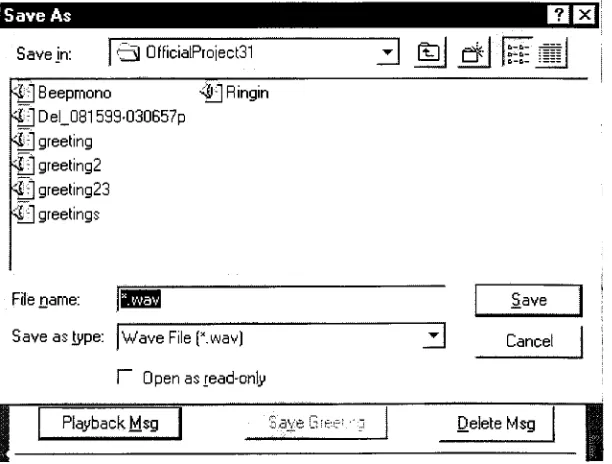
button to overwrite the old one and save it (Fig. 4.12. Overwrite and
Savethe
Greeting
Message).Save As
OE3
Savejn:
1
13 0fficialProject31 zlHJ
&i
I^MJ
^Beepmono <|JF^irigin
#|Del_081599-030657p
4|
greeting ^|f]greeting2*|ygreeting23
4r]
greetingsFilename:
Saveastype:
|
Wave File(K.wav)f"
Openasread-only
:
Save
3
CancelPlaybackMsg DeleteMsg
Figure 4.12. OverwriteandSavethe
Greeting
Message [image:29.589.139.445.408.640.2]3. Playbackthenew greetingmessageif it's necessary (press "Playback
Msg"
button).
24-V.
Telephony
Application
Programming
Interface
(TAPI)
The
Telephony
ApplicationProgramming
Interface(TAPI)
is one of the API sets to bereleased
by
Microsoft. The TAPI is a single set of function calls that allows an application tomanage and manipulate any type of communication link between the PC and the telephone line(s). An application that uses TAPI can generate a full set of
dialing
tones (answer anincoming
call andplace an outgoing call) and flash hookfunctions on /offhook (like that ofthesimpleanalog handset).
TAPI defines severaldata structuresthat are usedto passinformation between TAPI and the requesting application. The layout of the structures contains variable as well as fixed data
(seeatmdlTAPISource.bas module).
TAPI is sub into two subsets of API calls. Where each API subset (see at
mdlTAPISource.bas)refersto:
1. Line devices : a model of the physical
telephony
lines used to send and receive voice anddata between
locations,
such as faxboard,
amodem, oranISDNcard.2. Phone devices : amodel ofthe
desktop
handsetusedto placeandreceivecalls.Two of the significant TAPI functions are HneCallBack and phoneCallBack function. These functions
keep
track any state changes occuring the telephone network and notify theapplication accordingly
by
sendingacorrespondingmessage(LINECALLSTATE).V.l. Basic Typical TAPI Functions
These are theimportantsteps thatcanbeusedto receiveacall, place acall, end acall, close
the
line,
andleave TAPI (this condition is using a non speakerphone modem, so the applicationdoesn't need to call phone device functions such as phoneSetHookSwitch, phonelnitialize,
phoneOpen) :
1.
Linelnitialize(
)
toopen aTAPIsessionbetweentheapplication andTAPIcalls.2.
LineOpen(
)
toopen aspecificline devicetobe usedforthenextcall operations.3.
LineSetNumRings(
)
tosetnumberofringsbefore anincoming
callis answered'4.
LineMakeCall( )
/lineAnswer( )
toplace anoutgoingcall orreceivinganincoming
call.5.
LineMonitorDigits(
)
todetectdigits DTMFpressedby
callers.6.
LineDrop(
),
to placethe callin theIDLE state. The call stillexists, and the application stillhasits handle.
7.
LineDeallocateCall(
)
toreleasethecallhandle forthefinishedcall.Thecall nolongerexists.8. Ifthe application expects no more calls on the
line,
ituseslineClose(
)
to close the line. At thispoint,therewill beno moreincoming
or outgoingcalls onthatline.9.
LineShutdown(
)
toendtheuseofTAPI's functions forthecurrent session.V.2.
Media
Stream
TAPI only provides control for line and phone devices and does not give access to the content ofthemedia streamthatconsistsoftheinformationexchangedovera call.
This application uses Win32 API
functions,
such as the Remote Access Service (RASAPI),
Media Control Interface(MCI),
Messaging
ApplicationProgramming
Interface(MAPI)
orWindows Sockets functions to manage themedia stream.
Although,
this application functionslike an answering machine and send the recorded message through an email uses the TAPI functions to control and monitorthe an
incoming
call, it uses the MCI functions to record andsavethemessage, RAS API functionstolaunchthedial upconnectiontoremoteISP'sserverand then
finally
uses MAPI / Windows Sockets functions to transmit the actual data to an email address.V.3. Data
Structure
(mdlTAPIFunction.bas,
mdlTAPISource.bas)Memory
forall datastructuresusedby
the APImustbe allocatedby
the application. The application passesa pointerto theAPI functionthatreturnstheinformation,
andthefunction fillsthedatastructure with therequestedinformation.
The defined data structures contain fields that indicate the total size neededto fill in all
variable data
(dwNeededSize)
along with the total size usedby
TAPI whenfilling
in the structure(dwUsedSize). Forexample :Type VARSTRING
dwTotalSize As
Long
'size 4 byte dwNeededSize AsLong
'size 4 byte dwUsedSize AsLong
'size 4 byte dwStringFormat AsLong
'size 4byte dwStringSize AsLong
'size 4 byte dwStringOffset AsLong
'size 4byte End TypeGlobal Const VARSTRING_FIXEDSIZE = 24 'total size needed
by
this data structures(4x6)
The dwTotalSizefield is firstset
by
the callingapplication to indicatethe totalnumber of bytes allocatedfor TAPI to returnthe contents ofthe structure. If TAPIcannot fill in all valueswithoutrunning outofallocatedspace, anerrorisreturned.
Some TAPIfunctions inmdlTAPIFunction.bas module use particular data structures for
example :
lineOpen( )
incalllineOpen()
needsLINECALLPARAMS datastructure.lineMakeCall( )
incalllineMakeCall()
needsLINECALLPARAMS datastructure.V.4.
Initialize TAPI
(calllinelnitialize( ),
callphoneInotialize()
-mdlTAPIFunction.bas)
Before placing or receiving a call, an application must establish communication link
between itselfandTAPI. The application must select a
telephony
event notification mechanism(lineCallBack andphoneCallBack), and specify this in acall to the linelnitialize /phonelnitilize
function. One ofthe values linelnitialize /phonelnitialize returns is the number ofline / phone
devices available (lpNumLines /
lpNumPhones)
to the application. Inthis example, that numberis one(if only onemodem
installed),
andtheline's ID in telephony'szero-based scheme is 0. Theapplication mustestablish this communication link (with
linelnitialize)
regardless ofthe type ofcalltobeplaced orreceived.
V.5.
Monitor
Messages
from TAPI
(lineCallBack(
)
-mdlTAPILine.bas,
phoneCallBack(
)
-mdlTAPIPhone.bas)
The
LineCallBack( ) (mdlTAPILine.bas)
and phoneCallBack()
(mdlTAPIPhone.bas)
functions are acallback schemethrough which applications are notified ofthesuccess or failure
offunctioncalls and other events. TAPIwillcontinuetoreceivestatusinformation androutethat
to the application through the callback function previously registered in
linelnitialize(
). Thequalityofthe status information
(dialing,
ringing,busy, idle,
and so on) is all determinedby
thehardware vendor and TAPI service provider application. The more sophisticated the
hardware,
themore accuratetheprogressinformation.
For example, when the call session is
finished,
the application receives aLINE_CALLS TATE message, which informs it that the state of a line device has changed. In
this example, a remotedisconnect has occurred. The application disconnects the call atthe local
end with
lineDrop
(on hook).V.6. Open Line
/
Phone Devices
(calllineOpen( ),
callphoneOpen(
)
-mdlTAPIFunction.bas)
The function
lineOpen( )
and phoneOpen()
will activate the specified line or phone device and give the application line (lphLine)
/ phone(lphPhone)
handle that be used for thefollowing
operationsonthecorresponding line /phonedevice.Once aline/phonedevice opened,theapplicationisenabletoplace anoutgoingcall or
receive an
incoming
call.V.7.
Receive Calls
(calllineAnswer(
)
-mdlTAPIFunction.bas)
After an application has opened a line device
(calllineOpen( ))
registered a privilegeLtNECALLPRIVILEGE_OWNER
(allows the application to manipulate call), and a media mode(LINEMEDIAMODE_AUTOMATEDVOICE
the call and the voice islocally
handledby
an automatedapplication),theapplicationisnotified when a call arrives onthatline.Specifically,
an application that has opened the line withLINECALLPRF/ILEGE.OWNER
receives a LINE_CALLS TATE message only if it hasbecome an owner of the call. In this notification, TAPI gives the application a handle to the
incoming
call(lineCallback( )
mdlTAPILine.bas), and the application keeps this handle(lhActiveCall)
untiltheapplicationdeallocatesthecall.This handle will be used
by
lineAnswer(calllineAnswer( ))
to receive anincoming
callwhen the application detects a message (LINEDEVSTATE_PJNGING
lineCallBack(
)
-mdlTAPILine.bas)sent
by
TAPI.There are two conditions in this state. If "Auto Answer" is enabled the application will
automatically activate calllineAnswer(
),
play back an announcement, and start recording anincoming
message. Ifnot, the user can manually press"Answer"
button toreceive an
incoming
call.
V.8. Monitor Digit DTMF
(calllineMonitorDigits(
)
-mdlTAPIFunction.bas)
The application will enable HneMonitorDigits when "Auto Answer" option is checked.
Detected DTMF digits cause the application to be notified with the LINE_MONITORDIGrTS
message
(HneCallBack(
)
mdlTAPILine.bas). This allows caller to press digit # 1 tohang
up /disconnectthe call, pressdigit # 2 to play back recorded message and press digit # 3 to send an e-mail.Digit monitoringon a call ends as soon asthecalldisconnects or goes idle.
The application disables this monitoring digits if the user makes an outgoing call or answers an
incoming
call.V.9.
Place
the
Call
(calllineMakeCall(
)
-mdlTAPIFunction.bas)
Once the application has opened the line / phone
device,
it places the call withlineMakeCall,
specifying the address in the IpszDestAddress parameter and the media mode(LINEMEDIAMODE_AUTOMATEDVOICE)
in the lpCallParams parameter. This functionreturnsapositive valueifthefunction willbecompleted successfully, or a negative error number
if an error has occurred. Negative return values describe specific error states.
LINEERR_CALLUNAVAIL, forexample, means that the line is probably in use (someone else
already has an active call). If
dialing
completessuccessfully, messages are sentto the applicationtoinform it aboutthecall'sprogress.Oneofthemessageis
LINECALLSTATE_CONNECTED.
At the same time, this application also calls callphoneSetHootSwitch(
)
to set the hookswitchmode(offhookmode).
V.10. Set
Up
thePhone Hook Switch
Mode
(callphoneSetHookSwitch(
)
-mdlTAPIFunction.bas)
The user can manipulate the phone hook switch mode to activate the speaker or microphone or both while
handling
anincoming
or outgoing call. The application will setdevice's speaker on (mute themicrophone
PHONEHOOKSWITCHMODE_SPEAKER)
when"Auto Answer"
is enabled. And it sets both devices active
(PHONEHOOKSWITCHMODE_MICSPEAKER
)
if the user places an outgoing call ormanuallyanswers an
incoming
call(pressing
"Answer"
button)
V.ll.
Toll Saver
(lineCallBack(
)
-mdlTAPILine.bas)
The application invokes lineGetNumRings functionto determinethe number oftimes an
inboundcall onthegiven address should ring beforethe callis tobe answered.
Waiting
acertainnumber of rings (2 or 4 rings) allows callers to be spared the charge of a call connection.
Application also use the lineSetNumRings function in combination to provide a toll saver mechanism.
The application that receives a LINE_LINEDEVSTATE ringing message should wait a
number of rings equalto thenumber returned
by
lineGetNumRings before answeringthecall.The function lineGetNumRings returns the minimum number of rings any application has
specifiedwiththefunction lineSetNumRings.
V.12.
Drop
the
Call
(caUlinedrop( )
-mdlTAPIFunction.bas)
To terminate a call, the application uses
lineDrop
on the call. This has the effect ofhanging
up on(disconnecting)
the call, which makes itpossible tomake another call ontheline.If the remote party disconnects a call, the local application receives a LINE_CALLSTATE
message via lineCallBack function
(mdlTAPILine.bas)
with a call state of disconnected(LINECALLSATE_DISCONNECTED). If the local application disconnects a call, the call
becomes idle (LINECALLSTATEJDLE), but its handle
(lhActiveCall)
is not automaticallydeallocated (the application must calllineDeallocateCall).
V.13. Deallocate Call Handles
(calllineDeallocCall( )
-mdlTAPIFunction.bas)
A call handle
(lhActiveCall)
remains valid after the call has been dropped. Once anapplication has receivedaLINE_CALLSTATE
(LINECALLSTATEJDLE)
message, it shouldcall lineDeallocateCall to free system-allocated memory related to the call. If an application is
theowner ofthe call,itcandeallocate thecall's handle only ifthecall is in the idlestate. Failure
to deallocate call handles in a
timely
way can result in system failure and lost calls due to unnecessaryconsumptionofmemoryandother resources.V.14.
Close Line / Phone Device
(calllineClose(
),
callphoneClose()
-mdlTAPIFunction.bas)
The application mustclose all lines /phonesit has openbefore it becomes inactive. After
an application is finished using a line / phone
device,
it must close the deviceby
callinglineClose( )
/phoneClose()
on the line /phone -device handle. After theline /phone has been closed,the application'shandle fortheline /phone device isnolongervalid.30-VI.
Multimedia Control Interface
(MCI)
As mentioned inproject overview, themedia stream is the actual stream ofinformation
that travels on the line. Phone devices and calls on line devices are capable ofcarrying media
streams. The Telephony-API line and phone device classes provide a wide range of control
operations for these
devices,
but access to the media stream itself is not providedby
TAPI.Instead,
the application must use other APIs for the Win32 environments to access or managethese media streams. One of these APIs includes the MCI (Media Control
Interface)
thatprovides ahigh-levelgeneralizedinterface for controllingmediadevices.
Forexample,for line
devices,
anapplication can useTAPItoanswer a connectionfrom acaller. Once theconnectionis established,the application can thenusetheMCIWaveaudio API
on the associateddeviceto play back
(send)
and record (receive-and save) audio dataover the
connection.
Thereare twoforms ofMCIcommandsets :
1. command strings (communicates using English like text,
such as : mmPlayMsgGree.Command=
"close",
mmPlayMsgGree.Command=
"open",
etc (seeat "PlayBackMsg" button in frmTAPLfrm).
2. command messages (communicates using messages ID constants via mciSendCommand(
)
functions and also additional parameters (data structures), such as : mciSendCommand
fnnTAPI.mmRecInMsg.DevicelD,
MCI_SAVE,
MCI_SAVE_FILE,
mcisaveparams ; see atcallMCISaveMsg(
)
inmdlTAPIFunction.bas)VI.l. MCI
Command Messages
An application will use mciSendCommand(
)
functions and MCI command to sendmessages that set up and control multimedia devices (such as waveform audio, a digital
sampling of an analogsound source thatcanbe storedin afile and play back). Waveform audio
provides amethodofrecordingandplaying back
digitally
sampled sound.This application uses two MCI controls (mmPlayMsgGree and mmRecInMsg) to play
back a message andthe other one to record an
incoming
message. The basic strategy to recordandplayback waveformaudiois :
1. Locatethewaveform audiodevice.
Theuser must choose a suitable waveform audio recording / play back device in the
"Choose Wave Device" combo box to be used to play back and record waveform
audiooverto/ fromthephone connection.
The user must select modem wave device ("Voice Modem not local sound card
("Sound
Card")
inthatcombobox,
otherwisetheWAV file will beplayedback overthelocalsoundcardandtheapplication won'trecord an
incoming
message.2. Openthewaveform audiodevice.
The application will open thatproper waveform audio device using command string (mmPlayMsgGree.Command =
"open"
or frmTAPI.mmRecInMsg.Command =
"open")
3. Call mciSendCommand(
)
functionwith one oftheparametersbelow :. MCI_SETtoset
recordingaudioformat
(PCM, 16-bit,
8kHz,
mono).-. MCI_RECORDtorecorda messagebasedon
recording audioformat.
-. MCI_STOP and MCI_SAVE to
stop recording process and then to save the
recordedmessageinaWAVfile format.
. MCI_PLAYtoplay backtherecorded messageoverthe telephoneline.
4. Close an open wave
device,
after a particular function finishes the particular task(recording
andplay back). So thewavedevicecanbeusedforanotheropearation.Besidesabove, themmPlayMsgGree - MCI
control allows userto record a new greeting
(press record
button)
and overwrite theold one ("greeting.wav"). It alsoprovides userto accessall new or old
incoming
messages storedintheapplication'sfolder.VI.2.
WAV Audio File
Format
To play backand record a message overthe telephone
line,
thisapplicationusing analog-digital conversion process (Pulse Code
Modulation)
using sampling rates 8 kHz with digitalresolution 16-bitforonechannel(mono).
Audio recording based on this format would require 16 kB per second. Thus for 10 seconds wave
file,
the size wouldbe 160 KB and 35 seconds wavefile,
the size should be 560 kB. The highersample ratesthemorediskspaceis requiredto storethedigitalaudio.VT.3.
Detecting
aProper
Recording
andPlayback Modem Wave
Device
(calllineGetID(
)
-mdlTAPIFunction.bas)
Toplayback(a greetingorarecordedmessage) andrecord (acaller'smessage) to orfrom
the telephone
line,
the application will automatically detect the proper modem wave deviceby
invoking
lineGetID function (theapplication's default). This function will result a relateddeviceID
being
usedby
the selected modem. The application will usethis ID to control modem wavedevice insteadofusing an availablesound card.
When the user selects a sound card as a wave device
(by
unchecking the default in thecheck
box),
thegreetingorrecorded messages willbeplayedinthelocal soundcardnot overthetelephoneline.
VI.4.
Recording
aMessage
(callMCIRecMsg(
)
-mdlTAPIFunction.bas)
To limit the length of eachrecording so that one voicefile doesn't
inadvertently
take up toomuchdisk space,theapplicationuses Timercontrol(Timerl)
to specifytherecordtime. Theuser can selecttherecordingtimein "Mail". The maximum length ofthe voice file is 35 second
andthedefault is 10second.
Once the user specifies "Auto Answer" option is active and right after the application
playsback agreetingtothe caller, itwill callcallMCIRecMsg(
)
to startrecording amessagefor10or35 second.
This function will close an open wave device (MCI control) first and then open it for
subsequentrecording operations.It willinvoke acommandmessage- MCI_SET
to setrecording audio format and also what voice modem (from the "Wave Device"
combo
box)
will be used(parms.wlnput=
frmTAPI.cmbWaveRecord.Listlndex).
Finally
followedby
theother command message- MCI_RECORDtorecordthe
incoming
message.Atthe sametime,thisfunction alsoactivates thetimercontrol(frmTAPI.Timerl.Enabled
=
True)
tokeep
track thelengthofthemessage.VT.5.
Saving
aMessage
(callMCISaveMsg(
)
-mdlTAPIFunction.bas)
Once the Timer 1 has elapsed, the application will call callMCISaveMSG( ) to stop the
recordingoperation
(MCI_STOP)
and store the recorded messageinapplication's folder. Before saving the recorded audio to the application'sfolder,
it callCreateFileName(
)
(mcisaveparams.lpFileName =
CreateFileName)
tospecify the name of the file in which the
recordeddatawillbe stored.This filenamewillbenamedbasedonthedateandtimeitrecorded
("New_
& date &time&a/p.wav- 4.10. OverwriteandSavethe
Greeting
Message).Thisfunction alsobecalled, everytimethecaller
hang
up (press digit#1)
the connection(seeat
lineCallBack( )
inmdlTAPILine.bas).VT.6.
Playback
anAnnouncement
-Greeting
(callGreeting( )
-mdlTAPIFunction.bas)
The application calls callGreeting(
)
when "Auto Answer"is chosen. It will do some
tasksbelow :
Close MCI device first andopenit (fanTAPI.mmPlayMsgGree.Command= "open").
Set data structure (Dim mciwavesetparms As
MCI_WAVE_SET_PARMS)
required beforeapplying command message MCI_PLAY. One of the significant parameters has to be provided is voice modem device where the message will be play back to
(mciwavesetparms.wOutput=frmTAPI.cmbWaveRecord.Listlndex).
Play
back greeting (after 2 or 4rings) orrecorded message (caller pressing digit #2)
to thecaller.
Close MCIcontrol afterplaying back greetingor recordedmessage done.
VI.7.
Detect
andDisplay
MCI Error
Codes
(mdlTAPIMCI.bas)
Anapplicationhas todeterminethecontentofMCI_WAVE_SET_PARMS datastructure
before usingmciGetErrorString(
)
function todetect anddisplay
amessage. The length ofbufferto store theerror message returned
by
IpszErrorTextparameter is 300characters. To extract theerror message from series of
"0"
in the predetermined
buffer,
this function calls GetRidofO(mdlTAPIPhone.bas)
toget rid of all0s fromthatbuffer.VTI.
Remote Access Service Application
Programming
Interface
(RAS
API)
To allowthisapplicationtosendtherecorded message via anemail, this applicationmust
establish a connection to the remote ISP's server first before
invoking
a message transportprovider such as
Messaging
ApplicationProgramming
Interface MAPI (NetscapeMessenger)
orWindows Sockets tosenditout.
In Windows 95 environment, this can be done
by
use ofRemote Access Service (RASAPI)
that lets user to make a connection to the remote server withoutlaunching "Dial-Up
Networking"
dialog
box up. This service also provide the way to enumerate all activeconnections first before
terminating
them.ThemainRAS functionsusedinthisapplication are
(mdlTAPIRas.bas)
:1.
RasEnumEntries( )
to enumerate anddisplay
the phone book entry availableby
which theRasDial functionwillestablish aconnection or.
2.
RasDial( )
toestablishtheconnectionto theremote server.3.
RasEnumConnections( )
toenumerate anddiplay
theactiveconnectionbeforeterminating
it.4.
RasHangUp( )
toendtheactive connection.VTI.l.
Starting
aConnection
(callRasDial( )
-mdlRAS_API.bas)
Fifteen
(15)
seconds(tmrcallDirectDialUp)
after the caller terminates a call, thisapplication will call RasEnumEntries function
(callRasEnumEntries(
)). The application mustwait 15 seconds or more to let the system to properly close the previously opened port. Ifthe
application performs
RasDial(
)
function less than 15 seconds the appli