The Integrated Content Environment
Introduction
Outline
The Integrated Content Environme nt (ICE) is a distributed, web based content manageme n t application for preparing text - intensive courses for higher education, both for delivery electronically and in print. ICE is free software released under the GNU General Public License (FSF, 1991) . The copyright holder for the ICE code is the Distance and e- Learning Centre at the University of Southern Queensland (USQ).
USQ is a distance education specialist, with a history of paper, web and now trans mo d al delivery of courseware via the Distance and e- Learning Centre.
This paper explores the requirement s and motivation for the system, why it needed to be developed in- house, and the use of a variety of standar d s. After a brief system overview, the first topic discussed is the requiremen t s, followed by the technical architecture of the system and some other notewort hy
architectural design decisions. Discussion continues with a brief overview of the developmen t metho dology, and sections on installing and using ICE, concluding with potential future research and develop men t work.
System overview
The ICE system is a web application written in Python that runs as a web server on the desktop, rather than at the server (a second phase of
developme n t will create a version that works over the web as well). It is of interest for the developme n t method ology used, the architecture of the program involved, and for the way that the system uses a number of applications in harmony via ‘application profiles’ or templates.
The work described here falls between a general purpose single source web and print publishing system and more learning - focused applications. In this respect it is similar to a prior system developed at the university, the Generic Online Offline Delivery System (GOOD) (Taylor, 2001) (Radajewski et al., 2004) . At its heart the documen t publishing model in GOOD is a typical single
-source publishing system. GOOD is used in a similar way to DocBook (Walsh and Muellner, 1999) , but with a structure oriented towards pedagogy rather than towards technical docume ntation. Using GOOD, authors create XML documen ts in an XML editing application and the system automatically renders them to various output media.
on a set of 'application profiles' or templates of other software, particularly (a) the OpenDocu ment (OASIS, 2005) format used by the OpenOffice.org free -software office suite and (b) Microsoft Word.
ICE also differs from other learning - focused software, such as learning
manageme n t systems or learning content managemen t systems in that it has a print - focus, in addition to being web publishing software. It is also dedicated to providing standar d s - based output.
The ability for non - technical authors and editors to produce both book - like and web content from a single source, on multiple platforms, with distribute d version - controlled files, using office software was not available in any off the shelf system, hence the decision to develop the ICE software.
A good example of the output produced by the system is its own documen tation. The ICE guide is a available as an IMS package. An IMS package is a means of distributing courseware in a zip file, so that it may be used in a Learning Management System (LMS) (IMS, 2005) . Inside the zip file that constitutes the package are HTML and PDF files for each section of the guide, as well as a PDF version of the entire book.
The source files, which are in OpenDocument format can be examined as well, either by:
1. using the source - browsing feature of the ICE website,
2. or by checking them out using Subversion (Collins - Sussman et al., 2004) software via this URL:
The ICE user guide showing the HTML view, with a link to download PDF
Developme nt on the ICE system has started from a docume nt - centric point of view, largely because of the context at USQ. However, it will increasingly be used for interactive content, starting with formative assess me nt placed on -line in textual content, but eventually Standards compliant quizzing integrated with learning systems via QTI (IMS, 2006) and SCORM (ADL, 2006) .
ICE is based on open standar d s, including the OpenDocume n t format (OASIS, 2005) , XHTML (W3C, 2002) and the IMS content package format (IMS, 2005) .
The ICE project started in February 2005 and developmen t work has
proceeded in parallel with live pilots since then. At the time of writing in April 2006 ICE is a pre - version - 1 piece of software, used in production (as far as we know) only in USQ, and there only in pilot mode. A version 1 release is
expected mid 2006 for broad roll out.
Completed courses at time of writing are as follows:
Semester Web only
Web/CD Print / Web Print only
2005 S2 3 1
2005 S3 3 1
2006 S1 9 (4 new) 2 1 1
2006 S2 18 (5 new)
Current options for courseware production at
USQ
To create online - only courses authors or groups of authors at USQ can currently either:
1. Use a software package of their own choice and go it alone, without the centralized official support of the institution.
Options may include one of the many kinds of HTML- producing software or one of the alternative course creation systems mentioned below in the section on related work.
2. Upload Microsoft Word document s and / o r PDF files into the LMS, a practice that results in dubious usability and a less than web- like experience (Sefton, 2004) .
For print courses the usual practice is to send word processing file to a central bureau withing the Distance and e- Learning Centre where staff create books using either desktop publishing software, Adobe FrameMaker, or the in-house XML system, GOOD (Radajewski et al., 2004) .
GOOD is used where:
! HTML or disc outpu t is required in addition to print,
! materials do not contain many exceptions to the mandate d structure,
! and referencing in the Harvard, Author Year style (Snooks & Co., 2002) is
acceptable.
In both GOOD and Adobe FrameMaker production processes the author is working at arm's length from the system. The author's course changes are done in Microsoft Word or on paper, and dedicated staff manage the source files.
It was in this context that the ICE system was conceived.
Requirements & related systems
Requirements
The requiremen t s for ICE were that the system:
1. Run on Windows, Mac OS X and Linux.
3. Be usable on and off campus and from home, with or without a network connection.
4. Work in both Microsoft Word and OpenOffice.org Writer, using a generic template containing a set of pre - defined styles.
5. Be usable by non - technical and non - specialist staff.
6. Produce book - length course content in PDF for traditional distance education use.
7. Produce web- optimized content in HTML and PDF from the same collection of source document s as the print version.
8. Produce IMS content package format for use in Learning Management Systems.
9. Maintain a full revision history across multiple instances of a course and deal with courses offered in multiple ways with some changes.
Secondary and longer term requireme nt s, which may be addressed in late 2006, depending on resources include:
1. Expanded ability to do general web publishing (this paper was authored in the system) and intranets.
2. Annotation and discussion of the content and of the course - developmen t process, using a discussion system.
3. A web- only version of the software that does not require a client installation.
Related: Other candidate systems
There are some other systems that were given consideration before ICE was developed.
There is an earlier USQ- owned and developed XML publishing system with very similar aims, known as GOOD (Generic Online Offline Delivery)
(Radajewski et al., 2004, Taylor, 2001). GOOD has not been rolled out to course - owners as expected as the XML editor required by the system proved to be too hard to ‘sell’ to faculty although it is well- embedde d in the Distance and e- Learning Centre and has been particularly useful for managing the university handbook for publication to print, disc and the web.
The eXe (eXe, 2006) application meets several of the requirement s: it is cross platform, open source and written in the Python progra m ming language. eXe was considered as a basis for ICE. The main problems were that eXe is
embedde d in the Firefox (Mozilla, 2006) web browser and the USQ system needs to be deployed in a web context in future.
1. distribute d content authoring, except that it is a client application, 2. print,
3. or word processor input.
The NextEd Continuo us Publishing System (CPS) is a complete web publishing system (Sefton, 2004) with many of the features required including an open source code base, albeit an abandone d project (Sourceforge, 2004) . The main issue preventing it from being used as a basis for USQ's publishing is that it is server - side software that runs on the Microsoft .NET platform, making it unsuitable for cross - platform client - side deploymen t. The office - docume nt templates used by the CPS have been used as a basis for templates in ICE.
LaTeX (LaTeX3, 2001) is used within some of the technical disciplines to produce courseware for print and web delivery, but end - user authoring software is not available to roll out to course owners on a broad scale.
Finally, the WEBCT learning management system (LMS) used at the university has some content - handling abilities but lacks any features for automatically managing a single source document with multiple outputs.
Related: Other template- driven systems
CourseGenie is a commercial software package that is perhap s the closest active project to ICE , in that it uses Microsoft Word templates to create IMS course packages, but with a few differences:
1. It is much more mature.
2. It can export to proprietary package formats for the WebCT and BlackBoard LMSs.
3. And it is able to produce output with a great deal more interactivity, including the ability to create quizzes in the standard IMS QTI format. (ICE has some rudimentary support for quizzing at the moment).
On the negative side, CourseGenie is Windows and Microsoft Word only, in contrast to the cross platfor m Word and OpenOffice.org support in ICE, and does not have any inherent revision control or distributed authoring
capability.
Most importantly for USQ, CourseGenie is not at all targeted at print offerings; its quiz feature in particular has no print - ready output so that documen ts authored in the package are not presentable in print format, contrasting with ICE's use of the WYSIWYG aspects of a word processor in addition to export to HTML.
Technical publisher O'Reilly has a Microsoft Word template available from their website which is used as part of an unpublished toolchain, using a cut -down DocBook schema known as DocBook Lite. It is used for publishing O'Reilly titles to print and to the web- based service Safari. The template has a more tightly constrained purpose than the generic ICE template but it has a similar scope of structural options available to authors. There are few
resources available online for DocBook Lite, but it is a possible target format for ICE docume nt in the future.
In the educational sphere there is an effort at Humboldt University in Berlin to allow research studen ts to use a variety of tools for creating ETDs (Electronic Theses & Dissertations):
In order to receive convertible original we have program me d a selection of author templates for different word processing systems, such as Microsoft Office, Staroffice, Openoffice, LaTeX. To ensure a correct usage of those templates we offer consultancy services and support via web pages, e- mail, or telephone. The aim is to support the entire publication process and to reach the authors before they start their actual work on the ETD. So we offer specialized courses on “structured writing” for authors every month. (Dobratz, 2005)
While the Humboldt system involves more manual steps than ICE conversion and uses a custom schema for its documen ts (Müller and Klatt, 2005) , the commitmen t to training and support is similar to that in the ICE project where pilot users are offered training and support services.
Another difference is that the ICE software was designed to be deployed by users so they could use it to check the progress of their documen ts as they write. This rapid feedback loop is intended to reduce the error rate over processes where authors submit document s to a service bureau and have to wait hours or days for feedback.
Related approaches to distributed version control
Entire publishing systems related to ICE were covered above; none of these used a distribute d version control system in that way that ICE uses the Subversion system.The closest related piece of work to what ICE is attemp ting to do, by making Subversion revision control usable by ‘ordinary’ users, is the Tortoise
Subversion client for Windows . This provides Subversion access at the system level, integrated into the Windows explorer and system dialogs, but it does not attempt to abstract the Subversion system to the extent that ICE does.
On the web- publishing front there is a project to create an Atom content store using Subversion and Python, Demokritos, led by James Tauber. This is
another Python - based library for storing docume nt s, taking a different approach in that there is no working - copy used; all transactions are
is a key benefit for the distributed, client version of ICE.
Taking a completely different approach is the Chandler project to build a Python - based cross platform Personal Information Manager that will handle calenders, email, tasks, news feeds and any other kind of information item in a common interface across a common version controlled repository.
Chandler would have been a conten der for a platfor m on which to build ICE had it been more mature when ICE development began in early 2005; it is still an option for a future back - end and framework for ICE.
Predicted benefits of ICE
While the hands - off approach of sending away materials to a publishing center, commo n at the University of Southern Queenslan d at present may have some appeal to some authors, it represen ts a significant cost to the enterprise. Likewise, ad hoc approaches to writing web content can result in significant effort for individual authors, with little institutional control over standar d s of organization or presentation.
The ICE team will attemp t to show, through pilot deployments, that using a structured word processing template to 'do it yourself' is more efficient
overall than writing in an ad- hoc way and relying on other staff to sort out the publishing, then having to correct transcription errors.
There is not enough data on this yet, but the prediction is that good work practices, such as using styles and automa tically compiled tables of contents will be quicker for authors than the processes many are using now, with
added benefits in reduced turnarou n d time. It is expected by the ICE team that significant numbers of authors will choose the system over the alternatives, not just for courseware but for research and administrative writing as well.
The architecture of ICE also allows for collaboration between authors and advisory staff, such as instructional designers and editors, providing a
platform on which they can collaborate to improve course quality. Whether or not this happen s is a matter for the institution.
Technical architecture
ICE is far from monolithic: it draws extensively on a variety of other
applications and uses the capabilities of each to build a system to achieve the overall goal of ICE.
The ICE application is a web server that runs on a desktop compu ter including:
! a Python - based web server based on the Twisted framework 'talking to'
OpenOffice via the UNO API . OpenOffice writer provides document conversion services;
a. Generating PDF renditions for all document s.
b. Converting Microsoft Word documen ts to the standar d OpenDocume n t format.
c. Creating web - ready images from embedde d graphics using the Save as HTML feature in Writer (although ICE still has to re- size the resulting bitmaps).
! Either OpenOffice.org, or any other OpenDocumen t compliant word
processor may be used to edit content. Microsoft Word may also be used. ICE architecture 1: Client applications
A second diagram shows the way that the Subversion system, via the pysvn
Python interfaces to Subversion, is used to keep central, version controlled copies of all the files that make up a course. This diagram shows a server running the Apache web server as an interface to a Subversion repository which is used to store materials centrally. On the client, the ICE application talks to Subversion via the pysvn library. It is a goal of ICE to make it
unnecessary for users to resort to using a Subversion client to manage their materials, but it is possible for them to do so if they wish.
Subversion allows the application to store renditions of office documen ts, in both HTML and PDF as properties of a file; effectively caching them so they do not need to be re- rendered every time ICE serves a rendition via its inbuilt web server.
Standards: ICE architecture
Internally ICE largely uses small- s (as in not published by a standar d s body) standar ds, in that it uses freely available de - facto standar d libraries. There are some large - S (published by Standards bodies) standar ds involved, such as HTTP and HTTPS, but these are not used in innovative or noteworthy ways as they are part of the fabric of the web and the Free and OpenSource Software world.
Standar d s used by ICE include:
! IMS Packages (IMS, 2005) .
! OpenDocu me nt .(OASIS, 2005) .
Key design decisions
There are two major areas where ICE differs from many other publishing system developme n ts, as discussed in the sections on related work above.
1. It uses generic word processing templates in preference to domain - specific templates. These generic templates have roughly the same scope as
XTHML, which is a general purpose document format. This approach contrasts with attem pts to capture a much larger schema such as DocBook (Walsh and Muellner, 1999) , or to work with a domain - specific schema such as GOOD (Radajewski et al., 2004) .
2. It makes use of a desktop application for rendering to PDF rather than the more usual approach of an automate d rendering engine that is decoupled from the authoring application.
In this section these issues are covered in more depth than in the survey of related solutions above.
Using generic templates in preference to specific
XML schemas
ICE uses the OpenDocu me n t format as an underlying storage format, but it uses another layer of quasi - standardiza tion on top of that. It relies on a set of style names that provide interoperability between OpenDocu me nt (via
Barnes (Barnes) has shown that docume nt s created using the ICE template can be mappe d to a subset of DocBook. DocBook is an open specification
documen te d thoroughly by Norman Walsh (Walsh and Muellner, 1999) . This approach offers another small- s standar d way of storing and rendering documen ts.
The ICE template is very similar in scope to XHTML; it has structural elements for headings, lists and the same set of inline (sub - paragraph) semantic
elements as XHTML.
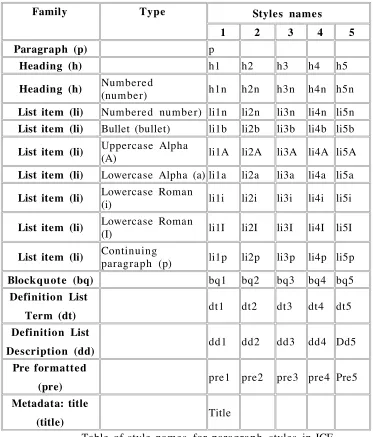
The core styles are listed below.
Family Type Styles names
1 2 3 4 5
Paragraph (p) p
Heading (h) h1 h2 h3 h4 h5
Heading (h) Numbered
(number) h1n h2n h3n h4n h5n
List item (li) Numbered number) li1n li2n li3n li4n li5n
List item (li) Bullet (bullet) li1b li2b li3b li4b li5b
List item (li) Uppercase Alpha (A) li1A li2A li3A li4A li5A
List item (li) Lowercase Alpha (a) li1a li2a li3a li4a li5a
List item (li) Lowercase Roman
(i) li1i li2i li3i li4i li5i
List item (li) Lowercase Roman
(I) li1I li2I li3I li4I li5I
List item (li) Continuing paragraph (p) li1p li2p li3p li4p li5p
Blockquote (bq) bq1 bq2 bq3 bq4 bq5
Definition List
Term (dt) dt1 dt2 dt3 dt4 dt5
Definition List
Description (dd) dd1 dd2 dd3 dd4 Dd5 Pre formatted
(pre) pre1 pre2 pre3 pre4 Pre5
Metadata: title
(title) Title
Table of style names for paragrap h styles in ICE.
The set of style names is designed to be different to those that ship by default with major word processors in order to emphasize that this is a
[image:11.595.89.462.248.685.2]In the default style- sets that come with other word processors this kind of list item might be “List 1” in OpenOffice.org, or “List Bullet 1” in Word. The Word style name is more readable than the ICE style, but at the cost of being so long that it can be difficult to work with in Word itself, when trying to view style names in the left margin (a feature denied to users of OpenOffice.org).
ICE styles may be applied with a hierarchical menu that sorts styles by function and is navigable using keyboard shortcuts in a predictable way.
The ICE styles menu in OpenOffice.org. A similar menu is available for Microsoft Word.
The ICE template is built on previous work using similar templates at NextEd Pty Ltd in a system known as the Continuou s Publishing System (Sefton, 2004) , which built on templates developed at Standard s Australia for
managing both standar d s and general business documents (Kannegieter and Sefton, 2000) .
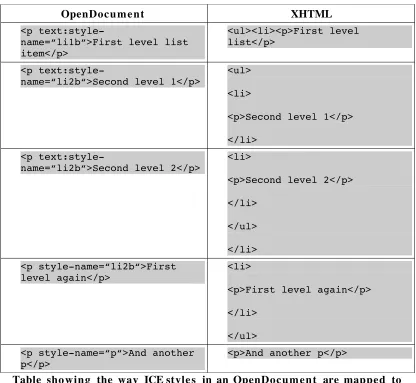
ICE uses XSLT stylesheets to map the style names in the ICE template, via the OpenDocu me nt format, to XHTML with correctly nested list elements.
The following table illustrates a simple example of this mapping.
OpenDocum e nt XHTML
<p text:style-name=“p“>A paragraph:</p>
OpenDocum e nt XHTML
<p
text:style-name=“li1b“>First level list item</p>
<ul><li><p>First level list</p>
<p
text:style-name=“li2b“>Second level 1</p>
<ul> <li>
<p>Second level 1</p> </li>
<p
text:style-name=“li2b“>Second level 2</p>
<li>
<p>Second level 2</p> </li>
</ul> </li> <p style-name=“li2b“>First
level again</p>
<li>
<p>First level again</p> </li>
</ul> <p style-name=“p“>And another
p</p>
<p>And another p</p>
Table sho wing the way ICE style s in an OpenDocum ent are mapped to XHTML output by the ICE software using XSLT
Using desktop applications for rendering instead of
‘pure’ XML technologies
One noteworthy aspect of ICE is that it uses a Desktop application, OpenOffice.org, as a rendering engine to produce PDF and to assist in producing web content from documen ts authored both in Word and OpenOffice.org Writer.
Most XML authoring applications are designed to completely de- couple
authoring from rendition, as with the Humboldt University system (Müller and Klatt, 2005) .
Automated rendering can have costs, though. A simple example found in the GOOD XML system at USQ is that with automate d rendering of large
[image:13.595.90.506.95.478.2]OpenOffice.org Writer application and tune pagination using paragrap h formatting attributes such as 'Keep with next'.
But more importan tly, custom requiremen ts are inevitable and very costly to implemen t in a university- wide system. Thus a simple change that might be accomplished quickly in a word processor becomes an expensive project in an XML publishing system, where rendering is done via technologies like XSL Formatting Objects (W3C, 2001) and a complex schema needs to be
maintained and tested against a large corpus of docume nt s by progra m m e rs. This is acceptable in some situations where (a) the value of the documents is such that important changes can be done as needed or (b) the users
themselves can change the system, such as in a technical documen tation group.
Another example of the high cost of change at USQ has been bibliograp hy styles. The in- house application, GOOD currently handles only Harvard - style Author - Date referencing (Snooks & Co., 2002 p188 - 208) . Adding support for citations and bibliographies in another format would be a significant cost, one that has yet to be approved as a project.
By contrast ICE uses desktop tools, enabling a solution using a bibliograp hic software package for which the university has a site license, EndNote, and Microsoft Word, for those authors who require a reference manageme nt solution. (Not as many authors are using reference managemen t as the program m e rs expected given the enormo u s benefit of doing so.)
The ICE approach is a pragmatic response to the above problems with completely automate d rendering that can only be changed by program m e rs. ICE gives users WYSIWG control over print rendering by using standar d desktop software. This means that users with special requiremen ts do not need to wait for new features; they can use the full feature set of their word processor in a flexible way, while still getting automate d rendering services driven by the set of ICE styles.
Extending the style- set is possible by adding extra information to a style name, so a special class of heading could be created, such as h1-related-work, extending h1. When rendered to HTML, the result would be a heading element with a class that could be used with CSS stylesheets or with a post -processor: <h1 class="related-work">...</h1>. This kind of
customiza tion has a much lower cost than changing an XML schema or rendering progra ms.
On the other hand, it has also been shown that ICE templates can be used as part of a traditional toolchain with separate authoring and rendering
The development process
Agile development
ICE is available from a site hosted at the University of Southern Queenslan d, which gives a window into the develop men t process, falling into the broad ‘agile’ category of methodologies. Anybody arriving at the site to download the software can see the software developme nt process laid out in series of
'milestones' correspon ding to two week developmen t cycles. The key source for developing the local agile- style methodology was the book Planning Extreme Program min g (Beck and Fowler, 2000) .
Application developme n t is iterative, with work conducted in two - week engineering cycles, each one of which is designed to produce a working version of the application. Released versions of the application usually take several cycles.
Contrary to usual practice the project is not hosted at a commu nity site such as SourceForge or EduForge, largely because the project is designed to be built entirely by the in- house team and it was released as open source for reasons other than building a commu nity.
Users can either download pre - compiled versions for Windows XP or Mac OS X (10.4) or follow instructions to install the application and its dependencies using Python.
Test first programming
The ICE team use test - first program ming with unit test environmen t s for the core code in the progra m.
Coverage of unit tests is good in some areas of the program, notably the low-level libraries like the class that abstracts the Subversion underside of ICE so that the application itself can use it for file access. In other areas, notably the web interface, test coverage is patchy – resulting in more bugs which are harder to fix in the interface area of the progra m.
ICE has test cases for XSLT stylesheets using a unit test framework, UTF- X
developed by Jacek Radajewski and team, also originating at the University of Southern Queensland. UTF- X is now an open source framework built on top of the JUnit Java test framework.
UTF- X has been particularly valuable in the area of OpenDocu me nt to XHTML conversion. To map a flat structure like OpenDocu me n t to a nested structure like XHTML so that lists are rendered correctly involves a rather mind
-bending algorithm in XSLT which makes several passes through a documen t gathering items that need to be grouped together; without test - first
The tests for ICE are available from the website. UTF- X test files are suffixed with _test.xml.
Installing ICE
Installation options
There are two modes for installing ICE; either (a) as a pre - built application for Windows (tested only on Windows XP) and for Mac OS X (v 10.4 ‘Tiger’), or (b) as a Python application with all the requisite libraries installed.
ICE requires the OpenOffice.org software suite be installed and running alongside ICE to provide documen t conversion services and optionally for documen t authoring.
Once ICE is installed, with OpenOffice configured and running, it runs as a local web server, accessed by default on http: / / l ocalhost:8000.
The ICE application showing sample content in a web browser, with a toolbar for performing actions on the content.
If the user edits one of the files in the sample content then looks at it again via the web browser and ICE web server it will be re- rendered into HTML and PDF.
Setting up an ICE environment
ICE depend s on having a Subversion repository. A repository usually resides on a server and it manages a file system providing version control and re- use features (Collins - Sussman et al., 2004) . Having docume nt s under Subversion control provides a very granular backup system which allows a user to save as many versions of their work as they choose and to roll- back unwanted
To use ICE in earnest there are two ways to proceed:
1. One can use a local repository stored on the local file system. This can be accomplished using ICE alone by typing a couple of paths into a
configuration screen but this is not suitable for collaboration and the repository would need to be backed - up.
2. A system administrator can set up a Subversion repository that is accessible via the http or https protocols and do the associated
configuration required for access control. The default way to do this is to use an Apache web server (Collins - Sussman et al., 2004) . The user then inserts the URL for the repository into a configuration screen.
Using ICE
Using ICE is a multifaceted experience. The user needs to work with:
! The ICE application, via a web browser.
! A subversion working copy of their source files.
! Microsoft Word or OpenOffice.org Writer to manipulate the source files.
This section covers some of the issues encountered, starting with creating and managing documen ts, then a brief discussion of how content may be reused.
Creating and Managing documents
If a user adds a document to a working copy, which is a set of files held locally controlled by Subversion, then the ICE application automatically adds the documen t to Subversion when the user looks at the documen ts via their browser.
Because ICE uses a Subversion working copy there are some potential
problems for users: their file system is being managed in an unusual way and without careful interface design and targeted training they are likely to be confronted with magically appearing and disappearing document s and error messages when document conflicts occur. For the second quarter of 2006 this has been one of the main development priorities; to find, docume nt and resolve as many potential problem cases as possible. ICE has a rudimentary file- manger that can be used to manipulate files ‘safely’, but the fact is that the files are there on a user’s disk and can be moved or deleted like any other file. Inexperienced users in particular are likely to move files manually rather than using ICE.
The ICE application offers one main interface to Subversion, a 'Sync' button. Sync encapsulates a number of primitive Subversion actions:
1. A Subversion update operation fetches changes from the server
2. ICE code moves conflicting document s into local copies prefixed with “myChanges_”
3. A commit sends the author's changes back to the server
Througho ut all of the above, complex code recovers from a plethora of error states resulting from deleted or moved documen ts and temporary files and network problems.
Reusing content
Using Subversion it is possible to copy one instance of a course, such as the version that was delivered in Semester one 2006 to a new instance for Semester two 2006. In the Subversion repository, at the server, pointers are used to show that the files that make up the semester one version are copied to the second version – this is known as 'cheap copying' (Collins - Sussman et al., 2004) . The repository maintains only one copy, while the author will have a complete new set of files for Semester two. But as soon as the author changes part of the course, and touches a file, the Subversion repository stores the changed version.
Future work
There are several interesting research and develop men t areas for ICE.
Look at ICE in a research - writing context
A sister project to ICE, the RUBRIC project will explore research workflows. One aspect of this will be to build a proof - of - concept system showing how ICE templates can be used in a research context.
Most research repositories are geared to accept PDF versions of content only. ICE would allow an XHTML version to be created as well. For a thesis, this might mean that a package, possibly an IMS content package, would be submitted rather than a monolithic PDF file.
It would also be useful to explore the possibility of auto - generating output in various journal formats automatically, or at least assist the author in doing so.
One related project to ICE which has already explored the interface
between academic writing and an institutional repository is the Academic Workbench (Barnes, 2006) , a program that uses the same word processing template as ICE to generate XML docume nt s suitable for preservation (Barnes, 2005) and add them to an Institutional Repository.
ICE also has potential as a research tool to manage reference material and format citations and bibliographies, either in concert with another piece of software or on its own. A promising new technology in this area is the
Citation Style Language (CSL), which allows reference formats to be
expressed in an application and domain neutral XML format. ICE may be a good vehicle for CSL- based bibliography processing.
Course ware delivery
Beyond using ICE for courseware development, there may be potential to use it in courseware delivery, with its automa te d conversion services and easy to use word processing templates being made available to students to build on course content and even to submit assess men t.
For example, the foundation computing course at the University of
assess me n t (Raadt et al., 2005) ; ICE could make the peer review process easier, by building the assess me n t process into an HTML rendition of the assess me n t rather than requiring a download, and as a by- product, help to establish best - practice word processing from the very start of a learner's encounter with the academy.
Annotation and revie w syste m s
References
ADL (2006) Sharable Content Object Reference Model (SCORM) 2004. http: / / w ww.adlnet.gov / scor m / i n d ex.cfm.
BALL, S. (2005) DocBook Roundtripping. AUSWEB.
http: / / a u s we b.scu.edu.au / a w05 / p a p e r s / e d i te d / b all / p o s t er.ht ml . BARNES, I. (2005) Sustainability of word processing document s. Australian
Partnership for Sustainable Repositories
http: / / w ww.ap sr.ed u.au / c u r re n t p r ojects / wo r d p r ocessing.ht ml. BARNES, I. (2006) Integrating the Repository with Academic Workflow.
OpenReposiotries. Sydney, APSR
http: / / w ww.ap sr.ed u.au / O p e n_Repositories_2006 / ian_barnes.p df. BECK, K. & FOWLER, M. (2000) Planning Extreme Program min g, Addison
Wesley
COLLINS- SUSSMAN, B., FITZPATRICK, B. W. & PILATO, C. M. (2004) Version control with Subversion, O'Reilly
http: / / b o o ks.google.com.au / b o ok s?ie
=UTF-8&id=xPC8n9DV18gC&dq=s u bversion + b o ok&psp =w p .
DOBRATZ, S. (2005) Thinking the long term: the XML-based publishing workflow for handling electronic theses and dissertations at
Humboldt - University Berlin. ETD2005: evolution through discovery 8th International Symposiu m on Electronic Theses & Dissertations. Sydney, Thinking the long term: the XML-based publishing workflow for handling electronic theses and dissertations at Humboldt - University Berlin.
EXE (2006) Exe 0.14. http: / / e xelearning.org /? q = a b o u t.
FSF (1991) GNU General Public License. Free Software Foundation (FSF)
http: / / w ww.gnu.org / c opyleft / g pl.ht ml.
IMS (2005) IMS Content Packaging Overview Version 1.2 Public Draft. IMS
http: / / w ww.imsglobal.org /con te n t / p a ck aging / c pv1 p2 p d / i m sc p_oviewv 1p2pd.ht ml.
IMS (2006) IMS Question & Test Interoperability Specification. IMS
http: / / w ww.imsglobal.org / q ue s tion / .
KANNEGIETER, T. & SEFTON, P. (2000) Content Mangement for all of us: The Standar d s Australia Experience. AUSWEB. Carins,
http: / / a u s we b.scu.edu.au / a w2k / p a p e r s / s e f t o n / p a p e r.ht ml. LATEX3, P. T. (2001) LaTeX2E for authors. http: / / www.latex
-project.org / g uide s / u s rg uide.p df.
MOZILLA (2006) Firefox 1.5. http: / / w ww.mozilla.com / firefox / .
MÜLLER, U. & KLATT, M. (2005) SCOPE - An XML Based Publishing Platform.
ETD. Sydney, http: / / a d t.caul.edu.au / e t d 2 0 0 5 / p a p e r s / 0 4 1Muller.pdf. OASIS (2005) OpenDocu me n t v1.0 specification. Organization for the
Advancement of Structure d Information Standards http: / / www.oasis -open.org / co m mit tees / d ow nloa d.p h p / 1 2 5 7 2 / O p e nDocum e n t - v1.0-os.pdf.
http: / / x ml.openoffice.org /x m erge / d o c boo k /UserGuide.html.
RAADT, M. D., TOLEMAN, M. & WATSON, R. (2005) Electronic peer review:
A large cohort teaching themselves?
ASCILITE. Brisbane,Australasian Society for Computers in Learning in Tertiary Education
http: / / w ww.ascilite.org.au /c o nferences / b ris ba ne05 / b logs / p r ocee dings /17_de%20Raadt.pdf.
RADAJEWSKI, J., MACFARLANE, S. & DEKEYSER, S. (2004) GOOD Publishing System: Generic Online /Offline Delivery. Australian Document Computing
Symposiu m.cs.mu.oz.au / ~ a lis tair / a dc s2 00 4 / p a p e r s / p a p e r 1 1.p df . SEFTON, P. (2004) Publishing versus Handouts, contrasting approaches to
courseware online. AUSWEB. Gold Coast,
http: / / a u s we b.scu.edu.au / a w04 / p a p e r s / e d i te d / s e f t o n 2 / p a p e r.h t ml
.
SNOOKS & CO. (2002) Style manual for authors, editors and printers, Milton, Qld., John Wiley & Sons
SOURCEFORGE (2004) Continuous Publishing System. NextEd Ltd (copyright holder) http: / / s o u r ceforge.net / p r ojects / c p s - skite.
TAYLOR, J. (2001) Fifth Generation Distance Education. E- Journal of Instructional Science and Technology, 4
http: / / w ww.dest.gov.au / a rc hive / highered / h e s / h e s 4 0 / h e s 4 0.p df.
W3C (2001) Extensible Stylesheet Language (XSL) Version 1.0. World Wide Web Consortium http: / / w ww.w3.org /TR /x sl / .
W3C (2002) XHTML™ 1.0 The Extensible HyperText Markup Language (Second Edition). http: / / w ww.w3.org /TR /xh t ml1 / .