Rochester Institute of Technology
RIT Scholar Works
Theses Thesis/Dissertation Collections
12-2016
Advance Android PHAs/Malware Detection
Techniques by Utilizing Signature Data, Behavioral
Patterns and Machine Learning
Suyash Jadhav [email protected]
Follow this and additional works at:http://scholarworks.rit.edu/theses
This Thesis is brought to you for free and open access by the Thesis/Dissertation Collections at RIT Scholar Works. It has been accepted for inclusion in Theses by an authorized administrator of RIT Scholar Works. For more information, please [email protected].
Recommended Citation
Rochester Institute of Technology
Advance Android PHAs/Malware Detection
Techniques by Utilizing Signature Data, Behavioral
Patterns and Machine Learning
By
Suyash Jadhav
A Thesis Submitted in Partial Fulfillment of the Requirements for the Degree of Master of Science in Computing Security
Department of Computing Security
B. Thomas Golisano College of Computing and Information Sciences Rochester Institute of Technology Rochester
Advance Android PHAs/Malware Detection Techniques by
Utilizing Signature Data, Behavioral Patterns and Machine
Learning
By
Suyash Jadhav
December 2016
Department of Computing Security
Rochester Institute of Technology
Rochester, NY
Approved By:
_____________________________________________Date:______________
Dr. Tae Oh
Primary Advisor – R.I.T. Dept. of Computing Security
_____________________________________________Date:______________
Professor Bill Stackpole
CoChair – R.I.T. Dept. of Computing Security
_____________________________________________Date:______________
Professor Chaim Sanders
| Page II
Acknowledgement
I wish to express my sincere gratitude towards my thesis committee. Their support and valuable inputs made this research work possible.
My sincere thanks to Dr. Tae Oh for encouraging to pursuing this research and providing with continuous feedback. He has been a source of motivation and encouragement throughout this research. His input through discussions and advices on designing research has been very helpful. His support motivated for putting rigorous efforts at each level in research work.
I would like to thank Professor Bill Stackpole for providing valuable and critical suggestions through out the research. His interest and creative thinking helped me a lot in designing this research. His continuous motivation helped doing out of box thinking, which made this research succeed truly.
I would like to extend my sincere thanks to Professor Chaim Sanders; his expertise in field of network security has helped me a lot in understanding the Android’s network security aspects in depth. His expertise in the field has been a great source of knowledge for this research.
Thanks to Computing Security Department and Advisors, this thesis won’t have been possible without the sincere efforts taken from you side.
Last but not the least most importantly, immense thanks to my parents for availing me an opportunity to study at RIT. Your faith and trust in me made all these accomplishments possible.
| Page III
Abstract
During the last decade mobile phones and tablets evolved into smart devices with enormous computing power and storage capacity packed in a pocket size. People around the globe have quickly moved from laptops to smartphones for their daily computational needs. From web browsing, social networking, photography to critical bank payments and intellectual property every thing has got into smartphones; and undoubtedly Android has dominated the smartphone market. Android growth also attracted cyber criminals to focus on creating attacks and malwares to target Android users. Malwares in different category are seen in the Android ecosystem, including botnets, Ransomware, click Trojan, SMS frauds, banking Trojans.
Due to huge amount of application being developed and distributed every day, Android needs malware analysis techniques that are different than any other operating system. This research focuses on defining a process of finding Android malware in a given large number of new applications. Research utilizes machine learning techniques in predicting possible malware and further provide assistance in reverse engineering of malware. Under this thesis an assistive Android malware analysis system “AndroSandX” is proposed, researched and developed. AndroSandX allows researcher to quickly analyze potential Android malware and help perform manual analysis.
| Page IV
Table of Content
Table of Contents
ACKNOWLEDGEMENT ... II ABSTRACT ... III TABLE OF CONTENT ... IV LIST OF FIGURES ... VI LIST OF TABLES ... VII
1 INTRODUCTION ... 1
2 RELATED WORK: ... 3
2.1 ANDROID MALWARE STATISTICS, MALWARE TYPES AND CATEGORIZATION ... 3
2.2 MALWARE ANALYSIS TECHNIQUES ... 3
2.3 DETECTION TECHNIQUES: ... 6
2.4 MALWARE DETECTION EVASION TECHNIQUES ... 6
2.5 MALWARE SANDBOXING AND DATA COLLECTION ... 7
2.6 ANDROID MALWARE ANALYSIS USING CLASSIFICATION OR REGRESSION TECHNIQUES ... 7
2.7 ANDROID MALWARE ANALYSIS ASSISTIVE SYSTEMS ... 8
3 METHODOLOGY ... 9
3.1 PROBLEM STATEMENT ... 9
3.2 HYPOTHESIS ... 9
3.3 EXPERIMENT APPROACH ... 9
3.4 HYPOTHESIS PROVING STRATEGY ... 9
3.5 OVERVIEW OF THE EXPERIMENTATION SYSTEM ... 10
4 EXPERIMENTATION ENVIRONMENT ... 15
4.1 MACHINE LEARNING TRAINING PHASE ... 15
4.2 MACHINE LEARNING PREDICTION PHASE ... 17
4.3 MALWARE REVERSE ENGINEERING/ MANUAL ANALYSIS PHASE ... 19
4.4 NETWORK ARCHITECTURE ... 20
4.5 FIREWALL IP TABLES RULES ... 25
4.6 DEVELOPMENT PLATFORM AND DATABASE STORAGE SOLUTION ... 25
4.7 APPLICATION SAMPLE SOURCE AND THREAT INTEL SOURCE DETAILS ... 25
4.8 3RD PARTY TOOLS AND PLATFORM IN USE ... 26
5 PROGRAMMING DETAILS ABOUT ANDROSANDX ... 28
5.1 OVERVIEW OF LAYERED ARCHITECTURE AND ITS IMPORTANCE ... 28
5.2 MONGODB COLLECTION DETAILS ... 28
5.3 ANDROSANDX TICKET STRUCTURE AND FILE STORAGE DIRECTORY DETAILS ... 31
5.4 LAYER NAME:ANDROSANDX ... 32
5.5 LAYER NAME:LAYER_1 ... 33
5.6 LAYER NAME:LAYER_2 ... 34
5.7 LAYER NAME:LAYER_3 ... 36
5.8 LAYER NAME:LAYER_4_A ... 37
5.9 LAYER NAME:LAYER_4_B ... 38
| Page V
5.11 UTILITY FUNCTION: MONGODB_ASX ... 41
5.12 UTILITY FUNCTIONS: OBJECT_ASX ... 41
6 RESULTS ... 43
6.1 CHOICE OF MACHINE LEARNING ALGORITHM ... 43
6.2 REGRESSION AND CLASSIFICATION ... 45
6.3 DETAILS ABOUT TOTAL SAMPLE SET –COLLECTION,THREAT INTELLIGENCE, CONFIDENCE AND CLEANING ... 46
6.4 POSITIVE SAMPLE,NEGATIVE SAMPLES AND ANALYSIS ... 46
6.5 AI FEATURE COLLECTION DETAILS ... 47
6.6 LEARNING DATA ... 61
6.7 PREDICTION SAMPLE AND PREDICTION RESULTS ... 61
6.8 FEATURE IMPORTANCE: ... 64
6.9 EFFICIENCY MATRIX: ... 70
6.10 PROPOSED PROCESS FOR ANDROID SIGNATURE CREATIONS AND MANUAL ANALYSIS . 71 7 CONCLUSION ... 72
8 REFERENCES: ... 73
9 APPENDIX A ... 78
10 APPENDIX B ... 85
| Page VI
List of Figures
Figure 1 : AndroSandX Experimentation Process Overview………...……….11
Figure 2 : Machine Learning Phase Process Graph ... 17
Figure 3 : Machine Learning Prediction Phase Process Graph ... 19
Figure 4 : Manual Malware Reverse Engineering Process Graph ... 20
Figure 5 : Network Architecture Diagram ... 21
Figure 6 : AndroSandX Decision Flow Diagram ... 30
Figure 7 : AndroSandX Ticket Object Variable Details ... 31
Figure 9 : Support Vector Machine Classification output ... 61
Figure 10 : Random Forest Classification Output ... 62
Figure 11 : Random Forest Classification output ... 63
| Page VII
List of Tables
Table 1 : Google's Android Malware Categories ... 3
Table 2 : Machine Learning Training Process Overview ... 15
Table 3 : Machine Learning Prediction Phase Overview ... 17
Table 4 : Experimentation Lab Network Subnet and Address Details ... 24
Table 5 : 3rd Party Tool Version and Use Details ... 26
Table 6 : MongoDB Collection Details ... 28
Table 7 : AndroSandX File Directory Structure Details ... 31
| Page 1
1
Introduction
Android application development and Android mobile market has expanded tremendously in last few year. One of the core success reasons behind Android OS is its easy application development and distribution. Google Play Store and many other Android application markets across the globe allow developer to upload and distribute their applications almost in runtime. Publishing and updates to application are very easy and goes through very little manual review. While the ease of distribution helped developers on one side, the adversity of system was it made distribution of malicious applications considerably easy. Due to tremendous volume and continuous increase in Android application uploads; it is highly difficult and costly to do manual review of applications. These Android market conditions resulted in fairly easy creation and distribution of Android malware.
Due to limitations on manual review of applications, Android market needed fast and efficient automated malware analysis system. Leading application stores like Google Play Store have developed their own automated malware analysis solutions and took down the existing malwares, but small size application stores still mostly depend on traditional hash based scanning techniques. This thesis study was carried out realizing a great need and scope for research in automated Android malware analysis.
Android malware analysis system “AndroSandX” is developed. AndroSandX is an assistive tool to reduce the set of possible malware in the given random set of Android application and provide ticket based malware analysis system for tracking and providing systematic approach for creation of IDS signature through manual analysis, storage of such signature and testing them.
| Page 2
|
Research focuses way beyond just proving feasibility of machine learning based Android malware prediction. Research strongly aims towards giving a prototype of a system that defines standard process for Android malware analysis and provide assistance at every step in analysis. AndroSandX is equipped with Ticketing system, machine leaning, non-relational database, intrusion detection system integration, reverse engineering, debugging and signature deployment capability. Extensive threat intelligence is used.
Research implements experimentation based analysis approach. Experimentation required understanding in following domains: Android operating system, malware analysis, Python programming, MongoDB, Snort IDS/IPS implementations, Network security analysis, Machine learning, sandboxing implementations, network setup, server deployments and threat intelligence.
This research resulted into proving feasibility and implementation of machine learning based Android malware analysis approach. Research also helped in providing standard Android malware analysis approach, assistive tool and IDS signature creation assistance.
| Page 3
2
Related work:
2.1 Android Malware statistics, malware types and categorization
Almost 1.4 Billion mobile devices were sold in 2015, out of which 5/6 of the devices run Android OS [3]. The number of mobile devices running Android OS is on tremendous increase in recent years. Which is also the reason for increase in sophisticated attacks and exploit development on Android platform [2][3]. Cyber criminals are focusing and investing in development of considerably larger amount of malwares and exploits for Android platform [4]. Malware in Android are no more just SMS Trojans or Spyware, multiple categories of Android malware are on rise mainly including Ransomware, Hostile Downloaders, Botnet Trojan [1].
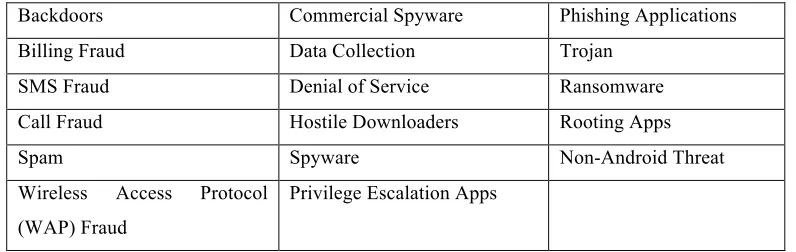
Google categorizes Android malware in to 17 different categories [1], as described in Table 1:
Table 1 : Google's Android Malware Categories
Backdoors Commercial Spyware Phishing Applications
Billing Fraud Data Collection Trojan
SMS Fraud Denial of Service Ransomware
Call Fraud Hostile Downloaders Rooting Apps
Spam Spyware Non-Android Threat
Wireless Access Protocol (WAP) Fraud
Privilege Escalation Apps
2.2 Malware analysis Techniques
| Page 4
|
of code and easy distribution of application allows malware authors to easily avoid signature-based detection.
There are different approaches for malware detection suggested by Android security researchers around the world. Android malware can be detected through code level signatures and Android instruction code. Detection through certain pattern matching of Application package name and methods/functions is possible [11]. Some other interesting approaches include visual representation of binaries [12], hybrid analysis using an attack tree based approach [14]. Researchers have developed assistive malware prediction tools to allow malware researchers find possible unknown malware in given set of applications[19][20][24][25].
2.2.1 Android Malware Analysis Methods:
Analysis methods can be categorized based of the data collection by performing execution or without execution of application. Three main categories are defined as follows - static, dynamic and hybrid analysis.
2.2.1.1 Static Analysis
| Page 5
malware author hides functionality by using runtime code download, which is not detected in the static analysis [11][12][15].
2.2.1.2 Dynamic Analysis
Dynamic analysis focuses on the runtime behavior of the application. Analysis involves execution and monitoring of the activity performed by the applications. Activity monitoring and data collection is carried out at system level, network level and at memory level. System level data includes system call and system functions invoked by the applications. Network level data included DNS request, payload downloaded, domain and IP addresses contacted by application. Network data further reveals details about protocol and http request made by the application. Memory level data usually is obtained during the debugging of application, which involves code level breakpoints and monitoring or registers, stack and heap data.
Dynamic analysis is sometimes way more powerful than the static analysis as it reveals actual behavior of malware and any intentionally hidden functionality[13][15]. Further analysis of dynamically downloaded payload or code modules is possible, most of the malwares now days download configuration files in runtime. For analyzing botnet and bot-network behavior dynamic analysis is very helpful. Network based intrusion detection/prevention system (NIDS/NIPS) signature required data is most of the time collected through dynamic analysis as post infection activity is very important for creation of network-based IDS/IPS.
2.2.1.3 Hybrid Analysis
| Page 6
|
gathering maximum number of features allowing more accurate detection, also helping in-depth analysis and signature creation[13][14].
2.3 Detection Techniques:
Malware detection techniques are categorized in to two approaches, signature based and behavior based. Signature based approach is being very accurate in detecting known malwares on the other hand behavior based approach allows detection of potential unknown malware.
2.3.1 Signature Based Approach
Signature based detection works at two layers, first is network level and second is host level. Network level signatures are usually dependent on network traffic features and pattern in network packets to detect possible infection. Host level signatures focus more on hash and byte code pattern in malicious applications. Signature based detection is very accurate and dependable for detecting already analyzed malware or malware family [12][15].
2.3.2 Behavior Based Approach
Behavior based approach allows detection of possible unknown malware by utilizing knowledge of normal behavior on the network or any host. Behavior based analysis looks for possible indicator of compromise, instead of looking for any one specific feature. Different execution time behavioral pattern and series of activity from an application caused behavioral anomaly or possible indicator of compromise pattern match. This approach allows detecting suspicious behavior of application further suggesting manual analysis [13][15][24][25].
2.4 Malware detection evasion techniques
| Page 7
more than simple signature based malware detection system. Also robust sandbox level anti-evasion techniques need to be used while analyzing malware. Cuckoo Droid [5] focuses on providing an excellent Android sandboxing solution that considers the possible anti detection measures. Different techniques are implemented including falsifying the system properties, contacts and network properties on Android virtual device to overcome malware evasion techniques [5]. Use of anti evasion Android framework like Xposed [6] makes Cuckoo Droid a robust Android sandbox. Though there are techniques, which allow Android malware to detect emulator or virtual machine instance of Android based upon performance parameters, use of virtual machine for running Android is very much a strong indication of sandboxing environment [8].
2.5 Malware sandboxing and data collection
Different Android sandboxing and malware analysis solutions have been created and tested for their efficiency. Automation and extraction of data from different phases of Android application execution are the core requirements of sandbox [9][10]. Analysis data can be extracted from static code level data, dynamic execution time data, network data and Android OS memory related data [26]. Cuckoo Droid is one of the most excellent Android malware sandbox available, it provides data for static, dynamic and network level analysis, further it also provides Android system level function calls and application runtime data. Use of Cuckoo-Droid and its Python implementation allows easy integration and extension of functionality.
2.6 Android Malware analysis using classification or regression techniques
| Page 8
|
learning algorithm also depends on the data used for the feature extraction. Feature extraction input data can be strings, floating values, continuously varying values, binary values or Boolean. Classification algorithm efficiency also varies with type of analysis being used for extracting data. Static analysis, dynamic analysis or hybrid analysis needs different algorithms as efficiency of classification changes significantly.
2.7 Android malware analysis assistive systems
| Page 9
3
Methodology
3.1 Problem Statement
Given a set of Android applications, researcher can perform automated analysis and collect data, allowing machine learning based classification. Classification results in malware/benign category. Further allowing creation of IDS signatures to detect flagged application. Achieve high efficiency of the malware analysis process by reducing manual intervention also making sure system is modular and resource rich.
3.2 Hypothesis
It is very much possible to extract data features of Android application that allows successful machine learning based classification of application in to malware/benign category. Perfectly sandboxed automated application testing environment provides static and dynamic analysis data that can be used for feature extraction. If a system is made with a combination of good sandboxing solution, quality threat intelligence data and machine learning algorithms then it is possible to find subset of Android application that can be classified as potential malware. Once a malware subset is found it can be further reverse engineered to create intrusion detection system signatures. This approach would help in detecting Android malware without needing extensive manual review, and manual analysis efforts will be focused on creating signatures for already predicted malware.
3.3 Experiment approach
The hypothesis of this research is proved using experimentation based proof. The research goes through development of a system, which allows sandboxing, automated malware analysis, feature extraction and machine learning. Results are collected and efficiency matrix is presented to prove the success in classification of Android applications as malware or benign category. Further the predicted malware are manually reverse engineered to create detection signatures and expected final state of experimentation is achieved.
3.4 Hypothesis proving strategy
| Page 10
system to preform automated dynamic and static analysis. Once the data is collected machine-learning algorithm is used to build models, these machine-learning models are further used for predicting unknown applications. Tested unknown applications are checked against threat intelligence data to confirm the true positives and false positives. Accuracy rate is calculated and further manual analysis of predicted malware application is performed. During manual analysis intrusion detection signatures are created and tested against running instance of malicious application to prove successful detection using intrusion detection system. Machine learning based malware prediction accuracy and IDS alert generation using newly created signature successfully proves the proposed hypothesis.
| Page 11
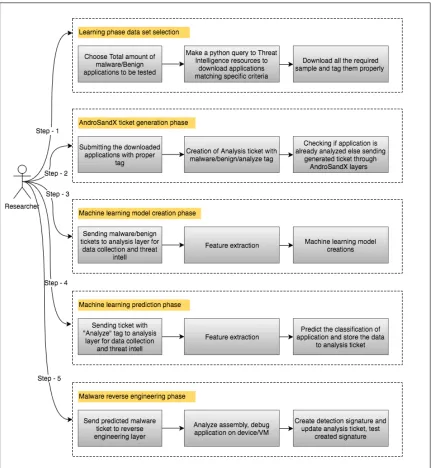
The experimentation process is divided in to five steps; these steps are logical abstraction of experimentation process.
• Learning phase data set selection,
• AndroSandX ticket generation phase,
| Page 12
• Machine learning model creation / Training phase,
• Machine learning prediction phase,
• Malware reverse engineering phase
3.5.1 Learning/Training phase data selection
For creation of a machine learning models to accurately perform prediction it is very important to choose the learning data set properly. The learning data set should be from proper trusted source and should be data rich, which allows accurate feature extraction. Under this research “VirusTotal.com”[40] is chosen as the source of collection of known categorized applications. VirusTotal python accessible APIs are used to download set of Android applications that are already detected by 10+ antivirus solutions as malware data set. For benign applications data set, VirusTotal Android applications with zero known detection from antivirus vendors are chosen. All the VirusTotal downloaded applications are not necessarily the right .apk or .zip formatted Android applications, and this is because of the files being uploaded all across the globe and not always are successfully installed on all Android devices. This non 100% clean data also helps to mimic real world data that any Android application store will come across. Android applications with compatibility issue, installation issue or running errors in sandbox are discarded in later phases to get a cleaner dataset. Once a malware/benign classified data set is obtained, then the data is properly tagged and forwarded to next layers.
3.5.2 AndroSandX ticket generation phase
| Page 13
3.5.3 Machine learning model creation/Training phase
Analysis tickets get tagged as malware/benign and are further passed to layer that perform static and dynamic analysis. During this phase data from static files, network traffic, runtime system calls, static functions and operating system level operations is collected. Further required threat intelligence is gathered. Once all the required data for generation of machine learning features is collected then 153 unique features are collected and stored in to the analysis ticket. When all the learning data set applications complete feature generation phase, feature data with known classification of application is passed through machine learning algorithms to create machine-learning models. These models are then tested to make sure they are not over fitted.
3.5.4 Machine learning prediction phase
This phase is the most interesting and crucial part in the experimentation. A certain set of mixed applications is chosen from VirusTotal. Actual VirusTotal given categorization of these applications is stored for calculating accuracy of the system. These applications are tagged as “Analyze” and sent for the static and dynamic analysis process. Once a feature generation phase is completed these applications are passed to machine learning based prediction. This process utilizes previously calculated machine learning models to classify each application into malware or benign category. Once all the required applications classes are predicted then they are compared with VirusTotal given signature based classification. This comparison gives out the efficiency matrix. Also the accuracy of prediction calculated by measuring precision and recall. Predicted values are stored in the analysis ticket. Prediction matrix is printed for user information, success of the AndroSandX and proof of research hypothesis depends on high prediction accuracy of this phase.
3.5.5 Malware reverse engineering phase
| Page 14
not owned by enterprise and people don't like to have any monitoring application on their mobile as it might lead to privacy breach. One of the prime goal of AndroSandX system is once an Android application is classified as malware, it should be reverse engineered manually and intrusion detection signatures should be created. A good NIDS/HIDS signature helps in discovering active infection on the enterprise network, which is of the prime importance to any security researcher. Malware reverse engineering phase helps in decompiling, debugging the application to walk through assembly code and understand the capability of applications. Also extracting unique features and behavioral pattern of malware.
| Page 15
4
Experimentation Environment
The experimentation environment is designed in a way that the data and processing is always independent of each other; most of the data is at rest and not continuously in server memory. System is designed with thinking that it could be expanded to create a real world product. System architecture, data storage strategy and network architecture is built with segmented design and functionality. Ticketing system helps in separating different tasks in different layers. This section will explain the process details, hardware and physical network details of the developed experimentation system.
At the process level experimentation is separated in to machine learning training, prediction and reverse engineering process.
4.1 Machine learning training phase
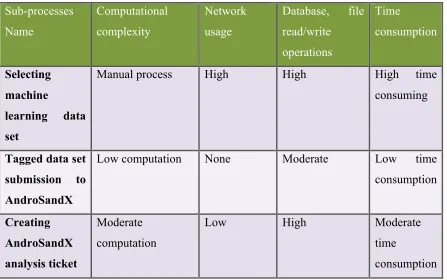
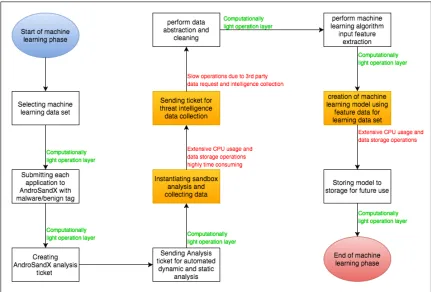
Machine learning process is divided into 10 sub processes, given in the Table 2, Figure 2 shows a functional control flow of the machine learning process, these sub processes are tabularized with their computational complexity, network usage and data read/write cycles.
Table 2 : Machine Learning Training Process Overview
Sub-processes Name Computational complexity Network usage
Database, file
read/write operations Time consumption Selecting machine
learning data set
Manual process High High High time
consuming
Tagged data set submission to AndroSandX
Low computation None Moderate Low time consumption Creating AndroSandX analysis ticket Moderate computation
Low High Moderate
time
| Page 16
Dynamic and static analysis
High utilization of processing power, extensive
multithreading
High High High time
consumption
Threat intelligence
Moderate computation
Moderate High High time
consumption
Data
abstraction and cleaning
Low computation None Moderate Low time consumption
Feature extraction
Moderate Computation
Low High High time
consumption
Creating machine
learning model
High computation None Low Low
Storing machine
learning model
| Page 17
Figure 2 : Machine Learning Phase Process Graph
4.2 Machine learning prediction phase
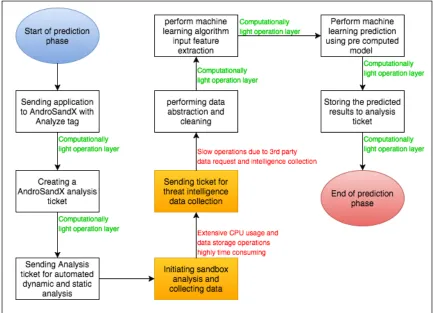
Prediction phase is carried out after completion of machine learning training phase. Prediction uses already created model to perform classification on the given unclassified application. Following Table 3 and Figure 3 shows sub-processes in prediction phase.
Table 3 : Machine Learning Prediction Phase Overview
Sub-processes Name
Computational complexity
Network usage
Database, file
read/write operations
Time
consumption
Submitting application to AndroSandX
Low computation None Moderate Low time consumption
| Page 18
AndroSandX analysis ticket
computation consumption
Dynamic and static analysis
High utilization of processing power, extensive
multithreading
High High High time
consumption
Threat intelligence
Moderate computation
Moderate High High time
consumption
Data abstraction and cleaning
Low computation None Moderate Low time consumption
Feature extraction
Moderate Computation
Low High High time
consumption
Machine learning
prediction of classification
Moderate None Low Moderate time
consumption
Storing predicted result analysis ticket
Low Low Low Low time
| Page 19
Figure 3 : Machine Learning Prediction Phase Process Graph
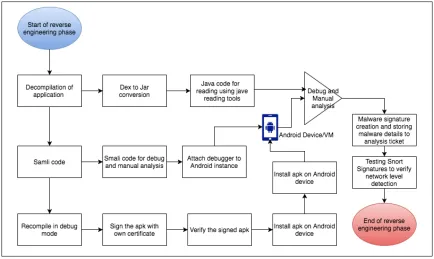
4.3 Malware reverse engineering/ manual analysis phase
| Page 20
Figure 4 : Manual Malware Reverse Engineering Process Graph
4.4 Network Architecture
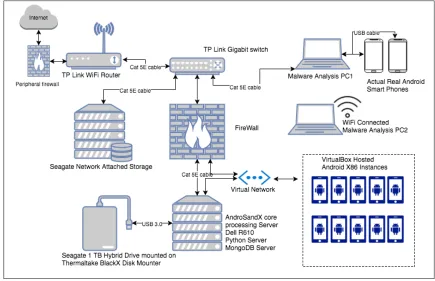
The AndroSandX is designed with an industry style product, which could be easily judged from its network architecture. AndroSandX network architecture is created with security consideration, easy extension, easy data sharing and functional independence capabilities. Main component of the network are as follows:
• Peripheral firewall
• WiFi router / Access point
• Gigabit switch
• IPtable based firewall
• AndroSandX main core processing server Dell R610
• Android virtual instances
• Android real devices
• Network Attached storage for data backup
• Hybrid drive mounted on drive mount
• Malware analysis laptops/desktops
| Page 21
4.4.1 Functional explanation of each component in the network
4.4.1.1 Peripheral Firewall
Peripheral firewall protect the internal infrastructure from unauthorized access, also it allows only specific inbound open ports restricting exploitation of internal services like MongoDB. Firewall does not allow creation of new inbound connection to avoid Trojan backdoor infections. Peripheral rules for AndroSandX network are very restrictive and mostly will differ from a real world enterprise situation. In case of experimentation network peripheral firewall is running on TPLink TL-WR940N WiFi router.
Figure 5 : Network Architecture Diagram
4.4.1.2 WiFi router / Access point
| Page 22
4.4.1.3 Gigbit Switch
Switch provides network wired connection to all component in the network, allows traffic between server, router, WiFi access point, laptops and network attach storage. Helps in maintaining collision free layer 2 network data transfer, and keeps it fast.
4.4.1.4 IPtable firewall
Iptable firewall is running on the Dell R610 server. IPtables helps in allowing and denying certain traffic, it helps in restricting access to only certain services running on the server. IPtables also performs an essential function of providing same network path for infected virtual Android devices to go out to internet, and restrict inbound connections.
4.4.1.5 AndroSandX core processing server
AndroSandX is developed in Python, it uses MongoDB v3.2 as its database storage. Server runs on Ubuntu 14.04 server OS. In terms of hardware capability Dell R610 is having 24Gb RAM(6x4gb), 2x X5550 2.66 Ghz quad core processor capable of running 16 parallel threads, 4 Ethernet network interface cards [42].
4.4.1.6 Android virtual instances
AndroSandX server runs multiple Android virtual instances that are used for malware installation and monitoring. Android 4.4 r2 x86 image is used. VirtualBox is used as virtualization software. Configured base image contains necessarily applications to connect with Cuckoo sandbox, root applications and Xposed framework required applications to hide presence of virtualization. Every instance of Android is allocated with 4 GB disk space and 512 Mb RAM, network is configured to be isolated from server and IP forwarding is used to provide connectivity to isolated network.
4.4.1.7 Android real devices
| Page 23
4.4.1.8 Network attached storage for data backup
Due to experimentation size, large amount of data is generated this data is not always possible to be stored on the server hard drive due to disk size constraint. Also the expansion cost of enterprise grade disk is too high to be afforded for the experimentation environment. Solution to these problems was achieved by setting up a network attached storage, this allows easy access to analysis data from local network as well as Seagate NAS allows url based cloud sharing. Routine backup for the system data and of MongoDB databases is highly required to avoid data loss, this is achieved by having routine backups of all databases and files to Seagate NAS.
4.4.1.9 Hybrid drive mounted via USB3.0 HDD docking station
Core server is having an enterprise grade SATA hard drive of size 146 Gb, this drive is pretty much utilized by Ubuntu OS and other essential software installations. For storing MongoDB database and analysis files this core hard drive is not a good options as it limits easy backup and restore process. Having an externally mounted hybrid drives gives advantage of separating malware related data from core OS data, allows granular file/directory access control, easy backup/restore, easy hardware failure recovery, affordable high speed drive, larger disc space, easy mounting and OS changes. Considering all these advantages AndroSandX was designed to use external Seagate 1 TB SSHD hybrid drive to store MongoDB and analysis files.
4.4.1.10 Malware analysis laptops/desktops
| Page 24
4.4.1.11 Cat 5e cable
For networking purpose and faster local network complete networking is done using good quality cat5e cable.
4.4.1.12 Network device IP addresses and subnet details
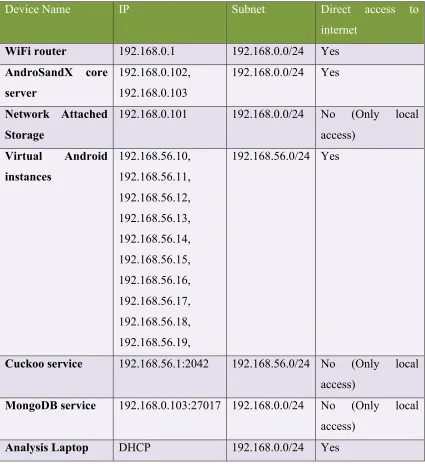
Table 4 gives details bout the devices and their IP address, table also includes subnet and Internet connectivity details.
Table 4 : Experimentation Lab Network Subnet and Address Details
Device Name IP Subnet Direct access to
internet
WiFi router 192.168.0.1 192.168.0.0/24 Yes
AndroSandX core server
192.168.0.102, 192.168.0.103
192.168.0.0/24 Yes
Network Attached Storage
192.168.0.101 192.168.0.0/24 No (Only local access)
Virtual Android instances
192.168.56.10, 192.168.56.11, 192.168.56.12, 192.168.56.13, 192.168.56.14, 192.168.56.15, 192.168.56.16, 192.168.56.17, 192.168.56.18, 192.168.56.19,
192.168.56.0/24 Yes
Cuckoo service 192.168.56.1:2042 192.168.56.0/24 No (Only local access)
MongoDB service 192.168.0.103:27017 192.168.0.0/24 No (Only local access)
| Page 25
4.5 Firewall IP tables rules
IPtable based firewall is implemented at the AndroSandX server, this allows restricting access to unauthorized services. IPtables also restricts uncontrolled access to infected Android instance. Appendix B includes are the IPtable rules that are implemented.
4.6 Development Platform and database storage solution
Python is used as the programming language in the AndroSandX. For the efficient development PyCharm[45] is used as an integrated development environment. For machine learning Scikit-learn[43] and Numpy[44] libraries are used. Scikit-learn allows easy implementation of classification and regression algorithms, Numpy is used in creating Numpy array of inputs for Scikit-learn functions. Python version 2.7 is used for the development.
For database storage non-relational database MongoDB v3.2 [39] is chosen. MongoDB provides great ease of storing document format data that is generated in the AndroSandX analysis process. Non-relational database provides great flexibility in modifying/adding fields in the documents that are non consistent in all applications. Considering the type and requirements of data structures in AndroSandX MongoDB provides the best compatibility.
4.7 Application sample source and Threat Intel source details
All the applications used in the research are from VirusTotal.com [40], chosen applications are very well detected by VirusTotal as malware or benign. Malicious applications used have the detection ratio more than 10 and benign has detection ratio of 0. VirusTotal applications are downloaded using Python API. VirusTotal provides a very trusted source of categorized application for sample set, and seems to be the best choice among the possible available sources.
| Page 26
automated analysis process. Few of the features submitted to machine learning algorithms directly depend on the threat intelligence gathered from VirusTotal and IPvoid.
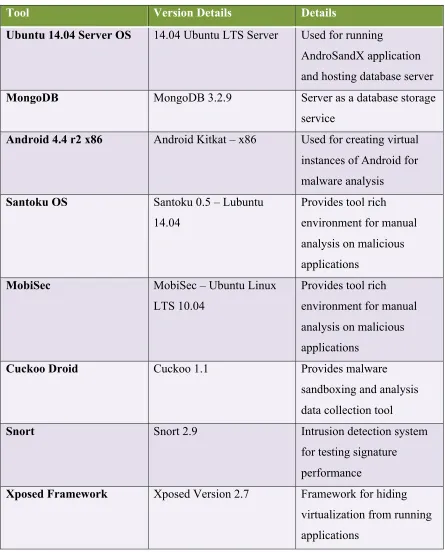
4.8 3rd party tools and platform in use
Table 5 : 3rd Party Tool Version and Use Details
Tool Version Details Details
Ubuntu 14.04 Server OS 14.04 Ubuntu LTS Server Used for running
AndroSandX application and hosting database server
MongoDB MongoDB 3.2.9 Server as a database storage service
Android 4.4 r2 x86 Android Kitkat – x86 Used for creating virtual instances of Android for malware analysis
Santoku OS Santoku 0.5 – Lubuntu 14.04
Provides tool rich environment for manual analysis on malicious applications
MobiSec MobiSec – Ubuntu Linux
LTS 10.04
Provides tool rich environment for manual analysis on malicious applications
Cuckoo Droid Cuckoo 1.1 Provides malware
sandboxing and analysis data collection tool
Snort Snort 2.9 Intrusion detection system
for testing signature performance
| Page 27
Apktool Apktool 2.0.0 De-compilation tool
JDGUI JD-GUI 1.4.0 Graphical interface for
reading .java extension files
Android Studio Android Studio 2.1 Android application development and assistive tool, using mainly for debugging in this research
TCPDump Tcpdump 4.7.3 Network packet capture tool
Wireshark Wireshark 2.0.5 Network packet capture analyzer
Droidmon Droidmon 2.0 Android Xposed framework
based android logging and monitoring tool
jarsigner -- Used in resigning modified
Android application, used in recompiling and resigning application in debug mode
ADB Android Build tool 23.0.0 Android command line access tool
Drozer Drozer v2.3.4 Android penetration testing
| Page 28
5
Programming details about AndroSandX
5.1 Overview of layered architecture and its importance
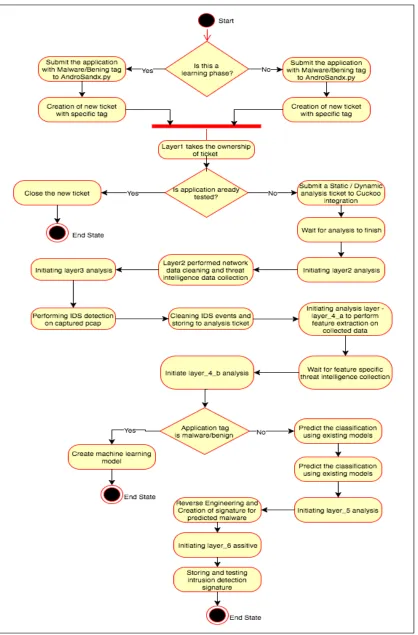
Figure 6 gives and overview of the steps and flow followed in experimentation. AndroSandX has layer-wise separation of different functions. Each layer works on AndroSandX ticket and can only work on certain tickets, as there is a dependency of each layer on other for completion of tasks and data collection. Fundamentally the control flow of the system takes two paths one reaches to end state by achieving creation of machine learning model (training phase) and other path reaches end state after creation of SNORT signatures for possible predicted malware applications. First logical control flow goes through dynamic analysis, feature extraction and machine learning model training. Second logical control flow goes through dynamic analysis, feature extraction, prediction using existing machine learning model, perform manual analysis on the predicted malware and end state is achieved by creation of SNORT signature and testing it to detect the malware under manual analysis. Details about each layer and its functions are explained in further sections.
5.2 MongoDB collection details
AndroSnadX data is stored using MongoDB, a non-relational database. The choice of such database storage is made as it allows runtime modification and addition of any new document element. Most of the data in analysis can be easily represented using key value pair with no pre defined data type, which can be very efficiently performed using MongoDB. AndroSandX has two different databases asx_core and analysis_core.
asx_core is used for storing all the AndroSandX ticket related date and other system required data. Following are the collections and data description under asx_core:
Table 6 : MongoDB Collection Details
Collection Name Data description
| Page 29
data
analyzed_url_ip Stores the already analyzed url and ip to avoid repetitive query for same resource to threat intelligence collection sources
static_var Sores the current ticket id for keeping count of total ticket and new ticket id assignment
pcap_snort_log Stores formatted SNORT logs for each ticket
new_tickets This collection stored the new ticket while application submission phase
analysis_tickets Stores the AndroSandX ticket, this collection have documents that are filled through out the execution of AndroSandX.
| Page 30
| Page 31
analysis_core data base is mainly used by Cuckoo Droid to add dynamic analysis related data. Some other data is also added using AndroSandX functions; the focus of this database is to store all the dynamic analysis extracted data. Name of the collection storing all dynamic analysis data is “analysis” some other Cuckoo Droid related collections are also part of this database.
5.3 AndroSandX ticket structure and File storage directory details
AndroSandX uses ticket-based process to interact between different layers. The ticket has unique structure and all submitted applications are represented as ticket in the system. Figure 7 shows the skeleton of the AndroSandX ticket, it gives details about the top level document elements and their data types. Table 7 gives details about the file storage structure for the Analysis data, some of the raw data is stored on the disk first and then used for data abstraction to retrieve relevant data in later phases of analysis.
Figure 7 : AndroSandX Ticket Object Variable Details
Table 7 : AndroSandX File Directory Structure Details
Directory/File name
Type(Directory/File) Description
apktool_output Directory Used for storing output from Apktool, {
"_id": <string>,
"analysis_start_time": <date>, "ai_feature": <dictionary>{}, "ai_decision": {
"data": <list>[],
"analysis_conclusion": <string> },
"cuckoo_id": <string>, "report": <boolean>,
"analysis_end_time": <boolean>, "snort_signatures": <boolean>, "apktool_data_path": <boolean>, "current_analysis_layer": <string>, "cuckoo_folder_id": <integer>, "analysis_status": <string>, "time_submission": <boolean>, "android_package_name": <boolean>, "file_path": <string>,
"ticket_id": <integer>, "hash_sha256": <string>,
| Page 32
contains code for applications binary File Binary file of the applications
dump.pcap File Pcap file captured during dynamic analysis
files Directory Analysis related extra files and intelligence used in manual analysis
reports Directory Cuckoo Droid reports
snort_logs Directory SNORT log directory for storing log and other SNORT related files while testing of network capture against SNORT rules
asx_ai.pcap File Sorted Pcap file after reducing unnecessary conversations from raw pcap
dex2jar_output Directory Java code for manual analysis extracted using dex2jar
dump_sorted.pcap File Sorted dump.pcap file
logs Directory Droidmon and AndroSandX related logs
shots Directory Screenshots for the applications during dynamic analysis
5.4 Layer Name: AndroSandX
5.4.1 Details:
AndroSandX module is functionally the client side module in the system. Its function is to initiate an analysis process.
5.4.2 Input:
Take file location / Folder location with tag malware/benign/analyze
5.4.3 Output:
Create a new ticket object and store in the collection, also put the new ticket into new ticket queue for further processing.
5.4.4 Function/Class details:
5.4.4.1 def start_asx(file_apk)
| Page 33
5.4.4.2 def create_new_ticket(file_path)
Create AndroSandX new ticket and fill in initial details.
5.4.4.3 def hash_calculator(file_path)
Computes and return hash of submitted file.
5.4.4.4 def init_global_var()
Initiates global variable object, this objects holds details about system wide global variables. Ticket count and queue for new tickets is stored in this variable.
5.5 Layer Name: Layer_1
5.5.1 Details:
Layer 1 works on new tickets, checks if the analysis is already done or not and then creates an AndroSandX analysis ticket request. This request is different than new ticket request as this separates client given new tickets from actual AndroSandX ticket, which allows refining, and more controlled rejection of unnecessary analysis request. Also hides direct database interaction from client side. Cuckoo analysis for each ticket is also initiated at this layer.
5.5.2 Input:
Layer 1 takes new tickets as its input, it is designed to run in infinite looped thread. It continuously looks for new submitted requests and process them.
5.5.3 Output:
| Page 34
5.5.4 Function/Class details:
5.5.4.1 class cuckoo_analysis_req(object)
Cuckoo Droid accepts class cuckoo_analysis_req object for running a dynamic analysis on given application. This class just has initialization function to create object that need to be passed to Cuckoo Droid.
5.5.4.2 def layer_1_new_ticket_watcher()
This function continuously watch for new tickets submitted to AndroSandX and takes ownership of then and convert then in to AndroSandX tickets.
5.5.4.3 def layer_1_init()
This function initializes layer 1, it looks for any previously pending tickets that need to be worked on before taking any new tickets.
5.5.4.4 def layer_1_analysis()
Takes new pending tickets and check if they are already analyzed, if not submits to Cuckoo Droid. Once completed it proceeds with updating of AndroSandX ticket.
5.5.4.5 layer_1.__main__
Layer 1 main function runs in infinite loop to process any newly created analysis requests.
5.6 Layer Name: Layer_2
5.6.1 Details:
Layer 2 is responsible for collecting threat intelligence from different sources, it also perform some data abstraction to get relevant data for further analysis. Layer 2 takes ownership of ticket after Cuckoo Droid analysis is completed.
5.6.2 Input:
| Page 35
5.6.3 Output:
Layer 2 completes network data abstraction, apk details extraction and threat intelligence gathering from different source. Once all the data for a ticket under analysis is collected then it is stored in the AndroSandX ticket document. Also threat intelligence data is cached with indexing using hash.
5.6.4 Function/Class details:
5.6.4.1 def layer_2_A()
This function collects some primary details about the .apk file. Most of these are already been collected in the dynamic analysis. Some functioning is purposefully shifted to next layer and no more used at this level to increase efficiency.
5.6.4.2 def get_apk_info_thread_fn(temp_ticket)
This is thread function for performing apk information extraction, allows parallel processing on multiple tickets simultaneously.
5.6.4.3 def layer_2_B()
This function is designed to perform network data abstraction. It uses raw network captures to give out relevant network data abtraction.
5.6.4.4 def get_network_conversations(temp_ticket_cuckoo_folder_id)
Extracts network end-to-end conversation details. It focuses on protocol and conversation streams.
5.6.4.5 def layer_2_C()
This function controls the threat intelligence collection from different sources. IPVoid and Virustotal are used to collect most of the data. Also this function makes sure that cache is maintained to avoid request for already analyzed resource. URL, domain, IP related information is collected.
5.6.4.6 def trusted_ip(ip)
| Page 36
5.6.4.7 class virustotal(object)
Virustotal class provides required functions and variables for collecting threat intelligence from the Virustotal.com. Required access key and other hardcoded information is kept in the class global variable.
5.6.4.7.1 virustotal.__init__(self,url_or_ip,parameter)
Takes threat intelligence collection resource and performs resource analysis request to Virustotal, if resource is already analyzed then this step is skipped. Going ahead the results are collected from the Virustotal and stored in the AndroSandX ticket.
5.6.4.8 class ipvoid(object)
IPvoid class provides functionality to query IPvoid service to gather blacklist status for given IP. Extensive html parsing is performed in this class.
5.6.4.8.1 ipvoid.__init__(self, ip_address)
Initialized required class variables and requests for IP blacklist status to IPvoid.com
5.6.4.8.2 ipvoid.get_ipVoid_results(self)
Fetches and returns the IPvoid results for the ipvoid object stored IP.
5.6.4.9 class ipvoid_parser(HTMLParser)
This is a derived class for providing HTML parsing functionality.
5.6.4.10 layer_2.__main__
Controls the flow of sub sections of layer 2 for granular control. Provides option to run sub functions or run complete layer 2 analysis.
5.7 Layer Name: Layer_3
5.7.1 Details:
| Page 37
5.7.2 Input:
Takes each ticket completing the layer 3 analysis as the input.
5.7.3 Output:
Any SNORT triggered alerts are parsed and stored in the AndroSandX ticket.
5.7.4 Function/Class details:
5.7.4.1 def execute_snort()
Creates a queue of tickets are that ready for layer 3 analysis and passes SNORT execution. Ticket are processed with 10 parallel thread each initiating different instance of SNORT.
5.7.4.2 def snort_exec_thread(ticket)
Instantiates the SNORT instance and passed the PCAP for detection. Any alerts that are generated during the process are stored and parsed to store in AndroSandX ticket. Parsed field includes signature id, group id, summary of alert, classification of attack vector, priority of alert, time stamp, source IP destination IP.
5.7.4.3 layer_3.__main__
Main function of layer 3 simply initiates the layer process.
5.8 Layer Name: Layer_4_a
5.8.1 Details
‘Layer_4_a’ is responsible for machine learning feature extraction; this layer is one of the most crucial in terms of functioning of AndroSandX. This layers does a lot of data abstraction and rule based feature value calculations. This layer also performs some threat intelligence gathering based on the feature requirements. Also utilizes cache to avoid repetitive request for same resource.
5.8.2 Input
| Page 38
sure that it will only work on ticket that have Droidmon logs captured, this is required to have a valid set of feature data for machine learning.
5.8.3 Output
This layer computes all the 153 features for each AndroSandX ticket submitted to it, and it stores it in ticket document.
5.8.4 Function/Class details:
5.8.4.1 class ai_features(object)
Provides a 153 machine learning feature extraction functions. Defines a data structure to hold features for each ticket. Each ticket needs different instance of this object to extract features. It has total of 153 distinct features and also requires threat intelligence collection from IPvoid and Virustotal.
5.8.4.2 layer_4_a.__main__
Simply reads all the AndroSandX tickets that are ready for layer_4_a analysis and submits to ai_feature class object initialization to extract feature set.
5.9 Layer Name: Layer_4_b
5.9.1 Details:
Layer_4_b focuses on machine learning and prediction functions. Total of 153 features are extracted, all feature are stored as float data type. Most of the features are having 0 or 1 value. Each AndroSandX ticket is worked on to generate and store the required features. Any required threat intelligence collection is also carried out during feature extraction. There are two sub tasks at this layer, first is training and creation of machine learning models and second is prediction phase. Machine learning classification and regression algorithms are used, layer provides storing and restoring of machine learning models.
5.9.2 Input:
| Page 39
5.9.3 Output:
Multiple outputs are achieved at this layer, main goal is to predict the classification of a submitted application. While achieving that machine learning models and feature set creation also takes place.
5.9.4 Function/Class details:
5.9.4.1 def create_feature_input()
Works on each of the AndroSandX ticket; collects data stored in analysis ticket and Cuckoo Droid generated data. Total of 153 features are extracted, and stored in the AndroSandX ticket. This function also collects any additional threat intelligence related data that might be required by for extracting feature.
5.9.4.2 def save_classifier()
Once all the required features are extracted and stored for all the learning phase applications then machine learning algorithm Random Forest is used to generate an AI model. save_classifier functions save this model to disk space for later use.
5.9.4.3 def restore_classifier()
This function reads back previously stored machine learning model. Restored models are further used for performing prediction.
5.9.4.4 def save_csv()
This functions save the comma separated values for prediction data and other data like feature importance.
5.9.4.5 def create_ai_model()
Creates machine-learning model using Random Forest algorithm. Model over-fitting is checked at this function. Created model is generated under a global object of sklearn, which is used by other functions to perform classification of applications and storing of model.
5.9.4.6 def predict()
| Page 40
5.9.4.7 def score()
Computes accuracy and different efficiency matix of machine learning model created at this layer.
5.9.4.8 layer_4_b.__main__
Mainly orchestrates the different functions performed at this layer.
5.10 Layer Name: Layer_5
5.10.1 Details:
Layer 5 is designed for assisting in manual analysis and reverse engineering of malicious android applications. This layer provides utilities and tool integrations such as repacking of apk, signing of apk, getting JAVA code for applications. Provides easy and quick pre manual analysis assistance.
5.10.2 Input:
Takes in the AndroSandX ticket to be used for performing manual analysis, no other input is required.
5.10.3 Output:
There is no defined output for this layer, multiple sub functions do achieve output like giving out signed apk, application code extraction. Ultimate goal at this layer is to assist in manual analysis, increase efficiency and store user created SNORT signatures to AndroSandX ticket.
5.10.4 Function/Class details:
5.10.4.1 def get_apktool_info(temp_ticket)
Function utilizes Apktool to extract code, repack apk in debug mode. Also dex2jar and apk signer applications are also done.
5.10.4.2 def get_app_name(aoktool_output_folder)
| Page 41
5.10.4.3 layer_5.__main__
Simply orchestrates the different functions at this layer.
5.11 Utility function: mongodb_ASX
5.11.1 Details:
mongodb_ASX is an utility module providing different database access class and functions to delete/reinitialize MongoDB collections.
5.11.2 Function/Class details:
5.11.2.1 class my_mdb(object)
my_mdb class object initiates connection to multiple MongoDB collections.
5.11.2.2 mongodb_ASX.__main__
Reinitialize all MongoDB collections by invoking drop_all, create_all sub functions.
5.12 Utility functions: object_ASX
5.12.1 Details:
Provides AndroSandX ticket object class and global variable class. Allows taking document from database and convert it into object and work on it, makes the functioning and modifications very easy.
5.12.2 Function/Class details:
5.12.2.1 class ticket(object)
| Page 42
5.12.2.2 class global_var(object)
| Page 43
6
Results
6.1 Choice of machine learning algorithm
Over all machine learning algorithms can be categorized into 3 main category, supervised learning, unsupervised learning and reinforcement learning. Choosing one of these completely determined based on what sort of data is available for training phase. If the output state and distinct input features are available then the supervised learning might be best fit. In other case if the learning data do not have any certain output state defined already then unsupervised learning would be a good approach. In a situation where learning data set is not available and machine learning models are required to be built based on ongoing data input then reinforcement learning is best fit. Reinforcement learning is trial and error based approach, and system learns from past decision gaining knowledge every time it makes any decision.
One more important decision to be made during choice of algorithm is either use regression to get a continuous output value or have a classification-based approach. In regression, the output of system is a continuous value. Depending on the parameters output can be some what clustered in specific regions on output ranges. Classification on the other hand has certain defined classes, output of machine learning model need to predict one of the predefined class as output. In case of this research, classification based algorithms are more relevant as the results are expected to be of only two types/class. In this research application can be member of either “Benign” class or “Malware” class. Though to prove the justification of use of classification algorithms certain regression algorithm results are also presented.
Some of the well-known machine learning algorithms and the reason for choosing or rejecting them for this research is stated bellow [48].
6.1.1 Linear Regression
| Page 44
be just either “Malware” or “Benign”. The type of the data generated in research and expected output is not linear or not expecting a linearly distributed output so this approach is discarded for research.
6.1.2 Decision Tree
Decision tree is mostly used for performing classification-based problems. Feature set is grouped in to multiple subsets to predict the output based on learning data set. Decision tree works very well in case of mixed data set having continuous and binary feature data. Decision tree is well suited for this research, though a better accuracy implementation “Random Forest” is used which at its core use decision tree.
6.1.3 SVM (Support Vector Machine)
SVM is a graph plotting based algorithm, each of the feature is plotted as a dimension in n-dimensional space where n is the number of features. Plotting allows distribution of sample data in n dimensional space and next step would be to find a unique plane that separates the samples in a most distinct and efficient manner. The plane becomes the equation that predicts the class of the input sample. SVM is a supervised learning algorithm. In this research SVM do not give good result because the features have binary value.
6.1.4 Naïve Bayes
Naïve Bayes machine learning algorithm uses Bayes theorem. Works very well with supervised learning and classification requiring problems. In security industry Naïve Bayes and Random Forest are the two competing algorithms, based on the data set each gives better accuracy. For the research decision was made to use Random Forest over Naïve Bayes algorithm.
6.1.5 KNN (K-Nearest Neighbors)
| Page 45
6.1.6 Random Forest
Random Forest is an ensemble of decision trees. Multiple decision tree votes for the final classification. A small sub set of features is chosen at random to create a decision trees, all these decision tree then vote for the outcome of total forest. Random Forest works very well with mixed data, in this research features are mixture of binary and float data type. Random Forest is the most suited algorithm for this research.
6.2 Regression and classification
Both regression and classification based statistics are presented here for the data set used under this research. One of the most important factors in building machine learning model is to avoid over-fitting and obtain a good cross-validation score [49]. Cross validation score indicates how generalized the modes are for any unknown data set. This research was able to achieve a cross valuation score of 0.98 for Random Forest based classification which a very much an indication of a successful model building. Total of 500 trees are used in the forest, which seems to create fairly accurate models.
============== Random_forest Model building statistics =============== Classification :
RandomForestClassifier(bootstrap=True, compute_importances=None,
criterion=gini, max_depth=None, max_features=auto,
min_density=None, min_samples_leaf=1, min_samples_split=2,
n_estimators=500, n_jobs=1, oob_score=False, random_state=None,
verbose=0)
cross_val_score 0.975503727597 Regression :
RandomForestRegressor(bootstrap=True, compute_importances=None, criterion=mse,
max_depth=None, max_features=auto, min_density=None,
min_samples_leaf=1, min_samples_split=2, n_estimators=500,
n_jobs=1, oob_score=False, random_state=None, verbose=0)
cross_val_score 0.829872505601