Rochester Institute of Technology
RIT Scholar Works
Theses
Thesis/Dissertation Collections
1988
An alternative language interface for the mistress
relational database patterned after IBM's
query-by-example
Susan C. Vogel
Follow this and additional works at:
http://scholarworks.rit.edu/theses
This Thesis is brought to you for free and open access by the Thesis/Dissertation Collections at RIT Scholar Works. It has been accepted for inclusion in Theses by an authorized administrator of RIT Scholar Works. For more information, please [email protected].
Recommended Citation
Rochester Inst
i tu te
of
Te c h n o l o gy
Schoo
l
of Compute
r
Sc
ience
a
nd
Techno
logy
An
Alte
rnative La n guag e Interface
F
or the Mistress Re lat ional
Database
P
a t te r ned After IBM's Que ry-by
-Examp
le
b
y
Susan C.
Vogel
A thes
is ,
s
u b mitted
t
o
Th e Facu lty
o
f
the School of Computer
Science and Te chn o l ogy ,
in partial f
u lf illment
of the
r
e quir e me n t s fo
r
the deg
ree
of
Master of Science
in Computer Science
App roved b
y :
Jeffrey A.
Lasky
-=-~-'-=--C"~----:----,--Professor Jeffrey A.
Lasky (chair)
Henry A. Et lin g
"e:.:r
:,-
-,:-_ _.,--::-:-:-_
_
Professor Henry A.
Elinger
Chris Comte
Title of
T
h e s i s
:
An Alte
rnative
Language
I
n t er f a c e
for t
he
Mistress Relational Database
Patterned after IBM
's
Query
-by-Example
I
,
Susan
c.
Vogel
her
e b y
grant perm
ission
to the Wallace
M
e mor i a l Lib
rary,
of RIT.
t
o
reproduce my thesis in who
le
or
i
n part.
Any reprodu
ct
ion
w
i l l not be fo
r
c
o mme rc i a l use o
r
profit.
-Abstract
This thesis effort developed a user-oriented query
language
interface,
patterned after IBM's Query-by-Example,for the Mistress relational database. The interface,
Mistress/QBE,
is written entirely in C and uses the UNIXcurses
library
of subroutines to allow full screen input andoutput. Mistress /QBE allows the user to issue commands to
draw pictorial representations of tables which exist in the
database. The user then enters values and operators into the
tables to specify a query
by
indicating
attributes to be usedin conditional selections, sort and grouping orders, and
output formats. Mistress/QBE decodes the information
entered on the screen and formulates a Mistress
Query
Language command which is passed to the Mistress standard C
language interface for execution. With a few minor
exceptions, any query which can be written in the Mistress
Query
language can also be written in Mistress/QBE. The interface also includes a high-level operator- calledgrouping, which is supported
by
IBM's QBE but notby
native Mistress.Key
Words and PhrasesQBE,
Query-by-Example, MistressComputing
Review Subject Codes H.2.3. - InformationSystems,
DatabaseManagement,
Table of Contents
1.
Introduction
and Background 11.1. Previous Work 1
1.1.1. Initial Work Done at IBM 1
1.1.2. Zloof's Proposal 1
1. 1.3. Recent Developments 3
1. 1.3. 1. Development Proposals 3 1. 1.3.2. Implementations . 10
1.1.4. Human Factors Research 13
1. 1.5.
Summary
151.2. IBM'
s Query-by-Example 16
1.3. IBM's QBE Versus Zloof's Proposal 19
1.4. IBM's QBE Versus Mistress/QBE 20
1.5. Mistress/QBE Versus the Mistress
Query
Language 221.6. A Sample Mistress /QBE
Query
241.7. Performance 27
2. Architectural Design of Mistress/QBE 28 2.1.
Programming Language,
Interfaces,
Subroutines . 282.2.
Top
Level Design 292.3. Data Structures 32
2.4. Functional Specifications 34
2.5. Algorithm 37
3.
System'
s Documentation 42
3.1. Source Files 42
3.2. Test Mode 42
3.3. Data Structure Details 44
3.4. Function Details 47
3.5. How
Grouping
Is Implemented 593.6. How To Add a New Terminal Type 60
4. Conclusions 63
4.1. Problems Encountered and Solved 63 4.2. Suggestions for Future Extensions 64
5.
Bibliography
676. Appendix 1
1. Introduction and Background
The objective of this thesis effort was to design and
implement a QBE-like interface to the Mistress relational
database system.
1.1. Previous Work
1.1.1. Initial Work Done At IBM
For many years there has been a trend to
develop
database query languages which can be easily learned and
used
by
non-professionals with little or no computerbackground. Query-by-Example (QBE), a non-procedural
relational query
language,
is an example of that trend. Query-by-Example was first proposedby
Zloof at IBM in 1975[23] and expanded in 1977 [24]. In
1978,
IBM released acommercial version of QBE which is now marketed as part of
its
Query
ManagementFacility
(which supports the DB2relational database system) [17]. QBE is also part of the System for Business Automation (SBA) research project
[5],
an executable design language for office automation
applications.
1.1.2. Zloof'
s Proposal
Query-By-Example as proposed
by
Zloof [24] is ahigh-level data base management language that provides a
convenient and unified style to
define,
query, and update arelational data base. The language syntax is simple, yet
of the same operations for
definition,
retrieval, andmanipulation. These language operations mimic, as much as
possible, manual table manipulation and the formulation of
a query is designed to capture the user's thought process.
The user needs to know little to formulate simple queries
and,
by design,
the number of concepts needed to learn andunderstand the whole language is minimized.
Programming
in QBE is doneby filling
intwo-dimensional skeleton tables with an example of a solution
using constant elements, example elements, and operators.
Example elements are variables which represent an example
of a possible answer.
They
are also used to link tables together and to link attributes within the same table. Constant elements represent a required condition.Operators specify actions to be taken such as printing,
sorting, counting, etc. A condition box can be used to
express one or more conditions which are too difficult to
express in the tables.
For example, the
following
simple query will print allthe information in a table called Loans for the employee
named Mosca. p. is the print operator and 'Mosca' is a
constant element.
loans ! name ! date ! amount
+ + +
p. !
'Mosca'
! !
same style as query operations but the print operator is
replaced
by
the appropriateinsert,
delete,
or updateoperator.
Tables can also be created
by drawing
a blank skeletontable,
filling
in the table and columnheading
names, andspecifying the data types, sizes, etc. under the column headings. After a table has been created it can be
expanded, reduced, or deleted from the database. Snapshots
and views can also be created. A snapshot is a new table
into which data from another table, or tables, is copied.
A view is a new table which contains pointers to data in
other tables but the data is not physically copied.
1.1.3. Recent Developments
In addition to the original work done at
IBM,
generaltheoretical work has also been undertaken and several
specific applications using QBE-like languages have been
proposed or implemented. The
following
material ispresented for the purpose of
illustrating
the broad appealof the QBE structure.
1.1.3.1. Development Proposals
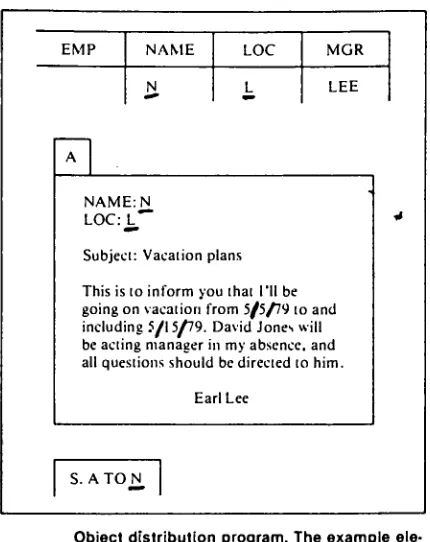
SBA contains a unified high level nonprocedural
language called OBE (for Of fice-Procedures-By-Example)
[22],
which is a superset and natural extension of QBE. Itmail, report writing, graphics, security
features,
andapplication developments within a single interface. The
approach of OBE is the same as that of QBE: direct
programming within two-dimensional pictures of business
objects. The objects in OBE include
letters,
forms,
reports, charts, graphs, and audio documents.
the
userscreate the objects on the screen in much the same way that
they
create the objects manually on paper.Also,
users canextract data from the QBE database management system and
map it into the
body
of the objects. The objects can be edited and sent through a communication subsystem to othernodes
by
specifying the receiver's ID. The users can alsoexpress various triggers which, when activated, result in
an action or several actions. An example, of a trigger is
a message that would be sent to managers when they exceed
EMP NAME LOC MGR
N, L^ LEE
A
NAME:N
Subject: Vacationplans
Thisistoinformyouthat I'll be goingon vacationfrom 5/5/79toand
including5/15/79. DavidJoneswill
beactingmanagerinmyabsence, and all questions shouldbe directedtohim.
EarlLee
*
S. A TOJ^
Object distributionprogram.Theexample ele ment N is used as adestinationaddress. Thiscauses each oTLee'semployeestoreceive aletter personallyad
dressedwithhisname andlocation.
figure 1.1.3.1a
-sample OBE program
[22,
p. 17]An extension to QBE was proposed in 1980 to
automatically enforce semantic
integrity
constraints [19] The system allows the user to stateintegrity
constraintdeclarations which then become a system enforcement
responsibility.
Integrity
constraints can be one of six types:1. perpetual check (PC) 2. pre-operative check (BC) 3. pre-operative action (BA) 4. post-operative check (AC) 5. post-operative action (AA) 6. post-operative request (AR)
[image:10.536.160.375.66.337.2]user starts a task or after the user terminates the task. A pre-operative check checks for a condition before the
requested operation is executed. A pre-operative action
requires that an action be automatically performed
by
thesystem before the requested operation is executed. A post
operative check checks a value after the operation has been
executed. A post-operative action requires the system to
perform the action after the operation has executed and a
post-operative request requires the system to
display
amessage to the user after executing the requested
operation.
For example, given a relation called DEPARTMENT
containing the dept. number, name,
budget,
and number ofemployees, the
following
QBE expression could be used to insure that no department containing employees is deleted:DEPARTMENT \ DEPT# ! DNAME ! DBUDGET ! #EMP
BC(D) i ! ! ! =0
The BC(D) indicates a pre-operative check before a delete
operation. The =0 indicates that the number of employees
must be equal to zero. If a user tries to delete a
department with the number of employees greater than zero,
the system will not allow it.
A Generalized Query-By-Example (GQBE) data
manipulation language [8] was proposed in 1983 to solve the
heterogenous databases (ie. relational, network,
hierarchical)
how can a user uniformly access each databasewithout
having
to learn all the data manipulationlanguages? GQBE can be layered onto most existing
databases and it supports retrieval, insertion, deletion,
and update operations. GQBE extends Zloof's QBE from the
relational to the heterogenous case to create a
user-friendly
common interfaceby
which one can issue datamanipulation commands. This is achieved
by
using thegeneralized CALCULUS data manipulation language. Each
database has a defined conceptual view and a relational
external view layered on top of the conceptual view. Each
GQBE query is translated into a generalized CALCULUS query
for the external view which is then translated into the
generalized CALCULUS query for the conceptual view and
subsequently executed. The user sees only the relational
view of each database.
A Unif ied-Query-By-Example (UQBE) information
manipulation language [7] has also been proposed, as an
alternative to
GQBE,
that can be used as a stand-alone interactive language. The user can use UQBE to access acollection of distributed heterogeneous databases
by
communicating with the network data manager. Like
GQBE,
UQBE extends Zloof's QBE from the relational to the
heterogeneous case.
been proposed that is capable of supporting any office
language that is causal and unambiguous. The user universe
is captured in a conceptual schema and each individual user
interface is mapped to the conceptual schema, using a
modified QBE language. The advantage of this system is that many user interfaces can be supported while
guaranteeing the compatibility of the data and other shared
resources among all the users. This enables the user to
migrate from one interface to another. This system is a
multi-interface one which is capable of
interacting
in more than one type of language(menu-based,
command-based,etc. ). A QBE-like language on a one table database is all that is required for expressing the changes needed for a
new user interface. A trichotomous organization is used
which contains a user level (with several user views), a
unified conceptual
level,
and the internal representation. The mapping from conceptual to internal level is doneby
the designers of the Universal Office System and the
mapping from user to conceptual level is done
by
non-designers.
Therefore,
the mapping from user to conceptuallevel must be able to be done easily. The system will
support office languages that use a CRT for
input,
arecausal (each action must have a cause), unambiguous, deterministic, and two-dimensional.
interfaced with an image analysis system.
By
using patternrecognition and image processing manipulation functions,
pictorial
descriptions
can be extracted from images andthen integrated into a relational database.
QPE,
Query-By-Pictorial-Example,
is a QBE-like language proposed forIMAID. The manipulation capabilities of QPE fall into six
types: conventional manipulation, pictorial entity
construction, pictorial attribute manipulation,
image-sketch-relation conversion, pictorial example, and
similarity manipulation. Conventional manipulation is
tabular queries as defined
by
QBE. Pictorial entityconstruction allows an entity to be constructed as a point,
line segment, or region of a previously stored entity.
Pictorial attribute manipulation involves the retrieval of
information about an entity such as area,
length,
orperimeter. Image-sketch-relation conversion converts a
picture sketch into the pictorial attributes in a relation.
Pictorial example allows selected portions of a displayed
picture to be used to specify further queries.
Similarity
manipulation allows entities similar to a given entity to
1.1.3.2.
Implementations
Summary-Table-By-Example
(STBE) [16] is a high levelnonprocedural language used to manipulate summary data in databases.
Summary
tables are tabular representations ofsummary data (ie. data that is aggregated
by
theapplication of a statistical function). In STBE the relational model is extended
by introducing
a new object,called the summary table. The language is used to
directly
manipulate summary tables and relations. It is similar to QBE in that it uses the example query concept. A summary
table is represented in the extended relational model as a
ternary
tuple containing a list of cell attributes, a rowattribute
forest,
and a column attribute forest. Eachforest consists of zero or more attribute trees. An STBE
window (or subquery) is a box and consists of a name, an
output skeleton, zero or more relation skeletons, an
optional condition
box,
and an optional range box. A range box is used todynamically
define the relations over whichvariables range. The window at the top level is called the ROOT.
Any
window may call other windowsby
referencingtheir names. An STBE query consists of one ROOT query and its subqueries. STBE is believed to be user-friendly and
powerful enough to be used in medical research, health
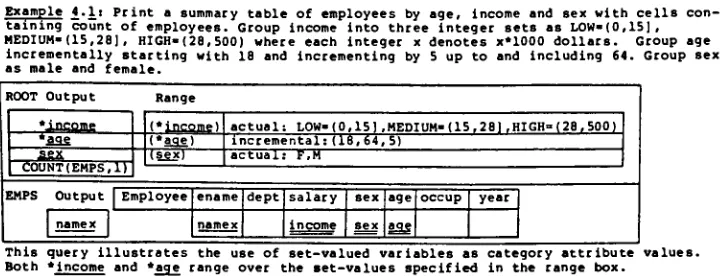
planning, scientific experiments, political planning, and office automation. See figure 1.1.3.2a for an example of
Example 4.It Print a summary table of employees by age. Income and sex with cells con taining count of employees. Group income into three integer sets as LOW(0,15], HEDIUM(15,28), HIGH-(28,500) where each integer x denotes x*1000 dollars. Group age
incrementally starting with 18 and incrementing by 5 up to and including 64. Group sex as male and female.
ROOT Output Range
'income (*}ncqme,) actual: LOW(0,15].MEDIUM-(15
,281,HIGH=(28,500)
*age (*aai) incremental:(18, 64, 5) iex (5x) actual: F,M
EMPS Output Employee ename dept1salary sex age occup year namex namex income sex
2S
1 1 1
This query illustrates the use of set-valued variables as category attribute values.
Both *Income and *age range over the set-values specified in the range box.
figure 1.1.3.2a
-sample STBE query
[16,
p. 200]The ILEX research project [12] implemented a QBE-like language in Prolog. ILEX is a unified approach for all
relational query languages and includes a universal
interface supporting both SQL and QBE-like languages.
Each query language is supported in a separate component
which can be modified
independently
from the rest of thesystem, and the underlying database software can be changed
independently
of the user interface.A system using a specialized QBE-like language was
implemented to handle the information processing needs of
the newborn intensive care unit of the
University
of NewMexico Hospital [113. The computer system was designed to
readily and rapidly access patient records, extract
specific information, make comparisons, and compile data.
[image:16.536.90.450.84.222.2]runs on a WICAT 150 (M68000 based) multi-user, multi
tasking
microcomputer. The system needed to be easilyavailable to medical staff not familiar with computer
technology,
flexible,
able to be used as a data managementand research
tool,
and report generation and datainvestigation
had to be fast and readily available. Thesystem includes QBE routines to allow searches of all the
information in the top nine menus and 28 fields of
diagnoses and procedures.
The TITAN database management system [6] was designed
to be a portable,
interactive,
and simple to use databasemanagement system for a microcomputer- It allows a user to
manage the database using a relational model. The main
menu allows access to three kinds of commands: database
processing (to create, open, and close a database);
relation processing (to create,
delete,
and listrelations); and data management (to
insert,
delete,
andsearch). The data management commands use a non
procedural, semi-graphical language based on
Query-by-Example. The language allows joins and the results of a
query can be used to create a new relation. Condition
boxes are not supported. Each attribute can have at most
one condition associated with it. The DBMS is written in
UCSD PASCAL and has been implemented on an APPLE II plus
microcomputer with 54k bytes of main storage and three mini
Geobase [2] is a geographical database system
being
designed (circa 1981) which allows the recursive
description
of images through abstract data types andmechanisms for
transferring
attributes through the various layers of images definedby
the recursion. In this system,the QBE-like
query language will not allow updates (which
must be done
by
the database administrator) and the output is in the form of maps or tables. Special operatorsintended for the manipulation of pictorial data will be included as well as an operation box in which geometric
operations can be specified which will act on the results
of previous geometric operations.
1.1.4. Human Factors Research
There have also been several human factors studies on
the ease of
learning
and use of QBE which have hadcontradicting and inconsistent results. One study [20]
using college and high-school students explored the ease of
learning
of QBE. The subjects received about one hour and45 minutes of training and then wrote translations of
twenty test questions. The subjects then received another
seventy minutes of
instruction,
followedby
anothertwenty
question test. Two weeks
later,
some of the subjects weregiven another twenty question
test,
followedby
a one hourrefresher course and another twenty question test. The
and use and that it would be hard to imagine a powerful
formal language system which could be learned much more
rapidly than QBE.
Also,
the subjects who returned aftertwo weeks wrote queries nearly as correctly as they did
when
they
initially
learned thelanguage,
suggesting that
people can easily retain the language.
In a second study
[18],
undergraduate students weretaught both SQL and QBE. The researchers concluded the
following:
1. QBE involved less
training
time.2. QBE required shorter exam times.
3. The subjects had more correct QBE queries.
4. QBE required less time per query.
5. The subjects were more confident of their QBE
answers.
However,
only the differences in query writing time andsubjects'
confidence were statistically significant,
indicating
that QBE may not be easier to learn than SQL.In a third study
[3],
SQL and QBE were taught to agroup of Business Administration students and a group of
secretaries, none of whom had any previous data processing
experience. The students learned SQL in about two-thirds
the time it took them to learn QBE.
They
haddifficulty
learning
the QBE concepts of implicit AND/OR,
the ALL.operator^ the condition
box,
and the use of output tables;there was little difference in query formulation time for
simple queries and queries
involving
logic and comparisons.However,
SQL was faster for queriesinvolving
arithmetic,built-in
functions,
and data modification. QBE was faster for queriesinvolving
more than one table and links withina single table. When asked which of the two languages they
preferred, two-thirds of the students chose SQL. The
secretaries also required about two-thirds the time to learn SQL as opposed to QBE but there was no significant
differences for the time to produce correct queries.
However,
there were twice as many unsolved queries for QBE as there were for SQL. Seven of the eight secretariessaid they preferred SQL over QBE.
1.1.5.
Summary
The broad appeal of QBE stems from the following:
1. It is consistent with the ease of understanding
associated with the relational model.
2. In general, the use of QBE is relatively simple, as
supported
by
thefollowing
points:a. The user only needs to know table names -not
attribute names
b. QBE is non-structured
-the user can design a query in any order which makes sense to him/her
c. It is easy to correct mistakes
1.2. IBM's
Query-by-Example
A commercial version of QBE has been implemented
by
IBM and is marketed as part of its
Query
ManagementFacility,
which supports the DB2 relational database system [17]. In this version ofQBE,
the user forms a queryby
filling
in the rows of a graphical representation of a table (or tables) with an example of a possible answer.This example answer is used as a pattern to select all
matching records from the database.
QBE divides the terminal screen into two parts as
shown in figure 1.2a. The upper (query) part of the screen is where most of the work is done. It is where the tables
are drawn and where the parameters are entered which define
the query. Logical
ly^
this part of the screen can consistof several pages
(vertically
and horizontally) of physicalscreens. The lower part of the screen consists of two
lines
defining
the PFkey functions,
a line for messages,and a command line. The command line is used mostly for
entering commands which alter the upper part of the screen
QBE QUERY
***
END ***
LINE 1
l=Help 2*Run 3=End 4=Enlarge 5-Reduce 7=Backward 8=Forward 9=Form 10=Left 11-Right
OK, this Is an empty QBE QUERY panel.
COMMAND >
6=0raw 12Report
SCROLL > PAGE
figure 1.2a - An
Empty
QBEQuery
Screen[17,
p. 26]The basic entities which define a QBE query are table
representations, condition
boxes,
and comment boxes. Tablerepresentations can be filled in
by
the user with exampleelements, constants, expressions, and operators. Example
elements are used like variables to link tables together,
form conditions, and to define expressions. Each example
element is tied to an attribute or attributes. Constants
and conditional expressions are used to determine which
records are to be selected from the tables. Operators are
used to specify the type of query
(select,
update,insert,
or delete) and to modify the results of a query
by
sorting,summing, counting, etc. and
by
restricting which attributesdefine complex record selection criteria.
They
containconditional expressions which are made up of example
elements, conditional operators and constants. Comment
boxes are used to document the query and do not effect its
execution. Comment boxes are useful if a query is to be
saved for later execution. See figure 1.2b for an example
of a simple QBE query.
Additional
details about IBM'S Query-by-Example can befound in the
Query
ManagementFacility
User's Guide andReference [17].
'-Q. STAFF I ID I NAME I DEPT I JOB I YEARS I SALARY I COMM I
; + + + + + + + j
I I P. AO. I 38 1 P. I IP. IP. I
: I COMMENTS I
| 1
I THIS QUERY DISPLAYS EMPLOYEE NAMES. JOBS, SALARIES, AND I
. I COMMISSIONS FOR EMPLOYEES IN DEPARTMENT 38 I
figure 1.2b
1.3. IBM's QBE Versus Zloof's Proposal
There are several capabilities contained in Zloof's
proposal that have not been implemented
by
IBM. Theoriginal proposal allowed new tables and views to be
created and existing tables to be expanded
(by
adding newattribute columns), or changed
(by
changing the attributenames or data types). It also allowed the user to list the
database
directory
to obtain a report of all the availabletable names in the database with their attributes. IBM's
version of QBE does not allow any of the above operations.
They
must be executed using SQL. The original proposalallowed the user to fill in the headings for temporary
tables; the IBM version uses arbitrary names (like
'EXPRESSION 1') for the headings.
Also,
in the proposalexample elements can be used in conditions within the
table, but in the IBM version they can only be used within
condition boxes.
The IBM version also looks somewhat different than the
original proposal, probably because of terminal
restrictions. For example, the original proposal
underlines example elements. It uses partial underlines to
indicate pattern matching and double underlines to indicate
grouping. Because many terminals do not allow underlining,
IBM defines an example element
by
starting it with anunderscore, and uses separate operators for pattern
1.4. IBM's QBE Versus Mistress/QBE
Although
Mistress/QBE
looks very much like IBM'sQBE,
there are several
differences,
most of which are related to differences between the IBM StructuredQuery
language (SQL)and Mistress's
Query
language (which will also be called SQL).However,
some of the differences make the Mistressversion simpler and easier to use than the IBM version.
One difference between the structured query languages is
that the IBM version allows sub-selects and mathematical
expressions and the Mistress version does not. (A
sub-select is where the result of a query is used as part of
the condition of a second query. ) The same difference
carries over to the two QBE versions. Because expressions
are not allowed in
Mistress/QBE,
it eliminates one of thereasons for allowing the user to add new columns to tables
or draw blank tables.
Also,
the IBM version allows insertsof records from one table into another table as part of the insert operation and the Mistress version allows it as part
of the select operation. This difference also carries over
to the two QBE versions. The IBM and Mistress versions of
SQL use different complex conditional operators: IBM uses
"between"
and Mistress uses
"range",
IBM uses"like" and
Mistress uses "match", and IBM has an
"in"
operator and
Mistress does not.
Finally,
Mistress allows the output ofa query to be in either
"list"
or
"dump"
does not. To handle
this,
the 1. and du. operators havebeen added to
Mistress/QBE.
The most important difference in the Mistress/QBE
interface,
which was designed to simplify use, is that thecolumn names in the tables are protected to prevent the
user from
typing
over them. This decreased the chance ofuser errors but required that other changes be made to
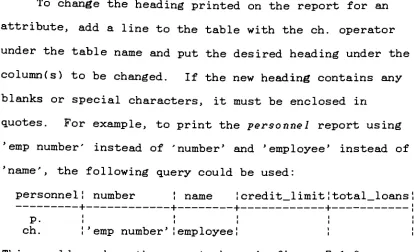
allow the user to change headings for reports and change
the order in which attributes are printed. To allow
headings to be changed, a new operator (ch. ) was added to
the interface. To allow the order in which attributes are
printed to be changed, an optional priority number was
added to the print (p. ) operator. These two changes also
had the effect of eliminating the need for allowing the
user to add blank columns or tables to the screen. Another
change which was made to simplify the
interface,
is thatthe all. operator has been eliminated. In IBM's
QBE,
thedefault can be to select all records or only unique records
depending
on how many rows are in the example table. InMistress/QBE the default is always to select all records.
To select only unique records, the unq. operator must be
specified.
There are several minor changes between the terms
used in IBM QBE and those used in Mistress /QBE and also
some spelling changes in some of the operators. These
compatible with
Mistress
andUNIX,
to simplify theinterface
program, or simply because the new words makemore sense. These changes are as follows:
IBM Mistress
end or exit
export
import
reset
run
backward
forward
top
bottom
count.
g.
stop
save
retrieve
clear
exec
up
down
up (as many times as needed) down (as many times as needed)
cnt.
gr. , gr() .
Also,
all scrolling in Mistress/QBE is done at the pagelevel.
The final difference is that the Mistress/QBE screen
looks slightly different in that the command portion of the
screen has three message lines and does not show any PF
key
functions.1.5. Mistress/QBE Versus the Mistress
Query
LanguageAny
command which can be expressed in Mistress SQL cantable names containing tab characters cannot be used with
Mistress/QBE and the current implementation of Mistress/QBE
can only be run from
tvi925,
gigi, pc7300, and vt52 typeterminals.
Also,
Mistress /QBE allows grouping operationswith functions and SQL does not. In general, it can be
said that SQL is better for simple queries and Mistress /QBE
for more complex queries. The same query in SQL and QBE
will take roughly equal amounts of time to execute, but a
simple query can be typed in SQL faster than in QBE.
However;
a complex query can be more easily typed into QBEbecause the query can be decomposed into several small
steps and it is easier to change a query in QBE
by
typingover the incorrect information than it is to change a query
in SQL using the Mistress line editor.
Also,
multiple1.6. A Sample Mistress/QBE
Query
To illustrate how a Mistress /QBE query is constructed,
a sample database containing two tables has been created.
The tables are called personnel and loans and they contain
the records shown in tables 1.6a and 1.6b. These tables
are based on those used in the Mistress manual [15].
numDer name
10 Kilroy
5 Mosca
17 Wladislaw
3 Jones
8 Peterson
4 Scarlatti
9 Jordan
credit limit totai_ioans
$500.00 $750.00 $50.00 $500.00 $250.00 $100.00 $250.00 $250.00 $350.00 $50.00 $358.95 $50.00 $0.00 $0.00
table 1.6a
-contents of personnel table
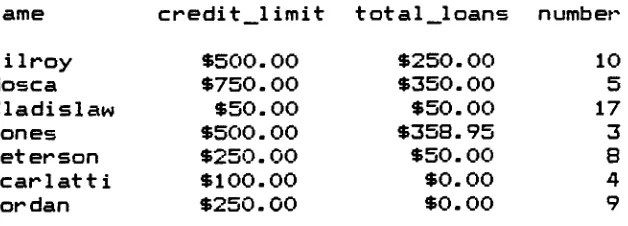
name Mosca Jones Kilroy Wladislaw Jones Mosca Wladislaw Peterson Wladislaw Jones date 02/02/87 02/07/87 02/16/87 02/27/87 04/03/87 05/04/87 05/12/87 06/06/87 06/25/87 08/12/87 amount $150.00 $33.95 $250.00 $55.00 $25.00 $200.00 $25.00 $50.00 $75.00 $300.00
table 1.6b
To print the number, name, credit
limit,
date,
and amountfor all loans taken out in
1987,
thefollowing
steps couldbe taken:
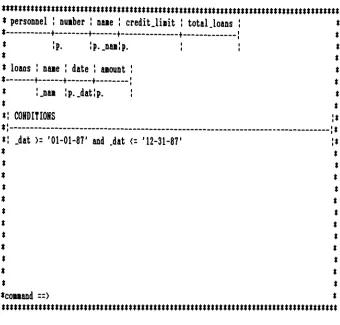
step 1: draw the personnel table
step 2: draw the loans table
step 3: draw a condition box
step 4: move the cursor to the personnel table and type the print operator (p. ) under the numbert
name, and credit imit columns
-type the example
element under the name column
step 5: move the cursor to the loans table and type the print operator under the date and amount
columns
-type the example element under the
name column and under the date column
step 6: move the cursor to the condition box and type the following:
_dat>=
'01-01-87'
and _dat<=
'12-31-87'
mmummmmtmnmmmmmtmmmmtmmnmmmmtm personnel ! nuiber ! naie ! credit.linit ! total loans
* + +
+
;..___
!p. !p..naa!p. jloans ! naie ! date ! aiount !
+ + + .
!.nai !p..dat!p. I
CONDITIONS
.dat>:
'01-01-87'
and .dat<=
'12-31-87'
conand ==>
[image:31.536.100.440.65.390.2]mmmtmtmnmmmmmmmtmmtmmmmttmmmmtmtt
figure 1.6c
-saiple query
The print operator (p. ) indicates which attributes will be
printed on the report. The example element _namis used to
link the two tables together and the example element _dat
is used to specify which attribute is to be used in the
condition.
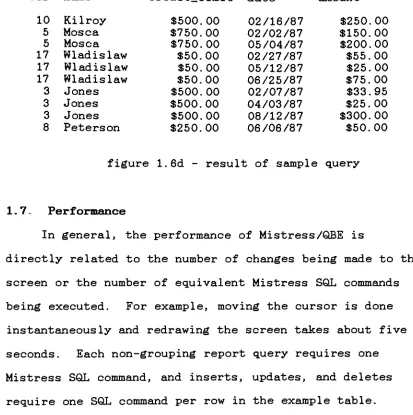
step 7: move the cursor to the command line and type
exec to execute the query
number name credit_limit date amount 10
Kilroy
5 Mosca 5 Mosca 17 Wladislaw 17 Wladislaw 17 Wladislaw 3 Jones 3 Jones 3 Jones 8 Peterson $500. 00 $750.00 $750.00 $50.00 $50.00 $50.00 $500.00 $500.00 $500.00 $250.00 02/16/87 02/02/87 05/04/87 02/27/87 05/12/87 06/25/87 02/07/87 04/03/87 08/12/87 06/06/87 $250.00 $150.00 $200.00 $55.00 $25.00 $75.00 $33.95 $25.00 $300.00 $50.00figure 1.6d
-result of sample query
1.7. Performance
In general, the performance of Mistress/QBE is
directly
related to the number of changesbeing
made to thescreen or the number of equivalent Mistress SQL commands
being
executed. For example, moving the cursor is doneinstantaneously
and redrawing the screen takes about fiveseconds. Each non-grouping report query requires one
Mistress SQL command, and
inserts,
updates, and deletesrequire one SQL command per row in the example table.
Grouping
queries require six SQL commands (to select thedata needed for the query, to create temporary
tables,
anddisplay
the final result) plus three SQL commands per eachline in the output report (to select the data for each
group and move data between the temporary tables).
Therefore, grouping and multiple
inserts,
deletes,
and [image:32.536.55.468.75.490.2]2. Architectural Design of Mistress/QBE
2.1.
Programming
Language,
Interfaces,
and SubroutinesMistress/QBE is written entirely in the C language and
uses the Mistress standard C interface
[13],
the MistressMR routines
[14],
and the UNIX curseslibrary
ofsubroutines [1]. The Mistress standard C interface is
invoked from a C program
by
calls to Mistress which specifythe database
directory
and aQuery
Language command.Mistress then executes the command. The Mistress MR
routines are very similar to a procedural programming
language and allow the programmer to sequentially read and
update tables in the Mistress database. The UNIX curses
routines are used to move the cursor around the screen and
allow full screen input and output.
Mistress/QBE uses the curses routines to accept
commands from the user and then to carry out the commands
by drawing
tables and boxes on the screen. The cursesroutines also allow the user to move around the entire
screen to fill in the parameters of the query. After the
query has been defined, Mistress/QBE processes the data on the screen and builds the equivalent
Query
Language commandwhich is executed
by
the Mistress standard C interface.The Mistress MR routines allow the interface to implement
grouping operations which are not
directly
supportedby
the2.2.
Top
Level DesignThe Mistress/QBE interface program is divided into
three sections. The first section is the main program.
This section accepts input from the user and, based on what
the user has entered on the command
line,
determines theaction to be taken. This section prevents the user from
typing
into a protected area of the screen and handles thedifferences in cursor keys between the different terminal
types. It executes Mistress commands not
directly
supported
by
QBE. It also includes the global utilityfunctions which can be called from any other function in
the program. The second section of the program executes
the screen altering commands. This includes functions to
draw tables and boxes on the screen, delete tables and
boxes from the screen, enlarge or reduce tables and
boxes,
clear the screen, save and retrieve queries, scroll the
current page up,
down,
left,
or right,display
thehelp
screen, refresh the current page, and move the cursor. The
third section contains the functions necessary to execute
the current query. This includes functions to insert
records into a table, update existing records in a table,
delete records from a table, and print reports. See
figures 2.2a and 2.2b for a structure diagram of the higher
oo r
m.o2 *0 TQ
SS.
H
8
? 2 a
i
If
i
3~
3 *a S33
sKs-3C
SS
ri
r
3
5-H nm %** 03
rr
0 0(0
M
*
IV cr
a
<8
ro0 *
I* 0
rt- .+
7 T
H.
?
2
2 a
(Q
O ?-a
io
O w
(-ID 01
T O
0
o u 1
Soft
o
3
1
o
n
J*
o
I
2.3. Data Structures
There are seven principle data structures used
by
theprogram to pass data between the three sections of the
program. The first two are linked lists used to hold
information about the
tables,
boxes,
and attributes. Thethird is a table which is used to determine which positions
on the screen are protected and which can be typed into.
The fourth is another table which is used as a
cross-reference between each line on the screen and its
associated table or box. The fifth structure is the window
structure used
by
curses to hold the information typed onthe screen. There is one window for each physical page of
the query. The sixth structure is a linked list used to
hold information about each page. The last structure is
another linked list which holds information about example
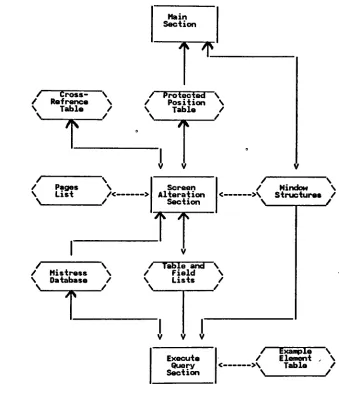
elements. See figure 2.3a for a diagram showing the
relationship between the data structures, the Mistress
/ Cross- \ / Refrence \ \ Tabla /
V ?
Main Section
/ Protected \ / Position S \ Table /
N
W
'
/ \
/ Pages \ \ List
/<-\ /
/ Mistress \ \ Database /
N
w
'
Screen Alteration
Section
A
A
/ \
/ Nindow \ ->\ Structures /
\ /
/ Table and \ / Field \ \ Lists /
\ /
Execute
Query
Section
/ Example N / Element , \ ->\ Table /
V /
[image:38.536.116.455.148.541.2]2.4. Functional Specifications
The
following
is a brief description of the higherlevel functions of the program:
1. Get data from screen - This function
uses the curses
routines to get input from the user from anyplace on
the terminal screen. Characters are read until the
return
key
or escapekey
is typed. Cursor control keys(which can send a one to three character code
depending
on the terminal) are checked for. Input is whatever is
typed at the terminal (a command on the command line
and/or information in the query portion of the screen. )
Output is an echo of what is typed.
2. Execute non-QBE Mistress commands - This function calls
Mistress using whatever was typed on the command line
(sortt display/ create/ rename/ drop/ empty/ database/
run from/ insert from/ update from/ do/ // or stop).
The stop command causes the QBE cleanup routines to be
performed before exiting the program. Input is the
Mistress command. Output is the same as if the command
was executed in SQL.
3. Execute screen alteration commands
-This function
executes the commands which alter the current screen.
These commands are: clear/ dravit delete/ up/ down/
right/ left/ save/ retrieve/ help/ refresh/ mover
enlarge/ and reduce. The clear command deletes all
condition
box,
or comment box to be drawn. Deleteremoves tables or boxes from the screen.
Up,
down,
right, and left scroll the screen one page in the
desired direction. Save writes the current query to a
file. Retrieve reads in a previously saved query.
Help
displays ahelp
screen. Refresh redraws thescreen when it is in error. Move moves the cursor.
Enlarge adds lines to a table, widens columns, adds lines to a
box,
or widens a boxdepending
on where thecursor is located. Reduce is the opposite of enlarge.
Input is the appropriate command typed on the command
line. The output is the altered screen.
4. Test mode
-This function executes commands used in the
testing mode. These commands are: tracer octal/ run/
dump/ and dumpall. Trace sets tracing on or off.
Octal displays the previous command in octal. Run
takes commands from a file instead of the command line.
Dump
writes the contents of the current page to a file.Dumpall writes the contents of several variables and
tables to a file.
5. Execute query - This function determines what operation
is to be performed
by
looking
at the query portion ofthe screen and calls the appropriate function
(select,
insert, update, delete). Input is the exec command.
6. Selects
-This function has to be able to execute any
select which can be executed
by
the MistressSQL,
including
joins and alternate formats. In addition, italso executes grouping operations. The user instructs
the program to draw pictorial representations of the
tables
involved,
conditionboxes,
and comment boxes andthen fills in the tables and boxes to specify the
parameters of the query. The output is the same as for
the corresponding SQL query.
7. Insertions - This
function inserts records into a
table. The user instructs the program to draw a
pictorial representation of the table and then fills in
the information to be added to the table. This can be
done one record at a time or several at a time. Output
is an acknowledgement that the insertions have been
completed.
8. Updates
-This function updates existing records in a
table. The user instructs the program to draw the
table and then fills in the updated information. This
can be done one row at at a time or several at a time.
Output is an acknowledgement.
9. Deletions - This function deletes records from a table.
The user instructs the program to draw a table and then
fills in the conditions which determine which records
will be deleted. This can be done one row at a time or
2.5. Algorithm
The
following
is a pseudo coded algorithm for thehigher level functions of the program:
main function:
initialize
repeat until command =
stop
process the command
cleanup routine
process command function:
get a screen of data through curses
check command line
if screen alteration command
process the command
else if test mode command and test mode is on
process the command
else if non-QBE Mistress command
call Mistress
else if command = exec
execute query
else if invalid command
display error message
get screen of data function:
repeat until return
key
or escapekey
is hitget a character through curses
check for cursor
key
- iffound,
move cursorcheck for escape
key
check for protected position - if
found,
tab tonext unprotected position
if character is printable
echo character
screen alteration command function:
if command = draw tablename
get table column names from Mistress
display
the tableupdate data structures
else if command = draw cond
draw blank condition box
update data structures
else if command = draw comm
draw a blank comment box
update data structures
else if command = up,
down,
right, or left
scroll 1 page in indicated direction
by
movingthe desired window to the current curses
screen
else if command = enlarge or reduce
determine position of cursor
determine what table or box the cursor is in
enlarge or reduce the indicated table or box
update data structures
determine position of cursor
delete
indicated
table or boxupdate data structures
else if command = clear
delete all tables and boxes
update data structures
else if command = save
save current query to a file
else if command = retrieve
delete all tables and boxes
read a previously saved query from a file
update data structures
else if command =
help
display help
screenre-display current screen
else if command = refresh
redraw current screen
else if command = move
move the cursor to the indicated position
test mode function:
if command = trace
turn tracing mode on or off
else if command = octal
print previous command in octal
read commands from a file instead of the
command line
else if command =
dump
write the current screen to a file
else if command - dumpall
write variables and data structures to a file
execute query function:
look for
i.,
d. , or u. ;if i.
process insertion
else if d.
process deletion
else if u.
process update;
else if anything else
process select
select function:
search tables and boxes
determine what columns are to be printed
determine "from"
clause table names
process example elements, constants, and conditions
formulate Mistress select command
call Mistress
insertion function:
for each row of table
call Mistress;
de1etion function:
for each row of table
process example elements, constants, and
conditions
formulate Mistress delete command
call Mistress;
update function:
for each row of table
look for updated columns
process example elements, constants, and
conditions
formulate Mistress update command
3. Systems
Documentation
3.1. Source Files
The
following
UNIX files contain the source code forthe Mistress/QBE interface program:
qbe.def
-defined constants
qbe.h
-external definitions of qlobal variables
qbem.c
-main program
qbeg.c
-global utility functions
qbet.c
-testing
mode functionsqbesa. c
-1st file of screen alteration functions
qbesb.c - 2nd
file of screen alteration functions
qbesg.c
-common functions called from qbesa.c and
qbesb. c
qbeqm. c
-main query execution functions
qbeqs.c
-"select"
type query execution functions
qbeqg.c
-common functions called from qbeqm. c and
qbeqs. c
The commands to compile the above source code (except the
qbet.c file) are located in the qbecc file. The commands
to run the interface are located in the qbe file.
3.2. Test Mode
The Mistress /QBE program has a built in
testing
modewhich is useful when debugging changes to the program.
the qbe.def file and compiling the qbet.c file using the
following
command:cc -c qbet.c -lcurses -ltermlib
The qbet.o file must be added to the last line of the qbecc
file and the qbecc file must be executed to recompile the
rest of the program.
When executing in
testing
mode a file called qbe. 1stwill be created which will contain the SQL version of every
query executed and any other Mistress commands which are
executed. The
following
additional commands will also beavailable:
trace
[on,
off]-this will turn tracing on and off
-when
tracing
is on, the name of most functionswill be written to the qbe. 1st file when the
function is entered and the word exit will be
written when the function is exited. (This can
be abbreviated tr).
octal - this
will
display
the previous command in octalon the error message lines. (abbreviation is oct)
run filenm - this
will cause commands to be read from
the indicated UNIX file instead of from the
command line.
dump
- thiswill
dump
the contents of the current pageto qbe. 1st. (abbreviation is du)
dumpall
-this will
dump
the contents of several globalposition, cross-reference, and page tables to
qbe. 1st.
(abbreviation
is dual I).3.3. Data
Structure
DetailsThe first of the principle data structures mentioned
in section 2.3. is a linked list of structures used to hold
information about tables and boxes. There are actually
three separate lists; one for tables, one for condition
boxes,
and one for comment boxes. The structure is calledTABLE_INF0 and contains the
following
information abouteach table or box: the type of entity (table or box); the
name; whether the name is simple or complex; the database
if different from the default; the length of the column on
the screen; the first line used on the screen; the last
line used on the screen; the last position used on the
screen; and pointers to the attribute list for the table
and the next and prior structures in the list. It also
contains several variables which are useful only
during
theactual execution of the query and which are reset for each
new execution.
The second principle data structure is a linked list
used to hold information about each attribute of a table.
There is one list for each TABLE_INF0 structure. This
structure is called FIELD_INF0 and contains the
following
information: the attribute name; whether the name is
the first position on the screen; and pointers to the next
and prior structures in the list. It also contains several
variables which are useful only
during
execution of thequery and which are reset for each new execution.
The third data structure is a table which determines
which positions on the screen can be typed into and which
are protected. There are actually two tables. The first
is called BSKIP and controls the command portion of the
screen. It is a fixed length 4 X 80 array. The second
table is called SKIP and controls the query portion of the
screen. It is implemented using pointers. There are 20
pointers for each vertical page of the query and each
pointer points to an area with a length of 80 times the
number of horizontal pages on the screen plus one position
to hold the null character so that each area can be handled
as a string. Each position in these tables is set to '1'
for protected or '2' for unprotected.
The fourth data structure is the cross-reference
table. This table is called Y_TAB and consists of 20
pointers for each vertical page of the screen. Each
pointer points to the TABLE_INF0 structure for the table or
box located on that line. If the line is
blank,
thepointer will be set to null.
The fifth structure is the curses window structure.
window, the current position within the window, and the
information on the window. For more
information,
see thesection on curses in the UNIX Programmer's Manual [1]. The
interface program uses several windows. There is a window
to hold the
information
on the current terminal screen.This is where all the information from the user is typed
and where the command portion of the screen is located.
There is a window to hold the
help
screen and two workwindows. There is also a window which holds all the
information for all the pages in the query. This window
contains 20 lines for each vertical page and 80 positions
for each horizontal page. Each page is defined as a 20 X
80 sub-window of the larger window.
The sixth structure is called PAGE_INF0 and is used to
hold information about each page in the query. There is
one PAGE_INF0 structure for each physical page and each
structure contains the
following
information: a pointer tothe associated sub-window; pointers to the next page up,
down,
left,
and right; the next available line on the page;and the page number.
The seventh structure is a linked list of structures
called VAR_INF0 which contain information about example
elements. There is one VAR_INF0 structure for each example
element defined in the query. Each structure contains the
following information: the name of the element; its line
attribute; and pointers to the next structure in the list
and the next structure with the same name. This structure
is only used
during
execution of thequery and is reset at
the
beginning
of each new execution.In addition to the above seven data structures which
are used to hold information about the query, there is also
a structure which is used when
building
the strings neededfor the SQL command. This structure is called STR_INF0 and
is used to hold information about
dynamically
allocatedvariable length strings. Each structure contains a pointer
to the string and the current size of the string. If a
fixed length string needs to be used in a function
requiring a variable length string, a STR_INFO structure
must be set up which points to the fixed length string.
3.4. Function Details
Each function in the Mistress/QBE program has a short
name and a
long
name. The short name identifies the sourcefile,
the relative position of the function within thefile,
and (usually) the calling function. Thelong
name isdescriptive of the purpose of the function. For example,
in the function name "sa320_build_condition_box",
"sa320"
is the short name and
"_build_condition_box"
is the
long
name. The
"sa"
means that the function is located in the
qbesa.c source file. The
"320"
gives the location in the
that it is called from function "sa300". The
long
nameindicates that the purpose of this function is to build a
condition box.
Most functions (except those that are called too
often) have the TRACE macro as the first statement. This
will cause the function name to be printed if tracing is on
in
testing
mode.Any
function which contains the TRACEmacro should use the RETURN macro instead of the return
command. This will cause the word
"exit"
to be printed.
Figures 3.4a
-3.4j
contain a detailedhierarchy
chartof all the functions in the program. If there are any
questions about the purpose of a
function,
refer to theI
3 II
.
it
39!
o
I
hi
ll(.
3<-?
3<-ffift
rss
Ift o Lu~
ftN N W
HH
il
H-ft
SS
**>
*
8
3
*
*
W
n
%
r-br
0* s
s-I
JT 8
s.
So<a
110
VII-Of.
Cft
t
ran iat
X,5!C
Bs
r
HCL. ftM-W "ft*
o
i
e a
2" fs o
e i
r
3? I?
JQ ft C ft <N 1So
4>3
ft T W <|3
o
fl
!
o
3
r
t
s-5-3!
IS
ofi
iff
u
SS
M
ftII
8
i
SS 1 ft
8;
Up
f!
18
r
Lss,
i-I
3*1
3
SJ
n
o I2*
tr
5-n
*8g
5H
31
Ill sis i a
88 m
*-I
f
I
i
V
*31*
ess ftN
3
I
t
s
38-ic
0.0.0
3ftSw
00
nn-7fia
si H U
ft O o
th
no**
I
IS!
It
w
S3
8j
t
I
vn% m
5-e[-,
8-8
s"
8S-3
TftW
01 o
4
0*T O :.,1S'
8-3!
?1
MO
li
8-5
I
ft_M
ITm*
ft*
TMO ft0
*>mo
0
ft? 8j
3no
iHU
Jft"
fl
u
2
J8
o
ill!
arft* n
s si
n
?
H-s
0*"M
m
o 3mo 3Ao m*o3<8
ffo
**3IN
t
MIS)3
8-ft
M
C m M
r
12
Y
D
8.S
3"
ft O
88S
ft
* D
fr
3.
1$
ft on
8.
-41
MM-Oi
MON
8JB
i i* M*
M>*+* 8ri
ft**40 *"3 W
M'M'O
v,51
HI.N
85
M*
i#?o 2$
v il ,to
Q.O 1
r T
fl 0 SM
5$i8
3.5. How
Grouping
Is ImplementedSince grouping is not
directly
supportedby
Mistress,it must be simulated using several steps and several
Mistress commands. The first step is to execute the QBE
query as though all the attributes containing the grouping
(gr. ) and function operators contained the print (p. )
operator instead and
ignoring
the unique (unq.),
list (1.),and
dump
(du. ) operators. The result of this query isinserted into a table called qbetab2. This results in a
table containing all the attributes needed for the grouping
operation from the records which satisfied the conditions
of the query. The unique grouping attributes (those which
were selected
by
the gr. operators) are then selected fromqbetab2 and inserted into a table called qbetabl. There
will be one line on the report for each record in qbetabJ.
Using
the ME routines, the records from qbetabl areinserted one at a time into a table called qbetab4. This
table will never contain more than more one record. Each
record is also inserted into a table called qbetab5. This
table will contain the records used to print the final
report. A Mistress SQL command will then be built to apply
the function to the records in qbetab2 which match the
record in qbetabl. If the unq. operator was specified in
the original query, it will be applied at this time. The
result of the function will be dumped into a file called
After all the records in qbetabl have been processed, a
Mistress SQL command will be built to select all the
records from qbetab5 and either
display
them on theterminal or list or
dump
them into a file if it wasspecified in the original QBE query. All the temporary
tables used are then dropped from the database.
3.6. How to Add a New Terminal Type
To add a new terminal type, the entry for the terminal
must be found in the /etc/
termcap
database. This entrywill give the number of lines and columns for the terminal
and also the character(s) sent
by
the cursor keys. Thenumber of columns are given after the "co#" entry, the
number of lines after
"li#",
the up cursorkey
after"ku=",
the down cursorkey
after"kd=",
the right cursorkey
after"kr=",
and the