International Journal of Innovative Technology and Exploring Engineering (IJITEE) ISSN: 2278-3075, Volume-8, Issue-6S3, April 2019
327
Published By:
Blue Eyes Intelligence Engineering & Sciences Publication
Retrieval Number: F10670486S319/19©BEIESP
Abstract: In Modern days, analyzing the malware samples through reverse engineering methodologies became more difficult because the malware authors are using Anti-reverse engineering techniques to evade the detection of malware. Previously these techniques are used by the software developers to prevent the software cracking, however such protection schemes are massively applied to malicious software these days. By identifying the functionality of these techniques, the malware analyst can easily detect the presence of Anti-Reverse Engineering methods. This paper proposes the proof of concept about the functionality of various anti-reverse engineering techniques used in malware samples.
Keywords: Malware, Reverse Engineering, Anti-reverse Engineering, Anti-debugging, Anti-VM.
I. INTRODUCTION
In recent years, the growth of malware is rapidly increasing. Over 350,000 malicious programs are being registered by Anti-virus softwares every day. In 2018, the most trending malwares are emotet, kovter, trickbot, zeus etc. The complexity of malwares has been increasing considerably with the emerging of technology. To analyze these malicious softwares effectively, the first step is to extract the malicious behavior which is the process of Reverse engineering. It is a structured approach for analyzing the malware. The behavior and functionality of the malwares can be detected through reverse engineering methodologies. Reverse-engineering a malware involves two key phases i.e Static and Dynamic analysis. On one hand static analysis describes about process of analyzing the code to determine its function, on other hand the dynamic analysis observes behavior of malware by executing it in a controlled and monitored environment [1].
In static analysis, the examining of the malware is done through two methods: Basic static and advanced static analysis. The Basic static phase involves analyzing the malware sample without observing the actual code. It is good to run the program in different anti-virus softwares to determine if the file is malicious or not. These softwares mainly detect the malicious files with the help of pattern matching as well as the file signatures analysis. For unique identification of the malware, hashing is the most commonly used method. By those hash values, the identification of the malware can be done easily. Mostly used hash algorithm for malware analysis is MD5 [2]. The Advanced static phase involves in analyzing execle (malware) through linked libraries and loading the sample in IDA disassembler.
Revised Manuscript Received on April 12, 2019.
R.Haritha Priya, student in KLEF, Computer science and engineering, Koneru Lakshmaiah Educational Foundation, vaddeswaram, Guntur district, Andhra Pradesh, India, [email protected]
K.Bhagavan, Professor in KLEF, Computer science and engineering, Koneru Lakshmaiah Educational Foundation, vaddeswaram, Guntur district, Andhra Pradesh, India, [email protected]
Unlike static analysis, the Dynamic analysis helps us to understand the malware functionality. It will be done through two approaches, Basic dynamic and advanced dynamic analysis. The Basic dynamic analysis involves observing the functionality of the malware by building it in a sandbox or in a virtual machine (safe environment). The analysis of the malware can be performed by using the sandboxes and monitoring the process of malware. In Advanced dynamic analysis, the malware is loaded into the debugger for examining the internal state. By using these methodologies, functionality and behavioral detection of the malware will be done.
When compared to static analysis, the dynamic analysis gives much information about runtime behavior of the malicious program. The security researcher can analyze behavior and functionality of the malware with the help of dynamic analysis [3]. In order to evade the detection of malware through this analysis, the malware authors are using the Anti-reverse Engineering techniques. The malware analyst will find difficulties in analyzing those malware samples which are using these techniques. Detecting and counteracting these types of techniques play a vital role in the analysis. This paper mainly focuses on Proof of Concept (POC) about the functionality of Anti-Reverse engineering techniques.
II. RELATED WORK
Malware authors use Anti-Reverse Engineering Techniques widely to impede the reverse engineering process of a malware. In reverse engineering, the malware analyst will run the malware samples in debuggers, disassemblers or in virtual environments to analyze the functionality and behavior [4]. The recent malware sample plays a lot of tricks to recognize the environment in which they are running with the help of Anti-reverse engineering techniques. Whenever malware recognizes the environment, it may hide the malicious functionality or it may terminate.
For example, the security researcher executes the malware in the debugger to know its functionality which is having the Anti-debugging technique. Then the malware hides its malicious behavior and simply runs as legitimate code, this is done by using the function named IsDebuggerPresent. Likewise, the malware sample also checks for less disk space, guest operating system tools such as vmware tools, virtual box guest additions and mac address of a hypervisor software etc., to detect if it is running in the virtual environment. In most of the cases, malware uses these techniques to make the analysis more
Anti –Reverse Engineering Techniques
328
Published By:
Blue Eyes Intelligence Engineering & Sciences Publication
Retrieval Number: F10670486S319/19©BEIESP
difficult. So, the malware analyst should know the functionality of those techniques which were used by the malware. These techniques include the following,
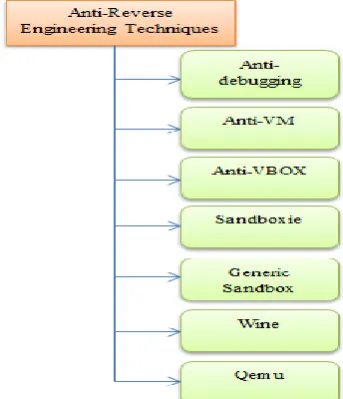
Anti-Reverse Engineering Techniques
Without having awareness on these Anti-Reverse engineering techniques one can’t detect their presence in the malware. So, this research paper creates the awareness of these Anti-Reverse engineering techniques.
III. ANTI-REVERSE ENGINEERING TECHNIQUES & RESULTS
Malwares are often executed in an isolated environment such as virtual machines, sandboxes and also malware analyst make use of debuggers to analyze the malicious software. All these techniques speedup the analysis, this is the reason why the malware authors trying to evade the analysis by implementing the anti-reverse engineering techniques to make the analysis difficult. In this paper, Proof of concept is developed to describe the functionality of Anti-Reverse engineering techniques. Let’s have a brief explanation of each technique used by the malwares. 3.1 Anti-Debugging:
One of the process to analyze the malware is debugging by using this technique malware analyst can look at the malware behavior at run time. Malware authors try to thwart this process by implementing anti debugging technique.
Anti-debugging is divided into several types: 1) Using Windows API functions 2) Timing checks
3) Code checksums
The Windows API which was used by the malware to detect the presence of debugger is IsDebuggerPresent.
Based on this function the malware sample checks if it is running under the debugger or not.
[image:2.595.75.247.107.307.2]The function “IsDebuggerPresent” returns zero if the current process is not running in the context of a debugger, If the current process is running in the context of a debugger, the return value is nonzero [5].
Figure 1
In the figure1 we can observe that, the exe contains the function IsDebuggerPresent and the EAX register values changes to “1”.
The function “IsDebuggerPresent” represents that the anti-debugging technique embeds in exe.
The Value “1” states that it was running under the debugger.
This is how the malware samples recognize the presence of debugger.
Figure 2
In figure 2 it states that the debugger is present. The malware author will embed these types of API’s in the malicious code.
3.2 Virtual Environment /Isolated Environment:
In order to study the malware behavior, analyst often uses the isolated environment to run the malware i.e virtual machines or sandboxes. By recognizing some of the artifact’s malware can differentiate between virtual machine and physical machine. With the help of these malware authors acknowledge the virtual machines. Below mentioned are the techniques how the malwares recognize the isolated environments.
3.2.1 Anti-VM:
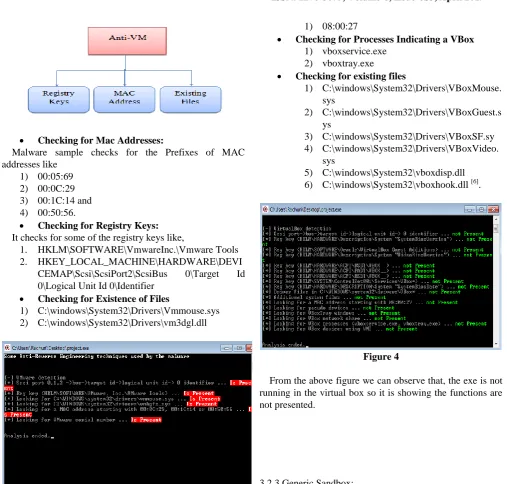
VMware is one of the virtual environments in which we can run many OS on it. The malware author makes use of these functions to recognize
International Journal of Innovative Technology and Exploring Engineering (IJITEE) ISSN: 2278-3075, Volume-8, Issue-6S3, April 2019
329
Published By:
Blue Eyes Intelligence Engineering & Sciences Publication
Retrieval Number: F10670486S319/19©BEIESP Checking for Mac Addresses:
Malware sample checks for the Prefixes of MAC addresses like
1) 00:05:69 2) 00:0C:29 3) 00:1C:14 and 4) 00:50:56.
Checking for Registry Keys: It checks for some of the registry keys like,
1. HKLM\SOFTWARE\VmwareInc.\Vmware Tools 2. HKEY_LOCAL_MACHINE\HARDWARE\DEVI CEMAP\Scsi\ScsiPort2\ScsiBus 0\Target Id 0\Logical Unit Id 0\Identifier
Checking for Existence of Files
[image:3.595.45.553.30.514.2]1) C:\windows\System32\Drivers\Vmmouse.sys 2) C:\windows\System32\Drivers\vm3dgl.dll
Figure 3
When it was executed in the VM it checks for the above mentioned functions. As the above figure clearly shows that all the functions i.e vmtools, mac address, vmmouse.sys etc Is Present, it states that the malware is running under the virtual environment(VMware)
3.2.2 Anti-Virtual Box:
It is one of the techniques in Anti-reverse engineering which hinder the process of reverse engineering. The virtual Box detection can be done by checking the following functions,
Checking for MAC address
1) 08:00:27
Checking for Processes Indicating a VBox 1) vboxservice.exe
2) vboxtray.exe Checking for existing files
1) C:\windows\System32\Drivers\VBoxMouse. sys
2) C:\windows\System32\Drivers\VBoxGuest.s ys
3) C:\windows\System32\Drivers\VBoxSF.sy 4) C:\windows\System32\Drivers\VBoxVideo.
sys
5) C:\windows\System32\vboxdisp.dll 6) C:\windows\System32\vboxhook.dll [6].
Figure 4
From the above figure we can observe that, the exe is not running in the virtual box so it is showing the functions are not presented.
3.2.3 Generic Sandbox:
Whenever we run the malware in the generic sandbox, it checks for,
Mouse Activity:
The function GetCursorPros calls twice to compare the recorded coordinates of the cursor, if the values are not equal then we can state that it was running in a simulated environment.
Username:
The function
[image:3.595.309.541.564.648.2]330
Published By:
Blue Eyes Intelligence Engineering & Sciences Publication
Retrieval Number: F10670486S319/19©BEIESP
strstr() checks for the strings like Sandbox, Virus, malware. If any of these strings are detected then the malware confirms that it was running in a sandbox.
File Path:
GetModuleFileName() function, used for retrieving the path of the file which contains the specified module. Here strstr() function checks for the strings like \\SAMPLE, \\VIRUS, Sandbox.
Drive Space:
The function DeviceIoControl() reserves some space for local variables and calls the function named CreateFile() to read the physicalDrive0 if it exists. Otherwise it returns an INVALID_HANDLE_VALUE as 1 and it states that the malware was not running under the sandbox. If it exists, the function checks whether the disk space <50GB or not. When the device space is smaller than 50 GB, it returns the value 0 representing the malware is running under sandbox [7]. Time checks:
[image:4.595.48.289.330.493.2]Gensandbox_uptime() uses GetTickCount() function to get the time elapsed.
Figure 5
As the above figure clearly shows that we are not running in the Generic Sandbox.
3.2.4 Qemu Detection:
The malware will detect the Qemu with the help of, Timing attacks.
OS implementation. Hardware implementation.
Emulator-related software inside the OS, for example VMware tools [8].
Registry Keys:
1) Scsi port: The Scsi identifier is detected when we enable the scsi option in the qemu.
2) SystemBiosVersion: Checks for the string named Qemu.
CPUid:
It will check for the string “Qemu Virtual CPU”.
Figure 6
As the figure 6 describes that we are not running the exe in Qemu environment.
3.2.5 Sandboxie:
The Sandboxie is one of the isolated environments, which is used by the malware analysts to run the malicious samples. It uses the module named sbiedll.dll. With the help of this process name the malicious program will detect that it was running in Sandboxie.
[image:4.595.306.552.519.661.2]Sbiedll.dll is an executable file which contains the machine code. Whenever we start the Sandboxie application, then commands in the sbiedll.dll will be executed [9].
Figure 7
The module sbiedll.dll is not existing so, from the above figure we can understand that the Sandboxie is not detected. 3.3 Wine Detection:
The wine is software used to run the windows executable files in Linux. Whenever the Windows’s malware executed in the linux systems through
International Journal of Innovative Technology and Exploring Engineering (IJITEE) ISSN: 2278-3075, Volume-8, Issue-6S3, April 2019
331
Published By:
Blue Eyes Intelligence Engineering & Sciences Publication
Retrieval Number: F10670486S319/19©BEIESP malware just infects the wine software.
It checks for the functions like GetProcAddress and Registry key for wine detection [10].
GetProcAddress: The function named GetProcAddress() will be called to get the wine_get_unix_file_ name function address which was exported and is available in kernel32.dll. If this function doesn’t return NULL then the wine has been detected.
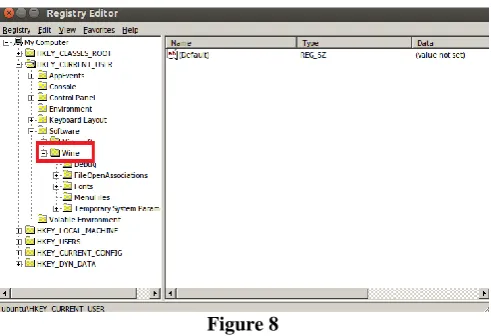
[image:5.595.47.293.317.485.2]Registry Key: It just looks for the windows registry key HKCU/SOFTWARE/Wine.
Figure 8
[image:5.595.47.293.542.701.2]In the Figure 8, we can observe the wine folder in the registry, with the presence of this folder the malware will detect it is running under the wine.
Figure 9
As the above figure 9 states that, we are using the Wine software to run the exe in the linux environment.
Due to the lack of awareness on these techniques malware analyst thinks that it is the legitimate file and runs in the host systems which lead to infection. So, it is important to know about Anti-Reverse Engineering Techniques.
IV. ACKNOWLEDGEMENT
This work is supported by the Department of Science and Technology, India through the fund sanctioned for improvement of Science & Technology infrastructure, at department of CSE, K.L University, by order number SR/FST/ESI-332/2013.
V. CONCLUSION
This paper discusses about the functionality of Anti-reverse engineering techniques. Malware analysts find the difficulties in analyzing the malware samples because the malware authors embed the Anti-reverse engineering technique. These techniques will thwart the detection of the malware from static and dynamic analysis. So, this paper gives a brief explanation about the functions used by the malware to evade the detection. With the help of these techniques the analysts can detect the presence of Anti-reverse engineering techniques in the malware sample.
REFERENCES
1. Jeremy Scott "Detecting malware through static and dynamic techniques" blog on NTT Security
2. Bo YuEmail authorYing FangQiang YangYong TangLiu Liu “A survey of malware behavior description and analysis” Frontiers of Information Technology & Electronic Engineering May 2018, Volume 19, Issue 5, pp 583–603
3. Gérard WagenerRadu StateEmail authorAlexandre Dulaunoy “Malware behaviour analysis” Journal in Computer Virology November 2008, Volume 4, Issue 4, pp 279–287
4. Syarif Yusirwan S, Yudi Prayudi, Imam Riadi "Implementation of Malware Analysis using Static and
Dynamic Analysis Method"
International Journal of Computer Applications (0975 – 8887) Volume 117 – No. 6, May 2015
5. Michael Sikorski and Andrew Honig "PRACTICAL MALWARE ANALYSIS" venom630
6. Yaniv Assor "Anti-VM and Anti-Sandbox Explained" blog on cyberbit.
7. Anna Bryk “Sandbox-Evading Malware: Techniques, Principles, and Examples” apriorit Dev Blog
8. "Reverse Engineering Malware Dynamic Analysis of Binary Malware II 2017" aalto
9. "sbiedll.dll" process library
![Figure 5 machine code. Sandboxie the start we Whenever application, then commands in the sbiedll.dll will be [9]executed](https://thumb-us.123doks.com/thumbv2/123dok_us/8209955.262966/4.595.48.289.330.493/figure-machine-sandboxie-start-application-commands-sbiedll-executed.webp)