
Cisco Ios Access Lists pdf
227
0
0
Full text
(2) Cisco IOS Access lists. TABLE OF CONTENTS Preface....................................................................................................................................5 Organization........................................................................................................................6 Audience .............................................................................................................................7 Conventions used in this book ............................................................................................8 Acknowledgments...............................................................................................................9 Chapter 1. Network Policies and Cisco Access Lists .......................................................10 1.1 Policy sets ...................................................................................................................11 1.1.1 Characteristics of policy sets ...............................................................................13 1.1.2 Policy sets in networks.........................................................................................13 1.2 The policy toolkit ........................................................................................................16 1.2.2 Controlling packets passing through a router ......................................................18 1.2.3 Controlling routes accepted and distributed ...............................................................19 1.2.4 Controlling routes accepted and distributed based on route characteristics...................20 1.2.5 Putting it all together............................................................................................21 Chapter 2. Access List Basics.............................................................................................22 2.1 Standard access lists....................................................................................................22 2.1.1 The implicit deny .................................................................................................23 2.1.2 Standard access lists and route filtering...............................................................24 2.1.3 Access list wildcard masks ..................................................................................25 2.1.4 Specifying hosts in a subnet versus specifying a subnet .....................................25 2.1.5 Access list wildcard masks versus network masks..............................................26 2.1.6 The implicit wildcard mask .................................................................................27 2.1.7 Sequential processing in access lists....................................................................28 2.1.8 Standard access lists and packet filtering ............................................................28 2.1.9 Generic format of standard access lists................................................................30 2.2 Extended access lists...................................................................................................31 2.2.1 Some general properties of access lists................................................................34 2.2.2 Matching IP protocols..........................................................................................34 2.2.3 More on matching protocol ports.........................................................................35 2.2.4 Text substitutes for commonly used ports and masks .........................................37 2.2.5 Generic format of extended access lists...............................................................38 2.3 More on matching .......................................................................................................40 2.3.1 Good numbering practices ...................................................................................44 2.4 Building and maintaining access lists .........................................................................46 2.4.1 Risks of deleting access lists as an update technique ..........................................48 2.4.2 Displaying access lists .........................................................................................49 2.4.3 Storing and saving configurations .......................................................................50 2.4.4 Using the implicit deny for ease of maintenance.................................................51 2.5 Named access lists ......................................................................................................51 Chapter 3. Implementing Security Policies ......................................................................52 3.1 Router resource control...............................................................................................52 3.1.1 Controlling login mode ........................................................................................53 3.1.2 Restricting SNMP access.....................................................................................56 3.1.3 The default access list for router resources..........................................................57. Page 2.
(3) Cisco IOS Access lists 3.2 Packet filtering and firewalls ......................................................................................58 3.2.1 A simple example of securing a web server ........................................................58 3.2.2 Adding more access to the web server.................................................................59 3.2.3 Allowing FTP access to other hosts.....................................................................60 3.2.4 Allowing FTP access to the server ......................................................................61 3.2.5 Passive mode FTP................................................................................................62 3.2.6 Allowing DNS access ..........................................................................................63 3.2.7 Preventing abuse from the server.........................................................................64 3.2.8 Direction of packet flow and extended access lists .............................................66 3.2.9 Using the established keyword to optimize performance....................................68 3.2.10 Exploring the inbound access list ......................................................................68 3.2.11 Session filtering using reflexive access lists......................................................75 3.2.12 An expanded example of packet filtering ..........................................................79 3.3 Alternatives to access lists ..........................................................................................88 3.3.1 Routing to the null interface ................................................................................88 3.3.2 Stopping directed broadcasts ...............................................................................89 3.3.3 Removing router resources ..................................................................................89 Chapter 4. Implementing Routing Policies.......................................................................90 4.1 Fundamentals of route filtering...................................................................................90 4.1.1 Routing information flow ....................................................................................90 4.1.2 Elements in a routing update................................................................................91 4.1.3 Network robustness..............................................................................................93 4.1.4 Business drivers and route preferences................................................................96 4.2 Implementing routing modularity ...............................................................................98 4.2.1 Minimizing the impact of local routing errors.....................................................99 4.2.2 Managing routing updates to stub networks ......................................................101 4.2.3 Redistributing routing information between routing protocols .........................102 4.2.4 Minimizing routing updates to stub networks using default networks..............103 4.2.5 Filtering routes distributed between routing processes .....................................106 4.3 Implementing route preferences ...............................................................................106 4.3.1 Eliminating undesired routes .............................................................................107 4.3.2 Route preferences through offset-list.................................................................110 4.3.3 Route preferences through administrative distance ...........................................114 4.4 Alternatives to access lists ........................................................................................119 4.4.1 Static routing ......................................................................................................119 4.4.2 Denying all route updates in or out of an interface............................................122 Chapter 5. Debugging Access Lists .................................................................................123 5.1 Router resource access control lists ..........................................................................123 5.1.1 Checking for correctness....................................................................................124 5.1.2 When access lists don't work .............................................................................125 5.1.3 Debugging router resource access lists..............................................................126 5.2 Packet-filtering access control lists...........................................................................127 5.2.1 Checking for correctness....................................................................................128 5.2.2 Debugging extended access lists........................................................................133 5.3 Route-filtering access control lists............................................................................140 5.3.1 Checking for correctness....................................................................................140 5.3.2 Debugging route-filtering access lists................................................................151. Page 3.
(4) Cisco IOS Access lists Chapter 6. Route Maps.....................................................................................................155 6.1 Other access list types ...............................................................................................156 6.1.1 Prefix lists ..........................................................................................................156 6.1.2 AS-path access lists............................................................................................159 6.1.3 BGP community attribute ..................................................................................164 6.2 Generic route map format .........................................................................................165 6.3 Interior routing protocols and policy routing............................................................168 6.4 BGP ...........................................................................................................................171 6.4.1 Match clauses in BGP........................................................................................171 6.4.2 Route maps as command qualifiers ...................................................................173 6.4.3 Implementing path preferences..........................................................................174 6.4.4 Propagating route map changes .........................................................................185 6.5 Debugging route maps and BGP...............................................................................186 Chapter 7. Case Studies....................................................................................................189 7.1 A WAN case study....................................................................................................189 7.1.1 Security concerns ...............................................................................................191 7.1.2 Robustness concerns ..........................................................................................191 7.1.3 Business concerns ..............................................................................................191 7.1.4 Site 1 router configurations................................................................................191 7.1.5 Site 2 router configurations................................................................................194 7.1.6 Site 3 router configurations................................................................................196 7.2 A firewall case study.................................................................................................199 7.2.1 Screening router configuration ..........................................................................201 7.2.2 Choke router configuration ................................................................................204 7.3 An Internet routing case study ..................................................................................207 7.3.1 Robustness concerns ..........................................................................................209 7.3.2 Security concerns ...............................................................................................209 7.3.3 Policy concerns ..................................................................................................209 7.3.4 Router configurations.........................................................................................210 Appendix A. Extended Access List Protocols and Qualifiers .......................................219 Appendix B. Binary and Mask Tables ............................................................................222 Appendix C. Common Application Ports .......................................................................226 Colophon ............................................................................................................................227. Page 4.
(5) Cisco IOS Access lists. Preface Building and maintaining a network involves more than just making sure that packets can flow between devices on the network. As a network administrator, you also want to ensure that only the right people can access resources on your network, and that your network will continue to run even if parts of that network fail or are configured incorrectly. Your organization may have directives that you need to implement, like using cheaper network paths whenever possible. In short, while maintaining connectivity is important, you also need to implement security, robustness, and business policies with your network. This book is about network policies and how to implement those policies using Cisco IOS access lists. I present a way to think about access lists and network policy, describe how access lists are built, and give examples of how to apply those access lists in different situations. Along the way, there are a number of sidebars and notes about concepts and information important to using access lists, and at the end of the book, there are appendixes with useful reference material. A brief note about what I cover: the access lists in this book deal only with the Internet Protocol (IP), though you could probably use many of the same techniques with other network protocols as well. While all the examples involve Cisco IOS access lists, many of the concepts are generic and can be applied to other router vendors' equipment. I've tried to make the examples in this book applicable to as many IOS versions as possible; most examples should work with Versions 10.* and above. If a feature is only available later or is known to fail with certain platforms and versions, I try to point that out. Please note, also, that the terms "access list" and "access control list" are used interchangeably throughout the book. It is unfortunate that the general policy mechanism for Cisco routers is known as an access list. The term access connotes that access lists apply only to the area of security, while in fact access lists are used for a whole range of policies, not just for security concerns. I envision this book as a guide and reference for implementing network policies with access lists on Cisco routers.. Page 5.
(6) Cisco IOS Access lists. Organization Chapter 1, motivates our discussion of access lists by giving examples of why you need to implement network policies. It then describes a framework for thinking about access lists and provides an idea of how we use access lists and the tools for implementing policy. Chapter 2, describes access list fundamentals: the format of the basic types, masking, and ways to maintain access lists. It also discusses some tricks and traps of access lists (like the difference between network masks and access list masks), some common mistakes, and ways to reduce the number of access list entries and access list changes you may need to make. Chapter 3, shows how to use access lists to implement security policies. It has examples of access lists that control access to router resources and to hosts, and discusses the tradeoffs of different kinds of access lists. The chapter includes explanations of how certain protocols work and ends with a discussion of access list alternatives. Chapter 4, describes using access lists to control routing. Network administrators typically use access lists for routing to make sure that their networks are robust and to implement business policy decisions; I include a number of examples demonstrating these tasks. Chapter 5, is about (what else?) debugging access lists. It first goes over how to check that your access lists are correct, and then shows what to do if you discover that they are wrong. Chapter 6, describes more advanced forms of access lists, including community lists, AS path access lists, and route maps. The chapter goes over policy routing and ends with a discussion of using access lists and routes with BGP, the Border Gateway Protocol. Chapter 7, concludes the book with some case studies of how different types and applications of access lists are used together in a variety of scenarios. There are three cases: an example of routers that connect sites within an organization, a firewall example, and a BGP routing example. Appendix A, has a number of tables listing keywords and qualifiers for extended access lists. Appendix B, contains a decimal/binary conversion chart and a table of prefix lengths and their corresponding network masks, access list masks, and valid networks. Appendix C, contains a table of commonly used application ports.. Page 6.
(7) Cisco IOS Access lists. Audience This book is designed for network administrators and others who use Cisco routers to implement policies, whether the policies are for security or to ensure that networks are robust. Basic knowledge of Cisco routers and TCP/IP is assumed. Those who are relatively new to using Cisco routers should start with Chapter 1 and work their way through Chapter 5. Network administrators who need to implement policy-based routing using route maps, whether with interior routing protocols or with BGP, should read Chapter 6. Chapter 7 contains case studies that readers may find useful. Administrators who are experienced in using Cisco routers can use this book as a reference for policy implementation, debugging, and access lists in general. Chapter 2 describes masking techniques that may reduce access list sizes and reduce the number of necessary changes. Chapter 3, Chapter 4, Chapter 6, and Chapter 7 have many examples of implementing basic security, robustness, and business policies. Readers interested in debugging access list problems should find Chapter 5 useful. The three appendixes contain helpful reference tables of access list keywords, decimal to binary conversions, and masks and ports that common applications use. Network administrators may find the table showing network masks, access list masks, and valid networks for each possible prefix length particular useful.. Page 7.
(8) Cisco IOS Access lists. Conventions used in this book I have used the following formatting conventions in this book: •. •. • •. Italic is used for router commands (commands that are typed at the router command prompt, whether in privileged mode or not), as well as for emphasis and the first use of technical terms. Constant width is used for router configurations (configuration commands that are either typed in while in configuration mode or read in from files loaded over the network). It is also used for strings and keywords that are part of configuration commands. Constant width italic is used for replaceable text. Constant width bold is used for user input.. Page 8.
(9) Cisco IOS Access lists. Acknowledgments There are several people and organizations I want to acknowledge. Clinton Wong needs to be mentioned because he was the person who let me know that O'Reilly was looking for authors in this area. Several organizations deserve thanks, particularly O'Reilly & Associates for being interested in my book, Intel for giving me the chance to learn about Cisco routers, and Cisco for making the routers I am writing about. I'd like to thank my editors—Mike Loukides, Simon Hayes, and Jim Sumser—for putting up with me through all of these years. Andre Paree-Huff, Sally Hambridge, Lynne Marchi, and Mark Degner deserve acknowledgment for providing excellent technical reviews. Finally, I'd like to thank Susan, Stephanie, Kevin, and Chris for enduring me throughout the writing of this book, and to Mom and Dad for watching the kids numerous times while I went off writing.. Page 9.
(10) Cisco IOS Access lists. Chapter 1. Network Policies and Cisco Access Lists In the best of all possible worlds, network administrators would never need network policies. Crackers would never break into a router to invade a network, routers would never pass bad routing information, and packets would never take network paths that network administrators did not intend. Sadly, we live in a hostile, imperfect world. Consider the following scenarios: •. •. •. Crackers penetrate Company A's public web site. The intruders replace the company's web content with pornography. Company A's management and public relations are consumed with dealing with the resulting negative publicity, much to the detriment of the company's core business. A network administrator works at Site O, one of many sites within a large, geographically dispersed intranet. Instead of typing "19", he types "10" ("9" and "0" are next to each other on the keyboard) when configuring a local router. As a result, Site O begins to advertise a route to network 10.0.0.0/8 instead of network 19.0.0.0/8. Since network 10.0.0.0/8 belongs to Site P, users on network 10 are unable to access the rest of the intranet. Network 19.0.0.0/8 users are also isolated because their route in Site P is also not getting advertised. Users at Sites O and P can't do any work requiring access to network resources outside their respective sites. A company has two connections to the Internet through different Internet service providers (ISPs), both at the same bandwidth. This has been implemented to provide backup routing in case one connection goes down. One of the ISPs has traffic-based prices while the other has a fixed price. To reduce costs, the company wants to use the fixed-price ISP unless the line to it goes down, in which case it will use the trafficbased Internet connection. Because a routing policy has not been implemented to enforce this preference, all Internet IP traffic passes through the usage-based connection, forcing the company to incur higher than necessary costs.. What can we conclude by looking at these scenarios? We see that crackers may try to penetrate networks, router configuration mistakes can happen, and network traffic may not flow through the path that network administrators intend. We see that these problems can occur accidentally or intentionally, often despite good intentions. In all these cases, if certain network policies had been formulated and enforced, costly problems could have been avoided. Let's look more closely at these scenarios. The first involves crackers breaking into a web site and modifying the contents. What kind of policy could prevent this situation? Allowing only HTTP (web) access to the web server from the Internet can greatly reduce the probability of a break-in, since such a policy makes it much more difficult for crackers to exploit operating system weaknesses or application software security holes. Even if someone gains access to the web server, preventing the use of services such as Telnet or FTP to or from the Internet would make it difficult to exploit the server as a platform for further attacks. It would also be difficult to upload pictures or other content to the server. This first scenario deals with security. A network administrator must worry about the definitive network security concerns: unauthorized modification of information, denial-ofservice attacks, unauthorized access, and eavesdropping. Throughout this book, you'll learn how to use Cisco access lists to enforce security policies.. Page 10.
(11) Cisco IOS Access lists The intranet scenario describes how a configuration mistake at one site in an enterprise network can create problems for another site far away. In this case, an intranet Site O advertised a route for a Site P, causing users in Site O and Site P to be cut off from the rest of the intranet. Again, why are both cut off? Typos happen. Errors in judgment happen. Even with injections of bad routing information and the best of intentions, a network should keep running. Network policies that help retain tight control over routes can minimize the impact of human error. This scenario illustrates the robustness problem. This problem is conceptually different from the first scenario and, in many ways, more difficult to deal with. In the security-oriented scenario, we are trying protect against hostile attacks. In the intranet scenario, we are trying to protect against operator mistakes. The difference in intent makes it much harder to anticipate where a problem can occur. Despite the difficulty, it is important that this type of scenario be anticipated. As intranets and the Internet become mission critical, configuration errors should not shut down networks. Configuration errors become more and more common as intranets and the Internet get bigger—the larger a network is, the more components it has that can fail in strange ways. Also, as more people are involved with maintaining a network, the greater the chance that one of them will make a configuration mistake. Access policies can minimize these risks. Maintaining a healthy and robust network is a major motivation for network access policies, as we will see repeatedly in future chapters. In the final scenario, traffic should go to the cheaper path, which is identical to the other path in every respect except for the way it is billed. In this scenario, security and robustness are not prime motivations. Instead, nontechnical business factors drive traffic policy. Business drivers are a third major motivation for network access policies. So these are the three key concerns that motivate the need for access policies: security, robustness, and business drivers. It should be mentioned that they are not always easily separated and distinct. Security is often (and should be) a major business reason for access policies. Good security also helps with network robustness: preventing denial-of-service attacks keeps the network up and healthy. Conversely, policies intending to maintain network robustness—minimizing the impact of accidental misconfiguration and equipment failures— can also minimize the impact of deliberate sabotage. Having a highly available, robust network is often a business goal that is key to an organization's effectiveness. Despite some overlap, I mention our three motivations as separate goals because they are distinct and important enough to help us focus on why we implement access policies.. 1.1 Policy sets Now that you know why you should have policies, how do you implement them in Cisco router networks? How are Cisco access lists involved with policy at all? In this section, I describe a conceptual framework that can help with the design and implementation of policies. The key concept in this framework is the policy set. If you think about policies in general (not just network access policy), every policy has two parts, what and how. "What" designates the objects included in a policy. "How" describes how those objects are affected by the policy. When a policy is enforced, some set of objects or is evaluated against whether it is affected by that policy. Let's look at policies in a department store. The store has a policy on business hours. Employees may come in during a specific range of hours, and customers are allowed in during another range. How is this policy Page 11.
(12) Cisco IOS Access lists divided into the two parts? The affected objects (the "what") are the store's employees and customers. The "how" is that employees are allowed in during certain hours, and customers are permitted to shop during certain hours. Of course, people other than employees, such as delivery workers, also go into stores. As each person goes in, the policy is enforced, and we check to see whether they are employees, deliverers, or customers. If they are customers, they may enter only during certain hours. Let's look at other policies a store might have. Many stores do not permit customers to bring in knapsacks or large bags. The "what" in the policy are the knapsacks and large bags brought by people coming to a store. The "how" is a rule forbidding customers from bringing them into the store and forcing them to check those items into lockers or drop them off in some area. Also, stores typically have a policy that only employees may enter certain areas. The "what" in this policy is employees. The "how" is that only employees are permitted in some area. When implementing traffic policies in Cisco router networks, we have to partition them in a similar way. The "what" of a policy, the set of objects affected, is what I will call the policy set. Let's look at the policy sets in the department store example. For the business-hours policy, the policy set consists of the store's customers. For the knapsack policy, the policy set consists of the knapsacks and large bags that customers bring into the store. For the restrictedarea policy, the policy set is made up of the stores' employees. Policy sets are defined using a series of policy set entries. These entries include or exclude objects of interest from a policy set. Let's go back to our department store policies to show how these policy set entries work. The store may have a policy that only employees who have undergone cashier training, supervisors, or managers may operate a cash register. In this case, the policy set is made of employees with the approved characteristics. We define the policy set with the following policy set entries: Employees with cashier training Supervisors Managers. When an employee tries to operate a cash register, he enters an employee ID number, which is checked against a database to see whether the employee is in the policy set. Is he an employee with cashier training? Is he a supervisor? Is he a manager? If any of these conditions apply, that employee is permitted to operate the cash register. In our knapsack policy example, knapsacks and large bags are included in our policy set, which is defined with the following policy set entries: Knapsacks Large bags. To enforce this policy, each person coming into the store with a bag is checked. Is the bag a knapsack? Then it is not permitted. Is the bag very large? Again, it is not permitted. If it is not one of the choices in the policy set (a purse, say), the policy does not apply, and the customer may bring the bag into the store. If the store changes its policy to allow large bags containing merchandise to be returned or exchanged, the policy set is then defined with the following policy set entries:. Page 12.
(13) Cisco IOS Access lists. Knapsacks Exclude large bags with merchandise for exchange or return Large bags. When this bag policy is enforced, people coming into the store have their bags checked. Do they have a knapsack? The bag may not be brought in. Does the bag have merchandise to exchange or return? Then it may be brought in. Is the bag large? If so, it may not be brought in. Policy set entries, as mentioned earlier, can either include or exclude objects from the policy set. 1.1.1 Characteristics of policy sets Notice that we add each entry to the policy set in the order specified. This is important because objects are compared sequentially against a policy set. As soon as an object matches a policy set entry, no more matching is done. If we had the policy set entries in the following order: Knapsacks Large bags Exclude large bags with merchandise for exchange or return. then "Large bags" are matched before excluding large bags with merchandise to be exchanged, and no exception is made. Enforcing policies takes up resources and has costs. The longer the policy set, the longer it takes to enforce the policy, and more resources are required. Using our department store example, if our policy set spelled out different colors of knapsacks and bags: Green knapsacks Purple knapsacks Red knapsacks Beige knapsacks All other knapsacks Aquamarine bags Blue bags Yellow bags Exclude pink bags with merchandise for exchange or return Exclude all large bags with merchandise for exchange or return All other bags. it would obviously take longer for an employee to inspect incoming bags. The number of points where policies are enforced also has an effect on resources. A store with many entrances would need to have an employee at each entrance to enforce the bag policy. This is why many department stores have only one entrance: to minimize the number of employees needed to enforce such a policy. 1.1.2 Policy sets in networks In network policies, policy sets are sets of the network objects that pass through or into a router. The three types of network objects that routers process are host IP addresses, packets, and routes. Network administrators implement policies by defining policy sets of these objects and applying rules to them. The policies are enforced as routers check the host IP. Page 13.
(14) Cisco IOS Access lists addresses, packets, and network numbers going through them to see if they are members of a defined policy set. If so, rules are applied to those network objects. 1.1.2.1 Policy sets of host IP addresses. Let's give a few examples to show how network policies and policy sets work. I'll describe a network policy, then break down each policy into a policy set and its rules. Let's start with the following policy: Only hosts in network 192.168.30.0/24 can log into Router A This is the network analog of the department store policy of allowing only employees into certain areas. In this case, the policy set is composed of the IP addresses in the network 192.168.30.0/24, which we can define as follows: Policy Set #1: Hosts with IP addresses in network 192.168.30.0/24 We implement this policy by allowing only hosts in the policy set to log into Router A. The rule that we apply is the following: Router logins are permitted only from Policy Set #1 When someone tries to log into the router, the IP address of the host is checked. If the IP address is in Policy Set #1, the person is permitted to log on. This is one way of limiting who can make changes to a router. For convenience, policy sets are labeled with numbers and, in some instances, names. This permits us to reuse policy sets. Let's add another policy as follows: Only hosts in network 192.168.30.0/24 may use Router A as an NTP (time) server We can then have the following policy setting without redefining a new policy set: Only hosts in Policy Set #1 may use the NTP Service 1.1.2.2 Policy sets of packets. The previous example showed how sets of host addresses form a policy set. Another type of network object that can be used to form policy sets is a packet. A security-oriented policy might state: Only web traffic is allowed to Host A Such a policy is designed to prevent scenarios like the one mentioned previously, where a web server was penetrated and altered. The policy set in this example consists of IP packets carrying the HTTP protocol (the web protocol) going to Host A: Policy Set #101: HTTP Packets to Host A. Page 14.
(15) Cisco IOS Access lists The policy set is applied against the router interface leading to Host A: Only packets in Policy Set #101 can pass through the router interface leading to Host A Only packets in Policy Set #101 are allowed through the interface to the host. Since web packets are the only packets defined in Policy Set #101, traffic to Host A is effectively limited to web traffic. In addition to host IP addresses and packets, policy sets can be comprised of routes. A policy might say the following: Accept only routes to network 192.168.65.0/24 from other routers A policy like this could be used to send only traffic to network 192.168.65.0/24 through a given router. It might also be used if we know that only routes to 192.168.65.0/24 arrive at the router. Any other routes received would be there only because of configuration mistakes (robustness being the key concern) or intentional attacks (security the key concern). Whatever our motivation, the policy set would be the following: Policy Set #2: Network 192.168.65.0/24 How would the policy set be affected? It would be as follows: Routing protocol: Accept only Policy Set #2 The result would be that network 192.168.65.0/24 is the only route allowed into the router's routing table. 1.1.2.3 Complex policy sets. As policies get more complex, it can be difficult to separate out a policy set. Take the following policy: Network traffic should pass through Organization X only as a last resort In other words, traffic should not go through Organization X unless no other route is available. This type of policy deals with scenarios like those discussed previously, where for business reasons like cost, certain network paths are preferred. How do we specify a policy set for this? Because traffic will not flow through a router to a given destination unless routing information exists for that destination, we can implement this policy by defining a policy set of all the routes going through Organization X: Policy Set #3: All routes going through Organization X We can then weight the metrics of the routes from the policy set to make them less appealing to routing processes and usable only as a last resort: Routing protocol: Add extra routing metric values to routes in Policy Set #3. Page 15.
(16) Cisco IOS Access lists So far, I have focused only on policy sets, so you might be wondering how Cisco access lists come into the picture. The function of Cisco access lists is to hold the specification of a policy set. The term "access list" is somewhat deceptive in that it implies only a security function. Though access lists are indeed used for security functions, they are properly understood as a general mechanism used by Cisco routers to specify a set of network objects subject to policy. Access lists are built of access list entries, which directly correspond with policy set entries. The framework described here is useful because it helps us think about network policies in ways that are almost directly translatable into Cisco access lists. In future chapters, I will almost always define network policies in terms of a policy set and a policy imposed upon it.. 1.2 The policy toolkit What do we do with our policy sets once we define them? How can we use those policy sets to prevent the described scenarios from happening? This section talks about the "policy toolkit," a set of four "tools" that are general techniques for manipulating policy sets. As we know, policy sets can be described as the "what" of a policy. The policy tools fit into our conceptual framework as the "how." Once we define a policy set, we must do something with it to implement a policy. There are four kinds of tools we can use with policy sets to implement network policy. These tools control the following: • • • •. Router resources Packets passing through the router Routes accepted and distributed Routes based on characteristics of those routes. It may not be obvious why a network administrator would use these tools. To understand this, think about the functions that a router performs in a network. First, in many ways, a router functions like a host in that there are certain services it provides—logins, network time, SNMP MIB data. These are router resources that a network administrator can control. Secondly, a router's key function is to forward packets from one network interface to another. Hence the network administrator can do packet filtering, i.e., can control the packets passing through the router. The last key function of a router is to accept and distribute routing information. Thus, there must be a way to control routes that are accepted and distributed. The most common way to do this is with the routes themselves: by filtering routes based on their network numbers. A second, more complex way to filter routes is to use another characteristic of the routes, like last hop or some other arbitrary route attribute. It can be argued that all route filtering is done based on some route characteristic, be it the network number or some other attribute, but we keep them in separate categories because route filtering based on route characteristics tends to be much more complex than filtering using network numbers. Controlling routes based on route properties also tends to use radically different access list constructs. For each of the four policy tools, I describe the typical policy set and provide an example of how the tool is used. I'll come back to these examples in later chapters when I show how to build and use access lists.. Page 16.
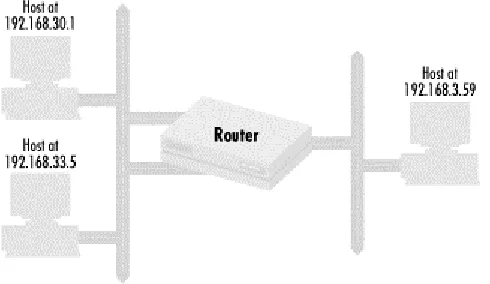
(17) Cisco IOS Access lists 1.2.1 Controlling router resources. In the original scenarios, we saw how letting unauthorized people log into a web server created problems. Similar problems can arise when unauthorized people are allowed to log into routers. Logins over the Internet can allow the theft of passwords and therefore the penetration of networks. Problems occur when unqualified people are allowed to make changes. For these reasons, as well as in a more general sense, network administrators need to have control over the resources on a router. The main concern here is, of course, security, but network robustness and business policy also play a large part. Earlier in this chapter, I mentioned that policy sets are composed of one of three things: host IP addresses, packets, or network addresses. When we control router resources, the policy set we use consists of host IP addresses: the IP addresses of systems that can access the resource. Let's look at a policy that defines which machines can access a certain router, restricting router logins to the hosts at IP addresses 192.168.30.1 and 192.168.33.5. Figure 1.1 shows how the network is configured with the router, the two hosts allowed to access it, and other hosts and networks. Figure 1.1. A router and hosts that could potentially access it. The first step in defining the access policy is to define the policy set of hosts that can access the router. We do that as follows: Policy Set #1: IP address 192.168.30.1 Policy Set #1: IP address 192.168.33.5 Policy Set #1: No other IP addresses Each of the first two policy set entries adds a specific IP address to the policy set: Policy Set #1 contains the IP addresses 192.168.30.1 and 192.168.33.5. The third entry explicitly denies all other IP addresses. Once the policy set is defined, we apply Policy Set #1 to router logins: Router logins: Use Policy Set #1 The policy we have just defined says that only hosts with IP addresses 192.168.30.1 and 192.168.33.5 may log into the router. Page 17.
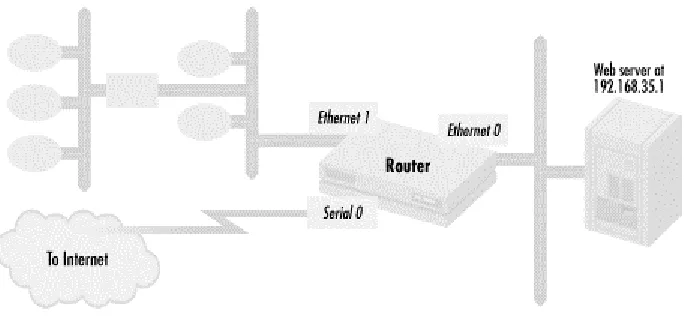
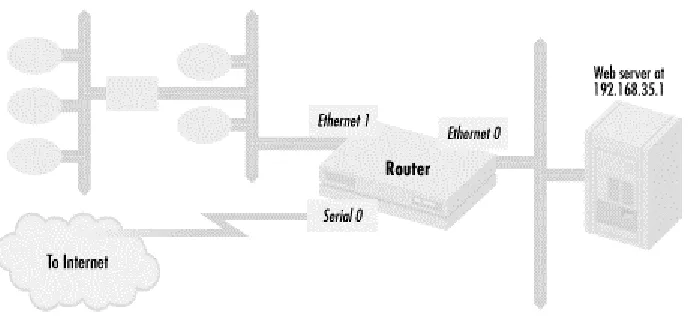
(18) Cisco IOS Access lists 1.2.2 Controlling packets passing through a router On the Internet, high-profile web servers are constantly probed for potential security vulnerabilities and opportunities for crackers to penetrate a web server and alter its contents. These web servers can be substantially protected from this and other kinds of attacks by limiting the type of packet a router passes on to the servers. With this policy tool, also known as packet filtering, we define in our policy sets the kinds of IP packets that can pass through router interfaces. Packet filtering with access lists is a very common use of Cisco routers, particularly as part of firewalls. Although the primary concern here is security, robustness and business policy are also considerations, since an organization may find that certain kinds of packets cause problems. It may decide that it doesn't want a certain type of network traffic passing through, thus conserving bandwidth or reducing costs. Almost all organizations now have some kind of web presence, so let's use the web server example to show how to specify a packet-filtering policy. The policy will limit access to a web server on an interface of a router to the web protocols HTTP and SSL. Figure 1.2 shows a typical network configuration that a company might use for this purpose. Figure 1.2. Restricting packets to a web server. This configuration shows a web server 192.168.35.1 on router interface Ethernet 0. The interface Ethernet 1 connects to other hosts and network segments with the company, while the serial line connects directly to the Internet. First, let's specify the policy set: Policy Set #101: HTTP packets to the host at 192.168.35.1 Policy Set #101: SSL packets to the host at 192.168.35.1 Policy Set #101: No other packets The first two policy set entries permit HTTP and SSL. The last entry excludes all other packets.. Page 18.
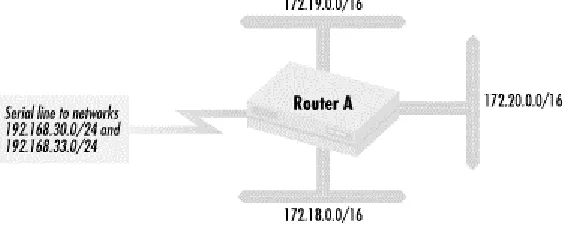
(19) Cisco IOS Access lists Finally, the policy set is applied to the router interface: Ethernet interface 0: Apply Policy Set #101 to outgoing packets The result is that the web server at 192.168.35.1 on interface Ethernet can be accessed only with web protocols. 1.2.3 Controlling routes accepted and distributed. In a previous scenario, a typographic error by a network administrator at one site causes both the site's own users and those at a remote site to lose network connectivity. Networks would function perfectly if routers always distributed routes correctly and with the metrics and directionality that the network designers intended. But as I said, operator mistakes do happen. In another scenario, network traffic paths are not optimal to an organization in terms of cost. Often the desire for traffic between networks to flow in certain paths goes against what would naturally happen with no intervention. To prevent routing errors from causing problems and to implement traffic-flow preferences, network implementers use the policy tool called route filtering. Route-filtering policies specify what routes are accepted into a router and what routes and routing metric values are distributed from a router. The policy sets used are composed of network numbers and are applied to routing protocols to indicate what routes are accepted and distributed from a router or what route metric values those routes should contain. The main motivations for using this policy tool are robustness and business policy. A network administrator wants to make sure that a network operates despite the presence of configuration mistakes, or a business may decide it wants traffic flowing over some paths instead of others to make a cost-effective use of bandwidth. Security can also be a motivation for implementing these policies since one way to attack a network is to inject bad routing information. Route filtering can effectively stop this attack. Let's look at a simple but very common application of route filtering. To implement such a policy, we first need to define what networks we want to accept. We then declare that these routes are the only routes accepted by a given routing protocol. In this example, we accept only two routes, 192.168.30.0/24 and 192.168.33.0/24, into an EIGRP routing process 1000. Figure 1.3 shows this network configuration. Figure 1.3. A configuration where route acceptance and distribution must be controlled. Page 19.
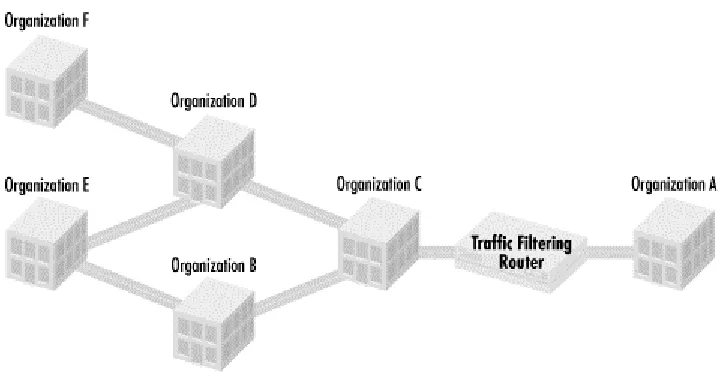
(20) Cisco IOS Access lists The policy set used with route filtering is composed of network numbers. For this example, we have the following policy set: Policy Set #2: Network 192.168.30.0/24 Policy Set #2: Network 192.168.33.0/24 Policy Set #2: No other networks It contains the two networks we specified and excludes all other networks. We then use this policy set to express the routes accepted for a given routing process: Routing process EIGRP 1000 accepts only routes in Policy Set #2 Only routes for networks 192.168.30.0/24 and 192.168.33.0/24 are accepted by EIGRP routing process 1000. All other routes are excluded, so only traffic for the two networks included will be permitted through the router. 1.2.4 Controlling routes accepted and distributed based on route characteristics. Networks would be much easier to configure and manage if network numbers were the only criteria we had for route policies, but there are other criteria for making routing decisions, including route characteristics. For instance, in a previous scenario, a company connecting to the Internet wants to prefer all routes coming from a particular Internet service provider. An ISP may want to route traffic depending on preferences that its customers send along with their route advertisements. In these cases, policy decisions must be made on some route characteristic other than just the network number. Like the previous policy tool, the policy sets themselves are still made up of network numbers, but membership in this type of policy set is based on route characteristics. Although this kind of access policy is typically implemented when dealing with Internet connectivity using the BGP-4 routing protocol, it can be done with interior routing protocols as well. The main motivations for using this technique are business drivers and robustness, but security (e.g., preventing denial-of-service routing attacks) can also drive its use. In the next example, we'll see how to control routing based on the properties of routes. In this case, we route based on the path that routing information has taken. Organization A has a policy to never route traffic through Organization B. Figure 1.4 shows how network connectivity might look in this situation.. Page 20.
(21) Cisco IOS Access lists Figure 1.4. Organization A restricting traffic based on paths. Organization A connects to other organizations through a number of paths, some that go through Organization B and some that do not. The policy's goal is to prevent traffic leaving Organization A from going through Organization B. To do this, Organization A needs to reject all routes with a path through Organization B. We build a policy set containing only routes that do not pass through Organization B: Policy Set #100: Exclude all routes passing through Organization B Policy Set #100: Include all other routes Then we apply the policy set to a route process: BGP Routing process #65001: Accept only routes in Policy Set #100 on the router connecting Organization A to Organization C. 1.2.5 Putting it all together These four policy tools are the fundamental techniques that network designers use to create and maintain secure and stable networks. Think of them as four different ways to keep networks running. When faced with an Internet or intranet network policy issue, you can deal with it by controlling router resources, packet filtering, or managing route distribution based on network numbers or route characteristics. We have seen how hosts, packets, and routes are controlled through access lists. Another way to think about these tools is to picture the router as a giant filter, taking in service requests from hosts, packets, or routes, and then either forwarding them, modifying them, or dropping them. When we want to implement a network policy, we use our four policy tools as different types of filters on the routers. The actual filters are defined in access lists. In this book, we'll see how to use access lists to apply these four categories of policy controls, and will return to these examples in future chapters to demonstrate how access lists are used.. Page 21.
(22) Cisco IOS Access lists. Chapter 2. Access List Basics In Chapter 1, I talked about the need for network policies. I also described how to build policy sets, how policy sets map to access lists, and how to manipulate policy sets. However, before actually implementing any policies, we must first understand how to create and manipulate access lists. This chapter covers the two basic access list types and how to build and maintain them. The first kind of access list is the standard access list, used to build policy sets of IP addresses or IP networks. In describing the standard access list, we will examine the basic syntax used in all Cisco access lists, including the basic permit/deny operation for including or excluding network objects from a policy set, address specification and masking, and the sequence used in processing access lists. The standard access list cannot cover all the policies we may wish to specify, particularly when we want to do packet filtering, which leads us to the second type of access list: the extended access list. This kind of list extends the format of the standard access list to specify packet filtering policies. Once we have learned to build the basic access list types, the chapter covers how to optimize, build, and maintain access lists.. 2.1 Standard access lists Also in Chapter 1, we discussed the motivations for implementing access policies. All three motivations—security, robustness, and business drivers—are reasons to use the standard access list. With these reasons in mind, a network administrator typically uses standard access lists to implement three types of policy controls: • • •. Access to router resources Route distribution Packets passing through a router. These policy controls require policy sets of IP addresses or network numbers, so the standard access list is used to build policy sets of either IP addresses or network numbers. Once policy sets are defined with standard access lists, the access list can restrict access to network resources, determine which routes are accepted and distributed, and change routing metrics to influence traffic behavior. To illustrate how the standard access list is used, let's look again at the first example from Chapter 1, which deals with controlling router resources. Recall that Figure 1.1 showed a router that we control and the hosts that are allowed to access its resources. We defined Policy Set #1, consisting of the hosts allowed to log into the router, as follows: Policy Set #1: IP address 192.168.30.1 Policy Set #1: IP address 192.168.33.5 Policy Set #1: No other IP addresses How does this policy set map to actual access lists? Here is the mapping: access-list 1 permit 192.168.30.1 access-list 1 permit 192.168.33.5 access-list 1 deny 0.0.0.0 255.255.255.255. Page 22.
(23) Cisco IOS Access lists The number after the access-list keyword is the access list number, so in this example, we define access list 1. The number also specifies what kind of access list it is. Different types of access lists for different network protocols use different ranges of access list numbers (e.g., IP uses 1-99 for standard access lists and 100-199 for extended access lists; IPX uses 800-899 for its standard access lists, while DECnet uses 300-399). The first two entries use the keyword permit, which includes the IP address listed in the entry into our policy set. In this example, we first include the IP address 192.168.30.1 into our policy set, followed by IP address 192.168.33.5. The third entry contains the keyword deny, which excludes the IP addresses following from the policy set. IP address and wildcard mask 0.0.0.0 255.255.255.255 means that we should match all packets. Combined with the deny keyword, this excludes all other packets (we'll discuss this mask format later in the chapter). It should be noted that access lists can be entered in the router's configuration only after you have obtained full privileges on the router and entered global configuration mode. What do we do with the policy set we have just defined? In the example, we want to control router login access. The policy set application is summarized as: Router logins: Only from hosts with IP addresses defined in Policy Set #1 In Cisco router configuration language, this maps to be: line vty 0 4 access-class 1 in. The first command line states that we are about to define some attributes about virtual terminal sessions (line vty), the Telnet sessions that allow people to log into the router. In this command we state that we will have five possible simultaneous sessions, labeled 0 to 4. The next command line states that the policy set defined by access list 1, our selected set of IP addresses, is the group of IP addresses that have access to the virtual terminal sessions. Only Telnet sessions initiated from hosts with those sets of IP addresses will be allowed to use one of the five available logins. In this way, we have just specified what IP addresses can telnet into our router. The line command makes all the following options we set apply to all possible Telnet sessions. We can also apply different access lists for each session. 2.1.1 The implicit deny Notice that we have used deny to exclude all other IP addresses from our policy set. The keyword deny is used to specify what is not included in the policy set. For example: access-list 2 deny 192.168.30.1 access-list 2 permit 192.168.33.5. Access list 2 does not include IP address 192.168.30.1 in the policy set but does include 192.168.33.5. These two access list entries are equivalent to the following single entry: access-list 2 permit 192.168.33.5. This is because access lists have an implicit deny at the end of them. Everything not explicitly permitted in the standard access list is denied. Similarly, in access list 1 listed earlier, we could have used the following as our access list:. Page 23.
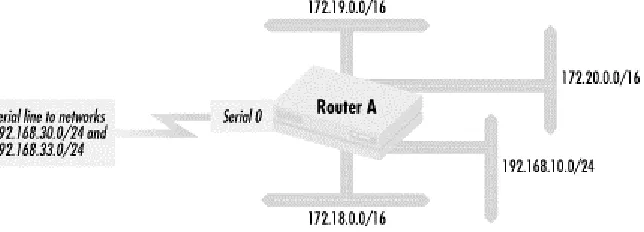
(24) Cisco IOS Access lists access-list 1 permit 192.168.30.1 access-list 1 permit 192.168.33.5. and omitted the final deny completely. The implicit deny is a key feature of Cisco access lists. It is a behavior that effects the way access lists are written, generally making them easier to deal with. We will use this feature extensively. 2.1.2 Standard access lists and route filtering Previously, I mentioned that the standard access list is also used in route filtering. This means that we can use standard access lists to build policy sets of routes. Let's go back to the example in Chapter 1 that illustrated how to filter routes. The network configuration is shown in Figure 2.1. Figure 2.1. A configuration where route acceptance and distribution must be controlled. We want a policy that restricts Router A (in Figure 2.1) so it forwards only traffic destined for the two networks 192.168.30.0/24 and 192.168.33.0/24 through the line on serial interface 0. We can implement this by configuring Router A to accept only routing information for these two networks from over the serial line. Traffic between the networks connected to Router A, 172.18.0.0/16, 172.19.0.0/16, 172.20.0.0/16, and 192.168.10.0/24, should be permitted, along with any traffic between those networks and the two networks on the other side of the serial line. All other traffic should be dropped. In addition to preventing the router from carrying unwanted traffic, this policy also prevents routing problems in case a configuration error (here or elsewhere) sends other routes to Router A over the serial line. To implement the policy, we need to configure the router to accept only the routes 192.168.30.0/24 and 192.168.33.0/24. Here is the policy set specification: Policy Set #2: Route 192.168.30.0/24 Policy Set #2: Route 192.168.33.0/24 Policy Set #2: No other routes When translated into standard access list notation, this policy set specification yields: access-list 2 permit 192.168.30.0 access-list 2 permit 192.168.33.0. Page 24.
(25) Cisco IOS Access lists This access list includes the two networks 192.168.30.0/24 and 192.168.33.0/24 in the policy set. We do not need an access list entry that excludes all other routes because the implicit deny at the end of access lists takes care of this. With the policy set established, we then apply it to a routing process. In our route distribution example, we specified this by saying: Routing process EIGRP #20: Accept only routes in Policy Set #2 inbound from interface serial The analogous route configuration commands are: router eigrp 20 distribute-list 2 in Serial0. The first line specifies the route protocol and EIGRP autonomous system (AS) number involved. The second line says that for this particular EIGRP routing process, only the routes in access list 2 from routing protocol updates over serial interface 0 will be accepted. 2.1.3 Access list wildcard masks An optional wildcard mask can be used to include many addresses in a policy set. For example: access-list 3 permit 192.168.30.0 0.0.0.255 access-list 3 permit 192.168.33.5. means that all the hosts on network 192.168.30.0/24 are included in our policy set, as well as the host with IP address 192.168.33.5. The wildcard mask is interpreted as a bit mask where 1 indicates "match anything" in the corresponding bit in the IP address, and 0 means match the IP address exactly in that bit position. Making the last octet of a mask all 1's (255) means match anything in the final octet. Thus every host in the network 192.168.30.0/24 is included in the policy set. If we apply the list to the virtual terminal lines: line vty 0 5 access-class 3 in. all the hosts in the 192.168.30.0/24 network and the host at 192.168.33.5 can log into the router. Another way to think about this is that a 1 is a wildcard for that particular bit position. Any value, 0 or 1, in the corresponding bit position is considered a match. 2.1.4 Specifying hosts in a subnet versus specifying a subnet It is important to distinguish between specifying a network number for inclusion in a policy set and specifying all of the hosts in a network in a policy set. Using the previous example, the access list entry: access-list 3 permit 192.168.30.0 0.0.0.255. includes all of the hosts in network 192.168.30.0/24 in a policy set. This is not the same as: access-list 4 permit 192.168.30.0. Page 25.
(26) Cisco IOS Access lists This access list entry includes the single IP address 192.168.30.0 in a policy set. 192.168.30.0 could be one of two things: a host IP address (a strange one at that, since hosts typically do not have in the last octet) or a network number. The entry does not include all of the hosts in network 192.168.30.0/24. If we use access list 4 in an access-class statement such as: line vty 0 4 access-class 4 in. only a host with the strange but potentially valid IP address of 192.168.30.0 would be permitted to have login access to the router. Access list 4 would more typically be used to build a policy set of a network addresses in a routing context: router eigrp 100 distribute-list 4 in Serial0. Here, only the route to network 192.168.30.0 would be permitted into the routing table via the EIGRP routing protocol. If we were building a policy set of network addresses, the address/mask pair 192.168.30.0 0.0.0.255 would include the network 192.168.30.0/24. But it would also include networks like 192.168.30.0/25, 192.168.30.128/25, and 192.168.30.192/26 that have different mask lengths. In general, it is best to be as specific as possible when defining policy sets. Including more than necessary can lead to unexpected behavior such as having unanticipated routes in a policy set. 2.1.5 Access list wildcard masks versus network masks One of the most commonly used access list wildcard masks specifies all the hosts in a network or a network subnet, as we saw in the previous example. Let's define a router's interface Ethernet on network 192.168.30.0/24 with the IP address 192.168.30.1. We use the following statements in the router: interface Ethernet 0 ip address 192.168.30.1 mask 255.255.255.0. The network mask (often called a subnet mask) is 255.255.255.0. The leftmost 24 bits have a value of 1, corresponding to the first three octets of the Ethernet IP address, which define the network number. They also correspond to the "24" used when we describe the network as 192.168.30.0/24. The remaining eight bits in this network's IP addresses identify the host. To get all of the hosts in Network 192.168.30.0/24 into a policy set, we use the following access list entry: access-list 3 permit 192.168.30.0 0.0.0.255. The access list wildcard mask is 0.0.0.255 (the rightmost eight bits are set to 1). This is a wildcard mask that matches all the addresses in the network, and it has 0 in the bit positions where the network mask has 1 and 1 where the mask has 0. Let's look at another example of network masks and access list wildcard masks that match all of the addresses in that network. For network 172.28.0.0/16, the network mask is 255.255.0.0. Each of the leftmost 16 bits has the value of 1. These 16 bits correspond to the Page 26.
(27) Cisco IOS Access lists first two octets in the IP address, which define the network number. The remaining 16 bits in the network's IP addresses identify the host. If we need an access list address and wildcard mask combination that include all the addresses in 172.28.0.0/16 in a policy set, we would use 172.28.0.0 0.0.255.255. The access list wildcard mask 0.0.255.255 has 1 in the 16 rightmost bits and 0 in the leftmost 16, while the network mask 255.255.0.0 has 0 in the 16 rightmost bits and 1 in the leftmost 16. Note again that the access list wildcard mask has 0 in the bit positions where the network mask has 1 and 1 where the network mask has 0. A fairly common mistake is to use a network's network mask when you want to match all of a network's hosts instead of an access list wildcard mask. Generally, for a network specified as A.B.C.D/n, the access list wildcard mask that matches all addresses in a network will have 1's in the 32-n rightmost bits and 0 in the leftmost n bits. For the network 192.168.32.0/26, the access list wildcard mask that matches all entries is 0.0.0.63 (six 1's in the rightmost column). The network mask on the interface is 255.255.255.192. For a supernet such as 192.168.80.0/22, the access list wildcard mask that matched all the addresses in it would be 0.0.3.255 while the network mask on the interface would be 255.255.252.0. 2.1.6 The implicit wildcard mask Earlier, we saw an IP address and wildcard mask combination of: 0.0.0.0 255.255.255.255. Since each bit is a 1 in this mask, any IP address on any network will be matched. This construct is very useful, and we'll see this address/mask combination used repeatedly in both basic access lists and in extended access lists. We've also seen access lists in which no mask is included. In the first example, we defined a policy set that included the addresses 192.168.30.1 and 192.168.33.5. The access list evolved to be the following: access-list 1 permit 192.168.30.1 access-list 1 permit 192.168.33.5. As I mentioned previously, a 0 in a bit position indicates that there should be a match at exactly that bit position. Thus, the access list could have been written as: access-list 1 permit 192.168.30.1 0.0.0.0 access-list 1 permit 192.168.33.5 0.0.0.0. The lack of an explicit wildcard mask implies a default mask of 0.0.0.0. The same applies to network numbers as well as hosts. The access list: access-list 2 permit 192.168.30.0 access-list 2 permit 192.168.33.0. includes 192.168.30.0/24 and 192.168.33.0/24 (assuming a typical class C network mask). It can also be written as:. Page 27.
(28) Cisco IOS Access lists access-list 2 permit 192.168.30.0 0.0.0.0 access-list 2 permit 192.168.33.0 0.0.0.0. The implicit wildcard mask is a handy feature that saves typing. We'll be using this feature of standard access lists repeatedly. 2.1.7 Sequential processing in access lists You will recall from Chapter 1 that access list entries are processed sequentially in the order in which they are entered. For each network object a router sees, it starts at the beginning of the access list with the first entry and checks for a match. If not, it continues down the list of entries until there is a match or no more entries. However, as soon as a match is found, no more matches are made, which makes the order of the entries in our list a very important consideration. Let's look at an example: access-list 4 permit 192.168.30.0 0.0.0.255 access-list 4 deny 192.168.30.70. Access list 4 includes the IP address 192.168.30.70. This address is included even though there is an explicit deny of the IP address. If the router controls a resource such as login access with access list 4, and then a host with 192.168.30.70 requests use of that resource, the router would see that 192.168.30.70 was in the policy set specified by access list 4 and allow the request. No more matches are made, and the entry on the second line is never reached. Access list 4 effectively specifies a policy set composed of all the addresses in network 192.168.30.0/24, including 192.168.30.70. On the other hand, IP address 192.168.30.70 is not in the policy set specified by access list 5: access-list 5 deny 192.168.30.70 access-list 5 permit 192.168.30.0 0.0.0.255. When the router checks 192.168.30.70 against access list 5, it matches on the first line. The address is explicitly excluded. Although both access lists have the same entries, the entries are in a different order. Access list 5 specifies a policy set of all the IP addresses in network 192.168.30.0/24 except 192.168.30.70. 2.1.8 Standard access lists and packet filtering At the beginning of this section, I mentioned that standard access lists are also used to control packets flowing through a router. Network administrators use standard access lists in this fashion when certain hosts need total access to hosts on a particular subnet. Figure 2.2 shows a network configuration used to protect a set of hosts that process payroll information.. Page 28.
(29) Cisco IOS Access lists Figure 2.2. Using the standard access list for packet filtering. The router shown has two interfaces, Ethernet and Ethernet 1. Network 192.168.33.0/24, where the payroll hosts live, is on the Ethernet 1 interface while the rest of the network is reachable through the Ethernet interface. We wish to limit access to the payroll systems on network 192.168.33.0/24 to the following hosts: 192.168.30.1, 172.28.38.1 (and no other host on network 172.28.38.0/24), and any remaining host in network 172.28.0.0/16. The hosts that can send traffic to the payroll hosts on network 192.168.33.0/24 should still be able to send any kind of IP traffic to that network. No other hosts have any business with the payroll systems and should have no access whatsoever. To implement this policy, let's first define a policy set containing the hosts that can access the payroll machines: Policy Set #6: host with IP address 192.168.30.1 Policy Set #6: host with IP address 172.28.38.1 Policy Set #6: no other host on subnet 172.28.38.0/24 of network 172.28.0.0/16 Policy Set #6: any remaining hosts in network 172.28.0.0/16 not previously excluded This policy set needs to be applied to any packet going out to interface Ethernet 1 where network 192.168.33.0/24 is attached: Ethernet interface 1: Apply Policy Set #6 to outgoing packets Policy Set #6 translates into the following standard access list: access-list access-list access-list access-list. 6 6 6 6. permit 192.168.30.1 permit 172.28.38.1 deny 172.28.38.0 0.0.0.255 permit 172.28.0.0 0.0.255.255. The first line puts the host at IP address 192.168.30.1 into the policy set, and the second line includes the host at 172.28.38.1. After this, we exclude all other hosts in the subnet 172.28.38.0/24. The fourth and last line includes the remaining hosts in network. Page 29.
(30) Cisco IOS Access lists 172.28.0.0/16. Note that the sequence of entries is critical. If the second and third lines switch positions, host 172.28.38.1 is never included in the policy set. If the third and fourth lines are switched, the hosts in subnet 172.28.38.0/24 are never excluded from the policy set. The Cisco configuration commands to set our policy are: interface Ethernet1 ip access-group 6 out. The first line specifies that we will modify the properties of interface Ethernet 1. The second line says that we apply the policy set defined by standard access list 6 to all IP traffic going out through router interface Ethernet 1 from the router. 2.1.9 Generic format of standard access lists Now that we've seen some examples of the standard access list, we can define its format in some detail. The generic format of the standard access list entry is: access-list (optional)]. [list. number]. [permit. |. deny]. [IP. address]. [wildcard. mask. The arguments are: list number. Access list number from 1 to 99. permit | deny Either permit or deny. permit includes a matching entry in the IP address set; deny excludes it. IP address. An IP address used to match and determine the IP addresses that are included in a policy set. wildcard mask. Optional wildcard mask that determines what bits of the IP address are significant when matching. The first part of the standard access list entry is the keyword access-list, which declares the line to be an access list entry. The next part is the access list number, which identifies what access list the entry belongs to. The standard access list for IP uses numbers between 1 and 99, which gives us 99 possible standard access lists, more than enough for typical configurations. With Cisco routers, access list numbers specifically define an access list's type and the network protocol it uses. Standard access lists can't use extended access list numbers, while access lists associated with other network protocol suites (such as DECnet or IPX) can't use standard or extended IP access list numbers.. Page 30.
Figure
+7
Outline
Extended access lists
Building and maintaining access lists
Controlling login mode
Exploring the inbound access list
An expanded example of packet filtering
Alternatives to access lists
Business drivers and route preferences
Debugging extended access lists
Debugging route-filtering access lists
Debugging route maps and BGP
Related documents
Secondly, based on the current tax practice of the real estate companies, the paper summaries the main tax, tax levels, tax planning, and the effect of non-tax cost factors on
Controlling network access and traffic using address filtering, dynamic access lists, and reflexive access lists can all contribute to increased
• Traffic Processing • Policies and Profiles • Portal Access • Network Access • Access Control Lists. • Application Access & Webtops • Web Application Access for LTM
Therefore, we need to edit access lists off-line, on a Unix host for example.. Later, we can copy it to
2 In the Smart Objects Library, select your User List - Access Control Mode object and click Manage.. 3 In the Manage dialog, click the
16 Total securities financing transaction exposures (sum of lines 12 to 15) - 17 Off-balance sheet exposure at gross notional amount 92,044,552 18 (Adjustments
• Access Control Lists
Some existing Cisco IOS security features include packet filtering via Access Control Lists (ACLs), Network Address Translation (NAT), network-layer encryption, and
