Java, Java, Java
Object-Oriented Problem Solving
Third Edition
R. Morelli and R. Walde
Trinity College
Hartford, CT
Creative Commons Attribution 4.0 International License (CC BY 4.0).
Preface to the Open Source
Edition
Java, Java, Java, 3ewas previously published by Pearson Education, Inc. The first edition (2000) and the second edition (2003) were published by Prentice-Hall. In 2010 Pearson Education, Inc. reassigned the copyright to the authors, and we are happy now to be able to make the book available under an open source license.
This PDF edition of the book is available under a Creative Commons Attribution 4.0 International License, which allows the book to be used, modified, and shared with attribution:
(https://creativecommons.org/licenses/by/4.0/).
– Ralph Morelli and Ralph Walde – Hartford, CT
– December 30, 2016
Preface to the Third Edition
We have designed this third edition ofJava, Java, Java to be suitable for
a typical Introduction to Computer Science (CS1) course or for a slightly more advanced Java as a Second Language course. This edition retains the “objects first” approach to programming and problem solving that was characteristic of the first two editions. Throughout the text we emphasize careful coverage of Java language features, introductory programming concepts, and object-oriented design principles.
The third edition retains many of the features of the first two editions, including:
• Early Introduction of Objects
• Emphasis on Object Oriented Design (OOD)
• Unified Modeling Language (UML) Diagrams
• Self-study Exercises with Answers
• Programming, Debugging, and Design Tips.
• From the Java LibrarySections
• Object-Oriented DesignSections
• End-of-Chapter Exercises
• Companion Web Site, with Power Points and other Resources
TheIn the Laboratorysections from the first two editions have been moved onto the book’s Companion Web Site. Table 1 shows the Table of Contents for the third edition.
What’s New in the Third Edition
The third edition has the following substantive changes:
• Although the book retains its emphasis on a “running example”
that is revisited in several chapters, the CyberPet examples have been replaced with a collection of games and puzzle examples. The CyberPet examples from earlier editions will be available on the Companion Web Site.
Table 1: Table of Contents for the Third Edition.
Chapter Topic
Chapter 0 Computers, Objects, and Java (revised)
Chapter 1 Java Program Design and Development
Chapter 2 Objects: Defining, Creating, and Using
Chapter 3 Methods: Communicating with Objects (revised)
Chapter 4 Input/Output: Designing the User Interface (new)
Chapter 5 Java Data and Operators
Chapter 6 Control Structures
Chapter 7 Strings and String Processing
Chapter 8 Inheritance and Polymorphism (new)
Chapter 9 Arrays and Array Processing
Chapter 10 Exceptions: When Things Go Wrong
Chapter 11 Files and Streams
Chapter 12 Recursive Problem Solving
Chapter 13 Graphical User Interfaces
Chapter 14 Threads and Concurrent Programming
Chapter 15 Sockets and Networking (expanded)
Chapter 16 Data Structures: Lists, Stacks, and
Queues (revised and expanded)
• Chapters 0 (Computers, Objects, and Java) and 1 (Java Program
De-sign and Development) have been substantially reorganized and rewritten. The new presentation is designed to reduce the pace with which new concepts are introduced. The treatment of object-oriented (OO) and UML concepts has also been simplified, and some of the more challenging OO topics, such as polymorphism, have been moved to a new Chapter 8.
• The new Java 1.5Scannerclass is introduced in Chapter 2 and is
used to perform simple input operations.
• Chapter 4 (Input/Output: Designing the User Interface) has been
completely written. Rather than relying primarily on applet inter-faces, as in the second edition, this new chapter provides indepen-dent introductions to both a command-line interface and a graphi-cal user interface (GUI). Instructors can choose the type of interface that best suits their teaching style. The command-line interface is
based on the BufferedReaderclass and is used throughout the
rest of the text. The GUI is designed to work with either graphi-cal applications or applets. Both approaches are carefully presented to highlight the fundamentals of user-interface design. The chapter concludes with an optional section that introduces file I/O using the newScannerclass.
• Much of the discussion of inheritance and polymorphism, which
was previously woven through the first five chapters in the second edition, has been integrated into a new Chapter 8.
• An optionalgraphics trackis woven throughout the text. Beginning
some of the examples that were previously presented in Chapter 10 of the second edition.
• Chapter 15, on Sockets and Networking, is expanded to cover some
of the more advanced Java technologies that have emerged, includ-ing servlets and Java Server Pages.
• Chapter 16, on Data Structures, has been refocused on how to use
data structures. It makes greater use of Java’s Collection Framework,
including theLinkedListandStackclasses and theList
inter-face. It has been expanded to cover some advanced data structures, such as sets, maps, and binary search trees.
The Essentials Edition
AnEssentials Editionof the third edition, which will include Chapters 0-12, will be published as a separate title. The Essentials Edition will cover those topics (Chapters 0-9) that are covered in almost all introductory (CS1) courses, but it will also include topics (Exceptions, File I/O, and Recursion) that many CS1 instructors have requested.
Why Start with Objects?
The Third Edition still takes an objects-early approach to teaching Java,
with the assumption that teaching beginners the “big picture” early gives them more time to master the principles of object-oriented programming. This approach seems now to have gained in popularity as more and more instructors have begun to appreciate the advantages of the object-oriented perspective.
Object Orientation (OO) is a fundamental problem solving and design concept, not just another language detail that should be relegated to the middle or the end of the book (or course). If OO concepts are introduced late, it is much too easy to skip over them when push comes to shove in the course.
The first time I taught Java in our CS1 course I followed the same ap-proach I had been taking in teaching C and C++ — namely, start with the basic language features and structured programming concepts and then, somewhere around midterm, introduce object orientation. This approach was familiar, for it was one taken in most of the textbooks then available in both Java and C++.
One problem with this approach was that many students failed to get the big picture. They could understand loops, if-else constructs, and arith-metic expressions, but they had difficulty decomposing a programming problem into a well-organized Java program. Also, it seemed that this procedural approach failed to take advantage of the strengths of Java’s object orientation. Why teach an object-oriented language if you’re going to treat it like C or Pascal?
I was reminded of a similar situation that existed when Pascal was the predominant CS1 language. Back then the main hurdle for beginners was
and parameter passing and learning how todesignprograms as a
collec-tion of procedures.Oh! Pascal!, my favorite introductory text, was typical
of a “procedures early” approach. It covered procedures and parameters in Chapter 2, right after covering the assignment and I/O constructs in Chapter 1. It then covered program design and organization in Chap-ter 3. It didn’t get into loops, if-else, and other structured programming concepts until Chapter 4 and beyond.
Today, the main hurdle for beginners is the concept ofobject abstraction. Beginning programmers must be able to see a program as a collection of interacting objects and must learn how to decompose programming prob-lems into well-designed objects. Object orientation subsumes both proce-dural abstraction and structured programming concepts from the Pascal days. Teaching objects-early takes a top-down approach to these three im-portant concepts. The sooner you begin to introduce objects and classes, the better the chances that students will master the important principles of object orientation.
Java is a good language for introducing object orientation. Its object model is better organized than C++. In C++ it is easy to “work around” or completely ignore OO features and treat the language like C. In Java there are good opportunities for motivating the discussion of object orien-tation. For example, it’s almost impossible to discuss GUI-based Java ap-plications without discussing inheritance and polymorphism. Thus rather than using contrived examples of OO concepts, instructors can use some of Java’s basic features — the class library, Swing and GUI components — to motivate these discussions in a natural way.
Organization of the Text
The book is still organized into three main parts. Part I (Chapters 0-4) in-troduces the basic concepts of object orientation and the basic features of the Java language. Part II (Chapters 5-9) focuses on remaining language el-ements, including data types, control structures, string and array process-ing, and inheritance and polymorphism. Part III (Chapters 10-16) covers advanced topics, including exceptions, file I/O, recursion, GUIs, threads and concurrent programming, sockets and networking, data structures, servlets, and Java Server Pages.
The first two parts make up the topics that are typically covered in an introductory CS1 course. The chapters in Part III are self-contained and can be selectively added to the end of a CS1 course if time permits.
The first part (Chapters 0 through 4) introduces the basic concepts of object orientation, including objects, classes, methods, parameter passing, information hiding, and a little taste of inheritance, and polymorphism. The primary focus in these chapters is on introducing the basic idea that an object-oriented program is a collection of objects that communicate and cooperate with each other to solve problems. Java language elements are introduced as needed to reinforce this idea. Students are given the basic building blocks for constructing Java programs from scratch.
Table 2: A one-semester course.
Weeks Topics Chapters
1 Object Orientation, UML Chapter 0
Program Design and Development Chapter 1
2-3 Objects and Class Definitions Chapter 2
Methods and Parameters Chapter 3
Selection structure (if-else)
4 User Interfaces and I/O Chapter 4
5 Data Types and Operators Chapter 5
6–7 Control Structures (Loops) Chapter 6
Structured Programming
8 String Processing (loops) Chapter 7
9 Inheritance and Polymorphism Chapter 8
10 Array Processing Chapter 9
11 Recursion Chapter 12
12 Advanced Topic (Exceptions) Chapter 10
13 Advanced Topic (GUIs) Chapter 11
Advanced Topic (Threads) Chapter 15
on how objects are constructed and how they interact with each other through method calls and parameter passing.
The second part (Chapters 5 through 9) focuses on the remaining lan-guage elements, including data types and operators (Chapter 5), control structures (Chapter 6), strings (Chapter 7), and arrays (Chapter 9). It also provides thorough coverage of inheritance and polymorphism, the primary mechanisms of object orientation: (Chapter 8).
Part three (Chapters 10 through 16) covers a variety of advanced topics (Table 1). Topics from these chapters can be used selectively depending on instructor and student interest.
Throughout the book, key concepts are introduced through simple, easy-to-grasp examples. Many of the concepts are used to create a set of games, which are used as a running example throughout the text. Our pedagogical approach focuses on design. Rather than starting of with lan-guage details, programming examples are carefully developed with an emphasis on the principles of object-oriented design.
Table2 provides an example syllabus from our one-semester CS1
course. Our semester is 13 weeks (plus one reading week during which classes do not meet). We pick and choose from among the advanced topics during the last two weeks of the course, depending on the interests and skill levels of the students.
Contents
0 Computers, Objects, and Java 1
0.1 Welcome . . . 2
0.2 What Is a Computer? . . . 2
0.3 Networks, the Internet and the World Wide Web . . . 4
0.4 Why Study Programming?. . . 6
0.5 Programming Languages . . . 7
0.6 Why Java? . . . 9
0.7 What Is Object-Oriented Programming? . . . 11
1 Java Program Design and Development 23 1.1 Introduction . . . 24
1.2 Designing Good Programs . . . 24
1.3 Designing a Riddle Program. . . 26
1.4 Java Language Elements . . . 34
1.5 Editing, Compiling, and Running a Java Program . . . 48
1.6 From the Java Library: System and PrintStream . . . 52
2 Objects: Using, Creating, and Defining 61 2.1 Introduction . . . 62
2.2 UsingStringObjects . . . 62
2.3 Drawing Shapes with aGraphicsObject (Optional) . . . . 66
2.4 Class Definition . . . 69
2.5 CASE STUDY: Simulating a Two-Person Game . . . 76
2.6 From the Java Library:java.util.Scanner. . . 90
3 Methods: Communicating with Objects 101 3.1 Introduction . . . 102
3.2 Passing Information to an Object . . . 102
3.3 Constructor Methods . . . 109
3.4 Retrieving Information from an Object . . . 114
3.5 Passing a Value and Passing a Reference . . . 118
3.6 Flow of Control: Control Structures. . . 121
3.7 Testing an ImprovedOneRowNim . . . 130
3.8 From the Java Libraryjava.lang.Object . . . 135
3.9 Object-Oriented Design: Inheritance and Polymorphism . . 136
3.10 Drawing Lines and Defining Graphical Methods (Optional) 138 4 Input/Output: Designing the User Interface 149 4.1 Introduction . . . 150
4.2 The User Interface . . . 150
4.3 A Command-Line Interface . . . 151
4.4 A Graphical User Interface (GUI) . . . 160
4.5 Case Study: The One Row Nim Game . . . 176
4.6 From the Java Library:java.io.File and File Input (Optional) . . . 183
5 Java Data and Operators 197 5.1 Introduction . . . 198
5.2 Boolean Data and Operators . . . 199
5.3 Numeric Data and Operators . . . 205
5.4 From the Java Libraryjava.lang.Math . . . 216
5.5 Numeric Processing Examples . . . 217
5.6 From the Java Library java.text.NumberFormat . . . 229
5.7 Character Data and Operators . . . 231
5.8 Example: Character Conversions . . . 235
5.9 Problem Solving = Representation + Action . . . 237
6 Control Structures 241 6.1 Introduction . . . 242
6.2 Flow of Control: Repetition Structures . . . 242
6.3 Counting Loops . . . 243
6.4 Example: Car Loan . . . 252
6.5 Graphics Example: Drawing a Checkerboard . . . 255
6.6 Conditional Loops . . . 259
6.7 Example: Computing Averages . . . 266
6.8 Example: Data Validation . . . 270
6.9 Principles of Loop Design . . . 270
6.10 TheswitchMultiway Selection Structure. . . 273
6.11 OBJECT-ORIENTED DESIGN: Structured Programming . . . 277
7 Strings and String Processing 297 7.1 Introduction . . . 298
7.2 String Basics . . . 298
7.3 Finding Things Within a String . . . 304
7.4 Example: Keyword Search . . . 306
7.5 From the Java Library: java.lang.StringBuffer . . . 308
7.6 Retrieving Parts of Strings . . . 310
7.7 Example: Processing Names and Passwords . . . 312
7.8 Processing Each Character in aString . . . 313
7.9 Comparing Strings . . . 317
7.10 From the Java Library: java.util.StringTokenizer . . . 323
7.11 Handling Text in a Graphics Context (Optional) . . . 324
8 Inheritance and Polymorphism 337 8.1 Introduction . . . 338
8.3 Abstract Classes, Interfaces,
and Polymorphism . . . 347
8.4 Example: A Toggle Button . . . 353
8.5 Example: The Cipher Class Hierarchy . . . 357
8.6 Case Study: A Two Player Game Hierarchy . . . 363
8.7 Principles Of Object-Oriented Design . . . 384
9 Arrays and Array Processing 393 9.1 Introduction . . . 394
9.2 One-Dimensional Arrays. . . 394
9.3 Simple Array Examples . . . 401
9.4 Example: Counting Frequencies of Letters. . . 403
9.5 Array Algorithms: Sorting . . . 406
9.6 Array Algorithms: Searching . . . 414
9.7 Two-Dimensional Arrays. . . 417
9.8 Multidimensional Arrays (Optional) . . . 426
9.9 OBJECT-ORIENTED DESIGN: Polymorphic Sorting (Optional) . . . 428
9.10 From the Java Library: java.util.Vector . . . 430
9.11 Case Study: An N-Player Computer Game . . . 431
9.12 A GUI-Based Game (Optional Graphics) . . . 437
10 Exceptions: When Things Go Wrong 459 10.1 Introduction . . . 460
10.2 Handling Exceptional Conditions . . . 460
10.3 Java’s Exception Hierarchy . . . 462
10.4 Handling Exceptions Within a Program . . . 466
10.5 Error Handling and Robust Program Design . . . 477
10.6 Creating and Throwing Your Own Exceptions . . . 487
10.7 From the Java Library:JOptionPane . . . 489
11 Files and Streams: Input/Output Techniques 499 11.1 Introduction . . . 500
11.2 Streams and Files . . . 500
11.3 CASE STUDY: Reading and Writing Text Files . . . 505
11.4 TheFileClass . . . 518
11.5 Example: Reading and Writing Binary Files . . . 521
11.6 Object Serialization: Reading and Writing Objects . . . 530
11.7 From the Java Library javax.swing.JFileChooser . . . 535
11.8 Using File Data in Programs . . . 536
12 Recursive Problem Solving 545 12.1 Introduction . . . 546
12.2 Recursive Definition . . . 549
12.3 Recursive String Methods . . . 551
12.4 Recursive Array Processing . . . 563
12.6 OBJECT-ORIENTED DESIGN:
Tail Recursion . . . 573
12.7 OBJECT-ORIENTED DESIGN: Recursion or Iteration? . . . 574
12.8 From the Java Library: javax.swing.JComboBox . . . 577
13 Graphical User Interfaces 591 13.1 Introduction . . . 592
13.2 Java GUIs: From AWT to Swing. . . 592
13.3 The Swing Component Set . . . 595
13.4 OBJECT-ORIENTED DESIGN: Model-View-Controller Architecture . . . 596
13.5 The Java Event Model . . . 598
13.6 CASE STUDY: Designing a Basic GUI . . . 602
13.7 Containers and Layout Managers . . . 614
13.8 Checkboxes, Radio Buttons, and Borders . . . 620
13.9 Menus and Scroll Panes . . . 629
14 Threads and Concurrent Programming 643 14.1 Introduction . . . 644
14.2 What Is a Thread? . . . 644
14.3 From the Java Library:java.lang.Thread . . . 648
14.4 Thread States and Life Cycle. . . 654
14.5 Using Threads to Improve Interface Responsiveness . . . 656
14.6 CASE STUDY: Cooperating Threads . . . 664
14.7 CASE STUDY: The Game of Pong. . . 679
15 Sockets and Networking 693 15.1 Introduction . . . 694
15.2 An Overview of Networks . . . 694
15.3 Using Multimedia Network Resources for a Graphical Pro-gram . . . 700
15.4 From the Java Library:java.net.URL . . . 701
15.5 The Slide Show Program . . . 704
15.6 Adding Text Network Resources for an Application . . . 708
15.7 Client/Server Communication viaSockets. . . 719
15.8 CASE STUDY: Generic Client/Server Classes . . . 724
15.9 Playing One Row Nim Over the Network . . . 732
15.10Java Network Security Restrictions . . . 741
15.11Java Servlets and Java Server Pages. . . 742
16 Data Structures: Lists, Stacks, and Queues 757 16.1 Introduction . . . 758
16.2 The Linked List Data Structure . . . 758
16.3 OBJECT-ORIENTED DESIGN: The List Abstract Data Type (ADT) . . . 770
16.4 The Stack ADT. . . 776
16.6 From the Java Library: The Java Collections Framework and Generic Types . . . 782
16.7 Using theSetandMapInterfaces . . . 785
16.8 The Binary Search Tree Data Structure . . . 789
A Coding Conventions 801
B The Java Development Kit 809
C The ASCII and Unicode Character Sets 819
D Java Keywords 821
E Operator Precedence Hierarchy 823
F Java Inner Classes 825
G Java Autoboxing and Enumeration 831
OBJECTIVES
After studying this chapter, you will
• Understand basic computer terminology that will be used throughout the book.
• Become familiar with the notion of programming.
• Understand why Java is a good introductory programming language.
• Become familiar with Java objects and classes.
• Know some of the principles of the object-oriented programming approach.
OUTLINE
0.1 Welcome
0.2 What Is a Computer?
Special Topic:Processors Then and Now
0.3 Networks, the Internet and the World Wide Web
0.4 Why Study Programming?
0.5 Programming Languages
0.6 Why Java?
0.7 What Is Object-Oriented Programming?
Chapter Summary Exercises
Chapter 0
Computers, Objects, and
Java
0.1
Welcome
Welcome toJava, Java, Java, a book that introduces you to object-oriented
programming using the Java language. When considering the purpose of this text, three important questions might come to mind: Why study programming? Why study Java? What is object-oriented programming? This chapter will address these questions. First, we provide a brief in-troduction to computers and the Internet and World Wide Web (WWW). Then, we address why someone would study programming and we ex-amine types of programming languages. We introduce the Java program-ming language and conclude the chapter by exploring object-oriented pro-gramming principles and how Java is an object-oriented propro-gramming language.
0.2
What Is a Computer?
Acomputeris a machine that performs calculations and processes infor-mation. A computer works under the control of a computer program, a
set of instructions that tell a computer what to do. Hardwarerefers to the
electronic and mechanical components of a computer. Softwarerefers to
the programs that control the hardware.
Ageneral-purpose computerof the sort that we will be programming can store many different programs in its memory. That is what gives it the ability to perform a wide variety of functions, from word processing to browsing the Internet. This is in contrast to aspecial-purpose computer, such as the one that resides in your microwave oven or the one that controls your digital watch or calculator. These types of computers contain control programs that are fixed and cannot be changed.
A computer’s hardware is organized into several main subsystems or components (Fig.1).
Figure 1: A diagram of the main functional components in a com-puter system. The arrows indicate the flow of information between various components.
Secondary Storage Main Memory
Input Devices Keyboard Mouse Optical Scanner
Output Devices Printer Monitor Audio Speakers Central
Processing Unit (CPU)
Disk Drive CD-ROM DVD
• Input devices bring data and information into the computer. Some of the more common input devices are the keyboard, mouse, microphone, and scanner.
• Primary memory ormain memory of a computer is used to store both
data and programs. This type of memory, which is often calledRAM,
short for Random Access Memory, is built entirely out of electronic
components—integrated circuit chips—which makes it extremely fast.
A computer’s main memory isvolatile, which means that any
informa-tion stored in it is lost when the computer’s power is turned off. In a sense, main memory acts as the computer’s scratch pad, storing both programs and data temporarily while a program is running.
• Secondary storage devices are used for long-term or permanent stor-age of relatively large amounts of information. These devices include hard drives or magnetic disks, compact disks (CDs), digital video disks
(DVDs), and magnetic tapes. All of these devices arenon-volatile,
mean-ing that they retain information when the computer’s power is turned off. Compared to a computer’s primary memory, these devices are relatively slow.
• Thecentral processing unit (CPU)is the computer’s main engine. The
CPU is the computer’smicroprocessor, such as the Intel Pentium
pro-cessor, which serves as the foundation for most Windows PCs, or the Power-PC processor, which serves as the foundation for Macintosh
computers. The CPU is designed to perform the fetch-execute cycle, Fetch-execute cycle
whereby it repeatedly gets the next machine instruction from memory and executes it. Under the direction of computer programs (software), the CPU issues signals that control the other components that make up
the computer system. One portion of the CPU, known as the
arithmetic-logic unit (ALU), performs all calculations, such as addition and sub-traction, and all logical comparisons, such as when one piece of data is compared to another to determine if they are equal.
There are two main types of software:
• Application softwarerefers to programs designed to provide a particular task or service, such as word processors, computer games, spreadsheet programs, and Web browsers.
• System software includes programs that perform the basic operations that make a computer usable. For example, an important piece of
system software is theoperating system, which contains programs that
manage the data stored on the computer’s disks.
An operating system assists application software in performing tasks
that are considered primitive or low-level, such as managing the
com-puter’s memory and its input and output devices.
Another important thing that the operating system does is to serve as an interface between the user and the hardware. The operating system determines how the user will interact with the system, or conversely, how
the system will look and feel to the user. For example, incommand-line
graphically based systems, such as Windows and Macintosh, a program is run by clicking on its icon with the mouse. Thus, this “point-and-click” interface has a totally different “look and feel” but does the same thing.
Special Topic:
Processors Then and Now
To give you some idea of how rapidly computer hardware technology has advanced, let’s compare the first digital processor with one of today’s models.
TheENIAC(which stood for Electronic Numerical Integrator and Cal-culator) was developed in 1946 at the University of Pennsylvania primar-ily for calculating ballistic trajectories for the U.S. Army. ENIAC occupied more than 640 square feet of floor space and weighed nearly 30 tons.
In-stead of theintegrated circuitsor chip technology used in today’s
comput-ers, ENIAC’s digital technology was based on over 17,000 vacuum tubes. ENIAC, which could perform around 300 multiplications per second, ran more than 500 times faster than other computing machines of that day and age. To program the ENIAC, you would have to manipulate hundreds of cables and switches. It took two or three days for a team of several pro-grammers, most of whom were young women, to set up a single program that would then run for a few seconds.
One of today’s most advanced and powerful processors for desktop computers is Intel’s Pentium IV processor. This chip contains 42 million transistors and runs at speeds over 3 GHz (3 gigahertz or 3 billion cycles per second). The Pentium processor is small enough to fit in a space the size of your pinky finger’s fingernail. Despite its size, it executes millions of instructions per second, thereby enabling it to support a huge range of multimedia applications, including three-dimensional graphics, stream-ing audio and video, and speech recognition applications. To write pro-grams for the Pentium, you can choose from a wide range of high-level programming languages, including the Java language.
0.3
Networks, the Internet and the World Wide
Web
Most personal computers contain software that enables them to be
con-nected to various-sizednetworksof computers. Networks allow many
in-dividual users to share costly computer resources, such as a high-speed printer or a large disk drive orapplication serverthat is used to store and distribute both data and programs to the computers on the network.
Net-works can range in size from local area networks (LANs), which connect
computers and peripherals over a relatively small area, such as within a
lab or a building, throughwide area networks (WANs), which can span large
geographic areas, such as cities and nations.
Client/server computing Application servers are just one example ofclient/server computing, a computing approach made possible by networks. According to this
ap-proach, certain computers on the network are set up asservers, which
pro-vide certain well-defined services toclient computers. For example, one
responsi-bility of sending, receiving, and storing mail for all users on the network.
To access their email on the email server, individual users employclient
application softwarethat resides on their desktop computers, such as Out-look Express or Eudora or Pine. Similarly, another server may be set up as aWeb server, with the responsibility of storing and serving up Web pages for all the users on the network. Users can run Web browsers, another type of client software, to access Web pages on the server. Java is particularly
well suited for these types ofnetworkedordistributedapplications, where
part of the application software resides on a server and part resides on the client computer.
The Internet (with a capital I) is a network of networks whose
geo-graphical area covers the entire globe. The World Wide Web (WWW) is
another example of distributed, client/server computing. The WWW is not a separate physical network. Rather it is a subset of the Internet that
uses the HyperText Transfer Protocol (HTTP). A protocol is a set of rules
and conventions that govern how communication takes place between two computers. HTTP is a multimedia protocol, which means that it supports the transmission of text, graphics, sound, and other forms of information. Certain computers within a network run special software that enables them to play the role of HTTP (or Web) servers. They store Web documents and are capable of handling requests for documents from client browser applications. The servers and clients can be located anywhere on the Internet.
The documents stored on Web servers are encoded in a special
text-based language known as HyperText Markup Language, or HTML. Web
browsers, such as Netscape’s Navigator and Microsoft’s Internet Explorer, are designed to interpret documents coded in this language. The language
itself is very simple. Its basic elements are known astags, which consist
of certain keywords or other text contained within angle brackets,<and
>. For example, if you wanted to italicize text on a Web page, you would
enclose it between the<I>and< /I>tags. Thus, the following HTML code
$<I>$ I t a l i c f o n t $</I>$ can be used f o r $<I>$emphasis$</I>$ .
would be displayed by the Web browser as
Italic fontcan be used foremphasis.
When you use a Web browser to surf the Internet, you repeatedly instruct your browser to go to a certain location and retrieve a page that is encoded
in HTML. For example, if you typed the followingURL (Uniform Resource
Locator)
h t t p : //www. p r e n h a l l . com/ m o r e l l i /index . html
into your browser, the browser would send a message to the Web server
www located in the prenhall.com domain—theprenhall portion of
this address specifies Prentice Hall and thecomportion specifies the
com-mercial domain of the Internet—requesting that the document named
Figure 2: WWW: The client’s browser requests a page from a Web server. When the HTML doc-ument is returned, it is interpreted and displayed by the browser.
Display
Internet
Send a document
Request a document
HTML document
Server
Client
HTTP software Text
yyyy yyyy
yyyy yyyy
yy yy
Browser software
computer (Fig.2). The beauty of the Web is that it is possible to embed
text, sound, video, and graphics within an HTML document, making it possible to download a wide range of multimedia resources through this (relatively) simple mechanism.
The Web has begun to change business, entertainment, commerce, and education. The fact that it is possible to download computer games and other application software from the Web is changing the way software and other digital products are purchased and distributed. Similarly, as noted earlier, many businesses have begun to organize their information systems intointranets—private networks that implement the HTTP protocol. Cur-rently, one of the biggest areas of development on the Web is commerce. As consumers become more comfortable that credit-card information can be securely transmitted over the Web (as it can over a telephone), the Web will explode as a marketing medium as powerful, perhaps, as television is today. Because Java has been designed to support secure, distributed, networked applications, it is ideally suited to be used as the language for these types of applications.
0.4
Why Study Programming?
Acomputer programis a set of instructions that directs the computer’s
behavior. Computer programming is the art and science of designing and
writing programs. Years ago it was widely believed that entrance into the computer age would require practically everyone to learn how to pro-gram. But this did not prove to be true. Today’s computers come with so much easy-to-use software that knowing how to use a computer no longer requires programming skills.
One of the best reasons to study programming is because it is a cre-ative and enjoyable problem-solving activity. This book will teach you to develop well-designed solutions to a range of interesting problems. One of the best things about programming is that you can actually see and experience your solutions as running programs. As many students have indicated, there’s really nothing like the kick you get from seeing your program solving a problem you’ve been struggling with. Designing and building well-written programs provides a powerful sense of accomplish-ment and satisfaction. What’s more, Java is a language that makes gramming even more fun, because once they’re finished, many Java pro-grams can be posted on the World Wide Web (WWW) for all the world to see!
0.5
Programming Languages
Most computer programs today are written in ahigh-level language, such
as Java, C, C++, or FORTRAN. A programming language is considered high level if its statements resemble English-language statements. For example, all of the languages just mentioned have some form of an “if” statement, which says, “if some condition holds, then take some action.”
Computer scientists have invented hundreds of high-level program-ming languages, although relatively few of these have been put to prac-tical use. Some of the widely used languages have special features that make them suitable for one type of programming application or another. COBOL (COmmon Business-Oriented Language), for example, is still widely used in commercial applications. FORTRAN (FORmula TRANsla-tor) is still preferred by some engineers and scientists. C and C++ are still the primary languages used by operating system programmers.
In addition to having features that make them suitable for certain types of applications, high-level languages use symbols and notation that make them easily readable by humans. For example, arithmetic operations in
Java make use of familiar operators such as “+” and “−” and “/”, so that
arithmetic expressions look more or less the way they do in algebra. So, to take the average of two numbers, you might use the expression
( a + b ) / 2
The problem is that computers cannot directly understand such expres-sions. In order for a computer to run a program, the program must first
be translated into the computer’smachine language, which is the language
understood by its CPU or microprocessor. Each type of microprocessor has its own particular machine language. That’s why when you buy soft-ware it runs either on a Macintosh, which uses the Power-PC chip, or on a
Windows machine, which uses the Pentium chip, but not on both. When a Platform independence
program can run on just one type of chip, it is known asplatform dependent.
In general, machine languages are based on the binary code, a
repre-sented as 1101. Similarly, a particular address in the computer’s memory might be represented as 01100011, and an instruction in the computer’s instruction set might be represented as 001100.
The instructions that make up a computer’s machine language are very simple and basic. For example, a typical machine language might in-clude instructions for ADD, SUBTRACT, DIVIDE, and MULTIPLY, but it wouldn’t contain an instruction for AVERAGE. In most cases, a single
in-struction, called anopcode, carries out a single machine operation on one
or more pieces of data, called itsoperands. Therefore, the process of
av-eraging two numbers would have to be broken down into two or more steps. A machine language instruction itself might have something sim-ilar to the following format, in which an opcode is followed by several operands, which refer to the locations in the computer’s primary memory where the data are stored. The following instruction says ADD the num-ber in LOCATION1 to the numnum-ber in LOCATION2 and store the result in LOCATION3:
Opcode Operand 1 Operand 2 Operand 3
011110 110110 111100 111101
(ADD) (LOCATION 1) (LOCATION 2) (LOCATION 3)
Given the primitive nature of machine language, an expression like
(a+b)/2would have to be translated into a sequence of several machine
language instructions that, in binary code, might look as follows:
011110110110111100111101 000101000100010001001101 001000010001010101111011
In the early days of computing, before high-level languages were de-veloped, computers had to be programmed directly in their machine languages, an extremely tedious and error-prone process. Imagine how difficult it would be to detect an error that consisted of putting a 0 in the preceding program where a 1 should occur!
Fortunately, we no longer have to worry about machine languages,
be-cause special programs can be used to translate a high-level or source
codeprogram into machine language code or object code, which is the
only code that can beexecutedor run by the computer. In general, a
pro-gram that translates source code to object code is known as atranslator
(Fig.3). Thus, with suitable translation software for Java or C++ we can
write programs as if the computer could understand Java or C++ directly.
Source code translators come in two varieties. Aninterpreter
trans-lates a single line of source code directly into machine language and
ex-ecutes the code before going on to the next line of source code. A
com-pilertranslates the entire source code program intoexecutableobject code, which means that the object code can then be run directly without further translation.
High-level language
Translator software
Machine language
Source code
Object code (a+b)/2
000110101 101000110 101000110
Figure 3: Translator software
translates high-levelsource codeto
machine languageobject code.
because they must translate and execute each line of the program before proceeding to the next line. If a line of code is repeated, an interpreter would have to translate the line each time it is encountered. By contrast, once compiled, an object program is just executed without any need for further translation. It is also much easier to refine compiled code to make it run more efficiently. But interpreters are generally quicker and easier to develop and provide somewhat better error messages when things go wrong. Some languages that you may have heard of, such as BASIC, LISP, and Perl, are mostly used in interpreted form, although compilers are also available for these languages. Programs written in COBOL, FORTRAN, C, C++, and Pascal are compiled. As we will see in the next section, Java programs use both compilation and interpretation in their translation process.
0.6
Why Java?
Originally named “Oak” after a tree outside the office of its developer, James Goslin, Java is a relatively young programming language. It was initially designed by Sun Microsystems in 1991 as a language for em-bedding programs into electronic consumer devices, such as microwave ovens and home security systems. However, the tremendous popularity of the Internet and the World Wide Web (WWW) led Sun to recast Java as a language for embedding programs into Web-based applications. As you recall, the Internet is a global computer network, and the WWW is that portion of the network that provides multimedia access to a vast range of information. Java has become one of the most important languages for Web and Internet applications.
Java has also generated significant interest in the business community, where it is has proved to have tremendous commercial potential. In addi-tion to being a useful tool for helping businesses to promote their products and services over the Internet, Java is also a good language for distribut-ing software and providdistribut-ing services to employees and clients on private corporate networks or intranets.
Because of its original intended role as a language for programming mi-croprocessors embedded in consumer appliances, Java has been designed with a number of interesting features:
• Java is object oriented. Object-oriented languages divide programs
into separate modules, called objects, that encapsulate the program’s
data and operations. Thus, object-oriented programming (OOP) and
grams, one which is rapidly emerging as the preferred approach for building complex software systems. Unlike the C++ language, in which object-oriented features were grafted onto the C language, Java was designed from scratch as an object-oriented language.
• Java isrobust, meaning that errors in Java programs don’t cause system
crashes as often as errors in other programming languages. Certain features of the language enable many potential errors to be detected before a program is run.
• Java isplatform independent. Aplatform, in this context, is just a
particu-Platform independence
lar kind of computer system, such as a Macintosh or Windows system. Java’s trademark is “Write once, run anywhere.” This means that a Java program can be run without changes on different kinds of computers.
This is not true for other high-level programming languages. This
porta-bility– the ability to run on virtually any platform – is one reason that Java is well suited for WWW applications.
• Java is adistributed language, which means that its programs can be
designed to run on computer networks. In addition to the language
it-self, Java comes with an extensive collection ofcode libraries—software
that has been designed to be used directly for particular types of applications—that make it particularly easy to build software systems for the Internet and the WWW. This is one of the reasons why Java is so well suited for supporting applications on corporate networks.
• Java is asecurelanguage. Designed to be used on networks, Java
con-tains features that protect againstuntrusted code—code that might
in-troduce a virus or corrupt your system in some way. For example, once they are downloaded into your browser, Web-based Java pro-grams are prevented from reading and writing information from and to your desktop computer.
Despite this list of attractive features, perhaps the best reason for choosing Java as an introductory programming language is its potential for bring-ing fun and excitement into learnbring-ing how to program. There are few other languages in which a beginning programmer can write a computer game or a graphically based application that can be distributed on a Web page to just about any computer in the world. The simplicity of Java’s design and its easily accessible libraries bring such accomplishments within reach of the most novice programmers.
For example, we will work on projects throughout the text that involve
games and puzzles. We start out in Chapter2 by designing very simple
games that involve storing and retrieving data. As we learn more sophisti-cated programming techniques, we gradually build more complexity into the games and puzzles. For example, we learn how to create interactive,
two-person games in Chapter4. In Chapter8, we develop some games
and puzzles that are played on virtual game boards. Finally, in Chapter14
we learn how to introduce games with multiple players on different com-puters. To get a look at where we are headed you might want to visit the authors’ companion Web site:
h t t p : //www. c s . t r i n c o l l . edu /˜ram/ j j j /
0.7
What Is Object-Oriented Programming?
Java is an oriented (OO) language, and this book takes an object-oriented approach to programming. So before beginning our discussion of Java, it is important that we introduce some of the underlying con-cepts involved in object-oriented programming. We need to talk about what an object is, how objects are grouped into classes, how classes are related to each other, and how objects use messages to interact with and communicate with each other.
0.7.1
Basic Object-Oriented Programming Metaphor:
Interacting Objects
A Java program, and any object-oriented program, is a collection of inter-acting objects that models a collection of real-world
Figure 4: A model of a kitchen. objects. Think of the model that a kitchen designer might use to layout
your new kitchen (Fig.4). It will contain objects that represent the various kitchen appliances and cabinets. Each object in the model is a simplified version of the corresponding real object. For example, a rectangle might be used to represent the refrigerator.
A kitchen model is mostlystatic. It doesn’t change. Once put into place, its various objects just stand there in a certain relation to each other. By
contrast, a computer program isdynamic. It changes. It does things and
performs certain actions. The objects in a computer program communi-cate with each other and they change over time. In this respect, the objects
that make up our computer programs are veryanthropomorphic, a big word
that means “like people.” If we are eating together and I want you to pass me the salt, I say, “Please pass me the salt,” and you invariably comply. Similarly, when you (Student X) put your ATM card into an ATM machine, the ATM object asks the bank’s database object “Give me Student X’s bank account object” and the database invariably complies. If you tell the ATM you want to withdraw $100 dollars it tells your bank account object to deduct $100 from your current balance. And so it goes. Both you and your bank account are changed objects as a result of the transaction.
0.7.2
What is an Object?
So what is an object? Just as in the real world, an object is any thing
whatsoever. An object can be a physical thing, such as aCar, or a mental
thing, such as anIdea. It can be a natural thing, such as anAnimal, or
an artificial, human-made thing, such as aATM. A program that manages
an ATM would involveBankAccounts andCustomerobjects. A chess
program would involve aBoardobject andChessPieceobjects.
Throughout this text, we will use the notation shown in Figure 5 to
depict objects and to illustrate object-oriented concepts. The notation is
known as theUnified Modeling Language, orUMLfor short, and it is a
standard in the object-oriented programming community. As the diagram shows, an object is represented by a rectangle whose label consists of the
object’s (optional) id and its type. An object’sid is the name by which
it is referred to in the computer program. In this case we show aATM
object, who’s id is not given, and aChessPieceobject, named pawn1.
Figure 5: In UML, objects are rep-resented by rectangles that are la-beled with a two-part label of the formid:Type. The object’s label is always underlined.
0.7.3
Attributes and Values
Just as with real objects, the objects in our programs have certain
char-acteristicattributes. For example, an ATMobject would have a current
amount of cash that it could dispense. A ChessPiece object might
have a pair ofrowandcolumnattributes that specify its position on the
chess board. Notice that an object’s attributes are themselves objects. The
ATM’scashattribute and the chess piece’srowand columnattributes
areNumbers.
Figure6shows twoATMobjects and their respective attributes. As you
can see, an object’s attributes are listed in a second partition of the UML
diagram. Notice that each attribute has a value. So thelobby:ATMhas a
$8650.0 incash, while thedrivethru:ATMhas only $150.0 incash.
Figure 6: A second partition of an object diagram is used to display the object’s attributes and their values.
We sometimes refer to the collection of an object’s attributes and values
as itsstate. For example, the current state of thelobby:ATMis $8650.0 in
cash. Of course, this is a gross simplification of an ATM’s state, which would also include many other attributes. But, hopefully, you see the point.
0.7.4
Actions and Messages
In addition to their attributes, objects also have characteristicactionsor
behaviors. As we have already said, objects in programs are dynamic. They do things or have things done to them. In fact, programming in Java is largely a matter of getting objects to perform certain actions for
us. For example, in a chess program theChessPieces have the ability to
moveTo()a new position on the chess board. Similarly, when a customer pushes the “Current Balance” button on an ATM machine, this is telling
the ATM toreport()the customer’s current bank balance. (Note how
we use parentheses to distinguish actions from objects and attributes.) The actions that are associated with an object can be used to send
mes-sages to the objects and to retrieve information from objects. Amessage
is the passing of information or data from one object to another. Figure7
Figure 7: Messages in UML are represented by labeled arrows. In this example, we are telling a pawn to move from its current po-sition to row 3 column 4.
In this example, we are telling pawn1:ChessPiece to moveTo(3,4).
The numbers 3 and 4 in this case are arguments that tell the pawn what square to move to. (A chess board has 8 rows and 8 columns and each square is identified by its row and column coordinates.) In general, an
argumentis a data value that specializes the content of a message in some way. In this example we are telling the pawn to move forward by 1 row. If we wanted the pawn to move forward by 2 rows, we would send the
messagemoveTo(4,4).
The diagram in Figure8depicts a sequence of messages representing
an idealized ATM transaction. First, an ATM customer asks the ATM ma-chine to report his current balance. The ATM mama-chine in turn asks the customer’s bank account to report the customer’s balance. The ATM re-ceives the value $528.52 from the bank account and passes it along to the customer. In this case, the message does not involve an argument. But it
does involve a result. Aresultis information or data that is returned to
the object that sent the message.
Figure 8: This UML diagram
illustrates an ATM transaction in which a customer asks the ATM machine for his current bal-ance. The ATM gets this informa-tion from an object representing the customer’s bank account and passes it to the customer.
Obviously, in order to respond to a message, an object has to know how to perform the action that is requested. The pawn has to know how to move to a designated square. The ATM has to know how to find out the customer’s current balance. Indeed, an object can only respond to messages that are associated with its characteristic actions and behaviors. You can’t tell an ATM to move forward 2 squares. And you can’t ask a chess piece to tell you your current bank balance.
Responding to a message or performing an action sometimes causes
a change in an object’s state. For example, after performingmoveTo(3,
4), the pawn will be on a different square. Its position will have changed.
On the other hand, some messages (or actions) leave the object’s state un-changed. Reporting the customer’s bank account balance doesn’t change the balance.
0.7.5
What is a Class?
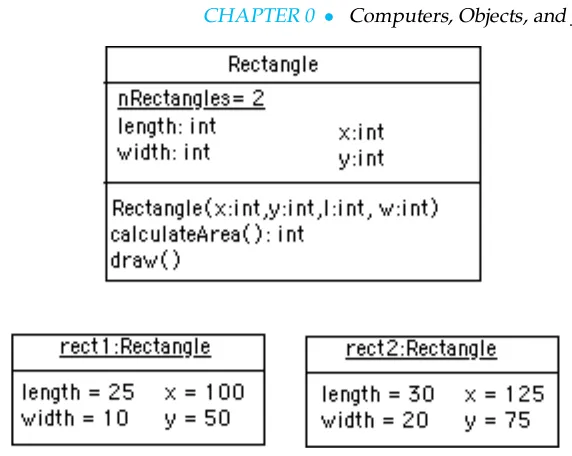
pro-Figure 9: A UML diagram of the
Rectangleclass.
gram uses. We say that an object is aninstanceof a class. A good analogy
here is to think of a class as a cookie cutter and its objects, or instances, as individual cookies. Just as we use the cookie cutter to stamp out cookies of a certain type, in an object-oriented program, we use a definition of a class to create objects of a certain type.
Writing an object-oriented program is largely a matter of designing classes and writing definitions for those classes in Java. Designing a class is a matter of specifying all of the attributes and behaviors that are characteristic of that type of object.
For example, suppose we are writing a drawing program. One type
of object we would need for our program is a rectangle. ARectangle
object has two fundamental attributes, a lengthand a width. Given
these attributes, we can define characteristic rectangle actions, such as the ability to calculate its area and the ability to draw itself. Identifying an object’s attributes and actions is the kind of design activity that goes into developing an object-oriented program.
Figure9shows a UML diagram of ourRectangleclass. Like the
sym-bol for an object, a UML class symsym-bol has up to three partitions. Unlike the UML object symbol, the label for a UML class gives just the class’s name and it is not underlined. The second partition lists the class’s attributes and the third partition lists the classes actions. Our rectangle has four
attributes. The first two,x andy, determine a rectangles position on a
two-dimensional graph. The second two,lengthandwidth, determine
a rectangle’s dimensions. Note that the attributes have no values. This is
because the class represents a generaltypeof rectangle. It specifies what
all rectangles have in common, without representing any particular rect-angle. Like a cookie cutter for a cookie, a class gives the general shape of an object. The content is not included.
0.7.6
Variables and Methods
Up to this point we have been using the termsattributeandactionto
de-scribe an object’s features. We will continue to use this terminology when talking in general about objects or when talking about an object or class represented by a UML diagram.
However, when talking about a programming language, the more com-mon way to describe an object’s features are to talk about its variables
and methods. Avariable, which corresponds to an attribute, is a named
memory location that can store a certain type of value. You can think of a variable as a special container that can only hold objects of a certain type.
variables that can store a certain type of numeric value known as anint.
Anintvalue is a whole number, such as 76 or -5.
Amethod, which corresponds to an action or a behavior, is a named
chunk of code that can be called upon or invoked to perform a certain
pre-defined set of actions. For example, in ourRectangle object, the
calculateArea() method can be called upon to calculate the rectan-gle’s area. It would do this, of course, by multiplying the rectanrectan-gle’s
length by its width. Similarly, thedraw()method can be invoked to draw
a picture of the rectangle. It would take the actions necessary to draw a rectangle on the console.
0.7.7
Instance versus Class Variables and Methods
Variables and methods can be associated either with objects or their
classes. An instance variable (or instance method) is a variable (or
method) that belongs to an object. By contrast, aclass variable(orclass
method) is a variable (or method) that is associated with the class itself. An example will help make this distinction clear.
An instance variable will have different values for different instances.
For example, individualRectangles will have different values for their
length,width, x, and yvariables. So these are examples of instance
variables. ThecalculateArea()method is an example of an instance
method because it uses the instance’s current length and width values
in its calculation. Similarly, thedraw()method is an instance method,
because it uses the object’s length and width to draw the object’s shape.
An example of a class variable would be a variable in theRectangle
class that is used to keep track of how many individual Rectangles
have been created. (Our drawing program might need this information to help manage its memory resources.) Suppose we name this variable
nRectanglesand suppose we add 1 to it each time a newRectangle
instance is created.
An example of a method that is associated with the class is a special
method known as aconstructor. This is a method used to create an object.
It is used to create an instance of a class. Calling a constructor to create an object is like pressing the cookie cutter into the cookie dough: the result is an individual cookie (object).
Figure10illustrates these concepts. Note that class variables are
un-derlined in the UML diagram. We have modified theRectangleclass
to include its constructor method, which is namedRectangle(). Note
that it takes four arguments, representing the values that we want to give
as the rectangle’sx,y, length and width respectively. Note also how the
Rectangleclass’snRectanglesvariable has a value of 2, representing
that twoRectangle instances have been created. These are shown as
members of theRectangleclass.
It won’t be obvious to you at this point, butnRectanglesis a value
that has to be associated with theRectangleclass, not with its instances.
To see this let’s imagine what happens when a newRectangleinstance
is created. Figure 11 illustrates the process. When the Rectangle()
constructor is invoked, its arguments (100, 50, 25, 10) are used by the
Figure 10: TheRectangle class and two of its instances. Note that
the class variable,nRectangles,
is underlined to distinguish it fromlengthandwidth, the in-stance variables.
the value ofnRectanglesby 1 as a way of keeping count of how many
objects it has created.
Figure 11: Constructing a
Rectangleinstance.
0.7.8
Class Hierarchy and Inheritance
How are classes related to each other? In Java, and in any other
object-oriented language, classes are organized in a class hierarchy. Aclass
hier-archyis like an upside-down tree. At the very top of the hierarchy is the
most general class. In Java, the most general class is theObjectclass. The
classes belowObjectin the hierarchy are known as itssubclasses. Since
all of the objects we use in our programs belong to some class or other, this is like saying that all objects areObjects.
Figure12illustrates the concept of a class hierarchy using the classes
that we have described in this section. Notice that theObjectclass
oc-curs at the top of the hierarchy. It is the most general class. It has fea-tures that are common to all Java objects. As you move down the
hierar-chy, the classes become more and more specialized. ARectangleis an
Objectbut it contains attributes – length and width – that are common to all rectangles but not to other objects in the hierarchy. For example, an
ATMobject does not necessarily have a length and a width. Notice that we
have added aSquareclass to the hierarchy. ASquareis a special type
ofRectangle, namely one who’s length equals its width.
To introduce some important terminology associated with this kind of
hierarchy, we say that theRectangleclass is a subclass of theObject
Figure 12: A hierarchy of Java classes.
class. TheSquareclass is a subclass of bothRectangleand Object.
Classes that occur above a given class in the hierarchy are said to be its
superclasses. ThusRectangleclass is superclass of theSquareclass. TheObjectclass is also a superclass ofSquare. In general, we say that
a subclassextendsa superclass, meaning that it adds additional elements
(attributes and/or methods) to those contained in its superclasses. We saw this in the case of theSquareclass. It adds the feature that its length and width are always equal.
Another important concept associated with a class hierarchy is the no- Class inheritance
tion ofclass inheritance, whereby a subclass inherits elements (attributes
and/or methods) from its superclasses. To take an example from the nat-ural world, think of the sort of inheritance that occurs between a horse and a mammal. A horse is a mammal. So horses inherit the characteristic of being warm blooded by virtue of also being mammals. (This is dif-ferent from the kind of individual inheritance whereby you inherit your mother’s blue eyes and your father’s black hair.)
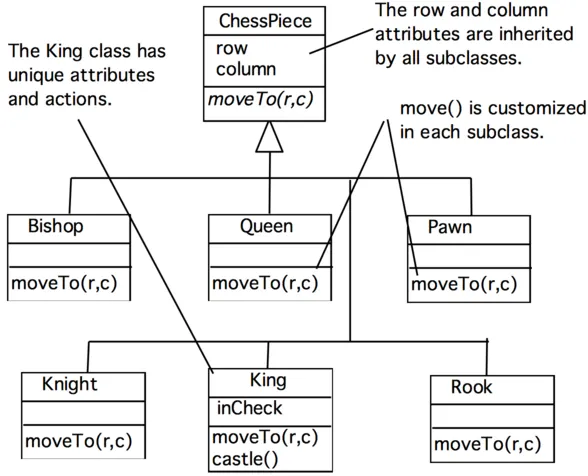
To illustrate how inheritance works, lets go back to our chess program.
There are several different types ofChessPieces. There arePawns, and
Knights, andQueens and Kings. Figure13illustrates the chess piece hierarchy. A pair of attributes that all chess pieces have in common is
their row and column position on the chess board. Because all chess
pieces have these attributes in common, they are located at the top of the
ChessPiecehierarchy and inherited by allChessPiecesubclasses. Of
course, therowandcolumnattributes are given different values in each
ChessPieceobject.
One of the actions that all chess pieces have in common is that they can
moveTo()a given square on the chess board. But different types of chess
pieces have different ways of moving. For example, aBishopcan only
move along diagonals on the chess board, whereas aRookcan only move
along a row or column on the chess board. So, clearly, we can’t describe a moveTo()method that will work for allChessPieces. This is why
we put themoveTo()method in all of theChessPiecesubclasses. The
Figure 13: TheChessPiece hier-archy.
a king can make together with one of its rooks under certain conditions.
Thus, the reason we show theinCheckattribute andcastle()action in
theKingclass is because these are characteristics that particular toKings. In this way, a class hierarchy represents aspecializationof classes as you
move from top to bottom. The most general class,ChessPiece, is at the
top of the hierarchy. Its attributes and methods are passed on to (inher-ited by) its subclasses. However, in addition to the attributes and methods they inherit from their superclasses, the subclasses define their own
spe-cial attributes and methods. Each of the subclasses,Pawn,Bishop, and
so on, represents some kind of specialization of the superclass. In this ex-ample, each of the subclasses have their own distinctive ways of moving.
And theKingsubclass has unique attributes and actions (inCheckand
castle().
0.7.9
Principles of Object-Oriented Design
As we have discussed, an object-oriented program is composed of many objects communicating with each other. The process of designing an object-oriented program to solve some problem or other involves several important principles:
• Divide-and-Conquer Principle. Generally, the first step in designing a program is to divide the overall problem into a number of objects that will interact with each other to solve the problem. Thus, an
object-oriented program employs adivision of labormuch as we do in
organiz-ing many of our real-world tasks. Thisdivide-and-conquerapproach is
an important problem-solving strategy.
the expertise needed to carry out its role in the program. Each object is a self-contained module with a clear responsibility and the tools (at-tributes and actions) necessary to carry out its role. Just as a dentist encapsulates the expertise needed to diagnose and treat a tooth ache, a well-designed object contains the information and methods needed to perform its role.
• Interface Principle.In order for objects to work cooperatively and effi-ciently, we have to clarify exactly how they should interact, orinterface, with one another. An object’s interface should be designed to limit the way the object can be used by other objects. Think of how the different interfaces presented by a digital and analog watch determine how the watches are used. In a digital watch, time is displayed in discrete units, and buttons are used to set the time in hours, minutes and seconds. In an analog watch, the time is displayed by hands on a clock face, and time is set, less precisely, by turning a small wheel.
• Information Hiding Principle. In order to enable objects to work to-gether cooperatively, certain details of their individual design and per-formance should be hidden from other objects. To use the watch anal-ogy again, in order to use a watch we needn’t know how its time keep-ing mechanism works. That level of detail is hidden from us. Hidkeep-ing such implementation details protects the watch’s mechanism, while not limiting its usefulness.
• Generality Principle. To make objects as generally useful as possible,
we design them not for a particular task but rather for a particularkind
of task. This principle underlies the use of software libraries. As we will see, Java comes with an extensive library of classes that specialize in performing certain kinds of input and output operations. For example, rather than having to write our own method to print a message on the console, we can use a library object to handle our printing tasks.
• Extensibility Principle.One of the strengths of the object-oriented ap-proach is the ability to extend an object’s behavior to handle new tasks. This also has its analogue in the everyday world. If a company needs sales agents to specialize in hardware orders, it would be more eco-nomical to extend the skills of its current sales agents instead of train-ing a novice from scratch. In the same way, in the object-oriented ap-proach, an object whose role is to input data might be specialized to input numeric data.
• Abstraction Principle.Abstraction is the ability to focus on the impor-tant features of an object when trying to work with large amounts of information. For example, if we are trying to design a floor plan for a kitchen, we can focus on the shapes and relative sizes of the appliances and ignore attributes such as color, style, and manufacturer. The ob-jects we design in our Java programs will be abstractions in this sense because they ignore many of the attributes that characterize the real objects and focus only on those attributes that are essential for solving a particular problem.
CHAPTER SUMMARY
Technical Terms
action (behavior) argument attribute class class inheritance class hierarchy class method class variable compiler computer program constructor high-level language instance instance method instance variable interpreter method message object object code object oriented result source code subclass superclass Unified Modeling Language (UML) variableSummary of Important Points
• A computer system generally consists of input/output devices,
pri-mary and secondary memory, and a central processing unit. A
com-puter can only run programs in its own machine language, which is
based on thebinary code. Special programs known ascompilersand
in-terpreterstranslatesource codeprograms written in ahigh-level language,
such as Java, into machine languageobject codeprograms.
• Application softwarerefers to programs designed to provide a particu-lar task or service;systems softwareassists the user in using application software.
• Theclient/servermodel is a form ofdistributed computingin which part of the software for a task is stored on aserverand part onclient comput-ers.
• HyperText Markup Language (HTML) is the language used to encode
WWW documents.
• A Java program is a set of interacting objects. This is the basic
metaphor ofobject-oriented programming.
• Anobjectin a Java program encapsulates the program’sattributes (or
variables) and actions(ormethods). A variable is a named memory lo-cation where data of appropriate type can be stored. A method is a named section of code that can be called (or invoked) when needed.
• An object’s methods are used to pass messages to it.
• Aclassis an abstract template that defines the characteristics and be-haviors of all objects of a certain type.
• An object is aninstanceof a class. An object hasinstance methodsand in-stance variables. Aclass method(orclass variable) is a method (or variable) that is associated with the class itself, not with its instances.
• Aconstructoris a special method that is used to construct objects.
• Java classes are organized into aclass hierarchy, with theObjectclass
at the top of the hierarchy. For a given class, classes that occur below it in the hierarchy are called itssubclasses, while classes that occur above it are called itssuperclasses.
• Classesinheritattributes and methods from their superclasses. This is
known asclass inheritance.
• The main principles of the object-oriented programming approach are
as follows:
• Divide and Conquer: Successful problem solving involves breaking
• Encapsulation and Modularity: Each object should be assigned a clear role.
• Public Interface: Each object should present a clear public interface
that determines how other objects will use it.
• Information Hiding: Each object should shield its users from
unnec-essary details of how it performs its role.
• Generality: Objects should be designed to be as general as possible.
• Extensibility: Objects should be designed so that their functionality
can be extended to carry out more specialized tasks.
• Abstractionis the ability to group a large quantity of information into a single chunk so it can be managed as a single entity.
EXERCISES
EXERCISE 0.1 Fill in the blanks in each of the following statements.a. Dividing a problem or a task into parts is an example of the principle.
b. Designing a class so that it shields certai