Embedded Controllers
Embedded Controllers
Using C and Arduino / 2E
Using C and Arduino / 2E
Embedded Controllers
Using C and Arduino
by
James M. Fiore
This Embedded Controllers Using C and Arduino, by James M. Fiore is copyrighted under the terms of a Creative Commons license:
This work is freely redistributable for non-commercial use, share-alike with attribution
Published by James M. Fiore via dissidents
For more information or feedback, contact:
James Fiore, Professor
Electrical Engineering Technology Mohawk Valley Community College 1101 Sherman Drive
Utica, NY 13501
For the latest versions and other titles go to
www.mvcc.edu/jfiore or www.dissidents.com
Introduction
This text is designed to introduce and expand upon material related to the C programming language and embedded controllers, and specifically, the Arduino development system and associated Atmel ATmega microcontrollers. It is intended to fit the time constraints of a typical 3 to 4 credit hour course for electrical engineering technology and computer engineering technology programs, although it could also fit the needs of a hardware-oriented course in computer science. As such, the text does not attempt to cover every aspect of the C language, the Arduino system or Atmel AVR microcontrollers. The first section deals with the C language itself. It is assumed that the student is a relative newcomer to the C language but has some experience with another high level language, for example, Python. This means concepts such as conditionals and iteration are already familiar and the student can get up and running fairly quickly. From there, the Arduino development environment is examined.
Unlike the myriad Arduino books now available, this text does not simply rely on the Arduino libraries. As convenient as the libraries may be, there are other, sometimes far more efficient, ways of
programming the boards. Many of the chapters examine library source code to see “what’s under the hood”. This more generic approach means it will be easier for the student to use other processors and development systems instead of being tightly tied to one platform.
All Atmel schematics and data tables are derived from the latest version (2016) of the Atmel 328P documentation which may be found at http://www.atmel.com/devices/ATMEGA328P.aspx This serves as the final word on the operation and performance of the 328P and all interested parties should become familiar with it.
There is a companion lab manual to accompany this text. Other OER (Open Educational Resource) lab manuals in this series include DC Electrical Circuits, AC Electrical Circuits, Computer Programming with Python, and Science of Sound. OER texts and lab manuals are available for Operational Amplifiers & Linear Integrated Circuits, and Semiconductor Devices. Problem workbooks are available for both DC and AC Electrical Circuits. Please check my web sites for the latest versions.
A Note from the Author
This text is used at Mohawk Valley Community College in Utica, NY, for our ABET accredited AAS program in Electrical Engineering Technology. Specifically, it is used in our second year embedded controllers course. I am indebted to my students, co-workers and the MVCC family for their support and encouragement of this project. While it would have been possible to seek a traditional publisher for this work, as a long-time supporter and contributor to freeware and shareware computer software, I have decided instead to release this using a Creative Commons non-commercial, share-alike license. I
encourage others to make use of this manual for their own work and to build upon it. If you do add to this effort, I would appreciate a notification.
“When things get so big, I don’t trust them at all You want some control-you gotta keep it small”
Table of Contents
1. Course Introduction . . . . 8
2. C Memory Organization . . . . 10
3. C Language Basics . . . 14
4. C Language Basics II . . . . 24
5. C Storage Types and Scope . . . 32
6. C Arrays and Strings . . . 36
7. C Conditionals and Looping . . . 40
8. C Pointers . . . 48
9. C Look-Up Tables . . . 52
10. C Structures . . . 56
11. C Linked Lists* . . . 60
12. C Memory* . . . 64
13. C File I/O* . . . 68
14. C Command Line Arguments* . . . 72
15. Embedded Programming . . . . 74
16. Hardware Architecture . . . . 78
17. AVR ATmega 328P Overview** . . . 84
18. Bits & Pieces: includes and defines . . 90
19. Bits & Pieces: Digital Output Circuitry . . 98
20. Bits & Pieces: Digital Input Circuitry . . 102
21. Bits & Pieces: pinMode . . . . 106
22. Bits & Pieces: digitalWrite . . . . 112
23. Bits & Pieces: delay . . . 116
24. Bits & Pieces: digitalRead . . . . 124
25. Bits & Pieces: Analog Input Circuitry . . 132
26. Bits & Pieces: analogRead . . . . 136
27. Bits & Pieces: analogWrite . . . . 142
28. Bits & Pieces: Timer/Counters . . . 146
29. Bits & Pieces: Interrupts . . . . 154
Appendices . . . 160
Index . . . 165
1. Course Introduction
1.1 Overview
This course introduces the C programming language and specifically addresses the issue of embedded programming. It is assumed that you have worked with some other high level language before, such as Python, BASIC, FORTRAN or Pascal. Due to the complexities of embedded systems, we begin with a typical desktop system and examine the structure of the language along with basic examples. Once we have a decent grounding in syntax, structure, and the development cycle, we switch over to an embedded system, namely an Arduino based development system.
This course is designed so that you can do considerable work at home with minimal cost if you choose to (this is entirely optional, but programming these little beasties can be addicting so be forewarned). Along with this course text and the associated lab manual, you will need an Arduino Uno board (about $25) and a USB host cable. A small “wall wart” power adapter for it may also be useful. There’s a lot of free C programming info on the Internet but if you prefer print books and want more detail, you may also wish to purchase one of the many C programming texts available. Two good titles are Kochan’s book
Programming in C and the one by Deitel & Deitel, C-How to Program. Whichever book you choose, make sure that its focus is C and not C++. You will also need a desktop C compiler. Just about any will do, including Visual C/C++, Borland, CodeWarrior, or even GCC. A couple of decent freeware compilers available on the Internet include Pelles C and Miracle C.
1.2 Frequently Asked Questions
Why learn C language programming?
C is perhaps the most widely used development language today. That alone is a good reason to consider it but there’s more:
It is a modern structured language that has been standardized (ANSI). It is modular, allowing reuse of code.
It is widely supported, allowing source code to be used for several different platforms by just recompiling for the new target.
Its popularity means that several third-party add-ons (libraries and modules) are available to “stretch” the language.
It has type checking which helps catch errors.
It is very powerful, allowing you to get “close to the metal”.
Generally, it creates very efficient code (small space and fast execution).
What’s the difference between C and C++?
desktop work is done in C++ as well as C, most embedded work is done in C. Desktop development systems are usually referred to as C/C++ systems meaning that they’ll do both. Embedded
development systems may be strictly C or even a variant of it (as is ours).
Where can I buy an Arduino development board?
The Arduino Uno board is available from a variety of sources including Digi-Key, Mouser, Parts Express and others. Shop around!
What’s the difference between desktop PC development and embedded programming?
Desktop development focuses on applications for desktop computers. These include things like word processors, graphing utilities, games, CAD programs, etc. These are the things most people think of when they hear the word “computer”. Embedded programming focuses on the myriad nearly invisible applications that surround us every day. Examples include the code that runs your microwave oven, automobile engine management system, cell phone, and many others. In terms of total units,
embedded applications far outnumber desktop applications. You may have one or even a few PCs in your house but you probably use dozens of embedded applications every day. Embedded
microcontrollers tend to be much less powerful but also much less expensive than their PC
counterparts. The differing programming techniques are an integral part of this course and we shall spend considerable time examining them.
How does C compare with Python?
If, like many students taking this course, your background is with the Python language, you may find certain aspects of C a little odd at first. Some of it may seem overly complicated. Do not be alarmed though. The core of the language is actually simple. Python tends to hide things from the programmer while C doesn’t. Initially, this seems to make things more complicated, and it does for the most simple of programs, but for more complicated tasks C tends to cut to the heart of the matter. Many kinds of data and hardware manipulation are much more direct and efficient in C than in other languages. One practical consideration is that C is a compiled language while most versions of Python are essentially interpreted. This means that there is an extra step in the development cycle, but the resulting compiled program is much more efficient. We will examine why this is so a little later.
How does C compare with assembly language?
2. C Memory Organization
2.1 Introduction
When programming in C, it helps if you know at least a little about the internal workings of simple computer systems. As C tends to be “close to the metal”, the way in which certain things are performed as well preferred coding techniques will be more apparent.
First off, let’s narrow the field a bit by declaring that we will only investigate a fairly simple system, the sort of thing one might see in an embedded application. That means a basic processor and solid state memory. We won’t worry about disk drives, monitors, and so forth. Specific details concerning controller architecture, memory hardware and internal IO circuitry are covered in later chapters.
2.2 Guts 101
A basic system consists of a control device called a CPU (central processing unit), microprocessor, or microcontroller. There are subtle distinctions between these but we have little need to go very deep at this point. Microcontrollers tend not to be as powerful as standard microprocessors in terms of processing speed but they usually have an array of input/output ports and hardware functions (such as analog-to-digital or analog-to-digital-to-analog converters) on chip that typical microprocessors do not. To keep things simple we shall use the term “processor” as a generic.
Microprocessors normally are connected to external memory (RAM chips). Microcontrollers generally contain sufficient on-board memory to alleviate this requirement but it is worthwhile to note that we are not talking about large (megabyte) quantities. A microcontroller may only contain a few hundred bytes of memory but in simple applications that may be sufficient. Remember, a byte of memory consists of 8 bits, each bit being thought of as a 1/0, high/low, yes/no, or true/false pair.
In order for a processor to operate on data held in memory, the data must first be copied into a processor’s register (it may have dozens of registers). Only in a register can mathematical or logical operations be carried out. For example, if you desire to add one to a variable, the value of the variable must first be copied into a register. The addition is performed on the register contents yielding the answer. This answer is then copied back to the original memory location of the variable. It seems a little roundabout at first, but don’t worry, the C language compiler will take care of most of those details for you.
2.3 Memory Maps
Every byte of memory in a computer system has an address associated with it. This is a requirement. Without an address, the processor has no way of identifying a specific location in memory. Generally, memory addressing starts at 0 and works its way up, although some addresses may be special or “reserved” in some systems. That is, a specific address might not refer to normal memory, but instead might refer to a certain input/output port for external communication. Very often it is useful to draw a
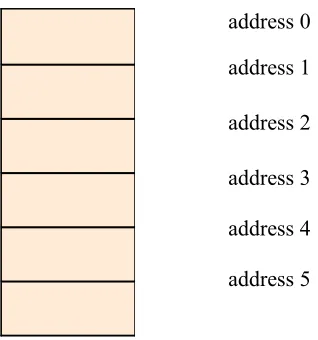
Here’s an example with just six bytes of memory:
address 0
address 1
address 2
address 3
address 4
[image:11.612.210.369.106.276.2]address 5
Figure 2.1, simple memory map
Each address or slot represents a place we can store one byte. If we had to remember specific addresses we would be doing a lot of work. Instead, the C compiler will keep track of this for us. For example, if we declare a char named X, it might be at address 2. If we need to print that value, we don’t have to say “fetch the value at address 2”. Instead we say; “fetch the value of X” and the compiler generates code to make this work out to the proper address (2). This abstraction eases our mental burden considerably. As many variables require more than one byte, we may need to combine addresses to store a single value. For example, if we chose a short int, that needs two bytes. Suppose this variable starts at address 4. It will also require the use of address 5. When we access this variable the compiler automatically generates the code to utilize both addresses because it “knows” we’re using a short int. Our little six byte memory map could hold 6 char, 3 short int, 1 long int with 1 short int, 1 long int with 2 char, or some other similar combination. It cannot hold a double as that requires 8 bytes. Similarly, it could not hold an array of 4 or more short int (see Chapter Three for details on numeric data types).
Arrays are of special interest as they must be contiguous in memory. For example, suppose a system has 1000 bytes of memory and a 200 element char array was declared. If this array starts at address 500 then all of the slots from 500 through 699 are allocated for the array. It cannot be created in “scattered” fashion with a few bytes here and a few bytes there. This requirement is due to the manner in which arrays are indexed (accessed), as we shall see later.
2.4 Stacks
variables are needed, this memory area is used. As more items are needed, more memory is taken up. As our code exits from a function, the temporary (auto) variables declared there are no longer needed, and the stack shrinks. If we make many, many function calls with many, many declared variables, it is possible for the stack to overrun the code and data sections of our program. The system is now corrupt, and proper execution and functioning of the program are unlikely.
address 0
area used by code and data
area currently unused
stack area, grows toward address 0
address 65,535
Figure 2.2, basic memory layout
Above is a memory map example of a system with 64k bytes of memory (k=1024 or 210). Individual memory slots are not shown. Only the general areas are shown.
It is worthwhile to note that in some systems, code and data are in a common area as shown (Von Neumann architecture) while in others they are physically split (Harvard architecture). Whether split or not, the basic concepts remain. So, why would we want to split the two areas, each accessed via its own memory bus1? Simple, separating the code and data allows the processor to fetch the next instruction (code) using a memory bus that is physically separate from the data bus it is currently accessing. A shared code/data memory bus would require special timing to coordinate this process as only one thing can be on the bus at any given time. Having two separate memory buses will speed execution times.
1 A bus typically refers to a collection of wires or connections upon which multiple data bits (or address bits) are
3. C Language Basics
3.1 Introduction
C is a terse language. It is designed for professional programmers who need to do a lot with a little code quickly. Unlike BASIC or Python, C is a compiled language. This means that once you have written a program, it needs to be fed into a compiler that turns your C language instructions into machine code that the microprocessor or microcontroller can execute. This is an extra step, but it results in a more efficient program than an interpreter. An interpreter turns your code into machine language while it’s running, essentially a line at a time. This results in slower execution. Also, in order to run your program on another machine, that machine must also have an interpreter on it. You can think of a compiler as doing the translation all at once instead of a line at a time.
Unlike many languages, C is not line oriented, but is instead free-flow. A program can be thought of as consisting of three major components: Variables, statements and functions. Variables are just places to hold things, as they are in any other language. They might be integers, floating point (real) numbers, or some other type. Statements include things such as variable operations and assignments (i.e., set x to 5 times y), tests (i.e., is x more than 10?), and so forth. Functions contain statements and may also call other functions.
3.2 Variable Naming, Types and Declaration
Variable naming is fairly simple. Variable names are a combination of letters, numerals, and the underscore. Upper and lower case can be mixed and the length is typically 31 characters max, but the actual limit depends on the C compiler in use. Further, the variable name cannot be a reserved (key) word nor can it contain special characters such as . ; , * - and so on. So, legal names include things like x, volts, resistor7, or even I_Wanna_Go_Home_Now.
C supports a handful of variable types. These include floating point or real numbers in two basic flavors: float, which is a 32 bit number, and double, which is a higher precision version using 64 bits. There are also a few integer types including char, which is 8 bits, short int, which is 16 bits, and long int, which is 32 bits. As char is 8 bits, it can hold 2 to the 8th combinations, or 256 different values. This is sufficient for a single ASCII character, hence the name. Similarly, a short int (or short, for short!) can hold 2 to the 16th combinations, or 65,536 values. chars and ints may be signed or unsigned (signed, allowing negative values, is the default). There is also a plain old int, which might be either 16 or 32 bits, depending on which is most efficient for the compiler (to be on the safe side, never use plain old int if the value might require more than 16 bits).
Here is a table to summarize the sizes and ranges of variables:
Variable Type Bytes Used Minimum Maximum
char 1 -128 127
unsigned char 1 0 255
short int 2 -32768 32767
unsigned short int 2 0 65535
long int 4 ≈ -2 billion ≈ 2 billion
unsigned long int 4 0 ≈ 4 billion
float
(6 significant digits) 4 ± 1.2 E -38 ± 3.4 E +38
double
(15 significant digits) 8 ± 2.3 E -308 ± 1.7 E +308
Figure 3.1, numeric types and ranges
C also supports arrays and compound data types. We shall examine these in a later segment.
Variables must be declared before they are used. They cannot be created on a whim, so to speak, as they are in Python. A declaration consists of the variable type followed by the variable name, and optionally, an initial value. Multiple declarations are allowed. Here are some examples:
char x; declares a signed 8 bit integer called x unsigned char y; declares an unsigned 8 bit integer called y short z, a; declares two signed 16 bit integers named z and a
float b =1.0; declares a real number named b and sets its initial value to 1.0
Note that each of these declarations is followed with a semi-colon. The semi-colon is the C language way of saying “This statement ends here”. This means that you can be a little sloppy (or unique) in your way of dealing with spaces. The following are all equivalent and legal:
float b = 1.0; float b=1.0;
3.3 Functions
Functions use the same naming rules as variables. All functions use the same template that looks something like this:
return_value function_name( function argument list ) {
statement(s) }
Figure 3.1, basic function template
You might think of the function in the mathematical sense. That is, you give it some value(s) and it gives you back a value. For example, your calculator has a sine function. You send it an angle and it gives you back a value. In C, functions may have several arguments, not just one. They might not even have an argument. Also, C functions may return a value, but they don’t have to. The “guts” of the function are defined within the opening and closing brace pair {}. So, a function which takes two integers, x and y, as arguments, and returns a floating point value will look something like this:
float my_function( int x, int y ) {
//...appropriate statements here... }
If the function doesn’t take or return values, the word void is used. If a function neither requires values nor returns a value, it would look like:
void other_function( void ) {
//...appropriate statements here... }
This may appear to be extra fussy work at first, but the listing of data types makes a lot of sense because C has something called type checking. This means that if you try to send a function the wrong kind of variable, or even the wrong number of variables, the compiler will warn you that you’ve made a mistake! Thus if you try to send my_function() above two floats or three integers, the compiler will complain and save you a big headache during testing.
/* Our first program */
void main( void ) {
float x = 2.0; float y = 3.0; float z;
[image:17.612.68.545.76.210.2]z = x*y/(x+y); }
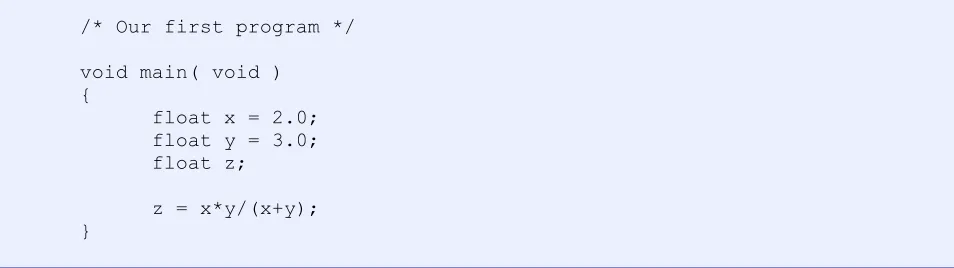
Figure 3.2, a simple program
There is only one function here, main(). It takes no variables and returns nothing. What’s the other stuff? First, the /* */ pair denotes a comment2. Anything inside of the comment pair is ignored by the compiler. A C comment can stretch for many lines. Once inside the function, three variables are declared with two of them given initial values. Next, the variables x and y are multiplied together, divided by their sum, and assigned to z. As C is free-flow, an equivalent (but ugly) version is:
/* Our first program */ void main(void){ float x=2.0;float y=3.0;float z;z=x*y/(x+y);}
Figure 3.3, alternate format (to be avoided)
This is the complete opposite of Python which has very rigid spacing and formatting rules.
Now, suppose that this add, multiply, divide operation is something that you need to do a lot. We could split this off into a separate function. Our program now looks like Figure 3.4 on the following page:
/* Our second program */
float add_mult_div( float a, float b ) {
float answer;
answer = a*b/(a+b); return( answer ); }
void main( void ) {
float x = 2.0; float y = 3.0; float z;
[image:18.612.67.546.85.314.2]z = add_mult_div( x, y ); }
Figure 3.4, program with separate function
The new math function takes two floats as arguments and returns a float to the caller. The compiler sees the new function before it is used in main(), thus, it already “knows” that it should be sent two floats and that the return value must be assigned to a float. It is very important to note that the new math function uses different variable names (a and b) from the caller (x and y). The variables in the new math function are really just place-holders. The values from the original call (x and y) are copied to these new variables (a and b) and used within the new function. As they are copies, they can be altered without changing the original values of x and y. In this case, x and y are said to be local to the main() function while a and b are local to the add_mult_div() function. In other words, a isn’t visible from main() so you can’t accidentally alter it! Similarly, x isn’t visible from add_mult_div(), so you can’t accidentally alter it either. This is a positive boon when dealing with large programs using many variable names. While it’s not usually preferred, there are times when you want a variable to be known
“everywhere”. These are called global items. You can make variables global by simply declaring them at the beginning of the program outside of the functions (i.e., right after that initial comment in our
example).
3.4 Libraries
The examples above are rather limited because, although they perform a calculation, we have no way of seeing the result! We need some way to print the answer to the computer screen. To do this, we rely on system functions and libraries. There are a series of libraries included with most C development systems to cover a variety of needs. Essentially, someone has already coded, tested and compiled a bunch of functions for you. You add these functions to your program through a process called linking. Linking simply combines your compiled code along with any required library code into a final executable program. For basic printouts, data input, and the like, we use the standard IO (Input/Output) library, or
compiler can do type checking, it must know something about this new function. We tell the compiler to look into a special file called a header file to find this information. Every library will have an associated header file (usually of the same name) and it will normally end with a .h file extension. The compiler directive is called an include statement.
// Our third program, this is an example of a single line comment
#include <stdio.h>
void main( void ) {
printf(“Hello world.\n”); }
Figure 3.5, program with library function call
This program simply prints the message Hello world. to the screen. The backslash-n combo is a special formatting token that means add a new line (i.e., bring the cursor to the line below). If we did not add the #include directive, the compiler wouldn’t know anything about printf(), and would complain when we tried to use it. So, what’s in a header file? Well, among other things they contain function prototypes. The prototypes are nothing more than a template. You can create your own by cutting and pasting your function name with argument list and adding a semicolon to it. Here is the function prototype for our earlier math function:
float add_mult_div( float a, float b );
You could make your own library of functions if you want. To use them, all you’d need is an appropriate include statement in your code, and remember to add in your library code with the linker. This will allow you to reuse code and save time. We will look at multiple file projects and more on libraries in a later segment.
/* Our fourth program */
#include <stdio.h>
void main( void ) {
float x = 2.0; float y = 3.0; float z;
z = x*y/(x+y);
[image:20.612.65.545.83.268.2]printf(“The answer is %f\n”, z); }
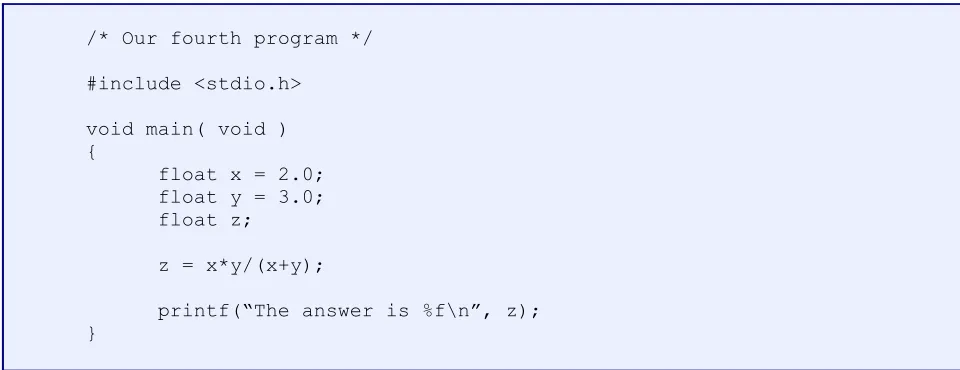
Figure 3.6, a more complete program
The %f in the printf() function serves as a place holder for the variable z. If you need to print several values you can do something like this:
printf(“The answer from %f and %f is %f\n”, x, y, z);
In this case, the first %f is used for x, the second %f for y, and the final one for z. The result will look like:
The answer from 2.0 and 3.0 is 1.2
3.5 Some Simple Math
C uses the same basic math operators as many other languages. These include +, -, /(divide), and *(multiply). Parentheses are used to group elements and force hierarchy of operations. C also includes %
for modulo. Modulo is an integer operation that leaves the remainder of a division, thus 5 modulo 7 is 2.
The divide behaves a little differently with integers than with floats as there can be no remainder. Thus 9 integer divide 4 is 2, not 2.25 as it would be if you were using floats. C also has a series of bit
manipulators that we will look at a little later. For higher math operations, you will want to look at the math library (math.h header file). Some examples are sin(), cos(), tan(), log10() (common log) and pow() for powers and roots. Do not try to use ^ as you do on many calculators. x raised to the y
power is not x^y but rather pow(x, y). The ^ operator has an entirely different meaning in C! Recalling what we said earlier about libraries, if you wanted to use a function like sin() in your code, you’d have to tell the compiler where to find the prototype and similar info. At the top of your program you’d add the line:
A final caution: The examples above are meant to be clear, but not necessarily the most efficient way of doing things. As we shall see, sometimes the way you code something can have a huge impact on its performance. Given the power of C, expert programmers can sometimes create code that is nearly indecipherable for ordinary people. There is a method behind the apparent madness.
3.6 The program creation/development cycle
To create a C program:
1. Do the requisite mental work. This is the most important part.
2. Create the C source code. This can be done using a text editor, but is normally done within the IDE (Integrated Development Environment). C source files are plain text and saved with a “.c” extension.
3. Compile the source code. This creates an assembly output file. Normally, compiling automatically fires up the assembler, which turns the assembly file into a machine language output file.
4. Link the output file with any required libraries using the linker. This creates an executable file. For desktop development, this is ready to test.
5. For embedded development, download the resulting executable to the target hardware (in our case, the Arduino development board). For the Arduino, steps 3, 4, and 5 can be combined by selecting “Build” from the IDE menu.
6. Test the executable. If it doesn’t behave properly, go back to step one.
3.7 Summary
Here are some things to keep in the back of your mind when learning C:
C is terse. You can do a lot with a little code.
As it allows you to do almost anything, a novice can get into trouble very quickly.
It is a relatively thin language, meaning that most “system functions” are not part of the language per se, but come from link-time libraries.
Function calls, function calls, and more function calls!
Source code is free flow, not line oriented. A “line” of code is usually terminated with a semicolon.
Shortcuts allow experts to create code that is almost indecipherable by normal programmers. All variables must be declared before use (not free flow as in Python).
3.8 Exercises
1. Write a C code comment that includes your name and the date. Use both the single line and the multi-line styles.
2. Write a function that will take three floating point values as arguments. The function should return the average value of the three arguments.
4. C Basics II
4.1 Input and Output
We’ve seen the use of printf() to send information to the computer screen. printf() is a very large and complicated function with many possible variants of format specifiers. Format specifiers are the “% things” used as placeholders for values. Some examples are:
%f float
%lf double (long float)
%e float using exponent notation %g float using shorter of e or f style
%d decimal integer %ld decimal long integer
%x hexadecimal (hex or base 16) integer
%o octal (base 8) integer %u unsigned integer %c single character %s character string
Figure 4.1, print format types
Suppose that you wanted to print out the value of the variableans in decimal, hex, and octal. The following instruction would do it all:
printf(“The answer is %d, or hex %x, or octal %o.\n”, ans, ans, ans );
Note how the three variables are labeled. This is important. If you printed something in hex without some form of label, you might not know if it was hex or decimal. For example, if you just saw the number “23”, how would you know it’s 23 decimal or 23 hex (35 decimal)? For that matter, how would you set a hex constant in your C code? The compiler would have no way of “knowing” either. To get around this, hex values are prefixed with 0x. Thus, we have 0x23 for hex 23. The printf() function does not
automatically add the 0x on output. The reason is because it may prove distracting if you have a table filled only with hex values. It’s easy enough to use 0x%d instead of just %d for the output format.
You can also add a field width specifier. For example, %5d means print the integer in decimal with 5 spaces minimum. Similarly, %6.2f means print the floating point value using 6 spaces minimum. The “.2” is a precision specifier, and in this case indicates 2 digits after the decimal point are to be used. As you can see, this is a very powerful and flexible function!
must specify the address of the variable. C uses the & operator to signify “address of”. For example, if you wish to obtain an integer from the user and place it in a variable called voltage, you might see a
program fragment like so…
printf(“Please enter the voltage:”); scanf(“%d”, &voltage);
It is very common for new programmers to forget the &. Be forewarned!
4.2 Variable Sizes
A common question among new programers is “Why are there so many sizes of variables available?” We have two different sizes of reals; float at 32 bits, and double at 64 bits. We also have three different sizes of intgers at 8, 16, and 32 bits each3. In many languages, there’s just real and integer with no size variation, so why does C offer so many choices? The reason is that “one size doesn’t fit all”. You have options in order to optimize your code. If you have a variable that ranges from say, 0 to 1000, there’s no need to use more than a short (16 bit) integer. Using a 32 bit integer simply uses more memory. Now, you might consider 2 extra bytes to be no big deal, but remember that we are talking about embedded
controllers in some cases, not desktop systems. Some small controllers may have only a few hundred bytes of memory available for data. Even on desktop systems with gigabytes of memory, choosing the wrong size can be disastrous. For example, suppose you have a system with an analog to digital converter for audio. The CD standard sampling rate is 44,100 samples per second. Each sample is a 16 bit value (2 bytes), producing a data rate of 88,100 bytes per second. Now imagine that you need enough memory for a five minute song in stereo. That works out to nearly 53 megabytes of memory. If you had chosen long (32 bit) integers to hold these data, you’d need about 106 megabytes instead. As the values placed on an audio CD never exceed 16 bits, it would be foolish to allocate more than 16 bits each for the values. Data sizes are power-of-2 multiples of a byte though, so you can’t choose to have an integer of say, 22 bits length. It’s 8, 16, or 32 for the most part (some controllers have an upper limit of 16 bits).
In the case of float versus double, float is used where space is at a premium. It has a smaller range (size of exponent) and a lower precision (number of significant digits) than double. double is generally preferred and is the norm for most math functions. Plain floats are sometimes referred to as singles (that is, single precision versus double precision).
If you don’t know the size of a particular data item (for example an int might be either 16 or 32 bits depending on the hardware and compiler), you can use the sizeof() command. This looks like a function but it’s really built into the language. The argument is the item or expression you’re interested in. It returns the size required in bytes.
size = sizeof( int );
size will be either 2 or 4 depending on the system.
4.3 More Math
OK, so what happens if you add or multiply two short int together and the result is more than 16 bits long? You wind up with an overrange condition. Note that the compiler cannot warn you of this because whether or not this happens will depend entirely on values entered by the user and subsequently
computed within the program. Hopefully, you will always consider maximum value cases and choose appropriate data sizes and this won’t be a problem. But what actually happens? To put it simply, the top most bits will be ignored. Consider an 8 bit unsigned integer. It goes from 0 to 255. 255 is represented as eight 1s. What happens if you add the value 1 to this? You get a 9 bit number: a 1 followed by eight 0s. That ninth bit is thrown away as the variable only has eight bits. Thus, 255 plus 1 equals 0! This can create some serious problems! For example, suppose you wanted to use this variable as a loop counter. You want to go through a loop 500 times. The loop will never terminate because an 8 bit integer can’t go up that high. You keep adding one to it, but it keeps flipping back to 0 after it hits 255. This behavior is not all bad; it can, in fact, be put to good use with things like interrupts and timers, as we shall see.
What happens if you mix different types of variables? For example, what happens if you divide a double by an int or a float by double? C will promote the lesser size/precision types to the larger type and then do the operation. This can sometimes present a problem if you try to assign the result back to something smaller, even if you know it will always “fit”. The compiler will complain if you divide a long int by another long int and try to assign the result to a short int. You can get around this by using a cast. This is your way of telling the compiler that you know there is a potential problem, but to go ahead anyway (hopefully, because you know it will always work, not just because you want to defeat the compiler warning). Casting in C is similar to type conversion in Python (e.g., the int() function). Here’s an example.
short int x, y=20; long int z=3;
x=(short int)(y/z);
Note how you are directing the compiler to turn the division into a short int. Otherwise, the result is in fact a long int due to the promotion of y to the level of z. What’s the value of x? Why it’s 6 of course! Remember, the fractional part is meaningless, and thus lost, on integer divides.
Casting is also useful when using math functions. If you have to use float, you can cast them to/from double to make use of functions defined with double. For example, suppose a, b, and c are declared as float but you wish to use the pow() function to raise a to the b power. pow() is defined as taking two double arguments and returning a double answer.
c = (float)pow( (double)a, (double)b );
4.4 Bitwise Operations
Sometimes you’d like to perform bitwise operations rather than ordinary math. For example, what if you want to logically AND two variables, bit by bit? Bitwise operations are very common when programming microcontrollers as a means of setting, clearing and testing specific bits in control registers (for example, setting a specific pin on a digital port to read mode instead of write mode). C has a series of bitwise operators. They are:
& AND
| OR
^ XOR
~ One’s Complement
>> Shift Right << Shift Left
Figure 4.2, bitwise operators
Note the double use of & for “address of” and now AND. The unary operation is always “address of”, and the binary operation is always AND, so a & b would not imply the address of b. If you wanted to AND x with y, shift the result 2 places to the left and assign the result to z, you’d use:
z = (x&y)<<2;
Let’s look at a few examples. Suppose the variables X, Y and Z are unsigned chars. X and Y are set to 13 and 134, respectively. In hex, that’s 0x0d and 0x86 for bit patterns of 00001101 and 10000110.
Z = X<<3; // Z is 01101000 or 0x68 Z = X>>1; // Z is 00000110 or 0x06 Z = ~X; // Z is 11110010 or 0xf2 Z = X|Y; // Z is 10001111 or 0x8f Z = X&Y; // Z is 00000100 or 0x04 Z = X^Y; // Z is 10001011 or 0x8b
4.5 Setting, Clearing and Reading Register Bits
Bitwise operations may appear to be somewhat arcane to the uninitiated but are in fact commonly used. A prime use is in setting, clearing and testing specific bits in registers. One example involves configuring bidirectional ports for input or output mode via a data direction register, typically abbreviated DDR. Each bit of the DDR represents a specific output pin. A logic high might indicate output mode while a logic low would indicate input mode. Assuming DDR is an 8 bit register, if you wanted to set all bits except the 0th bit to input mode, you could write4:
DDR = 0x01; // set bit zero to output mode
If sometime later you wanted to also set the 1st and 2nd bits to output mode while keeping everything else intact, the easy way to do it is simply to OR the bits you want:
DDR = DDR | 0x06;
The prior operation may be performed using the more common shorthand:
DDR |= 0x06;
Note that the preceding code does not affect any of the other bits so they stay in whatever mode they were originally. By the way, a set of specific bits (such as the 0x06 above) is often referred to as a bit pattern
or bitmask.
To see if a specific bit is set, simply AND instead of OR. So, to see if the 1st bit of DDR is set for output mode, you could use something like:
if ( DDR & 0x02 ) // true if set
Clearing bits requires ANDing with a bitmask that has been complemented. In other words, all 1s and 0s have been reversed in the bit pattern. If, for example, we want to clear the 0th and 4th bits, we’d first complement the bit pattern 0x11 yielding 0xee. Then we AND:
DDR &= 0xee;
Often, it’s easier to just use the logical complement operator on the original bit pattern and then AND it:
DDR &= (~0x11);
If you’re dealing with a single bit, you can use the left shift operator so you don’t even have to bother figuring out the bit pattern in hex. To set the 3rd bit and then clear the 4th bit of DDR, you could use the following:
DDR |= (0x01<<3); DDR &= ~(0x01<<4);
These operations are so common that they are often invoked using an in-line expansion via a #define.
4.6 #define
Very often it is desirable to use symbolic constants in place of actual values. For example, you’d probably prefer to use a symbol such as PI instead of the number 3.14159. You can do this with the #define preprocessor directive. These are normally found in header files (such as stdio.h or math.h) or at the top of a module of C source code. You might see something like:
#define PI 3.14159
#define parallel((x),(y)) ((x)*(y))/((x)+(y))
The x and y serve as placeholders. Thus, the line
a = parallel( b, c );
gets expanded to:
a = (a*b)/(a+b);
Why do this? Because it’s an in-line expansion or macro. That means that there’s no function call overhead and the operation runs faster. At the same time, it reads like a function, so it’s easier for a programmer to follow. OK, but why all the extra parentheses? The reason is because x and y are
placeholders, and those items might be expressions, not simple variables. If you did it this way you might get in trouble:
#define parallel(x,y) x*y/(x+y)
What if x is an expression, as in the following example?
a = parallel(2+b,c);
This would expand to:
a = 2+b*c/(2+b+c);
As multiplication is executed before addition, you wind up with 2 being added to the product of b times c
after the division, which is not the same as the sum of 2 and b being multiplied by c, and that quantity then being divided. By using the extra parentheses, the order of execution is maintained.
Referring back to the bit field operations, here are some useful definitions for what appear to be functions but which are, in fact, bitwise operations expanded in-line:
#define bitRead(value, bit) (((value) >> (bit)) & 0x01) #define bitSet(value, bit) ((value) |= (1UL << (bit))) #define bitClear(value, bit) ((value) &= ~(1UL << (bit)))
The 1UL simply means 1 expressed as an unsigned long. Finally, bit could also be defined as a symbol which leads to some nice looking self-documenting code:
#define LEDBIT 7
// more code here...
bitSet( DDR, LEDBIT );
PORTB so that you don't have to remember the precise numeric addresses of them. The norm is to place these symbolic constants in ALL CAPS.
4.7 Keywords
Here is a list of keywords in the C language:
Figure 4.3, C language keywords
We’ve looked at quite a few of these already. Some that we haven’t you can probably guess the use of. As stated previously, C is a “skinny” language!
4.8 Exercises
1. Write a line of code that will print the statement “The result is x volts” where x is the value given by the floating point variable output_voltage.
2. Write a line of code to define a constant called RECIP2PI that is equal to 1/(2π).
3. Write the code to determine the number of bytes required for a variable called POWER_SUPPLY.
4. Assume the 8 bit variable X exists. Write the code to set the MSB (most significant bit), leaving all other bits unchanged.
5. Assume the 8 bit variable Y exists. Write the code to set the LSB (least significant bit), leaving all other bits unchanged.
6. Assume the 8 bit variable Z exists. Write the code to clear the MSB and LSB, leaving all other bits unchanged.
7. Assume the 8 bit variable W exists. Write the code to complement each bit (flip 0 to 1 and 1 to 0).
8. If X is 0x04 and Y is 0x09, what are a) X|Y, b) X&Y, c) ~X, d) 0xf1&Y?
9. If X is 0xf0 and Y is 0x11, what are a) X|Y, b) X&Y, c) ~X, d) 0xf1&Y?
auto break case char const
continue do default double else
entry extern float for goto
if int long register return
sizeof short static struct switch
5. C Storage Types and Scope
5.1 Types
C has several ways of storing or referencing variables. These affect the way variables behave. Some of the more common ones are: auto, register, and static.
Auto variables are variables declared within functions that are not static or register types. That is, the
auto keyword is the default. Normally, auto variables are created on the application’s stack, although C doesn’t require this. The stack is basically a chunk of memory that is allocated for the application’s use when it is first run. It is a place for temporary storage, with values popped onto and pulled off of the stack in first-in, last-out order (like a stack of plates). Unless you initialize an auto variable, you have no idea what its value is when you first use it. Its value happens to be whatever was in that memory location the previous time it was used. It is important to understand that this includes subsequent calls to a function (i.e., its prior value is not “remembered” the next time you call the function). This is because any
subsequent call to a function does not have to produce the same the memory locations for these variables, anymore than you always wind up with the same plate every time you go to the cafeteria.
Register variables are similar to auto types in behavior, but instead of using the usual stack method, a CPU register is used (if available). The exact implementation is CPU and compiler specific. In some case the register keyword is ignored and a simple auto type is used. CPU registers offer faster access than normal memory so register variables are used to create faster execution of critical code. Typically this includes counters or pointers that are incremented inside of loops. A declaration would like something like this:
register int x;
Static variables are used when you need a variable that maintains its value between function calls. So, if we need a variable that will “appear the way we left it” from the last call, we might use something like this:
static char y;
There is one important difference between auto and static types concerning initialization. If an auto variable is initialized in a function as so:
char a=1;
Then a is set to 1 each time the function is entered. If you do the same initialization with a static, as in:
static char b=1;
Two useful but not very common modifiers are volatile and const. A volatile variable is one that can be accessed or modified by another process or task. This has some very special uses (typically, to prevent an optimizing compiler from being too aggressive with optimizations-more on this later). The const modifier is used for declaring constants, that is, variables that should not change value. In some instances this is preferred over using #define as type checking is now available (but you can’t use the two interchangeably).
5.2 Scope
Scope has to do with where variables are “seen”. We have already mentioned the idea of global and local in previous work but it is time to delve a little deeper. Generally, variables only exist within the block they are declared. While it is legal to declare variables inside of a conditional or loop block, we normally declare variables at the very beginning of a function. Consequently, these variables are known within the function. That is, their scope of reference is within the function. Nothing outside of the function knows anything about them. Thus, we say that they are local, or perhaps localized, to the function. For example, consider the two function fragments below:
void func1( void ) {
int x; int y;
//...some code here... }
void func2( void ) {
int y; int z;
//...some other code here... }
There is no direct way to access the z variable of func2() from func1(). Likewise, there is no direct way to access the x variable of func1() from func2(). More interestingly, the y variables of func1() and func2() are entirely different! They do not refer to the same variable. This sometimes can be confusing for new programmers but it is essential for large programs. Imagine that you were working with a team of people on a very large program, perhaps tens of thousands of lines long. If the idea of local scope did not exist, you’d have to make sure that every single variable in the program had a unique name! This would create a nightmare of confusion. By using local scope, you’re saying: “I only need this variable for a job within this function. As it only needs to exist within this function, its name is only meaningful within this function.”
If some form of “universally known” data item is needed, we can resort to the global. Globals act pretty much like statics and are usually stored the same way. If you have a program that consists of a single file, you can declare your globals by listing them at the beginning of the program before (and outside of) any functions. In this way they will be read by the compiler first and will therefore be “known” to all
If you have a multiple file project, how do you get the functions in the second file to recognize the globals declared in the first file? In this case, you’ll create a header file and use the #include directive. For example, suppose your project consists of two C source files named foo.c and bar.c.
In foo.c you declare the following global:
int m;
In order for the functions in bar.c to “see” m, you’ll create a header file, perhaps called foo.h. foo.h will contain the following:
extern int m;
Meaning that an integer named m has been declared externally (i.e., in another file). At the top of bar.c you’ll add the line:
#include <foo.h>
So, when bar.c is compiled, the compiler will first open up foo.h. It will see that the variable m has been declared elsewhere and puts it in a “known variables list”. It then continues to compile the remainder of you code. When it comes across m in some function, the compiler “understands” that this is a variable that was declared in another file. No problem!
So, you can now see that header files are largely composed of definitions and declarations from other places, namely external data and function prototypes.
5.4 Exercises
1. Assume a function declares a variable like so: static int x=0; The function increments the variable and then prints its value. What does the function print out on the tenth call to the function? How would this change if the static keyword was not used?
2. Consider the following snippet of code:
void doug( void ) {
int x=0;
x=x+1;
printf( “%d\n”, x ); }
void dinsdale( void ) {
int x=20;
x=x+1;
printf( “%d\n”, x ); }
6. C Arrays and Strings
6.1 Introduction
Up to now we haven’t talked much about character strings, that is, variables that contain non-numeric data such as a person’s name or address. There is no string variable type in C (unlike Python). In C, strings are nothing more than arrays of characters. Arrays are a simple grouping of like variables in a sequence, each with the same name and accessed via an index number. They behave similarly to arrays in most other languages (or lists in Python). C arrays may have one, two, or more dimensions. Here are a few example declarations:
float results[10]; An array of 10 floats
long int x[20]; An array of 20 longs, or 80 bytes
char y[10][15]; A two-dimension array, 10 by 15 chars each, 150 bytes total
Note the use of square brackets and the use of multiple sets of square brackets for higher dimension arrays. Also, C arrays are counted from index 0 rather than 1.5 For example, the first item of results[] is results[0]. The last item is results[9]. There is no such item here as results[10]. That would constitute an illegal access. You can pre-initialize arrays by listing values within braces, each separated by a comma:
double a[5] = {1.0, 2.0, 4.7, -177.0, 6.3e4};
If you leave the index out, you get as many elements as you initialize:
short int b[] = {1, 5, 6, 7}; /* four elements */
If you declare more than you initialize, the remainder are set to zero if the array is global or static (but not if auto).
short int c[10] = {1, 3, 20}; /* remaining 7 are set to 0 */
If you are dealing with character strings you could enter the ASCII codes for the characters, but this would be tedious in most cases. C let’s you specify the character in single quotes and it will do the translation:
char m[20] = {‘m’, ‘y’, ‘ ’, ‘d’, ‘o’, ‘g’, 0};
(The reason for the trailing 0 will be evident in a moment.) Even easier is to specify the string within double quotes:
char n[20]={“Bill the cat”};
characters). This is possible through a simple rule: All strings must be null terminated. That is, the character after the final character in use must be null, numerically 0. In the case of the direct string initialization of n[], the null is automatically added after the final character, t. In the case of the character-by-character initialization of m[], we had to do it manually. The null is extremely important. Functions that manipulate or print strings look for the trailing null in order to determine when their work is done. Without a null termination, the functions will just churn through memory until they eventually hit a null, which may cause system violations and even application or operating system crashes. Note that
char my_pet[] = {“fido”};
actually declares five characters, not four (four letters plus the terminating null). As C counts from index 0, this declaration is equivalent to:
my_pet[0]= ‘f’; my_pet[1]= ‘i’; my_pet[2]= ‘d’; my_pet[3]= ‘o’; my_pet[4]= 0;
The trailing null may also be written as ‘\0’. It is important to note that without the backslash, this has an entirely different meaning! ‘\0’ means null, but ‘0’means the numeral 0.
6.2 String Manipulation
A confusing aspect of C strings for beginners (especially those coming from BASIC or even Python) is how to manipulate them. That is, how do you copy one string to another, compare strings, extract a substring, and so forth? As strings are really arrays, you can’t assign one to the other as in a[] = b[]; Instead, we rely on a series of string functions found in the string library. To use these functions, you need to link your code with the string library and use #include <string.h> at the start of your code. To copy one string to another, use strcpy(). The template is:
strcpy( destination, source );
So, if you wanted to copy the contents of my_pet[] into n[], you could write:
strcpy( &n[0], &my_pet[0] );
If you’re awake at this point, you might ask “What’s with the ampersand?” Good question! What the string copy function needs are the starting addresses of the two arrays. In essence, all it does is copy a character at a time from the source to the destination. When it hits the trailing null it’s done. We’ve already seen the “address of” (&) operator earlier when we looked at scanf(). So, all we’re saying here is “For the source, start at the address of the first character of my_pet[], and for the destination, start at the first character of n[].” This can be a little cumbersome, so C offers a shortcut. You can think of & and [] as sort of canceling each other out. We’d normally write:
strcpy( n, my_pet );
strcpy( n, &my_pet[2] );
This can also be shortcut by using:
strcpy( n, my_pet+2 );
that is, don’t start at the address of the first element of my_pet[], start 2 characters later. We’ll look at this sort of manipulation much closer when we examine addresses and pointers.
What happens if the source string has more characters than the destination string was allocated to? For example, what if you did this?
strcpy( my_pet, n );
This results in a memory overwrite that can accidentally destroy other variables or functions. Very bad! Your program may crash, and in some cases, your operating system my crash. To protect against this, you can use strncpy(). This places a limit on the number of characters copied by adding a third argument. As the destination only has space for 5 characters, you’d use:
strncpy( my_pet, n, 5 );
This function will stop at 5 characters. Unfortunately, it won’t automatically null terminate the string if the limit is reached. To be safe, you’d need to add the following line:
my_pet[4] = 0; /* force null termination */
Remember, as C counts from 0, index 4 is the fifth (and final) element. There are many functions available to manipulate strings as well as individual characters. Here is a short list:
strcmp() Compares two strings (alphabetically)
strcmpi() As above, but case insensitive
strncmp() Compares two strings with max length
strncat() Concatenate two strings with max length
strlen() Find length of string (count of chars before null)
Figure 6.1, string functions
The following work on single characters. Again this is just a sampling to give you an idea of what’s out there. Use #include <ctype.h>
isupper() Determines if character is upper case
isalpha() Determines if character is alphabetic (not numeral, punctuation, etc.)
tolower() Turns character into lower case version
If you don’t have library documentation, it can be very instructive to simply open various header files and look at the function prototypes to see what’s available. Whatever you do though, don’t edit these files!
Finally, if you need to convert numeric strings into integer or floating point values, use the functions atoi(), atol() and atof(). (ASCII to int or long int in stdlib.h, ASCII to float in math.h).
6.3 Exercises
1. Write the code to declare an array of 12 single precision real numbers.
2. Write the code to declare an array of 15 eight bit signed integers.
3. Assume that an array of 100 double precision real numbers has been declared and is named points. Write the code to print out the first item of points. Also, write the code to set the last item of points to 0.0.
4. Declare a string called mammal and initialize it to the word woodchuck.
5. Do you see any potential problems with this snippet of initialization code? If so, explain the issues and how they might be corrected.
char bird;
7. C Conditionals and Looping
7.1 Conditionals
C uses a fairly standard if/else construct for basic conditionals. They may be nested and each portion may consist of several statements. The condition itself may have multiple elements and be formed in either positive or negative logic. The basic construct is:
if( test condition(s)... ) {
//...do stuff... }
The else portion is optional and looks like:
if( test condition(s).. ) {
//...do stuff... }
else {
//...do other stuff... }
If there is only a single statement in the block (i.e., between the braces), the braces may be removed if desired:
if( test condition(s).. ) //...single statement... else
//...do other statement...
The test condition may check for numerous possibilities. The operators are:
== equality
!= inequality > greater than < less than
>= greater than or equal to <= less than or equal to
Figure 7.1, relational operators
|| OR && AND
[image:41.612.220.394.70.139.2]! NOT
Figure 7.2, logical operators
Note that the logical operators do not behave the same as the similarly named bitwise operators. For example, a logical AND returns TRUE if its two arguments are non-zero, not necessarily the same bits. That is 1 & 2 yields 0, but 1 && 2 yields TRUE. TRUE is taken to be any non-zero value. Any variable or expression that evaluates to a value other than zero is logically TRUE. If the result is zero, then it is logically FALSE. Time for some examples. The conditional is written as a fragment with an explanation following:
if( a==6 )
/* taken only if the variable a is a 6 */
if( b!=7 )
/* taken as long as the variable b isn’t 7 */
if( (a==6) && (b!=7) )
/* taken as long as a is 6 and b is something other than 7 */
if( (a==6) || (b!=7) )
/* taken as long as a is 6 or b is something other than 7 */
if( a==0 )
/* taken if a is zero */
if( !a )
/* another way of saying taken if a is zero */
if( a!=0 )
/* taken if a is not zero */
if( a )
/* another way of saying taken if a is not zero */
How you word something is up to you. The following two code fragments are equivalent:
if( a==b ) do_x(); else
do_y();
if( a!=b ) do_y(); else
do_x();
if( a=b )
What does this do? At first glance, you might think it tests to see if a and b are the same. It does nothing of the kind! Instead, it assigns the value of b to a and then checks to see if that value is non-zero. In other words, it does this:
a=b; if( a )
A trick to help you with this, at least with constants, is to reverse the normal order. Instead of writing if( a==6 ), use if( 6==a ). This way, if you accidentally use a single equal sign, the compiler will cough up a syntax error.
7.2 Nesting
If a multiple condition won’t cut it, you can nest if/else tests. Nesting conditionals is easy:
if( test condition(s).. ) {
if( other tests.. ) { } else { } } else {
if( still other tests.. ) { } else { } }
You can go many levels deep if you desire. Note that C, unlike Python, doesn’t require the indenting shown, but it is expected formatting. For selection of a single value out of a list, you can use the switch/case construct. The template looks like:
switch( test_variable ) {
case value_1:
//...do stuff... break;
case value_2:
//...do other stuff... break;
default:
//...do stuff for a value not in the list... break;
The default section is optional. Also, it does not have to be the final item in the list. If a break is left out, the code will simply fall through to the next case, otherwise code execution jumps to the closing brace. Also, cases can be stacked together. The action statements for each case may include any legal statements including assignments, function calls, if/else, other switch/case, and so on. Note that you cannot check for ranges, nor can the cases be expressions. The cases must be discrete values. The following example shows all of these. The action statements are replaced with simple comments.
switch( x ) {
case 1:
/* This code performed only if x is 1, then jump to closing brace */
break;
case 2:
/* This code performed only if x is 2, then jump to closing brace */
break;
case 3:
/* This code performed only if x is 3, but continue to next case (no break statement) */
case 4: case 5:
/* This code performed only if x is 3, 4, or 5, */ break;
default:
/* this code performed only if x is not any of 1,2,3,4, or 5, then jump to closing brace (redundant here) */ break;
}
Sometimes it is very handy to replace the numeric constants with #define values. For example, you might be choosing from a menu of different circuits. You would create some #define values for each at the start of the file (or in a header file) as so:
#define VOLTAGE_DIVIDER 1
#define EMITTER_FEEDBACK 2
#define COLLECTOR_FEEDBACK 3 /* etc... */
You would then write a much more legible switch/case like so:
switch( bias_choice ) {
case VOLTAGE_DIVIDER:
/* do volt div stuff */ break;
case EMITTER_FEEDBACK:
/* do emit fdbk stuff */ break;
7.3 Looping
There are three looping constructs in C. They are while(), do-while(), and for(). do-while() is really just a while() with the loop continuation test at the end instead of the beginning. Therefore, you always get at least one iteration. The continuation test follows the same rules as the if() construct. Here are the while() and do-while() templates:
while( test condition(s)... ) {
//...statements to iterate... }
do {
//..statements to iterate... } while( test condition(s)... )
Here are some examples:
while( a<10 ) {
/* Perhaps a is incremented in here.
If a starts off at 10 or more, this loop never executes */ }
do {
/* Perhaps a is incremented in here.
If a starts off at 10 or more, this loop executes once */ } while( a<10 )
while( a<10 && b ) {
/* This loop continues until a is 10 or more, or b is zero. Either condition will halt the loop. Variable a must be less than 10 and b must be non-zero for the loop to continue */
}
Usually, loops use some form of counter. The obvious way to implement a counter is with a statement like:
a=a+1; /* add one to the current value of a */
C has increment and decrement operators, ++ and --, so you can say things like:
a++; /* add one to the current value of a */
a--; /* subtract one from the current value of a */
C also has a shortcut mode for most operations. Here are two examples:
You will see all three forms of increment in example and production code, although the increment and decrement operators are generally preferred.
The for() construct is generally preferred over the while() if a specific number of iterations are known. The template is:
for( initialization(s); termination test(s); increment(s) ) {
..statements to iterate.. }
Here is an example using the variable a as a counter that starts at 0 and proceeds to 9 by adding one each time. The loop iterates 10 times.
for( a=0; a<10; a++ ) {
/* stuff to do ten times */ }
The following example is similar, but adds 2 at each loop, thus iterating 5 times.
for( a=0; a<10; a+=2 ) {
/* stuff to do five times */ }
The next example uses multiples. Note the use of commas.
for( a=0, b=1; a<10; a++, b*=3 ) {
/* stuff to do ten times */ }
In this case two variables are initialized. Also, at each loop completion, a is incremented by 1 and b is multiplied by 3. Note that b is not used in the termination section, although it could be.
If the iterated block within the braces consists of only a single statement, the braces may be left out (just like in the if/else construct). Loops may be nested and contain any legal C statements including assignments, conditionals, function calls and the like. They may also be terminated early through the use of the break statement. As in the switch/case construct, the break command redirects program flow to the closing brace. Here is an example:
for( a=0, b=2; a<7; a++ ) {
while( b<a*10 ) b*=2;
Note that the if() is not part of the while(). This is visually reinforced by the use of indents and spacing, but that’s not what makes it so. The code would behave the same even if it was entered like so:
for( a=0, b=2; a<7; a++ ){ while( b<a*10 ) b*=2; if( b>50 ) break;}
Obviously, the former style is much easier to read than the later. It is strongly recommended that you follow the first style when you write code.
OK, what does the code fragment do? First, it sets a to 0 and b to 2. Then, the while() checks to see if b is less than 10 times a. 2 is not less than 0, so the while() doesn’t iterate. Next, the if() checks to see if b is more than 50. It’s not, so the break isn’t executed. That concludes the first iteration. For the second iteration, a is incremented to 1 and checked to see if it’s still less than 7. It is, so the loop
continues and enters the while(). b is smaller than 10 times a (2<10), so b is doubled to 4. This is still smaller so it’s doubled again to 4, and again to 8. Finally, it is doubled to 16. It is now larger than 10 times a so the while() loop exits. The if() isn’t true as 16 is not larger than 50 so the break isn’t taken. We wind up finishing iteration two by incrementing a to 2. The while() loop starts because b
(16) is less than 10 times a (now 20). The loop will only execute once, leaving b at 32. This is still less than 50, so the break is ignored. The for() closes by incrementing a to 3. On the next iteration both the while() and if() are ignored as b is less than 10 times a as well less than 50. All that happens as that a is incremented to 4. Now that a is 4, the while() starts again (32<40). b is doubled to 64. That’s greater than 10 times a, so the while() ex