Theses Thesis/Dissertation Collections
6-1-2011
CUDA accelerated cone‐beam reconstruction
Albert Sze
Follow this and additional works at:http://scholarworks.rit.edu/theses
This Thesis is brought to you for free and open access by the Thesis/Dissertation Collections at RIT Scholar Works. It has been accepted for inclusion in Theses by an authorized administrator of RIT Scholar Works. For more information, please [email protected].
Recommended Citation
Thesis
Release
Permission
Form
Rochester Institute of Technology Kate Gleason College of Engineering Title:
CUDA
Accelerated
Cone
‐
Beam
Reconstruction
DEDICATION
I dedicate this thesis to my parents, for their unending support.
ACKNOWLEDGMENTS
I would like to thank my committee members Dr. Andreas Savakis for introducing me to
this project and advising me, my supervisor Dr. Jay Schildkraut for his direct cooperation
and support, and Dr. Muhammad Shaaban for being fundamental to my education.
I would also like to thank Rick Tolleson for being the best lab manager, ever.
Lastly, this project would have not been possible without the support of RIT, Carestream
Health, and my family.
ABSTRACT
CUDA
Accelerated
Cone
‐
Beam
Reconstruction
Albert W. Sze
Supervising Professor: Dr. Andreas Savakis
Cone‐Beam Computed Tomography (CBCT) is an imaging method that reconstructs a 3D
representation of the object from its 2D X‐ray images. It is an important diagnostic tool
in the medical field, especially dentistry. However, most 3D reconstruction algorithms
are computationally intensive and time consuming; this limitation constrains the use of
CBCT.
In recent years, high‐end graphics cards, such as the ones powered by NVIDIA graphics
processing units (GPUs), are able to perform general purpose computation. Due to the
highly parallel nature of the 3D reconstruction algorithms, it is possible to implement
these algorithms on the GPU to reduce the processing time to the level that is practical.
Two of the most popular 3D Cone‐Beam reconstruction algorithms are the Feldkamp‐
Davis‐Kress algorithm (FDK) and the Algebraic Reconstruction Technique (ART). FDK is
images. However, ART requires significantly more computation. Material ART is a
recently developed algorithm that uses beam‐hardening correction to eliminate
artifacts.
In this thesis, these three algorithms were implemented on the NVIDIA’s CUDA
platform. These CUDA based algorithms were tested on three different graphics cards,
using phantom and real data. The test results show significant speedup when compared
to the CPU software implementation. The speedup is sufficient to allow a moderate
cost personal computer with NVIDIA graphics card to process CBCT images in real‐time.
CONTENTS
DEDICATION ... iii
ACKNOWLEDGMENTS ... iv
ABSTRACT ... v
Chapter 1: Introduction ... 1
Chapter 2: Cone‐Beam Reconstruction Algorithms ... 4
2.1 The Projection Model ... 4
2.2 FDK Algorithm ... 5
2.3 ART Algorithm ... 11
2.4 Material ART Algorithm ... 16
Chapter 3: NVIDIA CUDA ... 18
3.1 Brief History of GPUs ... 18
3.2 Main G80 “Tesla” Architectural Features ... 20
3.3 NVIDIA CUDA ... 23
3.4 Fermi Architecture ... 24
3.5 Unique CUDA Features ... 27
4.1 Previous Reconstruction Algorithms ... 29
4.2 Previous CUDA Accelerations ... 29
Chapter 5: CUDA Implementations ... 31
5.1 Overview ... 31
5.2 Important Points about CUDA ... 31
5.3 CUDA Accelerated FDK ... 32
5.4 CUDA Accelerated ART ... 35
5.5 CUDA Accelerated Material ART ... 37
5.6 Development ... 40
5.6.1 ART vs. Material ART ... 41
Chapter 6: Test Methodology ... 44
6.1 CUDA Graphics Cards ... 45
6.2 Data Sets ... 46
6.3 Expected Results ... 49
Chapter 7: Results and Analysis ... 50
7.1 Image Quality ... 50
7.1.1 GPU vs. CPU ... 51
7.1.2 ART vs. FDK... 52
7.1.4 Confirmation of Material ART ... 56
7.1.5 Truncation Artifacts ... 59
7.2 Runtime Results ... 61
7.2.1 Overview ... 62
7.2.2 Runtime Confirmations ... 63
7.2.3 Varying Problem Size ... 64
7.2.4 Overall Performance Gains ... 65
7.3 Unexpected Results ... 66
7.3.1 Comparing Data Sets ... 66
7.3.2 Observation ... 68
7.3.3 ART and Material ART ... 70
7.3.4 GPU Time Breakdown ... 72
Chapter 8: Conclusions and Future Directions ... 77
8.1 Conclusions ... 77
8.2 Future Directions ... 77
BIBLIOGRAPHY ... 80
APPENDIX B Reconstructed Images from the 20 Iteration Runs of Reconstruction
Algorithms on GTX560 Graphics Card ... 90
APPENDIX C Runtime Results from the 20 Iteration Runs of Reconstruction Algorithms
on GTX560 Graphics Card ... 109
LIST
OF
TABLES
Note: Tables in the Appendices are not listed here.
Table 1 – GT 330M Specifications ... 40
Table 2 – Summary of Test Plan ... 44
Table 3 – Benchmark Workstation Specifications ... 45
Table 4 – Testing CUDA Graphics Cards Specifications ... 45
Table 5 – Data Sets Description ... 46
Table 6 – Image Comparison for Appendix A ... 51
Table 7 – Images Comparison for Appendix B ... 52
Table 8 – Runtimes for Reconstruction Algorithms ran on CPU & Graphics Cards ... 61
Table 9 – Runtime Scaling for P1, P2, and P3 ... 64
Table 10 – Runtimes for Reconstruction Algorithms ran on CPU & Graphics Cards ... 65
Table 11 – GPU Time Breakdown ... 72
Table 12 – Percentage Breakdown of GPU Time ... 73
LIST
OF
FIGURES
Note: Figures in the Appendices are not listed here.
Figure 1 – KODAK 9500 Cone‐Beam 3D System [8] ... 2
Figure 2 – Model of How the X‐ray Projection Data is Collected [9] ... 4
Figure 3 – Three Dimensional Coordinate System [1] ... 5
Figure 4 – Parallel Beam Projections [5] ... 6
Figure 5 – Fan Beam Projections [5] ... 7
Figure 6 – The Fourier Slice Theorem [5] ... 8
Figure 7 – CPU Implementation of the FDK Algorithm ... 10
Figure 8 – Object and Projection Representation for ART[5] ... 12
Figure 9 – The Kaczmarz Method, an Iterative Method to Solve a System of Equations [5] ... 13
Figure 10 – CPU Implementation of ART Algorithm ... 15
Figure 11 – CPU Implementation of Material ART Algorithm ... 17
Figure 12 – GeForce 6800 Architecture [10] ... 19
Figure 13 – GeForce 8800 Architecture [11] ... 20
Figure 14 – The Two Streaming Multiprocessors (SM) in a Texture/Processor Cluster (TPC). ... 21
Figure 15 – CUDA Hierarchy of Threads, Blocks, and Grids [12] ... 23
Figure 16 – The Fermi Architecture [12] ... 24
Figure 17 – Streaming Multiprocessor for the Fermi Architecture [12] ... 25
Figure 19 – Comparison between CPU and GPU in Memory Bandwidth [13] ... 26
Figure 20 – CUDA Implementation of FDK Algorithm ... 33
Figure 21 – CUDA Implementation of ART Algorithm ... 35
Figure 22 – CUDA Implementation of Material ART V1 ... 37
Figure 23 – CUDA Implementation of Material ART V2 ... 38
Figure 24 – The Shepp‐Logan Phantom ... 47
Figure 25 – Carestream Health CS 9300 System ... 48
Figure 26 – B1 (R1, FDK, Slice 322) [left]; B5 (R1, ART Iteration 20, Slice 322) [right] ... 53
Figure 27 – B16 (R1, FDK, Slice 364) [left]; B20 (R1, ART Iteration 20, Slice 364) [right] . 54 Figure 28 – Elimination of Vertical Streaking ... 55
Figure 29 – B25 (R1, MART1 Iteration 20, Slice 364) [left]; B30 (R1, MART2 Iteration 20, Slice 364) [right] ... 56
Figure 30 – Comparison between FDK and ART ... 57
Figure 31 – Comparison between FDK and Material ART V1 ... 58
Figure 32 – Comparison between FDK and Material ART V2 ... 58
Figure 33 – Comparison between Material ART V1 and V2 ... 59
Figure 34 – Truncation Artifact in B31 (R2, FDK, Slice 135) [left]; B35 (R2, ART Iteration 20, Slice 135) [right] ... 59
Figure 35 – Truncation Scenario [22] ... 61
Figure 36 – Reconstruction Algorithms on CPU ... 68
Figure 37 – Reconstruction Algorithms on GTX295 ... 68
Figure 39 – ART Algorithm Comparison ... 69
Figure 40 – Material ART V2 Algorithm Comparison ... 70
Figure 41 – GPU Time Percentages for ART on Data Sets P1 and P2 ... 75
LIST
OF
EQUATIONS
Equation 1 – Fourier Slice Theorem [5] ... 7
Equation 2 – Filtered Backprojection [5] ... 8
Equation 3 – The System of Equations for ART[5] ... 12
Equation 4 – Formula to Find the Next Iteration [5] ... 13
Chapter
1:
Introduction
Computed Tomography (CT) and Cone‐Beam Computed Tomography (CBCT) are two of
many medical imaging technologies that allow doctors and dentists to visualize what is
inside of the human body in three dimensions. Both technologies allow medical
professionals to see all parts of the human body without injuring it.
The main components of Computed Tomography or Cone‐Beam Computed Tomography
are a rotating X‐ray machine and a very powerful digital computer. The X‐ray machine
takes thousands of two‐dimensional “pictures” of the object or the body; digital
computer puts these images together into a highly detailed three‐dimensional image of
what is inside the object. However, 3‐D image reconstruction is computationally
intensive. There are two challenges to computer scientists and engineers: to
reconstruct the 3‐D image in real‐time and to complete it on commodity hardware.
The CBCT scanner is smaller, faster, and safer than the CT scanner. Due to the cone
shaped X‐ray beam, the size of the scanner, amount of X‐rays, and scanning time are
reduced greatly. These can be very beneficial to patients; therefore CBCT scanners are
Figure 1 – KODAK 9500 Cone‐Beam 3D System [8]
Scientists and engineers have been developing many algorithms to reconstruct 3‐D
images from 2‐D CBCT images. Two of the most popular CBCT algorithms are the
Feldkamp‐Davis‐Kress algorithm (FDK) and the Algebraic Reconstruction Technique
(ART). FDK is the most basic and common reconstruction algorithm. It uses the method
of filtered‐backprojection to reconstruct the original object. FDK is faster than ART but
not as accurate as ART. ART is an iterative method that builds upon the FDK. It uses
projection in conjunction with backprojection to correct for reconstruction artifacts.
Recently developed, Material ART is an improvement over ART, as Material ART will
correct for beam‐hardening. Beam‐hardening is an artifact that occurs when the X‐ray
source is polychromatic. It produces reconstruction artifacts that make the center of
the reconstruction volume denser than it should be. This is because the lower energy
levels get absorbed faster, thus distorting the energy distribution.
Modern NVIDIA GPUs are scalable processor arrays that excel at computing parallel
tasks. Compute United Device Architecture (CUDA) technology allows general purpose
programs to run on NVIDIA GPUs. Since the reconstruction algorithms are easy to
“parallelize,” image reconstruction of CBCT could be implemented on the CUDA
platform.
The objective of this thesis is to implement three reconstruction algorithms, FDK, ART,
and Material ART, for Cone‐Beam Computed Tomography on NVIDIA GPUs, using CUDA.
Three different NVIDIA GPUs are compared: the high‐end GeForce GTX 560 with 2 GB
graphics memory, the mid‐range GeForce GTX 295 with 1 GB graphics memory, and the
low‐end GeForce G210 with 512 MB graphics memory. These GPUs should provide a
good estimation of the cost‐to‐performance ratio of the CUDA based reconstruction
algorithms.
In the remainder of the thesis, Chapter 2 provides background information on the CBCT
and on the three reconstruction algorithms considered. Chapter 3 describes the
hardware and software architectures of the NVIDIA’s CUDA enabled GPUs. Chapter 4
discusses various implementations of the reconstruction algorithms found in published
scientific papers. Chapter 5 details the implementation of these three algorithms on the
GPU. The test methodology is discussed in Chapter 6, and Chapter 7 reports and
Chapter
2:
Cone
‐
Beam
Reconstruction
Algorithms
2.1
The
Projection
Model
The model assumed for the collected projection data is that an X‐ray source and
detector plane are rotated about an object. The object could be a patient’s head, as
shown in Figure 2.
Figure 2 – Model of How the X‐ray Projection Data is Collected [9]
Based on this, a coordinate system can be created based on the source, object, the axis
Figure 3 – Three Dimensional Coordinate System [1]
Figure 3 demonstrates this coordinate system. The reconstruction volume can have an
arbitrary coordinate system, but each projection will have its own detector coordinate
system (illustrated by the u and v axes) and current source location. The source location
will be in volume coordinates. In the implementations, locations are often translated
between these coordinate systems.
2.2
FDK
Algorithm
The FDK algorithm, named after L. A. Feldkamp, L. C. Davis, and J. W. Kress, is one of the
most popular algorithms used for CBCT [4]. It is based on filtered backprojection.
Figure 4 – Parallel Beam Projections [5]
A projection can be modeled as the line integrals of an object. The diagram at the top
Figure 5 – Fan Beam Projections [5]
A more accurate model for the projections of X‐rays from a single source is if the lines
form a fan rather than being parallel with respect to each other.
The foundation of tomographic imaging reconstruction is based on the Fourier Slice
Theorem. The Fourier Slice Theorem is:
,
∞∞
Where , is the 2‐dimensional Fourier transform of the object and is the
projection of the object at angle . What this means is the Fourier Transform of a
projection is equal to the slice of the object in the frequency domain.
Figure 6 – The Fourier Slice Theorem [5]
Thus, for the case of parallel line projections, the original object can be found through
the polar integral of the weighed (or filtered) inverse Fourier transform of the projection
slices, or:
,
∞| |
∞
Equation 2 – Filtered Backprojection [5]
Where S w is the Fourier transform at angle θ.
The case of fan‐beam projections can be derived by reorganizing the projection lines
into the parallel‐line equivalent coordinate system. This introduces another weight into
the formula. The algorithm is completed once it is extended to the 3rd dimension.
Figure 7 gives a high level overview of how the FDK reconstruction works. For each
projection that gets loaded into the program, the projection goes through a Fourier
filter. Then each voxel in the reconstruction object gets modified by backprojection of
the projection data.
The FDK reconstruction has very large amounts of parallelism. Each voxel‐
backprojection operation is independent from each other; therefore, each can run in
parallel. The difference between Figure 7 and Figure 20 shows how a CUDA
Figure 7 – CPU Implementation of the FDK Algorithm
2.3
ART
Algorithm
There are three specific computer implementations of algebraic reconstruction
algorithms. They are:
• Algebraic Reconstruction Technique (ART)
• Simultaneous Iterative Reconstructive Technique (SIRT)
• Simultaneous Algebraic Reconstructive Technique (SART)
This thesis implemented SART for CUDA; therefore, we will simply refer to it as ART.
Theoretically, ART approaches the reconstruction in the reverse to FDK. It sets up
systems of equations that describe the reconstruction and uses an iterative method to
reconstruct the original object. Figure 8 and Equation 3 set up the systems of equations,
where N is the number of rays in a projection and M is the number of cells in the object.
Figure 9 and Equation 4 demonstrate the iterative calculations. In practice, the ART is
used to calculate the differences between the currently reconstructed model and the
input projections and uses that to correct any artifacts produced.
Figure 8 – Object and Projection Representation for ART[5]
Figure 9 – The Kaczmarz Method, an Iterative Method to Solve a System of Equations [5]
,
,
,
·
·
Equation 4 – Formula to Find the Next Iteration [5]
The objective is to improve upon FDK. Since ART is an iterative method, it can be
initialized to the FDK reconstruction as the initial guess. Additionally, because ART
needs to converge onto a solution, FDK provides a good initialization; Figure 9
demonstrates this. Therefore, ART is used to produce correction factors upon FDK
reconstruction, to remove the image artifacts and to improve the reconstruction quality.
Figure 10 visualizes ART. The CPU version gives a high level overview of the ART. After
the projection is loaded, the reconstruction object gets forward projected to calculate
what that projection should look like. Then the difference between the projection data
and the forward projection is calculated. This difference is then backprojected onto the
reconstruction object to correct for the difference between the projection data and the
current reconstruction volume.
Similarly to the FDK, the ART has a large amount of parallelism. The backprojection has
the same amount of parallelism compared to the FDK. The forward projection is
detector pixel based, as compared to voxel based backprojection, but it still presents an
2.4
Material
ART
Algorithm
A variation of the ART that uses “Material Projection” attempts to correct for beam‐
hardening, a characteristic of X‐rays passing through material. In medical imaging, when
an X‐ray passes through a material, such as flesh or bone, its energy decreases. The FDK
and ART assume that the X‐ray spectrum is either comprised of a single energy level or
comprised of an unchanging distribution of energy levels. However, in real life, neither
is true. As an X‐ray spectrum passes through material, its lower level energies get
absorbed faster than its higher level energies; its energy level distribution changes. This
has the effect of making the interior of the scanned object seem denser than it actually
is and producing additional reconstruction artifacts. This is called beam‐hardening.
Material ART solves this by maintaining an energy distribution count during the forward
projection process, and using it to produce a beam‐hardening correction factor for the
backprojection process. The downside is that it increases the amount of calculations by
the number of energy levels maintained for the forward projection process and another
volume object has to be maintained for the beam‐hardening correction factors. The
beam‐hardening correction factors pose a problem because of the memory costs of
maintaining a large 3D floating‐point volume and the limited amount of memory in
CUDA cards.
The scope of this thesis is to implement CUDA accelerations for all three algorithms.
Program Start
All 360 degrees
of projections
processed?
Load
projection no
Perform forward
projectionand
calculate image
correction values
Output
reconstruction
object
yes Program End
Backproject
difference onto
voxels and apply
image correction
values
Load FDK
initialization
Max iterations
reached?
no
yes
Calculate difference
between the
projection and the
calculated forward
projection
Note: The new calculations of
Material ART shown in red and
underlined
Chapter
3:
NVIDIA
CUDA
In 2007, the NVIDIA Corporation introduced the CUDA platform to harness the
computational power of its GPUs. Due to their nature of being large arrays of
processors and their SIMT nature, CUDA can accelerate parallelized computation.
In this chapter, we will review a brief history of the evolution of the GPUs. Next, we
review the G80 “Tesla” architecture and relate it to CUDA. Lastly we discuss the
architectural improvements of the Fermi architecture.
3.1
Brief
History
of
GPUs
The primary purpose of GPUs is to accelerate the computation intensive graphics
pipeline, typically for graphics rendering and video games. The earliest GPUs had fixed
function, but the vertex and fragment stages of the graphics pipeline required the
hardware to become programmable. Also, heavy demand from increasingly
sophisticated video games placed even greater performance demands from GPUs. Early
efforts produced architectures with greater numbers of programmable Vertex and
Fragment processors. However, because graphics workloads were typically unbalanced
between the Vertex and Fragment processors and the increased cost and difficulty in
designing and maintaining two different processors designs, this led to the unified G80
“Tesla” architecture, that was the first CUDA enabled GPU. The subsequent G200 and
Seperate Vertex processors & Fragment processors
Figure 12 – GeForce 6800 Architecture [10]
Figure 12, Figure 13, Figure 14, Figure 16, and Figure 17 are excerpts from previous
papers that illustrate the evolution of the architecture. Figure 12 visualizes the GeForce
6800 architecture, a typical GPU architecture before the unified architecture; note the
separate discrete vertex and fragment processors. Compare this to the unified
architecture of the GeForce 8800, the first CUDA‐enable GPU. Figure 13 illustrates the
scalable processors array. Figure 16 illustrates the continued evolution and further
improvements made to the architecture; these advancements will be discussed in
3.2
Main
G80
“Tesla”
Architectural
Features
Figure 13 – GeForce 8800 Architecture [11]
The G80 was the first unified architecture GPU. Instead of the separate vertex and
fragment processors, it is a “Scalable Processor Array (SPA).” This means that they are
comprised of very large arrays of general processing. Figure 13 illustrates the scalable
processor array architecture. Instead of running specialized vertex and fragment
programs or the graphics pipeline, it can run general programs. This is the basis of
CUDA.
Figure 14 – The Two Streaming Multiprocessors (SM) in a Texture/Processor Cluster (TPC).
Note each SM has 8 Streaming Processors (SP)
The main characteristic of modern GPUs is their parallel nature. They are made of
multiple streaming processors, with each containing eight processing elements called
“CUDA cores.” Figure 11 shows a Texture/Processor Cluster, which contains two
Streaming Multiprocessors (SM). One CUDA core is considered to be a stream
processor, a processor meant to deliver high performance by repeating a set of
instructions or kernel over a batch of data. Another example of a stream processor is
the Cell Broadband Engine Architecture (CBEA).
The CUDA‐enabled GPUs are SIMT in nature, which means Single Instruction, Multiple
Thread. This is similar to SIMD, or Single Instruction, Multiple Data. The difference is
subtle but important. Instead of just simply executing the same set of instructions over
threads to operate in parallel. Each streaming multiprocessor contains a multithreaded
instruction unit that creates, manages, schedules, and executes threads in groups of 32
parallel threads called warps and manages a pool of 24 warps for a total of 768 threads,
although for CUDA a block is limited to only 512 threads in Compute Capability 1.x.
Because each streaming multiprocessor contains 8 CUDA cores, it makes each streaming
multiprocessor very efficient at processing calculations. Their SIMT nature also makes
the multiprocessor very efficient in utilizing the memory bandwidth and hiding the
latencies. One weakness of the design is that for maximum efficiency, all threads in a
warp must be running the same set of instructions, or divergent threads would occur
and take a performance hit. This also means that the GPU is not very effective at
handling conditional statements, as it lacks the specialized hardware of traditional
processors. Another weakness is that it lacks a unified address space, so it cannot
formally use pointers in the C programming language and any function calls must be in‐
3.3
NVIDIA
CUDA
Figure 15 – CUDA Hierarchy of Threads, Blocks, and Grids [12]
Compute Unified Device Architecture (CUDA) is the computing engine in NVIDIA GPUs
that allow general programs to run on GPUs. Keeping the G80 Tesla architecture in
mind, it is easy to understand how CUDA takes advantage of the hardware to run
general programs.
It is the programmer’s responsibility to specify explicit parallelism in a program. The
programmer does this by programming a C program to run on the GPU, or a “kernel.”
organized by blocks, which are organized into a grid. Figure 15 provides a visual
companion for this. Each block of threads corresponds to a SM during execution. The
SM automatically manages the pool of threads in hardware.
3.4
Fermi
Architecture
Figure 16 – The Fermi Architecture [12]
A Streaming Multiprocessor
The Fermi Architecture is the most current architectural leap in NVIDIA GPU design. Its
design improvements include increased CUDA cores per multiprocessor, an increase of
CUDA cores in the GPU overall, a dual‐warp scheduler for each streaming
multiprocessor, a unified address space to support formal pointers, a proper memory
kernels concurrently. The important feature to note in Figure 16 is the L2 cache (circled
in solid red) and the streaming multiprocessors.
Figure 17 – Streaming Multiprocessor for the Fermi Architecture [12]
Figure 17 is a detailed look at the Streaming Multiprocessor that demonstrates the
greater number of CUDA cores per SM, the L1 cache, and the dual‐warp scheduler and
Figure 18 – Comparison between CPU and GPU in FLOPs [13]
Half of GTX 295 GTX 560 TI
GTX 560 TI
Figure 19 – Comparison between CPU and GPU in Memory Bandwidth [13]
The end result of the evolutionary pressures on GPU is the current, massive gap in
computational power and memory bandwidth between CPUs and GPUs. Figure 18 and
Figure 19 illustrate this gap.
Due to its highly parallel nature, it is difficult to predict the performance of a CUDA
program. For example, sometimes the CUDA card has enough streaming
multiprocessors to be able to compute all the blocks at once. Another scenario is that
the CUDA program provides too many blocks at once and some of the blocks have to be
serialized. Then there is yet another consideration that the kernel threads use so little
registers that multiple blocks can run in a single multiprocessor. These factors are
examples of what makes performance prediction difficult.
3.5
Unique
CUDA
Features
Before the Fermi Architecture, NVIDIA GPUs did not have traditional caches to reduce
the effect of access to on‐card memory. Instead, it uses “shared memory.” This is on‐
chip memory that is shared between threads within a block. It operates like a
programmer managed cache, having a read time like a register. Because it is handled by
the programmer rather than automatically handled by the hardware, it is more difficult
to use.
Another unique feature of the GPUs is the texture memory, a cache that stores spatially
local data. It is useful for accessing spatially local data, and it can linearly interpolate
between data points. One disadvantage of texture memory is that, to bind data to
texture memory, the data must either be a simple 1D memory space or an opaque
CUDA array. This means that a separate CUDA array must be allocated each time
volumes and low amounts of CUDA global memory. Another weakness of texture
memory is that it is read only, which limits its use.
A potential feature for the future is using surface memory. Surface memory can be
written to as well as read from. But this new feature is only available in CUDA Compute
Capability 2.0. Also, it is limited to 2D, not 3D.
Another unique feature to note is constant memory. As the name implies, constant
memory cannot be modified during a CUDA kernel’s runtime. It is stored off‐chip in the
CUDA card’s RAM, but it is cached and optimized for when all the threads in a kernel
access the same memory location simultaneously. There is a pre‐fetch penalty for the
first access, but subsequent accesses only have a latency of one cycle.
Now that all the necessary background material has been sufficiently covered, the next
chapter reviews the previous work on Cone‐Beam Reconstruction Algorithms.
Chapter
4:
Previous
Work
4.1
Previous
Reconstruction
Algorithms
Medical Imaging Cone‐Beam Reconstruction has been an active topic of research. Due
to its computationally intensive nature, a great deal of effort has been put into creating
more efficient algorithms. The algorithm proposed by L. A. Feldkamp, L. C. Davis, and J.
W. Kress is one of the most popular algorithms used for this field [4]. Cone‐Beam
reconstructions are known to be computationally intensive, so previous research has
focused on acceleration. These efforts include Cone‐Beam Reconstruction
implementations on FPGAs [16][17][18] and on the CBEA (Cell Broadband Engine
Architecture) [14][15]. There has also been work in using GPUs for Cone‐Beam
Reconstruction using shader languages and OpenGL [19][20]. OpenCL is a competing
general purpose GPU (GPGPU) standard, and it has been applied to Cone‐Beam
Reconstruction [21].
4.2
Previous
CUDA
Accelerations
NVIDIA CUDA has been a popular research project since its introduction in 2007. This is
due to the possibilities opened by its computational power and its widespread
application in scientific computing [6]. CUDA has been applied to Cone‐Beam
reconstruction before. The FDK is a common and basic algorithm, so CUDA
accelerations have been done [1]. The computation was executed on a data set of 414
execution time of 12 seconds. It also compared the runtimes to the CBEA
implementations.
A version of ART called SART (Simultaneous Algebraic Reconstruction Technique) also
has been implemented in CUDA [2], although it is less common. The work in [2] used a
Quadro FX 5600 on a data set of 228 projections of 256 x 128 pixels and a 512 x 512 x
350 volume. The result is a runtime of 844 seconds for 20 iterations. Also
recommended in [2] is the use of 3D texture memory, although the results obtained in
this thesis show it is not always beneficial. Note that the ART implementation in this
thesis uses FDK as an initialization.
Although there has been research on Beam‐Hardening [3], Material Projection is a
recently developed technique so there are no CUDA implementations yet.
This concludes the background of this thesis. The next chapter covers the details of the
CUDA implementations done in this thesis, followed by test methodology and the
results and analysis.
Chapter
5:
CUDA
Implementations
5.1
Overview
One defining characteristic and limitation of all the reconstruction algorithms is the
reconstruction volume size, which, by definition, grows cubically in relation to
reconstruction dimension size. This is the limiting factor when considering what kind of
data sets can be run on the reconstruction programs. Simply put, a CUDA card cannot
run a program that requires more device RAM than what the card has. Typically this is a
problem for reconstruction volumes.
Another characteristic that is common for all CUDA implementations is that they all use
constant memory for the kernel parameters. One challenge is that due to the
complexity of the kernels, a very large number of parameters were needed. Putting
them into the parameter list of the kernels would increase the number of registers used
and is likely to cause the use of shared memory. Constant memory is a way around that.
This is also one of the tips included in the CUDA Best Practices [23].
5.2
Important
Points
about
CUDA
There are a number of possible bottlenecks that can severely reduce parallel
computation and performance gains. Often, these are memory bottlenecks. CUDA’s
extreme parallel nature often turns compute bound problems into I/O bound problems.
The first bottleneck is the memory transfer between the CUDA device and the host
system. This is usually the largest bottleneck, because CUDA cards have a limited
amount of DRAM/global memory and the PCI‐Express bus is the slowest component
between the host system and the CUDA device.
The second bottleneck is the Global memory access. Just like in conventional computer
systems, accesses to RAM are extremely costly. For CUDA, accesses to the global
memory cost hundreds of cycles in latency. CUDA uses the multiple warps in a block to
attempt to hide the latency, but optimization typically involves reducing Global memory
accesses. Other types of memory such as texture memory, constant memory, and
shared memory can be used. Compute capability CUDA 2.0 made the architectural
improvement of formal caches, so it reduces the penalty of Global memory accesses.
5.3
CUDA
Accelerated
FDK
As discussed previously, FDK is based on filtered backprojection. This means FDK can be
Fourier filtering is implemented by using the Fourier transform to transform the
individual rows of the detector image, multiplying the Fourier signal with the filter, then
performing the reverse transformation to get back the filtered signal. CUDA already has
an implementation of Fast Fourier Transformation in its SDK, called the CUFFT. A simple
signal multiplying kernel and the CUFFT are used to implement the CUDA version of
Fourier filtering.
The backprojection is a relatively straight port from the original C++ code. As discussed
previously, the code was parallelized along individual voxels. In detail, each voxel would
calculate the direction of their X‐ray and use that to calculate where it would hit the
detector. Then the kernel would use the built‐in bilinear interpolation in the texture
memory. This feature is important for a couple of reasons: it is a built‐in function so it
reduces the demand for registers and CUDA cores and it reduces Global memory
accesses because the texture memory is cached for spatially localized data.
An attempted version of FDK was the “reworked FDK.” This was developed in an effort
to achieve the same speedup that was seen in [1]. It achieved greater efficiency by
loading all the projection data to the CUDA card in the beginning, and running one
kernel for all projections instead of one kernel run for each projection. This was
discontinued because it could only work for data set with 360 projections (due to the
use of constant memory) and thus it was less flexible. And even though it resulted in a
5.4
CUDA
Accelerated
ART
All 360 degrees
of projections
processed?
Load
projection no
Calculate difference
between projection
and calculated
forward projection
Output
reconstruction
object
Program End
CUDA:
Backproject
difference onto
voxel (0,0,0)
CUDA:
Backproject
difference onto
voxel (0,0,1)
CUDA:
Backproject
difference onto
voxel (x,y,z) ...
CUDA:
Backproject
difference onto
voxel (0,0,2)
CUDA:
Read
reconstruction
object from
CUDA device
yes
Program Start
Max iterations
reached?
no yes
Load FDK
initialization
CUDA:
Load FDK
initialization
onto CUDA
device
CUDA:
Forward project
reconstruction data
onto pixel (0,0)
CUDA:
Forward project
reconstruction data
onto pixel (0,1)
CUDA:
Forward project
reconstruction data
onto pixel (x,y) ...
CUDA:
Forward project
reconstruction data
onto pixel (0,2)
CUDA:
Load
difference
onto CUDA
device
Remember that ART is the theoretical opposite of FDK. As it has been discussed in
previous literature [15], using Forward Projection to correct for backprojection, or
implementing SART, has been shown to be effective in reducing and eliminating
reconstruction artifacts, increasing image sharpness, and increasing overall
reconstruction quality.
Forward projection works by calculating the direction of the X‐ray for each pixel of the
detector, and using ray casting to calculate the attenuation value of that detector pixel.
Then the backprojection step uses the difference between the input projection data and
the calculated projection data to correct for any differences found between them.
Similar to using texture memory for the 2D detector data, forward projection uses a 3D
texture for the reconstruction data. This is done for the same reasons. Unfortunately,
due to the previously mentioned reconstruction volume size problem and for CUDA
cards with low amounts of global memory, a problem becomes apparent. For the
typical reconstruction size of 5123, a 1 GB CUDA card cannot maintain both the normal
reconstruction volume and the CUDA array reconstruction volume that is bound to the
texture memory at the same time. What happens then is that the volume has to be
copied back to the host each time for the backprojection step. This is not a major
problem for reconstruction sizes of 2563, but the memory transfer takes up far more
5.5
CUDA
Accelerated
Material
ART
Figure 23 – CUDA Implementation of Material ART V2
Adds a "merged kernel" (in red
and underlined)
Material‐ART has its own unique challenges. The Image Correction Factors volume, by
definition, is the same size as the reconstruction object. The typical case size for
reconstruction volumes is 5123 floating point values, or 512 MB. However, the typical
CUDA card only has less than 1 GB of RAM. This would make it impossible to maintain
both the reconstruction volume and the image correction volume in memory at the
RAM. The second solution is to modify the implementation of the algorithm, or make
minor changes to the algorithm itself to eliminate the need to maintain the Image
Correction Factors in the main memory. This second solution can be implemented by
recalculating the Image Correction Factors on the fly for the reconstruction step. This
modification becomes the basis of the “merged kernel” implementation. The merged
kernel ray casts from the detector pixel just like the forward projection step, and
calculates and applies the image correction values. The merged kernel is separate from
the forward projection and back projection, as shown in Figure 23. The disadvantage of
this method is the increase in calculation and possible synchronization errors.
There are further notes on the implementation of Material ART. As mentioned before,
Material ART is more complex and requires more computation. It also requires
additional parameters. This is because during the forward projection step, at the
section when Material ART reads from the reconstruction volume, it takes the
attenuation of the voxels and classifies them to materials from a materials list received
in the parameters. This means that a material ART program would require both a
Materials list and the expected attenuation values for the expected materials. The
attenuation values come from the National Institute of Standards and Technology.
Ideally, the energy levels per detector pixel and the additional parameters for Material
ART should be placed in shared memory. However, they were not. The primary reason
would take up, and there is a limited amount of memory space of shared memory per
each block. Additionally, energy levels must be maintained per ray casted. Because a
large amount of threads were grouped per block and the energy spectrum can be
divided into an arbitrary number of levels, the memory requirements would exceed
shared memory capacity. These reasons combined with the difficulty of developing in
CUDA and the generous amount of space in global memory, these additional
parameters were delegated to global memory. The cache of the Fermi architecture
makes this debate moot, as the cache effectively eliminates the global memory penalty.
One potential source of error is that the actual energy levels of the X‐ray sources are not
known; since proper calibrations were not done. The energy levels provided for the real
data reconstructions are estimates. Even if copper was used to filter the X‐ray source,
the X‐ray source is still polychromatic.
5.6
Development
Development of the CUDA accelerations was done on a TOSHIBA Satellite A665‐S6050
Laptop with a GT 330M. The specifications are below:
Table 1 – GT 330M Specifications
Graphics
Card
Compute
Capability
Number of
multiprocessors
Number of
CUDA cores RAM GFLOPS
GT 330M 1.2 6 48 1GB 182
As running typical size data sets (5123 reconstruction dimensions) was time consuming
dimensions) instead, with the assumption that the runtime characteristics remain the
same.
In implementation, data transfers between the host and device and global memory
accesses were minimized. There are only two exceptions:
1. Because in‐development profiling indicated that calculation dominated GPU
time, so texture memory was utilized to reduce global memory accesses and
overall kernel time. This comes at the cost of increased memory transfers
between the host and device. More details are discussed in the analysis of
section 7.3.3 ART and Material ART and section 7.3.4 GPU time breakdown.
2. The size of Material ART parameters are not constant and are not
guaranteed to keep the same dimensions. Due to these reasons and the low
amount of available shared memory, the parameters were placed in global
memory.
5.6.1
ART
vs.
Material
ART
ART implements the use of texture memory to both calculate the bilinear and trilinear
interpolation and to cache the memory accesses. The Material ART cannot use the
interpolation of the texture memory, because it has to classify the accessed voxels
before calculating the effective attenuation value. This was considered to be a
disadvantage with an expected effect of slower kernel execution due to increased global
in global memory as stated before, so the additional global memory accesses are
expected to reduce kernel execution performance.
5.6.1.1 Memory Swapping
By necessity of using the texture memory and the size of the typical usage case, the
reconstruction volume has to be swapped between the system and the CUDA card. As
previously mentioned, the typical dimension size is 5123 or 512 MB and the older CUDA
cards only have 1 GB of memory.
The typical steps of runtime case are:
1. Allocate 3D CUDA array for reconstruction volume
2. Bind 3D CUDA array to texture memory
3. Execute Forward Projection Kernel
4. Free CUDA array
5. Allocate 3D memory space for Backprojection
6. Copy over the reconstruction volume from the system to the CUDA device
7. Execute the Backprojection Kernel
8. Copy back the reconstruction volume from the CUDA device
9. Free the 3D memory space
10. Go back to step 1 if it is not the final projection and iteration
The problem is that because of the limited RAM in the CUDA card, it is not possible to
need for swapping. Material ART is different because it allocates the 3D volume at the
start and maintains it throughout the entire runtime, it does not swap the volume.
In‐developing profiling shows that the swapping of a 2563 volume does not significantly
impact runtime. More information on this is presented in the results and analysis of
section 7.3.3 ‐‐ ART and Material ART and section 7.3.4 ‐‐ GPU time breakdown.
The next chapter discusses the test to confirm the CUDA implementation of the
algorithm.
Chapter
6:
Test
Methodology
Table 2 – Summary of Test Plan
CPU G210 GTX295 GTX560
P1 headphantomTiny FDK, ART,
MART1, MART2
FDK, ART, MART1, MART2
P2 headphantomTiny FDK, ART,
MART1, MART2
FDK, ART, MART1, MART2
P3 headphantomTiny FDK, ART, MART2
P4 hardeningphantom FDK, ART, MART2
R1 9300_Patient_321 FDK, ART, MART2
R2 9300_Patient_349 FDK, ART, MART2
R3 Bacelone_head_R23
R4 Rod_corticalbone FDK, ART,
MART1, MART2
FDK, ART, MART1, MART2 Hardwares / Algorithms to be tested
Dataset Actual Name Data Source Remarks
All 1 iteration
All 1 iteration. GTX295 to run 20 iterations on ART, MART1, & MART2 FDK, ART,
MART1, MART2 Computer
generated
CBCT Data
FDK, ART, MART
Testing and benchmarking was completed across three graphic cards and eight data sets
on a workstation that can support all three graphics cards. Table 2 provides a summary
of the test plan. It will be covered in further detail in the following sections. The
workstation is a Windows XP SP3 system with an AMD Athlon 64 X2 Dual Core 5600+
processor. Further details are shown in Table 3.
Table 3 – Benchmark Workstation Specifications
System Information
Operating System Windows XP Professional SP3 System Manufacturer Gigabyte Technology Co., Ltd.
System Model GA‐MA790X‐DS4
Processor AMD Athlon(tm) 64 X2 Dual Core Processor 5600+, MMX, 3DNow (2 CPUs), ~2.9GHz
Memory 2814MB RAM
PCI Express 2.0 x16 2
Power Supply Antec True Power Trio TP3‐650 650W Power Supply with Three 12V Rails
6.1
CUDA
Graphics
Cards
Three CUDA cards were selected to test the performance and behavior of the CUDA
programs across different CUDA cards. These cards are:
Table 4 – Testing CUDA Graphics Cards Specifications
card name compute capability
Number of
multiprocessors
Number of
CUDA cores RAM GFLOPS
G210 1.2 2 16 512MB 69
GTX 295 1.3 2x30 2x240 2x1GB 2x894
GTX 560 2.1 8 384 2GB 1263
Three CUDA graphics cards, G210, GTX 295, and GTX 560, were used to test the
performance and behavior of the reconstruction algorithms on CUDA. At present, G210
is a low‐end graphics card with 512 MB graphics memory, GTX 295 is a mid‐range card
with 1 GB graphics memory, and GTX 560 is a high‐end card with 2 GB graphics memory.
They have different amounts of memory in order to demonstrate the memory limit on
the reconstruction algorithms. The GTX 560 has Compute Capability 2.0, compared to
architectural improvements. The GTX 295 is different from others in that it combines
two physical NVIDIA GPUs into one graphic card. However, this thesis’ CUDA
implementation of reconstruction algorithms only utilized one GPU because
programming of two GPUs is beyond the scope of this thesis. The CUDA card used for
development, the GT 330M, is closer to the G210 rather than the GTX 295.
6.2
Data
Sets
Table 5 – Data Sets Description
Column Row Size (KB) Problem
Size (MB) Column Row Slice Size (MB)
Problem
Size (GB)
P1 360 128 128 64 23 128 128 128 8 3 P2 360 256 256 256 90 256 256 256 64 23 P3 360 512 512 1024 360 512 512 512 512 180 P4 360 512 512 1024 360 512 512 512 512 180 R1 246 575 640 1438 345 576 576 450 570 137 R2 449 960 768 2880 1263 576 576 450 570 250 R3 360 600 950 2227 783 608 608 608 857 301 R4 360 600 950 2227 783 300 300 200 69 24
Detector Volume No. of
Projections Dataset
Eight data sets, provided by Carestream Health, Inc., were used for testing. They are
divided between computer generated data and real data. The real data refers to
projection data produced from CT scans of patients and phantoms. Computer
generated data are not produced from X‐ray machines. The real data are further
distinguished between the patients and phantoms. Phantoms are manufactured objects
that test reconstruction algorithms. A well known and commonly used phantom is the
Shepp‐Logan Phantom. Figure 24 shows the Shepp‐Logan Phantom. Computer
Figure 24 – The Shepp‐Logan Phantom
Two types of phantoms were used for the computer generated data: the standard
phantom and the Material‐phantom, a phantom specifically used to test cone‐beam
correction. Also, because they are generated, different sizes of these phantoms will be
used. For real data, CT‐scans of patients were used as the final test and benchmark to
verify that the algorithms work, and that the ART and Material‐ART improve
reconstruction quality. Also, CT data of a real phantom was used to detect beam‐
hardening correction. Four sets of real data were used. Two data sets were selected to
have manageable dimensions, while the third was selected because its dimensions are
too large for the program to handle; these data sets were selected to verify the
memory‐bound problem.
Figure 25 – Carestream Health CS 9300 System
The real data sets R1 and R2 were scanned in the CS 9300 system, while the real data
set R3 was scanned in the KODAK 9500 Cone Beam 3D System. The real data set R4 was
scanned in an unspecified scanner.
The real data sets were used to test for image quality. Visual inspection was used to
determine image quality; the results from multiple programs running on the same data
set were compared. The FDK results served as the baseline, as it has the fastest runtime
but the poorest image quality. The FDK results were compared to the ART and Material
ART results. Between the FDK and ART results, specific details were examined, such as
image sharpness of image details and the correction of artifacts. Within the ART and
Material ART, the image qualities between different numbers of iterations were
compared to find the number of iterations needed to produce optimal image quality.
The results of the two Material ART implementations were compared to confirm the
validity of the alternate Material Art implementation and to make sure the second
Material ART implementation did not produce additional artifacts.
6.3
Expected
Results
Before benchmarking was performed, there were a number of expectations for the
results. These expectations are as follows:
• The newer GPU should have faster runtimes than the older ones.
• FDK will be the fastest algorithm, followed by ART, Material ART V1, and
Material ART V2.
• The main limitation of what data sets can be run on which CUDA cards will be
dictated by the amount of RAM the CUDA card has. It is expected that the G210
can only run the smallest reconstruction sizes (P1, P2, and R4) since it has only
512 MB of RAM. GTX 295 is expected to be able to run almost all of the cases
except R3 due to its extremely large reconstruction size.
There are additional expectations for Material ART. Because the real data sets R1, R2,
and R3 have their source filtered through copper, they effectively have minimal beam‐
hardening; Material ART will not produce a significant difference compared to the ART
results. This is why R4 was selected to confirm beam‐hardening.
All the necessary data was collected by following this test plan. The next chapter
Chapter
7:
Results
and
Analysis
7.1
Image
Quality
The real data sets R1, R2, and R3 are CT scans of patient’s heads. Of these, the features
of interest are the molars, molar implants (e.g., dental fillings), sinus bones, and ear
bones. The reconstruction slices are shown because they either have a feature of
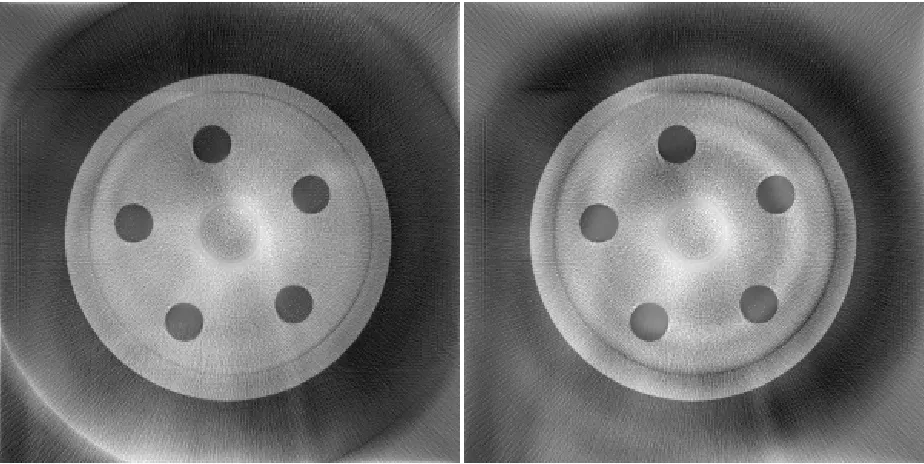
interest or they showcase the elimination of an artifact. R4 is a slab of acrylic with six
rods of bone‐like material. It was made to be the same as the Hardening Phantom P4.
The first criterion for the results of the CUDA accelerations is the image quality of the
output. As stated by the proposed testing, there are several points that have to be
confirmed. These are:
1) Confirm that the GPU produces images that are the same quality or better
quality compared to the CPU output
2) Confirm the quality improvement of ART over FDK and determine how many
iterations are needed
3) Confirm that Material ART confirms beam‐hardening
4) Confirm Material ART V2 produces the same output images as Material ART V1
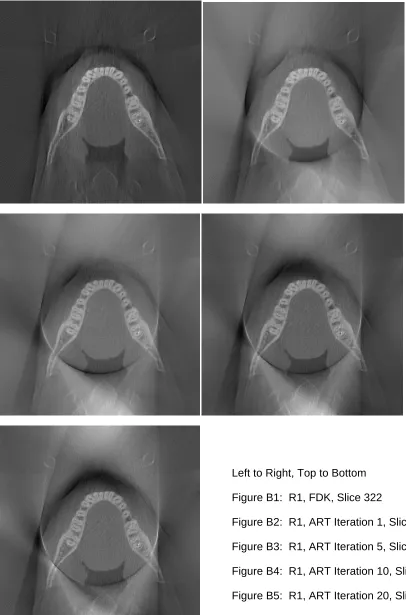
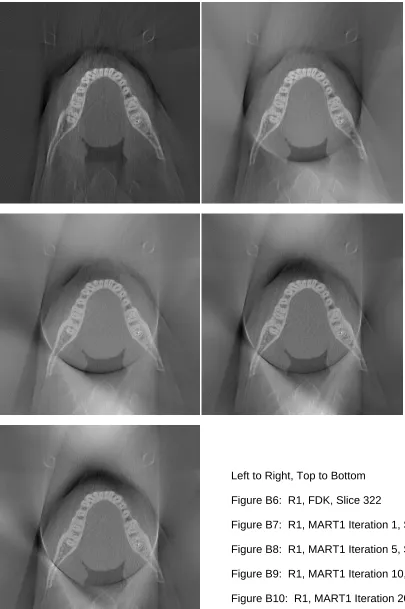
Because there are a very large number of images to be presented, the images are placed
inspection; what we are interested in is the removal of image artifacts and overall
increase in image quality.
7.1.1
GPU
vs.
CPU
Table 6 – Image Comparison for Appendix A
CPU GTX560
R1 FDK 322 A1
=
A2R1 ART 322 A3
<
A4R1 MART1 322 A5
=
A6R1 MART2 322 A7
=
A8R2 FDK 135 A9
=
A10R2 ART 135 A11
<
A12R2 MART1 135 A13
=
A14R2 MART2 135 A15
=
A16R4 FDK 38 A17
=
A18R4 ART 38 A19
<
A20R4 MART1 38 A21
=
A22R4 MART2 38 A23
=
A24= Images are similar per visual comparison
< GPU Image is better than CPU Image per visual comparison
Dataset Algorithm Image
Slice
Image Comparsion
Visual
Image
Comparison
on
Reconstruction
Algorithms
Ran
on
CPU
&
GTX560
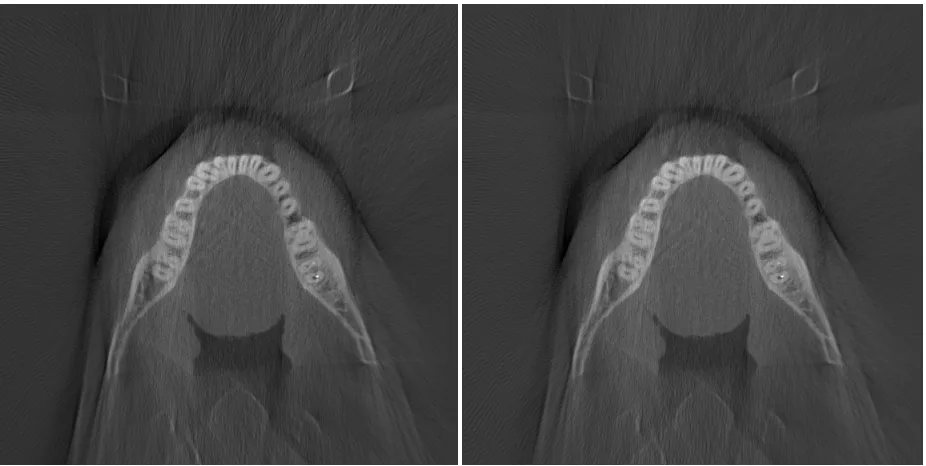
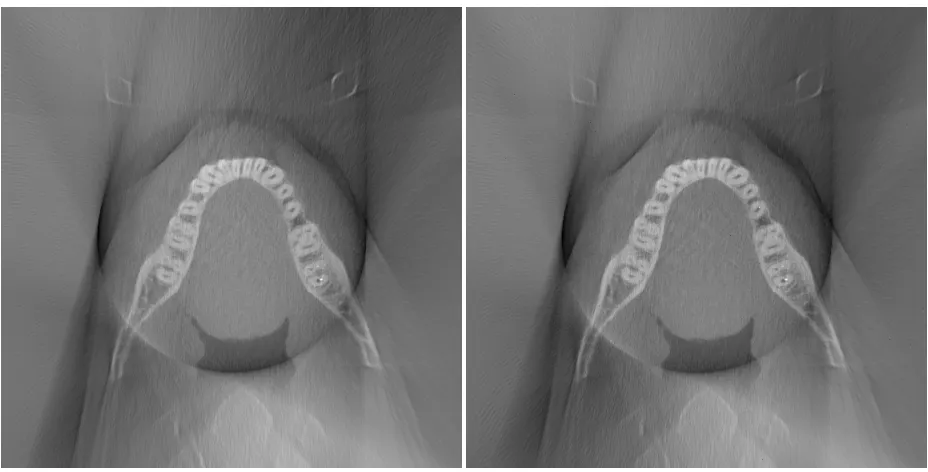
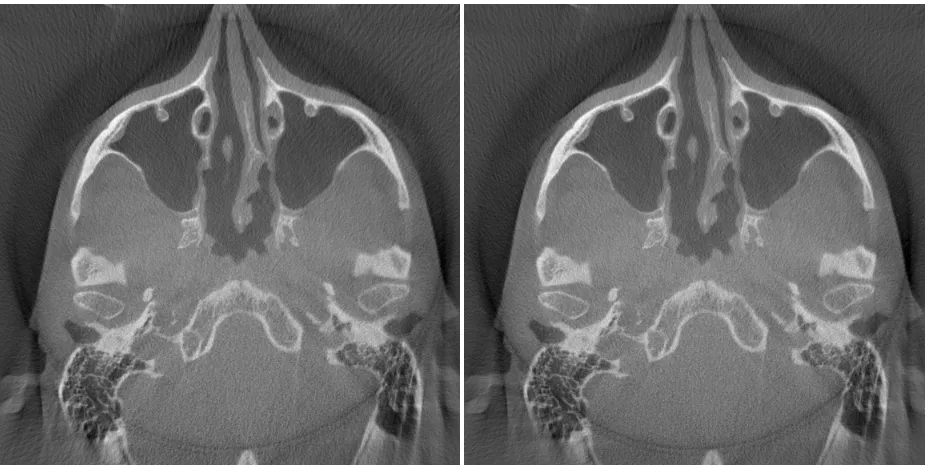
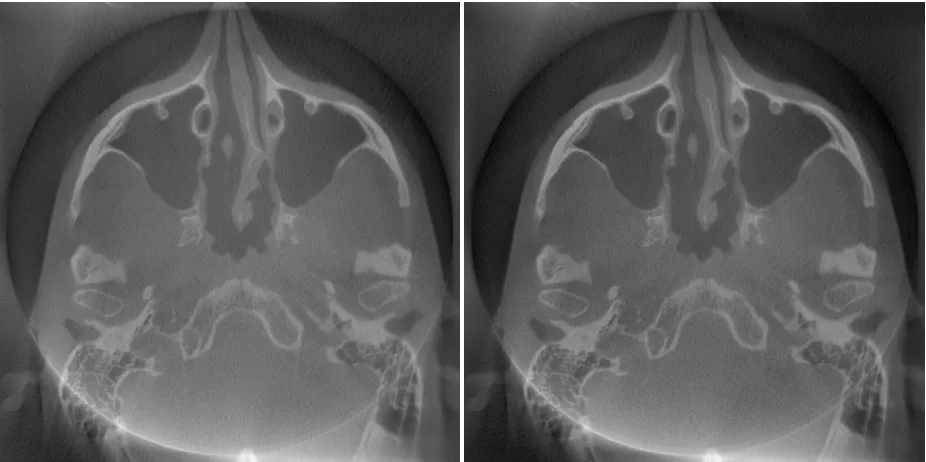
Appendix A contains selected slices of the reconstructed volumes for the real data sets.
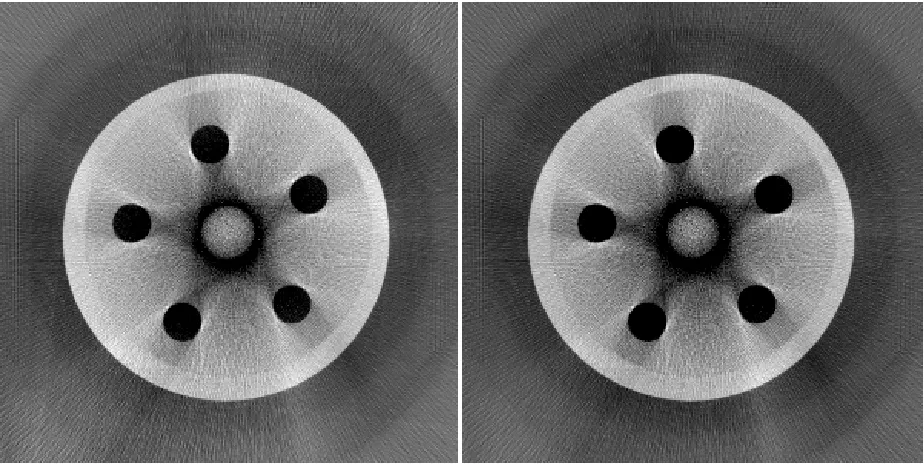
The CPU results are on the left side. The GPU results are on the right side. The point of
the same output or of better quality than images of CPU implementations. Through
visual inspection, we can confirm this is true.
7.1.2
ART
vs.
FDK
Table 7 – Images Comparison for Appendix B
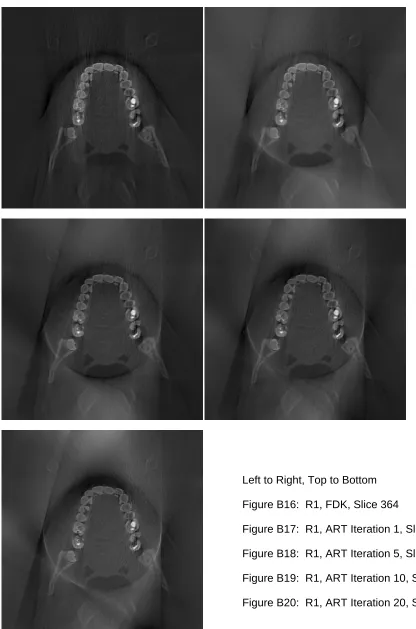
R1 ART 322 B1 << B2 << B3 << B4 < B5
R1 MART1 322 B6 << B7 << B8 << B9 < B10
R1 MART2 322 B11 << B12 << B13 << B14 < B15
R1 ART 364 B16 << B17 << B18 << B19 < B20
R1 MART1 364 B21 << B22 << B23 << B24 < B25
R1 MART2 364 B26 << B27 << B28 << B29 < B30
R2 ART 135 B31 << B32 << B33 << B34 < B35
R2 ART 190 B36 << B37 << B38 << B39 < B40
R3 ART 443 B41 << B42 << B43 << B44 < B45
R3 ART 527 B46 << B47 << B48 << B49 < B50
R4 ART 38 B51 << B52 << B53 << B54 <