Directives and Academics: educational developers, technology
and the right support
Carolyn Woodley, Victoria University
Roger Funk, Victoria University
Lisa Curran, Deakin University
There can be ‘an army of people involved in the development of academics as teachers’ (Ling & CADAC, 2009) and the role of Educational Developers with technological expertise is vital to the uptake and creative use of educational technologies in learning contexts (Oliver, 2005). Even so, technology plays only a part in the teaching and learning experience and must be underpinned with pedagogical wherewithal. At Victoria University (VU) in Melbourne, a new VU Agenda expects the university to be known for educational programmes ‘that maximise opportunities for blended and eLearning’.
This discussion examines the support available to staff using technologies for teaching. The discussion covers two examples from different faculties where teaching staff have needed to comply with Faculty or School directives to use particular university-supported technologies (Lectopia and GradeMark). The comments about staff uptake of technologies draw on general themes from evaluations administered in each faculty to gauge the effectiveness of the technologies for teaching and to identify further professional development needs. Unsurprisingly, the findings show that, without intensive and timely support tailored to the specific requirements of academics, without academics having both an understanding of the reason for the mandating of a technology as well as an ability to influence that uptake, academics are likely to find ways to resist authoritarian directives. The danger of encouraging academics’ uptake of educational technologies without broader educational development support to encourage good teaching practices that integrate technology and good curriculum design became clear from the data.
Keywords: educational development, educational technologies
Background: the complex teaching context
In addition to the complexity of the higher education landscape, it is a common notion that research and publications more specifically are privileged over teaching when it comes to work loads and promotion; publications impact on wages, resources, grants and research funding (Bedeian, Van Fleet & Hyman, 2009) in a way that teaching – even teaching that is recognised as excellent– does not. As well as teaching, the need to be aware of and proficient in at least some of the various technologies that support teaching is yet another specialised aspect to the teaching academic’s role. Universities around Australia have a range of teaching and learning support that aims to develop academics as teachers. Ling and CADAD note (2009) that the last decade has seen a shift to ‘distributed models of [Academic Development] in which individuals throughout the university have some responsibility’ (52) for developing teaching expertise, including people in faculties such as Associate Deans Teaching and Learning, Teaching and Learning Coordinators and/or Directors, Discipline Cluster Leaders and Teaching Fellows. There are also university-wide roles in areas like Libraries or Learning Support units that support the development of academics as teachers. At VU, there is also a central Learning and Teaching area with separate units that focus on governance, accreditation, curriculum development, teacher development and eLearning.
Various areas use technologies creatively to enhance learning across VU; the uptake of technology, however, is not likely to be consistent for teaching even in the same teaching programme. Innovators, early adopters and laggards (Rogers, 2003) are often in the same school and can be in the same programme; in addition to which, the choices available to academics as well as the idiosyncrasies of individual behaviour mean that even with one technology dominating teaching practices, differences will persist. The routine use of institutionally-supported technologies such as the university’s LMS or limiting the range of other institutionally-supported technologies such as Lectopia or GradeMark, however, does ‘appear to reduce the steepness of the learning curve for non-technically-inclined teachers’ (Elgort, 2005). Concentrated support for limited technologies can help greater numbers of academics to more consistently use technologies for teaching.
This paper considers the need for various models of supporting academic teaching staff to teach with a range of technologies. There are several professional development models that might support staff who could be new to teaching, new to educational technologies broadly or new to particular types of technologies. Most often, universities shift between having strongly centralised Learning and Teaching support areas with Educational Developers located centrally, to having Educational Developers or Learning and Teaching units embedded in Faculties or programme areas. There can be ‘an army of people involved in the development of academics as teachers’ (Ling & CADAC, 2009) and the role of Educational Developers with technological expertise is vital to the uptake and creative use of educational technologies in learning contexts (Oliver, 2005). Policy support and management directives, too, have been effective in galvanising teaching staff in the uptake of technologies, although research warns that top-heavy direction must be balanced with appropriate support for not only the development of technological competence but for the development of a solid appreciation of how students learn alongside the ability to design curriculum according to sound principles. The teaching context is complex (Fullan 2003) and technology plays only a part in the teaching and learning experience and must be underpinned with pedagogical wherewithal.
There are several themes at play in supporting academic staff to use technologies for educational purposes. Teaching staff in universities are a diverse cohort and the uptake and integration of technologies in teaching can be highly idiosyncratic (Woodley and Papadopoulos, 2009) and piecemeal. It has been noted that the uptake of technologies for administrative purposes and for the dissemination of information by teaching staff has often been more successful (Steel and Levy, 2009) than the uptake of technologies for interactive or student-generated teaching and learning activities.
Teaching at Victoria University
blended and eLearning’. The Faculty of Business and Law’s Strategic Plan echoes that of the university to ‘extend the use of eLearning 2.0 technologies, mobile learning technologies and other forms of multimedia content capture and delivery to enhance student-centred teaching and learning and to ensure every unit has a minimum online presence’. In part as a response to increased student expectations about how and when they learn, the Faculty of Business and Law (FoBL) resolved that, from 2012, all lectures will be automatically recorded electronically using Lectopia with an opt out clause. At the same time, a different focus was manifesting in the School of Nursing and Midwifery in the Faculty of Health, Engineering and Science (FHES) as schools moved to electronic submission and marking of all written assessment in an effort to improve quality processes including feedback on student assessment.
In this discussion, our focus is a general examination of what support is available to staff using university-supported technologies for teaching. We use two different examples from different faculties where academic staff have needed to comply with Faculty or School directives to use particular technologies. The discussion about staff uptake of those technologies for teaching will draw on general themes of two evaluations administered in each faculty as well as an audit of Lectopia recordings. The evaluations were designed to gauge both student and staff perceptions about the general use of the technologies and to identify any issues with the technological quality, pedagogical effectiveness or ethical and legal implications of the use of mandated technologies. Both of the faculties where the activities took place have requirements for a ‘minimum online presence’ in all units of study and Lectopia and GradeMark arguably contribute to the richness of that presence.
Background Lectopia in the FoBL
[image:3.595.86.319.429.583.2]Since the introduction of Lectopia in 2009 to VU, the number of lectures being recorded in the FoBL has steadily increased. At the end of 2011, 40 units used the system (30% of all units being delivered). Prior to 2012, the FoBL required only all lectures in first year core units and MBA units to be recorded. In 2012, the Faculty mandated the use of Lectopia for all lectures in part in response to an overwhelming demand from students. Since the implementation of the opt-out mode, the percentage of recorded units now averages 98%.
Figure 1: Faculty of Business & Law – Total Number of Lectures Recorded 2011-2012
Background GradeMark
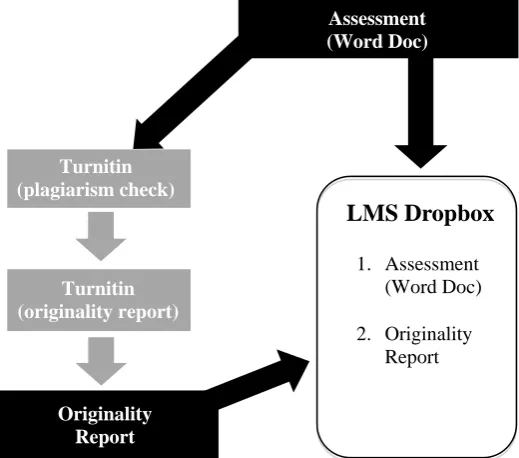
would collect all assignments (up to 400 for each unit), distribute these to assessors, collate marks and arrange for assessment to be returned to students. The staff who did use Blackboard dropbox for assessment submission were not consistent in how they used the function: some had students upload just their assessment, others required students to upload their Turnitin originality report as well. Even the online submission process was complicated and time consuming for students: they needed to submit their assignment to Turnitin to generate an originality report, download and save the originality report and then go to the Blackboard assignment dropbox and separately submit their assessment and originality report.
Figure 2: Pre GradeMark Electronic Assessment Process
Paper-based assessment tended to stay in the coordinator’s office rather than be picked up, an observation that echoes concerns that, given the importance of feedback on assessment, it is alarming that many students either do not collect their marked work and do not read comments from assessors if they do (Basnet, Brodie & Worden, 2010). GradeMark could solve some of the issues concerning consistency of process and the collection and return of work to students. Without a school-wide process, students were required to submit assignments in various ways according to preferences of different unit coordinators. There was a clear need for improved submission practices as well as greater consistency in expectations.
In mid 2011 VU extended its Turnitin licence to include GradeMark. GradeMark is a product within Turnitin that allows teaching staff to grade and provide feedback for student assignments online. As most units already required students to submit their work through Turnitin (to check for plagiarism), the use of GradeMark seemed opportune. GradeMark allowed Turnitin to act as the one and only ‘assignment dropbox’. The need to use the Blackboard dropbox as well was eliminated. Students submit their assessment once to Turnitin for both plagiarism checking and assessment submission. Staff can assess and mark assignments in this one space. In other words, Turnitin can now be used as a single process for student assessment submission, marking and assessment return. Teaching staff in the School were supported to trial the use of Turnitin’s GradeMark function with all assessment in first and second year nursing units.
Staff support
Like most Australian universities, VU has a range of roles distributed throughout the university that develop academics as teachers. There is support from various areas (IT, Library, Central Learning and Teaching units) and people (Teaching Directors and Coordinators, Associate Deans Teaching and Learning and Discipline Leaders). While universities seem to wax and wane in having either more centralised models of academic support or more distributed ones – or a mix of the two (Ling & CADAD, 2009), any academic model is likely to be challenged by ‘academic role stress and role change’, the
Assessment (Word Doc)
Turnitin (plagiarism check)
Turnitin (originality report)
Originality Report
LMS Dropbox
1. Assessment (Word Doc)
impact of technology on pedagogy and meeting diverse academic development needs across multiple discipline areas (Ling & CADAD, 2009: 10).
GradeMark
The restructuring of the central Learning and Teaching area saw a reduction of staff, Information Technology Services as the business owner of eLearning tools and limited centrally-delivered professional development for the introduction of GradeMark. The School’s Educational Developer ran GradeMark sessions covering technological and pedagogical issues. Most staff attended these sessions and had the opportunity to discuss advantages and disadvantages. Staff were keen for GradeMark to be adopted school-wide rather than having unit coordinators make personal decisions. Accordingly, the School mandated that, from semester 1 2012, all Nursing and Midwifery units were to use GradeMark for electronic assessment submission, marking and return. The fact that the directive to use GradeMark came through the School Board of Studies where staff voted on the recommendation is significant as staff had the chance to discuss issues and inform the outcome.
The School’s Educational Developer ran initial professional development sessions on GradeMark and developed online resources for staff and students on using GradeMark using the web 2.0 tool LibGuides. Individual staff were assisted as required with ‘just in time’ support as school staff had differing levels of ICT competency. Finally, the School Educational Developer made customisable marking rubrics for staff to use. This relatively small initiative required meetings with staff, several professional development sessions on using the rubrics and comments, individual sessions with sessional staff who could not attend group sessions as well as ad hoc advice through phone, email and face-to-face communication. Such support is resource intensive but necessary.
The Educational Developer reflects that senior management support for the change made the uptake of technology easier and that a whole-of-school approach encourages greater peer support. Further, if technology is offered as a way to reduce workload and make assessment more accessible, then most teaching academics are receptive to change. The fact that the School’s Educational Developer has a relationship with staff increases the likelihood of success as staff openly express a preference for dealing with him over other support options.
Lectopia
In addition to the usual general support of the Faculty of Business and Law’s Educational Developer, specific information sessions were run during semester breaks for staff new to using the Lectopia lecture capture system. Online resources were developed to support staff and students using the web 2.0 tool LibGuides. Self-paced tutorials online and print based were added to the LibGuide and promoted to staff via email. Generally, support from the faculty’s Educational Developer ranges from individual mentoring to group training. She works alongside academic staff to examine all curriculum and eLearning options. Lectopia was used to capture a range of face-to-face professional development sessions to encourage staff to experience Lectopia as students. Much Educational Development support is conducted either face-to-face, via phone and desktop sharing using Microsoft Communicator or online via Blackboard Collaborate. In the support of a mandated initiative, it is particularly important to communicate expectations regularly via emails and to make repeated offers of assistance and be flexible about when that help is offered.
Methodology
GradeMark
At the end of semester 1 2012, both students and staff were surveyed to evaluate the result of using GradeMark for one semester. An online survey was administered through Blackboard for students and through staff email for teaching staff. Only second and third year students were surveyed as the survey required views of students who had used the earlier electronic submission procedure via Blackboard assignment dropbox. Announcements were placed in Blackboard units on the same day that students’ marked assessment was released to encourage timely and current responses.
After one semester of mandatory Lectopia use in the FoBL, committee members of the Faculty’s Computing and Web-Based Learning Committee approved two surveys that were distributed to students and staff. One survey, adapted from ‘Staff and student perspectives on web based lecture technologies: Insights into the great divide’ (Phillips, Gosper, McNeill, Woo, Preston & Green, 2007), was administered to determine the perspectives of staff on lecture recording, identify any issues and improve the support to academics where possible. Students accessed a variation of that survey via their Blackboard units that were scheduled for lecture recordings for semester two 2012. Staff were emailed the link to the survey. In addition to the surveys, this discussion draws upon an audit conducted to check the quality of 124 of lecture recordings (start and finish of lecture, quality of sound, quality of visuals).
Findings: GradeMark
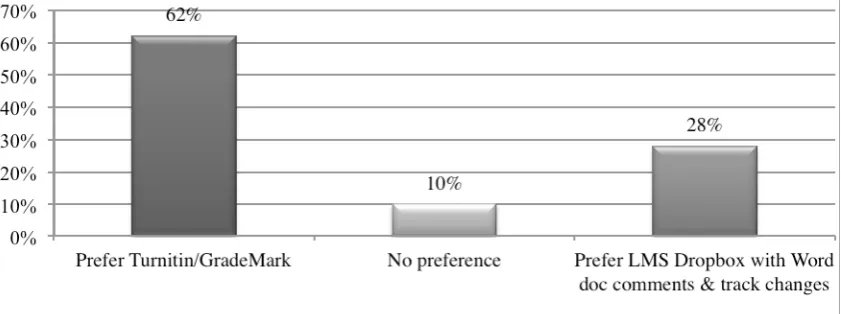
[image:6.595.88.509.379.536.2]Second and third year Nursing and Midwifery students were asked to provide feedback on the use of GradeMark for assessments. A total of 49 students completed the survey with 67% from second year and 33% from third year. Overwhelmingly, students prefer the use of Turnitin/GradeMark for submission and marking of assessments: 62% of students prefer the use of Turnitin/GradeMark over Blackboard assignment dropbox with comments and track changes: 60% do not prefer hard copy, 17.8% had no preference and 22.2% preferred hard copy. Unlike the case of paper-based assessments, 95% of students viewed their GradeMark comments and feedback at least once and 75% of students found the GradeMark comments and feedback useful. However, very much like paper-based assessment, students also expect more and more helpful feedback. Only 28% of students preferred using the Blackboard Assignment Dropbox/Word document comments and track changes assignment submission and marking; asked why, 8 students commented that it was easier to read and understand comments and to see how to improve. Respondents also said that it is still up to the lecturers to provide feedback and that feedback is not always detailed or helpful: ‘some markers are slack at using this system’.
Figure 3: Student Preferences for Electronic Submission
Still, almost 75% of 49 respondents found the feedback in GradeMark extremely useful, very useful or useful and over 70% would like GradeMark to be used in other units. Responses were mixed about particular likes/dislikes about GradeMark. Comments suggest that some students like the single location and the security. There is also some concern about relying on Turnitin and the need for support to ‘navigate’ GradeMark. Of hard copy assignment submission, 17 responses were diverse and blatantly oppositional. More typical of responses is that e-submission is convenient and environmentally friendly (travel and fuel considerations regarding physically submitting a paper). Only a few responses stated that hard copy assignments were somehow more reliable. Students said they liked e-submission but some wanted hard copies returned as hardcopy ‘provide[s] more feedback to students. The assignment can be criticized better’.
Staff reponses: GradeMark
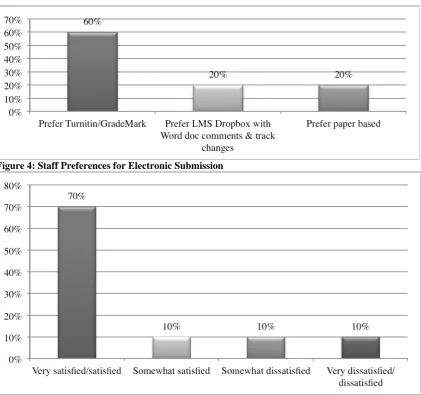
assignment dropbox with comments and track changes, 70% of staff are satisfied or very satisfied with the feedback students receive from Turnitin/GradeMark and 60% of staff propose the continued use of GradeMark. Staff preferred GradeMark because it saves time and is an easy way to provide feedback. The need for continuing professional development for staff is clear when some survey comments include a stated preference for using Blackboard Assignment Dropbox/Word comments and track changes, concerns about limitations of e-submissions, the time it takes to read online submissions (slow download or browsers freezing) and OHS concerns about too much online reading. Some staff had difficulty commenting on work – so targeted support is also recommended. The aspects of GradeMark that staff liked include the ease of use and the compilation of grades, click and drag comments, that it is paper free, the similarity index and having everything in one place with no need to download essays.
Figure 4: Staff Preferences for Electronic Submission
Figure 5: Staff Satisfaction with Feedback Students Receive from GradeMark
Using GradeMark simplifies assessment submission and provides automatic submission of an originality report, easy staff access to originality reports, automatic transfer of marks from Turnitin into the Blackboard gradebook (the rubric converts) and useful inbuilt comments. Further, GradeMark comments can be exported, imported and shared amongst colleagues and reports can be created and downloaded from GradeMark. The disadvantages of the system are that marking has to be done online and student assignments cannot be downloaded and marked offline. Even so, most staff agreed that this method is one they support and would like it to be used for electronic student assessment submission in order to simplify submission for students.
place, being able to better understand the marking and comments. It is a convenient way to access grades and involves less travel. These comments all concur with the findings in a project The Evaluation of Assessment Diaries and GradeMark at the University of Glamorgan (Lau, 2011).
Lectopia
Of 124 lecture recordings reviewed as part of an audit in week 3, 61 lectures had quality issues that ranged from no screen capture, faint audio, static over audio, small screen size and late starting to the less problematic issue of blue tinged slides. It was important to address these issues as quickly as possible as it is notable that few staff actually review their lectures; routine auditing of lecture recordings is therefore recommended.
Student Response
A total of 227 students completed an anonymous online survey administered via Blackboard in semester 2, 2012. Nearly 90% of respondents indicated that they used lecture recordings for revision, clarification of content and to prepare for homework and exams. Eighty-one students listened to recordings as a substitute for attending face-to-face lectures. Most respondents (61.7%) said they had no problems accessing recordings but, of those who did encounter problems (87), 73 commented on audio problems (faint, static crackling), the lecturer not using wireless microphone, difficulty accessing recordings through the portal, incorrect lecture recorded and no visual to match audio as issues.
Common themes amongst the 110 comments about the use of lecture recordings include the need to record all lectures, the need for staff to use the wireless microphone and requests to improve the quality of and access to recordings. Of the 73 student responses about problems accessing Lectopia recordings, the key themes concerned technical difficulties such as no audio, incomplete or missed lectures, audio failing due to lack of microphone, blank screen, background cackling noise and difficulty in locating lectures. Overall, however, students like being able to access recordings of lectures and expect more recordings of better quality to be readily available for all of their units.
Staff Response
Forty, or nearly half of the faculty’s Lectopia users, responded to most online questions. Over 40% of staff said that they ‘rarely or almost never’ have a positive experience with Lectopia. The majority of staff noticed a moderate or significant decline in lecture attendance (68%) since the introduction of lecture recordings in 2012 and staff are evenly divided in their thoughts about whether Lectopia helps students to learn. While nearly 8% of staff believe lecture recordings significantly improve learning, 13% believe it is detrimental to learning. Lecturers were even divided about whether Lectopia recordings affected student learning (moderate improvement, unsure, did not help). Significantly, 44.7% of staff said that they had had to change their lecture delivery because of Lectopia. Thirteen staff commented that they negatively changed their lecture delivery to having a greater commitment to the ‘script’, less spontaneity, avoiding jokes, avoiding the whiteboard, staying put behind the lectern, avoiding discussions and avoiding naming things or giving opinions. Clearly, at this point is it evident that rather than compliance with a technicist requirement to tape recordings, a focus on curriculum more broadly is long overdue. But even technical aspects of lecture recording require further support. Of the staff respondents who did not use a wireless microphone (21), the dominant reason was that it did not work, was missing or had not been recharged. Staff expressed concern that the lack of control to pause or edit Lectopia compounds the possibility for breaches of privacy and copyright. Inadvertent recordings of private conversations were the single biggest reason lecturers ask central areas for a lecture to be removed. Over 50% of staff claim that they do not notify central IT support if they encounter a problem with Lectopia with some saying there was no point: ‘the lecture has finished’. Asked for comments about the use of lecture recordings, 27 of the 38 respondents had concerns about control over the content and release of recordings. Many lecturers said recordings were useful for students regarding flexibility of attendance and exam preparation but most comments expressed some alarm at the lack of control lecturers had to edit, release and ensure quality of the recordings. There was some unease over legal issues such as privacy, intellectual property and copyright.
Lessons about Educational Development
Students’ very positive comments about good Lectopia recordings pointed out the effective characteristics of particular lecturers: they spoke clearly, their lectures were structured, they broke down information in ways that made information accessible. It was clear, then, that it is good teaching that makes educational technologies useful to learners. There seems to be a correlation between poor audio quality and staff who only use Lectopia because it is mandated. Some staff who have embraced Lectopia were mentioned by name in survey responses as having good quality recordings. While the Lecture Recording Audit indicates that issues affecting recording quality can also be venue-specific, there is no doubt that proficiency in lecturing, clear speech and using a wireless microphone improve quality. Many students wanted quality recordings in every unit. VU is moving to a new lecture capture technology with a different user interface. Hopefully, this change will address technical concerns expressed. Lecturers with control to edit recordings can avoid the Privacy and Copyright concerns raised. Training will doubtless be technical – although ideally it would also involve a review of curriculum.
Just as Lectopia requires good pedagogical practices to ensure that an effective lecture will form part of a broader learning experience, so too does the use of GradeMark require basic good teaching practices that are also required of VU’s Student Assessment Policy. Constructive, timely feedback is not just a student expectation but is also a policy requirement. Student responses were explicit in their criticism of lecturers not leaving sufficient constructive feedback in GradeMark. Cleary, technology can assist with providing feedback – but the need for teacher input remains: ‘I encourage the person marking the paper to give as much feedback as possible, both positive and negative because it justifies the mark given and can be used in the future.’ This student comment highlights the need for educational technologies to be incorporated into a wider support for curriculum design and attention to good teaching practices over a too narrow focus on technology. As was the case in a previous study evaluating the use of Turnitin (Chew, 2010), student dissatisfaction about educational technologies often focus on technical glitches and, more fundamentally, ‘pedagogical practices of individual lecturers’ (7). Academics cannot just use ‘new technologies as another way to deliver traditional material’ (Ling & CADAD, 2009). They need to be supported by Educational Developers to ensure that good teaching practices are amplified by technological use (not replaced by technology). Bad teaching practices amplified by technology is not just bad for students but puts the university at risk.
Pedagogical concerns
The two cases of Lectopia and GradeMark highlight major differences in approaches – with one change inviting more academic input than the other. The mandatory introduction of any new technology or function, such as Lectopia or GradeMark, cannot be regarded as discrete aspects of the curriculum. Recorded lectures, for example, should impact of the rest of the curriculum although previous studies in other universities show that most staff who recorded lectures did not change anything about their unit of study (Gosper, et al, 2008) though they may change their behaviour in lectures.
The concerns about whether recorded lecturers actually enhance learning are the most important theme to address. As some respondents pointed out, recorded lectures are not the same as giving a lecture because a lecture might typically have a great deal of interactivity, questions, small group discussion and so on. If the lecture is a one way transmission, simply recording it might be fine (if the quality is good) but if lecturers are teaching more dynamically, and student-centred learning may well encourage this, recording someone talking does not in and of itself enhance learning. It might be convenient but it may not be pedagogically sound. Other concerns focus on the observation that attending students tend not to speak if they know they are being recorded and lecturers admit to not being as interactive because it will not translate on a recording. Face-to-face students tend to be the ones that miss out here.
Conclusion
feedback and more choice of resources. But in the matter of teaching – what the teacher does – the skills and efforts of teachers to explain, to identify areas of improvement for students, to make sense of discipline concepts or enthuse students about particular professions – remains a matter for less technical and more pedagogical academic development. What academics need access to, beyond workshops, online resources or the occasional financed project, are Educational Developers who understand issues around academic workload and the overcrowded curriculum (Loomas, 1939). Whether Educational Developers are located in a program or faculty or whether they are in a central teaching and learning area is not important: but Educational Developers do need to have the freedom to be responsive to academics, they need to understand how academics work and to be develop a trustful relationship with academic areas. The importance of support for academic staff from educational developers with eLearning expertise who understand the policy context and the aims of the academics and who can co-develop creative curriculum cannot be overstated if programmes are going to mandate requirements of a minimum online presence. The significance of good pedagogy needing to underpin eLearning initiatives is emphasised by Willis and Bowles (2009) in a study of eLearning at the University of Wollongong: a focus on ‘learning design is part of the process of developing and promoting approaches to active learning (Biggs, 1999) that ...now underpins staff development, the production of web resources, guides and templates’ (8).
The challenges of implementing mandated requirements such as Lectopia recordings or GradeMark consistently and systematically through every course will continue to be challenging. The contested university environment with various organisational structures and distinct cultures between management and academic staff can present challenges for the implementation of change (Petrov, Bolden & Gosling 2006). Academics expect to be involved in decision making and mandatory directives can be met with reluctance and resistance. In addressing issues of compliance, a range of assistance, incentives, professional development and compliance initiatives need to be offered including one-on-one support, incentives such as grant funding to enhance the use of technologies for teaching, whole-of-university and unit-based professional development in curriculum design and supportive educational technologies. Audits of programs to both encourage and ensure compliance can be useful to identify areas for targeted support.
While uses of technology may not be overly innovative or challenging (such as Lectopia or GradeMark), academics need support to rethink their curriculum and to play with the throng of software and gadgets to see what works for them, their students and their professional areas. Overall, the more participative and collegial approach adopted by a smaller group in Nursing and Midwifery proved more effective than a blanket directive in the FoBL. VU’s teaching and learning policy context requires a curriculum responsive to individual learner’s needs, supported by educational technologies, scaffolded with literacy, numeracy and learning support activities, internationalised and engaged with industry. Discipline expertise is a ‘given’. Any ‘push’ to adopt various technologies needs to be a part of a more general support for curriculum design and teaching but the requirement to meet directives in technological uptake within a short time frame needs concentrated, nimble and local support.
References
Basnet, B., Brodie, L. and Worden, J. (2010). Enhanced Feedback - Does Peer Assessment achieve this goal? Proceedings of the 2010 Australasian Association for Engineering Education Conference, Sydney. http://aaee.com.au/conferences/AAEE2010/PDF/AUTHOR/AE100026.PDF[viewed 5 January 2013].
Bedeian, A.G., Van Fleet, D.D. & Hyman, H.H.. (2009) Scientific Achievement and Editorial Board Membership. Organizational Research Methods. 12: 211-238.
Bexley, E., James, R. and Arkoudis, S. (2011) The Australian academic profession in transition:
addressing the challenge of reconceptualising academic work and regenerating the academic workforce. Centre for the Study of Higher Education for the Department of Education, Employment and Workplace Relations.
Biggs, J. (2003). Teaching for quality learning at university: What the student does. SRHE & Open University Press: Berkshire.
Education, Employment & Workplace Relations. (2011). The Academic Profession in Transition. www.cshe.unimelb.edu.au/people/ bexley_docs/The_Academic_Profession_in_Transition_Sept2011.pdf [viewed 5 January 2013].
Fullan, M. (2003). Change Forces with a Vengeance. Routledge Falmer: London.
Lau, A. (2011) The Evaluation of Assessment Diaries and GradeMark at the University of Glamorgan.
Ling, P. & Council of Australian Directors of Academic Development (CADAD) (2009) Development of Academics and Higher Education Futures. Vol. 1, Report, Australian Learning and Teaching Council, Sydney.
Loomas, A. K. (1939). The Over-Crowded Curriculum. The Journal of Educational Research. 32 (6): 457-459.
McIlveen, P., Brooks, S., Lichtenburg, A., Smith, M., Torjul, P., & Tyler, J. (2008). Career Development Learning & Work-integrated Learning in Australian Higher Education: A Discussion Paper. NAGCAS. http://eprints.usq.edu.au/4255/1/McIlveen_2008_CDL_WIL.pdf [viewed 5 April 2012].
Oliver, R. G. (2005). Ten more years of educational technologies in education: How far have we travelled?
Australian Educational Computing. 20(1): 18-23.
Papadopoulos, T. & Woodley, C. (2008). ICT Mediated Collaborative Learning: a learner-centred approach to improving ICT literacy and employability of business graduates. Communications of the IBIMA (International Business Information Management Association). 4 (28): 207-215.
Petrov, G., Bolden, R., & Gosling, J. (2006). Developing effective leadership in higher education: Executive summary to the interim report. Exeter: Centre for Leadership Studies, University of Exeter.
Phillips, R., Gosper, M., McNeill, M., Woo, K., Preston, G. & Green, D. (2007). Staff and student perspectives on web-based lecture technologies: Insights into the great divide. Providing choices for learners and learning. Proceedings ascilite Singapore 2007.
www.ascilite.org.au/conferences/singapore07/procs/phillips.pdf [viewed 5 January 2013].
Rogers, E. M. (2003). Diffusion of innovations. New York: The Free Press.
Scott, G. (2003). Effective Change Management in Higher Education. Educause Review. 64-80.
VU (2012) The VU Agenda and Blueprint for Organisational Reform: excellent, engaged and accessible. www.vu.edu.au/sites/default/files/wfg/pdfs/VUAgendaSept2012.pdf [viewed 5 January 2013].
Willis, S. & Bowles, K. (2009) An evolutionary approach to strategic planning for eLearning. Academic Services Division - Papers Academic Services Division: University of Wollongong.