RIT Scholar Works
Theses
Thesis/Dissertation Collections
9-1-2000
The Creation of typographic specifications for
desktop publishing software
Michelle Hill
Follow this and additional works at:
http://scholarworks.rit.edu/theses
This Thesis is brought to you for free and open access by the Thesis/Dissertation Collections at RIT Scholar Works. It has been accepted for inclusion
in Theses by an authorized administrator of RIT Scholar Works. For more information, please contact
Recommended Citation
for
Desktop Publishing
Software
by
Michelle E. Hill
A
thesis
submittedin
partialfulfillment
ofthe
requirements
for
the
degree
ofMaster
ofScience in
the
School
ofPrinting
Management
andSciences
ofthe
Rochester Institute
ofTechnology
September
2000Thesis Advisor: Professor David Pankow
Rochester Institute of Technology
Rochester, NY
Certificate of Approval
Master's Thesis
This is to certify that the Master's Thesis of
Michelle Hill
With a major in Graphic Arts Publishing
has been approved by the Thesis Committee as satisfactory
for the thesis requirement for the Master of Science degree
at the convocation of
date
Thesis Committee:
Thesis Advisor
Graduate Program Coordinator
The Creation of Typographic Specifications for Desktop Publishing Software
I
wouldlike
to thank
Marie
Freckleton,
my Program
Coordinator,
for her
supportin
help
ing
meto
finish
this thesis
project.She
was alwaysnearby
whenI
neededformatting
advise,
editing
of a roughdraft
orfriendship.
Thanks
goto
Archie
Provan,
my
technical advisor,
for
pushing
meto
finish
this
proj
ect on schedule.
Thank
youfor
believing
in
me andcontinuing
to
push meforward
onthe
days
whenI
was not sure wherethings
wereheaded. Archie's
retirement willbe
a greatloss
to the
School
ofPrinting.
I
wouldlike
to thank
my
advisorDavid Pankow
for
his neverending
suggestions andhis
attentionto
detail. His historical
knowledge
served as a vast resourcefor
this
project.Finally,
I
wouldlike
to thank
my friends
and classmatesfor
their
support.Without
them this
would neverhave been
possible.List
ofTables
viList
ofFigures
viiAbstract
viiiChapter
1
Introduction
1Statement
ofthe
problem 1Background
and significance 1Reasons
for
interest
3
Notes
4
Chapter
2
Background
theory
5
Introduction
5
Punctuation
6
Hyphenation/justification/spacing
6
Widow/orphan
control 10Line length
12Indentation
13
Leading
14
Letterspacing
16Kerning
17
Ligatures
18Small
capitals 20Numerals
21Image
runaround 22Initial
letters
23
Reference
marks25
Notes
27
Chapter 3
Literature
review 30The
history
ofprinting
30The
history
oftypographic
style manuals 31The
history
ofdesktop
publishing
38The
desktop
publisher 41Designing
asoftware application 42Limits
of computerprogramming
43
Standards
for
softwareapplications44
Notes
45
Chapter
4
Statement
ofthe
problem 48Chapter
5
Methodology
49
Research
49
Design
andimplementation
51Evaluation
51Chapter 6
Results
52Software
requirements 52The
"ideal"desktop
publishing
application57
Notes
58Chapter
7
Summary
and conclusions59
Was
the
goal accomplished?60
Suggestions for further
research61
Glossary
66
Bibliography
71Appendix
A: An
example of softwarestandardscurrently in
use:Requirements
Table
1:Divisions
to
avoid9
Table
2:Bad
paragraphbreaks
11Table
3:Commonly
usedligatures
19
Table
4:True
small capitals vs. machine-generated small capitals 20Table
5:Old-style
figures
vs. modernfigures
21Table
6:
Printers'reference marks25
Table
7:Typographic
manuals consultedfor
this thesis
project 50Table
8:
How
current software applications measureup
to
specifications61
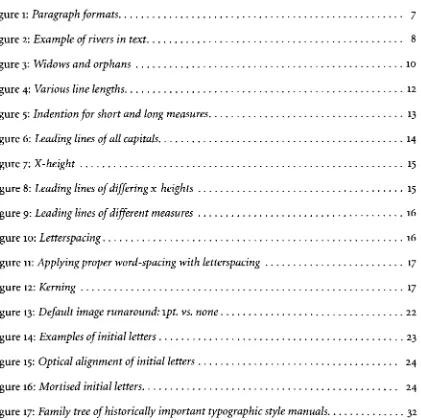
Figure
1:Paragraph
formats
7
Figure
2:Example of
riversin
text
8
Figure
3:Widows
and orphans 10Figure
4:Various
line lengths
12Figure
5:Indention
for
short andlong
measures13
Figure
6:
Leading
lines
of
all capitals14
Figure
7:X-height
15
Figure
8:
Leading
lines of
differing
x-heights15
Figure
9:Leading
lines of
different
measures 16Figure
10:Letterspacing
16Figure
11:Applying
properword-spacing
withletterspacing
17
Figure
12:Kerning
17
Figure
13:Default
image
runaround:lpt. vs. none 22Figure
14:Examples of initial letters
23
Figure
15:Optical
alignmentof initial
letters
24
Figure
16:Mortised
initial
letters
24
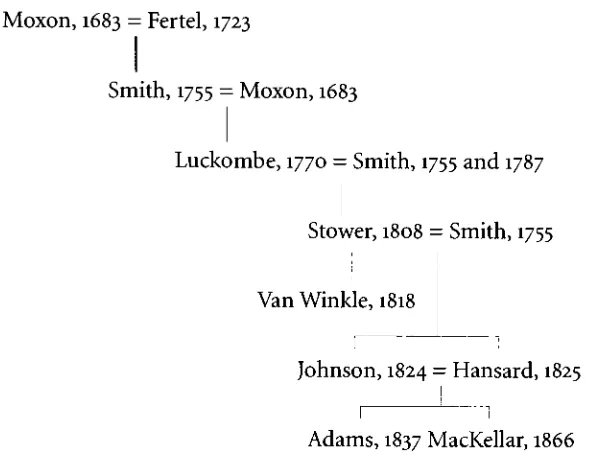
Figure
17:Family
tree
ofhistorically
important
typographic
style manuals 32 [image:9.543.69.490.157.577.2]As
computersbecome
more abundantin
the
home
andoffice,
more peopleareperforming
tasks that
once wouldhave been
done
by
a skilled professional.Computers
and software programshave become
easierto use,
including
desktop
publishing
programs.Programs
are now availablethat
allow anyoneto
"become
adesigner."
Through this,
however,
mosttypographers agree, the typographic
quality
ofdocuments has
suffered.Many
companies are nowdesigning
their
ownmedia,
in
an effortto
save money.The
documents
they
create areadequate,
but
there
is something
missing.Though
they
may
notbe
ableto
explainwhy,
most people can appreciate
the
appearance ofthe
professionally
typeset
page.The
goal ofthis
thesis
projectis
to
makeit
easierfor
a non-professionalto
maketypo
graphically pleasing
text
pages.The basic
rulesoftypography,
withoutregardto
fluxuating
design trends, have essentially
stayedthe
samefor
hundreds
of years.Background
researchfor
this
project was completedby
studying
historically
significanttypographic
manualsof
the
last
300 years.Research
began
withJoseph Moxon's Mechanick Exercises
(1694)
and ended withthe
most recent edition ofThe Chicago Manual of Style
(1993),
one oftoday's
most
highly
regarded manuals.From
this
background
research,
minimum andpreferred software requirementsfor
desktop
publishing
softwareapplications were created.The
purpose ofthese
requirementsis
to
encouragesoftware manufacturersto
incorporate
more automationin
regardto
typog
raphy,
as well asto
encourageimproved
default
settingsin
their
software applications.The
goal wasto
makethe
minimum requirementsrealistically
achievable.Many
ofthe
mini mum requirements arecurrently
availablein
softwareprograms;
however,
no oneprogram contains all oftherequirements.Each
softwareprogramhas
strengths andweaknesses.From
these
lists
ofrequirements, the
specificationsfor
the
"ideal"software applicationwere created.
Through
this
"ideal"application,
all ofthe
best
features
of current softwareonly
relateto the typographic
capabilities ofthe software,
anddo
notinclude
other areas such as color orimage
manipulation.Though
these
specifications couldvastly improve
onthe
quality
oftypography
produced
electronically,
automatedtasks
completedby
a computer will never producethe
same results as a
job
done manually
by
a skilled professional.Computer programming is
limited
andmany
typographic
rules cannotbe
adequately defined in
a computeralgorithm.Though
perfectionmay
notbe
attainable,
improvement
is
possible.Introduction
Statement of
the
Problem
Is
propertypography
becoming
alost
art?Are
webecoming
increasingly
dependent
onsoftware?
What
is
the
minimum amount ofknowledge
the
user should possess?What
arethe
minimum mechanicaltypographic
requirementsthat
pagelayout
software should possess?Does
the
softwarecurrently
available meetthese
requirements?Why
do
we want propertypography?
Does
it really
matter?These
questions arebecoming
moreimportant
as more people gain accessto
powerful
desktop
publishing
software.Work
traditionally
performedby
professionaltypographers
is
nowcommonly
being
done
by
non-professionals.Though
they
are capable ofthe
task,
the
quality
ofthe
work producedis
notthe
same.As
typographic
authority
Robin Williams
explains,
"Professional
typesetters
know
things
wedon't."1Background
andSignificance
Typography
is
the
arrangement ofitems
on a printed pageto
maximizereadability
andlegibility.
According
to the
International Typographic Union
(ITU),
"Legibility
refersmore
particularly
to the
clearness with whichthe type
may
be
seen;
readability
embracesfamiliarity,
interest,
action,
beauty
ofform,
color and spacing."2Though
this
is
a simpledefinition
oftypography,
typography
actually
encompasses much more.Typography
canrise
to the
level
of an artform.
The
importance
oftypography
is
conveyedin
this
quoteby
Peter Karow:
Pleasant
looking,
easily
readabletext
has been
the
aim oftypographers
since scribes
began
to
write andGutenberg
perfectedprinting
with mov abletype.
Text
transports
information. But it
does
even morethan
this,
its
essentially
remainedthe
samefor
centuries.The
Gutenberg
Bible,
printedin
the
1450susing
hand-set
type, is
still admiredfor its
masterful typography.4Laypeople
may
have
trouble
expressing
why,
yetthey
can still appreciatethe
superior appearance of aprofessionally
typeset
page.Though
the
rules oftypography
have
virtually
remainedunchanged, the
equipment andtechnology
usedto
settype
have
changeddrastically.
Yet,
with each newtechnology,
the
quality
ofthe
typography
producedhas
notnecessarily been
animprovement
overthe
previously
acceptedtechnology.
As
writerRichard Rubenstein
explains,
"Each
change of
typographic
technology
creates new constraints and newcapabilities."5
Quality
versus
efficiency
has
been
a constantbattle. Of
phototypesetting,
commonin
the 1970s,
Rubenstein
wrote,
"The
economics ofthis
newtechnology
were strongerthan the
appar entnecessity
to
conformto the
best
typographic
practice."6Better
quality
typography
canactually
be
attained with some ofthe
oldertechnologies,
though
at a slowerpace,
and
generally
ahigher
cost.Digital
technologies
have
been
fighting
to
catchup
to the
capabilities of older composition systems.
We
arecurrently
deep
into
the
world ofdigital
typography.
Though
the
situationhas
vastly
improved,
the
quality
of outputin
the
early days
ofdigital
typography
wasvery
poor.Not only
werethe typographic
capabilities ofthe
layout
softwarepoor,
but
the
first
digital
typefaces
werevery jagged (the
edges were not smooth and a staircaseeffect could
be
seen on curvedletters),
andthe
outputtechnologies
were primitive andonly
capable ofproducing
low
resolutionimages. All
ofthese
factors have
improved
immensely. The quality
ofthe
typography
producedby
digital
technology today
is
notonly
highly
dependent
onthe
knowledge
ofthe user,
but
also onthe
capabilities ofthe
software application.Though
there
areonly
afew
applicationscompeting for
the
high-end
printmarket,
dozens
oflower-end
applications are availablefor
the
home
orsmalloffice user.
This
thesis
project willdetermine
whattypographic
controls a software applicationThese
requirements willthen
be
usedto
createthe
specificationsfor
an"ideal"
software application.
Reasons for
interest
Through my
education atRochester Institute
ofTechnology,
particularly studying
underProfessor Archie
Provan,
I
have learned
to
appreciate propertypography.
I
realizeit is
something many
do
notnotice,
because it is something
that
I
knew very little
about untila short
time
ago.I
have heard
many
agreethat,
once you understand propertypography, it
is
difficult
to
look
at adocument
the
sameway
again.It
has
become
almostan obsessionof mine
to
identify
and critiquetype.
It
has become
apparentto
methat
typography
is in
danger
ofbecoming
alost
art,
particularly in
this
age ofrapidly
evolving
technology
andthe
Internet. This
thesis
projectis
an attemptto
reclaim some ofthis
artthrough
the
useof1.
Robin
Williams,
The Mac is
not aTypewriter
(Berkeley:
Peachpit
Press,
1990),
11. 2.International
Typographic Union Bureau
ofEducation,
ITU Lessons in
Printing,
Elements of Composition
Unit
1.(Indianapolis,
Indiana: International Typographic
Union,
1942),
Lesson
7,
p.2.3.
Peter
Karow,
"Extending
Control
ofDigital
Typography,"Visible Language
32(1998):
101. 4.James
Moran,
The Composition ofReading
Matter
(London: Wace & Co.
Ltd.,
1965),
11.Background
Theory
Introduction
Printers'
manuals and
typographic
style manualshave been
aroundfor
centuries.Though
the
rules and concepts containedin
these
manualshave essentially
remainedthe same,
they
have
been
adjustedto
accommodatefor
newtechnologies.
The
mostpopular manuals ofthe
last
300 years willbe
used asthe
primary
referencesin
determining
the typographic
requirements
for
software applicationsin
this thesis
project.These
typographic
requirements wouldin
the
"ideal" applicationbecome
automated so
the
user would notbe
requiredto
have knowledge
ofthe
specifictypographic
rules.
Karow
agrees:"The
digital
era challenges usfor
more automationregarding
typographic
composition."1With
the
increasing
speedof computerprocessors,
automationis
becoming
moreeasily
accomplished.Literally
thousands
of variations canbe
processedby
a computer scriptwithinseconds.2By
allowing
the
computerto
have
control overtypography,
the
appearance ofthe type
is
determined
by
software code and mathematicalformulas.
Traditionally,
many commonly
accepted,
rule-of-thumbformulas
have
been
usedby
typographers
for
determining
values such asindention
andline
length. Though
a professionaltypographer
may
usethese
for
mulas,
visual appearanceis
the
mostimportant judge
oftypography.
By
relying
on automation,
the
programmersarechallengedto
create a science out of whathas
traditionally
been
an art
form.
In
the
endthe trained
eye will alwaysbe
the
best
judge
of propertypography.
Background
researchfor
this thesis
project willconcentrate on proper usage of punctuation,
hyphenation/justification,
widow/orphancontrol,
line
length, indention,
leading,
letterspacing,
kerning, ligatures,
smallcapitals, numerals,
image
runaround,
initial
letters
sig-detail in Chapter
3.Punctuation
Proper
typography
includes
the
use of correct punctuation.Punctuation
is discussed in
detail
in
almost alltypographic
manuals.Unfortunately,
it is
the
mostdifficult
to
programfor
whendesigning
computer software.The
reasonfor
this
is
the
complexity
ofEnglish
grammar,
upon which punctuation oftendepends.
Though
some wordprocessing
programs
have
included programming
algorithmsto
checkthe
user'sgrammar,
they
are notsufficiently
sophisticatedto
include
punctuation.For
this reason,
punctuation control willnot
be
considered as a criteriafor
desktop
publishing
softwarein
this thesis
project.Another
challenge providedby
punctuationis
the
disagreement
overits
usage.Accord
ing
to
Charles
Timperley
in The Printer's
Manual
(1838),
"perhaps
there
never existedonany
subject,
among
men oflearning,
a greaterdifference
of opinionthan
onthe true
mode ofpunctuation,
andscarcely
canany
two
peoplebe brought
to
an agreein
the
samemethod."3Because
there
aremany
gray
areasregarding
the
useofpunctuation,
it is very
difficult
to
setstandards
for
its
usage.One
automatedfeature
included in
mostdesktop
publishing
programsin
regardto
punctuation regulates
the
useof quotation marks.This
feature
canbe
setto
make surethattypographers'
quotes,
ratherthan
primemarks,
are used withintext.
It
is
ahelpful feature
unless
the
useris
inputting
measurements andprime marks are necessary.In
this case, the
user must override
the
softwarepreferences.Some
applicationsaretrying
to
make punctuation more accessibleto the user,
sothat
it is
nolonger necessary
to
memorizekeystrokes
to
obtain punctuation such an endash
(-)
orellipsis
(...). Though better
accessto
charactersis
animprovement,
it
still requires userDeciding
how
to
break
aline has been
adilemma
troubling
printersfor
centuries.Thomas
MacKellar
describes
practices ofearly
printersin
his
manualThe
American
Printer,
published
in many
editionsduring
the
latter
half
ofthe
nineteenth century:"To
avoiddivisions,
the
early
printers used vowels with a mark of abbreviation overthem
to
denote
that
one ormore
letters
were omittedin
the
word: e.g. coposefor
compose or copletiofor
completion,&c."
Orthography
was various andarbitrary.4Orthography
is
the
process ofbreaking
wordsinto
syllablesin
orderto
divide
them
at
the
end of aline. As
moredictionaries became
published andaccepted,
orthography
became
more uniform.In
1844,
Thomas Adams
wrotein
his
manualTypographia:
The Dictionaries
ofWalker
andJohnson
arelooked up
to
asthe
highest
authorities.
It
has
silencedthose
pedantic clamors anddivided
opinions,
whichdistracted
the
attention ofthe compositor,
andhe is
nowableto
solveany dif
ficulty,
by
a referenceto those
excellent standards ofEnglish
orthography.5Lines
oftype
canbe
setcentered,
raggedright,
raggedleft,
andjustified
(shown in
figure
1).In justified text,
eachline
mustoccupy
the
full
measure.Lines rarely
fit
exactly
without some
respacing
andit is
oftennecessary
to
break
wordsthrough
hyphenation in
order
to
obtainabetter fit.
Thisisan example of Thisisan example of This isanexample of This is an example of ragged righttext.This
is
raggedlefttext.Thisis centeredtext.Thisisan justifiedtext.This is an an example of ragged right an exampleof raggedleft example of centeredtext. example ofjustifiedtext.text.This
is
an example of text.This isan example This isan example of Thisis
an example of ragged righttext. of raggedleft
text. centeredtext. justifiedtext.Figure
1:Paragraph
formats
In
the
days
of single metaltype,
the
compositorhad
to
spacethe
line
by
hand
to
obtain
the
optimumfit.
The
compositorhad
to
determine
atthe
end of eachline
whetherto
space out
the
text,
reducethe
spacing
ordivide
a word.Today,
these
decisions
are made electronically
by
computer algorithms.As
statedin The Chicago Manual of
Style,
in
a moderncomposing
system,
"the
operator puts a space after eachword,
and whenthe
line is
jus
not within
lines.
Generally,
thin
spacing is
preferable river.A
riveris
a whiteto
widespacing
because
the type
is
read more quickly.aP
resembling
a
riveru uu j ji, i- .j which can
1
be
traced
Large
spaces shouldbe
avoidedbecause
they
canlead
to
, . ,1
,through
theltext
whendistracting
"rivers".
Rivers
areillustrated in
figure
2.^
js
not
1
justified
Some
people objectto the
division
of wordsin
properly.It
fcan
occurprinting;
they
deem
it unnecessary
anddispleasing
to
whenlargel
type
IS, Tr .. . .
, . .
justified
on1
a
shortthe
eye.It
nodivision
occurs,
allregularity
orspacing
'1
measure.
is
sacrificed,
andthe
appearance ofbad
workmanship is
projected.
In
unjustifiedtype,
however,
hyphenation
is
Figure
2:Rivers
intext
generally
avoidable,
with no negative consequences.In The American Printer
(1879),
Thomas
MacKellar
shareshis
views onhyphenation.
MacKellar
touches
on several ofthe
many
rulesto
be
considered whenjustifying
type:
A
compositor whostudiespropriety
and neatnessin
his
work will not allowan
unnecessary
division,
evenin
a narrowmeasure,
if
he
can avoidit
by
overrunning
two
orthree
lines
of matter.In
large
type
and narrow measures, the
division
of words cannotbe
avoided;
but
care shouldbe
taken
thathyphens
do
not occur atthe
end of successivelines.
In
smalltype
and widemeasures, the
hyphen may
frequently
be
dispensed
with,
eitherby driving
out orgetting in
the word,
withoutinterfering
withthe
regularity
ofthe
spacing.
The
compositorwhois
carefulonthis
point willfind
his
advantagein
the
preferencegivento
his
work,
andin
the
respect attachedto
his
char acteras a master ofhis
business.7Table
1,
is
taken
from
a publicationby
the
International
Typographic Union
(ITU)
andlists
divisions
to
avoid.These
same rules are reiteratedin many
ofthe
printer's manuals.This
list helps
emphasize some ofthe
complexitiesthat
mustbe
taken
into
accountin
hyphenation/justification
programs.Additionally
the
ITU
advises:If
less
than
an em of space remains atthe
end of aline,
spaceit
out.If
thestates
in
his
manualTypographia,
(1824)
"The
appearance ofmany divisions
down
the
side of apage,
andirregular
spacing,
arethe two
greatestdefects
in
printing."9Hyphenation
should occur
logically.
As Horace Hart
explainsin Rules
for
Compositors
andReaders
atthe
University
Press,
Oxford
(1928),
the
principle ofhyphenation
is
that
"the
partofthe
wordleft
atthe
end of aline
should suggestthe
partcommencing
the
nextline.
Such
adivision
asread-just
is
indefensible;
it
shouldbe
re-adjust;
happi-ness,
nothap-piness."10Table
1:Divisions
to
avoidSource: International Typographic Union Bureau
ofEducation
Avoid
these
divisions
if
possible:1.
Words
ofless
than
sixletters.
2.
Words
of onesyllable,
regardless oflength;
as, strain,
thrusts,
strength 3.On
a syllable oftwo
letters
atthe
ending
orbeginning
of aline.
4.
Words
oftwo
syllables pronounced asone; as,
heaven,
power, prayer, often,
seven. 5.A
small amount statedin
figures.
6.
Proper
names,
especially
those
of persons.7.
Initials
of propernames,
or such abbreviations asA.M., B.C.,
Y. M.C. A.
;
1492,
A.D.
8.
The
last
word of apage so asto
carry
a part ofit
to the
next page.9.
More
than two
lines
in
succession.10.
Between
suchletter
combinations aseau, gn,
ph, sch,
th,
andthe
like,
when pronounced as one syllable(double
ss alone excepted).11.
A
referenceletter
orfigure;
as(1), (2),
or(a), (b),
atthe
end of aline,
carrying
overthe
matterto
whichit
refers.12.
Do
notdivide
on a singlefigure
and comma anddo
notdivide dollars
and cents. 13.One-syllable
words changedto two
syllablesby
adding
s or esfor
the
plural mustnot
be
divided;
asspac-es,
dish-es, hous-es,
priz-es.Ces,
hes,
ses,
and zes are not recognized suffixes.14.
A
single-letter syllable within a word shouldbe
placed atthe
end and not atthe
beginning
of aline;
ashom-i-cide, homi-cide;
pronunci-a-tion,
pronouncia-tion;
par-a-graph,
para-graph.15.
In
foreign
words,
divide
onthe
vowel:Di-nant, Ma-lines,
Ce-zanne. Do
notseparatethe
French
gn,
Italian
gli,
Polish
cz and sz:Ser-gui-gny, Pa-gliac-ci,
Bu-czacz,
To-ma-aszow.
16.
The
use ofthe
hyphen
to
indicate
an omittedword;
as 10-and25-centCurrently,
hyphenation/justification
algorithms are one ofthe
most studiedfeatures
of word
processing
and pagelayout
programs.Automation
in
this
respecthas
been
aroundsince
the
beginning
ofdesktop
publishing;
however,
the
quality is
stillimproving. The
big
gest problem produced
by
these
programsis
that
some allowfor
letterspacing
as well aswordspacing
to
fit
aline.
This
feature
maybeturned
offin
the
program's preferences.Pref
erences can alsobe
adjustedto
determine
the
number ofhyphens
allowedin
a row andthe
minimum word sizebefore
and afterthe
break.
Most
software programshave
adictionary
which can
be
editedto
include
exceptionsto the
hyphenation/justification
rules.Adobe InDesign
now utilizes whatis
defined
as a"multi-line
The
multiline
composer canlook
up
to
sixlines
aheadto
determine
the
best hyphenation. This
sameidea
was usedby
Donald Knuth's
TeX
program whichdealt
withhyphenation
a paragraphat a
time
and also withthe
HZ-program
developed
by
Hermann
Zapf
withthe
help
ofPeter
Karow.
The HZ-Program
utilizesKnuth's
TeX
program and also usesGutenberg's
conceptof
subtly
adjusting
letter
shape andkerning
to
help
improve uniformity
ofspacing.11Widow/Orphan
Control
Widows
and orphans areillustrated in figure
3.An
orphanoccurs when
the
first
line
of a paragraphis
the
last line
onthe
page.A
widowoccurs whenthe
last
line
of a paragraphis
the
first line
of a page and atypographic
widowoccurswhen
the
last line
of a paragraph contains a single word ortwo
orthree
small words.MacKellar
expressesemphatically,
"The last
line
ofa paragraph should not on
any
accountbegin
apage,
neither shouldthe
first line
of a paragraph come atthe
bottom
ofthe
page."12Other
manuals reiteratethe
samemessage.
Two
waysto
compensatefor bad
pagebreaks
are possible.
As The Chicago Manual of Style
states,
"Bad breaks
can oftenbe
eliminated withoutresetting type,
by
adjust-Orphan
Widow
Typographicwidow
[image:21.543.349.485.381.664.2]ing
pagelengths."13Pages
are allowedto
run aline
short orlong
to
remedy
abad
break,
aslong
asfacing
pages match.Pages
can alsobe
adjustedby
manipulating justification
rules,
especially if
the
bad break
only involves
one word.This
processis
explainedby
Joseph
Moxon in
his
manualMechanick Exercises (1694):
If
he [the
compositor]
finds he
shallhave but
alittle
single wordin
his
break,
he
either sets wideto
drive
a word ortwo
moreinto
the
break-line,
or elsehe
sets closeto
getin
that
little
word,
because
aline
withonly
alittle
wordin
it,
shews almostlike
a whiteline,
which unlessit be properly
plac'd,
is
notpleasing
to
a curiouseye.14The
following
table,
taken
from The Chicago Manual of
Style,
contains alist
ofbad
paragraph
breaks
that
shouldbe
avoided:Table
2:Bad
paragraphbreaks
Source: The Chicago Manual of
Style,
University
ofChicago Press
Bad Paragraph Breaks:
1.
A
widow, that
is,
a shortline
one word ortwo
orthree
little
ones(some say
anything
less
than
afull
line)
atthe
top
of apage.2.
A
recto[right
hand]
pagethat
ends withthe
first
part of abroken
word.3.
At
the
foot
of a page or column.A
subhead shouldbe
followed
by
atleast
two
lines
of
text.
4.
A
sectionbreak
consisting
of ablank
line
(or
atype
device in
an otherwiseblank
line)
falling
atthe
head
orfoot
of a page or column.Such
asectionbreak
should,
if
possible,
be
preceded orfollowed
by
atleast
two
lines
oftext.
5.
An
extractbeginning
onthe
last line
orending
onthe
first line
of a page or column.There
shouldbe
atleast
two
lines
in
either place.6.
A
footnote
that
does
notbegin
onthe
same page asits
reference.At
least
two
lines
ofthe
note shouldfall
onthe
pagecontaining
the
referencebefore
the
note continuesLine Length
It
is difficult for
the
eyeto
follow
across along
line
of smalltype, just
asit is equally
hard
to
read
large
type
setin
a short measure.The ITU
states:It is
known
that
along
line
oflarge
type
canbe
read with greater easethan the
sameline
setin
smalltype.
From
these
conclusions,
scientistshave
attemptedto
provethat the
ideal
measurefor
easy
reading,
taking
into
con siderationthe
size oftype, is approximately
one and one-halftimes the
length
ofthe
lower-case
alphabet when setin
type.15Many
printersdisagree
and preferto
usetwice the
alphabetlength.
According
to the
mostrecent
Chicago Manual of Style
(1993),
"As
arule, text
matterintended for
continuousreading (as
opposedto
referencematerial)
shouldbe
setin
lines
neithertoo
wide nortoo
narrowfor
comfortable reading.Ideally
the
line
should accommodate65
to
70characters."16Their
recommendationis nearing
three
alphabetlengths.
Margins
continueto
grow narrower
in
orderto
save paper and money.Examples
ofdifferent line lengths
(measures)
areshown
in
figure
4.abcdefghijklmnopqrstuvwxyzabcdefghijklm abcdefghijklmnopqrstuvwxyzabcdefghijklm abcdefghijklmnopqrstuvwxyzabcdefghijklm
Line
length
of
1.5
alphabetsabcdefghijklmnopqrstuvwxyzabcdefghijklmnopqrstuvwxyz abcdefghijklmnopqrstuvwxyzabcdefghijklmnopqrstuvwxyz abcdefghijklmnopqrstuvwxyzabcdefghijklmnopqrstuvwxyz
Line
length
of
2 alphabetsabcdefghijUmnopqrstuvwxyzabcdefghijklmnopqrstuvwxyzabcdefghijklmnopqr abcdefghijWmnopqrstuvwxyzabcdefghijklmnopqrstuvwxyzabcdefghijklmnopqr abcdefghijklmnopqrstuvwxyzabcdefghijklmnopqrstuvwxyzabcdefghijklmnopqr
Line
length
of
70charactersPages
withdouble
columns are often usedto
fit
moreinformation,
yetstill alloweasy
reading.
This is particularly
common with reference materials.Shorter
line
lengths
requireless
leading
and allowfor
smallertype, making
this
format
even more economical.Usually
one pica
is
allowedbetween
columns as adivider.
No
automationis
presentin
desktop
publishing
software applicationsfor determin
ing
ideal
line
length; however,
desktop
publishing
applicationshave
madeit
easierto
design
multi-column
documents.
Indention
As John Smith
in The Printer's Grammar
(1755)
explains, the
goal of paragraphindention
is
to
"indent
the
first line
thereof
far
enoughto
distinguish is from
the
preceding
line,
in
case
it
shouldbe
quitefull."17Larger
indention is necessary
withlonger lines
to
makethe
paragraph more apparent.
Indention
is usually
measuredin
em and en spaces.In
the
days
ofmetal
type,
these
were referredto
as en and em quadrates.The
widthofthese
spacesdepend
upon
the
particulartypeface
being
used.An
em spaceis
equalto the
width ofthelargest
character
in
the
font,
andan en spaceis
equalto
half
ofthat
width.Text in
measures shorterthan
18 picasshould
be
indented
one em space.Text in
measures19-23
picas shouldbe
indented
1.5
em spaces.Text
in
measureslarger
than
24
picas shouldbe
indented
two
em spaces.This
is necessary
to
better distinguish
the
paragraph
beginning.
Figure
5:Indention
for
short andlong
measuresCharles
Timperley
explainsin The Printer's Manual
(1838): "The first line
of a newparagraph
is indented according
to the
widthofthe page,
but
notless
than
an m quadratofwhateversize
the
letter
ofthe
workmay
be."18The ITU
gives more exactinstructions:
mea-sures wider
than
18 picas shouldbe indented
moreaccording
to the
measure."19Typogra
pher and
RIT School
ofPrinting
professorArchie Provan
agrees:"type
up
to
18 picas shouldbe indented
oneem, type
19-23
picas shouldbe
indented
one and ahalf
ems and measures24-30 picas should
be
indented
two
ems."20The ITU
goes onto
say:"Small
type
shouldnever
be
setin
widemeasures,
no matterhow
it is
indented.
Six-point
matter 30 picas ormore wide
is
an abominationtypographically
andit is
anirritation
to
mostreaders."21Indention
is
notnecessary if
there
is
aninitial letter
orfor
the
first
paragraph of achapter or section.
Theodore De Vinne
writesin Modern Methods of Book
Composition
(1914): "The first line
of achapter,
orany
line
following
a shortsubheading
or arunning
title,
or with afull
whiteline
overit
needs no indention."22The Chicago
Manual
of Style
agrees:
"It
is
usualto
omitthe
paragraphindention,
setting
the
first line flush left. This is
often
done
after subheads also."23The
default
indention in
most softwareprograms,
whetherdesktop
publishing
programs or
otherwise,
is
ahalf-inch
tab
space.This
does
nottake
into
accountline
length,
andis generally
larger
than
necessary
orthan
is aesthetically
pleasing.To
adjustthis,
the
usercan re-adjust
the tabs
or usekeystrokes
to
obtain em and en spaces.The keystroke for
an enspace
is
option-space,
andfor
anemspace,
option-space-space.Some
programs nowmakeit
easierto
obtain en and emspaces,
by
selecting
them
from
a pulldown
menu.Another
option
is
to
setthe
desired
paragraphindention
underparagraphformats
or style sheets.Leading
Leading
is
the
amount of spacethat
separateslines
oftype.
Increasing
leading
oftenincreases
legibility,
particularly
whensetting lines in
all capitals(shown in
figure
6).
The
factors
which must
be
taken
into
accountwhendetermining leading
aretype size,
line
length,
andthe
general characteristics ofthe typeface's
design.
Being
somewhat of an aestheticjudge
ment, there
is
no setformula for
calculating leading.
De Vinne
explains,
"Unleaded
thin-spaced
compositionis
preferredby
the
disciples
ofWilliam Morris [of
the
Kelmscott
press],
but
it is
notliked
by
the
averagereader,
whodoes
TEXT SET IN ALL CAPITALS NEEDS MORE
LEADING THAN TEXT SET IN UPPER AND
LOWER CASE LETTERS.
TEXT SET IN ALL CAPITALS NEEDS MORE
LEADING THAN TEXT SET IN UPPER AND
LOWER CASE LETTERS.
Figure
6:
Leading
lines of
all capitalsSome
typefaces
are crowdedfor
space and require extraleading
to
look
good;
othershaving long
ascenders ordescenders
requireless leading.
The
x-height ofthe
typeface,
shown
in
figure
7,
is
a majorfactor
in
determining
leading.
The
x-height of atypeface
is
the
height
ofthe
lowercase
x.The
larger
the x-height, the
moreleading
is
required.Similarly,
for larger
type
sizes andlonger line
lengths,
moreleading
is
required.The importance
ofleading
is
described
in The Chicago Manual ofStyle:
Tx
x-heightFigure
7:X-height
The
larger
the type size, the
moreleading
is
requiredto
preventthe
eyefrom
being
distracted
by
the
lines
above andbelow
the
onebeing
read.Also,
the
widerthe
line
oftype,
the
greaterthe
leading
needed,
because
the
eyemoving
from
the
end of oneline
to the
beginning
ofthe
nexttakes
along
jump,
andin closely
set materialthe
eyemay easily
jump
to
the
wrong
line.25Typefaces
with smaller x-heights andlonger
ascendersanddescenders,
such asthis one,
requireless
leading
than typefaces
withlarger
x-heightsasthe
one shownbelow.
Typefaces
with
large
x-heightsand
short
ascenders and
descenders,
such
as
this one,
require
more
leading
than
typefaces
with smallerx-heights,
suchas
the
one shown
in
the
example
above.Type
setin
long
measures requires moreleading
for
easier reading.Shorter
measuresdo
not require as muchleading.
Type
setin
long
measures requires moreleading
for
easierreading.
Shorter
measuresdo
not require as muchleading.
Type
set
in
long
measures requires moreleading
for
easier reading.Shorter
measuresdo
not require as muchleading.
Figure
9:Leading
lines
of
different
measuresIn
most softwareapplications, the
leading
for
typefaces
defaults
to
an automaticsetting,
whichis
closeto
single spacing.This is
acceptablein
some,
but
not allsituations.The
automatic values
increase
with pointsize,
but do
notvary
with x-height orline length.
Typically,
the
default
leading
valueis
calculated as 120%ofthe
pointsize.26This
valuemay
be
adjustedby
the
userwithinthe
programs preferences.Letterspacing
Increasing
the
spacebetween letters is known
asWITHOUT LETTERSPACING
letterspacing.
(Shown in Figure
10)
Letterspacing
WITR LETTERSpACING
is
done
to
improve readability
andto
compen-Figure
10:Letterspacing
satefor
different
letter
shapes.This
is especially
necessary
withtype
setin
all capitals.De Vinne
explains,
"Lines
of capitalletters
shouldalways
be leaded
and spaced widerthan the
letters
oflower-case."27Letterspacing
is rarely
necessary
withlower-case letters
and shouldgenerally
be
avoided.Letterspacing
should notbe
usedto
help justify
aline,
exceptas an absolutelast
resort.Letterspacing
is
also referredto
as optical or visualspacing
because
it is
done
to
achieve proper optical
fit
between
letters.
Tall
letters
appear closertogether
than
low
orangled
letters.
According
to
De
Vinne,
"in
an unspacedline,
allmeeting
types
with verticalstems seem
huddled,
whiletypes
with angularform
seemawkwardly
separated."28To
fix
The Chicago Manual of Style
suggestsavoiding
letterspacing,
but
adds:"authors
andeditors should
be
aware,
however,
that
some combinations ofletters,
particularly in
the
italic
alphabets,
givethe
illusion
of more spacebetween
them."29They
suggestthat
althoughletterspacing
is aesthetically
pleasing,
it is
notincorrect
to
set capitals withoutletterspacing.
When
letterspacing lines,
v&
NOWORDSPACING
WITH LETTERSPACING
it is important
to
alsoincrease
, j r . .
.
WORDSPACING
WITH
LETTERSPACING
the
wordspacing.This
ismus-trated
in
figure
n.Additionally,
Fiure
11:4RP^'S
appropriatewordspacing
withletterspacing
it is important
to
letterspace
the
entire
line
evenly,
making
surethat
someletters do
not appear closertogether than
others.In
desktop
publishing
applications,
manual controls exist withinthe
control palettesto
adjustletterspacing.
If
kerning
tables
areavailable,
positiveletterspacing
valuescan sometimes
be
added.Letterspacing
is only
done
automatically in
relationto
justification.
Kerning
Kerned
letters
wereoriginally defined
asyo
We
To Wo Ya
we w. y.
Xy
Vo
"types
that
have
part ofthe
face
hang-No
kerning
ing
over either one orboth
sides ofYo
We
To Wo Ya
we w. y.Xy
Vo
the
body."30Kerning
improves
the
fit
.Metric
kerning
of
lowercase
characters andis
sometimes
referredto
as negativeletterspac-Yo
We
To Wo Ya
we w. y.Xy
Vo
ing. When
certaincapitals,
like T
andY
Optical
kerning
are placed nextr
to
lowercase
letters,
it
_. TjrFigure
12:Kerning
is
oftendesirable
to
let
the
top
ofthe
uppercase
letter
hang
overthe
lowercase letter if it
has
no ascender.Philip
Luckombe,
in
his
manual
The
History
andArt of
Printing
(1771).
writes:"
in
the roman,
f,
f
[long
s],
j,
arethe
only
kerned
letters;
but
in
the
italic,
d,
g,
j,
I,
y
arekerned
on oneside;
and/and/
[long
s]
,onboth
sides ofthe
face.
Most italic
capitalsarekerned
on one side ofthe
face."31Luckombe
goeson
to
call attentionto the
most problematicletter
pairs.The
carefultypographer
willdesktop
publishing.Currently
in
the
majordesktop
publishing
applications,
"metric"
kern
ing
tables
are usedfor
eachtypeface.
These
tables
arebuilt
into
the typeface
by
font
manufacturers
and containkerning
valuesfor
eachletter
combination.They
canbe
adjustedby
the
user andturned
on andoffthrough the
application preferences.Though
they
workwell,
some applications
do
abetter job
than
others.Kerning
can alsobe done
manually in
these
programs.
Adobe InDesign
is
the
first
programto
offer automatic opticalkerning.
Optical
kerning
is determined
by
acharacters'
optical
shape,
ratherthan
withkerning
tables.32This
method
is generally
morepleasing;
however both fall
short withlarge
type.
Examples
ofoptical vs.metric
kerning
are also shownin
figure
12.Optical
kerning
is
most valuable when nokerning
tables
for
atypeface
exist.Ligatures
Ligatures,
alsoknown
asdouble
ortied
letters,
wereoriginally formed
by
combining
onekerned letter
withanother.33This helped
preventbreakage,
as wellasproviding
anaestheticquality
similarto
someofthe
joined
letters
drawn
by
scribes.The
romanf
wasthe
mostliable
to
accidents when castin
metal type.34In
his
1879
manual,
MacKellar
wrote,
"The
double
letters
in
modernuse areff, fi, ffi, fl, ffl;
andthese
areso castto
preventthe
breaking
of
the
beak
ofthe
f
when usedbefore
atall
letter."35Controversies
have
ensued overthe
advantages ofligatures. The
numberofligatures
used over
the
yearshas
fluxuate.
Many
manualsdid
not encouragetheir
usebecause
it
made
the
job
ofthe
compositormoredifficult.
Ligatures
were oftenthought
of as expensivebecause,
asJohnson
stated,
"the
damaging
of oneletter is
the
destruction
oftwo."36Smith,
in
his
1755
manual,
saysmany
ofthe
olderligatures,
such as('as', 'is',
'us', 'ft',
'ra',
'ta')
ought"to be
omitted,
and regarded asuseless;
orelse,
ontheir
arrivalbe
flung
into
the
Metal-basket,
withoutgiving
them
a place whichmay
be
taken
up
with more usefulsorts."37
Most
ofthese
ligatures
are unheard oftoday.
Luckombe in
his
1771 manualwrites,
"Double letters
areae,
ce, ct,
ft,
w.They
arethe
only
ligatures
that
have been
thought
fit
to
be
preserved.The
otherdouble letters
arecontrived."38
ligatures,
that
are morecommonly
found
today.
Stower in
referenceto
ligatures
states,
"we
would advise
the
dispensing
withevery
sortbut
whatis really
necessary."39Many
ligatures
weredone
away
with afterthe
replacement ofthe
long
s(f
)
withthe
round s
(s).
The
round s wasintroduced
by
John Bell in
1785,
in
his
edition ofthe
British
Classics
andgradually
became
adoptedby
all.40Thomas Adams
writes:The introduction
ofthe
rounds,
instead
ofthe
long,
waslooked
upon asa valuable
improvement in
the
art ofprinting,
and we see no reasonwhy
the
beak
ofthe
f
could notbe
gracefully
thrown
back
onits
ownbody,
andthereby
savethe
founder
the
inconvenience
ofkerning
it,
andthe
printerthe
expense and
trouble
ofkerned
anddouble
letters.41Though changing
aletter
shapehas
occurredin
the past,
(with
the
long
sfor
example)
it is
not a change
that
canbe
made overnight.Too many
typefaces
wouldhave
to
be
redesigned.Johnson
writes ofthe
work ofLord Stanhope
to
reshapethe
letter f in
his
effortto
abolishligatures:
"We
shouldhave
no objectionto
his
[Stanhope's]
planfor
abolishing
the
double
letters
attachedto the
f,
providedit
couldbe done
withoutdestroying
the
beauty
ofthat
character."42
Today
ligatures
are usedfor
appearance ratherthan
necessity.The ITU
agrees"these
combinationslook
better
than
letters
usedsingly
because
ofthe
interference
ofthe
projection ofthe
f
withthe
1
andthe
dot
overthe
i."43The Chicago Manual ofStyle
talks
about
the
use of as and cedipthongs
withforeign
words,
but
does
notdiscuss
the
f ligatures.
Today's
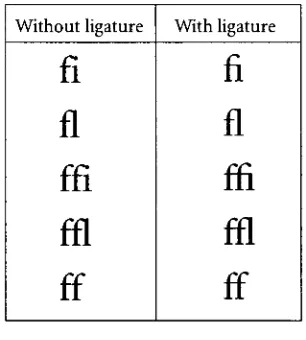
most
commonly
usedligatures
are shownin
table
3.Current
desktop
publishing
programs canbe
set
in
the
preferencesto
automatically
substitute thef ligatures for
individual
letters
pairs.Often,
this
will confusethe
spellchecker;
however,
some programs
have found
away
to
avoidthis
problem.Unfortunately,
not alltypefaces
aredesigned
to
include
ligatures.
When purchasing typefaces,
usersshould checkfor ligatures.
Without
ligature
With
ligature
fl
fi
fl
fl
ffl
ffi
ffl
ffl
ff
ff
[image:30.543.331.484.405.575.2]Small Capitals
Small
capitalshave
the
same shape andthe
same stem width as regularcapitals;
however,
they
are shorterin
height.
True
small capitals shouldbe
equalin
height
to the
x-height ofthe
lowercase letters.
X-height
is illustrated in
figure
7,
p. 15.Many
small capitals are actually
slightly
taller than this.
They
are usedto
give stronger emphasisto
a wordthan
mightbe
conveyedby
setting it in italic. MacKellar
explains,
"The
first
word ofevery
section orchapter
is commonly
putin
small caps.Headings
arecommonly in
small caps."44Small
capitalsneed
the
same attention withletterspacing
andleading
aslarge
capitalsand shouldbe
usedsparingly
for
better
readability.The availability
oftrue
small capitalshas
alwaysbeen
aproblem,
both in
the
days
of metal
type
andtoday.
Printers
and compositorshave found
ways ofgetting
aroundthis
problem; their solution,
however,
is generally
nottypographically
pleasing.Evidence
ofthese
practicesis
shownin
a statementin Luckombe's
1771 manual:"We
do
notstrictly
mean smallcapitals which are cast
to their
respectivefounts;
but
rathersuch are made artificially,
by
putting
aninitial
letter
of alarger
sizebefore
the
letters
which areto
look
asif
they
weresmall capitals."45The
problem withthis
practiceis
the
stem weights willnotmatch
the true
capitalsandthe
effectis visually
unpleasing.Similarly,
many digital
typefaces
do
not containa proper set of small capitals.
When
they
do
containsmall capitals
they
aregenerally found in
an accompanying
'expert'
set.
If
no expert setis
available,
many
software programs will allow
the
userto
createmachine-True Small
Capitals
Machine-Generated
Small Capitals
generated small capitals.
These
aregenerally
regularcap-Table
4:
True
smallcapitals vs.... 111 n/ t-u * u machine generated small capitals
ital
letters
scaleddown
to
70%.This
percentage canbe
* ^adjusted;
however,
no matter whatthe percentage, the
resultis
not pleasing.In QuarkX
Press
andAdobe
PageMaker,
these
machine-generated small capitals are created withthe
simple press of a
button in
the
control palette.Adobe
InDesign
has
a similarfeature;
how
ever,
if
an expert setis
available, the true
small capitals are utilized.An
example oftrue
smallOld
stylefigures
0123456789
Modern
figures
0123456789
Table
5:Old
stylefigures
vs.modern
figures
Numerals
Two
types
of numerals(or
figures)
exist: modern(lining
or
non-ranging)
and old-style(non-aligning
or ranging).Examples
ofthese
are shownin
table
5.Typographers
generally
prefer old-stylefigures,
but
will acceptthe
use ofmodern
figures
in
tabular
work.Old-style
figures
canbe
difficult
to
find.
Many
ofthe
newdigital
typefaces
are nolonger
created with old-stylefigures.
If
old-stylefigures
exist,
they
aregenerally
found
in
the
expert set withthe
true
small capitals.C.
Stower,
in
his
manualThe Printer's Grammar
(1808),
refersto the
modernfigures
as
"an
improvement,"
yet
Hansard's Typographia
(1825),
disagrees
withthis statement,
complaining
oftheir
"stiff
uniformity."Hansard
admits,
however,
that
modernfigures have
been "almost
universally
adopted."46Hansard
justifies
his
preference,
explaining:"there
is
a reliefto the eye,
and ahelp
to the
reading
ofthem
[old-style
figures],
whichis
by
no means afforded
in
the
modern-cut lining-figures."47MacKellar
agrees withHansard,
adding:
"though
uniformin
height
andappearance,
wedo
notdeem
the
modernfigures
animprovement
onthe
variously-lining
figures
formerly
in
vogue,
and nowhappily
coming
again
into
use."48It
is
oftenarguedthat
old-stylefigures
areeasierto
read anddistinguish. With
modernfigures,
3
and8
canbe
mistaken,
as well as6,
9
and0.
Whichever
numerals arechosen,
it is
important
notto
mix old-style and modernfigures
in
the
same publication without specialinstructions
to
do
so.The Chicago Manual of Style
does
not express a preferencebetween
figures,
exceptthat
aligning
figures
shouldbe
usedin
tabular
matter.Often
the
decision
regarding
whichfigures
to
useis
based
simply
on availability.The ITU
states:Modern
figures
are preferredin setting tables,
newspaperwork,
scientificThe
default figures
usedin
desktop
publishing
applications are almost alwaysmodernaligning
figures.
To
substitute old-stylefigures
canbe
time
consuming.With
the
introduc
tion
a newfont
technology, Open
Type,
more automationis
expectedin
this
respectin
the
near
future.
Image Runaround
With
the
advent ofdesktop
publishing,
combining
text
andillustration is
easierthan ever;
however,
some precautions mustbe
madein
doing
so.White
spaceis necessary
to
help
bal
ance
the
page.De
Vinne
writespassionately
onthe
subject:"The
jamming
oftext types
closeagainst
illustrations
orup
to
large
initial
letters
is equally
objectionable"He
comparesthis
sin
to the
overcrowding
ofletters
setin
allcapitals.50He
goes onto
explain:The
blank
spaceto
be
allowedabove,
below
orby
the
side of cuts[illustra
tions]
or narrowtables
mustbe
governedby
the
general openness or closeness of
the
composition. ...for
very
open compositiontwo
or eventhree
picas
may be
used;
for
solid composition about one pica.An
illustration is
damaged in
appearance whenit
crowdsthe
type
ofthe
text.51Many
experts agreethat the
spacing
around animage
shouldbe
roughly
equalto the
paragraph
leading.
Providing
too
much white spaceis generally
preferableto
providing
too
little
white space around an
image.
In
desktop
publishing
applications, this
spaceis
referredto
asimage
runaround ortext
wrap.It
canbe
adjustedindependently
for
each side ofthe
illustration. If
text
is
to
runover an
illustration,
the
space value shouldbe
setto
"none."
In QuarkXPress
the
default
set-Image
runaround setto
one point.
Image
runaroundset
to
onepoint.Image
runaround setto
one point.
Image
runaround set
to
one point.Image
runaroundset
to
one point.Image
runaround set
to
one point.Image
runaround setto
none.Image
runaround
set to
none.Image
runaround set
to
none.Image
runaroundset
to
none.Image
runaround setto
none.
Image
runaround setto
none.Image
runaround setto
none.Image
runaround set
to
none.Image
runaround set
to
none.ting
is
1 point.Generally,
that
is
notenough,
yetthe
program alwaysdefaults
to this
setting.In
the
Adobe
applications, the
default setting is
none;
however,
the
program willremembera new amount
if
the
setting is
adjusted with nodocuments
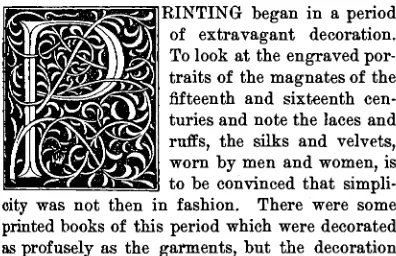
open.Initial
letters
Initial
letters,
sometimes referredto
in
earlier manuals astwo-line
letters,
are attention getting