Advanced Forensic Format: An Open,
Extensible Format for Disk Imaging
The Harvard community has made this
article openly available.
Please share
how
this access benefits you. Your story matters
Citation
Garfinkel, Simson L., David J. Malan, Karl-Alexander Dubec,
Christopher C. Stevens, and Cecile Pham. 2006. Advanced forensic
format: An open, extensible format for disk imaging. In Advances
in Digital Forensics II: FIP International Conference on Digital
Forensics, National Center for Forensic Science, Orlando, Florida,
January 29-February 1, 2006, ed. Martin Olivier and Sujeet Shenoi,
17-31. New York: Springer.
Citable link
http://nrs.harvard.edu/urn-3:HUL.InstRepos:2829932
Terms of Use
This article was downloaded from Harvard University’s DASH
repository, and is made available under the terms and conditions
applicable to Other Posted Material, as set forth at
http://
ADVANCED FORENSIC FORMAT:
AN OPEN, EXTENSIBLE FORMAT
FOR DISK IMAGING
S. Garfinkel, D. Malan, K. Dubec, C. Stevens and C. Pham
Abstract This paper describes the Advanced Forensic Format (AFF), which is designed as an alternative to current proprietary disk image formats. AFF offers two significant benefits. First, it is more flexible because it allows extensive metadata to be stored with images. Second, AFF im-ages consume less disk space than imim-ages in other formats (e.g., EnCase images). This paper also describes the Advanced Disk Imager (AImage), a new program for acquiring disk images that compares favorably with existing alternatives.
Keywords: Disk imaging, image storage, Advanced Forensic Format (AFF)
1.
Introduction
Most forensic practitioners work with just one or a few disks at a time. A wife might bring her spouse’s laptop to an examiner to make a copy a few days before she files for divorce. Police might raid a drug dealer’s apartment and seize a computer that was used for contacting suppliers. In these cases, it is common practice to copy the drive’s contents sector-for-sector into a single file, a so-called “raw” or “dd” copy. Some practitioners make a sector-for-sector copy of the original disk to a second drive that is the same size as the original.
Raw images are widely used because they work with practically every forensic tool available today. However, raw images are not compressed, as a result, they can be very large—even if the drive itself contained very little data.
random access within a compressed file. Because many forensic tools require random access to captured data just like a file system requires random access to a physical disk, disk images that are compressed must be decompressed before they can be used.
A second problem with raw images is the storage of data about the image itself, i.e., its metadata. Because a raw image is a sector-for-sector copy of the drive under investigation, the file cannot store metadata such as the drive’s serial number, the name of the investigator who performed the acquisition, or the date on which the disk was imaged. When metadata is not stored in the image file itself, there is a chance that it will become separated from the image file and lost—or even confused with the metadata of another drive.
After evaluating several of the existing alternatives for storing disk im-ages, we decided to create the new Advanced Forensic Format (AFFTM)
for our forensic work. AFF is open and extensible, and unencumbered by patents and trade secrets. Its open-source implementation is distributed under a license that allows its code to be freely integrated into other open-source and propriety programs.
AFF is extensible—new features can be added in a manner that main-tains forward and backward compatibility. This extensibility allows older programs to read AFF files created by newer programs, and it allows newer AFF programs to read older AFF files that lack newer features.
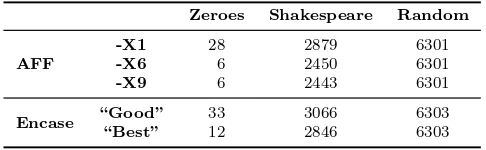
This paper presents our research on the design and implementation of AFF. We have used AFF to store more than one terabyte of data from imaged hard drives using less than 200 GB of storage. We are currently working to improve the functionality and performance of the AFF implementation and associated tools.
2.
Related Work
Several formats exist for forensic images, but none offers AFF’s com-bination of openness and extensibility. This section surveys the most common formats in use today. Some commercially-available tools sup-port formats other than their own. Nevertheless, supsup-port for proprietary formats, which is often the result of reverse engineering, tends to be in-complete.
2.1
EnCase Format
Figure 1. EnCase format.
bitstream of an acquired disk, prefixed with a “Case Info” header, inter-laced with CRCs for every block of 64 sectors (32 KB), and followed by a footer containing an MD5 hash for the entire bitstream. The header contains the date and time of acquisition, examiner’s name, notes on the acquisition, and an optional password; the header concludes with its own CRC.
[image:4.612.193.436.469.544.2]The EnCase format is compressible and searchable. Compression is block-based [17], and “jump tables” and “file pointers” are maintained in the format’s header or between blocks “to enhance speed” [14]. Disk images can be split into multiple files (e.g., for archival to CD or DVD). A limitation of the EnCase format is that image files must be less than 2 GB in size. As a result, EnCase images are typically stored in direc-tories with the individual file’s given names (e.g., FILE.E01,FILE.E02, etc.). The format also limits the type and quantity of metadata that can be associated with an image. Some vendors have achieved limited com-patibility by reverse-engineering the format; however, these attempts are generally incomplete.
Table 1. Comparison of AFF and EnCase (all values in MB).
Zeroes Shakespeare Random
-X1 28 2879 6301
AFF -X6 6 2450 6301
-X9 6 2443 6301
Encase “Good” 33 3066 6303
“Best” 12 2846 6303
2.2
Forensic Toolkit (FTK) Formats
AccessData’s Forensic Toolkit (FTK) [1] is a popular alternative to EnCase. It supports the storage of disk images in EnCase’s file format or SMART’s file format (Section 2.9), as well as in raw format and an older version of Safeback’s format (Section 2.7).
2.3
ILook Formats
ILook Investigator v8 [15] and its disk-imaging counterpart, IXim-ager, offer three proprietary, authenticated image formats: compressed (IDIF), non-compressed (IRBF) and encrypted (IEIF). Few technical details have been disclosed publicly. However, IXimager’s online docu-mentation [15] provides some insights: IDIF “includes protective mech-anisms to detect changes from the source image entity to the output form” and supports “logging of user actions within the confines of that event.” IRBF is similar to IDIF, except that disk images are left un-compressed. IEIF encrypts disk mages. To facilitate compatibility with ILook Investigator v7 and other forensic tools, IXimager allows for the transformation of each of these formats into raw format.
2.4
ProDiscover Format
Technology Pathways’ ProDiscover family of security tools [23] uses the ProDiscover Image File Format [22]. It consists of five parts: a 16-byte image file header, which includes a signature and version number for an image; a 681-byte image data header, which contains user-provided metadata about the image; image data, which comprises a single block of uncompressed data or an array of blocks of compressed data; an array of compressed blocks sizes (if the image data is compressed); and i/o log errors describing any problems during the image’s acquisition. The format is fairly well documented, but it is not extensible.
2.5
PyFlag Format
2.6
RAID Format
Relatively few technical details of DIBS USA’s Rapid Action Imaging Device (RAID) [8] are publicly available. It offers “built-in integrity checking” and is designed to create an identical copy in raw format of one disk on another. The copy can then “be inserted into a forensic workstation” [7].
2.7
SafeBack Format
SafeBack [3] is a DOS-based utility designed to create exact copies of entire disks or partitions. It offers a “self-authenticating” format for images, whereby SHA-256 hashes are stored along with data to ensure the integrity of images. SafeBack’s developers claim that the software “safeguards the internally stored SHA-256 values” [3].
2.8
SDi32 Format
Vogon International’s SDi32 [25] imaging software is designed to be used with write-blocking hardware. It is capable of making identical copies of disks to tape, disk or file, with optional CRC32 and MD5 fingerprints. The copies are stored in raw format.
2.9
SMART Formats
SMART [5] is a software utility for Linux designed by the original au-thors of Expert Witness (now sold under the name EnCase) [12]. It can store disk images as pure bitstreams (compressed or uncompressed) or in ASR Data’s Expert Witness Compression Format [4]. Images in the latter format can be stored as a single file or in multiple segment files, consisting of a standard 13-byte header followed by a series of sections, each of type “header,” “volume,” “table,” “next” or “done.” Each sec-tion includes its type string, a 64-bit offset to the next secsec-tion, its 64-bit size, padding, and a CRC, in addition to actual data or comments, if applicable. Although the format’s “header” section supports free-form notes, an image can have only one such section (in its first segment file only).
2.10
Comparison of Formats
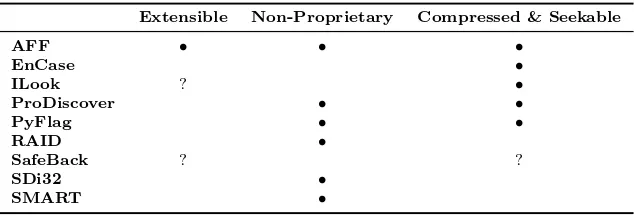
sup-Table 2. Summary of features supported by various file formats.
Extensible Non-Proprietary Compressed & Seekable
AFF • • •
EnCase •
ILook ? •
ProDiscover • •
PyFlag • •
RAID •
SafeBack ? ?
SDi32 •
SMART •
port for a feature, while a question mark (?) indicates that support for a feature is not disclosed publicly. FTK is omitted because it uses other tools’ formats.
2.11
Digital Evidence Bags
Turner proposed the concept of a Digital Evidence Bag (DEB) [24] as a “wrapper” or metaformat for storing digital evidence from disparate sources. The DEB format consists of a directory that includes a tag file, one or more index files, and one or more bag files. The tag file is a text file that contains metadata such as the name and organization of the forensic examiner, hashes for the contained information, and data definitions. Several prototype tools have been created for DEBs, including a bag viewer and a selective imager.
3.
Advanced Forensic Format
The Advanced Forensic Format (AFF) is a single, flexible format that can be used for a variety of tasks. This section discusses AFF’s design goals and its two-layered architecture that helps achieve the design goals.
3.1
AFF Goals
The specific design goals for AFF are provided below. We believe that AFF delivers on all these goals.
Ability to store disk images with or without compression.
Ability to store disk images of any size.
[image:7.612.150.467.127.235.2]Ability to store images in a single file of any size or split among multiple files.
Arbitrary metadata as user-defined name/value pairs.
Extensibility.
Simple design.
Multiple platform, open source implementation.
Freedom from intellectual property restrictions.
Provisions for internal self-consistency checking, so that part of an image can be recovered even if other parts are corrupted or otherwise lost.
Provisions for certifying the authenticity of evidence files with tra-ditional hash functions (e.g., MD5 and SHA-1) and advanced dig-ital signatures based on X.509(v)3 certificates.
3.2
AFF Layers
Many of the design goals are accomplished by partitioning the AFF format into two layers: the disk-representation layer and the data-storage layer. The disk-representation layer defines a schema that is used for storing disk images and associated metadata. The data-storage layer specifies how the named AFF segments are stored in an actual file. We have developed two data-storage implementations.
3.2.1 AFF Disk-Representation Layer. AFF’s
disk-sentation layer defines specific segment names that are used for repre-senting all the information associated with a disk image. Each AFF segment consists of a segment name, a 32-bit “flag,” and a data pay-load. The name and the data payload can be between 0 and 232
−1 =
4,294,967,295 bytes long. In practice, segment names are less than 32 bytes, while the data payload is less than 16 MB.
AFF 1.0 supports two kinds of segments: metadata segments, which are used for holding information about the disk image, and data seg-ments called “pages,” which are used for holding the imaged disk infor-mation itself.
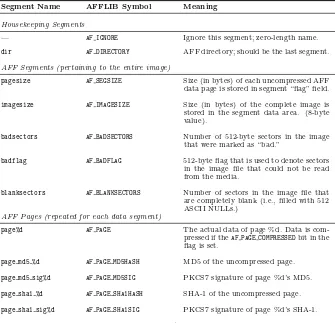
Two special segments areaccession gid, which holds a 128-bit glob-ally unique identifier that is different each time the disk imaging program is run, andbadflag, which holds a 512-byte block of data that identifies blocks in the data segments that are “bad” (i.e., cannot be read). The existence of the badflag makes it possible for forensic tools to distin-guish between sectors that cannot be read and sectors that are filled with NULLs or another form of constant data, something that is not possible with traditional disk forensic tools. Tools that do not support the badflag will interpret each “bad” sector as a sector that begins with the words “BAD SECTOR” followed by random data; these sec-tors can thus be identified as being bad if they are encountered by a human examiner. Alternatively, AFF can be configured to return bad sectors as sectors filled with NULLs. Table 3 provides a complete list of the segment names defined in AFF 1.0.
Data segments hold the actual data copied from the disk being exam-ined. All data segments must be the same size; this size is determined when the image file is created and stored in a segment namedpagesize. Althoughpagesize can be any value, common choices are 220
(1 MB) and 224
(16 MB).
Segments are given sequential names page 0, page 1, . . ., page n, wherenis as large as is necessary. The segment (page) number and byte offset within the uncompressed segment of any 512-byte sector i in the AFF file are determined by the formulas:
page number = i×512
pagesize (1)
offset = (i×512)−(page #)×pagesize (2)
AFF data pages can be compressed with the open-source zlib [10] or they can be left uncompressed. The data page’s 32-bit flag encodes if the page is compressed or not. Compressed AFF files consume less space but take more time to create; this is because the time taken to write uncompressed data is typically shorter than the combined time taken to compress data and write the compressed data. Interestingly, compressed files can actually be faster to read than uncompressed files as modern computers can read and uncompress data faster than they can read the equivalent uncompressed data of a hard drive. The decision to compress or not to compress can be made when an image is acquired. Alternatively, an uncompressed file can be compressed later.
Table 3. AFF segments defined in the AFF 1.0 specification.
Segment Name AFFLIB Symbol Meaning
Housekeeping Segments
— AF IGNORE Ignore this segment; zero-length name.
dir AF DIRECTORY AFF directory; should be the last segment.
AFF Segments (pertaining to the entire image)
pagesize AF SEGSIZE Size (in bytes) of each uncompressed AFF data page is stored in segment “flag” field.
imagesize AF IMAGESIZE Size (in bytes) of the complete image is stored in the segment data area. (8-byte value).
badsectors AF BADSECTORS Number of 512-byte sectors in the image that were marked as “bad.”
badflag AF BADFLAG 512-byte flag that is used to denote sectors in the image file that could not be read from the media.
blanksectors AF BLANKSECTORS Number of sectors in the image file that are completely blank (i.e., filled with 512 ASCII NULLs.)
AFF Pages (repeated for each data segment)
page%d AF PAGE The actual data of page %d. Data is com-pressed if theAF PAGE COMPRESSEDbit in the flag is set.
page md5 %d AF PAGE MD5HASH MD5 of the uncompressed page.
page md5 sig%d AF PAGE MD5SIG PKCS7 signature of page %d’s MD5.
page sha1 %d AF PAGE SHA1HASH SHA-1 of the uncompressed page.
page sha1 sig%d AF PAGE SHA1SIG PKCS7 signature of page %d’s SHA-1.
Some AFF Segments created by the Advanced Disk Imager
case num AF CASE NUM Case number for EnCase compatibility.
image gid AF IMAGE GID A unique 128-bit image identifier.
imaging commandline AF IMAGING COMMAND LINE Complete command used to create image.
imaging date AF IMAGING DATE Date and time when imaging was started.
imaging notes AF IMAGING NOTES Notes made by the forensic examiner when the imaging was started.
after it was acquired. AFF 1.0 supports two modes of certification: hashes and digital signatures.
It is common practice in the forensic community to record MD5 or SHA-1 hashes of an image. AFF 1.0 allows these hashes to be recorded for the entire image and for each individual data segment. The hash values are stored in specially named segments.
AFF 1.0 provides an additional level of certification by supporting the inclusion of PKCS #7 [16] digital signatures. These signatures can also be recorded for the entire disk image and for individual data segments. Because signatures are calculated on uncompressed data, it is possible to acquire and digitally sign a disk image and then compress the image without compromising the integrity of the digital signatures.
3.2.2 AFF Data-Storage Layer. The data-storage layer
handles the task of storing the actual AFF segments. AFF 1.0 has two storage formats. The AFF 1.0 Binary Format specifies that segments are stored sequentially in one or more files. AFF 1.0 XML, on the other hand, stores information in the XML format. The binary files are smaller and faster than the XML files. However, the standardized format of the XML files makes them easier to use with non-forensic tools. In practice, it is possible to store the actual disk image in an AFF binary file and the disk’s metadata in an XML file, although this does introduce the possibility that the two files might become separated.
The original plan for AFF’s Binary Format was to use an open-source B-tree implementation like Berkeley DB (BDB), the GNU Database Manager (GDBM), or a similar system to store the segments as a series of name/value pairs. But BDB and GDBM are distributed under the GNU Public License, which is unacceptable to many commercial soft-ware developers. (A licensed version of BDB with fewer restrictions can be obtained from SleepyCat Software [21], but not for free.) The Apache SDBM database has no such restrictions. However, our tests indicate that SDBM creates sparse files exceeding 100 GB when used to store just a few GB of image data. Note that because the files are sparse, they do not take up all the space on disk. However, if a file is copied to another disk, the unmapped sectors are filled with zeroes. Another concern is that the layout of information in a B-tree file might be too complex to explain in court, should the need arise.
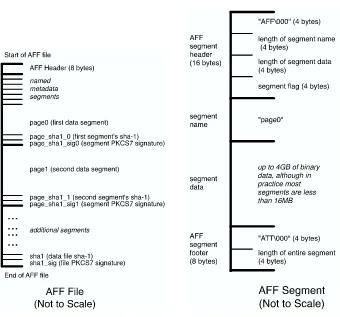
Figure 2. AFF file schematic. Figure 3. AFF segment schematic.
is stored in the header and footer, allowing for rapid bidirectional seeking as only the headers and the footers need to be read.
Figures 2 and 3 present schematic representations of an AFF file and segment, respectively. The AFF file schematic shows the file’s header and AFF segments. The AFF segment schematic shows the segment’s header, name, data and segment tail. Including the segment’s length at the beginning and the end makes it possible to rapidly seek through a large AFF file without having to read all of the data in each segment.
[image:12.612.145.485.96.413.2]4.
AFF Library and Tools
AFFLIBTM is an implementation of AFF 1.0 written in C/C++. To
avoid forcing the programmer to understand segments, data segments, compression, etc., AFFLIB implements a simple abstraction that makes the AFF image file appear as two resources: a simple name/value data-base that can be accessed with traditionalputand getsemantics and a stream that can be accessed usingaf open(),af read(), andaf seek()
function calls. If af open()is used to open a non-AFF file, the library defaults to a pass-through mode of operation, allowing AFF-aware pro-grams to work equally well with raw files.
AFFLIB also supports an af write function call—even across com-pressed data segments—which makes it easier to write disk imaging pro-grams.
The AFF source code comes with a set of tools including AImage: Advanced Disk Imager (aimage), a program for converting AFF meta-data into XML (afxml), a program for converting raw images to AFF images and back (afconvert).
In addition, we have modified Sleuth Kit [6] to work with AFF files. The modifications are relatively minor and have already been incorpo-rated into Sleuth Kit’s distribution. When run interactively, no perfor-mance degradation is noticeable—not even on compressed AFF files.
5.
Advanced Disk Imager
In the early days of our forensics work, we acquired disk images using the Unix dd [2] program. Although running dd with the correct argu-ments can be very fast, the program has several shortcomings. The dd
program does not automatically retry read attempts on bad sectors. If there is a bad region on the disk, dd attempts to plod its way through the region, which can take a very long time. It is easy to corrupt a disk by accidentally reversing or otherwise mistyping the values of the if=
andof=arguments. Finally,dddoes not capture forensic metadata such as the serial number of a hard drive or even the time of the acquisition. Consequently, we decided to create a new disk imaging program. Our Advanced Disk Imager (aimage) was developed specifically for the de-manding task of imaging large numbers of hard drives purchased on the secondary market. We have tested aimageon several hundred different hard drives and have found it to be a very powerful disk-imaging tool.
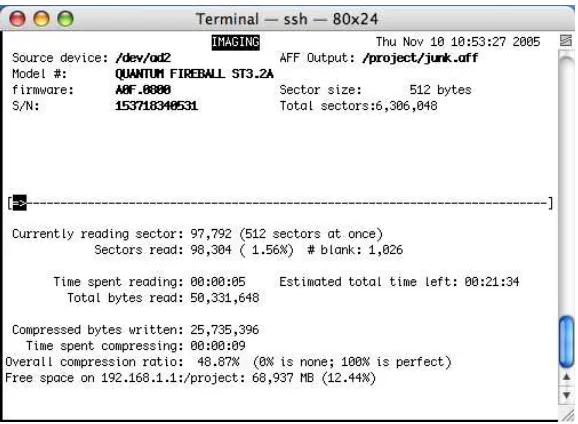
Figure 4. Screenshot of aimagein action.
The aimageprogram can create a raw file (in the so-called “dd” for-mat), an AFF file, or both files at the same time. The program offers a real-time display on a 80×24 screen detailing the status of the image
capture. By using a text-based interface, aimage can be run from a bootable Linux distribution on computers that do not support the X Window System. A screenshot ofaimageis shown in Figure 4.
A sophisticated error-handling system causes aimage to read large data blocks unless it encounters an error, in which case it switches to a smaller block size and attempts to re-read the data. If it encounters too many errors in a row the program goes to the end of the disk and attempts to image the remaining disk sectors in reverse. This approach, pioneered by the dd rescue [11] forensics program, works well to re-cover disks that have a single region of bad blocks. A future version ofaimagewill allow the remaining bad region to be further bisected so that additional good blocks can be recovered.
The aimage program calculates MD5 and SHA-1 hashes of a disk as the disk is imaged. Plans are underway to implement digital signatures as prescribed by the AFF standard.
6.
Conclusions
have collected images from nearly a thousand hard drives over the past year. AFF’s tools have enabled us to work with these images quickly, efficiently and at a very high level. AFFLIB’s support of additional file formats, e.g., EnCase and Expert Witness, permits the tools to be used for a variety of disk image formats without the need for modification or translation. AFF and AFFLIB may be downloaded from www.afflib.org.
Acknowledgements
Brian Carrier and Peter Wayner provided useful feedback on the ini-tial design of the AFF system. Basis Technology Corp. provided sub-stantial funding for the AFF effort. Simson Garfinkel was supported by a fellowship from the Center for Research on Computation and Soci-ety, Division of Engineering and Applied Sciences, Harvard University. David Malan was partially supported by NSF Trusted Computing Grant CCR-0310877. The support of this work by Michael Smith of Harvard University is greatly appreciated. AFF and AFFLIB are trademarks of Simson Garfinkel and Basis Technology, Inc.
References
[1] AccessData, Forensic Toolkit (www.accessdata.com/products/ftk). [2] Apple Developer Connection, dd, BSD General Commands Manual
(developer.apple.com/documentation/Darwin/Reference/Manpages /man1/dd.1.html).
[3] Armor Forensics, SafeBack (www.forensics-intl.com/safeback.html). [4] ASR Data Acquisition and Analysis, Expert Witness Compres-sion Format Specification (www.asrdata.com/SMART/whitepaper .html), April 7, 2002.
[5] ASR Data Acquisition and Analysis, SMART (www.asrdata.com/ SMART).
[6] B. Carrier, The Sleuth Kit & Autopsy: Forensic Tools for Linux and other Unixes (www.sleuthkit.org), 2005.
[7] DIBS USA, Computer Forensics (www.dibsusa.com).
[8] DIBS USA, DIBS RAID – Rapid Action Imaging Device (www.dibs usa.com/products/raid.html).
[9] J. Gailly and M. Adler, Thegzip Home Page (www.gzip.org), 2003. [10] J. Gailly and M. Adler,zlib (v.1.2.3) (www.zlib.net), 2005. [11] K. Garloff, dd rescue (www.garloff.de/kurt/linux/ddrescue),
[12] Guidance Software, EnCase Forensic (www.guidancesoftware.com /products/ef index.asp).
[13] Guidance Software, EnCase Forensic Edition User Manual, Version 4 (www.guidancesoftware.com/support/downloads.asp).
[14] Guidance Software,EnCase Legal Journal, April 2004.
[15] Internal Revenue Service, ILook v8 – Computer Forensic Applica-tion, IRS Criminal Investigation Division – Electronic Crimes, Wash-ington, DC (www.ilook-forensics.org/homepage.html).
[16] B. Kaliski and K. Kingdon, Extensions and Revisions to PKCS #7 (ftp.rsasecurity.com/pub/pkcs/pkcs-7/pkcs-7v16.pdf), 1997.
[17] PyFlag, Advanced Open Standard Forensics Format (pyflag.source forge.net/Documentation/articles/forensic format.html).
[18] PyFlag, Disk Forensics (pyflag.sourceforge.net/Documentation/tu torials/forensics.html).
[19] PyFlag, PyFlag IO Sources (pyflag.sourceforge.net/Documentation /manual/iosource.html).
[20] J. Seward,bzip2and libbzip2(www.bzip.org/index.html). [21] Sleepycat Software (www.sleepycat.com).
[22] Technology Pathways, ProDiscover Image File Format (v.1.3) (www .techpathways.com/uploads/ProDiscoverImageFileFormatv4.pdf). [23] Technology Pathways, The ProDiscover Family of Computer
Secu-rity Tools (www.techpathways.com/DesktopDefault.aspx?tabindex =3&tabid=12).
[24] P. Turner, Unification of digital evidence from disparate sources (digital evidence bags), Proceedings of the Fifth Annual Digital Forensics Research Workshop, 2005.