Design Features and Technology Evaluations for the PET Online
Knowledge Center
Mehmet Aktas, Galip Aydin, Mehmet Necati Aysan, Ozgur Balsoy, Geoffrey Fox, Cevat Ikibas, Ali Kaplan, Jungkee Kim, Marlon Pierce, Ahmet Topcu, and Beytullah Yildiz
Community Grid Labs, Indiana University Bloomington, IN 47402
Abstract
This paper presents an overview of the Online Knowledge Center (OKC) web portal’s initial phase. We review the overall purpose of the OKC, review some shortcomings of previous PET web sites, and list our identifications of the requirements and desired features for the OKC. We then describe numerous technologies that we are using to build the OKC, based on these requirements and features. These are initially presented in an overview that summarizes the technologies and how they work together. We then present the technologies in some detail in individual sections.
1.
Introduction
The Online Knowledge Center (OKC) has been commissioned by the Department of Defense High Performance Computing Modernization Program’s Programming Environment and Training (PET) project to serve as a web-based repository and information management environment for the PET program. The OKC will potentially be used to provide access to a wide range of information in various formats, including but not limited to presentation slides, software repositories, contact information, training announcements, and newsgroup postings.
This report is intended to serve as an overview of the OKC’s initial phase, in which we identified the basic problems we needed to solve and core features we needed to provide, determined the base technologies and portal architecture to meet these needs, and built, tested, and evaluated the prototypes for the OKC’s constituent subsystems. It is the purpose of this report to explain these issues and design considerations.
1.1.
OKC Design Goals
1.1.1.
OKC Portal Requirements
The various desired capabilities of the OKC require the evaluation of a diverse set of technologies. It is the purpose of this document to present a general overview of technologies that have been considered for incorporation into the OKC, justify our choices and present how the various pieces fit into an overall architecture.
We identify the following as important initial capabilities of the OKC:
1. A distributed, component-based web portal environment that can be easily modified by both OKC administrators and users.
2. Dynamic web page creation “wizards” that can be used in various ways, including a newsgroup management system, training registration management, and automatic page creation for
Computational Technology Areas (CTAs).
3. A distributed content management system that allows OKC contributors (such as CTA page developers) to modify, add, and delete the content of their web pages.
4. Support for a wide range of page authoring tools and techniques.
5. Multiple search capabilities, including structured XML searches (for use in newsgroups), unstructured searches (over OKC documents in many different formats) and linked structured/unstructured searches (for use in searching newsgroup postings with attachments)
The OKC has several other general requirements, not all of which we address in the current version. We record them here, though, as an indication of the scope of work remaining in OKC development.
7. The OKC should be easy for users to navigate and find information. This requires both good base organization and good search engine capabilities. In the production OKC web portal, it will be necessary for us to keep usage metrics to determine how well the site is being used.
8. The OKC should provide various levels of security, from publicly accessible information to SecurID protected areas. This applies to both web content and to newsgroups.
9. The OKC can define automatic updating procedures as options for content providers. Time sensitive information, for example, can be assigned an expiration date, after which it is moved to an archive area. This should address problems with the original PET websites, which became bloated with outdated information.
10. The OKC team should not dictate the style, organization, or content of the web material provided by the CTAs. We should however provide models for web sites and site generation and authoring tools to help CTAs create and organize their sites. This consistent organizational structure will also greatly help OKC users find the material they want.
1.1.2.
Distributed Components and Patterns
A distributed component-based user interface is crucial to our vision for the OKC and requires some further explanation. In summary, the idea is to provide an OKC portal that serves as a central framework for loading, managing, and displaying content that can be authored, developed, and displayed. The OKC should provide a skeleton framework, or a container system, into which each CTA can add their web pages without extensive knowledge of the underlying OKC technologies. Users can then modify and personalize their pages, choosing from different content, layouts, and look-and-feel skins.
Let us now be specific about the term “distributed component.” A component in the software design sense is a programming object with a specific set of publicly accessible functions and associated internal data. These interface functions define how the component interacts with other components. Components typically are derived from abstract parent components that define universally required interface methods. Components do not exist independently but instead are placed in some root container, sometimes also called a context. Components may also be containers themselves. These containers control their child components: how they are displayed and arranged, how they communicate with other components, and so on.
XML [XML] interface for a remote portlet is the URL of the remote site that it displays. Within the root container, Jetspeed defines a number of different layout formats for these containers, and this arrangement is hierarchical. For instance, a user can have a container that has a two-columned arrangement. Each column is a portlet container itself and so can contain other portlets with other layouts.
We envision that the OKC in production will eventually consist of a central OKC web server that manages a number of distributed content web servers maintained by HPCMP Major Shared Resource Centers, distributed centers, and partner institutions. The central OKC server manages the publication of this
distributed content and also provides options for the arrangement and display. Likewise, features like site searching and reading messages posted to newsgroups will possess web-based user interfaces that will also serve as portlet components.
Using the distributed component model such as the one defined by Jetspeed, we will be able to 1. Extend existing portal components to address specific needs of the OKC (such as in-portlet
navigation).
2. Encapsulate local and remote web sites within components that have XML interfaces, thus providing us with a well defined portlet-portlet interactions and portlet-container interactions. This can be used for example to define a consistent linking procedure between different remote web sites running in different OKC portlets.
3. Define a framework into which we can plug in advanced features developed independently of the OKC.
4. Allow users to pick the portlets that they want and arrange their web pages in a way that suits them and simplifies their navigation.
1.2.
Basic Technologies
1.2.1.
XML and XML Schemas
XML, the extensible markup language, is a World Wide Web Consortium (W3C) [W3C] standard format for describing tree-structured data. XML defines how one can construct a set of HTML-like markup tags to describe and organize information. For example, as we will discuss below, all remote content contained in the OKC is described using XML metadata. XML documents should be both valid and well-formed. Valid XML documents conform to a particular XML Schema [SCHEMA] that defines the rules for a document: which sub-elements and attributes are required for a particular element, which are optional, how many times sub-sub-elements can occur, and so forth. The XML schema for a particular markup language dialect extends from the global XML schema defined by the W3C. Well-formed XML documents are those that maps to a tree structure. XML is useful for creating metadata descriptions that are both human and machine readable. Validity and well-formedness also lead to a particularly interesting connection between XML data structures and JavaBeans. We discuss this in some detail in Section 4 on schema wizards.
1.2.2.
JavaServer Pages
JavaServer Pages [JSP] (or JSP) allow HTML web pages to contain Java code for dynamic control. JSPs can thus use Java control structures (if statements, for and while loops) to generate dynamic web page content in reaction to different requests. JSPs also allow web pages to contain non-visual Java components that provide services such as authentication. JSPs pages are run entirely on the web server and so require no special
software to be installed on the client and work with standard browsers.
JSP pages are converted into Java code, compiled, and executed by a special web server that runs a Java Virtual Machine. A free, open source version of this server called Tomcat [TOMCAT] is available from Apache. Tomcat servers can be used as standalone web servers or can be run behind other web servers. Commercial versions of JSP servers are available, including WebSphere from IBM, WebLogic from BEA, and iPlanet from Sun.
The OKC makes extensive use of JSP for building the interface to the newsgroup system. Jetspeed, the OKC’s web layout management system, uses JSP and related technologies to generate pages dynamically and to maintain session state so that different users can maintain different views of the web site.
1.2.3.
Java Messaging Service
The Java Messaging Service [JMS], or JMS, is a publish/subscribe system that can be used to
occurs (such as someone posts a message to a newsgroup) and the JMS server notifies all subscriber applications, which can decide independently how to react to the events.
JMS is an important part of the OKC newsgroup system. When someone posts a message to a particular news group, this generates an event received by two subscribers: a database listener that archives the message and makes it available through the web site and a listener that posts the message to interested users’ regular email accounts.
1.3.
OKC Architecture
We present an overall view of the OKC in Figure 1. Essentially, the figure illustrates the central OKC control server with content delivered from remote servers. The OKC server contains only the central portal control and display code and OKC specific web content. We use Jetspeed for this portal framework. Other web content is maintained on separate servers that can double as content management servers. Apache-Jakarta’s Slide [SLIDE] project is one such content management system that we have evaluated, but other systems are possible. Note in the diagram that we do not currently have display restrictions on the content servers. They can be accessed directly from a browser as well as through the OKC portal. The decision between open and locked-down content servers will have important implications on search technologies that we will use.
Figure 1 OKC organizes distributed content servers into a single interface.
1.4.
Jetspeed Overview: Browser Interface Framework
from remote servers. The Jetspeed root container manages the display layout of the portlets. Portlets can contain other portlets.
The obvious benefits of the portlet concept for web design have lead to product developments from a number of commercial companies, including BEA, Oracle, IBM, and Sun. Representatives from these companies, together with members of the Jetspeed development team, are developing a Portlet specification as part of the Java Community Process [JSR].
1.5.
Slide Overview: Distributed Content Management
Slide [SLIDE} is a web content management system from Apache-Jakarta, the same umbrella group that is also developing many of the other technologies we are using, particularly Jetspeed and Tomcat. In brief, Slide is a Java based implementation of Web-DAV [DAV}, a standard extension to the HTTP protocol for distributed content management. As described above, Jetspeed allows us to display content from distributed web servers. We discuss the use of Slide for these content servers, which will allow users to manage their own web material on the remote content servers.
1.6.
Newsgroup Overview: Dynamic Content Creation and Page Wizards
The OKC development team has developed an XML and JMS-based newsgroup system. Messages are posted through either a JSP user interface or with a standard email client. Messages are formatted with XML and archived in a database. Newsgroup displays then query the database to create a message list. The technologies underlying the newsgroup system can be reused to build a number of related features, including page wizards for creating CTA pages, conference management systems, and training management systems. The newsgroup system is described in detail in four related sections.
The newsgroup system is summarized in Figure 2. Users can post messages to newsgroups through either an interface in the OKC portal or by using their regular email client. Users have the option of viewing postings through a portal window in the OKC or having them delivered to their regular email.
Figure 2 OKC's newsgroup architecture supports both email and JSP clients and readers.
1.7.
Search Capabilities Overview: Structured, Unstructured and Hybrid
Searches
The Online Knowledge Center requires a number of different search capabilities, and the final choices will depend upon architectural decisions about content accessibility that need to be made by the sponsoring/hosting MSRCs and the PET program. If content is publicly available or not determines the type of search that will be used in production. We thus have evaluated technologies to support either option.
We address the following search scenerios:
a. Unstructured searches over publicly available OKC material; b. Unstructured searches over private web material;
c. Simple structured searches of XML documents, such as newsgroup postings; and
d. Linked structured and unstructured searches, such as over newsgroup postings and their attachments.
Search capabilities (a) and (b) will be part of the initial OKC capabilities. We have reviewed both options and describe how they may be implemented in the section on search. Searches of types (c) and (d) are still being testing at the time of writing. The linked search is an interesting topic of research for us.
2.
OKC Browser Interface Management
2.1.
Design Considerations
The central feature of the OKC is a centralized user interface management system. For this, we chose Jetspeed, a subproject of Jakarta. This allows us to separate web content from the management system. Jetspeed organizes both local and remote web content into “portlets” that can be arranged and displayed in a user-customizable interface.
For the OKC, for example, we have built a prototype that consists of the main OKC web server, with separate server instances supplying the contents of the portlets. We consider this system also to be a prototype for future integration of HPCMP portal projects.
2.2.
Jetspeed
Jetspeed is an open source implementation of an enterprise information portal, from the Jakarta Project, which is sponsored by the Apache Software Foundation. Basically, Jetspeed uses Java and XML. We used Jetspeed as a base portal structure for our Online Knowledge Center. Jetspeed defines a standard API for writing vendor neutral portlets that work on any portal framework that supports this API such as Jetspeed itself.
The user can access the portal by a web browser, WAP-phone, pager, and potentially other devices. Jetspeed is like a center where information from multiple sources is available for the end users.
The data presented by Jetspeed is independent of content type. This means that content from for example RSS (Rich Site Summary, an XML dialect, see [RSS]) can be integrated with Jetspeed and the actual presentation of the data is handled via XSL and delivered to the user for example via the combination of Java Server Pages (JSPs) and HTML. Jetspeed provides support for template and content publication frameworks such as Velocity.
Definitions of the numerous terms in this section are provided in an appendix
2.3.
Portlet
A portlet, which is a web component managed by a container, is used in Jetspeed portal environment to generate dynamic content. Portlets are actually platform independent java classes which can be dynamically loaded and run by a web server. They implement the org.apache.jetspeed.portal.Portlet interface. It is essential to extend new portlets from org.apache.jetspeed.portal.portlets.AbstractPortlet, which provides the basic functionalities. The difference of portlets compared with servlets is the indirect communication between web clients and portlets through Jetspeed.
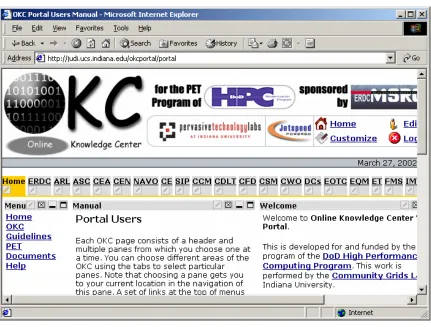
A typical Jetspeed portal screen is a collection of portals. There are pre-defined portlets but it is also possible to write and use by your own portlets. As you see in Figure 3 there are three types of portlets. On the left there is Menu portlet, on the center there is Manual portlet and on the right there is Welcome portlet.
The portlets are defined in the registry by an entry description. These entries can be in any of three distinct types:
1. instance: Instance is the basic entry type. An instance entry should provide all the necessary information to instantiate the portlet. This type of entry is instantiated as is by the Jetspeed engine.
3. ref : The ref entry is an entry that defines a new entry derived from some other entry definition. Thus the ref entry definition must reference another registry entry which may be of any type, even other ref entries. The engine will cascade all refs until it finds either an abstract or instance entry. It will then override all the parameters found in the abstract or instance definitions by those found in the ref definition and try to instantiate this portlet.
Figure 3 The OKC main page illustrates tab menus, portlets, and customization features.
Portlets Buttons:
Customize
edits the portlet data, customizing the portlet content.
Maximize
views the portlet in full screen with no other portlets in view.
Minimize
shows only the title bar.
Closed
closes the portlet and remove it from the page.
2.4.
Jetspeed Features
The following list, taken from Jetspeed web site, summarizes its features.
• Java Portlet API specification
• Template-based layouts including JSP and Velocity
• Supports remote XML content feeds via Open Content Syndication
• Custom default home page configuration
• Database user authentication
• In-memory cache for quick page rendering
• Rich Site Summary support for syndicated content
• Integration with Cocoon, WebMacro and Velocity so that you can develop with the newest XML/XSL technology.
• Wireless Markup Language (WML) support
• XML based configuration registry of portlets
• Full Web Application Archive (WAR) support
• Web Application development infrastructure
• Local caching of remote content
• Synchronization with Avantgo
• Fully portable across all platforms that support JDK 1.2 and Servlet 2.2
• Integrated with Turbine modules and services
• Profiler Service to access portal pages based on user, security (groups, roles), media types, and language
• Skins so that users can choose colors and display attributes
• Customizer for selecting portlets and defining layouts for individual pages
• PSML can be stored in a Database.
• User, group, role and permission administration via Jetspeed security portlets.
• Role-based security access to portlets.
2.5.
Factors choosing Jetspeed
The most important factors when we chose Jetspeed as a base portal implementation for OKC are given below.
1. Jetspeed is free and open source from Apache Jakarta Project, so we have the ability to modify and extend the source code to meet our specific requirements.
2. Jetspeed developers are participating in a Java Specification Request with Oracle, IBM, Sun, and BEA to develop a standard portlet API. Thus we can use Jetspeed for development with confidence that our developments will be later compatible with commercial products.
3. The portlet architecture meets several of our basic requirements, as described in the introduction. 4. As an open source project, we have the ability to have direct interactions with and support from
Jetspeed developers, and, as importantly, influence and contribute to Jetspeed development. 5. Jetspeed is Java-based.
2.6.
Portal Architecture
There are following layers in the order.
1. HTTP server
2. Servlet Engine (Tomcat) 3. Turbine
4. Portlet API 5. Jetspeed
Jetspeed is built on the Turbine framework. The Turbine provides us a Turbine servlet which receives and responds to HTTP requests from clients. The Turbine servlet is configured to call Jetspeed components when there are HTTP requests. It works as event base model. When the Turbine receives an HTTP request, it generates a Turbine event and searches for an action class and invokes a method in the action class. Each portlet that wants to process HTTP requests in the event model must provide an action class with the corresponding named methods to handle the events generated by Turbine.
2.7.
OKC Portal Internal Mechanisms
2.7.1.
Internal Mechanism Diagram
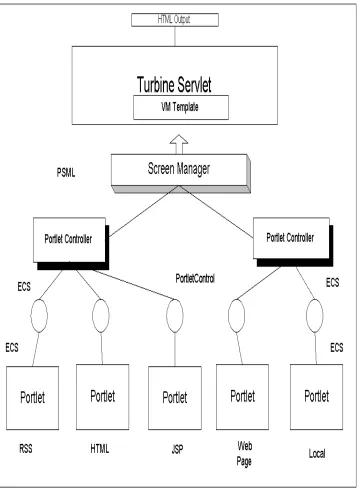
Figure 4 Jetspeed's architecture is used to rewrite local and remote data sources into a single HTML file for display.
OKC Portal consists of pre-defined and user defined portlets. There are six main portlets in our portal structure. These are RSS, HTML, XML and XSL, WebPagePortlet and local portlets. As defined before each portlet is actually java classes. In order to use these portlets each of them has to be registered in $HOME/WEB-INF/conf/okcportlets.xreg file.
We use the following portlets in the OKC:
1. OKCWebPagePortlet
2. HTML
3. JSP
4. GridsJSP
5. RSS + XSL
6. XML + XSL
2.7.3.
PortletControl
In the second layer there is the PortletControl (Java) object. The portlet content is rendered by a PortletControl object, and it provides a box which is actually an HTML table which the portlet fits into it. PortletControl handles rendering the title and body of the Portlet then it passes these values by ECS.
2.7.4.
Element Construction Set (ECS)
These pre-defined portlets are used to generate object elements in order to build the web page and control goes to ECS, which stands for Element Construction Set [ECS]. ECS is a java API to generate elements for various markup languages such as HTML and XML. In our case ECS allows us to use Java Objects to generate markup code. It takes the parameters from the portlets and builds a java object which consists of HTML tags.
For example a basic ECS will look like similar to the next example.
Document doc = (Document) new Document() .appendTitle("Example")
.addElement("text goes here")); out.println(doc.toString());
So this ECS will automatically creates an HTML page for us as shown below.
<html>
<head><title>Example</title></head>
<body><h1>Example Header</h1><h3>Sub Header:</h3>
<font size="+1" color="#FFFFFF" face="Times">text goes here</font></body> </html>
2.7.5.
PSML
PSML stands for Portal Structure Markup Language. It is in XML format. It allows content structure and abstraction within Jetspeed. PSML is actually composed of two different markups which are registry and site markup.
The registry markup which describes all the available resources to the Jetspeed engine. It supports more than a Portlet Registry. It also has a CapabilityMap Registry, a MediaType Registry, PortletControl Registry, and a PortletController Registry which are registry entries for the portal.
The site markup which describes which portlets, available in the registry, are actually displayed for a given user, as well as how they are organized on screen and what presentation properties they should use.
2.7.6.
PortletController
After that it comes to PortletController. A PortletController is responsible from the set of portlets. It combines multiple PortletControls and provides entire page information. The PortletController is configured by XML files and has almost every option seen by the users.
2.7.7.
Turbine
Turbine consists of five different modules which each serve for a specific service within the Turbine framework. These modules are Action, Navigation, Layout, Screen and Page. The layout structure for a web site with Turbine would like as in Figure 5.
Figure 5 Jetspeed/Turbine portlet containers are mapped into HTML tables for display.
Turbine is responsible from the following structures.
Layout: It controls the layout of the entire web page.
Navigation: Navigation areas are divided as top, bottom, right and left.
2.7.7.1
Velocity
Velocity is actually a Java based template engine. It is similar to Java Server Pages (JSP) but with its different syntax it is also another alternative to JSP from Apache. Velocity provides to users template language to reference objects in Java code. Velocity can be used either as a standalone utility for generating source code and reports, or as an integrated component of other systems. Velocity provides template services for the Turbine. Velocity and Turbine together provides a template service that allows web applications to be developed.
Example syntax of velocity is as follows.
<table cellspacing="0" cellpadding="0" border="0" width="100%"> <tr>
<table width="100%" border="0" cellspacing="0" cellpadding="0"> <tr bgcolor="#000000">
<td><img src="images/okc/spacer.gif" width="1" height="1"></td> </tr>
<tr bgcolor="BDC5CB"> <td>
<div align="center">Department of Defense High Performance Computing Modernization Program: Programming Environment & Training
</div> </td> </tr>
<tr bgcolor="#000000">
<td><img src="images/okc/spacer.gif" width="1" height="1"></td> </tr>
</table> <td> </td> </tr> </table>
2.7.7.2
HTML OUTPUT
As a result of those steps the HTML output has been automatically generated and publishes as nested tables to the user. In figure 5 the output of this internal mechanism can be seen.
2.7.8.
Consequences of Using Jetspeed
There are some consequences of this portal approach. Primarily, these arise from the rendering of portlets as HTML tables.
1. Netscape Navigator version 4.X has problems with rendering nested tables. NN users might have display problems. A detailed explanation can be found in problems section.
2. Content pages that depend on HTML tags that must be located in the document’s <HEAD> will have problems. This includes for example the page refresh meta tag. This again is because the remote content is loaded into an HTML table. The remote web page is no longer an independent HTML document but instead part of a larger single document.
3. In order to display portlets and portlet sets, a default Cascading Style Sheet (CSS) is used, and so the portlet may override content formatting specified in the original web page.
4. Jetspeed does not support the frame structure in a webpage so when building a new page it is necessary not to use frame structures. If a user wants to use menu for the page he or she can use stemlinks.xml and define the webpage in one of the areas. This procedure will explained in OKC Portal section.
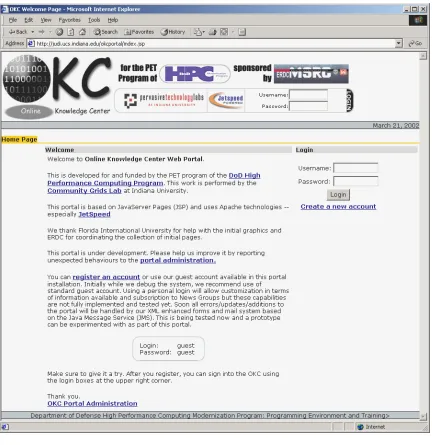
Figure 6 The Online Knowledge Center's login page.
Figure 5 Online Knowledge Center Portal
2.8.
OKC Portal
The OKC Portal supports plain HTML, CGI, JSP, JavaScript, XML, XSL pages. So far ERDC, ARL, ASC, CEA, CEN, NAVO, CE and SIP pages have been tested and they are accessible for OKC portal. Problems for previous pages included not using syntactically correct HTML or JavaScript languages. When there are cgi pages (such as used by NAVO) ,this can be shown by using apache at the background.
Our general procedure is summarized in the list below. These are explained in detail in the following section. This procedure is currently performed manually by editing the indicated files, but we will automate and add user interfaces. As stated above, our first goal is to simply test support for different types of content.
1. Review process of web pages from any problems 2. Write stemlinks.xml for menu
3. Define the area okcproperties.xml 4. Register the portlet in okc-portlets.xreg 5. Add the new page to the okcmenu.jsp 6. Customize
2.8.1.
Steps for adding web sites to the OKC
1. Review the pages which will be added to the OKC portal. If there are problems or incorrectness with the pages, they should be fixed. The problems might occur since they are not well formed. Let’s say if you are using JavaScript in your page and you forget to write semicolon, this might result a problem in OKC Portal. This is also true for HTML pages if you forget to close a tag. This may not be a problem for current browser since they fix these kinds of errors, but for OKC Portal malformed markup languages are not acceptable. When using an html portlet there is no need to use <head> tag. But when using OKCWebPagePortlet there is no such regular web pages can be used as long as they are well formed markup languages.
2. Write or edit the stemlinks.xml file in order to display menu items. When there is a stemlinks.xml the portal engine will recognize, read and show it on the OKC menu part. An example for stemlinks.xml file is below
<?xml version="1.0" encoding="UTF-8"?>
<section xmlns="http://grids.ucs.indiana.edu/okc/schema/stemlinks/v1" xmlns:cg="http://grids.ucs.indiana.edu/okc/schema/cg/ver/1"
xmlns:xsi="http://www.w3.org/2001/XMLSchema-instance"
xsi:schemaLocation="http://grids.ucs.indiana.edu/okc/schema/stemlinks/v1
<description>Signal and Image Processing</description> <metadata>
<cg:screen view="portal" link="relative"/> <cg:contentscreen mainframe="body"/> </metadata>
<item stem="./">
<title>SIP Home</title> <link>index.html</link> </item>
<item stem="sip/">
<title>SIP Forum 1999</title> <link>index.html</link> </item>
<item stem="sip2000/">
<title>SIP Forum 2000</title> <link>index.html</link> </item>
<item stem="sip2001/">
<title>SIP Forum 2001</title> <link>index.html</link> </item>
<item stem="./">
<title>HPC Related Documents</title> <link>tools.html</link>
</item> </section>
In these stem links the base directory structure is given and there are two main tags title and link in the item. The link of the page can be given in link and title can be written in between title tags.
3. If the menu wants to shown it has to be defined in one of our areas. The area declaration is done in okcproperties file which also another xml file. The directory structure for it is $JETSPEEDHOME\WEB-INF\OKC\okcproperties.xml
<?xml version="1.0" encoding="UTF-8"?>
<configuration xmlns="http://grids.ucs.indiana.edu/schema/okc/config/v1" version="0.2" xmlns:xsi="http://www.w3.org/2001/XMLSchema-instance"
xsi:schemaLocation="http://grids.ucs.indiana.edu/schema/okc/config/v1 http://grids.ucs.indiana.edu/schemas/okcconfiguration-v1.xsd"> <!-- contenthost>http://localhost</contenthost -->
<!-- contenthost>http://montblanc.ucs.indiana.edu</contenthost --> <contenthost>http://judi.ucs.indiana.edu</contenthost>
<!-- mediaserver>http://localhost/mediaserver/fs</mediaserver -->
<!-- mediaserver>http://montblanc.ucs.indiana.edu/mediaserver/fs</mediaserver --> <mediaserver>http://judi.ucs.indiana.edu/mediaserver/fs</mediaserver>
<stemlinks>stemlinks.xml</stemlinks> <newbrowser>
<extention type="ppt">Microsoft Power Point Files</extention> <extention type="doc">Microsoft Word documents</extention> <extention type="pdf">Adove PDF files</extention>
<extention type="css">Cascade Style Sheets</extention> <extention type="ps">Adobe PostScript Files</extention> <extention type="gif">GIF files</extention>
<extention type="jpg">JPEG files</extention> <extention type="jpeg">JPEG files</extention> <extention type="mpg">MPEG files</extention> <extention type="mpeg">MPEG files</extention> <extention type="avi">AVI files</extention> <extention type="swf">Flash files</extention> <extention type="png">Image files</extention> <extention type="ram">Real Media files</extention> <extention type="rm">Real Media files</extention> </newbrowser>
<areas> <area>
<stem>/okc/rawpages/testcases</stem>
<mapto>/var/tomcat/webapps/ROOT/rawpages/testcases</mapto> </area>
<areas>
4. The next step is to define our new portlet. Since everything is represented as portlets in jetspeed to able to see our pages they should define as portlets. For our case the file is okc-portlets.xreg and it is located in $JETSPEEDHOME\WEB-INF\conf\ okc-portlets.xreg
<?xml version="1.0" encoding="UTF-8"?> <registry>
<portlet-entry name="Welcome" hidden="false" type="ref" parent="HTML" application="false">
<meta-info>
<title>Welcome</title> </meta-info>
<parameter name="_enableactions" value="false" type="boolean" hidden="true"/> <url>/welcome.html</url>
</portlet-entry>
<portlet-entry name="Help" hidden="false" type="ref" parent="HTML" application="false"> <meta-info>
<title>Help</title>
<description>OKC Help Page </description> </meta-info>
<parameter name="_enableactions" value="false" type="boolean" hidden="true"/> <url>/BugReport.html</url>
</portlet-entry>
<portlet-entry name="BloomingtonWeather" hidden="false" type="ref" parent="CustomizerVelocity" application="false">
<meta-info>
<title>Bloomington</title>
<description>Weather conditions in Bloomington,IN in a portlet</description> </meta-info>
<parameter name="template" value="weather" hidden="false"/>
<parameter name="weather_city" value="Bloomington" hidden="false"/> <parameter name="weather_state" value="IN" hidden="false"/>
<parameter name="_enableactions" value="false" type="boolean" hidden="true"/> <media-type ref="html"/>
</portlet-entry> </portlet-entry>
<portlet-entry name="PET1_ERDC" hidden="false" type="ref" parent="OKCWebPagePortlet" application="false">
<meta-info>
<title>PET1/ERDC</title>
<description>PET1/ERDC Site</description> </meta-info>
<parameter name="url_variable" value="peterdc_url" hidden="true"/>
<parameter name="home_url" value="/rawpages/pet/pet_bd.htm" hidden="false"/> <parameter name="title" value="PET1/ERDC" hidden="false"/>
<url>/rawpages/pet/pet_bd.htm</url> </portlet-entry>
</registry>
5. There is a jsp portlet called okcmenu.jsp, located in
$JETSPEEDHOME\WEB-INF\templates\jsp\portlets\html. In order to show the new web site it has to be added to vector inside the okcmenu.jsp file
<%@
taglib uri='/WEB-INF/templates/jsp/tld/template.tld' prefix='jetspeed' %><%@ page import="org.gxos.debug.Log, commgrids.stemlinks.schema.*" %><%@ page import="commgrids.stemlinks.schema.*,commgrids.okc.config.*" %><%@ page import="commgrids.okc.*,commgrids.okc.portal.util.Pane" %><%@ page import="java.util.*,java.net.URL,java.io.*,javax.naming.*" %><%@
page import="org.apache.jetspeed.services.resources.JetspeedResources" %><%@ page import="org.apache.jetspeed.util.URILookup" %><%@
page import="org.apache.jetspeed.services.rundata.*" %><%!
OKC.initLogger(); }
%><%
boolean error = false;
JetspeedRunData rundata = (JetspeedRunData)request.getAttribute("rundata"); Configuration configuration = OKC.getConfiguration(rundata);
Hashtable areas = OKC.getAreas(rundata);
String homePath = URILookup.getURI(URILookup.TYPE_HOME,URILookup.SUBTYPE_NONE, rundata);
String paneTitle = rundata.getParameters().getString("pane0");
Vector paths = (Vector)(rundata.getSession().getAttribute("paths_vector")); Vector panes = (Vector)(rundata.getSession().getAttribute("panes_vector")); if(panes == null) {
panes = new Vector(); panes.add("ERDC"); panes.add("ARL");
paths = new Vector();
paths.add(new Pane((String)panes.get(0),"/rawpages/pet/pet_bd.htm","peterdc_url")); paths.add(new Pane((String)panes.get(1),"/rawpages/ARL/PET/pet.html","petarl_url"));
rundata.getSession().setAttribute("panes_vector",panes); rundata.getSession().setAttribute("paths_vector",paths); }
Please note that here, be sure to add in the same order when writing your panes.
6. The last step is to update the new pages for the user to be able to see. We currently do this by editing the base PSML file and overwriting each registered user’s individual copy of this file. Actually each user can update his or her own portal by own self. But there should be a page which tells people when new pages are available. In the future a help page for how to customize the pages will be also
necessary. Since we are in development process there are more updated web sites so each time we modified all psml files for each user. For registered users a notification portlet for changes would be enough since some users do not want to change their portlet.
2.9.
OKC Administrator
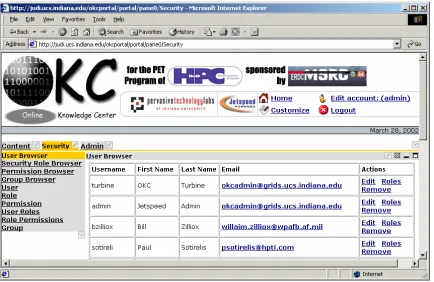
For OKC administrator OKC portal provides environment to manage security, user and group roles and to watch the current services provided by OKC portal. There might be more than one admin if desired. When an admin enters to the portal he/she will come up a web page seen in figure 7. This is explained in more detailed below.
2.9.1.
User Browser
[image:28.612.91.525.356.638.2]Admin can see the current users in OKC portal and can add more users to the portal. He/She can delete the user, edit their name, password and other information and can easily see the last login date of the user.
2.9.2.
Security Role Browser
OKC Portal security has a role based structure. Admin can assign roles to a specific user or a group and define their roles. Roles are defined for a certain permissions and admin restrict some of them or give
permission for that specific users. Security Role Browser screen can be found in Figure 8 and permission names are given below.
close customize detach info maximize minimize personalize view
[image:29.612.206.441.333.576.2]So for the OKC Portal admins can define the roles of a user or a group by using security role browser.
Figure 8 Administrators can edit user permissions through the illustrated interface.
2.9.3.
Permission Browser
1. Group Browser: By using group browser, admin can see the current groups and add more groups if desired.
2. User Role: In user role a new user can be added to the system.
3. Role: By using role browser a new role name can be added and by using security role browser specific roles can be assigned to the role.
4. Permission Name: Permission name is given here 5. User Roles: User roles are defined here.
6. Role Permissions: Role permissions for a specific user is given. 7. Group: A new group is defined here.
In Online Knowledge Center, these tools can be used to give specific roles to a certain user or by defining groups for each focus areas in OKC the security roles for OKC can be handled. Let’s say we do not want CE users to see the pages for other areas we can define a group called CE and give certain permission roles to that specific group.
Administrators can also audit and check the OKC portal for the following properties. These are related with portlets and portal title, color, controller browser types, etc.:
Global
Portlet browser Controller browser Control browser Media Types browser Skin browser
Java Runtime Daemons
Jetspeed Content BadURLManager
2.10.
OKC Users
An OKC user depending on its roles as explained in OKC administator part can customize, minimize, personolize, etc., his or her views. If a user has permission he or she can customize the portal as he/she wants. But keep in mind administrators can restrict this if wanted.
Here is an explanation of the customize process and how a user can add a porlet: 1. Sign in to the portal
2. Click the customize link on the top
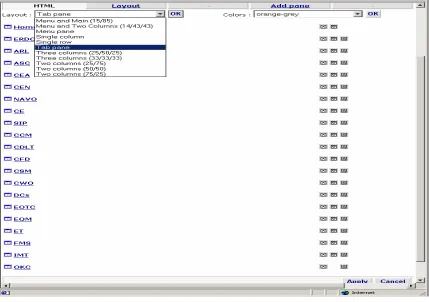
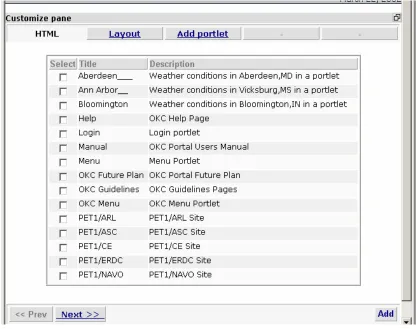
3. In customize page (Figure 9) click any layout other than pane and Add Portlet link appear 4. User can choose any of the available portlets from the portlets page (Figure 10)
5. After choosing the portlets just click the add button and for the next page just click the apply button.
6. The last step to choose the layout of the page whether single row, pane or something else from the layout menu. Also color of the portlets can be choosen from the customizer page.
[image:31.612.92.521.369.671.2]It is also for a OKC user to update his or her password or other information through edit page.
Figure 10 Users can choose the portlets that they wish to display
2.11.
Netscape Navigator 4.x Problems
For Netscape Navigator 4.x users there is a problem to see the Jetspeed. This is because of the way of Netscape 4.X versions deal with nested tables. So far it is not possible to see OKC portal with Netscape 4.x. When the size of nested tables exceed more than ten NN does not render it correctly. Also, large nested tables can cause problems. We are currently working on velocity files in order to minimize the tables.
When NN 4.X loads a Web with a table layout structure, it may suddenly just "give up" and display nothing. This is because of two things:
1. The most common is that a <td>, </td>, <tr> or </tr> tag is out of place or missing. This can easily occur in tables with unequal rows or columns. IE is much more tolerant of incorrect table syntax than NN.
Simplyfing the Jetspeed template may reduce the number of tables needed to create the portal layout. Jetspeed.vm creates a table to that table that contains the portlet title bar and a table that contains the content. Nesting the tables in this way greatest flexibility. It might be also possible to replace tables with some other HTML. Also by placing the icons before the title and minimizing the number of columns displayed, you may be able to remove the tables altogether.
This simplification may reduce the useable functionality, that is nested tabbed panes may not display correctly.
2.12.
OKC Database
Jetspeed stores information about users in a database. Stored information includes Username
Password User’s first name User’s last Name e-mail address Last login time
The default database for Jetspeed is Hypersonic SQL. To change the database connection, it is needed to update the database connection settings in TurbineResources.properties file. The war file installation
automatically configures Hypersonic SQL is the default database. In our case it is changed to Oracle for and the step to follow to switch to Oracle is given below. The links to switch to Oracle is given in resources section as a link (number 3).
Jetspeed should work with any JDBC 2.0 complaint driver such as. DB2
Hypersonic SQL MySQL
2.13.
Lessons Learned
As explained before there are seven main steps for adding a web page to the OKC. Plain HTML pages, XML or JavaScript pages can be added and display on portal without any problem as long as they are
syntactically correct. If there are errors on the original page the OKC portal would not display them properly. The issue here is IE, NN or any other browsers will fix the errors and display them without any error
notification. In order to check if your site is well formed or not you can test it from IE by choosing Internet Options from Tools and choose not to debug from Advanced features. The most common mistake when using JavaScript is forgotten to add semicolon (;). This type of HTML syntax errors can be validated by W3 web site.
http://validator.w3.org/check/referer
In the OKC portal SIP, CE pages are plain HTML pages and they have been added to the portal easily. For ASC pages JavaScript has been used and there have been some syntax problems. For example, the
semicolon has been forgotten in some lines and they have been corrected. For CEA and CEN pages there is a css file for style sheet and this has overridden by the portal’s default css file this also has been fixed by defining a separate css file for CEN.
NAVO pages are actually cgi forms which some of them are generated from Perl script. Tomcat had problems to handle this situation so we installed Apache and use it for NAVO pages to display at the background.
Netscape Navigator 4 versions have problem when rendering nested tables. There are display problems when nested tables reach to ten or more. Sometimes for three nested table can cause display problem in NN 4.X when the size of each table is big. The next effort will be to solve this problem and come up with a solution.
2.14.
Resources and Useful Links
1. Apache Jakarta project Jetspeed web site
http://jakarta.apache.org/jetspeed/site/index.html
2. One of the Developers’ web site
http://www.bluesunrise.com/jetspeed-docs/
3. Oracle database connection
http://www.lionelfarr.com/jetspeed/oracleHowTo.htm
4. HP Trial map site
http://mml.hpl.hp.com:9090/jetspeed/trailmap/index.html
5. Release builds at http://jakarta.apache.org/builds/jakarta-jetspeed/release/
6. Nightly builds at http://jakarta.apache.org/builds/jakarta-jetspeed/nightly/ 7. Jetspeed users archives
2.15.
Appendix
ECS: The Element Construction Set is a Java API for generating elements for various markup languages it directly supports HTML 4.0 and XML.
PSML: Stands for Portal Structure Markup Language
RSS: Rich Site Summary (RSS) is an XML-based format developed by Netscape to drive channels for Netscape Netcenter. The goal of RSS is to propagate change on a site, including your Jetspeed site, to increase traffic. Using an RSS file, all you need to do is change one file, and all the external sites your channels are registered with will automatically reflect those changes. More information can be found in the
http://my.netscape.com/publish/formats/rss-spec-0.91.html
Turbine: Turbine is a servlet based framework that allows experienced Java developers to quickly build secure web applications. Parts of Turbine can also be used independently of the web portion of Turbine as well.
Velocity: Velocity is a Java-based template engine. It permits anyone to use the simple yet powerful template language to reference objects defined in Java code. It is syntactically alternative to JSP.
2.16.
Necessary Files and Scripts
2.16.1.
okcproperties.xml
<?xml version="1.0" encoding="UTF-8"?>
<configuration xmlns="http://grids.ucs.indiana.edu/schema/okc/config/v1" version="0.2" xmlns:xsi="http://www.w3.org/2001/XMLSchema-instance"
xsi:schemaLocation="http://grids.ucs.indiana.edu/schema/okc/config/v1 http://grids.ucs.indiana.edu/schemas/okcconfiguration-v1.xsd"> <!-- contenthost>http://localhost</contenthost -->
<!-- contenthost>http://montblanc.ucs.indiana.edu</contenthost --> <contenthost>http://judi.ucs.indiana.edu</contenthost>
<!-- mediaserver>http://localhost/mediaserver/fs</mediaserver -->
<!-- mediaserver>http://montblanc.ucs.indiana.edu/mediaserver/fs</mediaserver --> <mediaserver>http://judi.ucs.indiana.edu/mediaserver/fs</mediaserver>
<stemlinks>stemlinks.xml</stemlinks> <newbrowser>
<extention type="pdf">Adove PDF files</extention> <extention type="css">Cascade Style Sheets</extention> <extention type="ps">Adobe PostScript Files</extention> <extention type="gif">GIF files</extention>
<extention type="jpg">JPEG files</extention> <extention type="jpeg">JPEG files</extention> <extention type="mpg">MPEG files</extention> <extention type="mpeg">MPEG files</extention> <extention type="avi">AVI files</extention> <extention type="swf">Flash files</extention> <extention type="png">Image files</extention> <extention type="ram">Real Media files</extention> <extention type="rm">Real Media files</extention> </newbrowser>
<areas> <area>
<name>tests</name> <description/>
<stem>/okc/rawpages/testcases</stem>
<mapto>/var/tomcat/webapps/ROOT/rawpages/testcases</mapto> </area>
<area>
<name>pet</name> <description/>
<!-- contenthost>http://localhost</contenthost -->
<!-- mediaserver>http://localhost/mediaserver/fs</mediaserver --> <stem>/okc/rawpages/pet</stem>
<mapto>/var/tomcat/webapps/ROOT/rawpages/pet</mapto> <!-- portal panename="PET1"/ -->
<!-- stemlinks>stemlinks.xml</stemlinks --> </area>
<area>
<!-- contenthost>http://localhost</contenthost -->
<!-- mediaserver>http://localhost/mediaserver/fs</mediaserver --> <stem>/okc/rawpages/training</stem>
<mapto>/var/tomcat/webapps/ROOT/rawpages/training</mapto> <!-- stemlinks>stemlinks.xml</stemlinks -->
</area> <area>
<name>arl</name> <description/>
<!-- contenthost>http://localhost</contenthost -->
<!-- mediaserver>http://localhost/mediaserver/fs</mediaserver --> <stem>/okc/rawpages/ARL/PET</stem>
<mapto>/var/tomcat/webapps/ROOT/rawpages/ARL/PET</mapto> <!-- stemlinks>stemlinks.xml</stemlinks -->
</area> <area>
<name>asc</name> <description/>
<!-- contenthost>http://localhost</contenthost -->
<!-- mediaserver>http://localhost/mediaserver/fs</mediaserver --> <stem>/okc/rawpages/ASC</stem>
<mapto>/var/tomcat/webapps/ROOT/rawpages/ASC</mapto> <!-- stemlinks>stemlinks.xml</stemlinks -->
</area> <area>
<name>navo</name> <description/>
<contenthost>http://judi.ucs.indiana.edu:1080</contenthost> <mediaserver>http://judi.ucs.indiana.edu:1080</mediaserver> <stem>/okc/pet</stem>
<mapto>/var/tomcat/webapps/ROOT/rawpages/navo/pet</mapto> <!-- stemlinks>stemlinks.xml</stemlinks -->
<name>navo-cgi</name> <description/>
<contenthost>http://judi.ucs.indiana.edu:1080</contenthost> <mediaserver>http://judi.ucs.indiana.edu:1080</mediaserver> <stem>/okc/cgi-bin/pet</stem>
<mapto>/var/tomcat/webapps/ROOT/rawpages/navo/pet</mapto> <!-- stemlinks>stemlinks.xml</stemlinks -->
</area> <area>
<name>asc-techareas</name> <description/>
<stem>/okc/rawpages/ASC/Techareas</stem>
<mapto>/home/okcadmin/webcontent/ASC/Techareas</mapto> </area>
<area>
<name>gateway</name> <description/>
<!-- contenthost>http://localhost</contenthost -->
<!-- mediaserver>http://localhost/mediaserver/fs</mediaserver --> <stem>/okc/rawpages/gateway</stem>
<mapto>/var/tomcat/webapps/ROOT/rawpages/gateway</mapto> <!-- portal panename="PET2"/ -->
<!-- stemlinks>stemlinks.xml</stemlinks --> </area>
<!-- Modified area starting on 01/16/2002 by Necati --> <!-- <area>
<name>asc-cea</name> <description/>
<stem>/okc/rawpages/ASC/CEA</stem>
<mapto>/var/tomcat/webapps/ROOT/rawpages/ASC/CEA</mapto> </area> -->
<area>
<!-- contenthost>http://localhost</contenthost -->
<!-- mediaserver>http://localhost/mediaserver/fs</mediaserver --> <stem>/okc/rawpages/ASC/CEN</stem>
<mapto>/var/tomcat/webapps/ROOT/rawpages/ASC/CEN</mapto> <!-- stemlinks>stemlinks.xml</stemlinks -->
</area> <area>
<name>asc-cfd</name> <description/>
<!-- contenthost>http://localhost</contenthost -->
<!-- mediaserver>http://localhost/mediaserver/fs</mediaserver --> <stem>/okc/rawpages/ASC/CFD</stem>
<mapto>/var/tomcat/webapps/ROOT/rawpages/ASC/CFD</mapto> <!-- stemlinks>stemlinks.xml</stemlinks -->
</area> <area>
<name>asc-ic</name> <description/>
<!-- contenthost>http://localhost</contenthost -->
<!-- mediaserver>http://localhost/mediaserver/fs</mediaserver --> <stem>/okc/rawpages/ASC/IC</stem>
<mapto>/var/tomcat/webapps/ROOT/rawpages/ASC/IC</mapto> <!-- stemlinks>stemlinks.xml</stemlinks -->
</area> <area>
<name>asc-ptes</name> <description/>
<!-- contenthost>http://localhost</contenthost -->
<!-- mediaserver>http://localhost/mediaserver/fs</mediaserver --> <stem>/okc/rawpages/ASC/PTES</stem>
<mapto>/var/tomcat/webapps/ROOT/rawpages/ASC/PTES</mapto> <!-- stemlinks>stemlinks.xml</stemlinks -->
<name>asc-sv</name> <description/>
<!-- contenthost>http://localhost</contenthost -->
<!-- mediaserver>http://localhost/mediaserver/fs</mediaserver --> <stem>/okc/rawpages/ASC/SV</stem>
<mapto>/var/tomcat/webapps/ROOT/rawpages/ASC/SV</mapto> <!-- stemlinks>stemlinks.xml</stemlinks -->
</area>
<!-- Modified area endiing on 01/16/2002 by Necati --> <area>
<name>pet2-cea</name>
<description>Computational Electromagnetics and Acoustics</description> <!-- contenthost>http://localhost</contenthost -->
<!-- mediaserver>http://localhost/mediaserver/fs</mediaserver --> <stem>/okc/rawpages/complete/CEA</stem>
<mapto>/var/tomcat/webapps/ROOT/rawpages/complete/CEA</mapto> <!-- stemlinks>stemlinks.xml</stemlinks -->
</area> <area>
<name>pet2-cen</name>
<description>Computational Electronics and Nanoelectronics</description> <!-- contenthost>http://localhost</contenthost -->
<!-- mediaserver>http://localhost/mediaserver/fs</mediaserver --> <stem>/okc/rawpages/complete/CEN</stem>
<mapto>/var/tomcat/webapps/ROOT/rawpages/complete/CEN</mapto> <!-- stemlinks>stemlinks.xml</stemlinks -->
</area> <area>
<name>documention</name>
<description>OKC Documentation</description> <!-- contenthost>http://localhost</contenthost -->
<!-- mediaserver>http://localhost/mediaserver/fs</mediaserver --> <stem>/okc/okcportal/okc</stem>
<!-- stemlinks>stemlinks.xml</stemlinks --> </area>
<area>
<name>errormessages</name>
<description>Computational Electronics and Nanoelectronics</description> <!-- contenthost>http://localhost</contenthost -->
<!-- mediaserver>http://localhost/mediaserver/fs</mediaserver --> <stem>/okc/rawpages/errors</stem>
<mapto>/var/tomcat/webapps/ROOT/rawpages/errors</mapto> <!-- stemlinks>stemlinks.xml</stemlinks -->
</area>
<area>
<name>sip</name>
<description>DescSIP</description>
<!-- contenthost>http://localhost</contenthost -->
<!-- mediaserver>http://localhost/mediaserver/fs</mediaserver --> <stem>/okc/rawpages/SIP</stem>
<mapto>/var/tomcat/webapps/ROOT/rawpages/SIP</mapto> <!-- stemlinks>stemlinks.xml</stemlinks -->
</area>
<area>
<name>ce</name>
<description>DescriCE</description>
<!-- contenthost>http://localhost</contenthost -->
<!-- mediaserver>http://localhost/mediaserver/fs</mediaserver --> <stem>/okc/rawpages/CE</stem>
<mapto>/var/tomcat/webapps/ROOT/rawpages/CE</mapto> <!-- stemlinks>stemlinks.xml</stemlinks -->
</area>
<area>
<name>asc-lecture1a</name> <description/>
<!-- contenthost>http://localhost</contenthost -->
<!-- mediaserver>http://localhost/mediaserver/fs</mediaserver -->
<stem>/okc/rawpages/ASC/CCM/training/courses/ACESII/lecture1a</stem>
<mapto>/var/tomcat/webapps/ROOT/rawpages/ASC/CCM/training/courses/ACESII/lecture1a< /mapto>
<!-- stemlinks>stemlinks.xml</stemlinks --> </area>
<area>
<name>asc-lecture2</name> <description/>
<!-- contenthost>http://localhost</contenthost -->
<!-- mediaserver>http://localhost/mediaserver/fs</mediaserver -->
<stem>/okc/rawpages/ASC/CCM/training/courses/ACESII/lecture2</stem>
<mapto>/var/tomcat/webapps/ROOT/rawpages/ASC/CCM/training/courses/ACESII/lecture2</ mapto>
<!-- stemlinks>stemlinks.xml</stemlinks --> </area>
<area>
<name>asc-lecture4</name> <description/>
<!-- contenthost>http://localhost</contenthost -->
<!-- mediaserver>http://localhost/mediaserver/fs</mediaserver --> <stem>/okc/rawpages/ASC/CCM/training/courses/ACESII/lecture4-frame</stem>
<mapto>/var/tomcat/webapps/ROOT/rawpages/ASC/CCM/training/courses/ACESII/lecture4-frame</mapto>
<area>
<name>asc-lecture5</name> <description/>
<!-- contenthost>http://localhost</contenthost -->
<!-- mediaserver>http://localhost/mediaserver/fs</mediaserver --> <stem>/okc/rawpages/ASC/CCM/training/courses/ACESII/lecture5-frame</stem>
<mapto>/var/tomcat/webapps/ROOT/rawpages/ASC/CCM/training/courses/ACESII/lecture5-frame</mapto>
<!-- stemlinks>stemlinks.xml</stemlinks --> </area>
<!-- Modified area end point on 01/29/2002 MNA--> </areas>
<errors>
<!-- message>Page is out of area boundaries!</message --> <url>/okc/rawpages/errors/notavailable.html</url> </errors>
</configuration>
2.16.2.
okc-portlets.xreg
<?xml version="1.0" encoding="UTF-8"?> <registry>
<portlet-entry name="Welcome" hidden="false" type="ref" parent="HTML" application="false">
<meta-info>
<title>Welcome</title> </meta-info>
<parameter name="_enableactions" value="false" type="boolean" hidden="true"/> <url>/welcome.html</url>
</portlet-entry>
<portlet-entry name="Help" hidden="false" type="ref" parent="HTML" application="false"> <meta-info>
<description>OKC Help Page </description> </meta-info>
<parameter name="_enableactions" value="false" type="boolean" hidden="true"/> <url>/BugReport.html</url>
</portlet-entry>
<portlet-entry name="BloomingtonWeather" hidden="false" type="ref" parent="CustomizerVelocity" application="false">
<meta-info>
<title>Bloomington</title>
<description>Weather conditions in Bloomington,IN in a portlet</description> </meta-info>
<parameter name="template" value="weather" hidden="false"/>
<parameter name="action" value="okc.WeatherAction" hidden="false"/> <parameter name="weather_city" value="Bloomington" hidden="false"/> <parameter name="weather_state" value="IN" hidden="false"/>
<parameter name="_enableactions" value="false" type="boolean" hidden="true"/> <media-type ref="html"/>
</portlet-entry>
<portlet-entry name="VicksburgWeather" hidden="false" type="ref" parent="CustomizerVelocity" application="false">
<meta-info>
<title>Vicksburg</title>
<description>Weather conditions in Vicksburg,MS in a portlet</description> </meta-info>
<parameter name="template" value="weather" hidden="false"/>
<parameter name="action" value="okc.WeatherAction" hidden="false"/> <parameter name="weather_city" value="Vicksburg" hidden="false"/> <parameter name="weather_state" value="MS" hidden="false"/>
<parameter name="_enableactions" value="false" type="boolean" hidden="true"/> <media-type ref="html"/>
</portlet-entry>
<portlet-entry name="AberdeenWeather" hidden="false" type="ref" parent="CustomizerVelocity" application="false">
<title>Aberdeen___</title>
<description>Weather conditions in Aberdeen,MD in a portlet</description> </meta-info>
<parameter name="template" value="weather" hidden="false"/>
<parameter name="action" value="okc.WeatherAction" hidden="false"/> <parameter name="weather_city" value="Aberdeen" hidden="false"/> <parameter name="weather_state" value="MD" hidden="false"/>
<parameter name="_enableactions" value="false" type="boolean" hidden="true"/> <media-type ref="html"/>
</portlet-entry>
<portlet-entry name="AnnArborWeather" hidden="false" type="ref" parent="CustomizerVelocity" application="false">
<meta-info>
<title>Ann Arbor__</title>
<description>Weather conditions in Vicksburg,MS in a portlet</description> </meta-info>
<parameter name="template" value="weather" hidden="false"/>
<parameter name="action" value="okc.WeatherAction" hidden="false"/> <parameter name="weather_city" value="Ann_Arbor" hidden="false"/> <parameter name="weather_state" value="MI" hidden="false"/>
<parameter name="_enableactions" value="false" type="boolean" hidden="true"/> <media-type ref="html"/>
</portlet-entry>
<portlet-entry name="PET1_ERDC" hidden="false" type="ref" parent="OKCWebPagePortlet" application="false">
<meta-info>
<title>PET1/ERDC</title>
<description>PET1/ERDC Site</description> </meta-info>
<parameter name="url_variable" value="peterdc_url" hidden="true"/>
<parameter name="home_url" value="/rawpages/pet/pet_bd.htm" hidden="false"/> <parameter name="title" value="PET1/ERDC" hidden="false"/>