© 2009 Marty Hall
HyperText Markup
HyperText Markup
Language (HTML)
Designing Documents for the
World Wide Web
Customized Java EE Training: http://courses.coreservlets.com/
Servlets, JSP, JSF 1.x& JSF 2.0, Struts Classic & Struts 2, Ajax, GWT, Spring, Hibernate/JPA, Java 5 & 6. Developed and taught by well-known author and developer. At public venues or onsite at yourlocation.
2
© 2009 Marty Hall
For live Java training, please see training courses at
http://courses.coreservlets.com/. Servlets, JSP, Struts
http://courses.coreservlets.com/. Servlets, JSP, Struts
Classic, Struts 2, JSF 1.x, JSF 2.0, Ajax (with jQuery,
Dojo, Prototype, Ext, etc.), GWT, Java 5, Java 6, Spring,
Hibernate/JPA and customized combinations of topics
Hibernate/JPA, and customized combinations of topics.
Taught by the author of Core Servlets and JSP, More
Servlets and JSP and this tutorial Available at public
Customized Java EE Training: http://courses.coreservlets.com/
Servlets and JSP, and this tutorial. Available at public
Agenda
•
Introduction to HTML
•
Creating and publishing a Web page
•
Validating a document
•
Main HMTL elements
•
Block-level HTML elements
•
Text-level HTML element
•
Creating hypertext links
•
Adding images to documents
•
Building tables
Diff
b t
XHTML
d HTML 4
•
Differences between XHTML and HTML 4
4
© 2009 Marty Hall
General
Customized Java EE Training: http://courses.coreservlets.com/
Servlets, JSP, JSF 1.x& JSF 2.0, Struts Classic & Struts 2, Ajax, GWT, Spring, Hibernate/JPA, Java 5 & 6. Developed and taught by well-known author and developer. At public venues or onsite at yourlocation.
The World Wide Web
•
Definitions
– The World Wide Web
• The set of computers on the Internet that support HTTP
• Not a separate network.Not a separate network.
– HTTP
• The HyperText Transfer Protocol.
Th l d b WWW li t ( N t
• The language used by a WWW client (e.g. Netscape, Internet Explorer) to request documents from a WWW server (i.e. the program running at Web sites like amazon com or yahoo com)
amazon.com or yahoo.com)
– HTML
• The HyperText Markup Language
• The language used to design web pages
6
HyperText Markup Language
•
Text Mixed with Markup Tags
– Tags Enclosed in Angle Brackets (<H1>Introduction</H1>)
•
What Does Markup Describe?
•
What Does Markup Describe?
– Appearance
– Layout
– Content (Can’t Enforce an Exact Look)( )
•
Changes in HTML 3.2 to HTML 4.0
– Standardization of frames
HTML Example
<!DOCTYPE HTML PUBLIC "-//W3C//DTD HTML 4.0 Transitional//EN"> <HTML>
<HEAD>
<TITLE>Home Page for Marty Hall</TITLE> …
<BODY BGCOLOR="#FDF5E6" TEXT="#000000" LINK="#0000EE" VLINK="#551A8B" ALINK="#FF0000">
<CENTER>
<TABLE BORDER=3 BGCOLOR="#3366FF"> <TABLE BORDER 3 BGCOLOR #3366FF >
<TR><TD><STRONG CLASS="title">Home Page for Marty Hall</STRONG></TD></TR> </TABLE> <P> <TABLE> <TR><TD><STRONG><B>Marty Hall</B><BR> President<BR> President<BR> <A HREF="http://www.coreservlets.com/"> coreservlets.com, Inc.</A><BR>
6 Meadowsweet Ct., Suite B1<BR> Reisterstown, MD 21136-6020<BR> <I>email:</I>
il h ll@ l h ll@ l /
<A HREF="mailto:[email protected]">[email protected]</A><BR> <I>Phone:</I> (410) 429-5535<BR>
<I>Fax:</I> (410) 429-4931</STRONG></TD> <TD><IMG SRC="images/Marty-JHU-Head-Small.jpg"
ALT="Marty" WIDTH="225" HEIGHT="263" HSPACE="5"></TD></TR> </TABLE>…/
8
Creating and Publishing
a Web Page
a Web Page
1.
Create an HTML document
2.
Place the file in an accessible directory
• This is public_html on the APL server
3
A
th
b
th
h
3.
Access the web page through
http://hostname/~username/filename
• E g on APL system:
• E.g., on APL system:
http://www.apl.jhu.edu/~hall/test.html
– If the filename is omitted, a system default filename is , y
assumed (index.html on the APL server )
• E.g. http://www.apl.jhu.edu/~hall/ refers to the file i d ht l in hall’s bli ht l
the file index.html in hall’s public_html
Creating and Publishing
a Web Page cont
a Web Page, cont.
4.
Validate the Document
– Check the syntax using a formal HTML validator
• http://www.htmlhelp.com/tools/validator/
• http://validator.w3.org/http://validator.w3.org/
– The version of HTML against which the document is
lid t d i b d th DOCTYPE
validated is based on the DOCTYPE
<!DOCTYPE HTML PUBLIC "-//W3C//DTD HTML 4.0 Transitional//EN">
– The WWW Consortium recently added advice that Web
pages include information on the character set, even though ASCII or Latin-1 is the default. The validator at g http://validator.w3.org/ gives warnings if you omit this. You can ignore such warnings if you wish.
10
Main HTML Elements
1.
DOCTYPE
2.
HTML
3.
HEAD
– TITLE element required
– Optional elements: • BASE
• BASE
• META
• BGSOUND
SCRIPT NOSCRIPT
• SCRIPT, NOSCRIPT
• STYLE
• LINK
12
Main HTML Elements
(Continued)
(Continued)
4.
BODY Element
– <BODY BGCOLOR="YELLOW">
– HTML Attributes and Attribute Values
• BACKGROUND
• BACKGROUND
• BGCOLOR
• TEXT
LINK VLINK ALINK
• LINK, VLINK, ALINK
• OnLoad, OnUnload, OnFocus, OnBlur
5.
Elements inside BODY element
– <BODY>
Remaining HTML elements
© 2009 Marty Hall
Block-Level Elements
Block Level Elements
(Paragraph-Like Elements)
Customized Java EE Training: http://courses.coreservlets.com/
Servlets, JSP, JSF 1.x& JSF 2.0, Struts Classic & Struts 2, Ajax, GWT, Spring, Hibernate/JPA, Java 5 & 6. Developed and taught by well-known author and developer. At public venues or onsite at yourlocation.
14
Block-Level Elements
•
Headings
– H1 ... H6
– ALIGN
Basic Text Sections
•
Basic Text Sections
– P
– ALIGNALIGN
– PRE
– WIDTH
– ADDRESS
Block-Level Elements, cont.
•
Lists
OL
– OL
– LI
– UL
– LILI
– DL
– DT
– DDDD
•
Tables and Forms (Postponed)
•
Misc.
– HRHR
– DIV
– CENTER
– MULTICOL (Netscape only)
16
Headings
•
Heading Types
– <H1 ...> ... </H1> – <H2 ...> ... </H2> <H3 > </H3> – <H3 ...> ... </H3> – <H4 ...> ... </H4> – <H5 ...> ... </H5> – <H6 ...> ... </H6>
•
Attributes: ALIGN
– Values: LEFT (default), RIGHT, CENTER
•
Nesting tags
Headings, Example
<!DOCTYPE HTML PUBLIC "-//W3C//DTD HTML 4.0 Transitional//EN"> <HTML>
<HTML> <HEAD>
<TITLE>Document Headings</TITLE> </HEAD>
<BODY>
Samples of the six heading types:
<H1>Level-1 (H1)</H1>
<H2 ALIGN="CENTER">Level-2 (H2)</H2> <H2 ALIGN= CENTER >Level-2 (H2)</H2> <H3><U>Level-3 (H3)</U></H3>
<H4 ALIGN="RIGHT">Level-4 (H4)</H4> <H5>Level-5 (H5)</H5>
<H6>Level-6 (H6)</H6>
</BODY> </HTML>
18
P – The Basic Paragraph
•
Attributes: ALIGN
– LEFT (default), RIGHT, CENTER. Same as headings.
– Whitespace ignored (use <BR> for line break) • Consecutive <P>’s do not yield multiple blank lines
• Consecutive <P> s do not yield multiple blank lines
– End Tag is optional in HTML 4:
<BODY> <P> <BODY> Paragraph 1 <P> Paragraph 1 </P> <P> Paragraph 1 <P> Paragraph 2 <P> Paragraph 2 </P> <P> Paragraph 3 Paragraph 3 </BODY>
Equivalent with Implied Tags
20 g p </P> </BODY> Fully-Specified
Preformatted Paragraphs
•
The PRE Element
– <PRE> ... </PRE>
•
Attributes: WIDTH
E d id h i h N id l d
– Expected width in characters. Not widely supported.
•
Problem: Special Characters
<PRE> <PRE> if (a<b) {
doThis();
Desired Character HTML Required
< <
(); } else {
doThat();
> > & & " "
}
</PRE>
OL: Ordered (Numbered) Lists
•
OL Element
– <OL> <LI>… <LI>…LI … ...
</OL>
Att ib t TYPE START COMPACT
– Attributes: TYPE, START, COMPACT
•
List entries: LI
<LI > </LI> (End Tag Optional) – <LI ...> ... </LI> (End Tag Optional)
– Attributes: (When inside OL) VALUE, TYPEA sample list: <OL>
<LI>Li t It O
22
<LI>List Item One <LI>List Item Two <LI>List Item Three </OL>
Nested Ordered Lists
<OL TYPE="I"> <LI>Headings
<LI>Basic Text Sections i
<LI>Lists
<OL TYPE="A"> <LI>Ordered
<OL TYPE="1"> <LI>The OL tag
<OL TYPE="a"> <LI>TYPE <LI>TYPE <LI>START <LI>COMPACT </OL>
<LI>The LI tag </OL>
<LI>Unordered <LI>Unordered
<OL TYPE="1"> <LI>The UL tag <LI>The LI tag </OL>
<LI>Definition <OL TYPE="1"> <OL TYPE 1 >
<LI>The DL tag <LI>The DT tag <LI>The DD tag </OL>
</OL>
UL: Unordered (Bulleted) Lists
•
UL Element
– <UL> <LI>… <LI>…LI … ...
</UL>
Att ib t
TYPE COMPACT
•
Attributes: TYPE, COMPACT
– TYPE is DISC, CIRCLE, or SQUARE
•
List entries: LI (TYPE)
•
List entries: LI (TYPE)
– TYPE is DISC, CIRCLE, or SQUAREA sample list: <UL>
<LI>List Item One
24
<LI>List Item One <LI>List Item Two <LI>List Item Three </UL>
UL: Custom Bullets
<UL TYPE="DISC"> <LI>The UL tag
<UL TYPE="CIRCLE"> <UL TYPE= CIRCLE >
<LI>TYPE <UL TYPE="SQUARE"> <LI>DISC <LI>CIRCLE <LI>SQUARE <LI>SQUARE </UL> <LI>COMPACT </UL>
<LI>The LI tag
<UL TYPE="CIRCLE"> <UL TYPE= CIRCLE >
© 2009 Marty Hall
Text-Level Elements
Text Level Elements
(Font-Like Elements)
Customized Java EE Training: http://courses.coreservlets.com/
Servlets, JSP, JSF 1.x& JSF 2.0, Struts Classic & Struts 2, Ajax, GWT, Spring, Hibernate/JPA, Java 5 & 6. Developed and taught by well-known author and developer. At public venues or onsite at yourlocation.
26
Text-Level Elements
•
Physical Character Styles
– B, I, TT, U, SUB, SUP, SMALL, BIG, STRIKE, S,
BLINK
– FONT
– FONT
• SIZE
• COLOR FACE
• FACE
– BASEFONT
– SIZESIZE
•
Logical Character Styles
Text-Level Elements
(Continued)
(Continued)
•
Hypertext Links
– A
• HREF, NAME, TARGET, ...
•
Images
Images
– IMG
• SRC (required), ALT, ALIGN, WIDTH, HEIGHT, HSPACE, VSPACE BORDER USEMAP ISMAP
VSPACE, BORDER, USEMAP, ISMAP
•
Misc. Text-Level Elements
– BR (Explicit line break)
( li id i )
– AREA (Client-side image maps)
– APPLET (Java),
– ...
28
Physical Character Styles,
Example
Example
...
<H1>Physical Character Styles</H1> <H1>Physical Character Styles</H1> <B>Bold</B><BR>
<I>Italic</I><BR>
<TT>Teletype (Monospaced)</TT><BR> <U>Underlined</U><BR>
Subscripts: f<SUB>0</SUB> + f<SUB>1</SUB><BR> Superscripts: x<SUP>2</SUP> + y<SUP>2</SUP><BR> <SMALL>Smaller</SMALL><BR>
<SMALL>Smaller</SMALL><BR> <BIG>Bigger</BIG><BR>
<STRIKE>Strike Through</STRIKE><BR> <B><I>Bold Italic</I></B><BR>
<BIG><TT>Big Monospaced</TT></BIG><BR> <SMALL><I>Small Italic</I></SMALL><BR> <FONT COLOR="GRAY">Gray</FONT><BR> <DEL>D l t </DEL><BR>
Physical Character Styles,
Result
Result
30
Logical Character Styles,
Example
Example
...
<H1>Logical Character Styles</H1> <H1>Logical Character Styles</H1> <EM>Emphasized</EM><BR>
<STRONG>Strongly Emphasized</STRONG><BR> <CODE>Code</CODE><BR>
<SAMP>Sample Output</SAMP><BR> <KBD>Keyboard Text</KBD><BR> <DFN>Definition</DFN><BR> <VAR>Variable</VAR><BR> <VAR>Variable</VAR><BR> <CITE>Citation</CITE><BR>
<EM><CODE>Emphasized Code</CODE></EM><BR>
Logical Character Styles, Result
32
Hypertext Links
•
Links can contain images and other
text-l
l l
(i
A HREF
/A )
level elements (i.e., <A HREF…>
...
</A>)
•
Link to Absolute URL
U l URL b i i i h h //
– Use a complete URL beginning with http:// Java is discussed in
<A HREF="http://host/path/chapter2.html"> Chapter 2</A>.
•
Link to Relative URL
Link to Relative URL
– Use a filename or relative path to filename • Interpreted wrt location of current file
Java is discussed in
Hypertext Links
(Continued)
(Continued)
•
Link to Section
– Use a section name (see below) preceded by # Images are discussed in
<A HREF="#Section2">Section 2</A>. <A HREF #Section2 >Section 2</A>.
•
Link to Section in URL
b l l i h h i
– Use absolute or relative URL, then #, then section name Images are discussed in
<A HREF="chapter1.html#Section2">
S 2 f Ch 1 /A
Sec. 2 of Chap. 1</A>.
•
Naming a Section
– Use <A NAME=" "> and do not include the pound signUse <A NAME ... > and do not include the pound sign <H2><A NAME="Section2">Images</A></H2>
34
IMG: Embedding Images
•
Example
<IMG SRC="SomeFile.gif" ALT="My Dog" WIDTH=400 HEIGHT=300>
•
Attributes:
•
Attributes:
– SRC (required)
– ALT (technically required)( y q )
– ALIGN (see <BR CLEAR="ALL">)
– WIDTH, HEIGHT
– HSPACE, VSPACE
– BORDER
USEMAP ISMAP
Image Alignment, Example
<!DOCTYPE HTML PUBLIC "-//W3C//DTD HTML 4.0 Transitional//EN"> <HTML>
<HEAD><TITLE>Image Alignment</TITLE></HEAD> <HEAD><TITLE>Image Alignment</TITLE></HEAD> <BODY>
<H1 ALIGN="CENTER">Image Alignment</H1> <TABLE BORDER=1>
<TR><TH>Alignment l <TH>Result
<TR><TH><CODE>LEFT</CODE>
<TD><IMG SRC="rude-pc.gif" ALIGN="LEFT" ALT="Rude PC" WIDTH=54 HEIGHT=77> This positions the image at the left side,p g , with text flowing around it on the right. <TR><TH><CODE>RIGHT</CODE>
<TD><IMG SRC="rude-pc.gif" ALIGN="RIGHT" ALT="Rude PC" WIDTH=54 HEIGHT=77> This positions the image at the right side This positions the image at the right side, with text flowing around it on the left. ...
</TABLE> </BODY> </HTML> </HTML>
36
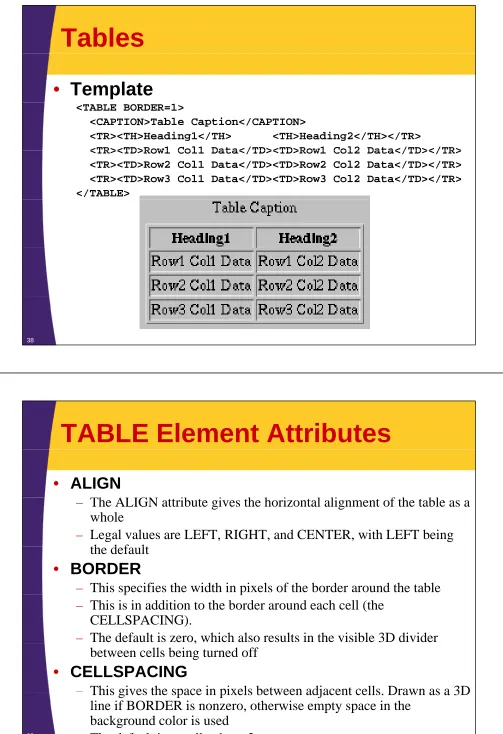
Tables
•
Template
<TABLE BORDER=1>
<CAPTION>Table Caption</CAPTION>
<TR><TH>Heading1</TH> <TH>Heading2</TH></TR>
<TR><TD>Row1 Col1 Data</TD><TD>Row1 Col2 Data</TD></TR> <TR><TD>Row1 Col1 Data</TD><TD>Row1 Col2 Data</TD></TR> <TR><TD>Row2 Col1 Data</TD><TD>Row2 Col2 Data</TD></TR> <TR><TD>Row3 Col1 Data</TD><TD>Row3 Col2 Data</TD></TR> </TABLE>
38
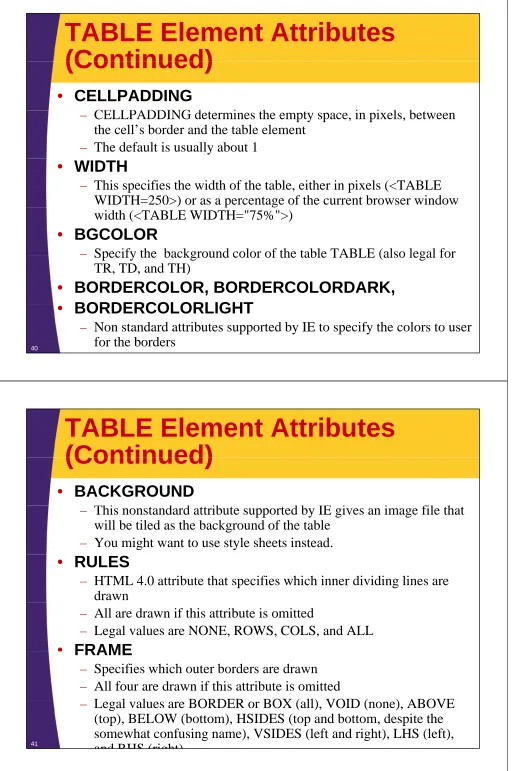
TABLE Element Attributes
• ALIGN
Th ALIGN ib i h h i l li f h bl
– The ALIGN attribute gives the horizontal alignment of the table as a whole
– Legal values are LEFT, RIGHT, and CENTER, with LEFT being th d f lt
the default
• BORDER
– This specifies the width in pixels of the border around the tablep p – This is in addition to the border around each cell (the
CELLSPACING).
– The default is zero, which also results in the visible 3D divider , between cells being turned off
• CELLSPACING
– This gives the space in pixels between adjacent cells Drawn as a 3DThis gives the space in pixels between adjacent cells. Drawn as a 3D line if BORDER is nonzero, otherwise empty space in the
[image:19.612.57.560.23.757.2]TABLE Element Attributes
(Continued)
(Continued)
• CELLPADDING
CELLPADDING d i h i i l b
– CELLPADDING determines the empty space, in pixels, between the cell’s border and the table element
– The default is usually about 1
• WIDTH
– This specifies the width of the table, either in pixels (<TABLE WIDTH=250>) or as a percentage of the current browser window ) p g width (<TABLE WIDTH="75%">)
• BGCOLOR
– Specify the background color of the table TABLE (also legal forSpecify the background color of the table TABLE (also legal for TR, TD, and TH)
• BORDERCOLOR, BORDERCOLORDARK,
BORDERCOLORLIGHT
• BORDERCOLORLIGHT
– Non standard attributes supported by IE to specify the colors to user for the borders
40
TABLE Element Attributes
(Continued)
(Continued)
• BACKGROUND
Thi d d ib d b IE i i fil h
– This nonstandard attribute supported by IE gives an image file that will be tiled as the background of the table
– You might want to use style sheets instead.
• RULES
– HTML 4.0 attribute that specifies which inner dividing lines are drawn
– All are drawn if this attribute is omitted
– Legal values are NONE, ROWS, COLS, and ALL
• FRAMEFRAME
– Specifies which outer borders are drawn – All four are drawn if this attribute is omitted
L l l BORDER BOX ( ll) VOID ( ) ABOVE – Legal values are BORDER or BOX (all), VOID (none), ABOVE
(top), BELOW (bottom), HSIDES (top and bottom, despite the somewhat confusing name), VSIDES (left and right), LHS (left), and RHS (right)
Table CAPTION
•
Attribute
– ALIGN (Values: TOP, BOTTOM)
•
Usage
A l i b d l bl i fl ibili
– An enclosing borderless table may give more flexibility than the built-in CAPTION.
42
TR: Table Row
• TR is used to define each row in the table
E h ill h i TH d/ TD i
• Each row will then contain TH and/or TD entries
• ALIGN
– ALIGN (legal values LEFT RIGHT or CENTER) is used to set theALIGN (legal values LEFT, RIGHT, or CENTER) is used to set the default horizontal alignment for table cells
• VALIGN
VALIGN (legal values TOP MIDDLE or BOTTOM) is used to set – VALIGN (legal values TOP, MIDDLE, or BOTTOM) is used to set
the default vertical alignment for table cells
• BGCOLOR
– Sets the color for the table row, overriding any values set for the table as a whole via the BGCOLOR attribute of TABLE
• BORDERCOLOR, BORDERCOLORDARK,
• BORDERCOLORLIGHT
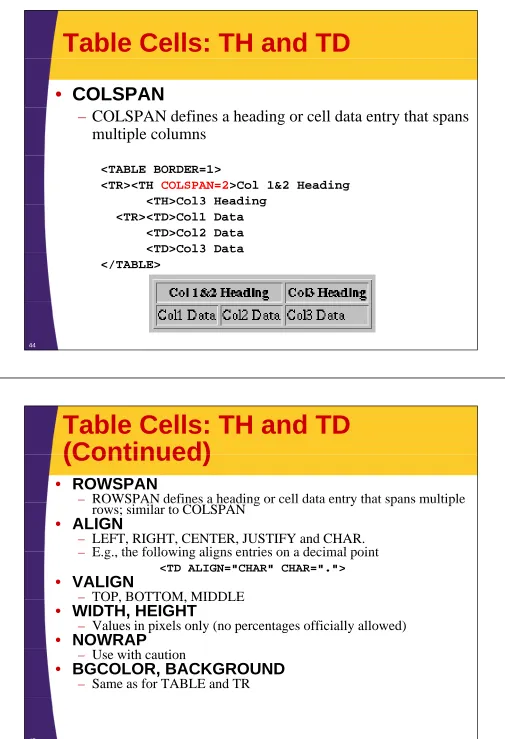
Table Cells: TH and TD
•
COLSPAN
– COLSPAN defines a heading or cell data entry that spans multiple columns
<TABLE BORDER=1>
<TR><TH COLSPAN=2>Col 1&2 Heading
<TH>Col3 Heading <TH>Col3 Heading <TR><TD>Col1 Data
<TD>Col2 Data <TD>Col3 Data </TABLE>
44
Table Cells: TH and TD
(Continued)
(Continued)
• ROWSPAN
– ROWSPAN defines a heading or cell data entry that spans multipleROWSPAN defines a heading or cell data entry that spans multiple rows; similar to COLSPAN
• ALIGN
– LEFT, RIGHT, CENTER, JUSTIFY and CHAR. E g the following aligns entries on a decimal point – E.g., the following aligns entries on a decimal point
<TD ALIGN="CHAR" CHAR=".">
• VALIGN
– TOP, BOTTOM, MIDDLETOP, BOTTOM, MIDDLE
• WIDTH, HEIGHT
– Values in pixels only (no percentages officially allowed)
• NOWRAP
– Use with caution
• BGCOLOR, BACKGROUND
© 2009 Marty Hall
XHTML
XHTML
Customized Java EE Training: http://courses.coreservlets.com/
Servlets, JSP, JSF 1.x& JSF 2.0, Struts Classic & Struts 2, Ajax, GWT, Spring, Hibernate/JPA, Java 5 & 6. Developed and taught by well-known author and developer. At public venues or onsite at yourlocation.
46
XHTML: Basic Template
<?xml version="1.0" encoding="UTF-8"?>
<!DOCTYPE html PUBLIC "-//W3C//DTD XHTML 1.0 Transitional//EN" <!DOCTYPE html PUBLIC //W3C//DTD XHTML 1.0 Transitional//EN
"http://www.w3.org/TR/xhtml1/DTD/xhtml1-transitional.dtd"> <html xmlns="http://www.w3.org/1999/xhtml">
<meta http-equiv="content-type"
content="text/html; charset=UTF-8" /> <head><title>Some Title</title>
</head> <body> ...
</body></html>
XHTML: Case
•
In HTML 4, case does not matter for tag
names and attribute names
– <BODY>, <Body>, and <body> are equivalent
1 A G " " i i l 1 iG " "
– <H1 ALIGN="..."> is equivalent to <H1 aLiGn="...">
•
In xhtml tag names and attribute names
•
In xhtml, tag names and attribute names
must be in lower case
– <body> <h1 align=" "><body>, <h1 align ... >
48
XHTML: Quotes
•
In HTML 4, quotes are optional if attribute
l
i
l
l h
i
l
value contains only alphanumeric values
– <H1 ALIGN="LEFT"> or <H1 ALIGN=LEFT>
•
In xhtml, you must always use single or
double quotes
double quotes
XHTML: End Tags
•
HTML 4
– Some tags are containers
• <H1>...</H1>, <A HREF...>...</A>
– Some tags are standalone – Some tags are standalone
• <BR>, <HR>
– Some tags have optional end tags • <P>, <LI>, <TR>, <TD>, <TH>
•
XHTML
All tags are containers End tags always required – All tags are containers. End tags always required.
• <p>...</p>, <li>...</li>
– If there is no body content, start/end tags can be merged • <br></br> or just <br/>
50
Summary
• A DOCTYPE is required to validate the document
HTML d h ld h l i HTML
• HTML document should have an enclosing HTML
element, a HEAD (TITLE is required) and a BODY
• Documents are composed ofDocuments are composed of
– Block-level and text-level elements
– Text-level elements must be inside block-level elements, not vice versa
versa
• Hypertext links, <A HREF="…">,
can be absolute or relative
– A link to a named section is denoted by #section
• Tables are composed of:
– Main table element, <TABLE>; rows, <TR>; table headers, <TH>;b e e e e , ; ows, ; b e e de s, ; and table data, <TD>
© 2009 Marty Hall
Questions?
Questions?
Customized Java EE Training: http://courses.coreservlets.com/
Servlets, JSP, JSF 1.x& JSF 2.0, Struts Classic & Struts 2, Ajax, GWT, Spring, Hibernate/JPA, Java 5 & 6. Developed and taught by well-known author and developer. At public venues or onsite at yourlocation.