11
Scrolling
In this chapter:• Scrollbar
• Scrolling An Image • The Adjustable
Interface • ScrollPane
This chapter describes how Java deals with scrolling. AWT provides two means for
scrolling. The first is the fairly primitiveScrollbarobject. It really provides only
the means to read a value from a slider setting. Anything else is your responsibility: if you want to display the value of the setting (for example, if you’re using the scrollbar as a volume control) or want to change the display (if you’re using scroll-bars to control an area that’s too large to display), you have to do it yourself. The
Scrollbarreports scrolling actions through the standard event mechanisms; it is up to the programmer to handle those events and perform the scrolling.
Unlike other components, which generate an ACTION_EVENT when something
exciting happens, the Scrollbar generates five events: SCROLL_LINE_UP,
SCROLL_LINE_DOWN,SCROLL_PAGE_UP,SCROLL_PAGE_DOWN, andSCROLL_ABSOLUTE. In
Java 1.0, none of these events trigger a default event handler like theaction()
method. To work with them, you must override thehandleEvent()method. With
Java 1.1, you handle scrolling events by registering an AdjustmentListener with
theScrollbar.addAdjustmentListener()method; when adjustment events occur,
the listener’sadjustmentValueChanged()method is called.
Release 1.1 of AWT also includes aScrollPanecontainer object; it is a response to
one of the limitations of AWT 1.0. AScrollPaneis like aPanel, but it has
scroll-bars and scrolling built in. In this sense, it’s likeTextArea, which contains its own
scrollbars. You could use a ScrollPane to implement a drawing pad that could
Both Scrollbar and ScrollPane take advantage of the Adjustable inter face.
Adjustabledefines the common scrolling activities of the two classes. The
Scroll-barclass implements Adjustable; aScrollPane has two methods that return an
Adjustableobject, one for each scrollbar. Currently, you can use theScrollPane’s “adjustables” to find out the scrollbar settings in each direction. You can’t change
the settings or registerAdjustmentListeners; the appropriate methods exist, but
they don’t do anything. It’s not clear whether this is appropriate behavior or a bug
(remember, an inter face only lists methods that must be present but doesn’t
require them to do anything); it may change in a later release.
11.1 Scrollbar
Scrollbars come in two flavors: horizontal and vertical. Although there are several methods for setting the page size, scrollbar range (minimum and maximum val-ues), and so on, basically all you can do is get and set the scrollbar’s value. Scroll-bars don’t contain any area to display their value, though if you want one, you could easily attach a label.
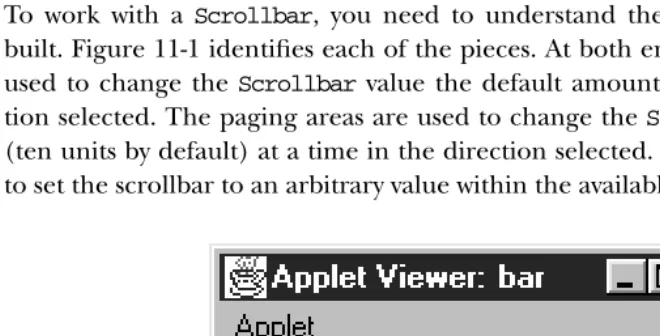
To work with a Scrollbar, you need to understand the pieces from which it is
built. Figure 11-1 identifies each of the pieces. At both ends are arrows, which are
used to change theScrollbarvalue the default amount (one unit) in the
direc-tion selected. The paging areas are used to change theScrollbarvalue one page
(ten units by default) at a time in the direction selected. The slider can be moved to set the scrollbar to an arbitrary value within the available range.
unit decrement
unit increment block
decrement incrementblock
scrollbar
visible (width of slider) value determined by location
min. max.
[image:2.612.69.399.385.553.2]slider
11.1.1 Scrollbar Methods
Constants
There are two direction specifiers forScrollbar. The direction tells theScrollbar
which way to orient itself. They are used in the constructors, as a parameter to
setOrientation(), and as the return value for thegetOrientation()method.
public final static int HORIZONTAL
HORIZONTALis the constant for horizontal orientation.
public final static int VERTICAL
VERTICALis the constant for vertical orientation.
Constructors
public Scrollbar (int orientation, int value, int visible, int minimum, int maximum)
TheScrollbarconstructor creates aScrollbarwith a direction of
orienta-tionand initial value ofvalue.visibleis the size of the slider.minimumand
maximumare the range of values that theScrollbarcan be. Iforientationis not HORIZONTAL or VERTICAL, the constructor throws the run-time exception
IllegalArgumentException. If maximum is below the value of minimum, the
scrollbar’s minimum and maximum values are both set tominimum. Ifvalueis
outside the range of the scrollbar, it is set to the limit it exceeded. The default line scrolling amount is one. The default paging amount is ten.
If you are using the scrollbar to control a visual object,visibleshould be set
to the amount of a displayed object that is on the screen at one time, relative
to the entire size of the object (i.e., relative to the scrollbar’s range:maximum
-minimum). Some platforms ignore this parameter and set the scrollbar to a fixed size.
public Scrollbar (int orientation)
This constructor forScrollbarcreates aScrollbarwith the direction of
ori-entation. In Java 1.0, the initial settings forvalue,visible,minimum, and
max-imumare 0. In Java 1.1, the default value forvisibleis 10, and the default for
maximumis 100; the other values default to 0. Iforientationis notHORIZONTAL
or VERTICAL, the constructor throws the run-time exception IllegalArgu-mentException. This constructor is helpful if you want to reserve space for the
Scrollbaron the screen, to be configured later. You would then use the
set-Values()method to configure the scrollbar.
public Scrollbar ()
This constructor creates aVERTICAL Scrollbar. In Java 1.0, the initial settings
forvalue,visible,minimum, andmaximumare 0. In Java 1.1, the default value forvisibleis 10, and the default formaximumis 100; the other values default
[image:4.612.54.172.237.348.2]to 0. You would then use thesetValues()method to configure the scrollbar.
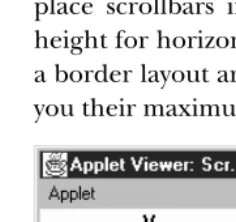
Figure 11-2 shows both vertical and horizontal scrollbars. It also demonstrates a
problem you’ll run into if you’re not careful. If not constrained by the
LayoutMan-ager, scrollbars can get very fat. The result is rarely pleasing. The solution is to
place scrollbars in layout managers that restrict width for vertical scrollbars or height for horizontal ones. The side regions (i.e., everything except the center) of a border layout are ideal. In the long term, the solution will be scrollbars that give you their maximum size and layout managers that observe the maximum size.
Figure 11–2: Vertical and horizontal scrollbars
Adjustable Methods
public int getOrientation ()
The getOrientation()method returns the current orientation of the
scroll-bar: eitherScrollbar.HORIZONTALorScrollbar.VERTICAL.
public synchronized void setOrientation (int orientation)★
The setOrientation() method changes the orientation of the scrollbar to
orientation, which must be eitherScrollbar.HORIZONTALor
Scrollbar.VER-TICAL. Iforientationis notHORIZONTALorVERTICAL, this method throws the
run-time exceptionIllegalArgumentException. It was not possible to change
the orientation of a scrollbar prior to Java 1.1.
public int getVisibleAmount ()★ public int getVisible () ✩
ThegetVisibleAmount()method gets thevisiblesetting of theScrollbar. If
the scrollbar’sContainer is resized, the visiblesetting is not automatically
public synchronized void setVisibleAmount (int amount)★
ThesetVisibleAmount()method changes the currentvisiblesetting of the
Scrollbartoamount.
public int getValue ()
The getValue() method is probably the most frequently called method of
Scrollbar. It returns the current value of the scrollbar queried.
public synchronized void setValue (int value)
ThesetValue()method changes the value of the scrollbar tovalue. Ifvalue
exceeds a scrollbar limit, the scrollbar’s new value is set to that limit. In Java 1.1, this method is synchronized; it was not in earlier versions.
public int getMinimum ()
The getMinimum() method returns the current minimum setting for the scrollbar.
public synchronized void setMinimum (int minimum)★
ThesetMinimum()method changes theScrollbar’s minimum value to
mini-mum. The current setting for theScrollbarmay change tominimumifminimum
increases abovegetValue().
public int getMaximum ()
The getMaximum() method returns the current maximum setting for the scrollbar.
public synchronized void setMaximum (int maximum)★
ThesetMaximum() method changes the maximum value of theScrollbarto
maximum. The current setting for theScrollbarmay change tomaximumif
max-imumdecreases belowgetValue().
public synchronized void setValues (int value, int visible, int minimum, int maximum)
ThesetValues()method changes thevalue,visible,minimum, andmaximum
settings all at once. In Java 1.0.2, separate methods do not exist for changing
visible,minimum, ormaximum. The scrollbar’s value is set tovalue, visible to
visible, minimum tominimum, and maximum tomaximum. Ifmaximumis below
the value ofminimum, it is set tominimum. Ifvalueis outside the range of the
scrollbar, it is set to the limit it exceeded. In Java 1.1, this method is synchro-nized; it was not in earlier versions.
public int getUnitIncrement ()★ public int getLineIncrement ()✩
ThegetUnitIncrement()method returns the current line increment. This is the amount the scrollbar will scroll if the user clicks on one of the scrollbar’s arrows.
getLineIncrement()is the Java 1.0 name for this method.
public void setUnitIncrement (int amount)★ public void setLineIncrement (int amount)✩
The setUnitIncrement() method changes the line increment amount to
amount.
setLineIncrement()is the Java 1.0 name for this method.
Changing the line increment amount was not possible in Java 1.0.2. This
method acted like it returned successfully, andgetLineIncrement()returned
the new value, but theScrollbarchanged its value by only one (the default)
when you clicked on one of the arrows. However, you could work around this
defect by explicitly handling the SCROLL_LINE_UP and SCROLL_LINE_DOWN
events: get the correct line increment, adjust the display appropriately, and
then set call setValue()to correct the scrollbar’s value. This workaround is
not needed in Java 1.1.
public int getBlockIncrement ()★ public int getPageIncrement ()✩
The getBlockIncrement() method returns the current paging increment. This is the amount the scrollbar will scroll if the user clicks between the slider and one of the scrollbar’s arrows.
getPageIncrement()is the Java 1.0 name for this method.
public void setBlockIncrement (int amount)★ public void setPageIncrement (int amount)✩
ThesetBlockIncrement()method changes the paging increment amount to
amount.
setPageIncrement()is the Java 1.0 name for this method.
Changing the paging increment amount was not possible in Java 1.0.2. This
method acts like it returns successfully, and getPageIncrement()returns the
new value, but theScrollbarchanges its value only by 10 (the default) when
you click on one of the paging areas. However, you can work around this
defect by explicitly handling the SCROLL_PAGE_UP and SCROLL_PAGE_DOWN
events: get the correct page increment, adjust the display appropriately, and
then set call setValue()to correct the scrollbar’s value. This workaround is
not necessary in Java 1.1.
Miscellaneous methods
public synchronized void addNotify ()
The addNotify()method creates the Scrollbar’s peer. If you override this
method, callsuper.addNotify()first. You will then be able to do everything
protected String paramString ()
Scrollbar doesn’t have its own toString() method; when you call the
toString() method of a Scrollbar, you are actually calling the method
Component.toString(). This in turn calls paramString(), which builds the
string to display. For aScrollbar,paramString()puts the scrollbar’s value,
vis-ibility, minimum, maximum, and direction into the string. In Java 1.0, there is
a minor bug in the output. Instead of displaying the scrollbar’svisiblesetting
(an integer), paramString() displays the component’s visible setting (a
boolean). (This is corrected in Java 1.1.) The followingStringis the result of
callingtoString()for a horizontalScrollbarthat hasn’t been configured yet:
java.awt.Scrollbar[0,0,0x0,invalid,val=0,vis=true,min=0,max=0,horz]
11.1.2 Scrollbar Events
With the 1.0 event model, scrollbars generate five kinds of events in response to
user interaction: SCROLL_LINE_UP, SCROLL_LINE_DOWN, SCROLL_PAGE_UP,
SCROLL_PAGE_DOWN, andSCROLL_ABSOLUTE. The event that occurs depends on what
the user did, as shown in Table 11-1; the event type is specified in theidfield of
theEventobject passed tohandleEvent(). However, as a programmer, you often do not care which of these five events happened. You care only about the
scrollbar’s new value, which is always passed as theargfield of theEventobject.
Table 11–1: Scrollbar Events
Event Type (Event.id) Event Meaning
SCROLL_ABSOLUTE User drags slider.
SCROLL_LINE_DOWN User presses down arrow.
SCROLL_LINE_UP User presses up arrow.
SCROLL_PAGE_DOWN User selects down paging area.
SCROLL_PAGE_UP User selects up paging area.
Because scrollbar events do not trigger any default event handlers (likeaction()),
it is necessary to override thehandleEvent()method to deal with them. Unless
your version ofhandleEvent()deals with all conceivable events, you must ensure
that the originalhandleEvent()method is called. The simplest way is to have the
return statement callsuper.handleEvent().
MosthandleEvent()methods first identify the type of event that occurred. The
fol-lowing two code blocks demonstrate different ways of checking for theScrollbar
events.
if ((e.id == Event.SCROLL_LINE_UP) || (e.id == Event.SCROLL_LINE_DOWN) || (e.id == Event.SCROLL_PAGE_UP) || (e.id == Event.SCROLL_PAGE_DOWN) || (e.id == Event.SCROLL_ABSOLUTE)) {
// Then determine which Scrollbar was selected and act upon it }
Or more simply:
if (e.target instanceof Scrollbar) {
// Then determine which Scrollbar was selected and act upon it. }
Although the second code block is simpler, the first is the better choice because it is more precise. For example, what would happen if mouse events are passed to scrollbars? Different Java platforms differ most in the types of events passed to
dif-ferent objects; Netscape Navigator 3.0 for Windows 95 sends MOUSE_ENTER,
MOUSE_EXIT, andMOUSE_MOVEevents to theScrollbar.*The second code block
exe-cutes for all the mouse events—in fact, any event coming from a Scrollbar.
Therefore, it executes much more frequently (there can be many MOUSE_MOVE
events), leading to poor interactive performance.
Another platform-specific issue is the way the system generates SCROLL_ABSOLUTE
events. Some platforms generate many events while the user drags the scrollbar. Others don’t generate the event until the user stops dragging the scrollbar. Some implementations wait until the user stops dragging the scrollbar and then generate
a flood ofSCROLL_ABSOLUTEevents for you to handle. In theory, it does not matter
which is happening, as long as your processing code is tight. If your event-processing code is time consuming, you may wish to start another thread to per-form the work. If the thread is still alive when the next event comes along, flag it down, and restart the operation.
Listeners and 1.1 event handling
With the 1.1 event model, you register an AdjustmentListener by calling the
addAdjustmentListener() method. Then when the user moves the Scrollbar
slider, the AdjustmentListener.adjustmentValueChanged() method is called
through the protected Scrollbar.processAdjustmentEvent() method. Key,
mouse, and focus listeners are registered through the threeComponentmethods of
addKeyListener(), addMouseListener(), and addFocusListener(), respectively. Because you need to register a separate listener for mouse events, you no longer have the problem of distinguishing between mouse events and slider events. An adjustment listener will never receive mouse events.
* MOUSE_UP,MOUSE_DOWN, andMOUSE_DRAGare not generated since these operations generateSCROLL
public void addAdjustmentListener(AdjustmentListener listener)★
TheaddAdjustmentListener() method registerslisteneras an object
inter-ested in being notified when anAdjustmentEventpasses through the
Event-Queuewith thisScrollbaras its target. The method
listener.adjustmentVal-ueChanged() is called when an event occurs. Multiple listeners can be regis-tered.
public void removeAdjustmentListener(ItemListener listener)★
The removeAdjustmentListener()method removeslistener as a interested
listener. Iflisteneris not registered, nothing happens.
protected void processEvent(AWTEvent e)★
TheprocessEvent()method receives everyAWTEventwith thisScrollbaras its
target. processEvent() then passes it along to any listeners for processing.
When you subclassScrollbar, overridingprocessEvent() allows you to
pro-cess all events yourself, before sending them to any listeners. In a way, overrid-ing processEvent() is like overriding handleEvent() using the 1.0 event model.
If you override theprocessEvent()method, remember to call the
super.pro-cessEvent(e)method last to ensure that regular event processing can occur. If
you want to process your own events, it’s a good idea to callenableEvents()
(inherited from Component) to ensure that events are delivered even in the
absence of registered listeners.
protected void processAdjustmentEvent(ItemEvent e)★
The processAdjustmentEvent() method receives all AdjustmentEvents with this Scrollbar as its target. processAdjustmentEvent() then passes them
along to any listeners for processing. When you subclassScrollbar, overriding
processAdjustmentEvent() allows you to process all events yourself, before sending them to any listeners.
If you override processAdjustmentEvent(), you must remember to call
super.processAdjustmentEvent(e) last to ensure that regular event process-ing can occur. If you want to process your own events, it’s a good idea to call
enableEvents() (inherited from Component) to ensure that events are deliv-ered even in the absence of registdeliv-ered listeners.
11.2 Scrolling An Image
Example 11-1 is a Java application that displays any image in the current directory in a viewing area. The viewing area scrolls to accommodate larger images; the user can use the scrollbars or keypad keys to scroll the image. In Java 1.1, it is trivial to
implement this example with aScrollPane; however, if you’re using 1.0, you don’t have this luxury. Even if you’re using 1.1, this example shows a lot about how to use scrollbars.
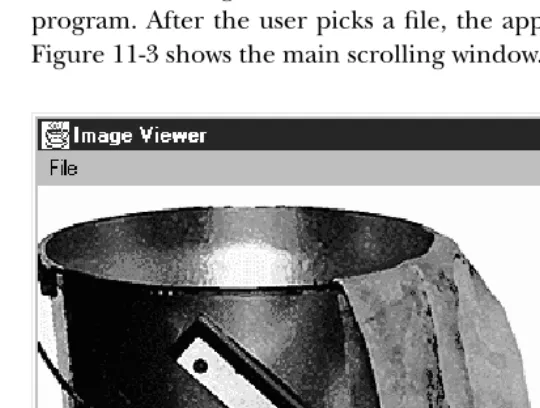
Our application uses aDialogto select which file to display; aFilenameFilter
[image:10.612.55.325.179.383.2]lim-its the list to image files. We use a menu to let the user request a file list or exit the program. After the user picks a file, the application loads it into the display area. Figure 11-3 shows the main scrolling window.
Figure 11–3: Scrolling an image
The code for the scrolling image consists of aScrollingImage class, plus several
helper classes. It places everything into the fileScrollingImage.javafor compilation.
Example 11–1: Source Code for Scrolling an Image
import java.awt.*;
import java.io.FilenameFilter; import java.io.File;
The first class contains theFilenameFilterused to select relevant filenames: that
is, files that are likely to contain GIF, JPEG, or XBM images. If the filename has an
appropriate ending, the accept() method returns true; other wise, it returns
false.
// True for files ending in jpeg/jpg/gif/xbm class ImageFileFilter implements FilenameFilter {
public boolean accept (File dir, String name) { String tempname = name.toLowerCase();
tempname.endsWith ("gif") || tempname.endsWith ("xbm")); }
}
The ImageListDialogclass displays a list of files from which the user can select.
Instead of using FileDialog, we created a customized List to prevent the user
from roaming around the entire hard drive; choices are limited to appropriate files in the current directory. When the user selects an entry (by double-clicking), the image is then displayed in the scrolling area.
class ImageListDialog extends Dialog { private String name = null; private String entries[]; private List list;
ImageListDialog (Frame f) { super (f, "Image List", true);
File dir = new File (System.getProperty("user.dir")); entries = dir.list (new ImageFileFilter());
list = new List (10, false);
for (int i=0;i<entries.length;i++) { list.addItem (entries[i]); }
add ("Center", list); pack();
}
public String getName () { return name;
}
public boolean action (Event e, Object o) { name = (String)e.arg;
((ScrollingImage)getParent()).processImage(); dispose();
return true; }
}
The code in this class is straightforward. The constructor reads the current
direc-tor y from the system property list, uses thelist()method of theFileclass to
cre-ate a list of files that match our filename filter, and then crecre-ates aListobject that
lists these files.getName()returns the name of the selected file.action()is called
when the user selects a file; it sets the name of the selected file from theargfield
of the Eventand then calls the processImage()method of its parent container.
The parent container of ourImageListDialogis theScrollingImageclass we are
defining; itsprocessImage()method displays a scrollable image.
The next class,ImageCanvas, is theCanvasthat the image is drawn onto. We use a
separateCanvasrather than drawing directly onto theFrameso that the scrollbars
do not overlap the edges of the image. You will notice that thepaint()method
uses negativexandyvalues. This starts the drawing outside theCanvasarea; as a
result, the Canvasdisplays only part of the image. This is how we do the actual
scrolling. (xPos,yPos) are the values given to us from the scrollbars; by positioning
the image at (-xPos, -yPos), we ensure that the point (xPos,yPos) appears in the
upper left corner of the canvas.
class ImageCanvas extends Canvas { Image image;
int xPos, yPos;
public void redraw (int xPos, int yPos, Image image) { this.xPos = xPos;
this.yPos = yPos; this.image = image; repaint();
}
public void paint (Graphics g) { if (image != null)
g.drawImage (image, -xPos, -yPos, this); }
}
ScrollingImageprovides the framework for the rest of the program. It provides a
menu to bring up the Dialog to choose the file, the scrollbars to scroll the
scrolling canvas, and the image canvas area. This class also implements event han-dling methods to capture the scrollbar events, paging keys, and menu events.
public class ScrollingImage extends Frame { static Scrollbar horizontal, vertical; ImageCanvas center;
int xPos, yPos; Image image;
ImageListDialog ild; ScrollingImage () {
super ("Image Viewer");
add ("Center", center = new ImageCanvas ());
add ("South", horizontal = new Scrollbar (Scrollbar.HORIZONTAL)); add ("East", vertical = new Scrollbar (Scrollbar.VERTICAL)); Menu m = new Menu ("File", true);
m.add ("Open"); m.add ("Close"); m.add ("-"); m.add ("Quit");
MenuBar mb = new MenuBar(); mb.add (m);
setMenuBar (mb); resize (400, 300); }
public static void main (String args[]) { ScrollingImage si = new ScrollingImage (); si.show();
}
if (e.id == Event.WINDOW_DESTROY) { System.exit(0);
} else if (e.target instanceof Scrollbar) { if (e.target == horizontal) {
xPos = ((Integer)e.arg).intValue(); } else if (e.target == vertical) {
yPos = ((Integer)e.arg).intValue(); }
center.redraw (xPos, yPos, image); }
return super.handleEvent (e); }
ThishandleEvent()method kills the program if the user used the windowing
sys-tem to exit from it (WINDOW_DESTROY). More to the point, if aScrollbargenerated
the event,handleEvent()figures out if it was the horizontal or vertical scrollbar,
saves its value as thexoryposition, and redraws the image in the new location.
Finally, it calls super.handleEvent(); as we will see in the following code, other
events that we care about (key events and menu events) we don’t want to handle
here — we would rather handle them normally, in action() and keyDown()
methods.
public void processImage () {
image = getToolkit().getImage (ild.getName()); MediaTracker tracker = new MediaTracker (this); tracker.addImage (image, 0);
try {
tracker.waitForAll();
} catch (InterruptedException ie) { }
xPos = 0; yPos = 0;
int imageHeight = image.getHeight (this); int imageWidth = image.getWidth (this); vertical.setValues (0, 5, 0, imageHeight); horizontal.setValues (0, 5, 0, imageWidth); center.redraw (xPos, yPos, image);
}
processImage()reads the image’s filename, callsgetImage(), and sets up a
Media-Tracker to wait for the image to load. Once the image has loaded, it reads the height and width, and uses these to set the maximum values for the vertical and
horizontal scrollbars by callingsetValues(). The scrollbars’ minimum and initial
values are both 0. The size of the scrollbar “handle” is set to 5, rather than trying to indicate the visible portion of the image.
public boolean action (Event e, Object o) { if (e.target instanceof MenuItem) {
if ("Open".equals (o)) {
ild = new ImageListDialog (this); ild.show();
}
} else if ("Close".equals(o)) { image = null;
center.redraw (xPos, yPos, image); } else if ("Quit".equals(o)) {
System.exit(0); }
return true; }
return false; }
action() handles menu events. If the user selected Open, it displays the dialog box that selects a file. Close redraws the canvas with a null image; Quit exits the
program. If any of these events occurred,action() returnstrue, indicating that
the event was fully handled. If any other event occurred,action()returnsfalse,
so that the system will deliver the event to any other methods that might be inter-ested in it.
public boolean keyDown (Event e, int key) { if (e.id == Event.KEY_ACTION) {
Scrollbar target = null; switch (key) {
case Event.HOME: target = vertical;
vertical.setValue(vertical.getMinimum()); break;
case Event.END: target = vertical;
vertical.setValue(vertical.getMaximum()); break;
case Event.PGUP: target = vertical;
vertical.setValue(vertical.getValue() - vertical.getPageIncrement()); break;
case Event.PGDN: target = vertical;
vertical.setValue(vertical.getValue() + vertical.getPageIncrement()); break;
case Event.UP: target = vertical;
vertical.setValue(vertical.getValue() - vertical.getLineIncrement()); break;
case Event.DOWN: target = vertical;
case Event.LEFT:
target = horizontal; if (e.controlDown())
horizontal.setValue(horizontal.getValue() -horizontal.getPageIncrement());
else
horizontal.setValue(horizontal.getValue() -horizontal.getLineIncrement());
break; case Event.RIGHT:
target = horizontal; if (e.controlDown())
horizontal.setValue(horizontal.getValue() + horizontal.getPageIncrement());
else
horizontal.setValue(horizontal.getValue() + horizontal.getLineIncrement());
break; default:
return false; }
Integer value = new Integer (target.getValue()); postEvent (new Event ((Object)target,
Event.SCROLL_ABSOLUTE, (Object)value)); return true;
}
return false; }
}
keyDown()isn’t really necessary, but it adds a nice extension to our scrollbars: in addition to using the mouse, the user can scroll with the arrow keys. Pressing an
arrow key generates aKEY_ACTIONevent. If we have one of these events, we check
what kind of key it was, then compute a new scrollbar value, then callsetValue()
to set the appropriate scrollbar to this value. For example, if the user presses the page up key, we read the page increment, add it to the current value of the vertical scrollbar, and then set the vertical scrollbar accordingly. (Note that this works even though nondefault page and line increments aren’t implemented correctly.) The one trick here is that we have to get the rest of the program to realize that the
scrollbar values have changed. To do so, we create a newSCROLL_ABSOLUTEevent,
and callpostEvent()to deliver it.
11.3 The Adjustable Interface
The Adjustable inter face is new to Java 1.1. It provides the method signatures required for an object that lets you adjust a bounded integer value. It is currently
implemented byScrollbarand returned by two methods withinScrollPane.
11.3.1 Constants of the Adjustable Interface
There are two direction specifiers forAdjustable.
public final static int HORIZONTAL★
HORIZONTALis the constant for horizontal orientation.
public final static int VERTICAL★
VERTICALis the constant for vertical orientation.
11.3.2 Methods of the Adjustable Interface
public abstract int getOrientation ()★
ThegetOrientation()method is for returning the current orientation of the
adjustable object, eitherAdjustable.HORIZONTALorAdjustable.VERTICAL.
setOrientation()is not part of the interface. Not all adjustable objects need
to be able to alter orientation. For example,Scrollbarinstances can change
their orientation, but eachAdjustableinstance associated with aScrollPane
has a fixed, unchangeable orientation.
public abstract int getVisibleAmount ()★
ThegetVisibleAmount()method lets you retrieve the size of the visible slider of the adjustable object.
public abstract void setVisibleAmount (int amount)★
ThesetVisibleAmount()method lets you change the size of the visible slider toamount.
public abstract int getValue ()★
ThegetValue() method lets you retrieve the current value of the adjustable object.
public abstract void setValue (int value)★
ThesetValue()method lets you change the value of the adjustable object to
value.
public abstract int getMinimum ()
ThegetMinimum()method lets you retrieve the current minimum setting for the object.
public abstract void setMinimum (int minimum)★
The setMinimum() method lets you change the minimum value of the
public abstract int getMaximum ()★
ThegetMaximum()method lets you retrieve the current maximum setting for the object.
public abstract void setMaximum (int maximum)★
The setMaximum() method lets you change the maximum value of the
adjustable object tomaximum.
public abstract int getUnitIncrement ()★
ThegetUnitIncrement()method lets you retrieve the current line increment.
public abstract void setUnitIncrement (int amount)★
ThesetUnitIncrement()method lets you change the line increment amount
of the adjustable object toamount.
public abstract int getBlockIncrement ()★
The getBlockIncrement() method lets you retrieve the current page increment.
public abstract void setBlockIncrement (int amount)★
The setBlockIncrement() method lets you change the paging increment
amount of the adjustable object toamount.
public abstract void addAdjustmentListener(AdjustmentListener listener)★
TheaddAdjustmentListener()method lets you registerlisteneras an object
interested in being notified when an AdjustmentEvent passes through the
EventQueuewith thisAdjustableobject as its target.
public abstract void removeAdjustmentListener(ItemListener listener)★
The removeAdjustmentListener()method removeslistener as a interested
listener. Iflisteneris not registered, nothing happens.
11.4 ScrollPane
AScrollPaneis aContainerwith built-in scrollbars that can be used to scroll its
contents. In the current implementation, a ScrollPane can hold only one
Component and has no layout manager. The component within a ScrollPane is always given its preferred size. While the scrollpane’s inability to hold multiple components sounds like a deficiency, it isn’t; there’s no reason you can’t put a
Panelinside aScrollPane, put as many components as you like inside thePanel,
and give thePanelany layout manager you wish.
Scrolling is handled by the ScrollPane peer, so processing is extremely fast. In
Example 11-1, the user moves a Scrollbarto trigger a scrolling event, and the
peer sends the event to the Java program to find someone to deal with it. Once it
identifies the target, it posts the event, then tries to find a handler. Eventually, the
applet’shandleEvent()method is called to reposition theImageCanvas. The new
position is then given to the peer, which finally redisplays the Canvas. Although
most of the real work is behind the scenes, it is still happening. WithScrollPane,
the peer generates and handles the event itself, which is much more efficient.
11.4.1 ScrollPane Methods
Constants
The ScrollPane class contains three constants that can be used to control its scrollbar display policy. The constants are fairly self-explanatory. The constants are
used in the constructor for aScrollPaneinstance.
public static final int SCROLLBARS_AS_NEEDED★
SCROLLBARS_AS_NEEDED is the default scrollbar display policy. With this policy, theScrollPanedisplays each scrollbar only if theComponentis too large in the scrollbar’s direction.
public static final int SCROLLBARS_ ALWA YS★
With theSCROLLBARS_ALWAYSdisplay policy, theScrollPaneshould always
dis-play both scrollbars, whether or not they are needed.
public static final int SCROLLBARS_ NEVER★
With the SCROLLBARS_NEVER display policy, theScrollPane should never
dis-play scrollbars, even when the object is bigger than the ScrollPane’s area.
When using this mode, you should provide some means for the user to scroll, either through a button outside the container or by listening for events hap-pening within the container.
Constructors
public ScrollPane ()★
The first constructor creates an instance of ScrollPane with the default
scrollbar display policy setting,SCROLLBARS_AS_NEEDED.
public ScrollPane (int scrollbarDisplayPolicy)★
The other constructor creates an instance ofScrollPanewith a scrollbar
set-ting of scrollbarDisplayPolicy. If scrollbarDisplayPolicy is not one of
the class constants, this constructor throws the IllegalArgumentException
Layout methods
public final void setLayout(LayoutManager mgr)★
ThesetLayout()method ofScrollPanethrows anAWTError. It overrides the
setLayout() method of Containerto prevent you from changing a
Scroll-Pane’s layout manager.
public void doLayout ()★ public void layout ()✩
ThedoLayout()method ofScrollPaneshapes the contained object to its pre-ferred size.
layout()is another name for this method.
public final void addImpl(Component comp, Object constraints, int index)★
TheaddImpl()method ofScrollPanepermits only one object to be added to theScrollPane. It overides theaddImpl()method ofContainerto enforce the
ScrollPane’s limitations on adding components. If index > 0, addImpl()
throws the run-time exceptionIllegalArgumentException. If a component is
already within theScrollPane, it is removed beforecompis added. The
con-straintsparameter is ignored.
Scrolling methods
public int getScrollbarDisplayPolicy()★
ThegetScrollbarDisplayPolicy()method retrieves the current display pol-icy, as set by the constructor. You cannot change the policy once it has been
set. The return value is one of the class constants: SCROLLBARS_AS_NEEDED,
SCROLLBARS_ALWAYS, orSCROLLBARS_NEVER.
public Dimension getViewportSize()★
The getViewportSize()method returns the current size of the ScrollPane,
less anyInsets, as aDimensionobject. The size is given in pixels and has an
initial value of 100 x 100.
public int getHScrollbarHeight()★
The getHScrollbarHeight()method retrieves the height in pixels of a hori-zontal scrollbar. The value returned is without regard to the display policy; that is, you may be given a height even if the scrollbar is not displayed. This method may return 0 if the scrollbar’s height cannot be calculated at this time
(no peer) or if you are using theSCROLLBARS_NEVERdisplay policy.
The width of a horizontal scrollbar is justgetViewportSize().width.
public int getVScrollbarWidth()★
ThegetVScrollbarWidth() method retrieves the width in pixels of a vertical scrollbar. The value returned is without regard to the display policy; that is, you may be given a width even if the scrollbar is not displayed. This method may return 0 if the scrollbar’s width cannot be calculated at this time (no
peer) or if you are using theSCROLLBARS_NEVERdisplay policy.
The height of a vertical scrollbar is justgetViewportSize().height.
public Adjustable getHAdjustable()★
ThegetHAdjustable()method returns the adjustable object representing the
horizontal scrollbar (or null if it is not present). Through the methods of
Adjustable, you can get the different settings of the scrollbar.
The object that this method returns is an instance of the package private class
ScrollPaneAdjustable, which implements theAdjustableinter face. this class allows you to register listeners for the scrollpane’s events and inquire about various properties of the pane’s scrollbars. It does not let you set some
scrollbar properties; the setMinimum(), setMaximum(), and
setVisi-bleAmount()methods throw anAWTErrorwhen called.
public Adjustable getVAdjustable()★
ThegetVAdjustable()method returns the adjustable object representing the
vertical scrollbar (or null if it is not present). Through the methods of
Adjustable, you can get the different settings of the scrollbar.
The object that this method returns is an instance of the package private class
ScrollPaneAdjustable, which implements theAdjustableinter face. this class allows you to register listeners for the scrollpane’s events and inquire about various properties of the pane’s scrollbars. It does not let you set some
scrollbar properties; the setMinimum(), setMaximum(), and
setVisi-bleAmount()methods throw anAWTErrorwhen called.
public void setScrollPosition(int x, int y)★
ThissetScrollPosition()method moves the ScrollPane to the designated
location if possible. Thexandyarguments are scrollbar settings, which should
be interpreted in terms of the minimum and maximum values given to you by
the horizontal and verticalAdjustableobjects (returned by the previous two
methods). If theScrollPane does not have a child component, this method
throws the run-time exceptionNullPointerException. You can also move the
ScrollPane by calling the Adjustable.setValue() method of one of the
public void setScrollPosition(Point p)★
ThissetScrollPosition()method calls the previous with parameters ofp.x,
andp.y.
public Point getScrollPosition()★
The getScrollPosition() method returns the current position of both the
scrollpane’sAdjustableobjects as aPoint. If there is no component within
theScrollPane,getScrollPosition()throws theNullPointerException run-time exception. Another way to get this information is by calling the
Adjustable.getValue()method of eachAdjustableobject.
Miscellaneous methods
public void printComponents (Graphics g)★
TheprintComponents()method ofScrollPaneprints the single component it
contains. This is done by clipping the contextgto the size of the display area
and calling the contained component’sprintAll()method.
public synchronized void addNotify ()★
The addNotify() method creates theScrollPane peer. If you override this
method, call super.addNotify() first, then add your customizations for the
new class. You will then be able to do everything you need with the informa-tion about the newly created peer.
protected String paramString ()★
ScrollPane doesn’t have its own toString() method; so when you call the
toString() method of a ScrollPane, you are actually calling the
Component.toString() method. This in turn calls paramString(), which
builds the string to display. For aScrollPane,paramString()adds the current
scroll position, insets, and scrollbar display policy. For example:
java.awt.ScrollPane[scrollpane0,0,0,0x0,invalid,ScrollPosition=(0,0), Insets=(0,0,0,0),ScrollbarDisplayPolicy=always]
11.4.2 ScrollPane Events
TheScrollPanepeer deals with the scrolling events for you. It is not necessary to
catch or listen for these events. As with any otherContainer, you can handle the
1.0 events of the object you contain or listen for 1.1 events that happen within you.
11.4.3 Using a ScrollPane
The following applet demonstrates one way to use a ScrollPane. Basically, you
place the object you want to scroll in theScrollPaneby calling theadd()method.
This can be aPanelwith many objects on it or aCanvaswith an image drawn on it.
You then add as many objects as you want to thePanelor scribble on theCanvasto
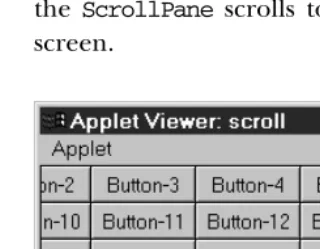
[image:22.612.54.214.160.284.2]your heart’s delight. No scrolling event handling is necessary. That is all there is to it. To make this example a little more interesting, whenever you select a button, the ScrollPane scrolls to a randomly selected position. Figure 11-4 displays the screen.
Figure 11–4: A ScrollPane containing many buttons
Here’s the code:
// Java 1.1 only import java.awt.*; import java.awt.event.*; import java.applet.*;
public class scroll extends Applet implements ActionListener, ContainerListener { ScrollPane sp = new ScrollPane (ScrollPane.SCROLLBARS_ALWAYS);
public void init () {
setLayout (new BorderLayout ());
Panel p = new Panel(new GridLayout (7, 8)); p.addContainerListener (this);
for (int j=0;j<50;j++)
p.add (new Button ("Button-" + j)); sp.add (p);
add (sp, "Center"); }
public void componentAdded(ContainerEvent e) { if (e.getID() == ContainerEvent.COMPONENT_ADDED) {
if (e.getChild() instanceof Button) { Button b = (Button)e.getChild(); b.addActionListener(this); }
} }
public void componentRemoved(ContainerEvent e) { }
Dimension d = c.getSize();
sp.setScrollPosition ((int)(Math.random()*d.width), (int)(Math.random()*d.height));
} }
Working with theScrollPaneitself is easy; we just create one, add aPanelto it, set
thePanel’s layout manager toGridLayout, and add a lot of buttons to thePanel. The applet itself is the action listener for all the buttons; when anybody clicks a
button, actionPerformed() is called, which generates a new random position
based on the viewport size and sets the new scrolling position accordingly by call-ingsetScrollPosition().
The more interesting part of this applet is the way it works with buttons. Instead of
directly adding a listener for each button, we add aContainerListenerto the
con-taining panel and let it add listeners. Although this may seem like extra work here, it demonstrates how you can use container events to take actions whenever some-one adds or removes a compsome-onent. At first glance, you might ask why I didn’t just call enableEvents(AWTEvent.CONTAINER_EVENT_MASK) and override the applet’s
processContainerEvent()to attach the listeners. If we were only adding our com-ponents to the applet, that would work great. Unfortunately, the applet is not noti-fied when buttons are added to an unrelated panel. It would be notinoti-fied only when the panel was added to the applet.