A
Using Properties and Resources
• System Properties• Server Properties • Resource Bundles
Java provides “property lists” that are similar to Xdefaults in the X Window system. Programs can use properties to customize their behavior or find out information about the run-time environment; by reading a property list, a program can set defaults, choose colors and fonts, and more, without any changes to the code. Java 1.1 makes property lists much more general. Although the basic features of prop-erty lists did not change between Java 1.0 and 1.1, the way you access them did. Instead of providing specific locations for files, Java 1.1 provides access to these resource bundles in a more general scheme, described in Section A.3.
A.1 System Properties
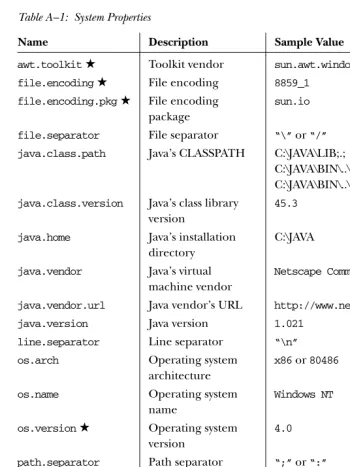
Although Java applications can define property lists as conveniences, there is one special property list that is common to all applications and applets: System Proper-ties. This list currently has 14 properties in Java 1.0 and 21 in Java 1.1, although you may add to it, and more standard properties may be added in the future. An application has access to all of them. Because of security restrictions, an applet has access only to 9. Among other things, these properties allow you to customize your code for different platforms if you want to provide workarounds for platform-spe-cific deficiencies or load native methods if available.
982 APPENDIXA: USINGPROPERTIES ANDRESOURCES
Table A–1: System Properties
Name Description Sample Value Applet
awt.toolkit★ Toolkit vendor sun.awt.window.Wtoolkit No
file.encoding★ File encoding 8859_1 No
file.encoding.pkg★ File encoding sun.io No
package
file.separator File separator “\”or“/” Yes
java.class.path Java’s CLASSPATH C:\JAVA\LIB;.; No
C:\JAVA\BIN\..\classes; C:\JAVA\BIN\..\lib\classes.zip
java.class.version 45.3Java’s class library Yes
version
java.home Java’s installation C:\JAVA No
director y
java.vendor Java’s virtual Yes
machine vendor
Netscape Communications
java.vendor.url http://www.netscape.comJava vendor’s URL Yes
java.version 1.021Java version Yes
line.separator Line separator “\n” Yes
os.arch Operating system Yes
architecture
x86or80486
os.name Operating system Yes
name
Windows NT
os.version★ Operating system 4.0 Yes
version
path.separator Path separator “;”or“:” Yes
user.dir User’s working No
director y
C:\JAZ\AWTCode\Chapter2
user.home C:\JAVAUser’s home No
director y
user.language★ User’s language en No
user.name★ User’s login name JOHNZ No
user.region★ User’s geographic US No
region
To read one of the system properties, use thegetProperty()method of the Sys-temclass:
System.getProperty (String s); // for the property you want
Ifsis a valid property and is accessible by your program, the system retrieves the current value as aString. If it is not, the return value isnull. For example, the fol-lowing line of code retrieves the vendor for the Java platform you are working with:
String s = System.getProperty ("java.vendor");
If an applet tries to access a property it does not have permission to read, a security exception is thrown.
For an application, the Java interpreter can add additional system properties at run-time with the -D flag. The following command runs the program className, adding theprogram.nameproperty to the list of available properties; the value of this property is the stringFoo:
java -Dprogram.name=Foo className
An application can also modify its property list by calling various methods of the
Propertiesclass. The following code duplicates the effect of the-Dflag in the
pre-vious example:
Properties p = System.getProperties ();
p.put ("program.name", "Foo"); // To add a new one
p.put ("java.vendor", "O’Reilly"); // To replace the current one System.setProperties(p);
An applet running within Netscape Navigator or Internet Explorer may not add or change system properties since Netscape Navigator and Internet Explorer do not let applets touch the local filesystem, and calls to getProperties() generate a security violation. Version 1.0 of HotJava, the JDK, and theappletviewerallow you to set properties with thepropertiesfile in the .hotjavadirector y. Other browsers may or may not enable this option.
NOTE The location of the system properties file depends on the run-time environment you are using. Ordinarily, the file will go into a subdi-rector y of the installation disubdi-rectory or, for environments where users have home directories, in a subdirectory for the user.
Users may add properties to the system property file by hand; of course, in this case, it’s the Java developer’s responsibility to document what properties the pro-gram reads, and to provide reasonable defaults in case those properties aren’t set.
984 APPENDIXA: USINGPROPERTIES ANDRESOURCES
properties list. These are two areas in which it would be appropriate for a program to define its own properties, expecting the user to set an appropriate value. For example, a program might expect the property myname.awt.drawingColor to define a default color for drawing; it would be the user’s responsibility to add a line defining this property in the property file:
myname.awt.drawingColor=0xe0e0e0 #default drawing color: light gray
A.2 Server Properties
Java programs can read properties from any file to which they have access. Applica-tions, of course, can open files on the platform where they execute; applets can-not. However, applets can read certain files from the server. Example A-1 is an applet that reads a properties file from its server and uses those properties to cus-tomize itself. This is a useful technique for developers working on commercial applets: you can deliver an applet to a customer and let the customer customize the applet by providing a property sheet. The alternative, having the applet read all of its customizations from HTML parameter tags, is a bit more clumsy. Ser ver properties let you distinguish between global customizations like company name (which would be the same on all instances of the applet) and situation-specific cus-tomizations, like the name of the animation the user wants to display (the user may use the same applet for many animation sequences). The company name should be configured through a style sheet; the animation filename should be con-figured by using a<PARAM>tag.
Example A-1 uses a properties list to read a message and font information. Follow-ing the source is the actual property file. The property file must be in the same director y as the HTML file because we usegetDocumentBase()to build the prop-erty file’s URL. Once we have loaded the propprop-erty list, we can usegetProperty()
to read individual properties. Unfortunately, in Java 1.0, we cannot use theFont
class’s methods to read the font information directly; getFont() can only read properties from the system property list. Therefore, we need to read the font size, name, and type as strings, and call theFontconstructor using the pieces as argu-ments. Java 1.1 does a lot to fix this problem; we’ll see how in the next section.
Example A–1: Getting Properties from a Server File
import java.util.Properties; import java.awt.*;
import java.io.IOException; import java.io.InputStream; import java.net.URL;
import java.net.MalformedURLException;
Example A–1: Getting Properties from a Server File (continued)
String theMessage; public void init () {
p = new Properties(); try {
URL propSource = new URL (getDocumentBase(), "prop.list"); InputStream propIS = propSource.openStream();
p.load(propIS); p.list(System.out); initFromProps(p); propIS.close();
} catch (MalformedURLException e) { System.out.println ("Invalid URL"); } catch (IOException e) {
System.out.println ("Error loading properties"); }
}
public void initFromProps (Properties p) {
String fontsize = p.getProperty ("MyProg.font.size"); String fontname = p.getProperty ("MyProg.font.name"); String fonttype = p.getProperty ("MyProg.font.type"); String message = p.getProperty ("MyProg.message"); int size;
int type;
if (fontsize == null) { size = 12;
} else {
size = Integer.parseInt (fontsize); }
if (fontname == null) { fontname = "TimesRoman"; }
type = Font.PLAIN; if (fonttype != null) {
fonttype.toLowerCase();
boolean bold = (fonttype.indexOf ("bold") != -1); boolean italic = (fonttype.indexOf ("italic") != -1); if (bold) type |= Font.BOLD;
if (italic) type |= Font.ITALIC; }
if (message == null) {
theMessage = "Welcome to Java"; } else {
theMessage = message; }
setFont (new Font (fontname, type, size)); }
public void paint (Graphics g) { g.drawString (theMessage, 50, 50); }
986 APPENDIXA: USINGPROPERTIES ANDRESOURCES
The fileprop.list:
MyProg.font.size=20
MyProg.font.type=italic-bold MyProg.font.name=Helvetica MyProg.message=Hello World
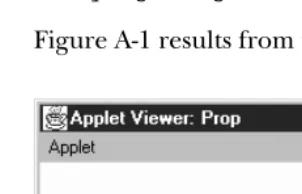
[image:6.612.54.205.165.262.2]Figure A-1 results from using this applet with this property file.
Figure A–1: Reading server properties
A.3 Resource Bundles
Java 1.1 adds two new pieces to make its property lists more general and flexible. The first is the ability to use localized resource bundles; the second is the use of resource files.
Resource bundles let you write internationalized programs. The general idea is that any string you want to display (for example, a button label) shouldn’t be spec-ified as a literal constant. Instead, you want to look up the string in a table of equiv-alents — a “resource bundle”—that contains equivalent strings for different locales. For example, the string “yes” is equivalent to “ja”, “si”, “oui”, and many other language-specific alternatives. A resource bundle lets your program look up the right alternative at run-time, depending on the user’s locale. The list of alter-natives must be implemented as a subclass ofResourceBundle or
ListResource-Bundle, in which you provide a key value pair for each label. For each locale you
support, a separate subclass and list must be provided. Then you look up the appropriate string through theResourceBundle.getString()method. A complete example of how to use resource bundles could easily require an entire chapter; I hope this is enough information to get you started.*
Resource bundles have one important implication for more mundane programs. Resource bundles can be saved in files and read at run-time. To support them, Java 1.1 has added the ability to load arbitrary properties files. In Example A-1, we looked for theprop.listfile on the applet server. What if we want to permit users to
modify the default font to be what they want, not what we think they want? With Java 1.0, that could not be done because there was no way for an applet to access the local filesystem. Now, with Java 1.1, you can access read-only resource files located in the CLASSPATH. To do so, you use the Class.getResource()method, which takes the name of a properties list file as an argument. This method returns the URL of the file requested, which could be available locally or on the applet ser ver; where it actually looks depends on theClassLoader. Once the file is found, treat it as a Properties file, as in Example A-1, or do anything you want with it. A similar method,Class.getResourceAsStream(), returns theInputStreamto work with, instead of the URL.
Example A-2 is similar to Example A-1. The fileprop11.listincludes three proper-ties: the font to use, a message, and an image. We need only a single property because we can use the newFont.decode() method to convert a complete font specification into a Font object: we don’t need to load the font information in pieces, as we did in the earlier example. As an added bonus, this example displays an image. The name of the image is given by the propertyMyProg.image. Like the property file itself, the image file can be located anywhere. Here’s the properties list, which should be placed in the fileprop11.list:
MyProg.font=Helvetica-italic-30 MyProg.message=Hello World MyProg.image=ora-icon.gif
And the code for the applet is in Example A-2.
Example A–2: Getting Properties from a Resource File
// Java 1.1 only import java.io.*; import java.net.*; import java.awt.*;
import java.util.Properties; import java.applet.Applet;
public class Prop11 extends Applet { Image im;
Font f; String msg;
public void paint (Graphics g) { g.setFont (f);
if (im != null)
g.drawImage (im, 50, 100, this); if (msg != null)
g.drawString (msg, 50, 50); }
public void init () {
InputStream is = getClass().getResourceAsStream("prop11.list"); Properties p = new Properties();
try {
988 APPENDIXA: USINGPROPERTIES ANDRESOURCES
Example A–2: Getting Properties from a Resource File (continued)
f = Font.decode(p.getProperty("MyProg.font")); msg = p.getProperty("MyProg.message");
String name = p.getProperty("MyProg.image"); URL url = getClass().getResource(name); im = getImage (url);
} catch (IOException e) {
System.out.println ("error loading props..."); }