Instructor perceptions of using a mobile-phone-based, free Classroom
Response System in first-year statistics undergraduate courses
Peter K Dunn
School of Health and Sport Science, University of the Sunshine Coast, Sippy Downs, Australia
Locked Bag 4, Maroochydore DC, Queensland 4558, Australia
Phone: +61 7 5456 5085; Fax: +61 7 5459 4600; Email: [email protected]
Alice Richardson
Faculty of Information Sciences & Engineering, University of Canberra, Canberra, Australia
Faculty of Information Sciences and Engineering, University of Canberra ACT 2601, Australia
Phone: +61 2 6201 2444; Fax: +61 2 6201 5231; Email: [email protected]
Christine McDonald
Department of Mathematics and Computing, University of Southern Queensland, Toowoomba, Australia
Department of Mathematics and Computing, University of Southern Queensland, Toowoomba QLD 4350, Australia
Phone: +61 7 4631 5534; Fax: +61 7 4631 5550; Email: [email protected]
Florin Oprescu
Locked Bag 4, Maroochydore DC, Queensland 4558, AUSTRALIA
Phone: +61 7 5456 5639; Fax: +61 7 5459 4600; Email: [email protected]
Corresponding author:
Peter K Dunn
School of Health and Sport Science, University of the Sunshine Coast, Sippy Downs, Australia
Locked Bag 4, Maroochydore DC, Queensland 4558, Australia
Instructor perceptions of using a mobile-phone-based, free Classroom
Response System in first-year statistics undergraduate courses
Student engagement at first-year level is critical for student achievement,
retention and success. One way of increasing student engagement is to use a
Classroom Response System (CRS), the use of which has been associated with
positive educational outcomes by fostering student engagement and by allowing
immediate feedback to both students and instructors. Traditional CRS rely on
special and often costly hardware (clickers), and often special software, requiring
IT support. As a result, the costs of implementation and use may be substantial.
This study explores the use of a low-cost CRS (VotApedia) from an instructor
perspective. The use of VotApedia enabled first-year students to become
anonymously engaged in a large-class environment by using their mobile phones
to vote on multiple-choice questions posed by instructors during lectures.
VotApedia was used at three Australian universities in first year undergraduate
statistics classes. The instructors in the study collected qualitative and
quantitative data specifically related to interacting with the VotApedia interface,
the in-class delivery, and instructor perceptions of student engagement. This
paper presents the instructors‘ perceptions of the advantages and challenges of
using VotApedia, the practicalities for consideration by potential adopters and
recommendations for the future.
Keywords: statistics, undergraduate, clickers, classroom response systems,
VotApedia, CRS, teaching
1. Introduction
in voting. Typically, students are presented with a question and a list of multiple-choice answer options. Using their clicker device, students then select the best option from the provided list. When requested by the instructor, the results can be displayed to the class (and instructors) immediately.
Many terms are used to refer to this type of technology; at least 26 different terms in the literature [2, 3]. Kay and LeSage [3] adopt the term audience response systems (or ARS), but we adopt the term classroom response system, as used by Bruff [2]. We adopt this term as we feel it communicates that the students are active in a classroom for learning, while describing students as an audience is a description too passive for describing what we desire for our students.
Kay and LeSage [3] classify the advantages of using a CRS as benefiting learning, assessment, and the classroom environment; these are then further subdivided resulting in 13 categories [3]. Barnett [4] classifies the advantages of using a CRS into three groups: attitudinal, interactional, and pedagogical. In this paper, we present an overview of the advantages of using a CRS, and refer the interested reader to Table 1 of Kay and LeSage [3], and the comprehensive list of references therein.
One advantage of using a CRS is that student attitudes could be improved if the use of a CRS is seen by students as fun and convenient [4]. In some cases, students‘ attitudes were positively impacted because the CRS was used for grading [4]. Improved attitudes have been shown to improve attentiveness of students [5] and improve class attendance [6], provided the CRS is properly used [7].
large classes [12] as is often found among first-year students. Using a CRS to engage students has advantages over many other methods, such as raising hands, because the interaction is anonymous [13-15] and so students do not fear being wrong in front of their peers or the instructor [16]. Importantly, this means that the use of a CRS allows instructors to engage students who otherwise remain disengaged, such as students with ‗lower class standing‘ [12] or students self-identified as reluctant participators [17].
The pedagogical advantages of using a CRS occur at a higher level of learning (metacognition) as well as at more basic levels [4, 18]. Importantly, using a CRS empowers students to evaluate their own performance [17] and to monitor their own understanding of content throughout the course [19]. As a result, the use of a CRS has been shown to increase students‘ long-term retention of knowledge [5, 20-22] and to
increase student achievement [19, 23, 24]. A further pedagogical advantage is that the use of a CRS can provide immediate feedback to the instructor about specific topics where students lack sufficient understanding [25], so that more or less instruction can be delivered as appropriate [26]. Some instructors incorporate CRS into assessment as well [27]. In addition, using a CRS is a useful method for implementing peer
instruction [28], which has been shown to increase mastery of conceptual reasoning [29, 30], and agile teaching, where questions are used to teach and to inform the direction of the lecture rather than to test students [31].
All of these advantages are crucial for effective teaching, for successfully achieving learning outcomes in lectures, and for increasing student engagement. However, practical difficulties may arise when using a traditional CRS in large classes. Barnett [4] classifies the challenges of using traditional CRS as financial, technical and pedagogical, while Kaye and LeSage ([3], Table 2) classify the challenges as
Financially,the physical clicker devices are expensive to purchase. Some universities require students to purchase individual clickers, imposing a cost on the student which is often resented by students [14]. When clickers are used for
assessment, the purchase of the clickers becomes a compulsory cost. Some universities purchase the clickers, imposing a cost upon the university, and also imposing a burden on instructors to obtain, distribute, monitor, and then return the clickers to a central location. In addition, specialist software may need to be installed and maintained which means more cost and on-going IT support. Instructors may also need to be trained, a further financial burden on instructors and their institutions.
Technically, numerous studies report problems when using physical clicker devices [32, 33], which in turn leads to student and instructor frustration, which is sometimes perceived by students and instructors as wasting time in class. Furthermore, the physical clicker devices may fail, and need repair, maintenance or replacement. For some CRS technologies (such as clickers using infra-red technology, which requires line-of-sight between the clickers and the receiver), issues of reliability may also be relevant if the room conditions are not optimal. Of course, any technology may have periods where, for some reason, the technology fails.
Pedagogically, students need to learn how to use the unfamiliar clicker devices, and training is recommended [4]. The time taken for this training reduce the time available to spend on the course content, and may present a burden to teaching staff. In addition, students perceive this as a waste of class time.
PollEverywhere (http://www.polleverywhere.com/ accessed 25 May 2011; up to 30 responses are free). Another mobile-phone-based option is VotApedia
(http://urvoting.com, accessed 29 May 2011), developed by Australia‘s Commonwealth Scientific and Industrial Research Organisation. VotApedia is a CRS not tied to any specific publisher, is free to use and implement, and so has the potential for widespread adoption. The explicit aim in developing VotApedia is that it ―will encourage the use of this teaching aid in Australian educational institutions‖
(http://urvoting.com/index.php?title=VotApedia_-_Free_Audience_Response_by_Mobile_Phone:About, accessed 26 August, 2011). VotApedia was the system chosen for this Australian study, because it is free to use and administer.
To use VotApedia, the instructor uses VotApedia‘s web interface to create a question (a ‗survey‘) with answer options. The instructor then displays this survey to the class on a projected computer screen, together with the short list of answer options (each with an associated telephone number), using the VotApedia webpage. Students select an answer, then vote in one of three ways: by making a free phone call on their mobile phone to a given phone number; by sending the two-digit code associated with the chosen answer option to a given SMS number; or by voting via the web. The results are collated automatically on a server and can be displayed immediately (in real-time) on the screen. These results can then be used in the classroom to correct
misunderstanding and generate further discussion, engaging students through an anonymous and safe process. In addition, students and instructor have access to immediate feedback on the progress of the lesson.
so neither the student nor the university are financially disadvantaged), technical (since the students‘ own mobile phones are used, with which they are familiar, technical
problems should be minimised) and pedagogical (the learning curve is minimal, so time will not be wasted on teaching students how to use the system). However, using
VotApedia may present other challenges to students and instructors.
On this basis, the overall aim of the present study is to gather instructor perceptions and to evaluate (i) the interface with which the instructor interacts with VotApedia; (ii) how VotApedia can be used in classes for teaching and learning; and (iii) how VotApedia assist instructors to engage with their students.
2. Study setting
The use of VotApedia in first-year statistics classes is investigated in this study at three Australian universities during Semester 1, 2011. Three of the authors were the
instructors for these courses.
SCI110 Science Research Methods at the University of the Sunshine Coast (USC), a young regional university (established in 1996), with approximately 7300 students. Class enrolments were 731, and three essentially-identical lectures were held each week to accommodate all students. Students in SCI110 were mainly from the health, science and engineering disciplines, plus a small number of other students.
6540 Introduction to Statistics at the University of Canberra (UC), a former
studying in parallel with undergraduates.
STA2300 Data Analysis at the University of Southern Queensland (USQ), a regional university with over 24,500 students. Class enrolments were 68 students on-campus. (Off-campus students did not participate in this project.) The students in STA2300 were primarily from business, psychology and science disciplines with a small number from education, engineering and arts.
A number of advantages exist in studying the use of VotApedia in this context. Firstly, one of these classes is very large (USC), one is large (UC), and one is of moderate size (USQ). Using classes of varying sizes and in different universities enabled instructors to identify more clearly the facilitators and barriers to implementing and using VotApedia. Secondly, using VotApedia in large classes made for easier identification of any shortcomings of the technology in coping with the load of large numbers. Thirdly, each setting supported the evaluation of VotApedia within the context of statistics by using questions involving text, formulae and equations, and images, as these all appear naturally in statistics. From previous experiences of the three instructors, first-year students often approach statistics with trepidation, so an
anonymous method of engaging students was anticipated to be beneficial.
3. Data collection and analysis
This study uses a case study approach [34], which may be defined as the ―development of detailed, intensive knowledge about a single ‗case‘, or of a small number of related ‗cases‘‖ ([34], p 89). A case study approach is appropriate here because instructor
location at a particular time [35]. Consistent with case study design, multiple sources of data will be employed, including personal instructor reflections (see below),
emails/conversations between the authors, and class observations. The instructors involved are adapting an action research cycle (plan, take action, collect evidence, reflect, repeat the cycle) to incorporate VotApedia into their classes [34], with the results from the first cycle reported in this paper.
During the semester, each instructor kept an electronic diary of the strengths and weaknesses of using VotApedia following each class. In these diaries, the instructors made notes of the barriers and facilitators to implementation they observed,
practicalities to be considered, and technical difficulties encountered. These observations were compared and contrasted at a meeting of the research team.
Data analysis included theme identification, which resulted in information related to three themes: interacting with the VotApedia interface, VotApedia use and student engagement. Extraction of themes and interpretations, class observations and feedback was collected independently from research team members and then combined, to ensure the validity of results presented in the next section.
4. Reflections
4.1 Reflections on interacting with the VotApedia interface
metacognitive goal [31]. They then provide guidelines for preparing useful questions, tactics for implementing these goals, and four examples of how questions are improved by adopting these tactics. Collaboration among instructors in similar subjects may be recommended (for example, within communities of practice [36], which may be online to enable collaboration across institutions [37]), to share the burden, and to gain from the shared knowledge.
VotApedia is not without its problems from an instructor‘s point-of-view, even though the instructors found that VotApedia was pedagogically very useful in the classroom. The major limitation is due to the interface and some idiosyncrasies in the way VotApedia is built (technology-based challenges in Kay and LeSage‘s
classification [3]).
correctly in the preview, but then show errors when the survey goes live in the classroom. Two of the authors discovered this in class.
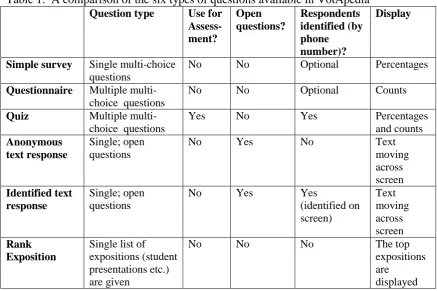
-- TABLE 1 GOES ABOUT HERE --- FIGURE 1 ABOUT HERE ---
One consequence of formatting restrictions is that questions may lack basic formatting and appear rather unprofessional. This all means that the creation of surveys to use in class must be completed with care. In particular, having a practice ‗live run‘ in the instructor‘s office before entering the classroom is very strongly advised.
Images (such as graphics, or screenshots of output from software packages) are easily included in questions, though the process is not obvious initially. Graphics may be included without difficulty: the user clicks the button for image insertion, then in the preview the user clicks on the image icon in the question and is directed to upload the image. However, including mathematical equations is problematic, even though a button is displayed in the web interface that promises to offer such a service. After pressing this button an equation can be entered, and the equations can appear nicely in the survey preview, but fail when the survey goes live (another reason for a live run in the instructor‘s office). One workaround is to recall that the inclusion of images works well, and create equations explicitly as images outside VotApeda (for example, using LaEqEd http://www.thrysoee.dk/laeqed/, accessed 25 May 2011). While this is
be increased so far because this extraneous information consumes so much screen area even when the browser is shown in full-screen mode.
--- FIGURE 2 ABOUT HERE ---
4.2 Reflections on VotApedia Use
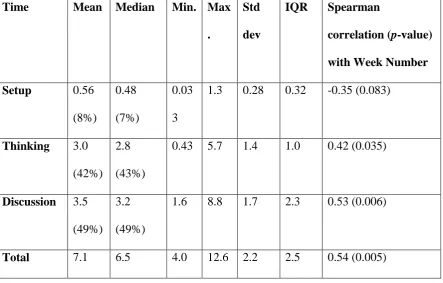
In one of the classes (SCI110), one of the two-hour lectures each week was recorded for teaching weeks 1 through 11. Near the end of the semester, these recorded lectures were reviewed and the amount of time using VotApedia in each two-hour lecture was recorded. The lectures in teaching weeks 1, 2 and 10 used three VotApedia questions; the lectures in the other teaching weeks used two VotApedia questions. These total times using VotApedia were further broken down into the time spent setting up VotApedia in class, the time given to the students to think about and discuss the question with others, and the time the instructor spent discussing the answers. The results (Table 2) were enlightening. The authors who used VotApedia believe that two or three questions in a two-hour lecture is a good balance between time spent and pedagogical gain, with two questions consuming about 15 minutes in a two-hour lecture, on average.
The time spent on each question obviously depends on the teaching style of the instructor, the level of the question, and the amount of reading, thinking and calculation required [38]. However, for the VotApedia session in this study the mean time spent per question was about seven minutes, including the setup, thinking and discussion time, with slightly more time spent in lectures later in the semester.
(Spearman r = 0.53; p = 0.006) over the semester. This willingness to allow more time for discussion generated by VotApedia questions may indicate an unconscious change in instructors‘ knowledge and skill at managing the student discussion around
increasingly difficult questions as the semester progressed, or reflect the content becomingly increasingly challenging.
--- TABLE 2 ABOUT HERE ---
Numerous authors have commented that using a CRS implies that less course content can be covered [9, 25, 31, 39]. The instructors in this study who used
VotApedia believe that this is more a reflection on the way in which a CRS is
incorporated into lectures, the goal of the instructor in using the CRS, and the teaching approach of the instructor in general. When CRS are used, they should be planned as an integral component of the course, and not seen as an add-on by students or instructors [40]. Certainly, time must be explicitly allocated in lectures for using the CRS, but this time should be seen as enhancing content learning and not replacing content delivery.
As an example, one instructor known to one of the authors shared one experience where students voted on one question and many students had the wrong answer. When asked if she spent some time reviewing the answers and explaining what was wrong, the instructor stated there was no time—there was content to deliver. This instructor had viewed the use of a CRS as an add-on, not an add-in, to teaching. Spending a few minutes exploring the results would have been an opportunity for significant learning to take place. The events as they transpired probably left students frustrated at having found out something they did not know, but were not offered any other feedback to enhance their learning as a result [8].
The results are generated, and the correct answer revealed (perhaps after a discussion of the options). Feedback is the ―most powerful single influence‖ ([41], p 9) on student achievement, and providing timely feedback is one of the conditions under which student learning is supported [41] . For this reason, the use of CRS has great potential for student learning.
As part of the authors‘ reflections on using VotApedia, different ways of using CRS were discussed [32]. VotApedia questions were used at the start of most lectures to review important concepts from the previous lecture, to ensure students were ready for the new content., VotApedia questions were used partway through a lecture for the instructor to obtain feedback on how students understood the new material. Often, VotApedia questions were used during the mid-lecture break to promote discussion in the break, and to be able to refocus the class after the break by discussing the answers.
VotApedia can be used to pose content questions, followed by a question about the students‘ level of confidence in their answer. A variation is to give answers with
levels of confidence built-in (for example, two answer options may be ‗The answer is 12, and I am very sure that I am correct‘ and ‗The answer is 12, but I am not very sure that I am correct‘). This gives the instructor more information about the degree to which the students understand the content.
Questions can be used to dispel wrong impressions about a course. The courses in the study are taught to students with generally poor mathematical backgrounds, and consequently the mathematical content in these courses is minimised. The first VotApedia question used in one of those courses asked students: ‘Which one of the following statements best describes your current attitude towards (the course)?‘ One of the answer options was ‗I don't like maths.‘ This issue could then be addressed
Questions can be used to demonstrate the value of teamwork and talking with other students. A question is posed, and students asked to vote. Students are then asked to discuss the answers with those near them (or to explain their reasoning to the class or a neighbour). Students can then revote. In most cases, following the revote a higher percentage of respondents will select the correct answer, thus demonstrating to students the value of group work. A variation to this is for the instructor to identify one option as incorrect (with explanation) before the students discuss and revote, thereby forcing some students to change their answers.
Questions can be used to demonstrate the content of the lecture, such as the effect of bias in question wording. In SCI110, three lectures were held every week to different groups of students. The instructor decided to ask students a different version of the same question in each lecture. The question in one lecture was:
Smoking is perfectly legal, and Australia is a free and democratic country. Do you
believe people should be able to buy cigarettes in Australia?
Of the 77 respondents, 66% answered Yes. (The other options were No and Unsure.) In a repeat lecture to a different group of students, the question was changed to:
Cigarettes are dangerous with deadly side effects such as cancer, even for those
who do not smoke, and they cost the Australian economy billions of dollars in lost
productivity and health costs. Do you believe people should be able to buy
cigarettes in Australia?
Of the 88 respondents, only 27% replied Yes. In another repeat lecture to another group of students, the question was changed to:
Of the 63 respondents, 56% voted Yes. These results were shared with the classes, to demonstrate to the students the effect of question wording first-hand. Figure 3 shows the complete breakdown of responses.
--- FIGURE 3 ABOUT HERE ---
Questions can be asked in class to generate data for analysis. For example, one of the authors asked students to indicate which of the following statements described them, and to vote accordingly:
A female using a pre-paid mobile phone plan.
A female using a mobile phone on a contract.
A male using a pre-paid mobile phone plan.
A male using a mobile phone on a contract.
From the responses, a two-way table was constructed (of sex against type of mobile-phone plan), and an appropriate hypothesis test was conducted.
VotApedia can be used to practise examination questions. All the instructors in this study adopted this approach, using VotApedia questions that were intentionally similar to actual multiple choice examination questions. Students were informed that this was the case. Instructors were given immediate feedback about which questions were good discriminators. Further, students were given practice and feedback with real examination questions.
4.3 Reflections on Engagement
From an instructor‘s point-of-view, the use of VotApedia has made the classroom a
engaged in discussing the question that has been posed.
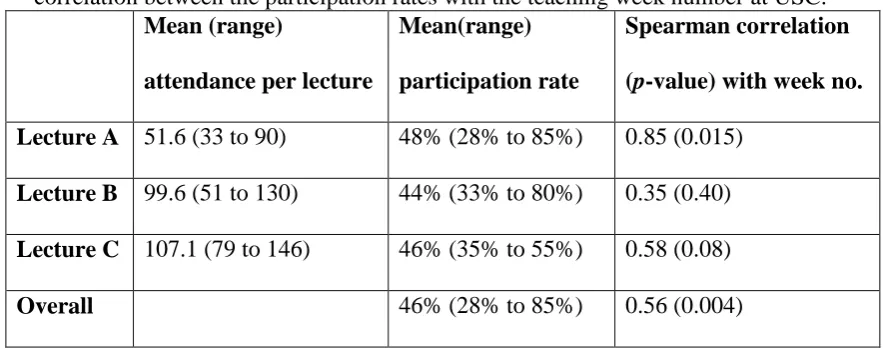
In some lectures for SCI110 at USC, the instructor or a Research Assistant was able to count the number of students attending the lectures, while students were thinking about and discussing the VotApedia question. Participation rates could be computed, as VotApedia automatically recorded the number of students who voted in each question. The participation rates were available over six different teaching weeks (from teaching week 6 to teaching week 12) for the three lecture groups (A, B and C) of SCI110; data from three Lecture As, four Lecture Bs, and five Lecture Cs were available, sometimes with counts from more than one question per lecture (Table 3). In total, data for 25 questions were available. The overall participation rate was 46%, with similar
participation rates in each of the three groups (48% for Lecture A; 44% for Lecture B; 46% for Lecture C). The instructor in SCI110 explicitly encouraged students to discuss their answers with those seated nearby before voting, so more students almost certainly participated in the classroom discussion than is reflected by these percentages. The participation rates increased significantly over the semester across these teaching weeks in every lecture (Table 3; Spearman r = 0.56; p = 0.004). At the same time, the
attendance at each lecture reduced marginally but not significantly (Spearman r = –0.26; p = 0.21) over the same period. One interpretation of these results is that the students‘ increased participation rates indicate a realisation that participation was valuable for learning.
---TABLE 3 ABOUT HERE ---
5. Implications for teaching practice
The acceptance of CRS has been relatively slow in Australian universities
(http://urvoting.com/index.php?title=VotApedia_-_Free_Audience_Response_by_Mobile_Phone:About, accessed 26 August, 2011), despite their documented advantages and their large uptake in the USA [31]. Certainly, using VotApedia has distinct financial advantages over other CRS: the instructors and students bear no direct costs for using VotApedia.
The pedagogical challenges are minimised because students are not using specialised hardware, but rather their familiar mobile phones. This means no training is necessary.
The technical problems with using mobile-phone-based CRS are quite different to the technical problems of using other CRS. Some students may not have a mobile phone, some may have poor reception in the lecture theatre, some may have forgotten their mobile phone, and some students may have no credit on their mobile phone (which prevents them from making a call, even if the call is free).
A series of issues and recommendations related to the use of CRS, most of which arise when using traditional clicker devices, have been identified in the literature [3, 4, 32, 39, 42]. For example, the registration of the clicker devices should be
streamlined [4], and student training to use the devices should be prepared and delivered at the start of each semester [4, 39]. Neither of these were an issue when using
VotApedia. In addition, students are less likely to forget their mobile phones than a dedicated clicker device.
using a CRS, as given by other authors, are apparent when using VotApedia. From an instructor‘s point-of-view, VotApedia could be made more instructor-friendly.
Fortunately, many of the limitations of VotApedia discussed earlier in this paper are not apparent to the student. In other words, we found the use of a CRS to be pedagogically very useful, and using VotApedia as the delivery mechanism useful but with some challenges.
The nature and extent of VotApedia‘s limitations mean that the authors
recommend a short training session for instructors before VotApedia is made available widely across universities. (Online videos rather than traditional face-to-face training may facilitate this training.) The cost of this type of training may be lower than the cost of implementing other CRS in any case.
Some of the difficulties in working with VotApedia discussed above have been observed by others, and as a result the Survey ‘n Vote project was developed
(http://www.survnvote.net, accessed 25 May 2011). While Survey ‘n Vote overcomes many of the problems with VotApedia identified above, one main hurdle exists: students cannot make a free phone call, but can only send an SMS (to a Malaysian number) to vote which incurs a cost to the student from their provider for our Australian-based students. In practice, this may or may not prove an impediment to students using the system, but our focus was to explicitly explore options that are free to use.
6. Conclusion
across a variety of problems in using the software.
In summary, VotApedia can be feasibly used in large first year statistics classes to increase student engagement if the instructors are aware of its advantages, if
VotApedia is part of the planning and course development process, and if instructors are aware of and are able to work around VotApedia‘s limitations. On a personal level, the instructors involved noted changes in their skills and knowledge regarding the use of CRS in general and VotApedia in particular. At an organisational level, instructors involved have a better understanding of the facilitators and barriers that could influence adoption of VotApedia. Availability of support and training for VotApedia
implementation is recommended. When the online student survey is closed, the results will be analysed to assess student opinion of the technology.
One of the unrealised opportunities is the possibility of statistics instructors across Australia and New Zealand to compose and share VotApedia questions. Further research, larger scale implementations and creation of a common knowledge base for statistics instructors are recommended.
Acknowledgements
The authors acknowledge the financial support from the University of the Sunshine Coast‘s
Open Learning and Teaching Grants Scheme, and thank Helen Fairweather for assistance in the
References
[1] G.D. Kuh, et al., Student success in college: Creating conditions that matter, Jossey-Bass, 2010.
[2] D. Bruff, Teaching with classroom response systems : creating active learning environments, Jossey-Bass, San Francisco, 2009.
[3] R.H. Kay, and A. LeSage, Examining the benefits and challenges of using audience response systems: A review of the literature, in Computers & Education, 2009, pp. 819-827.
[4] J. Barnett, Implementation of personal response units in very large lecture classes: Student perceptions, in Australasian Journal of Education Technology, 2006, pp. 474.
[5] R. Kaleta, and T. Joosten, Student response systems: A University of Wisconsin system study of clickers, in ECAR Research Bulletin, 2007, pp. 2-12.
[6] M.E. Lantz, The use of 'Clickers' in the classroom: Teaching innovation or merely an amusing novelty?, in Computers in Human Behavior, 2010, pp. 556-561.
[7] D.M. Bunce, et al., Comparing the effectiveness on student achievement of a student response system versus online WebCT quizzes, in Journal of Chemical Education, 2006, pp. 488-493.
[8] S. Brown, Assessment for learning, in Learning and Teaching in Higher Education, 2004-2005, pp. 81-89.
[9] I.D. Beatty, Transforming student learning with classroom communication systems, in Educause Center for Applied Research Research Bulletin, 2004. [10] B. Williams, et al., The impact of wireless keypads in an interprofessional
education context with health science students, in British Journal of Educational Technology, 2010.
[11] J. Berry, Technology support in nursing education: clickers in the classroom, in Nursing Education Perspectives, 2009, pp. 295-8.
[12] A.R. Trees, and M.H. Jackson, The learning environment in clicker classrooms: Student processes of learning and involvement in large university-level courses using student response systems, in Learning, Media and Technology, 2007, pp. 21-40.
[13] W. Beekes, The 'Millionaire' method for encouraging participation, in Active Learning in Higher Education, 2006, pp. 25-36.
[15] A. Hoekstra, Vibrant student voices: Exploring effects of the use of clickers in large college courses, in Learning, Media and Technology, 2008, pp. 329-341. [16] W.B. Wood, Clickers: a teaching gimmick that works, in Developmental Cell,
2004, pp. 796-798.
[17] C.R. Graham, et al., Empowering or compelling reluctant participators using audience response systems, in Active Learning in Higher Education, 2007, pp. 233-258.
[18] C. Elliott, Using a personal response system in economics teaching, in International Review of Economics Education, 2003, pp. 80-86.
[19] L. Kyei-Blankson, et al., The value added effect of using clickers in a graduate research methods and statistics course, in Proceedings of Society for
Information Technology & Teacher Education International Conference 2009 I. Gibson ed., 2009, pp. 1947-1952.
[20] K. Crossgrove, and K.L. Curran, Using clickers in nonmajors-and majors-level biology courses: student opinion, learning, and long-term retention of course material, in Life Sciences Education, 2008, pp. 146-154.
[21] R.G. Miller, et al., Evaluation of an audience response system for the continuing education of health professionals, in Journal of Continuing Education in the Health Professions, 2003, pp. 109-115.
[22] E. Palmer, et al., Assessment of an electronic voting system within the tutorial setting: a randomized controlled trial, in BMC Medical Education, 2005, pp. 24-34.
[23] P. Li, Creating and evaluating a new clicker methodology, 2007.
[24] R.E. Mayer, et al., Clickers in college classrooms: Fostering learning with questioning methods in large lecture classes, in Contemporary Educational Psychology, 2009, pp. 51-57.
[25] R. d'Inverno, et al., Using a personal response system for promoting student interaction, in Teaching Mathematics and its Applications, 2003, pp. 163-169. [26] N. Koppel, and M. Berenson, Ask the Audience-Using Clickers to Enhance
Introductory Business Statistics Courses, in Information Systems Education Journal, 2009.
[27] C.J. Alexander, et al., Assessing the integration of audience response system technology in teaching of anatomical sciences, in Anatomical Science Education, 2009, pp. 160-6.
[28] E. Mazur, and R.C. Hilborn, Peer instruction: A user's manual, in Physics Today, 1997, pp. 68.
[30] M.K. Smith, et al., Why peer discussion improves student performance on in-class concept questions, in Science, 2009, pp. 122.
[31] I.D. Beatty, et al., Question Driven Instruction: Teaching Science, in Audience response systems in higher education: Applications and cases, A. D. Banks ed., Information Science Publishing, Melbourne, 2006, pp. 96-115.
[32] S.W. Draper, and M. Brown, Increasing interactivity in lectures using an electronic voting system, in Journal of Computer Assisted Learning, 2004, pp. 81-94.
[33] L.J. Robertson, Twelve tips for using a computerised interactive audience response system, in Medical Teacher, 2000, pp. 237-239.
[34] C. Robson, Real world research : a resource for social scientists and
practitioner-researchers, Blackwell Publishers, Oxford, UK ; Madden, Mass., 2002.
[35] C. Glesne, Becoming qualitative researchers : an introduction, Pearson, Boston, 2011.
[36] J.S. Brown, and P. Duguid, Organizational learning and communities-of-practice: Toward a unified view of working, learning, and innovation, in Organization Science, 1991, pp. 40-57.
[37] C.M. Johnson, A survey of current research on online communities of practice, in The internet and higher education, 2001, pp. 45-60.
[38] A. Titman, and G. Lancaster, Personal Response Systems for teaching
postgraduate statistics to small groups, in Journal of Statistics Education, 2011. [39] J.E. Caldwell, Clickers in the large classroom: current research and
best-practice tips, in Life Sciences Education, 2007, pp. 9-20.
[40] H.L. Dangel, and C.X. Wang, Student response systems in higher education: Moving beyond linear teaching and surface learning, in Journal of Educational Technology Development and Exchange, 2008, pp. 93-104.
[41] G. Gibbs, and C. Simpson, Conditions under which assessment supports students' learning, in Learning and Teaching in Higher Education, 2004, pp. 3-31.
Tables
Table 1. A comparison of the six types of questions available in VotApedia
Question type Use for Assess- ment? Open questions? Respondents identified (by phone number)? Display
Simple survey Single multi-choice questions
No No Optional Percentages
Questionnaire Multiple multi-choice questions
No No Optional Counts
Quiz Multiple multi-choice questions
Yes No Yes Percentages
and counts
Anonymous text response
Single; open questions
No Yes No Text
moving across screen Identified text response Single; open questions
No Yes Yes
(identified on screen) Text moving across screen Rank Exposition
Single list of expositions (student presentations etc.) are given
No No No The top
expositions are
Table 2. The average amount of time (in minutes) per question spent with VotApedia in class, from teaching weeks 1 to 11 in Lecture B at USC.
Time Mean Median Min. Max
.
Std
dev
IQR Spearman
correlation (p-value)
with Week Number
Setup 0.56
(8%)
0.48 (7%)
0.03 3
1.3 0.28 0.32 -0.35 (0.083)
Thinking 3.0 (42%)
2.8 (43%)
0.43 5.7 1.4 1.0 0.42 (0.035)
Discussion 3.5 (49%)
3.2 (49%)
1.6 8.8 1.7 2.3 0.53 (0.006)
Table 3. The mean attendance per lecture, the mean participation rate and Spearman correlation between the participation rates with the teaching week number at USC.
Mean (range)
attendance per lecture
Mean(range)
participation rate
Spearman correlation
(p-value) with week no.
Lecture A 51.6 (33 to 90) 48% (28% to 85%) 0.85 (0.015) Lecture B 99.6 (51 to 130) 44% (33% to 80%) 0.35 (0.40) Lecture C 107.1 (79 to 146) 46% (35% to 55%) 0.58 (0.08)
Overall 46% (28% to 85%) 0.56 (0.004)
Figures caption
Figure 1: Editing an example VotApedia question using the markup interface
Figure 2: The resulting screen display of the question shown to students
Figure 3: The results of asking a question in two ways, trying to elicit certain responses. See the text for the actual wording used in each question. The bar widths are