The Electronic Journal for English as a Second Language
Online Tools for Language Teaching
June 2011 — Volume 15, Number 1
** On the Internet **
Jeong-Bae Son
jeong-‐[email protected]
University of Southern Queensland, Australia
Introduction
There are a large number of online tools that can be used for second/foreign language learning and teaching (Chapelle & Jamieson, 2008; Garrett, 2009; Godwin-‐Jones, 2009, 2010; Levy, 2009; Meskill & Anthony, 2010; Warschauer, 2010). The increasing
awareness of the tools generates a need for computer-‐assisted language learning (CALL) researchers and practitioners to develop and implement CALL widely by
exploring, selecting, using and evaluating the tools in a variety of contexts. In this paper, I discuss the place and role of online language teaching tools in CALL and present a categorised list of the tools, which provides a basis for further research and practice in CALL.
Language Teaching on the Internet
Internet-‐based language instruction (IBLI) can be defined as language teaching conducted on the Internet using Internet tools and resources (Son, 2004). In IBLI, computer-‐mediated communication (CMC) and Web-‐based language learning (WBLL) are two major topics, which have particularly attracted great attention among CALL researchers and practitioners. Chun’s (2007) survey of two CALL journals (i.e., CALICO Journal and Language Learning & Technology) supports this point by revealing that the two most popular topics in the journals during the period 2001-‐2006 were CMC and Web-‐based instruction. My own studies also reflect a similar trend with focuses on the use of online discussion groups (Son, 2002), the evaluation of language learning websites (Son, 2005) and the use of WBLL activities (Son, 2007, 2008) and Web-‐based portfolios (Son, 2009).
activity?” Consequently, I decided to make a list of online tools that are currently available and freely accessible on the Internet. My intention was to guide language teachers to explore those tools themselves and choose the right ones for their teaching purposes.
Types of Online Tools
The Online Tools for Language Teaching (OTLT) list presented below is a result of my own explorations, experiences and evaluations. During the process of information collection, interestingly, I discovered the Directory of Learning Tools
(http://c4lpt.co.uk/Directory/), which provides a comprehensive list of tools for formal, personal, group and organisational learning, including general computer applications, standalone software programs and Internet tools. While the directory itself is an excellent database of learning tools, its extra wide coverage makes it difficult for language teachers to use their online time effectively in choosing particular tools with direct relevance for language teaching. In this respect, my OTLT list takes a different approach by addressing the needs of a specific group of professionals (i.e., language teachers) and focusing on Web-‐based tools that can be exploited for language learning and teaching
purposes.
Based on their main functions and features, the online tools are classified into twelve categories: learning/content management systems; communication; live and virtual worlds; social networking and bookmarking; blogs and wikis; presentation; resource sharing; Website creation; Web exercise creation; Web search engines; dictionaries and concordancers; and utilities (see Figure 1).
Figure 1. Categories of online tools for language teaching
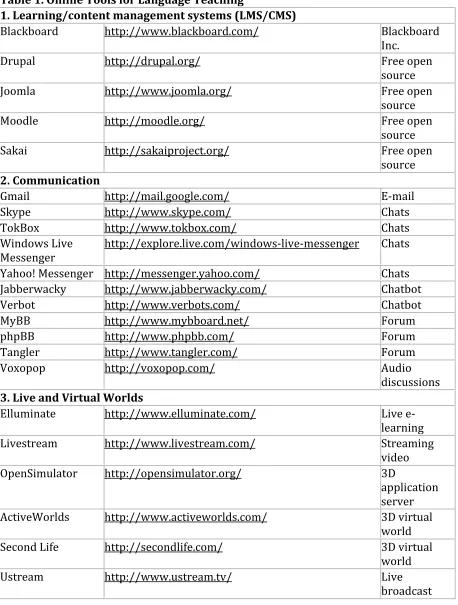
Table 1 shows a selected number of online tools for each category.
1. Learning/content management systems (LMSs/CMSs) include Blackboard, Drupal, Joomla, Moodle and Sakai. Moodle, in particular, is a very popular free LMS adapted to online courses at many universities and schools.
[image:2.594.80.507.444.525.2]3. Live and virtual worlds are used for delivering live meetings and virtual word communities. Elluminate, Livestream, OpenSimulator, ActiveWorlds, Second Life, Ustream, Wimba Classroom and WiZiQ belong to this category.
4. Social networking and bookmarking sites encompass Delicious, Diigo, Elgg, Facebook, Grouply, MySpace, Ning, SocialGo, LinkedIn, Twitter, Lang-‐8 and Livemocha. 5. Blogs and wikis, including Blogger, Edmodo, Edublogs, LiveJournal, WordPress.com, PBWorks, Wikispaces and Penzu, are collaboratively used in many language classes. 6. Presentation tools such as 280 Slides, Animoto, Empresser, Prezi, SlideRocket and Zoho Show offer innovative ways of presenting language-‐related materials.
7. Resource sharing tools are one of the most valuable tools on the Web. They encompass Google Docs, TitanPad, Zoho Writer, Box.net, Dropbox, VoiceThread, Xtranormal, Flickr, Picasa, MyPodcast, PodOmatic, Glogster, Screenr, Slideshare, PhotoPeach, Dipity, OurStory, Jing, SchoolTube, TeacherTube, VideoPress, Vimeo, WatchKnow and YouTube.
8. Website creation sites such as Google Sites, Jimdo, KompoZer, Mahara, Movable Type, SnapPages, Weebly, Webnode, Webs and Wix provide teachers and students with simple and easy ways to create their own Websites.
9. Web exercise creation tools such as ContentGenerator, SMILE, ESL Video, JClic, Hot Potatoes, Quia, Lingt and Listen and Write enable teachers to create language exercises themselves.
10. Web search engines designed to search for information on the Web include Ask.com, Bing, Google and Yahoo! Search.
11. Dictionaries and concordancers are language reference tools, which include Dictionary.com, Merriam-‐Webster Online, YourDictionary.com, Compleat Lexical Tutor, Forvo, Howjsay, Visuwords, OneLook Dictionary Search and VLC Web Concordancer. 12. Utilities that can be useful for language learning activities include CalculateMe, CalendarFly, Doodle, ClustrMaps, Currency Converter, Dvolver Moviemaker, Google Earth, Lesson Writer, Storybird, Cacoo, Mindmeister, Mindomo, Remember the milk, SurveyMonkey, Voki, Time and Date, TinyURL.com, W3C Link Checker, Wallwisher, Wayback Machine and Wordle.
Table 1. Online Tools for Language Teaching
1. Learning/content management systems (LMS/CMS)
Blackboard http://www.blackboard.com/ Blackboard
Inc.
Drupal http://drupal.org/ Free open
source
Joomla http://www.joomla.org/ Free open
source
Moodle http://moodle.org/ Free open
source
Sakai http://sakaiproject.org/ Free open
source
2. Communication
Gmail http://mail.google.com/ E-‐mail
Skype http://www.skype.com/ Chats
TokBox http://www.tokbox.com/ Chats
Windows Live
Messenger http://explore.live.com/windows-‐live-‐messenger Chats Yahoo! Messenger http://messenger.yahoo.com/ Chats
Jabberwacky http://www.jabberwacky.com/ Chatbot
Verbot http://www.verbots.com/ Chatbot
MyBB http://www.mybboard.net/ Forum
phpBB http://www.phpbb.com/ Forum
Tangler http://www.tangler.com/ Forum
Voxopop http://voxopop.com/ Audio
discussions
3. Live and Virtual Worlds
Elluminate http://www.elluminate.com/ Live e-‐
learning
Livestream http://www.livestream.com/ Streaming
video
OpenSimulator http://opensimulator.org/ 3D
application server ActiveWorlds http://www.activeworlds.com/ 3D virtual
world
Second Life http://secondlife.com/ 3D virtual
world
Ustream http://www.ustream.tv/ Live
[image:4.594.72.530.94.699.2]Wimba Classroom http://www.wimba.com/ Live teaching
WiZiQ http://www.wiziq.com/ Virtual
classroom
4. Social Networking and Bookmarking
Delicious http://delicious.com/ Social
bookmarking
Diigo http://www.diigo.com/ Social
bookmarking
Elgg http://elgg.org/ Social
networking
Facebook http://www.facebook.com/ Social
networking
Grouply http://www.grouply.com/ Social
networking
MySpace http://www.myspace.com/ Social
networking
Ning http://www.ning.com/ Social
networking
SocialGo http://www.socialgo.com/ Social
networking
LinkedIn http://www.linkedin.com/ Professional
network
Twitter http://twitter.com/ Information
network
Lang-‐8 http://lang-‐8.com/ Language
learning community
Livemocha http://www.livemocha.com/ Language
learning community
5. Blogs and Wikis
Blogger http://www.blogger.com/ Blog
Edmodo http://www.edmodo.com/ Blog & wiki
Edublogs http://edublogs.org/ Blog
LiveJournal http://www.livejournal.com/ Blog & journal
WordPress.com http://wordpress.com/ Blog
PBworks http://pbworks.com/ Wiki
Wikispaces http://www.wikispaces.com/ Wiki
Penzu http://www.penzu.com/ Personal
6. Presentation
280 Slides http://280slides.com/ Multimedia
Animoto http://animoto.com/ Video
slideshows
Empressr http://www.empressr.com/ Multimedia
Prezi http://prezi.com/ Presentation
editor
SlideRocket http://www.sliderocket.com/ Creating and
sharing
Zoho Show http://show.zoho.com/ Creating and
sharing
7. Resource Sharing
Google Docs http://docs.google.com/ Documents
TitanPad http://titanpad.com/ Documents
Zoho Writer http://writer.zoho.com/ Documents
Box.net http://www.box.net/ Files
Dropbox http://www.dropbox.com/ Files
VoiceThread http://voicethread.com/ Group
conversations
Xtranormal http://www.xtranormal.com/ Movies
Flickr http://www.flickr.com/ Photos
Picasa http://picasa.google.com/ Photos
MyPodcast http://www.mypodcast.com/ Podcasts
PodOmatic http://www.podomatic.com/ Podcasts
Glogster http://www.glogster.com/ Posters
Screenr http://screenr.com/ Screencasts
Slideshare http://www.slideshare.net/ Slides
PhotoPeach http://photopeach.com/ Slideshows
Dipity http://www.dipity.com/ Timelines and
news
OurStory http://www.ourstory.com/ Timelines and
stories
Jing http://www.techsmith.com/jing/ Visuals
SchoolTube http://www.schooltube.com/ Videos
TeacherTube http://www.teachertube.com/ Videos
VideoPress http://videopress.com/ Videos
Vimeo http://vimeo.com/ Videos
WatchKnow http://www.watchknow.org/ Videos
YouTube http://www.youtube.com/ Videos
8. Website Creation
Google Sites http://sites.google.com/ Pre-‐built
templates
Jimdo http://www.jimdo.com/ Website
editor
KompoZer http://kompozer.net/ Web
authoring
Mahara http://mahara.org/ E-‐portfolio
system
Movable Type http://www.movabletype.org/ Weblog
management
SnapPages http://www.snappages.com/ Drag-‐and-‐
drop
Weebly http://www.weebly.com/ Drag-‐and-‐
drop
Webnode http://www.webnode.com/ Website
builder
Webs http://www.webs.com/ Website
builder
Wix http://www.wix.com/ Flash Website
9. Web Exercise Creation
ContentGenerator http://www.contentgenerator.net/ Flash-‐based SMILE http://clear.msu.edu/teaching/online/mimea/smile/ Flash-‐based
ESL Video http://eslvideo.com/ ESL video
quizzes
JClic http://clic.xtec.cat/en/jclic/ Java platform
Hot Potatoes http://hotpot.uvic.ca/ JavaScript
authoring
Quia http://www.quia.com/ JavaScript
authoring
Lingt http://lingtlanguage.com/ Spoken
exercises Listen and Write http://www.listen-‐and-‐write.com/ Dictation exercises
10. Web Search Engines
Ask.com http://www.ask.com/ Ask Jeeves
Bing http://www.bing.com/ Decision
engine
Google http://www.google.com/ PageRank
Yahoo! Search http://search.yahoo.com/ Yahoo! Slurp
11. Dictionaries and Concordancers
Dictionary.com http://www.dictionary.com/ Free online Merriam-‐Webster
Online
http://www.merriam-‐webster.com/ Free online
YourDictionary.com http://www.yourdictionary.com/ Free online Compleat Lexical
Tutor http://www.lextutor.ca/concordancers/ English and French
Forvo http://www.forvo.com/ Pronunciation
dictionary
Howjsay http://www.howjsay.com/ English
pronunciation
Visuwords http://www.visuwords.com/ Graphical
dictionary OneLook Dictionary
Search http://www.onelook.com/ Dictionary search
VLC Web
Concordancer http://vlc.polyu.edu.hk/concordance/ Server-‐based
12. Utilities
CalculateMe http://www.calculateme.com/ Conversion
utility
CalendarFly http://www.calendarfly.com/ Free
scheduling
Doodle http://doodle.com/ Easy
scheduling
ClustrMaps http://www.clustrmaps.com/ Hit counter
map Currency Converter http://www.oanda.com/currency/converter/ Currency
calculator Dvolver
Moviemaker http://www.dvolver.com/moviemaker/ Animated cartoons Google Earth http://earth.google.com/ Virtual globe Lesson Writer http://www.lessonwriter.com/ Lesson plans
Storybird http://storybird.com/ Collaborative
storytelling
Cacoo http://cacoo.com/ Collaborative
diagramming Mindmeister http://www.mindmeister.com/ Mind
mapping
Mindomo http://www.mindomo.com/ Mind
management SurveyMonkey http://www.surveymonkey.com/ Online survey
Voki http://www.voki.com/ Speaking
avatar Time and Date http://www.timeanddate.com/ Time zones
TinyURL.com http://tinyurl.com/ URL
shortening W3C Link Checker http://validator.w3.org/checklink/ Links and
anchors
Wallwisher http://www.wallwisher.com/ Sticky
noticeboard Wayback Machine http://www.archive.org/web/web.php Internet
Archive
Wordle http://www.wordle.net/ Word clouds
(Last updated: 25 May 2011)
Source: (http://www.usq.edu.au/users/sonjb/projects/tools/)
Discussion
Related to the use of the online tools in CALL contexts, CALL research and practice can be initiated and improved by asking and answering the following 5W1H (who, when, where, what, why and how) questions. These elemental questions lead CALL
researchers and practitioners to choose and test certain tools with clear aims and objectives.
(1) Who uses it? – Learners? Teachers? Other users?
(2) When do we use it? – Class time? Self-‐study time? Meeting time? Free time? (3) Where do we use it? – In the classroom? In self-‐access rooms? At home? Outdoor
areas?
(4) What do we do with it? – Reading? Writing? Listening? Speaking? Course management? Communication? Collaboration? Social networking? Resource sharing? Website creation? Web exercise creation? Web search? Entertainment? (5) Why do we use it? – To manage courses? To communicate with others? To
collaborate with others? To experience virtual worlds? To share resources? To create Websites? To create Web exercises? To collect information and
resources? To have fun? To make learning and teaching easier?
language learning activities? By integrating certain online activities into the curriculum?
In terms of facilitating the second language acquisition (SLA) process, Bush (2008) asserts that we need to find out “where and when during the SLA process each technique and tool can be applied to achieve maximum benefit” (p. 453). In a similar vein, Garrett (2009) states that “the availability of tools and resources that make
possible student use of such aids does not guarantee that students will, in fact, use them in the way or to the extent that developers intend; only carefully structured
assignments and follow-‐up work can effectively promote such use” (p. 722). She also says, “Being familiar with digital tools is not enough; students need guidelines on how to use them specifically for the purpose of acquiring greater language proficiency” (p. 730). This implies that teachers need to be knowledgeable and skilful enough to guide students when and how to use which tool for effective language learning. Best CALL activities are likely to be planned and conducted by competent teachers utilising online tools effectively and efficiently.
Conclusion
With the widespread use of the Internet, many online tools are increasingly available for use in educational and non-‐educational settings. Due to the abundance and
sophisticated features of the tools, however, it is often difficult to select the right tools for specific purposes. In view of the need for CALL researchers and practitioners to find, choose, use and evaluate educational tools for further development and
implementation of CALL, it should be meaningful to have a categorised list of selected tools that can be used for language learning and teaching. With this in mind, I have created and presented the OTLT list showing examples of such tools divided into twelve categories.
In this paper, I have stressed the need to use online tools purposefully. It is suggested that the OTLT list should be updated regularly while reflecting continuous changes and new developments. It should be also valuable to incorporate an evaluation system into the list so that teachers can make evaluative judgements of the tools and share their experiences of using the tools in and beyond the classroom. I conclude this paper by saying that, along with the expansion of CALL, research and practice should be constantly encouraged to improve our understanding of theoretical, pedagogical and technical aspects of the use of the tools in various contexts.
Note
This article is an abridged version of a plenary address given on 3 December 2010 at the Globalization and Localization in Computer-‐Assisted LanguageLearning (GLoCALL) 2010 Conference, Le Meridien Hotel, Kota Kinabalu, Sabah, Malaysia.
About the Author
Jeong-‐Bae Son, Ph.D. [http://www.usq.edu.au/users/sonjb/], is Associate Professor of Applied Linguistics & TESOL in the Faculty of Education at the University of Southern Queensland, Australia. His areas of specialisation are computer-‐assisted language learning, language teacher education and e-‐literacy. He is currently the President of the Asia-‐Pacific Association for Computer-‐Assisted Language Learning (APACALL), Co-‐ Chair of the GLoCALL Conference, Editor of the APACALL Book Series, Co-‐Editor of CALL-EJ and Co-‐Editor of the International Journal of Pedagogies and Learning.
References
Bush, M. D. (2008). Computer-‐assisted language learning: From vision to reality? CALICO Journal, 25(3), 443-‐470.
Chapelle, C., & Jamieson, J. (2008). Tips for teaching with CALL: Practical approaches to computer-assisted language learning. White Plains, NY: Pearson Education.
Chun, D. M. (2007). Come ride the wave: But where is it taking us? CALICO Journal, 24(2), 239-‐252.
Garrett, N. (2009). Computer-‐assisted language learning trends and issues revisited: Integrating innovation. The Modern Language Journal, 93 (Focus Issue), 719-‐740. Godwin-‐Jones, R. (2009). Personal learning environments. Language Learning & Technology, 13(2), 3-‐9. Retrieved May 18, 2011, from
http://llt.msu.edu/vol13num2/emerging.pdf.
Godwin-‐Jones, R. (2010). Literacies and technologies revisited. Language Learning & Technology, 14(3), 2-‐9. Retrieved May 20, 2011, from
http://llt.msu.edu/issues/october2010/emerging.pdf.
Levy, M. (2009). Technologies in use for second language learning. The Modern Language Journal, 93 (Focus Issue), 769-‐782.
Meskill, C., & Anthony, N. (2010). Teaching languages online. Bristol, UK: Multilingual Matters.
Son, J.-‐B. (2002). Online discussion in a CALL course for distance language teachers. CALICO Journal, 20, 127-‐144.
Son, J.-‐B. (2004). Internet-based language instruction: Study book. Toowoomba, Australia: Distance Education Centre, University of Southern Queensland.
Son, J.-‐B. (2005). Exploring and evaluating language learning Web sites. In J.-‐B. Son & S. O’Neill (Eds.), Enhancing learning and teaching: Pedagogy, technology and language (pp. 215-‐227). Flaxton, Australia: Post Pressed.
Son, J.-‐B. (2008). Using Web-‐Based Language Learning Activities in the ESL Classroom. International Journal of Pedagogies and Learning, 4(4), 34-‐43.
Son, J.-‐B. (2009). Using Web-‐based portfolios in CALL teacher education. In J.-‐B. Son (Ed.), Internet-based language learning: Pedagogies and technologies (pp. 107-‐118). APACALL Book Series Volume 2. Raleigh, NC: Lulu.
Warschauer, M. (2010). New tools for teaching writing. Language Learning & Technology, 14(1), 3-‐8. Retrieved May 18, 2011, from
http://llt.msu.edu/vol14num1/commentary.pdf.