ABSTRACT
As part of a radical curriculum change, the Faculty of Engineering and Surveying at the University of Southern Queensland (USQ) introduced a strand of four problem-based learning (PBL) courses in 2002(1). While the first of these courses concentrates on building team skills, the second in the strand, Engineering Problem Solving 2 (ENG2102), introduces statistical analysis, basic physics concepts and elements of GIS and mapping as part of the technical content. The annual enrolment in this course is about 250 including over 100 students studying this course externally. One of the important factors to be considered in the design and delivery of such course is to provide an effective e-learning system considering that a significant number of the students study through the distance mode.
INTRODUCTION
WebCT is an e-learning system that is being used by several institutions for web-based teaching and learning(2,3,4,5). WebCT (Vista 2) was first implemented at USQ in 2002. Our course was one of the earliest adopters of WebCT as a learning platform at USQ. With improvements to this delivery system over the years, the ENG2102 course is now fully delivered to on-campus and distance students by the WebCT Vista learning management system (LMS). A wide array of WebCT features, such as course material delivery, discussion groups, timed release of problems, self assessments, electronic assignment submission and marking, and student surveys are all used. We consider that WebCT has removed the tyranny of isolation for distance students and enabled them to form successful virtual groups that benefit from the team-based PBL approach. This paper discusses this success and documents student recep-tiveness to both the LMS and PBL in Engineering.
HOW DID WE USE WebCT IN ENG2102?
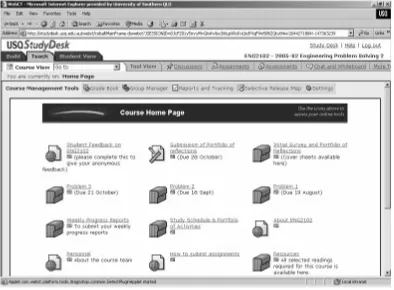
The upgraded version of the Learning Management System (LMS) WebCT Vista 3.0 has several highly useful features that we used in the delivery of ENG2102. The particular features used in the last offer of this course in semester 2, 2005 are discussed in this section. A readily navigatable interface for the course homepage is referred to as the StudyDeskand is depicted in figure 1. The homepage evolves during the semester, as more icons are added progressively throughout the semester.
Gaining Familiarity with the LMS and Allocating Students to Teams
Once each student registers on the LMS and completes and submits the introductory short quiz, we use a WebCT facility to allocate them to many small groups or teams. With a diversity of different study programs and sub-disciplines, we ensure that the seven member groups have representatives from each program and major. While we could have utilised the ‘survey tool’, we opted for the ‘quiz tool’ to collect student demographic data, and to begin their familiarisation with this LMS tool that is used throughout the course. We considered that this survey offered the opportunity to collect data to discover student’s initial impressions and expectations of the course. Since students needed to be rapidly allocated to their individual groups in order to commence their course work, participation rates in the survey were very high and much interesting data was collected. In a second part of their first assignment, the students were requested to reflect on their learning and team-working skills acquired in the pre-requisite course Engineering Problem Solving 1, and to outline their expectations of projected learning outcomes ENG2102. We chose to have students submit their assignments electronically as a word file
EFFECTIVE USE OF WebCT IN A PROBLEM-BASED LEARNING
COURSE FOR A DUAL MODE DELIVERY
Thiru Aravinthan and John Worden
attachment, through the ‘assignments’ submission box, thereby using another tool available on WebCT. While this assignment provided much useful information to the team facilitator on the individual team members, it was importantly their first attempt to attach a file in WebCT. We quickly discovered that many students faced problems with attaching files, mainly due to their computer software/hardware limitations or failure to install the Java plug-in properly. Overcoming such issues was important to the students at this early stage of the course, as all future submissions were required to be done electronically using WebCT.
Delivering the PBL Problem Scenario
While all course content is delivered via WebCT, a small printed course guide outlines important information such as the course specification and information contacts. together with a small resources book with a few selected readings are supplied to students. The PBL course problems are, however, solely delivered by WebCT. Three problems are successively given to the student teams, who focus on each problem for
a period of four weeks. A series of ‘organizer’ icons shown in figure 1 (terminology used in WebCT for folders) represent all three integrated problems, which are progressively time-released to students. Each problem involves a problem scenario devised by the staff facilitating team in one of the technical content areas. For example the first problem usually revolves around the use of control charts to monitor a production process illustrating basic statistical concepts.
Past course offers have taught us that a starting point for students’ problem-solving efforts is essential, particularly for less-experienced school leavers. Therefore, in addition to the problem scenario and relevant data, links to published information or background information sources are provided through these organizers, in place of conventional lectures for students.
Communication Between Distance and On-campus Team Members
[image:2.595.101.496.72.362.2]from an external company, and between them they had a wide variety of project management experience covering defence, information technology and construction industry sectors. They set some exercises during one of the module units and were available for consultation through a ‘Project Managers’ Forum’ discussion board topic.
Use of Good Practice Guidelines
In the forward to BS8426: 2003 A code of practice for e support in e-learning systemsit is recognized that such systems can provide significant benefits in terms of access to learning and flexibility, but that there are issues to address regarding quality and effectiveness of support offered. The code of practice is intended to facilitate development of consistent, effective and transparent frameworks for support to enable learners to achieve their full potential and make e-learning a satisfying experience for all concerned. BS8428 considers e-support under four categories: process, concept, performance and dialogue. Within this module, discussion board topics were set up to reflect these categories and thus keep the interactions focused and organised.
The approach to module design and delivery was also informed by the Rubric for Online Instruction, developed by California State University(3) which suggests criteria for baseline, effective and exemplary courses relating to, e.g., the opportunities for interaction, the clarity of the learning objectives and the technical sophistication of the materials. This and the associated Instruction Design Tips for Online Learning(4) provide useful guidance for e-learning planning and evaluation.
Module structure
The module is taught over a 15-week trimester and comprises an introduction (Unit 0), undertaken prior to the start of the semester, 12 units of study, and the final exam. Unit 0 is an activity-based module introduction, dealing with learning skills and resources. It covers essentials such as WebCT usage and support procedures, the module study guide, and
detailed information on the availability and use of study materials, giving students practical tasks to perform, such as posting discussion board messages. This introductory unit is considered crucial in setting expectations and tone, clarifying procedures, thus aiming to reduce or eliminate learner confusion and/or frustration. It draws together and gives some focus for information from other areas of the university, e.g. the library services generally and specifically in relation to distance learners, which may be a very important topic for those returning to education after a period away. It also helps to help create expectations of active, rather than passive learning.
The units follow a simple format and use a standard set of headings, guiding the student through the unit learning outcomes, study requirements (e.g. reading, computer work, workplace investigation), the learning activities arranged within a small number of topic headings, followed by a short summary. Units are typically four or five pages long, as they are mostly activity descriptors and ‘pointers’ to the content contained in the key textbooks or other resources such as the British Standard Guide to Project Management(5) and professional body publications.
and this is consistent with the 150 hours stated on the module descriptor.
Assessment
The intention was to operate educationally sound and efficient assessment which would, at the same time, help prepare students for the appropriate professional body examination, should they wish to take it. Therefore it was felt that the use of a supervised, multiple choice, online examination would best facilitate this. That has required working with the University’s Academic Registry to set up and evaluate new examination procedures, including the use of company staff as invigilators so the examination could be taken at the student’s workplace.
While using a final examination on its own for summative assessment would be efficient from the academic’s point of view, this would not necessarily promote early, consistent and effective engagement with the module materials, and this is necessary to prevent dropouts and optimise the outcome for the student. It was decided that the exam should account for 60% of the final mark, with the other 40% being awarded for unit activities done throughout the module. So, as most of the unit activities are formally assessed and count towards the final mark, students get a tangible reward for their efforts and effective learning is facilitated by a consistent level of engagement.
Some unit activities require short responses such as a discussion board posting, and this technique is used particularly when the intention is to facilitate students sharing information and learning from each other. Sometimes a Word or other type of file needs to be submitted through the ‘assignments’ tool on WebCT, and other activities may be web-based searches with the result being seen within a subsequent submission, e.g. finding out about academic referencing practice and then using this in an assignment. File naming instructions are explicitly given for each activity, which facilitates efficient data management and also the use of Turnitin(7) a software application for the detection of matching text and therefore a means to help deter and detect plagiarism.
Many of the unit activities require students to research project management methods used in their own organisations. This consideration of theory alongside practice reinforces relevance and also helps foster critical evaluation skills.
Learning Skills
Learning resources and methods of dealing with information have changed, with students now having many more electronic sources to choose from via the Web. The module has sought to utilise this positively by incorporating professional body websites, electronic journals and web-based case studies into module activities, and making good use of University learning centre resources, including study skills support information. This easy and flexible access to a wealth of electronic resources illustrates ‘affordances’ of IT-based learning, i.e. the properties of IT that enable particular approaches to learning(8).
MODULE DEVELOPMENT RESOURCES
People
It is estimated that the time spent in total by the module leader to complete all tasks related to the production of the units was around 240 hours, with significant time being given by educational development advisors and the school administrator on top of this. Module delivery time, including dialogue, assessment and trouble-shooting, was also required in addition to development time.
in achieving appropriate standardisation across modules. Also, it is important to direct distance learners to the best place for advice and sometimes they need to talk to a well-informed administrator, or a member of the University’s IT support staff, not to an academic.
Teaching Materials
Little time was available so rapid development was a priority. Using existing published materials was part of a time-saving strategy, as well as a decision made on principle, so effort was focused early on towards finding suitable textbooks, which were reasonably priced, and had supporting electronic resources. E-books were also investigated though these did not provide a solution in this particular case. American publishers supply books with extensive supporting electronic materials including, in some cases, WebCT sites, but British publishers, by and large, were found not to be good in this respect, so a combination of resources was assembled to give the right content and tone for the module, including one (US) book which included electronic quizzes, case studies and outline solutions to discussion questions, as well as project management software.
EVALUATION
The students’ industrial base is very important, especially in relation to some of the activities as currently written, and the module would not therefore translate easily to a situation where learners were not in relevant employment. Levels of motivation are generally high among part-time students, and this has been evident here, with the vast majority of assessments delivered on time and to an appropriate standard. For staff, working with this type of student is very rewarding.
There have been a few technical problems, though these were resolved quickly. Where VLE system problems occur at the module start this adversely affects University image and reduces student confidence, and at the end has potential to cause difficulties with security of assessment data.
The assessment approach, particularly scalability, has been evaluated, with adjust-ments proposed to combine each unit’s individual activities into the smallest number of separate files possible, thereby reducing file download times from the VLE. Fewer files would also make submissions to Turnitin more efficient, and in future direct access to this facility from WebCT Vista may also help(9). Students were asked for their feedback during Week 5 of the module, again just before the examination, and finally once formal assessment was completed. The process was facilitated by WebCT surveys which were developed using Respondus(10), a software application which allows text files to be imported, formatted, previewed and then exported to single or multiple WebCT sites. This was much easier than creating the surveys directly in WebCT.
The questions explored issues such as the pace of teaching and learning, the methods of assessment, company support for their studies, perceptions of the social aspects of the learning process, the VLE tool and its use, and their attitudes to professional devel-opment. Although the small cohort size limits analysis possibilities, student responses indicated the following key points:
l Students felt that their theoretical knowledge of project management was enhanced and that this would complement their practical work in project teams. They and their companies thought that industrial relevance of learning material was either very important (majority) or important.
l The students now have a better understanding of how their organisations operate, especially in relation to project management procedures.
l Students have developed their general learning skills through engaging in module activities.
l Companies were mainly very supportive, providing time off to study, full funding (with one exception), and access to company staff for module activities.
l While they said that the pace was demanding, the students found the structure of the activities and assessments helpful in maintaining a consistent effort throughout the module and keeping on track.
l Two of the students said that they experienced a sense of community through online study but one felt that face to face contact was needed to properly develop social aspects, although the lack of that didn’t adversely affect him. All students said they found the discussion tool helpful in feeling connected to others and learning from them.
In addition to module feedback, the University uses an independent evaluation expert to gauge student and staff responses to WebCT and this has found that ‘. . .overall student feedback is positive. Students like the accessibility features of WebCT – when and where they want it. Students also described many examples of WebCT as an aid to learning’(11). Although it is must be remembered that only a proportion of modules are on WebCT, the results are encouraging and indicate demand for the tool from students. This is more strongly reflected in the 2006 evaluation of the pilot of the new version of WebCT, Vista, where improved tools offer benefits to staff and students(12).
CONCLUSIONS AND FURTHER WORK
Flexible learning is still seen by some managers as a means to free staff up for other activities by reducing their contact time with students. It is suggested that support requirements for development and delivery of high-quality online learning are not well understood and must be addressed in terms of guidance given to managers on e-learning timescales and resources.
More needs to be done on incorporation of existing good practice guidelines into module design and delivery. Work emerging from the Joint Information Systems Committee (JISC) and other projects will provide valuable information and perhaps institutions need to develop more effective ways to access and share external and internal knowledge.
Learning from the good practice (and mistakes) of others will save time and money and facilitate better outcomes for managers, academics and students.
Often content creation diverts attention away from teaching, i.e. helping students to see the relevant points, practice sufficiently and reach an appropriate standard of proficiency. It is recommended that more use is made of existing published materials and that e-learning development is focused on pedagogy and appropriate use of IT tools to support researching, analysis, collaborating and testing of knowledge and skills.
Much needs to be done regarding focused and appropriate staff development for e-learning. Educational development specialists can keep academics abreast of the educational and technical developments in relation to online learning and perhaps it is particularly helpful when this is communicated through an online programme, such as Napier’s Introduction to Online Learning, as this illustrates many of the issues from a student perspective as well as effectively showing the staff member where their own strengths and weaknesses lie(13). Development of these skills takes time and in all of this the issue of support and rewards for staff should not be forgotten(14). It is also suggested that better teamwork between academics, administrators, educational development specialists and IT service providers would use time and talents more effectively and produce a more satisfactory result, while helping promote good practices across the institution.
and aspirations of student groups whose modules will be changing to a similar pattern of learning activities in the next session. It is hoped that this will help determine student views on the study frameworks, learner control, rewards for consistent performance, collaborative methods of working and use of technology to support learning.
REFERENCES
1. Association for Project Management, 2005 Introductory Certificate In Project Management. http://www.apm.org.uk/ IntroductoryCertificate.asp Accessed 31 Jan 2006.
2. British Standards Institution, 2003 BS 8426:2003 A code of practice for e-support in e-learning systems
3. California State University (CSU) Chico, 2003, Rubric for Online Instruction. http://www.csuchico.edu/celt/roi/ Accessed 31 Jan 2006
4. California State University (CSU) Chico, 2002, Instruction Design Tips for Online Learning http://www.csuchico.edu/tlp/ onlineLearning/rubric/instructionalDesign Tips.pdf Accessed 31 January 2006 5. British Standards Institution, 2002
BS6069-1: 2002 Project Management – Part1: Guide to Project Management 6. McInnes, C., 2005, Reinventing student
engagement and the learning community: Strategic directions for policy, research, and practice, The Higher Education Conference, Edinburgh, 2005: Enhancing the Student Experience. http://www.he a c a d e m y. a c . u k / d o c u m e n t s / M c I n n i s Edinburgh.ppt Accessed 31 January 2006 7. TurnitinPlagiarism Prevention. http://www. t u r n i t i n . c o m / s t a t i c / p l a g i a r i s m . h t m l Accessed 31 Jan 2006
8. Conole, G. and Dyke, M., 2004 What are the Affordances of Information and Communication Technologies? ALT-J 12(2):111-122
9. Turnitin Turnitin and WebCT: Enhanced Integration for 2005http://www.turnitin.com /static/pdf/datasheet_webct.pdf Accessed 31 Jan 2006
10. Respondus, Assessment, Survey and Game Applications for eLearning http://www.respondus.com/products/resp ondus.shtml Accessed 31 Jan 2006
11. Napier University, 2004, Napier University’s Managed Learning Environment (VLE) Evaluation http://www.ed. napier.ac.uk/learntec/VLEevaluation/repor t2004.htm Accessed 31 January 2006 12. Napier University, 2006, Managed
Learning Environment: WebCT Vista Pilot – Evaluation http://www.ed.napier.ac.uk/ learntec/VLEevaluation/VistaEvalReportJa n06.doc Accessed 31 January 2006 13. Mainka, C., 2005. Engaging staff online:
New approaches to online teaching training in preparation for publication. 14. Wolcott L. and Betts, K., 1999. What’s in
it for Me? Incentives for Faculty Participation in Distance Education Journal of Distance Education/Revue de l’enseignement à distance available at http://cade.icaap.org/vol14.2/wolcott_et_a l.html Accessed 31 January 2006