Ambient Gestures
Maria Karam, Jonathon Hare, m.c. schraefel
Electronics and Computer Engineering
University of Southampton
Southampton, UK
Email {amrk03r | jsh02r | mc} @ ecs.soton.ac.uk
ABSTRACT
We present Ambient Gestures, a novel gesture-based system designed to support ubiquitous ‘in the environment’ interactions with everyday computing technology. Hand gestures and audio feedback allow users to control computer applications without reliance on a graphical user interface, and without having to switch from the context of a non-computer task to the context of the computer. The Ambient Gestures system is composed of a vision recognition software application, a set of gestures to be processed by a scripting application and a navigation and selection application that is controlled by the gestures. This system allows us to explore gestures as the primary means of interaction within a multimodal, multimedia environment. In this paper we describe the Ambient Gestures system, define the gestures and the interactions that can be achieved in this environment and present a formative study of the system. We conclude with a discussion of our findings and future applications of Ambient Gestures in ubiquitous computing.
KEYWORDS
Gestures, multimodal interaction, HCI, multimedia, ubiquitous computing, transparent computing
INTRODUCTION
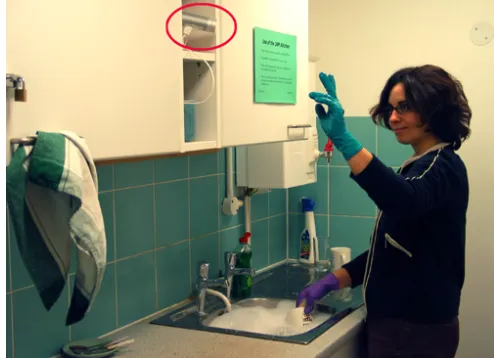
In this paper we present Ambient Gestures (AG), a lightweight system that combines free hand gestures in one’s environment with audio feedback to enable control of computer applications ‘in the environment’. Standard computing for the most part still requires users to go to a computer’s context (physical location) to operate it. Ambient Gestures’ ‘in the environment’ interaction is designed to support the ubiquitous computing goal of “transparent” interactions in a multimodal environment [18, 33] enabling people to engage with a computer system, more or less device-free, from theirs and not the computer’s current context (Figure 1).
The Ambient Gestures system is composed of a vision recognition software application, a set of gestures to be processed by a scripting application and a navigation and selection application that is controlled by the gestures. With Ambient Gestures, hand gestures ‘in the environment’ are picked up by the vision system and produce audio responses in the form of earcons, text-to-speech, and music or spoken word audio as determined by the application being controlled. The audio feedback is used to guide navigation and selection tasks within an AG-aware application.
Figure 1: Ambient Gestures supports ’in the environment’ system interaction so that users do not have to change their current task context in order to operate a computer application. Here, while washing up, gestures to the camera (circled in red) control a music browsing software application.
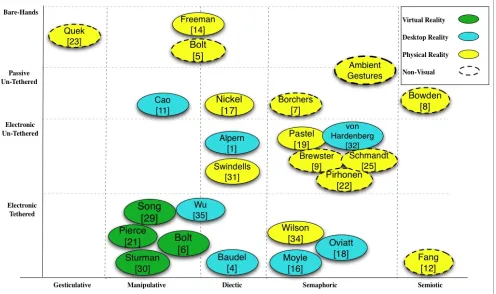
[image:1.612.316.563.335.514.2]Figure 2: A mapping of gesture research along four dimensions: X is gesture type Y is device type, colour is environment and border is visual or non-visual interaction.
In the following sections we describe the Ambient Gestures system in the context of related work. We describe its deployment to control an application without a visual interface, and we describe a formative user study that we conducted to investigate the system. We close with a discussion of the design issues for the AG approach and for future research directions in this area.
RELATED WORK
As both Bolt’s [5] and Quek’s [23] work have shown, as speech, audio and gesture based input methods become more integrated into everyday computing technology, people can begin to use more natural styles of human-human communication within human-human-computer interactions. As gesture is one type of natural communication, much of this work has been undertaken within gesture-based research. Gesture research covers work from data gloves for direct manipulation of objects in virtual environments [21] to an approach like Ambient Gestures for semaphoric communication in physical reality via free-hand interaction at a distance from the source application.
In order to better see where Ambient Gestures is situated in gesture research, we propose one mapping of the field (Figure 2). The graph shows 4 dimensions: devices, gesture-type, application type and environment. The Y-axis represents devices: electronic, tethered input sources such
as data gloves, electronic untethered devices like PDA’s, passive un-tethered devices, and finally, bare hands. The X-axis represents gesture type: gesticulative (gestures that accompany speech), deictic (pointing), semaphoric (flags or signals)and semiotic (natural language signs) gestures. The colouring on the graph represents the environments in which the user interacts with the specific gesture I/O: virtual reality, what we have called “desktop reality” to refer to gestures used to manipulate more traditional or familiar desktop applications, and physical ‘in the environment’ reality, where gestures are used for mobile or other off the desktop, ubiquitous computing. The solid and dashed borders around the objects on the graph indicate whether the gesture work represented uses predominantly visual or non-visual output. Non-visual includes audio, haptic and tactile interfaces.
We describe in more detail below how Ambient Gestures is situated within the graph. While the related work described is indicative rather than exhaustive, we can see that Ambient Gestures is in a relatively undeveloped area of gesture research. We hope to show, however, that AG represent a promising area for ubiquitous interaction.
Gesturing with Devices and Visual Interfaces
primarily in manipulative gesture interactions. In Virtual Reality, the gloves allow complicated gestures of the hands and fingers to be recognized. For example, in Bolt’s work, speech accompanies two-handed gestures using a DataGlove to rotate and move virtual objects on a display. Recent work uses the DataGlove to map a users’ hand movements onto a virtual hand in a virtual environment for direct manipulation of objects [29]. The gloves, however, are both tethered to a computer and are costly, making them impractical for either casual or ‘in the environment’ interaction.
Desktop Reality, Tethered Navigation. Datagloves are also used in sign language interpreters and as a means of controlling large screen displays [4, 12, 30]. On the smaller scale, gesture based interactions for Web browsers such as Opera and Mozilla have been implemented as mouse based movements to provide an additional way to control browsing and navigation.Theyhave been demonstrated to improve efficiency for these tasks [16].
Desktop Reality in the Large: Passive, Un-tethered, Selection and Manipulation. The use of cameras as a means of tracking movement allows gestures to be performed without the use of electronic devices. Vision Wand [11] presents a passive device to control objects on a screen in 3D, using two web cameras to capture the wand’s movements. Passive devices are lower in monetary cost for the user, and can provide a flexible set of gestures that are also used to control objects on the screen at a distance. Distance, however, constrains the interaction since the gestures must be performed within a localized area to maintain calibration of the two cameras with respect to the positioning of the wand. This means that the user must be positioned close to the screen and with minimal variation in order for the gestures to be recognized and processed.
Physical Reality, Electronic, Un-tethered, Direct Manipulation.
Gestures with electronic devices, such as the XWand [34] and gesturePen [31] use deictic gestures (pointing gestures) within an ‘intelligent environment’ to indicate with which device the user wants to interact. The XWand requires the user to point at the desired target, which is tracked by a camera using buttons on the wand to indicate when a gesture
is being performed. This system relies on audio feedback to indicate to theuser when a new device has successfully been selected. The gesturePen uses both infrared and wireless technology in order to transfer data between two devices. For example, the pen can be connected to a PDA, and the user points the gesturePen at the device to which the data is to be transferred.
Bare Hands, Device-Free Gestures
Desktop Reality, Bare Handed, Visual Interface. B a r e handed, device free interaction has been investigated for many years [5, 6, 13, 17, 23, 32], but success has been limited in terms of creating a truly autonomous gesture based interaction used for common applications. Von Harden for instance, has explored using finger tracking and hand posture
as input for a digital finger painting application and for moving and controlling digital objects on a wall display [32]. Vision based tracking in this case, however, requires that the user physically touch or maintain close contact with the visual display while the camera tracks the movements. While this work is based on bare-handed interactions, the nature of the work requires that the gestures be performed within close contact of the visual display in order to maintain visual focus. Alpern and Minardo’s also propose deictic gestures for secondary interaction with in-car visual interfaces [1]. Although minimal attention is required to accurately gesture at the target displayed on the windshield, the system has not been implemented yet and actual interaction with this level of gesture is still under development. In Freeman’s work, “Television control by hand gestures” [14], real-time computer vision techniques allow the user to control from a distance sliders that are overlaid on the television screen for controlling volume and channel changes. Hand movement is tracked and mapped onto the sliders. While this work is performed at a distance from the camera, it does require the user to focus on the screen while performing the gestures to ensure that the gestures are mapped to the sliders.
Physical Reality, Bare Handed, Eyes Free. Gesture work that is both bare handed and eyes free includes highly complicated systems that are semiotic in nature including sign language recognition [12]. Vision technology in this field has matured enough to distinguish between hundreds of complicated gestures, but is still primitive in its ability to maintain the high levels of calibration so that cameras can accurately track complex finger and hand movements. Because of the lack of robustness in the vision technology, users must perform the gestures while positioned very close to the camera. In addition, distinguishing between left and right hands is also a complex problem in computer vision [8], so that even state of the art technology uses coloured gloves to discriminate between the two hands (use of colour is a technique we have adopted in Ambient Gestures). So while the vision technology used for these tasks can be highly accurate, the restricted interaction style for bare-handed gestures is not conducive to an everyday, ubiquitous computing environment.
Gestures and Non-Visual, Audio Output interactions
closed” [20] compared the use of a haptic roller-ball input device to navigate and control both an audio-haptic and a visual-audio-haptic interface of a music browsing and playlist building application. They found that the cost difference between having the visual display and not having it is small in terms of task execution time. Since we are interested in ‘in the environment’interaction where screens may not be conveniently available or necessary, these findings give us confidence to pursue gesture-based, audio interface interactions.
Electronic Device and Audio Interface. S c h m a n d t ’ s Impromptu project foregrounds what we mean by audio interaction [25]. Impromptu uses the spatial arrangement of buttons on a handheld iPAQ computer to control an audio-only feedback system. This work presents some of the benefits of non-visual, audio only feedback in mobile computing scenarios where taking visual attention away from the user in order to control a device is not practical or safe. While the users are on the move, they can control Impromptu using modified mappings of the buttons and the centre wheel of the iPAQ while receiving audio feedback as output in the form of audio icons or text to speech.
Gestures, Devices and Audio Interaction. In more gesture-oriented work, Brewster [9] presents a 2D gesture recognition system that uses finger gestures on the touch screen of the iPAQ for eyes-free interaction. In this work the problems of interacting with small screen displays are addressed through using non-visual, touch based gestures as a means to control the mobile device. Brewster addresses the problems of orienting the gestures on the device by using a 3x3 grid overlaid on the screen as a method of conceptually guiding the user with the gestures. The key to this work is the audio feedback that guides the user towards performing the correct gestures through sounds and speech audio. We take advantage of Brewster’s findings in Ambient Gestures, but use environment oriented rather than device-based gestures.
AMBIENT GESTURES
The Ambient Gestures system leverages vision oriented gesture recognition research, specifically for bare hand, free style semaphoric interactions. State of the art computer vision technology, however, restricts the complexity and robustness of the interactions that are currently possibleand practicalin gesture detection by requiring that the user be proximally attached to the device so that proper calibration can be maintained in order to accurately track movements and detect objects [5, 11, 17, 35]. This means that while it is possible to detect skin tone for bare hands gestures, it becomes increasingly difficult to do so at aconstantly changing distance from the camera, and requires the use of significant processor power with skin tone detection algorithms that would make this type of interaction inaccessible for everyday use.
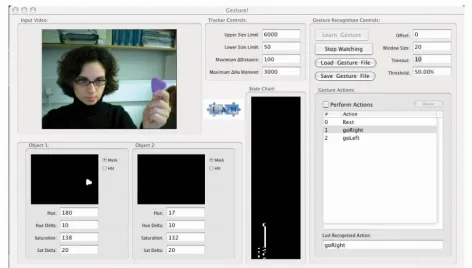
Figure 3: iGesture screenshot. The screen on the top left displays the visual input field, the two windows below display the left and right input channels. The black window to the right displays the visual data as it is processed and the box on the far right lists the programmed gestures.
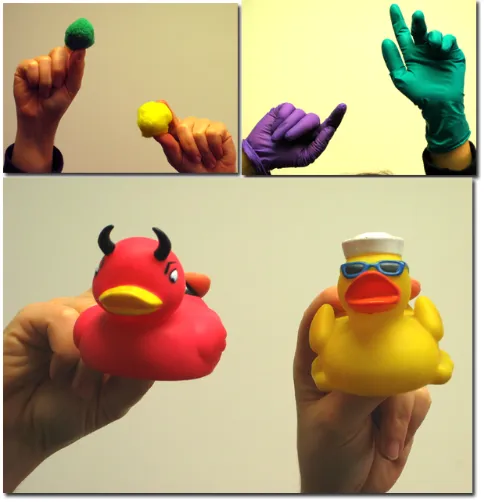
Ambient Gestures attempts to overcome some of these restrictions by letting users gesture with passive, brightly coloured everyday objects, such as washing up gloves or sticky-note pads (Figure 8), and by using simple gestures that allow for robust interactions. With strong colours, the calibration of the vision recognition input is more robust and does not require frequent recalibration due to light changes or objects changing distance from the camera. There are several advantages to this approach over using a more complex vision recognition algorithm that could recognize skintone for example. First, users can be well away from the camera while performing the gestures, as long as they remain within the field of vision. Second, the users’ gestures can be detected from any orientation in the space as long as the gestures are performed facing the cameras. In addition, the processing time and resources required to run a more complex algorithm would further slow down the system, and since we could develop such a robust system using limited resources, we decided that this would be a useful trade-off.
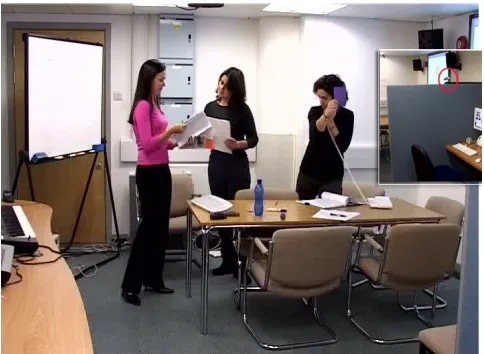
[image:4.612.318.554.56.190.2]mSpace project [28] to support fine-grained, categorized exploration of domains. The Ambient Gestures system was deployed in several spaces including a kitchen (Figure 1), one of the researchers’ desks (Figure 4), and a demonstration room within the researchers’ university (Figure 5).
Figure 4: Ambient Gesture (AG) system available for interaction at the desktop. Inset shows position of standard web cam used in AG. Screen shows user training the system (as per Figure 3).
iGesture
In order to process the gestures, we have developed a vision recognition software package called ‘iGesture’ that takes input from a single web camera and matches the real-time visual data input to a pre-programmed set of gestures. Since the gestures are based on simple hand movements, a single camera is sufficient for processing the visual input and greatly reduces the overhead cost in terms of design complexity and resources used by the system. Once a gesture is successfully recognized, the iGesture sends a call to the corresponding Applescript code that executes the specified command. The output for the system consists of the appropriate audio or text-to-speech sounds for the interaction as determined by the application and context of the command. For example, choosing to explore the next category will produce an earcon [10] to indicate that the command has been recognized; text-to-speech repeats the recognized command to the user and a preview cue, audio playback of a music selection in that category.
The implementation of the iGesture software consists of a simple algorithm that extracts motion data in four directions (up, down, left, right) from the video. The software then models this data as a first-order Markov Process by estimating the probabilities of state transition (e.g. the probability of the motion changing from ‘up’ to ‘left’ between time t and t+1) and storing them in a state-transition matrix. A training set of data is used to record each gesture that is stored in a matrix and used for comparing the real-time gestures with the stored matrices of the trained gestures. Gestures can be recognized through two separate vision channels, which can be processed
independently or in combination to form a larger set of gestures. Using a single web camera, we set the left and right visual input channels to recognize different colours rather than skin tone in order to minimize the CPU usage which gives us a faster system. In addition, the use of different colours as input to the two channels creates a larger set of gestures since distinguishing left and right hands with the iGesture is something to be investigated in future work. iGesture processes the input video stream at a resolution of 320x240 pixels and processes the video at a rate of about 15 frames per second on a 1Ghz single processor system.
Because iGesture is capable of processing each channel separately or in combination, we are able to have a large set of gestures with which to control the system. The initial set of gestures consists of five gestures for each hand, with three positions of two-handed gestures that can be recognized: both hands aligned horizontally or with one hand above or below the other. This gives us a total set of 3 x 52 +10 = 85 gestures for our initial interaction.
Figure 5: Ambient Gestures used to control audio application as a background activity during a meeting in the Demo Room. A note pad is being used to control the system. Inset shows Web cam (circled) mounted on partition, used to detect gestures.
Gesture Capture
[image:5.612.317.559.307.484.2]hue and saturation of the colour of the gesturing objects, each gesture is then performed in front of the camera as a training set. This data is stored and used to form the matrices that will form the set of gestures against which the real-time input will be compared. The system currently handles two channels; it can easily be modified to handle more, but this is reserved for future work.
The Application
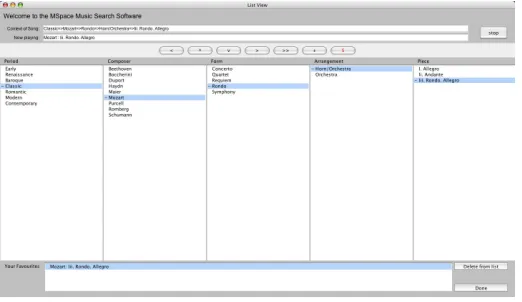
[image:6.612.54.315.203.354.2]The application that is controlled by the gestures is a version of the mSpace music browsing and navigation software. Figure 6 shows the graphical version of the interface.
Figure 6: Visual interface for the mSpace software, showing the current path through the available nodes of a hierarchy for classical music. The lower pane shows where one piece has been added to the playlist.
There are two advantages of this application for Ambient Gestures over standard mp3 desktop software. First, the mSpace browser allows music to be categorized in finer grains than the id3 genre tags associated with mp3 files. So rather than only “classical” or “pop” or “world”, one can explore a genre in more detail, hierarchically. One hierarchy may be Periods | Composers | Styles | Arrangements | Pieces. Second, the application supports preview cues [27]: brushing over attributes in a category of a genre causes a piece from within that category to be played. In this way, users can get a taste of an area of a category in a domain in order to determine whether they are interested in exploring that part of the domain further. After previewing an area within a category (Romantic Period in the classical music genre for instance), the user can select the area. Selection causes the next level of the tree associated with it to be expanded. In the above hierarchy, selecting Romantic would cause the set of Romantic Composers to become available. With the previewing and selection actions, users can explore the range of the domain by moving through the nodes of the hierarchy. At any point in an exploration a user can also choose to add the currently previewed piece to a playlist. At the Piece level – the final level of the hierarchy – users can also simply add the listed piece itself since these attributes are unary and the only preview cue associated with them is the piece itself.
The Gestures
Our gesture-lexicon has been designed to provide the user with intuitive gestures to control both the navigation of the data within the application and other system functions such as volume, playback, advance and rewind. There are five distinct gestures that are currently recognized by iGesture; clockwise and counter-clockwise circular movements, an up/down gesture and a sideways gesture. We use the same set of gestures for each channel, and create combinations of the same gestures for the two handed gestures. The single left channel gestures control navigation and selection within the music collection, while the right hand controls the playlist functions such as browsing, adding and deleting from the playlist. To step up and down through the attributes listed in a category, we mapped up and down gestures. To select an attribute in a category and expand the next associated level of the hierarchy we used a static gesture: the object held still in the camera’s field of vision. To move into a newly selected node or navigate back and forth through a fully expanded path of a tree, we used clockwise and counter-clockwise gestures to move forwards and backwards through levels of the hierarchy. The gestures can be performed either wearing alternate coloured gloves, holding alternately coloured bits of paper, or any other objects with distinct colours (Figure 8)
.
Figure 7: The above images are used to represent the gestures that can be recognized using the left and right channels. Each gesture is mapped onto a command for the software providing Ambient Gestures with 85 gestures that the iGesture can recognize.
Audio Feedback
[image:6.612.326.564.353.493.2]text-to-speech are used to inform the user when they reached the end of a category or tree.
Figure 8: Gestures can readily be recognized by using any pair of distinctly coloured objects, as shown above. The use of toys to control an application (lower pane) raises the possibility of Ambient Gestures as a child-friendly technique.
Rather than using electronic devices for input, which tether one to either a specific computer or specific device, we use the above described ‘in the environment’ gestures. In its combination of free-style, ‘in the environment’ gestures, and audio feedback, the Ambient Gestures system extends current work in gesture-based, non-visual interactions to provide an additional approach for (relatively low cost) ubiquitous computing interaction.
USER STUDY
The focus of the Ambient Gesture work in particular is to improve support for users in physical, non-desktop environments, such that users can manipulate ubiquitous applications from their current context in the environment, rather than having to physically go to a computer to manage a machine. For instance, a person may be washing dishes while listening to music and want to change the current selection without having to interrupt their task by taking off the gloves, drying their hands and going to the computer audio collection to navigate for something new. Ambient gestures may be far simpler for navigating to the desired track (a secondary task) with little interruption to one’s work (the primary task). Alternately, one may be already comfortably ensconced in a favourite chair and want to move through the same information space; gestures in space may be more convenient than finding a remote, offer a richer
palette of interactions than a remote, and provide a means to focus less on the device and more on the context of interest.
In order to investigate how best Ambient Gestures could be used as such a lightweight interaction, we both used the system ourselves in both our personal desktop and group meeting environments, and we presented the system to several participants for an informal study that included a talk-aloudexploration and an assessment of performance on specific tasks by the user. We describe the study with participants first. For each user, the camera was positioned so that they could move around a large area of the room and gesture while seated or standing. The camera was adjusted for each user to take into consideration their height and range of arm movements and readjusted for any lighting changes that may have occurred.
Participant Study. We brought seven people, one at a time into a demonstration room at the University in which the system was set up, and asked them each to engage in a think-aloud exercise while they used the system. The users were given instructions on how to control the software with the gestures. A poster was provided with a graphic list of the gestures and their functional mappings, as shown in Figure 7. For this preliminary study, we concentrated on single-handed gestures per single channel. One channel or coloured object represented all the navigation controls, and the second channel object represented gestures used for adding to and deleting from the playlist. Each user was given up to 10 minutes to practice using the system before beginning the tasks. Once the evaluations began, the users were instructed to maintain a think-aloud conversation with the examiners for the duration of the investigation, which lasted 30 minutes and consisted of roughly five to ten song changes.
For the study, participants were trained in using the gestures to control the audio system. They were then given two tasks: an exploration task and a location task. For the exploration task, they were asked to explore the space and add to a playlist any three tracks they may wish to listen to later. These tracks could be from anywhere in the domain space. For the location tasks, participants were asked to locate three specific tracks from specific categories to add to their playlist. The user was instructed to locate specific entries in specific categories in the domain, and then to add a piece to their playlist from that category. For instance, a participant would be asked to find from the Classic period a Beethoven concerto for violin. These specific requests ensured that the participant moved through multiple levels of the hierarchy.
OBSERVATIONS
Participant Study.Each of the participants was able to
complete all of the evaluation tasks and all gave positive feedback about their interaction with the system. Most of the users said they were impressed with the ease in which they could control the system once they got going, and with how effective and simple the gesture set was.
Initially, during the training sessions of the evaluations, the users appeared sceptical about the interaction. Two users asked why we didn’t just use a remote control, and another suggested using devices with sensors to detect movement rather than using free hand gestures. Once they became familiar with the system, however, their appreciation of the system increased. For the duration of the evaluations, the users seemed to enjoy themselves, moving around the room, performing gestures while maintaining a conversation about their interaction. During the second task, which involved locating specific categories of music in the domain, the users spoke less, as they were paying attention to the feedback from the system and trying to locate items for the task. Several users became impatient while waiting for the audio feedback to tell them where they were in the system, and with having to gesture through each label one at a time when they knew where they wanted to go.
There were some system level issues that need to be improved, such as the length of time it took for the actions to be completed after the gestures were recognized, as well as some problems with gestures occasionally being incorrectly recognized. But in spite of the delay in song changes, the immediate audio feedback that indicated when a gesture was recognized was extremely useful in conveying the state of the system to the user. Some users thought that an undo gesture would be helpful however such a gesture was not requested in the visual version of the application: Users simply change a selection to change the current action. Interestingly while the notion of an “undo” was voiced at the early stages of the think-aloud, as the participants became more familiar with the actions that the gestures corresponded to, they readily became more comfortable with moving around the information and navigating back or up from an unintended selection.
Personal Use Study. Using gestures to control music software at one’s desk allowed music to be controlled as a background task, while focusing on other application tasks in the foreground. It was somewhat surprising to find this dual mode of interacting with a desktop environment effective. We again see in this case the need for richer gestures to keep tasks like selecting playlists or navigating directly to specific areas of a domain readily accessible.
In the group use, the most effective use of gestures seemed to be more of functional controls (turning up or down volume, skipping through tracks) than of navigation. This may be the
result of the context: navigation tasks may have seemed more anti-social than simply changing the volume of a song. We will be looking at these group interactions further.
DISCUSSION AND FUTURE WORK
The success of our initial prototype and study has given us confidence to view ‘in the environment’ gestures as a promising space for further study. While we have adapted a visual music application for non-visual interaction, it is worth considering what the design affordances of strictly gesture/audio applications may be. Likewise, we have focused on offering a single audio audio cue per gesture through the music application’s space. It would be interesting to consider a version of Schmandt’s multi-layered audio “braids” being manipulated not by head gestures as in the initial Audio Hallway work [24]b u tthrough ‘in the environment’ gestures. With gestures, a more conductor-like interaction may be possible for bringing up and down, in and out, multiple strands of audio [7].
While we have focused on an audio-only interface with gestures, there are contexts in which gestures for visual display-based interaction seems a potentially effective way to support interaction with public or semi-public displays in particular. At our university, we have a variety of screens, including large plasma and touch screens, set up in our environment mainly as signage displays, with revolving news and information about local events. Some community members have already complained that there is no way to stop the large plasma display or move back or forward through its information pages. While in some situations, it may not be desirable to support public control of a display, in others it would be. Ambient Gestures may provide an effective mechanism to support such lightweight navigation. Ambient Gestures in public, loud spaces would also have advantages over voice-based interaction, though they may indeed act as a complement to voice recognition controls such as those described in [19]. We are looking at such a combination in the ubiquitous computing or “smart” science lab [26], where gestures and or voice can initiate processes and the recording of processes. Such interaction frees the scientist from having to leave a work area in one part of the lab to start a process in another. Ambient Gestures are also potentially effective in such areas where there is either limited space for a visual display to be set up or it is not safe to have one.
CONCLUSIONS
Applescript – standard desktop scripting software – and a standard web cam combined with our robust gesture recognition software, iGesture, has shown how lightweight ‘in the environment’ interactions can be readily integrated to control applications via ‘in the environment’ gestures with everyday, passive devices for multimodal, ubiquitous in-context interaction. We have suggested that the ability to interact with a multimodal non-GUI based system may be a practical solution to support computer task interaction without having to take the user away from their primary attention tasks.
Since there is an extensive set of gestures that have not yet been used for this preliminary work, we expect to begin investigating the addition of expert gesture sets to refine navigation. While our gesture system has been implemented to take advantage of everyday objects for gesture recognition, as a next step in this research, we are refining a robust skin-tone recognition algorithm in the iGesture software to enhance the system to support barehanded interaction. We will be deploying the system in a longitudinal study in both domestic and work environments to further investigate both the practicalities and effects of in the environment gestures for ubiquitous computing.
ACKNOWLEDGEMENTS
The authors wish to thank Max Wilson, Paul Groth and Paul Lewis for their contribution to the work, as well as Chris Gutteridge, Maira R. Rodrigues and Claudia Di Napoli. Also, to the members of the IAM group for participating in the studies.
REFERENCES
1. Alpern, M. and Minardo, K., Developing a Car Gesture Interface for Use as a Secondary Task. In CHI '03 extended abstracts on Human factors in computing systems, ( Ft. Lauderdale, Florida, USA, 2003), Conference on Human Factors in Computing Systems, 932 - 933.
2. Alty, J.L. and Rigas, D.I., Communicating Graphical Information to Blind Users Using Music: The Role of Context. In Proceedings of the SIGCHI conference on Human factors in computing systems, (Los Angeles, California, United States, 1998), 574 - 591.
3. Arons, B., Hyperspeech: Navigating in Speech-Only Hypermedia. In Proceedings of the third annual ACM conference on Hypertext, ( San Antonio, Texas, United States, 1991), Conference on Hypertext and Hypermedia, 133 - 146.
4. Baudel, T. and Beaudouin-Lafon, M. Charade: Remote Control of Objects Using Free-Hand Gestures. Communications of the ACM, 36 (7).1993, 28 - 35. 5. Bolt, R.A., “Put-That-There”: Voice and Gesture at the
Graphics Interface. In Proceedings of the 7th annual conference on Computer graphics and interactive techniques, (Seattle, Washington, United States, 1980), International Conference on Computer
Graphics and Interactive Techniques, 14, issue 3, 262 -270.
6. Bolt, R.A. and Herranz, E., Two-Handed Gesture in Multi-Modal Natural Dialog. In Proceedings of the 5th annual ACM symposium on User interface software and technology, (Monteray, California, United States, 1992), Symposium on User Interface Software and Technology, 7 - 14.
7. Borchers, J.O., Samminger, W. and Mühlhäuser, M., Conducting a Realistic Electronic Orchestra. In Proceedings of the 14th annual ACM symposium on User interface software and technology, (Orlando, Florida, USA, 2001), Symposium on User Interface Software and Technology, 161 - 162.
8. Bowden R, Zisserman A, Kadir T and M., B. Vision Based Interpretation of Natural Sign Languages Exhibition session: The 3rd International Conference on Computer Vision Systems, Graz. Austria, 2003. 9. Brewster, S., Lumsden, J., Bell, M., Hall, M. and
Tasker, S., Interaction Techniques for Constrained Displays: Multimodal 'Eyes-Free' Interaction Techniques for Wearable Devices. In Proceedings of the conference on Human factors in computing systems, (Ft. Lauderdale, Florida, USA, 2003), Conference on Human Factors in Computing Systems, 473 - 480.
10. Brewster, S.A. Using Nonspeech Sounds to Provide Navigation Cues. ACM Transactions on Computer-Human Interaction (TOCHI), 5 (3).1998, 224 - 259. 11. Cao, X. and Balakrishnan, R., Visionwand: Interaction
Techniques for Large Displays Using a Passive Wand Tracked in 3d. In Proceedings of the 16th annual ACM symposium on User interface software and technology, (Vancouver, Canada, 2003), Symposium on User Interface Software and Technology, 173 - 182.
12. Fang, G., Gao, W. and Zhao, D., Large Vocabulary Sign Language Recognition Based on Hierarchical Decision Trees. In Proceedings of the 5th international conference on Multimodal interfaces, (Vancouver, British Columbia, Canada, 2003), International Conference On Multimodal Interfaces, 125 - 131.
13. Freeman, W.T., Beardsley, P.A., Kage, H., Tanaka, K.-I., Kyuma, K. and Weissman, C.D. Computer Vision for Computer Interaction ACM SIGGRAPH Computer Graphics, 1999, 65 - 68.
14. Freeman, W.T. and Weissman, C. Television Control by Hand Gestures. Department of Computer Science, University of Zurich, TR94-24, 1994, 179 - 183. 15. Morley, S., Petrie, H., O'Neill, A.-M. and McNally, P.,
16. Moyle, M. and Cockburn, A., The Design and Evaluation of a Flick Gesture for 'Back' and 'Forward' in Web Browsers. In Proceedings of the Fourth Australian user interface conference on User interfaces 2003, (Adelaide, Australia, 2003), ACM International Conference Proceeding Series, 18, 39 -46.
17. Nickel, K. and Stiefelhagen, R., Pointing Gesture Recognition Based on 3d-Tracking of Face, Hands and Head Orientation. In Proceedings of the 5th international conference on Multimodal interfaces, ( Vancouver, British Columbia, Canada, 2003), International Conference On Multimodal Interfaces, 140 - 146.
18. Oviatt, S. and Cohen, P. Perceptual User Interfaces: Multimodal Interfaces That Process What Comes Naturally. Communications of the ACM, 43 (3).2000, 45 - 53.
19. Pastel, R. and Skalsky, N., Demonstrating Information in Simple Gestures. In Proceedings of the 9th international conference on Intelligent user interface, (Funchal, Madeira, Portugal, 2004), International Conference on Intelligent User Interfaces, 360-361. 20. Pauws, S., Bouwhuis, D. and Eggen, B., Programming
and Enjoying Music with Your Eyes Closed. In Proceedings of the SIGCHI conference on Human factors in computing systems, (The Hague, The Netherlands, 2000), Conference on Human Factors in Computing Systems, 376 - 383.
21. Pierce, J.S. and Pausch, R., P., Comparing Voodoo Dolls and Homer: exploring the Importance of Feedback in Virtual Environments. In Proceedings of the SIGCHI conference on Human factors in computing systems: Changing our world, changing ourselves, ( Minneapolis, Minnesota, USA, 2002), Conference on Human Factors in Computing Systems, 105 - 112.
22. Pirhonen, A., Brewster, S. and Holguin, C., Gestural and Audio Metaphors as a Means of Control for Mobile Devices. In Proceedings of the SIGCHI conference on Human factors in computing systems: Changing our world, changing ourselves, (Minneapolis, Minnesota, USA, 2002), Conference on Human Factors in Computing Systems, 291 - 298. 23. Quek, F., McNeill, D., Bryll, R., Duncan, S., Ma,
X.-F., Kirbas, C., McCullough, K.E. and Ansari, R. Multimodal Human Discourse: Gesture and Speech. ACM Transactions on Computer-Human Interaction (TOCHI), 9 (3).2002, 171 - 193.
24. Schmandt, C., Audio Hallway: A Virtual Acoustic Environment for Browsing. In Proceedings of the 11th annual ACM symposium on User interface software and technology, (San Francisco, California, United States, 1998), Symposium on User Interface Software and Technology, 163 - 170.
25. Schmandt, C., Kim, J., Lee, K., Vallejo, G. and Ackerman, M., Impromptu: Speech and Ambiguous
Input: Mediated Voice Communication Via Mobile Ip. In Proceedings of the 15th annual ACM symposium on User interface software and technology, (Paris, France, 2002), Symposium on User Interface Software and Technology, 141 - 150.
26. schraefel, m.c., Hughes, G., Mills, H., Smith, G. and Frey, J., Making Tea: Iterative Design through Analogy. In Submitted to Proceedings of Designing Interactive Systems, (2003).
27. schraefel, m.c., Karam, M. and Zhao, S., Listen to the Music: Audio Preview Cues for Exploration of Online Music. In Proceedings of Interact 2003, (Zurich, Switzerland, 2003), Interact.
28. schraefel, m.c., Karam, M. and Zhao, S., Mspace: Interaction Design for User-Determined, Adaptable Domain Exploration in Hypermedia. In Workshop on Adaptive Hypermedia and Adaptive Web Based Systems, (Nottingham, UK, 2003), Proceedings of AH 2003, 217 - 235.
29. Song, C.G., Kwak, N.J. and Jeong, D.H. Developing an Efficient Technique of Selection and Manipulation in Immersive V.E. Proceedings of the ACM symposium on Virtual reality software and technology, Seoul, Korea, 2000, 142 - 146.
30. Sturman, D.J., Zeltzer, D. and Pieper, S., Hands-on Interaction with Virtual Environments. In Proceedings of the 2nd annual ACM SIGGRAPH symposium on User interface software and technology, (Williamsburg, Virginia, United States, 1989), Symposium on User Interface Software and Technology, 19 - 24.
31. Swindells, C., Inkpen, K.M., Dill, J.C. and Tory, M., That One There! Pointing to Establish Device Identity. In Proceedings of the 15th annual ACM symposium on User interface software and technology, (2002), Symposium on User Interface Software and Technology, 151 - 160.
32. von Hardenberg, C. and Berard, F., Bare-Hand Human-Computer Interaction. In Proceedings of the ACM Workshop on Perceptive User Interfaces, (Orlando, Florida, USA, 2001).
33. Weiser, M. Some Computer Science Issues in Ubiquitous Computing Communications of the ACM, 1993, 75 - 84.
34. Wilson, A. and Shafer, S., Between U and I: Xwand: Ui for Intelligent Spaces. In Proceedings of the conference on Human factors in computing systems, (Ft. Lauderdale, Florida, USA, 2003), Conference on Human Factors in Computing Systems, 545 - 552. 35. Wu, M. and Balakrishnan, R., Multi-Finger and Whole