Firewalls
Jumpstart for
Firewalls
Jumpstart for
Network and Systems
Administrators
John R.Vacca
Scott Ellis
AMSTERDAM • BOSTON • HEIDELBERG • LONDON
NEW YORK • OXFORD • PARIS • SAN DIEGO
Elsevier Digital Press
200 Wheeler Road, 6th Floor, Burlington, MA 01803, USA 525 B Street, Suite 1900, San Diego, California 92101-4495, USA 84 Theobald’s Road, London WC1X 8RR, UK
This book is printed on acid-free paper.
Copyright © 2005, Elsevier Inc. All rights reserved.
No part of this publication may be reproduced or transmitted in any form or by any means, electronic or mechanical, including photocopy, recording, or any information storage and retrieval system, without permission in writing from the publisher.
Permissions may be sought directly from Elsevier’s Science & Technology Rights Department in Oxford, UK: phone: (44) 1865 843830, fax: (44) 1865 853333,
e-mail: [email protected]. You may also complete your request on-line via the Elsevier homepage (http://elsevier.com), by selecting “Customer Support”
and then “Obtaining Permissions.”
Library of Congress Cataloging-in-Publication Data Application submitted
British Library Cataloguing in Publication Data
A catalogue record for this book is available from the British Library
ISBN: 1-55558-297-4
For all information on all Digital Press publications visit our Web site at www.digitalpress.com
To my beloved wife Bee, without whose support and encouragement this book would not have been possible.
—John R. Vacca
For Elaine. Her patience, her enduring love, her sacrifice, and her quiet determination
have rendered the man I am today. I am forever in her debt.
Without her, this and so much more would not have been possible.
Contents
Foreword
xvii
Introduction
xix
Acknowledgments
xxix
Section I—Overview of Firewall Technology
1
1
Firewalls: What Are They?
3
1.1 Chapter objectives 3
1.2 Firewall defined 7
1.3 Why firewalls? 8
1.3.1 The need for firewalls 9
1.4 Benefits of firewalls 12
1.4.1 Protection from vulnerable services 13
1.4.2 Controlled access to site systems 13
1.4.3 Concentrated security 14
1.5 Enhanced privacy 15
1.5.1 Logging and statistics on network use and misuse 15
1.5.2 Policy enforcement 15
1.6 Limitations of firewalls 16
1.6.1 What about viruses? 18
1.7 Summary 19
1.8 References 21
2
Type of Firewall Security Policy
23
2.1 Chapter objectives 23
2.2 Firewall protection 24
2.3 Firewall architectures 25
2.3.1 Multi-homed host 25
2.3.2 Screened host 26
2.3.3 Screened subnet 26
2.4 Types of firewalls 26
2.4.1 Packet-filtering gateways 27
2.4.2 Application gateways 28
2.4.3 Hybrid or complex gateways 29
2.5 Issues 29
2.5.1 Authentication 30
2.5.2 Routing versus forwarding 30
2.5.3 Source routing 30
2.5.4 IP spoofing 31
2.5.5 DNS and mail resolution 31
2.6 Intranet 32
2.7 Network trust relationships 33
2.7.1 High 33
2.7.2 Low to medium 33
2.8 Virtual private networks 34
2.9 Firewall administration 34
2.9.1 Qualification of the firewall administrator 35
2.9.2 Remote firewall administration 35
2.9.3 User accounts 36
2.9.4 Firewall backup 37
2.9.5 System integrity 37
2.9.6 Documentation 38
2.9.7 Physical firewall security 38
2.9.8 Firewall incident handling 39
2.9.9 Restoration of services 39
2.9.10 Upgrading the firewall 40
2.9.11 Logs and audit trails: audit/event reporting and summaries 40
2.10 Revision/update of firewall policy 41
2.11 Examples of service-specific policies 44
2.12 Summary 48
2.13 References 48
3
Firewall Types
49
3.1 Chapter objectives 49
3.2 Types of firewalls 50
3.2.1 Simple packet filtering: IP or filtering firewalls 50
3.2.2 Application-layer firewalls: proxy servers 53
3.2.3 Stateful multilayer-inspection firewalls 54
3.3 Understanding firewall types 55
3.4 Firewall types drawbacks 55
3.5 Summary 56
3.6 References 57
Section II—Firewall Topologies
59
4
Choosing the Right Firewall
61
4.1 Chapter objectives 61
4.2 Convergence 63
4.2.1 The criminal meagermind 63
4.2.2 Considerations 65
4.2.3 Products 70
4.3 About packet inspection 72
4.3.1 Selecting a firewall 72
4.3.2 Firewall solutions 75
4.4 Summary 90
5
Defense in Depth: Firewall Topologies
93
5.1 Chapter objectives 93
5.2 Virtual private network 94
5.2.1 Remote office VPN 96
5.2.2 Remote user VPN 96
5.2.3 Point-to-point tunneling protocol VPN 97
5.2.4 Authenticating with a remote access dial-in user 97
service server
5.3 Firewall policies 97
5.3.1 How secure is VPN technology? 98
5.3.2 Document access 99
5.4 Setting up a demilitarized zone: A VPN alternative? 100
5.4.1 Uses 100
5.4.2 Theory of operation 100
5.4.3 Managing ports in a DMZ 103
5.4.4 DMZ topology 106
5.5 Summary 110
Contents ix
Section III—Firewall Installation and Configuration
111
6
Installation Preparation
113
6.1 Chapter objectives 113
6.2 Unbreakable walls 114
6.3 Selecting an operating system 115
6.3.1 Microsoft 115
6.3.2 UNIX 121
6.4 Scanning for vulnerabilities 124
6.4.1 Searching for weaknesses 124
6.5 Summary 129
7
Firewall Configuration
131
7.1 Chapter objectives 131
7.2 Defining firewall security objects 131
7.2.1 Object discovery process 132
7.2.2 Post object discovery evaluation 134
7.3 Scanning the firewall and fixing vulnerabilities 135
7.3.1 Tracing the routes 135
7.3.2 Perimeter packet analysis 140
7.4 Identifying trusted and untrusted networks 142
7.4.1 The firewall stops here 142
7.4.2 Creating trusted networks 144
7.5 Summary 145
Section IV—Supporting Outgoing Services
Through Firewall Configuration
147
8
Simple Policy Implementation
149
8.1 Chapter objectives 149
8.2 Policy configuration 150
8.2.1 Interface 150
8.2.2 Source 151
8.2.3 Destination 151
8.2.4 Services 152
8.3 Supporting HTTP 153
8.3.1 Web access control 154
8.3.2 HTTP as a policy 155
8.4 Dynamic content 156
8.5 Summary 157
9
Complex Web Services Management
159
9.1 Chapter objectives 159
9.2 Telnet 161
9.3 FTP 161
9.3.1 The role of FTP 162
9.3.2 FTP access 163
9.3.3 FTP sessions 163
9.3.4 FTP and firewalls 164
9.3.5 Netstat 164
9.3.6 FTP security 164
9.3.7 Alternatives 164
9.4 Handling port numbers 165
9.5 Deploying Real Audio 170
9.5.1 Outgoing versus incoming 170
9.5.2 Flexibility 171
9.6 Summary 172
10 Content Filtering
175
10.1 Chapter objectives 175
10.2 Filtering out dangerous content 175
10.2.1 Scanning e-mail 177
10.2.2 Web filtering 178
10.2.3 Application filtering 182
10.3 Summary 184
Section V—Secure External Services Provision
185
11 Publicly Accessible Servers Implementation
187
11.1 Chapter objectives 187
11.2 Securing your organization’s Internet site 187
11.2.1 Pros and cons 188
11.2.2 Special concerns 193
11.3 Separating your Internet site from your intranet 197
11.4 Supporting SMTP mail architectures 199
11.4.1 Internal e-mail 201
11.5 Summary 201
Contents xi
12 Architecture Selection
203
12.1 Chapter objectives 203
12.2 Types of screened subnet architectures 203
12.2.1 The perimeter 205
12.2.2 Two routers 207
12.2.3 Single router 208
12.2.4 Multiple screened subnet architecture 208
12.2.5 Screened host 210
12.2.6 Dual-homed host 210
12.3 Single-box architecture 213
12.4 Summary 215
13 External Servers Protection
217
13.1 Chapter objectives 217
13.2 Siting external servers on a perimeter net 217
13.2.1 Security of SQL and web servers 219
13.2.2 Search engines 222
13.2.3 SQL server security 224
13.3 Deploying packet filtering to control access to your servers 225
13.4 Router packet filtering 226
13.5 Using router access control lists 227
13.6 Summary 227
Section VI—Internal IP Services Protection
229
14 Internal IP Security Threats: Beyond the Firewall
231
14.1 Chapter objectives 231
14.2 Network threats 232
14.2.1 Behavior of employees 232
14.2.2 E-mail 234
14.2.3 Viruses 234
14.2.4 Spyware 235
14.2.5 Hackers 236
14.3 Organization risk assessment 236
14.4 Examining inside attacks 238
14.4.1 Saboteurs 238
14.4.2 Leaky e-mail 239
14.5 Handling new threats 239
14.6 Antivirus software technology: Beyond the firewall 240
14.6.1 Layered approach 241
14.6.2 Intrusion detection tools 242
14.6.3 Public key infrastructure 243
14.6.4 Security content 244
14.7 Summary 247
14.8 References 247
15 Network Address Translation Deployment
249
15.1 Chapter objectives 249
15.2 Person-to-person communication 249
15.3 Internet protocol telephony 250
15.4 Routers, firewalls, and NATs 251
15.5 Handling SIP 251
15.6 Firewall traversal/SIP NAT 252
15.7 Employing a Linux-based SOHO firewall solution with 253
NAT technology
15.7.1 Realities of securing SOHOs with firewall protection 257
15.7.2 Hardware and software solutions options 260
15.7.3 Employing a Linux-based SOHO firewall solution 263
15.7.4 Plugging the SOHO firewall leaks 265
15.8 Summary 267
15.9 References 268
Section VII—Firewall Remote Access Configuration
269
16 Privacy and Authentication Technology
271
16.1 Chapter objectives 271
16.2 Selecting cryptographic algorithms through encryption 273
16.2.1 Data Encryption Standard 273
16.2.2 3DES 273
16.2.3 Advanced Encryption Standard 273
16.2.4 RC4 273
16.2.5 Message Digest and Secure Hash Algorithm 274
16.2.6 Asymmetric Key Algorithms 274
16.2.7 Additional cryptographic options: modes and 274
initialization vectors
16.2.8 Options in padding 274
16.3 Key management 275
16.3.1 Administration and storage centralization 275
16.3.2 Specialized hardware 275
16.3.3 Importing a key 275
Contents xiii
16.3.4 Exporting a key 276
16.3.5 Rotating keys 276
16.4 Auditing, authentication, and authorization 276
16.4.1 Authentication 276
16.4.2 Authorization 277
16.4.3 Auditing 277
16.4.4 Secure the credentials 277
16.4.5 Disaster recovery, backup, and restore 278
16.5 High availability and load balancing 278
16.5.1 Key replication services 278
16.6 Transport and network 278
16.6.1 Firewalls 279
16.7 Encryption of multiple columns: database considerations 279
16.7.1 Creating indexes 279
16.7.2 Primary key encryption 279
16.7.3 Foreign key constraint 280
16.7.4 Randomly generated initialization vectors 280
16.7.5 Exact match searching 281
16.7.6 Encrypted data encoding 281
16.7.7 Additional space 281
16.7.8 Backups during pre-migration 282
16.8 Summary 282
16.9 References 283
17 Tunneling: Firewall-to-Firewall
285
17.1 Chapter objectives 285
17.2 Increasing risk on extranets and intranets 286
17.3 Openness with protection of firewall tunneling and 286
Internet security solutions
17.4 Firewall tunneling and Internet security architecture technologies 287
17.4.1 Protection solutions for the intranet 287
17.4.2 Protection solutions for the extranet and Internet 289
17.5 Firewall tunneling technologies 289
17.5.1 Application proxies 289
17.5.2 Encryption with virtual private network 290
17.5.3 Management center 290
17.5.4 Stateful IP filtering 290
17.5.5 Static IP filtering 291
17.6 Demilitarized zone focus 291
17.6.1 Isolating the machine 291
17.6.2 Controlling the flow 291
17.6.3 Controlling remote access 291
17.6.4 Authentication mechanisms 292
17.7 Keeping the firewall tunneling security rules up-to-date through 292 enterprise intranets
17.8 Summary 293
17.8.1 A high level of trust 293
17.8.2 Centralized security management 293
17.8.3 Enterprise-class scalability 294
17.8.4 High-end firewall tunneling protection 294
17.9 References 295
Section VIII—Firewall Management
297
18 Auditing and Logging
299
18.1 Chapter objectives 299
18.2 Auditing your firewall 299
18.2.1 Methodology 300
18.3 Logging 302
18.3.1 Configuration of firewall logging 303
18.3.2 Firewall monitoring 307
18.4 Summary 308
18.5 References 309
19 Firewall Administration
311
19.1 Chapter objectives 311
19.2 System administration 312
19.3 Managing your firewall remotely 312
19.3.1 Achieving high uptime 313
19.3.2 External and internal solution monitors 316
19.4 Maintenance of a firewall 317
19.4.1 Performing firewall maintenance 318
19.5 Managing firewall security 321
19.5.1 Firewall products common functionality 321
19.5.2 Analysis and activity reporting of firewalls 323
19.5.3 Enterprise firewalls: automated event response and 323
Real-Time monitoring
19.6 Summary 326
19.7 References 327
Contents xv
20 Summary, Conclusions, and Recommendations
329
20.1 Chapter objectives 329
20.2 Summary 330
20.3 Conclusions 331
20.4 Recommendations 332
20.4.1 Purchasing, learning, configuring, and maintaining 335
20.4.2 Effective firewall security: baseline design principles 336
20.4.3 Final recommendation: purchase a high-speed firewall 338
20.5 References 339
Section IX—Appendixes
341
A Contributors of Firewall Software 343
B Worldwide Survey of Firewall Products 349
C Firewall Companies 353
D Commercial Products or Consultants Who Sell or Service Firewalls 357
E Establishing Your Organization’s Security 363
E.1 Firewalls 364
F Network Interconnections: A Major Point of Vulnerability 367
G Deterring Masqueraders and Ensuring Authenticity 371
G.1 Boundary Protection: firewalls 372
H Preventing Eavesdropping to Protect Your Privacy 381
I Thwarting Counterfeiters and Forgery to Retain Integrity 385
Through a Reverse Firewall
J Avoiding Disruption of Service to Maintain Availability 391
K Developing Your Firewall Security Policy 393
s
a
r
y
Glossary
397
Index
407
Foreword
There are three basic rules about firewalls.
Firewalls are essential. Computer security professionals, govern-ments around the world, Internet service providers, information technology associations, and computer sellers and manufacturers recommend that you install firewalls if your computers are going to be connected to the Internet.
Firewalls need to be properly installed and configured. Experience shows that if you do not properly install and configure a firewall, you might as well not install it at all.
Firewalls need to be properly maintained. Experience shows that even if you properly install a firewall, you need to update it, maintain it, and test it in order to maximize its effectiveness.
Even though the three basic rules of firewalls are rather widely known, many organizations are still not getting the best protection they can achieve by deploying firewalls. Far too often firewalls are not properly installed or configured. Far too often firewalls are not properly updated and maintained. As a result, malicious attackers still manage to penetrate weak defenses and disrupt systems and business operations.
This book will keep you from making mistakes when you select firewall products, install and configure firewalls, and maintain fire-walls as a front-line defense against malicious attacks. John Vacca and Scott Ellis have covered firewall topologies, firewall installation and configuration, and firewall maintenance.
xviii Foreword
The novice as well as the seasoned security professional will benefit from this book. I highly recommend it as an essential tool to maximize the effectiveness of a critical element of network security.
Introduction
xix
Security infrastructure technology overview
To benefit fully from the opportunities offered by intranets, extranets, or the Internet without incurring undue risk, enterprises and organizations need strong security. It is a matter of urgency to prevent internal attacks, safeguard against break-ins, protect information systems, and preserve your enterprise’s confidential information.
Global protection must include solutions dedicated to protect IT systems from unwanted intruders, granting specific individuals selective access to information resources and applications. Control of transactions, filtering of malicious content, and protection of con-fidentiality and integrity of communications must be ensured. Powerful tools to audit and manage security are also needed.
Firewall solutions are a key component of such a security policy. Protecting the point of interconnection between several networks, they allow filtering and control of network transactions. All traffic passing through firewall points (web accesses, electronic mail, appli-cation transactions) is precisely identified, checked, and allowed through or rejected, and eventually encrypted, depending on the rules and regulations set out in the security policy. Interposing secu-rity gateways between the outside world and the organization’s inner networks, or between distinct subnetworks of the same organization, meets a fundamental network security need.
xx Introduction
when a fully meshed IP network has been deployed for the exact opposite goal. A good solution in such a case is to use host firewalls in addition to classical firewalls. Host firewalls are installed right on servers, so there is no dependence on the network architecture. Moreover, it increases the level of protection because the traffic can be controlled from the network card of the source to the network card of the destination. It is also a solution when you want end-to-end encryption.
With the preceding in mind, there are four main Internet security and firewall technology approaches that are used to combat intrusion in a TCP/IP network:
■ Static IP filtering
■ Stateful IP filtering
■ Application proxies
■ Encryption with a VPN (Virtual Private Network).
A very brief overview is given in this introduction. A more detailed explanation is given in the rest of the book.
Static IP filtering
Internet Protocol (IP) firewalls work by filtering IP packets on the network. Each IP packet trying to cross the IP layer is compared with an Access Control List, using rules concerning the source and desti-nation address, protocol, service or time frame, etc.
These rules are used to decide whether or not the packet is allowed to cross the firewall. Static filtering devices, such as filtering routers, provide a very simplistic filtering, with a low level of protection.
Stateful IP filtering
Introduction xxi
Introduction and constantly evaluating the state and progress of each connection or transaction.
Application proxies
Application firewalls implement a proxy on the gateway for each TCP/IP application supported. A proxy acts as a relay between spe-cific applications and their users. Remote users first connect to these proxies and authenticate themselves, as required, before connecting to the target server. All traffic must pass through the proxy, which performs checks and filtering based on the commands specific to the application. For a high level of protection, both types of techniques (stateful IP filtering and proxy) are in fact complementary, and indeed must act together to attain the highest levels of security.
Encryption with virtual private networks
The full development of the web’s information-sharing potential requires confidence and trust in the ability of network security mea-surements to safeguard the intellectual capital of an enterprise. Virtual private networks (VPNs), in assuring secret business communica-tions, make it possible to conciliate the security and the reduction of telecommunication costs. This represents a powerful complement to the access control capabilities of firewalls.
On the other hand, Network Address Translation (NAT) is a method to connect multiple computers to the Internet or any other IP network using one IP address. It operates on the firewall, usually connecting two networks together, and translates the private addresses in the internal network into legal addresses before packets are for-warded onto another network. It can be configured in such a way that only one address for the entire network is exposed to the outside world so that the entire internal network can be hidden and provided secu-rity. The aim of NAT is to hide the inside network topology from anyone listening to the company communication flows.
Is firewall security effective?
xxii Introduction
the least mature IT domain. In fact, the differences among the various suppliers is not only due to marketing or pricing aspects; there are very different approaches. Indeed, as the firewall is the key component controlling access, it must not be seen as a box with filtering capabilities. The firewall must provide security expertise and should not require experts to write scripts; it must use the exist-ing user management repository and not require an additional repos-itory; it must be managed in coherence with other firewalls and not simply be managed remotely. Not all firewall suppliers provide all of the following mandatory features: a real central and coherent secu-rity policy management, enterprise-class scalability, and a high level of control.
Firewall security policy management
The firewall security policy management must provide a solution to reduce human errors and to reduce the use of widely open configu-rations. Both issues result from the complexity of handling diverse security technologies. It is a difficult task to build filtering rules based on IP addresses, when the same source can be seen with a different IP address because of NAT. If the management tool does not solve such issues, the result is that the addition of two security technologies causes weaker security.
In addition, the main challenge for large enterprises lies not in the power of the technology used at each control point, but in the abil-ity to manage the protection policy centrally and consistently across all enterprise access points. A large enterprise may often need tens or even hundreds of Internet and intranet firewalls. How does one ensure good protection and apply a genuine security policy without overwhelming security officers with repetitive, endless configuration tasks, or risk security holes due to misconfigurations? For this rea-son, these enterprises require powerful management capabilities that are centralized and coherent and that allow you to simply replicate configurations.
Introduction xxiii
Introduction
Enterprise-class scalability
Enterprise-class scalability is not only a matter of performance and bandwidth capacity. It is also a matter of all of the following:
First, being able to manage a large quantity of users thanks to user profiling. It is the only way to efficiently use the authentication capabilities of a firewall.
Second, distributing management control. Constraining all the communication flows to pass through a unique point of control is not a scalable architecture, whatever the performances of this point of control are. The solution must impose as few network topology constraints as possible.
Third, reducing the number of rules managed. Managing thou-sands of rules on each firewall is not realistic. The solution is to sim-plify the management of security policy; an operator cannot safely manage more than 100 rules. The management tool must provide the capacity to work at a business level, because there are much fewer rules at the business level. Hence, the operator will manage 100 business rules, and the tool will transparently transform that into the necessary thousands of rules on each firewall.
Finally, being able to change the global configuration in a matter of minutes and, soon, in a matter of seconds.
Firewall protection from a high-end perspective
xxiv Introduction
Purpose
With the preceding in mind, the purpose of this book is to show experienced (intermediate to advanced) firewall security and law enforcement professionals how to analyze and conduct firewall secu-rity and report the findings that will lead to the incarceration of the perpetrators. This book also provides the fundamental knowledge you need to analyze risks to your system and implement a workable firewall security policy that protects your information assets from potential intrusion, damage, or theft. Through extensive hands-on examples (field and trial experiments) and case studies, you will gain the knowledge and skills required to master the deployment of fire-wall security systems to thwart potential attacks.
Scope
Throughout the book, extensive hands-on examples provide you with practical experience in firewall security analysis and reporting as well as future directions. In addition to advanced firewall security technology considerations in commercial organizations and govern-ments, the book addresses, but is not limited to, the following line items as part of the discovery of electronic evidence:
First, you will learn how to analyze your exposure to security threats and protect your organization’s systems and data; manage risks emanating from inside the organization and from the Internet and extranets; protect network users from hostile applications and viruses; reduce your susceptibility to an attack by deploying fire-walls, data encryption, decryption, and other countermeasures; and identify the security risks that need to be addressed in a security and firewall security policy.
Second, there are chapters on how to gain practical experience in analyzing the security risks and countermeasures that need to be addressed in your organization. This includes maintaining strong authentication and authenticity, preventing eavesdropping, retaining integrity of information, evaluating the strength of user passwords, selecting a firewall topology, and evaluating computer and hacker ethics.
Introduction xxv
Introduction benefit organizations and governments, as well as their firewall secu-rity professionals.
Target audience
With regard to firewall security, this book is primarily targeted at those in government and law enforcement who require the funda-mental skills to develop and implement security schemes designed to protect their organizations’ information from attacks, including managers, network and systems administrators, technical staff, and support personnel. This also includes those involved in securing Web sites, including Web developers; Web masters; and systems, network, and security administrators.
Organization of this book
This book is organized into nine sections, including 12 appendixes (including a glossary of firewall security terms and acronyms).
Section I: overview of firewall technology
Section I discusses firewall security fundamentals, types of firewall security policies, and firewall security types.
Chapter 1, “Firewalls: What Are They?,” sets the stage for the rest of the book by showing the importance of firewalls as a method of protection for corporate networks.
Chapter 2, “Type of Firewall Security Policy,” will help the responsible manager and firewall administrator create useful policy for the firewall.
Chapter 3, “Firewall Types,” is intended to present a brief overview of firewall types available and the relative advantages and disadvantages of each.
Section II: firewall topologies
The second section of this book discusses how to choose the right firewall and firewall topologies themselves.
xxvi Introduction
Chapter 5, “Defense in Depth: Firewall Topologies,” focuses on independent utilities that may be assembled to provide an in-depth defense against intrusion, extrusion, and collusion.
Section III: firewall installation and configuration
Section III covers firewall installation preparation and configuration. Chapter 6, “Installation Preparation,” is a discussion on how to install a firewall and the tools that are needed. This chapter also illustrates the need and the methods of hardening a firewall system in order to protect it from exploitation.
Chapter 7, “Firewall Configuration,” assumes that a firewall server has been built, its Operating System (OS) has been hardened, and firewall software has been installed that will allow further flex-ibility and management of traffic passing through the firewall.
Section IV: supporting outgoing services through firewall
configuration
Section IV discusses how to implement a simple policy, the manage-ment of complex web services, and content filtering.
Chapter 8, “Simple Policy Implementation,” provides in situ
deployment tactics.
Chapter 9, “Complex Web Services Management,” specifically focuses on understanding protocol vulnerabilities, vulnerabilities of wireless access, streaming audio and video, and FTP and Telnet.
Chapter 10, “Content Filtering,” explores the many types of con-tent filtering in order to establish a trailhead, with a map of known routes and avenues.
Section V: secure external services provision
Section V discusses the implementation of publicly accessible servers, architecture selection, and protection of external servers.
Introduction xxvii
Introduction Chapter 12, “Architecture Selection,” is an in-depth examination of how to choose an effective architecture, perimeter and DMZ subnets, blended defense, and dual-homed host firewalls and under-standing security risks of each architecture.
Chapter 13, “External Servers Protection,” focuses on Web site strategy, secure server communications, secure application develop-ment, server performance, using SSL, and Internet server VPN.
Section VI: internal IP services protection
Chapter 14, “Internal IP Security Threats: Beyond the Firewall,” recommends tools that will mitigate risks and make management of a layered security program easier and more efficient.
Chapter 15, “Network Address Translation Deployment,” shows you how to set up a Linux-based personal firewall for the small office home office (SOHO), broadband-attached network. It also takes a look at several SOHO firewalls and assesses whether or not they can keep your system safe from intruders.
Section VII: firewall remote access configuration
Chapter 16, “Privacy and Authentication Technology,” offers an overview of how to address firewall privacy and authentication in a comprehensive fashion, outlining the key building blocks of a privacy and authentication implementation and offering detailed guidance for each of these areas.
Chapter 17, “Tunneling: Firewall-to-Firewall,” discusses how to exploit VPNs, exchange keys between firewalls, implement the IPsec tunnel mode, focus on DMZ, and keep the firewall tunneling sec-urity rules up-to-date.
Section VIII: firewall management
Chapter 18, “Auditing and Logging,” makes recommendations on how to audit your firewall and set up your firewall log activities and your firewall rulebase.
xxviii Introduction
Chapter 20, “Summary, Conclusions, and Recommendations,” wraps things up by showing you how to design and implement future firewalls, thwart future firewall attacks, recommend future firewall technology, and evaluate firewall intrusion prevention systems
Section IX: appendixes
Eleven appendixes provide additional resources that are available for firewall security. Appendix A is a list of contributors of firewall software. Appendix B is a worldwide survey of firewall products. Appendix C is a list of firewall companies. Appendix D lists com-mercial products or consultants who sell or service firewalls. Appendix E discusses how to establish your organization’s security. Appendix F discusses how network interconnections are a major point of vulnerability. Appendix G discusses how to deter masquer-aders and ensure authenticity. Appendix H discusses how to prevent eavesdropping to protect your privacy. Appendix I discusses how to thwart counterfeiters and forgery to retain integrity. Appendix J discusses how to avoid disruption of service to maintain availability. Appendix K discusses how to develop your security policy. The book ends with a glossary of firewall-security related terms and acronyms.
Conventions
This book uses several conventions to help you find your way around and to help you find important sidebars, facts, tips, notes, cautions, and warnings.
There are many people whose efforts on this book have contributed to its successful completion. I owe each a debt of gratitude and want to take this opportunity to offer my sincere thanks.
A very special thanks to my editor and publisher Theron Shreve, without whose continued interest and support this book would not have been possible. Thanks to my production editor, Keith Roberts; Senior Project Manager, George Morrison; and copyeditor, Rachel D. Henriquez, whose fine editorial work has been invaluable. Thanks also to my marketing manager, Georgina Edwards, whose efforts on this book have been greatly appreciated. Finally, thanks to all of the other people at Elsevier Digital Press whose many talents and skills are essential to a finished book.
Thanks to my wife, Bee Vacca, for her love, her help, and her understanding of my long work hours. Finally, a very, very special thanks to Michael Erbschloe for writing the foreword.
—John R. Vacca
I would like to extend thanks to the many people who have asked me to support their technology over the years. I enjoy working with each and every one of them, learning about them, exploring new possibilities, and helping them create new opportunities. Without them, my contributions would not have been possible; this is a book about them.
Acknowledgments
I would like to thank my wife, Elaine Ellis, for her love and patience and for making sure I ate properly and always had enough coffee. I would like to thank my son, Ethan Ellis, for the calm and quiet nights and for his laughter and his smiles, which are worth a dozen pots of coffee. Additional thanks to Keith Roberts and his team for his hard work and for being such a great listener. And of course, I would like to thank my coauthor, John Vacca, and publisher, Theron Shreve, for the opportunity to write and to work with them on this project over the past three years.
—Scott Ellis
Section I
Overview of Firewall Technology
3
1
Firewalls: What Are They?
1.1 Chapter objectives
■ Showing the components of a firewall
■ Showing what firewalls can and cannot do
■ Comparing firewall types
■ Using application proxies
■ Showing the four-way security model
Today, when an organization connects its private network to the Internet, security has to be a primary concern. In the past, before the widespread interest in the Internet, most network administrators were concerned about attacks on their networks from within, perhaps from disgruntled workers. But for most organizations now connecting to the Internet and big business and big money moving toward elec-tronic commerce at warp speed, the motive for mischief from outside is growing rapidly and creating a major security risk to enterprise networks.
With that in mind, this chapter sets the stage for the rest of the book by showing the importance of firewalls as a method of protection for corporate networks. With the continued exponential growth of the Internet, the threat of attack on your network increases proportionally. If it is necessary for you to connect your network to the Internet, an appropriate security protocol should be chosen and implemented. This book illustrates many reasons why this is necessary, as well as a large number of different techniques to consider for your firewall solution. The bottom line is that you do not connect your network to the Internet without some sort of protection. Also, do not put sensitive information in a place where it can be accessed over the Internet. The firewall you decide to use will prevent most of the attacks on your network; however, firewalls will not protect against dial-in modem attacks, virus attacks, or attacks from within your company.
Nevertheless, a number of the security problems with the Internet can be remedied or made less serious through the use of existing and well-known techniques and controls for host security. For example, say you’ve ordered a new firewall, and you want to get it running on your network ASAP. Your first reaction is probably to put every client and server behind it. That’s fine for a small company, but a larger company should consider creating a perimeter security network called a demilitarized zone(DMZ) that separates the internal network from the outside world.
DMZs are the best place for your public information. That way customers, potential customers, and outsiders can obtain the infor-mation they need about your company without accessing the internal network. Your confidential and proprietary company information
4 1.1 Chapter objectives
A virtual private network (VPN) is a network that is constructed using public wires to connect nodes. It comes bundled with many of today’s firewall devices. In other words, a VPN is ideal for businesses with multiple offices or remote workers who need access to resources within the corporate network. Rather than maintaining separate and expensive private network and remote access servers to provide access to remote workers and offices, a VPN allows a company to leverage the Internet to provide secure access to employees anywhere and anytime while protecting corporate data from unauthorized access via firewall devices. For example, a number of systems enable you to create networks using the Internet as the medium for transporting data. These systems use encryption and other security mechanisms to ensure that only authorized users can access the network and that the data cannot be intercepted. (See Chapter 5 and Chapter 17 for detailed information on VPNs.)
1.1 Chapter objectives 5
Chapter 1 should be stored behind your DMZ on your internal network. Servers on the DMZ shouldn’t contain sensitive trade secrets, source code, or proprietary information. A breach of your DMZ servers should at worst create an annoyance in the form of downtime while you recover from the security breach. Here are examples of systems to put on your DMZ:
■ A web server that holds public information.
■ The front end to an e-commerce transaction server through which
orders are placed.
■ Keep the back end, where you store client information, behind the
firewall.
■ A mail server that relays outside mail to the inside.
■ Authentication services and servers that let you in to the internal
network.
■ VPN endpoints.
■ Application gateways.
■ Test and staging servers.1
Typically services like HyperText Transfer Protocol (HTTP) for general public usage, secure Simple Mail Transfer Protocol (SMTP), secure File Transport Protocol (FTP), and secure Telnet are deployed on the DMZ. If you use your firewall to block all incoming HTTP connections headed for your internal network, people from the outside can’t surf your internal network. Once outside, HTTP is blocked, and departments within your organization can then safely deploy web servers solely for internal use.
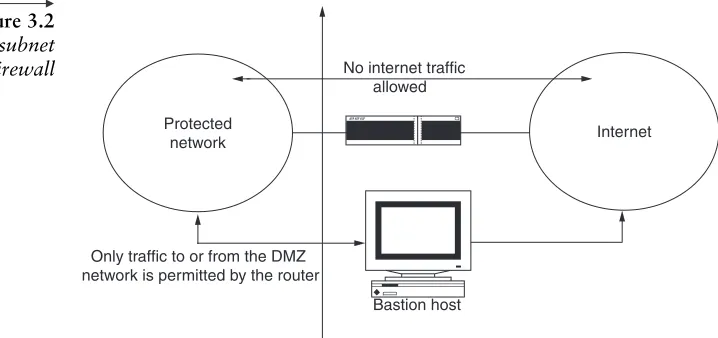
To build a DMZ, your firewall has to have three network inter-faces, as most nowadays do. One interface goes to the inside of your network, one goes to the untrusted Internet, and the third goes to the DMZ. The DMZ consists of those servers you need to connect outside of the firewall. Servers containing your mission-critical data are protected behind the firewall.
Also, when you configure your firewall rule set, you want to put tight restrictions on the traffic you let through to your internal network and use different and perhaps less restrictive rules for your DMZ. For example, you can allow HTTP to the web server on your DMZ, but not allow HTTP to your internal network. Systems in the DMZ should be as securely locked down as you can make them. You might use application-locking devices to prevent unauthorized behavior on your DMZ, and you might have an intrusion detection system in place on your DMZ. You can monitor machines on the DMZ fairly simply, because you know what ports need to be used and how the general public or your internal employees need to use the DMZ servers.
By contrast, you need highly restrictive firewall rules for traffic heading to your internal network for a variety of reasons. First, because security is typically an afterthought, the security of your internal network is typically in some sort of nebulous or unknown state, so you need to create a penetration barrier. Second, users inside your network will want maximum flexibility and, therefore, will reject internal security mechanisms as much as they can. You basically need to protect these users and their systems from their own naiveté.
In other words, you might not be able to secure all the systems on your network, but you can secure a small handful of systems—those on your DMZ. Therefore, it only takes securing a few systems to create a security perimeter around your internal network. If your internal network has grown to an ocean-sized state, putting a DMZ in place is a security project that has a defined scope—and that’s something you can turn into a security success story.
With the preceding in mind, a firewall can significantly improve the level of site security while permitting access to vital Internet serv-ices. This chapter, as well as those in Section I, provide an overview of firewall technology, including how firewalls protect against the vulnerabilities, what firewalls don’t protect against, and the compo-nents that make up a firewall. This part of the book gives special
emphasis to the use of advanced authentication (see Chapter 3) and the importance of policy (see Chapter 2 for determining how a firewall will implement a protection scheme).
However, the burning question that needs to be answered before we go any further is what really is a network firewall?
1.2 Firewall defined
A firewall is a system or group of systems that enforces an access control policy between two networks, as shown in Figure 1.1. The actual means by which this is accomplished varies widely, but in principle, the firewall can be thought of as a pair of mechanisms: one that exists to block traffic and the other to permit traffic. Some firewalls place greater emphasis on blocking traffic, while others emphasize permitting traffic. Probably the most important thing to recognize about a firewall is that it implements an access control policy. If you don’t have a good idea of what kind of access you want to permit or deny, or if you simply permit someone or some product to configure a firewall based on what they or it thinks it should do, then they are making policy for your organization as a whole.
In other words, a firewall is a network security product that acts as a barrier between two or more network segments. The firewall is a system (which consists of one or more components) that provides an access control mechanism between your network and the network(s) on the other side(s) of it. A firewall can also provide audit and alarm mechanisms that will allow you to keep a record of all access attempts to and from your network, as well as a real-time notification of things that you determine to be important.
Nevertheless, perhaps it is best to describe first what a firewall is not: A firewall is not simply a router, host system, or collection of systems that provides security to a network. Rather, a firewall is an
1.2 Firewall defined 7
Chapter 1
Firewall
Internal Network
[image:38.540.94.481.538.603.2]External Network (Internet) Figure 1.1
approach to security; it helps implement a larger security policy that defines the services and access to be permitted, and it is an imple-mentation of that policy in terms of a network configuration, one or more host systems and routers, and other security measures such as advanced authentication in place of static passwords. The main pur-pose of a firewall system is to control access to or from a protected network (a site). It implements a network access policy by forcing connections to pass through the firewall, where they can be examined and evaluated.
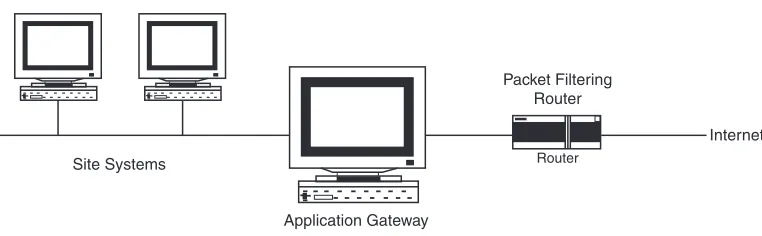
Furthermore, a firewall system can be a router, a personal com-puter, a host, or a collection of hosts, set up specifically to shield a site, subnet, or even a single computer or web server from protocols and services that can be abused from external hosts. A firewall system is usually located at a higher level gateway, such as a site’s connection to the Internet, as shown in Figure 1.2. However, firewall systems can be located at lower level gateways to provide protection for some smaller collection of hosts or subnets.
So, why do we need firewalls? What can a firewall do for you? Why would you want a firewall? What can a firewall not do for you? All of these burning questions are answered next for those inquiring security minds that want to know.
1.3 Why firewalls?
The general reasoning behind firewall usage is that without a fire-wall, a subnet’s systems expose themselves to inherently insecure services such as Network File System (NFS) or Network Information
[image:39.540.69.450.463.581.2]8 1.3 Why firewalls?
Figure 1.2 Router and application gateway firewall example.
Application Gateway
Packet Filtering Router
Internet Router
Service (NIS) and to probes and attacks from hosts elsewhere on the network (see FYI 1.1).
In a firewall-less environment, network security relies totally on host security, and all hosts must, in a sense, cooperate to achieve a uniformly high level of security. The larger the subnet, the less man-ageable it is to maintain all hosts at the same level of security. As mistakes and lapses in security become more common, break-ins occur not as the result of complex attacks, but because of simple errors in configuration and inadequate passwords.
1.3.1
The need for firewalls
As technology has advanced to greatly expand the information tech-nology (IT) systems capabilities of corporations, the threats to these systems have become numerous and complex. In today’s world, corporations face a variety of information system attacks against their local area networks (LANs) and wide area networks (WANs). Many of these attacks are directed through the Internet. These attacks come from three basic groups:
■ Persons who see attacking a corporation’s information system as
a technological challenge
1.3 Why firewalls? 9
Chapter 1
FYI 1.1 Why Would You Want a Firewall?
The Internet, like any other society, is plagued with the kind of jerks who enjoy the electronic equivalent of writing on other people’s walls with spray paint, tearing their mailboxes off, or just sitting in the street blowing their car horns. Some people try to get real work done over the Internet, and others have sensitive or proprietary data they must protect. Usually, a firewall’s purpose is to keep the jerks out of your network while still letting you get your job done.
Many traditional-style corporations and data centers have computing security policies and prac-tices that must be adhered to. In a case where a company’s policies dictate how data must be protected, a firewall is very important, because it is the embodiment of the corporate policy. Frequently, the hard-est part of hooking to the Internet, if you have a large company, is not justifying the expense or effort, but convincing management that it’s safe to do so. A firewall provides not only real security, but it often plays an important role as a security blanket for management.
■ Persons with no identified political or social agenda who see
attacking a corporation’s information system as an opportunity for high-tech vandalism
■ Persons associated with a corporate competitor or political
adver-sary who see the corporation’s information system as a legitimate strategic target2
To combat this growing and complex threat to a corporation’s LAN and/or Internet site, a series of protective countermeasures needs to be developed, continually updated, and improved. Security services that are important to protecting a corporation’s strategic information include the following:
■ Data integrity: Absolute verification that data have not been
modified
■ Confidentiality:Privacy with encryption, scrambled text
■ Authentication:Verification of originator on contract
■ Nonrepudiation:Undeniable proof of participation
■ Availability:Assurance of service demand2
Note:
The building and implementation of firewalls is an effective security countermeasure used to implement these security services. An external firewall is used to counter threats from the Internet. An internal firewall is used to primarily defend a corporation’s LAN or WAN. The internal firewall is used to separate and protect corporate data-bases (e.g., financial datadata-bases can be separated from personnel-databases). In addition, internal firewalls can be used to separate different levels of information being sent over a corporate LAN or
It’s really the endpoints, like the servers, on your network you need to secure, right? After all, that’s where the sensitive data live. You’ve got password protection on your servers, and you’ve implemented other security measures on your servers. You may even have an administrator for your servers who is security savvy; however, are you willing to bet your company’s private information in this way?
WAN (e.g., corporate proprietary information dealing with research projects, financial data, or personnel records).
Firewalls, however, are just one element in an array of possible IT systems countermeasures. The most effective security countermeasure is a good corporate security strategy. The effectiveness of this strategy will have a direct bearing on the success of any firewall that a corpo-ration builds or purchases. For example, the two critical elements that form the basis of an effective corporate security strategy are least privilegeanddefense in depth.
Least privilege
The principle of least privilege means that only those privileges that the object needs to perform are assigned tasks. Least privilege is an important principle in countering attacks and limiting damage.
Defense in depth
Don’t depend on one security solution. Good security is usually found in layers. These layers should consist of a variety of security products and services.
Note:
The solutions could be network security products (firewalls that could be both internal and external) and information systems security (INFOSEC) training (employee education through classes and threat/vulnerability briefings).
Note: Do you want to let themeven begin to work against your server’s security? Isn’t it possible that your administrator might go home at night and miss the attack? Can’t human errors in password security be made now and then? Firewalls are designed to allow you a very important second layer of protection. Detection of security problems can be made at this layer before any security breach can begin on any of your data-sensitive servers.
Not enough can be said regarding the importance of installing the latest security update patches and staying abreast of which ones are needed. All the firewalls in all the world might not help you if someone discovers you have not patched an exploit that they can breach your system through! This is especially true for firewalls that are not configured as tightly for the more publicly used servers that are running FTP, RDS, and web servers.
1.3 Why firewalls? 11
A firewall approach provides numerous advantages to sites by helping increase overall host security. The following section provides an overview of the primary benefits of using a firewall.
1.4 Benefits of firewalls
A firewall provides a leveraged choke point for network security. It allows the corporation to focus on a critically vulnerable point: where the corporation’s information system connects to the Internet. The firewall can control and prevent attacks from insecure network services. A firewall can effectively monitor all traffic passing through the system. In this manner, the firewall serves as an auditor for the system and can alert the corporation to anomalies in the system. The firewall can also log access and compile statistics, which can be used to create a profile of the system.
Some firewalls, on the other hand, permit only e-mail traffic through, thereby protecting the network against any attacks other than attacks against the e-mail service. Other firewalls provide less strict protection and block services that are known to be problems.
Generally, firewalls are configured to protect against unauthenti-cated interactive logins from the outside world. This, more than anything, helps prevent vandals from logging into machines on your network. More elaborate firewalls block traffic from the outside to the inside but permit users on the inside to communicate freely with the outside. The firewall can protect against any type of network-borne attack if you unplug it.
Firewalls are also important because they can provide a single
choke point (bottleneck) where security and audit can be imposed. Unlike in a situation where a computer system is being attacked by someone dialing in with a modem, the firewall can act as an effective
phone tap and tracing tool. Firewalls provide an important logging and auditing function. Often, they provide summaries to the adminis-trator about what kinds and amount of traffic has passed through it, how many attempts there were to break into it, etc. The following are the primary benefits of using a firewall:
■ Protection from vulnerable services that are running on the server
that may increase its vulnerability to attack
■ Controlled access to site systems
■ Concentrated security
■ Enhanced privacy
■ Logging and statistics on network use, misuse
■ Policy enforcement
■ VPN
■ DMZ2
1.4.1
Protection from vulnerable services
A firewall can greatly improve network security and reduce risks to hosts on the subnet by filtering inherently nonsecure services. As a result, the subnet network environment is exposed to fewer risks, because only selected protocols will be able to pass through the firewall.
For example, a firewall could prohibit certain vulnerable services such as NFS from entering or leaving a protected subnet. This provides the benefit of preventing the services from being exploited by outside attackers while permitting the use of these services with greatly reduced risk to exploitation. Services such as NIS or NFS that are particularly useful on a LAN basis can thus be enjoyed and used to reduce the host management burden.
Firewalls can also provide protection from routing-based attacks, such as source routing and attempts to redirect routing paths to compromised sites via Internet Control Message Protocol (ICMP) redirects. A firewall could reject all source-routed packets and ICMP redirects and then inform administrators of the incidents.
1.4.2
Controlled access to site systems
A firewall also provides the ability to control access to site systems. For example, some hosts can be made reachable from outside networks, whereas others can be effectively sealed off from unwanted access. A site could prevent outside access to its hosts except for special cases such as mail servers or information servers.
1.4 Benefits of firewalls 13
This brings to the fore an access policy that firewalls are particu-larly adept at enforcing: Do not provide access to hosts or services that do not require access. Put differently, why provide access to hosts and services that could be exploited by attackers when the access is not used or required? If, for example, a user requires little or no network access to his or her desktop workstation, then a firewall can enforce this policy.
Note:
1.4.3
Concentrated security
A firewall can actually be less expensive for an organization in that all or most modified software and additional security software could be located on the firewall systems as opposed to being distributed on many hosts. In particular, one-time password systems and other add-on authentication software could be located at the firewall as opposed to each system that needed to be accessed from the Internet.
Other solutions to network security such as Kerberos involve modifications at each host system. Although Kerberos and other techniques should be considered for their advantages and may be more appropriate than firewalls in certain situations, firewalls tend to be simpler to implement because only the firewall need run specialized software.
Note: Kerberos is an authentication system developed at the Massachusetts Institute of Technology (MIT). Kerberos is designed to enable two parties to exchange private informa-tion across an otherwise open network. It works by assigning a unique key, called a ticket, to each user who logs on to the network.The ticket is then embedded in messages to identify the sender of the message.
ICMP is an extension to the Internet Protocol (IP) defined by RFC 792. ICMP supports pack-ets containing error, control, and informational messages. The pingcommand, for example, uses ICMP to test an Internet connection.
1.5 Enhanced privacy
Privacy is of great concern to certain sites, because what would normally be considered innocuous information might actually contain clues that would be useful to an attacker. Using a firewall, some sites want to block services such as finger and Domain Name Service (DNS). Finger displays information about users such as their last login time and whether they’ve read mail and other items. However, finger could leak information to attackers about how often a system is used, whether the system has active users connected, and whether the system could be attacked without drawing attention.
Firewalls can also be used to block DNS information about site systems, making the names and IP addresses of site systems unavailable to Internet hosts. Some site administrators feel that by blocking this information, they are hiding information that would otherwise be useful to attackers.
1.5.1
Logging and statistics on network
use and misuse
If all access to and from the Internet passes through a firewall, the firewall can log accesses and provide valuable statistics about network usage. A firewall, with appropriate alarms that sound when suspi-cious activity occurs, can also provide details on whether the firewall and network are being probed or attacked.
It is important to collect network usage statistics and evidence of probing for a number of reasons. Of primary importance is knowing whether the firewall is withstanding probes and attacks and deter-mining whether the controls on the firewall are adequate. Network usage statistics are also important as input into network requirements studies and risk analysis activities.
1.5.2
Policy enforcement
Lastly, but perhaps most importantly, a firewall provides the means for implementing and enforcing a network access policy. In effect, a firewall provides access control to users and services. Thus, a network access policy can be enforced by a firewall, whereas with-out a firewall, such a policy depends entirely on the cooperation of users. A site may be able to depend on its own users for their
1.5 Enhanced privacy 15
cooperation, but it cannot and it should not depend on Internet users in general.
Given these benefits to the firewall approach, there are also a number of disadvantages and a number of things that firewalls cannot protect against. A firewall is not by any means a panacea for Internet security problems.
1.6 Limitations of firewalls
Firewalls can’t protect against attacks that don’t go through the firewall. Many corporations that connect to the Internet are very concerned about proprietary data leaking out of the company through that route. Unfortunately for those concerned, a magnetic tape can just as effectively be used to export data. Many organizations that are terrified (at a management level) of Internet connections have no coherent policy about how dial-in access via modems should be protected. It’s silly to build an 8-foot-thick steel door when you live in a wooden house. But, there are a lot of organizations out there buying expensive firewalls and neglecting the numerous other back-doors into their network. For a firewall to work, it must be part of a consistent overall organizational security architecture. Firewall policies must be realistic and reflect the level of security in the entire network. For example, a site with top secret or classified data doesn’t need a firewall at all; it shouldn’t be hooking up to the Internet in the first place; or the systems with the truly secret data should be isolated from the rest of the corporate network.
Another thing a firewall can’t really protect you against is traitors or idiots/morons inside your network. While an industrial spy might export information through your firewall, he or she is just as likely to export it through a telephone, fax machine, or floppy disk. Floppy disks are a far more likely means for information to leak from your organization than a firewall! Firewalls also cannot protect against stupidity. Users who reveal sensitive information over the telephone are good targets for social engineering. An attacker may be able to break into your network by completely bypassing your firewall, if he or she can find a helpful employee inside who can be fooled into giving access to a modem pool (see FYI 1.2).
A firewall opens communications channels between two networks and has no control over what users choose to transmit using these
channels. It has no concept of the value or sensitivity of the data it is transferring between networks, and therefore, it cannot protect infor-mation on that basis. A firewall cannot control what users choose to do with the data once they have received it. If a user chooses to modify or propagate that information, the firewall has no effect.
A firewall can protect the integrity of information from the time that it receives the information until it releases it on the other
1.6 Limitations of firewalls 17
Chapter 1
FYI 1.2 Failsafe
Who’s responsible for your data security? You are, right? You and the other people in your IT shop.
Ever since databases began to be stored in computer-readable form, it’s been IT’s job to protect them. That doesn’t just mean managing the technology to protect the data. It means protecting the data. And that, in turn, means that news reports coming out of hacker conferences (consisting of self-professed hackers, crackers, and phreakers) should have you grinding your teeth, tearing out your hair, and reaching for the TUMS.
The big news is that these days you don’t have to be a technology Dark Force to breach firewalls, crash servers, and otherwise wreak havoc on corporate IT systems. In other words, “social engineering” is back with a vengeance.
Social engineering is hacker speak for using nontechnological ways of getting access to your systems—dumpster diving for passwords, say, or making friends with your company’s employees just so they can be pumped for useful information, or using the phone and a few glib lies to collect the keys to your kingdom.
Maybe the most chilling presentation from the hacker conferences was an account of how one hacker cracked a bank’s security using only a phone. First, he called an executive’s secretary, posing as a human resources (HR) staffer, and pumped her for information on the executive. Then he called HR, posing as the executive whose identity he had just stolen, and talked a gullible staffer out of a list of new employees and their ID numbers over the phone. Finally, he called the employees, posing as an information systems staffer, and talked dozens of them into divulging their logins and passwords.
Yes, he’s an expert, and yes, he lied a lot. But that’s all it took to render the bank’s three firewalls completely useless.
Social engineering isn’t new. Spies, hackers, and unscrupulous competitors have used these techniques for decades. But now it’s more popular than ever. So if you’re going to protect that data, you’ll have to start doing some social engineering of your own. You’ll have to drill this into the brain of every new hire and longtime executive and everyone in between: They must not divulge key infor-mation to anyone they don’t know, with certainty, is inside the company. Not by e-mail. Not over the phone. Not in person. No logins. No passwords. No employee ID numbers. Not even information about what software they use.
You’ve got to get to new employees first and renew the message often. You’ve got to hammer it home every time an IT staffer makes contact with any other employee.
network. It cannot, however, test or ensure information integrity before it receives it or after it releases it. It also cannot prevent trusted users from disclosing (either accidentally or deliberately) information if they choose to do so.
However, a firewall cannot provide access control on any of your inside systems from someone already inside the firewall. If someone has already bypassed your firewall or is physically located on your inside network, then access attempts to your inside systems no longer need to go through the firewall, and the firewall will provide no protection.
Furthermore, a firewall cannot protect you from war driving or wireless hacking. War driving involves roaming around a neighbor-hood looking for the increasingly numerous “hot spots” where high-speed Internet access is beamed to a small area by a low-power radio signal—thanks to a scheme called Wireless Fidelity.In other words, it’s where hackers drive around with a wireless network PC, looking for unsecure wireless networks—networks that may very well have a firewall to protect them from the Internet but do nothing to protect the wireless internal network (often in peoples’ homes). Furthermore, war driving is also using wireless computers to find and “plug into” wireless networks, often without the owner’s permission or knowledge. For example, imagine your computer as a walkie-talkie, but instead of talking, you’re getting high-speed Internet access. Wi-Fi, as it’s generally called (“propeller heads” call it 802.11b), has unexpect-edly emerged as the wireless world’s Maltese falcon, something truly lustworthy and, once possessed, impossible to let go of.
Finally, a firewall cannot completely protect your systems from any data-driven attack such as viruses.
1.6.1
What about viruses?
Firewalls can’t protect very well against things like viruses. There are too many ways of encoding binary files for transfer over networks and too many architectures and viruses to try to search for them all. In other words, a firewall cannot replace security consciousness on the part of your users. In general, a firewall cannot protect against a data-driven attack—attacks in which something is mailed or copied to an internal host, where it is then executed. This form of attack has occurred in the past against various versions of Sendmail (Unix e-mail server) and GhostScript, a freely-available PostScript viewer.