Testing Web Security-Assessing the Security of Web
Sites and Applications
Steven Splaine
Wiley Publishing, Inc.
Publisher: Robert Ipsen Editor: Carol Long
Developmental Editor: Scott Amerman Managing Editor: John Atkins
New Media Editor: Brian Snapp
Text Design & Composition: Wiley Composition Services
Designations used by companies to distinguish their products are often claimed as trademarks. In all instances where Wiley Publishing, Inc., is aware of a claim, the product names appear in initial capital or ALL CAPITAL LETTERS. Readers, however, should contact the appropriate companies for more complete information regarding trademarks and registration.
This book is printed on acid-free paper.
Copyright © 2002 by Steven Splaine.
ISBN:0471232815
All rights reserved.
Published by Wiley Publishing, Inc., Indianapolis, Indiana
Published simultaneously in Canada
No part of this publication may be reproduced, stored in a retrieval system, or transmitted in any form or by any means, electronic, mechanical, photocopying, recording, scanning, or otherwise, except as permitted under Section 107 or 108 of the 1976 United States Copyright Act, without either the prior written permission of the Publisher, or authorization through payment of the appropriate per-copy fee to the Copyright Clearance Center, Inc., 222 Rosewood Drive, Danvers, MA 01923, (978) 750-8400, fax (978) 750-4470. Requests to the Publisher for permission should be addressed to the Legal Department, Wiley Publishing, Inc., 10475 Crosspointe Blvd., Indianapolis, IN 46256, (317) 572-3447, fax (317) 572-4447, Email: <[email protected]>.
For general information on our other products and services, please contact our Customer Care Department within the United States at (800) 762-2974, outside the United States at (317) 572-3993 or fax (317) 572-4002.
Wiley also publishes its books in a variety of electronic formats. Some content that appears in print may not be available in electronic books.
Library of Congress Cataloging-in-Publication Data:
0-471-23281-5
Printed in the United States of America
10 9 8 7 6 5 4 3 2 1
To my wife Darlene and our sons, Jack and Sam, who every day remind me of just how fortunate I am.
To the victims and heroes of September 11, 2001, lest we forget that freedom must always be vigilant.
Acknowledgments
The topic of Web security is so large and the content is so frequently changing that it is impossible for a single person to understand every aspect of security testing. For this reason alone, this book would not have been possible without the help of the many security consultants, testers, webmasters, project managers, developers, DBAs, LAN administrators, firewall engineers, technical writers, academics, and tool vendors who were kind enough to offer their suggestions and constructive criticisms, which made this book more comprehensive, accurate, and easier to digest.
Many thanks to the following team of friends and colleagues who willingly spent many hours of what should have been their free time reviewing this book and/or advising me on how best to proceed with this project.
James Bach Joey Maier
Rex Black Brian McCaughey
Ross Collard Wayne Middleton
Rick Craig Claudette Moore
Dan Crawford David Parks
Yves de Montcheuil Eric Patel
Mickey Epperson Roger Rivest
Danny Faught Martin Ryan
Paul Gerrard John Smentowski
Stefan Jaskiel John Splaine
Professional Acknowledgment
I would like to thank everyone who helped me create and then extend Software Quality Engineering's Web Security Testing course (www.sqe.com), the source that provided much of the structure and content for this book. Specifically, many of SQE's staff, students, and clients provided me with numerous suggestions for improving the training course, many of which were subsequently incorporated into this book.
Foreword
As more and more organizations move to Internet-based and intranet-based applications, they find themselves exposed to new or increased risks to system quality, especially in the areas of performance and security. Steven Splaine's last book, The Web Testing Handbook, provided the reader with tips and techniques for testing performance along with many other important considerations for Web testing, such as functionality. Now Steve takes on the critical issue of testing Web security.
Too many users and even testers of Web applications believe that solving their security problems merely entails buying a firewall and connecting the various cables. In this book, Steve identifies this belief as the firewall myth, and I have seen victims of this myth in my own testing, consulting, and training work. This book not only helps dispel this myth, but it also provides practical steps you can take that really will allow you to find and resolve security problems throughout the network. Client-side, server-side, Internet, intranet, outside hackers and inside jobs, software, hardware, networks, and social engineering, it's all covered here. How should you run a penetration test? How can you assess the level of risk inherent in each potential security vulnerability, and test appropriately? When confronted with an existing system or building a new one, how do you keep track of everything that's out there that could conceivably become an entryway for trouble? In a readable way, Steve will show you the ins and outs of Web security testing. This book will be an important resource for me on my next Web testing project. If you are responsible for the testing or security of a Web system, I bet it will be helpful to you, too.
Rex Black
Preface
As the Internet continues to evolve, more and more organizations are replacing their placeholder or brochureware Web sites with mission-critical Web applications designed to generate revenue and integrate with their existing systems. One of the toughest challenges facing those charged with implementing these corporate goals is ensuring that these new storefronts are safe from attack and misuse.
Currently, the number of Web sites and Web applications that need to be tested for security vulnerabilities far exceeds the number of security professionals who are sufficiently experienced to carry out such an assessment. Unfortunately, this means that many Web sites and applications are either inadequately tested or simply not tested at all. These organizations are, in effect, playing a game of hacker roulette, just hoping to stay lucky.
A significant reason that not enough professionals are able to test the security of a Web site or application is the lack of introductory-level educational material. Much of the educational material available today is either high-level/strategic in nature and aimed at senior management and chief architects who are designing the high-level functionality of the system, or low-level/extremely technical in nature and aimed at experienced developers and network engineers charged with implementing these designs.
Testing Web Security is an attempt to fill the need for a straightforward, easy-to-follow book that can be used by anyone who is new to the security-testing field. Readers of my first book that I coauthored with Stefan Jaskiel will find I have retained in this book the checklist format that we found to be so popular with The Web Testing Handbook (Splaine and Jaskiel, 2001) and will thereby hopefully make it easier for security testers to ensure that the developers and network engineers have implemented a system that meets the explicit (and implied) security objectives envisioned by the system's architects and owners.
Table of Contents
Testing Web Security—Assessing the Security of Web Sites and Applications
Foreword Preface
Part I - An Introduction to the Book Chapter 1 - Introduction
Part II - Planning the Testing Effort Chapter 2 - Test Planning
Part III - Test Design
Chapter 3 - Network Security
Chapter 4 - System Software Security Chapter 5 - Client-Side Application Security Chapter 6 - Server-Side Application Security
Chapter 7 -Sneak Attacks: Guarding Against the Less-Thought-of Security Threats
Chapter 8 -Intruder Confusion, Detection, andResponse Part IV - Test Implementation
Chapter 9 - Assessment and Penetration Options Chapter 10 - Risk Analysis
Epilogue
Part V - Appendixes
Appendix A -An Overview of Network Protocols,Addresses, and Devices
Appendix B -SANS Institute Top 20 Critical InternetSecurity Vulnerabilities
Appendix C - Test-Deliverable Templates Additional Resources
Index
Part I: An Introduction to the Book
Chapter List
Chapter 1: Introduction
Overview
The following are some sobering statistics and stories that seek to illustrate the growing need to assess the security of Web sites and applications. The 2002 Computer Crime and Security Survey conducted by the Computer Security Institute (in conjunction with the San Francisco Federal Bureau of Investigation) reported the following statistics (available free of charge via www.gocsi.com):
Ninety percent of respondents (primarily large corporations and government agencies) detected computer security breaches within the last 12 months.
Seventy-four percent of respondents cited their Internet connection as a frequent point of attack, and 40 percent detected system penetration from the outside.
Seventy-five percent of respondents estimated that disgruntled employees were the likely source of some of the attacks that they experienced.
The following lists the number of security-related incidents reported to the CERT Coordination Center (www.cert.org) for the previous 4 1/2 years:
2002 (Q1 and Q2)-43,136 2001-52,658
2000-21,756 1999-9,859 1998-3,734
In February 2002, Reuters (www.reuters.co.uk) reported that "hackers" forced CloudNine Communications-one of Britain's oldest Internet service providers (ISPs) -out of business. CloudNine came to the conclusion that the cost of recovering from the attack was too great for the company to bear, and instead elected to hand over their customers to a rival ISP.
In May 2002, CNN/Money (www.money.cnn.com) reported that the financing division of a large U.S. automobile manufacturer was warning 13,000 people to be aware of identity theft after the automaker discovered "hackers" had posed as their employees in order to gain access to consumer credit reports.
The Goals of This Book
poorly designed Web application running on the Web site, an oversight in the firewall's configuration, or a disgruntled employee working from the inside.
THE FIREWALL MYTH
The firewall myth is alive and well, as the following two true conversations illustrate. Anthony is a director at a European software-testing consultancy, and Kevin is the owner of a mass-marketing firm based in Florida.
Anthony: We just paid for someone to come in and install three top-of-the-line firewalls, so we're all safe now.
Security tester: Has anybody tested them to make sure they are configured correctly?
Anthony: No, why should we?
Kevin: We're installing a new wireless network for the entire company. Security tester: Are you encrypting the data transmissions?
Kevin: I don't know; what difference does it make? No one would want to hack us, and even if they did, our firewall will protect us.
This book has two goals. The first goal is to raise the awareness of those managers responsible for the security of a Web site, conveying that a firewall should be part of the security solution, but not the solution. This information can assist them in identifying and planning the activities needed to test all of the possible avenues that an intruder could use to compromise a Web site. The second goal is aimed at the growing number of individuals who are new to the area of security testing, but are still expected to evaluate the security of a Web site. Although no book can be a substitute for years of experience, this book provides descriptions and checklists for hundreds of tests that can be adapted and used as a set of candidate test cases. These tests can be included in a Web site's security test plan(s), making the testing effort more comprehensive than it would have been otherwise. Where applicable, each section also references tools that can be used to automate many of these tasks in order to speed up the testing process.
The Approach of This Book
Testing techniques can be categorized in many different ways; white box versus black box is one of the most common categorizations. Black-box testing (also known as behavioral testing) treats the system being tested as a black box into which testers can't see. As a result, all the testing must be conducted via the system's external interfaces (for example, via an application's Web pages), and tests need to be designed based on what the system is expected to do and in accordance with its explicit or implied requirements. White-box testing assumes that the tester has direct access to the source code and can look into the box and see the inner workings of the system. This is why white-box testing is sometimes referred to as clear-box, glass-box, translucent, or structural testing. Having access to the source code helps testers to understand how the system works, enabling them to design tests that will exercise specific program execution paths. Input data can be submitted via external or internal interfaces. Test results do not need to be based solely on external outputs; they can also be deduced from examining internal data stores (such as records in an application's database or entries in an operating system's registry).
and Kaner et al. (1999) provide additional information on black-box and white-box testing techniques.
Gray-box testing techniques can be regarded as a hybrid approach. In other words, a tester still tests the system as a black box, but the tests are designed based on the knowledge gained by using white-box-like investigative techniques. Gray-box testers using the knowledge gained from examining the system's internal structure are able to design more accurate/focused tests, which yield higher defect detection rates than those achieved using a purely traditional black-box testing approach. At the same time, however, gray-box testers are also able to execute these tests without having to use resource-consuming white-box testing infrastructures.
GRAY-BOX TESTING
Gray-box testing incorporates elements of both black-box and white-box testing. It consists of methods and tools derived from having some knowledge of the internal workings of the application and the environment with which it interacts. This extra knowledge can be applied in black-box testing to enhance testing productivity, bug finding, and bug-analyzing efficiency.
Source: Nguyen (2000).
Wherever possible, this book attempts to adopt a gray-box approach to security testing. By covering the technologies used to build and deploy the systems that will be tested and then explaining the potential pitfalls (or vulnerabilities) of each technology design or implementation strategy, the reader will be able to create more effective tests that can still be executed in a resource-friendly black-box manner.
This book stops short of describing platform- and threat-specific test execution details, such as how to check that a Web site's Windows 2000/IIS v5.0 servers have been protected from an attack by the Nimda worm (for detailed information on this specific threat, refer to CERT advisory CA-2001-26-www.cert.org). Rather than trying to describe in detail the specifics of the thousands of different security threats that exist today (in the first half of 2002 alone, the CERT Coordination Center recorded 2,148 reported vulnerabilities), this book describes generic tests that can be extrapolated and customized by the reader to accommodate individual and unique needs. In addition, this book does not expand on how a security vulnerability could be exploited (information that is likely to be more useful to a security abuser than a security tester) and endeavors to avoid making specific recommendations on how to fix a security vulnerability, since the most appropriate remedy will vary from organization to organization and such a decision (and subsequent implementation) would generally be considered to be the role of a security designer.
How This Book Is Organized
To make it easier for readers to hone in on the chapters that are of most interest to them, this book has been divided into four parts. Part 1 is comprised of this chapter and provides an introduction and explanation of the framework used to construct this book.
Chapter 2, "Test Planning," provides the material for Part 2, "Planning the Testing Effort," and looks at the issues surrounding the planning of the testing effort.
Part 3, "Test Design," is the focus of this book and therefore forms the bulk of its content by itemizing the various candidate tests that the testing team should consider when evaluating what they are actually going to test as part of the security-testing effort of a Web site and its associated Web application(s). Because the testing is likely to require a variety of different skill sets, it's quite probable that different people will execute different groups of tests. With this consideration in mind, the tests have been grouped together based on the typical skill sets and backgrounds of the people who might be expected to execute them. This part includes the following chapters:
Chapter 3: Network Security
Chapter 4: System Software Security Chapter 5: Client-Side Application Security Chapter 6: Server-Side Application Security
Chapter 7: Sneak Attacks: Guarding against the Less-Thought-of Security Threats Chapter 8: Intruder Confusion, Detection, and Response
Having discussed what needs to be tested, Part 4, "Test Implementation," addresses the issue of how to best execute these tests in terms of who should actually do the work, what tools should be used, and what order the tests should be performed in (ranking test priority). This part includes the following chapters:
Chapter 9: Assessment and Penetration Options Chapter 10: Risk Analysis
As a means of support for these 10 chapters, the appendix provides some additional background information, specifically: a brief introduction to the basics of computer networks as utilized by many Web sites (in case some of the readers of this book are unfamiliar with the components used to build Web sites), a summarized list of the top-20 critical Internet security vulnerabilities (as determined by the SANS Institute), and some sample test deliverable templates (which a security-testing team could use as a starting point for developing their own customized documentation).
Finally, the resources section not only serves as a bibliography of all the books and Web sites referenced in this book, but it also lists other reference books that readers interested in testing Web security may find useful in their quest for knowledge.
Terminology Used in This Book
The following two sections describe some of the terms used in this book to describe the individuals who might seek to exploit a security vulnerability on a Web site-and hence the people that a security tester is trying to inhibit-and the names given to some of the more common deliverables that a security tester is likely to produce.
Hackers, Crackers, Script Kiddies, and Disgruntled Insiders
term to describe someone who tries to acquire unauthorized access to a computer or network of computers.
The terminology has become further blurred by the effort of some practitioners to differentiate the skill levels of those seeking unauthorized access. The term cracker is typically used to label an attacker who is knowledgeable enough to create his or her own hacks, whereas the term script kiddie is used to describe a person who primarily relies on the hacks of others (often passed around as a script or executable). The situation becomes even less clear if you try to pigeonhole disgruntled employees who don't need to gain unauthorized access in order to accomplish their malicious goals because they are already authorized to access the system.
Not all attackers are viewed equally. Aside from their varying technical expertise, they also may be differentiated by their ethics. Crudely speaking, based on their actions and intentions, attackers are often be categorized into one of the following color-coded groups:
White-hat hackers. These are individuals who are authorized by the owner of a Web site or Web-accessible product to ascertain whether or not the site or product is adequately protected from known security loopholes and common generic exploits. They are also known as ethical hackers, or are part of a group known as a tiger team or red team.
Gray-hat hackers. Also sometimes known as wackers, gray-hat hackers attack a new product or technology on their own initiative to determine if the product has any new security loopholes, to further their own education, or to satisfy their own curiosity. Although their often-stated aim is to improve the quality of the new technology or their own knowledge without directly causing harm to anyone, their methods can at times be disruptive. For example, some of these attackers will not inform the product's owner of a newly discovered security hole until they have had time to build and publicize a tool that enables the hole to be easily exploited by others.
HACKER
Webster's II New Riverside Dictionary offers three alternative definitions for the word hacker, the first two of which are relevant for our purposes:
o 1 a. Computer buff
o 1b. One who illegally gains access to another's electronic system
COLOR-CODING ATTACKERS
The reference to colored hats comes from Hollywood's use of hats in old black-and-white cowboy movies to help an audience differentiate between the good guys (white hats) and the bad guys (black hats).
black-considering individuals who do not always follow the actions of just one definition. For instance, if an attacker secretly practices the black art at night, but also publicly fights the good fight during the day, what kind of hatter does that make him?
Rather than use terms that potentially carry different meanings to different readers (such as hacker), this book will use the terms attacker, intruder, or assailant to describe someone who is up to no good on a Web site.
Testing Vocabulary
Many people who are new to the discipline of software testing are sometimes confused over exactly what is meant by some of the common terminology used to describe various software-testing artifacts. For example, they might ask the question, "What's the difference between a test case and a test run?" This confusion is in part due to various practitioners, organizations, book authors, and professional societies using slightly different vocabularies and often subtly different definitions for the terms defined within their own respective vocabularies. These terms and definitions vary for many reasons. Some definitions are embryonic (defined early in this discipline's history), whereas others reflect the desire by some practitioners to push the envelope of software testing to new areas.
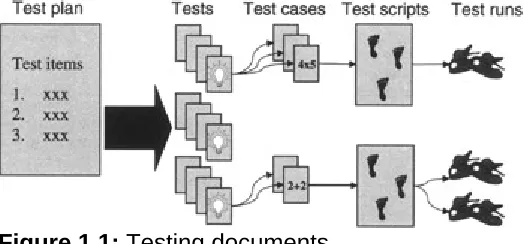
[image:14.595.73.338.475.597.2]The following simple definitions are for the testing artifacts more frequently referenced in this book. They are not intended to compete with or replace the more verbose and exacting definitions already defined in industry standards and other published materials, such as those defined by the Institute of Electrical and Electronics Engineers (www.ieee.org), the Project Management Institute (www.pmi.org), or Rational's Unified Process (www.rational.com). Rather, they are intended to provide the reader with a convenient reference of how these terms are used in this book. Figure 1.1 graphically summarizes the relationship between each of the documents.
Figure 1.1: Testing documents.
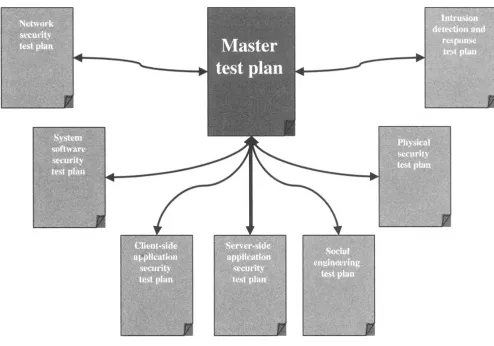
Test plan. A test plan is a document that describes the what, why, who, when, and how of a testing project. Some testing teams may choose to describe their entire testing effort within a single test plan, whereas others find it easier to organize groups of tests into two or more test plans, with each test plan focusing on a different aspect of the testing effort.
Test item. A test item is a hardware device or software program that is the subject of the testing effort. The term system under test is often used to refer to the collection of all test items.
Test. A test is an evaluation with a clearly defined objective of one or more test items. A sample objective could look like the following: "Check that no unneeded services are running on any of the system's servers."
Test case. A test case is a detailed description of a test. Some tests may necessitate utilizing several test cases in order to satisfy the stated objective of a single test. The description of the test case could be as simple as the following: "Check that NetBIOS has been disabled on the Web server." It could also provide additional details on how the test should be executed, such as the following: "Using the tool nmap, an external port scan will be performed against the Web server to determine if ports 137-139 have been closed."
Depending on the number and complexity of the test cases, a testing team may choose to specify their test cases in multiple test case documents, consolidate them into a single document, or possibly even embed them into the test plan itself.
Test script. A test script is a series of steps that need to be performed in order to execute a test case. Depending on whether the test has been automated, this series of steps may be expressed as a sequence of tasks that need to be performed manually or as the source code used by an automated testing tool to run the test. Note that some practitioners reserve the term test script for automated scripts and use the term test procedure for the manual components.
Test run. A test run is the actual execution of a test script. Each time a test case is executed, it creates a new instance of a test run.
Who Should Read This Book?
This book is aimed at three groups of people. The first group consists of the owners, CIOs, managers, and security officers of a Web site who are ultimately responsible for the security of their site. Because these people might not have a strong technical background and, consequently, not be aware of all the types of threats that their site faces, this book seeks to make these critical decision makers aware of what security testing entails and thereby enable them to delegate (and fund) a security-testing effort in a knowledgeable fashion.
The second group of individuals who should find this book useful are the architects and implementers of a Web site and application (local area network [LAN] administrators, developers, database administrators [DBAs], and so on) who may be aware of some (or all) of the security factors that should be considered when designing and building a Web site, but would appreciate having a checklist of security issues that they could use as they construct the site. These checklists can be used in much the same way that an experienced airplane pilot goes through a mandated preflight checklist before taking off. These are helpful because the consequences of overlooking a single item can be catastrophic.
Summary
Part II: Planning the Testing Effort
Chapter List
Chapter 2: Test Planning
Failing to adequately plan a testing effort will frequently result in the project's sponsors being unpleasantly surprised. The surprise could be in the form of an unexpected cost overrun by the testing team, or finding out that a critical component of a Web site wasn't tested and consequently permitted an intruder to gain unauthorized access to company confidential information.
This chapter looks at the key decisions that a security-testing team needs to make while planning their project, such as agreeing on the scope of the testing effort, assessing the risks (and mitigating contingencies) that the project may face, spelling out any rules of engagement (terms of reference) for interacting with a production environment, and specifying which configuration management practices to use. Failing to acknowledge any one of these considerations could have potentially dire consequences to the success of the testing effort and should therefore be addressed as early as possible in the project. Black (2002), Craig et al. (2002), Gerrard et al. (2002), Kaner et al. (1999, 2001), the Ideahamster Organization (www.ideahamster.org), and the Rational Unified Process (www.rational.com) provide additional information on planning a testing project.
Requirements
A common practice among testing teams charged with evaluating how closely a system will meet its user's (or owner's) expectations is to design a set of tests that confirm whether or not all of the features explicitly documented in a system's requirements specification have been implemented correctly. In other words, the objectives of the testing effort are dependent upon on the system's stated requirements. For example, if the system is required to do 10 things and the testing team runs a series of tests that confirm that the system can indeed accurately perform all 10 desired tasks, then the system will typically be considered to have passed. Unfortunately, as the following sections seek to illustrate, this process is nowhere near as simple a task to accomplish as the previous statement would lead you to believe.
Clarifying Requirements
Ideally, a system's requirements should be clearly and explicitly documented in order for the system to be evaluated to determine how closely it matches the expectations of the system's users and owners (as enshrined by the requirements documentation). Unfortunately, a testing team rarely inherits a comprehensive, unambiguous set of requirements; often the requirements team-or their surrogates, who in some instances may end up being the testing team-ends up having to clarify these requirements before the testing effort can be completed (or in some cases started). The following are just a few situations that may necessitate revisiting the system's requirements:
Implied requirements. Sometimes requirements are so obvious (to the requirements author) that the documentation of these requirements is deemed to be a waste of time. For example, it's rare to see a requirement such as "no spelling mistakes are to be permitted in the intruder response manual" explicitly documented, but at the same time, few organizations would regard spelling mistakes as desirable.
Nonspecific requirements. Specifying "strong passwords must be used" may sound like a good requirement, but from a testing perspective, what exactly is a strong password: a password longer than 7 characters or one longer than 10? To be considered strong, can the password use all uppercase or all lowercase characters, or must a mixture of both types of letters be used?
Global requirements. Faced with the daunting task of specifying everything that a system should not do, some requirements authors resort to all-encompassing statements like the following: "The Web site must be secure." Although everyone would agree that this is a good thing, the reality is that the only way the Web site could be made utterly secure is to disconnect it from any other network (including the Internet) and lock it behind a sealed door in a room to which no one has access. Undoubtedly, this is not what the author of the requirement had in mind.
Failing to ensure that a system's requirements are verifiable before the construction of the system is started (and consequently open to interpretation) is one of the leading reasons why systems need to be reworked or, worse still, a system enters service only for its users (or owners) to realize in production that the system is not actually doing what they need it to do. An organization would therefore be well advised to involve in the requirements gathering process the individuals who will be charged with verifying the system's capability. These individuals (ideally professional testers) may then review any documented requirement to ensure that it has been specified in such a way that it can be easily and impartially tested.
More clearly defined requirements should not only result in less rework on the part of development, but also speed the testing effort, as specific tests not only can be designed earlier, but their results are likely to require much less interpretation (debate). Barman (2001), Peltier (2001), and Wood (2001) provide additional information on writing security requirements.
Security Policies
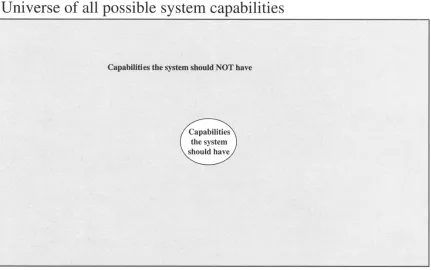
Figure 2.1: System capabilities.
When testing security requirements, a tester is likely to have to focus on deciding what negative tests should be performed to ascertain if the system is capable of doing something it should not do (capabilities that are rarely well documented-if at all). Since the number of tests needed to prove that a system does not do what it isn't supposed to is potentially enormous, and the testing effort is not, it is critically important that the security-testing team not only clarify any vague requirements, but also conduct a risk analysis (the subject of Chapter 10) to determine what subset of the limitless number of negative tests will be performed by the testing effort. They should then document exactly what (positive and negative tests) will and will not be covered and subsequently ensure that the sponsor of the effort approves of this proposed scope.
The Anatomy of a Test Plan
Once a set of requirements has been agreed upon (and where needed, clarified), thereby providing the testing team with a solid foundation for them to build upon, the testing team can then focus its attention on the test-planning decisions that the team will have to make before selecting and designing the tests that they intend to execute. These decisions and the rationale for making them are typically recorded in a document referred to as a test plan.
interproject communication. At the same time, the testing team should be permitted to customize the template or standard to reflect the needs of their specific project and not feel obliged to generate superfluous documentation purely because it's suggested in a specific template or standard. Craig et al. (2002) and Kaner et al. (2002) both provide additional guidance on customizing a test plan to better fit the unique needs of each testing project.
A test plan can be as large as several hundred pages in length or as simple as a single piece of paper (such as the one-page test plan described in Nguyen [2000]). A voluminous test plan can be a double-edged sword. A copiously documented test plan may contain a comprehensive analysis of the system to be tested and be extremely helpful to the testing team in the later stages of the project, but it could also represent the proverbial millstone that is hung around the resource neck of the testing team, consuming ever-increasing amounts of effort to keep up-to-date with the latest project developments or risk becoming obsolete. Contractual and regulatory obligations aside, the testing team should decide at what level of detail a test plan ceases to be an aid and starts to become a net drag on the project's productivity.
The testing team should be willing and able (contractual obligations aside) to modify the test plan in light of newly discovered information (such as the test results of some of the earlier scheduled tests), allowing the testing effort to hone in on the areas of the system that this newly discovered information indicates needs more testing. This is especially true if the testing effort is to adopt an iterative approach to testing, where the later iterations won't be planned in any great detail until the results of the earlier iterations are known.
As previously mentioned in this section, the content (meat) of a test plan is far more important that the structure (skeleton) that this information is hung on. The testing team should therefore always consider adapting their test plan(s) to meet the specific needs of each project. For example, before developing their initial test plan outline, the testing team may wish to review the test plan templates or checklists described by Kaner et al. (2002), Nguyen (2000), Perry (2000), Stottlemyer (2001), the Open Source Security Testing Methodology (www.osstmm.org), IEEE Std. 829 (www.standards.ieee.org), and the Rational unified process (www.rational.com). The testing team may then select and customize an existing template, or embark on constructing a brand-new structure and thereby produce the test plan that will best fit the unique needs of the project in hand.
One of the most widely referenced software-testing documentation standards to date is that of the IEEE Std. 829 (this standard can be downloaded for a fee from www.standards.ieee.org). For this reason, this chapter will discuss the content of a security test plan, in the context of an adapted version of the IEEE Std. 829-1998 (the 1998 version is a revision of the original 1983 standard).
IEEE STD. 829-1998 SECTION HEADINGS
For reference purposes, the sections that the IEEE 829-1998 standard recommends have been listed below:
j. Testing tasks
k. Environmental needs l. Responsibilities
m. Staffing and training needs n. Schedule
o. Risks and contingencies p. Approvals
Test Plan Identifier
Each test plan and, more importantly, each version of a test plan should be assigned an identifier that is unique within the organization. Assuming the organization already has a documentation configuration management process (manual or automated) in place, the method for determining the ID should already have been determined. If such a process has yet to be implemented, then it may pay to spend a little time trying to improve this situation before generating additional documentation (configuration management is discussed in more detail later in this chapter in the section Configuration Management).
Introduction
Given that test-planning documentation is not normally considered exciting reading, this section may be the only part of the plan that many of the intended readers of the plan actually read. If this is likely to be the case, then this section may need to be written in an executive summary style, providing the casual reader with a clear and concise understanding of the exact goal of this project and how the testing team intends to meet that goal. Depending upon the anticipated audience, it may be necessary to explain basic concepts such as why security testing is needed or highlight significant items of information buried in later sections of the document, such as under whose authority this testing effort is being initiated. The key consideration when writing this section is to anticipate what the targeted reader wants (and needs) to know.
Project Scope
Assuming that a high-level description of the project's testing objectives (or goals) was explicitly defined in the test plan's introduction, this section can be used to restate those objectives in much more detail. For example, the introduction may have stated that security testing will be performed on the wiley.com Web site, whereas in this section, the specific hardware and software items that make up the wiley.com Web site may be listed. For smaller Web sites, the difference may be trivial, but for larger sites that have been integrated into an organization's existing enterprise network or that share assets with other Web sites or organizations, the exact edge of the testing project's scope may not be obvious and should therefore be documented. Chapter 3 describes some of the techniques that can be used to build an inventory of the devices that need to be tested. These techniques can also precisely define the scope of the testing covered by this test plan.
Change Control Process
The scope of a testing effort is often defined very early in the testing project, often when comparatively little is known about the robustness and complexity of the system to be tested. Because changing the scope of a project often results in project delays and budget overruns, many teams attempt to freeze the scope of the project. However, if during the course of the testing effort, a situation arises that potentially warrants a change in the project's scope, then many organizations will decide whether or not to accommodate this change based on the recommendation of a change control board (CCB). For example, discovering halfway through the testing effort that a mirror Web site was planned to go into service next month (but had not yet been built) would raise the question "who is going to test the mirror site?" and consequently result in a change request being submitted to the CCB.
When applying a CCB-like process to changes in the scope of the security-testing effort in order to provide better project control, the members of a security-testing CCB should bear in mind that unlike the typical end user, an attacker is not bound by a project's scope or the decisions of a CCB. This requires them to perhaps be a little more flexible than they would normally be when faced with a nonsecurity orientation change request. After all, the testing project will most likely be considered a failure if an intruder is able to compromise a system using a route that had not been tested, just because it had been deemed to have been considered out of scope by the CCB.
A variation of the CCB change control process implementation is to break the projects up into small increments so that modifying the scope for the increment currently being tested becomes unnecessary because the change request can be included in the next scheduled increment. The role of the CCB is effectively performed by the group responsible for determining the content of future increments.
THE ROLE OF THE CCB
The CCB (also sometimes known as a configuration control board) is the group of individuals responsible for evaluating and deciding whether or not a requested change should be permitted and subsequently ensuring that any approved changes are implemented appropriately.
In some organizations, the CCB may be made up of a group of people drawn from different project roles, such as the product manager, project sponsor, system owner, internal security testers, local area network (LAN) administrators, and external consultants, and have elaborate approval processes. In other organizations, the role of the CCB may be performed by a single individual such as the project leader who simply gives a nod to the request. Regardless of who performs this role, the authority to change the scope of the testing effort should be documented in the test plan.
Features to Be Tested
Social engineering (covered in Chapter 7) Dumpster diving (covered in Chapter 7) Inside accomplices (covered in Chapter 7) Physical security (covered in Chapter 7) Mother nature (covered in Chapter 7) Sabotage (covered in Chapter 7)
Intruder confusion (covered in Chapter 8) Intrusion detection (covered in Chapter 8) Intrusion response (covered in Chapter 8)
Before embarking on an extended research and planning phase that encompasses every feature of security testing, the security-testing team should take a reality check. Just how likely is it that they have the sufficient time and funding to test everything? Most likely the security-testing team will not have all the resources they would like, in which case choices must be made to decide which areas of the system will be drilled and which areas will receive comparatively light testing. Ideally, this selection process should be systematic and impartial in nature. A common way of achieving this is through the use of a risk analysis (the subject of Chapter 10), the outcome of which should be a set of candidate tests that have been prioritized so that the tests that are anticipated to provide the greatest benefit are scheduled first and the ones that provide more marginal assistance are executed last (if at all).
Features Not to Be Tested
If the testing effort is to be spread across multiple test plans, there is a significant risk that some tests may drop through the proverbial cracks in the floor, because the respective scopes of the test plans do not dovetail together perfectly. A potentially much more dangerous situation is the scenario of an entire feature of the system going completely untested because everyone in the organization thought someone else was responsible for testing this facet of the system.
Therefore, it is a good practice to not only document what items will be tested by a specific test plan, but also what features of these items will be tested and what features will fall outside the scope of this test plan, thereby making it explicitly clear what is and is not covered by the scope of an individual test plan.
Approach
This section of the test plan is normally used to describe the strategy that will be used by the testing team to meet the test objectives that have been previously defined. It's not necessary to get into the nitty-gritty of every test strategy decision, but the major decisions such as what levels of testing (described later in this section) will be performed and when (or how frequently) in the system's life cycle the testing will be performed should be determined.
Levels of Testing
Many security tests can be conducted without having to recreate an entire replica of the system under test. The consequence of this mutual dependency (or lack of) on other components being completed impacts when and how some tests can be run.
components of the system are often referred to as integration-, string- or link-level tests, and finally those that would benefit from being executed in a full replica of the system are often called system-level tests. For example, checking that a server has had the latest security patch applied to its operating system can be performed in isolation and can be considered a unit-level test. Testing for the potential existence of a buffer overflow occurring in any of the server-side components of a Web application (possibly as a result of a malicious user entering an abnormally large string via the Web application's front-end) would be considered an integration- or system-level test depending upon how much of the system needed to be in place for the test to be executed and for the testing team to have a high degree of confidence in the ensuing test results.
One of the advantages of unit-level testing is that it can be conducted much earlier in a system's development life cycle since the testing is not dependent upon the completion or installation of any other component. Because of the fact that the earlier that a defect is detected, the easier (and therefore more cheaply) it can be fixed, an obvious advantage exists to executing as many tests as possible at the unit level instead of postponing these tests until system-level testing is conducted, which because of its inherent dependencies typically must occur later in the development life cycle.
Unfortunately, many organizations do not conduct as many security tests at the unit level as they could. The reasons for this are many and vary from organization to organization. However, one recurring theme that is cited in nearly every organization where unit testing is underutilized is that the people who are best situated to conduct this level of testing are often unaware of what should be tested and how to best accomplish this task. Although the how is often resolved through education (instructor-led training, books, mentoring, and so on), the what can to a large part be addressed by documenting the security tests that need to be performed in a unit-level checklist or more formally in a unit-level test plan-a step that is particularly important if the people who will be conducting these unit-level tests are not members of the team responsible for identifying all of the security tests that need to be performed.
Dividing tests up into phases based upon component dependencies is just one way a testing team may strategize their testing effort. Alternative or complementary strategies include breaking the testing objectives up into small increments, basing the priority and type of tests in later increments on information gleaned from running earlier tests (an heuristic or exploratory approach), and grouping the tests based on who would actually do the testing, whether it be developers, outsourced testing firms, or end users. The large variety of possible testing strategies in part explains the proliferation of testing level names that are in practice today, such as unit, integration, build, alpha, beta, system, acceptance, staging, and post-implementation to name but a few. Black (2003), Craig et al. (2002), Kaner et al. (2001), Gerrard et al. (2002), and Perry (2000) provide additional information on the various alternate testing strategies that could be employed by a testing team.
When to Test
For many in the software industry, testing is the activity that happens somewhere in the software development life cycle between coding and going live. Security tests are often some of the very last tests to be executed. This view might be an accurate observation of yesterday's system development, when development cycles were measured in years and the tasks that the system was being developed to perform were well understood and rarely changed, but it most certainly should not be the case today.
In today's world of ever-changing business requirements, rapid application development, and extreme programming, testing should occur throughout the software development life cycle (SDLC) rather than as a single-step activity that occurs toward the end of the process, when all too often too little time (or budget) is left to adequately test the product or fix a major flaw in the system.
When to Retest
Although many foresighted project managers have scheduled testing activities to occur early in the development cycle, it is less likely that as much thought will be given to planning the continuous testing that will be needed once the system goes live. Even if the functional requirements of a system remain unchanged, a system that was deemed secure last week may become insecure next week. The following are just a few examples of why this could happen:
A previously unknown exploit in an operating system used by the system becomes known to the attacker community.
Additional devices (firewalls, servers, routers, and so on) are added to the system to enable it to meet higher usage demands. Unfortunately, these newly added devices may not have been configured in exactly the same way as the existing devices.
A service pack installed to patch a recently discovered security hole also resets other configuration settings back to their default values.
Due to the large number of false alarms, the on-duty security personnel have become desensitized to intruder alerts and subsequently do not respond to any automated security warnings.
User-defined passwords that expire after a period of time and were originally long and cryptic have become short, easy to remember, and recycled.
Log files have grown to the point that no free disk space is left, thereby inhibiting the capability of an intruder detection system to detect an attack.
Security testing should not be regarded as a one-time event, but rather as a recurring activity that will be ongoing as long as the system remains active. The frequency with which the retests occur will to a large part be driven by the availability of resources to conduct the tests (cost) and the degree to which the system changes over time. Some events may, however, warrant an immediate (if limited in scope) retest. For example, the organization may decide to upgrade the operating system used by a number of the servers on the Web site, or a firewall vendor releases a "hot fix" for its product.
What to Retest
For tests that have been automated, there may be very little overhead in keeping these tests as part of a regression test set, especially if the automated test script is being maintained by another organization at no additional cost, which may well be the case for a security assessment tool (such as those listed in Table 9.4) that an organization has a maintenance agreement for, or is available free of charge.
THE REGRESSION TEST SET
Regression tests are usually intended to be executed many times and are designed to confirm that previously identified defects have been fixed and stay fixed, that functionality that should not have changed has indeed remained unaffected by any other changes to the system, or both.
With regard to manual tests, the determination as to whether or not to repeat a test will to a large part depend upon how problems previously detected by the test were fixed (and consequently what the likelihood is that the problem will reappear). For example, if the testing team had originally found that weak passwords were being used and the solution was to send an email telling everyone to clean up their act, then chances are within a couple of userID/password cycles, weak (easy to remember) passwords will again start to show up, necessitating the testing team to be ever vigilant for this potential vulnerability. If, on the other hand, a single user-sign-on system was implemented with tough password requirements, then the same issue is not likely to occur again and therefore may not warrant the original tests being included in future regression tests.
Pass/Fail Criteria
A standard testing practice is to document the expected or desired results of an individual test case prior to actually executing the test. As a result, a conscious (or subconscious) temptation to modify the pass criteria for a test based on its now known result is avoided.
helpful as a handcrafted report that lists the security vulnerabilities detected (or suspected) and their potential consequences if the system goes into service (or remains in service) as is.
If an organization's testing methodology mandates that a pass/fail criteria be specified for a security-testing test effort, it may be more appropriate for the test plan to use a criteria such as the following: "The IS Director will retain the decision as to whether the total and/or criticality of any or all detected vulnerabilities warrant the rework and/or retesting of the Web site." This is more useful than using a dubious pass criteria such as the following: "95 percent of the test cases must pass before the system can be deemed to have passed testing."
Suspension Criteria and Resumption Requirements
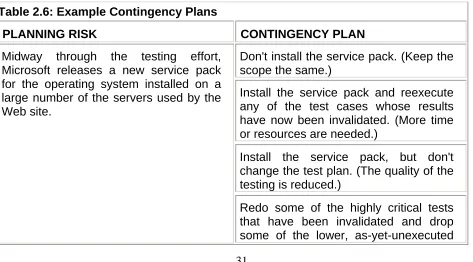
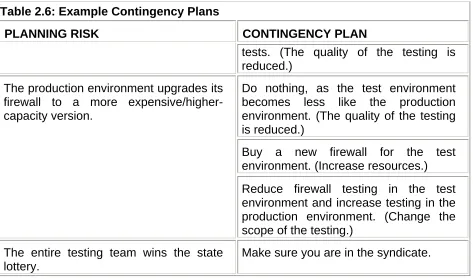
This section of the test plan may be used to identify the circumstances under which it would be prudent to suspend the entire testing effort (or just portions of it) and what requirements must subsequently be met in order to reinitiate the suspended activities. For example, running a penetration test would not be advisable just before the operating systems on the majority of the Web site's servers are scheduled to be upgraded with the latest service pack. Instead, testing these items would be more effective if it was suspended until after the servers have been upgraded and reconfigured.
Test Deliverables
Each of the deliverables that the testing team generates as a result of the security-testing effort should be documented in the test plan. The variety and content of these deliverables will vary from project to project and to a large extent depend on whether the documents themselves are a by-product or an end product of the testing effort.
As part of its contractual obligations, a company specializing in security testing may need to provide a client with detailed accounts of all the penetration tests that were attempted (regardless of their success) against the client's Web site. For example, the specific layout of the test log may have been specified as part of the statement of work that the testing company proposed to the client while bidding for the job. In this case, the test log is an end product and will need to be diligently (and time-consumingly) populated by the penetration-testing team or they risk not being paid in full for their work.
In comparison, a team of in-house testers trying to find a vulnerability in a Web application's user login procedure may use a screen-capture utility to record their test execution. In the event that a suspected defect is found, the tool could be used to play back the sequence of events that led up to the point of failure, thereby assisting the tester with filling out an incident or defect report. Once the report has been completed, the test execution recording could be attached to the defect (providing further assistance to the employee assigned to fix this defect) or be simply discarded along with all the recordings of test executions that didn't find anything unusual. In this case, the test log was produced as a by-product of the testing effort and improved the project's productivity.
Before a testing team commits to producing any deliverable, it should consider which deliverables will assist them in managing and executing the testing effort and which ones are likely to increase their documentation burden. It's not unheard of for testing teams who need to comply with some contractual documentary obligation to write up test designs and creatively populate test logs well after test execution has been completed.
Figure 2.2: Testing deliverables.
Test Log
The test log is intended to record the events that occur during test execution in a chronological order. The log can take the form of shorthand notes on the back of an envelope, a central database repository manually populated via a graphical user interface (GUI) front end, or a bitmap screen-capture utility unobtrusively running in the background taking screen snapshots every few seconds. Appendix C contains a sample layout for a test log.
Test Incident Report
An incident is something that happens during the course of test execution that merits further investigation. The incident may be an observable symptom of a defect in the item being tested, unexpected but acceptable behavior, a defect in the test itself, or an incident that is so trivial in nature or impossible to recreate that its exact cause is never diagnosed.
The test incident report is a critical project communication document because the majority of incidents are likely to be investigated by someone other than the person who initially observed (and presumable wrote up) the incident report. For this reason, it is important to use a clear and consistent report format and an agreement be reached between representatives of those who are likely to encounter and report the incidents and those who are likely to be charged with investigating them. Appendix C contains an example layout of a test incident report.
in a single defect-tracking report. In effect, a guilty-until-proven-innocent mentality is applied to the incidents.
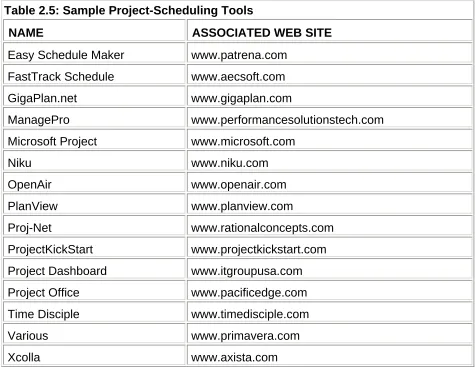
The question of who should be assigned ownership of a defect (who is responsible for making sure it is resolved) may be a politically charged issue. Often the testing team has the task of acting as the custodian of all known incident and defect reports. To make managing these reports easier, most testing teams utilize an automated tool such as one of those listed in Table 2.1.
Table 2.1: Sample Defect-Tracking Tools
NAME ASSOCIATED WEB SITE
Bug Cracker www.fesoft.com
Bugbase www.threerock.com
BugCollector www.nesbitt.com
Buggy www.novosys.de
BUGtrack www.skyeytech.com
BugLink www.pandawave.com
Bugzilla www.mozilla.org
ClearQuest www.rational.com
D-Tracker www.empirix.com
Elementool www.elementool.com
PT BugTracker www.avensoft.com
Razor www.visible.com
SWBTracker www.softwarewithbrains.com
Team Remote Debugger www.remotedebugger.com
Team Tracker www.hstech.com.au
TestDirector www.mercuryinteractive.com
TestTrack Pro www.seapine.com
Visual Intercept www.elsitech.com
ZeroDefect www.prostyle.com
Using a commercial defect-tracking tool (such as one of the tools listed in Table 2.1) or an in-house-developed tool typically enables the testing team to automatically produce all sorts of defect-tracking reports. Examples include project status reports showing the status of every reported incident/defect; progress reports showing the number of defects that have been found, newly assigned, or fixed since the last progress report was produced; agendas for the next project meeting where defect-fixing priorities will be assessed; and many interesting defect statistics.
frequently can often generate so much paper that the reports that are truly useful get lost in the paper shredder. Therefore, a testing team should consider what reports are actually going to be useful to the team itself and/or useful methods of communication to individuals outside of the testing team, and then document in this section of the test plan which reports they initially intend to produce. If the needs of the project change midway through the testing effort, requiring new reports, modifications to existing ones, or the retirement of unneeded ones, then the test plan should be updated to reflect the use of this new set of reports.
Metrics
Some defect metrics are so easy to collect that it's almost impossible to avoid publishing them. For example, the metrics of the number of new incidents found this week, the mean number of defects found per tested Web page, or the defects found per testing hour are easily found and gathered. The problem with statistics is that they can sometimes cause more problems than they solve. For instance, if 15 new bugs were found this week, 25 last week, and 40 the previous week, would senior management then determine that based on these statistics that the system being tested was nearly ready for release? The reality could be quite different. If test execution was prioritized so that the critical tests were run first, moderately important tests were run next, and the low-priority tests were run last, then with this additional information, it would be revealed that the unimportant stuff works relatively well compared to the system's critical components. This situation is hardly as desirable as might have been interpreted from the numbers at first glance.
Before cracking out metric after metric just because a tool produces it or because it just seems like the right thing to do, the testing team should first consider the value of these metrics to this project or to future projects. Moller et al. (1993) cites six general uses for software metrics: (1) goal setting, (2) improving quality, (3) improving productivity, (4) project planning, (5) managing, or (6) improving customer confidence. More specific goals may include identifying training needs, measuring test effectiveness, or pinpointing particularly error-prone areas of the system. If a proposed metric is not a measure that can be directly used to support one or more of these uses, then it runs the risk of being irrelevant or, worse still, misinterpreted. Black (2002, 2003), Craig et al. (2002), and Kan (1995) provide additional information on collecting and reporting software-testing metrics.
This section of the test plan can be used to document what metrics will be collected and (optionally) published during the testing effort. Note that some metrics associated with process improvement may not be analyzed until after this specific project has been completed. The results are then used to improve future projects.
Test Summary Report
The test summary report-also sometimes known as a test analysis report-enables the testing team to summarize all of its findings. The report typically contains information such as the following:
High-level project control information such as the number of hours and/or elapsed time expended on the testing effort, capital expenditure on the test environment, and any variance from the budget that was originally approved.
Optionally, an assessment of the accumulative severity of all the known defects and possibly an estimation of the number and severity of the defects that may still be lurking in the system undetected.
Finally, some test summary reports also include a recommendation as to whether or not the system is in a good enough state to be placed into or remain in production. Although the ultimate decision for approval should reside with the system's owner or surrogate, often the testing team has the most intimate knowledge of the strengths and weaknesses of the system. Therefore, the team is perhaps the best group to make an objective assessment of just how good, or bad, the system actually is.
The completion of the test summary report is often on a project plan's critical path. Therefore, the testing team may want to build this document in parallel with test execution rather than writing it at the end of the execution phase. Depending upon how long test execution is expected to take, it may be helpful to those charged with fixing the system's vulnerabilities to see beta versions of the report prior to its final publication. These beta versions often take the form of a weekly (or daily) status report, with the test summary report ultimately being the very last status report. Appendix C contains an example layout of a test summary report.
Environmental Needs
A test environment is a prerequisite if the security-testing team wants to be proactive and attempt to catch security defects before they are deployed in a production environment. In addition, tests can be devised and executed without worrying about whether or not executing the tests might inadvertently have an adverse effect on the system being tested, such as crashing a critical program. Indeed, some tests may be specifically designed to try and bring down the target system (a technique sometimes referred to as destructive testing). For example, a test that tried to emulate a denial-of-service (DoS) attack would be much safer to evaluate in a controlled test environment, than against a production system (even if in theory the production system had safeguards in place that should protect it against such an attack).
It would certainly be convenient if the testing team had a dedicated test lab that was an exact full-scale replica of the production environment, which they could use for testing. Unfortunately, usually as a result of budgetary constraints, the test environment is often not quite the same as the production environment it is meant to duplicate (in an extreme situation it could solely consist of an individual desktop PC). For example, instead of using four servers (as in the production environment) dedicated to running each of the following components-Web server, proxy server, application server, and database server-the test environment may consist of only one machine, which regrettably cannot be simultaneously configured four different ways. Even if a test environment can be created with an equivalent number of network devices, some of the devices used in the test lab may be cheap imitations of the products actually used in the production environment and therefore behave slightly differently. For example, a $100 firewall might be used for a test instead of the $50,000 one used in production.
steps that are prone to human error, then just because the proxy server in the test lab has been configured to implement every security policy correctly does not mean that the production version has also been implemented correctly.
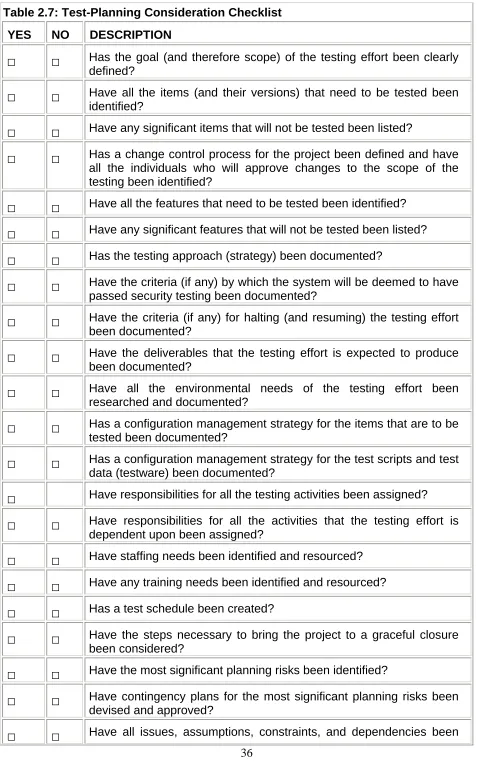
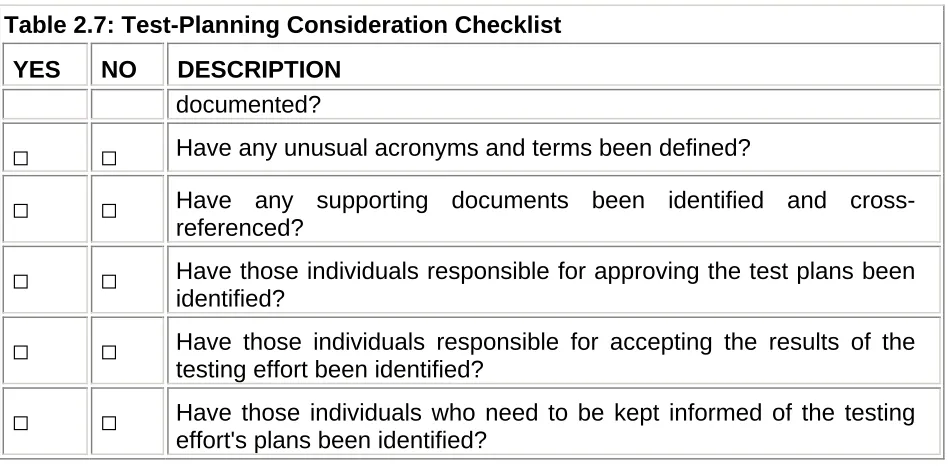
In all probability, some critical site infrastructure security tests will need to be rerun on the production environment (such as checking the strength of system administrators' passwords, or the correct implementation of a set of firewall rules). If the Web site being tested is brand-new, this extra step should not pose a problem because these tests can be run on the production environment prior to the site going live. For a Web site that has already gone live, the security-testing team must develop some rules of engagement (terms of reference) that specify when and how the site may be prodded and probed, especially if the site was previously undertested or not tested at all. These rules serve as a means of eliminating false intruder alarms, avoiding accidental service outages during peak site usage, and inadvertently ignoring legitimate intruder alarms (because it was thought that the alarm was triggered by the security-testing team and not a real intruder).
Configuration Management
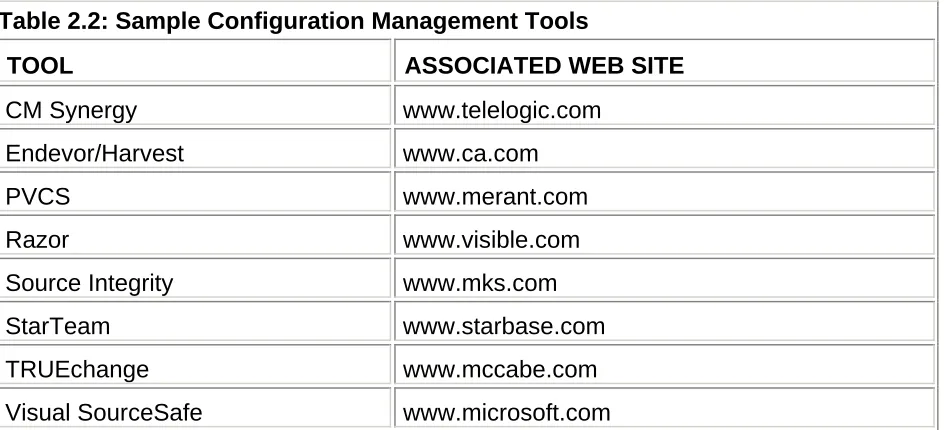
Configuration management is the process of identifying (what), controlling (library management), tracking (who and when), and reporting (who needs to know) the components of a system at discrete points in time for the primary purpose of maintaining the integrity of the system. A good configuration management process is not so obtrusive, bureaucratic, or all encompassing that it has a net negative effect on development or testing productivity, but rather speeds such activities.
Developing, testing, or maintaining anything but the most simplistic of Web sites is virtually impossible without implementing some kind of configuration management process and should therefore be a prerequisite for any significant testing effort, and consequently be addressed by the associated test plan. For example, a Webmaster may choose to install an operating system service pack midway through a penetration test, or a developer may directly perform a quick fix on the Web application in production. Both decisions can cause a great deal of confusion and consequently prove to be quite costly to straighten out.