Rochester Institute of Technology
RIT Scholar Works
Theses
Thesis/Dissertation Collections
11-1-2005
Digital sketchpad: A Portable scetching device
Jung-Hwa Kim
Follow this and additional works at:
http://scholarworks.rit.edu/theses
This Thesis is brought to you for free and open access by the Thesis/Dissertation Collections at RIT Scholar Works. It has been accepted for inclusion in Theses by an authorized administrator of RIT Scholar Works. For more information, please [email protected].
Recommended Citation
Rochester Instituteof
Technology
A Thesis
Submitted
to theFaculty
ofThe Collegeof
Imaging
ArtsandSciencesin
Candidacy
fortheDegree ofMasterofFine Arts
Digital Sketchpad:
A Portable
Sketching
DeviceBy
Jung-Hwa Kim
CONTENTS
LIST OF TABLES ii
LIST OFILLUSTRATIONS hi
CHAPTER 1. INTRODUCTION 1
The Problem
AnalysisandResearch
Shortcomingsof
Existing
ProductsDisplay Technology
ErgonomicResearch
CHAPTER 2. DESIGNDEVELOPMENT 5
Goals
Criteria
Concept Development
EvaluationofConcepts
CHAPTER3. FINAL DESIGN 10
Features
Interface Design
Presentation
3D ComputerModel Renderings
Physical Models
Thesis Show Exhibition
CHAPTER 4. EVALUATION ANDCONCLUSION 23
Presentation
Technology
Design
BIBLIOGRAPHY 24
LISTOF TABLES
Table Page
LIST OFILLUSTRATIONS
Figure Page
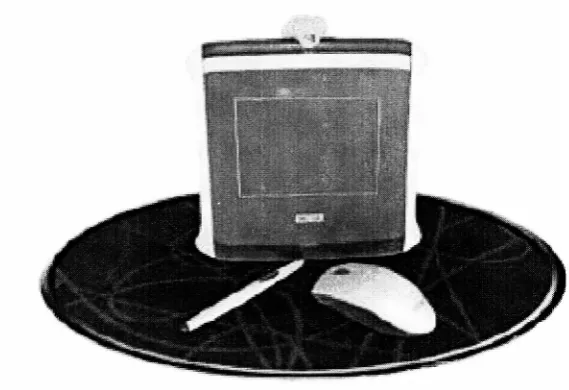
1. Wacom Graphire 2
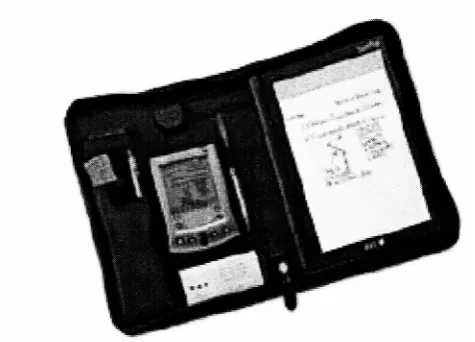
2. Seiko Smartpad 3
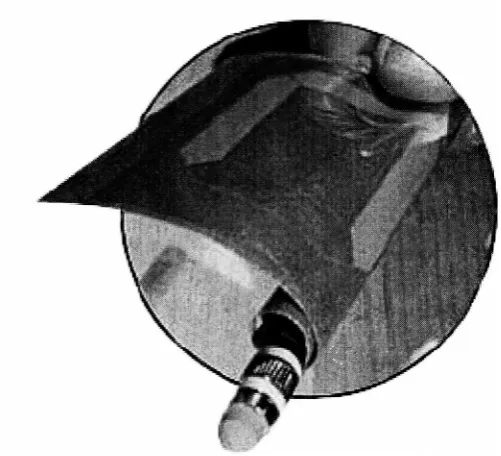
3. Lucent Technologies E-paper 4
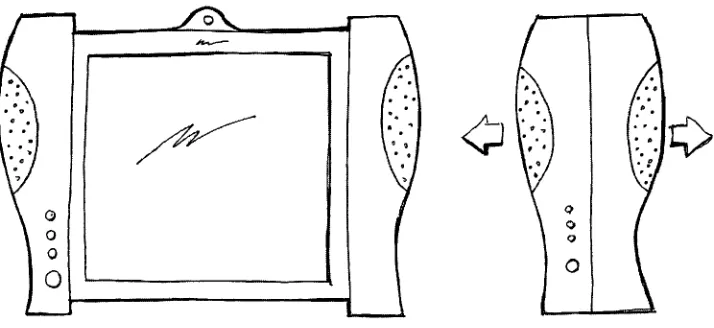
4. "Roll-outscreen"
concept 7
5.
"Fold-up
planner"concept 7
6. "Wearabledevice"
concept 8
7. Thecontouredformgrippedinonehand 10
8. Thecontouredformgrippedwithtwohands 11
9. Thecontouredform-sideview 11
10. The
telescoping
panel 121 1. ComponentsoftheDigitalSketchpad 13
12. The
USB,
antenna,andACadapter 1313. Thepower switch 14
14. The Digital Sketchpadconnectedtoa computer 14
15. The sketchingposition 15
16. Thestylus 15
17. The E-paper
display
1618. The Interface design 17
19. 3Dcomputermodel rendering showingcomponents 18
20. 3Dcomputermodel renderingshowingopen and closed positions 19
21. The Ren Boardmodel components 20
22. Themodelmakingprocess 20
23. The finalphysicalmodels 21
24. Thesisshowexhibition overall view 22
25. Thesisshowexhibitionclose-upview 22
CHAPTER1
INTRODUCTION
The Problem
Today
werelymore on computerstoperformourfunctionaltasks.Many
professionalfieldsincorporateadvanced applicationsintotheirrespective areas.Forexample,widelyutilized
computer applications such as
Photoshop
andIllustratorallow peopletocapture concepts andideas inthecomputer ratherthanon paper.
However,
sketching usingamousehas its limitationsandcanbe inconvenient. Usersarerestrictedtotheuse ofa mouseinsteadof apentosketchnatural curves exceptwith some
products. Thosewhoprefer a more comfortablehand
drawing
positiontoa mousemay find itdifficultto
fully
expresstheirideas. AshortfallofartbasedcomputerapplicationssuchasPhotoshop
andIllustrator isthatpeople needtoinstalltheseapplications on acomputerthatcannotbe easilycarriedaroundintheirpalm.Theselimitationsexplainwhymost people
today
still make sketchesonpaper.
However,
theproblem associatedwithsketches on paperistheexcessconsumptionthatleadstoa wasteof paper.
Also,
thesesketches arehardtoorganize,andtakeuptoomuch space.
Bulky drawing
materials such ascolorpencils, paint, charcoal,and pensare someofthenecessary itemsthatonenormallycarriesin hisorher bag.
Ideasonpaper cannotbe
instantly
convertedintoaflexible digitalformat,
otherwise apart oftheconceptmay be lostorforgotten
by
the timea user getstoacomputerbecausetheusersideasoften cometothemunexpectedlyatanytimeoranyplace.
Thisthesispaper solvestheproblemsofsketchingon paper andin usingexisting
productsthatarecurrentlyonthemarketfor hand drawing.
My
projectisadigitaland portabledevicethathasattributes suchas;compactsize,
lightweight,
and portability.ThesefeaturesallowAnalysisandResearch
Shortcomingsof
Existing
ProductsFigurescanbesketched on a computerusing Wacom's Graphire1orSeiko SmartPad2for
thePalmOrganizer3
applications(See Fig. 1andFig.
2),
buttheseproductshaverestrictions.TheWacom Graphire isnot a portable productthatcanbecarriedaroundeasily becauseatablethas
tobeconnectedtoa computer via a cabletoaUSB4or serialport.
The Seiko Smart Pad forthePalm Organizer isportable,but it doesnotofferany
applicationstochange various colors andbrushstylesusedforthesketches.WithSeiko Smart
[image:9.523.103.388.288.483.2]Pad,
ausercanonly draw black lineswithapenciltool.Fig. 1. Wacom Graphire
1
Graphire,the mouse,pen andtabletsetfrom Wacom
Technology
Co. <http://www.wacom.com> 2SmartPad,a notepad which captureshandwrittennotes,<http://www.seikosmart.com/products/smartpad/>
3
Palm INC.http://www.palmos.com 4
USB-UniversalSerial Bus. Aroyalty-freeconnectorstandardfor PCs. The USBallowsupto 127
Fig. 2. Seiko SmartPad
Display Technology
A promising
display
technology
fordrawing
iselectronicpaper5
display
(See Fig. 3).Theattributesof compact sizeandlight-weightmaterial are emphasizedinthis technology.
Electronicpaperis thin,
flexible,
portable,lightaspaper,and canberolled-out.Electronicpaperwill soonbegintoreplacethedisplaysonpagers,cellular phones and personaldigitalassistants.
Electronicpaperenablesthedisplay'spaper-like qualities: easy viewing fromwide angles and
extraordinary brightness. The resultingsheetofelectronic paperisaboutthe thicknessofthin
cardboard(about 1mm). Anelectronicpapersheet ofthesizeofa standardletterwould costless
than$10tomake.
:
Fig. 3. Lucent Technologies Electronicpaper
Ergonomic Research
According
totheresearchfor WacomofThe Global ErgonomicTechnologies,6a
comparison of posturesfrompen and mouse useindicatesthat thereis less deviationofposture
fromaneutral arm position
during
penusethanduring
mouseuse.Studiesof mouse usagehavedemonstratedexcessivedeviation fromtheneutralposition. Penuseresultsina more neutral arm
positionthan
during
mouseuse.Therefore,
theresearchimpliesthatpen useisergonomicallysuperiorwhen comparedtomouse use.
6
For informationonthisstudygotohttp://vvww.wacom.com/productinfo/features.htmltodownloadthis
CHAPTER 2
DESIGNDEVELOPMENT
Goals
Thefirstgoal ofthedesignistobeableto take thehandhelddeviceanywhere onegoesto
sketch.Itwouldbe easyto takeontrips,meetings or evenjusttolunch becauseofitsportability.
Thedesignwouldbeaestheticallypleasing,like ApplecomputersiBookandPowerBook.
Thesecond goalistobeabletosend sketchesalreadysavedinthemachinetoother
peopleviaWireless Internet Access.
Thereby,
making it veryconvenienttosendsketchestootherpeople atanytimeandanyplace.
The lastgoalistobeabletocreate auser-friendly interfacethatusers caneasilysketch
on.
They
wouldbeabletoeasilytransfersketchesintoapplications such asPhotoShop
orIllustratortoenhancethesketches.Simple iconswouldbe easytounderstand anduse.This
devicewouldprovidedifferenttypesoftools.There wouldbeavarietyoftoolstosketch
drawings in manycolorssothatpeople would notbe intimidated
by
thetechnology
and wouldhave fun usingthisproduct.
Criteria
Thecriteriaforthedesignistodefineadevicethatwillaccomplishthegoals.The design
conceptswouldbe developedand evaluated
by
thedeterminedcriteria. I determinedthefollowing
criteria respectiveto thegoals:User-friendly
interface- Thedisplay
size shouldbesimilarto thatof a standard sizeof apaper sketchpad about6 inchesx8 inches. The
display
thicknessshouldbeabout80micrometersthick,twicethe thicknessof a sheet ofordinarypaper.
Easy
transfershouldbepossibleintoapplications suchas
PhotoShop
andIllustratortofurtherPortability
- Thesize shouldbesmall enoughto takeanywherecomfortably.
Housing
size shouldbe lessthan4inches(wide)
x7inches(long)
x2inches (thick).Theweight shouldbelessthan 1.5pounds.Arechargeable alkaline
battery
shouldbeplacedinbottomofthehousing.
Lowcost
-ThepriceforthisdeviceshouldbenomorethanUSD$400.
Ergonomics
-Thedeviceshould accommodateboth right-handedandleft-handed
users.
Aesthetics- To differentiate from
thecurrenthand-heldcomputerproductstoday,the
deviceshould avoidtherectangular shapesandthecolor gray.The designshould
emphasize characteristics such asbrightcolors anda slim profile.
Concept Development
After
drawing
manythumbnail sketchesthatgeneratedmany different ideasandshapes,Ichose3conceptstobemockedup inthree-dimensionalform. The 3 concepts were asfollows:
1. Arollout screen
-Thescreen canberolledintothe twosidesinordertooccupy less
space.Theuseofflexible "electronic
paper"
makesthispossible.(See Fig. 4).
2. A
fold-up
planner- Thescreencanbe
folded-up,
collapsableinto halfthesize(SeeFig. 5).
3. Awearabledevice- Theuser
Fig. 4. "Roll-outscreen"
[image:14.523.83.440.50.214.2]concept
[image:14.523.76.443.336.536.2]Fig. 6. "Wearabledevice"
EvaluationofConcepts
Afterconcept
development,
thecommitteeandIevaluatedeach conceptmock-upmadewithblue foam.
According
to theevaluation,theroll-out concept satisfiedthemostcriteria.Thefinalconcept shouldbeabletohavea compact size
housing
butreasonabledisplay
size.Thedisplay
surface shouldbe flatand smoothforsketching.CONCEPT
CRITERIA
CONCEPT 1
(roll-out)
CONCEPT- 2
(fold-up)
CONCEPT- 3
(wearable
device)
User-friendly
interface
o
o
OPortability
o
o
o
Lowcost
o
O
o
Ergonomics
O
oo
AestheticsO
oo
Largesatisfaction
o
MediumsatisfactionO Smallsatisfaction
CHAPTER 3
FINAL DESIGN
Features
In
designing
theDigitalSketchpad,
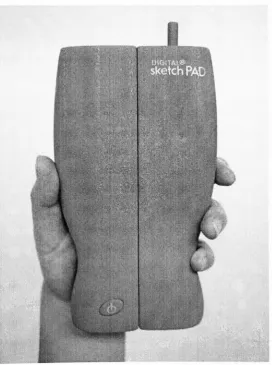
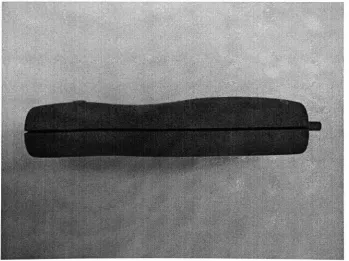
I determinedthefinal formtobecontouredto theshape ofthepalm(See
Fig.7,
Fig
8andFig
9). When openingthisdevice,
the shape wouldbecomfortableto theuser.Ialsodesignedthe
telescoping
paneltostabilizetheflexiblescreen(SeeFig. 10). Thepannelhas verythinandhardmaterialto
keep
theproductlight inweight.Torolloutthis
display,
atraditionalrollersystemisemployed.Therollersystemmakesitsmallerinsize.
[image:17.523.140.413.287.653.2]i
Fig. 7. Thecontouredformgrippedinonehand
Fig. 8. Thecontouredformgrippedwithtwohands
Fig.9. Thecontouredform
-sideview
[image:18.523.93.311.38.325.2] [image:18.523.91.441.386.647.2]Fig. 10. The
telescoping
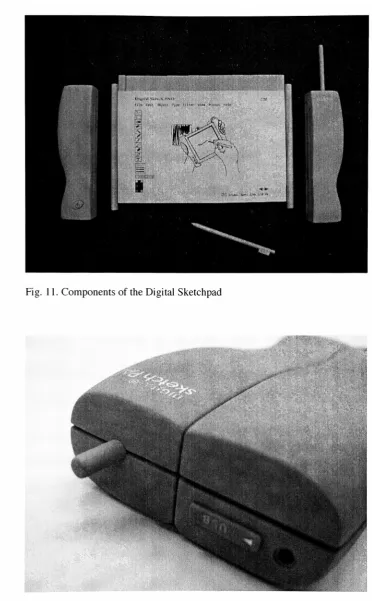
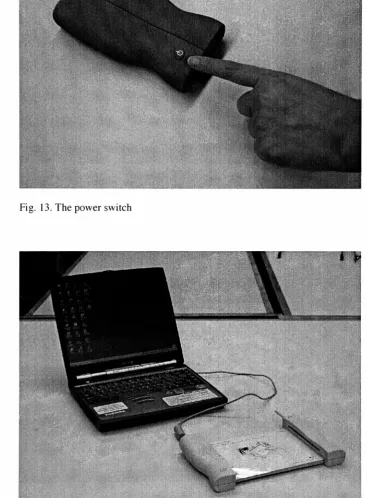
panelThe Digital Sketchpadwouldincludeseveral components(See Fig. 1 1). Aninputsystem
consistsof aFirewire/USB,Wireless Internet
Access,
and a stylus(See Fig.12,
Fig. 13andFig.14). The Firewire/USB port canbeconnectedtoa computer.The Wireless Internet Accesscanbe
usedas asourceofinstant datatransferand communication.Thestyluslooks likea pencil that
will work withauser's particular
drawing
style.Thispendoesnotneedbatteriesor an awkwardcord(See Fig. 15andFig. 16). TheoutputsystemistheElectronicpaper
display
(See. Fig. 17).Thesize ofthe
display
is 5.5 inchesx7.5 inchesx0.06inches,
whichisthe same as astandardpaper sketchpad.Thescreen resolution of 150 dotsperinchprovidescrispreadableinformation
and clearcolors.This device ispowered
by
rechargeablebattery
withanACadapter(SeeFig
12).Thesize ofthe
battery
is lessthan thatoftwoAAA batteries. Thememorywouldbeatleast32MBofRAMavailableforoperation.
[image:19.523.89.469.38.326.2]Fig. 1 1. ComponentsoftheDigital Sketchpad
ma
[image:20.523.65.438.23.625.2]f"'!WZ
Fig. 12. The
USB,
antenna,andACadapter [image:20.523.72.436.36.305.2]:;:- ..:-:;i:X^"V-'*
'
[image:21.523.79.445.61.361.2]M
Fig. 13. Thepower switch
mmmsgri:.
Fig. 14. TheDigitalSketchpadconnectedtoa computer
[image:21.523.79.447.133.632.2]Fig. 15. The sketchingposition
Fig. 16. Thestylus
[image:22.523.91.437.357.618.2]Fig. 17. Theelectronicpaper
display
Interface Design
Theinterfacewasdesignedwith simplevisual icons (See Fig. 18). Theusers could
enhancetheirsketcheswithcomputer applications such as
Photoshop
andIllustrator.TheinterfacewasdesignedtobesimilartoAdobe Illustratorsothattheusers wouldbe familiarwith
theinterface. Theactive sketch areais 5 inchesx7 inches.
1%
5H&
I
Digital Sketch PAD
File Edit Object Type Pill
? E3
vi.evv Window Help
[oTdToFISI
E2 Friday, April 27th 5:30PM
Fig. 18.TheInterface design
[image:24.523.100.463.189.478.2]Presentation
3DComputerModel Renderings
Thevirtual models oftheDigitalSketchpadwere constructedinthecomputer
by
usingAlias/Wavefrontstudio9.5 (See
Fig
19andFig.20). Themodelswerethenviewedatmany [image:25.523.52.483.190.473.2]differentangles. 3Drenderings showedtheproductinvariousmaterials,texturesandcolors.
Fig. 19. 3Dcomputer modelrenderingshowingcomponents
Fig. 20. 3Dcomputer modelrendering showingopen and closed positions
Physical Models
After exportingthetechnicaldrawingsfrom Alias/Wavefrontstudio
9.5,
1 builtseveralfull-sizephysical models(SeeFig. 21andFig.22). Models intheclosed and opened positions
were made withRen Shape 350 Board (See Fig. 23).
Fig. 21. The Ren Boardmodel components
Fig. 22. Themodelmakingprocess
[image:27.523.91.440.357.620.2]Fig. 23. The finalphysical models
Thesis Show Exhibition
Forthegalleryexhibition,postersweredesignedtopresentthefeaturesandfunctions.
Foraneffective
display
ofthedesign,
Iplanned an arrangement ofthemodelwithinformationalposters.
Also,
adisplay
stand was made ofwoodandtransparentplastictodisplay
thefinalmodels.
Theshowwasheld in Bevier
Gallery
atRIT fortwoweeksfrom April23rd
to
May
9thin 2001
(See Fig. 24andFig.25).
Fig. 24. Thesisshowexhibition overallview
Fig. 25. Thesisshow exhibitionclose-upview
[image:29.523.92.438.358.617.2]CHAPTER4.
EVALUATION ANDCONCLUSION
Variouscomments were madetome attheexhibition
by
mythesiscommitteeandtheexhibition audience. Mostgave positivefeedback. Inoticed a specialinterest intheproductfrom
children and parents.Thecomments canbe divided into 3categories:presentation,technology,
anddesign.
Presentation
Atthe exhibition,posters and physical models wereaneffective meanstocommunicate
howtooperatethisproduct.Themodelshelpedtheaudiencetounderstandtheproductmore
clearly.
Technology
The Digital Sketchpadwasdesignedtoincorporate existingtechnologies.
However,
"electronicpaper"
technologyhasyettobe widelymarketed.Thisproductisprojectedforthe
nearfuturewhenthetechnologyprogressesintheareaof electronicdisplays. The Digital
Sketchpadwouldbeanidealproductforthe introductionofElectronicpaper use.
Design
TheDigital Sketchpadwasformedas ahumanizedshape.Whenauserworks with
it,
heorshewillfeel comfortablebecauseofitsergonomic shape.
However,
thedetailsof accessoriessuchasthe
battery
spaceand ahandgrip
needtobe further developed.Also,
more colorsmaybeaddedtodistinguisheachcomponent.
BIBLIOGRAPHY
Bederson,
B.B.,
James D. HollanandGeorge G. Furnas."Pad++:AzoomableGraphicalSketchpadfor
Exploring
AlternateInterfacePhysics,"JournalofVisual Languagesand
Computing.Mar
01,
1996.Coates,
Del. "CAIDcurrents: digitalvellum,"
Innovation.
Vol.12,
no.2(Spring
1993).Picchi,
Francesca. "PDA Personal DigitalAssistant,"Domus.no.785(Sep.
1996)
82-85.Le,
Lana. "Thethinking
Pen,"LP. fUSA].
Vol.45,
no.7(Nov.1998)
87.Hall,
Peter."Palmistry,"LP. fUSAI.
Vol.46,
no.3(May 1999)
56-57.Gioscia,
Richard."Planning
Products forPlay,"Innovation.
Vol.12,
no.4(Fall 1993).Pheasant,
Stephen. Bodyspace: Anthropometry. ErgonomicsandtheDesignofWork. PA: Taylor&Francis. 1996.Scrivener,
S.A.R.et al."Designing
at adistancevia real-timedesigner-to-designerinteraction,"DesignStudies. Vol.
14,
no.3 (Jul.1993)
261-282.Vossoughi,
SohrabandHarry
Turvey."Thepower ofInformedDesign,"Axis,no.48(Summer
1993)132-135.
"Newton Message Pad 110and
Charging
station,"
LP. TUSA1.
Vol.41,
no.4(Jul/Aug. 1994). "What Future for Personal intelligenttools,"Axis,no.48(Summer
1993)
62-67."Product Concept fthePersonalIntelligentcommunicator/General
Magic,"
Axis,no.48(Summer
1993)
68-73. Websites:Graphire.http://www.wacom.com/graphire/index.html.2000.
Lucent Technologies Licenses Bell Labs
Technology
toE inkand makescashinvestment. http://ww w.1ucent.com/press/0600/000613.coahtml. 2000.PalmOS-SoftwaresforPalmpilots.http://palmos.com/. 2000.
Palo Alto ProductInternational-IndustrialPesign.http://www.paloaltoproducts.com/. 1999.
SeikoInstruments-SmartLabelPrinterProducts.
http://www.seikosmart.com/products/smartpad.html.2000.
WiredMagazine,http://www.wired.com/wired/current.html. 1994-2000.