Joomla!
Development
...
1. Introduction
9
...
The Problem
9
...
The Solution
10
...
Coding?
10
...
What Can You Learn From This Book?
11
...
How to Start?
11
...
2. Prepare Your Workstation
14
...
Source Code Editors
15
...
Integrated Development Environments (IDE)
16
...
What Are Professional Developers Using?
16
...
Lamp Software Bundle
17
...
Other Tools
18
...
What Do I Need?
18
...
3. Write Your Own Component
20
...
Model-View-Controller Architecture
21
...
Is It Necessary to Build A Component From Scratch?
21
...
How to Start?
22
...
The Cocoate Real Estate Component
23
...
4. Step 1 - The Basics
25
...
Frontend and Backend
26
...
Files and Installation
27
...
Discover Extension
27
...
Install Extension
27
...
...
5. Step 2 - Database, Backend, Languages
35
...
Cocoate Real Estate (CRE) Version 0.0.2 Screenshots
35
...
CRE Version 0.0.2 Files
39
...
Database Table cocoaterealestate_objects
40
...
Models, Tables, Fields, Language Files
42
...
Controllers
51
...
Views in Frontend and Backend
53
...
6. The Cool Stuff
63
...
What Is Missing in Our Component?
64
...
The Future of Cocoate Real Estate
65
...
The Deal
65
...
7. Write Your Own Module
66
...
mod_contact_list.xml
69
...
mod_contact_list.php
73
...
helper.php
74
...
tmpl/default.php
77
...
language/en-GB/en-GB_mod_contact_list.ini
78
...
language/en-GB/en-GB_mod_contact_list.sys.ini
78
...
index.html
78
...
Packaging the Module for Installation
79
...
8. Write Your Own Plugin
80
...
Example
81
...
9. Write Your Own Template Overrides
86
...
...
10. Write Your Own Layout Alternative
91
...
Example for Module Alternative Layouts
92
...
Alternative Menu Items
94
...
Read More:
94
11. Write Your Own App Using Joomla! Platform
96
...
History
96
...
Using the Joomla Platform
98
...
A Web App
102
...
Multiple Web Apps
105
...
More Resources
106
...
12. Common Mistakes
107
...
Radek Suski's List of Common Mistakes
108
...
YOUR List of Common Mistakes
112
13. Publish Your Extension to the Joomla! Extension
...
Directory
113
...
Publish Your Extension
115
...
14. What Is Git?
119
...
Centralised Repository
119
...
Commit
120
...
Merge
120
...
Versions
120
...
Distributed Revision Control
120
...
Decentralised Workflow
121
...
The Name and the History
122
...
GitHub
122
...
Joomla! and GitHub
122
...
How to Start?
122
...
More to Read About Git
123
...
15. Contribute Code to the Project
124
...
My Findings
124
...
Joomla! Leadership
125
...
Contribute Code In a Technical Way
127
...
Propose New Features
128
...
More to Read:
129
...
16. Localisation Using OpenTranslators
132
i18n & L10n - why they matter to Joomla extension Developers
133
...
Transifex
135
...
OpenTranslators
136
.
Setting up your project with Transifex & OpenTranslators
138
...
Volunteer Translators & you
142
...
Conclusion
145
17. Running a Business Around Joomla! Extensions
147
...
The 4 Major Roles of An Extension Business
148
...
1. Product
148
...
2. Business Model
149
...
3. Support
152
...
...
5. Hard Work and Discipline Pays Off
154
...
18. What Is PHP?
155
...
Where Is My PHP?
156
...
Hello World
158
...
Variables
159
...
Functions
160
...
Parameters
160
...
Control Structures
161
...
Classes
167
....
19. What Is Object-Oriented Programming?
171
...
Classes, Objects, Instances, Properties and Behaviours
172
...
Attributes/Properties
173
...
Instantiation
173
...
Methods, Behaviours
174
...
Access Rights
176
...
How to Use the OOP Paradigm in A Website?
176
...
Why MooTools?
179
...
Demos
179
...
Joomla! and MooTools
180
...
A Tooltip Example
182
...
Customised Tooltips with CSS
183
...
Multiple Customised Tooltips
186
...
Advertisement
The Art of Joomla vision
Our vision is the Art of Joomla family of web sites to be the centre of excellence for learning the art of developing with Joomla.
The Art of Joomla mission
Our mission is to provide a useful and relevant knowledge base, spanning beginner and advanced topics, for the benefit of the Joomla community at large, for people that want to become great Joomla developers and for people that want to learn to customise the web sites that they rely on.
Behind the Art of Joomla
The Art of Joomla web sites is backed by an Australian company called New Life in IT Pty Ltd. This is the consulting company run by long-term contributor to, and co-founder of Joomla, Andrew Eddie.
1. Introduction
Photo: http://www.flickr.com/photos/npobre/2601582256/ (CC BY 2.0)
Using Joomla! is easy. To configure it, you usually use your browser and the Joomla! user interface in front- and backend.
Enhancing Joomla! with additional features is easy, too. You download the desired extension, install it, configure it and use it.
T
HE
P
ROBLEM
Sometimes you have a request and no idea how to implement it. You searched the Joomla! extension directory but found nothing, no extension that fits your needs.
T
HE
S
OLUTION
If there is no predefined solution for your problem you have three possibilities to solve it
1. Think about your problem whether it is honestly that unique. Explore existing real estate solutions and take your time to play around with them. You can learn a lot from existing solutions and maybe you realise that it is possible to use a ready-made solution. That means no coding.
2. Use one of the upcoming content construction kits for Joomla! to implement your individual solution. That means no coding, too.
3. If you have a budget, think about outsourcing and pay others for coding. 4. Or ... start to code! Write your desired extension yourself.
C
ODING
?
When configuring Joomla! via the administrator interface, you already have used different kinds of ‘code’.
Visual Code
The visual code is the design of check boxes, options and text fields, different editors, which makes it possible to configure options and add, edit and delete content.
Structural Code
The structural code in Joomla! are words like templates, categories, options, articles, menu items, modules, styles and many more. You have to know the meaning of these codes, otherwise you are lost.
‘Real Code’
This is what this book is about!
You probably know all these abbreviations like PHP, CSS, JavaScript, HTML, JDOC, XML, and so on. Besides the other meanings mentioned above, the verb ‘to code’ means to me writing commands into text files, which make sense in a given context. The ‘only’ challenge you have to face is to learn what all these different commands and contexts are about and how to write them in a way so they work as expected, and are secure, flexible, reliable, fast, and easy to understand.
W
HAT
C
AN
Y
OU
L
EARN
F
ROM
T
HIS
B
OOK
?
Even if you have never touched a text file with code inside and even if you have no idea at the moment what I am talking about, try to read a few chapters. I don’t want to say you’ll get enlightened but I think it’s just interesting to see the relationships between all these bits and pieces in Joomla!
In the next chapters, I want to cover the main concepts in Joomla! to be able to enhance it with self-made extensions.
H
OW TO
S
TART
?
You need to know many things which have no direct relationship to Joomla!
The Story of mod_coco_bookfeed module
I'll give you a typical example how things happen sometimes.
In the past couple of months people asked me more and more often whether it is possible to place a link to the download of our free books on their website.
They wanted to have the cover of the book in various sizes, the title, the amounts of file downloads and, in the administration interface, a choice of the book to present and so on ...
Saturday, November 12 2011
I started to play around thinking of a solution which offers code to embed but that doesn't work well for the display and the counting of the amount of downloads in the widget, so I decided to create a Joomla! module for that purpose.
Here Is the Story So Far
• I installed a local Joomla! 1.7 on my machine to play around • I created the structure by copying an existing Joomla! module • I created a file on our server (cocoate.com) with the necessary data
• I found a possibility to access the server file in the Joomla! module, implemented the features, tested everything and it seemed to work
• I wrote a blog entry and asked for testers (Book Feeds Joomla! Module)1
• I got immediately the following feedback:
• the way I deal with the server file doesn't work on all servers (jwillin)2
• ot2sen3 enhanced the module with language files and send it to me via email
Wow, that was all in less than 24 hours and it seemed to be possible to work together on that module!
1. For a healthy collaboration I decided to create a project on GitHub (https:// github.com/hagengraf/mod_coco_bookfeed)4
2. I decided to describe the story of this little module here in the introduction 3. I thought about a further development of the module
In this little example you see a lot of what is necessary and what you need to know when starting with programming in Joomla! You need to know something about Web servers, Editors, local server environment, live server environment, Joomla!, PHP, HTML, XML, Joomla! modules, GIT and, of course, about your possible collaborators.
The following chapters try to cover all or hopefully most of the steps you need to know when you want to start with Joomla! development.
2 http://twitter.com/#!/jwillin
3 http://twitter.com/#!/ot2sen
Advertisement
Hosting Platform: Get the power of a dedicated server without the cost. As Joomla!’s official host for the demo.joomla.org site, we launch over 22,000 new Joomla! sites a month on our platform-as-a-service. We own and manage our own cloud data center, enterprise servers, and fiber connections. We optimize our platform for fast-loading Joomla! sites that can scale to accommodate a large number of concurrent connections.
Support: Our support team answers support tickets quickly and professionally. Manage tickets in our online support panel, or call and talk to us live (for Standard hosting plans & above). Prefer forum support? We’ve got that too. A Knowledgebase of how-to articles? Check. Our support team is here to make sure you succeed.
Business tools: You need more than just a professional web presence to run your business. You need email addresses customized to your domain name. You need software that allows your team to collaborate, and software that allows you to analyze and make informed decisions. CloudAccess.net gives you all that with Google Apps and Google Analyics, included with all paid hosting plans.
Development: Whether you need a Joomla! partner to help build custom Joomla! templates or build applications, we have both the frontend and backend coders who can turn your vision into reality.
Joomla! KickStart package
Let us build the framework for your Joomla! site. Free with paid hosting plan, or go Pro for just $79.
2. Prepare Your Workstation
Photo: http://www.flickr.com/photos/lenore-m/2514975647/ (CC BY 2.0)
In former times, people usually used one workstation to work and all the other devices (if they had one or more) for something different. Today, the situation is changing because of the amount of 'other devices' and the way they are used. Internet access is available in many places and it is often not that easy to distinguish between work and 'the rest'.
Joomla! extensions consist of source code. Source code is text written in a computer programming language. It needs to be written and it needs to be edited. Therefore you need a source code editor. It can be a standalone application or it may be built into an integrated development environment (IDE).
S
OURCE
C
ODE
E
DITORS
Many people start their career as a developer with easy code in simple editors. Each operating system comes with a plain text editor. So often the 'hello world' example is created with
• Windows: Notepad5
• OSX: TextEdit6
• Linux: VI7
You can use these editors for your very first steps. It is also useful to know the basic behaviour and commands of these editors if you have to edit source code on another machine than yours (e.g. your live server). Especially in the case of VI it is important to know how to insert and delete text and how to save the edited file (Basic VI Commands8).
After the first steps, you'll notice that it would be nice to have more features like splitting the screen to see more than one file, 'fold' the source code to have a better overview or search in all files of a folder and more unlimited other features.
When you are in that stage, have a look at more advanced editors like • Windows: Notepad++9,
• OSX: TextWrangler10,
• Linux: KDE Advanced Text Editor11,
5 http://en.wikipedia.org/wiki/Notepad_(software)
6 http://en.wikipedia.org/wiki/Textedit
7 http://en.wikipedia.org/wiki/Vi
8 http://www.cs.colostate.edu/helpdocs/vi.html
9 http://en.wikipedia.org/wiki/Notepad++
10 http://en.wikipedia.org/wiki/Notepad++
I
NTEGRATED
D
EVELOPMENT
E
NVIRONMENTS
(IDE)
Joomla! is using the model view controller (MVC) concept as the key concept in developing extensions. Using that concept, you have to write a lot and, therefore, you soon wish to have something which enables you to be more productive. Thus, an IDE like Eclipse12 or Komodo13 can be useful.
This is a 45 minutes webinar about using Eclipse14
W
HAT
A
RE
P
ROFESSIONAL
D
EVELOPERS
U
SING
?
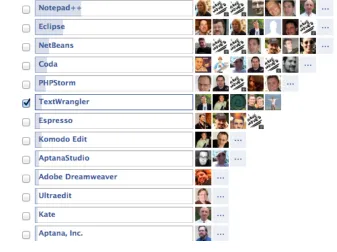
[image:16.576.99.436.263.515.2]I asked a question in Facebook15 and got a lot of answers (Figure 1)
Figure 1: Facebook Question
12 http://en.wikipedia.org/wiki/Eclipse_(software)
13 http://www.activestate.com/komodo-ide
14
http://community.joomla.org/blogs/community/828-webinar-using-eclipse-for-joomla-development.html
A few quotes from Joomla! developers:
Most Notepad++ and Netbeans (Brian Rønnow, Denmark)
Switched almost completely to PHPStorm but some smaller things I still do in TextMate. Some older projects are still under Coda control. (Achim Fischer, Germany)
For dev I use eclipse, for quick edits I'll use Coda. (Chad Windnagle, USA)
notepad++ and Eclipse (Ronni K. G. Christiansen, Denmark) Notepad++ and Netbeans :) (Jeremy Wilken, USA)
I find Quanta Plus awesomely handy. Mind that I mostly use it for web page editing. Of all the editors I could find in the Canonical repositories I liked Quanta Plus the most. It would take much time to list all that I like about it so I won't do it here. :-) (Alexey
Baskinov, Russia)
For development basically only Eclipse. For quick edits also, Komodo Edit (Radek Suski, Germany)
It depends on which file / which purpose of editing. Zend Studio and Notepad++ are my choice. (Viet Vu, Vietnam)
L
AMP
S
OFTWARE
B
UNDLE
LAMP is an acronym for a solution stack of free, open source software, originally coined from the first letters of Linux (operating system), Apache HTTP Server, MySQL and Perl/PHP/Python, principal components to build a viable general purpose web server.
Suitable for beginner's are XAMPP16, available for Windows, OSX and Linux,
WampServer17 for Windows and MAMP18 for OSX. They are all easy-to-install Apache
Web server distributions containing the latest MySQL Database and PHP script language and they are really very easy to install and to use - just download, extract and start.
O
THER
T
OOLS
As browsers, you need the usual suspects: Internet Explorer, Chrome, Firefox, Opera, Safari. You need to verify your results in all these web browsers.
All of these browsers offer the possibility to install additional plugins such as Firebug19
and Webdeveloper20.
W
HAT
D
O
I
N
EED
?
As already mentioned before, start with the editor of your choice and install a Lamp Software Bundle that fits your needs. Install a fresh copy of Joomla! without example data.
• Editor
• Lamp Software Bundle
• The actual Joomla! Version 1.7/2.5
For this book I am using OSX as the operating system, TextWrangler and MAMP. As a browser, I use mainly Firefox with the plugin Firebug.
16 http://www.apachefriends.org/
17 http://www.wampserver.com/
18 http://www.mamp.info/
19 http://getfirebug.com/
Advertisement
Codingfish Limited is a small software development company located in Fulda, Germany (100 km northeast of Frankfurt). Small means it is actually me running the business. I am the founder and director of Codingfish Limited.
Codingfish Limited was founded in December 2007. When I had to choose a name for the new company, I thought it would be a good idea just to say what I am doing. I am coding software (Coding) and my lastname is Fischer (english: Fisher) so I took the "fish" from it. There it is: Codingfish. Sometimes things are really simple :-)
Because I have a lot of experience in managing online communities (italobikes.com is online since 2000), Codingfish Limited is specialized on Content Management Systems (CMS) and Online Communities.
If you would like to contact me, you can find me on Facebook, LinkedIn and Xing. Feel free to add me to your contact list. Of course you may also send me a good old email.
Achim Fischer aka Codingfish
3. Write Your Own
Component
Photo: http://www.flickr.com/photos/59937401@N07/5857777188/ (CC BY
2.0)
If not, they have to hire someone to write a component for their special needs or do it by themselves.
In this chapter we want to build a component for a real estate agency. It should contain house listings and detailed descriptions of the houses on the frontpage and a possibility to manage these listing in the backend. We have to think about the fields, the permissions, the image upload and many other requirements, too.
A typical Joomla! component like the web links component consists of 30+ files for the frontend and 30+ files for the backend. Every page in a Joomla! website contains the output of exactly one component.
M
ODEL
-V
IEW
-C
ONTROLLER
A
RCHITECTURE
Joomla! is build on the model-view-controller architecture (MVC) which was first described for user interfaces of a programming language called Smalltalk in 1979.
Today MVC is the de facto standard in software development. It comes in different flavours, control flow is generally as follows:
• The user interacts with the user interface in some way (for example, by clicking a submit button).
• The controller handles the event from the user interface, and converts it into an appropriate user action, understandable for the model.
• The controller notifies the model of the user action, possibly resulting in a change in the model's state. (For example, the controller updates the user's house listing.)
• A view queries the model in order to generate an appropriate user interface (for example, the view lists the house listings). The view gets its own data from the model. • The user interface waits for further user interactions, which restarts the control flow
cycle.
Joomla! MVC Implementation
In Joomla!, the MVC pattern is implemented using three classes: JModel, JView and JController. You can watch a good introduction to MCV by Andrew Eddy on YouTube21.
I
S
I
T
N
ECESSARY TO
B
UILD
A
C
OMPONENT
F
ROM
S
CRATCH
?
A few years ago, building a component from scratch was the only way to enhance Joomla! core. Today we have several content construction kit components (CCK) available22. After
installing one of these CCK components, you are able to configure additional content types with additional fields. The configuration is mostly easy but you depend on an additional Joomla! component that is the base of your use case.
I am a user and I want a simple directory for my website.
Don't waste time with developing the component, download a CCK component and configure what you need.
I am a company with a use case that will not change in the next five years and I haven’t found the right component in the JED. The company has no IT department with developers.
Try to solve your problem with a CCK component. If it doesn't work, start with your own component.
I am a company with a use case that will not change in the next five years and I haven’t found the right component in the JED. The company has an IT department with developers.
Let the IT department come together and discuss it. Try out CCK components and individual component development.
I am a developer and I want to create components. I want to sell them online.
Well, you have to learn it :)
H
OW TO
S
TART
?
I did a little research using Google, Joomla.org and the usual suspects. I found two very detailed tutorials on How to write an MVC component. The first one is from Christophe Demko, France 23, and the second one is from Rune V. Sjøen, Norway24. There are more
tutorials available.
Another interesting approach for component development is to create a whole component automatically, based on your desires.
22 http://extensions.joomla.org/extensions/news-production/content-construction
23
http://docs.joomla.org/Developing_a_Model-View-Controller_(MVC)_Component_for_Joomla!1.6
• A project on GitHub called jFoobar25 started by Amy Stephen:
JFoobar Component Builder builds a fully functioning Joomla Component, complete with ACL, Views, Models, and Controllers for the Administrator and Site. You can customise your Component for your site building needs by defining new data and customising the Layouts.
• A company called Not Web Design™ offers a component creator26 as a paid service
that will create all the necessary files based on your desired configuration. By using the paid pro version, you can create your own list and form views with custom fields, potentially saving you several days of work.
Try to build your own component from scratch to get an idea and afterwards try out both builders to check whether they are useful for you.
T
HE
C
OCOATE
R
EAL
E
STATE
C
OMPONENT
Based on the tutorials mentioned above, I will build a Real Estate component in I am not sure right now how many steps.
We need more or less three types of applications in one component.
• Site
The site application, also called frontend, is the area of your site that guests and users see. It is used for displaying content. The components of the site application live in the /components folder in your Joomla! root.
• Administrator
The administrator application, also called backend, is the administration area of your site. Where logged in managers and administrators can manage the site. The components of the administrator application live in the /administrator/components folder in your Joomla! root.
• Installation and Update
To install an update for your component, we need xml files for configuration and meta data, sql files with database queries and, later on, an update server to provide new versions of the component.
25 https://github.com/Niambie/jfoobar
Advertisement
J and Beyond is back and bigger than ever on May 18 - 20 2012 so make sure you block the dates in your calendar, renew your passport and get ready for three days of intense Joomla, fun and beer. This year we will be in the beautiful historic spa town of Bad Nauheim at the Dolce Hotel - on Elvis Presley Platz. On the approach to the venue you can leave your message at the Memorial to Elvis who served in the US Army right here. We've listened to the feedback from last year about travel issues, especially for those flying, and you will be glad to hear that Bad Nauheim is only 40km from Frankfurt Airport, Europe's largest. For those of you that wish to bring your partners the Hotel has a health spa and you will enjoy the short walk to the park and historic buildings of Bad Nauheim.
4. Step 1 - The Basics
Photo: http://www.flickr.com/photos/22280677@N07/2994098078 (CC BY 2.0)
Let's collect a few facts about the first step to our Real Estate component. A component has to have a unique name and the easiest way to achieve that is to use your name or your company's name in the beginning.
• The human readable name for the component is "Cocoate Real Estate".
• It has one view called object. This view should display listings of houses later on. • We need the possibility of creating a menu item to access the component
• We want to have a menu item in the backend that displays coming soon.
F
RONTEND AND
B
ACKEND
In "extension speech" the frontend is called site and the backend is called admin.
If you have a menu item on your page that leads to your component and a user clicks on this link,
• Joomla! evaluates the URL path: /index.php?option=com_cocoaterealestate
• It searches the database components table for a component called cocoaterealestate. • It looks for a folder called com_cocoaterealestate in the site folder components. • In this folder it looks for a file called cocoaterealestate.php.
• It interprets this file.
The same happens in the admin area. If a manager or an administrator clicks the menu item,
• Joomla! evaluates the URL path: /administrator/index.php?option=com_cocoaterealestate
• It searches the database components table for a component called cocoaterealestate.
• It looks for a folder called com_cocoaterealestate in the admin folder administrator/ components.
• In this folder it looks for a file called cocoaterealestate.php. • It interprets this file.
Because we have to build two applications in one component with the same name, we have to have a structure. To interpret in the right way, you need several files in the site
folder.
• cocoaterealestate.xml – The XML file with all the information for the installer • cocoaterealestate.php – The starting point of your component
• controller.php – The C in MVC, the controller
• views/object/tmpl/default.php – A default template for the component area of the page. It is possible to override this default template with the installed Joomla! template.
We need the same structure in the admin interface. Both applications are totally separate.
F
ILES AND
I
NSTALLATION
Each extension needs a record in the extension table of the database. Without this record it doesn't exist in the "eyes" of the Joomla! CMS and it is not possible to use the extension, even when all files are in the right place. The database record will usually be created when you install the component.
But how to start. You have to write the component first :) As always you have two possibilities.
D
ISCOVER
E
XTENSION
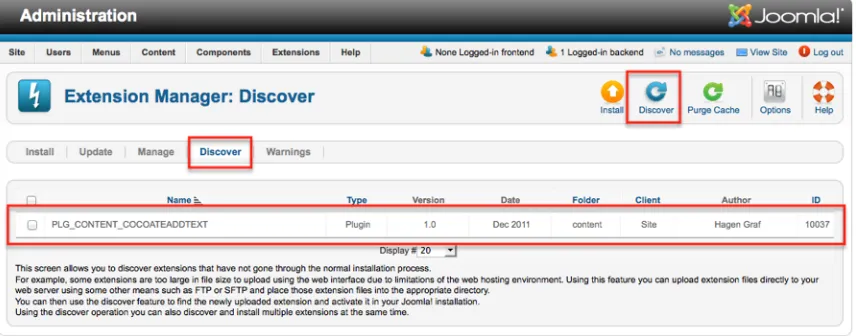
Since Joomla! 1.6 there is a discover option in the Extension Manager. You can place the files of your component in the right folders and click the discover option in the extension manager. It will read the components .xml file and update the extension table. The component is ready to use.
Your files should be placed like this. A file index.html has to be placed in each folder for security reasons.
/component/com_cocoaterealestate/cocoaterealestate.php
/component/com_cocoaterealestate/controller.php
/component/com_cocoaterealestate/index.html
/component/com_cocoaterealestate/view/object/view.html.php
/component/com_cocoaterealestate/view/object/index.html
/component/com_cocoaterealestate/view/object/tmpl/default.php
/component/com_cocoaterealestate/view/object/tmpl/default.xml
/component/com_cocoaterealestate/view/object/tmpl/index.html /component/com_cocoaterealestate/view/index.html
/administrator/components/com_cocoaterealestate/cocoaterealestate.php
/administrator/components/com_cocoaterealestate/cocoaterealestate.xml
/administrator/components/com_cocoaterealestate/index.html
The other way is to install your extension via the Joomla! Extension Manager. In this case you have to place the files outside of Joomla!, compress them to a zip archive and upload it to the installer. After installation, the component is ready to use.
Your files should be placed like this. A file index.html has to be placed in each folder for security reasons.
/site/cocoaterealestate.php
/site/controller.php
/site/index.html
/site/view/object/view.html.php
/site/view/object/index.html
/site/view/object/tmpl/default.php
/site/view/object/tmpl/default.xml
/site/view/object/tmpl/index.html
/site/view/index.html
/administrator/cocoaterealestate.php
/administrator/cocoaterealestate.xml
/administrator/index.html
You find the example component for download on our website27.
T
HE
C
ODE
In total we need 7 files with code and the index.html file.
File: index.html
If a visitor navigates his browser directly to a folder of the component, it would be possible, depending on the configuration of the web server, that he would see a directory of that folder. To avoid that you have to place a file called index.html in each folder (Listing 1). This requirement is a moot point (The files of wrath28) but it is still necessary
to get listed in the Joomla! Extension Directory.
<!DOCTYPE html><title></title>
Listing 1: index.html
27 http://cocoate.com/jdev/component/step-1
File: /administrator/cocoaterealestate.php
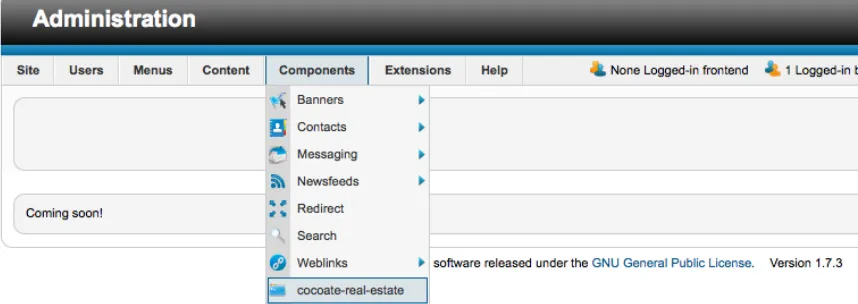
[image:29.576.75.504.142.294.2]This is the file, which is executed when you click the component in the administration area (Figure 1). It can contain "everything" :)
Figure 1: Output in Backend
Coming soon!
Listing 2: /administrator/cocoaterealestate.php
File: /administrator/cocoaterealestate.xml
The .xml file contains meta data and the information where to put the files. You can see parts of the data in Figure 2.
Figure 2: XML Data in Extension Manager
[image:29.576.75.505.438.604.2]<extension type="component" version="1.7.0" method="upgrade"> <name>Cocoate Real Estate</name>
<!-- The following elements are optional and free of formatting constraints -->
<creationDate>November 2011</creationDate> <author>Hagen Graf</author>
<authorEmail>[email protected]</authorEmail> <authorUrl>http://cocoate.com</authorUrl>
<copyright>2006-2011 cocoate.com - All rights reserved</copyright> <license>GPL 2</license>
<!-- The version string is stored in the components table --> <version>0.0.1</version>
<!-- The description is optional and defaults to the name --> <description>House listings on your website.</description>
<!-- Note the folder attribute: This attribute describes the folder to copy FROM in the package to install therefore files copied in this section are copied from "site/" in the package --> <files folder="site">
<filename>index.html</filename>
<filename>cocoaterealestate.php</filename> <filename>controller.php</filename>
<folder>views</folder> </files>
<administration>
<menu>Cocoate Real Estate</menu>
<!-- Note the folder attribute: This attribute describes the folder
to copy FROM in the package to install therefore files copied
<files folder="admin">
<filename>index.html</filename>
<filename>cocoaterealestate.php</filename> </files>
</administration> </extension>
Listing 3: /administrator/cocoaterealestate.xml
File: /site/cocoaterealestate.php
The defined ('_JEXEC') or die; statement has to be for security reasons at the top of each .php file. This statement checks to see if the file is being called from within a Joomla! session (Listing 4).
// No direct access to this file defined('_JEXEC') or die;
// Import of the necessary classes
jimport('joomla.application.component.controller');
// Get an instance of the controller prefixed by CocoateRealEstate $controller = JController::getInstance('CocoateRealEstate');
// Perform the Request task
$controller->execute(JRequest::getCmd('task')); // Redirect if set by the controller
$controller->redirect();
Listing 4: /site/cocoaterealestate.php
File: /site/controller.php
This is the controller, the C of MVC. At the moment there is nothing to control, so the file remains empty (Listing 5)
defined('_JEXEC') or die;
class CocoateRealEstateController extends JController {
}
Listing 5: /site/controller.php
File: /site/view/object/view.html.php
Views are the V in MVC and they are separated in various views. The name of the folder is the name of the view. In our case we'll need a listing of all houses and a detailed page for one object. The views are separated in files for collecting the necessary data from the model (which will come later too) and the template file with the markup. In Listing 4 you see the data collection for the objects list.
// No direct access to this file defined('_JEXEC') or die;
jimport('joomla.application.component.view'); class CocoateRealEstateViewObject extends JView {
function display($tpl = null) {
// Assign data to the view
$this->item = 'Cocoate Real Estate'; // Display the view
parent::display($tpl); }
}
Listing 6: /site/view/object/view.html.php
File: /site/view/object/tmpl/default.php
This is the template file with the markup (Listing 7). This file can be copied to and overwritten by the main Joomla! template.
// No direct access to this file defined('_JEXEC') or die;
?>
Listing 7: /site/view/object/tmpl/default.php
File: /site/view/object/tmpl/default.xml
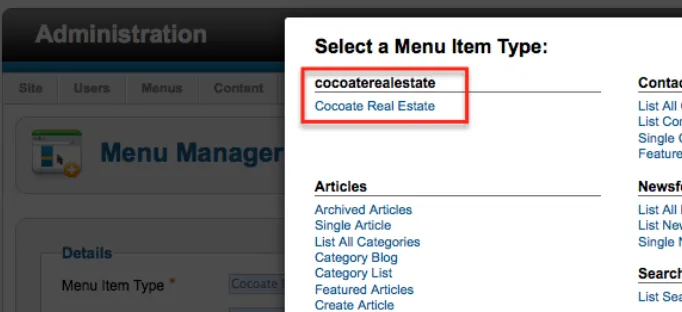
[image:33.576.74.415.143.299.2]This is the configuration file for the menu item Manager (Figure 3, Listing 8)
Figure 3: XML Data in Menu Manager
<?xml version="1.0" encoding="utf-8"?> <metadata>
<layout title="Cocoate Real Estate"> <message>Object</message>
</layout> </metadata>
Advertisement
Yo u c a n s p o n s o r t h i s
chapter
5. Step 2 - Database,
Backend, Languages
After the basics we want to achieve more.
We want to have a fully functioning component with a backend for adding, editing and deleting objects and we want to have separated language files, of course, to have the possibility to localise our component. In general this is not complicated but we have to create many files and it is easy to get lost in folders, filenames and methods.
I want you to start with a few screenshots to give you an idea of what I am talking about :)
C
O C OAT E
R
E A L
E
S TAT E
( C R E )
V
E R S I O N
0 . 0 . 2
The component consists more or less of two components. One is responsible for the Frontend (site) and one for the administration area (admin). It is still a simple component without eye candy, ACL, additional JavaScript and all the other fancy stuff but it will be a robust foundation to discover more.
Site
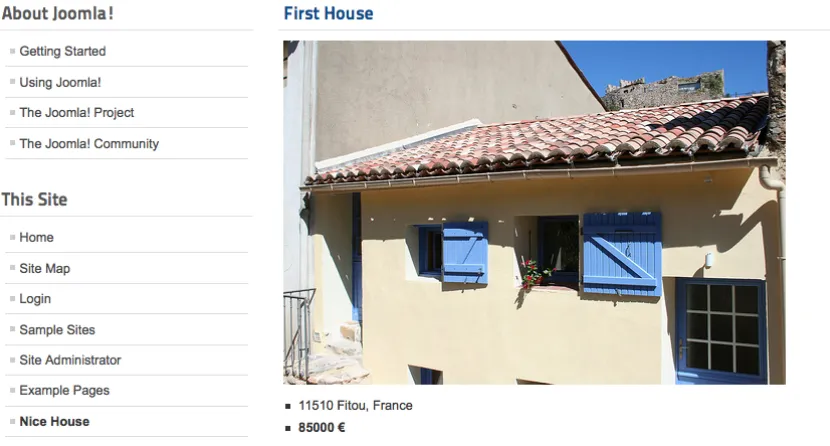
[image:36.576.78.493.227.450.2]For the moment we only want to have the possibility to create a link to one object (Figure 1). Later on we will enhance that.
Figure 1: One listing in the frontend
Admin
Figure 2: Menu Item Type
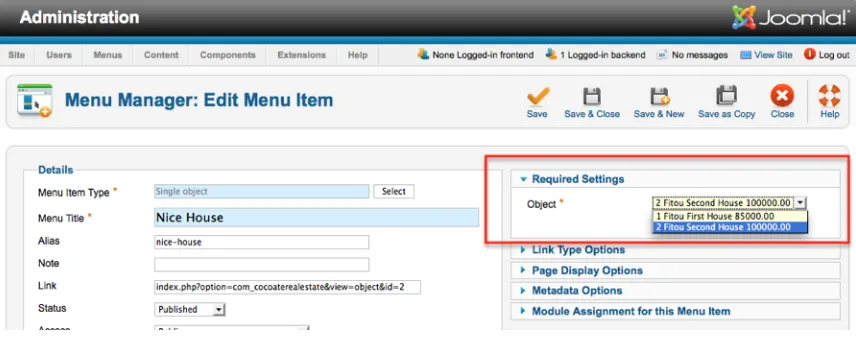
[image:37.576.75.503.187.358.2]After we choose the menu item Type we have to select the object we want to present. There will be an option list consisting of different fields fetched from the database. This step is important because in our first try we just wrote the text in an xml file. Here the option list is created dynamically, depending on the content of our database table (Figure 3).
Figure 3: Dynamic Parameters
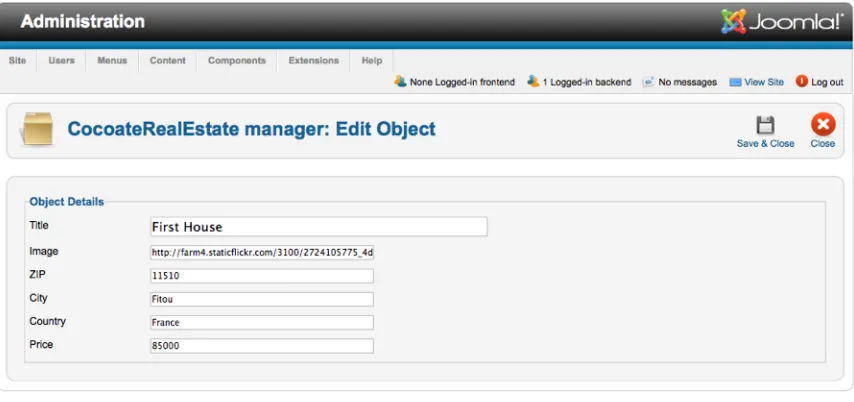
[image:37.576.73.505.435.577.2]To add, edit and delete objects we need an overview page like in Figure 4. We need a headline, a toolbar with Icons, checkboxes and of course content.
Figure 4: Backend Table
understand what should be done (Figure 5). The form should appear, too, when the New
[image:38.576.75.502.116.317.2]icon is clicked! After saving, there should be a message for the user.
Figure 5: Edit Form
In the case of edit, it should be possible to tick the checkbox of the row and click the icon edit. If nothing is checked and the edit icon is clicked there should be a message (Figure 6)
Figure 6: Message that Nothing Is Checked
[image:38.576.72.504.392.571.2]CRE
V
ERSION
0.0.2
F
ILES
In this step we need a lot of additional files. If you still work with a "simple" text editor it can become a bit confusing. I propose that you install the example component29 and go
through all the files.
It is important to keep in mind that the folder structure in the installation package differs from the folder structure in the Joomla! CMS.
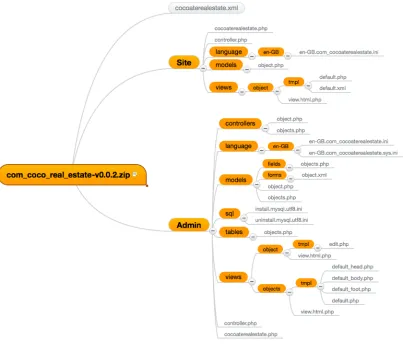
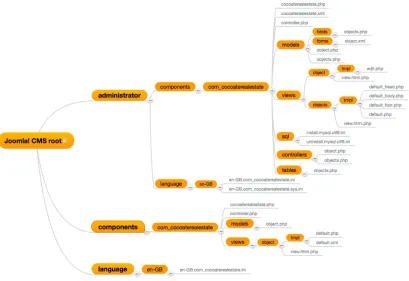
[image:39.576.86.489.227.574.2]Please take your time and have a look at the folder structure in the ZIP file (Figure 7) and the file structure in the CMS after installing (Figure 8).
Figure 7: Folder Structure in Installation Package
Figure 8: Folder Structure in Joomla! CMS
D
ATABASE
T
ABLE COCOATEREALESTATE
_
OBJECTS
We need to store our listings somewhere and I had a chicken and egg30 problem when I
wrote the chapter. Of course I wrote two files for installing and uninstalling the table
cocoaterealestate_objects (Listing 1, Listing 2) but initially I built the table manually using phpMyAdmin.
After the code was complete, it was possible to install the component and the two files are executed from the installing and uninstalling process.
The files contain pure SQL commands and consequently the extension is .sql. To keep it "simple" I structured the table in a simple way with fields for title, image, description, city, zip, country and price. Keep in mind that the drop command at the top of the install file can accidentally delete existing data. Depending on your update plans it can be useful or dangerous :).
DROP TABLE IF EXISTS `#__cocoaterealestate_objects`;
CREATE TABLE `#__cocoaterealestate_objects` ( `id` int(10) unsigned NOT NULL AUTO_INCREMENT, `uid` int(10) unsigned NOT NULL DEFAULT '0',
`created` timestamp NOT NULL DEFAULT CURRENT_TIMESTAMP, `published` tinyint(1) unsigned NOT NULL DEFAULT '0', `ordering` int(10) unsigned NOT NULL DEFAULT '0', `image` varchar(255) NOT NULL DEFAULT '',
`meta_descr` varchar(250) DEFAULT NULL, `meta_keys` varchar(250) DEFAULT NULL, `title` varchar(200) NOT NULL DEFAULT '', `description` text,
`city` varchar(100) NOT NULL DEFAULT '', `zip` varchar(50) NOT NULL DEFAULT '', `country` varchar(100) NOT NULL DEFAULT '', `price` int(10) NOT NULL DEFAULT '0',
PRIMARY KEY (`id`)
) ENGINE=MyISAM DEFAULT CHARSET=utf8 AUTO_INCREMENT=3 ;
INSERT INTO `#__cocoaterealestate_objects` VALUES(1, 42, '2011-11-29 1 5 : 3 9 : 1 0 ' , 1 , 0 , ' h t t p : / / f a r m 4 . s t a t i c f l i c k r . c o m / 3100/2724105775_4d039b4127.jpg', NULL, NULL, 'First House', 'Sed id leo metus, ut mollis mi. Etiam malesuada ornare felis, vel imperdiet eros cursus sollicitudin. Nulla viverra, neque sodales porttitor accumsan, felis purus varius libero, eu posuere odio risus ac nisl. Proin quis eros ipsum, sit amet pretium eros? Proin at purus cras amet.\r\n', 'Fitou', '11510', 'France', 85000);
Listing 1: /administrator/components/com_cocoaterealestate/sql/install.mysql.utf8.sql
DROP TABLE IF EXISTS `#__cocoaterealestate_objects`;
Listing 2: /administrator/components/com_cocoaterealestate/sql/uninstall.mysql.utf8.sql
M
ODELS
,
T
ABLES
,
F
IELDS
,
L
ANGUAGE
F
ILES
Besides the database table itself, we need a table class and various models to manage the needs of our component.
Table Class
The table class lives in the administration area of the CMS in /administrator/components/ com_cocoate_realestate/tables/objects.php (Listing 3). You define as many tables as you need. The name of the class consists of a prefix (CocoateRealEstateTable) and of the virtual name of the table (Objects). An instance of this class represents a row in the db table which means one house listing.
<?php
// No direct access to this file defined('_JEXEC') or die;
jimport('joomla.database.table');
class CocoateRealEstateTableObjects extends JTable {
var $id = null; var $title = null; var $city = null; var $price = null; var $published = 0;
function __construct(&$db) {
parent::__construct('#__cocoaterealestate_objects', 'id', $db); }
} ?>
Model - Frontend
The cool thing is that we can create a link for a single object (Figure 1). Therefore we need a model for ONE row (one object/house listing). It is important to distinguish between a single house listing and list/table of house listings. In Joomla! we call the model file in a singular way, if we want to have ONE item (object.php) and in the plural way if we want a list of items (objects.php). The name of the model has to be similar to the name of the view folder.
In our case the name of the view folder is object so we call the model file object.php too (Listing 4).
<?php
// No direct access to this file
defined('_JEXEC') or die('Restricted access'); jimport('joomla.application.component.modelitem'); class CocoateRealEstateModelObject extends JModelItem {
protected $item;
public function getItem() {
if (!isset($this->item)) { $id = JRequest::getInt('id'); // Get a TableObject instance
$table = $this->getTable('Objects', 'CocoateRealEstateTable'); // Load the object
$table->load($id); // Assign the data
$this->item['id'] = $table->id;
$this->item['image'] = $table->image; $this->item['title'] = $table->title; $this->item['city'] = $table->city; $this->item['zip'] = $table->zip;
}
return $this->item; }
} ?>
Listing 4: /components/com_cocoate_realestate/models/object.php
Model/Field - Backend
The view related to the object model needs a kind of relationship to this model. This is done by an entry in an xml file called /components/cocoaterealestate/views/object/tmpl/ default.xml (Listing 5). The important attribute is addfieldpath. The WORDS IN CAPITAL LETTERS are variables for language files.
<?xml version="1.0" encoding="utf-8"?> <metadata>
<layout title="COM_COCOATEREALESTATE_OBJECT_VIEW_DEFAULT_TITLE"> <message>COM_COCOATEREALESTATE_OBJECT_VIEW_DEFAULT_DESC</message> </layout>
<fields name="request" addfieldpath="/administrator/components/ com_cocoaterealestate/models/fields">
<fieldset name="request"> <field
name="id" type="object"
extension="com_cocoaterealestate"
label="COM_COCOATEREALESTATE_OBJECT_FIELD_OBJECT_LABEL"
description="COM_COCOATEREALESTATE_OBJECT_FIELD_OBJECT_LABEL" required="true"
/> </fieldset> </fields> </metadata>
Language Files
Language files have nothing to do with models but I want to mention them now because we need them and I already have used language variables (THE ONES WITH CAPITAL LETTERS).
The language file for the frontend would be /language/en-GB/en-GB.com_cocoaterealestate.ini. The name for the German language file would be /language/de-DE/de-DE.com_cocoaterealestate.ini. At the moment we need no text strings for the frontend.
The two language files for the backend are stored in the folder /administrator/language/en-GB/. One is called en-GB.com_cocoaterealestate.sys.ini (Listing 6) and the other one is called en-GB.com_cocoaterealestate.ini (Listing 7). The sys.ini file will be used during the installation process, in the extension manager and in the menus. It contains a lot less translation strings and this file is loaded in scenarios where the loaded component is not
com_cocoaterealestate itself, but minimal translation is still needed.
COM_COCOATEREALESTATE="Cocoate Real Estate"
COM_COCOATEREALESTATE_DESCRIPTION="House listings on your website." COM_COCOATEREALESTATE_OBJECT_VIEW_DEFAULT_TITLE="Single object"
COM_COCOATEREALESTATE_OBJECT_VIEW_DEFAULT_DESC="This view displays a single object"
COM_COCOATEREALESTATE_MENU="Cocoate Real Estate"
Listing 6: /administratorlanguage/en-GB/en-GB.com_cocoaterealestate.sys.ini
COM_COCOATEREALESTATE_OBJECT_FIELD_OBJECT_DESC="This object will be displayed"
COM_COCOATEREALESTATE_OBJECT_FIELD_OBJECT_LABEL="Object" COM_COCOATEREALESTATE_OBJECT_HEADING_ID="ID"
COM_COCOATEREALESTATE_OBJECT_HEADING_OBJECT="Object" COM_COCOATEREALESTATE_OBJECT_HEADING_TITLE="Title" COM_COCOATEREALESTATE_OBJECT_HEADING_COUNTRY="Country" COM_COCOATEREALESTATE_OBJECT_HEADING_CITY="City"
COM_COCOATEREALESTATE_OBJECT_HEADING_IMAGE="Image" COM_COCOATEREALESTATE_OBJECT_HEADING_ZIP="ZIP" COM_COCOATEREALESTATE_OBJECT_HEADING_PRICE="Price"
COM_COCOATEREALESTATE_MANAGER_OBJECT_NEW="CocoateRealEstate manager: New Object"
COM_COCOATEREALESTATE_MANAGER_OBJECT_EDIT="CocoateRealEstate manager: Edit Object"
COM_COCOATEREALESTATE_N_ITEMS_DELETED_1="One object deleted" COM_COCOATEREALESTATE_N_ITEMS_DELETED_MORE="%d objects deleted" COM_COCOATEREALESTATE_OBJECT_DETAILS="Object Details"
COM_COCOATEREALESTATE_OBJECT_FIELD_TITLE_LABEL="Title" COM_COCOATEREALESTATE_OBJECT_FIELD_TITLE_DESC="Title" COM_COCOATEREALESTATE_OBJECT_FIELD_IMAGE_LABEL="Image"
COM_COCOATEREALESTATE_OBJECT_FIELD_IMAGE_DESC="Please paste a URL" COM_COCOATEREALESTATE_OBJECT_FIELD_ZIP_LABEL="ZIP"
COM_COCOATEREALESTATE_OBJECT_FIELD_ZIP_DESC="Enter ZIP code" COM_COCOATEREALESTATE_OBJECT_FIELD_CITY_LABEL="City"
COM_COCOATEREALESTATE_OBJECT_FIELD_CITY_DESC="City"
COM_COCOATEREALESTATE_OBJECT_FIELD_COUNTRY_LABEL="Country" COM_COCOATEREALESTATE_OBJECT_FIELD_COUNTRY_DESC="Country" COM_COCOATEREALESTATE_OBJECT_FIELD_PRICE_LABEL="Price" COM_COCOATEREALESTATE_OBJECT_FIELD_PRICE_DESC="Enter price"
Listing 7: /administratorlanguage/en-GB/en-GB.com_cocoaterealestate.ini
Models, Fields and Forms - Backend
The parameter field for choosing the right object for the menu link needs a relationship to the model. Therefore we create a folder fields inside of the models folder. In this folder we store the structure of the parameter field and call it object.php (Listing 8).
<?php
defined('_JEXEC') or die; jimport('joomla.form.helper');
JFormHelper::loadFieldClass('list');
class JFormFieldObject extends JFormFieldList {
{
$db = JFactory::getDBO(); $query = $db->getQuery(true);
$query->select('id,title,price,city');
$query->from('#__cocoaterealestate_objects'); $db->setQuery((string)$query);
$titles = $db->loadObjectList(); $options = array();
if($titles){
foreach($titles as $title) {
$options[] = JHtml::_('select.option', $title->id, $title->id.' '.>city.' '.>title.' '.money_format('%i', $title->price));
} }
$options = array_merge(parent::getOptions(), $options); return $options;
} }
Listing 8: /administrator/components/com_cocoate_realestate/models/fields/object.php
In the backend, we have an overview page (Figure 4) and a form for editing and adding a single object (Figure 5). For that reason we need two models - object.php and objects.php
(Listing 9 and Listing 10)
<?php
// No direct access to this file defined('_JEXEC') or die;
jimport('joomla.application.component.modeladmin'); class CocoateRealEstateModelObject extends JModelAdmin {
// Get the form.
$form = $this->loadForm('com_cocoaterealestate.object', 'object', array('control' => 'jform', 'load_data' => $loadData));
return $form; }
protected function loadFormData() {
// Check the session for previously entered form data.
$ d a t a = J F a c t o r y : : g e t A p p l i c a t i o n ( ) ->getUserState('com_cocoaterealestate.edit.object.data', array());
if(empty($data)){
$data = $this->getItem(); }
return $data; }
p u b l i c f u n c t i o n g e t T a b l e ( $ n a m e = ' O b j e c t s ' , $ p r e f i x = 'CocoateRealEstateTable', $options = array())
{
return parent::getTable($name, $prefix, $options); }
}
Listing 9: /administrator/components/com_cocoate_realestate/models/object.php
<?php
// No direct access to this file defined('_JEXEC') or die;
jimport('joomla.application.component.modellist'); class CocoateRealEstateModelObjects extends JModelList {
protected function getListQuery() {
$db = JFactory::getDBO(); $query = $db->getQuery(true); // Select some fields
$query->select('id,title,city,country,price'); // From the realestate table
$query->from('#__cocoaterealestate_objects'); return $query;
} } ?>
Listing 10: /administrator/components/com_cocoate_realestate/models/objects.php
To add an object/listing we need a form. Forms are located in the model folder, too. The extension for form files is .xml and the name is the same as the name of the view where the form is needed. In our case, the name is again objects (Listing 11).
<?xml version="1.0" encoding="utf-8"?> <form>
<fieldset> <field name="id" type="hidden" />
<field
name="title" type="text"
label="COM_COCOATEREALESTATE_OBJECT_FIELD_TITLE_LABEL" description="COM_COCOATEREALESTATE_OBJECT_FIELD_TITLE_DESC" size="40"
class="inputbox" default=""
<field
name="image" type="text"
label="COM_COCOATEREALESTATE_OBJECT_FIELD_IMAGE_LABEL" description="COM_COCOATEREALESTATE_OBJECT_FIELD_IMAGE_DESC" size="40"
class="inputbox" default=""
/> <field
name="zip" type="text"
label="COM_COCOATEREALESTATE_OBJECT_FIELD_ZIP_LABEL" description="COM_COCOATEREALESTATE_OBJECT_FIELD_ZIP_DESC" size="40"
class="inputbox" default=""
/> <field
name="city" type="text"
label="COM_COCOATEREALESTATE_OBJECT_FIELD_CITY_LABEL" description="COM_COCOATEREALESTATE_OBJECT_FIELD_CITY_DESC" size="40"
class="inputbox" default=""
/> <field
name="country" type="text"
size="40"
class="inputbox" default=""
/> <field
name="price" type="text"
label="COM_COCOATEREALESTATE_OBJECT_FIELD_PRICE_LABEL" description="COM_COCOATEREALESTATE_OBJECT_FIELD_PRICE_DESC" size="40"
class="inputbox" default=""
/>
</fieldset> </form>
Listing 11: /administrator/components/com_cocoate_realestate/models/forms/objects.xml
C
ONTROLLERS
The controllers are necessary to be able to decide what to do next. If you click the “New”
icon to add a house listing, a controller has to find the right way what to do next. In total we use four controllers at the moment.
• One for the frontend (/component/com_cocoaterealestate/controller.php - listing 12)
• One generic controller with a default option (in our case objects) for the backend (/ administrator/component/com_cocoaterealestate/controller.php - listing 13)
• Two controllers for the backend for the list view (/administrator/component/ com_cocoaterealestate/controllers/objects.php - listing 14) and for the single view (/administrator/ component/com_cocoaterealestate/controllers/object.php - listing 15).
/component/com_cocoaterealestate/controller.php
This controller does nothing at the moment. It simply has to be there (Listing 12).
<?php
jimport('joomla.application.component.controller'); class CocoateRealEstateController extends JController {
}
Listing 12: /administrator/component/com_cocoaterealestate/controller.php
/administrator/component/com_cocoaterealestate/controller.php
The controller has to be there, too, but in this case we have two views, so one of must be the default view. The controller sets the default view to objects.
<?php
// No direct access to this file defined('_JEXEC') or die;
jimport('joomla.application.component.controller'); class CocoateRealEstateController extends JController {
function display($cachable = false) {
// Set default view if not set
JRequest::setVar('view', JRequest::getCmd('view', 'objects')); parent::display($cachable);
} } ?>
Listing 13: /administrator/component/com_cocoaterealestate/controller.php
administrator/component/com_cocoaterealestate/controllers/
objects.php
<?php
// No direct access to this file defined('_JEXEC') or die;
jimport('joomla.application.component.controlleradmin');
p u b l i c f u n c t i o n g e t M o d e l ( $ n a m e = ' O b j e c t ' , $ p r e f i x = 'CocoateRealEstateModel') {
$model = parent::getModel($name, $prefix, array('ignore_request' => true));
return $model; }
}
Listing 14 /administrator/component/com_cocoaterealestate/controllers/objects.php
administrator/component/com_cocoaterealestate/controllers/
object.php
This controller has to be there but can remain empty.
<?php
// No direct access to this file defined('_JEXEC') or die;
jimport('joomla.application.component.controllerform');
class CocoateRealEstateControllerObject extends JControllerForm {
}
Listing 15 /administrator/component/com_cocoaterealestate/controllers/object.php
V
IEWS IN
F
RONTEND AND
B
ACKEND
In our example we have three views:
The object view in the frontend (Figure 1) displaying a single object. It consists of three files:
/component/com_cocoaterealestate/views/object/view.html.php (Listing 16) /component/com_cocoaterealestate/views/object/tmpl/default.php (Listing 17)
/component/com_cocoaterealestate/views/object/tmpl/default.xml (Listing 18) (I already mentioned that file above)
The objects view in the backend (Figure 4) displays a list of objects/houses. It consists of five files:
/administrator/component/com_cocoaterealestate/views/object/view.html.php (Listing 19)
/administrator/component/com_cocoaterealestate/views/object/tmpl/default_foot.php (Listing 22) /administrator/component/com_cocoaterealestate/views/object/tmpl/default_head.php (Listing 23)
The object view in the backend (Figure 5) displays the form. It consists of two files:
/administrator/component/com_cocoaterealestate/views/object/view.html.php (Listing 24) /administrator/component/com_cocoaterealestate/views/object/tmpl/edit.php (Listing 25)
The structure of the views are very important. The view.html.php collects the data from the model and provides it as variables for the "real" template called default.php. The default.php is made for designers and it is overridable by any Joomla! template (Read more in Chapter Template Overrides). It should contain only markup enriched with PHP variables.
<?php
// No direct access to this file defined('_JEXEC') or die;
jimport('joomla.application.component.view'); class CocoateRealEstateViewObject extends JView {
protected $item;
function display($tpl = null) {
// Assign data to the view
//$this->item = 'Cocoate Real Estate'; $this->item = $this->get('item');
// Display the view parent::display($tpl); }
}
Listing 16: /component/com_cocoaterealestate/views/object/view.html.php
<?php
// No direct access to this file defined('_JEXEC') or die;
<h1><?php echo $this->item['title']; ?></h1> <img src="<?php echo $this->item['image']; ?>"> <ul>
<li>
<?php echo $this->item['zip']; ?> <?php echo $this->item['city']; ?>, <?php echo $this->item['country']; ?> </li>
<li>
<strong><?php echo $this->item['price']; ?> €</strong> </li>
</ul> <pre> <?php
// uncomment the next line to see the array // print_r($this->item); ?>
</pre>
Listing 17: /component/com_cocoaterealestate/views/object/tmpl/default.php
<?xml version="1.0" encoding="utf-8"?> <metadata>
<layout title="COM_COCOATEREALESTATE_OBJECT_VIEW_DEFAULT_TITLE"> <message>COM_COCOATEREALESTATE_OBJECT_VIEW_DEFAULT_DESC</message> </layout>
<fields name="request" addfieldpath="/administrator/components/ com_cocoaterealestate/models/fields">
<fieldset name="request"> <field
name="id" type="object"
extension="com_cocoaterealestate"
label="COM_COCOATEREALESTATE_OBJECT_FIELD_OBJECT_LABEL"
required="true" />
</fieldset> </fields> </metadata>
Listing 18: /component/com_cocoaterealestate/views/object/tmpl/default.xml
<?php
// No direct access to this file defined('_JEXEC') or die;
jimport('joomla.application.component.view'); class CocoateRealEstateViewObjects extends JView {
function display($tpl = null) {
// Get data from the model $items = $this->get('Items');
$pagination = $this->get('Pagination'); // Assign data to the view
$this->items = $items;
$this->pagination = $pagination;
// Set the toolbar $this->addToolBar(); // Display the template parent::display($tpl); }
JToolBarHelper::title(JText::_('COM_COCOATEREALESTATE_MANAGER_OBJECTS') );
JToolBarHelper::deleteListX('', 'objects.delete'); JToolBarHelper::editListX('object.edit');
JToolBarHelper::addNewX('object.add'); }
} ?>
Listing 19: /administrator/component/com_cocoaterealestate/views/object/view.html.php
<?php
// No direct access to this file defined('_JEXEC') or die;
JHtml::_('behavior.tooltip'); ?>
< f o r m a c t i o n = " < ? p h p e c h o J R o u t e : : _ ( ' i n d e x . p h p ? option=com_cocoaterealestate'); ?>" method="post" name="adminForm"> <table class="adminlist">
<thead><?php echo $this->loadTemplate('head');?></thead> <tfoot><?php echo $this->loadTemplate('foot');?></tfoot> <tbody><?php echo $this->loadTemplate('body');?></tbody> </table>
<div>
<input type="hidden" name="task" value="" />
<input type="hidden" name="boxchecked" value="0" /> <?php echo JHtml::_('form.token'); ?>
</div> </form>
Listing 20: /administrator/component/com_cocoaterealestate/views/object/tmpl/default.php
<?php