Collaborative SVG
as a Web Service
Ph.D. student of EECS department, Syracuse University
Research work is performed at Community Grids Lab, Indiana University
[email protected], [email protected]
501 Morton N. St, Suite 222, Bloomington IN 47404
Community Grids Lab, Indiana University
Introduction
Ø The research work is founded by NSF.
Ø The work is a part of the blueprint of the Community Grids Lab – building peer-to-peer grid system.
l http://grids.ucs.indiana.edu/ptliupages/
Ø The foils are arranged into the following four sections –
l Background
• introduces key technologies related to my research.
l Design of collaborative system / applications
• general
l architecture of Collaborative DOM as A Web Service Model. l architecture of Collaborative SVG as A Web Service
• specific
l architecture of Collaborative SVG Browser l Architecture of Collaborative SVG Chess Game
• (core) Collaborative events
l Future Work
• points out several research directions that worth of further study based on the current results.
l Demo
Background
Ø General area is technology Support for Synchronous and
Asynchronous Resource Sharing
l e-learning
l e-science
l video/audio conferencing etc.
Ø Grids
l manage and share (typically asynchronously) resources or
distributed objects (people, computers, data, applications etc.) in a centralized fashion.
Ø Web Services
l Define loosely coupled software components across internet
interacting with messages.
Ø Peer-to-peer Grids
l link services, resources and clients in dynamic decentralized fashion
• The system consists of a sea of message-based Services (e.g. shared SVG
as a Web Service)
• Services linked by publish-subscribe messaging infrastructure (e.g.
Classic Grid Architecture
Database Database
Netsolv e
Computin g
Securit y Collaboratio
n
Compositio n
Content Access
Resources
Client Users and Devices
Middle Tie Brokers Service Providers
Middle Tier becomes Web Services
Peer to Peer Grid
Database Database
Peers Peers
Peer to Peer Grid
A democratic organization
User Facin
Web Service Interfaces Service Facin
Web Service Interfaces
Event Messag Brokers
Event Messag Brokers
Event Messag Brokers
Our Goals
Ø Build a collaborative SVG browser
l Collaborative SVG browser is a real application (SVG content, hyperlink, interactivity
and animation with JavaScript binding)
l An example of a collaborative DOM model l A test bed for the general principles above l Batik SVG browser
• a java open source project from Apache
• a client side program like Microsoft PowerPoint
Ø Building a collaborative SVG chess game as the first step to SVG Arena
l Key features of the collaborative system (synchronization and interactivity) can be
well presented by multiplayer games
l Chess game represents a type of game with round-robin event sequence l It involves two players while multiple observers watching the game
l The ultimate version (e.g. integration with XGSP fully) allows dynamic changing roles
between players and observers
Ø Research ways of building collaborative Web Services
l Building collaborative system is non trivial
l Share SVG, share Audio/Video, share PowerPoint?, share Word? ……
Ø Research approaches to build applications as Web Services
Related Technologies I
Ø DOM (W3C specifications for Document Object Model)
l Programmatic interfaces for access and manipulate structured
document object
l All modern browsers (approximately) support the W3C DOM
Ø SVG (W3C specifications for Scalable Vector Graphics)
l A language for describing 2D vector and mixed vector/raster
graphics in XML.
Ø XML (W3C specifications for Extensible Markup Language)
l A markup language for structured information l A mechanism to identify structure in a document
Ø JavaScript (A scripting language)
l JavaScript can access and manipulate structured documents –
in our case SVG DOM
Related Technologies II
Ø Web Services (W3C working group)
l Programmatic interfaces for application to application
communication.
l XML specified distributed objects.
Ø MVC (Model-View-Control)
l A design architecture that separate an application into
Model-View-Control triads
Ø NaradaBrokering (Message passing infrastructure)
l Provide performance driven transport and intelligent
routing of all messages
Ø XGSP (Collaborative Session Controller)
l Support collaboration as a Web service defining
Demo
Ø
Collaborative SVG Browser
l
Teacher-Students scenario
l
Static Shared SVG contents
l
Dynamic Share SVG contents
• Hyperlink
• Interactivity and animation (JavaScript binding)
Ø
Collaborative SVG Chess game
l
Two players-multiple observers scenario
Figure 3 Architecture of collaborative SVG browser on PC XGSP Session control Server NaradaBrokering Event (Message) Service Infrastructure •• • Master client
SVG browser 1
F I R
O
Other client
SVG browser 2
F I R
O
Other client
SVG browser n
F I R
O
Control to/from all SVG browsers in the collaborative session Data from master client Control to/from XGSP Data to other clients Control to/from XGSP Data from master client Control to/from XGSP
Collaborative SVG Chess Game
Players
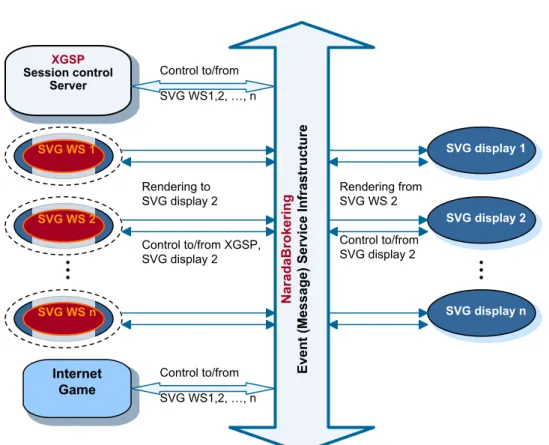
Figure 4 Architecture of collaborative Web Services drawn for particular case of Internet multiplayer game with SVG
NaradaBrokering Event (Message) Service Infrastructure •• • XGSP Session control Server
SVG WS 1
Internet Game
SVG WS 2
SVG WS n
••
•
SVG display 1
SVG display 2
SVG display n
Control to/from SVG WS1,2, …, n
Control to/from XGSP, SVG display 2 Rendering to SVG display 2
Control to/from SVG WS1,2, …, n
Rendering from SVG WS 2
Control to/from SVG display 2
Games with private information
Virtual SVG Community
Ø Find latest development info at Community Grids Project
http://grids.ucs.indiana.edu/ptliupages/
Ø Building virtual SVG community that has applications
such as
l Collaborative SVG meeting l SVG recorder
l infrastructure for supporting different types of games written in
JavaScript
• “SIMD”
• “MIMD”
Ø Provide a robust system
l re-join
Why W3C DOM is important?
Ø DOM (Document Object Model)
l In the most general sense, everything is an object
• Data ─ A text file, a graph, an email, a MP3 …
• Hardware ─ A computer, a printer, a fax machine, a sensor, … • Software ─ SVG Viewer and proprietary software like
l Microsoft Word(?), PowerPoint(?)
l Adobe Illustrator/Photoshop(?)
l Macromedia Flash(?)…
l defines the object-structure of a general document
l allows documents to be accessed as distributed objects – especially as a Web service
Ø DOM has a particular tree-like specification of Document Object Model Ø It defines
l an application programming interface (API) for documents (e.g. HTML, XML documents)
l the logical structure of documents
l the way a document is accessed and manipulated
Collaborative Web Service
W S Display W S Viewe r WS Display WS Viewe r Event (Message) Service Master W S Display WS Viewe r Web Service F I U O F I R OShared Input Port (Replicated WS) Collaboration
Othe r Participant s Web Service F I U O F I R O Web Service F I U O F I R O
Collaboration as a WS
Set up Session with XGSP
Resourc e
Facing Port
Why using SVG ?
Ø SVG is An Application of DOM
l Scalable Vector Graphics (SVG)
• a new XML-based language for describing two-dimensional vector and mixed
vector/raster graphics from W3C.
• SVG 1.0 specification becomes a W3C recommendation at September 4th, 2001
l SVG includes a complete (DOM) and conforms to the DOM core and events
Recommendation [DOM1].
l DOM is just an interface that defines Document Object Model and Events Model.
l SVG is a complete implementation of DOM.
l SVG DOM
• has a high level of compatibility and consistency with the HTML DOM that is defined in
the DOM Level 1 specification.
• builds upon and is compatible with the Document Object Model (DOM) Level 2
Specification [DOM2].
Ø SVG is An Application of XML
l SVG is compatible with the "Extensible Markup Language (XML) 1.0"
Recommendation [XML10]
l SVG is compatible with the "Namespaces in XML" Recommendation [XML-NS]
l SVG's syntax for referencing element IDs is a compatible subset of the ID
referencing syntax in "XML Pointer Language (XPointer)" [XPTR].
l SVG content can be styled by either CSS (see "Cascading Style Sheets (CSS)
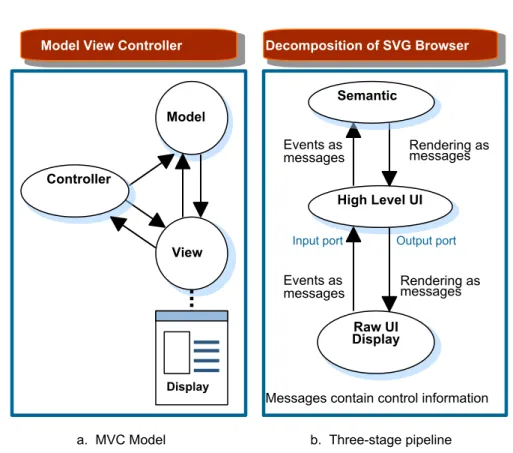
Model View Controller
a. MVC Model
Controller
View
Display
Model
Messages contain control information
Decomposition of SVG Browser
b. Three-stage pipeline
High Level UI
Raw UI Display
Rendering as messages Events as
messages
Semantic
Events as
messages Rendering asmessages
Figure 1 Reformulation of SVG to message based MVC in a Web Service Model Input port Output port
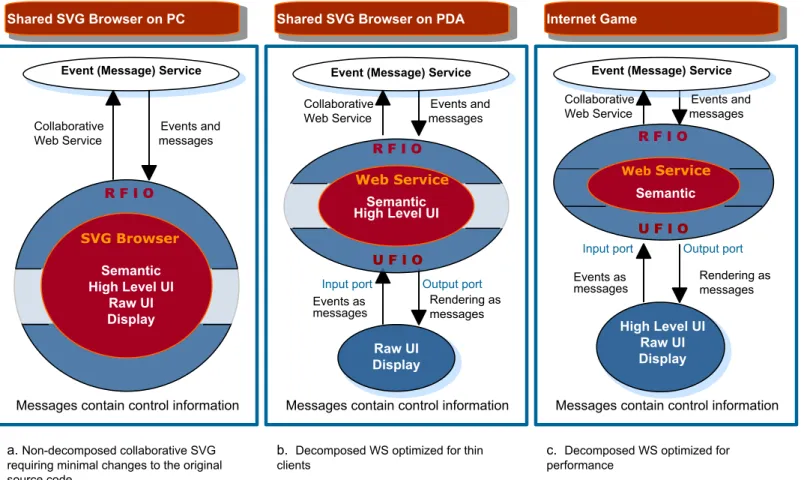
Shared SVG Browser on PDA
b. Decomposed WS optimized for thin clients
Rendering as messages Events as
messages
Messages contain control information
Semantic High Level UI
R F I O
U F I O
Web Service
Event (Message) Service
Raw UI Display Shared SVG Browser on PC
a.Non-decomposed collaborative SVG requiring minimal changes to the original source code
Messages contain control information Event (Message) Service
R F I O
SVG Browser Semantic High Level UI
Raw UI Display
Collaborative Events and Web Service messages
Internet Game
c. Decomposed WS optimized for performance
Messages contain control information
Semantic
R F I O
U F I O
WebService
Event (Message) Service
High Level UI Raw UI Display
Figure 2 Three among the different ways of decomposing SVG between client and Web Service component Input port Output port Events asmessages Rendering asmessages
Input port Output port Collaborative Events and
Web Service messages
Collaborative Events and Web Service messages
Ø Two major systems for representing graphics
l Raster
• In raster graphics, an image is represented as a rectangular array of picture
elements or pixels. Each pixel is represented either by its RGB color values or as an index into a list of colors.
• A bitmap is consisting of such series of pixels and usually stored in a
compressed format.
• Most modern display devices are raster devices - uncompress the bitmap
and transfer it to the screen.
• Examples: JPEG, GIF, PNG and BMP.
l Vector
• In vector graphics, an image is described as a series of geometric shapes
rather than receiving a finished set of pixels.
• Vector objects can change their shape and color by redrawing
Scalability - being scaled without loss of resolution.
• Examples: Adobe Postscript, Macromedia Flash file ".fla" and SVG
l Shared SVG browser shares input port l Share Display browser shares output port
Ø Different content format
l SVG is XML format and can be processed as ordinary text l Raster files are program generated data
DOM Event Model
Ø
An event describes changes in state of some
Grid component –
in our case the SVG
application or more generally a (W3C-DOM)
defined web service
l Collaboration involves sharing state changes
l Events represent the changing of DOM
l We capture and distribute events to participating
clients
Ø
W3C DOM Supplies a generic event system
which allows registration of event handlers and
provides basic contextual info for each event
Ø
DOM gives a standard suite of events
for UI
Definition of Collaborative SVG Events
Ø A collaborative event
l an object that wraps original SVG events
l provides additional context information for collaboration and Web
service model.
Ø The context information helps to guide the events
through the NaradaBrokering system to reach other clients (subscribers in the same session).
Ø The receivers un-wrap the collaborative event and get an
SVG event that defines detailed actions on the SVG DOM.
Ø The Model part of Web service application analyses the
SVG event based on its type and then delivers the resultant rendering information to the associated
Structure of Collaborative Events
Ø
An event contains information such as follows:
ØAn original UIEvent or selected semantic events
as generated by the DOM
l Some events are local, not for sharing
Ø
Event types
l master/non-master l major/minor type l global/local
Ø
Context information of the collaboration
l client ID
l session/topic
l windows name in a multi-SVG viewer application l event sequence number
Ø
Context information of the Web services
Types of Collaborative Events
Ø
UIEvents
vs.
semantic events
l view and model
Ø
Master events
vs.
non-master events
l One master client at all times
Ø
Major events
vs.
minor events
l late clients join in
l computer crushes, clients rejoin in l replay
Ø
Global events
vs.
local events
l e.g. history list on master client vs. on participating client
Ø
Collaboration as a Web Service
(XGSP) Events
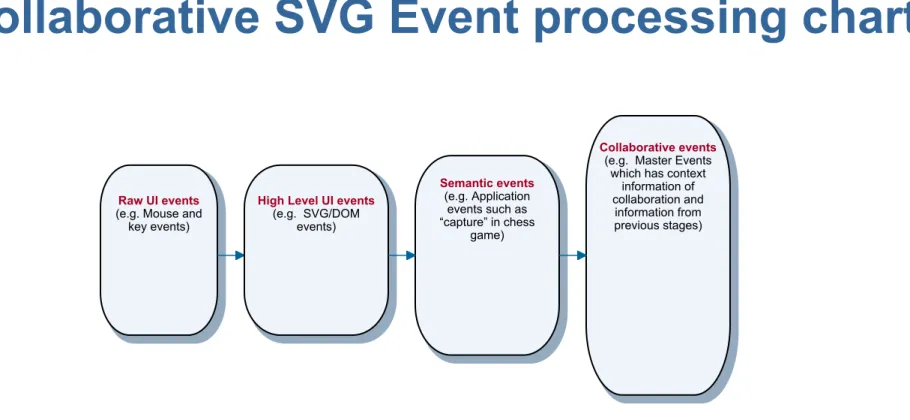
Figure 5 Collaborative SVG Event processing chart
Raw UI events
(e.g. Mouse and key events)
High Level UI events
(e.g. SVG/DOM events)
Semantic events
(e.g. Application events such as “capture” in chess
game)
Collaborative events
(e.g. Master Events which has context
information of collaboration and
information from previous stages)
Future Work
Ø
Packaging the following products and put core
modules into the public domain
http://grids.ucs.indiana.edu/ptliupages/ l Collaborative SVG Viewer
l Collaborative SVG Chess game
Ø
Provide a product of SVG recorder to support
replay
l The same technology also provides robustness of the
system (e.g. late join and rejoin)
Ø
Integrate the work with PDA group
l Collaborative SVG applications cross platforms - PC,
Pocket PC, Cellular phone, …
Ø
Building more Internet collaborative SVG Games
l to exploit the capabilities and detailed design