Collaborative Annotation of Real Time Streams on Android-Enabled Devices
Tao Huang, Geoffrey Fox
Department of Computer Science, Pervasive Technology Institute
Indiana University, Bloomington, IN, 47404
{taohuang, gcf}@indiana.edu
ABSTRACT
Mobile based collaboration such as image tagging and video annotation has become a hot research for both academic research groups and the industry. Current mobile platforms such as Google’s Android and Apples’s iOS have almost the same computing and multimedia capabilities as modern computers. This makes it possible for their users conduct regular collaborative activities as described before. Moreover their embedded geographic sensors can provide useful auxiliary metadata to help improve the accuracy of several collaboration features such as location annotation and tagging recommendation. In this paper, we firstly analyze most recent research on mobile based collaboration and annotation on digital contents, and then we introduce our efforts in expanding our collaborative annotation framework to the mobile platforms, especially the android-enabled devices. A prototype of the mobile extension that supports collaborative annotation on real time data streams especially audiovisual streams is introduced as well as several preliminary performance experiments.
KEYWORDS: Collaborative Annotation, Multimedia, Android, Distributed Framework
1. INTRODUCTION
With the fast development of various mobile platforms in the past few years, handheld devices have gradually become more capable of assisting people to accomplish regular tasks in their daily lives. Several mobile devices have already got the same computing power as modern computers and we can find whatever software you need from hundreds of thousands of apps (short for applications) in the online app store. It is not hard to find siblings of most popular software on your desktop for the two major mobile platforms: Google’s Android [1] and Apple’s iOS [2]. With advantages of mobility and ease of
use, mobile software/hardware products are drawing attentions of the major internet population and will therefore be heavily invested in by large corporations. It is almost certain that the mobile industry will be the next burst of Internet growth.
Besides the great interest from the industry, mobile platforms also draws attentions of many academic researchers due to their ubiquitous features such as image/video capturing, build-in rich sensory and connection capabilities. Collaborative analysis, editing and annotation on digital contents are one of the most popular researches [3-11] on these platforms. Various researches have been done on photo tagging [4-8], geographic data commenting [9] and video annotation [10]. Interesting results have been found on how end users and research entities utilize both location and social information collaboratively on tagging and annotating the digital data more effectively and precisely.
In this paper, we present our work on expanding our collaborative annotation framework [3] to the mobile platform, especially the android platform, to achieve better and accurate annotating on real time data streams. We will explain our efforts on how we make use of the ubiquitous devices to generate rich media, create most relevant metadata based on the users’ geographic information to provide improved collaborative annotation experiences.
2. RELATED WORK
Researches have been done on different aspects of collaborative annotation on mobile phones. Due to the multimedia capability and location awareness of those devices, most of the research mainly focuses on annotation on digital contents such as photos, audiovisual data and location information. In this section, we give brief analysis on some of these systems and explain how they affect our design.
2.1. Annotation Research on mobile devices
Many efforts have been spent in bringing multimedia annotation on current mobile platform. In [12], Yeh introduces a hybrid searching technique for location recognition based on image and keywords. It however does not support operations in real time. [8] is an annotation system for digital contents on cell phone but its lack of server side supports makes it impossible for users to collaborate with each other. As an improvement of existing mobile search systems such as Layar[10], [11] uses image and video information in extracting information about a scene. It also associates tags with the content for later usage and supports capturing short videos instead of images in Google Goggle [12].
In [4], Anita et al develops a lightweight client application which uses camera phones to capture images and annotate on them. All the annotation information is stored remotely on a dedicated metadata server and organized in a faceted classification structure. This enables rich description of the images and overcomes the limitations of strictly hierarchical metadata structures and keyword based approaches in prior image annotation systems. However, the limited screen size of the mobile device causes a problem for the system to display and enable navigation on such faceted metadata structure.
Jintao et al investigate four major techniques in their paper [13] for collecting end-user place annotations interactively using cell phones. Based on their usability test results, they conclude that “photo memo plus offline editing” is the most favorite approach in ease of use. Although their approach elaborates on providing most convenient user interface for the end users to generate location based annotation data on images stored on their cell phone, annotation in a team oriented fashion was not addressed.
Most of previously described systems mainly focus on utilizing the ubiquitous feature of mobile devices and their network access with geographic information to support user friendly annotation experience. Few of them have
talked about supporting collaboration between mobile and desktop users and almost none of them can support such capability. This becomes the greatest motive of design and implementing the mobile extension of our collaborative annotation framework.
2.2. Collaborative systems on the android
platform
Android is one of the youngest and most promising operating system of the mobile OS family. It is maintained by the Open Handset Alliance [15] led by Google and it has greatly evolved since 2009. Four major versions have been released and there are many android-enabled mobile devices including smartphones and tablets being sold in the market every day.
As a descendant of Linux, android supports almost every feature of a modem computer and its user interface is designed to be compatible with all user interactions on regular computers except that they are touch based. The android development framework is inspired and designed based on Oracle’s java and swing toolkit which makes it easy to port existing java based system onto the android platform.
In [7], Zixuan Wang et al present an image annotation system based on android devices and a dedicated web server. It basically uses the android smartphone to capture images and create tags on specific portions of them. Relevant annotation of the same object on different images is grouped together based on similarity algorithms to help users share better semantic understanding of the object. Most of the analysis is done by the webserver after end users submit their photo tags and android devices are merely working as input devices. Moreover, it is quite difficult for this system to support collaborations on their images in the real time without sending queries to the web server.
2.3 Collaborative Annotation Platform on real
time data stream
Other Pub/Sub natured data transmitting middlewares such as ActiveMQ and RabbitMQ can also be used within the platform since they share similar features with Naradabrokering and have almost the same programing interfaces. To support typical real time streams such as audiovisual streams, a full set of media processing senders and renderers have been implemented using the JMF [17] library. JMF is a media framework developed by Sun Inc that aims at multimedia capturing, processing and rendering. It defines a convenient filter based architecture that developers can easily extend it through customized filters for complex media data processing. However, it is no longer under maintenance since 2004 and there are few mature alternatives which makes it difficult for current java based systems to provide multimedia capability. Since android platform has its own multimedia framework which is mentioned in the next section for easy media data capturing and playback, we are able to avoid such difficulties in extending our framework to android based mobile devices.
3. SYSTEM PREREQUISITES
From the introduction and analysis of mobile annotation systems in previous section, we can see that most existing systems are limited to capturing simple digital data such as images and geographic data. And the annotation methods that these systems support are also quite primitive and restricted to simple tagging and text comments. Since we want to provide similar user experience in the mobile extension as in the desktop client of our collaborative annotation platform, it is important that the mobile platform should be able to support several key features our system requires. We give a feature support comparison between technologies that android provides and those we used in our collaborative annotation framework in the following Table 1.
Features Collaborative Annotation Framework Android Platform User interface
GWT[16], AWT Android UI framework Audiovisual
Capturing
JMF[17] based Android Multimedia Framework Image
Processing
GWT, AWT Android canvas and OpenGL ES 1.0/2.0 Whiteboard GWT based canvas Android canvas Data
Transmitting & Streaming
NaradaBrokering[18] or RabbitMQ
Simple RTSP based video streaming
Data Storage Raw data file, XML Based metadata
Both raw file and xml file
Location sensor
Requires third party sensor devices
[image:3.612.328.557.460.591.2]Supported by default
Table 1 Comparison of technologies to support different features between Android development framework and
Collaborative Annotation Framework
From the above table, we can see clearly that the android platform meets almost every requirement to build a mobile extension for the collaborative annotation framework. And as mentioned in the previous section, the java based android development framework also save us lots of efforts in migrating key components of the existing annotation framework.
[image:3.612.55.302.533.717.2]4. ARCHITECTURE
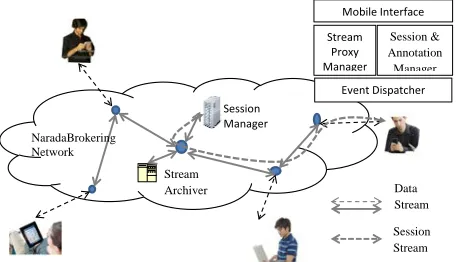
Figure 1 below shows how the collaborative annotation is done between desktop and mobile users in the system. Both content and session streams are transmitted through NaradaBrokering network. Each time a mobile user logs on the system, it will firstly send out a query event to request latest session information. Once it receives such an update from the session manager, it will subscribe to the corresponding topic and start the underlying broker client to receive data streams that its user chooses to process. If the selected data stream is a multimedia data stream that requires streaming support of android platform, a Stream proxy will be created to redirect the payload of NaradaBrokering events for the android media player to render locally. The design of the proxy will be explained in details in section 4.2. Events for other types of data streams will be passed on to corresponding handlers the same way as in the desktop client.
Figure 1 Collaborative Annotation between Desktop and Mobile users
There are two major differences between the mobile client and the regular desktop clients in above figure. Since the mobile users are more prone to network issues such as disconnection and low connectivity, we need to design a better mechanism for them to save and restore their session status from possible connection problems. Due to the lack of direct RTP support for android media players
[19], we need a proxy to understand RTSP requests from the android media player and feed it with the raw RTP data from NaradaBrokering events.
4.1. Session Control and Management
In our collaborative annotation system, we use heartbeats to manage the session information due to the pub/sub nature of the NaradaBrokering platform. Each component in the system continuously publishes its own heartbeat event to public channels. All clients will monitor heartbeat events in the session channel and maintain their own copies of the session status. Unresponsive clients will be removed from the list if other clients cannot hear from them for more than several seconds. In our framework, a dedicated Session Manager as in Figure 1 is running and responsible for monitoring the session status and synchronizing with every client nodes. It will also generate status reports periodically and store them in the remote storage node. Since the mobile client may reside in low bandwidth networks and has higher probability of losing connection with the system, we decide to make our mobile client synchronize the session monitor only and ignore heartbeat events from other clients to reduce the possibility of misjudging their status. And if the mobile client detects its session information is stale, it will send out a request for a batch update since last successful synchronization. Figure 2 below depicts the procedure that our session monitor handles abnormal leaves of mobile clients.
Figure 2 Batch updates sent by the Session Manger
From the figure above, we can see that once a mobile client rejoins the same live session in our system, it will compare its status with the session manager based on the timestamp and send out batch update request if necessary. The session communication has been minimized to the lowest necessary level to reduce the possibility of status misjudging due to high possibility of network outages. Besides the session information, other metadata like past
annotation events and stream changes are also included inside the batch update events.
4.2. Multimedia proxy
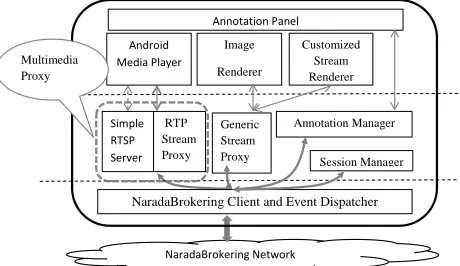
[image:4.612.315.545.276.409.2] [image:4.612.61.294.433.581.2]Since the android multimedia framework doesn’t support direct RTP streaming [19], we design and implement a multimedia proxy to communicate with the android media player and redirect to it actual RTP media packets. This proxy is basically a simple RTSP server which handles requests from the android media player for media playback and codec information. After a successful communication, the proxy feeds in the player RTP packets extracted from the NaradaBrokering events. Figure 3 below shows how the mobile client processes multimedia data streams sending by desktop clients.
Figure 3 Multimedia proxy for audiovisual stream playback
When the mobile user chooses to play a multimedia stream from the live stream list, a proxy will be created to receive events from the corresponding topic, extract the RTP packets from their payloads and buffer them locally. An android media player will then be created on the mobile client and sends out a RTSP request to the proxy for media data for playback. Once all the RTSP based communications such as OPTIONS, DESCRIBE, SETUP and PLAY are done successfully, the media player will start to receive RTP packets from a local port and play the media content defined by the proxy. Currently only H.263 format for the video and Mpeg-3 format for the audio are supported due to the limitation of the android multimedia framework [20]. Other media codecs such as H.261 and Divx/Mpeg4 which are supported on desktop clients are not available on the mobile client currently.
The local buffering and communication between the proxy and the media player can cause a delay of initial playing of the audiovisual data. But once the initialization is finished, fluent collaborative annotations on media contents are achievable on a reasonable level within high
NaradaBrokering Network Generic Stream Proxy Annotation Panel Android
Media Player
NaradaBrokering Client and Event Dispatcher Simple
RTSP Server
RTP Stream Proxy
Session Manager Annotation Manager Image
Renderer
Customized Stream Renderer Multimedia
speed networks. Our preliminary experiment has proved this in the latter section.
[image:5.612.63.270.194.330.2]4.3. Annotation Interface
[image:5.612.319.540.326.668.2]Figure 4 below are snapshots of the mobile client running on an android smartphone. It comprises two simple activities (running entities on the android platform) that are responsible for session/stream selection and stream annotation.
Figure 4 Annotation interface of the mobile client
Image on the left shows a demo session that contains multiple attendees. One of them is sending out a live video stream as well as a live audio stream. Once the client user selects to open a video stream from the list, an annotation activity will be brought up as shown in the bottom right picture. Annotation operations are available for selection on a top floating toolbar and they can be hidden to provide better view of the streaming content if necessary. An extra annotation panel can be brought up from right to display past annotations generated by other clients. If the mobile user selects to view one of those annotations, the media player will be rewound to the correct time spot based on the timestamp information of the annotation and the annotation itself will be layout on top of the content stream. Most annotation operations available on desktop clients are also implemented on the mobile client in order to maintain the same user experience within the system.
This client can provide better user experience on android based tablet devices due to larger screens and more accurate user interactions. The layout of components in above images may change slightly but the actions would remain the same on both mobile and tablet devices.
4.4. Changes to the annotation metadata
In our collaborative annotation framework, we use XML DOM objects to save information that represents the layout of content streams in the annotation panel and related annotations. Due to the limited display size of the
mobile client, we make changes to the schema of the XML metadata by adding types of source device, stream source location and so on. Annotation events created by mobile clients will also contain geographic information with them for future features such as annotation search and recommendation based on location.
5. PRELIMINARY EXPERIMENTS
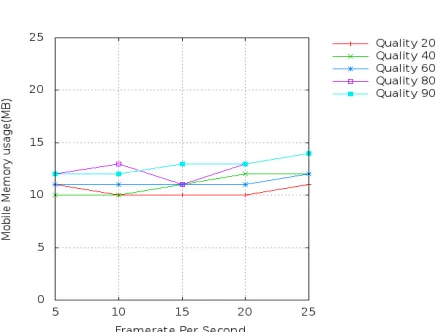
We conducted two preliminary experiments on the new mobile extension of our collaborative annotation framework. The first performance test was to see the resource usages of a typical annotation on video streams sent with different encoding parameters from the desktop client. The mobile client was running on a HTC Inspire 4g android smartphone with 1GHz Scorpion CPU and 768MB internal memory. Multiple video streams were sent to the smartphone with different FPS (frame per second) and quality. The test results are shown in the following Figure 5 and 6.
[image:5.612.319.539.326.470.2]Figure 5 CPU usage of playing video stream with different parameters
[image:5.612.319.542.502.668.2]The experiment results show that the CPU usage of the smartphone falls below 30% for a typical H.263 video stream with 25 FPS and 80 video quality. And the memory consumption is managed within the limitation of regular android apps (16MB per app). This proves that our mobile client can be quite responsive to user interactions such as adding annotations and replaying past ones.
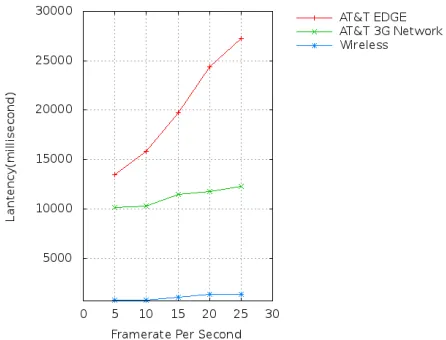
[image:6.612.60.283.310.480.2]The second experiment was designed to evaluate the latency caused by local buffering the streaming data and communication between the proxy and media player. The mobile client was running on three different types of mobile networks: AT&T’s EDGE, 3G and a wireless network. The time was measured between the time that a NaradaBrokering event was sent out from the desktop client and the time that the android media player starts playing. Figure 7 below is our test results of our mobile client receiving video streams with different parameters.
Figure 7 Latency of playing video stream with different parameters on different networks
The results show that the delay was managed under a reasonable level for our mobile client on wireless networks and we saw expected long delays on low bandwidth and unstable networks such as EDGE and 3G. We however noticed that the latency may be slightly improved by using smaller event payloads which may speed up the transmission between the broker and the mobile client for those networks. However the improvement was quite limited and we can hardly achieve a fluent collaboration between the desktop and mobile clients.
7. SUMMARY AND FUTURE WORKS
In this paper, we present our initial efforts to extend our collaborative annotation framework into the mobile
environment. We provide a user friendly mobile client prototype with event translating proxies for the mobile users to collaborate with desktop users easily. The preliminary experiments show that our design can provide satisfying performance and user experience on android-based mobile devices with wireless networks. Our next step is to improve the stability and performance of the system on low bandwidth networks and conduct further experiments for more sophisticated use cases. We are also plan to apply the same design on other mobile platforms such as iOS and Windows mobile.
REFERENCES
[1] Google Android platform: http://www.android.com
[2] Apple iOS platform: http://www.apple.com/ios/
[3] Tao Huang, Shrideep Pallickara, Geoffrey Fox, “A distributed framework for collaborative annotation of streams,” cts, pp.440-447, 2009 International Symposium on Collaborative Technologies and Systems, 2009
[4] A. Wilhelm, Y. Takhteyev, R. Sarvas, N.A.V. House, and M. Davis, “Photo annotation on a camera phone”, in Proc. CHI Extended Abstracts, 2004, pp.1403-1406.
[5] Bageshree Shevade, Hari Sundaram and Min Yen-Kan, “A Collaborative Annotation Framework.” In Proceedings of the International Conference on
Multimedia and Expo (ICME '05), Amsterdam,
Netherlands, July 2005.
[6] Morgan Ames & Mor Naaman. “Why We Tag: Motivations for Annotation in Mobile and Online Media.” In Proceedings of CHI 2007, ACM Conference on Human Factors in Computing Systems.
ACM Press, April 2007.
[7] Zixuan Wang, Omprakash Gnawali, Kyle Heath, and Leonidas Guibas, “Collaborative Image Annotation Using Image Webs” In proceedings of the Army
Science Conference (ASC 2010), November 2010.
[8] Xavier Anguera, JieJun Xu, Nuria Oliver. “Multimodal photo annotation and retrieval on a mobile phone.” In Proceedings of Multimedia Information Retrieval 2008. pp.188~194
International Workshop on Collaborative Editing
Systems (IWCES’07) (Sanibel Island, Florida, USA,
November 4 2007).
[10]Layer Vision:
http://www.layar.com/
[11]Motaz El-Saban, Xin-Jing Wang, Noran Hasan, Mahmoud Bassiouny, and Mahmoud refaat. “Seamless annotation and enrichment of mobile captured video streams in real-time” IEEE Internation Conference on Multimedia & Expo
(ICME) 2011
[12]Google Goggle:
http://www.google.com/mobile/goggles
[13]
Jingtao Wang and John Canny, "End-User Place
Annotation on Mobile Devices: A Comparative Study," CHI 2006.[14]T. Yeh, K. Tollmar, and T. Darrell, "Searching the Web with Mobile Images for Location Recognition," Proc. IEEE Int'l Conf. Computer Vision and Pattern Recognition (CVPR 04), vol. 2, IEEE Press, 2004, pp. 76–81.
[15]Open Handset Alliance:
http://www.openhandsetalliance.com/
[16]SWT: The Standard Widget Toolkit. Available from http://www.eclipse.org/swt/
[17]Sun Java Media Framework API. Available from http://java.sun.com/javase/technologies/desktop/medi a/jmf
[18]S. Pallickara and G. Fox, “NaradaBrokering: A Middleware Framework and Architecture for Enabling Durable Peer-to-Peer Grids,” Proceedings of ACM/IFIP/USENIX International Middleware
Conference Middleware-2003. pp 41-61.
[19]Justin M. Bailey. “Live Video Streaming From Android-Enabled Devices To Web Browsers” Theses
and Dissertations. Paper 2995.
http://scholarcommons.usf.edu/etd/2995
[20]Android Multimedia Framework http://developer.android.com/guide/topics/media/inde