Rochester Institute of Technology
RIT Scholar Works
Theses Thesis/Dissertation Collections
2010
Creating local networks in the Cloud
José R. Sánchez E.Follow this and additional works at:http://scholarworks.rit.edu/theses
This Thesis is brought to you for free and open access by the Thesis/Dissertation Collections at RIT Scholar Works. It has been accepted for inclusion in Theses by an authorized administrator of RIT Scholar Works. For more information, please [email protected].
Recommended Citation
Creating Local Networks in the Cloud
By
Jose R. Sanchez E.
Thesis submitted in partial fulfillment of the requirements for the
degree of Master of Science in
Networking and Systems Administration
Rochester Institute of Technology
B. Thomas Golisano College
of
Computing and Information Sciences
Rochester Institute of Technology
B. Thomas Golisano College
of
Computing and Information Sciences
Master of Science in
Networking and Systems Administration
Thesis Approval Form
Student Name:
José Rolando Sánchez Espinal
Thesis Title:
Creating local networks in the Cloud
Thesis Committee
Name
Signature
Date
Charles Border
Chair
Luther Troell
Committee Member
Arlene Estevez
Thesis Reproduction Permission Form
Rochester Institute of Technology
B. Thomas Golisano College
of
Computing and Information Sciences
Master of Science in
Networking and Systems Administration
Creating Local Networks in the Cloud
I, Jose R. Sanchez E., hereby grant permission to the Wallace Library of the Rochester Institute of Technology to reproduce my thesis in whole or in part. Any reproduction must not be for commercial use or profit.
Copyright 2010 José R. Sánchez E.
Abstract
The resources and services offered by cloud computing platforms have been opening new
alternatives of expansion to several research areas. The cloud computing platform
applications to the educative area have been creating interest in different educative
organizations. This thesis proposes the use of the Amazon EC2 cloud computing platform
to build networking laboratories for the computational and networking educative areas.
Within this paper, several options are evaluated in order to fulfill this objective. The final
proposed design introduces a practical scenario for networking laboratories. Future
i
Table of Contents
1 Introduction ... 1
2 Literature Review ... 4
2.1 Virtual Laboratories ... 4
2.2 Cloud Computing ... 5
3 Problem statement ... 6
4 Significance and Benefits ... 7
5 Methodology ... 7
6 Test Environment ... 10
6.1 Platform description ... 10
6.2 Platform capability Tests ... 13
6.3 Platform´s limitations and issues for development ... 16
6.4 Platform´s alternatives ... 20
6.5 Solution Development ... 22
6.6 Final Test ... 27
7 Results and Conclusion ... 35
8 Future work... 37
9 References ... 39
ii
Table of Figures
Fig. 1 - Amazon EC2 Initial Page ...11
Fig. 2 - VMLogix Cloud Edition initial page ... 13
Fig. 3 - New Configuration on VMLogix ... 14
Fig. 4 - VMLogix Security Configuration ... 14
Fig. 5 - VMLogix Administration Options – Job Defaults ... 15
Fig. 6 - VMLogix Administration Options – Remote Access Settings ... 16
Fig. 7 - VMLogix Configuration Deployment ... 16
Fig. 8 - Deployed Configuration ... 17
Fig. 9 - Basic Machine Network Job ... 17
Fig. 10 - VM #1 and VM #2 information ... 17
Fig. 11 - Win2k3 VM, RDP Console ... 18
Fig. 12 - ipconfig command results – VM #1 ... 18
Fig. 13 - ipconfig command output – VM #2 ... 19
Fig. 14 - Amazon EC2´s Security Configuration Tab ... 19
Fig. 15 - IP over IP encapsulation diagram [12] ... 21
Fig. 16 - GRE encapsulation diagram [13] ... 21
Fig. 17 - VMLogix Vyatta Lab 1 ... 23
Fig. 18 - Vyatta Lab 1 – OS selection ... 23
Fig. 19 - Lab 1 Deployed Configuration ... 23
Fig. 20 - Pre-shared key generation ... 24
Fig. 21 - Key sharing ... 24
iii
Fig. 23 - Loopback interface configuration ... 25
Fig. 24 - Ping from Router#1 to Router#2’s loopback... 26
Fig. 25 - Ping from Router#2 to Router#1’s loopback... 26
Fig. 26 - Final Test´s configuration ... 27
Fig. 27 - Final Test Deployed configuration ... 27
Fig. 28 - Lab2 VMs information ... 28
Fig. 29 - Router#1 Configuration... 29
Fig. 30 - Router#1 routing table ... 29
Fig. 31 - Router#2 routing table ... 30
Fig. 32 - Installing OpenVPN client on Windows 2003 VM ... 30
Fig. 33 - OpenVPN configuration file – Client side ... 31
Fig. 34 - ipconfig /all command output ... 31
Fig. 35 - Windows 2003 second VM – ipconfig output ... 32
Fig. 36 - Adding the second segment route on Windows 2003 first VM ... 32
Fig. 37 - Adding the first segment route on Windows 2003 second VM ... 33
Fig. 38 - Testing connection between endpoint#1 and endpoint#2... 33
Fig. 39 - Testing connection between endpoint#1 and endpoint#2... 34
Fig. 40 - Amazon Virtual Private Cloud (VPC) ... 38
Fig. 41 - VMLogix Administration window ... 41
Fig. 42 - VMLogix Security options ... 41
Fig. 43 - VMLogix user management window ... 42
Fig. 44 - VMLogix machine templates window ... 42
Page 1
1
Introduction
The infrastructure of real networking and information technology laboratories is
supported on advanced equipment, and therefore getting an accessible budget for such
purposes could be a difficult task. With the advent of virtual machines technologies, new
possibilities are being created for the purpose of establishing new learning methodologies
that will contribute to a more deep rooted education in this subject.
The use of this technology for educative reasons has its limitations and disadvantages.
Some of those reasons are based on lack of familiarity by students, the lack of resources
that support this technology, as well as other obstacles that make difficult the final
implementation of this educational tool.
With the widespread use of Cloud Computing and the use of a reliable Lab Manager on
this environment, the limitation of resources could be easily solved as Cloud Computing
environment can offer countless different machine images each one with different
resources.
Regarding investment issues, we need to visualize each scenario in order to recognize the
impact of the cloud computing platform. The physical platform is based on software and
hardware equipment for each student; this implies that each student needs to interact
physically with a real scenario; therefore there will be an investment on computers,
switches, routers and software licensing for each student. Furthermore, the space
Page 2
because this kind of laboratory requires an assigned space for multiple students at the
same time. As an example, for the implementation of a simple network environment of
two interconnected nodes through a router, it would be necessary to invest in two PCs
and one router for each student; which could employ investment on an onerous platform
to acquire and maintain, also the space requirements could limit the quantity of students
inside the laboratory. In the same way, a physical laboratory can be used only by one
group of students on a specified schedule, so the availability of the lab would be limited
by the time assigned to each group. Furthermore, the hardware components of a physical
laboratory have a limited lifespan and resource availability, because the technology
advance fast, the resources needs to be increased with the time and the equipment would
fail, so it is important to update periodically the hardware platform of the laboratories.
On the other hand, the virtualization of the laboratories using a group of servers to
accomplish the function of a physical platform relieves some part of the issues.
Nevertheless, the virtualization scheme implies the investment on a high performance
computing server farm, which could include high memory, processing power and space
requirements that should support several Virtual Machines launched at time. Moreover,
resources availability is tied to the funds invested in the server infrastructure. In the same
way, this type of platform requires the periodical renew of the hardware components,
since these equipments would be affected by the aging, and also dependent to future
enhancements to expand the resources as the requirements go up with the time. These
variables could lead to an expensive platform investment that might not be reachable for
Page 3
In contrast, the cloud computing platform could accomplish the objectives of a physical
scenario, but reducing or eliminating the investment for new hardware, software licenses,
space requirements and power considerations. The cost impact of this platform could be
minimal, because this platform is based on a “pay per use” scheme. Every resource will
pay a quota per hour, which means that we would be paying dynamically for the
resources used every hour. This is an important factor to consider, because we will not
need to invest on a local expensive server farm nor individual hardware and software,
since we will be investing on a dynamic payment option. Moreover, this new platform
could be implemented by both, low resources educational entity and the big wealthy
educational institution, because it offers a shared resources environment that is available
through the internet; also, the low resources educational institutions will have the chance
to work in the same way as the big wealthy educational institutions, being capable to
expand their laboratories resources to the cloud computing environment, maintaining a
limited and dynamic budget.
As a result, given the vast opportunities that the Cloud Computing platform (CCP) offers
to the educative environment, the creation of virtual laboratories are proposed using the
virtual machines technologies based on the CCP, in conjunction with tools of remote
administration, for the implementation of a modern and efficient educative system. Our
goal in this Thesis is to evaluate the viability of designing virtual networking labs (VNL)
Page 4
2
Literature Review
There are many works in the area that are related with the creations of laboratories on a
virtual environment. These works can be categorized in three main areas.
2.1
Virtual Laboratories
On the virtual laboratories area, many researchers [1] [2] [3] [4] have developed different
studies that are focused on the analysis and implementation of a virtual laboratory
infrastructure for both distance learning and local campus students.
Bullers Jr, W. I. and Stephen, B (2006), conducted a qualitative research about the use of
a virtual platform (based on VMware workstation software) and the teaching experience
in network administration, information security and database administration courses
using this virtual platform. Similarly, Border, C. (2007) introduced a virtual laboratory
solution for the RIT networking and System Administration classes named Remote
Laboratory Emulation System (RLES). This solution was based on a combination of
different software technologies of remote management and the use of the VMware
Workstation virtual platform. His goal was to develop a remote laboratory in which the
students could deploy several services in order to construct a functional virtual network.
In the same way, but in a broad topic, a virtual laboratory are tried to be developed;
Page 5
Correspondingly, Stackpole, B. (2008), analyzed the current path of laboratories
virtualization process emphasizing the actual cost of a physical infrastructure
environment. Within this paper, the virtual platform implementation is compared to the
physical infrastructure implementation, and the laboratories performance as well as the
student satisfaction was evaluated to measure the level of achievement of this virtual
solution. Moreover, Stackpole, B. et al. (2008) conducted a qualitative analysis of the
VMware based laboratory platform that are used in the RIT, in which they review the
technology and variables that are related with this platform. However, both papers
evaluate a virtual infrastructure that is based on a physical virtualization platform, but this
Thesis evaluates a different virtualization approach that is related to Cloud Computing
environment.
2.2
Cloud Computing
The cloud computing area has been increasing it research scope, because this area has
been offering a high computational resources at a reduced cost, motivating the study of
new developments in the educational area. Many researchers [5, 6, 7, 8 and 9] have done
studies related to the cloud computing platform.
Deelman, E. et al. (2008), conducted a cost research in the cloud computing area, where
they were analyzing the economic impact of this platform by using an astronomic
application. They concluded that the cloud computing environment (like Amazon EC2)
offers a cost-effective solution for intensive CPU applications. Furthermore, Hazelhurst,
Page 6
environment, in which they concluded that this platform provides a cost-effective to the
scientific areas. These papers are focused on the cloud computing solutions for scientific
and astronomical areas, but this Thesis is focused on an educational objective.
3
Problem statement
Seeing the early stages of the networking educational platforms, the development of the
laboratories has been focused on physical infrastructure facilities that implied investment
on equipments and software that could represent additional costs to educational
institutions. For this situation local virtualization technologies were implemented in order
to reduce the impact of future investments; this type of technology has appeared to
expand the educational platforms, which are related to informational systems. Platforms
have appeared that offer virtualization resources in the cloud, which proposes a challenge
to the development of the educational platforms as regards networking laboratories. In
order to develop virtual laboratories on the CCP, it is necessary to define processes and
schemes for the construction of those laboratories, which present a challenge for the
proposed goal. Besides that, the CCP showed several limitations of connectivity and
handling of the virtual devices that could be used to establish the educational platforms.
Page 7
4
Significance and Benefits
• There would be a reduction in the operation and maintenance of a local physical or
virtual infrastructure for educational purposes, since these processes might be
implemented inside of a centralized cloud computing platform.
• The educational entities would not have to invest in the acquisition of equipment nor
hardware update needed for the implementation of an educational platform.
• There would be an optimization of the resources usages, because the cloud computing
platform is supported over a shared resources environment.
5
Methodology
For the methodology used in the evaluation of the viability of designing virtual
networking labs in a Cloud computing environment it was tried an implementation in
multiple phases.
A network is a group of interconnected points that allow multiples nodes to exchange
information through different communications media or gateways. In this case, a network
may allow several hosts to intercommunicate among themselves, through a predefined
communication path; in contrast, a single node alone could not be able to exchange
information with other endpoints, which definitely does not comply with the definition of
a network. A virtual network on the cloud should allow testing from physical to the
application layer of the TCP/IP Protocol Stack; in the same way, it should allow
Page 8
For this Thesis the primary goal was the simulation of a real networking environment, in
which it could replicate two or more machines that were connected together, being
isolated from other VM on the network in order to be able to test networking operations
and exchange of packets between them. This platform must allow the arrangement of
several machines with multiple network interfaces to reproduce an adequate routing
environment. It was a required feature, because it was used a VM as a router, and a
router should be capable of interconnect several network, so this VM should had more
than one routing interface in order to act as a real router.
In the first phase of the Thesis, Amazon EC2 Cloud Computing platform and VMLogix
Lab Manager are used to set a Remote Virtual Laboratory. Multiple test scenarios were
implemented in this laboratory to test our proposition. These scenarios were focused on
the implementation of basic network communications, basic routing labs and
client-server networking labs.
At the second phase, in which the evaluation of the platform features and options were
done, design of different scenarios was the main goal. This phase was focused on an
ample analysis of the platform that could allow covering all the areas, related to the use
of the infrastructure. Subsequently, an exhaustively implementation of the tests in each
scenario was done. These scenarios evaluate the ability of the platform to permit routing
Page 9
On the first scenario, two virtual machines are being configured as routers. The main
purpose of this scenario was to develop a virtual tunnel between those VMs and execute a
static routing, as well as the RIP protocol to test the dynamic routing features of this
platform. With this scenario there was developed a virtual network around these VMs;
therefore exchange of packets was done directly among the VMs.
On the second scenario, four virtual machines are configured; two machines as desktop
OS and the other two are used as routers. The idea behind this scenario was to expand the
network from just two routers of the first scenario; consequently it could interconnect two
host machines using those routers. Dynamic routing protocols were used in this scenario
to advertise the networks behind each router. This configuration complies with the
concept of a network, because it could exchange information around these virtual paths.
The resources of VMLogix as well as the resources and tools of Amazon EC2 to generate
virtual machines and OS images were used in the design of the test scenarios. The
resources provided by VMLogix are User management, Images Manipulation,
Networking configuration (Security Groups between VMs) and virtual machines control.
Those resources are used from Amazon EC2, because VMLogix manages the resources
of Amazon with a structured way and focused on an educational platform.
For the implementation of each test scenarios, there was used the Linux distribution
named Vyatta, which offer several features and options that could be used to construct a
Page 10
Windows 2003 OS Virtual Machines, which are part of the networking environment in
each test scenario. Those images (as well as other Linux images like Ubuntu and Vyatta)
are the only options available for doing a network configuration, and the reason is that
Amazon only have license for Windows 2003 Images but does not have for other types of
windows OS at this time.
Finally, in the last phase, the results obtained in the previous phase were analyzed in
order to verify if the Virtual platform could be used for the pursued objective.
6
Test Environment
The idea to create a virtual networking laboratory base on the use of resources in the
cloud was developed searching for a reduction on the actual cost of implementing a
physical networking laboratory. To consolidate this idea it was necessary to create a work
agenda in order to reach our objectives. That agenda consist on several steps, which are
broken down as follow:
6.1
Platform description
Amazon Elastic Computing 2 (Amazon EC2) it is a CCP, which offers computational
resources services through the internet. This platform requires an account in
Amazon.com; this account needs to have assigned funds to allow access to the processing
Page 11
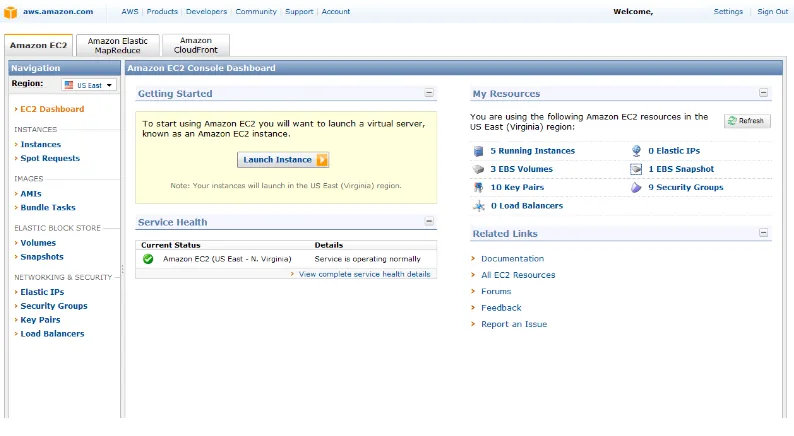
Once the account is created, the link http://aws.amazon.com/ec2 is used to access the
[image:21.612.108.505.181.399.2]main page of Amazon EC2 CCP.
Fig. 1 - Amazon EC2 Initial Page
Amazon EC2 allows creating instances and manipulating the images of operative systems
that have already been created. Also, Amazon EC2 has tools that could be used to capture
OS images, which allow storing the data for future uses or for data recovering in case of
failures.
At the same time, Amazon EC2 allows having private storage spaces through Amazon S3
(Amazon Storage 3). These private storage spaces can be used to store specific data that
belongs to the deployed OS images. In order to have this storage available in Amazon
Page 12
an option that is managed by the EC2 administration console. Once it has established the
access to the private storage spaces, there are many applications that can benefit from this
option. Among these applications can be found databases storage usage, user storage
configuration, backup storage systems, and other applications that need a robust storage
platform could also be benefit because in other circumstances would be expensive to
maintain.
Amazon EC2 and Amazon S3 are managed by VMLogix Cloud Edition; this is a virtual
manager for remote laboratories. It uses the same resources provided by Amazon EC2
and Amazon S3 to take the necessary steps that allow the user easy access to these
resources. In this case, this software could be used to create a teaching platform in the
cloud that can be used to impart laboratory classes related to the areas of computation and
information technology. In this particular case this platform could be used as a support
for the networking laboratories.
VMLogix is a fundamental piece for this Thesis, since it provides the necessary tools that
are needed to establish an effective platform in the educational field. This software allows
adequate access to the resources of Amazon EC2 CCP, as well as an organized and less
complicated way to use this platform, which is favorable to the educational goals.
Page 13
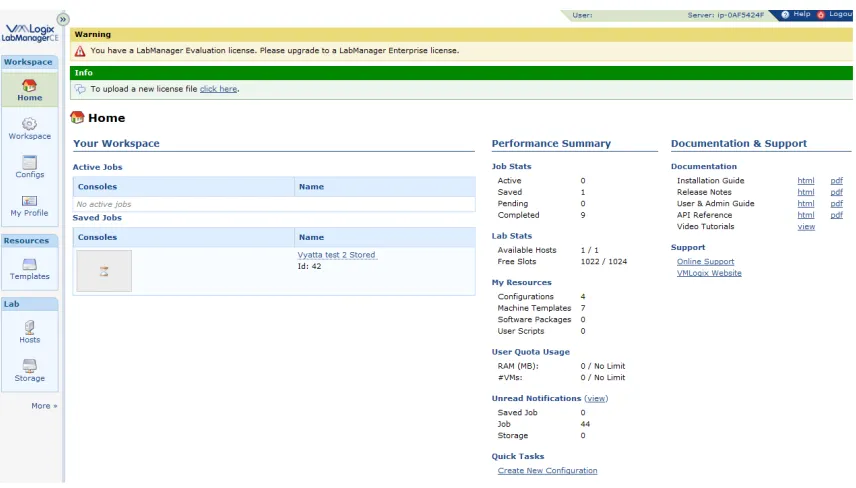
Fig. 2 - VMLogix Cloud Edition initial page
In order to have access to this software an appropriate license is needed, which is
provided by the VMLogix organization. In this case was used a software license for
educational purposes.
6.2
Platform capability Tests
For the evaluation of the networking capabilities of this platform a focus was taken on the
configuration details of virtual machines. The objective of this evaluation is to verify if
this platform allows the possibility of creating virtual networking configurations, in
which it could simulate real life networks. Since real life networks allow point-to-point
and multipoint connections between real life machines it should be able to do the same
Page 14
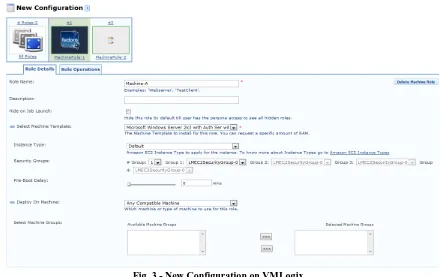
Fig. 3 - New Configuration on VMLogix
VMLogix offers multiple VM configurations, which can be defined by the OS to use, as
well as the details of software configuration that these VMs would use. One option to
emphasize is the one related to Security groups that each VM belongs to when they are
launched by VMLogix.
Fig. Fig. Fig.
Fig. 4444 ---- VMLogix Security ConfigurationVMLogix Security ConfigurationVMLogix Security ConfigurationVMLogix Security Configuration
According to the test ran, these groups of security are related with external access
[image:24.612.88.529.71.348.2]Page 15
users for the VM control from a remote location in the internet. By the way, the
machines created within the same group have total access among them through the
transport protocols TCP, UDP and ICMP.
[image:25.612.95.521.169.510.2]
Fig. 5 - VMLogix Administration Options – Job Defaults
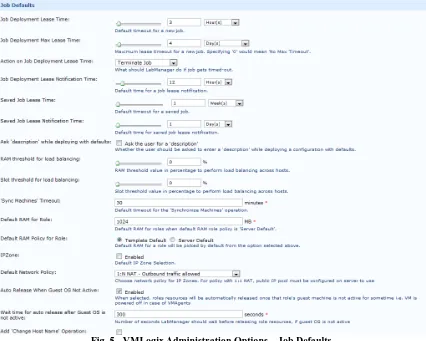
VMLogix have several administrative options that focus in the control of the definitions
of the virtual configurations. Between the modifiable options there are the configuration
run time, the amount of memory assigned to each VM, synchronization preferences, and
other options related with the access of the VMs from external networks. It should be
noted that it has been verified that some of the options do not execute the way they
Page 16
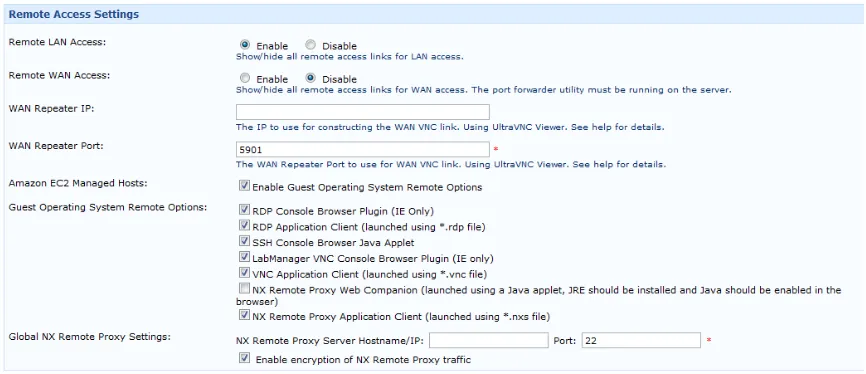
related to CCP.
Fig. Fig. Fig.
Fig. 66 66 ---- VMLogix Administration Options VMLogix Administration Options –VMLogix Administration Options VMLogix Administration Options ––– Remote Access SettingsRemote Access SettingsRemote Access SettingsRemote Access Settings
In reference to the access configuration, VMLogix offers different access mediums to the
VM, which consist in access through SSH, RDP and VNC. To achieve connectivity to
VM, multiple plug-in of access can be used, as well as direct access through third party
software (like VNCviewer, PUTTY and Microsoft Remote Desktop).
6.3
Platform´s limitations and issues for development
Fig. Fig. Fig.
Fig. 7777 ---- VMLogix Configuration DeploymentVMLogix Configuration DeploymentVMLogix Configuration DeploymentVMLogix Configuration Deployment
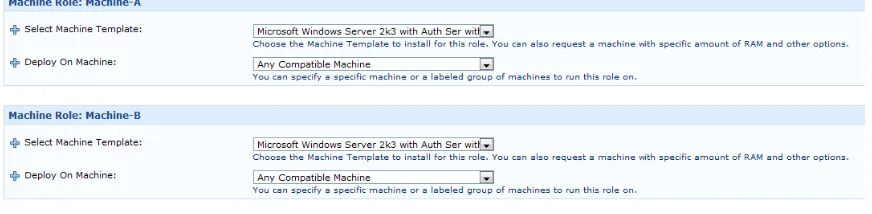
To run connectivity tests between VMs a configuration was created with two VMs, by
[image:26.612.91.524.114.301.2] [image:26.612.94.524.497.638.2]Page 17
Fig. 8 - Deployed Configuration
For this task the Microsoft Windows 2003 OS was selected, being used in both VMs.
Fig. 9 - Basic Machine Network Job
[image:27.612.120.492.343.545.2]Page 18
[image:28.612.93.527.249.462.2]Fig. Fig. Fig.
Fig. 11111111 ---- Win2k3 VM, RDP ConsoleWin2k3 VM, RDP ConsoleWin2k3 VM, RDP ConsoleWin2k3 VM, RDP Console
Fig. Fig. Fig.
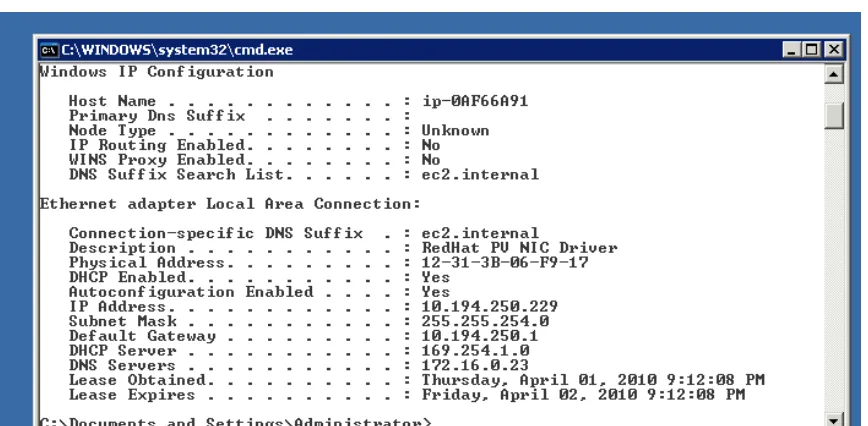
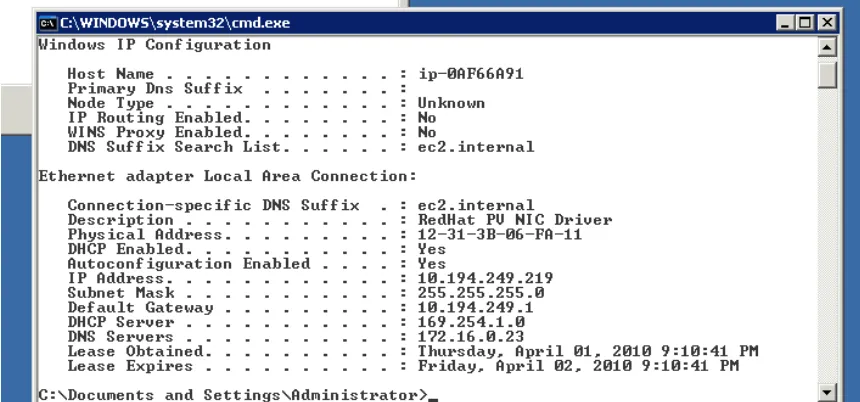
Fig. 121212 12 ---- ipconfig command results ipconfig command results –ipconfig command results ipconfig command results ––– VM #1VM #1VM #1VM #1
According to this data the assigned IPs to each VM are determined by the usage of a
DHCP server, therefore it can be assumed that it is not possible to assign specific fixed
Page 19
[image:29.612.91.521.74.275.2]Fig. Fig. Fig.
Fig. 131313 13 ---- ipconfig command output ipconfig command output –ipconfig command output ipconfig command output ––– VM #2VM #2VM #2 VM #2
To each VM different subnets are assigned, as well as different gateways. This creates a
link between both VM through virtual routers or virtual nodes, for which it was no access
to establish routing tests.
The CCP of Amazon, which is managed through VMLogix, does not allow the specific
manipulation of each VM, because the control of these machines is done through the IP
protocol. In the same way, the true control of the VMs is done internally by the Amazon
EC2 platform.
Page 20
Through the Amazon EC2 console it was able to evaluate the access configuration
assigned to the launched VMs. By the use of this console it could modify the access
restrictions of the VMs, and also it can be noted that the permission assignment can be
done to the TCP, UDP and ICMP transport protocols only.
6.4
Platform´s alternatives
Seeing the previously exposed limitations it could be stated that the CCP platform of
Amazon does not allow changing the configurations related to the link of each VM
through the layer 2 nor the layer 3 of the TCP/IP protocol stack. So it is necessary to
develop alternatives that could allow passing over those limitations.
In order to be able to create point to point network configurations between nodes, data
encapsulation could be used. This type of encapsulation is related with the use of virtual
tunnels between VMs. Actually there are several ways to make these tunnels:
• IP over IP Tunneling
• General Routing Encapsulation (GRE) Tunneling
Page 21
Fig. 15 - IP over IP encapsulation diagram [12]
IP to over IP is a data encapsulation method, in which the Payload data is masked within
two IP headers; specifically, an IP header is added to the original IP header being able to
encapsulate the data and thus transport it through multiple networks without affecting the
traffic between the communicated endpoints. Since this transport protocol works on level
3 of the TCP/IP protocol stack, it does not fulfill the requirements to security
configuration of CCP Amazon EC2. Therefore, this encapsulation protocol is not allowed
to pass through this platform, which prevents its function.
Fig. 16 - GRE encapsulation diagram [13]
GRE is an encapsulation protocol that does the same function of IP over IP, since this
Page 22
uses a different header than the IP over IP protocol and it encapsulates the data using a
header that operates on the same layer as the TCP, UDP and ICMP; that means that this
protocol would be prevented to function in the Amazon EC2 platform.
The two first alternatives require the use of transport protocols different from TCP/UDP,
which is the reason why they are automatically discarded. This is due to the limitations in
the communication between VMs imposed by the CCP Amazon EC2.
The other alternative is OpenVPN, which is a tool for site to site interconnection based in
the implementation of protocol TLS/SSL as well as pre-shared keys. The operation of
OpenVPN is done over the transport layer of the TCP/IP protocol stack, which means that
this tool could manage encapsulation process through the TCP/UDP protocols. With this
tool it could create several tunnels to interconnect different endpoints in the CCP Amazon
EC2.
6.5
Solution Development
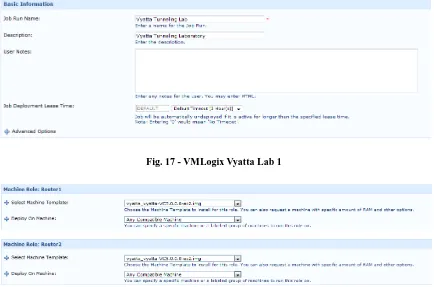
For the development of the OpenVPN based solution a virtual laboratory with two Vyatta
virtual routers was created. By using these routers it was able to verify the viability of the
Page 23
Fig. 17 - VMLogix Vyatta Lab 1
[image:33.612.92.526.89.376.2]Fig. 18 - Vyatta Lab 1 – OS selection
Fig. 19 - Lab 1 Deployed Configuration
In this step, the testing VMs were using pre-shared keys as the way to simplify the use of
Page 24
simplest way to connect, since only one shared key for both routers is needed to be
created.
Fig. 20 - Pre-shared key generation
The first step consists in the creation of the shared-key. Using the “openvpn –genkey –
secret” console command it was created the key that will be used to establish the link
between both routers.
After that there was needed to copy that key in the other router, and for that there was
used the SCP command:
Page 25
Then, the OpenVPN tunnel configuration was continued in router #1:
Fig. 22 - Router #1 Configuration
After that, the same procedure was performed with the second router, and to proof the
concept Loopback interfaces were added. In the same way, static routes were added to
reach the second router’s IP segment, and vice versa.
Page 26
[image:36.612.108.469.328.533.2]For the scheme verification, a connectivity test was performed between both routers:
Fig. 24 - Ping from Router#1 to Router#2’s loopback
Page 27
[image:37.612.93.525.385.627.2]6.6
Final Test
Fig. 26 - Final Test´s configuration
For the implementation of the final test it was using a four VMs configuration, which was
including two Vyatta routers, and two Windows 2003 as endpoints. Within this
configuration it was using pre-shared keys and the TLS/SSL protocol to interconnect the
Windows VM with each router.
Fig. 27 - Final Test Deployed configuration
The TLS/SSL requires the creation of several security certificates that are used on the
Page 28
the creation of the certificates, and these steps can be found on the main page of
[image:38.612.93.522.126.475.2]OpenVPN organization [14].
Page 29
[image:39.612.134.460.63.701.2]Fig. Fig. Fig.
Fig. 29292929 ---- Router#1 ConfigurationRouter#1 ConfigurationRouter#1 ConfigurationRouter#1 Configuration
Page 30
On the routing table, it is able to find the router#1 directly connected routes, as well as
[image:40.612.134.481.365.625.2]the routes that belong to router#2 interfaces.
Fig. 31 - Router#2 routing table
This is the second routing table; here it can be appreciated that the routing information
matches the other router’s routing table.
Fig. 32 - Installing OpenVPN client on Windows 2003 VM
In order to interconnect endpoints machines, it was necessary to install OpenVPN client
Page 31
Fig. 33 - OpenVPN configuration file – Client side
Fig. 34 - ipconfig /all command output
This image shows the second local network adapter, which belongs to the OpenVPN
tunnel. It can be appreciated that the second interface acquired an IP within the Vyatta
[image:41.612.131.475.388.605.2]Page 32
Fig. 35 - Windows 2003 second VM – ipconfig output
On this image there is confirmed that second Windows VM acquired the router#2 IP
segment address.
Fig. 36 - Adding the second segment route on Windows 2003 first VM
A second router segment was added manually, because the tunnel did not had any route
[image:42.612.114.499.359.616.2]Page 33
Fig. 37 - Adding the first segment route on Windows 2003 second VM
Then, routing tests were done to verify the connections between each node.
Fig. 38 - Testing connection between endpoint#1 and endpoint#2
In this image, ping and tracert commands were executed from the first Windows 2003
VM to the second Windows VM. As it could seen here, both VMs were communicating
[image:43.612.136.448.408.589.2]Page 34
Page 35
7
Results and Conclusion
The Thesis has successfully completed a networking laboratory scheme. The results of
this Thesis could be extracted from the test environment section. Within this Thesis the
CCP Amazon EC2 was analyzed and there was found that this platform presents several
limitations that do not allow users to construct network laboratories without the use of
other tools. The main goal of this Thesis was to develop a solution that includes the
configuration of the VMs, analysis of the accessible tools in the market, and the use of
those tools to be capable to develop a networking laboratory scheme.
The first configuration scheme was based on the use of two Vyatta routers as proof of
concept for the development of the laboratory. With this configuration we pursued to test
the OpenVPN solution to determine if we were going to be able to interconnect those
routers. For the second configuration, it was used an expansion of the first configuration
with the inclusion of two end points. Also, a dynamic routing protocol (RIP) was used to
test the routing capabilities of this solution. This configuration included the
authentication of the Windows clients with SSL certificates.
With the use of OpenVPN, as well as the TLS/SSL protocols, the solution was able to
interconnect through a series of tunnels, two endpoints (Windows VMs). Furthermore, by
using static and dynamic protocols it was able to exchange routing information between
two Vyatta Routers. Although, the use of OpenVPN+Tunneling increased the difficulty of
the laboratory scheme, this solution could be reduced in complexity with the use of
Page 36
implementation easily.
Finally the CCP Amazon EC2 could be used with the help of VMLogix and OpenVPN to
develop several network configuration schemes, which could help create a successful
Page 37
8
Future work
The objective of this Thesis was to develop a virtual networking laboratory with the use
of the CCP Amazon EC2. During the Thesis development several obstacles were
encountered that made complex the process to complete this task. The final solution
involved the use of OpenVPN tunneling which increase the time and the complexity of
the laboratory. This Laboratory would be difficult to build by students; therefore, it would
be helpful to improve the construction way of this laboratory by using predefined VM
images to reduce the complexity and made easy the development for the final user. Also,
the complexity could be reduced by the use of the VMLogix scripting options. Another
future work related to this Thesis would be the use of dynamic routing protocols different
from RIP.
On the other hand, by the time of this Thesis development, Amazon introduced -in beta
format on one data center- its new cloud computing product named Amazon Virtual
Private Cloud (Amazon VPC), which is based on the Amazon EC2 platform. This
software introduces the use of the customer’s isolated AWS resources, in which the
owner of the private cloud could assign its own private subnets, as well as a VPN tunnel
Page 38
Fig. 40 - Amazon Virtual Private Cloud (VPC)
The Amazon VPC could be used in conjunction of VMLogix to develop a Virtual
Laboratory, which could be designed to be accessed only for the authorized campus
connections. It would be useful to use private subnets with the VMLogix, because the
networking laboratories would be developed easily. Actually VMLogix does not offer the
required options to control the IP subnet assignment of the virtual configurations. The
VMLogix Lab Manager needs to be redesigned to allow the VPC features to work in this
Page 39
9
References
1. Border, C., (2007). The Development and Deployment of a Multi-User, Remote Access
Virtualization System for Networking, Security, and System Administration Classes.
SIGCSE’07, March 7–10, 2007, Covington, Kentucky, USA
2. Stackpole, B., (2008). The Evolution of a Virtualized Laboratory Environment. SIGITE’08, October 16-18, 2008, Cincinnati, Ohio, USA.
3. Stackpole, B. et al, (2008). Decentralized Virtualization in Systems Administration
Education. SIGITE'08, October 16-18, 2008, Cincinnati, Ohio, USA.
4. Bullers Jr, W. I. and Stephen, B. Virtual Machines - An Idea Whose Time Has
Returned: Application to Network, Security, and Database Courses.
SIGCSE'06, March 1-5, 2006. Houston, Texas, USA.
5. Deelman, E. et al, (2008). The Cost of Doing Science on the Cloud: The Montage
Example. Conference on High Performance Networking and Computing. Proceedings
of the 2008 ACM/IEEE conference on Supercomputing. Austin, Texas. 2008
6. Vaquero, L. M. et al, (2009). A Break in the Clouds: Towards a Cloud Definition. ACM SIGCOMM Computer Communication Review. January 2009.
7. Hazelhurst, S, (2008). Scientific computing using virtual high-performance
computing: a case study using the Amazon Elastic Computing Cloud. ACM
International Conference Proceeding Series; Vol. 338. Proceedings of the 2008 annual research conference of the South African Institute of Computer Scientists and
Information Technologists on IT research in developing countries: riding the wave of technology. 2008
8. Cappos, J. et al, (2009) Seattle: A Platform for Educational Cloud Computing. Technical Symposium on Computer Science Education. Proceedings of the 40th ACM technical symposium on Computer science education. Chattanooga, TN, USA. 2009
9. Delic, K. A. & Walker, M. A., (2008). Emergence of the Academic Computing
Clouds. Ubiquity, Volume 2008, Issue August.
Page 40
11.Kouznetsova, S., (2008). A Networking Lab Facility On The Cheap: Turning
Obstacles Into Opportunities. Journal of Computing Sciences in Colleges, Volume
23, Issue 4. April, 2008.
12.IP over IP. http://tools.ietf.org/html/rfc1853. Retrieved on February 28, 2010.
13.General Routing Encapsulation (GRE). http://tools.ietf.org/html/rfc1701. Retrieved on February 28, 2010.
14.OpenVPN. http://openvpn.net/index.php/open-source/documentation.html. Retrieved on February 28, 2010.
15.Vyatta. http://www.vyatta.org/documentation. Retrieved on February 28, 2010.
Page 41
[image:51.612.88.523.113.516.2]10
Appendix
Fig. 41 - VMLogix Administration window
Page 42
Fig. 43 - VMLogix user management window
[image:52.612.92.524.386.642.2]Page 43
Page 44
Lab1 Router 1 Configuration file:
interfaces {
ethernet eth0 { address dhcp duplex auto speed auto }
loopback lo {
address 192.168.102.1/24 }
}
openvpn vtun0 {
local-address 192.168.100.1 mode site-to-site remote-address 192.168.100.2 remote-host y.y.y.y shared-secret-key-file /root/secret } } protocols { static {
route 192.168.101.0/24 { next-hop 192.168.100.2 { } } } service { ssh { allow-root true port 22 protocol-version v2 } } system { host-name Router1 login {
user root {
authentication {
encrypted-password $1$$Ht7gBYnxI1xCdO/JOnodh. }
level admin }
user vyatta {
Page 45
ntp-server 69.59.150.135 package {
auto-sync 1
repository community { components main distribution stable password "" url http://packages.vyatta.com/vyatta username "" } } time-zone GMT }
/* Warning: Do not remove the following line. */ /* === vyatta-config-version:
"nat@3:ipsec@1:quagga@1:wanloadbalance@1:dhcp-relay@1:vrrp@1:cluster@1:firewall@3:webgui@1:dhcp-server@4" === */
/* Release version: VC5.0.2 */
Lab1 Router 2 Configuration file:
interfaces {
ethernet eth0 { address dhcp duplex auto speed auto }
loopback lo {
address 192.168.101.1/24 }
}
openvpn vtun0 {
local-address 192.168.100.2 mode site-to-site remote-address 192.168.100.1 remote-host x.x.x.x shared-secret-key-file /root/secret } } protocols { static {
route 192.168.102.0/24 { next-hop 192.168.100.1 { }
Page 46 ssh { allow-root true port 22 protocol-version v2 } } system { host-name Router2 login {
user root {
authentication {
encrypted-password $1$$Ht7gBYnxI1xCdO/JOnodh. }
level admin }
user vyatta {
authentication { encrypted-password $1$$Ht7gBYnxI1xCdO/JOnodh. } level admin } } ntp-server 69.59.150.135 package { auto-sync 1
repository community { components main distribution stable password "" url http://packages.vyatta.com/vyatta username "" } } time-zone GMT }
/* Warning: Do not remove the following line. */ /* === vyatta-config-version:
"nat@3:ipsec@1:quagga@1:wanloadbalance@1:dhcp-relay@1:vrrp@1:cluster@1:firewall@3:webgui@1:dhcp-server@4" === */
Page 47
Lab 2 Router 1 Configuration file:
interfaces {
ethernet eth0 { address dhcp duplex auto speed auto }
loopback lo {
address 192.168.110.1/30 }
openvpn vtun0 { mode server server { subnet 192.168.100.0/24 } tls { ca-cert-file /root/ca.crt cert-file /root/server.crt crl-file /root/crl.pem dh-file /root/dh1024.pem key-file /root/server.key } }
openvpn vtun2 {
Page 48
login {
user root {
authentication {
encrypted-password $1$$Ht7gBYnxI1xCdO/JOnodh. }
level admin }
user vyatta {
authentication { encrypted-password $1$$Ht7gBYnxI1xCdO/JOnodh. } level admin } } ntp-server 69.59.150.135 package { auto-sync 1
repository community { components main distribution stable password "" url http://packages.vyatta.com/vyatta username "" } } time-zone GMT }
/* Warning: Do not remove the following line. */ /* === vyatta-config-version:
"nat@3:ipsec@1:quagga@1:wanloadbalance@1:dhcp-relay@1:vrrp@1:cluster@1:firewall@3:webgui@1:dhcp-server@4" === */
/* Release version: VC5.0.2 */
Page 49
Lab 2 Router 2 Configuration file:
interfaces {
ethernet eth0 { address dhcp duplex auto speed auto }
loopback lo {
address 192.168.111.1/30 }
openvpn vtun0 { mode server server { subnet 192.168.101.0/24 } tls { ca-cert-file /root/ca.crt cert-file /root/server.crt crl-file /root/crl.pem dh-file /root/dh1024.pem key-file /root/server.key } }
openvpn vtun1 {
Page 50
login {
user root {
authentication {
encrypted-password $1$$Ht7gBYnxI1xCdO/JOnodh. }
level admin }
user vyatta {
authentication { encrypted-password $1$$Ht7gBYnxI1xCdO/JOnodh. } level admin } } ntp-server 69.59.150.135 package { auto-sync 1
repository community { components main distribution stable password "" url http://packages.vyatta.com/vyatta username "" } } time-zone GMT }
/* Warning: Do not remove the following line. */ /* === vyatta-config-version:
"nat@3:ipsec@1:quagga@1:wanloadbalance@1:dhcp-relay@1:vrrp@1:cluster@1:firewall@3:webgui@1:dhcp-server@4" === */
![Fig. 15 - IP over IP encapsulation diagram [12]](https://thumb-us.123doks.com/thumbv2/123dok_us/54750.5035/31.612.207.405.459.608/fig-ip-over-ip-encapsulation-diagram.webp)