Analyzing Art, Culture,
and Design in the Digital
Age
Gianluca Mura
Politecnico di Milano University, Italy
A volume in the Advances in Media,
Published in the United States of America by
Information Science Reference (an imprint of IGI Global) 701 E. Chocolate Avenue
Hershey PA, USA 17033 Tel: 717-533-8845 Fax: 717-533-8661 E-mail: [email protected] Web site: http://www.igi-global.com
Copyright © 2015 by IGI Global. All rights reserved. No part of this publication may be reproduced, stored or distributed in any form or by any means, electronic or mechanical, including photocopying, without written permission from the publisher. Product or company names used in this set are for identification purposes only. Inclusion of the names of the products or companies does not indicate a claim of ownership by IGI Global of the trademark or registered trademark.
Library of Congress Cataloging-in-Publication Data
British Cataloguing in Publication Data
A Cataloguing in Publication record for this book is available from the British Library.
All work contributed to this book is new, previously-unpublished material. The views expressed in this book are those of the authors, but not necessarily of the publisher.
For electronic access to this publication, please contact: [email protected]. Analyzing art, culture, and design in the digital age / Gianluca Mura, editor. pages cm
Includes bibliographical references and index.
ISBN 978-1-4666-8679-3 (hardcover) -- ISBN 978-1-4666-8680-9 (ebook) 1. Technology and the arts. 2. Arts and soci-ety. 3. Digital media--Social aspects. I. Mura, Gianluca, 1965- editor.
NX180.T4A53 2015 700.1’05--dc23
2015015527
This book is published in the IGI Global book series Advances in Media, Entertainment, and the Arts (AMEA) (ISSN: Pending; eISSN: pending)
Managing Director: Managing Editor:
Director of Intellectual Property & Contracts: Acquisitions Editor:
Production Editor: Development Editor: Cover Design:
258
Chapter 19
DOI: 10.4018/978-1-4666-8679-3.ch019
ABSTRACT
This research explores emotional response to gesture in order to inform future product interaction de-sign. After describing the emergence and likely role of full-body interfaces with devices and systems, the importance of emotional reaction to the necessary movements and gestures is outlined. A gestural vocabulary for the control of a web page is then presented, along with a semantic differential question-naire for its evaluation. An experiment is described where users undertook a series of web navigation tasks using the gestural vocabulary, then recorded their reaction to the experience. A number of insights were drawn on the context, precision, distinction, repetition and scale of gestures when used to control or activate a product. These insights will be of help in interaction design, and provide a basis for further development of gestural vocabularies.
INTRODUCTION
As technology becomes increasingly sophisticated, consumers expect more powerful and natural user interfaces than has previously been the case (Shan, 2010). While User-Centered Design (UCD) ensures that the task-orientated needs of users are recognized, the increasing adoption of Human-Centered Design (HCD) and User Experience (UX) has recognized the broader need for our interactions with technology to be “physically, perceptually, cognitively and emotionally intuitive” (Giacomin, 2014). As products become increasingly “dematerialised” (Dunne, 2008) through the use of electronics, physical operation has in many cases been replaced by control through software – for example, televisions, vending ma-chines, and smartphones are experienced primarily as an interface rather than a physical entity. Despite the emergence of UCD, HCD and UX, the complexity of many control systems mean that the experience of using too many contemporary products is unrewarding and in the worst cases emotionally upsetting
Physicality in Technological
Interface Design
Andrew J. Wodehouse
University of Strathclyde, UK
Jonathon Marks
Physicality in Technological Interface Design
(Moggridge, 2007; Norman, 2004). This is perhaps less surprising when viewed from an evolutionary perspective: for two million years humans have interacted with their environment through physical ma-nipulation. From the earliest stone tools, our physiology has adapted and improved to provide us with the motor skills to perform operations of great complexity (Lancaster, 1968; Susman, 1998) and has long been discussed as a key factor in the development of human intellectual capacity (Skoyles, 1999; Stout & Chaminade, 2007). These innate characteristics make physical movement attractive in the control of products (Costello & Edmonds, 2007) and is likely to be important in the era of ubiquitous or pervasive computing (Abawajy, 2009; Hassenzahl, 2013).
This work therefore explores how we can balance and extend computer interaction to make better use of the human body. While Gesture Controlled User Interfaces (GCUIs) have been around for the last 30 years (Bhuiyan & Picking, 2011; Buxton, 2012), recent developments in motion detection and analysis have made the hardware and software more widely available for researchers. This has resulted in an increase in attention to the applications and possibilities of such technology beyond its original use in gaming. For example, Kuhnel et al (2011) have conducted studies on the use of three dimensional gestures using a mobile phone to control a smart home environment. This utilizes the motion sensors in the phone to detect basic swipes, tilts and points to control various devices. In revisiting the workstation interface, Bhruguram et al (2012) have suggested replacing a mouse with camera and motion detection technology while retaining the conventional movements associated with a mouse. This retains the fa-miliarity of a known paradigm rather than reinvent it from first principles. When attempting to define a new, hands-free system for basic interactions with a CAD system, Jeong et al (2012) utilized simple static gestures based on a number of fingers for selection, translation, etc. although these cannot be considered to be intuitive. Despite research on set-ups and applications of GCUIs, there is less understanding as to what gestures should be employed and why.
The use of gesture, however, introduces a range of complex factors, including culture (Rico & Brewster, 2009; Yammiyavar, 2008), ergonomics (Fikkert, 2010; Saffer, 2008) and emotional response (Larssen, Robertson, & Edwards, 2006). Culture becomes critical when assigning semaphores and gestures to different functions, as there are different frames of reference across the world. For example, an “a-ok” sign in America can mean “zero” in France, “money” in Japan and “I’ll kill you” in Tunisia (Liebenau & Backhouse, 1992). Ergonomics is well established in the use of everyday products, for instance a toothbrush that is easy to hold, and our first reaction to many gestural interfaces is that they are more “natural”. However, performing a swipe command repeatedly for several hours may put a significant strain on shoulders and arms, and more detailed studies will undoubtedly be required as these become more commonplace. Emotion is possibly the least understood of these factors in relation to gesture, with the field of Emotional Design (Norman, 2004) emerging comparatively recently to address unreward-ing and in some cases problematic user experiences. A product or machine may well “do the job” but a positive emotional reaction is fundamental in ensuring that the interaction is pleasurable (Benyon, Hook, & Nigay, 2010). While it has been demonstrated that the use of gesture in gaming can engender positive emotions in players (Isbister & DiMauro, 2011; Lindley, Couteur, & Berthouze, 2008) and has driven much of the technology in gestural control, it is necessary to move beyond simply manipulating avatars and consider how movement can be used as a fundamental part of interaction with machines in our everyday lives.
ma-Physicality in Technological Interface Design
chine operation and the means of interaction for the user closer together. By better understanding how we react to the use of gestures in a practical setting, future designers would be then able to select and utilize appropriate gestures for different product operations and functionality. The aim of this research is therefore to explore what emotions and feelings gestures engender in users when interacting with sophisticated devices and systems.
EMOTIONAL RESPONSE
There is a long history of the consideration of emotional reaction to movement in dance and drama. A number of recognized systems exist, such as Meyerhold’s (1969) biomechanical exercises to develop and release the emotional potential through movement, the Feldenkrais Method (Feldenkrais, 1972) for learning movement and enhanced body function, and Laban’s (Laban, 1960; Laban & Lawrence, 1974) movement studies on the physical and expressive variations behind human motion. Regarding the interface with devices and systems, emotion has been described as a key consideration for new Human Computer Interaction (HCI) technologies, including gestural control (Benyon et al., 2010; Larssen et al., 2006). As these become more manifest in organizational settings as well as everyday life, the skills and practices for their successful use becomes important (Maguire, 2014). Research examining the social acceptance of gestures in public places (Montero, Alexander, Marshall, & Subramanian, 2010; Rico & Brewster, 2009) has broadly established that, while there are variations across demographics and cultures, as long as the gestures are not too large and demonstrative, people are willing to both use and observe them in social settings.
APPLICATION TO INTERACTION DESIGN
Research on the use of gesture for product interaction has become an important theme in HCI (Fikkert, 2010; Quek et al., 2002). In their paper describing how “defamiliarization” can be a useful tool in rei-magining HCI interfaces, Loke and Robertson (2013) provide a useful overview of different conceptual design frameworks that are emerging to frame “interaction between people and interactive computing technologies”. Karam and Schraefel (2005) suggest a classification system for gesture which is useful in identifying the different types of movement typically used when interacting with products and in daily life:
• Deictic gestures – Indicator-relative gestures used to indicate an object, direction or location. Deictic gestures consist of a pointing gesture, but importantly are different from the manipulation of pointing a screen cursor, for example.
• Manipulation gestures – Used to control an entity using a close relationship between the actual gesture and virtual entity.
• Semaphore gestures – Used to signal symbolic gestures. The gestures can be static or dynamic. Un-manipulative gestures often fall in this category.
• Gesticulation – Gestures used along with speech. They are considered the most natural gestures. • Language gestures – Used to convey sign language. These depend on gestural and symbolic
Physicality in Technological Interface Design
In terms of interaction design, a blend of different deictics, manipulations and semaphores are typi-cally used. As interfaces become more attuned to the emotional state of users, it may be that gesticula-tion has a greater role to play in the operagesticula-tion of products. In this research, we wanted to consider how emotion could relate to the practical operation of products. For example, if a traditional light switch is replaced by a motion controller, what would be an appropriate motion to activate the lighting of a room? It could be an energetic action such as a snap of the fingers or clap of the hands to induce a happy or excited mood. Conversely, a wave or patting motion may be selected to invoke a more relaxed feeling.
Rather than focusing on just one “product”, and in order to consider a range of movements and func-tions, we decided to examine the interaction with a web browser. While the web browser is a commonly used application, it also allowed a range of discrete tasks to be identified, and a distinct gesture assigned to each. In observing and analyzing how users reacted to the range of browsing tasks and their associated gestures, broader insights for future product interaction design are drawn. Based on an examination of common web browsing behavior, a set of eleven of the most commonly used commands was created. This consisted of: select; backward/forward; scroll vertical; scroll horizontal; zoom; refresh; new tab; close tab; exit browser; stop; context menu. Users were required to utilize these commands to navigate a series of web pages.
DEVELOPING A GESTURAL VOCABULARY
Once the task was developed, it was necessary to allocate gestures to each command. Rather than relying on existing conventions, we wished to better understand the nature of movement in relation to the human body, and as outlined above for inspiration have looked to the field of dance. Rudolf Laban’s (Laban, 1960; Laban & Lawrence, 1974) movement studies are one of the most widely used and cohesive theories of human movement, recognizing the physical and expressive variations behind human motion. Despite being based in the arts, and forming the basis for concepts such as dance therapy (Bartenieff & Lewis, 1980) Laban worked with engineers to analyze the movement dynamics of industrial workers in the 1940s (Davies, 2001) and senior management (Moore, 2005). There have been a number of previous studies examining the use of Labanotation in the context of product interaction (Loke, Larssen, & Robertson, 2005; Loke & Robertson, 2010). Such research into using more people-orientated interactions using dance and movement as inspiration (Bull, 1987; Kendon, 2004; Sheppard et al., 2008) have resulted in the importance of kinaesthetics – the quality and effects of movement – being more fully considered in design (Moen, 2005, 2006).
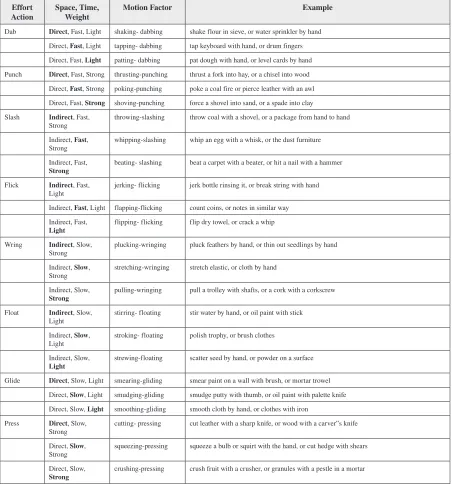
Laban identified eight basic Effort Actions. These are descriptively named Float, Punch, Glide, Slash, Dab, Wring, Flick, and Press and encompass the range mechanical movements we typically undertake. Each of the Effort Actions can change based on the Movement Factors of Space, Time and Weight and Flow. These have opposite polarities:
• Space – Direct or Indirect, the active attention to the environment and level of focus on a particular task.
• Time – Fast or Slow, the rhythm or pace of movement but also encompassing attitude to time. • Weight – Strong or Light, the sensing of physical mass and its relationship to movement.
Physicality in Technological Interface Design
[image:7.612.72.524.230.717.2]Table 1 shows how the different Motion Factors change the Effort Actions, with examples included for each. Flow has not been included as it is prevalent as the inner attitude across all movements. “Free” flow describes movement that is continuous or unimpeded and difficult to stop suddenly such as paint-ing broad and sweeppaint-ing brush strokes, whereas “bound” flow is more hesitant and involves more care such as painting a fixed area such as a window frame.
Table 1. Laban’s eight Effort Actions with the different Motion Factors and examples
Effort
Action Space, Time, Weight Motion Factor Example
Dab Direct, Fast, Light shaking- dabbing shake flour in sieve, or water sprinkler by hand Direct, Fast, Light tapping- dabbing tap keyboard with hand, or drum fingers Direct, Fast, Light patting- dabbing pat dough with hand, or level cards by hand Punch Direct, Fast, Strong thrusting-punching thrust a fork into hay, or a chisel into wood
Direct, Fast, Strong poking-punching poke a coal fire or pierce leather with an awl Direct, Fast, Strong shoving-punching force a shovel into sand, or a spade into clay Slash Indirect, Fast,
Strong throwing-slashing throw coal with a shovel, or a package from hand to hand Indirect, Fast,
Strong whipping-slashing whip an egg with a whisk, or the dust furniture Indirect, Fast,
Strong beating- slashing beat a carpet with a beater, or hit a nail with a hammer Flick Indirect, Fast,
Light jerking- flicking jerk bottle rinsing it, or break string with hand Indirect, Fast, Light flapping-flicking count coins, or notes in similar way Indirect, Fast,
Light flipping- flicking flip dry towel, or crack a whip Wring Indirect, Slow,
Strong plucking-wringing pluck feathers by hand, or thin out seedlings by hand Indirect, Slow,
Strong stretching-wringing stretch elastic, or cloth by hand Indirect, Slow,
Strong pulling-wringing pull a trolley with shafts, or a cork with a corkscrew Float Indirect, Slow,
Light stirring- floating stir water by hand, or oil paint with stick Indirect, Slow,
Light stroking- floating polish trophy, or brush clothes Indirect, Slow,
Light strewing-floating scatter seed by hand, or powder on a surface Glide Direct, Slow, Light smearing-gliding smear paint on a wall with brush, or mortar trowel
Direct, Slow, Light smudging-gliding smudge putty with thumb, or oil paint with palette knife Direct, Slow, Light smoothing-gliding smooth cloth by hand, or clothes with iron
Press Direct, Slow,
Strong cutting- pressing cut leather with a sharp knife, or wood with a carver”s knife Direct, Slow,
Strong squeezing-pressing squeeze a bulb or squirt with the hand, or cut hedge with shears Direct, Slow,
Physicality in Technological Interface Design
For each web command, a range of possible gestures using Laban terminology were selected with accompanying textual and visual description. These were then presented to a focus group of eight design engineering students. The group discussed each command in turn, and had the option to suggest alterna-tive gestures for the command. After all the gestures and commands had been reviewed, the group then decided on a suitable gesture for each command. The purpose of this was to allow the users to lead the selection of gestures and to reveal the issues relating to their efficacy and emotional impact. A more detailed exploration of the nature of Laban’s Motion Factors and the appropriateness of physical move-ments has been undertaken by the authors elsewhere (Wodehouse & Sheridan, 2014). The gesture set resulting from the focus group is shown in Figure 1. As part of this process, the number of gestures was shortened to ten when it became apparent scroll vertical and scroll horizontal could be combined to one type of gesture incorporating different axes of movement.
METHOD
An experiment was designed to allow users to experience a gestural interface and to explore how differ-ent gestures affect their emotional state. It was assumed that users’ level of experience of web browsers would vary and so this was considered as part of the user background profiling in the experiment.
RECORDING USER RESPONSE
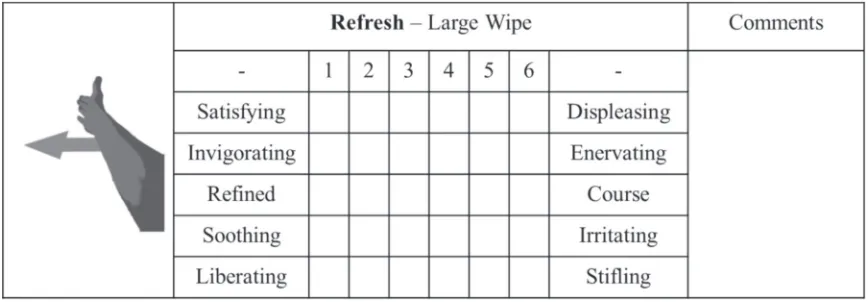
As the experiment was intended to explore the experience different gestures elicited, several methods were considered for determining the emotions experienced by the user. These included physiological measurements (Flaisch, Häcker, Renner, & Schupp, 2011), the Self-Assessment Manikins (SAM) (Bradley & Lang, 1994) and semantic differentials (Al-Hindawe, 1996).
Developed by Osgood (Charles E. Osgood, 1964; Charles Egerton Osgood, Suci, & Tannenbaum, 1957), the semantic differential technique uses bipolar adjectives (good/bad, valuable/worthless) to understand the connotative meaning of objects or concepts. It has been used in a range of settings, but in this instance provided us with the opportunity to identify appropriate measures through the explora-tion of appropriate semantic differentials for the gestural vocabulary. This was distributed immediately after users had completed the web browsing task and allowed us to define an appropriate granularity of response – the questionnaire had to be reasonably quick to complete while providing an appropriate level of detail.
Physicality in Technological Interface Design
Physicality in Technological Interface Design
EXPERIMENTAL SETUP
The experiment was conducted using a “Wizard of Oz” technique (Salber & Coutaz, 1993). This means that the user’s gestures in the experiment do not directly control the output – in this case the web browser. The user’s gestures are instead interpreted by a controller who is observing the user and controlling the computer. The Wizard of Oz setup has been successfully used in a variety of other gesture interaction studies (Fikkert, 2010; Hoysniemi, Hamalainen, Turkki, & Rouvi, 2005; Hummels & Stappers, 1998). While direct user control of the interface would be preferable, the literature suggests that the setup is suitable for gesture interaction experiments. The implementation in this instance was based on the projector-based set-up described by Fikkert (2010), and is shown in Figure 3. The users stood behind a table supporting the projector, viewing the web browser via a projected screen of 850mm x 740mm with a copy of the gesture command illustrations for reference. The users worked through the task before completing the semantic differential questionnaire afterwards. The operator also took additional notes based on observation of user behavior.
USERS
[image:10.612.98.532.127.278.2]Physicality in Technological Interface Design
Figure 3. Wizard of Oz experimental set-up
[image:11.612.108.495.464.743.2]Physicality in Technological Interface Design
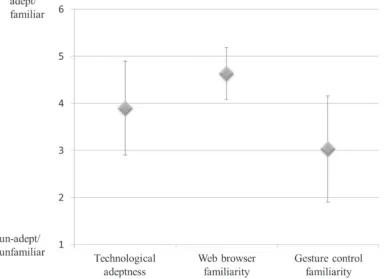
(x̄ = 3.9 σ = 0.99) and all users were either familiar or very familiar with a web browser (x̄ = 4.63 σ = 0.55). Users’ familiarity with gesture-controlled products, however, was lower and varied more greatly (x̄ = 3.03 σ = 1.13) than technology in general or web browsers.
RESULTS
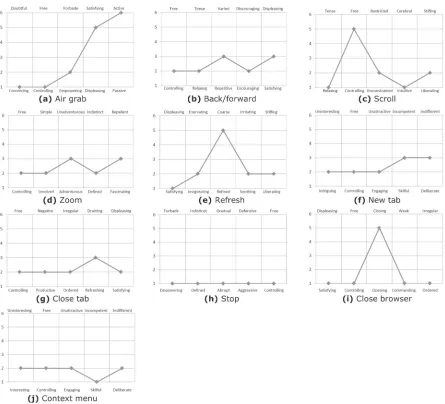
The results of the semantic differential questionnaire were reviewed. For each gestural command, Figure 5 shows the mean value across all 30 users for the five related semantic differentials. These results, along with qualitative user responses, are reviewed for each command in turn in the sections below.
SELECT (AIR GRAB)
A gesture involving a grabbing motion, with the user closing their hand as if to grip something. All users executed this gesture easily and seemed to find it intuitive. Users had strong feelings relating to the air grab as shown by Figure 5(a), where the results of the semantic differential tend towards the limits of the scale. Users felt very active while completing this gesture, which may be due to an association with grabbing a physical object. The fact that the gesture felt convincing is important: even though an object does not exist, the movement engenders a strong emotional reaction that correlates with the movement itself. This is more visceral than for example a mouse click to achieve a similar function.
BACK/FORWARD (MOVING CLOCK HANDS)
A gesture involving the user rotating their pointing index finger anti-clockwise to go back and clock-wise to go forward. Of the gestures tested here, this was one of the most delicate, with 17% of the users commented that they would prefer a bigger gesture involving the whole hand. Satisfaction levels with the gesture were middling, as shown in Figure 5(b). The gesture came across as slightly repetitive, but users also found the gesture encouraging. Users tended to find the gesture both relaxing and controlling though not compellingly so.
SCROLL (FLICK)
technologi-Physicality in Technological Interface Design
cally adept they were. Though not at the limits of the scale the feeling of liberation, being free and being unconstrained were also selected by the users. These feelings and the loose physicality of the gesture have a lot in common.
ZOOM (PINCH)
[image:13.612.74.519.121.525.2]Physicality in Technological Interface Design
familiarity with gesture technology low. Similarly they also tended to find the gesture simple rather than involved. A couple of feelings did not come across as strongly for the users: on the fascinating/repellent scale and adventurous/unadventurous the output was only marginally towards fascinating and adventurous.
REFRESH (WHOLE ARM SWIPE)
A gesture involving a large sweeping action with the user’s arm. Through observation it was noted us-ers particularly enjoy this gesture, and this is reflected in Figure 5(e) It can be seen that the usus-ers found the gesture highly satisfying as well as invigorating. Users’ comments also suggested that this was an enjoyable gesture, highlighting that it was distinctive and fun. The gesture also came across as being coarse, soothing and liberating. As the gesture involves considerable physical motion, it was interesting that this was the case – the effort required does not seem to have been an irritant.
NEW TAB (GRAB AND DRAG, TOP CORNER TO MIDDLE)
A gesture involving the user air grabbing the top right hand corner of the screen and dragging and dropping into the center. This represented pulling a new window from a tab bar onto the middle of the screen. From Figur 5(f) it can be seen there were no especially strong emotions associated with it. The gesture did, however, come across as somewhat intriguing. The seven users who did not find it intrigu-ing were unfamiliar with gesture-controlled product prior to takintrigu-ing part in the experiment. The gesture also came across as controlling and engaging, which aligns with its fairly direct mechanics. The two scales that only just swayed in one direction were skillful and deliberate showing these were not strong feelings for the users.
CLOSE TAB (GRAB AND DRAG, MIDDLE TO BOTTOM CORNER)
A gesture involving the user air grabbing the middle of the screen and dragging and dropping their hand to the bottom corner. This represented the concept of throwing away the current window. Three users commented that this gesture was too easy to confuse with the Select and New Tab gestures. Figure 5(g) shows that this gesture did not create particularly strong reactions, but feelings of being productive, ordered, satisfied are still evident. Whether the gesture is refreshing or draining is unclear, with neutral feedback.
STOP (HAND UP FLAT)
Physicality in Technological Interface Design
CLOSE BROWSER(TWO-HANDED GRAB AND DRAG, MIDDLE TO BOTTOM)
A gesture involving the user air-grabbing the middle of the “screen” with both hands before pulling down and dropping. It evoked strong feelings within the users as can be seen in Figure 5(i). Feelings included satisfying, controlling, commanding and ordered. Users also felt the gesture to be closing and this relates to the purpose of the gesture in exiting the web browser. Several users highlighted that the gesture felt definitive, with the two hands emphasizing it as the end of a sequence. Three other users, however, commented that having to use two hands was a negative factor.
CONTEXT MENU(AIR GRAB, TWIST, WAVE AND AIR GRAB)
A gesture involving multiple parts due to the task it performs. The user at first air grabs before rotating his or her closed fist to bring up the context menu. The user then moves his or her hand up and down to scroll up and down the menu before air grabbing to select the required item. In Figure 5(j), skillful is seen as the only emotion felt very strongly by users. Four users felt this gesture was difficult to do therefore doing the gesture was a skillful process. It can also be seen that the users felt the gesture was also clearly interesting, controlling, engaging and deliberate.
DISCUSSION
Through the development and testing of the gestural vocabulary, it became apparent that gestural inter-action poses unique challenges. It is fundamentally different from direct physical interinter-action or remote control using a proxy device in that it involves movement without any tactile feedback or resistance to the actions performed (Ramduny-Ellis, Dix, Evans, Hare, & Gill, 2010). While in dance or drama the actors are expressing feelings or emotions through gesticulation and movement, mimicking operation requires a greater degree of response and if this relies only on the correlation of visual feedback on a screen the user experiences an increased cognitive load to ascertain the result when appropriate tactile feedback would be instantly and intuitively recognized. This issue is revisited in the “Implications” sec-tion below, however the feedback of the identified movements was reviewed initially in terms of their ease-of-use and effectiveness. The major issues that emerged included context, precision, distinction, repetition and scale, and these are reviewed in turn.
Precision
suggest-Physicality in Technological Interface Design
ing that the lack of precision in the gesture may also be a factor in its attractiveness. Creating a relaxed feeling when utilizing interfaces is important for user satisfaction, and ways to incorporate freedom or flexibility in gestures wherever possible may be important in achieving this.
Distinction
Gestures that are distinct were found to be more satisfying and create stronger emotions in users. The refresh gesture, with its large sweeping action, was highly appreciated by users. It was also noted that the gesture was very distinctive, and hard to do by accident. Unlike the refresh gesture which has a distinct movement the new tab gesture, a grab and drag from the top corner to middle, and the close tab gesture, a grab and drag from middle to bottom corner, were commented on by users as being too similar and therefore confusing. This affected how deliberate the new tab gesture felt. It also affected the overall experience of the gesture, which shows that defined gestures created stronger feelings within a user. Defined does not necessarily mean simple: if the task is not obvious then the gesture does not need to be. The relatively intricate gesture associated with the context menu was positively received. The ap-propriateness of the physical action for the intellectual task is what matters, and the sequences of grabs and twists, perhaps suggestive of opening a door or turning a key, in this case aligned well with the sentiment of exploration associated with using a context menu. When gesture, emotion and functionality correlate as in this instance, the interface has succeeded.
Context
Gestures which mimic commonly used actions from real life can be effective in recreating the emotions typically associated with them. The stop command, consisting of a vertical flat palm, is an embolic gesture that would be recognized in any context and was to the users very definite in nature. Its associa-tions with a break, defensiveness or even aggression could, however have a negative impact in relation to the interface. It is therefore important to consider possible connotations of any motion and how they relate to interface functionality. Another example is the select gesture, which consisted of the air grab and again engendered strong reactions in users. It resembles a real-life action, and while no physical object is present for the user to hold or touch, the motion itself was sufficient to engender the feelings of decisiveness. In this sense, the grabbing action is well suited to item selection in the interface design. On the other hand, the back/forward action, which invoked winding clock hands, also mimicked real life but was less intuitive and less effective in engendering emotional response. This suggests that familiar and commonly used motions should be employed where possible, but need to be aligned with appropri-ate interface functionality.
Repetition
Physicality in Technological Interface Design
to include the likely frequency of a command when deciding on an appropriate gesture. While distinc-tion, as previously discussed, can be a powerful emotional differentiator, it cannot be at the expense of fundamental ergonomic issues such as economy of motion, speed of execution and energy expenditure. This is distinct from combinations of movements – most of the motions here consisted of only one or two elements apart from the context menu. The sequence of distinct motions used in this case may have been a factor in its positive reception and should be considered in the construction of more complex gestural interfaces.
Scale
Gestures should be related to the size of the controlled system or output. For example, a full sweep of the arm is a large gesture suitable for controlling images or systems as big or bigger than the human body. In the experimental set-up, users found the small gestures to control the large, projected screen to be disconcerting, which affected their overall satisfaction. An example of this was the back/forward gesture, which users found to be too small, suggesting a bigger gesture involving the whole hand rather than just an index finger would be more appropriate. The zoom gesture, with its pinch to zoom motion, provoked similar comments of dissatisfaction. Further exploration revealed this was related to the delicate nature of the gesture in a relatively large setup. The gesture is commonly used on touch screen devices, and typically far smaller canvas sizes. Within the interface itself, it is therefore appropriate to relate the scale of physical movement to functionality – for example using arms and wrists for grander actions and fingers for more intricate tasks. In addition, the size of execution carries an emotional content: a big arm sweep is an emotionally stronger indication than the same arm motion only with smaller amplitude. This should be considered for the control of machine functions where amplitude (such as volume, speed etc.) are important. The fact that larger, more imprecise movements generally seemed to prove more popular is also worth considering in an overall gestural vocabulary.
IMPLICATIONS FOR HCI
The emerging use of gestural controllers in GCUI set-ups provides a significant opportunity to develop new paradigms for HCI interfaces. New principles of movement can be used to establish gestural vo-cabularies that could free us from static sitting positions in the operation of not only computers but our environment and indeed any computer-controlled device. This does, however, present new challenges in usability that are only now becoming apparent. The lack of constraints associated with GCUIs – while a great asset in terms of flexibility – is a particular challenge in developing meaningful physical experiences.
Physicality in Technological Interface Design
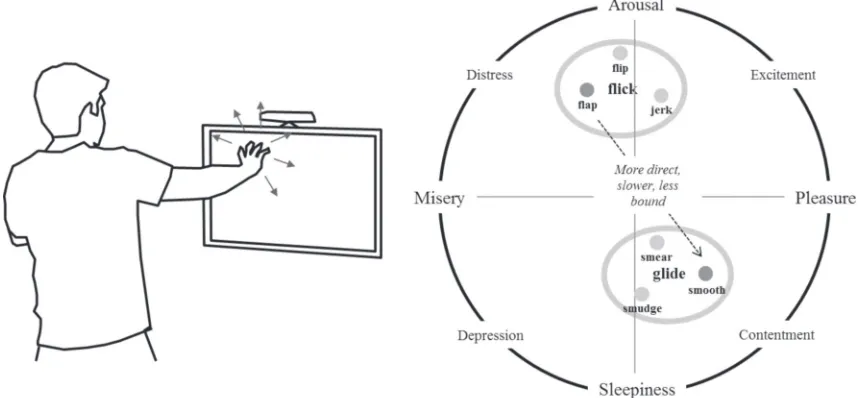
likely to be far more aggressive than someone in a relaxed state ponderously browsing. Because there are less limitations on where and how the user moves (than with a physical dial for instance), there can be a considerable change in the mechanical motion undertaken: an aggressive and rapid movement of the hand would equate to a flapping-flicking motion, whereas a more relaxed approach would equate to a smoothing-gliding motion. This transition is highlighted in Table 2.
To illustrate more clearly the difficulties in an HCI context, an example is presented in Figure 6 to show how emotional state and physical movement are interdependent. Russell’s (1980) Model of Affect utilizes arousal vs. sleepiness and pleasure vs. misery as the two primary axes with compound emo-tions between them. This is apt for evaluating the interaction with a product or interface with its focus on the experiential nature of emotion. Considering the vertical axis to broadly equate to engagement and the horizontal axis to enjoyment, we have plotted flicking and gliding Effort Actions, with the two modes of completing the Scroll command (agitated and leisurely) illustrated by the flapping-flicking and smoothing-gliding Motion Factors respectively. Note that the three variations in each of the basic Effort Actions means there is scope for considerable variation across the graph. For example for flicking, flipping-flicking would generally feature highest on the arousal scale as it is more attuned to the sensi-tivity of weight. Jerking-flicking is of a more sudden and unpredictable nature than flapping-flicking, which is focused on rhythm and repetition.
In designing gestural interactions, it is therefore necessary to consider how much variation should be permissible and whether physical boundaries or feedback such as those provided by the switches or handles of “real” interfaces should be emulated in the gestural environment. In other words, if we define a slow flick as mandatory, this could either frustrate the user or help calm them to a state of mind more aligned with the nature of the action. This is very much connected with the concept of Flow, which is not obvious from the outer physical movement but relates to the inner attitude of the user. In moving from the flick to the glide movement for scrolling, we would anticipate that the user is less bound, i.e. they are moving in a more relaxed manner. The subtleties of these emotional states and transitions have been identified as a key are of focus for kinaesthetics in GCUI.
CONCLUSION
[image:18.612.86.550.622.699.2]While the results presented in the experiment are in important step in exploring the emotional aspects of gestural interaction, there are several issues that should be considered for future work. The Wizard of Oz technique proved effective in facilitating the experiment, but the presence of an operator in the
Table 2. Use of the Scroll command and its transition according to attitude of the user
Effort
Action Space, Time, Weight Motion Factor Nature of scrolling
Flick Indirect, Fast,
Light flapping-flicking Moving rapidly through sequence in hurried or agitated manner Glide Direct, Slow,
Physicality in Technological Interface Design
room may have influenced results. None of the previous studies cited that used a Wizard of Oz exam-ined the emotions and feelings of users; some users may have felt uncomfortable with the thought of being observed and in future experiments a fully-operational interface allowing uninhibited control is desirable. Semantic differentials are an established and appropriate way of recording emotion but did raise several issues. There was a balance between the number of scales used and the time to complete the questionnaire. Only using five for each gesture meant that the results were not as expansive as they could have been. Additionally, the adjectives chosen and implemented did not always allow users to fully express their emotional reaction. Adding the comments box for each gesture did prove useful as users often expanded on what they were feeling and why.
While we have suggested how existing models of movement and emotion can be linked to provide a more holistic exploration of interface design, the main findings from the work are the identification of context, precision, distinction, repetition, and scale as critical factors for consideration in gestural interfaces:
• Context – Familiar and commonly used motions should be employed where possible, and aligned with the product functionality.
• Precision – Looser, more imprecise movements tends to create positive feelings within the user and should be used where appropriate.
• Distinction – Distinct, decisive motions, tend to be more satisfying and create stronger emotions in the user.
• Repetition – Unnecessary repetition should be avoided as users quickly find this laborious and disengaging. Appropriate combinations and sequences of movements can, however, add interest. • Scale – Gesture size should relate to the controlled system or output, with small movements
[image:19.612.82.511.129.328.2]Physicality in Technological Interface Design
REFERENCES
Abawajy, J. H. (2009). Human-computer interaction in ubiquitous computing environments. International Journal of Pervasive Computing and Communications, 5(1), 61–77. doi:10.1108/17427370910950311 Al-Hindawe, J. (1996). Considerations When Constructing A Semantic Differential Scale. La Trobe Papers in Linguistics, 9(7).
Bartenieff, I., & Lewis, D. (1980). Body Movement: Coping with the Environment. New York, NY: Gordon and Breach.
Benyon, D., Hook, K., & Nigay, L. (2010). Spaces of interaction. Paper presented at the 2010 ACM-BCS Visions of Computer Science Conference, Edinburgh, UK.
Bhruguram, T. M., Jophin, S., Sheethal, M. S., & Philip, P. (2012). A New Approach for Hand Ges-ture Based Interface. In D. C. Wyld, J. Zizka, & D. Nagamalai (Eds.), Advances in Computer Science, Engineering & Applications (Vol. 166, pp. 649–655). Springer Berlin Heidelberg. doi:10.1007/978-3-642-30157-5_65
Bhuiyan, M., & Picking, R. (2011). A Gesture Controlled User Interface for Inclusive Design and Evaluative Study of Its Usability. Journal of Software Engineering and Applications, 4(9), 513–521. doi:10.4236/jsea.2011.49059
Bradley, M. M., & Lang, P. J. (1994). Measuring emotion: The self-assessment manikin and the semantic differential. Journal of Behavior Therapy and Experimental Psychiatry, 25(1), 49–59. doi:10.1016/0005-7916(94)90063-9 PMID:7962581
Bull, P. E. (1987). Posture And Gesture. Oxford, UK: Pergamon Press.
Buxton, W. A. (2012). Innovative interaction: from concept to the wild: technical perspective. Com-munications of the ACM, 55(9), 90–90. doi:10.1145/2330667.2330688
Costello, B., & Edmonds, E. (2007). A study in play, pleasure and interaction design. Paper pre-sented at the 2007 conference on Designing pleasurable products and interfaces, Helsinki, Finland. doi:10.1145/1314161.1314168
Davies, E. (2001). Beyond Dance: Laban’s Legacy of Movement Analysis. New York, NY: Routledge. Dunne, A. (2008). Hertzian Tales: Electronic Products, Aesthetic Experience, and Critical Design. Cambridge, MA: The MIT Press.
Feldenkrais, M. (1972). Awareness Through Movement. New York, NY: HarperCollins.
Fikkert, F. W. (2010). Gesture Interaction at a Distance. (Doctor of Philosophy). Enschede: University of Twente.
Physicality in Technological Interface Design
Giacomin, J. (2014). What Is Human Centred Design? The Design Journal, 17(4), 606–623. doi:10.27 52/175630614X14056185480186
Hassenzahl, M. (2013). User experience and experience design. In M. Soegaard & R. F. Dam (Eds.), The Encyclopedia of Human-Computer Interaction (2nd ed.). Aarhus, Denmark: The Interaction Design Foundation.
Hoysniemi, J., Hamalainen, P., Turkki, L., & Rouvi, T. (2005). Children’s intuitive gestures in vision-based action games. Communications of the ACM, 48(1), 44–50. doi:10.1145/1039539.1039568 Hummels, C., & Stappers, P. J. (1998, 14-16 Apr 1998). Meaningful gestures for human computer inter-action: beyond hand postures. Paper presented at the Third IEEE International Conference on Automatic Face and Gesture Recognition. doi:10.1109/AFGR.1998.671012
Isbister, K., & DiMauro, C. (2011). Waggling the Form Baton: Analyzing Body-Movement-Based Design Patterns in Nintendo Wii Games, Toward Innovation of New Possibilities for Social and Emo-tional Experience. In D. England (Ed.), Whole Body Interaction (pp. 63–73). London, UK: Springer. doi:10.1007/978-0-85729-433-3_6
Jeong, J.-S., Park, C., & Yoo, K.-H. (2012). Hand Gesture User Interface for Transforming Objects in 3D Virtual Space. In T.-h. Kim, H. Adeli, W. Grosky, N. Pissinou, T. Shih, E. Rothwell, B.-H. Kang & S.-J. Shin (Eds.), Multimedia, Computer Graphics and Broadcasting (Vol. 262, pp. 172-178). Springer Berlin Heidelberg.
Karam, M., & Schraefel, M. C. (2005). A taxonomy of gesture in human computer interactions. Technical Report ECSTR-IAM05-009. Southampton, UK: University of Southampton.
Kendon, A. (2004). Gesture: Visible Action as Utterance. Cambridge, UK: Cambridge University Press. Kühnel, C., Westermann, T., Hemmert, F., Kratz, S., Müller, A., & Möller, S. (2011). I’m home: Defining and evaluating a gesture set for smart-home control. International Journal of Human-Computer Studies, 69(11), 693–704. doi:10.1016/j.ijhcs.2011.04.005
Laban, R. (1960). The Mastery of Movement (2nd ed.). London, UK: MacDonald and Evans. Laban, R., & Lawrence, F. C. (1974). Effort (2nd ed.). London, UK: MacDonald and Evans.
Lancaster, J. B. (1968). On the evolution of tool-using behavior. American Anthropologist, 70(1), 56–66. doi:10.1525/aa.1968.70.1.02a00060
Physicality in Technological Interface Design
Loke, L., Larssen, A. T., & Robertson, T. (2005, 23-25 November). Labanotation for Design of Movement-Based Interaction. Paper presented at the Second Australasian Conference on Interactive Entertainment, Sydney, Australia.
Loke, L., & Robertson, T. (2010). Studies of Dancers: Moving from Experience to Interaction Design. International Journal of Design, 4(2), 1–16.
Loke, L., & Robertson, T. (2013). Moving and making strange: An embodied approach to move-ment-based interaction design. ACM Transactions on Computer-Human Interaction, 20(1), 1–25. doi:10.1145/2442106.2442113
Maguire, M. (2014). Socio-technical systems and interaction design–21st century relevance. Applied Ergonomics, 45(2), 162–170. doi:10.1016/j.apergo.2013.05.011 PMID:23856116
Meyerhold, V., & Braun, E. (1969). On Theatre. London, UK: Methuen Drama.
Moen, J. (2005). Towards people based movement interaction and kinaesthetic interaction experiences. Paper presented at the 4th decennial conference on Critical computing: between sense and sensibility, Aarhus, Denmark. doi:10.1145/1094562.1094579
Moen, J. (2006). KinAesthetic Movement Interaction: Designing for the Pleasure of Motion: KTH. Nu-merical Analysis and Computer Science.
Moggridge, B. (2007). Designing Interactions. Cambridge, MA: The MIT Press.
Montero, C. S., Alexander, J., Marshall, M. T., & Subramanian, S. (2010). Would you do that?: understanding social acceptance of gestural interfaces. Paper presented at the 12th international conference on Human computer interaction with mobile devices and services, Lisbon, Portugal. doi:10.1145/1851600.1851647 Moore, C.-L. (2005). Movement And Making Decisions: The Body-mind Connection. In The Workplace (Contemporary Discourse on Movement and Dance). New York, NY: Dance & Movement Press. Norman, D. (2004). Emotional Design: why we love (or hate) everyday things. New York: Basic Books. Osgood, C. E. (1964). Semantic Differential Technique in the Comparative Study of Cultures. American Anthropologist, 66(3), 171–200. doi:10.1525/aa.1964.66.3.02a00880
Osgood, C. E., Suci, G. J., & Tannenbaum, P. H. (1957). The measurement of meaning. Academic Press. Quek, F., McNeill, D., Bryll, R., Duncan, S., Ma, X.-F., Kirbas, C., & Ansari, R. et al. (2002). Multi-modal human discourse: Gesture and speech. ACM Transactions on Computer-Human Interaction, 9(3), 171–193. doi:10.1145/568513.568514
Ramduny-Ellis, D., Dix, A., Evans, M., Hare, J., & Gill, S. (2010). Physicality in Design: An Explora-tion. The Design Journal, 13(1), 48–76. doi:10.2752/146069210X12580336766365
Rico, J., & Brewster, S. (2009). Gestures all around us: user differences in social acceptability perceptions of gesture based interfaces. Paper presented at the 11th International Conference on Human-Computer Interaction with Mobile Devices and Services, Bonn, Germany. doi:10.1145/1613858.1613936
Physicality in Technological Interface Design
Salber, D., & Coutaz, J. (1993). Applying the Wizard of Oz technique to the study of multimodal systems. In L. Bass, J. Gornostaev, & C. Unger (Eds.), Human-Computer Interaction (Vol. 753, pp. 219–230). Berlin, Germany: Springer. doi:10.1007/3-540-57433-6_51
Shan, C. (2010). Gesture Control for Consumer Electronics. In L. Shao, C. Shan, J. Luo, & M. Etoh (Eds.), Multimedia Interaction and Intelligent User Interfaces (pp. 107–128). Springer London. doi:10.1007/978-1-84996-507-1_5
Sheppard, R. M., Kamali, M., Rivas, R., Tamai, M., Yang, Z., Wu, W., & Nahrstedt, K. (2008). Ad-vancing interactive collaborative mediums through tele-immersive dance (TED): a symbiotic creativity and design environment for art and computer science. Paper presented at the 16th ACM international conference on Multimedia, Vancouver, British Columbia, Canada.
Skoyles, J. R. (1999). Human evolution expanded brains to increase expertise capacity, not IQ. Psycolo-quy, 10(2), 1–14.
Stout, D., & Chaminade, T. (2007). The evolutionary neuroscience of tool making. Neuropsychologia, 45(5), 1091–1100. doi:10.1016/j.neuropsychologia.2006.09.014 PMID:17070875
Susman, R. L. (1998). Hand function and tool behavior in early hominids. Journal of Human Evolution, 35(1), 23–46. doi:10.1006/jhev.1998.0220 PMID:9680465
Wodehouse, A., & Sheridan, M. (2014). Exploring emotional response to gesture in product interaction using Laban’s movement analysis. Interaction Studies: Social Behaviour and Communication in Biologi-cal and Artificial Systems, 15(2), 321–342. doi:10.1075/is.15.2.15wod