ooooo
t.o
3
,trtt
oa
ra-oooooooooo
o o
oooo
oo
ooo
OO
Conlenls
The outlines
of
the Computing
Centre
3
Software
componenb
4
layout
of
hardware
components
5
Hardware
components
Glnsalled
terminals
8
Tabte
of
equivalent time, sumrnary per month and
cumulative
11Statistics
of
computing installation
utilization,
July
12
Utilization
by objectives and accounts,
July
13
Statistics
of
computing installation
utilization,
August
14
Utilization
by objectives and accounts,
August
15
IBM time sharing
option
(TSO)
16
Note
to
the
users
2GNote of
the Editol
The present Newsletter is
published monthly except for Augurt
and Decamber.
The Newsletter includes:
.
Oevelopments, changeg, uses of installationsa
AnnouncemenE, neu,s and abtracts on initiatives and accomplishments.The Editor thanks in advanca tho6e who want to contribuc to the Nelvlletter
bry sending articla in English or French
to one of the following poBons of the
Editorial Board.
Note de la R6daaion
le
pr6sent Bulletin ert publidntnsuelle-rnent exoept6 durant les mois d'aoot et
d6cembre.
[c
Bulletin traited6:
.
Ddveloppements, changement! et emploi des des installationr'
o
Avis, nourrelles et rdsunrdt conoemantles initistiws et len r66listiqrr.
[a Rddaction rernercie d'avance ceux
qui veulent bien contribuer au Bulletin
en envoyant dec articles en anglair ou
frangais B l'un des rnembes du Comit6
de Rddaction.
Editorial
Board/
Comitd de R6daetionH. de
Wol&,
D.G. lspraC. Pigni, C.C. lspra J. Pire, C.C. lspra
Consulant: S.R. Gabbai, D.G. lspra
Computing Centre References
fi/lanager
Adjoined
@mpuar Boom Adjoined
&,ripherals
System Group Adjoined
lnfornptia
Supporto General lnformation o Program lnforrnation Service
Adloin€d
o Graphics and Support to Users
Adioined
Application Packagps
Programming Languages
'J.
Pire
1816
?32 G.Gaggero
1874
787P.
Tomba
1857
797A.
Binda
1857
797G.
Nocera
1825
767D.
Koenig
1839
742 P.A.Moinil
1841
7O4 G.Gaggero
1874
7A7G.
Hudry
1873
787 G.Gaggero
1874
7A7S. Leo
Menardi
1884
72'lH.f . de
Wolde
1890
753A.
Pollicini
1867
753A.
lnzaghi
1887
755C. van den
Muyzenberg
1848
781 Tel.Editor :
Jean PireLayout :
Paul De HoeThe Outlines
of
the Computing Centre
The
next
pages
give
a
schematic standard
information
on
the
Computer Centre.
The
material is represented
mainly
astables.
Some
of
these
tables
will
be published in
the
future only
in
caseof
modifications,
others
will
show
up in
each
edition
of
this
newsletter.
lt
is
advisable
to
file
this
material
for
reference
purposes.
The
second
two tables specify
the
hardware
configuration,
illustrated
by
the
schematic
layout
of
the
components.
Weintend
to
describe
the
specific
characteristics
of
some
of
the
hardware
items
more
in
detail
in
following
editions
of
the
nqrusletter.
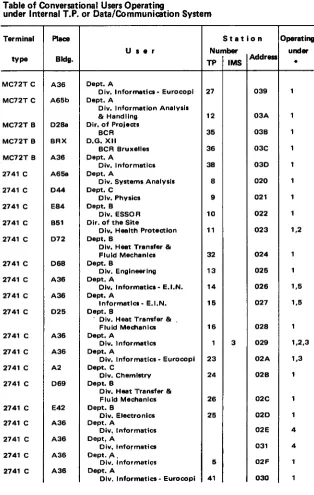
The
third
table might
be
useful
in
case
your
terminal
malfunctions;
you
may consult
the
list for
an
equivalent
appliance
close
at hand.
The software components are specified very
shortly
in the
first
table. Other information about software
components
are
recorded
in
lnstallation
Notes.
The lnstallation
Notes are produced
by the
computer through
the
execution
of
the
described
job. The
notes give
detailed
information
on specific
subjects.
The
statistics
on
computer
use
will
be published
monthly.
ln
some
cases
the
figures
for
the
last years are specified
too.
The
reader
might
use these
data
asa
basefor
planning this computer
workload
to
decrease
turn
around
time
and
costs.
The
responsibles
of
accounts
may check
their
situation
on
amonthly
base.Software Components
. System:
OperatingSystem
O'S.MVT 21.8 Spoolprogram
HASP l1 V.3.1Teleprocessing
TELEUR
(local system) rMS/DC V.2.4.1o
Compilers':
AssemblerF
TSO
Assembler H V.5.0FORTRAN G
FORTRAN H
coBoL
ANS V.3.2 Sort/Merge V.1.4PL/l Optimizirg
Y.1.2.2 FORTRAN H extended V.2.0 FORTRAN G1 V.2.0ALGOL
.
Srycial
System:PMS
lV
V.l.4
Prolect Management SystemCSMP
lll
V.1.3
Continuous System Modelling ProgramMPSX-MlPV.1.6
Mathematical ProgrammingSystemDYNAMO
ll
V.4.6
Dynamic ModellingSTMPL/I
V.1.0
SimulationPL/l
ICES-PROJECT
1
Proiect Engineering CantralICES-STRUDL
2
Structural Design LanguageGENESYS
General Engineering SystemSHELTRAN
SHELLTRANSLATOR
(Structure FORTRAN precompiler)
FORMAC
PLll
and FORTRAN preprocessor IMS DB/DCV.2.4.1
lnformation
Management SystemData Base/Data Communication
STAIRS
Storage andInformation
Retrieval SystemSIMAS
Softwarelnformation
Management SystemAPL
V.1.1
A
Programming Language STMULA 67V.1.2
Simulation
Languagec
Seruie
andutility
programs:LIBRARIAN
FILED!T-PSO
cohEA
OS/DITTO
'
Libraries: Theu*r
can dispo* of a tibrury of mathematiel programs (algorithm orsubroutines), and of a library of problem oriented agpliation programs).
SrtEo lttsl
O
tlr.!
o
r2doa
2.ooa
at@?
tc008sC UNES
I
3
J
RCISPRA
6mputing lnrtollotion
SYSTEM
/
370rootr tat
I rlvtt3 cort 3rdaot
Layout
of
HarAmre
ComPomonts
E
@MPUTING INSTALLATION
DESCRIPTION HARDWARE COMFONENTSN Typo Unit It/bdel Func'tbn
dcoriptbn
'1 6 1 1 1 2 12 7 1 1 1 7 1 IBM TELEX IBM IBM IBM ITEL. ITEL. ITEL-IBM IBM TELEX TELEX TELEX
31 65 6360 2880 2860 2870 7833 739) 7330 283rt 2305 6803
il20
il20
KJ 5 2 1 1 2 1 11 2 2 1 7 5Central Processing Unit
Processing Storage
Total csntral storage capacity
3 Megabytes
Channels
Block multiplexor drannel Selector channel
Byte multiplexor drannel with one selector subdrannels
Dir.ct Accass Unitr:
Storage control
Disk storage
Disk storage
Total 19 disk storago units (Track length 1304) bytesl
Storage
ontrol
Fixed head storag€
(Track lengrth 14660 bytesl
Magnotic Tap€*
Tap€ control unit
Magnetic tape unit
(9 tracks density 800/1600 bpil
Magneti c tape unit
1
2
1 1 1
I
1 1 1 1 1
1 1
10
4
1
20 24
I
I
lP.riph.ntunats
tBM I ol
lt
lcontrotunit
tBM I
t4Og
lttOt
lprinterIBM I
Z*O
1
| Card reader/punchrBM |
28211
I Control unitIBM
I
1403
lNOl
lPrinterrBM I
2540
l1
Card reader/punchrBM I
ZSZZ
lr
Control unitIBM I Zezt ll
lPapertapereaderrBM I
ZeZe1
| Paper tape controlrBM |
10181
| Paper tape punchrBM |
1052
1052
lt
ll
lPrinterkoyboard(secondary consolel
Dirplay Ststiom:
IBM
13066
l1
lsystemconrcle(primarylIBM I
SZ7Z
lZ
Control unitIBM
|
3277
12 Display stationrBM I
3286
12 PrinterTclrproccring cnd RJE Nttsro?k MEMOREX
1380
I
1
|
Communicationprooassor8
b 5 21
IBM IBM
I
I
BSC lines 12fi) + 96fi) baudsI
I
Start/stoo lines with limitedI
I dbtsnco line adaPterI
I
Start/stop lines 134'5+ l2(X) baud3I
I
Start/ctop lines 1200*960O baudslt
I
I Terminclr:MC?2T
I
lCommunicationterminal2741 I
t
lCommunicationterminalGoncontrator:
1
IIBM
st7
I
ers
Computing system-
EIN network connection (MITRA 15)-
3 gnaphic stations(TEKTRONIX r()xxl
-
2 mini+omputers(WANG 2200)
Auxiliery
Mrdritrl:
18
|
rBMo29 | A22
|
Printing card punc'lr3
lrBM
029 | C22
|
Printing card pundr interpreter4
IIBM
129
|
3
|
Printing card punch interpreor1
lrBM
5,57 l1
latilraOeticat interpreter1 |
D-MAC Curve,folloucr9OO/1136
|
Graphicoutput3ystem1 I
CALCOMPTable
of
@nversational Users Ooeratinounder lnternal T.P.
or
Data/Conimunici'tion SystemTerminal
typ€
MC72T C
Mtc7zT C
MC72-f B
MC72f B
MC72T B
2741 C
2741 C
2741 C
2741 C
2741 C
2741 C
2741 C
2741 C
2741 C
2741 C
2741 C
2741 C
2741 C
2741 C
2741 C
2741 C
2747 C
2741 C
A36 A65b o2Ba BBX A36 A65a o44 E84 851 072 D68 A36 A36 o25 A36 A36 A2 D69 E42 A36 A36 A36 A36
Dept. A
Div. lnformatlcs - Eurocopl
D€pt. A
Div. lnformatlon Analysl3
& Handllng
Dir. of Prol€ct3 BCR
D.G,
Xil
BCR Bruxelles Dept. A
Div. lnformatics
D€Pt. A
Div. Systoms Analysls
Dept. C
Dlv. Physics
Dept. B
Div. ESSOR
Dir. of the Sit€
Dlv. Hoalth Protectlon
Dopt. B
Div. H€at Trancfer & Fluld M€chanld Dept. B
Div. Engln€erlng
Dept. A
Dlv. lnformatlo - E.l.N.
D€Pt. A
lnformatlc. - E,l.N.
Oept. B
'
Div. H€at Transf€r &Fluid Mectranlca
Dept. A
Div. lnformatlca D6pt. A
Div. lnformati6 - Eurocopl
Dept, C
Div. Ch€mlltry Dept. B
Div. H.at Transf€r &
Fluid M€chanlcs
Dept. B
Div. EloctronlG Dept. A
Div. Informatics Dept. A
Div, lnfofmatics
Dept.
A.
Div. I nformatics
Dept. A
Dlv. lnfoim6ti6 - Eurocopi
[image:10.413.50.364.69.564.2]Teminal tyPo
2741 P
2741 P
2741 P
EZ7ZtZ 927712 gi27712 gi27?t2 97712 9,277n 97712
c277t2 I
A67927712
I
A36x277/2 |
4363,2a6/2
I
A2s2a6t2 |
464c2a6/2
|
43632A6t2
|
436IBM MC72T and 274 tBM 32t7/2 tBi$ 32A6/2
Dept. C
Div. Applisd Mechrnlca Oept. A
Div. lnformltic3 o.E.c.D.
NEA @mput€r Progr. Libr. Dopt. A
Library Dept. A
Div. lntormatica Dept. A
Library D6pt. A
Dlv. lnformatica - Eurocopi
Oopt. C
Div. Chemiftry Olr. of the Sit€
Oir. of
th.
Slt€Olv. Adm. & Personnel
Dlr. of-ttre Site
Dlv. Adm. & P€rlonnel
Oir. of the Site
Dlv. Flnance & Budgst O€pt, A
Div. lnformrticr - E,l.N. D€pt. C
Div, Chemlstry
Dir. of the Site
Div. Adm. & Perrcnnel
Dir. of the Site
Div. Finrnce & Budgat
Dept. A
Div. lnformetica - E.l.N.
26 users 124 TP - 2 IMS/DC)
1O users (5 TP - 6 IMS/OC)
4 u*rs (1 TP - 3 IMS/DC)
'Note:
I
= lnternal Teleprocessing2 = tMS/DC
3=APL 4=TSO
5=EIN
D45 A36 A36 A36 A36 A36 A36 A2 A36 A64 6 7 33 17 22 34 4 33 6 11 7 8 9 13 o34 o35 o37 oAo oAl oA2 oA3 oA4 oA5 oA5 oA7 oA8 oA9 OAA OAB oAc OAD 1 1,3 1 1,2 4 1 1,2 1,2 2 2 2 2 5 1,2 2 2 5 12 10Station
trlunits
TP
llms
Ieaat"t'
The Newsletter is available
at:
Mn. A.
CambonSupport
to
ComputingBldg. 36 -
Tel.
730Des exemplaircs du Bulletin sont disponibles chez:
Mme
A.
CambonSupport
to
ComputingB6t. 36 -
Tel.
730tttti[
E
urdr
Table
of
RJE stationard
special teleprocessing equipments'
Note:I
:
lnternal Teleprocessing2:
IMS/DC3:
APL4:
TSO5:
EINTrminal
type
Placo
Bldg.
Urer
Ooeratino
Addres , '
TPLine,
iundertll.
IBM S/7
TEKTR. 4OO2A
TEKTB.4{'O2A
WANG 2OO2
TEKTR.4{'15
MITBA 15
rBM 360/30
rBM 370/158 tBM 1130
tBM 2770
WANG 2200 WANG 2200
A36 o27 A36 D68 A65b A36 GE LX MI EA2 a36 C63a
D€Pt. A
Div. lntormatics D6pt. B
Div, Eloctronicr Dept. A
Div. lnformatlcs D€pt. B
Div. Engineering
Dapt. A
Div, lnformation Analysis &
Elaboration - ESIS
O€pt. A
Oiv. lnformatica - EIN S.p.A. ERG - G€nova
o.G.
tx
Computing Centre - Luxemburg Univ€r3ita Bocconi - Milano O€pt. B
Div. ESSOB
Dept. A
Ctiv. lnformatica
Oept. B
Div. Design off ic6 & rlt€
S€rvice Woikshop
l:;:il
lo,ol1
l;;;1,
tot2ls
rto6cl
"lo"ol
sloer
I:l:::l
28
E
[image:12.412.37.378.97.404.2]EOUTVALENT TtME TABLE FOR ALL JOBS OF THE GENEBAL SERVICES - nlonthty
rrd
Ormulatave Statisti6January February March April May June July
August
September
October
November December576473il61
401
465
538
592
65336
46748
79484
82
101
77u
166
267
U4
59 712 Year 1976
accumulation
Year 1977
accumulation
74
78
32
26
36
27
25
118
196
228
254
290
317
g2
4
44
EOUIVALENT TIME TABLE FOR THE JOBS OF ALL THE OBJECTIVES AND GENERAL SERVICES. MOMhIY ANd CUMUIST'Vo StAtiSt'G3
January
February
March
April May June JulyAugust
September
October
November December206
237206
M3
270713241
9il
1 229183244 1431 249 1680 223 1903 233 2136 159 2539 150 1689 244 2380 Ysar 1976
accumulation Year t977 accumulation
135
218135
353312
193
180665
858
1038z@
1307 244 1551 214 1765EOUTVALENT TIME TABLE FOR THE JOBS OF THE EXTERNAL USERS - tl,lomhly ard CumulatiYe Statinacs
January
February
March April May June JulyAugust
September
October
November December12
262
18
19
2A
16
25
32
14
11
27
31
2918
37
65
81
'106
138
152
163
190
221
2sOYear I 976 accumulation Year 1977
accumulation
13 13
22
96
18
1645
6114 27 13 74 19 115 18 133
EOUTVALENT TIME TABLE FOR ALL JOBS OF ALL USERS - i/tonthly ard Cumulative
Stati't.6
January
February
March
April MayJuly
August
September
October
November December206
1926
172
g)98
245
273
2872160
2433
2720233
271233
504260
1915
277
2A11374
16552AO
1097
313 817
Year 1976
accumulation Year 1977
accumulation
158
241
314
242202
n4
1157
1451266
1717
Statistics
of
computing installation utilization
Report
of
co mputing insta I lation exploitation
for
the
monthof
July
Number of vrorking days
Work hours from 8.00 to 24.00
for
-Duration of scheduled rnaintenance
Duration of unexpcted maintenance
Total rnaintenance time
Toal exploitation time
CPU tirne in problem mode
Conuotlrtbml w!ilomr
CPU time l/O number
Equivalent time
Elapsed time
Batch procassing: Number of iobs
Number of cards read
Number of cards puncted
Number of lines printed
Number of pages printed
YEAR 1977
21
d16.00 h
19.42 h
9.27
h51.G'
h284.31 h
134.80 h
2.60
h426,m0
5.60
h278.00 h
8,390 2,309,000
106,000
24gil,@O
5/t9,mo
YEAR 1976
22d
16.00
h18.59
h39.65
h$.24
h83.76
h110.00
h1.14
216,m0 2.66
143.00
8,r0s
2.481,W
205,0m
21,8Ap@
572,@O
h
h
h
BATCH PROCESSING DISTRIBUTION 8Y REOUESTED CORE MEMORY SIZE K BYTES
10O
200
flX,
400 600
800 10q, 14OO
totalNumber of lobs 1902
3)66
1@61020
308
77 3 13
8085Etapsed tirne
(hrl
45
179
167
175
118 39 0.2 1.2
724CPU
tirt
(hrs)3 23 25 a) 35 14
0.2
0.4
131Equivalent
tirr (hnl
15 54 58 67 50 17 0.5 0.6
262 Tum around tirn€(hrl) 0.6 0.9 1.0 2.1 3.3 4.7 2.4 7.6
1.2PERCENTAGE OF JOBS FINISHED IN LESS THAN
TIME
15' E;' th 2h
4h gh 1D 2D 3p 5D%uet
197643.7
U.2
79.7
90.9 96.9
98.2 99.6 99.8 99.9
100tltilisation of
computer center by the ot{ectives andapproFaation ao@unt3
for the
monthof July
rBM 370/165
equivalent tamo in hou]r
1.2O.2
General Services -Administration
'
Ispra 26.011.20.3
General Services - Technical'
lspra 0.781.30.4
L.M.A.1.90.0
ESSOR 1 1.131.92.0
Supportto
the Commission 2.262.10.1
Reactor Safety 151.632.10.2
Plutonium Fuel andActinide
Research 5.722.10.3
Nuclear Materials 2.332.20.1
Solar Energy 0.452.2O.2
Hydrogen 0.142.2O.4
Design Studies on Thermonuclear Fusion 1.352.30.0
Environment and Resources 12.462.4O.O
METRE 2.922.50.1
Data Processing 26.792.50.3
Safeguards 0.35TOTAL
244.331.94.0
Servicesto
External UsersTOTAL
263.2218.89
Statistics
of
computing
installation utilization
Report
of
computiog installationexploitation
for
thc
monthof
AugustNumber of working days
work hours from 9.00 to 24.c0
for
_
Ouration of scheduled maintenanceDuration of unexpeGed maintenance
Total rnaintenance tirne Total exploitation time
CPU time in problem mode Conversational systoms
CPU time l/O number
Equivalent time
Elapsed time
Batch processing:
Number of iobs Number of cards read
Number of cards punched Number of lines printed
Number of pages printed
451.000
535,0q) BATCH PROCESSING OISTRTBUTION BY REOUESTED CORE MEMOBY StZEK BYTES
100
2(l0 soo 400 600
800
1000 1400YEAR 1977
22d
16.00 h
27.41
hy.51
h61.92
h290.08 h
102.3'
h2.00
h281,000
4.00
h227.@
h7,852 2,165,000
128,000 19,543,(x)0
YEAR 1976
22d
16.00 h
25.lo
h18.76 h
44.16
h07.84
h107.62 h
1.72
hcls,0q)
4.06, h
152.00 h
7,48
2,388,ofi)
161,000
23,346,000
Number of jobs 2050 261
1 1764
835
201 77 11 7568Elapsed time (hrsl
51
126
143 120
8624 s53
CPU tirne (hrs) 3.1
15.1
19.8
24.9
28.5 6.7
0.51.3 100 Equivalent time (hrsl
18
41I
5110
0.6 1.7 210 Turn around time(hrs)
0.40.6
1.02.5 2.0
1.6 3.8 PERCENTAGE OF JOBS FINTSHED !N LESS THANTIME 15',
3r' th 2h
4h gh 1D 2D 3D 5D %year 197650.2
68.8 83.0
93.8 97.9 98.9 99.3 99.4 99.5
1oO%vear 1977
46.8 66.6
81.2 91.5 96.8 99.1
99.6
loO19
tltilisation
of
computer center by the oblectives andappropriation accounts
for
the monthof
AugustrBM 370/t65
equivalent time in houi3
1.20.2
General Services -Administration
'
lspra 24.081.20.3
General Services - Technical'
lspra 0.801.30.4
L.M.A.1.90.0
ESSOR 6.131.92.0
Supportto
the Commission 7.882.10.1
Reactor Safety 101.032.10.2
Plutonium Fuel andActinide
Research 0.462.10.3
Nuclear Materials 1.142.20.1
Solar Energy o.922.20.2
Hydrogen 0.s22.20.4
Design Studies on Thermonuclear Fusion 1.132.30.0
Environment and Rercurces 8.522.40.0
METRE 2.032.50.1
Data Processing 39.432.50.3
Safeguards 1.03TOTAL
195.1018.54
1.94.0
Servicesto
External UsersIBM
Time Slaring Option
(TSO)
Conoepts,
Features
and
Facilities
C.
Daolio,
D.
KoenigThis
article conbins
majorexerpts of
the I BM manuals givenin
the listof
references.lntroduction
The
following article
iswritten to
giveto
a personwho
never used TSObefore
an
indication
of
the
possibilities TSO provides. Everyonefamiliar
with the
manualscited
in
the
referencelist
should skip
the
following
pages. The second aim
of
the article
isto
provide a foundation which theinformation
meetingon
Sept. 26, 14:OO,will
be based on.The IBM
System/360 Operating SystemTime
SharingOption
(TSO) addsgeneral purpose
time
sharingto
the
facilities
already available throughMVT
(see Nevrcletter No. 13). As a result, the system provides a numberof
rrw
capabilities:o
lt
gives users aooessto
the systemthrough
a commandlanguqe which
is entered
at
remob
Erminals (typewriter like
keyboard-printer or key-board-screen devices) connectedthrough
telephoneor other
commu-nication lines
to
computer.o lt
givesthose
who may not
be programmersthe
useof
data
entry,editirg,
and retrieval facilities.o
lt
makes the facilitiesof
the operating system availableto
programmersat
remote terminalsto
develop, test, and execute programsconvenient-ly, without
theiob
turnaround delays typicalof
batch processing. Both terminal-oriented and batch programs can be developed at terminals.o
lt
creates a time-sharing environmentfor
terminal-oriented applications. Some applications, such as problem-solving languages, terminal-oriented compilers, andtext-editing facilities,
are availablefrom
different
soft-ware manufacturers.
A
malor
considerationin the
designof
TSO is
easeof
use. Theway
inwhich
a
usercommunietes
with
the
system iskept
simpleto
encouragepeoplewhomaynotbeprogrammers
to
take
advantageof
the
speed andversatility
of
a computing systemto
solvetheir
problems. There arefour
The
physical
medium is
easyto
use.
lnformation is
easyto
enterthrough
the
terminal's typewriter-like
keyboard andno
omplex
pro
cedures are required
to
obtain
outgrt
from
the
computeron the
ter-minal.The way in which a terminal user defines his
work
is uncomplicated. Heenters commands
which
describe the generalfunction
he wantsto
ac-complish.
lf
the
user chooses, hecan
createhis
own
commands and command system.lf
a
userdoesn't
know
how
to
define hiswork
to
the
system, he cantype
HELP and receiveinformation pertinent
to
the
typeof
operation he istrying
to
perform. ln
most cases, he doesn't needto
enter detailedparamebrs describing every aspect
of
thework
he is doing; the system usesdefault
valuesthat
are appropriatefor
mostjobs.
lf
hefails to
provide parameters
the
system needsto
do
thework
he requested, the systemwill
ask
him
for
the mising information, item by item,
by"prompting"
himfor it
in a conversational way.The system keeps
the terminal
user auvareof
what
is happening, so he knovvswfiat
to
do
next
He "@nverses"with
the
system on a step'by-step basis. The system letshim know when
it
is readyto
aoceptinput
from
him,
andit
tellshim
immediately when there has been achang
inthe
status
of
his
program.
tf
the
user receivesa
messags he doesn'tunderstand,
he can
request
more information about
the
situationsimply
by
typing a
question mark.
The
messages he receives use anuncomplicated language
to
describethe
situation.
When the messagesbecome
familiar
to
him,
he may requestthe
systemto
use theabbre-viated
messagesthat
are availablewith
sorneof
the
programming lan'guages.
ln
a
simplebatch
processing system, oneiob
at atime
has accessto
theresouroes
of
the
system.An
inherent problemwith
this typeof
processirgis
turnaround
time
lthe elapsedtime
betweenthe submision
of
aiobto
the
computer
centrefor
procesing
andthe return
of
resultsto
the
pro
grammer) and
inefficient
useof
resources.ln
a multiprogramming system several iobs sharethe
resourcesof
the systemconcurrently,
sothe
us€of
resouroes
is much
moreefficient.
However,the
operator
at the
system console controls the system, and the programtrprstill
must waitfor
resultsto
be returnedto
him.
A
time
sharing system reduces delaysin
receivingresrlB.
A
largernumber
of
iobs
sharethe
resourcesof
the
systemcon-currently,
and
the
execution
of
eachiob
is controlled primarily by
aremote
terminal
user.Thus, time sharirg can
bedefined
asthe
shared,conversational, and concurrent use
of
a computing system by a numberof
The
system resources sharedby the time
sharingjobs
(foregroundjob)
entered
from
the terminals are also sharedby
batch jobs (background jobs)that
are being processedat the
sametime.
Each foreground main storageregion
handlesmany active
foregrornd
jobs, although
only
onejob
isrtually
in
the
region at any moment in time.A
foregroundjob
is asignedto
a
main
storage regionand
has accessto
the
system's resourcesfor
ashort period
of
time called a time slice. The other foreground iobe ass'tgnedto that
region are saved onauxiliary
storagewhile
theiob
being executedin main storage receives a time slice.
At
the endof
the job'stime
slice,or
if
the
iob
enters thewait
statefor
terminal
l/O,
the
main storage imageof
the
iob
(that
is,
programs,work
areas,and
associatedcontrol
blocks) isstored on a
direct
access device and anotheriob
isbrought
into
the same regionof
main storage and given a time slice. TSO schedules a similartime
slice
for
each ready foreground lob.The
processof
copying
job
imagesback and
forth
betweenmain
andauxiliary storage is called swapping.
Writing
an imageto
auxiliary storage issvrrapouureading one
into
main storage is swapin.The apportionment
of
slicesof proesing
time
to
fcreground
jobs isnot
apparent
to
a terminal user.At
any terminal, the responseof
the systemto
requests
for
action
is fast enough sothat
he hasthe
impressionthat
he isthe
sole user.As
far
asthe
user is concerned thedistinctive
featureof
atime-sharing system
is
the way
in which
it
"converses"or
interactson
astep-by-step basis
with him
as he doeshis
work.
He isprompted
for
in-formation
the
system needsto
execute his
job,
he receives immediate responseto
his requestsfor
action, and he isnotified
immediatelyof
errors the system detects, sothat
he can take correc{ive action at once.tn
generalthen,
a
timesharing system
differs from a
batch
processing system in three ways:1.
A
terminal
user
conctrrently
sharesthe
resouroesof
a
computingsystem
with
other terminal users.2
A
terminal
user can enter his problem statements and otherinput into
the system as he develops them, and he receives immediate results. Thus
the
problemof
turnaround
time
inherentwith
batchiob
operations 'rsgreatly reduced.
3.
A
terminal
user
is
constantly
awareof
the
progressof
his
job.
He requests resultsfrom
the system one step at a time, he is promptedfor
any additional information
the system requires, he receives immediatenotification
of
the
statusof
this work
and he is apprisedof
errors assq)n
asthe
systemdetects
them.
The terminal
user can change hisproblem
statements oroorrect
errors
immediately after entering eachstatement
or
at
anytime during
thecurrent terminal
session. Thus, hething
a termina!A
terminal
sessionis
designedto
be an uncomplicated processfor
ater-minal user: he identifies himself
to
the system and then issues commandsto
requestwork
from
the
system. As the session progresses, the user has anariety
of
aids available at the therminal which he can useif
he encounters anydifficulties.
When
the
user has somework
to
perform
with
the
system, he dials the systemnumber
if
he
hasa terminal
on
a switchedline, or
heturns
thepower
on
if
he has aterminal
on a non-switchedline. A
switchedline
isone
in
which
the
connection
betweenthe
computer
anda
terminal
asestablished
by
dialing
the
system'snumber
from the
terminal.
A
non-switched
line
is onewith
afixed
connection between the computer and aErminal.
The user identifies himself by entering"LOGON"
and-
a useridentification,
for
examplethe
user's nameor
initials, which the systemwill
useto
identify
his program and data sets.-
apasword,
assignedby the installation
usuallyknown only to
the user and the system manager.-
an
account number,
which
defines
the
account
in which
his
systemusage totals are
to
be accumulated.The
LOGON pr(rcessor verifies that the user is an authorized TSO user andthen
checksthe
password and account number.The
systemthen
assignsthe
user'siob
to
a
timesharing
(foreground) regionof
main storage and allocatesother
resources, such asauxiliry
storage space and user data sets.LOGON marks the start
of
a terminal session. When the user completes hiswork,
he enters"LOGOFF" to
endthe
session. The system then updateshis job's
system usetotals,
releases resources allocatedto it,
and releasesthe terminal
from
TSO.The
userenters
the
commandsto
define
and execute hiswork at
theerminal.
He enters a command bytyping
a command name, such asEDIT
and possibly some
additional operan&.
The systemfinds the
appropriate command processor-
a load module in a commandlibrary
-
and bringsit
into the
foreground region
assignedto
the
user
for
execution.
For example,in
responseto
entering the EDIT command, the system brings inthe EDIT
command processor,the data
handlingroutine
usedto
create and update data sets.lf
a
user does
not enter
all
the
operands associatedwith
a
partiorlar
command name,
default
values are assumed where possible.lf
necessay operands aremising,
the system prompts the userfor
themwith
a messagesrch
as"ENTER DATA
SETNAME".
The user can replywith
the missingvalue,
or
enter
a
qu*tion
mark
for
a further
explanation
of
what
thesvstem needs.
lf
the
user chooses, he can specifythat
promptang messagesbe suppressed.
A
terminal
user can also receive asistancethrough the
HELPfacility.
He can reguestinformation
regarding the syntax, operands, orfunction of
anycommand.
subcommand,or
operand.lf
he enters HELPfollowed by
acommand
name,he
receivesan
explanation
of
the
command and
theoperands required
with
it
HELPfollowed by
a
subcommand namefur-nishes an explanation
of
the subcommandif
the user isworking
with
the commandat that time.
Entering
HELPby
itself
returns a descriptionof
the command language, a list
of
the commands, and an explanationof how
to
use HELPto
obtainfurther
information.During
a typical
session,the usei
enters a seriesof
commandsto
define andperform his
work.
If
the
sequenceis
onethat
is usedoften,
he canstore
the
sequencein
a data set and then execute the sequence whenever he needsit
by enteringthe
EXEC command.The commands provided
with
the
system handle data and program entry, program invocationin
eitherthe
foregroundor
the
background, programEsting, data
management.Additional
products
are availableto
supportproblem solvirq, data manipulation,
andtext
formatting,
to
provide ter.minal-oriented
language processors, andto
make these processors moreconvenient
to
usefrom
the terminal.ln
addition
to
the foreground executionof
programs, TSO allows lobsto
be
submitted
for
execution
in the
background,or
batch,portion
of
the system.lf
his installation authorizesit,
a user can submit a backgroundlob
at
histerminal,
benotified
of
thejob's
status, andthen
receive resultsof
the
iob
at theterminal.
lf
he chooses, he can specifythat
theoutput of
hisiob
be produced at the computing centre, rather than at the terminal.Because
time
sharing is carriedout
within
the framanyorkof
MVTjob
andtask
management, the foreground and backgrourid environment arecom-patible. TSO
usesthe
same data formats, programming conventions, and moessmethods as
the
rest
of
the
operating system.The
programming languages and service programs availablewith
TSO
are cornpatiblewith
their
background counterparts.Command language faci lities
A
TSO
commandis
the
requestfor
work
to
bedone
by the
system.lt
establishes the scope
of
thework to
the system.To
provideflexibility
and greater easeof
usethe
scopeof
some commands is subdividedinto
severalfunctions
eachidentified
by
a subcommand.For
examplein
the scopeof
the EDIT
commandthe
usercan
INSERT linesof
data, CHANGE data,DELETE
linesof
data
with the
corresponding subcommands. The com.rnands
and
subcommands recognizedby
TSOform
the TSO
command language.A
command consistsof
a command namefollowed,
usually,by or
moreoperan6.
The
command nameis
typically
a
familiar
Englishword
that
describes
the
function
of
the command.For
instancethe
RENAME com mand changesthe
nameof
a
data
set. Operands providethe
specificin-formation
requiredfor
the commandto
perform the requested operation. For instance, operandsfor
the RENAME commandidentify
the data setto
be renamed and specify the new name.
RENAME command name
OLDFI LE NEWFILE
operand
,operand(old
data-set-name)
(new namefor
data set)Most operands are
optional.
lf
anoptional
operand isnot
enteredwith
the command,the
system assumesthe
default
values and proceeds asif
the user had entered the value.!f
the
missing operand isnot
onethat
can bedefaulted,
for
instance, a data set name, the system prompts the userfor
it
with
a message such as"ENTER DATA
SETNAME".
Whenalltheoper-ands have been
either enEred or
defaulted, the command processorpro-ceeds
to
perform the
desiredfunction.
Someof
the command processors, such asEDIT,
accept,interpret,
and perform zubcommands, whichfollow
the same syntactic rules as the general commands.
The
comman&
and$bcommands
of
the TSO.command language can be groupedinto four functional
classes:1.
Control the terminal session; example areL0G0N -
to start a terminal ssssionLISTBC
-
to display general mcsages available for terminal usen (noticss, mail, etc.)SENO -
to send msssagss to othsr terminals or to tho sptem oporatorTIME -
to display the sesion time usadHELP -
to obtain helpfrom tho systomL0G0FF
-
to end the tsrminalsesion2
Enter,mirdify,
store and retrievedata;
example areEDIT
-
to crBatg a data sotINPUT*
-
to entor data into a data sotCHANGE*
-
to change dma in a data set0EIETE
-
to deleto a data sstLIST* -
to list the content of a data sstSAVE* -
to stolg a data setLISTDS
-
to list information about the data setsLISTCAT
-
to list tho nam6 of all caulogued datasst
(per ussrlBEIIIAI$E
-
to rsRams a data setrubcomrnand3 of EOIT
3.
Develop programs andproces
data;
example areEolT -
to crBate a program and snter ithto
a data$t
RUN -
to compile rnd :xecuto s programIOADGO
-
to invoke the loader and excutaI
programCALL -
to losd and execute a load modulePtt
-
to only compile aPUI
program wtth tho optimizingcompilr
ASM -
to only compile an ASSEMBLER programF0RT -
to only compile a F0BTRAttl profamC0801
-
to only compile a C0B0L prognmSUBltllT
-
to 3ubmit a iob for batch procesringSTATUS
-
to dbpby the status of a batch job at ths terminalCANCEL
-
to cancel a batch iob from the terminal4.
Test and debug aprogram;
example areTEST
LOAD*
AT* G0*
-
to initiam r testing $3sion-
to load a load module for cxeafiion-
to rst breakpoints(t)
into program for inspection of the execution-
to start or restert program sxecution (after o brakpointfor instance)
LIST* -
to lbt the contence of mainstorage or reghenTIME -
to dbplay the used CPU timeThis
list
isnot
at all an exhaustive listof
all the commands available under TSO and isnot
a complete descriptionof
the
functionsof
the mentionedcomman&,
but
shouldsimply
prwide
an indication
of
the
possibilities which areoffered by
the TSO command larpuage.A
detailed descriptionof
all the available commands can befound in
ret.2.
The facilities
describedto
test
and debug a program are thosewhich
arestandard
in
TSO, andthey
can be usedin
connectionwith
theassembler-version
of
a
program. High level
language debuggingaids such
as"FORTRAN
lnteractive
Debug"or
"COBOL lnteractive
Debug" are alsoarailable under TSO. They cannot hovwyer, be described here because
this
yrould exceed the scope
of
this paper.t
lubcommend. of TEST(1! e brcrkpolnt lr
r
polnt ln th€profrm
et whlchth..x.curion
ofth.t
progr.m 13lnt
rruptad to allor^, rom. lntaiv.ntion by tha progi.mmathogramming at the termina!
The
time
sharing environment is especially nre!l-suitedto
programdevelop
ment.
The
advantagBof
programmingat a time
sharingterminal is
thereduction
of
iob turraround
delays.The
programrrcr canprofitably
de' vote himselfto
oneproject
at
atime;
he doesnot
needother
prolectsto
vrork
on while
waiting
for
resultsfrom
a batch computingfacility.
TSO provides servicesfor
termina! usersat
eachsep in
program development: codi ng, compilingor
assembling, testing, implementation, documentation,and program maintenance.
Any
compiler or assembler designedto
run under the operating system canbe invoked
from
a TSOterminal.
Compilers can be executedin
the
fort
ground, or, via the SUBMIT @mmand, in the background.
To
have aiob
executedin
the
background, the user places theiob control
statement
defining
theiob
in
a data set. By convention the iobname is the useridentification,
plua a single characterto
provide uniqueness. The userthen enters a
SUBMIT
command, including the nameof
the data qet as anoperand. SUBMIT
will
generate a standard iobname and a JOB statement.A
newkeyword
has beendefined
for
the
JOB statementto
allow
auto-matic notification of
the user when theiob
is completed. The user receivesa
messageto
his terminal when
thejob
completes.The
message is saveduntil
he
entersa
LISTBC command. The OUTPUT command alloutsthe
user
to
displayjob
output
(SYSOUT)at
histerminal,
to
saveit
in
a data set, orto
deleteit
The follonring section describes, on an
introductory
level, howto
create adata set,
input
a source program and then compile and execute this sourceprogram, using
a
TSO-terminal.The
examplesasume
that
the
user has aocessto
an IBM
2741
communicationsterminal
connectedto the
IBM370/165
via
a
non
switchedline
andthat
hewants
to
developa
PLll
program (these assumptions are made
to
facilitate
the description).ln
thefollowing the
userinput
will
bewritten in
lowercase letters whereas thesystem response
will
bewritten
in uppercase letters. The actionsto
be taken in the example are:-
Start the terminal session-
create aninput
data set andinput
the source program-
compile the source prqtrram and executeit
-
end the terminal session.'To
start
a
terminal
sessionthe
userturns on the
powerat
the terminal(according
to
an instruction sheet attachedto
theterminal)
and presses the "carriagereturn"
key. The systemwill
then answer:ENTER LOGON
Now
the
user should enterthe
logon command. Asormingtle
user has theuser-identify
"newuser",
the
password ,,topsecret,,
and
the
accoundnumber
"12345", hewil!
ansuver:Logon
nemrser/topseuet acc(12345) proc(plllog) The systemwil!
now ansiurrer(for
instance):NEWUSER
L0G0N
ll{
PR0GRESSAT
14:30:57 ONJUty
ZB,1977 andafer
it
finishes logon processingREADY
The
useris now
in
"cornmandmode"
and may
type in
aommand to
requ€st
work to
be performed by the system. Theinput
is freeformat,
i.e.the
user can
begintyping at
any
pmition on the line
andhe
cantype
command names and operands in Either upperc,ase or lowercase ctaracters" He can continue a line
by
placing a hyphen as thelst
character on the tinethat
is
to
becontinued.
Hecan
usechrrterdeletion
and
line-deletioncharac&rs
for
correcting typing errors. The default characters*e
-
the backspaoe lrey,to deleu
the preceding c.traracter on the line and-
theATTN key, to
delete the entire line (including continued lines).ln
our
examplethe
ueernow wfl1ts
to
createand
input a
PLll
rouroe program; therefore hs types inedit pllprqg pli
new vytrere:pllpros
irthe data-set name;pli
spcilb
tl8t
th€ data set will containPUl
rtatements;new
sfcilb
that the drta let ir to be crsated and doet not yot sxist The system answerswith:
INPUT
(indicatc to the user tharlp
b in input mode)00010
....
(is a systsm provided line numbr)(user input, caniage return)
0m20...
(usar input, caniage return) 00030...
To finish the input the
userinputs a
"null-line"
(i.e. carriagereturn
im-rnediately after thelirr
number) and the system ansnerswith
ED IT
The user
now certainly
wantsto
save hisinput
sothat
he can referto it
ana later terminal
sesion*.
Therefore he simply types insave
and the system answers
with
SAV EO
tf
the
usernow
wantsto
compile and execute his new program he simplytypes in run
and
the
PL/l
Optimizing compiler
will
be
invoked,the
userwill
receivediagnostic messages
on
the terminal andif
there is noerror
in the programit
will
be executed. The SYSIN (datainput)
and SYSPRTNT (dataoutput)
files
will
be allocatedto
the terminal.lf
the user now wantsto finish
his TSOsesion
he types inend
and the system answers
with
REAOY
He types in logoff
atd
the system ansYrerswitt
NEWUSER LOGGED OFF TS0 AT 14:40:01 0N JULY 28,1977
for
instance, and logically disconnects the terminalfrom
the system.!t
is
hopedthat
this
first
descriptionof
the TSOfacilities
stimulstes suf'ficient
interestso that
therewill
be many usersparticipating in the
TSOinformation
rpeting
heldon
September 26, 14:00 in the amphitheatreof
the CETIS.tf
there issufficient
interestit
is plannedto
haveTSO courseswithin the
Centre.After the
TSO information
meetingit
is
plannedto
have a TSO demonstration
for
interested userc. References(This is a list
of
IBM mangals which are important to the TSO user' Theywill
beaailable from the manual-library of tho "Support to Computing" group).
1l
IBM System/360 Oporating Sysem: Tirne Sharing Option Terminal User's GuideGC286763X
2l
IBM Swom/360 Operating Sysom: Time Sharing Option Command t-angu4eReference, GC286732-X
3)
OS/MVT and OS/VS2 TSO terminals GC286762'X4,
05/360 TSO Command Languagg Reference Sumrnarv Gx285781'X'
the problem of reservation of perrnanent disk space is omitted in this discussionto avoid too much dstails; it is equally easy to do it.
IMPORTANT
Note
to
the
Usrs
Due
to
reasons
beyond
the
control
of
the
involved people
an information
meeting
on the
time-sharing system TSO
which
was scheduled
for
June
29,
1977
could
not
take
place,
This
meeting is
now
planned
for
monday,
Septem-br
26,
14:00
h
in
the
amphitheatre
of
the
CETIS. All
users
who intend
to
use
TSO
in
the
future
are
invited
to
oome.
All
users
presently
using
the
PSO/FlLEDl
system
are
recommended
to
come.
I
L€spersonnes intdress6es
et
d6sireuses
de recevoir
r6gulidre-I
rnent
"Computing
Centre
Neunletter"
sont
pri6es
de
remplir
I
le
bulletin
suivant et de l'envoyer
i
I
I
I
MmeA'
CambonI
SuPPortto
ComPtrtingI
Bet.36,
Tel. 7A)
I
I
;
NomI
r
Adresse|
- -------I
I
The
percons
interested
in
receiving
regularly the
"Computing
Oentre Nevrnletter"
are
requested
to
fill
out the
following
form
and
tosgtd it to:
Mrs.
A.
CambonSupport
to
ComputangBuilding
36,
Tel.
730Nom
.Address