Visual Representation of Text in Web Documents
and Its Interpretation
D. Karatzas and A. Antonacopoulos
PRImA Group, Department of Computer Science, University of Liverpool Peach Street, Liverpool, L69 7ZF, United Kingdom
http://www.csc.liv.ac.uk/~prima
Abstract
This paper examines the uses of text and its representation on Web documents in terms of the challenges in its interpretation. Particular attention is paid to the significant problem of non-uniform representation of text. This non-uniformity is mainly due to the presence of semantically important text in image form as opposed to the standard encoded text. The issues surrounding text representation in Web documents are discussed in the context of colour perception and spatial representation. The characteristics of the representation of text in image form are examined and research towards interpreting these images of text is briefly described.
1 Introduction
A Web document, like many other types of documents in electronic form, comprises two components: the code and the view. The code, is typically a file containing markup language tags, program instructions and various types of text. To be more precise, text in this instance refers to anything that it is not a keyword or part of a program. This text may not actually appear in the browser window, such as attributes to keywords (e.g. textual attributes to META or ALT tags). On the other hand, the bulk of the text will be visible in the browser window as part of the document text. Typically this text is encoded in ASCII or UNICODE and is formatted for display according to the instructions in the code.
The view of the document is what actually appears in the browser window. This is what humans see when they look at the monitor screen and what the creator of the document intended to present. In the authors’ opinion, the view is the definitive representation of the document message as it was originally intended to be conveyed to the reader. The reasons for establishing the view as the baseline representation are explained immediately below.
A second major (and very frequently occurring) discrepancy is that some of the visible text in the view of the document is actually embedded in images. There is no correspondence between the code (an instruction to display a given image) and the text contained in that image. The human reader, of course, can read all the text on the screen (document view), whether this text is in the code or not. From this point on, visible text that is contained in the code will be referred to as encoded text while text that is embedded in images will be referred to as image text.
The latter discrepancy between the code and the view representations of a Web document is potentially very significant. The origins of the problem are twofold. First, Web document designers create image text as a way of overcoming the limitations of the markup language used in the code. Second, due to limitations of current technology, image text is not accessible to any automated process performed on the document. Both of these interrelated issues are examined next in order to achieve a deeper understanding of the problems of the representation and the impact on the automated interpretation of Web documents.
Image text is created for two main reasons. The first is one of necessity as the markup language (HTML in this case) cannot adequately display textual entities such as mathematical equations, text in diagrams and charts etc. The second and main reason is that document creators wish to add impact to certain textual entities such as titles, headings, buttons etc. The effects applied to the text and its background are such that cannot be expressed in the markup language.
Not having all the visible text in the code of the document means that a proportion of the text seen by the human reader (image text) is not available for any automated analysis. Such analysis includes fundamental processes, fundamental to of the modus operandi of the Web such as automated indexing by search engines. In the case of indexing, the problem is compounded by the fact that it is precisely the semantically important text (titles, headings etc.) that is most often required to make a visual impact and, therefore, represented as image text.
The lack of a uniform representation of the text impacts negatively on several other possibilities for exploiting the Web. If all the visible text was available as encoded text, it would be possible to perform accurate voice browsing [2]. One could listen to the Web document read to them instead of having to look at a monitor. Such a possibility will enable browsing in the car, via the telephone and also will benefit visually impaired people. Another major application area is the analysis of the content of a Web document for filtering, summarisation and display on small form-factor devices such as PDAs and mobile phones.
of the challenges faced by current approaches as well as open problems is given in Section 5. The authors’ research towards converting image text into its encoded form is summarised in Section 6, while Section 7 concludes the paper.
2 Image Text Representation
For encoded text, a pure textual representation exists and is directly available by analysing the code of the web document. In the case of image text, though, information about the textual content of the image is generally absent. The only provision for an alternative representation of image text is the ALT tag, by which a textual description can be supplied for each image. Nevertheless, in an average of 56% of image text cases, the ALT tag description is incomplete, totally false or inexistent [3]. The same study [3] showed that 76% of the image text does not appear within the rest of the encoded text. Some information could, potentially, be extracted from the filename of the image, which is usually related to the thematic content of images [4]. However, it can be appreciated that the filename rarely represents an accurate description of the image text.
The ALT tag contents and the filename, along with the size and placement of each image inside a web document, are all the information that can be obtained by analysing the code of the document alone. The other option is to analyse the images themselves, and extract the image text directly from them. As mentioned earlier, this is the most reliable way of obtaining a uniform representation, as the definitive representation is only what the reader sees. Towards this goal, the key characteristics of image text are examined in the remainder this section.
Images found in Web documents share some common characteristics that emanate exactly from the dedicated use of the images in the World Wide Web. Certain observations can be made for image text:
• Image text is created with the use of computers, in order to be viewed on computer monitors.
• File size minimisation is very important when creating image text, as it has to be easily transmitted over the Internet.
• It is used to create impact. Designing eye-catching headers and selection buttons, and enhancing the appearance of a Web document using images for anything that the visitor should pay attention to (e.g., advertisements), is a strong advantage in the continuous effort to attract more visitors.
• There are no strict rules governing the creation of image text e.g., the use of colours, fonts, provision of alternative representation etc. Therefore, people exercise their creativity and frequently produce images with complex colour arrangements of text and background.
(a) (b)
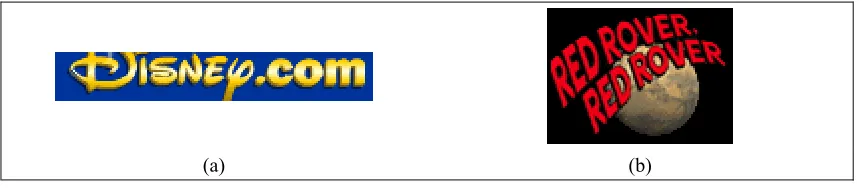
Figure 2-1 – (a) Image containing text over multicoloured photographic background. (b) Image containing multicoloured textured text.
The most prominent difference is the fact that image text is multi-coloured, whereas typical document images are black and white. Traditional scanned document analysis methods that require both the text and the background to be of constant colour are therefore unsuitable for image text in Web documents. The majority of such image text contains gradient-colour or textured characters rendered over textured or photographic background (Figure 2-1). The number of colours present in the image text dataset used by the authors (comprising approximately 120 images of text collected from various Web documents), range from 2 up to 66023 with an average of
4832 colours per image.
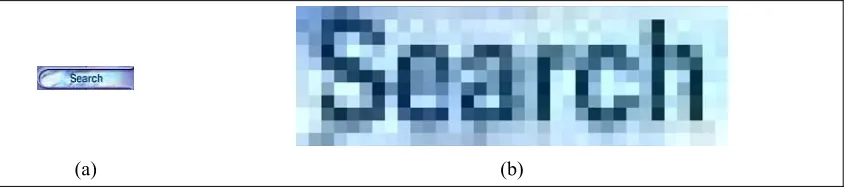
Image text is designed to be viewed on computer monitors. This entails certain characteristics with regard to the size and the resolution of the images. Contrary to typical document images, which have a minimum spatial resolution of 300 dpi (dots per inch), characters in image text have an average resolution of 72 dpi.
(a) (b)
Figure 2-2 – (a) Original image of a menu item. (b) The word “Search” magnified. The effect of anti-aliasing is severe in this case and, combined with the small size of characters makes this text difficult to
recognize, even for humans.
The actual size of the characters is the next significant difference between scanned documents and image text in Web documents. An expected character size in scanned documents is 10 pt or larger, whereas in image text, characters can be as small as the equivalent of 5 pt to 7 pt. Commercial OCR methods typically fail for characters of such small size.
[image:4.595.89.513.391.485.2]packages when applying colours to objects, the same character can appear slightly different in different parts of an image.
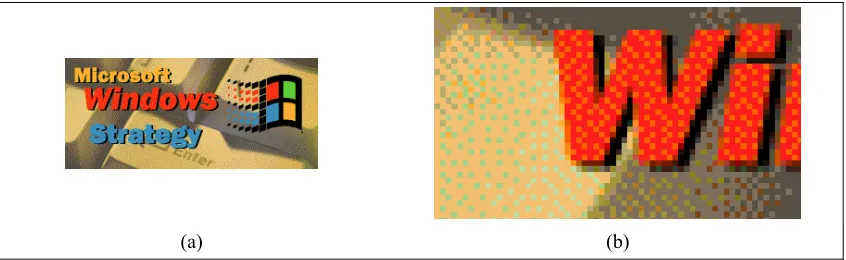
Finally, the fact that image text is created with file-size minimisation in mind, suggests that most often some kind of compression method is applied to the image. The vast majority of images in the Web are in fact in JPEG format, using in some extent JPEG’s compression capabilities. This type of compression introduces certain artefacts in the images that have no particular effect in areas of almost constant colour, but can produce significant distortions to characters. This kind of lossy compression is even more noticeable when colour analysis of the image takes place, as lightness information is mostly preserved, but colour information is to a great extent discarded in the JPEG compression scheme. The next most popular format used for storing image text, is GIF. Although the GIF format preserves much more information than JPEG, it is limited to representing 256 colours. This vastly reduces the number of available colours to represent the characters with, and can introduce significant quantisation artefacts in the attempt. In addition, due to the limited number of colours available, dithering techniques are often employed to render colours that cannot be represented uniquely (Figure 2-3). Dithered areas are difficult to identify as uniform regions, which poses a further problem in colour image analysis.
[image:5.595.89.512.347.477.2](a) (b)
Figure 2-3 – (a) Original GIF compressed image. (b) Magnification of an area containing part of characters and part of the background. Dithering is evident and pixels belonging to the same area
would be assigned to different colour clusters in most colour image analysis techniques.
3 Colour Representation
Colour is the perceptual result of light in the visible region of the spectrum (having wavelengths between approximately 400nm to 700nm). A good understanding of how colour is reproduced on computer monitors and the way it is internally represented in a computer with the use of a colour system is vital to understand the difficulty of analysing colour images such as the ones found in web documents.
Colour is reproduced in Cathode Ray Tube (CRT) displays in an additive manner by mixing three lights of different colours (red, green and blue) produced by the phosphors of the screen. Thus three components are being used, namely R, G and B
and blue, and that is the reason why phosphors producing colour stimulus with exactly those primaries are employed. Nevertheless, since there are hardware differences between computer systems, RGB information alone is not (strictly speaking) adequate to determine the actual colours of an image. A set of primaries that closely represent the primaries used in CRT monitors are the ones specified for the HDTV protocol by the standard ITU-R recommendation BT.709 [5]. The majority of monitors conform to
Rec.709 within some tolerance, so it is a safe assumption that the same RGB code will produce the same colour on different CRT monitors.
[image:6.595.84.512.196.360.2](a) (b)
Figure 3-1 – RGB colour space. (a) Axis of the colour space. (b) Colour gamut.
[image:6.595.84.512.493.649.2]The most widely used colour system in computer applications is therefore RGB
(Figure 3-1). As already mentioned, RGB colour system directly describes the way colours are mixed on computer monitors. Although RGB is hardware dependant, in the sense that the same RGB colour may be slightly different between different monitors, it is the default choice for most applications because of its simplicity and low computational cost.
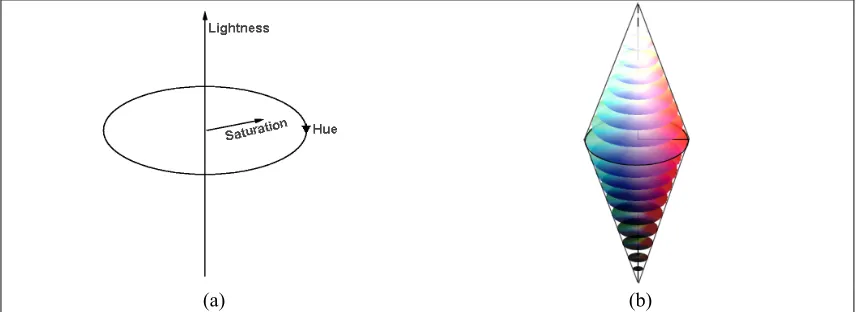
(a) (b)
Figure 3-2 – HLS colour space. (a) Axis of the colour space. (b) Colour gamut.
such as real-life scenes, and for this case, image text [6, 7]. HLS, HVC and HSI are colour systems based on these attributes (Figure 3-2).
[image:7.595.85.512.114.265.2](a) (b)
Figure 3-3 – CIE XYZ colour space. (a) Axis of the colour space. (b) Colour gamut.
There exists, however, a totally different approach based directly on human vision characteristics rather than on transformations of the RGB components. A colour stimulus is radiant energy of given intensity and spectral composition, entering the eye and producing a sensation of colour. This radiant energy can be completely described by its spectral power distribution. This is often expressed in 31 components, each representing power in a 10nm band from 400nm to 700nm. Using 31 components is a rather impractical and inefficient way to describe a colour, especially when a number of colours must be described and communicated, which is the case with computer graphics. A more efficient way would be to determine a number of appropriate spectral weighting functions to describe a colour, and it proves that just three components are adequate for that, based on the trichromatic nature of vision. The CIE (Commission Internationale de l’Eclairage or International Commission on Illumination) standardized, in 1931, a set of spectral weighting functions, called Colour Matching Functions, which model the perception of colour by human beings. These curves are referred to as x, y, and z, and the colour system subsequently defined as CIE XYZ (Figure 3-3).
(a) (b)
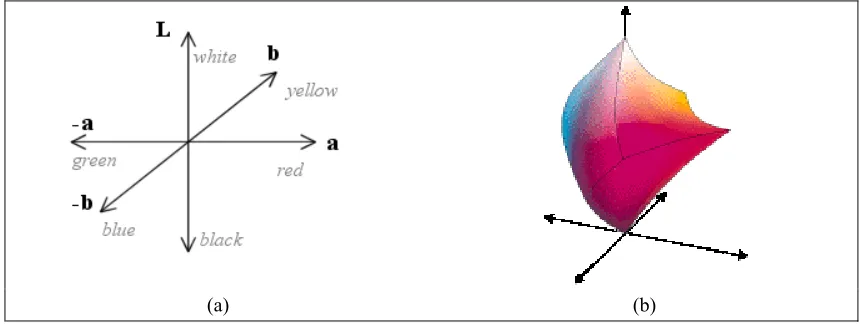
Figure 3-4 – CIE L*a*b* colour space. (a) Axis of the colour space. (b) Colour gamut.
[image:7.595.82.512.539.701.2]perceived (by humans) distance of the colours (how similar or dissimilar they are). For this reason, the CIE proposed certain transformations of the XYZ colour system, resulting in systems that exhibit greater perceptual uniformity. The CIE L*a*b* [8, 9] and CIE L*u*v* [10] are such colour systems (Figure 3-4), and are used when a colour distance measure that correlates well to the perceptual colour distance is needed.
4 Spatial Representation
Although colour information is vital when trying to separate the foreground from the background of an image, there is an additional number of spatial characteristics that enable us to infer whether something in the image is a character, even if it is a character we have never encountered before. In this section, the spatial features of characters indicative of their hypostasis are briefly summarized in the context of image text.
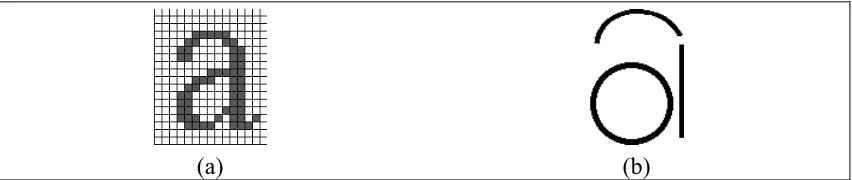
A distinctive feature of characters is the fact that they are comprised of strokes. A stroke can be thought of as a single movement of the writing tool. In the context of image text, a stroke can be any short line, straight or curved, which is part of a character. All characters can be decomposed to a series of strokes as can be seen in figure Figure 4-1. This is an important observation, since it directly suggests a way to create a comprehensive description of every character. Such a description can be obtained by recording the character’s strokes and the way they are combined, in terms of corners, ends and intersections. Descriptions like the above are invariant of size and in most of the times of rotation, and are widely used in character recognition applications. Although such a matching process usually comes after segmentation, that is after the characters have been separated from the background, the knowledge that characters comprise from a number of strokes can provide useful information for the segmentation process as well.
[image:8.595.86.512.478.568.2](a) (b) Figure 4-1 – (a) Original character. (b) The character decomposed in a number of strokes: an arc, a
straight line and a circle.
A second prominent feature of characters is their aspect ratio. This is defined as the ratio of the character’s width to its height or vice versa, and is a measure of the overall shape of the character (in terms of elongated its bounding box is). In general, with the exception of characters like “i” or “l”, the bounding boxes of characters are closer to square, with an aspect ratio near 1.
(a) (b)
Figure 4-2 – (a) Image with characters of different font in the same line of text. What is also interesting is that part of the first character is missing (placed in a different image in the web document). This is an example of tightly cropping the images around the characters, even splitting characters among different images. (b) Characters of the same line of text are of different size. Also
they are not placed on a straight line as usually the case in paper documents.
[image:9.595.84.515.85.179.2]At a more macroscopic scale, when looking at the whole set of characters in an image or document, we usually expect them to share some common characteristics. The size of characters is probably the first such characteristic. Indeed, in the majority of the cases we expect the characters in a paragraph, or at least within a single line of text to have similar size. Although such assumptions stand true for essentially all paper documents, when it comes to image text the situation is relatively different. There are many cases where even characters of the same word are of different font and consequently of different size as well (Figure 4-2). To make things even worse, there are cases where characters are substituted by other shapes for the sake of visual impact, as can be seen in Figure 4-3.
Figure 4-3 – Example of an image where characters have been replaced by other shapes.
Finally, an important characteristic of text is that characters are usually placed on straight (and horizontal) baselines. While this is true for the majority of paper documents, characters in image text in Web documents may not be on straight or even horizontal baselines (as depicted in Figure 4-4).
[image:10.595.126.472.143.235.2](a) (b)
Figure 4-4 – (a) Sentences placed on a circle, and straight lines of text placed on an angle. (b) Letters of the same ‘word’ placed with different orientation.
Overall, concerning the spatial characteristics of text as a whole or of single characters, their applicability to image text in Web documents proves more limited compared to traditional scanned documents. However, in combination with other features, such as colour similarity, spatial characteristics can provide considerable help in numerous circumstances.
5 Challenges and Approaches
The characteristics of the image text have been examined in the previous sections in terms of image, colour and spatial representations. This section examines the problem of extracting the characters from the image text and the subsequent recognition of this text. As the character extraction is still an unsolved and difficult problem and there is only one approach in the literature that has attempted to recognise the characters, this section concentrates on the former.
A small number of approaches have been proposed towards text extraction from image text. Previous attempts, mainly assume that the characters are of uniform colour, work with a relatively small number of colours, and restrict their operations on the RGB colour space.
detection rate of 68.3% for a set of 482 GIF images collected from the Web, containing homogeneous text.
With similar assumptions about the colour of characters, the approach of Antonacopoulos and Delporte [16] uses two alternative clustering approaches in the RGB space, but works on (bit-reduced) full-colour images (JPEG) as well as GIFs. Jain and Yu [17] report a method based on decomposing an original image into a number of foreground images and a single background one. The original number of colours (8-bit or 24-bit images) is dramatically reduced (to between 4 and 8 distinct colours) by bit dropping and colour quantisation in the RGB space.
6 An Anthropocentric Approach
Towards the extraction of characters from image text, the authors have examined possible ways to segment and identify character-like components in colour images. Two different methods have been implemented and tested. The innovation of both approaches, lies to fact that they are both based on available knowledge on the way humans perceive the given images. The anthropocentric character of the two approaches is evident primarily through the way colour is manipulated, making use of human perception data and employing colour systems that are efficient approximations of the psychophysical manner humans understand colour.
The first method proposed by the authors [18] works on a split and merge strategy. It employs the HLS colour space to split the image into layers in a recursive way, by analysing the Luminance and the Hue histograms. Connected components are then identified, and for each component, the neighbouring pixels are checked for colour similarity. In this way, a visually similar area is identified for each component as a possible extension. Special consideration has been given to the way visual similarity is assessed. Towards that end, the authors used existing biological data for wavelength and luminance discrimination, according to the layer processed each time. The merging process starts with the bottom layers and proceeds in a bottom-up manner. The merging of components (and their possible extensions) is ruled by the extent to which they overlap.
The second method developed by the authors [19], is based on the use of a propinquity measure defined with the help of a fuzzy inference system. The method comprises two steps. It starts with the grouping of pixels having similar colours into connected components, and then uses the propinquity measure defined, to combine connected components into larger ones, aiming at constructing a correct segmentation of the characters in the image. This time the perceptually uniform CIE L*a*b* colour space was used in order to assess the colour similarity of the pixels. The propinquity measure used in the second step combines, with the help of a fuzzy inference system, the colour distance between two components and a metric indicative of their spatial distance. The colour distance metric used is the Euclidean distance in the CIE L*a*b*
colour space, while the second input of the fuzzy system is a topological measure defined by the authors, which has to do with the way components are connected in the image.
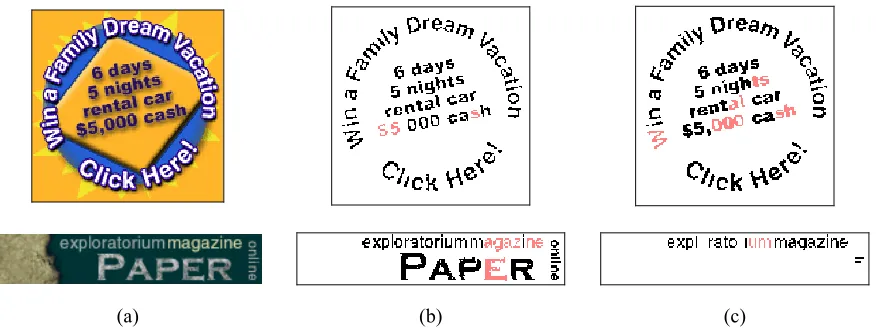
segmented around 80% of the characters. Figure 6-1, illustrates in a comparative way the resulting segmentation from both methods. Correctly segmented characters are illustrated in black colour, while in red colour are characters that were still correctly separated from the background, albeit not as single, whole characters (broken in more than one components, or joined together).
[image:12.595.96.534.157.321.2](a) (b) (c)
Figure 6-1 – (a) Original image. (b) Results obtained with split and merge method. (c) Results obtained with fuzzy segmentation method..
7 Concluding Remarks
From the preceding sections, it can be appreciated that there is a problem of non-uniform representation (in terms of encoding) of text in Web documents. There is a pressing need to do so to achieve more accurate searching and retrieval of information from the Internet. Moreover, there is an ever-increasing requirement to provide the capability for novel ways of interaction with the Internet (e.g., voice browsing and viewing summarised documents on devices with small bandwidth and form-factor).
To obtain a uniform representation for the text in Web documents, the image text must be analysed, the characters within it extracted and recognised. It is evident that the various characteristics if the representation of the image text (image, colour and spatial representation) make the interpretation of image text a difficult problem.
Finally, the paper described a handful of prominent approaches to interpret the image text (mostly extract the characters from the images at this stage). Among them, the research carried out by the authors attempts to exploit human perception of colour differences along with spatial features of characters. The results obtained so far are very promising and further development of the extraction and subsequent recognition methods is planned for the near future.
References
[1] "Search Engine Watch," http://searchenginewatch.com
[2] M. K. Brown, S. C. Glinski, and B. C. Schmult, "Web Page Analysis for Voice Browsing," Proceedings of the 1st International Workshop on Web Document Analysis (WDA2001), Seattle, USA, 2001.
[4] E. V. Munson and Y. Tsymbalenko, "To Search for Images on the Web, Look at the Text, Then Look at The Images," Proceedings of the 1st International Workshop on Web Document Analysis (WDA2001), Seattle, USA, 2001.
[5] "Basic Parameter Values for the HDTV Standard for the Studio and for International Programme Exchange," ITU-R Recommendation BT.709 [formely CCIR Rec.709] Geneva, Switzerland: ITU 1990.
[6] R. S. Ledley, M. Buas, and T. J. Golab, "Fundamentals of True-Color Image Processing," Proceedings of the 10th International Conference on Pattern
Recognition, pp. 791-795, 1990.
[7] S. Tominaga, "Color Image Segmentation Using Three Perceptual Attributes,"
Proceedings of the Conference on Computer Vision and Pattern Recognition, pp. 628-630, 1986.
[8] K. McLaren, "The Development of the CIE 1976 (L*a*b*) Uniform Colour Space and Colour-difference Formula," Journal of the Society of Dyers and Colorists, vol. 92, pp. 338-341, 1976.
[9] A. L. Robertson, "The CIE 1976 Color Difference Formulae," Color Research and Application, vol. 2, pp. 7-11, 1977.
[10] R. C. Carter and E. C. Carter, "CIE L*u*v* Color-Difference Equations for Self-Luminous Displays," Color Research and Application, vol. 8, pp. 252-253, 1983. [11] J. Zhou, D. Lopresti, and Z. Lei, "OCR for World Wide Web Images,"
Proceedings of the IS&T/SPIE International Symposium on Electronic Imaging, San Jose, California, pp. 58-66, 1997.
[12] D. Lopresti and J. Zhou, "Document Analysis and the World Wide Web,"
Proceedings of the Workshop on Document Analysis Systems, Marven, Pennsylvania, pp. 417-424, 1996.
[13] J. Zhou and D. Lopresti, "Extracting Text from WWW Images," proceedings of the 4th International Conference on Document Analysis and Recognition, Ulm, Germany, 1997.
[14] D. Lopresti and J. Zhou, "Locating and Recognizing Text in WWW Images,"
Information Retrieval, vol. 2, pp. 177-206, 2000.
[15] J. Zhou, D. Lopresti, and T. Tasdizen, "Finding Text in Color Images”,
Proceedings of the IS&T/SPIE Symposium on Electronic Imaging, San Jose, California, pp. 130-140, 1998.
[16] A. Antonacopoulos and F. Delporte, "Automated Interpretation of Visual Representations: Extracting Textual Information from WWW Images," in Visual Representations and Interpretations, R. Paton and I. Neilson, Eds. London: Springer, 1999.
[17] A. K. Jain and B. Yu, "Automatic Text Location in Images and Video Frames,"
Pattern Recognition, vol. 31, pp. 2055-2076, 1998.
[18] A. Antonacopoulos and D. Karatzas, "An Anthropocentric Approach to Text Extraction from WWW Images," Proceedings of the the 4th IARP Workshop on
Document Analysis Systems (DAS2000), Rio de Janeiro, Brazil, pp. 515-526, 2000.