i
University of Southern Queensland
Faculty of Engineering and Surveying
Design and Implementation of Web-Based Keystroke Analytics for
User Verification
A dissertation submitted by
Mr Ryan Stephenson
In fulfilment of requirements of
Courses ENG4111 and 4112 Research Project
towards a degree of
Bachelor of Engineering Honours (Computer Systems)
ii
Abstract
Keystroke analytics is the study of the way in which a user types rather than simply what they are
typing. Through the application of statistical or machine learning methods the gathered biometric
data may be used to verify the identity of a user, based on their typing style.
This project aims to explore the field of keystroke analytics to gain an understanding of the methods
involved and as such detail the implementation process for such a system’s design and
implementation in a web-based context. Details regarding the technical design and implementation
are specifically highlighted as current literature often does not describe how the systems shown
were developed by rather the theory and methods used by them.
The use of JavaScript to gather typing characteristic data is explored and the process of extracting
useful features illustrated. Additionally both PHP and MySQL and used to create the backbone
infrastructure to process and store the typing data. A phased development approach has been
employed, with the overall system being separated into a collection of subsystems which are
designed, implemented and tested before combining them to form the overall system.
The supplementary software system requirements are presented, including the process of setting up
a system capable of both being used to perform research on a local system as well as expand to
online users for the data collection process.
Method of testing the performance of a keystroke analytics system are discussed with potential
changes to improve performance and minimise problems encountered outlined.
The project was successful in that a working proof-of-concept web-based keystroke verification
system was designed and implemented which yielded promising results for the data tested (FAR: 0%,
FRR: 3.33%). Although to fully evaluate the system’s performance further testing needs to take place
for a larger sample size of participants. The results obtained show that a keystroke analytics system
may be implemented in a web-based environment, with relatively simple statistical methods, and
provide reasonable performance results with only minor additional interaction required by the
end-user. This has shown that keystroke analytics is a valid and well-performing method of providing
iii
University of Southern Queensland
Faculty of Health, Engineering and Sciences
ENG4111/ENG4112 Research Project
Limitations of Use
The Council of the University of Southern Queensland, its Faculty of Health, Engineering &
Sciences, and the staff of the University of Southern Queensland, do not accept any
responsibility for the truth, accuracy or completeness of material contained within or associated
with this dissertation.
Persons using all or any part of this material do so at their own risk, and not at the risk of the
Council of the University of Southern Queensland, its Faculty of Health, Engineering &
Sciences or the staff of the University of Southern Queensland.
iv
University of Southern Queensland
Faculty of Health, Engineering and Sciences
ENG4111/ENG4112 Research Project
Certification of Dissertation
I certify that the ideas, designs and experimental work, results, analyses and conclusions set out in this dissertation are entirely my own effort, except where otherwise indicated and acknowledged.
I further certify that the work is original and has not been previously submitted for assessment in any other course or institution, except where specifically stated.
v
Acknowledgements
I would like to offer my thanks to my supervisor Dr Hong Zhou, who has provided assistance and guided me through my project work.
Additionally I would like to thank the faculty of USQ who have enabled my learning throughout the last four years.
Finally I would like to thank my friends and family for their continual support throughout this year. Particularly I would like to thank my friend Brady Albrand for his motivation and support.
Ryan Stephenson
University of Southern Queensland
vi
Table of Contents
Contents Page
Abstract ... ii
Chapter 1 Introduction ... 13
1.1. Aims and Objectives ... 14
1.2. Project Outcomes ... 16
Chapter 2 Background ... 17
2.1. Need for Biometric Analysis for User Verification ... 17
2.2. Basic Principles of Keystroke Dynamics ... 18
2.2.1. Types of Biometric Data Used to Differentiate Users ... 19
2.3. Methods of Implementing Keystroke Dynamics ... 21
2.3.1. Typing Data Collection ... 24
2.4. System Performance Analysis ... 24
2.5. Storage of Typing Data using MySQL ... 25
2.5.1. Reasons for Using MySQL ... 25
2.5.2. Interacting with the MySQL Database ... 25
2.6. Storing Typing Characteristic Arrays ... 26
2.7. Transferring Data between Client and Server ... 27
2.8. Storing User Passwords Securely ... 28
2.9. Project Methodology ... 29
2.9.1. Software Development Process ... 29
Chapter 3 The Design and Implementation of User Input Collection System ... 31
3.1. Setup of the Testing System ... 31
3.2. Local Development System ... 31
3.2.1. Using XAMPP ... 31
3.3. Hosting Options ... 33
3.4. Setting up Server ... 34
3.4.1. Installation and Configuration of Apache2 ... 34
3.4.2. Installation and Configuration of MySQL and PHP ... 34
3.4.3. Installation and Configuration of PHPMyAdmin ... 35
3.4.4. Website Directory Security ... 36
3.5. File Transfer from Windows to a Server ... 37
3.6. Characteristic Collection Code ... 39
vii
3.6.2. The Event-Driven Programming Model ... 39
3.6.3. Implementation of Collection Code ... 39
3.6.4. Restricting the Keyboard Inputs... 42
3.6.5. Miscellaneous Functions ... 43
3.6.6. Storing the Key Press Data ... 44
3.7. Classification Algorithm Design... 48
3.7.1. Introduction ... 48
3.7.2. System Assumptions ... 48
3.7.3. Data Set Observations ... 48
3.7.4. Data Set Preparation ... 50
3.8. Statistical Analysis Methods ... 55
3.8.1. Relevant Theory: Pythagoras’s Theorem and Euclidean Distance ... 55
3.8.2. Application to Keystroke Biometrics ... 57
3.9. Template Generation ... 58
3.9.1. Calculating Mean, Variance and Weight: ... 59
3.9.2. Euclidean Distances Calculations ... 59
3.9.3. Template Structure ... 62
3.9.1. Decision Making ... 63
3.10. Summary ... 65
Chapter 4 Implementation ... 66
4.1. Introduction ... 66
4.2. System Overview... 66
4.3. Development and Data Viewing System ... 67
4.3.1. System Overview... 67
4.4. HTML Timeline Plot using Canvas ... 69
4.5. Output Raw Data in Table Form... 71
4.6. Storage of the Collected Data ... 72
4.7. Template Generation Algorithm ... 72
4.7.1. Align Input Dataset with Template ... 72
4.7.2. Calculate Mean, Variance and Weight ... 78
4.8. Data Collection System ... 80
4.9. Demo Matching System ... 84
4.10. MATLAB Visualisation System ... 89
Chapter 5 Testing ... 92
5.1. Introduction ... 92
viii
5.2.1. Unit Testing the Data Alignment Code ... 92
5.2.2. Unit Testing the Data Collection Code ... 94
5.3. Preparing Participants ... 94
5.4. Data Collection Process ... 94
5.5. Comparing the access attempts ... 95
5.6. Use of the Typing Data Dataset ... 95
5.7. Results of the Test Data ... 95
5.7.1. Test Method ... 95
5.7.2. System Performance for Poorly Known Phrases ... 97
5.7.3. System Performance for Well Known Phrases ... 98
5.7.4. Discussion of System Performance ... 100
5.7.5. Suggestions for increasing system performance ... 104
5.7.6. Comparison with Systems in Literature ... 104
5.8. Summary ... 105
Chapter 6 Future Work and Conclusion ... 106
6.1. Potential Future Work ... 106
6.2. Achievement of Project Objectives ... 106
References: ... 108
Appendices ... 112
Appendix A: Project Specification ... 112
Appendix B: System Code Listing ... 113
Appendix B.1: Typing Data Collection System ... 113
Appendix B.2: Development System ... 125
Appendix B.3: Data Collection System ... 127
Appendix B.4: Demo System ... 133
Appendix B.5: Template Generation System ... 142
Appendix B.6: MATLAB Visualisation and Matching Code ... 150
Appendix B.7: Styling Code ... 154
Appendix B.8: Unit Testing Data Alignment Code ... 162
ix
Table of Figures
Figure 2.1: Keystroke Biometric Analysis Process ... 18
Figure 2.2: Illustration of Dwell Time and Flight Time ... 20
Figure 2.3: Usage of Classification Approaches ... 21
Figure 2.4: Data Collection and Storage Process Overview ... 27
Figure 2.5: Phases Development Methodology, Adapted From McLeod and Everett (2006) ... 29
Figure 3.1: XAMPP Control Panel ... 32
Figure 3.2: XAMPP Control Panel with Running Modules ... 33
Figure 3.3: WinSCP Interface ... 38
Figure 3.4: Assigning Event Handlers to the Password Field ... 40
Figure 3.5: Code to Extract Key Code Value... 41
Figure 3.6: Event Type Detection Code ... 41
Figure 3.7: Shift Location Detection Code ... 41
Figure 3.8: Code to Prevent Using Mouse to Move Text Input Cursor ... 42
Figure 3.9: Code to Prevent Moving Input Cursor with Arrow Keys ... 42
Figure 3.10: Code to Prevent Repeat Key Press Events ... 43
Figure 3.11: Example Use of Autocomplete Attribute on a Form ... 43
Figure 3.12: Code to Delay Execution Until The Page Has Loaded ... 43
Figure 3.13: Code to Track the Total Elapsed Time ... 43
Figure 3.14: Example Code for Defining an Object Class in Javascript ... 44
Figure 3.15: Example Code for Instantiating a New Object in Javascript ... 44
Figure 3.16: Example Code for Defining and Calling an Object Method ... 44
Figure 3.17: Contents Of A Key Element Object ... 45
Figure 3.18: Object Mapping Character Codes to Key Element Objects ... 45
Figure 3.19: Flowchart Showing Logic for Typing Data Collection ... 46
Figure 3.20: Flowchart for Data Collection Subsystem ... 47
Figure 3.21: Visualisation of Observation Dataset ... 49
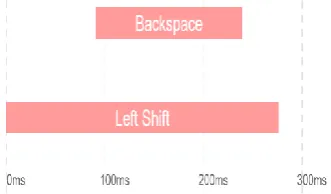
Figure 3.22: Illustration of Multiple Successive Shift Presses ... 51
Figure 3.23: Illustration of Shift Key with No Effect on Following Character ... 52
Figure 3.24: Illustration of Character Being Backspaced ... 52
Figure 3.25: Illustration of Shift Being Held While Backspace Is Pressed ... 53
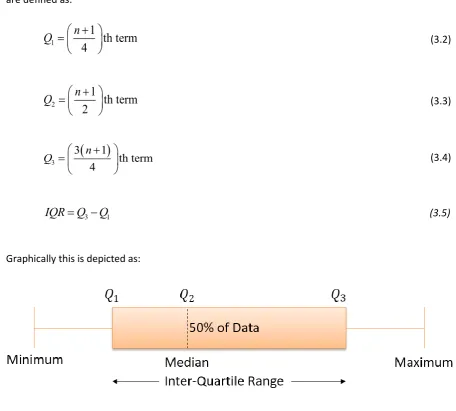
Figure 3.26: Graphical Depiction of Quartiles ... 54
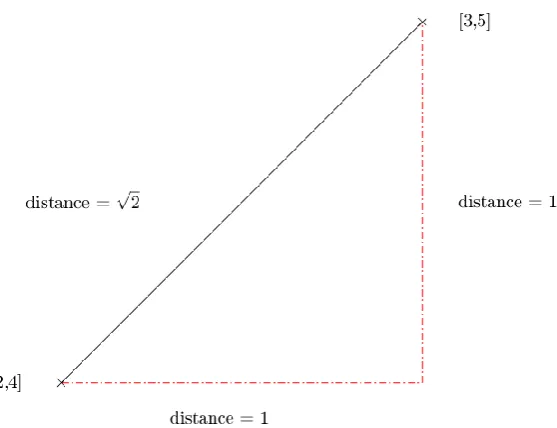
Figure 3.27: Illustration of Pythagoras’ Theorem for 2D Space ... 55
Figure 3.28: Flight Time Data for Training Set ... 57
Figure 3.29: Data Flow Diagram for Template Generation Process ... 58
Figure 3.30: Use of Gain on Upper Limit for Matching System ... 60
Figure 4.1: Overview of System Sections ... 67
Figure 4.2: Data View System Graphical Interface... 67
Figure 4.3: Example Timeline Rendering from Data Viewing System ... 68
Figure 4.4: Example Raw Data in Table Form from Data Viewing System ... 68
Figure 4.5: Code for Checking If Canvas Element Is Supported By Browser ... 69
Figure 4.6: Canvas Positioning System Illustrated ... 70
Figure 4.7: Code to Change Canvas Text Styling ... 71
x
Figure 4.9: Code to Open a New Window to Export Data To ... 71
Figure 4.10: Black Box Diagram of Dataset Alignment Function ... 72
Figure 4.11: Illustration of Use of a Sliding Window for the Data Alignment Function ... 73
Figure 4.12: Code Showing the Use Of Two While Loops In The Data Alignment Code... 73
Figure 4.13: Code to Get Code and Shift Values Required ... 74
Figure 4.14: Code to Handle Multiple Successive Shift Key Presses ... 74
Figure 4.15: Logical Test for Unnecessary Shift Press Event ... 75
Figure 4.16: Code to Reorder Array Values ... 75
Figure 4.17: Code to Update Position Index ... 76
Figure 4.18: Code to Substitute Values for Data Arrays in Template Generation Process ... 77
Figure 4.19: Code for Calculating Mean, Variance and Weight of Key Press Events ... 78
Figure 4.20: Code for Calculating Distances between Template and Training Data ... 79
Figure 4.21: Code to Calculate Q3 and IQR for Distance Metrics ... 79
Figure 4.22: Data Collection Screen, As Seen By the Participant ... 81
Figure 4.23: Thank You Screen for Data Collection Process ... 81
Figure 4.24: Example Entry in Template Database Table ... 82
Figure 4.25: Code to Retrieve Template Phrase from Database ... 82
Figure 4.26: Example of Displaying Phrase to User ... 82
Figure 4.27: States for Access Attempt Counter ... 83
Figure 4.28: Code to Display Access Attempt Counter ... 83
Figure 4.29: Code to Redirect to Thank You Page Once Finished Gathering Data ... 84
Figure 4.30: Code for Checking That Inputted Phrase Matches Template Phrase ... 84
Figure 4.31: Interface for Demo Matching System ... 85
Figure 4.32: Dropdown Box to Selected User Template ... 85
Figure 4.33: Input Elements to Store Collected Typing Characteristic Data ... 86
Figure 4.34: Example Definition of Form Element ... 86
Figure 4.35: Pseudocode for Access and Template Matching System ... 87
Figure 4.36: Code for Setting the Matching System Parameters ... 87
Figure 4.37: Code to Calculate Match Percentage for Flight and Delay Time Metrics ... 88
Figure 4.38: Code for Determining If an Access Attempt Is Valid ... 88
Figure 4.39: Output Screen of Access Matching System ... 89
Figure 4.40: Improved Data Alignment Termination Conditions ... 89
Figure 4.41: Example Plot Generated By MATLAB Code ... 90
Figure 4.42: Output of Match Attempts from MATLAB Code... 90
Figure 4.43: MATLAB Code to Read in Typing Characteristic Data from Spreadsheet Format ... 91
Figure 5.1: Interface for Modified Version of Demo Testing System ... 95
Figure 5.2: Processing Of Calculating Equal Error Rate... 97
Figure 5.3: Visualisation of Delay Time for Brian's Learning Dataset ... 100
Figure 5.4: Visualisation of Flight Time for Brian's Learning Dataset ... 101
Figure 5.5: Visualisation of Delay Time for Brian's Well Known Dataset ... 101
Figure 5.6: Visualisation of Flight Time for Brian's Learning Dataset ... 102
Figure 5.7: Comparison of Variance for Delay Times in Dataset for Brian ... 103
xi
List of Tables
Table 2.1: Distinguishing Ability Of Selected Typing Characteristics (Kellas-Dicks & Stark 2012) ... 21
Table 2.2: Classification Methods Featured In Keystroke Research (Teh et al. 2013) ... 22
Table 3.1: Variance of Delay Characteristic for Observation Dataset ... 49
Table 3.2: Variance of Flight Characteristics for Observation Dataset ... 49
Table 3.3: Variances Associated With Flight Time Data ... 57
Table 3.4: Example of Data Loaded From Mysql Table ... 59
Table 3.5: Example of Column-Wise Calculations ... 59
Table 3.6: Data Necessary to Calculate Euclidean Distances ... 60
Table 3.7: Template Structure for User Typing Characteristic... 62
Table 3.8: Example User Template ... 63
Table 3.9: Access Attempt Data ... 63
Table 5.1: Results of Unit Testing the Data Alignment Module... 93
Table 5.2: Results of Unit Testing the Data Collection Module ... 94
Table 5.3: Excel Spreadsheet for System Performance ... 96
Table 5.4: System Performance Results for Poorly Known Phrases ... 98
Table 5.5: Summary of Performance for System for Poorly-Trained Template ... 98
Table 5.6: System Performance Results for Poorly Known Phrases ... 99
Table 5.7: Summary of Performance for System for Well-Trained Template ... 99
Table 5.8: Variance Of Delay Characteristic for Brian’s Learning Dataset ... 100
Table 5.9: Variance Of Flight Characteristics for Brian’s Learning Dataset ... 101
Table 5.10: Variance Of Delay Characteristic for Brian’s well known Dataset ... 102
Table 5.11: Variance Of Flight Characteristics for Brian’s Learning Dataset ... 102
Table 7.1: Unit Testing Sheet for Data Alignment Code ... 162
xii
Glossary of Terms
CSPRNG Cryptographically secure pseudorandom number generator
EER Equal error rate
FAR False acceptance rate
FRR False rejection rate
FTP File transfer protocol
JSON JavaScript object notation
LAMP Linux, Apache, MySQL and PHP software stack
PDO PHP data objects
PHP Hypertext pre-processor
SSH Secure Shell
StudyDesk University of Southern Queensland online learning environment
USQ University of Southern Queensland
VPS Virtual private server
13
Chapter 1 Introduction
Multi-factor authentication incorporates multiple security methods simultaneously to control
access to a computer system in a more secure manner, compared to traditional single-factor
systems. Factors may be categorised as being: knowledge, possession or inherence (Multi-factor
authentication 2014). Inherence factors consider attributes of the user, such as biometric data.
Keystroke dynamics is focused on the analysis of gathered user biometric information for user
verification purposes. It is concerned with the way in which users type, rather than what they
are typing. Specifically typing characteristics are used to verify the users are who they are
claiming to be (Teh et al. 2013).
This process consists of five main stages: data acquisition, feature extraction, classification and
matching, decision making and template retraining. Identified user typing features are
compared against a reference template for verification (Douhou & Magnus 2009). To create an
accurate reference template the genuine user must enter the text string multiple times (Teh et
al. 2013). This process is called enrolling and involves the use of the collected data (called a
training set) to generate the template of the user’s typing style.
This project seeks to implement a web-based keystroke analysis system, focusing on user
authentication. As a result of this development process, insight into the implementation
decisions will be explored. The project will allow for other academics to speed up the
development process of a system used for web-based collection and storage of user typing data
for use in authentication systems. Motivation for this project comes from an interest in
investigating alternative non-intrusive ways of securing online systems, without the use of token
14
1.1.
Aims and Objectives
The project aims to investigate the field of keystroke analytics to design and implement a web-based
proof-of-concept user verification system which utilises typing characteristics; emphasis is placed on
documenting the technical considerations and processes involved. Despite an extensive amount of
theory being available, the field does not currently feature much literature regarding
implementation details for these systems.
The above described outcomes will benefit further research in the area as it presents researchers
with the options available for implementing such a system, as well as describing the design and
implementation process. The main goal is to reduce the time researchers spend implementing a
generic keystroke analysis system, enabling further work into better performing classification
methods. Relatively simple classification techniques will be implemented in the proof-of-concept
system as advanced methods and techniques are outside the scope of the project. This project aims
to achieve the following objectives:
1. Research keystroke analytics/dynamics to gain and understand of the field and methods used by existing systems/literature.
To be able to implement a system to collect, store and analyse user typing characteristics efficiently
existing techniques and methods must be investigated and well understood. This will both help
inform the development process as well as the selection of technologies to implement the system.
2. Design and implement a basic development environment for keystroke data collection and viewing.
The purpose of this objective is to ease into the development process by looking into methods of
collecting typing data. Visualising the collected data will help provide insight into the data
characteristics such as flight and dwell times.
3. Investigate classification/matching algorithms for user verification.
Once the system is able to effectively store and collect typing data, methods to use this to
authenticate users need to be investigated. This will involve a variety of different methods, although
the complexity of these techniques will be limited to avoid spending time unnecessarily outside the
15 4. Design and implement a conceptual web-based program to illustrate the application of keystroke analytics to user verification.
As the components required to implement the system have been developed through the previous
objectives, they should now be combined into a software package which provides a fully functioning
proof-of-concept keystroke analytics system.
5. Design and implement an online testing system to collect and store user biometric typing data.
In order to test the system, collected typing data from multiple users is analysed to judge the
system’s effectiveness. A user-friendly system is designed and implemented which allows for the
completion of this collection process.
6. Analyse collected typing data and test the performance of the user verification systems.
Once sufficient typing and authentication data has been collected the effectiveness of the
verification system should be analysed.
Besides the above major objectives, this project aims to:
1. Research variances in typing characteristics based on hardware changes and other factors (E.g. Tired or distracted users).
It is expected that the user typing characteristics will vary between different keyboards and devices.
Looking into the degree to which this alters the effectiveness of the classification algorithms is
important. It additionally will be beneficial to see if the system may be used to detect if users have
become fatigued or are otherwise impaired.
2. Investigate if a correlation exists between typing characteristics and user traits as well as the devices they use.
If time permits, it would be beneficial to looking into alternative applications of collecting typing
data other than user authentication. This, for example, may include the ability to distinguish
16
1.2.
Project Outcomes
This project has made the following contributions and achievements:
1. An example software package (Web-based) serving as a proof-of-concept, which implements
the technologies and methods described.
2. Report on the methods in which current web-browsers may be used to collect typing
dynamics information.
3. Outlining of the options available for storing and accessing user typing signatures, in the
context of a web-server.
4. Exploration of the implementation process of a keystroke dynamics system.
5. Comparison of the developed system against performance expectations from available
17
Chapter 2 Background
In this section background information regarding the field of keystroke analytics is presented. A firm
understanding of these concepts is vital to understanding the following chapters and
implementation of the system. The need for keystroke analytics is discussed to justify the
completion of this project, followed by an outline of relevant concepts. Methods currently used are
outlined along with the metrics by which their performance is judged.
Additional to information regarding keystroke analytic systems, the MySQL database software will
be examined and discussed particularly with respect to storing the data used by the proposed
system.
2.1.
Need for Biometric Analysis for User Verification
As internet based authentication systems become commonplace in modern life, the need for more
sophisticated methods of securing confidential data is becoming increasingly vital (Teh et al. 2013).
Data breaches have been, and will remain, a primary concern in regards to authentication systems.
Breaches may occur due to a number of reasons, including: Lost or stolen devices which contain sensitive information Authentication system databases being hacked
Social engineering, where organisations provide information to unauthorised users
Authentication system breaches are serious and can result in severe damages and costs to the users
and organisations.
In regards to users, such damages and costs include:
o Identity theft, damage to public reputation/relationships and financial losses. In regards to organisations:
o Loss of public confidence, legal liability and damage to reputation (Data breach notification guide: A guide to handling personal information security breaches
2014).
The current standard for providing relatively inexpensive and accessible authentication relies on the
use of passwords and other knowledge factors. Although, due to the reuse of passwords across
multiple systems and bad usage behaviours the effectiveness of these systems is diminished (Teh et
18 Password reuse is particularly damaging, due to the fact that if a single system is compromised the
other systems are in most cases also compromised as a result.
Creating more secure passwords decreases the risk of an account being compromised but it can also
affect the user as they are more difficult to remember and enter into systems. Often a user who is
authorised access for a system is denied access due to the inability to correctly remember complex
credentials (Mahnken 2014).
Keyboard biometrics allows for an additional layer of security on top of standard password systems
with minimal inconvenience to the user in terms of usability (Peacock et al. 2004). Analysis of typing
dynamics is transparent to the end user with no additional actions required to complete the process
with the exclusion of the enrolment process (Bartlow & Cukic 2006). It is worth noting however that
the user template may be generated incrementally, for example during the first ten login instances.
2.2.
Basic Principles of Keystroke Dynamics
Keystroke analytics is at its core focused on the analysis of gathered user biometric information.
Identified user typing characteristics are compared against a reference template with a set threshold
of variability. Given the typing characteristics match within the set threshold the user is authorised
to access the system (Douhou & Magnus 2009).
Variations may exist between access attempts due to external factors such as drowsiness,
distractions, and changes between input devices. These must be accounted for if the system is to
operate reliably.
A keystroke biometrics system consists of the following processes:
Figure 2.1: Keystroke Biometric Analysis Process
1. Data Acquisition
2. Feature Extraction
3. Classificaton and Matching
4. Decision Making
19 1. Data Acquisition: (Also known as Feature Acquisition)
Raw keystroke data is collected from the user typing in a text field.
2. Feature Extraction:
The data from step one is processed and a reference template (Of the user’s typing
characteristic) is created.
A feature vector is created which contains the biometric characteristics of the authorisation
attempt (Moskovitch et al. 2009).
3. Classification and Matching:
Extracted features are categorised and appropriate mathematic principles applied to
prepare the data set for use in the following stages.
May use either statistical or machine learning methods for the matching algorithm.
Compares the typing characteristics of the current access attempt to a stored reference
template.
4. Decision Making:
Using the calculations made in the matching algorithm of stage 3, the system determines if
the login attempt is from the genuine user or a potential intruder.
5. Retraining of Template:
As the typing characteristics may slowly change over time as the user becomes more
accustomed to typing the password, the reference template needs to be updated (Teh et al.
2013).
Keystroke dynamics may be implemented to either verify or identify users based on their typing
characteristics. Verification is where the characteristics are used to prove the user is who they are
claiming to be. Identification is where the system searches a list of known characteristics in an
attempt to determine who the user is (Teh et al. 2013).
The system may be implemented as either static or dynamic, wherein static systems check the
typing characteristics once when the user is authenticated and dynamic systems continually check
the characteristics (Teh et al. 2013).
2.2.1.
Types of Biometric Data Used to Differentiate Users
Typically the inputs to a biometric analysis system are either character or numerical inputs. Inputs
may be either long or short texts, in which the distinction is based on the length of the input to the
system.
20 Long inputs are concerned with inputs of a hundred or more words, such as paragraphs of
input text (Teh et al. 2013).
The majority of literature available focuses on short input systems, this may be due to the fact that
these systems are easier to gather test data for and have more simplified implementations.
To create an accurate reference template it is required that the genuine user enter the text string
multiple times (Teh et al. 2013).
Collected typing characteristic features may include the: Total number of character strokes inputted
Average, standard deviation, maximum and minimum key hold time Average, standard deviation, maximum and minimum of key press delays. Number of shift key presses
Dwell time (Time between pressing a key down and its release) and flight time (time
between two successive key presses)
Figure 2.2: Illustration of Dwell Time and Flight Time
Most available literature uses dwell and flight times as a primary source of developing a typing
characteristic. This data is relatively simple to gather from software and has shown to provide
promising performance results, see Table 2.1 (Kellas-Dicks & Stark 2012; Teh et al. 2013).
More advanced typing characteristics include:
Keystroke speed, the relative speed at which characters are typed
Overlapping key presses, where another key is pressed before the previous is released Typing errors (E.G. Common mistakes and frequency of mistakes) (Moskovitch et al. 2009)
Timing resolutions of between 1 and 100 milliseconds are suitable for comparing typing
characteristics (Teh et al. 2013). Additionally it has been shown that the performance of keystroke
biometric systems increases with string length, with a suggested length of 13 to 15 characters for
short input systems.
Key 1
Unpressed
Key 1
Pressed
Key 1
Released
Key 2
Unpressed
Key 2
Pressed
Dwell Time (Key 1)
21 Extensive research into the distinguishing ability of typing characteristics is presented in a patent
held by Kellas-Dicks and Stark (2012), prominent methods are shown in Table 2.1.
Table 2.1: Distinguishing Ability Of Selected Typing Characteristics (Kellas-Dicks & Stark 2012)
Typing Characteristic Definition Distinguishing Ability
Sum of Dwell Time Sum of dwell times for input 1.2337
Dwell Time (min) Minimum dwell time 0.6882
Dwell Time (max) Maximum dwell time 0.8296
Sum of Flight Time Sum of flight times for input 0.5922
Flight Time (min) Minimum flight Time 0.8529
Flight Time (max) Maximum flight Time 0.6229
2.3.
Methods of Implementing Keystroke Dynamics
Classification Methods:
In regards to classification, there are two main categories of methods which are commonly
[image:21.595.186.408.456.664.2]implemented, statistical analysis and machine learning.
Figure 2.3: Usage of Classification Approaches
Statistical classification methods are more popular than machine learning approaches with a
popularity of 61% compared to 37%. Methods other than these are rarely used (Teh et al. 2013).s Statistical
61% Machine
Learning 37%
Other 2%
Classifier Popularity By Field
22 Statistical classification methods include:
Use of mean, median and standard deviation.
More advanced methods such as cluster analysis, probabilistic modelling and distance
measurements.
Traditional methods, such as absolute, Euclidean and Mahalanobis distance have been shown to
have poor results for the classification process as shown by Bartlow and Cukic (2006).
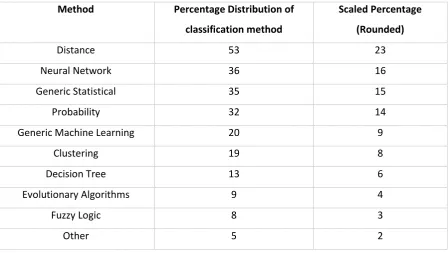
Contrastingly Teh et al. (2013) show that distance and generic statistical methods are amongst the
[image:22.595.75.524.313.566.2]top classification methods featured in existing literature from the field, as shown in Table 2.2.
Table 2.2: Classification Methods Featured In Keystroke Research (Teh et al. 2013)
Method Percentage Distribution of classification method
Scaled Percentage (Rounded)
Distance 53 23
Neural Network 36 16
Generic Statistical 35 15
Probability 32 14
Generic Machine Learning 20 9
Clustering 19 8
Decision Tree 13 6
Evolutionary Algorithms 9 4
Fuzzy Logic 8 3
Other 5 2
Commonly used machine learning methods in current literature include neural networks, decision
trees, evolutionary algorithms, fuzzy logic and support vector machines (Teh et al. 2013). Bartlow
and Cukic (2006) have stated that random forests show promising performance results as a
classification method.
Machine learning methods which may be implemented include: OneR, Naïve Bayes, Voted
23 System Implementation
Implementation of the various components of a keystroke dynamics system will vary depending on
the system’s design and requirements. Whether the analysis process is performed entirely client side
(Generally a bad idea for authentication systems with respect to system security), with only the
signatures database handled by a server, or whether a server is responsible for all tasks except for
feature acquisition is a design choice which must be considered (Moskovitch et al. 2009).
Front End
The front end of the system (which the end-users interacts with) may comprise of either a specially
made software program or an existing web browser (Moskovitch et al. 2009).
Gunetti and Picardi (2005) have shown the viability of using a JavaScript based implementation of
keystroke analysis to gather timing information with a system considering free text inputs. Their
research showed performance results of 5% for False Rejection Rate and 0.005% for False
Acceptance Rate. Details regarding the possible formatting of collected data is presented, where the
proposed system includes a combination of the character pressed and the time at which it was
pressed (in milliseconds).
Example: 0 a 120 b 190 c 752 m 910 h
Back End
The complexity of the backend system which stores the user biometric signatures varies depending
on the system’s implementation and the classification algorithm implemented. Typically a signature
database is stored on a server which contains the reference templates with which the authorisation
attempt biometric characteristics are compared (Moskovitch et al. 2009).
It is crucial that typing characteristic data is stored securely, as this information may be used to
design a system to allow malicious individuals to pose as the user even on other authentication
systems (Peacock et al. 2004).
Details regarding the implementation of signature databases are not fully presented in any of the
literature read, which may be due to the nature of the signatures changing between implementation
24
2.3.1.
Typing Data Collection
Commonly a data collection system gathers the following information:
1. Time at which the key is pressed
2. Unicode value of the key being pressed
3. Time for which the key is depressed (delay time)
4. Time between releasing the current key and pressing the next key (flight time)
2.4.
System Performance Analysis
A keystroke biometric system may exhibit the following response to an authentication attempt:
1. Authorisation is successful for a legitimate user
2. Authorisation is unsuccessful for a legitimate user (Error Type 1)
3. Authorisation attempt by an unauthorised user is prevented
4. Authorisation attempt by an unauthorised user is successful (Error Type 2)
A well performing system will ensure that responses 1 and 3 are achieved, whilst minimising the
occurrences of responses 2 and 4 (Chudá & Ďurfina 2009).
The performance of keystroke dynamic systems is typically measured using error rates.
False Acceptance Rate (FAR) is the rate in which a biometric system will authorise a user who should not have access to the system.
False Rejection Rate (FRR) is the rate in which a biometric system will not authorise a user who should have access to the system.
Equal Error Rate (EER) is the threshold values for which the FAR and FFR are equal (Bartlow & Cukic 2006).
The transparency of the system must also be considered. A well-designed keystroke analysis system
does not significantly decrease the usability of the system into which it is being integrated (Teh et al.
25
2.5.
Storage of Typing Data using MySQL
2.5.1.
Reasons for Using MySQL
Multiple software packages are available for storing collected information on a web-server. It is not
necessary that MySQL be used for storing the collected typing information, however for the reasons
listed it has been selected.
MySQL exhibits that following beneficial characteristics:
Ease of use: Comprehensive knowledge of SQL is not required to interact with the database. A few statements is sufficient to read from and write to the database.
Security: Years of development have been put into MySQL. Privileges can be set to control access and the database is password protected.
Cost: Available for free, licensed under the GPL (Schwartz 2009) Scalability: Capable of handling very large databases.
Flexibility: Numerous data types can be stored within the database.
Portability: Capable of running on various operating systems (Benefits of MySQL 2015)
2.5.2.
Interacting with the MySQL Database
For interacting with the MySQL database, PHP Data Objects (PDO) have been selected to be used.
PDO’s are a PHP5 extension that define a lightweight and consistent data access abstraction library.
To connect to the system’s database a connection string is used. Connection strings vary in structure
depending on the database system in use. The prefix of the connection string indicates the type of
database system being connected to. The use of connection strings with PDO’s aids portability
(Popel 2007).
Example: MySQL connection string:
mysql:host=$servername; dbname = research,$username,$password
Example: PostgreSQL connection string:
pgsql:host=$servername;dbname=research,user=$username,password=$password
PDO’s allow for values or variables to be bound to positional placeholders in prepared statements.
The use of bound values helps to prevent SQL injection attacks with values not needing to be
26 Example: INSERT query using PDO’s (PHP: PDO::prepare - Manual 2016):
$sql="INSERT INTO `typingdata` (userID, username, recordNumber, dataTime, dataDelay, dataFlight, hash) VALUES (:userID, :username, :recordNumber, :dataTime, :dataDelay, :dataFlight, :hash)";
For each named parameter a value is then bound to it:
$stmt=$conn->prepare($sql);
$stmt->bindValue(':userID',1, PDO::PARAM_INT);
$stmt->bindValue(':username','Ryan', PDO::PARAM_STR);
After values have been assigned to each named parameter, the query is executed:
$stmt->execute();
2.6.
Storing Typing Characteristic Arrays
As many records are to be stored, with each user having multiple entries recorded it is important
that the data is stored efficiently, and ensured that it will not become corrupt in the process of
storing and retrieving the data.
The PHP serialize functions allows for arrays to be converted into a storable representation in string
format (PHP: serialize - Manual 2016). This allows for the structure of the array to be not lost during
the storage and retrieval process. To return the stored string to the original array structure the
unserialize function may be used (PHP: unserialize - Manual 2016).
PHP also contains functions to allow the encoding of arrays into JSON format and decoding back to
the original array (PHP: json_encode - Manual 2016).
The data to be stored will always have the following characteristics for the system implemented: One-dimensional array for each characteristic
Contain only signed (Both positive and negative) integer values
Individual elements in the data will not need to be modified once stored
As each array is to be stored in one-dimensional, a sophisticated encoding scheme such as the
serialize and unserialize functions is not required. Using delimiter separated values avoids the
overhead associated with serialised arrays and JSON encoding.
To illustrate the size of the overheads for each method consider the following encoded sizes for a
sixteen value array:
Comma delimited: 64 bytes
JSON encoded: 66 bytes
27 Due to the type of data being stored both the comma separated values and JSON encoded values are
similar in value. Although due to the overhead of including an index value for each element in the
serialised encoding it is significantly larger.
Consider for example the following formatting styles:
Comma delimited: 0,37,168,215,275,389,488,578,625,647,734,925,1007,1091,1156,1223
JSON encoded: [0,37,168,215,275,389,488,578,625,647,734,925,1007,1091,1156,1223]
Serialised: a:16:{i:0;i:0;i:1;i:37;i:2;i:168;i:3;i:215;i:4;i:275;i:5;i:389;i:6;i:488;i:7;i:
578;i:8;i:625;i:9;i:647;i:10;i:734;i:11;i:925;i:12;i:1007;i:13;i:1091;i:14;i:1156;i
:15;i:1223;}
It can therefore be seen that for the data collected, it is most suitable to store the values are
delimiter separated values as a string. Under normal operation these values should only contain
integer values and checks should be put into place before storing the data that these conditions are
met.
2.7.
Transferring Data between Client and Server
HTML forms are typically used to take inputs from users and process this data. Data may be sent
using either POST or GET methods.
To save the typing characteristics, stored as JavaScript arrays, a form with hidden input elements
which contain the arrays as strings are used. When the user presses submit the form the data is sent
to the processing page where it can be saved into the MySQL database. The processing page is able
to assign the posted data to a variable and use it with the MySQL insertion code outlined previously.
An overview of the collection and storage process is shown in Figure 2.4.
Figure 2.4: Data Collection and Storage Process Overview
Javascript Array
containing
typing
characteristics
Write typing
characteristics
to hidden input
field
Submit form to
saving page
Save typing
characteristics
and hashed
phrase into
28
2.8.
Storing User Passwords Securely
Although the secure storage of passwords is, in a sense, outside of the scope of this project it is
important it is discussed as it will need to be considered for the implementation of a secure user
authentication system.
For the keystroke analytics system the Unicode values are not stored as it would pose a security risk
by allowing the original password to be reconstructed if the database was accessed by a malicious
user. Checking that the correct password has been entered is performed using a hashed value of the
password.
In this context hashed values are the result of cryptographic hashing algorithms (E.g. SHA256,
SHA512, WHIRLPOOL, MD5, BCRYPT, etc.) which one-way map strings of various length to a
fixed-length value (Thomsen & Knudsen 2005).
Despite being a one-way function, hashed passwords can be ‘reversed’ through the use of lookup
tables called rainbow tables, which contain a list of messages and corresponding hashes for a given
cryptographic method. Rainbow tables may be counteracted through the use of hash salting. Salting
is a method used to randomise hashes by either pretending or appending another string to the input
message.
The salt value should be randomised and changed for each user when they create an account or
change their password. Additionally the salt should be sufficiently long so that an attacker cannot
create rainbow tables for each salt combination, a general rule is to have the salt as long as the
output hash length. A Cryptographically Secure Pseudo-Random Number Generator (CSPRNG) which
is highly random and unpredictable should be used when generating the salt values (Secure Salted
Password Hashing - How to do it Properly 2016).
PHP offers a packages for one-way string hashing through the password_hash and password_verify
functions (Verifies that a password matches a hash - PHP 2016). It is preferred that the automatic
hash generation feature of password_hash be used, simplifying the implementation process and
ensure that security flaws are not introduced (Creates a password hash - PHP 2016). The
automatically generated salt is read from /dev/urandom. For the current version of PHP (>7), bcrypt
is used as the default key derivation function. Bcrypt is highly recommended due to its ability to
adjust the algorithms cost of hashing (Why You Should use Bcrypt to Hash Stored Password 2016).
Using these provided functions, the password can securely be stored in the database without having
29 It should be noted that by storing the press instance information in the database, a malicious may be
able to perform a frequency analysis on the passwords to determine dictionary words. This should
not be a concern for well-constructed passwords, but it may be a potential security flaw for weaker
passwords. Additionally the keystroke information stored allows an attacker to be able to determine
the exact length of the input password, which would significantly decrease the time required to
brute-force the original password. As such it is vital that efforts be made to decrease the change of
the MySQL database being retrieved by malicious users through SQL injection and other exploits.
2.9.
Project Methodology
Selection of the project’s implementation methodology or design must take into consideration the
project’s requirements, scheduling and resource availability.
2.9.1.
Software Development Process
The system’s development follows a phase development methodology. As such the system is
represented by several smaller subsystem which follow their own development cycles. After the
development cycle for all of the subsystems has been completed they are joined together to create
the final system. This is shown graphically in Figure 2.5 adapted from McLeod and Everett (2006).
Figure 2.5: Phases Development Methodology, Adapted From McLeod and Everett (2006)
Separating the program into subsystems aids the testing process by allowing each module to be
thoroughly tested for functionality before the final system is formed. Unit tests are tests which are
conducted on a module of the software package. As such test cases can be constructed to confirm
that the software is functioning as required before proceeding to the final construction stage. This
30 The system can naturally be dissected into discrete major components which inform the
development of the successive phases. For example, the manner in which the typing data is
31
Chapter 3 The Design and Implementation of User Input
Collection System
3.1.
Setup of the Testing System
This section covers the process of preparing the system on which the keystroke analytics program is
to be prototyped and tested before it is uploaded to the online testing server. Whilst the local
development system could be implemented on any major operating system, only Windows will be
considered in this chapter. The reason for this decision is that the development software for this
project has been purchased for the Windows operating system.
Additionally covered is the setup of the online testing server. This will assume that the server has
been freshly installed without any relevant software having yet been installed or configuration
changes made.
Finally the process of transferring files between the local development system and the online testing
system are outlined.
3.2.
Local Development System
As it is not feasible to expect a constant connection not the internet during the development
process, a local development server is installed and configured.
XAMPP (Cross-platform, Apache, MariaDB, PHP and Perl) is a free open-source software package
released by Apache Friends which allowed for local development of systems which utilise PHP and
MySQL (Dvorski 2007).
3.2.1.
Using XAMPP
After downloading and installing the XAMPP software package and new directory will be created
located at C:/xampp/htdocs/ this is where all the local development files will be situated.
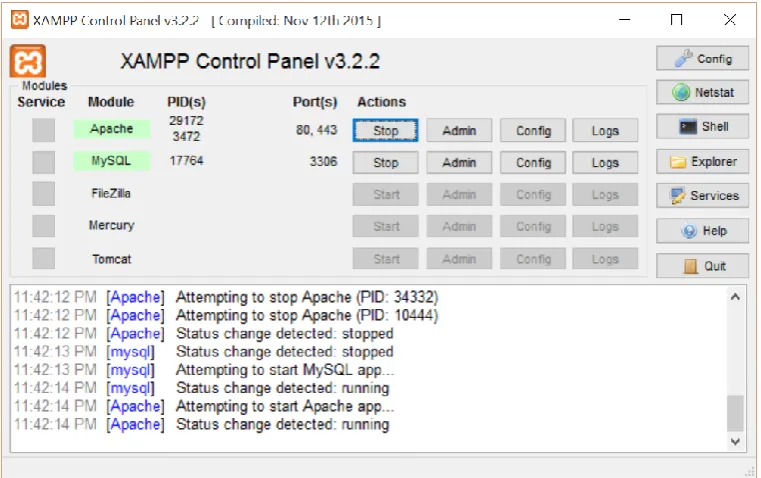
32
Figure 3.1: XAMPP Control Panel
To allow for local development the Apache and MySQL modules must be started using the respective
start buttons. Once started, the local system is now ready for development. The development files
may be accessed by navigating the web-browser software to the local host using the term localhost
as the host name.
For example: To access the file index.php in the C:/xampp/htdocs folder the URL would be: localhost/index.php
Administration of the MySQL databases may be performed by accessing the PHPMyAdmin system by
navigating to localhost/phpmyadmin.
For now, this is all that is required for setting up the local development system to run programs
which use PHP and MySQL.
Take note that once finished using the local development system, the XAMPP modules must be
stopped from the control panel by clicking the stop buttons located next to the PHP and MySQL
33
Figure 3.2: XAMPP Control Panel with Running Modules
3.3.
Hosting Options
There are multiple options available for hosting the online testing system. One approach would be to
port-forward the local networks router to the machine hosting the program to allow others to access
the local server. This however would require that the development machine be continually online at
any time the online testing system is being used.
Another possible option is to rent a small server from a provider which hosts the system
permanently. A virtual private server (VPS) is suitable for the system requirements. VPS’s are virtual
web servers which operate on top of a physical server. Through virtualization multiple private
servers which are independent of each other may operator on a single machine. As such the
operator of the VPS is given complete control over their server to do as they please. Additionally
many VPS hosts provide a control panel where administrative tasks may be performed.
There are many providers of VPS’s online and it is not important which providers is selected for the
purpose of this project so long as the server is running a Linux based operating system. Selecting a
34
3.4.
Setting up Server
For the purpose of completing the following section it is assumed that the server has been
connected to remotely via secure shell (SSH). To set up the server the LAMP (Linux, Apache, MySQL
and PHP) stack is to be installed and configured. This software bundle is similar to the XAMPP
package installed for the local development system and will allow for the server to host dynamic
web-pages (Sverdlov 2012b). As the server is already running Linux the first of the four components
of the stack has already been set up.
The following installation commands assume that a Debian based operating system is being used.
3.4.1.
Installation and Configuration of Apache2
Assuming that the server has not yet had any software installed and is running a freshly installed
version of Linux, the next task which must be completed is installing Apache 2. Apache 2 is a web
server used with Linux systems. This is the software which handles the PHP scripts and MySQL
databases for the program (HTTPD - Apache2 Web Server n.d.).
The installation process is completed by running the following commands in the terminal window:
sudo apt-get update
sudo apt-get install apache2
This is all that is required to install the software. Once complete by navigating a web-browser
towards the server IP address a confirmation page should appear.
3.4.2.
Installation and Configuration of MySQL and PHP
MySQL is an open-source relational database management system (RDBMS). Relational database
systems are controlled by the use of Structured Query Language (SQL) (Converse et al. 2004).
PHP (Hypertext Pre-processor) is a server-side scripting language, which is a module of the Apache
HTTP server and as such cross-platform compatible (Converse et al. 2004). A range of databases are
supported by PHP as well as server operating systems (What can PHP do? 2016).
Before installing software packages, ensure the system’s package list is up to date by running:
35 Installing MySQL (A Quick Guide to Using the MySQL APT Repository 2016):
To install MySQL run the following command:
sudo apt-get install mysql
After completing the installation process, check MySQL is running using:
sudo service mysql status
Installing PHP:
sudo apt-get install php5-common libapache2-mod-php5 php5-cli php5-mysql
After completing the installation process, restart the Apache2 server using:
sudo service apache2 restart
3.4.3.
Installation and Configuration of PHPMyAdmin
PHPMyAdmin is a front-end interface for managing the MySQL system. The system is capable of
managing the MySQL databases and tables as well as other tasks including importing and exporting
data (Bringing MySQL to the web 2016).
Installing PHPMyAdmin (Sverdlov 2012a):
To install PHPMyAdmin run the following:
sudo apt-get install phpmyadmin apache2-utils
After completing the installation process, add the PHPMyAdmin configuration file location to the
Apache2 configuration file by including the following line in /etc/apache2/apache2.conf
Include /etc/phpmyadmin/apache.conf
Then restart the Apache2 server using:
36
3.4.4.
Website Directory Security
To prevent unauthorised users from accessing the system a username and password system may be
implemented to restrict access. A simple method of controlling access is to restrict access to
directories on the web-server (How do I do BASICAuth using .htaccess and .htpasswd? 2016).
Rather than having multiple access credentials, for the purposes of restricting access to the system a
single username and password combination is implemented.
To secure a directory, a file named .htaccess containing the following is added to the directory:
Authtype Basic
AuthName “Restrict System Access”
AuthUserFile /var/www/html/.htpasswd
Require valid-user
Note that the directory containing the .htpasswd file does not necessary have to be
/var/www/html/.
The htpasswd command is used to create the password file and add the user:
htpasswd –c /var/www/.htpasswd <username>
After running the above command, the console will prompt for a password to be entered. This will
be the password associated with the username to access the directory. Note that the above
command uses the –c option which specifies to create the file. If multiple users are added remove
37
3.5.
File Transfer from Windows to a Server
There a multiple options for transferring files between the development machine (Assumed to be
Windows) and the Linux webserver. For the purposes of this system the SCP (Secure Copy) protocol
is used.
PSCP (The PuTTY Secure Copy Client) and WinSCP (Windows Secure Copy) are two tools for using the
secure copy protocol. The former is a command-line option whilst the later features a graphic
interface.
Using PSCP: The PSCP tool is similar to the SCP command used in Linux Systems (Tatham 2007).
For copy files to a remote server the following syntax is used:
pscp [options] source [source...] [user@]host:target
Example: Copy the contents of the local Research folder to the web-server:
pscp C:\xampp\htdocs\Research\* [email protected]:/var/www/Research/
To copy files from a remote server the following syntax is used:
pscp [options] [user@]host:source target
Example: Copy a file from the web-server to the local Research folder:
pscp [email protected]:/var/www/Research/out.txt C:\xampp\htdocs\Research\out.txt
Usage details for PSCP can be viewed by running the pscp without specifying any options or
arguments.
Using WinSCP: The WinSCP tool is an open-source client for the using the SCP protocol, as well as multiple others (Introducing WinSCP 2014).
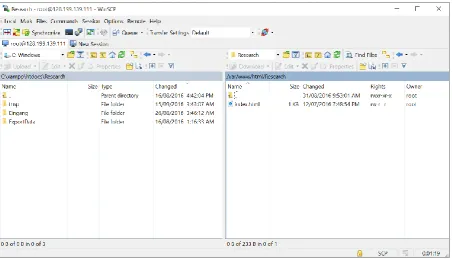
Contrastingly to PSCP, the WinSCP tool features a graphical interface shown in Figure 3.3. Through
this interface the system directories may be traversed and files copied between the local
38
Figure 3.3: WinSCP Interface
The system to collect typing characteristic data from the user is now discussed. This includes the
development of the algorithm to collect raw data as well as the interface the user interacts with. In
order to test the functionality of the collection system first a system is created to store and display
information from an attempt. Furthermore MATLAB is used to visualise access attempts, to confirm
the feasibility of using the collected information for user verification.
Before the typing data collection system is discussed, concepts relating to JavaScript must be
examined. Firstly the event-driven programming model is discussed and its application using
39
3.6.
Characteristic Collection Code
3.6.1.
Data to be Stored
The data to be stored for each login attempt (Additional to identifying information) consists of:
1. Cryptographic hash of password value
2. Key-down timing information
3. Length of time the key was depressed in milliseconds (Delay Time)
4. Length of time between key-up and the following key-down events (Flight time)
5. Instance of key press, which is used to identify keys that are the same Unicode value
6. Special modifiers (Such as whether the shift key was pressed)
From this information other typing characteristics can be determined, such as if keys were held
down or repeatedly pressed.
The full program list of the typing data collection system is provided in Appendix B.1: Typing Data
Collection System.
3.6.2.
The Event-Driven Programming Model
In the event-driven programming model code blocks are executed in response to asynchronous user
input, such as key presses or mouse clicks. The web-browser creates events in response to inputs
from the user, which invoke an event handler to execute a defined response. An event handler is
simply a subroutine which is called when the associated event is invoked.
Event handlers can be assigned to an element using the addEventListener() function. This method
allows for more than one handler to be assigned to an element event. Contrastingly the
removeEventListener() function can be used to remove a listener which has been previously assigned
(Mozilla Developer Network 2016h).
3.6.3.
Implementation of Collection Code
The keystroke analytics system is concerned with events associated with keyboard input. The
following events are available:
1. onkeydown: when a key is depressed while the element has focus
40 For the system being created, the onkeydown and onkeyup event handlers are used. Using these
events the key value, press type, keyboard location and modifier states can be extracted.
Attaching event handlers to the password field:
// Assign identified to password field
varelement = document.getElementById('password');
// Set user focus to password input field element.focus();
// Attach event handlers to password element if (element.addEventListener) {
element.addEventListener("keydown", keyHandler, false); element.addEventListener("keyup", keyHandler, false); } elseif (element.attachEvent){
element.attachEvent("keydown", keyHandler); element.attachEvent("keyup", keyHandler); }
Figure 3.4: Assigning Event Handlers to the Password Field
The purpose of this code section is to allocate a function as the event handler for the key up and key
down events of the system’s password field. Two methods are used to attach the handler
addEventListener and attachEvent.
The member function addEventListener is the standard method used for attaching a handler to an
event for all browsers with the exclusion of Internet Explorer. Rather than using addEventListener,
Internet Explorer uses the attachEvent member function. As such both methods must be provided
for cross-browser compatibility (Flanagan 2006).
Extracting the event key code:
There are significant problems with determining character code values between different browsers.
Many methods are either deprecated or not available to all web-browsers. For future
implementations of a web-based keystroke analytics system alternative methods of extracting the
key code may need to be investigated.
It should be noted that different web-browsers may return different values for the same key event.
Whilst the code values are generally the same for alpha-numeric values, symbol values return
different values. For example the semi-colon symbol returns 59 for Firefox, 186 for Internet Explorer
and 59 for Opera (Wolter 2012).
For a production system it would be important that this be accounted for by either using a more
41 implement a conceptual level solution, a method offering more consistency between browsers will
be considered outside of the project scope. For an already made solution, future developers may be
interested in using a library package such as JQuery which offers a normalised key event solution
(The jQuery Foundation 2016).
For the time being, the which and keyCode methods are used to determine the code associated with
a key event. Using these methods for each key down and key up event a numerical value is returned
indicating the key pressed.
varcode = (event.which) ? event.which : event.keyCode;
Figure 3.5: Code to Extract Key Code Value
Detecting key event type:
To reduce the amount of duplicate program code, the same event handler code is used for both the
key down and key up events with code executing depending on the event type. To determine the
event type the type member function is used on the event data element. A simple if statement may
be used to check if the type was keydown or keyup and take appropriate action.
// Detect a keydown event type if ( event.type == 'keydown' ) { … }
// Detect a keyup event type if ( event.type == 'keyup' ) { … }
Figure 3.6: Event Type Detection Code
Detecting key event location:
For the shift key it is important that the system distinguishes between the left shift key and the right
shift key. The location member function can be used to determine this characteristic. To check
whether the left or right shift was pressed, the result can be compared against the constants
DOM_KEY_LOCATION_LEFT and DOM_KEY_LOCATION_RIGHT respectively. These values simply
enumerate the values 1 and 2, respectively.
For the keystroke system we make the simplification as saying that the code for left shift is 16 and
therefore the right shift key may be represented by -16.
// Set different code for right shift than left shift
if (event.location === KeyboardEvent.DOM_KEY_LOCATION_RIGHT && code == 16){ code = -16;
}
42 Detecting key shift modifier:
The final event characteristic which must be considered is detecting whether the shift key was
depressed whilst another key is pressed. To achieve this the shiftKey member function is used. The
member function returns true if the shift key was depressed when the event occurred, otherwise
false is returned (Mozilla Developer Network 2016d).
3.6.4.
Restricting the Keyboard Inputs
To simplify the system’s logic some restrictions are applied to the password input field. These are
that the user:
1. Cannot use the mouse to change the cursor position
2. Cannot use the keyboard arrow keys to move the cursor position
3. Cannot hold down keys for repeated input events
4. Cannot use the autocomplete functions of the web-browser
Preventing moving the text cursor with the mouse:
There is not presently an easily implemented option to disable the mouse from being used to move
the input cursor in a text field. One work around is to update the field value when a click even occurs
which causes the cursor position to reset to the end position.
The following event handers may be used:
element.addEventListener("click", function(){ this.value = this.value; });
element.attachEvent("click", function(){ this.value = this.value; });
Figure 3.8: Code to Prevent Using Mouse to Move Text Input Cursor
Preventing moving the text cursor with the arrow keys:
To restrict the use of the arrow keys to move the text cursor, simply test for the appropriate key
codes and then call the preventDefault member function which inhibits the default action.
// Prevent cursor keys from being used to move the typing cursor left and right if ( code == '37' || code == '39' ) {
event.preventDefault(); return;
}
Figure 3.9: Code to Prevent Moving Input Cursor with Arrow Keys
Prevent holding down a key from registering as multiple presses:
To prevent the user from being able to hold down a key to register multiply key presses, test for the
43 // Detect and prevent repeat key presses
if ( event.repeat ) { event.preventDefault(); event.returnValue = false; return;
}
Figure 3.10: Code to Prevent Repeat Key Press Events
Prevent browser autocomplete function from being used:
For a form, the autocomplete function can be disabled by setting the autocomplete attribute to off
(Mozilla Developer Network 2016a).
<form id="typingDataForm" method="post" action="match.php"autocomplete="off">
Figure 3.11: Example Use of Autocomplete Attribute on a Form
3.6.5.
Miscellaneous Functions
Detecting when the page has finished loading
The d