Rochester Institute of Technology
RIT Scholar Works
Theses
Thesis/Dissertation Collections
2003
A Practical guide to understanding wireless
networking concepts, security protocols, attack,
and safer deployment schemes
Jay Yip
Follow this and additional works at:
http://scholarworks.rit.edu/theses
This Thesis is brought to you for free and open access by the Thesis/Dissertation Collections at RIT Scholar Works. It has been accepted for inclusion
in Theses by an authorized administrator of RIT Scholar Works. For more information, please contact
Recommended Citation
Rochester Institute of Technology
B. Thomas Golisano College
of
Computing and Information Sciences
Master of Science in Information Technology
Thesis Approval Form
Student Name: _ _
.:::..:Ja::::.lyl..-Y.:...:i~p
_ _ _ _ _ _ _ _ _ _ _ _
_
Thesis Title:
A Practical Guide To Understanding Wireless
Networking Concepts, Sec.
urity Protocols, Attack,
and Safer Deployment Schemes
Thesis Committee
Name
Signature
Date
Prof. Bruce Hartpence
Bruce Hartpence
Chair
Bradley R. Newcomer
Bradley R. Newcomer
5
-11
-OL(
Committee Member
Thesis Reproduction Permission Form
Rochester Institute of Technology
B. Thomas Golisano College
of
Computing and Information Sciences
Master of Science in Information Technology
A Practical Guide To Understanding Wireless
Networking Concepts, Security Protocols, Attack,
and Safer Deployment Schemes
I, Jay Yip, hereby grant permission to the Wallace Library of the Rochester
Institute of Technology to reproduce my thesis in whole or in part. Any
reproduction must not be for commercial use or profit.
Date:
t;11~ )OLf
A
practical guide
to
understanding
wireless
networking
concepts,
security
protocols, attack,
and
safer
deployment
schemes
By Jay Yip
Project
submittedin
partialfulfillment
ofthe
requirements
for
the
degree
ofMaster
ofScience
in Information
Technology
Department
ofInformation
Technology
B.
Thomas Golisano
College
Of
Computing
andInformation
Sciences
Abstract/Introduction
page4Overview
page4Research
page5Why
is
wireless soimportant?
page6802.11b
verses802.1
1g
page7Popularity
changes page7Comparison
chart of802.11b
verses802.1
1g
along
with802.11
a... page8Introduction
to
WEP
page9WhatisWEP
page9How WEP
encryption works pagel0
How
sharedkey
authentication works pagel2
How
openkey
authentication works pagel3
Enabling
WEP
pagel4
WEP
is
flawed
pagel6
Why
Wi-Fi is insecure
pagel6
History
of802.
1 1
security vulnerability
timeline
pagel9
Different
types
ofWEP
attacks page20How to
find
an access point page23Equipment
neededto
find
an access point page23Windows XP
page24Netstumbler
page25ApSniff
page27Is
Wardriving
legal?
page28Wireless Traffic
andWEP cracking
tools
page29Ethereal
page30Kismet
page31Airsnort
page32WEP
Crack
page32Dwepcrack
page33Comments found regarding WEP
page34In favor
ofWEP
page34In
opposition ofWEP
page35WEP2
(Second
Generation
WEP)
page36WEP2
versesWEP
page36Alternatives
to
WEP/WEP2
page37WPA
(Wi-Fi
Protected
Access)
page37Advantages
ofupgrading
to
WPA
page40Migration from WEP
to
WPA
page40Issues
overimplementing
WPA
page41802. 1 1 i
page42Authentication
Protocols
andEncryption Algorithms
page43802.
1
x page43802. 1
x authentication withWi-Fi
page44EAP (Extensible
Authentication
Protocol)
page45RADIUS (Remote Access Dial In User
Service)
server page46AES (Advanced Encryption
Standard)
page47Roaming
Issues
page48Multiple Access Points
withthe
sameSSID
page48Multiple Access Points
with an authentication sever page48Author's
recommendations page49Implement
afirewall
page50Implement WEP
page50Securely
configurethe
access point page51Implement
Fake AP
page51Detect
rogue access points page52Implement
aVPN
page53Tunneling
and encapsulationbasics
page53PPTP
andL2TP Protocols
page54Implement
aRADIUS
authentication server page54Setup
a'honey
pot'
page54
Abstract/I
ntrod uctio nWith
the
explosion of wireless networksappearing
in
buildings,
business
and educational
campuses,
and evenhomes;
security is
alarge
concernin
orderto
prevent attemptedintrusions
and malicious attacksfrom
the
retrieval ofconfidential
data.
Wireless
Fidelity,
Wi-Fi for
short,
does
providesecurity in
the
form
calledWired Equivalent
Privacy
otherwisesimply
known
asWEP.
However
cases
documenting
WEP's
security
mechanismbeing
breached in
legitimate
andillegitimate
caseshave been
published and arereadily
available onthe Internet.
While
wireless networks providethe
freedom
ofmobility for
users,
this
alsoallows potential
hackers
to
eavesdrop
onunsuspecting
wireless users.Or
worse,one could
potentially
hijack
an access point and gain unauthorized access pastthe
wireless network andthen
into
the
wiredinternal
network.Thus
anintruder
who
has hijacked
an access point willbe
ableto
access criticaldata
whilehiding
safely
outsidethe building.
Knowledge
andunderstanding
of wireless networksand of
its security is
anecessary step
to
be
learnt
if
wireless networks areto
be
deployed securely especially in
congested urban settings.Overview
Network
administratorsimplement WEP
as asecurity
meansfor
userswith wireless network capable
devices
that
connect with accesspoints;
however
WEP
is flawed
and can notbe
used as an absolute means of security.Available
are applications
that
can sniff wirelesstraffic
and viewthe
contents of packets asthey
arebeing
transmitted through the
air.Also
available are applicationsthat
be downloaded
offthe
Internet.
These
applications workby
capturing
enoughwireless packets and
analyzing
each one.Given
enoughtime
and resources,data
canbe
revealed andWEP
keys
canbe
cracked.Even
worse, the
capturing
of packets
does
not needto
be
withinthe
samebuilding.
In fact it
canbe
anywhere within
the
coverage range ofthe
wireless networkhence providing
agreat advantage
for
a potentialintruder.
Once
ahacker
has
establishedconnection
to
anAccess
Point
andhas
crackedWEP,
the
hacker is virtually
sitting
inside
a closed roomin
front
of a victim's unoccupied computer.To
makematters
worse,
oncethe
penetrationhas been
discovered;
capturing
the
culpritis
futile
sincethey
were neverinside
the
building
in
the
first
place!By
better
understanding
the
aspects of wirelessnetworking
security,
better
security
measures can
take
place.But before
hand;
it is best
to
understand whatWEP
is,
how it
works,
why it
fails,
and what other measures canbe implemented
to
decrease
the
chances of attacks.Research
The
scope ofthis thesis
involves
abrief discussion
of available wirelessprotocols and what
lies in
the
future
with regardsto
securing
computer networkswhether
they
are wired or wireless.Research
documenting
whatis
WEP,
how it
works,
andwhy it is flawed in
terms
ofsecurity
willbe discussed.
This
thesis
willalso
document
ways offinding
wireless networksusing
a personallaptop
computer or
PDA
(Personal
Digital
Assistant)
armed with a wireless card andknowledge
ofthe
Windows
andLinux
operating
system.Also
alist
of availablebe
providedshowing
what each programis
capable ofdoing
in
terms
ofpotentially allowing
anintruder
to
gain unlawful accessfrom
andinto
a wireless network.Information
pertaining
to the
steps neededin
orderto
crackWEP
willbe
documented
withoutcreating
a set of cookbookinstructions.
All
the
relevantinformation
researched offthe
Internet
willbe
comprisedinto
a guide neededfor
someoneto
understand whatthe
currentforms
ofsecurity
existfor
wireless networksduring
the time
ofthis
writing.Second
generationWEP
(WEP2)
willbe
discussed
and compared withfirst
generationWEP
asthe
hopes for
this
secondgeneration version will provide a more robust version
to
first
generationWEP.
Alternative forms
ofsecurity
to
WEP
willbe
presented although none ofthem
have been
yetimplemented into
the
marketduring
the time
ofwriting
this thesis.
Other
alternativeforms
ofexisting
and underdevelopment
authentication andencryption schemes will
be
discussed,
althoughtheir
original purposemay
nothave been designed
for Wi-Fi
the
concepts canbe
appliedtowards
it.
Based
upon all gathered
research, this thesis
willinclude
personal recommendations ofsetting
up
a wireless networkin hopes
to
provide a moredifficult
setting
for
intruders
to
gain of unlawful accessbased
uponthe
currentsecurity
mechanisms and schemes availableduring
the time
ofwriting.Why
is
wireless soimportant?
Planning
for
the
future is
animportant step,
which notonly
appliesto
networks and
beyond.
According
to
Dr.
Bernard
Aboba
ofthe
Microsoft
Corporation,
he
predicts wireless systemsby
the
end ofthe
first
decade
in
the
20th
century
will consist ofthe
following1:
A
viabledesktop
NIC
replacementWireless ISPs
willhappen
Community
nets willhappen
Adhoc
networking
will extend coveragedramatically
Dual
802.1 1/WAN
NICs
willbe
commonplaceAlthough
they
areonly
predictions, the
probability
ofthem
actually
occurring
seems
very
likely
to
happen
giventhe
boom in
computertechnology
from
the
early
1990's into
the
early
2000's.
In
the
meantime
during
the time
ofthis
writing,
some network administratorsmay
oppose wireless or somemay
simply
not want
to
deploy
it.
Based
uponthe
abovepredictions,
all networkadministrators should
be
preparedto
either embrace wireless or atleast
acceptit
because
wirelessnetworking is currently
only
atits
infancy
andthe
future
seemsto
indicate
that
wirelessis
notgoing
to
goaway
anytime soon.802.1 1
b
verses802.1 1
g
Popularity
changesDuring
the
course ofwriting
this
thesis,
both IEEE
wireless standardshave
changed
in
availability, price,
and popularity.When
the
writing
ofthis thesis
began,
802.11b
wasgaining
vastpopularity
over802.11a
and wasreadily
available
in
the
retail market at a moderate price.Nearing
the
completion ofthis
thesis,
802.1
1g
is
fast
gaining popularity
over802.11b
and802.11g's
prices are1
The Unofficial 802.11
Security
Web Page. September 2003.approximately
whatthe
pricesfor
802.11b
were when allwriting
began.
As
ofcurrent
time
ofthis writing,
802.1 1b's
prices arecurrently extremely
affordableto
those
interested in
setting
up
a wireless networkhence
the
rapid growth ofwireless networks
especially
in homes.
However,
for
the
purpose ofthis
thesis,
the term
Wi-Fi
willbe
referredto
as either802.11b
or802. 11g.
Fortunately,
the
security
measures usedby
both
wireless standards arethe
same and will notaffect
the
rest ofthis thesis.
Comparison
chart of802.
1
1b
verses802. 1
1g
along
with802.
1 1a2.
Wireless Standard
802.11a802.11b
802.1
1g
Frequency
5.8GHz
2.4
GHz
2.4
GHz
Speed
54Mbps
11
Mbps
54
Mbps
Range
Shorter
rangethan802.1 1b and 802.1
1g
Good Range.
Better
rangethan802.11a
Good Range. Samerange
as802.11b. Betterrange
than802.11a.
Popularity
User base
stillrelatively
smallCurrently
has
thelargest
userbase
Expect
thisstandard toovertake 802.1 1bas the
standard of choice
Cost
Most
expensiveCheapest
More
expansivethan802.1
1b but
cheaperthen
802.11a
2
Wireless LANAntennas. InPathDevices,Inc. 2003.
Benefits
Excellent
speed,Lowest
price,The
speed of802.11aunaffected
by
2.4
excellent signal with therange ofGHz
devices,
can co range, coverage 802.11b,
compatiblewithexist with
802.11b
penetrate most 802.11b networksandand 802.1
1g
walls,works withhotspots,
excellentnetworks public
hotspots
signal strengthIntroduction
to WEP
What is WEP
WEP
standsfor Wired Equivalent
Privacy.
Its
purposeis
to
bring
the
security
of wired networksto
Wi-Fi
by
preventing
eavesdropping, the
modificationof
messages,
and unauthorized accessfrom illegitimate individuals.
This is
accomplished
through
apolicy
of encryption and authentication.WEP's
encryption scheme
is based
upon a64bit
RC4
(stream
cipher)
random variationencryption algorithm
developed
by
cryptographerRon Rivest.
A
stream cipherindependently
ciphers or codes eachbyte
separately
withoutaffecting
otherbytes,
andit
can expand"a
shortkey
into
aninfinite
pseudo-randomkey
stream."3
This
encryption scheme willbe
further
discussed
shortly.The
authentication scheme used
in WEP
is like
ahandshake
systembetween
adevice
such as an access point and anotherdevice
capable of wirelessnetworking.
There
aretwo types
of authentication schemesthat
WEP
canuse,
shared
key
and openkey
authentication.Shared
key
authenticationis based
3
upon a challenge/response algorithm while open
key
authenticationdoes
not usea challenge/response algorithm.
Both
schemes willboth
be
explained shortly.How WEP
encryption worksWEP
encryption canbe
broken
down into
two
components.After
the
sender,
usually
an accesspoint,
initiates
the
encryption schemealgorithm; the
first
component ofWEP
encryptionbegins.
In
orderto
encryptthe
unsecuredplaintext,
a process ofconstructing
a shared secretkey
occurs.Once
completed, the
resultis
akey
sizebuilt
of a16
to 104bit
key
with aninitialization
vector
(IV)
inserted in
the
beginning.
An IV is
a24
bit
long
stream addedto the
shared
key.
Its
useis
neededbecause WEP
canonly
createfour
combinationsof shared
keys,
withonly
four
combinationsthere
runs a greatpossibility
that the
same shared
key
willbe
reused.In
orderto
preventthe reuse,
anIV is
a set ofrandomly
generated charactersto
be
used withthe
sharedkeys
to
producefurther
encryptedkeys
thus
somewhatextending
the
sharedkey's lifetime
of use.This
key
willthen
be imported into
a pseudo-random number generator(PRNG)
to
create randomness"because
computers aredeterministic,
starting
the
sequence with
the
same seed always resultsin
the
samestring
ofnumbers."4
The final
product createdis
called akey
streamranging
from 40
to
128
bits,
the
next
step
is
the
creation of ciphertext.
As
mentionedbefore,
the
actualencryption
is
performedby
the
RC4
algorithm.Since
the
actualRC4
algorithmis
beyond the
scope ofthis
thesis,
it
willbe very simply
explained as a process of4
XORing
("a
logical
operation ofcomparing
two
binary
bits"5)
the
originalunencrypted plaintext with
the
key
streamto
create ciphertext.
The
second component ofWEP
encryptioninvolves
protection againstmodification
to the
ciphertext,
whether accidental or malicious.A
32-bit
cyclic-redundancy-check
(CRC32)
is
calculatedto
provide some error checking.It is
anumeric value computed
from bits in
the
ciphertext
andis
attachedto the
end ofthe
packetbefore
transmission.
When
the
receiving
end receivesthe
ciphertext,
it
removesthe
CRC32
and recreates a newCRC32.
The
originalCRC32
andthe
new
CRC32
arecompared,
if
they
both
matchthen the
ciphertext
was notchanged and
is
consideredto
be
original andsecure;
or soit
seems.This
window of
opportunity
for
an exploitfrom
this
scenario willbe discussed later
on.The
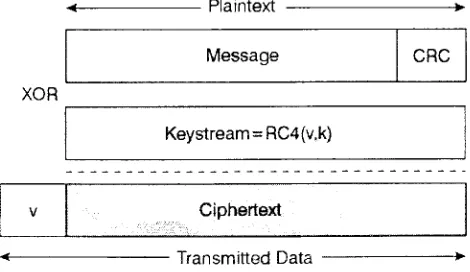
following
diagram
shows an encryptedWEP
frame
afterit
completing
the
first
2
steps onthe
WEP
encryptionprocess.6
Figure1: Encrypted WEP frame
- Plaintext >
Message CRC
XOR
Keystream=
RC4(v.k)
V Ciphertext
TransmittedData
Figure1:Encrypted WEP frame
5
Grogans,
Candance; Bethea, Jackie;
Hamdan,Issam. RC4 Encryption Algorithm: AlgorithmBreakdown. March 2000. URL: http://www.ncat.edu/~grogans/algorithm breakdown.htm6
Loeb,Larry. What's upwithWEP? Don't let itcompromiseyourdata. Secure ElectronicTransactions.
[image:14.495.80.315.431.567.2]A decryption
processis
initiated
whenthe
ciphertext
onthe
receiving
sideis
sentback
to the
sending
side.To
begin
the
decryption
process, the
samesteps used
to
createthe
ciphertext
willbe
reversedto
recoverthe
plaintextdata.
The
plaintextis
recovered whenthe
ciphertext
is XORed
with akey
stream(WEP
key,
comprised ofthe
IV
and sharedkey).
Deciphering
ciphertext,
similarto
encrypting
ciphertext,
involves performing
aCRC32
error checkto
ensureaccuracy
ofthe
ciphertext
without mistake.Once
the
encryption phasehas
been completed, the
next phase willbe
authentication.How
sharedkey
authentication worksShared
key
authenticationis
afour-step
processbeginning
with an accesspoint
that
receives a requestfor
associationfrom
a wirelessdevice.
Actual
authentication
does
notbegin
until managementframes
are sentback
andforth
between both
endsto
begin
the
processbut
oncethey
do,
the
four
authenticationsteps are
listed
asthe
following:
1
.The
client sends an association request2.
The
access point receivesthe
request and produces a random challengetext to
be
sentto
the
client3.
The
client receivesthe
challengetext
and encryptsits
sharedWEP
key
and returnsit back
to
the
access point4.
The
access pointdecrypts
the
challengetext
withits
own sharedWEP
key
and comparesit
withthe
original challengetext
If
the
returneddecrypted
challengetext
from
the
clientis
the
same withthe
original challenge
text
sentfrom
the
accesspoint, the
clientis
then
authenticatedwith the access point.
If the
challengetext
from
the
clientis
different from
the
shared
WEP
key,
the
ciphertext
(plaintext
XORed
with akey
stream generatedduring
the
WEP
encryptionprocess)
would nothave
been
exposedrevealing any
plaintext.
Since
the
plaintexthas
notbeen exposed,
the
authentication processis
saidto
be
securein
theory
or soit
seems.This
window ofopportunity
for
anexploit
from
this
scenario willbe
discussed
later
on.Below is
another version ofshared
key
authentication process shownin illustration form
to
provide anotherview
for
the
same notionjust
explained above.AinticMHatiofl Frame
Aj'.'Tli:i'..H.|,j['Rl'.JLTil
8021 1 Wireless
LANAij.jpte'
2 AutheotiCdftJOftM.irriK 126 byteWEP Cha lengs
J Atttfcmiicationframe Encrypted
rh.j tinge.'.Hi.h,ir<f)-kp'y
B0211 ]:,\lf\.-.: LANAcCfiii
Potnt
4 A;jtlwnliCdlio Rr'.ulrSutr%r>
decrypted successfullyoiFaituira
\ r
How
openkey
authentication worksUnlike
sharedkey
authentication,
openkey
is
much simpler.When
using
this
authentication scheme withoutWEP
enabled,
any
wireless capabledevice
can associate with an access point without
the
exchange of a challengetext to
be
encrypted,
decrypted,
compared,
checkedfor
differences,
and/orhave
packets
discarded.
All
that
is
neededfor
a wirelessdevice
to
associate with anaccess point
is
the
access point'sSSID.
What
anSSID
is
andhow it
canbe
found
willbe
further
explainedin
the
upcoming
paragraphs.This
schemegenerally
the
default
setting
of most access points.If WEP is
enabled,
WEP's
own use of a shared
key
then
becomes
a pseudo authentication method whichworks
transparently
orindirectly
when usedin
conjunction with openkey
authentication.However
despite
having
no actual authentication mechanism whenusing
open
key
authentication and withWEP
enabled,
one personfrom
anInternet
message
board
actually
recommendedthe
use of openkey
authenticationfor
greater
security
over sharedkey
authentication whenboth
areto
be
usedin
conjunction with
WEP. Their
explanationis
asfollows:
"Shared
Key
authentication wouldbe
more secureif WEP
wasn't so 'easy'to
crack...It's
the
authenticationprocess, alone, that
makesShared
Key
less
secure...Open
Authentication,
when used withWEP,
is
more secure...the
client will stillbe
ableto authenticate,
aslong
asthe
SSIDs
match,
but
unlessthe
clienthas
amatching
WEP
key
it
will notbe
ableto
passdata
to
orfrom
the
AP. This
scenario makesit
muchharder
for
a'hacker'
to
obtainthe
WEP
key
via a
sniffer/WEPcracker."7
Of
course whenusing
openkey
authentication,
one shouldturn
offSSID
broadcasting
onthe
access pointto
limit
the
chance of unwanted wirelessnetwork
discoveries
and associations.The
SSID broadcast
actslike
abeacon
whichinforms
all wireless capabledevices
within rangethat
an access pointis
around and available.Third
party
software,
which willbe
explainedlater
on,
canbe
usedto
detect
available wireless networksby
listening
for
an access point'sSSID
broadcast.
Enabling
WEP
7
Enabling
WEP first
involves selecting
whichlevel
of encryptionis
wantedor
needed;
40, 64,
and128
arethe
most commonbit levels
during
the time
ofthis
writing.
As
the
higher
number ofbits
increases
sodoes
the
level
of security.However,
if
an access pointis
capable ofsupporting
128bit
WEP
encryption andthe
wirelessNIC
onthe
client endonly
supportsup
to
64bit
WEP
encryption,
64bit
WEP
encryption willbe
the
final
encryptionlevel
usedbetween
the
accesspoint and wireless node.
Next,
up
to 4
privatekeys
needto
be
createdbefore
the
authentication process canbegin.
Depending
onthe
model and manufactureof
the
accesspoint;
the
key
to
be
enteredmay
be in
the
form
ofASCII
characters,
hexadecimal
numbers,
or a pass phrase(text). The
following
screencapture
is
an example of ahome-marketed
wireless router withWEP
configuredand enabled.
Enhanced2,4GMz Wireless Router
Home
ThesearethewirelesssettingsfortheAPfAccessPotnt)Portion
SSID AP1
Channel 1 "
WEP Enabled0Disabled
WEPEncryption 54Blt v
KeyType HEX v
Key1 ''-. ABCDEF1234
Key2 O 0000000000
Key3 :'/.< 0000000000
key4 O 0000000000
Wireless
j
j
0
The
following
screen capture shows a computer equipped with a wireless cardrunning
the
Windows XP
operating
systemwaiting for
aWEP
key
to
be
entered.The WEP
key
to
be
enteredis
the
same asthe
one shownin
the
above screencapture,
it is
neededin
orderfor
the
wireless capable computerto
associate withthe
above access point.D-Link Air Plus
Thefollowingwirelessnetwork(s)areavailable.Toaccess a wirelessnetwork,selectit fromthelist,andthenclickConnect:
Availablewireless networks:
i API
Thiswireless network accessthisnetwork.
Network key:
requirestheuseof a networkkeyWEP). To type thekey,thenclickConnect.
?
EnableIEEEIfyou arehavingdiffi
802.1x authenticationforthisnetwork
:ultyconnecting toanetwork, click.Advanced
|
Advanced... Connect CancelWEP is flawed
Why
Wi-Fi
is insecure
Four basic
groupings ofvulnerability
exist asto the
reasonwhy Wi-Fi is
considered
to
be
lacking
in
terms
of security.The first
reasonlies in Wi-Fi's
physical structure or
having
the
lack
of one.Wi-Fi
is
a"wireless Ethernet
networking
technology."8
Unlike
traditionalnetworking
technology
whichtransmits
data through
wires and cables,Wi-Fi
transmitsdata
through
open air.While
this form
oftransmission
has
the
greatest advantage ofallowing
usersto
become
mobile anddynamic,
this
greatest advantage also resultsin Wi-Fi's
WirelessEthernet
Networking
with802.11b,
an overview.greatest
shortcoming
in
the
form
of security.By
default,
these
packets ofdata
travel
through
the
airin
often plain and unencryptedtext.
Given
the
rightsoftware and
hardware,
these
packets canbe
'sniffed'and captured
to
be further
analyzed
to
retrievethe
originaldata
being
sent.The
second reasonwhy Wi-Fi's
security
measurein
the
form
ofWEP
is
considered
flawed
lies in
the
IV
(initiation
vector which was explainedduring
WEP
encryption).It is
sentin
cleartext
asin it is
not encrypted.As
soon aswireless cards are powered on with
WEP
enabled,
most cards assignthe
IV
aninitial
value of one andthen
augmentthose
valuesby
one eachtime the
WEP
key
is
passedbetween
the
access point and client.Because
the
IV is
only
a24
bit
value,
it
canbe
reusedup
to
atotal
of16,777,216
times
before
running
out ofdifferent
values.Although
this
may
seem alarge
number,
in
an environmentthat
can move
data
at maximumbit
ratecontinually
throughout the
day,
sixhours is
approximately
how
long
it
willtake
for
all valuesto
be
used.After this event,
most
APs
will resetthe
IV
to
back
one andbegin
the
same cycle over again.Since
the
IV is
transmitted
withevery
packet sentto the
destination,
this
leaves
it
very
susceptibleto
reuse exploits.After
enough rounds ofcollecting
cipheredtext
encrypted withthe
sameIV,
the
sharedWEP
key
canbe
recovered.This
process will
further
explained shortly.The
worst partbeing,
most sharedWEP
keys
by
default
are setto
be
the
same asthe
SSID.
Although
it
may
requirecollecting 15
to
25
billion bytes
ofdata,
the
possibility is
there.
What
makesthe
use of
IVs
worse, ofthe
16,777,216
combinations, about2%
ofthem
arethey
are encrypting.Fortunately,
mosthome
and smallbusiness
wirelessnetworks will not generate enough wireless
traffic
in
aday.
Although
this
may
possibly
take
monthsto
hack,
if
the
data is
critical enough someone with enoughpatience will always
be
aroundto
foil
any
wireless network.The
third
reasonwhy
Wi-Fi's
security
measures are consideredflawed
involves
the
challengetext
sequence when associationfirst
occurs, this
wasintroduced
during
the
paragraph on sharedWEP
key
authentication.There
is
aninstance
ofvulnerability
during
the
challengetext
exchange whenusing
sharedkey
authentication,
which washinted
earlier above.This vulnerability
occursif
amalicious
intruder
wereto
intercept
the
initial
unencrypted challengetext
along
with
the
challengetext
encrypted withthe
sharedWEP key.
If
the
maliciousintruder
wereableto
capturethese two
critical streams ofdata
packets, there
is
achance
that the
secret sharedWEP
key
canbe
obtainedby
reverseengineering
them
by
XORing
the two together.
Once
obtained, the
intruder
can usethe
WEP
key
to
associate with anunsuspecting
wireless network.This is
possibledue
to
an
inherited flaw
usedby
the
RC4
encryption algorithm.The fourth
reason over concern aboutWEP lies
in
the
CRC
which wasintroduced
andhinted
in
the
paragraphregarding WEP's
encryption process.Unfortunately,
this
method of errorchecking
may
not always preventdata
packets
from
being
altered or modified.By
using
the
sameXOR
exploitwithIVs,
this vulnerability
allowsthe
packetto
be
sentto
anotherdestination.
This
canoccur
between the
user client and an accesspoint,
if
the destination
IP
addressforward
it
onto the
changedIP
address.Although TCP
forwarding
is beyond
the
scope of
this
thesis,
it
willbe
saidthat the
TCP
checksum will notbe
checkeduntil
it
reachesthe
forged destination.
A
moredetailed
explanation ofusing
this
exploitwill
be
discussed
later.
Combined
withthese
four
factors;
adetermined
intruder
can sit outsidethe
building,
usually in
a parkedvan,
withinWi-Fi
rangecapturing
wirelesstraffic.
In
the
safety
of such avan, the
intruder
can collect enough wireless packetssearching specifically for
IV
reusal and/or challengetext
exchange withthe
malicious
intent
ofobtaining
the
sharedWEP key.
Once
obtained, the
hacker
can redirect packets
to
forward
them to
anotherlocation usually
belonging
to the
hacker themselves.
However,
despite
the
possibility
ofWEP
being
hackable,
the
amount of work required
to
crackit
may
sometimes notbe
worththe trouble.
If
the
contents orinformation
inside
the
wireless networkis
ofless
value, this
may
cause an
intruder
to
find
another wireless network with easierentry
access.Thus WEP
shouldbe
used whendeploying
Wi-Fi but
one shouldonly
considerit
to
be like
alock
on adoor,
it
willonly
keep
honest
people out.History
of802.
1 1
Security
Vulnerability
timeline9October 2000
-Jesse Walker
was one ofthe
first
peopleto
identify
severalof
the
problemsin
WEP. Jesse
wrote a paperfor
the 802.11
committeeentitled
"Unsafe
at anykey
size:An
Analysis
ofthe
WEP
encapsulation"January
2001
-Researchers
atthe
University
ofCalifornia
atBerkely
independently
released a paperdescribing
the
problemswithWEP.
March
2001
-Jesse
also made a presentationto
the 802.15.3
committeedescribing
some ofthe
problems withsecurity in
802.1
1
.9
May
2001
-Recently,
wefound
a new cryptographic attack againstboth
WEP
andWEP2
(a
proposed enhancementto
WEP)
that
works regardless ofthe
IV
size,
and we presented ourfindings
to the 802.11
subgroup
onsecurity
atthe
May
2001
Orlando
meeting.June
2001
-Tim Newsham found
a problemin
the
algorithmthat
somevendors used
to
automatically
generateWEP keys. He
alsobuilt
codeto
perform
dictionary
attacks againstWEP intercepted
traffic.
August 2001
-Scott
Fluhrer,
Itsik
Mantin,
andAdi
Shamir find
aflaw in
the
RC4
key
setup
algorithm which resultsin
atotal
recovery
ofthe
secretkey.
Implementing
the
attack requiresthe
collection oftraffic
passively.February
2002
Arunesh Mishra
andI describe
severaldesign
flaws
in the
combination of
the
IEEE
802.1X
andIEEE 802.11
protocolsthat
permitman-in-the-middle and session
hijacking
attacks.Different types
ofWEP
attacksTo
reiterate, the
purpose ofthis thesis
is
notto
provide a set of cookbookinstructions
onhow
to
crackWEP.
Instead
the
goalis
to
present concepts ofwireless
security,
its
flaws,
attacks,
andtools
available which werespecifically
written
for
wireless networks.The
following
categories are statisticallistings
ofthe
wayshackers
areattacking
wireless networks.Later
on,
softwaretools
willbe
presentedonly
to
provideinformation
aboutusing
them
based
uponinformation that
is widely
available offthe Internet.
Further
explanation ofsetting
up,
implementation,
and resultsis
left to the discretion
ofthose
whoimplement
and experiment with
them.
The
authortakes
noresponsibility in
the
results ofthose
actions.WEP
is
notsomething
that
shouldbe
crackedby
anyonewhois
notwilling
challenge.
The
following
lists four
different
kinds
of possibledocumented
attacks10:
Passive
attacksto
decrypt
traffic
based
on statistical analysisActive
attackto
inject
newtraffic
from
unauthorized mobilestations,
based
on
known
plaintextActive
attacksto
decrypt
traffic,
based
ontricking
the
access pointDictionary-building
attackthat,
after analysis of about aday's
worth oftraffic,
allows real-time automateddecryption
of alltraffic
Passive
attacksby decrypting
traffic
involve
an eavesdropperintercepting
wireless
traffic
specifically
looking
for
anIV
collisionto
occur.An
IV
collisionis
when a reusal of
the
sameIV
occurs.By
exploiting
this vulnerability, the
intruder
has initiated
an attack.This
type
of attackis
the
most common and wasdescribed in
the
above paragraph.Active
attacksto
inject
newtraffic
occur aftersuccessfully accomplishing
the
above passive attack.Once
the
IV has
been exploited, the
hacker
cancorrectly
assemble an encrypted packet and sentit
to the
access point.Because
the
access point will recognizethis
packet asbeing
genuine,
security up
to this
point
has
been
treacherously
breached
andthe intruder
has
gained control ofthe
hijacked
access point.In
short, the hacker
can createany
genuine packethe
orshe wishes
in
a processcalledspoofing
withthe
known
key
stream orWEP key.
Active
attacksfrom both
endsto decrypt traffic takes the
above mentionedattack one
step further.
In
this attack,
anintruder
maliciously
spoofs a packetto
include
a newdestination
IP
addressdifferent
from
wherethe
packet was10
Borisov, Nikita; Goldberg,
Ian;
Wagner,David.Security
oftheWEPalgorithm.originally
intended
to
go.This
canbe
accomplishedby flipping
the
appropriatebits in
the
packetheader
of aWi-Fi
frame
(very
similarto the
frames
usedin
Ethernet),
asit
wasbriefly
mentionedin
the
paragraphregarding
why WEP is
considered
flawed.
This is dangerous because
the
access point willdecrypt
the
packet,
notknowing
anintrusion has
occurred,
andthe
contents canbe easily
revealed since
it is
being
receivedin
plaintext.If
anintruder has
enoughknowledge
to
changethe
TCP
header,
the
destination
port canbe
changedto
port
80.
By
going
through
port80,
mostfirewalls
are configuredto
allow alltraffic
to
passby
with minimalsecurity because
the
World Wide Web
uses port80.
Since
most wireless networks alsohave
Internet access, this
is
avery easy
means of
transferring
stolen packetsto
notonly
to the
attacker's machinebut
to
those
in hostile foreign
countriesas well.Dictionary-building
attacksinvolve
building
adecryption
table
of allcombinations of available
IVs
andWEP
keys.
When
enoughIVs
canbe
collected and
the
plaintextfor
packets canbe
determined,
ahacker
can calculatethe
RC4
key
stream and predicthow
the
next encrypted packet willbe
assembled.
With
this
key
streamin
hand,
the hacker
candecrypt
allthe
otherpackets
using
the
sameIV. Over
time
combined with an ample amount ofspace,
approximately
15
gigabits,
atable
canbe
populated which candecrypt
allpackets
being
sent throughthe
unsuspecting
wireless network.Although
possible, this
is
the least type
of attack performeddue to the
large
amount ofHow
to
find
an access pointThe first
step
to
potentially
hack into
a wireless networkis
to
find
anaccess point.
With
the
price of wireless access points and wireless cardsdropping
in
price,
access points areconstantly
popping
up
in
buildings,
campuses,
and evenhomes.
War
driving
is
a new occurrencethat
canbe simply
described
as"driving
aroundlooking
for
unsecured wirelessnetworks."11
Software in
conjunction with a wireless network card canbe
usedto
listen for
anaccess point's
SSID broadcast
to
locate
areas within rangethat
contain wirelessnetworks.
The
act of actualwardriving involves
driving, biking,
orwalking
aroundin
congested urban areas with alaptop
orPDA
with wireless capabilities.A
GPS
(Global Positional
System)
receiveris
consideredextremely helpful
asit
willrecord each
localized
wireless network and create amap
or zone of'hotspots'.
Equipment
neededto
find
an access pointLaptop
computer orPDA
capable ofWi-Fi for
ease ofmobility
andcompactsize
Wireless
card with a prism2 chipset or anOrinoco for
the
most softwarecompatibility
A
laptop
battery
capable oflong
term
runs,
wireless cards use morepower,
or aconstant powersupply (car
battery
DC
inverter)
Microsoft Windows
operating
system althoughknowledge
ofthe
Linux
operating
systemis
preferabledue
to
the
abundance of softwarespecifically
writtenfor Linux
Possibly
an external antenna mount onthe
wireless cardfor increased
and
better
reception and range11
Shipley,Pete. Wardriving.com.
War
driving
tools
which canfind
accesspoints;
i.e.
Windows
XP,
Netstumbler,
orApSniff
.The
list
continuesA
GPS
receiver attachedto
alaptop
orPDA,
the
GPS
canbe "configured
to
emitNMEA
(National
Marine
Electronic
Association)
standardpositioning
data,
andfeed
that
data
to the
computer"12The
picture shownbelow
is
an example of ahomemade
externalantenna,
instructions
canbe
found
here.13With
such ahomemade
antennabuilt,
signalsthat
a wireless card can pickup
canbe
greatly increased
without atremendous
expense
for
those
on abudget.
This
equatesto
being
ableto
locate
the
sameaccess point
from
alocation farther away
then
withouthaving
the
externalantenna.
Windows
XP
Windows
XP,
the
operating
systemfrom
the
Microsoft
Corporation,
has
built in
capabilitiesto
find
access points when equipped with a wireless card.Any
wireless card will work aslong
asXP has
adriver
availablefor it.
Of
allthe
12
Duntemann,
Jeff. Jeff Dunetemann'sDrive-By
Wi-Fi Guide: Chapter 18:Going
Wardriving.[Online]
ParaglyphPress,2003.URL: http://80-librarv.books24x7.com.ezproxy.rit.edu/book/id 5243/viewer.asp?bookid=5243&chunkid
=0980682783
13
access point
finding
software,
this
wasthe
easiestto
use sinceit is built
into
the
operating
system.The
following
is
a screen capture of whathappens
whenXP
finds
an access point.Note
that
sincethe
access pointfound does
nothave
WEP enabled,
anyone whois
within rangejust has
to
checkthe
checkbox andclick
the
Connect button
to
associate withthat
access point unless othersecurity
means
have been
established.DLinkAirPlus
Thefollowingwirelessnetwork(s)areavailable.Toaccess a wirelessnetwork,selectit fromthelist,andthenclickConnect
Availablewireless networks:
i
Thiswireless networkisnot secure Becausea network
J
\ key [WEP]isnot usedforauthentication orfor dataencryption,datasent overthisnetwork mightbesubjectto
unauthorised access.
I |Allowrnetoconnectto theselected wirelessnetwork,
eventhoughitisnot secure
Ifyou arehaving difficultyconnecting toanetwork,clickAdvanced
Advanced... Cancel
Netstumbler
Netstumbler is 3rd
party
software usedby
"security
folks wanting
to
checkthat their
corporateLAN isn't
wide openSystems,
adminswanting
to
checkcoverage of
their
Wireless
LAN,
gatherers ofdemographic information
about802.11
popularity,
drive-by
snoopers,
overly
curiousbystanders."14
Based
uponall
the
messageboards found regarding War
Driving,
Netstumbler
is
the
mostpopular
tool
usedfor
finding
access points.It
canbe found
anddownloaded
from
http://www.netstumbler.com.
Unlike
most otherWi-Fi
arealocators,
notonly
14
Netstumbler.com: NetStumbler.comForumsFAQ'sNetStumblerOfficialNetStumbler Version 0.3 FAQ.
July
2002.does Netstumbler
run onLinux/Unix
platformsbut
it
alsohas
a version ableto
run on
the
Windows
platform.When
researching
among Internet
messageboards,
many
othershad
compatibility issues
with past versionsNetstumbler
due
to the
lack
on wirelesscards support.
As
ofNetstumbler
version .3,the
following
wireless cards aresupported as
taken
straight offtheir
website:15Lucent Technologies WaveLAN/IEEE (Agere
ORiNOCO)
Dell
TrueMobile
1
150
Series (PCMCIA
andmini-PCI)
Avaya
Wireless
PC
Card
Toshiba
Wireless
LAN Card
(PCMCIA
andbuilt-in)
Compaq
WL1
10
Cabletron/Enterasys
Roamabout
Elsa Airlancer MC-1
1
ARtem
ComCard
1 1
Mbps
IBM High Rate Wireless LAN PC Card
1
stWave1
ST-PC-DSS1
1
1S,
DSS1
1
1G,
DSS1
1
ES,
DSS1
1
EG
With
allthe
now available cards supported andits
ease ofuse,
it is
no wonderwhy Netstumbler
seemsto
be
the
most popular access pointfinding
softwareused.
The
following
screen capture shows an access pointfound.
15
NetStumbler.com
URL: http://www.netstumbler.com/modules.php?op=modload&name=FAO&file=index&myfaq=ves&
* NetworkStumbler [200301 12202503]
\S\
File Edit V|e Devicel_J J
'5"
Channels
-J-SSIDs
YFilters
Mal
|
SSID jVendor[
Type[
SNR-J-004005BA1211 API D-Link AP
Sign..
]
Noi.|
SNR+|j
First Seen|
LaslSe... ; Beaconlnterval_n 100 100 8 25 04P.. 8 2851
Ready 1/1
Unfortunately
the
above sampleonly
provides one access point.In
orderto
gaina sample of an area with a
large
abundance of more access pointsthat
canbe
found
by
Netstumbler,
atrip
to
the
University
ofTennessee Knoxville
was madewhere
the
sampleis
documented
asfollows:
i NetworkStMmbler-20030126135435]
[J]
File Edit View Device Window Help::: Iff '? o eg y t> % ef * y \
"S'J
Channels MAC
|
SSID Name iCh|
Vendor Ty.|
En...j
SN :Sign.|
Nor SN.|
La--XSSIDs J-00022D28B97D Agere(Lucent.)Orinoco AP -100 -100 0 + -d.
-ii00601D023A00 Agere(Lucent)WaveLAN AP -100
-100 0
-YFillers J-00022D1D127C Agere(Lucent)Orinoco AP -100 -100 0
,/Encryption Off J-00022D28B97A Agere(Lucent)
Orinoco AP -100 -100 0
H
EncryptionOn"5" ESS(AP) "S" IBSS(Peer) "A" CFPollable "J" Short Preamble
,_/DefaultSSID
dfc 00601 D023900 Agere(Lucent)WaveLAN AP -100 -100 u &00601D013700 Agere(Lucent)WaveLAN AP -100 -100 0
it 00601 D023800 Agere(Lucent)WaveLAN AP -100 -100 0
-i00601 D023700 Agere(Lucent)WaveLAN AP -100 -100 0
J-00022D213636 J-00022D213631
Agere(Lucent)Orinoco Agere(Lucent)Orinoco
AP AP -100 -100 -100 -100 0 0
it00022D28B69E Agere(Lucent)Orinoco AP -100 -100 0
at00022D2134C0 Agere(Lucent)Orinoco AP -100 -100 0 -d-00022D21324B Aqere(Lucent)Orinoco AP
-100 -100 0
ApSniff
ApSniff
is
anothertool that
canbe
usedin
the
art of wardriving.Unlike
Netstumbler,
which also works onthe Linux/Unix
platform,ApSniff
is
limited to
only
Windows 2000
andXP.
Not
only is it limited
to Window
2000/XP,
it
supportsa much smaller range of wireless cards which must
be
a prism2
chipset.It
canfollowing
is
screen capture right offtheir
website.-T-Apsmri
Sc-anReuils
|
ScanLc-j|Network Cad Configualion|Optois|*l
APMACAckkeu ISSID IOilSLlANLlWEP 00-50-18-06-81-BA BREtMOUNET COM ? 63 9 ^
I^^HH^^H Cunert Channel 7
|: Scanning_j|
OK. Cancel Help
It
was notinstallable due
to the
lack
of a prism2
chipset(a D-link Tl
chipset wasthe
only
card available atthe time
of writing).Given
the
lack
ofoperating
systems and wireless cards
support, the
authordoes
not recommendthis tool
atthe time
ofthis
writing
unless more supportivefeatures
areaddedin.
Is
Wardriving
legal?
As
ofthe
currenttime
ofthis writing,
no exact answer couldbe
found.
Some say
that
simply
driving
aroundlooking
for
places where wireless networksexist
especially
whilehaving
no malicious motive cannotbe
consideredillegal.
However,
if
one wereto
wardrive for
the
purpose ofhoping
to
find
a wirelessnetwork
to
gainfree
services such asInternet,
then
one could constitute anunlawful act.
As
the
progression of wardriving
intensifies,
it is
only
a matter oftime
before laws
are writtento deal
withhow far
a wardriver
can gobefore
the
intent
becomes
criminal.One
case wasunofficially documented
where a warlaptop
was mounted onthe
dashboard
ofhis
car; the
officer wrotethe
person aticket
for
driving
with an obscured viewbut did
not askfor
what purpose washis
laptop being
usedfor.
During
the time
ofthis writing, the
author givesthe
adviceto those
who chooseto
wardrive
-Do
not make
it
obvious anddo
not getcaught.
Wireless Traffic
andWEP
cracking
tools
The
following
next paragraphsdiscuss
softwaretools that
were writtento
break into
wireless networks.All information
was researched andtaken
directly
from
variousvenders'
websites and
'the
word onthe
streets'during
the time
ofthis
writing.The basis
of operation ofthese tool
lies in
the
published paperentitled
Weaknesses in
the
Key
Scheduling
Algorithm
ofRC4
writtenby
Fluhrer,
Mantin,
andShamir
which canbe
viewedin its entirely
here.16The fundamentals
of
these tools
lies in
the
weakIV
that
willeventually
be
usedboth in
the
challenge
text
sequence when associationfirst
occurs andduring
passive packetcapturing
which was explained earlierin
this
paper.Fortunately
speaking,
moreinformation
could notbe
found
onthe Internet
publicly
regarding
the
use of suchtools.
Most Internet
messageboards
do
not condonethe
discussion
ofusing
such
tools
and areactively
monitoredby
moderators who willdelete
suchdiscussions.
Unfortunately,
whilethese
publicforums
aremonitored;
all varioushacking
websites which containvery revealing
information
canbe
retrieved.The
author makes no reference
to these types
of websitesonly
otherthan the
fact
that
they
exist.Ethereal
Ethereal
is
a networktraffic-sniffing
tool,
available athttp://www.ethereal.com.
It is described
asbeing
"a
free
network protocolanalyzer
for Unix
andWindows.
It
allows youto
examinedata from
alive
networkor
from
a capturefile
ondisk. You
caninteractively
browse
the
capturedata,
viewing summary
anddetail information for
each packet.Ethereal has
severalpowerful
features,
including
a richdisplay
filter language
andthe
ability
to
viewthe
reconstructed stream of aTCP
session."17However
whileits
Windows
version can
perfectly
sniff wiredtraffic,
its
capabilitiesto
sniffwirelesstraffic
on aWindows
platform wasfaulty
or soit
seemed.After experimenting
withsniffing
wireless
traffic,
the
only
types
oftraffic
Ethereal
could sniff were wirelessbroadcast
packets.A
searchfor
an official answerin Ethereal's
website couldnot
be found.
After
posting
the
question/problem on a messageforum for
wireless
sniffers, the
answer wasunofficially
answered as:"Ethereal
is
notthe
problem withsniffing
wirelesstraffic
in
Windows,
it's
the
wirelessNIC
drivers.
That's
why Wanderer
mentioned
the
use of wildpacketsdrivers. Ethereal
does
support802.11
whichI
useregularly,
but
the
wirelessNIC
drivers
for
windows will not pass all of
the
networktraffic.
The drivers
providedby
the Wireless
NIC
vendorsdo
not supportmonitor mode
(if
they do,
it's
notdocumented).
Monitor
modeis
necessary
to
capture wirelesstraffic
from
stations otherthen
yourown."18
Thus
to
useEthereal to
sniff wirelesstraffic,
it
shouldbe installed
onthe
Linux
operating
system platform whereits
drivers
are capable ofsupporting
monitor17
Ethereal.com
URL: http://www.ethereal.com 18
NetStumbler.com: NetStumbler.comForumsSoftwareMISCCanEtherealsniff all wireless traffic?
February
2003.mode.
Unfortunately
due
to the
lack
ofLinux
knowledge
andthe
availability
ofdrivers
for D-link's Tl
chipset wireless cardfor the
Linux
operating
systemduring
the time
ofwriting, the
experiment could notbe
conducted andthus
no screencaptures are available.
Kismet
Kismet is
another wirelesstool
usedfor
sniffing
wirelesstraffic.
Its
description
is best
taken
straightfrom
their
website as:"Kismet is
an802.1
1
wireless network sniffer-this
is different
from
a normal network sniffer
(such
asEthereal
ortcpdump)
because it
separates and
identifies different
wireless networksin
the
area.Kismet
works withany 802.11b
wireless card whichis
capable ofreporting
raw packets(rfmon
support),
whichinclude
any
prism2based
card(Linksys, D-Link,
Rangelan,
etc),
Cisco
Aironet
cards,
and
Orinoco
based
cards.Kismet
also supportsthe
WSP100
802.11b
remote sensorby
Network
Chemistry
andis
ableto
monitor
802.1
1a
networks with cards which usethe
ar5kchipset."19Once
againdue
to
alack
onLinux knowledge
andthe
lack
of availableLinux
drivers,
the
following
Kismet
screen capture wastaken
offthe
Internet
which reveals
information
about somewireless network:
rj-Networks I[--Info i
1 SSID T N Ch Data LLC Crypt Hk Flags 11 Ntwrks 1
1 linksys ft Y 01 0 97 0 0 II 33 1
1 HarlanNet ft N 01 1 188 0 0 II Pckets 1
1 . Physics Network ft Y 01 9 36 3 0 II 6145 1
1 . Travis ft N 01 0 9 0 0 1 1 Cryptd 1
1 . Hamilton MS2 A N 01 4 17 0 0 II 4 1
1 . Hamilton-Steve and Kin's r ft N 01 0 4 0 0 II Weak 1
1 . Hheeler MS 2 ft N 01 2 7 0 0 II 0 1
1 . WaveLAN Network ft N 03 0 15 0 0 1 1 Noise 1 1 1 David's Room ft N 01 9 82 0 0 ft C II 138 1
1 . Hope 302 ft Y 05 3 24 0 0 1 1 Discrd 1
1 . <no ssid> H N 00 17 17 0 0 II 407 1
1 1 HirelessHoiieNetwork ft N 01 0 84 0 0
1 I harbor+wave ft N 06 0 27 0 0
1 1 the new ftLT ft N 06 0 91 0 0 1 1 Elapsd 1
L_
1 1 000203 1 J LH-M-S-1
[-"Status
-" ~ I Reoving Inactive network 'Apple Network 391c2e'
from display list. I Detected new network 'the new ftLT' bssid 00:04:5A:D0:03:F5 HEP N Ch 6 I Removing inactive network 'default' front display list.
I Detected newnetwork '
harbor*wave'
bssid 00:40:96:44:15:C7 HEP N Ch 6
'
Kismet.com
AirSnort
"AirSnort is
a wirelessLAN
(WLAN)
tool
which recovers encryptionkeys.
AirSnort
operatesby
passively
monitoring
transmissions,
computing
the
encryption
key
when enough packetshave
been
gathered."20Some
have
claimed with
the
use ofAirSnort,
most wireless networks canbe
hacked
into
within
two
weeks orless.
Since
it
worksby
monitoring
wireless signalspassively
without
interference,
it is
unlikely
a network manager wouldbe
ableto
detect
the
attack as
it is happening. While
the
authors statethe
goal ofreleasing
AirSnort is
not
intended for
malicioususe,
it is intended
to
pushWEP
standardshigher
so amore secure method can
be
created and established.The
following
is
a screencapture of what a
running
version wouldlook like
asit is
capturing
wirelesspackets.
X-AirSnort
File E8S Sailings Help
.cfianmei IF 4
Metwisrt-device
1
6M0Card )>/&* Icrifti
40in! ccibre3dt> pj~"-i
126Sitwart breach17 4
BSSID Name WEP Lastsee'i LssSI