Developing
Cloud Computing
Applications
DAVID E.Y. SARNA
Printed in the United States of America on acid-free paper 10 9 8 7 6 5 4 3 2 1
International Standard Book Number: 978-1-4398-3082-6 (Hardback)
This book contains information obtained from authentic and highly regarded sources. Reasonable efforts have been made to publish reliable data and information, but the author and publisher cannot assume responsibility for the validity of all materials or the consequences of their use. The authors and publishers have attempted to trace the copyright holders of all material reproduced in this publication and apologize to copyright holders if permission to publish in this form has not been obtained. If any copyright material has not been acknowledged please write and let us know so we may rectify in any future reprint.
Except as permitted under U.S. Copyright Law, no part of this book may be reprinted, reproduced, transmitted, or utilized in any form by any electronic, mechanical, or other means, now known or hereafter invented, including photocopying, micro-filming, and recording, or in any information storage or retrieval system, without written permission from the publishers.
For permission to photocopy or use material electronically from this work, please access www.copyright.com (http://www. copyright.com/) or contact the Copyright Clearance Center, Inc. (CCC), 222 Rosewood Drive, Danvers, MA 01923, 978-750-8400. CCC is a not-for-profit organization that provides licenses and registration for a variety of users. For organizations that have been granted a photocopy license by the CCC, a separate system of payment has been arranged.
Trademark Notice: Product or corporate names may be trademarks or registered trademarks, and are used only for identi-fication and explanation without intent to infringe.
Library of Congress Cataloging‑in‑Publication Data Sarna, David E. Y.
Implementing and developing cloud computing applications / by David E.Y. Sarna. p. cm.
Summary: “Major enterprises and small start-ups are beginning to embrace cloud computing for the scalability and reliability that cloud vendors can provide. This book demonstrates how to implement robust and highly scalable cloud computing applications. Filled with comparative charts and decision trees to help navigate the many implementation alternatives, the author describes the major available commercial offerings and guides readers in choosing the best combination of platform, tools, and services for a small, growing start-up or an established enterprise. Aimed at software developers and their managers, the text details cloud development environments, lifecycles, and project management”-- Provided by publisher.
Includes bibliographical references and index. ISBN 978-1-4398-3082-6 (hardback)
1. Cloud computing. 2. Business--Data processing. I. Title.
QA76.585.S37 2010
006.7’8--dc22 2010037120
Visit the Taylor & Francis Web site at
http://www.taylorandfrancis.com
and the Auerbach Web site at
http://www.auerbach‑publications.com
vii
Contents
About the Author xix
Preface xxi
Author’s Acknowledgements xxiii
Executive Summary xxv
Cloud Computing is a True Paradigm Shift xxv From Do It Yourself to Public Cloud—A Continuum xxv Cloud Computing: Is It Old Mainframe Bess in a
New Dress? xxv
Moving Into and Around the Clouds and Efforts
at Standardization xxvi
Cloud Economics and Capacity Management xxvii Demystifying the Cloud: A Case Study Using
Amazon’s Cloud Services (AWS) xxvii Virtualization: Open Source and VMware xxvii Securing the Cloud: Reliability, Availability,
and Security xxviii
Scale and Reuse: Standing on the Shoulders of Giants xxviii
Windows Azure xxix
Google in the Cloud xxix
Enterprise Cloud Vendors xxx Cloud Service Providers xxxi Practice Fusion Case Study xxxi Support and Reference Materials xxxi
Chapter 1 Cloud Computing is a True Paradigm Shift 1
Chapter Overview 1
1.1 Introduction 1
1.2 What is Cloud Computing? 2
viii Contents
1.3.1 Electronic Faxing 4
1.3.2 Voice in the Cloud 4
1.3.3 Commerce in the Cloud 5 1.3.4 Distributed Hosting in the Cloud 5 1.3.5 Accounting and Online Banking in
the Cloud 5
1.4 New in the Cloud 6
1.5 Other Cloud Applications 8
1.6 What about the Enterprise? 8
1.7 More to Come 9
Summary 9
Chapter 2 From Do It Yourself to Public Cloud—A Continuum 11
Chapter Objectives 11
2.1 A Brief History 11
2.2 Virtualization 11
2.3 Remote Hosting 13
2.4 Hosting Services 14
2.5 Cloud Computing Defined 15
2.5.1 Essential Characteristics 15 2.5.2 Cloud Service Models 16
2.5.3 Deployment Models 17
2.5.4 Cloud Software 17
2.5.5 Advantages of Cloud Computing 17 2.6 The Divisive Issue of Multitenancy 18 2.7 Advantages of Cloud Hosting Over Remote Hosting 19 2.8 The Battle Over Public and Private Clouds 20
2.9 Then Came the Internet 22
2.10 The Argument for Private Clouds 25
2.11 Hybrid Solutions 25
2.11.1 Hybrid Cloud—Not Really 25 2.11.2 The Hybrid Cloud Model 26 2.12 Cloud Computing for Development 26 2.13 Eucalyptus—Open Source Software Supporting
Hybrid Solutions 27
Eucalyptus Features and Benefits 28 2.14 Microsoft Also Endorses the Hybrid Model 30
Contents ix
Chapter 3 Cloud Computing: Is It Old Mainframe Bess in
a New Dress? 33
Chapter Overview 33
3.1 Déjà Vu? 33
3.2 Not Remote Hosting 34
3.3 Cloud Computing is Maturing Quickly 34 Cloud Computing is Not a New Concept 35 3.4 Vision of Computer Utility 36
3.5 Desktop Virtualization 40
3.6 PaaS: Platform as a Service 41
3.7 SaaS Applications 42
3.8 Force.com and Standing on Tall Shoulders 43 3.9 Other Popular SaaS Applications 45 3.10 The Holy Grail of Computing 46
3.11 SaaS 2.0 46
Summary 47
Chapter 4 Moving Into and Around the Clouds and Efforts
at Standardization 49
4.1 Portable Software 49
4.2 Openness, Linux, and Apache 50
4.3 Closed Architectures 51
4.4 Legacy Applications and Migration to the Cloud 51 4.5 Preventing Vendor Lock-In as You Migrate to
the Cloud 52
4.5.1 What to do? 52
4.5.2 More Questions 53
4.5.3 Comparing Costs 55
4.6 Narrowing the Choices 55
4.7 Scripting Languages 55
Microsoft Visual Studio and Other
Development Environments 56
4.8 Cloud Software 57
Eucalyptus Enterprise Edition 57
4.9 Cloud-Optimized Linux 58
4.9.1 CloudLinux 58
4.9.2 Peppermint 60
4.9.3 Ubuntu’s Cloud Strategy 61
4.10 CohesiveFT 63
x Contents
4.10.2 VPN-Cubed IPSec to Cloud for
Hybrid and Cloud-to-Cloud Applications 65
4.11 Zend 66
4.12 Abiquo 68
4.12.1 Abiquo’s Vision 68
4.12.2 Management Benefits 70 4.12.3 Other Abiquo Benefits 71
4.13 3Tera 72
4.14 Elastra 73
Elastra for Amazon Web Services 75
4.15 RightScale 75
ServerTemplates versus Machine Images 77
4.16 Today is Like 1973 78
4.17 Interclouding, Standards, and VMware’s Focus
on Open PaaS 79
4.18 DMTF 81
OCSI Standardization Efforts 82
4.19 The Problem of Metering 83
4.20 Remember the Dodo Bird 83
4.21 Cloud Broker 86
Interclouding, DTMF and OVFS 88
4.22 Product Offerings 89
Summary 89
Chapter 5 Cloud Economics and Capacity Management 91
Overview 91
Choices Abound 91
5.1 Capacity Planning: A Play in Three Acts 92 Capacity Mangement: An Old-NewTechnique 93
5.2 Queueing Theory 94
5.3 Queuing and Response Time 94 5.4 Historical Note on Computer
Capacity Management 97
5.5 Evidence-Based Decision Making 98 5.6 Instrumentation (Measuring Resource
Consumption) 98
5.6.1 First, Get Your Business Needs Down Clearly 99 5.6.2 What Technologists Must Know to
Contents xi
5.7 Managers Are from Mars, Technologists Are
from Venus 102
5.8 Bottlenecks 102
5.9 Getting the Facts 103
5.10 Strategies for Capacity Planning 104 5.11 Critical Success Factors (CSF) and Best Practices 104
5.12 Key Volume Indicators 107
5.12.1 Types of Workloads 109 5.12.2 Determining KVIs for an Application 109 5.12.3 Monitoring and Improving
Forecastability 109
5.12.4 Standard Costs 109
5.12.5 Determining Whether Resources are
Adequate for Projected Demand 110 5.12.6 New Applications 110 5.12.7 Accuracy of Forecasts 110
5.12.8 Queueing Models 111
5.12.9 Make or Buy a Cloud 112
Summary 113
Chapter 6 Demystifying the Cloud: A Case Study Using Amazon’s
Cloud Services (AWS) 115
6.1 Why Amazon? 116
6.1.1 Amazon is Just an Illustrative Example 117
6.1.2 Let’s Do It Now 118
6.1.3 Amazon S3 Functionality 118
6.2 Using Amazon S3 121
6.3 Gladinet Puts a Desktop Face on S3 122 6.3.1 Use Cases for Using Virtual Drives 123 6.3.2 Beyond One-on-One: Use a Cloud
Gateway 125 6.3.3 Benefits of Using Cloud Gateway 125 6.4 Moving A Simple Application to the Cloud 126 6.5 Step One: Move Static Content to S3 126
6.5.1 Using CloudFront 127
6.5.2 Other Tools for Moving Content to S3 127 6.5.3 Using Amazon S3 with Firefox S3Fox 128 6.6 Step Two: Move Web Servers and Backend
Servers to EC2 130
The Web Servers 130
xii Contents
6.8 Using EBS for MySQL 137
6.9 Accessing Public Data 139
6.10 Crawl, Walk, Run 139
6.11 Scaling and Monitoring: Taking Advantage of
Cloud Services 140
Monitoring 140 6.12 Eucalyptus Enterprise Edition 142 Key Features and Functionality 143 6.13 Nimbula—Roll Your Own Private EC2 143
Summary 145
Chapter 7 Virtualization: Open Source and VMware 147
Overview 147
Virtualization Is an Old Story 148 7.1 The Hypervisor is the Secret Sauce 148 7.2 KVM 149
7.3 Xen 149
7.4 QEMU 150
7.5 Comparing KVM and Xen 150
7.6 Comparing KVM and QEMU 151
7.7 Parallels 151
7.8 A Unique Hypervisor: Microsoft Azure and
Hyper-V 151
7.8.1 Managing a Virtualized Infrastructure 152 7.8.2 Monitoring and Management 153 7.8.3 Commercial Virtualization Offerings 154
7.8.4 Citrix 154
7.8.5 VMware 155
7.9 EMC’s VPLEX and VMware 160
7.10 VMware Partners with Salesforce.com and Google 162
7.11 VMforce 163
7.12 VMware and Google 164
7.12.1 Spring for AppEngine 165 7.12.2 Spring Insight and Google Speed Tracer 166
7.13 Eucalyptus and VMware 166
Recent VM Acquisitions 167
7.14 OpenStack 168
Contents xiii
Chapter 8 Securing the Cloud: Reliability, Availability,
and Security 171
Overview 171
8.1 The FUDD Factor 171
8.2 Leakage 172
8.3 Not All Threats Are External 172 8.4 Virtualization Is Inherently More Secure 172 8.5 Virtualization is Not Enough 173 8.6 The Best Security May Be Unavailable for
(In-House) Private Clouds 173
8.7 Providers Make Security Their Business 173 8.8 Cloud Security Providers Employ a Hierarchy
of Containment Strategies 174
8.9 How a Denial of Service Attack Is Carried Out 176 8.10 Cloud Computing Offers Enhanced Defenses
for Thwarting DoS Attacks 177
8.11 Who’s Responsible? Amazon’s AWS EC2 and
Salesforce.com Compared 178
8.12 VMForce.com 178
8.13 Azure and Security 179
8.14 OASIS and SPLM 179
8.15 Trust, but Verify 179
8.16 Independent Third-Party Validation is a Prerequisite 180 8.17 Standards and Vendor Selection 180
8.17.1 ISO 27001 180
8.17.2 SAS 70 (Statement on Auditing Standards No. 70): Service
Organizations 182 8.17.3 Type I and Type II Audits 183 8.18 SAS 70 and Cloud Computing 184 8.19 Cloud Security Alliance 186
8.20 SysTrust Certification 186
8.21 Cloud Security Alliance Working Toward
Cloud-Specific Certifications 187 CSA Goes Beyond SAS 70 andISO 27001 189 8.22 Customers Demand Better Proof 190
8.23 CloudAudit 191
Summary 192
Chapter 9 Scale and Reuse: Standing on the Shoulders of Giants 193
xiv Contents
9.2 Cloud Computing on One Foot 193 9.3 Just Make the Call; Let Google Do It 194
9.4 Hardware Reuse 195
9.5 Scale and Reuse (Use it or Lose it) 196 9.6 Service-Oriented Architecture 197
9.7 Web 2.0 199
Summary 199
Chapter 10 Windows Azure 201
Chapter Objectives 201
10.1 Back to the Future 201
10.2 But Windows had not kept pace. 202
10.3 Billionaire’s Agita 203
10.4 Prologue to Windows Azure 203 10.5 Introducing Windows Azure 204
10.6 What is Windows Azure? 205
10.7 Microsoft’s Secret Datacenter 206 10.8 Azure is an Open Platform 207 10.9 How does the Windows Azure SDK for
PHP fit in? 208
10.10 Deployment Scenarios 208
10.11 Recent Enhancements 209
10.12 Open Source Embraced 210
10.13 Azure: IaaS or PaaS? 211
10.14 Competition with Salesforce.com 212 10.15 Salesforce.com is Microsoft’s Real Concern 212
10.16 Preparing for Midori 213
10.17 F# and Midori 214
10.18 An Azure Tie-In-to Midori? 215
10.19 Azure Pricing 216
10.20 Microsoft Intune: A New SaaS-based Service 216 10.21 Advanced Management Tools 218 10.22 Intune is Microsoft-Centric 219
10.23 Microsoft Resources 219
Summary 220
Chapter 11 Google in the Cloud 221
Overview 221
11.1 Free is Good 222
Contents xv
11.4 Google Web Toolkit™ 223
11.5 Google Cloud Applications Built on GWT 224
11.6 Google Gears R.I.P. 224
11.7 Google Apps Script 225
11.8 What Is Google App Engine? 226 11.9 Google App Engine for Business 228 11.10 Collaboration with VMware 229
Summary 230
Chapter 12 Enterprise Cloud Vendors 233
Overview 233
12.1 IBM 233
12.1.1 Consistent Development Experience 234 12.1.2 Eleven Cloud Computing Competency
Centers Worldwide 235
12.1.3 IBM Cloud Resources 239 12.1.4 Recent IBM Cloud Press Releases 239
12.2 Amazon AWS 239
12.2.1 Amazon RDS 239
12.2.2 Amazon CloudWatch 240
12.3 Hewlett Packard 241
12.3.1 HP’s SaaS Offerings 242 12.3.2 HP Business Service Management 242 12.3.3 HP’s View of the Hybrid World 243
12.3.4 HP BSM 9.0 243
12.3.5 HP Business Availability Center 244 12.3.6 HP’s Test Data Management 245 12.3.7 HP Partners with Enomaly 246 12.3.8 HP’s Alliance With Microsoft 247
12.3.9 HP Resources 247
12.4 Oracle (Sun) 248
12.4.1 Oracle and Sun 251
12.4.2 Oracle Resources 253
12.5 CA Technologies 253
12.5.1 Partnership with NetApp 256
12.5.2 CA Resources 257
12.6 Unisys 257
xvi Contents
12.6.5 Unisys Cloud Transformation Services 260 12.6.6 Unisys Resources 260 12.6.7 Unisys Partnerships 260
12.7 Cloud Research 261
Summary 261
Chapter 13 Cloud Service Providers 263
Overview 263
13.1 Comprehensive Cloud Service Providers 263 Joyent 263
13.2 IaaS Providers 264
13.2.1 Rackspace 264 13.2.2 GoGrid 264 13.2.3 ElasticHosts 264 13.2.4 SymetriQ 265
13.3 PaaS Providers 266
13.3.1 AT&T 266 13.3.2 Terremark 266 13.3.3 EngineYard 267
13.4 SaaS Providers 268
13.4.1 NetSuite 268 13.4.2 Intuit 268 13.4.3 Intacct 268 13.4.4 FinancialForce.com 269
13.4.5 Coupa Software 270
13.4.6 AT&T 271 13.5 Specialized Cloud Software Providers 271 13.5.1 Appistry 271
13.5.2 BMS Software 271
13.5.3 Nasuni 273
Summary 274
Chapter 14 Practice Fusion Case Study 275
14.1 Overview 275
14.2 Practice Fusion 275
14.3 Non-Trivial, Maybe Life-Saving 276
14.4 Typical User 278
14.5 Practice Fusion Resources 280
Contents xvii
Chapter 15 Support and Reference Materials 281
Overview 281
The NIST Definition of Cloud Computing 281 15.1 Characteristics of Cloud Computing 284 15.2 Commonly Cited Benefits of Cloud Computing 284 15.3 Most Cited Risks of Cloud Computing 285 15.4 Coping Strategies for Perceived Risks Associated
with Cloud Computing 286
15.5 Threats to Security in the Cloud 287 15.6 Reasons for Capacity Planning 288 15.7 Step-by-Step Work Plan for Capacity Planning
with Amazon EC2 288
15.8 Cloud Capacity Planning and Classical
Approach Compared 293
15.9 SLA Failures and Potential Solutions 293 15.10 Coping Strategies for Security Threats 294 15.11 General Questions to Ask When Migrating to
the Cloud 295
Questions for Avoiding Lock-In 295 15.12 Vendor Questions About Security for
Cloud Providers (CP) 296
15.12.1 Data Security (At Rest) 296 15.12.2 Data Security (In Transit) 296 15.12.3 Authentication 297 15.12.4 Separation Between the Customers 297 15.12.5 Cloud Legal and Regulatory Issues 297 15.12.6 Incident Response 297 15.12.7 Data Export Restrictions 298 15.12.8 Questions to Ask Potential Cloud
Providers About Costs 298
xix
About the Author
David E. Y. Sarna
David E. Y. Sarna is a technologist, serial entrepreneur, and author of the popular blogs EyeOnTheCloud.com and GoogleGazer.com. Mr. Sarna is a Certified Systems Professional, a Certified Computer Programmer and Cer-tified Data Processing Auditor. He is the co-author, with George Febish, of PC Magazine Windows Rapid Application Development (published by Ziff-Davis Press) which went into three printings and was translated into several languages; he has also written five other books and more than 120 articles published in professional magazines. His longtime column “Para-digm Shift” was the most popular feature in Datamation for many years. Mr. Sarna holds several patents in the fields of bar code and kiosk technolo-gies. He has been honored by the Computer Measurement Group, Inc., by IBM, and by Microsoft Corporation, where he was a founding Regional Director of the Microsoft Developers Network. He has lectured widely and has appeared on television many times, including multiple national appear-ances on the Fox Network, CNN, and MSNBC.
Mr. Sarna is the founder and managing director of Hendon, Stamford Hill & Co., Inc. (HSH), strategy consulting (www.hshco.com). He has more than 35 years of experience as a merchant banker, management con-sultant and as an executive of high-technology companies. Prior to found-ing HSH, Mr. Sarna served for many years on the Advisory Board of Hudson Venture Partners, a well-known New York venture capitalist.
He has served as a board member, director and executive officer of the Ramaz School, and on the Board of Yavneh Academy, both prestigious not-for-profit schools.
xx Implementing and Developing Cloud Computing Applications
company was founded as a spin-off of International Systems Services Corp. (ISS), which Mr. Sarna co-founded in 1981. IBS developed ImageSystem, the first large-scale client-server software for document image processing; it was marketed by IBM. Warburg Pincus and IBM were major investors in IBS, which went public and was listed on the NASDAQ.
At ISS, he architected ISS Three, a computer capacity planning and expert systems tool which ISS successfully marketed and ultimately sold successfully to UCCEL Corp., now part of Computer Associates. ISS itself was successfully sold to a public company.
From 1976 to 1981, Mr. Sarna was employed at Price Waterhouse & Co. as a management consultant, beginning as a senior consultant and ris-ing to the position of senior manager. At the start of his career, Mr. Sarna worked for Honeywell, Inc. and a hardware engineer from 1969 to 1970, and for IBM Corp. from 1970 to 1976 in the large systems division of IBM World Trade Corp. in engineering and sales capacities.
Mr. Sarna holds a B.A. degree cum laude with honors from Brandeis University and did his graduate work in Computer Science at the Technion-Israel Institute of Technology.
Ivan Gelb collaborated with Mr. Sarna on matters related to cloud eco-nomics and capacity planning. He is past president and a director of Com-puter Measurement Group. He is also President of Gelb Information Systems Corporation (GIS), a consulting firm that provides management and technical consulting services in the United States and internationally. His extensive information technology (IT) background includes determina-tion of optimum hardware and software requirements for mainframe and client-server systems; effectiveness evaluation of computer systems and related organizations; data communications systems design and implemen-tation; computer systems end-to-end availability management, performance management and capacity planning; development of software packages; and proprietary measurement data analysis techniques.
xxi
Preface
I was first exposed to what would become the Internet way back in 1969, while I was still an undergraduate at Brandeis University working on ARPANet, the forerunner to the present Internet, which operated at the then blazing speed of 2,400 bps, ultimately increased to 50 Kbps (see
http://www.computerhistory.org/internet_history/). I have been privi-leged to enjoy a front-row seat watching the technology speed up, evolve and mature over the past 45 years.
Without hesitation, I make this bold statement: Cloud computing will have a greater effect on our lives than the PC revolution and the dot-com revolution combined.
This book details how to go beyond the theory and build “industrial-strength” robust and highly scalable cloud computing applications for the enterprise. We discuss
Whose platforms are available today What tools facilitate development How to fit the different pieces together How much it costs
We look at actual case studies, and examine costs, technologies, and problems that were overcome.
xxii Implementing and Developing Cloud Computing Applications
I aim to help you select the best tools, to follow the best practices, and to avoid pitfalls so you can build effective and appropriate cloud applications.
xxiii
Author’s Acknowledgements
I have many people to thank.
My agent, Carole Jelen McClendon of Waterside Agency, who believed in me, and introduced me to my editor, Theron Shreve. Theron has been a pleasure to know and a privilege to work with, and I learned much from him. He made many, many contributions to this book. Darice L. Moore carefully and meticulously copy-edited the manuscript. My long-time friend Ivan Gelb contributed greatly to the chapter on cloud economics and capacity planning and made many helpful contributions throughout. My friend Eli Schor and Yishai Pinchover, both of Cav Systems read the manu-script and made many helpful suggestions.
A book like this could not be written without the assistance and coop-eration of many vendors, from A (Amazon) to Z (Zend). Thanks are due to all the vendors for fact-checking, and for their courtesy in allowing the reuse of copyrighted material from their respective Web sites, including illustra-tion credits, as noted.
xxv
Executive Summary
Cloud Computing is a True Paradigm Shift
Cloud computing is a major paradigm shift. Most of us are already using cloud computing in our daily lives for personal use, and now enterprises are rapidly moving key applications to the clouds for agility (speed of imple-mentation and speed of deployment), improved customer experience, scal-ability, and cost control.
From Do It Yourself to Public Cloud—A Continuum
Cloud computing is a natural development to meet needs that have been evident for more than forty years. Virtualization is the key technology that enables cloud computing. Remote hosting has developed from simply rent-ing infrastructure to providrent-ing and maintainrent-ing standardized virtual servers that can be scaled up and down as demand fluctuates. Private (often on-premise) clouds can provide increased utilization compared with deploying, installing, and maintaining traditional farms of servers deployed on a task-per-server basis. Public clouds offer increased efficiency, but are perceived as being less secure. Newer hybrid solutions, such as IBM Cloudburst, Euca-lyptus, and Windows AppFabric provide a consistent development experi-ence for easy migration, redundancy, and scalability.
Cloud Computing: Is It Old Mainframe Bess in a New
Dress?
Cloud computing is very much in vogue. Many vendors are simply relabel-ing their offerrelabel-ings to pretend they are cloud applications, but they are not the real McCoy.
xxvi Implementing and Developing Cloud Computing Applications
the personal computer pushed aside interest in its development, which in any event required ubiquitous, high-speed Internet access to become a reality.
Many vendors offer managed platforms as a service. Universal stan-dards are emerging, but there is not yet a universal standard as vendors fight for competitive advantage.
Commercial software developers and well as enterprise developers are building robust, multitenant software-as-a-service applications to run effi-ciently on these platforms, and usage is anticipated to explode over the next few years.
Moving Into and Around the Clouds and Efforts at
Standardization
Most enterprise IT organizations have either implemented or are studying cloud projects. The two most commonly expressed fears are:
How do we keep our data safe?
How do we prevent being locked in to a single vendor? How do we move legacy applications to the cloud?
Portability of data and applications is crucial. Several versions of Linux have been optimized for the clouds. Linux, Apache, and the programming languages C++, Python, and Java, as well as PHP, have been widely adopted and are supported by many vendors. Leading tools like Eucalyptus and RightScale have also been adopted by many vendors, enhance portability, and prevent lock-in, as does the use of “wrappers” like Zend. VPN-Cubed IPsec supports hybrid clouds across multiple vendors.
The Simple Cloud API project empowers developers to use one inter-face to interact with a variety of cloud application services, enabling them to more easily access new technologies from cloud vendors.
Tools like Abiquo and 3Tera’s AppLogic facilitate cloud management across vendors, hypervisor independence, and the support of thousands of virtual machines. Elastra’s CloudServer facilitates provisioning and enforce-ment of policy rules.
Executive Summary xxvii
Cloud Economics and Capacity Management
The goal of capacity planning is to ensure that you always have sufficient but not excessive resources to meet customers’ needs in a timely fashion In this chapter, we look at the economics of cloud computing, and the tools of capacity management needed to ensure adequate performance without overpaying.
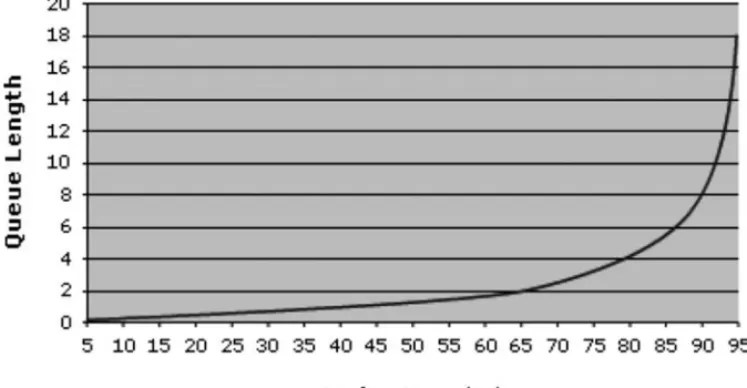
Queueing theory explains how overutilization of resources causes poor response times and erratic performance. Key Volume Indicators (KVIs) are a technique for relating computer metrics to units of forecastable work.
We discuss tools for evidence-based decision making, including mea-suring workloads, forecasting changes, modeling the expected workloads on different physical and virtual configurations to meet business needs at opti-mal cost, and validating the models for accuracy and robustness.
We discuss questions to ask cloud vendors about elasticity (scalability), and how to work through make versus buy decisions.
Demystifying the Cloud: A Case Study Using Amazon’s
Cloud Services (AWS)
Amazon began providing Amazon Web Services in 2005, and the early adopt-ers did their best to treat it as a black art, known only to the cognoscenti.
Amazon’s Web Services is the oldest and most mature of the public cloud service providers. An easy way to get started with AWS is to use Glad-inet to create a Z disk that appears local but connects to the cloud. S3Fox Organizer is a free tool for moving static content from our own computers to the cloud. A custom instance of a virtual server on EC2 can be easily cre-ated and configured just the way we want it. Amazon’s CloudWatch is use-ful for monitoring EC2 instances and Elastic Load Balancers in real time or by using Auto Scaling to dynamically add or remove Amazon EC2instances based on Amazon CloudWatch metrics. Nimsoft’s Nimsoft Monitoring Solution (NMS) for AWS is one tool for monitoring and controlling Ama-zon-hosted cloud solutions.
Virtualization: Open Source and VMware
xxviii Implementing and Developing Cloud Computing Applications
is based on open source. Citrix is a form of virtual desktop, but today it often rides on VMware. Amazon uses a modified version of Xen. Monitor-ing is essential to managMonitor-ing the performance of virtual systems. Microsoft has its own patented approach in Microsoft Azure. EMC’s VPLEX is an important new technology for moving blocks of storage across the cloud. Interesting partnerships have been announced among VMware, Google, Salesforce.com, Eucalyptus, and Amazon that will help grow the entire industry and prevent lock-in to a single vendor.
Securing the Cloud: Reliability, Availability, and
Security
Reliability, Availability, and Security (RAS) are the three greatest concerns about migrating to the cloud. Reliability is often covered by a service level agreement (SLA). Availability addresses not only whether sufficient resources are available but also how long provisioning of new resources can take and how quickly they can be deprovisioned as needs scale back down. The main goal of Security is to limit access only to those approved, to let those with approved see and/or modify only the data they are entitled to see and no other data, and to ensure that no one can requisition resources beyond their budget.
However, many commercial service providers have better tools and facilities for ensuring RAS than do their clients. ISO 27001 and SAS 70 are two recognized standards designed for independently ensuring that third parties handling data have sufficient controls in place. These standards have been adapted for cloud security. The Cloud Security Alliance has been developing cloud-specific standards that will further improve on such stan-dards. CloudAudit is developing an open, extensible, and secure interface that allows cloud computing providers to expose Audit, Assertion, Assess-ment, and Assurance (A6) information for cloud infrastructure (IaaS), plat-form (PaaS), and application (SaaS) services to authorized clients.
Scale and Reuse: Standing on the Shoulders of Giants
Executive Summary xxix
order to allow users to combine and reuse them in the production of appli-cations. SOA, Web 2.0, and SOA 2.0 promote code reuse in a cloud envi-ronment. Calls to cloud-provided services, such as Google’s AJAX APIs, also let you implement rich, dynamic Web sites entirely in JavaScript and HTML.
Windows Azure
Microsoft Azure represents a major evolution both of operating systems and of Microsoft’s overall strategy. While written entirely from the ground up, it benefits from a long, mostly distinguished, and expensive pedigree. It seems to be the first-to-market component of Midori, the descendant of Cairo, Microsoft’s two-decades-ago planned, never released object-oriented distrib-uted operating system. Midori’s strong emphasis on concurrency issues, a willingness to break compatibility, and the idea of using a hypervisor “as a kind of Meta-OS” fits Microsoft’s long-term strategy.
Azure is a great place to develop and host .Net applications, an ade-quate place to build and host LAMP applications, and a very good place for hosting applications developed in a mixed environment.
Google in the Cloud
Google is believed to manage one of the two or three largest server farms in the world. Recently, it has begun making its infrastructure available to oth-ers for a fee. Its widely used offerings, in addition to search, include Google Apps for Business, Google Maps, Google Finance, and Google Voice. More recently, it has introduced Google App Engine, and in its own unique way, it is now a general cloud services provider.
Google is aiming to be an enterprise cloud vendor. Its approach to development in the cloud may be summarized as:
Stand on our tall shoulders (Use Google’s extensive code base) Develop your applications in Java, PHP, or Python
Use the GQL datastore as an alternative to SQL
Let Google worry about resource allocation, load balancing, and scalability
xxx Implementing and Developing Cloud Computing Applications
App Engine should prove to be a worthy competitor to Amazon Web Ser-vices, one of App Engine’s major competitors for hosting environments.
Enterprise Cloud Vendors
Traditional enterprise vendors all have cloud strategies.
IBM was a very early proponent of both virtualization and cloud com-puting. IBM Smart Business cloud solutions support clouds built behind the enterprise firewall, or the IBM cloud. IBM’s public cloud offering is still new, while its private cloud offerings are, for the cloud, very mature.
IBM has partnered with Red Hat, SOASTA, RightScale, and others. HP has partnered with Microsoft; Oracle bought Sun outright and partners with Amazon AWS.
Hewlett Packard is primarily selling cloud solutions to the enterprise, and the enterprise is typically hosting the solutions in private clouds. Its SaaS offerings are still specialized and limited. HP’s BSM 9.0. addresses hybrid delivery models and management of the “consumerization of IT,” i.e., people who use non-company-owned devices on a company network. HP, Intel, and cloud software maker Enomaly have partnered to offer a full end-to-end IaaS platform for cloud service providers. HP and Microsoft are investing $250 million to significantly simplify cloud technology environ-ments for businesses of all sizes.
Oracle has reclassified its clusters as private clouds while slowly moving into the “enterprise private cloud.” Oracle customers can now use their existing Oracle licenses or acquire new licenses to deploy Oracle software on Amazon’s EC2. Oracle has also announced its intention to license others as well. The newly introduced Oracle Secure Backup Cloud module makes it possible to move database backups to the Amazon Simple Storage Service (S3) for offsite storage. Its VeriScale architecture (part of Oracle’s acquisition of Sun) optimizes load balancing by implementing the networking logic locally in the service instance’s containers and treating the networking logic as part of the application.
Executive Summary xxxi
Unisys places strong emphasis on security; this has carried over to its cloud offerings. Unisys Stealth security solution, an innovative, patent-pending data protection technology initially designed for government appli-cations, is now available to commercial clients. Unisys has also partnered with VMware on the software side and with its parent, EMC, on the hard-ware side, among others.
Cloud Service Providers
Large cloud service providers include Rackspace, GoGrid, and Joyent (a newer entry), as well as robust cloud offerings from AT&T. EngineYard is a specialized provider of cloud services for Ruby on Rails developers. Other interesting SaaS vendors include NetSuite, Intuit, and Intacct, as well as cross-platform vendors like 3Tera, Appistry, Elastra, RightScale, BMS, and Nasuni.
Practice Fusion Case Study
Practice Fusion has demonstrated that cloud computing enables it to offer sophisticated applications to a wide audience at extremely low cost, while respecting HIPAA privacy and security mandates. Physicians are armed with good and complete data at the point of care; this is a significant paradigm shift from traditional paper-centric processes. A cloud-based environment prepares providers by focusing on the condition rather than by asking repeated questions around past medical history of the patient because they couldn’t find it in a traditional paper chart or noninteroperable environment.
Support and Reference Materials
Charts and tables review the basic definitions of cloud computing, its char-acteristics, delivery models, and deployment models. Commonly cited ben-efits are listed, and the main concerns articulated. Pathways are identified for mitigating the risks. We also specifically articulate security concerns and pathways for mitigating security risks. Questionnaires are provided to ask internally and to vendors regarding:
When to migrate to the cloud How to avoid lock-in
What security is available
1
Chapter 1
Cloud Computing is a True Paradigm Shift
Chapter Overview
In this introductory chapter, we look at what cloud computing really is, why it’s generating such excitement, and who are the major players. We make the point that most of us are already using cloud computing in our daily lives for personal use and show how enterprises are moving key applications to the clouds for improved customer experience, scalability, and cost control.
1.1 Introduction
A cloud, of course, is a visible mass of droplets or frozen crystals floating in the atmosphere above the surface of the Earth or another planetary body. A cloud is also a visible mass attracted by gravity. Lately, cloud computing has been exerting a strong gravitational pull all of its own—one that has been attracting a mass of money.
The big players in cloud computing are Google, Amazon, and, of late, Microsoft and IBM. Maybe Oracle/Sun, maybe HP will join them. Rack-space, GoGrid, and AT&T want in too.
2 Implementing and Developing Cloud Computing Applications
Google has built the world’s largest cloud computing infrastructure. Amazon has not only built the world’s largest marketplace, but also is a prime mover in the cloud computing revolution, hosting a myriad of other businesses on its Cloud Services infrastructure. With the recently gone-live Microsoft Azure, Microsoft has entered the cloud-computing business as well, simplifying migration for all Windows applications. Salesforce, VMware, Oracle (Sun), IBM, Adobe, and RackSpace among others, have all tied their futures to cloud computing. (Rackspace and Oracle are mostly into “private clouds”).
Specialized vendors such as Intuit (maker of Quickbooks) and “com-mand and control” vendors such as CA Technologies (formerly Computer Associates) also have cloud-based offerings.
As cloud computing matures, it is being embraced not only by small start-ups, but also by major enterprises (albeit more slowly); they appreciate the scalability and reliability that cloud computing can provide.
1.2 What is Cloud Computing?
At its simplest, cloud computing is the dynamic delivery of information technology resources and capabilities as a service over the Internet. Cloud computing is a style of computing in which dynamically scalable and often virtualized resources are provided as a service over the Internet. It generally incorporates infrastructure as a service (IaaS), platform as a service (PaaS), and software as a service (SaaS).
According to Gartner Group1, the attributes of cloud computing are:
Service-based Scalable and elastic Shared
Metered by use
Use of Internet technologies
The most frequently cited benefits of cloud computing are:
It is agile, with ease and speed of deployment Its cost is use-based, and will likely be reduced In-house IT costs are reduced
Capital investment is reduced
Cloud Computing is a True Paradigm Shift 3
The latest technology is always delivered
The use of standard technology is encouraged and facilitated
As applications migrate to the Internet “cloud,” as Internet access becomes ubiquitous, and as low-cost, ultra-lightweight devices (such as the new Apple iPad tablet) and inexpensive, handheld devices built on Google’s Chrome Operating System or on Google’s Android all provide access to what is increasingly the ubiquitous Internet, the number and types of tasks taking advantage of the new technology will increase by several orders of magnitude, going far beyond the comparatively modest list of things that we use computers and the Internet for today.
While a plethora of introductory books related to cloud computing have been published describing how to use specific Google- or Amazon-pro-vided services (a search for “Cloud Computing” on Amazon.com lists more than 927 results), there are few implementation-centered books that focus on the enterprise, the major vendors, the services they provide, how to Figure 1.2 Kelpie in agility competition. (Photo by Amos T. Fairchild, licensed
4 Implementing and Developing Cloud Computing Applications
choose among them, and the supporting vendors, or on how to build real, working applications quickly and economically.
Having seen it all for more than 45 years, I retain a healthy skepticism of the supposedly new and unique. But I remain curious and excited about the truly innovative. Cloud computing is the real deal. It marks a true paradigm shift, whose effects will eventually dwarf those of the dot.com revolution.
1.3 We’re Using Cloud Computing Already
Like the fellow who wrote prose but didn’t know it, you and I are using cloud computing more than we realize. I use it and benefit from it every day, and probably you do too. Consider my little business. Like more than a million other businesses, I use the paid version of Google Apps (cloud-based, with an annual fee of $50 per user), so e-mail addressed to my hshco.com domain is hosted by Google, and spam filtering, archiving, and e-discovery are provided by Postini, owned by Google since 2007. Google Apps also maintains my contact list and calendar, which are all accessible from my desktop, synchronized over the cloud to my laptop and Black-Berry, and accessible from anyone else’s computer equipped with a Web browser an Internet connection, and the right credentials. I can access and allow others to collaborate on my documents anywhere through Google Docs, recently enlarged to accept files of up to 1 GB, and terabytes of stor-age can be rented for a modest annual cost.
1.3.1 Electronic Faxing
I use RingCentral’s cloud-based Rcfax.com (www.rcfax.com) to virtually (electronically) send and receive faxes. Incoming faxes are sent to a tele-phone number supplied by RingCentral and are routed to my e-mail address as PDF attachments; outgoing messages are sent via e-mail to their service and delivered to fax machines around the world. Google Apps and RCFax, SaaS providers both, interact flawlessly without either one having to do anything special—or even know about each other.
1.3.2 Voice in the Cloud
Cloud Computing is a True Paradigm Shift 5
access through my e-mail, as an SMS message on my BlackBerry, or from any Internet browser. I can also get a (still imperfect, but usually under-standable) transcript of the message delivered in the same ways.
1.3.3 Commerce in the Cloud
Some of my books are available for sale as downloadable e-books through my Web site (hosted under the covers by Google). It is interfaced with the cloud-based PayLoadz.com (www.payloadz.com) to receive and fulfill orders, which are paid for either using Google Checkout ( http://check-out.google.com/sell/), E-bay’s PayPal.com (www.paypal.com), or Amazon Payments (https://payments.amazon.com/sdui/sdui/index.htm), cloud-based services all.
The several sites interact seamlessly. For example, you can choose to pay via Google Checkout, via PayPal, or via Amazon’s checkout system. My Web site will hand off seamlessly to Payloadz, which calls the payment ser-vice that you selected. After you’ve paid, you will again be handed off seam-lessly to the part of PayLoadz that fulfills the order. You never left my site, and I didn’t have to code all that functionality myself—a key characteristic we’ll return to again and again.
1.3.4 Distributed Hosting in the Cloud
A portion of my Web site requires FTP (file transfer) and database services that Google’s hosting doesn’t offer (at least as of this writing). That develop-ment subdomain is seamlessly hosted by Godaddy.com. I could just as easily have used Amazon, Rackspace, or any one of hundreds of alternatives.
1.3.5 Accounting and Online Banking in the Cloud
6 Implementing and Developing Cloud Computing Applications
online statements, check imaging, bill payment and similar services for numerous banks (http://ifs.intuit.com/), a full SaaS application.
Most of my income is also received electronically as direct deposit ACH payments (see http://en.wikipedia.org/wiki/Automated_Clearing_House).
When I need to ship an order, PayPal’s MultiOrder Shipping inter-faces with a Pitney Bowes application that prints a prepaid label, obtains a tracking number from USPS, and notifies PayPal so it can charge my account. (That’s three major vendors, all interoperating seamlessly with cloud applications).
If I complete an online purchase and go to the merchant’s site to track delivery, I’m usually handed off to UPS, Federal Express, or the USPS, each of which operates tracking systems in the cloud.
There are many other interesting cloud services that I use but don’t have space to mention, and even more that I don’t [yet] use.
The important message here is that cloud computing can be used not only for individual interaction, but also for enterprise-to-enterprise interaction.
1.4
New in the CloudCloud Computing is a True Paradigm Shift 7
do the year before. Not surprisingly, he mostly talked about Google-related things, so his list is not complete. Still, Matthew’s list is a reminder of how far we’ve come in a short space of time.
1. Having access to everything on the go—through an iPhone an Android-based phone like Google’s Nexus One, a BlackBerry, or Apple’s new iPad.
2. Being able to search through all my e-mail quickly from any device using Gmail or Google Apps (see http://mail.google.com/ support/bin/answer.py?hl=en&answer=7190).
3. Chatting with customers and partners—in any language. Mat-thew gave a very cool live demo of inline translation of chat; my Web site, eyeonthecloud.com, implements a translate button provided by Google. Last I looked, it translates the site into 52 languages on request. You can do use it too; just copy this code snippet into your Web page:
<div id=“google_translate_element”></div><script> function googleTranslateElementInit() {
new google.translate.TranslateElement({ pageLanguage: ‘en’
}, ‘google_translate_element’); }
</script><script src=“http://translate.google.com/ translate_a/
element.js?cb=googleTranslateElementInit”></script>
4. Easy collaboration with Google products Sites and Docs. (Lee Lefavre provides a great explanation of document sharing at
http://www.masternewmedia.org/online_collaboration/docu- ment-collaboration/Google-Docs-explained-in-simple-words-by-Lee-Lefever-20070919.htm). Online collaboration has been a goal for years; it’s now coming of age.
5. Organizing travel using TripIt, a personal travel assistant (www.tripit.com/).
8 Implementing and Developing Cloud Computing Applications
7. Building a scalable business application on the cloud platform with Force.com (see www.salesforce.com/platform or http://devel-oper.force.com/appengine) to create Web and business applica-tions that span both salesforce.com and Google’s cloud computing platforms and take advantage of the key features of both.
8. Using online-templates for documents, spreadsheets, and presen-tations.
9. Running fast, secure, and stable Web apps (Chrome; see http:// googleblog.blogspot.com/2008/09/fresh-take-on-browser.html). 10. Securely sharing video in apps with Youtube for Google apps (see
www.google.com/intl/en/press/pressrel/ 20080902_video_in_apps.html).
1.5 Other Cloud Applications
Walt Mossberg, author of the Personal Technology column of the Wall Street Journal (and a fellow Brandeis Alum), turned me on to Evernote, a clever, cloud-based tool for capturing all your thoughts, ideas, and inspira-tions in a single place (www.evernote.com/) and accessing your notes, clipped Internet pages, images, music or whatever over the Web, from a BlackBerry, and so on. I used it extensively in writing this book.
1.6 What about the Enterprise?
The discussion up to now has focused on the individual user (even if that user is getting services from the enterprise). But what about the enterprise?
Quest Diagnostics (www.questdiagnostics.com), a leading testing labo-ratory, wanted to facilitate interaction with its customers. It has a cloud-based system where you can schedule appointments. You can also receive your test results online if the following are all true:
Your physician is using a Quest Diagnostics computer system. Your physician agrees to release your results.
You have a linked account with a health management service such
as Google Health™, Keas™, Microsoft®, HealthVault™, or MyCare360™(all cloud-based).
Cloud Computing is a True Paradigm Shift 9
(HIPAA privacy rules2 are very strict), the service itself works very well and actually interfaces with multiple other cloud applications (as noted); this begins to demonstrate the power of cloud computing.
Providing a comprehensive cloud-based electronic health record appli-cation serving medical practitioners as well as their patients is what Practice-Fusion does. It’s so interesting that we devote a chapter to a case study of this application (Chapter 12).
1.7 More to Come
We’ve only begun to scratch the surface of what can be done with cloud-based computing today; the most important and paradigm-changing solu-tions are still either a gleam in someone’s eye or a sketch on his or her draw-ing board.
The best is yet to come, and hopefully, you will be the one to build the killer applications. The focus of this book is to guide you towards develop-ing robust, scalable, cloud-based applications quickly and economically.
Summary
Cloud computing is here and now. Most of us use it daily in our private lives, often without our being aware of it. However, major enterprises are also moving applications to the cloud for scalability, cost savings, and speed of development and deployment.
2. Health Insurance Portability and Accountability Act (HIPAA) of 1996 (P.L.104-191). See
11
Chapter 2
From Do It Yourself to Public Cloud—
A Continuum
Chapter Objectives
Place cloud computing in its historical perspective Define cloud computing
Introduce virtualization, which is the key enabling technology for
cloud computing
Discuss various levels of remote hosting
Review the advantages of cloud computing in general
Compare private and public clouds, as well as newer hybrid solu-tions
Introduce Eucalyptus and Windows AppFabric for a consistent
development experience, for easy migration, and to improve portability
2.1 A Brief History
To appreciate what are perhaps the key issues in cloud computing, we need to have a little sense of history and evolution of computers and operating systems. While you may not initially see why this history lesson is relevant or important, please bear with me for a few paragraphs while we run through a highly compressed history of those aspects computing most rele-vant to cloud computing.
2.2
Virtualization
12 Implementing and Developing Cloud Computing Applications
called TSS to support time sharing (slowly and expensively), the real break-through occurred in IBM’s Cambridge Scientific Center, closely aligned with nearby Massachusetts Institute of Technology, where CP (control pro-gram) was developed to support virtualization.
Figure 2.1 Growth of Internet hosts, 1981–2009.
From Do It Yourself to Public Cloud—A Continuum 13
CP provided each user with a simulated (virtual) standalone System/ 360 computer, able to run any S/360 software that ran on the bare machine. This gave each user what was, in effect, a private computer system. Its latest grandson, z/VM, now called a hypervisor in common with standard industry usage, is still in active use on zSeries, System z9, and System z10 computers. z/VM can be used to support thousands of Linux virtual machines using a process known as virtualization. Its most recent release, V6.1 (at this writ-ing), debuted in October 2009. According to IDC1, Linux on Power and Linux on System z customers achieved on average a 6.3 month payback on their initial investment, including the initial system purchase.
Virtualization is a key technology in cloud computing, and we discuss it in detail in Chapter 7.
2.3 Remote Hosting
“Farms” of racked individual personal computers and, later on, blade servers (where up to 128 computers can be crammed into a single 42U rack) became a commonplace sight in larger- and medium-sized organizations,
1. Adding Business Value with Cross-Platform Solutions: Linux Running on IBM Servers ftp://ftp.soft-
ware.ibm.com/linux/pdfs/IDC-adding_business-value_with_cross-platform_solutions-Linux_on_IBM_Systems.pdf.
14 Implementing and Developing Cloud Computing Applications
and even in smaller enterprises. Smaller organizations immediately saw the value in outsourcing the care and feeding of these servers to experts, and the rack-hosting industry was born, a further development of the co-location industry that had been primarily developed for the telecommunication and ISP industries and essentially rented space with power, cooling, and connec-tivity. More recently, medium- and larger-sized organizations have seen the merit of outsourced hosting.
2.4 Hosting Services
Hosting services provide, in order of ascending cost:
Co-location services, which only provide physical facilities, Internet connection, uninterruptible power, and climate control; the client provides and owns the equipment and is responsible for system administration.
Virtual private servers, in which virtualization technology is
employed to allow multiple logical servers to share a single physical server owned, supplied, and maintained by the hosting service. Virtual firewalls ensure security.
From Do It Yourself to Public Cloud—A Continuum 15
Dedicated hosting services, also called managed hosting services, in which the service provider owns and manages the machine, leasing full control to the client. Management of the server typically includes monitoring (to ensure the server continues to work effec-tively), backup services, installation of security patches, and vari-ous levels of technical support, and may include a physical firewall.
Traditional hosting does not provide software beyond systems software.
2.5 Cloud Computing Defined
The National Institute for Standards and Technology (NIST), Information Technology Laboratory offers this definition2 of Cloud Computing. It’s as good as any.
Cloud computing is a model for enabling convenient, on-demand network access to a shared pool of configurable computing resources (e.g., networks, servers, storage, applications, and services) that can be rapidly provisioned and released with minimal management effort or service provider interaction. The cloud model of computing promotes availability.
2.5.1 Essential Characteristics
On-demand self-service. A consumer armed with an appropriate delegation of rights (permission) can unilaterally provision computing capabilities, such as server time and network storage, as needed and automatically, with-out requiring human interaction with each service’s provider.
Broad network access. Capabilities are available over the network and accessed through standard mechanisms that promote use by heterogeneous thin or thick client platforms (e.g., mobile phones, laptops, and PDAs).
Resource pooling. The provider’s computing resources are pooled to serve multiple consumers using a multi-tenant model, with different phys-ical and virtual resources dynamphys-ically assigned and reassigned according to consumer demand. There is a sense of location independence in that the customer generally has no control or knowledge over the exact location of the provided resources but may be able to specify location at a higher level of abstraction (e.g., country, state, or datacenter). Examples of separately
16 Implementing and Developing Cloud Computing Applications
allocable resources include storage, processing, memory, network band-width, and virtual machines.
Rapid elasticity. Capabilities can be rapidly and elastically provisioned, in some cases automatically, to scale out quickly and then rapidly released to scale in quickly. To the consumer, the capabilities available for provi-sioning often appear to be unlimited and can be purchased in any quan-tity at any time.
Measured service. Cloud systems automatically control and optimize resource use by leveraging a metering capability at some level of abstraction appropriate to the type of service (e.g., storage, processing, bandwidth, and active user accounts). Resource usage can be monitored, controlled, and reported, providing transparency for both the provider and consumer of the utilized service.
2.5.2 Cloud Service Models
The three service models defined by NIST are essentially a hierarchy:
Cloud Software as a Service (SaaS). The capability provided to the consumer in this highest level is to use the provider’s applications
running on a cloud infrastructure. The applications are accessible from various client devices through a thin client interface such as a Web browser (e.g., Web-based e-mail). The consumer does not manage or control the underlying cloud infrastructure, including network, servers, operating systems, storage, or even individual application capabilities, with the possible exception of limited user-specific application configuration settings.
Cloud Platform as a Service (PaaS). The capability provided to the consumer in this intermediate level is to deploy onto the cloud infrastructure consumer-created or acquired applications developed using programming languages and tools supported by the provider. The consumer does not manage or control the underlying cloud infrastructure, including network, servers, operating systems, or storage, but has control over the deployed applications and possi-bly application hosting environment configurations.
From Do It Yourself to Public Cloud—A Continuum 17
control the underlying cloud infrastructure but has control over operating systems, storage, deployed applications, and possibly lim-ited control of select networking components (e.g., host firewalls).
2.5.3 Deployment Models
Four models of cloud deployment are recognized by NIST.
Private cloud. The cloud infrastructure is operated solely for an organization. It may be managed by the organization or a third party and may exist on premise or off premise.
Community cloud. The cloud infrastructure is shared by several organizations and supports a specific community that has shared concerns (e.g., mission, security requirements, policy, and compli-ance considerations). It may be managed by the organizations or a third party and may exist on premise or off premise.
Public cloud. The cloud infrastructure is made available to the gen-eral public or a large industry group and is owned by an organiza-tion selling cloud services.
Hybrid cloud. The cloud infrastructure is a composition of two or more clouds (private, community, or public) that remain unique entities but are bound together by standardized or proprietary technology that enables data and application portability (e.g., cloud bursting for load-balancing between clouds).
2.5.4 Cloud Software
Cloud software takes full advantage of the cloud paradigm by being service oriented with a focus on statelessness, low coupling, modularity, and seman-tic interoperability.
2.5.5 Advantages of Cloud Computing
Cloud computing offers a number of advantages when compared with remote- or self-hosting:
Agility—A customer can rapidly and inexpensively reprovision
technological infrastructure resources.
18 Implementing and Developing Cloud Computing Applications
Reduced level of IT skills—Fewer and less sophisticated IT skills are
required for implementation.
2.6 The Divisive Issue of Multitenancy
Multitenancy is a characteristic of SaaS, and sometimes PaaS, where numer-ous customers run the same application, sharing the same equipment and software, but each accesses only his or her data. Perhaps the best known example is the Google Apps Premier Edition, a SaaS service ( www.goo-gle.com/apps/intl/en/business/index.html). More than two million unique enterprises, each operating under its own domain name, share the same Google infrastructure and cloud, which altogether supports tens of millions of individual users.
From Do It Yourself to Public Cloud—A Continuum 19
somewhat more complex, and the testing necessary for security needs to be more stringent.
On the other hand, multitenancy simplifies the release management process. In a traditional release management process, packages containing code and database changes have to be distributed to individual client desk-top and/or server machines and individually installed. With browser-accessed applications using the multitenant model, the package typically only needs to be installed on a single server and is automatically propagated to other server instances. This greatly simplifies the release management process. (In essence, this is the great-grandchild of service bureaus that han-dle applications such as payroll on behalf of many different customers).
2.7 Advantages of Cloud Hosting Over Remote Hosting
Cloud service providers offer a number of advantages over and above those provided by remote hosting Some vendors, such as Rackspace, offer both, so a look at their offerings makes clear the incremental benefits of cloud hosting:
Scalability (also called elasticity), the ability to provision one or
more servers quickly and to scale up or down quickly
Pre-configured operating system images, such as a variety of popular Linux distributions: Ubuntu, Debian, Novell (SUSE), Gentoo, Centos, Fedora, Arch, and Red Hat Enterprise Linux and various version of Windows-based servers.
Virtual servers or physical servers that can be sized to different plans
through a control panel, all the way up to 15.5 GB of RAM; serv-ers can be configured with one to four processors and with one to four cores per processor, and disk drives are usually arranged in a fault-tolerant RAID configuration
Dedicated IP addresses for cloud servers
Communication among servers in the same cloud (co-located), effectuated at high-speed and free of communications charges
Replication and/or distribution over various geographical areas Persistence provided by a separate cloud storage facility, as storage
2.8 The Battle Over Public and Private Clouds
“Ever since offshoring got hot in the 90s, large companies have been mov-ing toward a model of IT in which the IT services appear to come from a single IT department but are actually an integrated mix of cloud, virtualiza-tion and networking services, often provided by external companies,” says Chris Wolf, analyst at The Burton Group.3
Supposedly, the big battle today is the conflict between public and pri-vate clouds. The issue has produced more heat than light. Consider these well-known facts:
In olden times (and in some places, even today) , if you wanted water, you dug a well and then drew water. Tap water and indoor plumbing only became available in the late 19th century, and became common only in the mid-20th.
Before the 20th century, if you wanted clothes, you needed to have
them made to measure (“bespoke tailoring” in the British argot). Figure 2.6 Boy drawing water from a well.
Ready-to-wear clothing, prior to the Civil War, was mostly for out-erwear and undergarments. It took the Civil War to give the impe-tus to building factories that could quickly and efficiently meet the growing clothing demands of the military.
Electricity use began with on-site generators. In 1895 at Niagara
Falls, George Westinghouse opened the first major power plant using alternating current, making it possible to serve many cus-tomers and to transport electricity over considerable distances.
In each case, what was once local, time-consuming, and expensive became available to all, in quantity, and inexpensively, perhaps with some sacrifice in customizability.
So it has been with data centers.
Until the microcomputer revolution, all data centers were “bespoke”— that is, made to measure and custom designed. The concept of centrally managed data centers (empires) was justified by the need for control, stan-dardization, and security.
There has always been tension between users, who craved freedom and competitive advantage through agility, innovation, and their own data silos, and the command and control mentality of centralized administration.
2.9 Then Came the Internet
Lots of data became available from outside the enterprise, and it needed to be integrated with enterprise data for best effect. Conflict mounted, as the concept that “information wants to be free” (a mantra attributed to Peter Samson, a legendary member of the Tech Model Railroad Club at MIT,4 conflicted with information’s value and the competitive advantages that could be conveyed to its owner.
As Stewart Brand, (founder of the Whole Earth Catalog) wrote:5
In fall 1984, at the first Hackers’ Conference, I said in one discussion session: “On the one hand, information wants to be expensive, because it’s so valuable. The right information in the right place just changes
4. http://tmrc.mit.edu.
Figure 2.8 The Whole Earth Catalog, 1968 edition.
your life. On the other hand, information wants to be free, because the cost of getting it out is getting lower and lower all the time. So you have these two fighting against each other.”
If you’re still with me, you’re probably asking yourself, “What in heaven’s name have plumbing, bespoke tailoring, and data silos got to do with cloud computing?”
The answer is that the debate within cloud computing over public ver-sus private clouds is but a manifestation of the same old conflict between freedom and control. On the Internet, the debaters are sharpening their knives. Phil Wainewright has suggested that “Private clouds will be discred-ited by year end [2010],” a statement he later amended: “Year-end 2011 or mid-2012 would have been a lot safer but hey, I wanted to be provocative.” (http://blogs.zdnet.com/SAAS/?p=973).
Randy L. Blas, CEO of private-cloud strategic consulting firm Cloud-scaling6 (http://cloudscaling.com) has a lot of hands-on experience, and he disagrees. He defines a private clouds as an “unshared, single tenant, self-ser-vice compute, storage, and network infrastructure.“ He says that private clouds come in three flavors, “virtual, external, or internal.”
6. Their Infrastructure-as-a-Service Builder’s Guide can be downloaded at http://cloudscaling.com/ wp-content/uploads/2009/12/iaas-building-guide-v1.pdf.
A virtual cloud is a logical slice of a cloud infrastructure (see Chapter 7 for further discussion of virtualization). Blas posits that a [real] private cloud operates within a public cloud but uses virtual private networking to give individual enterprises the ability to cordon off a portion of the public cloud under their own delegated control and management. He says has no prob-lem with them.
“On the other hand,” he says, “you can make your [own] infrastructure as multitenant as you like; it’s not cloud if it’s confined within a closed, sin-gle-enterprise environment.”
Many disagree with this view and see private clouds operating behind an enterprise’s firewall as not only completely legitimate, but as the only “safe” alternative in today’s environment.
An external private cloud, in Blas’ view, refers to cloud infrastructure hosted by third-party providers. “But a lot of it is going to be as alluring as lipstick daubed on a pig, because behind the scenes the hosting providers will be doing a lot of covert physical partitioning to cut corners (actually, some of them will openly tout that partitioning as a selling point).”
For Blas, “A public cloud is one that’s concurrently shared by thousands of discrete customers, all of whom access precisely the same (though contin-uously enhanced) baseline functionality and have complete freedom of action (and control) over how they use that functionality within the con-straints of the platform.”
He predicts that the strength of the cloud model (and why public cloud will leave any variety of physically partitioned private cloud trailing in the dust) is the collective scrutiny, feedback, and innovation that becomes possi-ble when thousands of customers are using the same, constantly evolving, shared platform. These advantages are real. They are similar to the advan-tages conveyed by open source software—that is, they are readily and freely available, and many developers have a hand in maintaining them. Equally important is the scalability that comes from working with large numbers, a topic we cover in Chapter 9.
Sam Johnston, the founder and CTO of Australian Online Solutions, has been working in cloud computing since 2007. He wrote in his blog:7
It’s no secret that I don’t very much like this whole private cloud or internal cloud concept8 on the basis that while advanced virtualization
7. http://samj.net/2009/03/cloud-computing-types-public-cloud.html.