RIT Scholar Works
Theses
Thesis/Dissertation Collections
8-9-1990
Exploring the future of compact disc-interactive
Patrick J. Haggerty
Follow this and additional works at:
http://scholarworks.rit.edu/theses
This Thesis is brought to you for free and open access by the Thesis/Dissertation Collections at RIT Scholar Works. It has been accepted for inclusion
in Theses by an authorized administrator of RIT Scholar Works. For more information, please contact
.
Recommended Citation
Rochester Institute
of
Technology
A Thesis
Submitted
to the
Faculty
ofThe
College
ofFine
andApplied Arts
in
Candidacy
for
the
Degree
ofMASTER OF FINE ARTS
Exploring
the
Future
of
Compact
Disc
-Interactive
By:
Patrick
J.
Haggerty
Advisor: Craig McArt
Date:
Associate Advisor:
Doug Cleminshaw
Date:
\ "'>
~c.,.S{::f' \
<;)Associate Advisor: James Sias
Date:
1-
b~
70
.,!3!1<J
Acting Ueary,
C~,ge
of Fine atld APPlrd trts:
Dr. Peter Giopulos
Date:
111
t;!
4
u
I, Patrick J.
Haggerly,h~reby
grant permission to the Wallace Memorial Library
Special Assistant to the Dean for Gra_duate Affaim:
Philip Bonarth
Date:
of RIT, to reproduce my thesis in whole or in part. Any reproduction will not be
for commercial use or profit.
Table
of
Contents
I
Introduction
II
Information Age
-Information
Media
Optical Disc
Technology
andCD-I
3
Marketing
7
III
IV
Possible
Applications
17
23
VI
Product
Developement
25
Technical
Explanation
ofCD-I
Optical Discs
7
CD-I Audio
9CD-I Video
9
Video Images 11
Visual Effects
13
Text
15Processing
Power
15Possible
Applications
Education
18Resource Tool
21Entertainment
22The
Portable
CD-I
Unit
Goals
24Product
Developement
Components
25Display
Screens
25Cursor Control Device
27CD Drives
31Circuit Boards
31Power
Supply
32
Compatibility
32Sound
33
Controls
33
Molded Shell
35Form
Exploration
Analogy,
Metaphor
andAllusion36
Disc Shapes
36
Functional
Benefits
ofForm
39
Color
39
Softcase
40
Logo
41Conclusion
Appendix
A
45
Appendix
B
60
Bibliography
62
iii
VII
Form
Exploration
36
Figure
page1
Deep
and
Wide Structure
7
2
Resolution Proportions
11
3
Image Planes
12
4
CLUT Animation Technique
13
5
Scrolling
aLarge
Image
15
6
Resolution Control
On
anLCD
Screen
26
7
Comparison
ofControl
Response Ratios
29
8
Menu
Driven
Controls
33
Charts
page1
Growth
oflnformation3
2
Audio Levels
17
3
Comparison
ofVarious Devices
onSpeed
I
28
andAccuracy
ofCursor
Positioning
I.
Introduction
The flood
of moderntechnology
has done
a greatdeal
tofill
needsin
ourchanging
society.Technological
advancesnotonly improve
upon thepastbut
also createtotally
newmethodsof
doing
thingswhich,
in turn,
revolutionize ourway
oflife.
From
adesigner's
standpoint,
theprospectofincorporating
newtechnology
tocreate an
entirely
new productis
overwhelmingly
exciting.The designer
is
placedin
thepositionof
shaping
thefuture. This
situation shouldbe
approachedwithboth
enthusiasmand seriousness.
Enthusiasm
willspawninnovative
conceptswhileseriousnesswillbring
refined solutions.Some
ofthehigh-tech
productstoday
lack
refinementand,
as aresult,
areunfriendly
anddifficult
tounderstand.These
unrefinedproductsmay be very
creative,
but
have
somehowfailed
tomeettheneedsoftheuser.They
arelacking
theuser-friendlinessand
familiarity
that sucessfulproducts possess.By
creating
productsthatrelate to users, confusioncanbe
avoided.Each
new productthatis designed
shouldbe
astep
forward;
astep
thatcanboth
look
to thefuture
and relateto thepastA
productthatlooks
aheadhas
anexciting
appeal,
while
relating it
to thepast givesit
afamiliarity
thatusersare comfortable with.For my
thesisI have designed
aPortable
Compact
Disc
-Interactive Unit.
During
the
design
processI
have
experiencedtheenthusiasmofdesigning
anewandexciting
product.
At
thesametime, I have
realizedtheneedtoexcercisetheseriousnessthatbrings
refinement.
I
attemptedtoderive
aform
thatis exciting
andnew,
but
onethatalso reflectsthecontext
in
whichit
was created.Compact Disc-Interactive
(CD-I)
is
anewopticaldisc
technology
thathas
thecapability
ofrevolutionizing
theway
we useinformation. CD-I
willfill
needsin
homes,
businesses,
andinstitutions. It
is
capable ofreplacing
traditionalforms
ofinformation
traditionalmedia
into something entirely
new.Considerable
timeand effort was spentinvestigating
Compact Disc
-Interactive
because
ofits
new andimperceptible
quality.By
gaining
a clearunderstanding
ofCD-I's
technical
aspects,
I
could arrive at aphysicalsolutionthatwouldbe
arich
expression ofCD-I's
character.The first
sections ofthispaperwillexplainthemore general technical aspects ofCD-I
sothat thereader might also gain anunderstanding
ofits
possibilitiesandits
character.
The
sectionsthatfollow
willexplainthedesign
processI
experiencedin my
creation ofthe
Portable CD-I Unit. It
willcovertheanalytical selectionand placement ofII. Information Age
-Information Media
Optical Disc
Technology
and CD-I
"
Efforts
todescribe
CD-I
are abit like
the taleaboutthesevenblind
menand the elephant.Each
man wasaskedtodescribe
theelephantbased
on whathe
couldfeel. Each
cameup
witha
different
description,
but
nonedeveloped
atrueunderstanding
of
thebeast. Since
noprevious single systemhas
approachedthelevel
of
functional integration
of
CD-I,
weare
all,
in
asense,blind
men."^In
thepast20
yearstherehas been
tremendousgrowthin
theareaofinformation, (see
chart1
percent of
labor force
5 0__ stage I
^Industry
nformation
Service
Agriculture
i i i i i
1880 1900 1920 1940 1960 1980
Source: Stewart
Brand,
The Media Lab:Inventing
theFuture AtMIT,
(NewYork: The PenguinGroup,
1988),
p.6.Growth in
Information
chart
1
flood
ofactivity has
notonly
createdtheneedfor
new andbetter
ways ofusing
andsharing
information,
but
it
alsohas
spawnedmany
new andinnovative
product solutions.These
new andinnovative
solutionshave greatly
reducedtasks,
aswellasthecosttocompletethese tasks.
Just
thinkofthelist
ofeveryday
products and servicesthathave
changed our ways of
handling
information:
personalcomputers,
cabletelevision,
cellulartelephones, fax
machines,
conferencecalls,
automatic-tellermachines, photocopiers,
calculators,
pockettelevisions,
...andthelist
goes on.The storing
andprocessing
ofinformation is
anareathatis
underconstantrethinking.
Our society is
drowning
in
a seaofpaper.In
small scaleoperations,
paperis
avery flexible
and efficientway
ofdealing
withinformation. When
theoperationbecomes
large
scale,
however,
paperbecomes very inefficient
.It becomes inefficient
to storeby
filling
roomswithfiling
cabinetsfull
of paper.It
becomes inefficient
toprocessbecause
every document
mustbe found
individually,
by
hand.
Producing
paper alsodepletes
ourforests
oftreesandwildlifesothatmorepaper canbe
produced.Optical disc
technology
is
a
relatively
newtechnology
thatmay be
abletosolvemany
oftheproblemsofstoring
andprocessing information.
Although
opticaldiscs have
been
around sincethemid-1970's,
they
did
notbecome
commonplaceto thepublic until
1982
whenCompact Disc
-Digital Audio
(CD-DA)
wasintroduced.
These
small12
centimeterdiscs
offered a soundquality
neverbefore
obtainable
in
musical publishing.The
discs
themselvesarevery
durable,
accurate,
andcanbe
produced atalow
cost(approximately
$14./
disc)
.The storing
of audiofiles
is
only
part of what opticaldiscs
are capable of.Compact Disc-Read
Only Memory
(CD-ROM)
is
usedin
libraries
tostorelarge
textualreferences,
indexes,
and abstracts.Interactive
Videodiscs
(IV)
storeboth
still andfull
Compact Disc-Interactive
(CD-I)
is
one ofthenewest opticaldisc
technologies.It
combines
audio, video,
andtextualinformation,
all onthesamedisc.
These
threemediaarethenunified
by
aprogram,
also stored on thedisc. All
togethera12cm
disc has
thetotal storage
capacity
of650 Megabytes
(Mb). In
simpleterms,
thatequatesto:over7800video still
frames
or,2
hours
oftop
qualitysoundor,17
hours
of simple narrationor,150,000pages oftext or,
moretypically,acombinationof allfourunder
theguidance ofacomputer programalso onthedisc2
Coupled
withCD-I's amazing
storagecapacity is its ability
toinstantly
accessany
bit
ofinformation
onthedisc. The information
on an opticaldisc is
storeddigitally,
meaning
eachbit
ofinformation is
storedin
numericalform,
has its
ownidentity,
andcanbe
accessed easily.This is contrary
to traditionalanalog
forms
of storage such asphonographicrecords and audiotapewhich store
information in linear form. In analog
recording,each
bit
is
dependant
upontheinformation
on either side ofit.
Digitally
storedinformation
has
a realtimeadvantageoveranalogically
storedinformation,
in
thatinformation
is randomly
accessible.Random
accessis defined
as,
"Any
form
of storagein
whichtheaccesstime for any item
ofdata
is
independent
ofthelocation
ofthedata
mostrecently
obtained."3This
meansthat
digitally
storedinformation
is
easily
accessed,and canbe
found
regardless ofany
otherinformation
onthedisc.
CD-I
is
alsoaReal Time
Operating
System
(RTOS)
whichmeans,
"The
flow
ofdata
takendirectly
from
thedisc
cannotbe interupted
withinthebounds
of a realtime
2Philips
International, Compact
Disc
- Interactive:A
Designers
Overview,
(New York:
McGraw-Hill,
1988),
p.15.responseto theuser
(Within
CD-I
, aninstant
canbe
anywherefrom
immediate,
if
thedata
is
close,
tono morethan2
seconds,
if
thelaser
usedtoreadthedisc has
totravelacross theentire
disc).
Random accessibility
andCD-I's ability
tooperatein
realtime
offer greatopportunities
for
interactivity.
Interactivity
is
being
realizedas apowerfullearning
tool.In
aninteractive
program,
asmuchas a40% increase in
retention canbe
gained overtraditionalpassivemethods.5
Interactivity
forces
theusertobecome
involved
andestablish a
dialogue between
one's self andtheprogram.Ideally,
you wantthedialogue
establishedto
be
meaningfulandrewarding
to the user, tokeep
theuseractively
engagedin
theprogram.
With
randomaccessibility
andrealtime,
theusercanchange subjectsinstantly
if
notinterested. This
allows theusertolearn
subjectsin
one'sownorder,regardless of oftheorder established
by
thewriter.CD-I
givestheusertheinteractive
advantagetocontrolthepace oftheprogram.You
can slowdown
by
stopping,
repeatanything
instantly
, orspeedup
by
changing
frames faster. This
can eliminatethepossibility
of someonebecoming
angry
orfrustrated
by
afast-paced
program,or,
thepossibility
ofboredom
anddistraction in
a slow-pacedprogram.
CD-I
also givestheusertheability
tointeractively
controlthelevel
oftheprogram.Most CD-I
programswillhave very
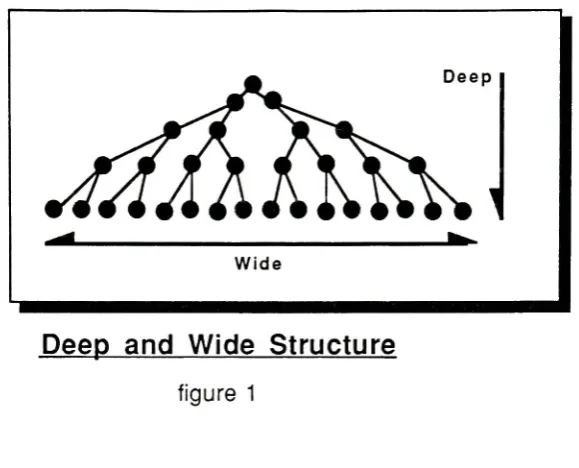
deep
and wide programs(
seefigure 1
)
.The
problem withthis
is
how
topresentadeep
andwideprogram.Usually
it is
approachedsystematically
by having
variouslevels
ofinformation.
The higher levels
contain generalinformation
whilethedeeper
ones aremorespecific.With
CD-I,
you canchoosetoremainon ageneral
level
ordive into
adeeper level instantly.
4Philips
International,
p.188.7
Deep
and
Wide Structure
figure
1
Marketing
One
ofthemarketing
advantagesofCD-I
thatgivesit
abetter likelihood
ofsuccessoverother optical
disc
mediumsis
thatit is
internationally
standardized.Standardization has
provento
be
alarge factor in
the success orfailure
of a newtechnology.For
example,
considerthe
fate
oflaser
videodiscsin
themid-70's.Originally
videodiscs weresupposedto
fill
themarket videotape nowoccupies,
but incompatible
standards causedtheirdownfall.
International
standardizationenlarges andsimplifiestheCD-I
market.It
enlargesmarkets
by
making
theworldits
consumer.It
simplifies marketsby
allowing for only
oneversionofplayerandsoftware to
be
made.One
aspectthatfurther
reinforcesthe success ofCD-I is
thatit's based
onCompact
Disc Digital Audio (CD-DA).
By
coupling
withCD-DA,
CD-I already has
the toolsofmanufacturing,
marketing
anddistribution
channelsin
place."Seldom has
a new consumertechnology
been
sospring-loaded for
success."6 [image:12.562.162.452.55.289.2]In
Explaining
thepotential ofCD-I,
Dr. Bernard
Luskin,
president ofAmerican
Interactive
Media
(
ATM
),
posesthatCD-I is
a"focal
technology ",
meaning
thatit
combines several
publishing industries
into
onepublishing
medium.This
is
unliketraditional
publishing
methodsthatdisperse
information.7III. Technical Explanation
of
CD-I
Optical Discs
Optical discs
storeinformation in
amanner similartoa conventional audioLP.
Coded
information
is
burnt into
a glassmasterdisc
by
apowerfullaser beam from
a magnetictapemaster recording.
The
positive glassmasterdisc is
thenusedtoproduce a negativemetalmold
for stamping
mass produceddiscs. The
information
onthedisc is actually
a series ofpits and grooves
along
aspiralpath,muchlike
anLP,
but
muchmoredense,
andspiraling
from
theinside
outward.The
massproduced plasticdiscs
are then coveredwithanultra-thinlayer
ofreflective
aluminum,
andovercoated withaprotective,
clear plastic coating.This
outerlayer
makesthedisc impervious
todirt,
wearand roughhandling.
To
readthedisc,
alow
poweredlaser
beam is
reflectedoffthedisc. The
reflectionis
passedthrougha series of prisms and mirrorstoa photodiode
whichdecodes
theinformation
for
processing.All
opticaldiscs
sharethiscommon storage method.However,
theway
theinformation
is
processedcan vary.CD-I
playersdecode information
by
a smallmicroprocessor within
it. A CD-I
playeris known
as anOptical Media System
because
it
reads and
decodes information
onthedisc.
Other formats
such asCD-ROM
players,
do
not
have
a microprocessor and requiretheaid of acomputertoprocessinformation. This
is known
as anOptical Media
Peripheral Device
because
it only has
theability
toreadinformation
and cannotdecode
it.8Information
on aCD-I disc
is
storedin
tracksand sectors.All
ofthematerialfrom
oneapplication
is
storedin
onetrack.Within
this track therearemany different
sectorscontaining
audio,
video andtextinformation. If
thesectorscontainonly
audioinformation,
therecan
be
novisualinformation displayed. If
thesectors containonly
videoinformation,
therecan
be
no sound.Certain
typesofinformation
consumemore sectors thanothertypes.
A disc designer
shouldbe
aware oftheseconsumption valuesso storage spacemay
be
conserved.The
rate atwhichthedisc
information is
processedis
themost criticalaspectofdisc design.
Audio,
videoandtextinformation
areallprocessedalong
one channel.This
channelcan
only
processinformation
at a certainrate.Consequently,
abottleneck
occursalong
thischannel wheninformation
flow is
greaterthan thechannel's capacity.Because
there
is
adanger
ofthebottleneck stopping information
flow,
CD-I
offers severalquality
levels
ofaudio,video andtext.A
higher quality level
consumes more spacein
thedata
channel,
while alower quality level
consumesless.
By
offering
variouslevels,
thedisc
designer
can avoidthedangers
ofabottleneck
in
thedata
channelby
choosing
variousquality levels
thatwillnotrestricttheflow
ofdata.
CD-I Audio
CD-I
offersthreedifferent quality
levels,
allof whichhave
a stereo or mono capability.A-level
(the
highest),
has
asoundquality
equivalentto thefirst play
of abrand
new,
high
quality
audioLP. B-level
is
equivalenttoanFM
broadcast,
transmittedand receivedunderoptimum conditions.
C-level is
equivalenttoanAM
broadcast,
transmittedandreceivedunder optimumconditions.
There
are16
channels of audio playback availableonadisc,
each withaduration
of72
minutes.Each higher level
usesa greater number of channelstoplayback.A-level
uses8
channelsfor
stereosound, so,
withA-level,
therecanbe just
over2 hours
ofhigh
quality
sound on onedisc
(
some space mustbe
allottedtocontroldata ). With C-level
monooccupying
only
onechannel,
therecanbe
over16
hours
ofsimple narration.Or,
eachtrackcould contain adifferent language
toproduceadisc
over anhour
long
containing
16
different
languages,
any
ofwhich theusercan select!CD-I
Video
As
withaudio,
CD-I
offersthreelevels
ofquality.Normal
resolutionis
thelowest level
andcan create an
image
equivalenttoanormaltelevisionbroadcast. Double
resolution canproduce an
image
equivalenttoa color computer monitor.High
resolutionis
equivalenttothe
highest quality
digital
picture.The
easiestway
todescribe
thedifference in
theseresolutionsis
by
proportionally
comparing
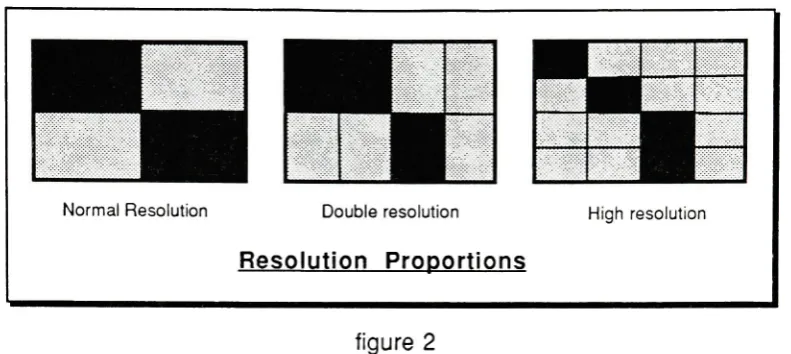
thenumberof pixelswhich appearin any
givenimage. Figure 2
showsthis1 1
Normal
Resolution
DoubleresolutionResolution
Proportions
High resolution
figure
2
Originally,
thebenefit
ofbeing internationally
standardized created someproblemswith
compatibility
.There
aretwomainstandardsfor
televisionbroadcasting
in
theworld.These
twostandardshave incompatible
screendisplay
sizes.The NTSC
(
National
Television System Committee
)
standard,
usedin North America
andJapan,
usesa525-line
screenthatis
updated at30 times
persecond.The PAL
(
Phase Alternation Line
)
system used
in
Britain,
most ofEurope,
Australia,
Africa
andSouth
America,
uses a625-line
screenthatis
updated25
timesper second.CD-I
overcomes thisincompatibility by
incorporating
adecoder
withintheplayerthatadaptsthevideo signaltothe typeof videomonitor
it
is linked
to.9CD-I
offers use offour
image
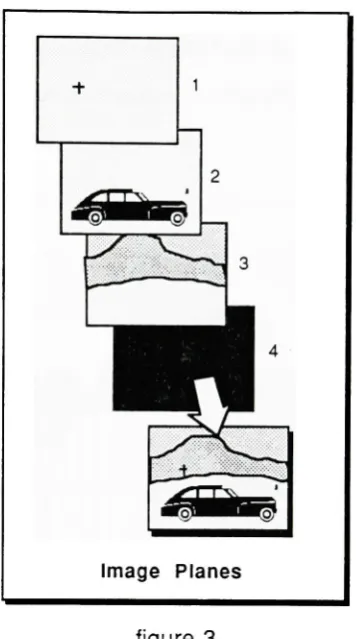
planes withinaprogram(
seefigure 3 ).
A
screenimage
canbe
acombination ofseveraloftheseviewing
planesoverlapping
eachother.The first image
planeis
transparentand containsthecursorand simple usercontrolgraphics.
The
second andthirdimage
plane canbe full
or partial screensdisplayed
togetherorseparately.
These
twoplanes can alsobe
mergedtocreate a single videoimage
thatrequirestwiceas much
data
tobe displayed. The fourth
andfinal
image
plane acts as abackdrop
when planesin
theforeground
aretransparentandleave
voidsin
thedisplay
area. [image:16.562.78.474.57.234.2]figure
3
Video
Images
CD-I
is
capable ofthreetypesof videoimages: full
coloranimation,
video stills andfull
motionvideo.
Full
coloranimationis
possiblethroughparticularcoding
techniquesandcertain
processing
methodsthatonly
updatefractions
oftheimage,
causing
a reductionin
the
data
stream.Animation
canbe
usermanipulatedin
applicationslike
golforhockey,
wheretheusercontrolstheanimated
figure
tocompete.Another
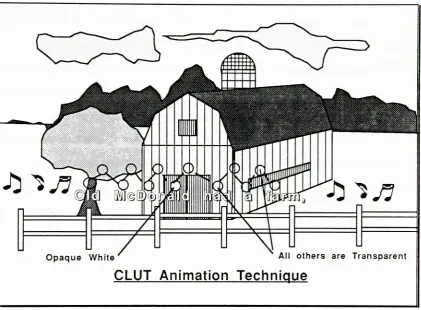
animationtechniqueusestheColor Look
Up
Table
(CLUT)
whichis
usedto
define
and code allthecolorsin
a given scene.This
techniquegives motiontographicobjects
by
repeatedly changing
thedata in
theCLUT,
which,
in
turn,
changesthecolor oftheobjects.
For
example,
CLUT
animationis
possiblein
asing-along
sequencethat [image:17.562.188.367.57.377.2]13
movement,
a series ofball
images
canbe
overlaidtogether.By
sequentially changing
thecolor of each
ball from
transparent
toopaque,
theball
will appeartomoveacrossthescreen(see
figure
4 ).
Opaque White'
'
Al1 others are Transparent
CLUT Animation Technique
figure
4
Video
stillswillbe
themost commonvideoimages,
usedin nearly every
videoapplication
because
they
do
not requireupdates whichconsumethedata
stream.Quality
will
be
offeredin
the threedifferent levels
available.Full
motion videois
possiblein
severaldifferent
ways.Full
motionvideo,
in
atraditionalsensewherethe
image
is
constantly
updated,
would create amoving image
for
atotal of
only 4.5
minutes.Because
ofthis, different
methodsofprocessing
and storage are [image:18.562.60.482.155.465.2]The first
method offull
motion videois
achievedby
partialupdates.That
is,
only
part ofthe screen
(up
to13%
)
is
updatedfor
motion whiletherestremainsthesame.The
second method achieves10
frames
persecondonup
to50%
ofthescreen.It
achievesthis
larger
areaby
employing
softwarecoding
techniques.This
techniqueputsinformation
onthedisc in
codeform
sothatit
canbe
processedeasierandfaster.
A
thirdprocess uses atechniquecalled chromakey. In
thistechnique,
twoimage
planes are
utilized;
aforeground
and abackground. The foreground image is
updatedregularly
toshow motion.The background image is very large
andbleeds far
offthescreen.
Motion is
achievedin
thebackground
by
using
atechniquecalledscrolling.In
scrolling,
thevideoscreen moves,orscrolls,acrossthevery large background
image,
updating
the screen asit
moves.The
resultis
abackground image
thatmoveswiththeforeground
figure.
Scrolling
is
avisualeffectthatwillbe described in
greaterdetail in
thenext section.
Visual
Effects
The
rangeof visualeffectsCD-I has
toofferis
greatenough toachieve visual stylesequalto thatoftelevision
broadcasts. Special
effectsinclude
cuts,
wipes,fades, dissolves,
granulation,andscrolling.
One important
aspecttokeep
in
mindis
thatCD-I
canbe
usedtoedit
its
own programs.Video images
and sequences need notbe finalized before
being
encoded onthe
disc
because
anediting
programcanbe input
tocontrol theframe
sizes andsequences.
There
aretwoclassificationsfor
visual effects.One
typeachievesaneffectusing
asingle
image
plane,whilethesecondtyperequires theuse oftwoimage
planes.Single
15
The
cutis
the simplestandprobably
themost commonway
ofchanging from
oneimage
toanother.In
CD-I,
thecutis
usedfor
obvious screenframe
changes aswellasproviding
full
motion videoby
sequentially
cutting
andupdating
a partialimage.
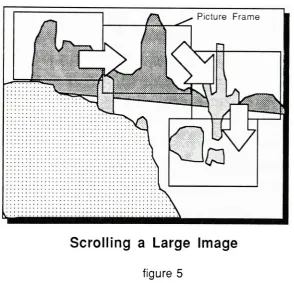
Scrolling,
referedtobefore,
is
another single plane effectthatgives motiontoalarge
stillframe.
In scrolling,
alarge image
is
processedonly
once,
whiletheeditprogrammoves across
it,
only
displaying
part oftheimage
(
seefigure
5 ).
Also,
asdescribed
earlier,
atwoplane effect can alsobe
usedtoemploy full
motionvideo.Picture Frame
[image:20.562.130.425.247.530.2]Scrolling
a
Large Image
figure 5
A
fade is
where animage slowly
appearsordisappears
by
a simple variationin
screen
intensity.
CD-I
is
capableoftaking
animage from black
tofull
intensity
in 64
levels
or sequences.
This
is
enoughtoachievehigh quality
fade-ins
andfade-outs.
Mosaic
effectsare similartofades.
They
canbe
usedtochangeframes
as wellasother minor effects.
In
a mosaic change offrame,
theimage becomes
granulatedby
altering
the
resolution oftheimage. The
granulationbuilds
andthe
image
soonbecomes
clear.
Mosaics
can alsobe done
withtwoplanes wherethedisappearing
granulationsarealternately
interweaved
withthenextframe.
Wipes
appear asif
thepicture werewipedoffthescreenby
using
awindshieldwiper,
revealing
animage behind
theoriginal.Wipes
requiretheuse oftwoimage
planes.Wipes
canbe
horizontal
orvertical andmoving in
eitherdirection
.A dissolve
is
another effectthatrequirestwoimage
planes.In
reality,
adissolve is
a
fade-in
andfade-out
occuring
simultaneously.Two image
planes areneeded, onefor
each
fade.
Text
Text
is
the simplest mediaform
tostore.Up
to150,000
pages oftextcanbe
storedon asingle
disc.
Text
canbe
compressed(reduced for
storage)
much easierthansoundorpictures.
CD-I
specifies aparticularsetofcharacters as a standardfor
compressed storage.This
set coversallLatin
alphabetlanguages. Alternate
setsofcharacterscanbe
createdby
traditional meansofstorage andprocessing, so
CD-I is easily
amulti-lingual medium.Higher quality
textand graphicscanbe
createdusing
alternativesin
animation andgraphics.
These higher quality images
cannotbe
compressed aseasily
and require morestorage space.
Processing
power
The processing
powerofCD-I,
asmentionedbefore,
canbe limited
by
athebottleneck in
the
data
stream.The
realchallengeofdesigning
aCD-I disc
willbe
toanalyze all ofthepossiblecombinations of
audio,
video,andtextata giventime
and selectlevels
ofquality
which will allow allmediasto
be
presented.Chart
2 below
separatesthevariouslevels
of1 7
100
-i75
-50
25
-Percentof datachannel occupancy 1 hour ::Stereo
Mono
2 hours 4hoursX
H
8 hours 16hoursDA
A
Super Hi Fi Hi R
B
C
FM AM
broadcast broadcast
Audio Levels
chart
2
Video,
ontheotherhand,
does
notfollow
therules of a chart.Because
videoimages
are notconstantly
updated,videodata
willonly occupy
thedata
streamwhenimages
needupdating.Time
can allowahigher quality image
tobe
presentedwithA-level
stereo
sound,
aslong
asenoughtime is
givenfor
thedata
to squeeze throughtheremaining
50%
ofthedata
stream.So,
withvideoimage
processing,
thetime between
frames
becomes
afactor
as well as videoimage
quality
and size.From
this
it's
easy
to seehow
quickly
things canbecome
complicated.A
CD-I
playerhas
twoforms
oftemporary
storage which allowfor
optionsthatcould enhance a player'scapability.
The first
typeoftemporary
storageis
called systemfrom
thedisc
sothatit may
be
presented more quickly.The
examplein
thelast
paragraphis
a goodillustration
ofhow
a videoimage is
storedin
systemRAM
before
it
is
presented.System
RAM only
offerstemporary
storage of1Mb,
whichis
lost
whentheplayeris
turned off.
Fortunately,
not all ofthe1Mb is
usedin
mostdata
processing.Any
remaining
RAM
canbe
usedfor applying
goodhuman
factors
principles.Various
effects suchasbeeps,
buzzes
andhighlights
canbe incorporated into
aprogramtogive goodfeedback
tothe user.
The
secondform
oftemporary
storageis
calledNon-Volital Random Access
Memory
(NV-RAM),
andcanbe
savedevenif
thepowersupply is lost. It has
thestoragecapacity
of8 Kilobytes
(Kb)
.Part
oftheNV-RAM
is
usedfor
systeminformation. The
remaindercan
be
usedfor
variousfeatures like
notetaking
or page marking.For
example,
while
researching
ona referencedisc,
important
pagescanbe
marked and notescanbe
taken.
These
page marks and notes canbe
storedin NV-RAM
and recalled asthey
areneeded.
NV-RAM
can alsobe
usedfor
userpreferenceslike
textsize and color.This
canprove
very helpful
tousers with poor vision.IV.
Possible
Applications
Possible
applicationsfor CD-I
list in
great numbers.One important
aspecttorememberis
that
many
traditional mediums are transformedinto something entirely
newwhen appliedtoCD-I. An interactive
encyclopediais
one oftheseapplications.In
aCD-I
encyclopedia,
there
is only
onedisc,
so,
shuffling
through a20
volumesetis
nolonger
a problemwithCD-I. In
addition,
thestructure andmakeup
ofthesubject matterhas completely
changed.The
additionofsoundandvideo notonly
allowtheuserto read,but
also,
hear famous
19
There
canbe
severallevels
ofinteractivity
thatwill allow youtolearn
atyour ownpace and
depth. Passive viewing
canbe
achievedby
remaining in
theshallowerlevels
ofinteractivity.
A
slidelecture
offamous
presidents,for
example,couldbe
apassiveviewing
section
for browsing. Specific information
canbe found
by
keying
in
thesubject or personyouwishto
learn
about.So
yousee,
anencyclopediabecomes
moredynamic
andfriendly
with
CD-I,
aswellasbecoming
less
expensiveby
using fewer
materials.The
following
is
alist
of some ofthepossibleCD-I
applicationsfrom
thebook,Compact Disc
-Interactive: A Designer's Overview:
popmusic,moviesplays,danceand opera
studies offamous people and eventsin
history
and popular cultureartand music programs which allowtheuser creative control
games ofobservation/deduction, such as mysteries and adventures
educational games forchildren, to teach
learning
andsocial skills aswell as academic subjects andknowledgeareasinteractivemovies and even erotica which allowthe user or playerto directthe action
gamesof skill such asbridgeorchess, or enhanced versions ofboardgames such as
Monopoly
multi-media reference works such as encyclopedias anddictionaries
diagnosticreference books on specialisttopics from
family
medicinetocar repairpicture libraries anddatabases foramateur and professionalcollectors,
scholars and hobbyists
gamesof generalknowledge,wit andexperience,such astriviaand word games
armchair travelguides andtouristbooks
guides tofamous places andbuildings,from archaeological sitestomuseums
maps,plans and navigation aids
-including
in-carsystems'surrogatetravel'
throughfabulousplaces(realor
imaginary)
arcade-style games
demanding
hand/eyeco-ordination and quickjudgementeducational material at alllevels frompre-schooltopost graduate
language teaching forself-tuitionorinstitutionaluse
aids,
by
in presentations, andforstafftraining
As
you cansee,
CD-I
has
thepossibility
ofchanging
theway
welearn. Applications for
CD-I
canbe
groupedinto
threemaincategories;
education,resourcetoolandentertainment.Education
CD-I is
an educationaltool,
atool thatcan enhance andimprove
thelearning
processthrough
interactivity.
The
use of audio-visual aidshas
long
been known
toenhancelearning. Programs
to teachchildrencouldhelp
advancethemfaster
thanbefore,
whilelanguage
learning
programs couldbridge
gapsin
cultural andlanguage differences.
Let's look
atthepossibility
of alanguage
learning
programtobetter illustrate
theeducational power of
CD-I. A
program couldcontainanimatedor realsequencesofcommonconversationalscenariossuchas
eating
atarestaurant,visiting
abank
, orasking
for directions. An
audibleconversationcouldbe heard in
onelanguage,
whiletranslated,
textual
information
couldbe
scrolledalong
thebottom.
Because
ofCD-I's
storagecapacity,
severaldifferent languages
couldbe
stored onthedisc
andtheusercould choosewhich
language
is
heard
andwhichis
written.This
meansthataGerman
couldlearn
English,
or aRussian
couldlearn
French;
aninternational
language
programallfrom
thesame
disc!
An
example ofinteractivity
couldbe
takenfrom
a restaurant scenario.When
askedwhatto
eat,
theuseris
givena menu toselecthis
orher
choices.One has
theability
tocontroltheprogram
based
onwhatis
chosen.The
number ofoptions couldmeanthatmany different directions
theprogramcould go.Also,
withinthe animation,certain objectsin
scenescouldbe
highlighted,
calling
them to theattention ofthe user.
By
pointing
atandselecting
any
oftheseobjects,
a smallwindow would
instantly
covera comer ofthescreen.This
window wouldprompt a audio21
In
additionto thevocabulary
aspect, therecould alsobe
a menu of relatedtopicsscrolling
alongsidethe animation.Related
topicscould offer options suchas photo essayson
geography
or culture.These
essays couldvary,based
onsomething
withintheexercise.
Topics
relating
to the typeoffood
ordered,
such as geographicaloriginoringredients,
could scrollalongside,
allowing
theuserto tailorone'slesson
toone'sinterests. So
thelanguage
learner has
alsobecome
a cross-culturallecturer!
Resource Tool
CD-I's
capability
as a resourcetoolcomesfrom its
obviousstrengthin
storagecapacity
andrandom accessibility.
"First
andforemost,
CD-I is
a stand alonepersonalcomputer."10Its
massive storagecapacity
willenable onedisc
tohold many different
softwareprograms,
while
its
quickprocessing
speedwillshortentedious tasks.All
thatremainsis
toallowtheuserto
have
theability
tosavefiles. This
caneasily be done
by
connecting
a magneticdisc
drive
to theplayer.Other
resourcetoolapplications will replacemany
ofthebooks
we owntoday.Multi-volume
reference worksthatarerequiredin many
professionalfields
can existonCD-I. Catalogs
suchasSweet's
Catalog
andtheThomas Register
canbecome CD-I discs.
Many
ofthesecatalogs,
requiring yearly
updates,are expensive and anincredible
wasteofpaper.
CD-ROM has already
startedthe transferof paper mediatodigital
mediaby
converting
multi-volumeabstracts andindexes,
found in
libraries,
toopticaldisc. The
mainproblem with
CD-ROM
is
thatthereareno standardsfor
disc
size andCD-ROM is
only
aPeripheral Optical
Media,
a mediawhichrequirestheaid of a computertoprocessinformation.
Plus,
by
using CD-I for
these references,sound and video can alsobe
addedwhich
may
makeresearchless
strenuous.Advertisements in
theThomas Register
andSweet's
Catalog
willhave
thecapability
ofpresenting
theirproductsbetter.
However,
adisc
with severalthousand televisioncommercials coulddeter
eventhemost seriousprofessional.
Entertainment
CD-I is
also an entertainment media.Sporting
events andTravel
Guides
aretypesofprograms thatwill
introduce
CD-I
to theconsumer market.Sports
programs,
like
agolfgame can simulate some ofthemost
famous
coursesin
theworld.Photographic
stillswillshow you
exactly
whatthefairways
look like
while youcontroltheanimatedfigure
tohit
the
ball. CD-I
can alsoinstall details
like,
club selection or a professional'sdescription
onhow
toplay
eachhole. If playing
thegameis
moreinvolved
thanyouwishtoget,
youhave
theoption ofpassively viewing
a slidelecture
on thehistory
ofthecourse.11Although
entertainmentmay
notbe
thenoblestapplicationofCD-I,
it
willbe
onethat
has
a greatdeal
of controloverits
success orfailure. "The
object ofCD-I is
tosetthestandard
for
thegenerichome information
and entertainmentsystemofthefuture."12Since
theconsumermarketis
themainthrust,
applicationsdesigned
for
thatmarketwillhave
themostimpact in
dictating
CD-I's
success.The
aspect ofinteractivity
canbe
questionedwhenappliedtoentertainmentapplications.
It
has
been
arguedthatconsumersmay
notwanttointeract
withatelevisionmonitor.
After
ahard
day
ofwork,they
may only be in
themoodfor
more passiveforms
ofentertainment, or
engaging in
conversation withothers.The
truthis,
it is
not yetknown
11
Compact
Disc-Interactive:
An
Overview,
videotape,17 minutes,
(London:
New
23
how
consumers willreceive ahighly
interactive
device in
thehome.
There
has
neverbeen
a
device
like
CD-I
offeredtothem.
The
safest routeis
toallowfor
passiveviewing
aswellas active
viewing
by
designing
softwarewith severallevels
ofinteractivity.
V. The
Portable
CD-I Unit
"If
you are a videodiscdesigner
orproducer,
CD-I is
a specificationfor
a pocketdigital
videodisc player."13
The
design
of aPortable CD-I Unit is
adirection inherent in CD-I
technology.Physically,
thesmall and
dense discs lend
themselvestoa portable application.The
playeritself,
being
an
Optical Media
System,
canbe
operatedindependent
ofany
peripheraldevice. What
remainsto
be done is
tointegrate
aplayer(microprocessor
anddisc
drive)
with a videodisplay,
aform
of audio output and a portablepowersource.These
componentswouldmake
up
thebare
minimum ofanindependent
unit.Coupled
withCD-I's inherent
small physicalsize,
are the number of portableapplications.
Families
andbusiness
persons who travelby
carwillnolonger
needfolders
of maps andtravelguidesto
help
themin
unfamiliarareas.A
traveldisc
can contain roadmaps with various
levels
ofdetail right down
topictures ofbuildings
andlandmarks
alongside theroad.
Guides for
hotels,
campgrounds,restaurants and entertainment spotscangive ratings and
descriptions
of eachfacility
aswellasshowing
theirexactlocation
onthemap.
If
you arelooking
up
oldfriends,
the traveldisc's
phonebook
can give youphone
numbers,
addresses andlocations
withoutevenleaving
thecar.In
relationtoroadmaps,
a civilengineering
map
ondisc
couldbe
usedby
city
plannersandtheirworkersto
locate
utility
lines
andjunctions
in
thefield. Different lines
could
be
color coded andthe
user could control whichutility
lines
weredisplayed
sothatreading
themap is
easier.One
disc
could replace severallarge
maps.As
anentertainmentmedium,
a portable unitwillallow usein any
environment.A
portable unit
in
thehome
can give youtheflexibility
of abook
by
allowing
usein every
room.
A
non-portableunitloses
thisflexibility
because
it is dependant
on otherforms
ofoutput such asatelevisionor stereowhicharen't
necessarily
portable.Goals
The
Portable
CD-I Unit
shouldbe
small,
lightweight
andeasy
tocarry.It
shouldbe
capable of
presenting
sound,
video andtextequivalentto thequalities obtainable.The
unitshould
have
aninterface
thatis
intuitively
understood and comfortableto theuser.The
power
supply
shouldnot restrict usetoonly
certainlocations
orshort amounts oftime.One
ofthe traps thatshouldbe
avoidedis
the temptation tointegrate
every
compatible component
into
theunit.If
CD-I is introduced
as anextremely
complextoolthen
CD-I
willonly
succeedin perpetuating
confusion andfear among
consumers.Success
willcomeby
reducing
theunitsfeatures
topureCD-I
use,
whileallowing for
hookup
toother compatibledevices.
This
reduction willalso stressportability
by
remaining
smallin
size.The
physicalmakeup
oftheunit shouldbe
ofrealisticconstruction.The
electroniccomponents used shouldreflectpresent ornear
future
developments in
technology.The
housing
shell shouldbe
made ofpresentday
materials and utilize presentday
25
Aesthetically,
theunitshouldbe both
exciting
andvisually
pleasing.The form
shouldexpress
CD-I's
dynamic
characterwhile at thesametime
alludetomore simple andtranslatable
artifacts to remainunderstandable.
VI.
Product
Development
Components
The
following
sectionexplainsthephysicalmakeup
ofthePortable
CD-I Unit. Where
different
options on variouscomponentsexist,
the componentselectedis
justified
onits
ownstrengths aswellas against other options.
In
reality,
all ofthephysicalcomponentswere researchedsimultaneously.
However,
for
clarity,
eachcomponentis
examinedindividually.
Display
Screens
A
form
of visualdisplay
willbe
needed.Any
televisionset couldbe
used.However,
toallow
for
flexibility
andfreedom,
a screen shouldbe included
ontheunit.There
arefour
maintypesofdisplay
screensavailable,
Cathode
Ray
Tubes
(CRT),
Electroluminescent
displays
(EL),
Gas Plasma
Displays,
andLiquid
Crystal Displays
(LCD). Each
typehas its
own strengths andweaknesses,
and eachtypewas weighed asit
CRT displays
offer arelatively
high quality
picturein
termsofresolutionandcolorrendering
capabilities.However,
when weighed against aspects ofportability,
aCRT falls
short.
Its
size and weight aretoogreattobe easily
carried andit
consumestoomuchpowerto
be
poweredby
a smallbattery.
EL displays
are smallin
size,
light
in
weight,
and pictureresolutionis
good.However,
colorrendering
is
poorfor
blues
andgreens,
andpower consumptionis
toogreat
for
a portable application.Gas
Plasma
Displays
work muchlike EL displays. EL displays electronically
excite particles
in
amembranetomakethemglowatdifferent hues. Gas Plasma Displays
excite gasestoachievethesame end.
Gas
Plasma Displays
are small andlightweight
but,
like EL
displays,
they
consumetoomuch powerfor
portable applications.An LCD is
thebest
portable solution.It is
small,
lightweight,
andhas low
powerconsumption.
It
worksby
changing
theshape or structureofaliquid
crystal containedin
athinmembrane.
Changes in
shape willcause ambientlight
tobe
absorbedin
certain areasand reflected
in
others.This
variationcauseslight
anddark
areas,
muchlike
whenamagnet
is
passedundera sheet ofpaper withiron filings
ontop
ofit. Because
anLCD
screen refracts
light,
it
canbe
viewedin very bright
environments.A light emitting
display,
such as aCRT
wouldloose
resolutionin
abrightly
lit
environment.In dark
environments,wherethereis
nolight
torefract,
anLCD has
theoptionofbeing
back-lit,
supplying both
thescreenand theuser withalight
source.Color is
available
in
goodquality,
andresolutionis
fairly
good andconstantly improving.
The
weaknessofanLCD
is in
viewing
angle.An
LCD
has only
one optimumviewing
angleandresolutionatany
other angleis
poor.Because
ofthis,
atuning device
is
incorporated
withmany LCD's. This
tuning
device
allows peopletochangetheoptimumviewing
angletoonewhich accommodatesthem.Tuning
takesonly
afew
seconds and canbe
changed anytime.However,
due
to thesmallrangein viewing
angle,
thescreen cannot27
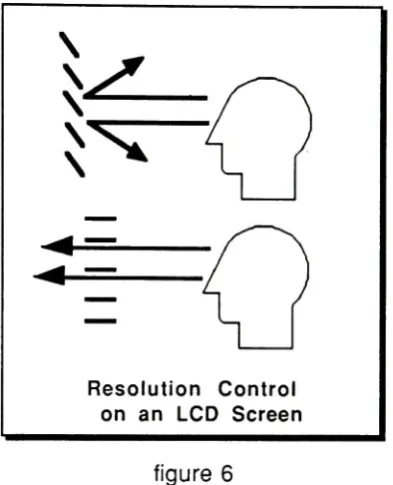
Technically,
tuning
is
achievedin
thesame manner aVenetian blind's louvers
canbe
rotatedtobe
seenthrough
from
any
angle(
seefigure 6
).
The
tuning
knob
on anLCD
screen realignsthe structureof
the
crystal sothatit
is
reflectedin
theuser'sdirection.
^
^
Resolution
Control
on an
LCD
Screen
figure
6
Screen
shapes canvary
greatly.I have
adopted a rectangular screenthatconformsto the
3x4
proportions ofboth
theNTSC
andPAL
broadcasting
standards.I have
alsochosen an
LCD
screenwitha curved profile.This
profilewillreduce screen glaretoasingle narrow
bar
acrossthescreen.Glare is further
reducedby
a non-glare mattefinish
onthescreens surface.
The
curved screen was alsochosenfor functional
and aestheticconsiderationsthatwill
be
discussed later.
Cursor Control
Device
A
cursor controldevice
withtwoselectionbuttons
willbe
neededastheinterface
controlmechanism
between
theunit andtheuser. 14There
aremany different devices
whichhave
[image:32.562.169.366.156.399.2]been
developed for
cursorcontrol,
However,
only
afew
ofthemost commondevices
fit
well
into
a portableapplication.A
mouseis
one ofthemostfamiliar
and accurate cursor controls.However,
it
requires a
tabletop
for
use as well ashaving
a hard-wire connectionthatwouldproveawkward
for
traveling.A light
penis
anotherdevice
thatwouldhave
ahard
wireconnection.
Hard-wire
connections caneasily deteriorate in
portableunitsbecause
thecordmay be
misusedtocarry
theunit.A
touchscreenis
a cursor controlthatwouldincrease
interactivity by
making
acursor control
device
seemtodisappear.
A
touchscreenis essentially
aform
of electronicgrid placed overthe screen.
Control
is
maintainedby
simply
touching
smallwindows,resembling
buttons,
onthe screen.Finger location
is
instantly
calculatedtodeduce
whichbutton
was touched.This
typeofinterface
couldhelp
takeusersastep
closertoaninvisible interface.
However,
with a small size screenbeing
used,problems existwithtouch screens.Tactual
recognition
fields for
touchentry
systemshave been found
toyieldthebest
performancewhenthetactual
field for
controlsexceeded30mm
x30mm.15When
this sizetactualfield
is
applied toa smallscreen,
the screenbecomes
overrunby
buttons for
usercontrol.It
is
because
ofthis thatatouch screenhas been
ruled out.A joystick
or trackball aretwocontroldevices
whichhave
long
been
commoncontrol
devices for
video games.Because
ofconsumer'sfamiliarity
withthem,
thesetwodevices
couldbe
usedtoestablishacomfortableinterface
thatrequires noexplanation.A
joystick
and trackball alsolend
themselvestoportableapplicationsbecause
they
canbe
self-containedwithin the unit,
requiring
noloose
wiresfor
connection.15Anthony
D.
Hall,
James B.
Cuningham,
Richard P. Roache
andJulie W.
Cox,
"Factors
Affecting
Performance
Using Touch-Entry
SystemsTactual RecognitionFields
andSystem
Accuracy,"
29
Of
thetwo,
atrackballis
thebetter
choice.It is faster
and more accuratethanajoystick.
In
fact,
whencomparedwith six other cursorcontrols,
the trackballwasthemost
accurate,
andfourth
in
speed.(
see chart3
)
Comparison
ofVarious Devices
onSpeed
and
Accuracy
ofCursor
Positioning
Device Speed
Accuracy
Touchscreen 1
fastest
6.5 worstLightpen 2 6.5
Digitizing
tablet 3 2Trackball 4 1 best
Force joystick 5 3
Position joystick 6 4
Keyboard 7 slowest 5
Source: Taken
from,
HumanFactors inEngineering
andDesign,
Mark SandersandErnest
McCormick,
(NewYork:McGraw-Hill,
1987),
p.292.chart
3
The
trackballI have incorporated into
theunithas been
positionedtobe
usedby
thefingertips
of eitherhand (see
appendixB,
photo#1
).
Fingertip
controlwillbe
forced due
to
its positioning
onthe unit,aswellasthelow
control response(
C/R
)
ratiothatcanbe
incorporated
withinthetrackballitself.
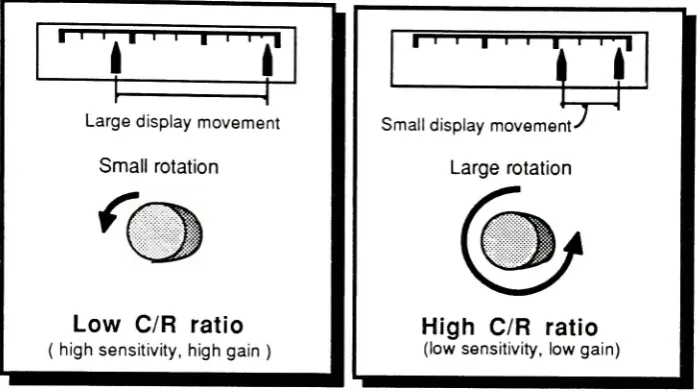
C/R
ratiois
thecomparisonbetween
themovementofthecontroldevice
to themovement ofthesystem response.
Different C/R
ratios canbe
described using
theexampleofthe
tuning
ofa radio.Some
radiosareequipped withtwotuning
knobs,
a gross and aoftheneedle
(
low
C/R
ratio).
The fine
tuning
knob
requires several rotations tomove asmall
distance
(high
C/R
ratio)
(see figure
7).
i
|
it
-I
=r
Largedisplay
movementSmall
rotationLow
C/R
ratio
highsensitivity,highgain
)
I
' I I''Small
display
movement-'Large
rotationHigh C/R
ratio
(lowsensitivity, low gain)
Source:
Mark
S.Sanders
andErnest
J.McCormick.
Human
Factors
InEngineering
andDesign,
(
New York:McGraw-Hill, 1987),
p.268.Comparison
of
Control Response
Ratios
figure
7
In
continuouscontrols,
such as atrackball,
thereis
initially
a gross adjustmentmovement usedto
find
approximate position.This
gross movementis followed
by
afine-adjustment movement usedto
find
preciselocation. Although
these twodifferent
movements are
indistinguishable from
eachother,
thereis
definitely
a changein
motorbehavior.16
A low C/R
ratioin
thetrackball ofthePortable CD-I
Unit
willmake manipulation ofthecursor
fast
toshorten response time.This high sensitivity
willalso requireprecise,
fine-motor
movements(
fingertips
)
tomake selections.16Mark
S.
Sanders
andErnest J.
McCormick,
HumanFactors In
Engineering
andDesign,
(New
[image:35.562.75.425.156.352.2]31
CD
Drives
The disc
driving
mechanismfor
aCD-I
playeralready
existsin
stores andhomes
throughout theworld.
CD-I
uses thesamedisc drives
asCD-DA discs because
the twohave
been
madecompatible.In
fact
some companieswillofferCD-I
converterkits
thatwilltransforma
CD-DA
playerinto
aCD-I
player.A
typicalin-home
disc
drive
measures6
x9
x1-1/2
inches
andhas
asliding door
for disc
loading
and unloading.This is
quitelarge for
a portable unit.Portable CD-DA
units
have
asubstantially
smallerdriving
mechanism.They
can measure assmallas5-1/2
x
5-1/2
x1/2 inches.
I have
allowed a volumeslightly larger
than thisfor
aself-feeding disc drive. Extra
volume wasallottedtoallow
for
adisc-feeding
mechanismthatwouldeject aswellasinject
discs
(
see appendixA,
drawing
#
14 ).
Self-feeding
is
uncommmontomost portabledrives. It
eliminatestheneedfor
ahinged door
orsliding
tray
thatwouldbe
less
durable.
Circuit
Boards
Philips Electronics
corporationhas developed
a'mother'
circuit
board for
aplayerthatis 12
x
12
x1/4
inches
in
size.This board
willbe
reducedin
sizeto6
x6
inches in 1991.
17This
board
can alsobe
divided into
severalpiecesequaling
thesame area.I
allowedenough volume
in
theportableCD-I
unitfor
threeboards measuring 3x4
inches
(
seeappendix
A, drawing
# 14
).
Power
Supply
Power
suppliedto theportableCD-I
unit canbe in
theform
of a rechargeablebattery
orwall socket.
I
have
incorporated
a standard(
Panasonic Camcorder Type
)
rechargeablebattery
which powers a camcorderfor
over2 hours. I
have
alsoincorporated
an adaptorconnection
for
a9
VDC
power converter.This
willenabletheunittohook-up
tootherpower sources tominimize
battery
consumption.Compatibility
It is
important
tolimit
theamountofcomponents onthe unittomaximizeportability
andproduct simplicity.
It
is
alsoimportant
toallowfor
hook-up
withcompatible componentstomaketheunit moreversatile.
I
have incorporated hook-ups for
a magneticdisc drive
anda secondtelevision.
The
magneticdisc drive
is
essentialif
theunitis
tobe
usedas apersonal computerwherethe
capability
ofsaving documents is
needed.A
coaxial cablehook-up
witha secondtelevision willallowtheunittodouble
as anin-home
unitby
connecting
withahome's higher quality
video monitor and stereo system.In
mostcases,
thevideo monitorandstereo systemin
ahome have already been
connectedfor viewing
stereobroadcast
televisionprograms.With
thisalready in
place,
only
oneconnection
is
necessary.The Portable CD-I Unit
thenbecomes
aplayerand cursorcontrollerthatcan
be
usedlike
ahard-wire
remote controlin
theuser'slap.
By
allowing
consumerstousethePortable CD-I Unit
asboth
a portable andin-home
unit,they
needonly
topurchaseoneunit.This may
help
withthesuccess ofCD-I
due
toits
projected cost of$1,500.00,
whichmay
seem expensivetotheaverage33
Sound
At least
two speakers are needed as audio outputfor
theunitbecause
ofCD-I's
full
stereosound capability.
These
smallspeakersshould offerhigh quality
sound,
notonly because
of
CD-I's
stereocapabilitiesbut because
CD-DA discs
can alsobe
playedby
theunit.Incorporating
ahook-up
for
headphones
is very
important
for
moreintimate
publicuseof
CD-I
.Headphone
use will also spare othersfrom
having
tolisten
toa programwithall
its
miscellaneous noises.This
could prove vitaltoa schoolteacher'ssanity if CD-I
is
usedin
theclassroom.The
speakersI have
incorporated
are2 inch
coaxial,
cone speakers.To improve
durability
these speakershave
water-resistant mylar cones.Controls
The
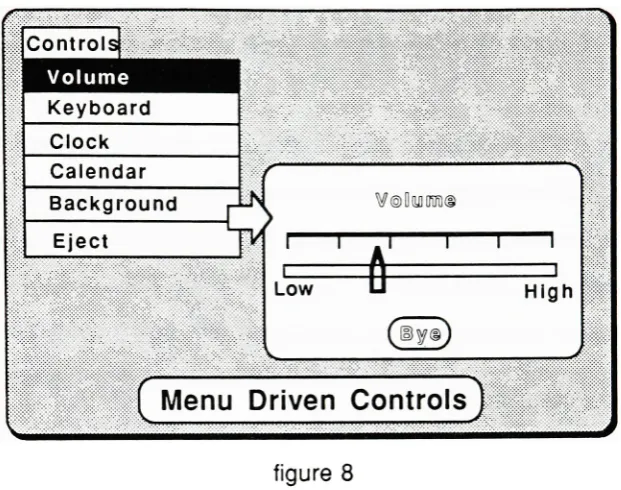
display
screen andtrackballwillallow most ofthecontrolstobe
programmedinto
thedisplay.
Functions
andfeatures
like
thevolume controlandinternal
clock canbe
controlledControls
Volume
Keyboard
Clock
Calendar
Background
Eject
[image:39.562.110.421.59.304.2]Menu
Driven
Controls
figure 8
For
keying
in
specificinformation
akeyboard
willbe included in
thecontrol menu.A
window withadrawing
ofakeyboard
would appear which wouldallowtheusertokey-in
specificinformation
using
the trackball and selectbuttons.
There
arethreemanualcontrolsontheunit.The
power switch controlsdiscrete
information
(
only
twochoices)
and requiresadiscrete
typeof switch.Pushbuttons,
toggle switches,and
rotary
selector switchesarethreeexamples ofdiscrete
controls.I
choseapushbutton
for
its
low
profile andfor
aesthetic considerationsthatwillbe
discussed later.
The
othertwomanualcontrols, thecontrastandbrightness
controls,controlcontinuous
information,
thatis,
information
onacontinuum.Rotary
knobs,
wheels,cranks and
levers
arefour
typesofcontrolsthatmanipulate continuousinformation.
The brightness
andcontrast controls were chosenasmanualcontrols onthePortableCD-I
Unit because
they
controlfactors
of screenvisibility.If
thesecontrolswereprogrammed
into
the screenlike
the others,they
wouldnotbe
abletobe
manipulatedby
the35
impossible
toread?How
could youimprove
screen resolutionif
thecontrol menu wasunreadable?
Knurled rotary
knobs
wereincorporated
for
theirsmall size andlow
profile.The
knobs
were placedin
closeproximity
to thescreen toinsure
good mapping.In early
sketches,
all ofthemanualcontrolslooked
similarin
shape and created confusion astohow
they
were used.(
see appendixB,
photo#6
)
The final
shapes wereintentionally
alteredto
differ
from
each other.The rotary knobs
afforded rotationby being
larger
andhaving
knurls,
whilethepushbutton remained small and smooth.Molded
Shell
The
plastic molded shell oftheunitis
intended
tobe
made ofABS
(
Acrylonitrate-Butadiene-Styrene ). This
materialwas chosenfor its high durability. Injection molding
was chosen
for its
extremeflexibility
and versatility.The
molded shellI have designed has
threeparts(
see appendixA,
drawing
# 10
).
The first
twoparts enclose allofthecomponentsthatmakeup
theunit.These
twopartshave been
given properdraft
sothatmolding
is
possible.The
thirdpart existsmainly for
aestheticreasons,
althoughit does
serve as anVII.
Form
Exploration
"As
microelectronicshave
dematerialized technology
and givenit
anintelligent
presenceit
never
had
before,
designers
areforced
toconfrontmeaning
rather