251
6
Trojan Horses
Y
ou might have read the last chapter on backdoors and thought to your-self, “I’d never run a program named Netcat or VNC on my machine, so I’m safe!” Unfortunately, it isn’t that easy. Attackers with any modest level of skill will disguise the nasty backdoors we covered in the last chap-ter or hide them inside of other programs. That’s the whole idea of a Tro-jan horse, which we define as follows:A Trojan horse is a program that appears to have some useful or benign purpose, but really masks some hidden malicious functionality.
As you might expect, Trojan horses are called Trojans for short, and the verb referring to the act of planting a Trojan horse is to Trojanize or even simply to Trojan. If you recall your ancient Greek history, you’ll remember that the original Trojan horse allowed an army to sneak right through a highly fortified gate. Amazingly, the attacking army hid inside a giant wooden horse offered as a gift to the unsuspecting victims. It worked like a charm. In a similar fashion, today’s Trojan horses try to sneak past computer security fortifications, such as firewalls, by employ-ing like-minded trickery. By lookemploy-ing like normal, happy software, Tro-jan horse programs are used for the following goals:
• Duping a user or system administrator into installing the Trojan horse in the first place. In this case, the Trojan horse and the unsuspecting user become the entry vehicle for the malicious software on the system.
system so users and administrators blithely continue their activ-ity, unaware of the malicious code’s presence.
Many people often incorrectly refer to any program that gives remote control of or a remote command shell on a victim machine as a Trojan horse. This notion is mistaken. I’ve seen people label the VNC and Netcat tools we covered in the last chapter as Trojan horses. How-ever, although these tools can be used as backdoors, by themselves they are not Trojan horses. If a program merely gives remote access, it is just a backdoor, as we discussed in Chapter 5. On the other hand, if the attacker works to disguise these backdoor capabilities as some other benign program, then we are dealing with a true Trojan horse.
Attackers have devised a myriad of methods for hiding malicious capabilities inside their wares on your computer. These techniques include employing simple, yet highly effective naming games, using executable wrappers, attacking software distribution sites, manipulating source code, co-opting software installed on your system, and even dis-guising items using polymorphic coding techniques. As we discuss each of these elements throughout this chapter, remember the attackers’ main goal: to disguise their malicious code so that users of the system and other programs running on the machine do not realize what the attacker is up to.
In this chapter, we’ll discuss both widely used and cutting-edge techniques. Keep in mind, however, that attackers are a creative and devious lot. They use the concepts we’ll cover, but tweak them in innu-merable ways to achieve maximum subterfuge.
What’s in a Name?
‘Tis but thy name that is my enemy.
—William Shakespeare, Romeo and Juliet, 1595
tech-What’s in a Name? 253
niques that I can easily spot, I’m all for it. That makes my job easier. I’m perfectly happy to catch any attacker when he or she makes a mistake of that magnitude, and, thankfully, I have found several instances of attackers calling a backdoor Netcat or even VNC. However, we can’t expect all of our adversaries to make such trivial errors, so let’s investi-gate their naming games in more detail.
Playing with Windows Suffixes
One very simple Trojan horse naming technique used by attackers against Windows systems is to trick victims by creating a file name with a bunch of spaces in it to obscure the file’s type. As you no doubt know, the three-letter suffix (also known as an “extension”) of a file name in Windows is supposed to indicate the file’s type and which application should be used to view that file. For example, executables have the .EXE suffix, whereas text files end in .TXT. The information security business has done a good job over the last decade of informing our users not to run executable attachments included in e-mail or those that appear on their hard drive. “Unknown EXE files cause trouble,” we lec-ture our users, with furled eyebrows and a deep voice to emphasize the importance of this lesson. So, given users’ fright and awe in the pres-ence of EXE files, how could a malicious executable program be dis-guised as something benign, such as a simple text file? An attacker could confuse a victim by naming a file with a bunch of spaces before its real suffix, like this:
just_text.txt .exe
Of course the Explorer file viewer shows the second file’s type as Application and displays an executable’s icon next to the name instead of a text file icon. Still, the vast majority of users would never notice these somewhat subtle distinctions. If this is a huge concern for the attackers, they could even configure the system so that an executable program type’s icon actually appears as a .TXT icon. This can be accomplished by altering the icon using one of a variety of tools, such as the free E-Icons program available at www.deepgls.com/eicons/. Alter-natively, an attacker could choose a file type that is both executable
and has an icon that looks quite similar to a text file, such as the Shell Scrap Object file type, with an .SHS extension. These .SHS files are used to bundle together commonly copied and pasted text and pic-tures, as well as commands, for various Windows programs. The third line of Figure 6.1 shows a typical .SHS file. The fourth line of the figure shows a combination of these techniques: a .SHS file is given a name of “just_text.txt .shs”, which includes several spaces to make it appear as a .TXT file. You can easily see how a user could get duped into executing this type of file.
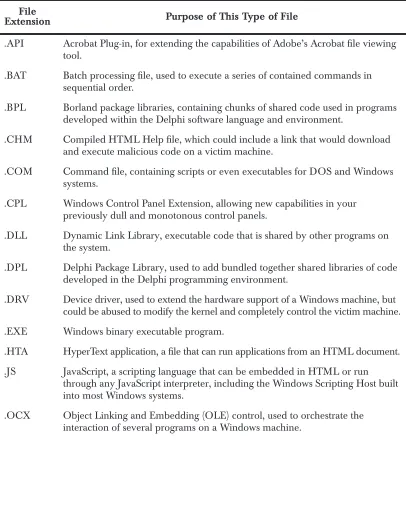
Numerous file suffixes could be used to deliver and contain mali-cious code on a target machine. Table 6.1 shows the different file types developers use to hold binary, scripts, and other types of executable code. Many, but certainly not all, of these script types are tied to Win-dows machines, as the WinWin-dows operating system is freakishly obsessed with a file’s type being stored in the suffix. However, the phenomenon is not limited to Windows. On UNIX systems, some program types are also indicated with a suffix, including .sh, .pl, and .rpm files. It’s impor-tant to note, however, that UNIX doesn’t put any special meaning into a file’s suffix, unlike Windows. In Windows, the operating system uses the suffix to determine which application to use when opening a docu-ment. On UNIX machines, this suffix is just a handy reference for users; UNIX won’t run a specific application based merely on the file Figure 6.1
Hiding the EXE extension after several spaces.
What’s in a Name? 255
[image:5.612.110.516.206.713.2]suffix. Still, any one of these file types in Table 6.1 could be abused to spread malicious code. For a detailed description of any type of file suf-fix, you can refer to the very handy Filext Web site, at http://filext.com.
Table 6.1
Useful File Extensions to Filter at an Internet Gateway
File
Extension Purpose of This Type of File
.API Acrobat Plug-in, for extending the capabilities of Adobe’s Acrobat file viewing tool.
.BAT Batch processing file, used to execute a series of contained commands in sequential order.
.BPL Borland package libraries, containing chunks of shared code used in programs developed within the Delphi software language and environment.
.CHM Compiled HTML Help file, which could include a link that would download and execute malicious code on a victim machine.
.COM Command file, containing scripts or even executables for DOS and Windows systems.
.CPL Windows Control Panel Extension, allowing new capabilities in your previously dull and monotonous control panels.
.DLL Dynamic Link Library, executable code that is shared by other programs on the system.
.DPL Delphi Package Library, used to add bundled together shared libraries of code developed in the Delphi programming environment.
.DRV Device driver, used to extend the hardware support of a Windows machine, but could be abused to modify the kernel and completely control the victim machine.
.EXE Windows binary executable program.
.HTA HyperText application, a file that can run applications from an HTML document.
.JS JavaScript, a scripting language that can be embedded in HTML or run through any JavaScript interpreter, including the Windows Scripting Host built into most Windows systems.
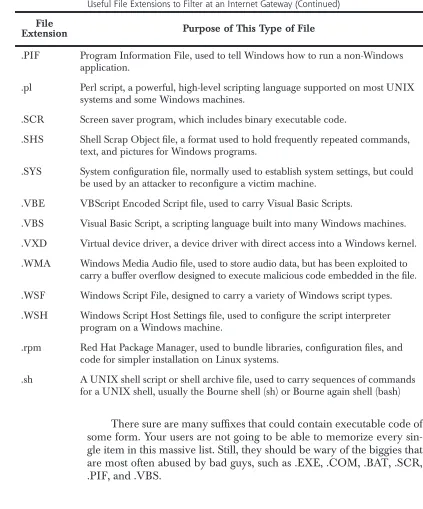
There sure are many suffixes that could contain executable code of some form. Your users are not going to be able to memorize every sin-gle item in this massive list. Still, they should be wary of the biggies that are most often abused by bad guys, such as .EXE, .COM, .BAT, .SCR, .PIF, and .VBS.
.PIF Program Information File, used to tell Windows how to run a non-Windows application.
.pl Perl script, a powerful, high-level scripting language supported on most UNIX systems and some Windows machines.
.SCR Screen saver program, which includes binary executable code.
.SHS Shell Scrap Object file, a format used to hold frequently repeated commands, text, and pictures for Windows programs.
.SYS System configuration file, normally used to establish system settings, but could be used by an attacker to reconfigure a victim machine.
.VBE VBScript Encoded Script file, used to carry Visual Basic Scripts.
.VBS Visual Basic Script, a scripting language built into many Windows machines.
.VXD Virtual device driver, a device driver with direct access into a Windows kernel.
.WMA Windows Media Audio file, used to store audio data, but has been exploited to carry a buffer overflow designed to execute malicious code embedded in the file.
.WSF Windows Script File, designed to carry a variety of Windows script types.
.WSH Windows Script Host Settings file, used to configure the script interpreter program on a Windows machine.
.rpm Red Hat Package Manager, used to bundle libraries, configuration files, and code for simpler installation on Linux systems.
[image:6.612.84.507.145.654.2].sh A UNIX shell script or shell archive file, used to carry sequences of commands for a UNIX shell, usually the Bourne shell (sh) or Bourne again shell (bash)
Table 6.1
Useful File Extensions to Filter at an Internet Gateway (Continued)
File
What’s in a Name? 257
Mimicking Other File Names
These Trojan horse naming issues go beyond just putting a bunch of spaces between the name and its file extension on Windows systems. We’ve just barely scratched the surface. Often, to fool a victim, attackers create another file and process with exactly the same name as an exist-ing program installed on the machine, such as the UNIX init process. Init normally starts running all other processes while the system boots up. In this type of naming attack, you could actually see two processes named init running on your system: your normal init that’s supposed to be there, and another Trojan horse named init by the attacker. This is a particularly bizarre circumstance, kind of like waking up and finding that you have two noses.
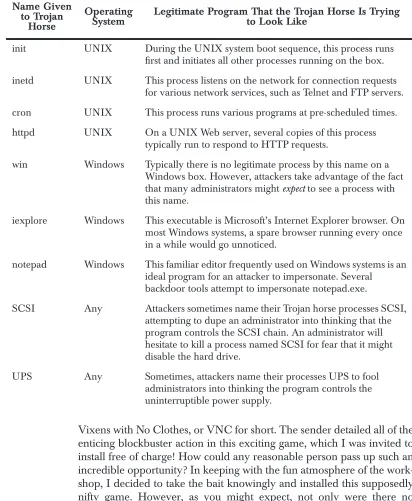
Similarly, on a Windows machine, you could notice that there are two running processes called iexplore. A bunch of such naming schemes are possible. Table 6.2 lists common programs expected to be running on Windows and UNIX operating systems whose names are frequently borrowed by attackers for malicious code. It is hugely important to note the following: There are often supposed to be processes running on your machine with these names. Don’t freak out if you see a running program named init or iexplore! In all likelihood, these are merely the legitimate programs that should be on your sys-tem. If these are legitimate processes, you should not kill them, as your machine requires them to function properly. We’re discussing this issue because attackers sometimes impersonate these vital programs using Trojan horses that have the same name.
Of course, the list in Table 6.2 is not comprehensive, as tens of thousands of possible programs and variations would fill this whole book. Still, I want to give you a flavor for the types of Trojan horse nam-ing attacks I’m seenam-ing in the wild in the incidents I handle. If you inves-tigate computer attacks, expect to see these exact names, subtle variations on these names, and a variety of other similar tricks.
Vixens with No Clothes, or VNC for short. The sender detailed all of the enticing blockbuster action in this exciting game, which I was invited to install free of charge! How could any reasonable person pass up such an incredible opportunity? In keeping with the fun atmosphere of the work-shop, I decided to take the bait knowingly and installed this supposedly nifty game. However, as you might expect, not only were there no Table 6.2
Common Names Given to Trojan Horses to Blend In
Name Given to Trojan
Horse
Operating
System Legitimate Program That the Trojan Horse Is Tryingto Look Like
init UNIX During the UNIX system boot sequence, this process runs first and initiates all other processes running on the box.
inetd UNIX This process listens on the network for connection requests for various network services, such as Telnet and FTP servers.
cron UNIX This process runs various programs at pre-scheduled times.
httpd UNIX On a UNIX Web server, several copies of this process typically run to respond to HTTP requests.
win Windows Typically there is no legitimate process by this name on a Windows box. However, attackers take advantage of the fact that many administrators might expect to see a process with this name.
iexplore Windows This executable is Microsoft’s Internet Explorer browser. On most Windows systems, a spare browser running every once in a while would go unnoticed.
notepad Windows This familiar editor frequently used on Windows systems is an ideal program for an attacker to impersonate. Several
backdoor tools attempt to impersonate notepad.exe.
SCSI Any Attackers sometimes name their Trojan horse processes SCSI, attempting to dupe an administrator into thinking that the program controls the SCSI chain. An administrator will hesitate to kill a process named SCSI for fear that it might disable the hard drive.
What’s in a Name? 259
clothes … there were no vixens either! I watched as the keyboard and mouse on my screen began to move by themselves, while squeals of joy erupted from my attacker on the other side of the computer lab! Of course, this was all just a little game. Real-world attackers might not be so blatant, but this example really helps illustrate the concept of using deceptive naming to achieve installation of a Trojan horse backdoor.
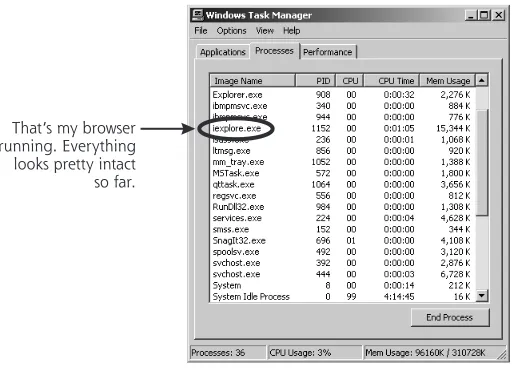
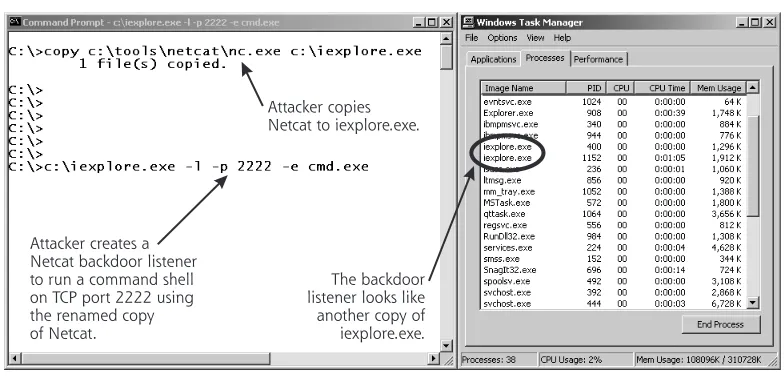
For another more real-world example, check out Figure 6.2. You can see the familiar Windows Task Manager on my Windows 2000 sys-tem. By hitting Ctrl-Alt-Delete, selecting Task Manager, and then look-ing at the Processes tab, I can see the various processes runnlook-ing on my box. The list of Figure 6.2 look pretty reasonable. In particular, you can see that I’m running one instance of the Internet Explorer browser (iexplore.exe).
[image:9.612.181.437.317.501.2]Now, to illustrate a Trojan horse name-based attack, check out Fig-ure 6.3. Here, we see an attacker copying the Netcat program, giving it the rather curious name of iexplore.exe. That’s pretty nasty, but rather common. After creating the copy of Netcat, our intrepid attacker, evil dude that he is, sets up a backdoor listener with the copy. The backdoor is waiting with a command shell on TCP port 2222. However, if you look at the Task Manager now, it appears that there is just another copy of iexplore.exe, the Internet Explorer browser, running on my machine. Figure 6.2
Normal Windows Task Manager: Here is what I expect to be running on my Windows 2000 system.
Users or administrators searching for a malicious process would likely overlook this extra little goodie running on the box, as it looks com-pletely reasonable.
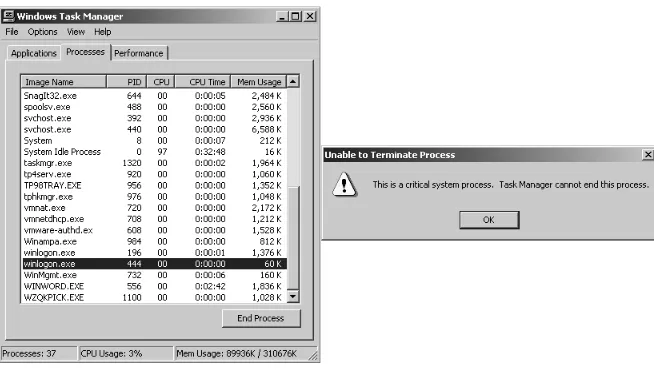
[image:10.612.97.489.131.320.2]Giving a backdoor a name like iexplore.exe is pretty sneaky. How-ever, an attacker could do something even worse by taking advantage of an interesting characteristic of Windows 2000, XP, and 2003. In these operating systems, the Task Manager won’t allow you to kill pro-cesses that have certain names [1]. If a process is named winlogon.exe, csrss.exe, or any other name shown in Table 6.3, the system automati-cally assumes that it is a sensitive operating system process based solely on its name. These names are all used for very important processes on a Windows machine [2], but attackers can use the exact same name for a backdoor. We’ll discuss the interplay between many of these processes in more detail in Chapter 8.
Figure 6.3
Bad guy runs Netcat. Now, the evil attacker creates a copy of Netcat called iexplore.exe and runs a backdoor listening on TCP port 2222.
The backdoor listener looks like another copy of iexplore.exe. Attacker copies Netcat to iexplore.exe.
What’s in a Name? 261
If an attacker gives a backdoor a name from Table 6.3, Task Man-ager will refuse to kill it. The system gets confused, believing the back-door process is really the vital system process. The system is overprotective. To prevent a user from accidentally killing a vital process and making the system unstable, Windows goes overboard by prevent-ing users from killprevent-ing any process with such a name. To illustrate this concern, in Figure 6.4, I created a copy of Netcat named winlogon.exe, executed it as a backdoor listener, and tried to kill this imposter using Task Manager. The system instantly popped up a dialog box saying, “This is a critical system process. Task Manager cannot end this pro-cess.” You might think that Windows would be smart enough to differen-Table 6.3
Windows Process Names That Cannot Be Killed with Task Manager
Windows
Process Name Purpose of Legitimate Process with This Name
csrss.exe This is the environment subsystem process, which supports creating and deleting processes and threads, running 16-bit virtual DOS machine processes, and running console windows.
services.exe This process is the Windows Service Controller, which is responsible for starting and stopping system services running in the background.
smss.exe The Session Manager SubSystem on Windows machines is invoked during the boot process. Among numerous other tasks, it starts and supports the programs needed to implement the user interface, including the graphics subsystem and the log on processes.
System This process includes most kernel-level threads, which manage the underlying aspects of the operating system.
System Idle Process On a Windows system, this process is just a placeholder to indicate all of the CPU cycles consumed by idle tasks, when no specific other processes have a pressing need.
tiate vital system processes from imposters by looking at the file on the hard drive the process was started from, or even its process ID number. However, Windows doesn’t do this, and just assumes that any process named winlogon.exe or csrss.exe must be okay. Therefore, unfortu-nately, these names are just perfect for Trojan horse backdoors, because they are more difficult for a system administrator to terminate, if they are ever discovered.
As an additional concern, under certain circumstances, you might legitimately have multiple copies of both csrss.exe and winlogon.exe running on a machine. If you use Windows Terminal Services or Cit-rix to allow multiple users to simultaneously log on to virtual desktops on a single Windows machine, each user will have a csrss.exe and win-logon.exe. So, if there are two or more copies of these two processes running, you might not have been attacked; you’re just looking at the processes created for different users. For the other processes listed in Table 6.3, however, only a single instance of the process should show up in Task Manager.
The Dangers of Dot “.” in Your Path
[image:12.612.172.499.134.319.2]Another issue associated with Trojan horse names involves the setting of the path variable for users and administrators. On Windows and Figure 6.4
What’s in a Name? 263
UNIX, most running programs, including command shells and even GUIs, have the concept of a path. This variable just contains a list of directories that are searched in order from start to finish when a new program or command name is executed. For example, on my UNIX machine, I can view my path by typing:
$ echo $PATH
The default path for users on my UNIX box includes a variety of directories, such as /bin, /usr/bin, /usr/local/bin, and so on. These directories are the locations of the commands commonly run by users on UNIX machines.
On Windows, you can view your path by using the set command and searching for the word Path, as follows:
C:\> set Path
My default path on Windows includes folders such as C:\WinNT \System32, C:\WinNT, and others.
Whenever I type a program’s name at a command prompt, my system starts combing through the directories in my path, one by one, until it finds the command and runs it. If it cannot find the command in my path, the system responds with an error message, saying that the program or command could not be found.
On UNIX systems, by default, your current working directory, referred to as “.” and usually pronounced “dot,” is not in your path. So, if you change to a directory, and type the name of a program in that directory, you’ll get a “Command not found” error, even though you are in the same directory as the program you are looking for. This can be frustrating for new UNIX users, but not having the current working directory in your path is a very good thing from a security perspective!
attacker now has such privileges as well, having successfully launched a privilege escalation attack using a Trojan horse version of ls.
Or, similarly, an attacker could create a backdoor with a name that matches a commonly mistyped command, such as ipconfig. The nor-mal UNIX command for viewing network interface information is ifconfig, with an f instead of a p. However, users sometimes type ipconfig instead, given that a similar command with that name is available on Windows. If I create a Trojan horse named ipconfig on your UNIX machine, I can sit back and wait for an administrator to accidentally type ipconfig while in the wrong directory. For this rea-son, “.” isn’t in the path on UNIX machines by default, and you shouldn’t reconfigure your shell to add it. In this case, the default path setting for UNIX is quite reasonable. So, do yourself a favor, and leave it as is. Also, if you do have “.” in your path, consider removing it by editing the various start-up scripts associated with your login shell, which depend on the particular shell you are using.
However, not having “.” in your path also means that if you change directories to a place where a program file is located, you can-not just type the program’s name to run it. Instead, to run the program, you have to type ./[program_name] to execute the program. So, if the system ever complains that it cannot find a file, but you can see the file in the current working directory using ls, use the “./” notation to start the program. It’s not too much of a burden.
This matter differs markedly on Windows systems. In the Win-dows command shell, the current working directory is implicitly in your path. Even though the set command doesn’t show a “.” in your path, it’s still there, implicitly represented, just because you are using Win-dows. Therefore, if you change to a directory with an executable inside and then type the executable’s name on Windows, the executable runs. The system automatically finds it, because “.” is implicitly at the very beginning of your path. Yes, it’s convenient, as you don’t have to ever mess with the “./” notation. However, having “.” in your path is also a security hole.
If an attacker gets low-privileged access to your machine, and then tricks an administrator into running a command, the attacker can esca-late privileges. One of the most common tricks attackers utilize in Win-dows is to create a privilege-escalating Trojan horse named cp. On Windows, the copy command is used to copy a file, and there is no
default command named cp. However, users sometimes mistakenly
What’s in a Name? 265
the attacker placed a Trojan horse with that name, the attacker could easily get that user’s privileges on the machine.
Unfortunately, you cannot easily remove “.” from your path on a Windows machine. It’s built into the operating system itself right at the start of your path. Remember, the system searches for commands start-ing from the beginnstart-ing of your path, runnstart-ing the first matchstart-ing pro-gram that it finds. Mistyping a command name could lead to a privilege escalation attack on a Windows system, so be careful when typing com-mands with an account with administrator privileges.
Trojan Name Game Defenses
So, in light of these deviously named Trojan horses, what can we do to defend ourselves? First, we must keep the malicious code off of our sys-tems in the first place by employing the antivirus tools described in Chapter 2 and the backdoor defenses described in Chapter 5.
Also, you should be ready to kill suspicious processes that usurp the names of legitimate processes. Even though Task Manager cannot kill processes with certain names, you can deploy a free tool called PsKill from the PsTools package, available for free at www.sysinternals.com. PsKill can shut down any running process, regardless of its name. How-ever, be careful with this tool! If you shut down a legitimate process, you could cause your system to be unstable or even create an instant crash. Therefore, you need to research each process of concern in more detail before shutting it down.
To conduct this research, you can use some tools we initially dis-cussed in Chapter 5. Remember our good friends, lsof and Fport? As you might recall, Fport, run on a regular basis by diligent system administrators on Windows machines, will help you discover strange port usage associated with Trojan horses on your system. For each run-ning process that has an open TCP or UDP port on the network, Fport shows the process ID, process name, port number, and the full path-name of the file that the process ran from on the hard drive. Fport is very simple, yet highly effective. On UNIX machines, you can use the lsof command to achieve similar functionality to Fport, as we dis-cussed in Chapter 5.
Fport tells us that there are a variety of programs using ports on this machine. All of these ports are pretty normal on a Windows machine, except for the one with a Process ID (Pid) of 1084. It’s called iexplore.exe, but is listening on TCP port 2222 and running out of C:\iexplore.exe. That just doesn’t look right!
Using Fport, we can differentiate between the real browser, which should have a path of C:\Program Files\Internet Explorer\iexplore.exe, and the attacker’s backdoor, which runs from C:\iexplore.exe. Unfortu-nately, this kind of analysis requires an administrator to be intimately familiar with what is supposed to be running on the system. That way, if a counterfeit pops up, an administrator can quickly identify it and inves-tigate. This can be very difficult, but rock-solid system administrators should have a gut feel for what is installed and running on critical sys-tems. If an experienced system administrator notifies you that “some-thing just doesn’t look right with this program,” you ignore their concerns at your own peril. Your best bet is to analyze suspect programs in a laboratory environment to determine if they are attempting to access files or the network unexpectedly. In Chapter 11, we’ll discuss a recommended laboratory environment and analysis process you can use to analyze problematic software.
[image:16.612.97.504.129.288.2]Another defense for these Trojan naming schemes is to block exe-cutable e-mail attachments at your Internet gateway. You should filter out all programs that are potentially executable. These include the familiar EXE programs, but go well beyond that, too. In reality, you Figure 6.5
Using Fport. Why is iexplore.exe listening on TCP port 2222 and why is it running from C:\iexplore.exe? That looks like a problem!
What’s this?
Wrap Stars 267
should filter out at least all of the program types described in Table 6.1. For more information about these and other file extension types, you should check out the File Extension Source Web site at http://filext.com.
Wrap Stars
Be afraid. Be very afraid.
—The movie, The Fly, 1986
Bad guys’ Trojan horse ruses aren’t limited to just playing games with names. Many attackers also combine their malicious code with an innocuous program to create a nice, cozy-looking package. By grafting together two programs, one malicious and one benign, an attacker can more easily trick unsuspecting users or administrators into running or ignoring the combined result. When unsuspecting victims receive the combined package and run it, the malicious executable embedded in the package will typically run first. Of course, the vast majority of back-doors don’t display anything on the screen, so the victim will not see anything during this step, which usually takes less than a second. After the backdoor is firmly lodged on the victim machine, the benign pro-gram runs. For example, an attacker might take the Tini backdoor we briefly mentioned in Chapter 5 and combine it with Internet Explorer. Given Tini’s small size, the resulting program would be only 3 kilobytes larger than the original browser.
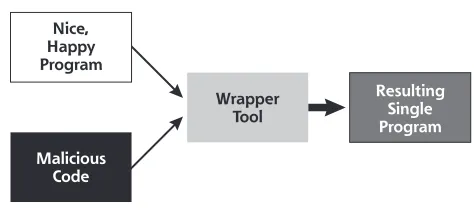
To marry two executables together, an attacker uses a wrapper tool. The computer underground uses several terms to refer to these tools, including wrappers, binders, packers, EXE binders, and EXE joiners. Figure 6.6 illustrates how an attacker uses a wrapper program. In essence, these wrappers allow an attacker to take any executable back-door program and combine it with any legitimate executable, creating a Trojan horse without writing a single line of new code! Even the most inexperienced attacker can easily create Trojan horses using this tech-nique. This is the stuff script kiddie attackers fantasize about.
two living beings, so it just combines the scientist and the fly at their most fundamental level into one very ghastly mutant combination of the two. That’s essentially what wrapper tools do: combine two or more separate programs at a fundamental level into one package.
Wrapper Features
Some wrappers allow for combining two, six, nine, or even an arbitrary number of programs together. Others allow for the addition of static files into the mix. When the wrapper is run, it executes all included pro-grams, and also unloads the bundled static files into the attacker’s cho-sen places on the file system. With such capabilities, these wrappers are actually becoming the functional equivalent of souped-up install shields and Setup programs.
For most of the popular wrapper tools available today, when a combined package file is executed, the malicious program and benign program will each show up as separate running processes in Windows Task Manager or Fport output. The two programs only live together in the file on the hard drive. When a user is duped into running the pack-age, the two wrapped programs become two separate processes. There-fore, to hide the malicious processes, attackers use wrappers together with the deceptive naming schemes we discussed in the last section.
[image:18.612.166.403.132.237.2]Some wrappers go even further by encrypting the malicious code portion of the resulting package, so that antivirus programs on the tar-get system have more difficulty detecting the malicious program. Of course, to make the malicious program run on its target, the wrapper must add a decryption routine to the resulting package. Antivirus pro-grams therefore look for the decryption code added by these popular wrapping tools. Attackers raise the bar by morphing the decryption Figure 6.6
Wrapper programs: Two programs enter and one program leaves with the combined functionality of both input programs.
Nice, Happy Program
Wrapper Tool
Resulting Single Program Malicious
Wrap Stars 269
code so that it dynamically alters itself to evade detection, using poly-morphic coding techniques, as we discussed in Chapter 2.
The computer underground has released dozens of wrapper pro-grams available for free download from the Internet. Table 6.4 shows some of the most popular and powerful wrapper programs available today. To analyze these and other wrapper tools in more detail, you can check out
www.tlsecurity.net/exebinder.htm, a comprehensive Web site devoted to the fine art of wrappers. It’s important to note that not all of these programs are inherently evil. They also have a variety of entirely legitimate uses for pack-aging and distributing useful software, not just Trojan horses.
Table 6.4
Popular Wrapper Tools
Wrapper
Tool Name Function of Wrapper Tool
AFX File Lace This wrapper encrypts an executable and appends it to the end of another, unencrypted executable.
EliteWrap This program is the premier wrapper tool, with gobs of features, including: • The ability to bind together an unlimited number of executables. • A function to start programs in a specified order, with each program
waiting for the other programs ahead of it to finish running before executing itself.
• Built-in integrity checks to make sure the package hasn’t been altered.
Exe2vbs This tool converts executable programs (in EXE format) into Visual Basic Scripts (VBSs or VBScripts). By packing the EXE inside of a VBScript, the attacker might be able to transmit a Trojan horse through e-mail filtering programs that block standard EXEs, but allow VBScripts to pass through.
PE Bundle This program bundles together an executable with all the DLLs required by that executable to run. With this combined package, the malicious software will be able to run on the target system even if some critical DLLs are not installed there.
Perl2Exe Using this tool, a developer can create standalone programs originally written in the Perl scripting language that do not require a Perl interpreter to run. Also, the original Perl code isn’t included inside the resulting executable, making reverse engineering the functionality of the executable code significantly more difficult than simply analyzing more easily
Wrapper Defenses
To defend your systems against attacks involving Trojan horses created with wrappers, antivirus tools are really your best bet. By detecting the malicious code wrapped into a combination package and preventing its installation, antivirus tools stop the vast majority of these problems. Fol-lowing the antivirus recommendations we discussed in Chapter 2 goes a long way in dealing with this problem.
Trojaning Software Distribution Sites
The woman said, “The serpent deceived me, and I ate.”
—Genesis 3:13
So, we’ve seen how attackers use name trickery and wrapper programs to create and disguise their backdoors. Now, let’s discuss a far nastier Trojan horse technique that is greatly increasing in popularity: Trojan-ing software distribution sites. IncreasTrojan-ingly, some attackers are aimTrojan-ing beyond the individual software loaded on your system, and going upstream by attacking the Internet sites used to distribute software. What better way could there be to get widespread dispersal of malicious code than to put a Trojan horse version of a popular program on a Web site used by millions of people around the world? Everyone who down-loads and installs the tool would be impacted by such a Trojan horse.
Saran Wrap This easy-to-use GUI-based wrapper combines two executables together.
TOPV4 This so-called Teflon Oil Patch program combines up to nine executables together and sports a simple GUI.
Trojan Man This wrapper combines two programs, and also can encrypt the resulting package in an attempt to foil antivirus programs.
Table 6.4
Popular Wrapper Tools (Continued)
Wrapper
Trojaning Software Distribution Sites 271
Trojaning Software Distribution the Old-Fashioned Way
There is an admittedly lower tech precedent to this trend. Over the last two decades, attackers would sometimes send software updates contain-ing malicious code via the snail-mail postal service. A package would arrive containing a tape or CD of supposedly crucial software updates, claiming to be from a legitimate vendor. Some administrators and users would fall for the trick, and blindly load the software onto their systems. Bingo! The attacker’s backdoor would be loaded onto the system by the administrators or users themselves. Of course, such an attack could con-stitute mail fraud, a felony in some countries.
Sending Trojan horse updates with backdoors via the postal ser-vice still works today. If several administrators in your organization received an official-looking package claiming to be from Microsoft Cor-poration, Sun Microsystems, or even Ed’s Linux Software and Chop Suey Take Out Service, would they install it? Similarly, what would happen if some of your telecommuters received a CD in the mail at home with a note on company letterhead describing an important update? Unfortunately, in most organizations, at least some administra-tors and users would install the package without a second thought. All it takes is one mistake for the attacker to get a foothold in the organiza-tion. Of course, if any users start asking questions about the mysterious new package that arrived in the mail, the attacker’s subterfuge should be quickly detected.
Popular New Trend: Going after Web Sites
• Monkey.org: In May 2002, someone broke into the Web site that distributes the popular security and hacking tools written by Dug Song. Attackers modified the Dsniff sniffing program, as well as the Fragroute and Fragrouter IDS evasion tools distributed through Monkey.org. The attacker replaced each tool with a Tro-jan horse version that created a backdoor on the systems of any-one who downloaded and installed these tools. This attack was especially insidious, considering the widespread use of these tools by security professionals and computer attackers alike. • Openssh.org: From July 30 to August 1, 2002, an attacker loaded
a Trojan horse version of the Open Secure Shell (OpenSSH) security tool onto the main OpenSSH distribution Web site. OpenSSH is widely used to provide rock-solid security for remote access to a system. However, diligent administrators who tried to protect their systems by downloading this security tool in late July 2002 unwittingly installed a backdoor. Sadly, this tool often utilized to protect systems against attack included its own backdoor for this short period of time.
• Sendmail.org: This one is just plain evil. From September 28 until October 6, 2002, a period of more than one week, the distribution point for the most popular e-mail server software on the Internet was subverted. The main FTP server that distributes the free, open-source Sendmail program was Trojanized with a nasty backdoor. • Tcpdump.org: From November 11 to 13, 2002, tcpdump, the
pop-ular sniffing program, and libpcap, its library of packet capture routines, were replaced with a Trojan horse backdoor on the main tcpdump Web site. Not only is the tcpdump sniffer widely used by security, network, and system administrators around the world, but the libpcap (pronounced using the elegant term
lib-pee-cap, which is short for “library for packet capture”) com-ponent is a building block for numerous other tools. Administra-tors who installed tcpdump, libpcap, or any other package built on top of libpcap during this time frame were faced with a back-door running on their systems.
Trojaning Software Distribution Sites 273
associated with each tool so that it created a backdoor listener on the machine where the program was configured and compiled. In these cases, the compiled binary executable itself wasn’t altered; the installa-tion program was modified to include the backdoor. The great similari-ties in each of these attacks could indicate that a single perpetrator committed all of these dastardly deeds, or the actions could merely have been copycat crimes.
The Tcpdump and Libpcap Trojan Horse Backdoor
To understand the nature of the Trojan horses bundled with these pro-grams, let’s look at the functionality of the malicious code included in the tcpdump and libpcap distribution during that fateful week in November 2002. This Trojan horse was similar to the one used in the Monkey.org, Sendmail, and OpenSSH attacks, so analyzing it will help us better understand this whole class of attacks.To install an up-to-date version of tcpdump, an administrator typi-cally downloads the latest package from the tcpdump Web site. This package includes a script called “configure” that analyzes the system used to compile the tool, typically an administrator’s machine. The configure script verifies that certain required compiler options, libraries, and other programs needed for building tcpdump are included on the system. The script then devises a plan for compiling the software on that particular machine. After configure runs, the administrator can compile the tool.
However, the version of the configure script distributed with tcp-dump and libpcap included a nasty yet invisible surprise. The whole process is illustrated in Figure 6.7, starting with the download of the Trojan horse version of the installation package in step 1. The adminis-trator runs the configure script in step 2. While the configure script checks the system configuration as expected, it also attempts to connect to a Web server operated by the attacker to grab a copy of another script, named “services,” shown in step 3. With a simple name like ser-vices, it sounds pretty innocuous, huh?
the attacker can just sit back and wait for a new set of victims to inad-vertently install the updated functionality of the backdoor. After down-loading the services script, the configure script executes it. In step 4, the services script, in turn, creates a small amount of C code for a backdoor, which it compiles and executes.
This little compiled C program is really a simple backdoor, which starts running in step 5. The backdoor then makes a connection across the network to the attacker’s own machine. In step 6, the backdoor polls the attacker’s system on TCP port 1963 to retrieve a single character indicating what the backdoor should do. This request for a command is sent every few minutes. The backdoor responds to three possible con-trol characters:
[image:24.612.88.502.126.425.2]• The A character indicates that the backdoor program should stop running.
Figure 6.7
The tcpdump and libpcap Trojan horse backdoor. Attacker’s Web Server
Victim’s System
Attacker types commands here for execution on victim’s machine. Admin downloads
Trojan horse version of tcpdump and/or
libpcap package.
If D character, run shell and shovel
input to attacker
Poll for control character, A, D, or M on TCP port 1963
Shovel shell across network Download
and Run
1 3
Generate, compile, and execute
4
tcpdump install package
configure script
services
script C program
backdoor
shell 2
5
6
Trojaning Software Distribution Sites 275
• The D character tells the backdoor program to create a shell and shovel this shell to the attacker. It uses the same shell-shov-eling technique we discussed in Chapter 5. The attacker can then type any commands into the shell for execution on the vic-tim machine, shown in step 7. If tcpdump or libpcap was installed by an administrator, these commands would run with root privileges. Otherwise, the commands would still run, but with the privileges of a more limited account. Of course, most people who compile and install tcpdump or libpcap do so with root permissions.
• The M character tells the backdoor tool to sleep for one hour, and then poll for another control character.
After the attacker finishes executing commands on the victim, the shell is terminated and the backdoor’s polling for A, D, or M com-mands continues. At a later time, the attacker can fire up the shell shov-eler again, and access the system.
There are a couple of interesting little twists in this Trojan horse backdoor. First, look at those control characters: A-D-M. A rather famous group of hackers calls itself the ADM Crew, known for writing some seriously powerful computer attack tools. Is this a mere coinci-dence? That’s highly doubtful, as the odds that someone would ran-domly select control characters of A, D, and M are very slim. Did ADM perpetrate the attack, or was someone trying to frame them? At the time of this writing, the information security community at large just doesn’t know the answers to these questions. Given the secrecy in certain quar-ters of the computer underground, we might never know the full truth.
Unfortunately, this trend of Trojanizing software distribution Web sites didn’t end with the Trojan horse version of tcpdump. Attackers are certainly setting their sights on even larger prey. I’m sure they are con-stantly scanning large-scale software distribution sites, such as Microsoft’s own Windows Update servers, various Linux software dis-tribution sites, and other popular software depots to find flaws and upload their malicious wares. On the plus side, these sites are usually quite carefully secured, and software vendors such as Microsoft are increasingly using digital signatures to ensure the integrity of their patches. On the negative side, a single error in any of these schemes could lead to Trojan horse backdoors installed on millions of systems. That’s not a happy thought.
Defenses against Trojan Software Distribution
Defenses against this type of attack fall into three categories: user aware-ness, administrator integrity checks, and carefully testing new software. First, you and your organization must be aware of the threat. Without fundamental knowledge of what you’re up against, you’re guaranteed to lose. Your policies must clearly state that users are strictly forbidden from installing unauthorized programs on your organization’s systems. Users should not install any unexpected software updates that arrive in the mail, no matter how “official” they appear to be. I don’t care if the package included the company logo; it should never be installed. If any updates do arrive, they should immediately be forwarded to the secu-rity team. If you need to update users’ systems, you should have a for-malized plan announcing how you’ll be distributing software to them. This plan should be included in user awareness materials.
rap-Trojaning Software Distribution Sites 277
idly tune out any dialogue they don’t understand or care about, but if it has cool balloons and cartoons, they just might listen.
Another important area for defending against these attacks involves administrative procedures for checking the integrity of the packages you download. Whenever I upgrade a software tool across the Internet, I always download copies from at least three different mirrors. I then verify the integrity of the programs using a cryptographically strong hash against each mirror’s copy to make sure they all match. You can create an MD5 hash, kind of like a digital fingerprint, for any file using the great md5sum program included in most Linux distributions. On Windows, you can use the free md5summer program written by Luke Pascoe, available at www.md5summer.org. Because MD5 is a one-way hash function, an attacker would find it very, very difficult to create a Trojan horse with the exact same hash as the legitimate program. By difficult, I mean that they would require a supercomputer running for thousands of years to create an evil program that has the exact same hash as your good program. At least, that’s the idea if these one-way algorithms are as good as we hope they are.
A lot of Web sites that distribute software include a file containing the MD5 hash of the latest version on the site itself. However, I’m uncomfortable downloading a program from just a single mirror and checking this single hash from the exact same site. Think about it. If attackers could compromise a single Web site and Trojanize the soft-ware, of course they could alter the file containing the hash on that same Web server. The idea here is that an attacker would have a more difficult time compromising several mirrors of the code, and therefore I’ll be able to catch their treachery by observing different versions on the mirrors. By downloading from multiple mirrors and checking for consistency across them, I get much better odds that the attacker hasn’t compromised them all, and I’ll have an intact program to run. Unfortu-nately, if the mirrors are automatically updated from a single central server, I’d still lose if the bad guy contaminates the code on the main server. I’ve raised the bar some by comparing hashes across multiple mirrors, but the bad guys could still leap over the higher bar.
the package. However, such attacks would be much more difficult, and are therefore far less likely.
Finally, you should always test new tools before rolling them into production. Such a test process not only gives you a chance to detect the malicious software in advance, but it also gives you some precious time for others to discover the problem before you blindly put code into pro-duction. I was working with one bank whose bacon was saved simply because they spend at least one month reviewing any new release of Sendmail before putting it into production. I’d love to tell you that they discovered the Sendmail backdoor while they were looking through the program in their evaluation network. However, they didn’t find it. Still, while they were analyzing the new release to make sure it met corporate functionality requirements, other folks had discovered and publicized the backdoor in October 2002. When the bank heard about the discovery of a backdoor in this version of Sendmail, they yanked it from their test sys-tems and never rolled it into production. The built-in lag of their analysis process certainly helped this organization avoid catastrophe. For critical security patches, rapid deployment is crucial. For simple upgrades or new features, a few weeks lag can actually help improve security.
Poisoning the Source
Most software sucks.
—Jim McCarthy, founder of a software quality training company, as quoted in Technology Review Magazine, July/August, 2002
Poisoning the Source 279
haystack! Any users purchasing the product would then unwittingly be buying a Trojan horse and installing it on their systems. The whole soft-ware product itself becomes the Trojan horse, doing something useful (that’s why you buy or download it), yet masking this backdoor.
Ken Thompson, noted UNIX cocreator and C programming lan-guage guru, discussed the importance of controlling source code and the possibility of planting backdoors in it in his famous 1984 paper titled “Reflections on Trusting Trust.” In that classic paper, Thompson described modifying the source code for a compiler so that it built a backdoor into all code that it compiles [5]. The proposed attack was particularly insidious, as even a brand new compiler that is compiled with a Trojan version of the old compiler would have the backdoor in it, too. This avenue of attack has long been a concern, and is an even big-ger potential problem today.
This concern is even more disturbing than the Trojaning of soft-ware distribution sites that we discussed in the last section. When an attacker Trojanizes a software distribution site, the developers of the software at least have a clean version of the software that they can com-pare against to detect the subterfuge. Backing out problems is relatively easier after discovery, as a clean version of the software can be placed on the Web site for distribution. On the other hand, if an attacker embeds a Trojan horse during the software development process, the vendor might not even have a clean copy. If the attackers are particu-larly clever, they will intertwine a small, inconspicuous backdoor throughout the normal code, making eradication extremely difficult. The software developer would have to scan enormous quantities of code to ensure the integrity of a whole product. The larger the software product, the more difficult detection and eradication become. Let’s ana-lyze why this is so.
Code Complexity Makes Attack Easier
knows about the hole initially. By exploiting that flaw, the developer could control any systems using his or her code.
To get a feel for how easily such an intentional flaw or even a full Trojan horse could squeak past software development quality processes, let’s consider the quality track record of the information technology industry over time. Software quality problems have plagued us for decades. With the introduction of higher density chips, fiber-optic tech-nology, and better hard drives, hardware continues to get more reliable over time. Software, on the other hand, remains stubbornly flawed. Watts Humphrey, a software quality guru and researcher from Carnegie Mellon University, has conducted surveys into the number of errors software developers commonly make when writing code [6]. Various analyses have revealed that, on average, a typical developer acciden-tally introduces between 100 and 150 defects per 1,000 lines of code. These issues are entirely accidental, but a single intentional flaw could be sneaked in as well.
Although many of these errors are simple syntactical problems easily discovered by a compiler, a good deal of the remaining defects often result in gaping security holes. In fact, in essence, a security vul-nerability is really just the very controlled exploitation of a bug to achieve an attacker’s specific goal. If the attacker can make the program fail in a way that benefits the attacker (by crashing the system, yielding access, or displaying confidential information), the attacker wins. Esti-mating very conservatively, if only one in 10 of the defects in software has security implications, that leaves between 10 and 15 security defects per 1,000 lines of code. These numbers just don’t look very heartening.
A complex operating system like Microsoft Windows XP has approximately 45 million lines of code, and this gigantic number is growing as new features and patches are released [7]. Other operating systems and applications have huge amounts of code as well. Doing the multiplication for XP, there might be about 450,000 security defects in Windows XP alone. Even if our back-of-the-envelope calculation is too high by a factor of 100, that could still mean 4,500 security flaws. Ouch! Indeed, the very same day that Windows XP was launched in October 2001, Microsoft released a whopping 18 megabytes of patches for it.
some-Poisoning the Source 281
times feature-laden) programs with tons of security flaws. Throughout the software industry, we see very fertile soil for an attacker to plant a subtle Trojan horse.
Test? What Test?
Despite these security bugs, some folks still think that the testing process employed by developers will save us and find Trojan horses before the tainted products hit the shelves. I used to assuage my concerns with that argument as well. It helped me sleep better at night. But there is another dimension here to keep in mind to destroy your peaceful slumber: Easter eggs. According to The Easter Egg Archive™, an Easter egg is defined as:
Any amusing tidbit that creators hid in their creations. They could be in computer software, movies, music, art, books, or even your watch. There are thousands of them, and they can be quite entertaining, if you know where to look.
Easter eggs are those unanticipated goofy little “features” squir-reled away in your software (or other products) that pop up under very special circumstances. For example, if you run the program while hold-ing down the E, F, and S keys, you might get to see a dorky picture of the program developer. The Easter Egg Archive maintains a master list of these little gems at www.eeggs.com, with more than 2,775 software Eas-ter eggs on record as of this writing.
What do Easter eggs have to do with Trojan horses in software? A lot, in fact. If you think about our definition of a Trojan horse from early in this chapter, an Easter egg is really a form of Trojan horse, albeit a (typically) benign one. However, if software developers can sneak a benign Easter egg past the software testing and quality assurance teams, there’s no doubt in my mind that they could similarly pass a Trojan horse or intentional buffer overflow as well. In fact, the attacker could even put the backdoor inside an Easter egg embedded within the main program. If the testing and quality assurance teams don’t notice the Eas-ter egg or even notice it but let it through, they likely won’t check it for such hidden functionality. To me, the existence of Easter eggs proves quite clearly that a malicious developer or tester could put nasty hidden functionality inside of product code and get it through product release without being noticed.
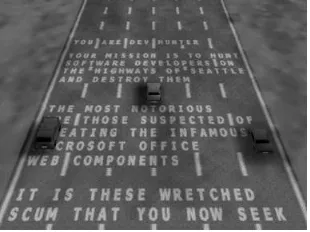
Excel 97, included a flight simulator game. A more recent version, Excel 2000, includes a car-driving game called Dev Hunter, which is shown in Figure 6.8.
For this Easter egg to work, you must have Excel 2000 (pre Service Release 1), Internet Explorer, and DirectX installed on your computer. To activate the Easter egg and play the game, you must do the following:
• Run Excel 2000.
• Under the File menu, select Save as Web Page.
• On the Save interface, select Publish and then click the Add Interactivity box.
• Click Publish to save the resulting HTM page on your drive. • Next, open the HTM page you just created with Internet
Explorer. The blank spreadsheet will appear in the middle of your Internet Explorer browser window.
• Here’s the tricky part. Scroll down to row 2000, and over to col-umn WC.
• Now, select the entirety of row 2000 by clicking on the 2000 number at the left of the row.
• Hit the Tab key to make WC the active column. This column will be white, while the other columns in the row will be darkened. • Hold down Shift+Ctrl+Alt and, at the same time, click the
Microsoft Office logo in the upper left corner of the spreadsheet. • In a second or two, the game will run.
[image:32.612.171.326.137.253.2]• Use the arrow keys to drive and steer and the spacebar to fire. The O key drops oil slicks to confound the other cars. When it gets dark, you can use the H key to turn on your headlights. Figure 6.8
Poisoning the Source 283
If the game isn’t invoked on your system, it is likely because you have Service Release 1 or a later version of Microsoft Excel installed on your machine, which doesn’t include the Easter egg. You could hunt down an earlier version of Microsoft Excel, or just take my word for it.
Now, mind you, this “feature” is in a spreadsheet, an office produc-tivity program. Depending on your mindset, it might be quirky and fun. However, how does such a thing get past the software quality process (which should include code reviews) and testing team? Maybe the qual-ity assurance and testing personnel didn’t notice it. Or, perhaps the quality assurance folks and testers were in cahoots with the developers to see that the game got included into the production release. Either way, I’m concerned with the prospects of a Trojan horse being inserted in a similar way at other vendors.
Again, I’m not picking on just Microsoft here. In fact, Microsoft has gotten better over the past couple of years with respect to these con-cerns. New service packs or hot fixes frequently and quickly squash any Easter eggs included in earlier releases. Microsoft’s Trusted Computing initiative, although often derided, is beginning to bear some fruit as fewer and fewer security vulnerabilities and Easter eggs appear to be coming to market in Microsoft programs. However, I say this with great hesitation, as another huge gaping egg could be discovered any day. Still, underscoring that this is not a Microsoft-only issue, many other software development shops have Easter eggs included in their prod-ucts, including Apple Computer, Norton, Adobe, Quark, the open source Mozilla Web browser, and the Opera browser. The list goes on and on, and is spelled out for the world to see at www.eeggs.com.
The Move Toward International Development
A final area of concern regarding malicious software developers and Trojan horses is associated with code being developed around the world. Software manufacturers are increasingly relying on highly dis-tributed teams around the planet to create code. And why not? From an economic perspective, numerous countries have citizens with top-notch software development skills and much lower labor rates. Although the economics make sense, the Trojan horse security issue looms much larger with this type of software development.
product sits on your hard drive, thousands of hands distributed across the planet could have been involved in developing it. Some of those hands might have planted a nasty backdoor. Worse yet, the same analy-sis applies to the back-end financial systems used by your bank and the database programs housing your medical records. Information security laws and product liability rules vary significantly from country to coun-try, with many nations not having very robust regulations at all.
This concern is not associated with the morality of the developers in various countries. Instead, the concern deals with the level of quality control that can be applied with limited contract and regulatory sup-porting structures. Also, the same economic effects that are driving development to countries with less expensive development personnel could exacerbate the problem. An attacker might be able to bribe a developer making $100 a week or month into putting a backdoor into code for very little money. “Here’s 10 years’ salary … please change two lines of code for me” might be all that it would take. We don’t want to be xenophobic here; international software development is a reality with significant benefits in today’s information technology business. However, we must also recognize that it does increase the security risks of Trojan horses or intentional software flaws.
Defenses against Poisoning the Source
How can you defend yourself from a Trojan horse planted by an employee of your software development house? This is a particularly tough question, as you have little control over the development of the vast majority of the software on your systems. Still, there are things we can all do as a community to improve this situation.
First, you can encourage your commercial vendors to have robust integrity controls and testing regimens for their products. If they don’t, beat them up1 and threaten to use other products. When the market-place starts demanding more secure code, we’ll gradually start inching in that direction. Additionally, if you use a lot of open source software, support that community with your time and effort in understanding software flaws. If you have the skills, help out by reviewing open source code to make sure it is secure.
Next, when you purchase or download new software, test it first to make sure it doesn’t include any obvious Trojan horse capability. Use
Poisoning the Source 285
the software tests we described in Chapter 11 to look for unusual open ports, strange communication across the network, and suspect files on your machine. With a thorough software test and evaluation process in house, you might just find some Trojan horses in your products before anyone else notices them. Communicate this information to the vendor to help resolve the issue.
If your organization develops any code in house, make sure your software testing team is aware of the problems of Easter eggs, Trojan horses, and intentional flaws. Sadly, software testers are often viewed as the very bottom tier of importance in the software development hierar-chy, usually getting little respect, recognition, or pay. Yet, their impor-tance to the security of our products is paramount. Train these folks so that they can quickly spot code that doesn’t look right and report it to appropriate management personnel. Reward your testers when they find major security problems before you ship software. Be careful, though. You don’t want to have testers working with developers to game the sys-tem and plant bugs so they can make more money. That’s like having a lottery where people can print their own winning tickets. Carefully mon-itor any bug reward programs you create for such subterfuge.
Furthermore, ensure that your testers and developers can report security concerns without reprisals from desperate managers trying to meet a strict software deadline. Depending on the size of your organiza-tion and its culture, you might even have to introduce an anonymous tipline for your developers to report such concerns. By giving this much-needed additional attention to your software testers, you can help to squelch problems with Trojan horses as well as improve the overall quality of your products.
Co-opting a Browser: Setiri
You know, attackers don’t have to poison source code to implement a tro-jan. Instead, they can co-opt software already installed on a system. As we saw in the section on deceptive naming, impersonating an Internet browser is a very useful Trojan horse technique, but the issue goes way beyond mere name games. In February 2002, two very bright developers pushed this trend of Trojanizing browsers to the extreme by creating a tool that they later named Setiri. After installing Setiri on a victim machine, a bad guy can remotely control the system, executing arbitrary commands on the victim’s box. In that regard, Setiri is a pretty standard backdoor, like many of the specimens we discussed throughout Chapter 5. However, the tool goes a lot further than most backdoors and Trojan horses in the way that it hides the communication channel with the attacker. These extreme hiding techniques make detecting and blocking the backdoor very challenging, and finding the actual location of the attacker highly difficult.
Setiri represents an extremely stealthy Trojan horse backdoor that works by co-opting the Internet Explorer browser included on most Windows machines. Setiri hasn’t been released to the public yet, thank-fully. However, its authors, Roelof Temmingh and Haroon Meer, have demonstrated their code at a variety of information security and hacker conferences. Others have independently implemented similar ideas, such as the IEEvents.pl tool by Dave Roth at www.roth.net/perl/scripts/ scripts.asp?IEEvents.pl. In fact, the very clever techniques implemented in Setiri are just starting to trickle down into other tools that are being used in real-world attacks.
Setiri Components
Co-opting a Browser: Setiri 287
attacker comes from. Attackers use the connection broker to launder their actual location on the Internet, making them virtually untraceable. The second component of Setiri is the backdoor itself, which is installed on the victim’s computer, shown with a sad face in Figure 6.9. In step 1, the attacker could install this code on the victim machine by tricking a user into running an executable built with a wrapper tool. Alternatively, attackers could install the Setiri backdoor on the victim themselves, given physical access to the machine or through any attack that executes a command on the victim machine, such as a buffer over-flow exploit.
Setiri Communication
[image:37.612.184.506.101.343.2]The attacker accesses the connection broker using a standard browser on the attacker’s machine. All communication occurs via the HTTPS protocol, which encrypts the data in transit across the network. Fur-thermore, the attacker uses an anonymizing Web surfing service, such as the one available at www.anonymizer.com, to strip all information going to the connection broker about where the attacker is located. These anonymizing services hide a Web surfer’s location from Web servers by removing all information associated with the browser, such Figure 6.9
The Setiri Trojan horse browser architecture: This tool represents a new level of Trojan horse stealthiness.
Attacker Connection
Broker
(Any Web server that includes the attacker’s CGI scripts)
Victim Attacker somehow installs the Setiri backdoor on victim machine.
HTTPS HTTPS
HTTPS
HTTPS
Setiri backdoor uses OLE to communicate with the Internet Explorer browser, bypassing a personal
firewall. 1
3
2
Anonymizer Anonymizer
as the source IP address, browser type, and any user profiling informa-tion stored in cookies. Essentially, these services funcinforma-tion as intelligent Web proxies that users surf through to hide their identity and location.
In step 2 of Figure 6.9, the attacker surfs to the connection broker and types commands into HTML forms generated by the CGI scripts on the connection broker machine. These commands will be executed later by the Setiri backdoor. There are only three commands supported by Setiri:
• Upload a file. • Execute a program. • Download a file.
That’s it! Although these commands might seem pretty simple, they really are all an attacker needs to have complete domination of a victim system. With the ability to upload files, an attacker can install a variety of other attack tools on the victim machine, such as the Netcat program we discussed in Chapter 5. The attacker can also execute any local commands on the victim machine and store the results in a file on the victim. Then, by downloading the file, the attacker can get the results of the commands.
Things get really interesting in step 3. To retrieve the attacker’s commands from the connection broker, the Setiri backdoor code uses Microsoft’s Object Linking and Embedding (OLE) technology to inter-act with the Internet Explorer browser on the victim. OLE is a frame-work that lets different objects and applications running on a machine communicate with each other. The Setiri backdoor uses OLE to send messages to Internet Explorer running in an invisible mode, telling the browser to surf to the connection broker and retrieve a command. The Internet Explorer browser supports both visible and invisible window panes on the system’s GUI. Invisible browser windows are a rather dubious function that allows the browser to access information from the Internet using a whole new window without crowding the user’s screen. Some Web applications use these invisible panes to make connections, run scripts, or conduct other activities that don’t need to interact with the user. The Setiri backdoor uses an invisible browser window to poll the connection broker for commands at a periodic interval configured by the attacker, usually every 60 seconds or so. In effect, the backdoor on the victim machine uses Internet Explorer to surf out to the connec-tion broker to pick up the attacker’s commands.