Theses
5-2-2019
Predict Network, Application Performance Using
Machine Learning and Predictive Analytics
Mohamed Elmasry
Follow this and additional works at:https://scholarworks.rit.edu/theses
This Thesis is brought to you for free and open access by RIT Scholar Works. It has been accepted for inclusion in Theses by an authorized administrator of RIT Scholar Works. For more information, please [email protected].
Recommended Citation
Machine Learning and Predictive Analytics
Under Supervision of:
Prof Joseph Nygate, PhD
Submitted By:
Mohamed Elmasry
Thesis submitted in partial fulfillment of requirements of Degree of Master of Science in
Telecommunication Engineering Technology
Department of Electrical, Computer & Telecom Engineering Technology
College of Engineering Technology
Rochester Institute of Technology
Rochester, NY 14623
1 | P a g e
Committee Approval
Joseph Nygate, Ph.D. Date
Associate Professor, Thesis advisor
William P. Johnson, J.D. Date
Graduate Program Director, MS Telecommunications Engineering Technology Program
Mark Indelicato Date
2 | P a g e
Acknowledgments
I would like to express my sincere gratitude to my supervisor Dr. Joseph Nygate, who has
guided me through my coursework then later in my thesis. His valuable advice helped me in
overcoming several obstacles, which was standing in my way to complete my thesis work.
During the past year, I received many constructive feedbacks which assisted me in planning and
carrying out the research work. In addition, his insightful thoughts helped me to set up the
environment in a timely manner. Secondly, I am grateful to Mr. Mahesh Popli and Popli Design
Group for giving me permission to use the company network for collecting performance data
which was essential to my research work. Finally, I would like to thank my parents and friends
3 | P a g e
Table of Content
1. Abstract ... 6
2. Introduction ... 7
2.1 Literature Review ... 8
3. Architecture ... 11
3.1 Diagram ... 11
3.2 The Network Topology ... 12
3.3 Performance Metric Tools ... 13
3.3.1 Performance Monitor Tool ... 14
3.3.2 IPerf ... 16
3.3.3 PowerShell Scripts ... 17
3.3.4 Task Scheduler ... 20
3.3.5 Ku-Tools ... 20
4. Methodology ... 22
4.1 Collecting Data ... 22
4.2 Parsing the Data ... 27
4.3 Generating Graphs... 29
5. Results ... 33
5.1 Top Processes ... 33
5.2 Statistics Analysis ... 35
5.3 Decision Trees and Regression ... 40
6. Discussion ... 43
6.1 Limitation ... 45
6.2 Recommendation ... 45
7. Summary and Conclusion ... 46
4 | P a g e
Table of Figure
Figure 1: Architecture Diagram ... 11
Figure 2: Network Topology ... 12
Figure 3: Performance metric per extraction point ... 13
Figure 4: Performance Monitor Tool ... 15
Figure 5: Data Collector Set ... 15
Figure 6: Performance Monitor Output File ... 16
Figure 7: PowerShell Version ... 18
Figure 8: Ping Script ... 18
Figure 9: Top Process ... 19
Figure 10: IPerf Script ... 19
Figure 11: Task Scheduler ... 20
Figure 12: KU-Tools ... 21
Figure 13: Performance Monitor Scheduled Task ... 23
Figure 14: Task Trigger ... 24
Figure 15: Task Scheduler Action ... 25
Figure 16: Scheduled Task... 25
Figure 17: Ping Script Output ... 26
Figure 18: Top Processes Output ... 26
Figure 19: IPerf Script Output ... 27
Figure 20: Python Correlation Coefficient Code ... 28
Figure 21: Statistical Analysis describe method ... 29
Figure 22: Top Processes Python Code ... 29
Figure 23: Most Frequent Processes ... 30
Figure 24: Data Analysis Visualization ... 30
Figure 25: Decision Tree Python Code ... 31
Figure 26: Decision Tree Graph ... 32
Figure 27: Total CPU Time per Process ... 35
Figure 28: Measuring Decision Learning Model Accuracy ... 40
Figure 29: Decision Tree with seven Performance metrics ... 41
Figure 30: Decision Tree Rules ... 41
5 | P a g e
Tables of Tables
Table 1: Database Table... 12
Table 2: Network and Application Performance Metrics Per Tool ... 13
Table 3: Metrics Definition Table... 14
Table 4: IPerf Command Line Option ... 17
Table 5: Performance Monitor Output ... 23
Table 6: incorrect calculation for CPU Time Usage ... 34
Table 7: Correction calculation for CPU Time usage ... 34
Table 8: describe method output ... 36
Table 9: Resource Consumption summation ... 37
Table 10: Pearson Correlation Coefficient ... 38
Table 11: Spearman Correlation Coefficient ... 39
6 | P a g e
1.
Abstract
In this thesis, a study is performed to find the effect of applications on resource consumption
in computer networks and how to make use of available technologies such as predictive analytics,
machine learning and business intelligence to predict if an application can degrade the network
performance or consume computer system resources. In recent years, having a healthy computer
system and the network is essential for continuity of business. The study focusses on analyzing the
performance metrics collected from real networks using scripts and available programs created
specifically for monitoring applications and network in real-time.
This work has significant importance because monitoring real-time performance doesn’t give
accurate or concise information about the reasons behind any degradation in network or application
performance. On the other hand, analyzing those performance metrics over a certain period and
find a correlation between metrics and applications gives much more relevant information about
the root cause of problems.
The findings proved that there is a correlation between certain performance metrics, besides
correlation found between metrics and applications which conclude the study objectives. The
benefits of this study could be seen in analyzing complex networks where there is uncertainty in
7 | P a g e
2.
Introduction
Nowadays, Computer Networks are more complex than before, the number of applications
that runs on Clients/Servers increasing leading to a resources management problem. The IT
professionals tasked with maintaining the computer network facing serious challenges in
determining which applications consume computer resources or degrade network performance.
Analyze the performance metrics collected from Clients/Servers using traditional methods is not
enough anymore to make a correct decision whether an application consumes computer and
network resources. The improvement of the network performance is not an easy task, even with
network bandwidth upgrade might not be an optimal solution to solve the problem of high
network utilization.
In this thesis will make use of machine learning and business intelligence and data analytics
to compare and show the benefits of using those techniques in analyzing network performance
metrics. Through collecting performance metrics from a real computer network. A constructed
database combine performance metrics will be further analyzed to find pattern and correlation to
give a better understanding of the application and network performance. The database will be
used to applying machine learning algorithms to predict future performance under certain
conditions. The implementation of those techniques in the future will cut the cost of running a
network and reduce investigation time whenever a problem occurs and make IT professional life
8 | P a g e
2.1 Literature Review
The predictive data analytics and machine learning evolution changed the world. The
applications are endless to apply those techniques to various aspects of life. Computer
networking can utilize predictive analytics and machine learning to monitor network
performance and further predict its performance [1]. The predictive analysis utilizes the
data-mining tools to make a prediction and provide a recommendation based on historical data [2].
The predictive analytics models can perform the statistical and analytics analysis on
diverse types of data. The data collected require preprocessing before applying predictive
analysis methods such as machine learning algorithms. The raw data is processed and
transformed into a format which is suitable for the future operation machine learning analysis or
business intelligence techniques.
The processed data used as input to the machine learning models to produce the required
prediction. The raw data is obtained by using data mining techniques. Data Mining is the
extraction of obscure or hidden predictive information next searching for a pattern using
techniques of statistical and pattern recognition such as decision trees and neural networks [2].
The data is divided into predictors and variables that are used to create a predictive model. The
study performed by using data mining to extract and find a hidden pattern from data collected in
a real computer network.
Machine learning algorithms such as decision trees are used to perform analysis on
network performance metrics after being divided into predictors and response variables [2].
Moreover, the data are analyzed using statistical techniques on the same network performance
metrics to compare the results of both techniques. The predictive analytics combines several
9 | P a g e
By using this approach, we combine several techniques stretched from statistics to
machine learning and data mining [3]. The data forecasting carried out by knowing the entire
elements of the decisions and using the decision models to find the relationship between those
elements [2]. The development of machine learning algorithms makes it easy to be used in
networking domain [1].
Machine learning algorithms can tackle problems in networking domains, create
unlimited potentials and unforeseen benefits in the next few decades. Classification and
prediction in machine learning can solve networking problems in network performance and
security. Those problems were very hard to deal with because of the complexity of networks.
The application of a machine learning in a typical network problem go through steps. The
first step identifying the problem type that requires attention (prediction, regression or decision
making). The second step collects unbiased data from network and applications that comprise
application performance logs, network metrics, etc. The third step is performed analysis on the
data being collected from preprocessing to feature extraction [1]. The fourth step is model
construction that’s basically a learning model or algorithm require training using data [1]. Step
five is model validation which involves accuracy testing and verifies if the model is overfitting.
The last step called deployment and inference because the implementation phase requires
10 | P a g e
Learning depends on data availability and accuracy. The real-time responses from a
learning model require having a huge amount of historical data and a very complex learning
model. In the study, the learning model doesn’t provide real-time responses, but it can analyze
historical data when it is presented [1]. The learning model able to predict the applications which
consume computer resources such as CPU utilization. The goal is to improve the network and
11 | P a g e
3.
Architecture
The Architecture shows an overview of the entire experiment and the testbed environment
created to prove the thesis statement.
3.1 Diagram
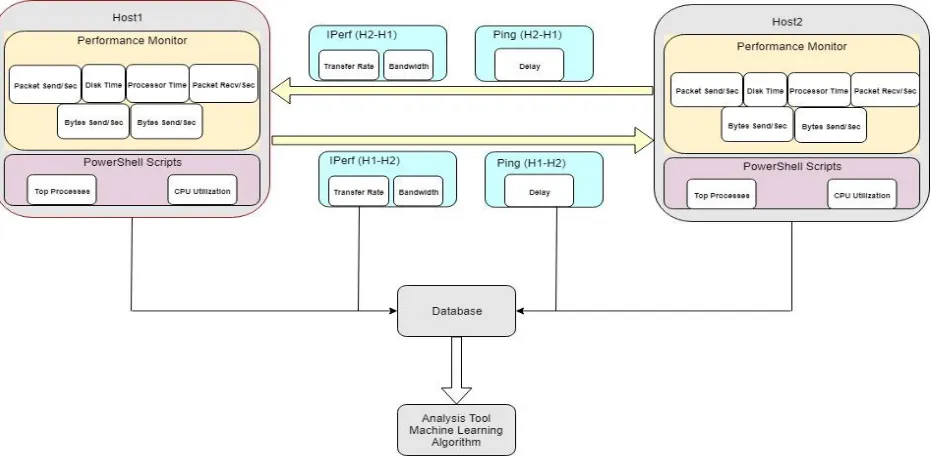
The following diagram represents the network topology and name of tools used to collect
the data from client/server as well as communication links. The diagram illustrates the flow of
data between client/server and PowerShell scripts created to retrieve application metrics and
CPU utilization from client/server. In addition, it shows the commands run on client/server that
is used to test communication links between them. Every monitoring tool, PowerShell script, and
command runs on the client/server produce an output file (raw data). Those files require
preprocessing to transform data into a suitable format to apply data analytics techniques and
[image:13.612.75.541.432.664.2]machine learning algorithm.
12 | P a g e
3.2 The Network Topology
The below figure represents the network topology and shows how the two hosts are
connected and can reach each other.
• The network topology is a hub and spoke • Host1 located in the main office
• Host2 located in one of the remote branches
[image:14.612.72.539.261.409.2]• Remote offices are connected through a VPN Tunnels or Leased Line connection.
Figure 2: Network Topology
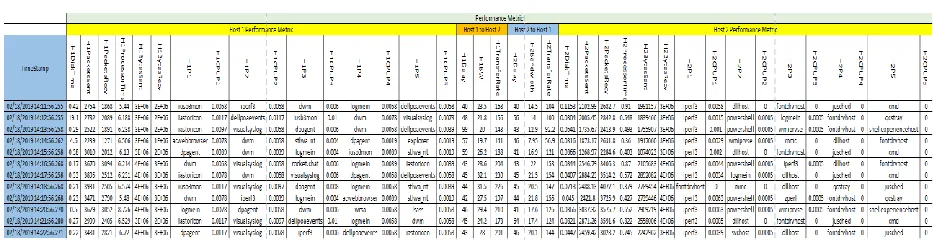
The following table represents the database that was created from processing the output
files from PowerShell scripts, Performance monitor, IPerf network testing tool and commands
run on Client/Server.
[image:14.612.70.538.550.671.2]13 | P a g e
3.3 Performance Metric Tools
The network and application performance is measured through several performance
metrics such as Bandwidth, Throughput, Disk time, CPU Utilization, number of packets send/Recv
per sec, and number of bytes send/Recv per send.
The testbed used in the implementation has several tools to collect network and application
metrics. The metrics collected on both hosts and the communication links between two hosts.
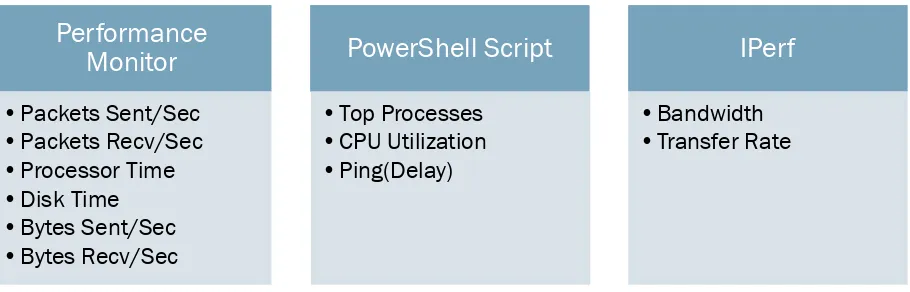
[image:15.612.79.534.324.470.2]The below tables show the performance metrics categorized by the tool used:
Table 2: Network and Application Performance Metrics Per Tool
The below figure shows performance metrics categorized by the metric extraction point:
Performance
Monitor
•Packets Sent/Sec
•Packets Recv/Sec
•Processor Time
•Disk Time
•Bytes Sent/Sec
•Bytes Recv/Sec
PowerShell Script
•Top Processes
•CPU Utilization
•Ping(Delay)
IPerf
•Bandwidth
•Transfer Rate
Figure 3: Performance metric per extraction point
Performance Metrics
Host Metrics
Packet
Sent/Sec Recv/SecPacket Disk Time Processor TIme UtilizationCPU ProcessesTop Sent/SecBytes Recv/secBytes
Communication Link Metrics
Delay
[image:15.612.89.507.503.635.2]14 | P a g e
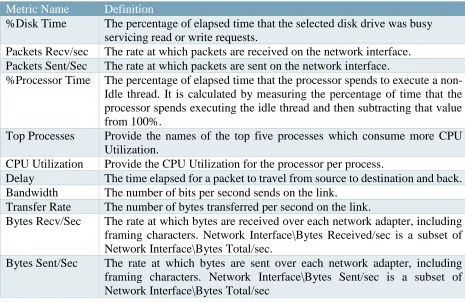
[image:16.612.72.537.114.416.2]The table below shows network and application performance metrics definitions:
Table 3: Metrics Definition Table
Metric Name Definition
%Disk Time The percentage of elapsed time that the selected disk drive was busy servicing read or write requests.
Packets Recv/sec The rate at which packets are received on the network interface. Packets Sent/Sec The rate at which packets are sent on the network interface.
%Processor Time The percentage of elapsed time that the processor spends to execute a non-Idle thread. It is calculated by measuring the percentage of time that the processor spends executing the idle thread and then subtracting that value from 100%.
Top Processes Provide the names of the top five processes which consume more CPU Utilization.
CPU Utilization Provide the CPU Utilization for the processor per process.
Delay The time elapsed for a packet to travel from source to destination and back. Bandwidth The number of bits per second sends on the link.
Transfer Rate The number of bytes transferred per second on the link.
Bytes Recv/Sec The rate at which bytes are received over each network adapter, including framing characters. Network Interface\Bytes Received/sec is a subset of Network Interface\Bytes Total/sec.
Bytes Sent/Sec The rate at which bytes are sent over each network adapter, including framing characters. Network Interface\Bytes Sent/sec is a subset of Network Interface\Bytes Total/sec
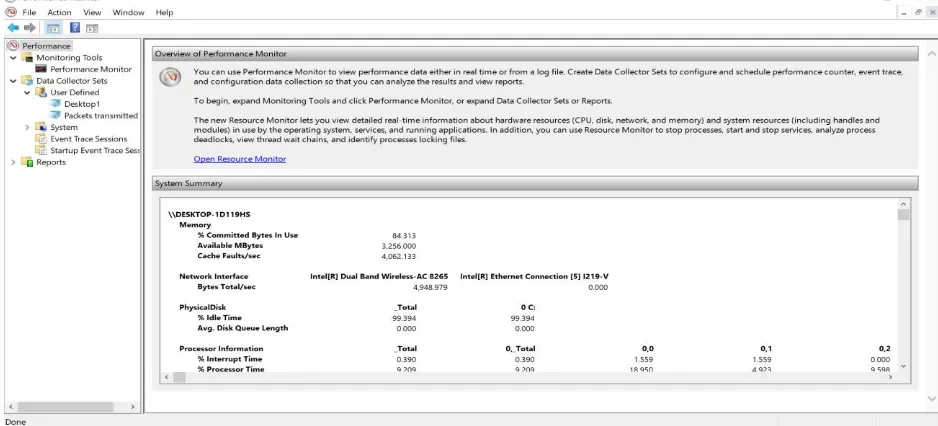
3.3.1 Performance Monitor Tool
Performance Monitor Tool used to view performance data in real-time or produce logs
files. Performance monitor tool is a built-in tool within Windows and doesn’t require any
installation. The requirement to obtain performance metric data is to configure a data collector
set. The output of the data collector is configured to produce a Comma Separated file that will be
used in further analysis. Creating a data collector set and configure it through adding specific
metrics require collecting. The study focuses on collecting metrics related to applications and
15 | P a g e
Figure 4: Performance Monitor Tool
Metrics added on data collector set
• Packets Recv/sec • Packets sent/sec • Bytes Recv/sec • Bytes Sent/sec • Processor Time • Disk Time
[image:17.612.300.529.349.591.2]16 | P a g e
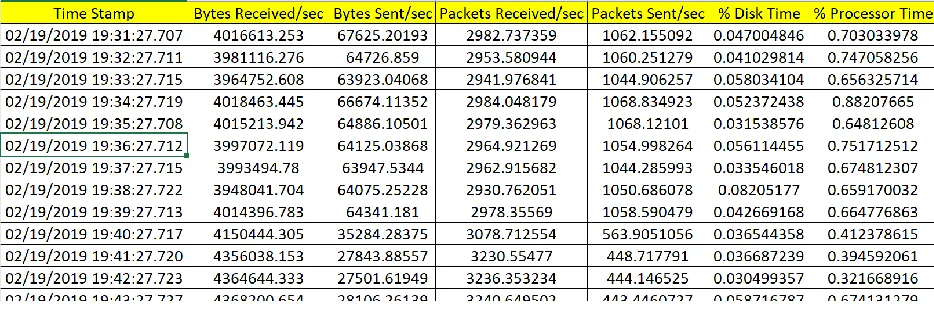
[image:18.612.72.539.102.257.2]The below Figure show the output log file from Performance Monitor Tool:
Figure 6: Performance Monitor Output File
3.3.2 IPerf
It is a tool used to test network bandwidth and provide measurement [4], IPerf can
generate TCP/UDP traffic. IPerf uses a client/server model. It's compatible with several
platforms from Windows/Linux. IPerf has built-in features to customize the testing process and
dump the output into CSV files for further analysis. The IPerf support different protocols (TCP,
UDP, SCTP with IPv4 or IPV6). IPerf reports two important network performances metrics
(Transfer Rate, Bandwidth). IPerf version used on the testbed and the real environment is version
iperf-3.1.3. IPerf command can make use of any of the following programs to run its commands
17 | P a g e
[image:19.612.69.545.137.383.2]The below table explains option features which can be used to customize the testing command:
Table 4: IPerf Command Line Option
Command Line Option Description
-p, --port n The server port for the server to listen on and the client to connect
to. This should be the same in both client and server. The default is
5201.
-i, --interval n Sets the interval time in seconds between periodic bandwidth, jitter,
and loss reports.
-V, --verbose Give a more detailed output.
--logfile Send output to a log file.
-s, --server Run IPerf in server mode (This will only allow one IPerf
connection at a time).
-c, --client host Run IPerf in client mode, connecting to an IPerf server running on
the host.
-t, --time n The time in seconds to transmit for.
3.3.3 PowerShell Scripts
The PowerShell is a command-line task-based framework and scripting language from
Microsoft. For any System Administrator, it is a powerful tool that can be used to perform
different kinds of operation on any supported Windows platform, macOS and Linux. It used to
18 | P a g e
Figure 8: Ping Script
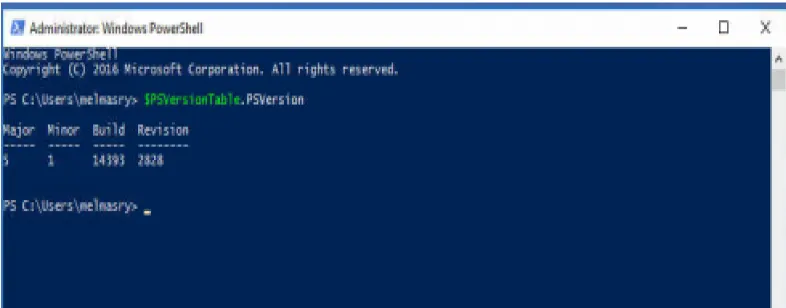
version 6 is independent of Windows, free and open source [5]. The PowerShell version utilized
[image:20.612.108.501.134.288.2]in this research is version 5.1
Figure 7: PowerShell Version
The PowerShell is used in this research to develop scripts that automate the extraction of
network and application performance metrics from clients and servers running Windows
Platform. The developed script used to automate the running of IPerf network testing tool, collect
top processes which are utilizing CPU and ping command to test the delay on the network
between server and client.
The below figure shows the Ping script:
Test-Connection 10.5.1.229 -delay 60 -count 720 | Format-list @{n='TimeStamp';e={Get-Date}},__SERVER, Address,IPV4Address,ResponseTime | out-file
19 | P a g e
Figure 9: Top Process
The below figure shows Top-Processes script:
The below figure shows the IPerf script:
Figure 10: IPerf Script
function TopProcess { Param ( [Parameter(Position=1)] [Alias("l")] [int]$TotalList=5, [Parameter(Position=2)] [Alias("r")] [int]$Invertal=60 ) Begin {} Process { While ($true) {
$CounterSamples = Get-Counter '\Process(*)\ID Process','\Process(*)\% Processor Time','\Process(*)\Working Set' | Select-Object -Expand CounterSamples
Clear-Host
$CounterSamples | Group-Object { Split-Path $_.Path } | Where-Object {$_.Group[1].InstanceName -notmatch "^Idle|_Total|System$"} | Sort-Object -Property {$_.Group[1].CookedValue} -Descending | Select-Object -First $TotalList | Format-Table
@{n='TimeStamp';e={Get-Date}},@{Name="ProcessId";Expression={$_.Group[0].CookedValue}},@{Name="ProcessorUsage";Expression ={[System.Math]::Round($_.Group[1].CookedValue/100/$env:NUMBER_OF_PROCESSORS,4)}},@{Name="Pr ocessName";Expression={$_.Group[1].InstanceName}},@{Name="WorkingSet";Expression={[System.Math]::Ro und($_.Group[2].CookedValue/1MB,4)}}
Sleep -Seconds $Invertal }
} End {} }
TopProcess | Out-File C:\Users\melmasry\Desktop\ThesisWork\Server-Task.txt -Append
cd c:/
cd iperf-3.1.3-win64
20 | P a g e
3.3.4 Task Scheduler
The task scheduler enables the Windows users to automate tasks and run scripts on specific
times and run programs or even sending emails. There are several features to utilize and allow
more control parameters to be adjusted in any scheduled running task. The task scheduler is built
[image:22.612.92.527.235.463.2]in several Windows platforms by default.
Figure 11: Task Scheduler
The main components of task scheduler that were utilized in this research are:
• Task Action • Task Trigger • Repeating A Task
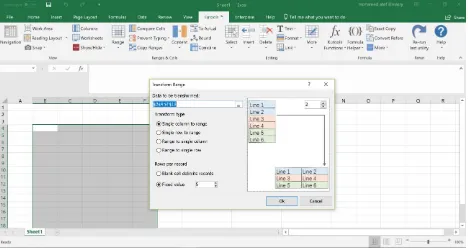
3.3.5 Ku-Tools
It is an add-on used with excel Microsoft, allow advanced functions and operations to be
implemented on excel, CSV files. The function that is used in this research called Transform
21 | P a g e
22 | P a g e
iperf.exe -c 10.5.1.229 -i 60 -t 900 -p 5021 -V --logfile client-iperf.csv
4.
Methodology
The experiment is carried out to find the effects of applications on resource consumption
in computer networks through extracting performance metrics. The data is analyzed using
machine learning and data analytics techniques, also finding any correlation exists between those
metrics. The performance metrics are extracted from the client as well as the server. The client is
accessing files on the server or using installed network applications.
The synchronization between tasks running in this experiment is the most important
factor to have accurate performance metrics which converted into a database. The performance
metrics are measured and extracted using installed independent software, built-in programs
within the Windows Operating Systems.
4.1 Collecting Data
The software used are Performance Monitor, Task Scheduler, PowerShell Scripts, and
IPerf network testing tool. IPerf is introduced into the experiment to test network bandwidth and
transfer rate. This aims at increasing the amount of the data exchanged between the client and the
server. The IPerf tool generates UDP or TCP traffic protocols. In this experiment, only a TCP
traffic is generated by IPerf tool. Windows PowerShell is used to run IPerf commands. A
PowerShell script is created and imported into Task Scheduler and configured to run at a specific
time. The performance metrics are collected every one-minute interval.
23 | P a g e
iperf.exe -c 10.3.1.8 -i 60 -t 900 -p 5021 -V --logfile server-iperf.csv
iperf.exe -s -p 5021
• Command used to initiate traffic from the server to the client (run on the server):
• Command used to allow the client and server to listen to port 5021(run on server and client):
The data collection tasks are required to run exactly at the same time across the client or
servers. The main reason behind this is to take a snapshot from performance metrics on both the
client and server at the same second in time.
The Performance Monitor has a component called schedule. This component is used after
data collector set created and performance metrics were added.
Figure 13: Performance Monitor Scheduled Task
Data collector set is configured to generate a CSV file that is preprocessed and later
analyzed. The below table shows the CSV output file from Performance Monitor.
24 | P a g e
Task Scheduler is used to schedule PowerShell Scripts to start at the exact time. Task
Trigger component is used to perform this operation.
Figure 14: Task Trigger
Task Scheduler component is used Task Action to import PowerShell script to run.
Argument Option is used to locate PowerShell Script
25 | P a g e
Task Scheduler is used to run three different PowerShell scripts scheduled to run at the
same time on both the client and server:
• Task 1: IPerf script
[image:27.612.119.494.71.269.2]• Task 2: Ping command script • Task 3: Top Processes script
Figure 16: Scheduled Task
Each of the script used in task scheduler provides an output file. The output file is
text-based that requires preprocessing before converted into a database. The PowerShell scripts are
designed to provide output accompanied by a time stamp. This time stamp is used to align the
[image:27.612.74.541.350.556.2]output of all PowerShell scripts, Performance Monitor and IPerf Script.
26 | P a g e
The below figures show the output of Ping Command PowerShell script, the PowerShell
script used in this experiment implemented another command is used as a replacement and provide
the same output called Test-Connection:
Figure 17: Ping Script Output
[image:28.612.181.376.174.279.2]The below figure shows the output of Top Processes PowerShell script:
Figure 18: Top Processes Output
27 | P a g e
Figure 19: IPerf Script Output
4.2 Parsing the Data
The output from the PowerShell scripts is pure text files. Those files require processing to
extract the required data. Each text file is imported into Microsoft Excel and using KuTools
an add-in. The transform function among other advanced operations used to extract the
required performance metrics.
A database is constructed from the data extracted from PowerShell script output. The
database columns consist of two sides, one side represents the performance metrics of the
client and the other side the server. Each row in the database represents performance metrics
collected in the one-minute interval. Once the database is created, the analysis phase using
28 | P a g e
Figure 20: Python Correlation Coefficient Code
Python is a powerful programming language that can be used in many different fields to
solve real-world problems. Python has rich libraries that allow the programmers to perform
many actions without having to write long code. In the thesis work, Python programming
language along with a couple of libraries are utilized to analyze the data using machine
learning and data analytics. The Pandas library provides data manipulation and analysis tools.
The Numpy library provides high-level mathematical functions that can work on
multi-dimensional arrays. The scikit-learn library is a free machine learning library provides
classification, regression and clustering algorithms. It's used in this research work for
regression and decision trees. The matplotlib library is a powerful plotting library for Python
that can be incorporated with other libraries such as Pandas and Numpy.
The statistical analysis used to understand the nature of the data being analyzed. It’s a
component of data analytics and related to business intelligent [6]. It is applied to the
database using Python powerful libraries and mathematical functions to identify the trends
and find patterns in structured and semi-structured data. The database is analyzed to find the
correlation coefficient between application and network performance metric. The correlation
coefficient provides us with insights into the cause-effect relationship between performance
metrics. There are three correlation coefficient methods (Pearson, Kendall, Spearman).
Below figure shows an example python code used to calculate the Spearman correlation
coefficient:
import pandas as pd import numpy as np import math as m import statistics
FileServer = pd.read_csv('FileServerMetrics.csv')
29 | P a g e
import pandas as pd import numpy as np
import matplotlib.pyplot as plt %matplotlib inline
import seaborn as sns
Server = pd.read_csv('Server-2.csv')
pd.set_option('display.float_format', lambda x: '%.4f' % x) plt.rcParams["figure.figsize"] = (20,20)
plt.xlabel('occurance') plt.ylabel('process names')
Server.H2P1.value_counts().plot(kind='Barh')
Figure 22: Top Processes Python Code
The statistical analysis is continued to analyze the database by calculating standard
deviation, mean, count, percentile, minimum and maximum values for performance metrics.
The below figure shows the Python code as well as output obtained from using a Python
method called describe()
Figure 21: Statistical Analysis describe method
4.3 Generating Graphs
The database collected is analyzed further to find the trend in applications consumed the
resources in computer networks. One performance metric column “H1CPUP1” represent a top
process that used the CPU for the longest time per minute. Each value represents a process name
of an application installed on the client or server. The frequency of the process name in
“H1CPUP1” is investigated to determine the top applications that utilize the CPU.
The below figure shows the Python code used to find the most occurred top processes:
import pandas as pd import numpy as np import math as m import statistics
30 | P a g e
A graph generated as the output from the above Python code displays the most frequent
[image:32.612.119.495.119.289.2]processes occurred as Top Process:
Figure 23: Most Frequent Processes
The seaborn library provides a toolset to draw graphs, the below graph represents pair plot
for performance metrics to show data analysis visualization of database and how much the data
are scattered.
[image:32.612.173.458.391.686.2]31 | P a g e
The decision tree algorithm covers both regression and classification in machine learning,
this provides a wealth of information about performance metric database. The decision tree
provides a visual representation of the decisions and decision making through classification and
decision tree models. It is considered a data mining tool to enable finding a hidden pattern as
well as a prediction for future values. It revolves around asking the right questions to make better
decisions about which features are more important than others. In this research, the decision trees
illustrate which performance metrics have higher effects on the resource consumption and
performance prediction in the computer network. The performance metrics are divided into
groups predictor and target. The database is also divided into test and train sets into 20-80 or
10-90 split to increase precision.
The below figure shows the part of the code developed to create a decision tree and
[image:33.612.85.522.416.605.2]visualized:
Figure 25: Decision Tree Python Code
Below decision tree figure shows prediction accuracy and classification for determining
future top processes that utilizing computer network resources.
X = df1.drop(columns=['H1P1']) Y = df1['H1P1']
x_train, x_test, y_train, y_test = train_test_split(X,Y,test_size=0.1) model = DecisionTreeClassifier(max_depth=4)
model.fit(x_train,y_train)
predications = model.predict(x_test) score = accuracy_score(y_test, predications) import graphviz
feature_names = list(df1.drop(['H1P1'], axis=1))
dot_data = tree.export_graphviz(model, out_file=None, filled=True, rounded=True, feature_names=feature_names,class_names=Y)
32 | P a g e
Figure 26: Decision Tree Graph
The learning model and the decision tree has been created then the training database is used
to train the model and test database used to verify the prediction of target top processes. The
33 | P a g e
5.
Results
The experiments started by setup a testing environment and scenarios to collect reliable
real-time data from a working network. The testing environment was carried out on a standalone
server. The built-in programs in windows operating system and developed PowerShell scripts
were tested to check their output if it matches what is required to run the experiment and obtain
accurate performance metrics values.
5.1 Top Processes
The first mission was choosing the significant performance metrics that have a high effect on
the application and network performance. The next step was finding a method to obtain values of
those performance metrics. A number of the performance metrics data were obtained using the
built-in programs while others were obtained through developing PowerShell scripts. The main
goal also is to automate this task.
The results obtained were not as expected in the beginning. For example, the CPU Time used
by a single application in one minute was required to determine which applications consume the
computer network resources. The challenge facing this task, the Windows Operating System
gives by default the accumulated time since the process started. A PowerShell script was
developed to perform this task calculates CPU Time used by the application in one minute. The
output was obtained as expected and required for the experiment success.
The two tables below show the difference in the result while trying to extract CPU Time used
34 | P a g e
Table 6: incorrect calculation for CPU Time Usage
Table 7: Correction calculation for CPU Time usage
The delay is an essential metric to characterize the network performance, it provides an
indication on the congestion of the network due to traffic utilized by application communicating
between client and server. The usual command used in most of operating systems is ping
command. The goal is to schedule sending a single ICMP ping packet every minute for a specific
period of time and the result of the delay should be accompanied by a time stamp of ping
initiation.
The first approach is to use the ping command, but it was ineffective in this experiment due
to lack of customization in output. Another approach was using a PowerShell script with a
command called test-connection, this command was appropriate and satisfy the need of this
35 | P a g e
5.2 Statistics Analysis
The data collection phase resulted in creating a performance database using the output from
multiple programs and scripts. The Analysis of this database resulted in an interesting finding.
The analysis included using data analytics techniques as well as applying machine learning
algorithms.
The database included five top processes who utilized the CPU Time in one minute. The first
column represents the number one in the list of top processes. The column was analyzed to
determine which applications are more frequent to appear in this column than others as well as
compare against the total time each process utilized the CPU Time. Using the matplotlib library
[image:37.612.130.482.366.656.2]and describe a method to analyze the top process column.
36 | P a g e
Several applications appeared more than others but other applications who appeared less in
the Top Process column consumed more CPU Time. The result is logical and proves that it is not
about how frequent application usage CPU but for how long each application takes to complete a
certain task. An example, referring to the graph in figure 23 above, the most frequent Top
Processes is “logmein” while the second most frequent Top Processes is “IPerf3”. Examining the
graph in figure 27, we found that the second Top Processes used the CPU Time is svhost process
which contradicts that the second most frequent application appeared as the top process was
“IPerf3”.
Filtering the database to include only the values belong to the most frequent application
appeared as top process and analyze this part of the database. Using statistical methods to
calculate the min, max, mean, standard deviation and quartile provides insights about the data
[image:38.612.101.511.436.672.2]distribution in each column. describe() method is used to provide this output.
Table 8: describe method output
mean std min 25% 50% 75% max SD/mean
H1DiskTime 0.6968 1.6632 0.0045 0.0323 0.0634 0.5982 15.4442 2.386911596
H1PacketsSent 1209.8453 1907.2108 1.2332 2.3332 36.9648 2296.6207 4817.5659 1.576408819
H1PacketsRecv 1163.8365 1834.906 1.8493 2.9665 49.6131 1822.2873 4619.0421 1.576601181
H1ProcessorTime 1.1159 0.7487 0.1303 0.9023 1.0226 1.1804 8.9249 0.670938256
H1BytesSent 1294659.1 1829841 122.32 5039.789 138766.58 2880897.7 6042295.7 1.413376683
H1BytesRecv 1406656.8 2336037.8 167.4 282.9439 57981.627 1856004.9 19384944 1.660702015
H1CPUP1 0.0038 0.0021 0.0005 0.002 0.0034 0.0049 0.0107 0.552631579
H1CPUP2 0.0008 0.0008 0 0.0005 0.0005 0.001 0.0078 1
H1CPUP3 0.0004 0.0006 0 0 0.0005 0.0005 0.0068 1.5
H1CPUP4 0.0003 0.0005 0 0 0 0.0005 0.0058 1.666666667
H1CPUP5 0.0001 0.0004 0 0 0 0 0.0058 4
H1Delay 34.0239 10.7934 28 30 31 33 166 0.317229947
37 | P a g e
The coefficient of variation (CV) is calculated by dividing the standard deviation over the
mean value. If the value is higher than 1 this means high standard deviation and data points are
tend not to be too close to each other. This is a measure for the spreading in the data points of
performance metrics. The performance metrics with a coefficient of variation larger than 1 refer
to having substantial changes through the data collection period. This allows the understanding
of the nature of the performance metrics and in the future improve the network and application
performance.
Each process consumes a certain amount of resources from CPU Time to how much delay
the network experience due to data exchanged between client and server. The following code
developed to combine the resource’s consumption by each process.
The table shows the output for each process accompanied by the total CPU time, Bandwidth
[image:39.612.209.412.486.724.2]and delays the network experienced:
Table 9: Resource Consumption summation
H1P1 H1CPUP1 H1Delay H1BW acwebbrowser 0.144 798 534
csrss 0.0005 39 12.9 dattobackupagent 0.0029 68 10.5 dellpoaevents 0.3036 1156 746.24
dpagent 0.6462 2739 1789.33 dwm 0.6356 3279 5142.13 explorer 0.09 633 395.6 iastoricon 0.6639 2454 1567.4
iperf3 1.0323 7867 6377.7 iusb3mon 0.6186 2444 1657.17
logmein 2.8228 11482 8493.31 lsass 0.0159 209 156.9 niniteagent 0.2102 90 61.4
platform-agent-core
0.001 60 58.3
38 | P a g e
H1P1 H1CPUP1 H1Delay H1BW
platform- performance-plugin
0.0468 86 62.2
powershell 0.002 243 90.9 rocket.chat 0.0156 86 60.8 saazscheduler 0.0034 78 15.1 svchost 2.1914 1840 1048.26 visualsyslog 0.4127 1438 978
wmiprvse 0.093 455 242.3 wrsa 0.0699 305 213.8
The correlation coefficient provides insights if there is a mutual relationship or association
between quantities. In this research work, it is used to find if there are a cause and effect
relationship between performance metrics and measure the strength as well. The relationship can
be either positive or negative correlation and ranging between +1 and -1. It used to predict one
value from another present value.
Utilizing Python libraries and methods to calculate the correlation coefficient between the
performance metrics. There are several types of correlation coefficient that can be calculated for
the performance metrics. The below table shows the Pearson correlation coefficient between
[image:40.612.207.405.72.221.2]several performance metrics:
Table 10: Pearson Correlation Coefficient
39 | P a g e
The Pearson correlation coefficient was used to calculate the correlation, but the results
showed it was not the best suitable coefficient type. Because it calculates a linear association
between continuous variables. The second correlation coefficient used is the Spearman
correlation coefficient, it is more appropriate for continuous and discrete data. The table below
[image:41.612.78.539.236.403.2]shows the Spearman correlation coefficient for performance metrics:
Table 11: Spearman Correlation Coefficient
H1DiskTime H1PacketsSent H1PacketsRecv H1ProcessorTime H1BytesSent H1BytesRecv H1CPUP1 H1Delay H1BW H1TransferRate
H1DiskTime 1 -0.0945 -0.1498 0.2201 -0.0925 -0.1264 -0.0613 0.1219 -0.1159 -0.1152
H1PacketsSent -0.0945 1 0.9039 0.5941 0.991 0.9061 0.4324 -0.4963 0.4989 0.4971
H1PacketsRecv -0.1498 0.9039 1 0.6045 0.8852 0.8792 0.453 -0.4905 0.4738 0.4689
H1ProcessorTime 0.2201 0.5941 0.6045 1 0.5868 0.5373 0.5459 -0.282 0.331 0.3333
H1BytesSent -0.0925 0.991 0.8852 0.5868 1 0.8705 0.4355 -0.4772 0.5023 0.501
H1BytesRecv -0.1264 0.9061 0.8792 0.5373 0.8705 1 0.4028 -0.5273 0.4975 0.4974
H1CPUP1 -0.0613 0.4324 0.453 0.5459 0.4355 0.4028 1 -0.3558 0.4084 0.4039
H1Delay 0.1219 -0.4963 -0.4905 -0.282 -0.4772 -0.5273 -0.3558 1 -0.4179 -0.4137
H1BW -0.1159 0.4989 0.4738 0.331 0.5023 0.4975 0.4084 -0.4179 1 0.9978
H1TransferRate -0.1152 0.4971 0.4689 0.3333 0.501 0.4974 0.4039 -0.4137 0.9978 1
The Spearman correlation coefficient shows stronger association and relationship between
performance metrics because it looks at the monotonic relationship which is the variables
changes together but not with the constant rate. The third correlation coefficient utilized in this
research is the Kendall correlation coefficient. It is more suitable for a discrete variable.
Table 12:Kendall correlation coefficient
H1DiskTime H1PacketsSent H1PacketsRecv H1ProcessorTime H1BytesSent H1BytesRecv H1CPUP1 H1Delay H1BW H1TransferRate H1DiskTime 1.0000 -0.2402 -0.2076 0.4187 -0.1915 -0.2041 0.3613 0.2623 -0.1292 -0.1179
H1PacketsSent -0.2402 1.0000 0.6667 -0.2406 0.8688 0.5422 -0.1742 -0.3472 0.2858 0.2931
H1PacketsRecv -0.2076 0.6667 1.0000 -0.2278 0.5411 0.7769 -0.1735 -0.4033 0.2833 0.2870
H1ProcessorTime 0.4187 -0.2406 -0.2278 1.0000 -0.1840 -0.1829 0.5124 0.2377 -0.0608 -0.0763
H1BytesSent -0.1915 0.8688 0.5411 -0.1840 1.0000 0.4142 -0.1284 -0.2793 0.2759 0.2828
H1BytesRecv -0.2041 0.5422 0.7769 -0.1829 0.4142 1.0000 -0.1685 -0.3929 0.3220 0.3128
H1CPUP1 0.3613 -0.1742 -0.1735 0.5124 -0.1284 -0.1685 1.0000 0.2335 -0.0586 -0.0530
H1Delay 0.2623 -0.3472 -0.4033 0.2377 -0.2793 -0.3929 0.2335 1.0000 -0.2706 -0.2816
H1BW -0.1292 0.2858 0.2833 -0.0608 0.2759 0.3220 -0.0586 -0.2706 1.0000 0.9628
H1TransferRate -0.1179 0.2931 0.2870 -0.0763 0.2828 0.3128 -0.0530 -0.2816 0.9628
The Kendall correlation coefficient showed less association than the Spearman coefficient.
[image:41.612.72.542.572.643.2]40 | P a g e
5.3 Decision Trees and Regression
The decision tree is basically a binary tree flowchart used to split the data into groups,
extremely helpful in classification and regression. The split is made according to certain
conditions or question aiming at categorizes the data with similar attributes to highlight hidden
information exist in data. In this research, decision trees are utilized to map and classify the
performance metrics to predictors and target. The decision tree algorithm used is a classification
and regression decision tree. Gini index value ranges from 0 (all target values belong to one
label) to a maximum value of 1(all target values are distributed equally). From Navigating the
decision tree, the applications that properly consume the resources in computer networks can be
predicted. The learning model accuracy was measured and provided accuracy between 70-80
percent. The below code shows the code and output for measuring the accuracy of the learning
model.
Figure 28: Measuring Decision Learning Model Accuracy
Dataset split into train and test, the highest accuracy achieved in splitting the dataset to 90%
train and 10% test. The results could be improved more with a larger dataset. Also, the maximum
41 | P a g e
The decision tree is taking the decision of splitting data based on rules, the figure 29 shows a
decision tree included the following performance metrics (H1BytesSent, H1BytesRecv,
[image:43.612.82.541.153.263.2]H1DiskTime, H1ProcessorTime, H1PacketsSent, H1PacketsRecv, H1P1).
Figure 29: Decision Tree with seven Performance metrics
The below figure shows the rules created to generate the decision tree above:
Figure 30: Decision Tree Rules
Previously, the decision tree learning model was measured and it was expected to provide
accuracy from 70-80 %. The test dataset used as input to the learning model after using the train
dataset. A code was developed to compare between predicted output and the actual output of test
[image:43.612.179.415.335.505.2]42 | P a g e
The output can be seen below, using a simple calculation to calculate the accuracy of the
output in percentage:
Figure 31: Decision Tree Accuracy Calculation
The calculation shows the accuracy is 77.95% that falls within the range of predicted value.
from pandas import DataFrame predict = model.predict(x_test)
43 | P a g e
6.
Discussion
The usage of machine learning and data analytics in computer networking has huge
potentials. In the thesis work, specific machine learning algorithm and data analytics techniques
were explored to find the benefits of applying those techniques and algorithm on a real-life
problem. In this case, the goal was to predict the application and network performance.
The work started by navigating and analyze a database constructed from collecting
performance metrics. The performance metrics were extracted from a real computer network.
The work started by using data analytics techniques. The statistical analysis put some lights on
hidden information unseen to the ordinary person. The nature of performance metrics become
easier to understand through the statistics and numbers.
Calculating the correlation coefficient has shown the cause and effect relationship between
performance metrics which is shown in high correlation discovered between processor time and
disk time among other correlation and association were discovered. As a result, the interpretation
of applications behavior is not impossible even in the complex computer networks. The
complexity of the network is not a concern or a factor anymore because the important is to
collect accurate metrics and data then analyze it.
The regression and classification of decision tree helped in predicting the future values of
resource consumption in the computer network. The CPU time consumed by application as well
as the amount of traffic send or received by edge nodes can be predicted with enough accuracy.
The measured accuracy was between 70-80 percent for the decision tree. The accuracy of the
44 | P a g e
In this study, a private company network was used to collect the performance metrics from
its clients and servers, in addition to, the communication links between branches. The data
analytics results were interesting. We were able to find the applications that consume most of the
resources at the company network. For example, two processes named logmein and svchost
consumed most of the CPU time.
We were able to calculate the proper correlation coefficient to discover the association
between performance metrics. The performance is affected by the amount of data exchanged
between client/server. A positive correlation was discovered between the number of packets
sent/recv per second and processor time. Consequently, the processor time increase as a response
to the increment number of packets exchanged between the clients/server.
The calculation of the standard deviation, mean and quartile explained the data point samples
taken from each performance metrics. The processor time had a coefficient of variation less than
one (0.67) indicating that the difference between processor time data point is minimal. On the
other hand, the coefficient of variation disk time was bigger than one (2.386) informing us that
the data point collected have a long margin.
We were able to create a decision tree using the metrics collected from the company network
and the target was predicting the application that consumes CPU time most of the time. The
model was trained using dataset then, using a test sample compromised from 127 samples. The
success rate reached 77.9% for this experiment.
The findings can help any IT professionals to analyze the application and network
performance and obtain information with acceptable accuracy on the application consumes the
45 | P a g e
6.1 Limitation
The experiment was performed on a standalone server. The goal was to isolate any failure
which can result in interrupting the business in case of using a real-life computer network. This
extended the time frame of establishing a working environment. The multiple simultaneous
actions and the synchronization between the task are essential factors in the success of the
experiment. The experiment requires having a huge database to obtain a good result.
Consequently, the data collection phase took a long time to prepare a dataset big to provide
reliable results.
6.2 Recommendation
The thesis work proved that there is a potential to take this work further and recommendation
to apply other data analytics techniques and machine learning algorithms. The work requires
more care when creating the database from performance metrics because of the sensitivity of
46 | P a g e
7.
Summary and Conclusion
The application and network performance are a major concern for the network
professional. The thesis addressed several concerns related to determining the applications that
may misuse the resources in the computer networks. The suggested techniques to address and
solve this problem relied on using high trended technologies machine learning and data analytics.
Both techniques have the reputation of solving many problems in a variety of field. The
work resulted in understanding more about the network and application performance metrics. In
addition, the nature of the metrics if they are categorical or continuous or discrete. Moreover, the
cause and effect relationship between performance metrics by calculating the correlation
coefficient. Furthermore, the decision trees helped in the prediction of application performance
through analyzing and classifying the performance metrics.
The performance metrics that are responsible for affecting or consuming the resources in
the computer network can be predicted with satisfactory accuracy ranging between 70-80%. The
decision tree graphs were able to show the classification of performance metrics and the changes
in values would affect the target performance metric.
The application of this work will cut cost and provide substantial benefits to IT
professionals and mid-large companies to optimize the network and application performance.
Nowadays, as the networks become more complex and applications requires much more
resources. The traditional approaches to deal with network and application performance is not
enough. The thesis work could be extended to provide more benefits through using other
47 | P a g e
8.
References
[1] Y. C. X. W. S. X. a. J. J. Mowei Wang, "Machine Learning for Networking: Workflow, Advances, and Opportunities," IEEE Network.
[2] N. Mishra and S. Silakari, "Predictive Analytics: A Survey, Trends, Applications,
opportunities & challenges," International Journal of Computer Science and Information Technologies, no. 0975-9646, 2012.
[3] K. Wakefield, "www.sas.com," [Online]. Available:
https://www.sas.com/en_gb/insights/articles/analytics/a-guide-to-predictive-analytics-and-machine-learning.html.
[4] C. Schroder, "wikipedia," [Online]. Available: https://en.wikipedia.org/wiki/Iperf.
[5] J. Aiello, C. Shawn, and S. Wheeler, "PowerShell Version 6," 26 08 2018. [Online]. Available:
https://docs.microsoft.com/en-us/powershell/scripting/overview?view=powershell-6.
[6] M. Rouse, "statistical analysis," [Online]. Available: https://whatis.techtarget.com/definition/statistical-analysis.
[7] R. Boutaba, M. A. Salahuddin, N. Limam, S. Ayoubi, N. Shahriar, F. Estrada-Solano and O. M. Caicedo, "A comprehensive survey on machine learning for networking: evolution, applications, and research opportunities," Journal of Internet Services and Applications,
2018.