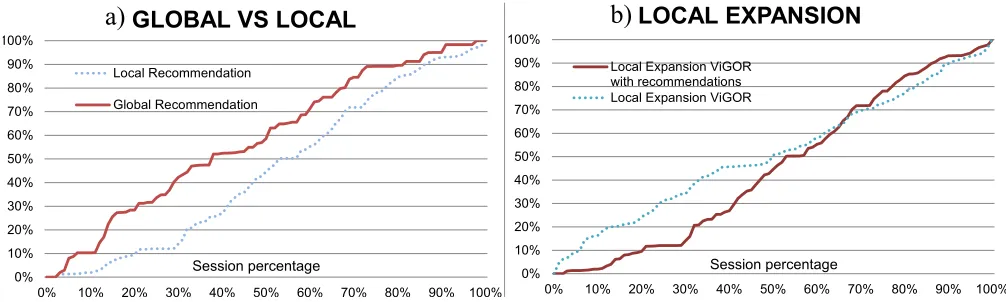
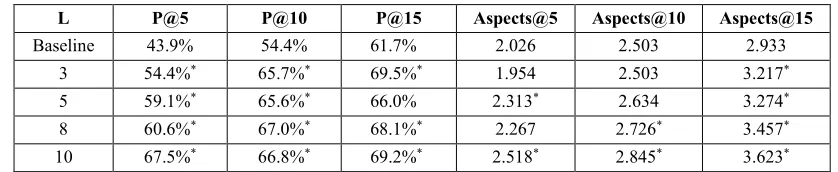
Supporting Exploratory Video Retrieval Tasks with
Grouping and Recommendation
Martin Halvey
1, David Vallet
2,4, David Hannah
3, Joemon M. Jose
3 1University of Strathclyde, Glasgow, G1 1XQ, Scotland, UK2Universidad Autonoma De Madrid, Madrid, 28049, Spain 3University of Glasgow, Glasgow, G12 8QQ, Scotland, UK 4National ICT Australia, 2217 Eveleigh, Sydney, Australia
Abstract
In this paper, we present ViGOR (Video Grouping, Organisation and Recommendation), an exploratory video retrieval system. Exploratory video retrieval tasks are hampered by the lack of semantics associated to video and the overwhelming amount of video items stored in these types of collections (e.g. YouTube, MSN video, etc.). In order to help facilitate these exploratory video search tasks we present a system that utilises two complementary approaches: the first a new search paradigm that allows the semantic grouping of videos and the second the exploitation of past usage history in order to provide video recommendations. We present two types of recommendation techniques adapted to the grouping search paradigm: the first is a global recommendation, which couples the multi-faceted nature of explorative video retrieval tasks with the current user need of information in order to provide recommendations, and second is a local recommendation, which exploits the organisational features of ViGOR in order to provide more localised recommendations based on a specific aspect of the user task. Two user evaluations were carried out in order to 1) validate the new search paradigm provided by ViGOR, characterised by the grouping functionalities and 2) evaluate the usefulness of the proposed recommendation approaches when integrated into ViGOR. The results of our evaluations show 1) that the grouping, organisational and recommendation functionalities can result in an improvement in the users’ search performance without adversely impacting their perceptions of the system and 2) that both recommendation approaches are relevant to the users at different stages of their search, showing the importance of using multi-faceted recommendations for video retrieval systems and also illustrating the many uses of collaborative recommendations for exploratory video search tasks.
Keywords: Video, search, user interface, collaborative, implicit, feedback, recommender, user studies.
1.
Introduction
As a result of the improving capabilities and the declining prices of current hardware systems, there are increasing possibilities to store and manipulate videos in a digital format. People now build their own digital libraries from materials created through digital cameras and camcorders, and use a number of systems to place this material on the web. However, the systems that currently exist to organise and retrieve these videos are insufficient for dealing with such large and increasing volumes of video. In particular, there is a growing need to develop tools and techniques to assist users in the complex task of searching for video; this is particularly true online with the increasing growth of online video search systems.
of annotations unless there is some benefit to the user [14], resulting in a lack of available textual annotations. On the other hand, the difference between the low-level data representation of videos and the higher level concepts users associate with video, commonly known as the semantic gap [29], provides difficulties for using these low-level features. Consequently, while these low-level features are used in some state of the art systems, most online video retrieval systems (e.g. YouTube1 or Blinkx2) rely only on query by text.
In order to alleviate some of these problems associated with video search we have developed ViGOR, a video retrieval system that allows users to create semantic groups of results to help conceptualise and organise their results for complex video search tasks. This interactive grouping is a flexible means for a user to illustrate their multi-faceted information needs. Multi-faceted information needs mean that the task that the user is conducting can be considered to be multiple specific tasks; it could also be considered that multi-faceted search tasks/information needs can have multiple solutions. Specific information needs can be related to short term information needs as the user is focused on one particular aspect of their search task. The grouping facilities also allow the user to focus on one particular aspect of a global task as they can focus on specific (or short-term) information needs while still solving the overall multi-faceted (or long-term) information need as embodied by their search task. We believe that the semantic gap is narrowed by this abstraction to high-level semantic groupings reflecting an individual's task-specific mental model of the data and a more flexible user interaction with the video collection, thus the user is focused more on interaction with the data and less on the mechanics of their search. We also believe that the use of this system can result in a number of desirable outcomes for users: improved user performance in terms of task completion and task exploration, and increased user satisfaction with their search and their search results.
In addition, the interactions available in ViGOR make it an ideal system with which to integrate some recommendation techniques. We believe that many of the problems associated with searching large collections of video can be alleviated through the use of recommendation techniques. Recommendation techniques can offer a work around for the problems associated with the semantic gap and the unreliability of textual descriptions, as they utilise additional information about user interaction that is already available in many systems. However, it is also imperative that the recommendations relate to as many aspects of a user task as possible so as to ensure that the recommendations present the user with a diverse set of results that encompass as many interpretations of the user actions as possible. To that end, we have developed a recommendation approach that utilises the implicit actions involved in previous user searches to create a predictive model that can provide multi-faceted and diverse recommendations to assist users in completing their difficult search tasks. Our recommendations encompass many interpretations of user actions and numerous videos that users may not have seen using normal query methods. Providing these recommendations is not trivial, as due to the complex and difficult search process for video, implicit feedback from video search is quite noisy [29]. However, we believe that this problem can be overcome by utilising collaborative recommendation techniques. In particular we believe that our approach of modelling many aspects of user needs via implicit user interactions can result in improved user performance in terms of task completion and reduce the user effort involved in finding relevant videos.
Before proceeding, it should be noted ViGOR has been developed as an interface that can sit on top of any video retrieval system. The recommendation and grouping facilities provided as part of the ViGOR system can be created based on the log files stored by almost any system, website etc. As such while the recommendation and interface are coupled in this system, in some ways they can be viewed as two distinct parts that can be applied to any video retrieval system, however in this case we are attempting to leverage the benefit of both. Thus as well as solving problems surrounding exploratory video search tasks, we have developed a scalable solution which can be deployed on top of almost any existing video retrieval system anywhere (this has been demonstrated by conducting evaluations using ViGOR in conjunction with YouTube, the largest online video storage and retrieval system (see Section 6 and Section 7)).
In order to test and validate the potential benefits of ViGOR in assisting with video search, we conducted two user studies, in which we tested two systems. The first ViGOR without recommendations, and the second a system based on ViGOR that provides recommendations based on a model of implicit actions. These systems were evaluated to determine
1 http://www.youtube.com/
whether any benefit to the users is achieved. The remainder of this paper is organised as follows: in the following section we will provide a rational for this work. Section 3 will describe the two systems that were used in our study. Subsequently, in section 4 we will describe our approach for using implicit feedback to provide multi-faceted recommendations. In section 5 we will describe our experimental methodology including our hypotheses, which is followed by the results of our experiments, presented in Section 6 and 7. In Section 8 we will provide a discussion of our work and section 9 will provide some final conclusion and a discussion of future directions for this work.
2.
Related Work
2.1 Interactive video retrieval
Interactive video retrieval consists of users formulating queries and carrying out video searches, and then reformulating those queries and thus the current results based on previously retrieved results. As video is in essence multimodal i.e. it consists of a variety of content types, there are a variety of methods that can be used to query a video retrieval system. One approach commonly adopted is to use the low-level features that are available in images and videos, i.e. colour, texture, shape etc. for retrieval. This is often utilised in a query by example approach; using query by example users provide examples via sample images or video clips in order to retrieve comparable images or video clips. While this approach seems both intuitive and reasonable, there are also a number of limitations. Query by example requires the extraction, representation and storage of a set of low level features from all of the videos in the collection, this presents issues related to efficiency. Also the semantic gap [29], provide difficulties. The semantic gap essentially is the difference between the high level concepts users associate with video and the low-level data representation of videos used for visual features. Overcoming the problems associated with the semantic gap is one of the largest and most challenging research issues in multimedia information retrieval. As a consequence of the semantic gap and in an attempt to overcome the limitations it causes, the multimedia search research community has investigated search by concept. The basic idea behind search by concept is that more semantic concepts such as “vehicle” or “person” can be used to aid retrieval instead of relying on just low level features; an example of this is the Large Scale Ontology for Multimedia (LSCOM) [25]. However as it is still in the early stages of research query by concept also has a number of issues that hinder its widespread use, the biggest problem is that it requires a large number of concepts to be represented and as a result to date it has not been deployed on a large scale for general usage.
The most common method of searching for video does not use low level features or concepts, but is rather query by text. Query by text is the approach used in many online large scale video retrieval systems, e.g. YouTube, MSN Video, or Blinkx, and is also the most popular query method at TRECVID [5]. Query by text is simple and users are familiar with this paradigm from other types of search. In addition, query by text does not require a representation of concepts or features associated with a video. However, it does require that meaningful textual descriptions of the content of the video are available and this is not always the case. Textual descriptions in some cases may be extracted from closed captions or through automatic speech recognition; however a study of a number of state of the art video retrieval systems [19] concludes that the availability of these additional resources varies for different systems. Where these descriptions are available there may be some reliability issues, this could be due to a number of factors, e.g. limitations in automatic speech recognition, language differences etc. Most contemporary online video search systems rely mostly on annotations provided by users to provide video descriptions. However, as was stated previously, this further complicates the retrieval process, either because of misconception surrounding annotations [13] or users’ reluctance to provide annotations [14].
While the methods outlined above have some limitations and problems, they have been used together in a number of systems, e.g. Informedia [17] and MediaMill [30]. These systems have been some of the best performing systems at past TRECVID interactive search evaluations. However, these best performing results are quite often for “expert” users, who establish an idealistic upper bound of performance of video search users [6]. In addition, a combination of these approaches requires a vast amount of metadata to be extracted and stored for each individual video clip.
the problems associated with video retrieval. To date none of these approaches has provided a complete and wholly adequate solution to providing the tools to facilitate video search [5]. Thus, in an attempt to overcome these limitations some innovative interfaces have been proposed for multimedia search, some of these interfaces are described in the following section.
2.2 Interactive Multimedia Retrieval Interfaces
As has been described above there are a number of problems which hinder effective multimedia retrieval. Some of these problems can be overcome by providing effective interfaces for interactive multimedia retrieval. In this sub-section we outline some innovative and interesting interfaces for interactive multimedia retrieval. PicturePiper [10] provides a mechanism for allowing users access to images on the web related to a topic of interest. This system was developed to demonstrate a re-configurable pipeline architecture that is ideally suited for applications in which a user is interactively managing a stream of data. PicturePiper also contains a workspace for displaying search results; the distance between groups of images in the workspace illustrates the distance between the centroids of the groups of images as calculated using low level features. CueFlik [11] is a Web based image search application that allows users to create their own rules for ranking images based on their visual characteristics. Users can then re-rank possible search results according to these rules. In user evaluations it was found that users can quickly create effective rules for a number of diverse concepts. EGO [33] is a tool for the management of image collections. The main components of EGO are a workspace and a recommendation system. By providing these facilities, different types of requirements are catered for, enabling the user to both search and organise results effectively. The workspace serves as an organisational ground for the user to construct groupings of images. The recommendation system in EGO observes the user's actions, which enables EGO to adapt to their information requirements and to make suggestions of potentially relevant images based on a selected group of images. ImageGrouper [24] is another interface for digital image search and organisation. It is possible to search, annotate, and organise images by dragging and grouping images on the workspace, ImageGrouper allows users to use an entire group as a query by example and allows a user to annotate an entire group at once. However, no formal evaluation of ImageGrouper has taken place. The MediaGLOW system [12] presents an interactive workspace that allows users to organise photographs. Users can group photographs into stacks in the workspace; these stacks are then used to create neighbourhoods of similar photographs automatically. Campbell presents a novel image search and browsing system in the Ostensive Browser [4]. The main component of the interface is a workspace with objects on it and links between those objects. The user begins browsing at a starting image, around which candidate next images are displayed. A user selects a candidate which becomes the centre of focus; the next possible candidate images related to the current image are displayed. Browsing continues in this fashion. Candidate images for browsing are determined by an ostensive model, which encompasses a temporal profile of uncertainty. This is accomplished by the application of a particular class of discount function with respect to the age of the evidence, thus more recent user interactions are more relevant for determining next steps in comparison with older interactions.
to aid user interaction. However, it should be noted that the ViGOR interface does not do anything beyond what any other video retrieval system that is mentioned here does to deal with the multimodal nature of video or indeed interactivity with the actual videos themselves. The focus the grouping in the interface is to overcome some of the problems caused by the semantic gap. However, our recommendation approach does take into account some of the actions that users can perform with video, e.g. playing the video, thus in this way some of the interactivity that can take place with video is taken into account.
The ForkBrowser [26] embeds multiple search methods into a single interface for browsing. The multiple search methods are presented to the user in the form of threads. These threads are ranked lists of shots based on one of the search methods implemented in the interface. The threads are visualised in the shape of a fork. The shot at the top of the stem of the fork is the video that the user is currently viewing, with the tines representing the different threads. The ExtremeBrowser [18] aims to maximise the human capability for judging visual material quickly, while at the same time applying active learning techniques using the user selected videos. Videos are presented to the user via a method called rapid serial visual presentation which allows the user to make fast judgements about high numbers of videos. The feedback from the user is used in an active learning loop, which is used to rank the remaining results that the user will review. The FacetBrowser [35] is a video search interface that supports the creation of multiple search "facets", to aid users carrying out complex video search tasks involving multiple concepts. Each facet represents a different aspect of the video search task: an assumption of this work is that search facets are best represented by sub-searches. These facets can be organised into stories by users, facilitating the creation of sequences of related searches and material which together can be used to satisfy a work task. The interface allows more than one search to be executed and viewed simultaneously, and importantly, allows material to be reorganised between the facets, acknowledging the inter-relatedness which can often occur between search facets. The goal of these systems is common: to overcome the semantic gap problem of video content. Another way of overcoming the semantic gap is through the use of recommendation techniques, of particular interest to the work outlined in this paper are techniques that use past usage history, a number of such approaches are outlined in the next section.
2.3 Usage-based Recommendation approaches in multimedia information retrieval
to different search trails, instead of recommending a query search trail related to the user’s search. Our approach also exploits session search trails that include multiple queries, instead of a single query trail. With this we expect to obtain even more diverse recommendations, as shifts in user needs are usually not restricted to a single query.
Hopfgartner et al. [21] expanded the above work on click through data by taking into consideration an MIR system, which includes other types of actions such as playing a video for a given duration or navigating through a video. Their goal is to exploit the community based feedback mined from the implicit interactions of previous users of their video retrieval system to aid users in their search tasks [21]. Some of this work has been used as a basis for the recommendation techniques that we have implemented in our own video retrieval system. Similar to White et al.’s [36] notion of search trails; we represent user interactions as a linked sequence of interacted documents and input queries during a search session. Following Craswell and Szummer [7] and Hopfgartner et al. [21], we adopt a graph-based approach, as it facilitates the representation of interaction sequences.
While most of the authors limit the graph to click through data, we propose to integrate other sources of implicit relevancy into the representation, following some of the work of Hopfgartner et al. [21]. As will be shown in the following section, ViGOR allows the collection of more and richer interactions, related to the interaction of users with ViGOR’s grouping functionalities. In addition, our recommendation approaches couple the multi-faceted and ambiguous nature of explorative tasks, where a user can typically interact with different aspects of a retrieval tasks within the same session. This is achieved through the representation of soft-links, introduced in Section 4.2. The ViGOR system for searching and recommendation is presented in the next section.
3.
System Description
3.1 ViGOR: A Video Grouping and Organization Interface for Video Retrieval
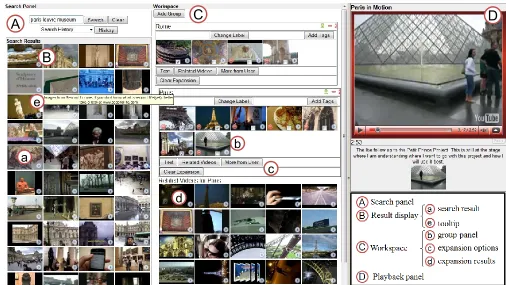
The main goal of ViGOR is to provide grouping functionalities for interactive video retrieval tasks. ViGOR (see Figure 1) comprises of a search panel (A), results display area (B), workspace (C) and playback panel (D). These facilities enable the user to both search and organise results effectively. The users enter a text based query in the search panel to begin their search session. The result panel is where users can view the search results (a). Additional information about each video shot can be easily retrieved. Placing the mouse cursor over a video keyframe for longer than 3 seconds will result in any text associated with that video being displayed to the user (we will hence forth refer to this action as tooltip) (e). If a user clicks on the play button the highlighted video shot will play in the playback panel. Users can play, pause, stop and navigate through the video as they can on a normal media player.
one annotation. Drag-and-drop techniques allow the user to drag videos into a group or reposition the group in the workspace. It should be noted that any video can belong to multiple groups simultaneously.
[image:7.612.66.572.242.527.2]The workspace is designed as a potentially infinite space to accommodate a large number of groups. Each group can also be used as a starting point for further search queries. Users can select particular videos in the group’s panel (b) and can choose to view an expansion of the group that contains similar videos based a number of different features (d). We will call this functionality local expansion. As the ViGOR system uses YouTube as a backend, the features available to perform a local expansion of the group are mainly standard YouTube features. The interface offers three expansion options (c): 1) text expansion, which is the result of a new search using text extracted from the selected videos; 2) related videos; and 3) videos from the same user. All of the videos returned by these expansion options are retrieved using the YouTube API. Some of the interface components allow users of the system to provide implicit feedback, which is then used to provide recommendations to future users. Implicit feedback is given by users adding a video to a group panel (b), playing a video (D), highlighting a video using the tooltip (e), or submitting a search query (A).
Figure 1. ViGOR interface.
A
B
e
C
b
a
c
d
D
E
f
E Recommendation panel group-specific recommendations
Figure 2. Changes for the ViGOR interface with recommendations.
3.2 Integrating Multi-faceted Recommendations into ViGOR
The extended ViGOR with recommendations system is designed as an extension of the ViGOR system (See Figure 2 for a detail on the changes of the interface). No functionality is removed, ViGOR with recommendations still allows users to organise their search in different groups in the workspace and allows the execution of text queries along with the local expansion functionalities (i.e. related videos, videos from same user, text expansion). In the extended interface with recommendations, users also have two options to receive recommendations. The users are presented with recommendations of video shots that might match their search criteria based on their interactions (E); these are global recommendations that incorporate the entire search session (see Section 4.4). These global recommendations are updated whenever the users plays a video, issues a new text query or moves a video to a group panel. One new option for a local expansion is added: the local recommendation (f), with which users may also retrieve recommended videos within a group. These recommendations are localised to each group and are based on the interactions of previous users with videos that the current user has selected (see Section 4.5). The following section will provide further details about the recommendations that are provided by the ViGOR system.
4.
A Multi-faceted Graph Based Recommendation Approach
In this section we introduce the multi-faceted recommendation approach integrated into the ViGOR system. We present two recommendation techniques. The first is a global recommendation technique, which is an extension of a previous recommendation approach [21] that takes into consideration the new interactions provided by ViGOR, and incorporates the concept of soft-links for multi-faceted and diverse recommendations. The second approach is a novel local recommendation technique which has been specifically defined to take advantage of the grouping facilities provided by ViGOR. The goal of these recommendation approaches is twofold: 1) to exploit the organisational functionalities provided by ViGOR as a new source of implicit information; and 2) to take into consideration the ambiguous and multi-faceted nature of an exploratory video search, through the use of soft links. To the best of our knowledge, these points have not previously been addressed.
4.1 Weighted Graph User Interaction Representation
agglomeration of all past user interaction in a single aggregated pool of past usage information, which we will henceforth refer to as the implicit pool. See Section 4.3 for a further explanation of this technique.
4.2 Soft Link Motivation
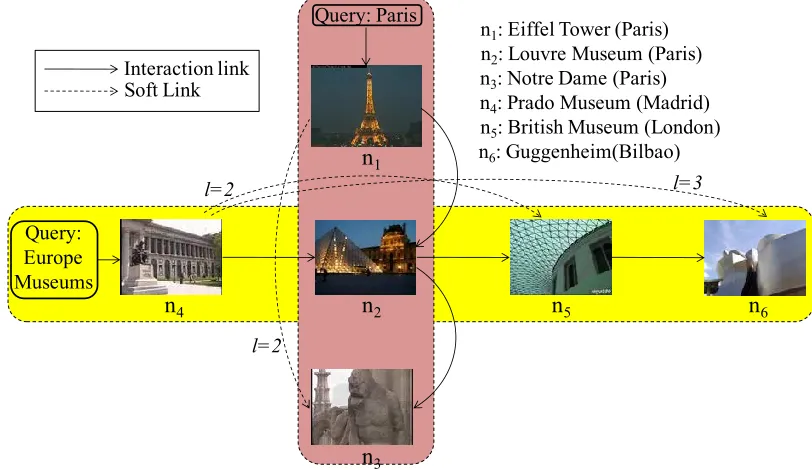
[image:9.612.119.525.215.450.2]In recommendation algorithms based on a graph-based representation of past usage history [7] [36] [21], the nodes of the graph indicate user queries or documents in the search collection, whereas each link indicates a transition of the user from one content to another. For instance, in the example graph shown in Figure 3, the vertical path represents a user that input the query ‘Paris’ in the search system and then accessed consecutively the search results represented by nodes n1, n2, and n3. These graphs are later exploited in a number of ways in order to recommend results to the current user.
Figure 3. Example of user interaction and soft links in two related task.
However, many techniques do not take into account the potential ambiguous and/or multi-faceted nature of some tasks, and thus treat each possible aspect inspected by the user as if it was the same or indeed if each aspect is related to a single task. To illustrate this we follow the simplified example of a graph-based usage representation of the user actions over the system, depicted in Figure 3. It can be observed that there are two different aspects stored in this graph, the first one regarding the city of Paris, and the second regarding different European museums. These aspects could be part of a more complex search task, such as "find places to visit in Europe". These two aspects intersect in one node: ‘Paris Louvre Museum’. Let us suppose that the current interactions sequence of a user is related to nodes n4 and n2 (e.g. because she has opened these items). Recommendation approaches that use the direct links [7] [21] will score nodes n5 and n3 the same, because they directly follow node n2. However, we believe that it is more sensible to give a higher score to n5 as it belongs to the same search aspect that the user seems to be following. White et al.'s recommendation approach [36][27], based on search trails, can also give some consideration to the actual aspect of the search session, but they rely on having information on the initial query input by users, while our approach only needs the interaction information regarding documents. In addition, as is shown in the experiments section (see Section 7.3), White et al.'s approach also benefits from this representation.
Motivated by the previous example, we propose the use of soft links in order to overcome the problems of aggregating all user interactions into one single graph-based representation. Soft links are arcs that create soft relations between nodes that belong to the same interaction sequence of user actions, indicating the level of distance separation (𝑙 in Figure 3). The purpose of soft links is to maintain the original subsequent interactions of a user even if his/her interaction data is aggregated
Query: Europe Museums
n4: Prado Museum (Madrid) n5: British Museum (London) n6: Guggenheim(Bilbao)
n1: Eiffel Tower (Paris)
n3: Notre Dame (Paris)
l=2
l=2 l=3
Query: Paris
n
1n
3n2: Louvre Museum (Paris)
n
4n
2n
5n
6with other users’ interaction information. In this way, we can take the current aspect of the user’s interactions into consideration when making a recommendation.
Furthermore, as soft links help to disregard which aspects are parts of the trail of interactions, a recommendation approach that uses soft links might be able to diversify its results by aggregating recommendation results at different levels of soft links. For instance, in following the previous example, when using the original interaction links, i.e. a soft link level of 𝑙 = 1, the recommendation approach would recommend node n3, among others, from the “city of Paris” aspect. On the other hand, when using soft links of level 𝑙 = 2, the recommendation algorithm will ignore the original links and, in this example, recommend n5,which belongs to the “European Museums” aspect.Furthermore, as more levels of soft links are aggregated it is expected that more aspects will be found, as the recommendation algorithm advances further through the interaction information of past users, which could contain changes of aspect of their actual search, in case of their task being explorative and multi-faceted. We thus put forward that a proper aggregation of all the recommendations for all levels of soft links will provide recommendations that are not only relevant to the current task of the user, but that belong to different aspects related to the search tasks and thus are more diverse than only considering the direct interaction information.
In conclusion, we hypothesise that soft links enable further exploration in the usage information collected from past users, distinguishing and reaching other aspects related to their multi-faceted search. Thus a recommendation approach that uses soft links at different levels, instead of the original usage information, will be able to provide more diverse recommendations. In the following section we provide a formal definition of soft links and in Section 7.3 we will perform a user-centred experiment in order to validate our hypothesis.
4.3 Soft Link Weighted Graph
We hence complete the weighted graph outlined above by the use of soft links. Soft links are modelled as special action arcs Ws(l), represented in the form (ni, nj, u, ws(l)) where in the case there is a path 𝑝 = 𝑛𝑖↝ 𝑛𝑗−1→ 𝑛𝑗 from 𝑛𝑖 to 𝑛𝑗 in the session graph. 𝑛𝑗−1→ 𝑛𝑗 means that 𝑛𝑗−1 is adjacent to 𝑛𝑗, and the same notation is used as shorthand to define p as any path between 𝑛𝑖 and 𝑛𝑗, taking into consideration the link directionality. The action’s weight is obtained from the action arc (𝑛𝑗−1, 𝑛𝑗,, 𝑢, 𝑤𝑠) and l is equal to length(p), which is counted as the number of links in path p. A soft link of level l will thus connect each node with the node at a distance l of the same user’s search interaction trail. Figure 3 shows a simplified example of a soft link weighted graph. Note that Ws(1) is equal to Ws and thus we can represent the session graph as Gs = (Ns, Ws(l)) where l ∈ {1,2, … , L} varies from 1 to the maximum level of soft links considered, denoted as L.
Finally, all the session graphs are aggregated into a single graph G = (N, W(l)), where N = ⋃ Ns s and W(l) = ⋃ Ws s(l), which constitutes a global pool of usage information that collects all the implicit relevance evidence of users from past sessions. This graph is the implicit pool of the past community of users. The nodes of the implicit pool are all the nodes involved in any past interaction N = ⋃ Ns s, whereas the weighted links W(l) are of the form (𝑛𝑖, 𝑛𝑗, 𝑤(l)), where 𝑛𝑖, 𝑛𝑗∈ 𝑁 and w combines the probabilities of all the session-based values for a specific soft link distance value of l. Note that W(1) models the aggregation of past interaction sequence of users, whereas W(l), l ∈ {2, … , L} models the aggregations of the soft links at different distance levels. As weight values are considered probabilities of relevance of the node 𝑛𝑗 to the user, we opt for a simple aggregation of these probabilities, this is w(l) = ∑ 𝑤𝑠 𝑠(l)
#𝑤𝑠(l)|𝑤𝑠(l)>0, which represents the average probability
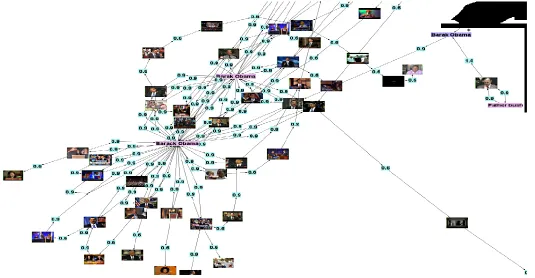
Figure 4 shows a close up image of an implicit pool from our evaluations, in which we can see in more detail the interaction sequences and associated weights, the video nodes, the query nodes (marked with an asterisk), and the group panels nodes, which are related to the set of contained video nodes. In Figure 4 we can observe an example of two group panels, labelled as ‘Barack Obama’, which were created by two different users, and have some documents in common. This is the type of panel representations that can be exploited by the local recommendation approach, explained in Section 4.5
[image:11.612.68.603.154.432.2]*
Figure 4. Detail of implicit pool. Text nodes with an asterisk indicate query nodes, whereas the rest of text nodes indicate group panel nodes. For the sake of clarity, soft links are not here represented.
4.4 Global Soft Link Recommendation
The global recommendation approach is based on the status of the current user session. As the user interacts with the system, a session graph Gs= (Ns, Ws(l)) is constructed, where in this case 𝑠 is the current user’s ongoing session. This graph is the input for the global recommendation algorithm presented next. This recommendation approach has two goals: 1) to exploit the implicit pool in order to retrieve similar nodes that were somewhat relevant to other users and 2) to exploit the soft links in a way that the user’s outgoing aspect within their task is taken into consideration. This recommendation approach is defined in two steps. Firstly, the global recommendation is defined for each soft link level:
𝑔𝑟(𝑛, 𝑁𝑠, 𝑙) = ∑ 𝑙𝑟′(𝑛𝑖) ∙ 𝜉𝑙𝑒𝑛𝑔𝑡ℎ(𝑝)−1∙ 𝑤 (𝑙, 𝑛𝑗, 𝑛), 𝑛𝑖∈𝑁𝑠
𝑝=𝑛𝑖↝𝑛𝑗→𝑛 𝑙𝑒𝑛𝑔𝑡ℎ(𝑝)<𝐷𝑀𝐴𝑋
(1)
Where 𝑛𝑖↝ 𝑛𝑗 denotes the existence of a path from 𝑛𝑖 to 𝑛𝑗 in the graph, taking link directionality into consideration. 𝑛𝑗→ 𝑛 means that n is adjacent to 𝑛𝑗. 𝑤 (𝑙, 𝑛𝑗, 𝑛) is the probability weight, given by the implicit pool, for a soft link distance of 𝑙, as this weight is exploited in order to rank n. 𝑙𝑟′(𝑛
𝑖) ∈ [0,1] is a weighting function that follows our previous implicit model [21] based on the relevance of this node to the outgoing user’s session, obtained from the user’s implicit feedback.
evaluation. Finally, 𝜉 is a length reduction factor, set to 0.8, which allows us to give more importance to those documents that directly follow the interaction sequence, however if a document with high levels of interaction occurs two or three steps away it may still be recommended. These values were tuned using development data such as the implicit information and relevance judgements collected from our initial user study with ViGOR. In a second step, the final recommendation score is computed as
𝑔𝑟(𝑛, 𝑁𝑠) = ∏ 𝑔𝑟(𝑛, 𝑁𝑠, 𝑙) 𝐿
𝑙=1
(2)
where L is the maximum level of soft link considered, set to 10 in our experiments. It was decided to only evaluate the recommendation of documents (videos in the case of our evaluation) to the user, so the ranking was filtered by 𝑛𝑑= 𝑛 ∈ D, i.e. by only nodes that belong to documents.
4.5 Local Group Recommendation
The local group recommendation focuses on a local expansion of a set of selected documents within a group, and tries to recommend more documents that could aid the user in expanding the aspect of the task represented by this group. This recommendation approach exploits the representation in the implicit pool of the different aspects created by previous users. In this case, the local group recommendation tries to find similar aspects that previous users could have created and then rank their related documents. The input of the local group recommendation is the set of documents Dg that the current user has selected within an aspect group g ∈ G. On the first step of this approach, related aspect groups from the implicit pool are searched, this is achieved by ranking the related groups panels 𝑛𝑔∈ G with the global recommendation approach, using the set of selected documents as input. Thus, the related groups can be ranked, using Equation 2, as 𝑔𝑟(𝑛𝑔, 𝐷𝑔), were the local relevance of the selected documents is set to 1, i.e. 𝑙𝑟′(𝑑
𝑔) = 1, 𝑑𝑔∈ 𝐷𝑔. We tuned the parameters for this approach in order to focus on the current aspect; this was done by setting the maximum soft link value L to 3. We also limited the expansion distance 𝐷𝑀𝐴𝑋 to 3, in order to constrain the search to more highly related groups.
On the second step of this approach, the implicit pool is exploited in order to rank the top nodes related to the set of ranked group nodes 𝑛𝑔. Group nodes are connected to their contained documents by a special action, namely ‘panel contains’. This allowed us to rank documents based on how many group panels contained them. Note that group panels are uniquely identified by the user who created them and their assigned title, so it is possible to have different group panels from different users which contain related and overlapping sets of documents (this phenomenon is illustrated in Figure 4). The ranking approach in this second step is to rank higher those documents that belong to more related aspects created from previous users. This ranking can be also implemented by tuning the global recommendation approach in the following way. The input of the ranking approach will be the ranked set of related groups, 𝑛𝑔∈ G. The local relevance of the input is the ranking given by the previous step: 𝑙𝑟′(𝑛
𝑔) = 𝑔𝑟(𝑛𝑔, 𝐷𝑔). Thus, the final ranking is obtained from 𝑔𝑟(𝑛, 𝑛𝑔). No soft links are used in this ranking, and the expansion distance 𝐷𝑀𝐴𝑋 is set to 1, as we only want to rank documents that are contained by at least one of the related group nodes. As with the previous approach we filter the recommended nodes to contain only documents 𝑛𝑑= 𝑛 ∈ D.
5.
Experimental Methodology
5.1 Hypothesis
In order to measure the effectiveness of our proposed approach we conducted two user-centred evaluations. The two user evaluations conducted were both between subject evaluations that involved users carrying out broad video search tasks on YouTube. This provided us with a large and dynamic data collection, and facilitated the analysis of ViGOR in an online situation. The first evaluation compared a baseline system, which mimicked YouTube’s functionalities, with our own system ViGOR, without recommendations. We had three hypotheses to address in the first evaluation:
Hypothesis H1.1: Despite the overhead involved in the extra grouping functionality, that user’s performance will improve using the grouping functionality in the ViGOR system in comparison with an appropriate baseline system.
Hypothesis H1.2: Users will explore more aspects of their task using ViGOR and that the workspace will help the users explore and see more options in large and unfamiliar datasets.
Hypothesis H1.3: Users will be more satisfied with their search results and the search process using ViGOR.
For the second evaluation which compared the basic ViGOR system with the ViGOR extension with recommendations, we had four hypotheses:
Hypothesis H2.1: The use of implicit information from previous users will help address the nosiness of implicit information on video retrieval systems.
Hypothesis H2.2: Users conducting multi-faceted and ambiguous video retrieval tasks can benefit from recommendations based on implicit feedback.
Hypothesis H2.3: The organisational features (i.e. the grouping functionality and the organisation of those groups in the workspace) available in ViGOR allow richer and multi-faceted recommendations (i.e. recommendations that incorporate multiple diverse videos that may be relevant to the search task).
Hypothesis H2.4: The use of soft links in the implicit pool representation allows more useful and diverse recommendations.
In the following sections we will describe both evaluations in full detail and will also outline the results obtained for both evaluations with respect to the hypotheses that have been outlined above.
5.2 Collection and Tasks
indicative search task below (where the task for the first evaluation is presented first and then the task for the second evaluation is presented):
Task 1 Politics
Evaluation 1: A task of finding videos of political figures of 2008
Evaluation 2: A task of finding videos containing leading world figures (Superset)
Task 2 Travel
Evaluation 1: A task of finding video clips about Paris, Rome and other Europe locations
Evaluation 2: A task of finding video clips about locations in Europe that you would like to visit (Similar)
Task 3 Culture
Evaluation 1: A task of finding videos that illustrate Scottish culture, in particular Scottish dancing and food
Evaluation 2: A task of finding videos that illustrate Scottish culture (Similar)
Task 4 World News
Evaluation 1: A task of finding the major sport news of 2008
Evaluation 2: A task of finding videos illustrating news stories from 2008 (Superset)
Figure 5. Simulated work task situation for Task 1 Politics (Evaluation 2).
For the second evaluation, which included recommendations, the same implicit pool was used for all tasks, created from the first evaluation. As we defined the similar/superset tasks on the second evaluation, users were not receiving recommendations from identical tasks. Also, as the tasks are extremely broad, many users conducted the tasks in very different ways, hence they would not repeat queries and/or interactions, and indeed may not have the same end goal in mind as the previous users from the first evaluation. The implicit pool was thus created from the implicit information of the 16 users from the first evaluation, with an average of 35 relevant documents retrieved and 4.5 groups created per task during the first evaluation. This implicit pool contained 5.5K nodes, 9.7K direct links (l=1) and ~7K soft links per each soft link distance level (up to l=10). We also included the usage information of the 8 users that interacted with the baseline interface which mimics YouTube (see Figure 5), as their information could be exploited by the global recommendation approach.
It should be noted that the second evaluation was conducted 5 months after the first evaluation; hence some changes in the YouTube index are to be expected and were accounted for in the following fashion. Firstly, the recommendation approach did not recommend items from the interaction information from the first evaluation that could no longer found by searching YouTube’s index. Secondly, it was expected that new content relating to the tasks would be uploaded to YouTube between the two evaluations and as such this new content would not be included in the interactions from the first evaluation. This could potentially bias the search process of the users, as the recommendations would not include any content uploaded in the past 5 months. We hypothesised that this would be more noticeable in the similar-type tasks, as the superset-type tasks were related to finding information about to the previous year, and the available content would not have varied significantly between the two evaluations. In order to account for the variance between the YouTube index and our implicit pool, after every four users in the second evaluation we updated the implicit pool for the similar tasks. In this way, interaction with the new content would be added to the implicit pool for users conducting the similar tasks, but not for the superset tasks. In addition, this would allow us to
Task 1: Find Leading World Figures Simulated Work Task Situation
Imagine that you are a student and as part of your class you must make a presentation about leading world figures from the early 21st century e.g. Saddam Hussein, George Bush, Tony Blair, Bono, Bill Gates etc.
For the piece you must find various videos about each figure and write a short description of your presentation outlining the different aspects of the news and personality of that figure as shown by the clips that you have selected of that figure. Feel free to find shots of as many figures as you like and mark any videos that you feel are relevant.
*You may assume that editing software is available which will be used later on to edit the video clips that you find and select the best shots. The description will be written as part of a post task questionnaire.
Indicative Request
analyse and compare the effect of adding implicit information for the same exploratory tasks and using a static source of implicit information for related tasks.
5.3 Experimental Design
As has been mentioned previously two user centred evaluations were performed, during which three different systems were evaluated: a baseline system with mimicked YouTube functionality (YI, see Figure 6), ViGOR without recommendations (see Figure 1), and ViGOR with recommendations (see Figure 2). The first evaluation compared the baseline system with ViGOR in order to assess ViGOR’s grouping paradigm. The second evaluation compared ViGOR with its extension with recommendations in order to assess the feasibility of our multi-faceted recommendation model. Two evaluations were conducted rather than one, as our first set of hypotheses address the utility of ViGOR as a video retrieval system and the second set address our recommendation approach. We wanted to make sure that ViGOR was an appropriate platform before using it to evaluate our retrieval approach. In addition the logs from the first evaluation provided a stable implicit pool for the recommendation algorithms in the second evaluation. A between subjects design was adopted for both evaluations. Each participant carried out four tasks in a Latin square design, using only one of the interfaces, which was randomly assigned. Upon arrival the participants were given an introductory sheet outlining the purposes of the experiment. If the participants were happy to proceed they then completed a consent form and an introductory questionnaire which gathered some background information on each participant. The participants were then given a demonstration of how to use the system. Following this training on the search system, the participants were allowed to complete a training task, this was to allow the participants to further familiarise themselves with the system and also see the types of tasks they had to complete for the evaluation. The same training task was used for all evaluations. Following this training the users began the evaluation; participants were allowed a maximum of 20 minutes to complete each of the four tasks. After each task the participants were asked to complete a post task questionnaire. In addition for each participant their interaction with the system was logged, as well as storing the videos they marked as relevant. Finally after they had finished all four tasks and post task questionnaires the participants were asked to complete an exit questionnaire. For both evaluations participants were paid a sum of £12 for their participation in the experiment, which in both cases took approximately 2 hours.
The first evaluation which compared the baseline YouTube system with ViGOR without recommendations, involved 16 participants, who were randomly divided into two groups of 8 and each group used one of the systems. The participants were mostly postgraduate students and researchers at out university. The participants consisted of 12 males and 4 females with an average age of 29 years (median: 27.5) and an advanced proficiency with English. The participants indicated that they regularly interacted with and searched for multimedia.
The second evaluation which compared ViGOR without recommendations with ViGOR with recommendations, involved 24 participants, which were randomly split into two groups of 12. The participants were mostly postgraduate students and researchers at our university. The participants consisted of 18 males and 6 females with an average age of 28.78 years (median: 28) and an advanced proficiency with English. Once again the participants indicated that they regularly interacted with and searched for multimedia. There was no overlap between the two groups of users.
The results of the user trials were analysed with respect to our hypotheses that were given in the previous section. The evidence for and against each of these hypotheses and the potential benefits of the systems is laid out in the following sections.
6.
ViGOR Interaction Results
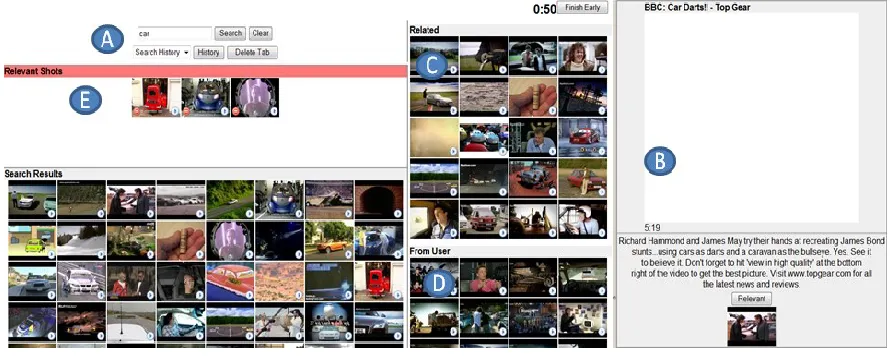
playing (B), users were presented with lists of related videos (C) and videos from the same user (D), in the same way that YouTube did at the time, this also mimicked the functionality available through the group expansions explained above. In addition, users of the YI were provided with a panel where they could drag and drop relevant videos (E). Similarly, users of ViGOR were instructed to organise relevant results in each group panel. Each participant carried out four tasks either using the YI or ViGOR. The results of the evaluation are presented below. In order to provide clarity we reiterate the hypotheses that are addressed by the findings at the beginning of each section, this presentation style is continued for each subsection of results.
Figure 6. YouTube interface (YI).
6.1 System Performance
H1.1: Despite the overhead involved in the extra grouping functionality, that user’s performance will improve using the grouping
functionality in the ViGOR system in comparison with an appropriate baseline system.
H1.2: Users will explore more aspects of their task using ViGOR and that the workspace will help the users explore and see more options in large and unfamiliar datasets.
As discussed above, in absolute terms YI users viewed 19.9% more videos than ViGOR users (total of 25.1 videos for YI and 20.1 videos for ViGOR average per task), while other type of actions had no statistical difference (see Table 1). This means that users benefit from ViGOR by reducing the number of high cost interactions thus freeing the user to explore the task that they are trying to complete. We also note a trend in which, in absolute terms, there is an increase of low cost
interactions from the use of the tooltip functionality and the selection of relevant/irrelevant results. The former is a lightweight functionality for the user to carry out, as it does not require to, e.g., play the video in the player or input text for a new query. The latter is an inherent action of finding more relevant results through the use of the evaluated system. While there is no statistical evidence of the increase on low cost interactions, we welcome these results, as some studies, e.g. [3], suggest this increment is a desirable outcome, as fostering a richer interaction between the user and the search system is a preferred goal when performing complex search tasks, as it allows for a better definition of the information need of the user.
Users of the ViGOR system created an average of 4.5 group panels, which shows that they went well beyond the three mandatory aspects and were comfortable using the interface to investigate a number of aspects. We evaluated the results and essays created by the users of the YI interface to determine the number of aspects that were investigated. Users of the YI interface created slightly less aspects than the ViGOR interface, 4.1 aspects on average. Although the results are not statistically significant for this sample size, it is worth noting the trend that users that were using ViGOR investigated more aspects of the tasks. Furthermore, investigating more aspects coupled with the higher number of relevant documents retrieved indicates a trend in which ViGOR users create richer, more complex and more detailed aspects than those of the YI.
ViGOR YI
# % # % F p
Tooltip 79.4 61.2% 60.1 58.2% 3.444 0.069
*View 5.1 3.9% 6.3 6.1% 17.064 0.000
Query 12.9 10.0% 14.1 13.7% 0.150 0.700
Relevant 31.7 24.4% 22.1 21.4% 2.830 0.098
Irrelevant (Deleted) 0.8 0.6% 0.6 0.6% 4.122 0.047
Aspects explored 4.5 4.1 0.006 0.940
Table 1. Total number of different interactions averaged per task and interface. Interactions are for unique videos e.g. if a user plays the same video twice we only record it once. Significant differences are marked with *.
Thus far the results indicate that users of ViGOR seem to explore the collection more and create more and richer aspects, with more related content found for each aspect. However, none of the differences in interaction or performance are significantly different, but the trend is that performance is improved when using the ViGOR interface over the YI. While the ViGOR users have more interaction with the retrieval system, they rely on less taxing actions such as tooltip, to the detriment of other more taxing actions such as playing a video for a specific duration or issuing a new search query. While the analysed trend is promising, further evidence is needed to support H1.1 and H1.2. In addition, the organisational facilities afforded provided by ViGOR bring about other benefits and interaction opportunities, without negatively impacting user performance. In an attempt to validate hypothesis H1.3, we analysed user feedback provided by the questionnaires that the participants completed at different stages of the evaluation.
6.2 User Feedback
H1.3: Users will be more satisfied with their search results and the search process using ViGOR.
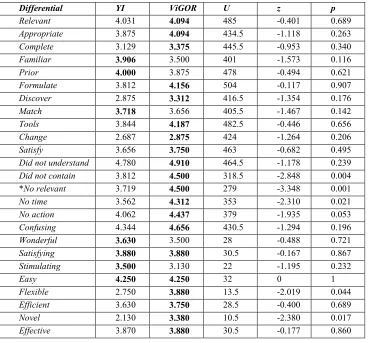
which kind of videos were relevant for the topic before starting the search” (Prior). “I found it easy to formulate queries on this topic” (Formulate). “During the search I have discovered more aspects of the topic than initially anticipated” (Discover). “The video(s) I chose in the end match what I had in mind before starting the search” (Match). “The tools provided allowed me to find videos that matched the topic” (Tools). “My idea of what videos and terms were relevant changed throughout the task” (Change). “I am satisfied with my search results” (Satisfy). The users were also asked about any issues that might affect performance on a scale from agree (1) to disagree (5), they were asked “What are the issues/problems that affected your performance” – “I didn’t understand the task” (did not understand), “the video collection didn’t contain the video(s) I wanted” (did not contain), “the system didn’t return relevant videos” (no relevant), “I didn’t have enough time to do an effective search” (no time), “I was often unsure of what action to take next” (no action) and “I found the system confusing” (confusing). In a post experiment questionnaire the two interfaces were compared using the following 5 point semantic differentials regarding overall reaction to the system with a positive response being higher on the scale – “wonderful/terrible”, “satisfying/frustrating”, “stimulating/dull”, “easy/difficult”, “flexible/rigid”, “efficient/inefficient”, “novel/standard” and “effective/ineffective”. Table 2 presents the average responses for each of these scales using the labels after each of the Likert scales in the list above.
Differential YI ViGOR U z p
Relevant 4.031 4.094 485 -0.401 0.689
Appropriate 3.875 4.094 434.5 -1.118 0.263
Complete 3.129 3.375 445.5 -0.953 0.340
Familiar 3.906 3.500 401 -1.573 0.116
Prior 4.000 3.875 478 -0.494 0.621
Formulate 3.812 4.156 504 -0.117 0.907
Discover 2.875 3.312 416.5 -1.354 0.176
Match 3.718 3.656 405.5 -1.467 0.142
Tools 3.844 4.187 482.5 -0.446 0.656
Change 2.687 2.875 424 -1.264 0.206
Satisfy 3.656 3.750 463 -0.682 0.495
Did not understand 4.780 4.910 464.5 -1.178 0.239
Did not contain 3.812 4.500 318.5 -2.848 0.004
*No relevant 3.719 4.500 279 -3.348 0.001
No time 3.562 4.312 353 -2.310 0.021
No action 4.062 4.437 379 -1.935 0.053
Confusing 4.344 4.656 430.5 -1.294 0.196
Wonderful 3.630 3.500 28 -0.488 0.721
Satisfying 3.880 3.880 30.5 -0.167 0.867
Stimulating 3.500 3.130 22 -1.195 0.232
Easy 4.250 4.250 32 0 1
Flexible 2.750 3.880 13.5 -2.019 0.044
Efficient 3.630 3.750 28.5 -0.400 0.689
Novel 2.130 3.380 10.5 -2.380 0.017
[image:18.612.124.493.277.620.2]Effective 3.870 3.880 30.5 -0.177 0.860
Table 2. Perceptions of Retrieved Videos (Higher = Better). The most positive response is in bold and significant differences are marked with *. Degrees of freedom for each are 32.
indicate that users will be more satisfied with their search results and the search process using ViGOR, while the users are more positive about ViGOR than the YI they are not significantly so. Thus hypothesis H1.3 is not fully supported, however the addition of the grouping functionality does not negatively impact user perception and indeed as noted the trend is for a slight increase in user satisfaction.
6.3 Summary
In this section we have evaluated the impact of the ViGOR interface on video search. ViGOR was compared to a baseline interface resembling a familiar video search paradigm as provided by YouTube. The main novelty of ViGOR is the addition of a workspace that allows users to group results, which we believe facilitates the exploration of specific aspects of a broader search task. The evaluation findings, although not definitive, provide some support for our hypotheses, suggesting that, although the interaction with the workspace adds an additional overhead to users’ search process, the creation of aspects was perceived by many participants as a more flexible way of approaching exploratory search tasks. What could be viewed as the main drawback of this new search paradigm is the increase on number of interactions required by users. However, it should be noted that a trend in ViGOR was that users spent more time interacting with the workspace and results (e.g., through tooltip actions) than issuing keyword queries or viewing videos. This suggests that the users were comfortable with the new search paradigm, and, as our system performance study indicated, there was no negative effect on the search performance of users when using ViGOR. There is even an early indication that users could potentially perform better when using the organisational features made available by ViGOR, but further studies have to be conducted to validate this claim. Nevertheless, as we show in the next section, ViGOR enables richer user interactions when performing exploratory search tasks, which in turn can be used to produce multi-faceted recommendations.
7.
ViGOR Recommendation Results
The second evaluation compared the ViGOR system without recommendations used in the first evaluation with a ViGOR system extended with recommendations. As explained in Section 3.2, ViGOR with recommendations shows a global panel of video recommendations, above the search result panel (see Figure 2(E)), which proactively changed with every interaction of the user with the system, using the global recommendation approach introduced in Section 4.4. The extended version of ViGOR with recommendations also has an added new local expansion option; which uses the local recommendation approach introduced in Section 4.5.
7.1 Task Performance
H2.1: The use of implicit information from previous users will help address the nosiness of implicit information on video retrieval systems. H2.2: Users conducting multi-faceted and ambiguous video retrieval tasks can benefit from recommendations based on implicit feedback.
4.702 for the system without recommendations, the difference between systems was significant (F(1,88)=4.616, p=0.034, partial η2=0.050). A higher number of created groups indicate that users explored more aspects of each particular task. Overall, these results show that users are retrieving more videos and expressing more aspects of their task using ViGOR with recommendations.
The values highlighted in Table 3 show that the users of ViGOR with recommendations have more user interactions with the system overall in comparison with users of the ViGOR baseline system. Much of this difference is due to the increased use of the tooltip functionality of the recommendation system users; this is a lightweight functionality which is of low cost for the user to carry out. In terms of more heavyweight user actions such as querying the system or viewing a video, there are small differences between the two systems. Users of the recommendation system seem to submit slightly more queries and view more videos. However, the differences above in these values are not significant. One major noticeable difference in the user interactions is the way that the users use the expansions. In both systems the expansion by more videos from the same user and expansion by text are not used very often, however the difference in expansions by the same user is significantly different between the two systems (F(1,88)=11.775, p=0.001, partial η2=0.118) with users using the feature less in the system with recommendations. In contrast the query by related video from YouTube is the most frequently used expansion. In the recommendation system we see that the three YouTube related expansions are used less frequently than in the baseline ViGOR system. This is to be expected as this system has one more local expansion option. However, it can be seen that the new recommendation expansion is used almost as frequently as the YouTube related expansion. This is an encouraging result; all of our users had previous experience using YouTube and were familiar with related videos etc., but not the recommendations, users appear to find the recommendations quite useful and exploit this resource. As was stated in the experimental design section (see Section 5) users also filled out questionnaires after each task. The analysis of the user responses did not indicate a preference towards either system.
Action ViGOR ViGOR +
Recommendations
F p
Tooltip 79.723 (43.026) 97.208 (52.245) 3.204 0.077
View 33.659 (24.143) 39.812 (51.878) 0.490 0.486
Query 14.766 (8.215) 15.667 (10.035) 0.320 0.573
*Add to group 20.191 (8.363) 28.520 (18.007) 5.876 0.017
Delete from group 1.787 (3.444) 1.416 (2.019) 0.403 0.527
*Create group 4.702 (1.966) 5.604 (2.377) 4.616 0.034
Delete group 0.234 (0.520) 0.333 (0.595) 0.879 0.351
Expand Text 1.957 (2.245) 1.542 (2.083) 1.371 0.245
*Expand User 1.553 (1.755) 0.625 (0.890) 11.775 0.001
Expand Related 5.809 (4.292) 4.458 (4.708) 2.567 0.113
Local Recom. n/a 3.354 (3.479) n/a n/a
Time (minutes) 17.73 (2.92) 18.46 (2.02) 1.623 0.206
Table 3. Average number of interactions per task for each interface, standard deviation in brackets. Significant differences are marked with *.
7.2 User Interactions
H2.3: The organisational features (i.e. the grouping functionality and the organisation of those groups in the workspace) available in ViGOR allow richer and multi-faceted recommendations (i.e. recommendations that incorporate multiple diverse videos that may be relevant to the search task).
In order to investigate H2.3 and also to investigate previous findings further, the user behaviour while using the recommendations was analysed in more detail. Table 4 shows the average number of videos selected from each expansion or recommendation. The only prior knowledge users had about all expansion options was based on their previous interactions with YouTube. It can be seen clearly that the text expansions and the videos from the same user expansions return the videos that the users selected least often; this indicates that the users did not find these types of recommendation useful. In terms of the most used technique, the YouTube related expansion is the most used for the two superset tasks (Tasks 1 and 4). The global recommendations are the most used technique for the two similar tasks (Tasks 2 and 3). Similar and Superset tasks are designed to investigate different situations of available usage information: superset tasks make use of a static implicit pool based on usage information from previous more specific tasks, whereas the similar tasks made used of previous information from similar tasks and also were updated with the information obtained from previous users during the evaluation. Due to the nature of the tasks and the experimental design (see Section 5.2) it is more likely that users will search for similar aspects of the task in the similar tasks than in the superset tasks, thus this tasks are more likely to receive more relevant recommendations. However, for the superset tasks, the local and global recommendations are still useful for the user, as they are used more than the baseline expansion approaches such as the user expansion and the text expansion.
Table 5 shows the percentage of selected videos that came from each local expansion or recommendation functionality, over the selected videos from all these approaches, without considering selected videos from the textual search panel. This gives a relative value of importance for each of the expansion and recommendation approaches, the greater this value, the more the users used this recommendation option when executing their search tasks. We can see that the global recommendation has more importance on average that the YouTube related local expansion. In fact, the importance of the YouTube related function drops on average from an 85% to a 38% from ViGOR to ViGOR with recommendations. This seems to indicate that users rely less on this feature, which is dominant on the baseline system, and prefer to utilise the newer recommendation approaches. The global recommendation approach seems to be much more important globally than the local recommendation approach, which has similar values as the textual based expansion. Whereas Table 4 showed a greater difference in absolute terms on the selection values of the recommendation on the similar and superset tasks, Table 5 shows that the importance of the recommendation approaches are only slightly higher on the similar tasks. Moreover, regarding the overall performance of these tasks, it is important to note that the increase in performance in comparison with the baseline system is consistent across all tasks. For instance, there was an average increase of 39.44% relevant documents on the similar tasks and an average increase of 37.53% relevant documents on the superset tasks.
YouTube API Expansion Recommendation
Task (Type) Text YouTube Related YouTube User Local Recom. Global Recom. Total 1 (Superset) 0.25 (2.92) 6.58 (6.50) 0.00 (2.33) 0.08 1.50 8.42 (11.75) 2 (Similar) 0.42 (1.83) 3.67 (6.33) 0.42 (1.08) 1.25 4.42 10.17 (9.25) 3 (Similar) 0.75 (1.77) 3.83 (6.23) 0.00 (1.31) 2.83 5.42 12.83 (9.31) 4 (Superset) 0.50 (1.83) 2.58 (4.58) 0.17 (1.75) 0.50 0.92 4.67 (8.17)
[image:21.612.68.546.536.630.2]Avg 0.48 (2.08) 4.17 (5.92) 0.15 (1.61) 1.17 3.06 9.02 (9.61)
Table 4. Number of documents selected on average per user and search task for each expansion or recommendation approach: text related expansion (Text); YouTube expansion by related videos (YouTube Related); YouTube expansion by
videos uploaded by the same user (YouTube User); local recommendation approach (Local Recom., Section 4.5); global recommendation of videos (Global Recom., Section 4.4); total average selection of videos for all recommendation and