Theses
Thesis/Dissertation Collections
5-21-2014
Using Least Variance for Robust Extraction of
Systolic Time Intervals
Cody R. Cziesler
Follow this and additional works at:
http://scholarworks.rit.edu/theses
This Thesis is brought to you for free and open access by the Thesis/Dissertation Collections at RIT Scholar Works. It has been accepted for inclusion in Theses by an authorized administrator of RIT Scholar Works. For more information, please [email protected].
Recommended Citation
Extraction of Systolic Time Intervals
by
Cody R Cziesler
A Thesis Submitted in Partial Fulfillment of the Requirements for the Degree of Master of Science
in Computer Engineering
Supervised by
Bausch and Lomb Professor Dr. David A. Borkholder Department of Microsystems Engineering
Kate Gleason College of Engineering Rochester Institute of Technology
Rochester, New York May 21, 2014
Approved by:
Dr. David A. Borkholder, Bausch and Lomb Professor
Thesis Advisor, Department of Microsystems Engineering
Dr. Roy Melton, Senior Lecturer
Committee Member, Department of Computer Engineering
Dr. Andres Kwasinski, Assistant Professor
Rochester Institute of Technology Kate Gleason College of Engineering
Title:
Using Least Variance for Robust Extraction of Systolic Time Intervals
I, Cody R Cziesler, hereby grant permission to the Wallace Memorial Library to reproduce my thesis in whole or part.
Cody R Cziesler
Dedication
Acknowledgments
I would like to thank the following people, for all their helpful knowledge and
encouragement throughout this process:
Abstract
Using Least Variance for Robust Extraction of Systolic Time Intervals
Cody R Cziesler
Supervising Professor: Dr. David A. Borkholder
Systolic time intervals (STI) are clinically used as non-invasive predictor of
cardiovascu-lar disease. However, algorithm accuracy generally suffers across subjects and physiological
states, requiring parameter tuning for robust STI extraction. To address this challenge,
an automated methodology of processing with varying tuning parameters was explored. In
this work, two STIs were examined: the R-wave pulse transit time to the PPG foot at the
ear (rPTT) and the left ventricular ejection time (LVET).
Historic feature detection algorithms were used with a range of tuning parameters over
a 60 second interval, with least variance used to select the optimal parameter for robust
extraction. These least variance algorithms were quantitatively compared to historic, single
parameter algorithms using a positive predictive value metric. In order to decrease the
runtime of the algorithms, the least variance algorithms were written such that they could
run on a GPU using CUDA.
Overall, the least variance algorithms were able to extract the features better than the
historic algorithms, without sacrificing runtime. In addition to providing this robust and
reliable STI extraction, the least variance algorithms can be adapted to extract features
Contents
Dedication. . . iv
Acknowledgments . . . v
Abstract . . . vi
1 Introduction . . . 1
1.1 Biological Background . . . 1
1.1.1 The Heart and Circulatory System . . . 1
1.1.2 Biological Signals . . . 3
1.1.3 Systolic Time Intervals . . . 6
1.2 Systolic Time Interval Extraction . . . 8
1.2.1 PPG Foot Detection . . . 8
1.2.2 PPG Dicrotic Notch Detection . . . 9
1.3 Graphics Cards . . . 11
1.4 Thesis Overview . . . 11
2 Algorithms . . . 12
2.1 ECG R-Wave Pulse Transit Time (rPTT) . . . 13
2.1.1 Percent Height PPG Foot Detection . . . 13
2.1.2 Least Variance PPG Foot Detection . . . 14
2.2 Left Ventricular Ejection Time (LVET) . . . 14
2.2.2 Least Variance PPG Dicrotic Notch Detection . . . 16
3 CUDA . . . 17
3.1 Graphics Card Background . . . 17
3.2 NVIDIA’s CUDA . . . 20
3.2.1 CUDA Threads . . . 20
3.2.2 CUDA Architecture . . . 24
3.3 Data Parallelism . . . 31
3.3.1 Flow Dependency . . . 31
3.3.2 Anti-dependency . . . 32
3.3.3 Output Dependency . . . 32
3.4 CUDA Programming Structure . . . 33
3.5 MATLAB to CUDA Compilation . . . 36
3.5.1 MATLAB Function Overloading . . . 36
3.5.2 MATLAB Kernels . . . 37
3.5.3 MATLAB CUDA Kernels . . . 38
3.6 Potential Speedup . . . 40
4 Methods . . . 43
4.1 Data Collection . . . 43
4.2 Processing . . . 43
4.3 Accuracy . . . 45
5 Results and Discussion . . . 47
5.1 Positive Predictive Value (PPV) . . . 47
5.2 Standard Deviation . . . 50
6 Conclusion . . . 55
List of Tables
List of Figures
1.1 The Human Heart . . . 2
1.2 Graph of ECG and PPG Signals . . . 4
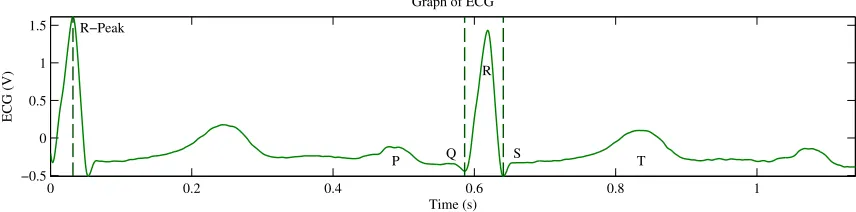
1.3 Graph of ECG Signal . . . 5
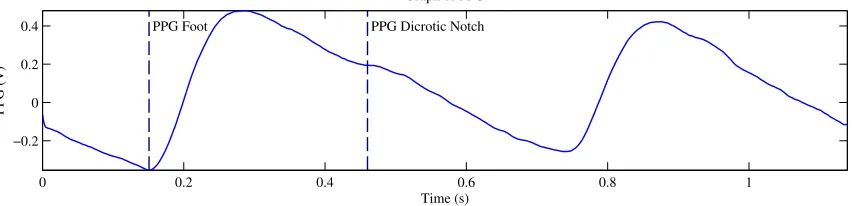
1.4 Graph of PPG Signal . . . 6
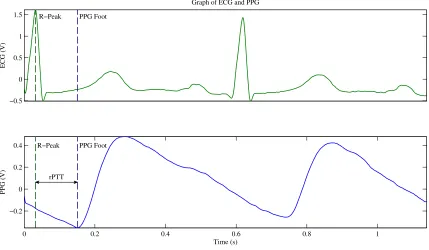
1.5 Graph Depicting the rPTT . . . 7
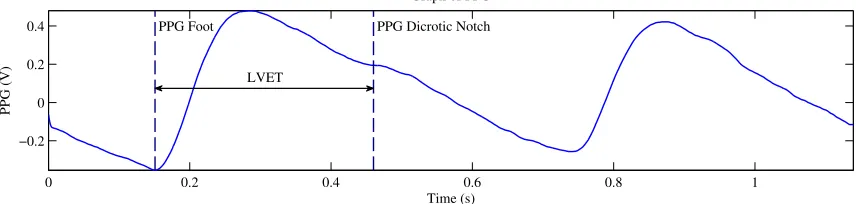
1.6 Graph Depicting the LVET . . . 8
2.1 Generic Least Variance Block Diagram . . . 13
2.2 PPG Foot Detection Block Diagram . . . 14
2.3 PPG Dicrotic Notch Detection Block Diagram . . . 15
3.1 A Fixed-Function NVIDIA GeForce Graphics Pipeline . . . 19
3.2 CUDA Thread Organization . . . 21
3.3 CUDA Warp Scheduling Example . . . 23
3.4 Architecture of a CUDA-Capable GPU . . . 24
3.5 Architecture of a Fermi Streaming Multiprocessor . . . 26
3.6 Execution of a Typical CUDA Program . . . 34
3.7 Timing Results for CUDA Test . . . 42
4.1 Run Files Block Diagram . . . 44
4.2 Example of Beat Segmenting . . . 45
5.1 Graphs Showing Extracted Features . . . 49
5.3 CUDA Runtime Results with 500 Hz Sampling Frequency . . . 52
5.4 CUDA Runtime Results with 50 kHz Sampling Frequency . . . 53
Chapter 1
Introduction
Cardiovascular disease is the leading cause of death in the United States [1], and accurate
extraction of systolic time intervals is key to early detection [2, 3]. The ECG waveform, for
example, can provide information about the presence, extent, and severity of myocardial
ischemia [4]. An elevated heart rate is associated with an increased risk of heart failure in
asymptomatic patients [5]. By extracting non-invasive ventricular performance information,
doctors will have better tools to diagnose and treat patients. This work examined two of
the more prominent STIs: the rPTT and the LVET.
1.1
Biological Background
1.1.1 The Heart and Circulatory System
The Heart
The human heart is the central organ in the circulatory system; it is necessary for the
body to function. Its main purpose is to pump blood throughout the body. The blood
carries essential oxygen and nutrients throughout the blood vessels to the cells via periodic,
rhythmic pumps from the heart. Furthermore, it carries waste, such as carbon dioxide,
away from the cells to the excretory system.
The heart lies between the lungs in the chest cavity. It is separated vertically into
two halves, and then again subdivided horizontally into two cavities; the upper cavities are
Figure 1.1: The human heart (published with permission from Eric Pierce) [6].
four total chambers: the left and right atria, and the left and right ventricles. Figure 1.1
shows an illustration of the heart with the four chambers labeled.
In essence, the heart acts as a double pump. The right side of the heart collects the
de-oxygenated blood from the veins and pumps it into the lungs for the carbon dioxide to
be dropped off and the oxygen to be picked up. The left side collects the oxygenated blood
The Heart Beat
The contractions of the heart will pump blood through the arteries to all parts of the body.
These contractions are periodic in nature, occurring approximately sixty times per minute
(the heart rate). The start of a heart contraction originates from the sinoatrial node (SA);
the SA sends an electrical impulse, starting the act of the heart beating. From there, the
heart will go through three phases: atrial systole, ventricular systole, and diastole [8].
The atrial systole is a short contraction of both the left and right atria, occurring
simultaneously. On the right side of the heart, this causes oxygen-depleted blood from
the veins that had flowed into the right atrium to be pushed through the atrio-ventricular
openings into the right ventricle. On the left side of the heart, atrial systole causes
oxygen-rich blood from the lungs to be forced into the left ventricle.
Ventricular systole is a simultaneous, more prolonged contraction of both the left and
right ventricles. On the right side, this causes the oxygen-depleted blood to be pumped out
of the right ventricle, through the pulmonary valve, and into the lungs. On the left side,
ventricular systole increases the pressure within the left ventricle until the pressure exceeds
that within the aorta. At that time, the oxygen-rich blood is pumped through the aortic
valve into the aorta. When the moment of ventricular systole ends, the pressure from the
aorta exceeds that from the left ventricle, causing the aortic valve to close.
During diastole, the valves to the heart are relaxed, allowing blood to flow from either
the veins or the lungs into the atria. This duration is also known as the period of rest [7].
1.1.2 Biological Signals
The two biological signals that will be noninvasively measured in this thesis are the
elec-trocardiogram (ECG) and the photoplethysmogram (PPG). Figure 1.2 shows a summary
−0.5 0 0.5 1 1.5
Extracted STI Features
ECG (V)
R−Peak
0 0.1 0.2 0.3 0.4 0.5 0.6 0.7
−0.2 0 0.2 0.4
Time (s)
PPG (V)
R−Peak Foot Notch
[image:17.612.97.528.98.350.2]rPTT LVET
Figure 1.2: Graph of ECG and PPG Signals
Electrocardiogram (ECG)
An electrocardiogram, or ECG, is a measurement of electrical activity of the heart over a
period of time. It is captured by attaching electrodes across the heart that detects and
amplifies a small electric field caused by the heart dipole.
There are five major features in an ECG waveform, which are historically called P, Q,
R, S, and T waves. The QRS complex is made up of the Q, R, and S inflections and
represents the depolarization of the ventricles. The QRS complex is also important in this
work because its peak can be used as the start of the R-wave pulse transit time (rPTT). The
QRS complex can be found by using algorithms such as the Pan-Tompkins QRS Detection
Algorithm [9].
Figure 1.3 shows a typical ECG signal. One of the QRS complex time intervals is labeled,
0 0.2 0.4 0.6 0.8 1 −0.5 0 0.5 1 1.5
Graph of ECG
[image:18.612.95.523.96.202.2]Time (s) ECG (V) R−Peak T S R Q P
Figure 1.3: Graph of ECG Signal
Photoplethysmogram (PPG)
A photoplethysmogram, or PPG, is an optical measurement that detects the change of
blood volume in the microvascular tissue bed. In other words, PPG measures blood flows
through the capillaries. The PPG is taken by using a light source, usually a light emitting
diode (LED), to illuminate an area of skin. In the case of a reflective PPG sensor, a certain
amount of light is reflected back by the blood and tissue. That reflected light is measured
by a photo diode on the same side of the skin as the LED. In the case of a transmissive
PPG sensor, only a part of the light is able to pass through the blood and tissue, and that
light is measured with a photo diode on the opposite side of the skin than the LED. The
LED and photo diode usually pair together with a few other electrical components, such as
an amplifier and passive elements, to form a PPG sensor to measure the change of blood
volume [10].
A typical PPG signal consists of two waveforms superimposed together: an AC
com-ponent and a quasi-DC comcom-ponent. The AC comcom-ponent has a fundamental frequency of
around 1 Hz, which corresponds to the heart rate. The quasi-DC component is based on
the amount of blood in the capillaries, and will vary slowly with respiration [11].
The maximas of the PPG are known as peaks, and the minimas are called feet. The
dicrotic notch is a temporal feature of the photoplethysmogram waveform. It is a small
downward deflection that occurs following the PPG peak. The dicrotic notch is attributed
to the reflected wave caused by the closure of the aortic valve at the end of ventricular
systole [10, 12]. It has also been shown that the dicrotic notch is a reflected wave caused by
less pronounced dicrotic notch due to reduced magnitudes of the PPG harmonics, making
the dicrotic notch more difficult to detect [13].
Figure 1.4 shows a typical PPG waveform. This plot shows two periods of the PPG.
One foot, and one dicrotic notch are labeled on the graph.
0 0.2 0.4 0.6 0.8 1
−0.2 0 0.2 0.4
Graph of PPG
Time (s)
PPG (V)
[image:19.612.99.525.189.292.2]PPG Foot PPG Dicrotic Notch
Figure 1.4: Graph of PPG Signal
1.1.3 Systolic Time Intervals
ECG R-Wave Pulse Transit Time (rPTT)
The rPTT is the ECG R-wave pulse transit time, which is the time elapsed between the
ECG R-wave peak and a location on the PPG waveform. For this work, the PPG foot will
be used since it is the location that is most robustly extracted from the PPG waveform.
Equation 1.1 shows this relationship, where ECGr−wave is the ECG R-wave peak, and
P P Gf oot is the PPG foot [11, 15].
rP T T =ECGr−wave−P P Gf oot (1.1)
−0.5 0 0.5 1 1.5
Graph of ECG and PPG
ECG (V)
R−Peak PPG Foot
0 0.2 0.4 0.6 0.8 1
−0.2 0 0.2 0.4
Time (s)
PPG (V)
R−Peak PPG Foot
[image:20.612.96.525.96.346.2]rPTT
Figure 1.5: Graph Depicting the rPTT
Left Ventricular Ejection Time (LVET)
The left ventricular ejection time is the amount of time between the aortic valve opening to
the aortic valve closing. LVET can be directly measured by the time difference between the
first and second heart sounds, and can be estimated from the time difference between the
PPG foot (valve opening) and the PPG dicrotic notch (valve closing). Since heart sound is
not used in this thesis, the LVET will be captured from the PPG waveform. Equation 1.2
below shows this relationship [15, 16].
LV ET =P P Gdicrotic−notch−P P Gf oot (1.2)
0 0.2 0.4 0.6 0.8 1 −0.2
0 0.2 0.4
Graph of PPG
Time (s)
PPG (V)
PPG Foot PPG Dicrotic Notch
[image:21.612.96.524.99.201.2]LVET
Figure 1.6: Graph Depicting the LVET
1.2
Systolic Time Interval Extraction
1.2.1 PPG Foot Detection
Absolute Minimum
One method for finding the PPG foot is by taking the minimum value of the PPG waveform
before the PPG peak. This may work well for some waveforms, but most
photoplethysmo-grams have a very shallow slope near the foot. This causes small amounts of noise to be
picked up as the smallest value, resulting in incorrect feet.
Second Derivative Maxima
Another method for finding the PPG foot is to find the maximum value of the second
derivative. Chiu et al. described a method in which a 7-point central difference formula
was used over the region stretching 10 milliseconds before and 100 milliseconds after the
minimum point of the PPG waveform. The maxima of that region was used as the PPG
foot. Chiu et al. found that the second derivative method gave very consistent and reliable
Third Derivative Peak
Chan et al. discovered that a rapid change from thick to thin on the first derivative PPG
waveform corresponded with maximum acceleration, or a peak in the third derivative PPG
[18]. This method, however, is very prone to noisy signal errors. Since the derivative must
be taken three times on the original signal, it is very possible that a small error will result
in very large errors in the higher derivatives.
Intersecting Tangent
The intersecting tangent method is an algorithm to find the photoplethysmogram foot. The
foot of the waveform is found by the intersection of the tangent to the maximum systolic
upstroke with the horizontal line through the minima of the waveform [19]. It has been
shown that the intersecting tangent method is one of the more reliable methods of finding
the PPG foot [17].
1.2.2 PPG Dicrotic Notch Detection
Slope Extrapolation
Chirife et al. first found the PPG dicrotic notch in an effort to determine the LVET
empiri-cally from the features of a photoplethysmogram. In their experiment, the authors captured
ECG, PPG, and carotid pressure waves in a group of subjects. These signals were inspected
and correlated together to determine the best landmarks of the PPG to correspond with
the known LVET landmarks of the carotid pressure wave.
The authors determined that the best places on the PPG to find the LVET were the
rapid ascent of the curve (the PPG foot), and the most rapid descent before the point of
inflection. This point found is called the dicrotic notch. The method used to find this point
First Derivative
Quarry-Pigott et al. improved on the slope extrapolation method by making the observation
that the first derivative of the PPG waveform gave ejection times that correlate more closely
to the ejection times measured in the carotid artery [16].
The authors held a study to capture the ear densitogram (which is now known as
the ear photoplethysmogram, or ear PPG), the first derivative of the ear PPG, the ECG,
and carotid pressure waves. As with the previous slope extrapolation study, the authors
empirically determined the best locations to extrapolate the LVET on the first derivative of
the ear PPG. They discovered that rapid change from thick to thin for a starting point, and
the nadir for the ending point. Of course, the authors were using a photographic recorder
to extract the first derivative of the ear PPG from the ear PPG itself, so the rapid change
from thick to thin is an artifact of the data collection. This method can still be useful by
modifying it slightly. By using statistical analysis, the paper proves that the first derivative
method of extracting LVET is more accurate than using the slope extrapolation method.
Thus, the zero of the first derivative is used as the dicrotic notch in the first derivative
method.
Third/Forth Derivative
Chan et al. further improved upon the first derivative method of extracting LVET by
examining the second, third, and fourth derivatives of the PPG waveform. The authors
saw that a more accurate dicrotic notch point for the LVET measurement was the diastolic
peak of the third derivative PPG. However, due to the noisiness of the waveforms due to
wave reflections, the authors used the other derivatives as guides to determine which peaks
were the correct start and end points of the LVET [18].
The authors state that their algorithm showed high correlation with the LVET extracted
from aortic flow, but was not robust enough for clinical evaluation of LVET. However, their
method of extracting LVET was compared to flow, not pressure, meaning their method
1.3
Graphics Cards
In order to speedup the execution time of the algorithms, CUDA was explored. CUDA is
parallel computing platform and programming model designed by NVIDIA. It involves
run-ning parallel code on graphics processing units (GPUs) to parallelize algorithms. Because
of the periodic nature of biological signals, and the parallel nature of the algorithms, it was
thought that CUDA would prove to be a useful tool in decreasing the runtime.
1.4
Thesis Overview
The remainder of this thesis is broken up into several chapters. The Algorithms chapter
will explore the historic algorithms and least variance adaptations. The CUDA chapter
explains the CUDA programming model and how it was used to decrease the runtime. The
Methods section explains exactly what and how this work was completed. The Results
and Discussion section explores the meaningful results from this work, and quantitatively
compares the historic and least variance results. The Conclusion concludes this work, and
gives future work ideas. The MATLAB Files appendix contains all of the source code from
Chapter 2
Algorithms
A new class of algorithms was designed to better extract the waveform characteristics that
mark the start and end of the STIs by modifying historic algorithms to be run multiple
times with different tuning parameters. These tuning parameters are variables within the
algorithm that, when changed, slightly alters the feature extracted. Because a single
pa-rameter is not ideal for every waveform, the tuning papa-rameter can be used to better extract
the features across people and physiological states.
The two STIs found in this work are the rPTT and the LVET. Each algorithm to
extract the start and end points of the STIs can be separated into two parts: pre-processing
and processing. The pre-processing step contains filtering, differentiation, squaring, and
segmentation, while the processing step is where the main feature detection occurs, and
is the part of the historic algorithm that is replaced for the least variance algorithms.
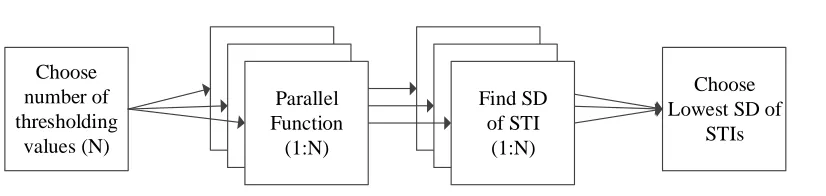
Figure 2.1 contains the generic model for the least variance adaptation of the processing
Choose number of thresholding
values (N)
Parallel Function (1:N)
Choose Lowest SD of
STIs Find SD
[image:26.612.112.525.102.200.2]of STI (1:N)
Figure 2.1: The least variance adaptations of the historic algorithms follow similar flows: choose the number of iterations, run the algorithm with different tuning parameters, find the standard deviation of the STI, then choose the systolic time interval with the least variance.
2.1
ECG R-Wave Pulse Transit Time (rPTT)
The R-wave pulse transit time is the time duration between the ECG R-wave peak and the
PPG foot, where the R-wave peak is extracted by a simple peak detection algorithm and the
PPG foot is historically found by using the percent height algorithm found in commercial
systems such as the SphygmoCor health monitoring system [20] (Figure 2.2).
2.1.1 Percent Height PPG Foot Detection
The algorithm for the percent height PPG foot detection starts by low pass filtering the raw
PPG signal, then segmenting it by using the robustly extracted ECG R-wave as the start of
each beat. The time value that is located at 5 percent of the total amplitude for that beat
is extracted, and the final rPTT value is found by using Equation 2.1, whereP P Gf ootis the
time that the PPG foot occurs, and ECGr−wave is the time that the R-wave peak occurs.
Note that the5 percent value is chosen based on the default value of the SphygmoCor health
monitoring system [20].
rP T T =P P Gf oot−ECGr−wave (2.1)
Least Variance PPG Foot Detection PPG Signal
Stream
Low Pass
Filter Segment Beats PPG Feet
Least Variance Percent Height Detection Percent Height Detection ECG R-Wave Peaks Choose N H% s
For each beat, find the point on the
upslope that is H[1]% of the amplitude
Standard Deviation of the rPTT Widths
For each beat, find the point on the
upslope that is H[N]% of the amplitude
Standard Deviation of the rPTT Widths
[image:27.612.108.524.95.349.2]Choose Lowest Standard Deviation ... ... Historic Least Variance
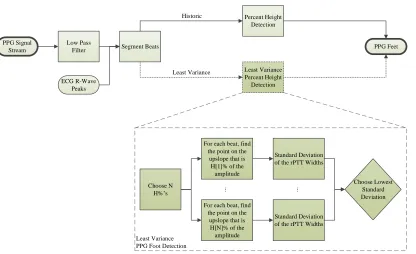
Figure 2.2: The PPG foot detection is shown, with the percent height algorithm on the upper path, and the least variance adaptation on the lower, darker path.
thresholding level, since the noise will be extracted rather than the true PPG foot.
2.1.2 Least Variance PPG Foot Detection
Rather than thresholding at a fixed percentage, the threshold parameter was varied in the
least variance algorithms (Figure 2.1). The least variance PPG foot detection algorithm
thresholds across N percent heights, with the thresholded value containing the smallest
variance of rPTT values extracted as the PPG foot (Figure 2.2. The rPTT is then found
by Equation 2.1.
2.2
Left Ventricular Ejection Time (LVET)
The left ventricular ejection time is the time duration from the PPG foot to the PPG
dicrotic notch, where the PPG foot is found by using the percent height algorithm explained
by Quarry-Pigott [16] (Figure 2.3).
Least Variance
PPG Dicrotic Notch Detection PPG Signal
Stream
Low Pass
Filter Segment Beats
PPG Dicrotic Notches Least Variance Nadir Detection Nadir Detection ECG R-Wave Peaks Differentiation Filter Choose N H% s
For each beat, find the point H[1]% before and H[1]%
after the nadir
Standard Deviation of the LVET
Widths
For each beat, find the point H[N]% before and H[N]%
after the nadir
Standard Deviation of the LVET
[image:28.612.112.524.122.385.2]Widths Choose Lowest Standard Deviation ... ... Historic Least Variance
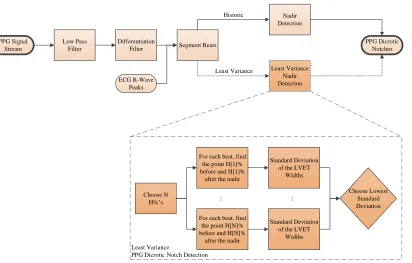
Figure 2.3: The PPG dicrotic notch detection is shown, with the Quarry-Pigott algorithm on the upper path, and the least variance adaptation on the lower, darker path.
2.2.1 Quarry-Pigott PPG Dicrotic Notch Detection
The duration between the PPG foot and the PPG derivative nadir (dicrotic notch) after
the peak was identified as providing an accurate estimate of LVET [16]. To find the
di-crotic notch, the PPG signal is low-pass filtered, differentiated, low-pass filtered again, and
segmented into beats based on the ECG R-peaks. The nadir after the peak is taken as the
dicrotic notch, and the final LVET is found by using Equation 2.2, where dP P Gnadir is the
nadir of the PPG derivative signal, and the P P Gf oot is the foot of the PPG signal.
LV ET =dP P Gnadir−P P Gf oot (2.2)
The algorithm accuracy suffers when noise induces multiple zero-slope locations in the
2.2.2 Least Variance PPG Dicrotic Notch Detection
The nadir detection of the Quarry-Pigott algorithm was replaced with a thresholding
algo-rithm that varies on the upslope and downslope surrounding the nadir (Figure 2.1). The
least variance algorithm extracts N/2 percent heights on the downslope to the nadir, and
N/2 additional percent heights on the upslope after the nadir and the thresholded value
with the least variance of LVET values is extracted as the PPG dicrotic notch. The LVET
Chapter 3
CUDA
3.1
Graphics Card Background
A GPU, or graphics processing unit, is essentially a coprocessor that is able to perform
operations on pixel values, and can be either discrete or integrated. An integrated GPU
typically uses a portion of the memory on the host, and is usually slower than its discrete
counterparts. A discrete GPU is one that is mounted on a graphics card, which is a printed
circuit board containing the GPU, some amount of discrete memory, and an interface to
the computer’s motherboard.
Graphics cards were first produced for the public market in 1982, with Intel’s iSBX
275 Video Graphics Control Multimodule board [21]. This graphics card was able to draw
simple lines, rectangles, arcs, and text. It contained an onboard memory module, called
a frame buffer. This frame buffer was able to read and write to the host system memory
via DMA, or direct memory access. The processor would write the graphics card through
a custom API, or application programming interface. The graphics card would take those
commands, perform the corresponding logic to the pixels in the frame buffer, and output
the necessary signals to the monitor.
In the 1990s, graphics card producers, such as NVIDIA, ATI, and 3dfx, started releasing
abstractions to allow application developers to take advantage of the GPU through standard
programming languages. A few of these standard APIs include OpenGL, Glide API, and
DirectX. These APIs allowed programmers to code for any compatible graphics card, rather
A typical graphics card produced in the mid to late 1990s contained a massively parallel
pixel pipeline. A single pixel pipeline had several stages in which the pixels were processed
through to render an image. These pixel pipelines were instantiated many times in the
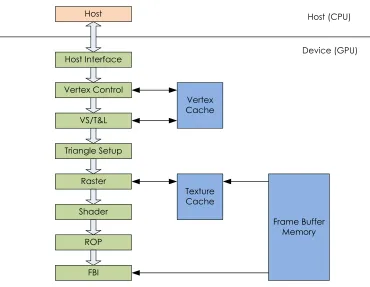
GPU, in order to process many pixels together at the same time, in parallel. Figure 3.1
shows a fixed-function graphics pipeline from an early NVIDIA GeForce GPU. Commands
are sent from an application running on the host through a standard API. The host interface
received the commands and data from the CPU. It also contained hardware to perform direct
memory access (DMA) to transfer data in bulk from the main host memory to the graphics
pipeline. The other stages of the pipeline were essentially to perform transformations on
the final rendered image.
The NVIDIA GeForce 3, released in 2001, was the first graphics card to allow the
pixel pipeline to be programmable, meaning that the functionality of some of the stages
could be changed to produce different rendered pixels [22]. In particular, the floating-point
vertex engine (VS/T&L stage) was given programmability by publicly releasing the private
instruction set. This allowed for more control over how the final outputted image was
manipulated, but also gave a means of using this new architecture to perform calculations
on non-pixel data. This lead to a new way of GPU computing, now known as
Host
Host Interface
Vertex Control
VS/T&L
Triangle Setup
Raster
Shader
ROP
FBI
Vertex Cache
Texture Cache
Frame Buffer Memory
Host (CPU)
[image:32.612.115.485.99.386.2]Device (GPU)
Figure 3.1: A Fixed-Function NVIDIA GeForce Graphics Pipeline
Computing data using the GPGPU architecture had its problems. For one, there were
no user-defined data types, meaning the programmer needed to store data within the vector
arrays on the GPU. Secondly, the primitive operations, such as addition, division, etc., were
not IEEE compliant. This meant that computations on a GPU were not necessarily the
same as that on a CPU, or even another GPU. Finally, the GPGPU pipeline did not provide
an easy way to write to the main memory; the computation needed to be converted to a
pixel color and saved to the frame buffer memory before it could be written to main memory.
These deficiencies of the GPGPU programming model led the way towards more powerful
3.2
NVIDIA’s CUDA
In 2007, NVIDIA released a set of graphics cards with an entirely new architecture. This
programming model and hardware was dubbed CUDA. Originally, CUDA stood for
com-pute unified device architecture. Like the GPGPU, it allowed for advanced programmability
of the graphics pipeline. However, instead of providing the APIs to program certain stages,
CUDA replaced the pipeline with fully programmable processors with instruction memory,
instruction cache, and instruction sequencing control logic. NVIDIA also added an abstract
parallel programming model with a hierarchy of parallel threads, as well as barrier
synchro-nization and atomic operations. To go along with this new architecture, the CUDA C/C++
compiler, library, and runtime software were developed to enable programmers to easily use
the new CUDA GPU architecture [23].
In 2010, NVIDIA released its newest version of the CUDA architecture called Fermi.
Fermi introduced several new features to increase parallel performance. This included new
streaming multiprocessors, an improved memory subsystem, and new application switching
logic. This work will use the Fermi-based CUDA architecture [24].
3.2.1 CUDA Threads
A typical CUDA program has two main parts: the sequential part that runs on the host
(CPU), and the parallel part that runs on the device (GPU). These two components work
together to perform some task. Usually, the sequential part will setup the GPU, load and
access the GPU’s memory, and start the parallel code. The parallel part, also known as a
kernel, will execute some small task that will run in parallel on many small processors within
the GPU. Each small task, which is also called a thread, is exactly the same. However, the
threads execute on different data. This programming model is known as “same program,
multiple data,” or SPMD, because the same program is processing multiple data values. For
CUDA, the SPMD programming model is identical to SIMD, or “same instruction, multiple
data,” since the same instruction is run in multiple threads on multiple data values.
CUDA also introduced abstract concepts known as blocks and grids. When a kernel is
launched, it creates a grid of thousands to millions of threads. In Figure 3.2, Kernel 0 on
When running a large number of threads in a grid, it is necessary to create a large amount
of data parallelism (more on parallelism is in a later section).
The grids are split up into a two-dimensional array of blocks. These blocks are further
organized into three-dimensional arrays of threads. Figure 3.2 shows an example of this
thread hierarchy. In this figure, each grid is split up into a 2 by 3 matrix of blocks. Each
block is then arranged into 2 by 4 by 2 matrices of threads. The number of threads shown
is very small compared to what would normally run on a GPU, but were kept small for ease
of describing the CUDA thread organization [23].
Host Device Grid 0 Block (0,0) Block (0,1) Block (1,0) Block (1,1) Block (2,0) Block (2,1) Grid 1 Block (0,0) Block (0,1) Block (1,0) Block (1,1) Block (2,0) Block (2,1) Kernel 0 Thread
(0,1,0) Thread(1,1,0) Thread(2,1,0) Thread(3,1,0) Thread
(0,0,0) Thread(1,0,0) Thread(2,0,0) Thread(3,0,0) (0,0,1) (1,0,1) (2,0,1) (3,0,1)
[image:34.612.107.515.268.648.2]Kernel 1 Ex e c u tio n Tim e
Arranging threads into grids, blocks, and grids is the responsibility of the programmer.
It is their job to assign the threads correctly to assure the hardware resources of the
graph-ics card are fully utilized. In addition, there is a concept called warps that is an implied
responsibility of the programmer. Warps are not assigned by the programmer, but are
automatically created. Implied responsibility means that the programmer should
under-stand how these warps are created in order to choose the thread hierarchy to best use the
hardware on the CUDA card. Each block is assigned to a streaming multiprocessor (SM).
Multiple blocks may be assigned to a single SM if there are enough resources available.
These threads running on the SM are broken up into groups of 32 threads, called warps.
Within SMs, warps are the unit of thread scheduling.
As mentioned earlier, each warp contains up to 32 threads from the same block that
contain the same program counter. Because all 32 threads in a warp share the same program
counter, they all execute the same instructions simultaneously. However, even though each
thread shares a program counter, it is still possible for divergence within a warp. For
example, if a warp contains a branching instruction, such as an if-else construct, certain
threads may execute some instructions while others do not. In this case, the warp will
maintain an active mask to keep track of which threads in the warp will execute the next
instruction. This active mask can be used to disable threads that are not part of the current
branch path. Hence, the threads do notdiverge, but instead do not execute until the control
path converges again.
Figure 3.3 shows an example of how a streaming multiprocessor warp scheduler might
schedule warps. Note that only 16 instructions are shown for simplicity. In this example, all
threads in Warp 8 will execute instruction 22. Then, only 7 threads in Warp 1 will execute
instruction 63. This shows the warp divergence explained earlier. Warp 5 will then have all
threads execute instruction 12. The warps are scheduled based on which are ready to run,
and which are currently waiting. If, for example, one warp needed to access high-latency
global memory, it would be taken out of the priority schedule until it received its data from
Streaming Multiprocessor
Warp Scheduler
Warp (8); Instruction (22)
Warp (1); Instruction (63)
Warp (5); Instruction (12)
Warp (8); Instruction (23)
Warp (1); Instruction (64)
Warp (5); Instruction (13) ...
Ti
m
[image:36.612.124.500.108.597.2]e
3.2.2 CUDA Architecture
Figure 3.4 shows the block diagram of a typical Fermi based CUDA-capable GPU. In essence,
the CUDA architecture contains hundreds of streaming processors, known as CUDA cores.
The CUDA cores are then grouped into streaming multiprocessors (SMs). The SMs are
positioned around a common L2 cache, with each SM having access to read and write to
both L2 cache and global DRAM memory.
In regards to the Fermi architecture, there are up to 512 streaming multiprocessors,
organized into groups of 16 SMs with 32 streaming processors each. The GigaThread warp
scheduler is in charge of assigning work to each of the SMs. Furthermore, there can be up
to 6 GB of GDDR5 DRAM memory, arranged into six partitions [24].
Device (GPU) Host Input Assembler GigaThread Load/ Store L2 Cache SPs, SFUs, LD/ST Regs/ Cache Dispatch SPs, SFUs, LD/ST Regs/ Cache Dispatch SPs, SFUs, LD/ST Regs/ Cache Dispatch SPs, SFUs, LD/ST Regs/ Cache Dispatch SPs, SFUs, LD/ST Regs/ Cache Dispatch SPs, SFUs, LD/ST Regs/ Cache Dispatch SPs, SFUs, LD/ST Regs/ Cache Dispatch Load/
Store Load/Store Load/Store Load/Store Load/Store Load/Store
DRAM
[image:37.612.106.516.314.600.2]...
Streaming Multiprocessor
The streaming multiprocessors (SMs) are the main processing center for CUDA-capable
GPUs. Each SM is made up of several streaming processors (SP), warp schedulers,
dis-patch units, a register file, load and store units (LD/ST), special function units (SFU), an
interconnection network, shared memory, level one instruction cache, level one data cache,
and level two uniform data cache. Figure 3.5 shows the typical block diagram for the
streaming multiprocessor.
In the Fermi architecture, there are up to 512 streaming multiprocessors. Within each
SM will be 32 streaming processors, 16 load and store units, four special function units, two
warp schedulers, two dispatch units, a 32K x 32-bit register file, and a 64K memory that is
L1 Instruction Cache
Warp Scheduler Warp Scheduler
Dispatch Unit Dispatch Unit
Register File (32 KB x 32-bit)
Interconnection Network
Shared Memory and L1 Cache (64 KB)
L2 (Uniform) Cache
[image:39.612.110.517.100.489.2]LD/ST SFU SFU SP SP SP SP Dispatch Port Operand Collector Result Queue FPU ALU SP SP SP SP SP SP SP SP SP SP SP SP SP SP SP SP SP SP SP SP SP SP SP SP SP SP SP SP SP LD/ST LD/ST LD/ST LD/ST LD/ST LD/ST LD/ST LD/ST LD/ST LD/ST LD/ST LD/ST LD/ST LD/ST LD/ST SFU SFU
Figure 3.5: Architecture of a Fermi Streaming Multiprocessor, adapted from [24]
Streaming Processor Each streaming processor (SP), or CUDA core as they are
typ-ically called, is essentially a low-speed processor. However, where a CPU runs between
one and sixteen threads simultaneously, a GPU can run upwards of thousands of threads
in parallel. Thus, a GPU is said to have “strength in numbers,” meaning the GPU can
break up a task into many small computations in order to obtain better performance than
a high-powered CPU.
instructions, the operand collector for receiving the operands, the floating point unit (FPU)
that uses the IEEE 754-2008 floating point standard, the fully pipelined 32-bit integer
arithmetic logic unit (ALU), and the result queue for sharing its results with the other
parts of the SP [24].
Register File A register file is contained within each streaming multiprocessor. Each
thread contains its own set of local registers within the register file. The amount of registers
each thread owns depends on how many registers each thread requires. In this sense, the
registers are dynamically allocated. Once the registers have been allocated to a specific
thread within a SM, those registers cannot be accessed by another thread.
By allowing the registers to be dynamically allocated, it allows more flexibility to both
the compilers and the programmers. The compilers have more freedom to tradeoff between
instruction-level parallelism and thread-level parallelism. Instruction-level parallelism is the
parallelism that exists between instructions within a thread. Thread-level parallelism is the
parallelism between multiple threads. The compiler can choose whether the best speedup
will occur when instruction-level parallelism or thread-level parallelism is exploited. The
programmer can choose how many registers each thread should have, allowing more or less
threads running on each SM. By giving the programmer control over the number of threads
on each SM, it gives the opportunity for better execution times [23].
The Fermi-based register file is 32 KB long by 32-bits wide. By making the width 32
bits, it allows for floating-point numbers to be easily stored in a single register [24].
Warp Scheduler The dual warp schedulers within the streaming multiprocessors are
used to schedule which warps should execute next. Warps are added to the scheduler when
all of its operands are ready for consumption for the next execution cycle. Eligible warps
are selected based on a prioritized scheduling policy. In other words, the warp scheduler has
logic to decide which warp is of higher priority. This logic is a combination of round-robin
scheduling, and age of warp scheduling [23].
Round-robin scheduling is a scheduling algorithm where time slices are assigned to each
task in a cyclic pattern. In this algorithm, the tasks do not have priority, meaning each
another scheduling algorithm where tasks are assigned based on the age of the task. With
this algorithm, older tasks will have a greater chance of running next than younger tasks.
By combining these two scheduling algorithms, the Fermi CUDA architecture will perform
round-robin scheduling for each age group. For example, the oldest tasks will execute in
round-robin, then the next oldest tasks will run in round-robin, and so on.
As stated earlier, each thread in a warp executes the same instruction. To keep track
of which threads should be active during a specific instruction, the warp scheduler contains
active masks for each warp in the streaming multiprocessor. When a thread should not be
active on a certain program counter, the bit in the active mask for that thread is cleared,
telling the dispatch unit to skip dispatching that thread for the current instruction [23]
Unlike other scheduling systems, the warp scheduler does not introduce any latency
when switching warps. This concept is called zero-overhead thread scheduling. The only
time that warp switching causes an overhead is when there are no warps available to run
because the operands to every warp are not available. To remedy this, simply introduce
more threads in each block to create more warps. This way, there are more warps, allowing
other warps to execute while others are waiting for long-latency memory operations to
complete [24].
In the Fermi-based CUDA cards, there are two warp schedulers. Each scheduler chooses
a separate warp to be issued and executed concurrently. The schedulers then issues one
instruction from each warp to either the groups of SPs, the load and store units, or the
SFUs. Because the two warp schedulers operate on separate warps, there is no need to check
for dependencies between them. This allows for excellent, near-peak hardware performance
when executing [24].
Dispatch Unit The dispatch unit is used to fetch instructions from L1 instruction cache,
and dispatch those instructions to the correct streaming processors according to the warp
schedulers. The dispatch unit is tightly coupled with the warp scheduler, in that it is the
interface between scheduling the warps and the streaming processors. As previously
men-tioned, there are two warp schedulers and two dispatch units in Fermi-based architectures
Load and Store Control The load and store control units within the streaming
multi-processors are used as the interface between the threads and the memories. These memories
include the register file, the shared memory and L1 cache, the local L2 cache, the global L2
cache, and the global DRAM memory [24].
Special Function Units The special function units (SFUs) are specialized arithmetic
units that are able to perform mathematical functions such as sine, cosine, reciprocal, and
square root. The SFUs are decoupled from the execution pipeline, meaning other warps
may be dispatched to the streaming processors while the SFUs are occupied. In Fermi-based
CUDA cards, there are four SFUs per SM, double that of previous CUDA architectures [24].
Shared Memory and L1 Data Cache Shared memory is a chunk of memory that can
be accessed by every thread executing on a single streaming multiprocessor. This is useful
for programs that require knowledge of the data around the data point it is currently working
on, such as matrix calculations. Shared memory is ideal to use in these situations because
accessing shared memory takes a very short amount of time compared to accessing global
DRAM. Once shared memory is loaded, it is significantly faster than accessing DRAM, and
can be accessed by multiple threads [24].
Level one (L1) cache is a new feature on Fermi-based CUDA cards. It is used to hold
global memory references, to decrease DRAM access times. This type of cache is very
useful when the kernel may not be accessing data locations that can be shared between
other threads [25].
In Fermi architectures, there is 64 KB of configurable memory in each streaming
mul-tiprocessor. This memory can be configured as 48 KB of shared memory and 16 KB of
L1 cache, or 16 KB of shared memory and 48 KB of L1 cache. The choice is that of the
programmer and depends on two factors: how much shared memory is needed, and how
predictable are the kernel’s accesses to global memory likely to be [25].
L2 Data Cache (Local) The Fermi architecture added L2 cache to each streaming
multiprocessor. This cache allows for faster accesses to DRAM. An important feature of
are uninterruptible. These atomic operations are ideal for accessing shared data locations;
this includes data shared between blocks, or kernels. By implementing atomic operations
in hardware, it allows the ALU to perform the operation without having to us semaphores
[25].
GigaThread Scheduler
The GigaThread scheduler is in charge of distributing thread blocks to the SMs. The input
assembler on the host will compile the input code into an instruction set that the scheduler
can understand. Said scheduler will take the instructions and split up the work based
on the kernels already running on the GPU. Thus, multiple kernels can run on the same
CUDA card, with near-instantaneous kernel switching (under 25 microseconds), due to the
capabilities of the GigaThread scheduler [24].
L2 Cache and DRAM
The level 2 cache (L2) and dynamic random access memory (DRAM) memories are known
as the global memories on the Fermi GPU. These memories, unlike the local memories, can
be accessed by every SP within the GPU. Thus, the global memories make it useful for
inter-thread communication on a per-application basis. However, as explained earlier, accessing
global memory is typically slower than accessing local memory. Using global memory is a
tradeoff between communicating between processors and speed.
As seen from its name, L2 cache is used to cache accesses to DRAM. When memory is
accessed in DRAM, those values are transfered to L2 cache for future reference. This is
im-portant for memory coalescing. Memory coalescing is when memory is accessed sequentially.
For example, a warp may access memory locationsM0,0, M1,0, M2,0, M3,0 in that order. This
will have a far greater access time than if the warp accessed M0,0, M10,3, M4,2, M0,20. This
is because DRAM cells are essentially weak capacitors. When these cells are accessed, the
small charge on the capacitor must be shared with a sensor to set off a comparator circuit
to determine if that cell had a zero or a one present on it. Since this is a slow process due to
the small charges on the capacitors, most modern DRAMs use a parallel process to increase
same time, and compare each of the charges in parallel. The DRAM then transfers the
data from each location at high speed to the cache [23]. Thus, reading consecutive global
memory locations will give a much higher bandwidth than reading random data locations.
3.3
Data Parallelism
Data processing on graphics cards is used primarily when there are a large number of
computations that have low data dependencies. For example, Listing 3.1 would be a good
candidate for implementing on a graphics card. In this C-like example, two arrays,bandc,
are added together and placed in array a. These arrays are added by looping through each
value of b and c and adding the values at that location together, putting the sum in the
corresponding location in a. This is a good candidate for parallelizing with a GPU since
there is no data dependencies between iterations of the for loop.
Listing 3.1: Typical GPU Algorithm: Vector Addition
1 // - N is the s i z e of a r r a y s b and c
2 // - A r r a y a is a l r e a d y pre - a l l o c a t e d
3 // - A r r a y s b and c c o n t a i n n u m b e r s
4 for (int i = 0; i < N ; i ++) {
5 a [ i ] = b [ i ] + c [ i ];
6 }
In order to write code that will execute quickly and correctly in parallel on a GPU, it is
important to understand the data dependencies between computations. The sections that
follow will explain the three types of data dependencies in more detail.
3.3.1 Flow Dependency
Flow dependency occurs when a task depends on the result of a previous task. Listing 3.2
shows an example of something that has a flow dependency. When the loop is on a given
iteration (i), array arequires the value of a from the previous iteration (i−1). Thus, the
Listing 3.2: Flow Dependency Example
1 for (int i = 1; i < N ; i ++) {
2 a [ i ] = a [ i -1] + b [ i ];
3 }
3.3.2 Anti-dependency
Anti-dependency occurs when a task depends on a value that is later changed. Listing 3.3
shows an example of something that has an anti-dependency. In this example, arrayauses
the value ataof the next loop iteration. On the next value ofi,a[i+1]will be overwritten,
meaning the a[i]is anti-dependent on a[i+1].
Listing 3.3: Anti-dependency Example
1 for (int i = 0; i < N ; i ++) {
2 a [ i ] = a [ i + 1 ] ; + b [ i ]
3 }
3.3.3 Output Dependency
Output dependency occurs when the ordering of the tasks affect the result. Listing 3.4
shows an example of something that has an output dependency. Array a is the sum of
arrays b and c. However, array c is also assigned the sum of arrays d and e. If lines 2
and 3 were swapped, the value of array a would change, meaning that there is an output
Listing 3.4: Output Dependency Example
1 for (int i = 0; i < N ; i ++) {
2 a [ i ] = b [ i ] + c [ i ];
3 c [ i ] = d [ i ] + e [ i ];
4 }
3.4
CUDA Programming Structure
CUDA is the hardware and software architecture that allows NVIDIA GPUs to execute
programs written in high-level languages, such as C, C++, Fortran, and more. A typical
CUDA program will have code that executes on the CPU, or the host, as well as on the
GPU, or the device. The code that runs on the device is known as a kernel. A kernel will
execute in parallel across many threads simultaneously. These threads may be organized in
grids of blocks of threads by the programmer or the compiler.
Usually, a CUDA program will consist of phases, where the code with little data
paral-lelism is executed on the host, and those with a lot of data paralparal-lelism is executed on the
device. Figure 3.6 shows this phenomenon. In this figure, the CUDA program starts out
executing the code serially on the CPU. Then, a kernel is called to run in parallel on many
threads. The CPU then runs some code in serial, until another kernel is called to run more
Grid (0)
…
Thread Thread Thread Thread
Grid (1)
…
Thread Thread Thread Thread
CPU Serial Code
GPU Parallel Kernel
CPU Serial Code
GPU Parallel Kernel
Serial Code
[image:47.612.117.514.96.398.2]Serial Code
Figure 3.6: Execution of a Typical CUDA Program, adapted from [23]
Listing 3.5 shows an example CUDA program that will add two arrays element-wise.
This code follows the programming pattern shown in Figure 3.6; the CPU code (int ...
main()) will first run in serial. The serial code will setup the device kernels, and start executing those kernels (add dev(...)). This example was adapted from Sanders and
Listing 3.5: Example CUDA Code
1 # d e f i n e N = 64
2 /* C o d e t h a t r u n s on the d e v i c e ( GPU ) */
3 _ _ g l o b a l _ _ v o id a d d _ d e v (int * a , int * b , int * c ) {
4 int t h r e a d I d = b l o c k I d x . x ; // The i n d e x of the t h r e a d e x e c u t i n g 5 // Add the e l e m e n t s c o r r e s p o n d i n g to the i n d e x of the c u r r e n t t h r e a d
6 if ( t h r e a d I d < N ) {
7 c [ t h r e a d I d ] = a [ t h r e a d I d ] + b [ t h r e a d I d ];
8 }
9 }
10 /* C o d e t h a t r u n s on the h o s t ( CPU ) */
11 int m a i n () {
12 int a [ N ] , b [ N ] , c [ N ]; // H o s t ( CPU ) a r r a y s 13 int * a_dev , * b_dev , * c _ d e v ; // D e v i c e ( GPU ) p o i n t e r s 14 // A l l o c a t e m e m o r y on the d e v i c e
15 c u d a M a l l o c( (v o i d**) a_dev , N * s i z e o f(int) ) ;
16 c u d a M a l l o c( (v o i d**) b_dev , N * s i z e o f(int) ) ;
17 c u d a M a l l o c( (v o i d**) c_dev , N * s i z e o f(int) ) ;
18 // F i l l h o s t a r r a y s a and b w i t h d a t a h e r e
19 /*
20 */
21 // C o p y a and b to the d e v i c e
22 c u d a M e m c p y( a_dev , a , N * s i z e o f(int) , c u d a M e m c p y H o s t T o D e v i c e ) ;
23 c u d a M e m c p y( b_dev , b , N * s i z e o f(int) , c u d a M e m c p y H o s t T o D e v i c e ) ;
24 // E x e c u t e a d d _ d e v on the d e v i c e
25 add_dev < < N ,1 > >( a_dev , b_dev , c _ d e v ) ;
26 // C o p y c _ d e v f r o m the d e v i c e b a c k to the h o s t
27 c u d a M e m c p y( c , c_dev , N * s i z e o f(int) , c u d a M e m c p y D e v i c e T o H o s t ) ;
28 // F r e e the m e m o r y on the d e v i c e
29 c u d a F r e e( a _ d e v ) ;
30 c u d a F r e e( b _ d e v ) ;
31 c u d a F r e e( c _ d e v ) ;
3.5
MATLAB to CUDA Compilation
With the advent of MATLAB’s Parallel Computing Toolbox, it is now possible to write
MATLAB programs to take advantage of NVIDIA’s CUDA graphics cards. There are
several ways to write MATLAB code to speed up computations on a GPU. One of which is
to use overloaded built-in function calls. Another is to write a kernel in MATLAB to run
on each element of a large matrix. A final way is to write CUDA code that can be called
from MATLAB [27].
For each of the methods of writing parallel code to be used with MATLAB, it is
im-portant to keep a few things in mind. First, it is imim-portant to understand the hardware
inside the graphics card. Without a good knowledge of how many streaming processors, how
much memory, and the limitations of GPU, it is very difficult to receive optimal performance
from the code. Second, it is important to understand the data dependencies between
com-putations, When these dependencies are violated, stalls will appear in the CUDA pipeline,
causing enormous slow-downs in the program. Finally, it is important to understand the
pros and cons of the three ways of writing CUDA code for MATLAB. The three sections
below will explain the methods, as well as detail when each should be used.
3.5.1 MATLAB Function Overloading
MATLAB has support for overloading function calls with GPU function calls. Instead of
calling a function on a CPU array, it would be called on a GPU array. For example, in
Listing 3.6, a fast Fourier transform (FFT) is performed on two random arrays. TheAarray
is located on the CPU, and the GAarray is located on the GPU. The same function call is
used for both arrays: fft(). However, sinceGA is located on the graphics card, thefft()
function is executed as a CUDA kernel on the GPU and sinceAis located on the CPU, the
Listing 3.6: MATLAB Overloaded Functions
1 % S e r i a l
2 A = r a n d( 2 ^ 1 2 , 1 ) ;
3 B = fft( A ) ;
4 % P a r a l l e l
5 GA = g p u A r r a y(r a n d( 2 ^ 1 2 , 1 ) ) ;
6 GB = fft( GA ) ;
7 GC = g a t h e r( GB ) ;
With all MATLAB code that runs on a GPU, it is important to note that GPU arrays
must be copied back to the CPU before they can be used by a CPU function. In Listing 3.6,
the gather()function is used to copy theGBarray back to the CPU.
MATLAB function overloading is the easiest to implement in existing MATLAB code
because it requires the fewest code changes. As long as the existing serial code uses
sup-ported overloaded functions, the changes to convert it to parallel code is minimal; simply
use gpuArray() to send the arrays to the GPU, and gather() to bring the arrays back
to the CPU. In Tordoff’s Mandelbrot experiment, using overloaded functions resulted in a
speedup of around 16 times that of the CPU code [28].
3.5.2 MATLAB Kernels
In MATLAB, it is possible to write a function that will perform a task on a single element
of an array. By running this MATLAB function on the GPU, it becomes very similar to
running a CUDA kernel, except is is written in MATLAB.
Listing 3.7 shows an example of using the arrayfun function to execute gpuPlus()
on each element of Ga and Gb. In this example, gpuPlus()will add elements of the same
index from both of the input arrays. Since Ga and Gb are both GPU arrays, gpuPlus()
Listing 3.7: MATLAB Kernels
1 % F u n c t i o n
2 f u n c t i o n [ o ] = g p u P l u s ( a , b ) ;
3 o = a + b ;
4 end
5
6 % C o d e
7 Ga = g p u A r r a y(r a n d( 2 0 0 ) ) ;
8 Gb = g p u A r r a y(r a n d( 2 0 0 ) ) ;
9 Go = a r r a y f u n( @ g p u P l u s , a , b ) ;
10 o = g a t h e r( Go ) ;
MATLAB kernels are more in depth to implement than using overloaded functions. It
is necessary to create the element-wise function, and call it usingarrayfun(). In Tordoff’s
Mandelbrot experiment, using element-wise MATLAB kernels provided a speedup of 164
times that of the serial CPU code [28].
3.5.3 MATLAB CUDA Kernels
The final way to execute MATLAB code on a CUDA-capable graphics card is to write a
custom CUDA kernel, then execute the pre-compiled code with existing MATLAB bindings.
Listing 3.8 shows the CUDA code. This code is then compiled into the ptx file, which is
essentially the binary that runs on the CUDA card. Listing 3.9 is the MATLAB code that
will initialize the GPU arrays, create the kernel in MATLAB, run the kernel, and save the
Listing 3.8: CUDA Kernel Example
1 // C U D A C o d e ( m u s t be c o m p i l e d )
2 _ _ g l o b a l _ _ v o i d a d d _ d e v (c o n s t d o u b l e * a , c o n s t d o u b l e * b , d o u b l e ...
* c ) {
3 int t h r e a d I d = b l o c k I d x . x ; // The i n d e x of the t h r e a d e x e c u t i n g 4 // Add the e l e m e n t s c o r r e s p o n d i n g to the i n d e x of the c u r r e n t t h r e a d
5 if ( t h r e a d I d < N ) {
6 c [ t h r e a d I d ] = a [ t h r e a d I d ] + b [ t h r e a d I d ];
7 }
8 }
Listing 3.9: MATLAB CUDA Kernels
1 % % M a t l a b c o d e
2 % I n i t i a l i z e the GPU a r r a y s
3 Ga = g p u A r r a y(r a n d(200 ,1) ) ;
4 Gb = g p u A r r a y(r a n d(200 ,1) ) ;
5 % C r e a t e the k e r n e l in M A T L A B
6 k = p a r a l l e l . gpu . C U D A K e r n e l ('a d d _ d e v . ptx','a d d _ d e v . cu' ) ;
7 k . T h r e a d B l o c k S i z e = 2 0 0 ;
8 % Run the k e r n e l and c o p y the r e s u l t to the CPU
9 Go = f e v a l( k , Ga , Gb ) ;
10 o = g a t h e r( Go ) ;
MATLAB CUDA kernels require the most effort to run with MATLAB. It is necessary
to understand the subset of CUDA that is available to use with MATLAB. It is also required
to format the input parameters in such a way that MATLAB is able to create the kernel
and its inputs and outputs correctly. CUDA code must also be compiled first before it
can be used, unlike typical MATLAB code. Although this is more difficult to execute, it
does provide the most flexibility and has the largest potential for speedup. In Tordoff’s
Mandelbrot experiment, using CUDA kernels gave a speedup of approximately 340 times
3.6
Potential Speedup
A simple script was written in MATLAB to examine the potential speedup of using
over-loaded functions. The hypothesis was that running with the GPU will provide a speedup
over running with a CPU for larger datasets. For smaller datasets, the time to load the
GPU arrays would be too large for the speedup of the actual function to overcome.
The function chosen was thefft() function. This was chosen because it was expected
that the fft would need to be run multiple times in the least variance algorithms. The
code is shown below in section 3.10.
Listing 3.10: gpu test.m
1 clear all;
2
3 N = 23;
4 N2 = 15;
5
6 disp('CPU')
7 t = zeros(1,N);
8
9 for n = 1:N %#ok<FORPF>
10 tic
11 A = rand(2ˆn, 1);
12 B = fft(A); %#ok<SNASGU>
13 t(n) = toc;
14 end
15
16 disp('GPU')
17 t gpu = zeros(1,N);
18
19 for n = 1:N %#ok<FORPF>
20 tic
21 A gpu = gpuArray(rand(2ˆn, 1));
22 B gpu = fft(A gpu); %#ok<SNASGU>
23 t gpu(n) = toc;
24 end
25
26 fig = figure('Name', 'Array Size Plot', 'NumberTitle', 'off');
27
28 set(fig, 'Color', 'w');
[image:53.612.95.538.309.712.2]30 hold on;
31 plot(1:N,t, 'b', 'LineWidth', 1);
32 plot(1:N,t gpu, 'r', 'LineWidth', 1);
33 hold off;
34 title('FFT of Random Arrays')
35 xlabel('Array Size (2ˆN)')
36 ylabel('Time (s)');
37 box on;
38 legend('CPU', 'GPU', 'Location', 'SouthWest');
39
40 % Graph Insert
41 set(fig,'DefaultAxesFontSize', 8);
42 axes('Position', [.2,.65,.2,.2]);
43 hold on;
44 plot(1:N2,t(1:N2), 'b', 'LineWidth', 1);
45 plot(1:N2,t gpu(1:N2), 'r', 'LineWidth', 1);
46 hold off;
47 xlabel('Array Size (2ˆN)');
48 ylabel('Time (s)')
49 box on;
50
51 export fig(fig, 'gpu timing.pdf');
52
53 close(fig);
54
55 clear all;
The results from this test showed that the GPU executed thefftfaster than the CPU
for arrays larger than 215elements. For arrays smaller than that, the CPU performed faster.
This is expected, since the GPU must first copy the elements to the graphics card before
performing the fft. Figure 3.7 shows a plot of the execution time versus the size of the
array. The inset shows the time between arrays of 21 to 215 elements. This was added since
0
5
10
15
20
25
0
0.05
0.1
0.15
0.2
0.25
0.3
0.35
FFT of Random Arrays
Array Size (2
N
)
Time (s)
CPU
GPU
0 5 10 15
0 1 2 3
x 10−3
Array Size (2N)
[image:55.612.98.521.95.451.2]Time (s)
Chapter 4
Methods
4.1
Data Collection
The physiological datasets used to verify the least variance algorithms were obtained
un-der informed consent using protocols approved by the Rochester Institute of Technology
Institutional Review Board for Protection of Human Subjects. The Biopac MP36 (Biopac
Systems, Inc., Goleta, CA) captured synchronized three-lead ECG and infrared ear PPG
from 15 subjects (60/40 male-to-female ratio) at a sampling rate of 50 kHz.
To vary the physiological states of the subjects, one minute measurements were captured
after pedalling four minutes at different activity levels, varied via the Life Fitness 95R1
Recumbent Bike. Measurements were taken at five levels of increasing resistance (L1, L2, L3,
L5, L7), then two levels of decreasing resistance (L3, L1), and a final recovery measurement
was taken after resting four minutes (REC). Repeat measurements were obtained on three
occasions, separated by 1-2 days.
4.2
Processing
Figure 4.1 contains the block diagram of the run_files.m script. All of the code can be
Run File Start Load Waveforms
Filter Waveforms
Segment/ Average Beats
Run File Complete Feature
[image:57.612.116.510.112.139.2]Detection
Figure 4.1: The run files.m block diagram.
To process the physiological datasets, scripts were written using MATLAB (MathWorks,
Inc., Natick, MA). Datasets were downsampled to 500 Hz to approximate a clinical sampling
frequency [29] and reduce processing time. The PPG was low-pass filtered at 20 Hz with a
501-tap finite impulse response filter (FIR), then differentiated (9-tap differentiation filter),
and low-pass filtered at 20 Hz again (501-tap FIR). The ECG was bandpass filtered between
0.05 Hz and 150Hz (501-tap FIR), then notch filtered between 55 Hz and 65 Hz
(500-tap FIR) for line noise suppression. Filter types were selected based on prior algorithm
implementations [9, 16, 18, 30].
The signals were segmented into beats based on the R-wave peaks. PPG feet were
obtained from the 5-percent historic percent height method as well as the least variance
algorithm (N = 50, thresholds evenly spaced between 0 and 50 percent), and the PPG
dicrotic notches were captured with the historic Quarry-Pigott algorithm as well as the
least variance algorithm (N= 50, thresholds evenly spaced from 0 to 50 percent).
Figure 4.2 graphically shows how the beats were segmented with more detail. The chop
points for the peaks were shifted backwards in time 15 percent of the estimated beat length
from the ECG R-wave peaks. Each beat was then averaged with the next 10 beats in a
moving average algorithm, which assumes that the ECG and PPG signals are stable and
reproducible on a beat-to-beat basis. This was done to increase the signal-to-noise ratio of
1
2 3 4 5
s s s s s s
ecg
beat ecg
chop_pts r_peaks
1
2
3
4
5
ecg_seg(1,:)
ecg_seg(2,:)
ecg_seg(3,:)
ecg_seg(4,:)
ecg_seg(5,:)
[image:58.612.113.493.97.348.2]segment_len
Figure 4.2: The waveforms of the 60 second dataset were segmented into beats, based on the ECG R-Peaks (red). The chop points (green) were found by shifting the R-peaks back 15 percent of the beat length. The end result is shown by the light blue arrows beneath the waveforms on the left, and is shown by the stack of beats on the right.
4.3
Accuracy
To compare the least variance and historic feature detection algorithms, the positive
pre-dictive value (PPV) was used. This statistic shows the proportion of beats where the
feature was correctly extracted within an acceptance interval to the ECG R-wave to the
total number of beats [33]. If for a given beat, the difference between the R-wave and
the detected feature was within that acceptance interval, the feature was considered to be
correctly extracted (a true positive). Otherwise, the feature was not correctly extracted (a
false positive).
P P V = T P
T P +F P (4.1)
The acceptance interval for all extrac
![Figure 1.1: The human heart (published with permission from Eric Pierce) [6].](https://thumb-us.123doks.com/thumbv2/123dok_us/42036.3631/15.612.106.516.93.522/figure-human-heart-published-permission-eric-pierce.webp)