C
Platform-Specific Event Handling
• The Results• Test Program
My life with Java began in September of 1995. I started on a Sun Sparc20 and have since used Java on Windows 95, Windows NT (3.51/4.0), a PowerMac, and an early version of a Java terminal. At the time I started using Java, it was in its alpha 3 release. Even before the beta release, the Internet crowd was hailing Java as the programming language for the next millennium, and people were lining up to take Sun’s Java training classes.
Although Java has many important features, probably the most important is plat-form independence: you can compile a program once and run it anywhere. At least, that was the goal; and Java came impressively close to meeting that goal. However, there are some problems, particularly in the area of event handling. Java programs just do not act the same, from platform to platform, environment to environment. Even if you stay within Sun’s Java Developer’s Kit, you cannot take a program created on one platform, move it to another, and be guaranteed that it will react the same way to the user’s interactions. To make matters worse, Netscape, the makers of the first run-time environment for beta API applets, Netscape, decided to take matters into its own hands with Navigator version 3.0; its version of AWT behaves slightly differently than the JDK’s. On top of that, Navigator itself dif-fers from platform to platform. Version 1.1 of the JDK introduces more idiosyn-crasies, even as it resolves some others.
not included in this appendix, the source for a test program is. If you run the pro-gram on your platform and send the results to me at [email protected], they will be included in a future printing or provided online. The test program requires user-interaction, so please follow directions carefully. Between printings, the book’s Web site will maintain the latest information at http://www.ora.com/cata-log/javawt/. Only the results from using the latest releases of each platform are included in Table C-1.
C.1 The Results
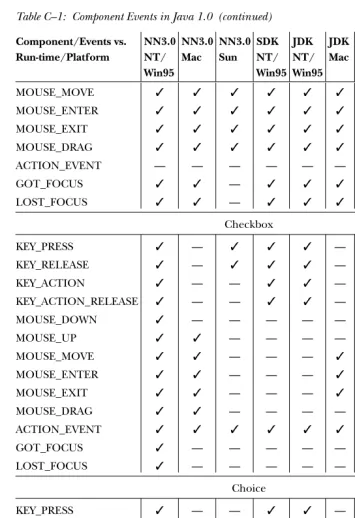
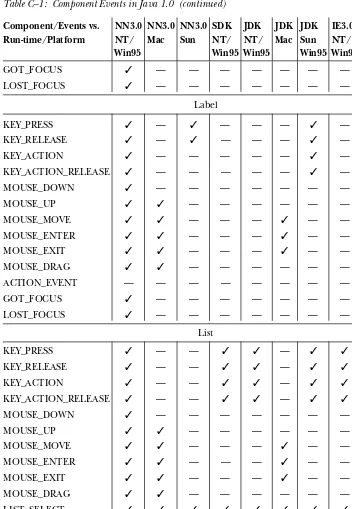
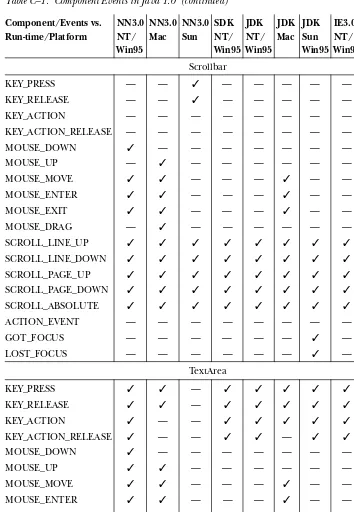
[image:2.612.55.410.258.602.2]Table C-1 shows the events delivered to each component on the major platforms in Java 1.0. An✓in a particular entry means that the event is passed to Java from the component’s peer; a dash means it is not.
Table C–1: Component Events in Java 1.0
Component/Events vs. NN3.0 NN3.0 NN3.0 SDK JDK JDK JDK IE3.0 HJ HJ Run-time/Platform NT/ Mac Sun NT/ NT/ Mac Sun NT/ NT/ Sun
Win95 Win95 Win95 Win95 Win95
Button
KEY_PRESS ✓ — ✓ ✓ ✓ — ✓ ✓ ✓ ✓
KEY_RELEASE ✓ — ✓ ✓ ✓ — ✓ ✓ ✓ ✓
KEY_ACTION ✓ — — ✓ ✓ — ✓ ✓ ✓ ✓
KEY_ACTION_RELEASE ✓ — — ✓ ✓ — ✓ ✓ ✓ ✓
MOUSE_DOWN ✓ — — — — — — — —
MOUSE_UP ✓ ✓ — — — — — — —
MOUSE_MOVE ✓ ✓ — — — ✓ — — — —
MOUSE_ENTER ✓ ✓ — — — ✓ — — — —
MOUSE_EXIT ✓ ✓ — — — ✓ — — — —
MOUSE_DRAG ✓ ✓ — — — — — — — —
ACTION_EVENT ✓ ✓ ✓ ✓ ✓ ✓ ✓ ✓ ✓ ✓
GOT_FOCUS ✓ — — — — — ✓ — — —
LOST_FOCUS ✓ — — — — — ✓ — — —
Canvas
KEY_PRESS ✓ ✓ ✓ ✓ ✓ ✓ — ✓ ✓ —
KEY_RELEASE ✓ ✓ ✓ ✓ ✓ ✓ — ✓ ✓ —
KEY_ACTION ✓ ✓ — ✓ ✓ ✓ — ✓ ✓ —
KEY_ACTION_RELEASE ✓ ✓ — ✓ ✓ — — ✓ ✓ —
MOUSE_DOWN ✓ ✓ ✓ ✓ ✓ ✓ ✓ ✓ ✓ ✓
Table C–1: Component Events in Java 1.0 (continued)
Component/Events vs. NN3.0 NN3.0 NN3.0 SDK JDK JDK JDK IE3.0 HJ HJ Run-time/Platform NT/ Mac Sun NT/ NT/ Mac Sun NT/ NT/ Sun
Win95 Win95 Win95 Win95 Win95
MOUSE_MOVE ✓ ✓ ✓ ✓ ✓ ✓ ✓ ✓ ✓ ✓
MOUSE_ENTER ✓ ✓ ✓ ✓ ✓ ✓ ✓ ✓ ✓ ✓
MOUSE_EXIT ✓ ✓ ✓ ✓ ✓ ✓ ✓ ✓ ✓ ✓
MOUSE_DRAG ✓ ✓ ✓ ✓ ✓ ✓ ✓ ✓ ✓ ✓
ACTION_EVENT — — — — — — — — — —
GOT_FOCUS ✓ ✓ — ✓ ✓ ✓ — ✓ ✓ —
LOST_FOCUS ✓ ✓ — ✓ ✓ ✓ — ✓ ✓ —
Checkbox
KEY_PRESS ✓ — ✓ ✓ ✓ — ✓ ✓ ✓ —
KEY_RELEASE ✓ — ✓ ✓ ✓ — ✓ ✓ ✓ —
KEY_ACTION ✓ — — ✓ ✓ — ✓ ✓ ✓ —
KEY_ACTION_RELEASE ✓ — — ✓ ✓ — ✓ ✓ ✓ —
MOUSE_DOWN ✓ — — — — — — — — —
MOUSE_UP ✓ ✓ — — — — — — — —
MOUSE_MOVE ✓ ✓ — — — ✓ — — — —
MOUSE_ENTER ✓ ✓ — — — ✓ — — — —
MOUSE_EXIT ✓ ✓ — — — ✓ — — — —
MOUSE_DRAG ✓ ✓ — — — — — — — —
ACTION_EVENT ✓ ✓ ✓ ✓ ✓ ✓ ✓ ✓ ✓ ✓
GOT_FOCUS ✓ — — — — — ✓ — — —
LOST_FOCUS ✓ — — — — — ✓ — — —
Choice
KEY_PRESS ✓ — — ✓ ✓ — — ✓ ✓ —
KEY_RELEASE ✓ — — ✓ ✓ — — ✓ ✓ —
KEY_ACTION ✓ — — ✓ ✓ — — ✓ ✓ —
KEY_ACTION_RELEASE ✓ — — ✓ ✓ — — ✓ ✓ —
MOUSE_DOWN ✓ — — — — — — — — —
MOUSE_UP ✓ — ✓ — — — — — — —
MOUSE_MOVE ✓ ✓ ✓ — — ✓ — — — —
MOUSE_ENTER ✓ ✓ ✓ — — ✓ — — — —
MOUSE_EXIT ✓ ✓ ✓ — — ✓ — — — —
MOUSE_DRAG ✓ ✓ — — — — — — — —
Table C–1: Component Events in Java 1.0 (continued)
Component/Events vs. NN3.0 NN3.0 NN3.0 SDK JDK JDK JDK IE3.0 HJ HJ Run-time/Platform NT/ Mac Sun NT/ NT/ Mac Sun NT/ NT/ Sun
Win95 Win95 Win95 Win95 Win95
GOT_FOCUS ✓ — — — — — — — — —
LOST_FOCUS ✓ — — — — — — — — —
Label
KEY_PRESS ✓ — ✓ — — — ✓ — — —
KEY_RELEASE ✓ — ✓ — — — ✓ — — —
KEY_ACTION ✓ — — — — — ✓ — — —
KEY_ACTION_RELEASE ✓ — — — — — ✓ — — —
MOUSE_DOWN ✓ — — — — — — — — —
MOUSE_UP ✓ ✓ — — — — — — — —
MOUSE_MOVE ✓ ✓ — — — ✓ — — — —
MOUSE_ENTER ✓ ✓ — — — ✓ — — — —
MOUSE_EXIT ✓ ✓ — — — ✓ — — — —
MOUSE_DRAG ✓ ✓ — — — — — — — —
ACTION_EVENT — — — — — — — — — —
GOT_FOCUS ✓ — — — — — — — — —
LOST_FOCUS ✓ — — — — — — — — —
List
KEY_PRESS ✓ — — ✓ ✓ — ✓ ✓ ✓ —
KEY_RELEASE ✓ — — ✓ ✓ — ✓ ✓ ✓ —
KEY_ACTION ✓ — — ✓ ✓ — ✓ ✓ ✓ —
KEY_ACTION_RELEASE ✓ — — ✓ ✓ — ✓ ✓ ✓ —
MOUSE_DOWN ✓ — — — — — — — — —
MOUSE_UP ✓ ✓ — — — — — — — —
MOUSE_MOVE ✓ ✓ — — — ✓ — — — —
MOUSE_ENTER ✓ ✓ — — — ✓ — — — —
MOUSE_EXIT ✓ ✓ — — — ✓ — — — —
MOUSE_DRAG ✓ ✓ — — — — — — — —
LIST_SELECT ✓ ✓ ✓ ✓ ✓ ✓ ✓ ✓ ✓ ✓
LIST_DESELECT ✓ ✓ ✓ ✓ ✓ ✓ ✓ ✓ ✓ ✓
ACTION_EVENT ✓ ✓ ✓ ✓ ✓ ✓ ✓ ✓ ✓ ✓
GOT_FOCUS ✓ — — — — — ✓ — — —
Table C–1: Component Events in Java 1.0 (continued)
Component/Events vs. NN3.0 NN3.0 NN3.0 SDK JDK JDK JDK IE3.0 HJ HJ Run-time/Platform NT/ Mac Sun NT/ NT/ Mac Sun NT/ NT/ Sun
Win95 Win95 Win95 Win95 Win95
Scrollbar
KEY_PRESS — — ✓ — — — — — — —
KEY_RELEASE — — ✓ — — — — — — —
KEY_ACTION — — — — — — — — — —
KEY_ACTION_RELEASE — — — — — — — — — —
MOUSE_DOWN ✓ — — — — — — — — —
MOUSE_UP — ✓ — — — — — — — —
MOUSE_MOVE ✓ ✓ — — — ✓ — — — —
MOUSE_ENTER ✓ ✓ — — — ✓ — — — —
MOUSE_EXIT ✓ ✓ — — — ✓ — — — —
MOUSE_DRAG — ✓ — — — — — — — —
SCROLL_LINE_UP ✓ ✓ ✓ ✓ ✓ ✓ ✓ ✓ ✓ ✓
SCROLL_LINE_DOWN ✓ ✓ ✓ ✓ ✓ ✓ ✓ ✓ ✓ ✓
SCROLL_PAGE_UP ✓ ✓ ✓ ✓ ✓ ✓ ✓ ✓ ✓ ✓
SCROLL_PAGE_DOWN ✓ ✓ ✓ ✓ ✓ ✓ ✓ ✓ ✓ ✓
SCROLL_ABSOLUTE ✓ ✓ ✓ ✓ ✓ ✓ ✓ ✓ ✓ ✓
ACTION_EVENT — — — — — — — — — —
GOT_FOCUS — — — — — — ✓ — — —
LOST_FOCUS — — — — — — ✓ — — —
TextArea
KEY_PRESS ✓ ✓ — ✓ ✓ ✓ ✓ ✓ ✓ ✓
KEY_RELEASE ✓ ✓ — ✓ ✓ ✓ ✓ ✓ ✓ ✓
KEY_ACTION ✓ — — ✓ ✓ ✓ ✓ ✓ ✓ ✓
KEY_ACTION_RELEASE ✓ — — ✓ ✓ — ✓ ✓ ✓ ✓
MOUSE_DOWN ✓ — — — — — — — — —
MOUSE_UP ✓ ✓ — — — — — — — —
MOUSE_MOVE ✓ ✓ — — — ✓ — — — —
MOUSE_ENTER ✓ ✓ — — — ✓ — — — —
MOUSE_EXIT ✓ ✓ — — — ✓ — — — —
MOUSE_DRAG ✓ ✓ — — — — — — — —
ACTION_EVENT — — — — — — — — — —
GOT_FOCUS ✓ ✓ ✓ — — ✓ ✓ — — ✓
Table C–1: Component Events in Java 1.0 (continued)
Component/Events vs. NN3.0 NN3.0 NN3.0 SDK JDK JDK JDK IE3.0 HJ HJ Run-time/Platform NT/ Mac Sun NT/ NT/ Mac Sun NT/ NT/ Sun
Win95 Win95 Win95 Win95 Win95
TextField
KEY_PRESS ✓ ✓ ✓ ✓ ✓ ✓ ✓ ✓ ✓ ✓
KEY_RELEASE ✓ ✓ ✓ ✓ ✓ ✓ ✓ ✓ ✓ ✓
KEY_ACTION ✓ ✓ — ✓ ✓ ✓ ✓ ✓ ✓ ✓
KEY_ACTION_RELEASE ✓ ✓ — ✓ ✓ — ✓ ✓ ✓ ✓
MOUSE_DOWN ✓ — — — — — — — — —
MOUSE_UP ✓ ✓ — — — — — — — —
MOUSE_MOVE ✓ ✓ — — — ✓ — — — —
MOUSE_ENTER ✓ ✓ — — — ✓ — — — —
MOUSE_EXIT ✓ ✓ — — — ✓ — — — —
MOUSE_DRAG ✓ ✓ — — — — — — — —
ACTION_EVENT ✓ ✓ ✓ ✓ ✓ ✓ ✓ ✓ ✓ ✓
GOT_FOCUS ✓ ✓ ✓ — — ✓ ✓ — — ✓
LOST_FOCUS ✓ ✓ ✓ — — ✓ ✓ — — ✓
Key:
IE Microsoft’s Internet Explorer
HJ Sun’s Hot Java Prebeta 1
JDK
Java Developer’s Kit 1.0.2 (appletviewer/Java)
NN
Netscape Navigator
SDK
Microsoft SDK
Sun
Solaris 2.x (UNIX/Motif)
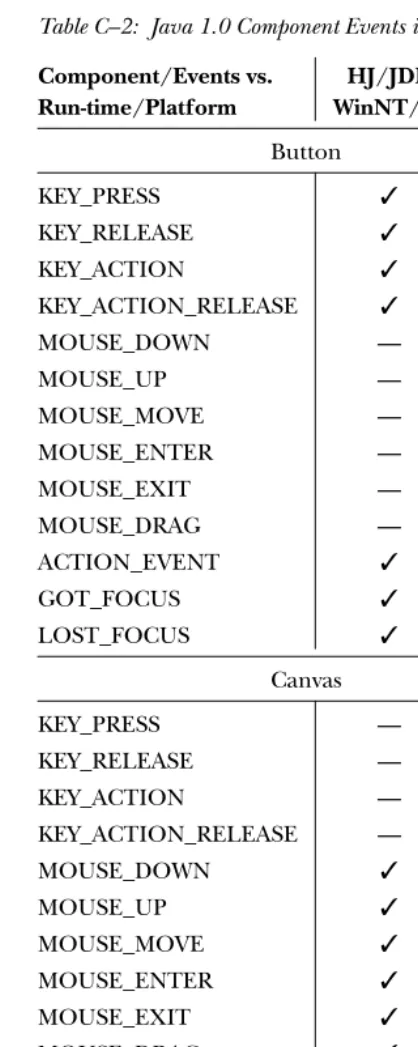
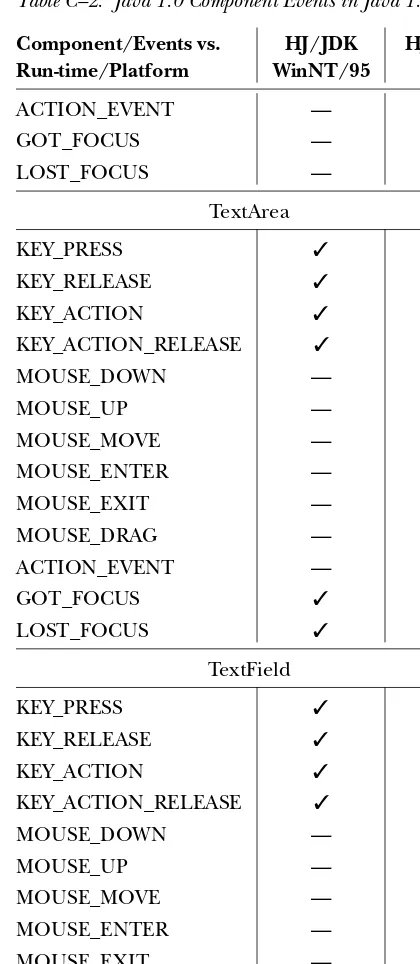
Yes, things changed again with the 1.1 release. Table C-2 shows which Java 1.0 events are generated for each component in Java 1.1. Fortunately, there is one clear improvement: the Java 1.1 event model promises much more uniform event processing, since it’s largely under your control. For example, you can attach a
Table C–2: Java 1.0 Component Events in Java 1.1
Component/Events vs. HJ/JDK HJ/JDK Run-time/Platform WinNT/95 Sun
Button
KEY_PRESS ✓ ✓
KEY_RELEASE ✓ ✓
KEY_ACTION ✓ ✓
KEY_ACTION_RELEASE ✓ ✓
MOUSE_DOWN — —
MOUSE_UP — —
MOUSE_MOVE — —
MOUSE_ENTER — —
MOUSE_EXIT — —
MOUSE_DRAG — —
ACTION_EVENT ✓ ✓
GOT_FOCUS ✓ ✓
LOST_FOCUS ✓ ✓
Canvas
KEY_PRESS — —
KEY_RELEASE — —
KEY_ACTION — —
KEY_ACTION_RELEASE — —
MOUSE_DOWN ✓ ✓
MOUSE_UP ✓ ✓
MOUSE_MOVE ✓ ✓
MOUSE_ENTER ✓ ✓
MOUSE_EXIT ✓ ✓
MOUSE_DRAG ✓ ✓
ACTION_EVENT — —
GOT_FOCUS — —
LOST_FOCUS — —
Checkbox
KEY_PRESS ✓ ✓
KEY_RELEASE ✓ ✓
KEY_ACTION ✓ —
KEY_ACTION_RELEASE ✓ —
Table C–2: Java 1.0 Component Events in Java 1.1 (continued)
Component/Events vs. HJ/JDK HJ/JDK Run-time/Platform WinNT/95 Sun
MOUSE_UP — —
MOUSE_MOVE — —
MOUSE_ENTER — —
MOUSE_EXIT — —
MOUSE_DRAG — —
ACTION_EVENT ✓ ✓
GOT_FOCUS ✓ ✓
LOST_FOCUS ✓ ✓
Choice
KEY_PRESS ✓ —
KEY_RELEASE ✓ —
KEY_ACTION ✓ —
KEY_ACTION_RELEASE ✓ —
MOUSE_DOWN — —
MOUSE_UP — —
MOUSE_MOVE — —
MOUSE_ENTER — —
MOUSE_EXIT — —
MOUSE_DRAG — —
ACTION_EVENT ✓ ✓
GOT_FOCUS ✓ —
LOST_FOCUS ✓ —
Label
KEY_PRESS — —
KEY_RELEASE — —
KEY_ACTION — —
KEY_ACTION_RELEASE — —
MOUSE_DOWN — —
MOUSE_UP — —
MOUSE_MOVE — —
MOUSE_ENTER — —
MOUSE_EXIT — —
MOUSE_DRAG — —
Table C–2: Java 1.0 Component Events in Java 1.1 (continued)
Component/Events vs. HJ/JDK HJ/JDK Run-time/Platform WinNT/95 Sun
GOT_FOCUS — —
LOST_FOCUS — —
List
KEY_PRESS ✓ ✓
KEY_RELEASE ✓ ✓
KEY_ACTION ✓ ✓
KEY_ACTION_RELEASE ✓ ✓
MOUSE_DOWN — —
MOUSE_UP — —
MOUSE_MOVE — —
MOUSE_ENTER — —
MOUSE_EXIT — —
MOUSE_DRAG — —
LIST_SELECT ✓ ✓
LIST_DESELECT ✓ ✓
ACTION_EVENT ✓ ✓
GOT_FOCUS ✓ ✓
LOST_FOCUS ✓ ✓
ScrollBar
KEY_PRESS — —
KEY_RELEASE — —
KEY_ACTION — —
KEY_ACTION_RELEASE — —
MOUSE_DOWN — —
MOUSE_UP — —
MOUSE_MOVE — —
MOUSE_ENTER — —
MOUSE_EXIT — —
MOUSE_DRAG — —
SCROLL_LINE_UP ✓ ✓
SCROLL_LINE_DOWN ✓ ✓
SCROLL_PAGE_UP ✓ ✓
Table C–2: Java 1.0 Component Events in Java 1.1 (continued)
Component/Events vs. HJ/JDK HJ/JDK Run-time/Platform WinNT/95 Sun
ACTION_EVENT — —
GOT_FOCUS — ✓
LOST_FOCUS — ✓
TextArea
KEY_PRESS ✓ ✓
KEY_RELEASE ✓ ✓
KEY_ACTION ✓ ✓
KEY_ACTION_RELEASE ✓ ✓
MOUSE_DOWN — —
MOUSE_UP — —
MOUSE_MOVE — —
MOUSE_ENTER — —
MOUSE_EXIT — —
MOUSE_DRAG — —
ACTION_EVENT — —
GOT_FOCUS ✓ ✓
LOST_FOCUS ✓ ✓
TextField
KEY_PRESS ✓ ✓
KEY_RELEASE ✓ ✓
KEY_ACTION ✓ ✓
KEY_ACTION_RELEASE ✓ ✓
MOUSE_DOWN — —
MOUSE_UP — —
MOUSE_MOVE — —
MOUSE_ENTER — —
MOUSE_EXIT — —
MOUSE_DRAG — —
ACTION_EVENT ✓ ✓
GOT_FOCUS ✓ ✓
Key:
HJ Sun’s Hot Java Prebeta 2
JDK
Java Developer’s Kit 1.1 (appletviewer/Java)
Sun
Solaris 2.x (UNIX/Motif)
C.2 Test Program
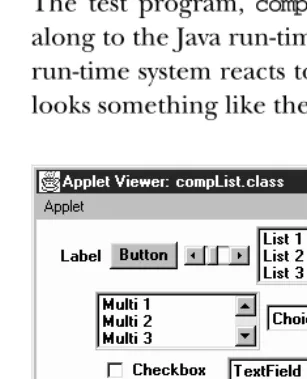
[image:11.612.55.209.265.455.2]The test program, compList, listed in Section C.2.2 shows the events peers pass along to the Java run-time system. You can then examine the output to see how the run-time system reacts to the different events. When you runcompList, the screen looks something like the one in Figure C-1.
Figure C–1: Test program
C.2.1 How to Use the Program
Java does not have an automated record and playback feature, so the work is left for you to do. The program displays 10 components: Label, Button, Scrollbar,
List, multiselection List, Choice, Checkbox, TextField, TextArea, and Canvas
Forever ycomponent on the screen (except Done), do the following:
With the mouse
Move the cursor over the object, press the mouse button and release, and drag the cursor over the object.
With the keyboard
Press and release an alphabetic key, press and release the Home and End keys, arrow keys, and function keys. Do this for every component, even for compo-nents like Button andLabelthat have no logical reason for using keyboard events.
For items with choices
Select and deselect a few choices; double-click and single-click selections.
For the scrollbar
Click on each arrow, drag the slider, and click in the paging area (the space between each arrow and the slider).
For the text field Press Enter.
When finished
Press the Done button, and analyze the results. Run the program again (with-out exiting), and check the results again. Try to trigger any specific events that you expect but didn’t appear in the output from the first pass. Generating some events requires a little work. For example, on a Macintosh, in order to get theMOUSE_UP andMOUSE_DRAG events, you must do a MOUSE_DOWN off the component; otherwise, theMOUSE_DOWN/MOUSE_UP combination turns into an
ACTION_EVENT, if that component can generate it.
NOTE The SunTest business unit of Sun Microsystems has an early version of a record and playback Java GUI testing tool called JavaSTAR. Information about it is available at http://www.suntest.com/TAR/JavaSTAR.html. In the future, it may be possible to use JavaS-TAR to help automate this process.
C.2.2 Source Code
The following is the source code for the test program:
import java.awt.*; import java.util.*; import java.applet.*;
public void init () {
add (new Label ("Label")); add (new Button ("Button"));
add (new Scrollbar (Scrollbar.HORIZONTAL, 50, 25, 0, 255)); List l1 = new List (3, false);
l1.addItem ("List 1"); l1.addItem ("List 2"); l1.addItem ("List 3"); l1.addItem ("List 4"); l1.addItem ("List 5"); add (l1);
List l2 = new List (3, true); l2.addItem ("Multi 1"); l2.addItem ("Multi 2"); l2.addItem ("Multi 3"); l2.addItem ("Multi 4"); l2.addItem ("Multi 5"); add (l2);
Choice c = new Choice (); c.addItem ("Choice 1"); c.addItem ("Choice 2"); c.addItem ("Choice 3"); c.addItem ("Choice 4"); c.addItem ("Choice 5"); add (c);
add (new Checkbox ("Checkbox")); add (new TextField ("TextField", 10)); add (new TextArea ("TextArea", 3, 20)); Canvas c1 = new Canvas ();
c1.resize (50, 50);
c1.setBackground (Color.blue); add (c1);
add (done); }
public boolean handleEvent (Event e) { if (e.target == done) {
if (e.id == Event.ACTION_EVENT) {
System.out.println (System.getProperty ("java.vendor")); System.out.println (System.getProperty ("java.version")); System.out.println (System.getProperty ("java.class.version")); System.out.println (System.getProperty ("os.name"));
System.out.println (values); }
}else { Vector v;
Class c = e.target.getClass(); v = (Vector)values.get(c); if (v == null)
v = new Vector();
Integer i = new Integer (e.id); if (!v.contains (i)) {
}
return super.handleEvent (e); }
}
An HTML document to display the applet in a browser should look something like the following:
<APPLET code="compList.class" height=300 width=300> </APPLET>
C.2.3 Examining Results
The results of the program are sent to standard output when you click on the Done button. What happens to the output depends on the platform. It may be sent to a log file (Internet Explorer), the Java Console (Netscape Navigator), or the command line (appletviewer). The following is sample output from Internet Explorer 3.0 on a Windows 95 platform.
Microsoft Corp. 1.0.2
45.3 Windows 95
{class java.awt.Canvas=[504, 503, 1004, 501, 506, 502, 505, 1005, 401, 402, 403, 404], class java.awt.Choice=[1001, 401, 402, 403, 404], class java.awt.Checkbox=[1001, 402, 401, 403, 404], class compList=[504, 503, 501, 506, 502, 505, 1004, 1005], class java. awt.TextField=[401, 402, 403, 404], class java.awt.List=[701, 1001, 401, 402, 403, 404, 702], class java.awt.Scrollbar=[602, 605, 604, 603, 601], class java.awt.TextArea=[401, 402, 403, 404], class java.awt.Button=[1001, 401, 402, 403, 404]}