ONLINE VIRTUAL CLASSROOM
NURFATIN ZAYANI BINTI SAHAR
This Report Is Submitted In Partial Fulfillment Of Requirements For The Bachelor Degree of Electronic Engineering (Computer Enginering)
Faculty Kejuruteraan Elektronik dan Kejuruteraan Komputer Universiti Teknikal Malaysia Melaka
ii
UNIVERSTI TEKNIKAL MALAYSIA MELAKA
FAKULTI KEJURUTERAAN ELEKTRONIK DAN KEJURUTERAAN KOMPUTER
BORANG PENGESAHAN STATUS LAPORAN
PROJEK SARJANA MUDA II
Tajuk Projek : ONLINE VIRTUAL CLASSROOM
Sesi
Pengajian : 1 2 / 1 3
Saya NURFATIN ZAYANI BINTI SAHAR mengaku membenarkan Laporan Projek Sarjana Muda ini disimpan di Perpustakaan dengan syarat-syarat kegunaan seperti berikut:
1. Laporan adalah hakmilik Universiti Teknikal Malaysia Melaka.
2. Perpustakaan dibenarkan membuat salinan untuk tujuan pengajian sahaja.
3. Perpustakaan dibenarkan membuat salinan laporan ini sebagai bahan pertukaran antara institusi
pengajian tinggi.
4. Sila tandakan ( √ ) :
SULIT*
*(Mengandungi maklumat yang berdarjah keselamatan atau kepentingan Malaysia seperti yang termaktub di dalam AKTA RAHSIA RASMI 1972)
TERHAD** **(Mengandungi maklumat terhad yang telah ditentukan oleh organisasi/badan di mana penyelidikan dijalankan)
TIDAK TERHAD
Disahkan oleh:
__________________________ ___________________________________
(TANDATANGAN PENULIS) (COP DAN TANDATANGAN PENYELIA)
iii
“I hereby admit that this report is my own work except for the summary and the excerpt of each of them that I have already explained the source.”
Signature : ………
Author’s Name : ………...
iv
“I acknowledge that I have read this piece whereby in my opinion this work is sufficient in term of scope and quality for the award of Bachelor of Electronic
Engineering (Computer Engineering).”
Signature : ……….
Supervisor’s Name : ……….
v
vi
ACKNOWLEDGEMENT
In the name of Allah, the most beneficent and the most merciful, with His grace, I was able complete this Bachelor Degree Project. I offer my sincerest gratitude to my supervisor, Mr. Muhammad Noorazlan Shah Bin Zainudin, whi has supported me throughout my project and my thesis with his patience and knowledge whilst allowing me the room to work in my own way. Without him, this thesis would not have been completed or written. One simply could not wish for a better or friendlier supervisor.
I would like to express my gratitude to my friend who have been helping me to complete this project, Ms. Nurul Ain Ismail from the Faculty of Information & Communication Technology. She taught me a whole new thing in developing this project. The informal support and encouragement of many friends too has been indispensible.
vii
ABSTRACT
viii
ABSTRAK
ix
LIST OF CONTENT
CHAPTER TOPIC PAGES
TITLE i
REPORT STATUS CONFIRMATION ii
RECOGNITION iii
SUPERVISOR AUTHENTICATION iv
DEDICATION v
ACKNOWLEDGEMENT vi
ABSTRACT vii
ABSTRAK viii LIST OF CONTENT ix-x LIST OF TABLES xi
LIST OF FIGURES xii -xiii LIST OF ABBREVIATION xiv I INTRODUCTION 1.1 INTRODUCTION 1-2 1.2 OBJECTIVE 2
1.3 PROBLEM STATEMENT 2
1.4 SCOPE OF WORK 2-3 1.5 METHODOLOGY 3
1.6 REPORT STRUCTURE 3
x
III METHODOLOGY
3.1 INTRODUCTION 9
3.2 OPERATION FLOWCHART 10
3.3 PROCESS 11-20
IV RESULTS & DISCUSSION
4.1 RESULTS 21-30
4.2 DISCUSSION 30-31
V CONCLUSION & RECOMMENDATION
5.1 CONCLUSION 32
5.2 RECOMMENDATION 33
xi
LIST OF TABLE
NO. TITLE PAGES
xii
LIST OF FIGURE
NO. TITLE PAGES
3.1 Operation Flowchart 10
3.2 Adobe Dreamweaver CS6 11
3.3 Original Template 11
3.4 Home page 12
3.5 Registration page 13
3.6 Notes page 13
3.7 Classes page 14
3.8 Discussion Room page 14
3.9 Creating channel on USTREAM dashboard 15
3.10 Embed code to integrate the live video to webpage 16
3.11 USTREAM Broadcaster 16
3.12 First step of creating chat interface 17 3.13 Embed code to integrate live chat to webpage 17
3.14 Creating online quiz 18
3.15 Students database 19
3.16 Staff database 19
3.17 Discussion Room database 19
4.1 Home page 22
4.2 Registration form 23
4.3 Home page after logged in 24
4.4 Log in failed 24
4.5 Notes page with link to download notes 25
xiii
4.8 Online quiz sheet 27
4.9 Spreadsheet of students’ answers and marks 28
4.10 Total marks of students’ assessment 28
4.11 Live video streaming and live chat 29
4.12 Pre-recorded video stored in USTREAM channel 29
xiv
LIST OF ABBREVIATION
OVC - Online Virtual Classroom
BKMDT - Bilik Kuliah Maya Dalam Talian PSIT - Pranveer Singh Institute of Technology
PC - Personal Computer
CHAPTER I
INTRODUCTION
1.1INTRODUCTION
Online Virtual Classroom (OVC) is similarly referred to E-Learning system or can be described as simulated classroom via Internet. This is a database project which is also a web application and can be accessed by users over the world by the internet. OVC also can be classified as teaching tools to assist lecturers or teachers for learning process in an interactive way.
With OVC, geographical barriers can be removed as everyone can enter or register the class from all around the world. For example, people nowadays prefer long-distance learning or part-time study while they are actually working. With OVC, they can save costs and time in order to complete their courses. OVC implies one-to-one communication where students can have a private chat with the lecturers regarding their doubt and the students can even chat among themselves to discuss about the courses.
2
students as the clients. To enhance the OVC, features that would make it better are the live video streaming and live chat to discuss about the class. By that mean, the student won’t miss any important notes or topics during the class.
1.1OBJECTIVE
i. To build an interactive teaching tools which involve both lecturers and students.
ii. To create an alternative way to attend classes in order to remove geographical barriers.
iii. To provide an online learning experience for registered students.
1.2PROBLEM STATEMENT
Nowadays, there are many students want to attend a course that probably not available in their own country or states. Not only students, this situation may occur among the lecturers especially the international lecturers. A class with international or distance students or lecturers, facing a problem to attend the courses as it takes time and costly. An OVC is a brilliant idea to overcome this problem where the students can attend the online classes by registering on the subject offered. This will be a standalone application that will be made available to users once they have registered with the service. This application will be used to give users access to lessons.
1.3SCOPE OF WORK
3
The networking that involves in this project related to server-clients relation. The system is designed that this application implies the teachers or lecturers act as the server and the students as the clients. In order to design this application, any web template available which suits the OVC well will be used and also Adobe Dreamweaver CS6 too.
1.4METHODOLOGY
This project will be use Adobe Dreamweaver CS6 as the interface designing platform and WampServer to develop databases. A free web template also will be used in order to guide the interface designing.
1.5REPORT STRUCTURE
CHAPTER II
LITERATURE REVIEW
A virtual classroom is a teaching and learning environment within a computer-mediated communication system. Rather than attending physical classes, all are accessed, not by travelling to the university but by typing and reading from a PC which connected to the internet. The term virtual used in computer science to referto something whose existence is simulated with software rather than actually existing in hardware or some other physical form.
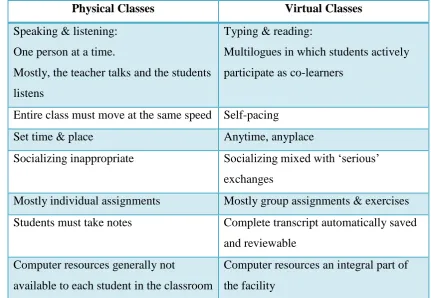
The virtual classroom was first created on 1977 at Princeton University during a postgraduate seminar on the Sociology of Architechture, led by Professor Suzanne Keller. One difference between physical classes and virtual classes is that in the physical classes, most interaction takes place by speaking and listening but in virtual classroom, interaction currently takes place almost entirely by typing and reading from a computer terminal. Table 2.1 shows the difference between physical classes and virtual classes.
5
something different or new or even for some courses that not available on our country.
Physical Classes Virtual Classes
Speaking & listening: One person at a time.
Mostly, the teacher talks and the students listens
Typing & reading:
Multilogues in which students actively participate as co-learners
Entire class must move at the same speed Self-pacing
Set time & place Anytime, anyplace
Socializing inappropriate Socializing mixed with ‘serious’ exchanges
Mostly individual assignments Mostly group assignments & exercises Students must take notes Complete transcript automatically saved
and reviewable Computer resources generally not
available to each student in the classroom
[image:19.595.100.532.133.431.2]Computer resources an integral part of the facility
Table 2.1: Comparison between physical classes and virtual classes
Usually, an online classes can be define as student portal where they can learn and having discussion among students related to that course. Among all the online classes, they have their own speciality which makes them differ from other product or project. Despite that, they are having quite similar features in their systems. Two types of online classes are whether it is an online application or software program that need to be installed.
6
Online classes normally consist of login or register button, attendance button, download or upload button (for learning materials) and also discussion room (chat; private or group). Table 2.2 and Table 2.3 shows the comparison between the product choosed. Criteria/ Product Software Program Online Application
Log in / Registration
Attendance Record
Discussion Virtual
Classroom (WizIQ)
Yes - - Yes Yes
Virtual Classroom
Software (E-Lecta
Live)
Yes - Yes - Yes
Virtual Classroom
Sytem (PSIT)
- Yes Yes - -
Online Virtual Classroom
(OVC)
- Yes Yes - -
7
Criteria/ Product
Whiteboard Live Audio & Video Discussion Room Hands-up Button Download / Upload Learning Materials Virtual Classroom (WizIQ)
Yes Yes Yes - Yes
Virtual Classroom
Software (E-Lecta
Live)
Yes Yes - - -
Virtual Classroom
Sytem (PSIT)
- Yes Yes - Yes
Online Virtual Classroom
(OVC)
- Yes Yes Yes Yes
Table 2.3 : Comparison between previous project and OVC
First of all, this project is an online application system while the product from WizIQ and E-Lecta Live are software program which need to be installed for use. Login or register button are compulsory in order to make the application works only for registered users. If the application allows public to access or use the system then no registration or log in required. As for this project, according to one of the objective, only registered users can experience the online learning system. WizIQ’s Virtual Classroom did not provide the login and register button while the rest have.
8
CHAPTER III
METHODOLOGY
3.1 INTRODUCTION
10
[image:24.595.111.531.107.654.2]3.2 OPERATION FLOWCHART
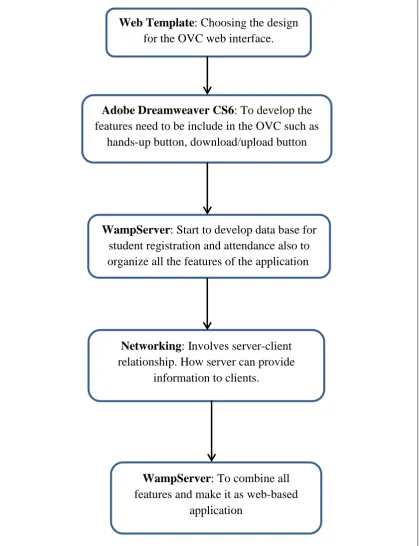
Figure 3.1: Operation Flowchart
Figure 3.1 shows the operation flowchart of this project. Research are done right after this project is choosed. After researching, the literature review is constructed which consist of comparison between previous projects and OVC.
Web Template: Choosing the design
for the OVC web interface.
Adobe Dreamweaver CS6: To develop the
features need to be include in the OVC such as hands-up button, download/upload button
WampServer: Start to develop data base for
student registration and attendance also to organize all the features of the application.
Networking: Involves server-client relationship. How server can provide
information to clients.
WampServer: To combine all