Minimising Intrusiveness in Pervasive Computing Environments using
Multi-Agent Negotiation
Sarvapali D. Ramchurn, Benjamin Deitch, Mark K. Thompson, David C. De Roure,
Nicholas R. Jennings, Michael Luck
School of Electronics and Computer Science
University of Southampton, Southampton, UK.
E-mail:
sdr01r,bnd03r,mkt,dder,nrj,[email protected]
Abstract
This paper highlights intrusiveness as a key issue in the field of pervasive computing environments and presents a multi-agent approach to tackling it. Specifically, we discuss how interruptions can impact on individual and group tasks and how they can be managed by taking into account user and group preferences through negotiation between soft-ware agents. The system we develop is implemented on the Jabber platform and is deployed in the context of a meet-ing room scenario.
1. Introduction
Pervasive computing artefacts such as laptops, smart white-boards, video phones, and pagers are becoming increasingly commonplace in our everyday lives [1, 2]. Moreover, such devices are becoming increasingly interconnected given advances in communication technology (e.g. 3G mobile phones, bluetooth) and processing power (e.g. PDAs, Video telephony). Thus, users of such devices can be contacted in very many ways and in most environments.
There are a number of advantages to this. First, users are able to receive information on a variety of interactive media which afford different types of interactions (e.g. re-sponding to an email, rere-sponding to a video call). Second, users can communicate information through many different light and portable devices that can be used anywhere with such connectivity (e.g. GPRS palm, wireless laptop). Third, users can use these devices as supports for their tasks (e.g. a stock trader using different monitors to check stock prices, while at the same time having a phone call with a broker, or a customer checking prices of books online on a PDA while walking around a bookshop to check which books are bet-ter deals). Thus, in general, such technology can increase the efficiency and well-being of its users.
However, the uses of such pervasive technology also have some downsides. First, notifications or messages re-ceived on such devices disturb the users in their current
fo-cus of activity, which might warrant more attention than the message itself (e.g. a phone call received while making a presentation, or an instant messenger (IM) beeping while having a discussion). Second, this shift of focus affects the other users with whom the user is interacting (e.g. the at-tendees of the presentation lose track of what is being pre-sented or the discussion stops). Third, by using current fil-tering techniques (e.g. in instant messengers or phones), it is not possible to distinguish between messages which are completely irrelevant to either the current activity of the users (e.g spam mail, wrong number phone call), as cap-tured by their context, or their own interests (e.g. a sub-scribed weekly electronic newsletter, or news flash), and messages which are actually relevant to the preferences of the users and/or help in the task at hand (e.g. an email con-taining attachments that need to be used in a presentation, or a phone call from the users’ boss).
Given this background, there is a clear demand for mid-dleware systems to manage the intrusive nature of interac-tions in pervasive computing environments. Such systems should nevertheless permit users to carry out their normal activities and effectively interact with pervasive comput-ing artefacts seamlessly without blockcomput-ing incomcomput-ing infor-mation that might be important given the interests of the user and their context. More specifically, these systems need to be dynamically configurable so as to adapt to the current context of the user and their interests. For example, the un-derlying system should be able to react differently when the user is in a meeting (where notifications should be relevant to the meeting or important for the user) and where the user is alone and browsing email (when emails that are not very important can be viewed). Moreover, in order for the system itself to be non-intrusive, it should be able to autonomously decide on behalf of the user which is the best course of ac-tion, given the objectives of the user and other users that may be in the same environment.
com-posed of autonomous software agents (i.e. both event-driven and goal-directed programs) that each represent their re-spective human owner1and make decisions on their behalf given their specified preferences. Thus, in our model, users relinquish the management of incoming messages to their software agent which decides when, how, and where mes-sages are to be displayed such that the notification delivered disturbs the user on the right device, given the intrusive na-ture of the device and the level of intrusiveness permitted by the user’s context (e.g. an unimportant instant messen-ger chat window may be hidden until the meeting is over, while an important email might be highlighted in the list of received emails with a beep to warn the user). As part of this endeavour, the agent may need to negotiate with other soft-ware agents that represent other users in the environment in order to reconcile the preferences of the group, as op-posed to those of the user, when the latter is involved in a group activity. For example, if a video call expected by the group is received on one user’s laptop it should appear on the public display which can be viewed by all participants in the meeting. Conversely, if no one is interested in an in-stant messenger message received by a participant, then that message could be redirected to his email if it is not impor-tant, or beeped to him if it is.
Against this background, this work advances the state of the art in the following ways. First, we define a typol-ogy of interruptions for pervasive computing environments using notions of intrusiveness. Second, we detail a novel agent-based negotiation solution to the problem of manag-ing intrusiveness given the preferences of the human users. Finally, we describe an implementation of our system in a meeting room scenario using the Jabber platform as the un-derlying architecture of our solution.
The rest of the paper is structured in the following way. Section 2 describes the notion of interruptions and defines intrusiveness for pervasive environments. It also describes the context of the meeting room scenario that we use to demonstrate our solution. Section 3 provides an account of our agent-based solution, while section 4 describes a prac-tical implementation of our solution. Finally, section 5 con-cludes and outlines future work.
2. Intrusiveness and Interruptions
McFarlane was the first to distinguish the notion of intru-siveness from that of interruption [6]. He defines the for-mer as the degree of interference with the realisation of the main task of a group caused by a number of intrusions. In turn, an intrusion is defined as an occurrence of a process or event that is not intimately related to the current task of a group and that interferes with the realisation of that task. Note that interruptions and intrusions are clearly distinct concepts: the latter cause errors where people incorrectly
1 In this paper we will assume that the owners are human. We will in-vestigate the applicability of the model to software owners in future work.
perform actions in an interrupted task after task switching (i.e. handling the interruption), while the former are general methods by which a person shifts his focus of conscious-ness from one processing stream to another [5]. Thus intru-sions can be regarded as a subset of interruptions (see sec-tion 2.2 for more details).
2.1. Receiving and Managing Interruptions
Interruptions can happen in very many ways. Specifically, in pervasive computing environments, these interruptions gen-erally take the form of notifications that are received on the various artefacts that a user may possess or perceive in his environment. To this end, McFarlane identifies four main ways to disrupt someone [6] and we identify examples where these apply in pervasive computing environments:
1. Immediate: require the attention of the user immedi-ately without any other choice. This might involve dis-playing a notification on a public display or popping up a chat message in an instant messenger when a mes-sage is received.
2. Negotiated: allow the user to choose the moment when they will deal with the interrupting activity that needs attention. A user may thus notice that an email has ar-rived on his email client or that a message is flashing on his instant messenger.
3. Mediated: alert the user on another device rather than the one on which it was supposed to be delivered. Such systems are now starting to become reasonably stan-dard. For example, an email client can redirect via SMS (Short Message Service) to a phone or a phone call is re-routed to the voice mail of the user (which he can access at a later time or listen to after the mes-sage is recorded).
4. Scheduled: come at prearranged intervals. For exam-ple, a user may have a pre-arranged video-conference call or may schedule a periodic alarm on a PDA to alert him to take his regular insuline dose.
Whatever the form in which a message is received, there are four possible responses to it [3]:
1. take-up with full compliance – handle the interruption immediately.
2. take up with alteration – acknowledge the interruption and agree to handle it later.
3. decline – explicitly refuse to handle the interruption.
4. withdraw – implicitly refuse to handle the interruption by ignoring it.
the whole content of the message) is the name or identi-fication number of the message sender and a subject line briefly describing the content of the message (mostly in emails, IM messages, and sometimes on video conference calls as well). From this information, the user can usually tell whether the message (for which the notification has happened) is something that he asked for (e.g. information about his children’s health), or was sent to him to inform him of something important (e.g. an email about his latest stock prices), or is relevant to his current context (e.g. an ad-vertising SMS (short message service) received on his mo-bile phone about a shop in his surroundings). The device through which the notification is conveyed determines the degree to which the user is disturbed (e.g. a notification dis-played on a public device on which a message is publicly visible is almost certain to alert the user and other users present, while a message shown in an email client without beeping or popping up an icon, is sure not to disturb the user). Moreover, the device gives a level of guarantee that the notification will be seen by the user (e.g. an IM beep-ing is sure to alert the user, while the user must be lookbeep-ing at his laptop screen to see the heading of an email). Thus, the right device must be chosen in the right context in order to balance the importance of the message with the intru-sive nature of the interaction with these devices (e.g. an IM must not beep when the user is doing a presentation, while he can be beeped when he is not focussed on any impor-tant task). In the next subsection we therefore consider the issues involved in choosing devices that can be used to dis-seminate the information contained in the message.
2.2. Typology of Interruptions
We can generally assume that interruptions define a means of disseminating information2. Now, whether this
informa-tion warrants the disturbance of the user is dependent on the relevance of the information to the needs and preferences of the user or the user’s group. We therefore classify the infor-mation dissemination solutions as inforinfor-mation push, where information is not expected by the user, or pull, where the information is expected.
Whenever messages are received, we will use the prefer-ences of the users to define the messages’ pull or push na-ture. Thus, whenever preferences specify that a sender and a particular subject is much liked, then the message con-cerned is considered to be pulled, while if preferences do not specify the sender or the subject then that message is considered to be pushed. Given this description, we can now further distinguish between intrusive interruptions and non-intrusive ones.
Generally, we consider that the intrusiveness of a notifi-cation displayed on a particular device depends on the pref-erences of the user and the context within which the
notifi-2 We consider a specific aspect of interruptions here. However, an inter-ruption may also be a request to take action on some issue. We will investigate this other aspect of interruptions in future work.
cations are received. Those interruptions that help the user or the user’s group with the task at hand are not intrusions. Rather, they are task support information which we inter-pret as “good” interruptions. We define task support infor-mation as: being related to another task (i.e. handling the content of the message) concurrent to the one being per-formed that will aid the latter’s completion or enhance its efficiency.
Thus, in information dissemination terms discussed above, we further classify intrusions and task support infor-mation as follows:
intrusions are unwanted (by the group or user) pushed
information;
task support information is pulled or useful pushed
in-formation (as determined by the user(s)’s preferences).
Although, some intrusive notifications might be un-wanted by the group, they might be considered important enough by the user receiving them for him to switch to han-dling the notification (i.e. disturb the group) rather than stick to the group task at hand (i.e. not disturb the group). This happens when there is a conflict of preferences be-tween the group as a whole and the individual within the group. Therefore, users might need to negotiate in or-der to decide whether the intrusion should be allowed or not. This would normally involve the users each stat-ing their preferences regardstat-ing the intrusion in the cur-rent context and thus deciding as a group whether to allow the notification (i.e. whether they would mind the group be-ing disturbed). However, if the users are to do this them-selves, the group task would be disturbed. Therefore, we require an additional interface, between the noti-fication controllers (i.e. the software that controls the notification devices) and the physical world, that can man-age the preferences of the users over incoming notifica-tions.
To this end, in section 3, we develop an agent-based mechanism that can flexibly negotiate the best course of ac-tion on behalf of the users. Before doing so, however, we detail in the next subsection the particular domain in which we study the problem of managing intrusiveness. We choose a meeting room scenario which allows us to focus on the key issues arising in managing the intrusiveness of perva-sive computing artefacts on an important prevalent group task.
2.3. Intrusiveness in the Meeting Room
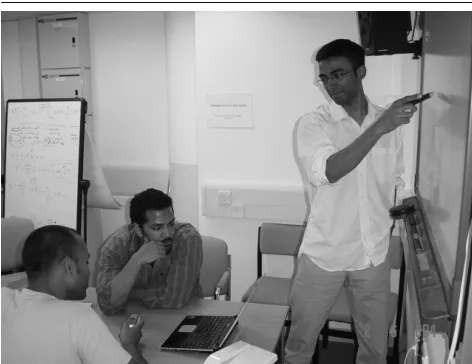
Figure 1. Intrusiveness in the meeting room. Users might be checking their email or send-ing SMS while attendsend-ing a presentation, thus disturbing their colleagues.
on a particular issue of the project. Video calls are expected from other members who were not able to physically attend the meeting.
There are different ways a user in the meeting room can be disturbed. Here, we consider the following as the most relevant types of notification delivery services:
1. An email client – this device simply shows a header containing the email sender and subject (other details may be added but the content is not shown). This type of notification is intrusive to the extent that it alerts the user of the meta-information about the message rather than the content itself. This does not guarantee that the user will entirely shift his focus of attention to read-ing the email unless he finds the subject very interest-ing (i.e. negotiated interruption).
2. An instant messenger – this pops up a window and beeps the user. This type of notification gives the con-tent of the message and disturbs the user’s activity with the beep. This nearly always results in the user shifting his focus of attention (i.e. scheduled or immediate in-terruption).
3. A public display – this is a whiteboard that simply shows messages that are sent to it. This device is po-tentially the most intrusive since it disturbs the whole group as everyone in the meeting room is able to see the message. Users may re-route messages or video calls received on their laptops to this device when-ever the messages are relevant to the whole group (i.e. scheduled or immediate interruption).
The participants of the meeting may reach different states of focus at different points in time. For example, in a presen-tation most users are focussed on the presenpresen-tation, while if
two users are in discussion, the others might lose focus alto-gether. In another context, the meeting might even be silent if all users are reading an important document together. The latter state would require a very high level of attention. At yet other times, the group might be having a coffee break which can allow intrusive notifications.
Given that each of the devices involves a particular de-gree of interruption (e.g. immediate as opposed to negoti-ated), it is possible to relate the preferences of users over a received notification or message to a given device through its degree of interruption. Thus, an important message to a particular user might be displayed on his IM, while an im-portant message to the group should be displayed on the public device. However, when users have conflicting pref-erences regarding notifications, some form of negotiation is needed. To this end, the next section details our multi-agent based solution to negotiating and managing interruptions.
3. The Multi-Agent Solution
We have developed a multi-agent system for managing in-trusiveness and have applied this system to a real meeting room (at our university). This system defers the handling of messages to software agents that each represent their own-ers. Specifically, we assume that users relinquish the deci-sion about which device to use for a notification to their agent (after negotiations with other agents). This may mean re-routing an IM message to an email client or even being kept on an invisible queue for later (e.g. post-meeting) de-livery depending on the preferences of the user. This is a fundamental change to the present situation in which the sender of the notification chooses the device on which his message will appear. To capture the group’s influence on the display of a notification, we incorporate the use of a dial which can be turned up or down by the members of the group (with all members’ consent) to regulate the level of in-trusiveness allowed. Thus, at different points in the meeting, the users might want their agents to know that they do not want to be disturbed (except for very important messages) by turning the dial down. During a coffee break the dial can be turned up to signal to the agents that intrusions are allowed.3 Here, we assume that the users have input their
preferences into their representative agent to allow the latter to know which messages are to be considered important and which are not. Fundamentally, this involves assigning points (from 0 to 1 inclusive) to particular sender names and sub-jects that a notification could contain. For example, a sender named Wendy gets 1 point since she is the project supervi-sor and a subject such as ‘Project guidelines’ gets 1 point as well since it is relevant to the current meeting (about that
project). On the other hand, sender names that are not ex-pected or not deemed very important will get less than 1 point (including 0 expressing no interest in such notifica-tions being routed to their target user).
3.1. Formal Definitions
The meeting room contains human users ½ ¾ and devices ½ ¾
. There also exist other users
outside the meeting room noted as ½ ¾ .
Devices can have different characteristics: private display () (e.g. email client), public display () (e.g. the
smart whiteboard) and part-private-part-public () (e.g.
IM) such that . Devices are
con-trolled indirectly by user agents , whereis the
set of agents. By indirect control we mean that it is the sys-tem (a special user agentrepresenting the meeting
room and the group of users within it) that handles the ac-tual display of messages, but it is the user agent that decides which device should be used. Thus,authorises the
display of notifications when asked by other agents (if these satisfy certain requirements). In this way, the
ac-tually manages the group preference on the level of intru-siveness allowed. The behaviour of theis regulated
through the dial (controlled by the group of users) which in-directly scales the level of intrusiveness of all devices in the meeting room by changing the conditions which
imposes on the display of notifications. Figure 3 shows the flow of messages between agents (including)
whenever a notification is received from outside the meet-ing room. We generally capture the devices that are ac-cessible by a user’s agent by the function
. Each meeting room user can have a number of devices used to display (notifications of) messages. We use ½ to note
an agent belonging to user
½. Devices under the
indi-rect control of an agent are noted as ½
¾
.
Mes-sages received by users from outside the meeting are noted as ½ ¾
. Each message has the following
structure
, where
is a sender
outside the meeting room, is the recipient inside the
meeting room,is the subject of the message,is the
con-tent of the message,is the time at which the
mes-sage arrives, and is (are) the device(s) available
for display.
We consider the intrusiveness to be a cost to the group activity since it disturbs the meeting; notifications can be allowed into the meeting if and only if the gain of display-ing them matches the cost (or level of disturbance) to the group. The dial can be formalised as a function that scales the level of intrusiveness
. Assuming each
set of devices (i.e.,,) has a different degree
of intrusiveness (and therefore cost) in the
fol-lowing order
, then the actual cost
of a particular device in a particular context (as set by the dial), is obtained by the function
defined as
. As can be seen in the
func-tion
, the dial scales the cost to display a message on
each set of devices (private display, public display, part private-part public displays). We also assume the existence of an invisible queue that stores messages that are not suf-ficiently important to be displayed at a particular time, but which might become important enough later on. This de-vice does not interrupt any user and is therefore assigned a cost of zero. Finally, each agent has a private utility func-tion,
, that captures the preferences
of the user, in terms of points assigned to sender names and subjects as described earlier and the intrusiveness of the de-vice chosen for the display. The utility function sums the points assigned to a sender name and a subject and scales that value using
as given in equation 1 below:
(1)
where , ,
and function
returns user
’s utility of either the sender or subject
of the message.4 Thus, the utility function returns a value
for a given message on a given device. Whenever a mes-sage is displayed on a particular device, the
re-wards the agent concerned (i.e. the user agent which asked to display the message) with a number of points dictated by its utility function. This reward represents the user’s re-ward to its agent for satisfying his preferences. The more points it gets, the more the agent is able to pay for messages that the user might like. Moreover, agents may also be al-lowed to exchange points they receive if they need to col-laborate to pay for the cost of a message (whenever they cannot pay for a message on their own). We useas a
scal-ing factor in the utility function since it determines the level of guarantee that the user will indeed be alerted by the mes-sage (e.g. a public device guarantees the alert while an email needs to be polled). Note that if(i.e. the message
is given by an agent to another agent to be evaluated), we apply the same function to determine the value of a mes-sage.5
Messages from users,
, are received by the system
agent which manages the meeting room (i.e.
de-vices forward incoming messages to the system agent and wait for a decision to be made before displaying anything). We assume that devices forward the messages they receive to the system to notify the user agent concerned. A mes-sage is first analysed by the system to determine the re-cipient . The system then contacts the appropriate user
agent . The user agent then needs to make some
deci-sions by taking into account the cost
of displaying a
message on the targetted device, and the utility of a
message
to itself. We assume that all agents are
4 The sender name and subject are considered to be only the necessary rather than sufficient features of the utility function. The other ele-ments of the message such as the content of the message (e.g. using data-mining techniques where possible) and the time at which it is re-ceived may also allow for a more comprehensive analysis of the utility of the message. We foresee doing so in future work.
initially assigned a budget
equal to the cost of display-ing a message for the most expensive set of devices (i.e.
´µ ).
In this way, messages are first assessed using the pref-erences of the user and then the decision is made whether to ask the system to display or not. There are 3 possible courses of actions that a user agent can take:
1. Ask the system to queue the message, resulting in no cost.
2. Ask the system to display message by paying cost
with the budget
available.
3. Ask other agents to contribute to pay the cost of dis-playing the message.
The first two options are straightforward to carry out. The agent simply needs to analyse the message and deter-mine the payoffs. If the budget matches the cost of display and the payoffs will replenish (partly or fully) the budget, then the message is displayed. Otherwise it is not. However, there might be cases where
and
meaning that the agent would get a higher pay-off than
if it had the additional funds to match
. To be
able to achieve this, an agent can therefore negotiate with other agents to get their contribution to the pool of funds and get the message displayed. The display can be on the users’s private device or on other agents’ devices (if they agree to this) or on a public device depending on the importance of the message to the user and the group. The user agent will therefore negotiate with other user agents for their invest-ments to match the cost of displaying the message. These other agents might have an interest in getting the message displayed since they might also have a preference for the sender and the subject. When other user agents do not have similar preferences, the proponent of the notification may also promise some points (to be given in future) or ask for points promised to it in the past (by other agents) in order to have enough points to pay for the cost of a message. Given that such promises are more likely to persuade the oppo-nent to agree on contributing to the payment (since they ob-tain points in return or have committed to give some) the negotiating agents are expected to find an agreement more quickly than if they operated without such promises. More-over, the use of promises and appeals to past promises al-lows the system to flexibly deal with important messages (to a user or the group) over time such that important mes-sages are not rejected simply because the user’s budget size varies as his messages are notified.
3.2. Persuasive Negotiation
One specific negotiation model that fits the requirements discussed above is persuasive negotiation, which involves an exchange of proposals supported by arguments such as threats, rewards, or appeals [8]. We choose such an approach specifically because it incorporates the use of promises of future rewards (i.e. trading points) and appeals to past promises together with proposals exchanged (e.g.
Start 1. determines For each Do 2. 3. where and
4., calculate 5. If Then
for eachDo
6. 7. 8. 9. 10.
Else send to queue End
Figure 2. Algorithm to determine most appro-priate device to display message
display on IM and promise 0.3 points in return for 0.3 points now or appeal to a past promise of 0.5 points in order to display on the email client). Thus, not only can agents ne-gotiate about the type of device to display a message on, but they can also promise points to each other in order to get their proposal accepted. In the context of collaborative environments such as the meeting room, we exclude the use of threats in the negotiation algorithm (because agents do not have any opportunity to deny each other some re-source or punish each other). We denote the promises and appeals to past promises as elements of the set of arguments
½
¾
. Next we describe the algorithm used by the
agents to perform negotiations and decide which device to choose for display.
3.3. The Negotiation Algorithm
The algorithm is described in figure 2. Note that
and
(for tells
about ) is a message from to
with the content . In Step 1, the agent determines its util-ity for all devices available to it. In Step 2, sends the
dif-ferent proposals and arguments with them. The type of
(i.e. either promise or appeal) is determined according to whether the opponent has a commitment to give a
spe-cific number of points to or not. If it has, then
ap-peals to the promise. Otherwise makes a promise equal
to ¼where ¼
rep-resents the points promised for the current message (i.e. not for future ones) by agents other than . In so doing,
makes a promise to that it will be able to refund
af-ter it can get its message displayed. In Step 3 each agent sends its potential investment
for the offer given. Step 4
computes the pool of points available given the utility to be obtained and the cost of the device. Then, in Step 5,
SAgent
A’s agent
A’s devices
B’s agent
C’s agent negotiation
msg
msg display
Pay Cd?
iuA
iuB
[image:7.595.317.558.75.218.2]iuC Dial
Figure 3. Interactions between device and agents. Dotted lines represent interactions after a message is received by user A’s agent has negotiated with B’s and C’s agent.
than zero. If does get some points, in Step 6 it notifies
all other agents about its decision so that they can update their commitments (i.e. keep track of promises) and their budgets (i.e. by deducting the promised
for the
cur-rent message), otherwise it queues the message. The other agents send their investments to in Step 7 and
for-wards the payment for the device toin Step 8. In
Step 9, thepays
and Step 10 updates ’s
bud-get.
4. Implementation
In order to evaluate the efficiency and effectiveness of our algorithm we developed it using the Jabber6 platform (a
highly extensible instant messaging system). In more de-tail, the Jabber platform incorporates devices and agents in the following ways:
1. Devices with various levels of intrusiveness are rep-resented by a number of highly configurable instant messaging clients. Thus, Jabber clients (e.g. Psi) can be configured to simulate an email client by having messages sent to a client that simply displays an icon when a message is received. The client then needs to be checked (or polled) to view the message. An IM can instead be simulated by having the client pop up a chat window and beeping at the same time. Thus the user is alerted and the message can be viewed imme-diately. Other devices mentioned as part of the meet-ing room, such as the public device and the invisible queue, can be created by having a custom-made Jab-ber client that simply outputs messages it receives to a window and an internal queue that is not visible re-spectively.
2. Software agents as pictured in figure 3 are made to in-teract on a server that plugs into the Jabber system that is responsible for routing XML-based messages which come from users outside the meeting room. In this way
6 http://jabber.org/
Jabber (backbone) Scripting
component
Public Display
Meeting Room Server (negotiating agents)
IM
Nick
IM
Dave
IM
Gopal
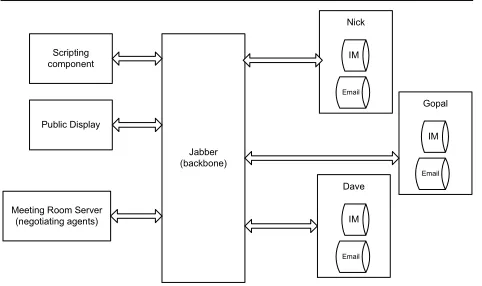
Figure 4. The architecture used for the meet-ing room and negotiatmeet-ing agents.
the negotiation is performed in a single thread of con-trol every time a message is received. Thus, after nego-tiation, agents can provide the appropriate routing in-formation to the Jabber system (i.e. which device to be chosen for notification).
In the next section, we detail the operation of our sys-tem.
4.1. System Operation
Each user in the environment is assigned their own unique ‘Jabber ID’. Associated with that identifier there are a num-ber of resources, in the scenario’s case there are two; an e-mail ‘device’ and one for instant messages. The other two candidate devices for notification delivery are the invisi-ble queue device, and the public whiteboard display (a first class Jabber ID in its own right), shared amongst all of the users in the scenario. The various components of our sys-tem are shown in figure 4.
The user agents were implemented within a Jabber server component (i.e the meeting room server), representing a meeting room. The meeting room server maintains an in-ternal description of each user’s preferences as part of the Jabber system’s user profile (i.e.
). The user can view or change his preferences via dialogue (using an instant mes-senger) with this component. This preference information is then used to initialize the user’s agent, which is created when the user first logs in to the system. As a user adds fur-ther devices to the system, this agent is then informed of the new device, and thus different components become candi-date targets for notifications.
Messages that are sent from outside the meeting to a par-ticular Jabber user go through the Jabber server, which then re-routes them to the meeting room server (which repre-sents the). The agent representing the recipient is
pro-vides the Jabber server with the appropriate routing infor-mation.
To illustrate the operation of our system, consider the following interaction episode. We will assume that Nick, Gopal, and Dave are having a meeting. Each user has a Psi-based email client and an IM client up and running on his laptop while the public display client is connected to a smart whiteboard and the invisible queue is implemented in the meeting room server. Before the users start the meet-ing, they log on to the Jabber system which communicates their presents to the meeting room server. The latter then queries the users for their preferences. The meeting topic is about “FEEL project” which all users register in their pref-erences in their profile (e.g. they each give 1 point to that subject to indicate a high preference). Moreover, they each assign, possibly different, preferences for senders (e.g. Nick gives Wendy 1 since she is his boss while Dave gives Wendy
since she is not involved with Dave on any projects at
the moment) and other subjects including the meeting sub-ject. Duplicate entries are prevented by the system. Let us assume in the following that a message (e.g. an email) is sent to Nick by Wendy about the meeting subject in partic-ular and that the dial is set to such that a
mes-sage to a public display would cost, an IM, an email
clientand the invisible queue 0, and that each agent is
given an initial budget of
:
1. The meeting room server (i.e. ) intercepts
a message ‘from’ wendy@scenario with sub-jectFEEL projectto recipient Jabber ID of Nick,
2. Thedispatches the message (including
mes-sage metadata contained in envelope) to the agent rep-resenting the interests of the target user (i.e. ).
3. first calculates the utility of the message using
equation 1 and then negotiates with and
as per the algorithm described in figure 2. As can be deduced from our initial settings, can only
af-ford an email or invisible queue by itself but given in-vestments of other agents, it could send the message to the public device or the IM. Given that Gopal and Dave have a high preference for the meeting room subject and that Dave also has a high preference for the sender while Gopal has none (i.e. from equation 1,
and
), each decides to
in-vest different amounts in the message for different de-vices that could be used for the notification. Let us as-sume (according to preset values of
) that the
util-ity maximising device (without promises) for is
the IM which attracts an investment of
from Gopal and
from Dave. Instead, with a
promise of returning ½
to Gopal and ¾
to
Dave, the utility maximising option for is when it
uses a public device. Thus can get
from Gopal and
from Dave’s agent for
the public display (for which they would invest more than the IM without the promises but these investments
would not be enough to satisfy the cost of the public device). Nick’s agent can thus display the message on the public display by investing only
and
re-warding and in future encounters.
4. sends the identifier of the chosen device to
together with the investments of all agents.
5. The then sends the whole content of the
XML-based message from Wendy to the Jabber sys-tem with the appropriate routing information that se-lects the public whiteboard.
6. Thethen rewards all the agents with the utility
they gain from the display of the message on the pub-lic device (i.e.to
,
to
and
to
).
5. Conclusion and Future Work
We have presented an agent-based system to manage intru-siveness in pervasive computing environments. The solution takes into account the preferences of a user, and other users in his environment through persuasive negotiation, in decid-ing the intrusive level of a message. Moreover, we success-fully implemented the algorithm in Jabber and deployed it in a meeting room scenario. The main findings were that the algorithm would always choose the most important in-coming messages for display and, if too many messages of medium importance are received, the agents gradually run out of budget and cannot afford to display any further mes-sages.
As part of future work we intend to consider privacy is-sues that might arise in the re-routing of notifications to public or part-private-public devices (e.g. if a private sage gets displayed on a public device or if a private mes-sage is presented on an instant messenger which can be seen by other users). We will also look at non-collaborative en-vironments where agents are selfish and act strategically in order to obtain the maximum utility (e.g. they might renege on commitments or not give investments truthfully).
Acknowledgements
We would like to thank the EU commission which funded this work through the FEEL project (IST-2000-26135) as part of the Disappearing Computer initiative. The first author also thanks Rajdeep Dash and Perukrish-nen Vytelingum for their comments on the paper.
References
[1] G. D. Abowd and E. D. Mynatt. Charting past, present, and future research in ubiquitous computing. ACM Transactions
on Computer-Human Interaction (TOCHI), 7(1):29–58, 2000.
[2] K. Mani Chandy, A. Fuchs, B. Janssen, D. Mulchandani, and M. Weiser. Ic online: Ubiquitous computing: The future of de-velopment? IEEE Distributed Systems Online, 3(3), 2002. [3] Herbert H. Clark. Using Language. Cambridge University
[4] N. R. Jennings. An agent-based approach for building complex software systems. Communications. of the ACM,
44(4):35–41, 2001.
[5] D. McFarlane. Interruption of people in humancomputer in-teraction: A general unifying definition of human interruption and taxonomy. Technical Report 5510–97-9870, Naval Re-search Laboratory Report, 1997.
[6] D. McFarlane. Coordinating the interruption of people in humancomputer interaction. HumanComputer Interaction
-INTERACT’99, pages 295–303, 1999.
[7] S. D. Ramchurn, D. Huynh, and N. R. Jennings. Trust in multi-agent systems. The Knowledge Engineering Review, 2004.
[8] S. D. Ramchurn, N. R. Jennings, and C. Sierra. Persuasive ne-gotiation for autonomous agents: A rhetorical approach. In C. Reed, editor, Workshop on the Computational Models of