City, University of London Institutional Repository
Citation
:
Booth, T., Stumpf, S., Bird, J. and Jones, S. (2016). Crossed Wires:
Investigating the Problems of End-User Developers in a Physical Computing Task. Paper
presented at the Conference on Human Factors in Computing Systems (CHI), 7-12 May
2016, San Jose, USA.
This is the accepted version of the paper.
This version of the publication may differ from the final published
version.
Permanent repository link:
http://openaccess.city.ac.uk/id/eprint/14844/
Link to published version
:
http://dx.doi.org/10.1145/2858036.2858533
Copyright and reuse:
City Research Online aims to make research
outputs of City, University of London available to a wider audience.
Copyright and Moral Rights remain with the author(s) and/or copyright
holders. URLs from City Research Online may be freely distributed and
linked to.
City Research Online:
http://openaccess.city.ac.uk/
[email protected]
Crossed Wires: Investigating the Problems of
End-User Developers in a Physical Computing Task
Tracey Booth
1, Simone Stumpf
1, Jon Bird
1, Sara Jones
2City University London
London, UK
1
Centre for HCI Design; School of Mathematics, Computer Science and Engineering
2
Centre for Creativity in Professional Practice; Cass Business School
{tracey.booth.1, simone.stumpf.1, jon.bird, s.v.jones}@city.ac.uk
ABSTRACT
Considerable research has focused on the problems that end users face when programming software, in order to help them overcome their difficulties, but there is little research into the problems that arise in physical computing when end users construct circuits and program them. In an empirical study, we observed end-user developers as they connected a temperature sensor to an Arduino microcontroller and visualized its readings using LEDs. We investigated how many problems participants encountered, the problem locations, and whether they were overcome. We show that most fatal faults were due to incorrect circuit construction, and that often problems were wrongly diagnosed as program bugs. Whereas there are development environments that help end users create and debug software, there is currently little analogous support for physical computing tasks. Our work is a first step towards building appropriate tools that support end-user developers in overcoming obstacles when constructing physical computing artifacts.
Author Keywords
Physical computing; End-user development; Electronics; End-user support; Debugging.
ACM Classification Keywords
H.5.m. Information interfaces and presentation (e.g., HCI): Miscellaneous.
INTRODUCTION
The rise of the Maker Movement and DIY creation [41], underpinned by the ready availability of open source tools and affordable components, has resulted in a growing
number of end-user developers—artists, designers, researchers, and hobbyists—who create interactive physical computing artifacts. Increasing numbers of end-user developers are also building complex systems using the 'Internet of Things' [28,22,14], for example, taking charge of their well-being and health by adapting programmable medical devices and developing health-related information appliances [1]. This area is of burgeoning interest to HCI research, both as a cultural phenomenon and for developing tools to support people who are interested in building these interactive systems and devices [39,40,2].
While users' engagement with physical computing is beyond a doubt [6], the challenges faced by end-user developers are still considerable: they must learn and apply both programming and electronics concepts, and also develop some understanding of the relationship between the software and hardware of their systems in order to solve problems that arise. We already know from the literature that program debugging is difficult but it has been suggested that localizing errors may present even greater challenges for inexperienced end-user developers when both hardware and software are involved [43].
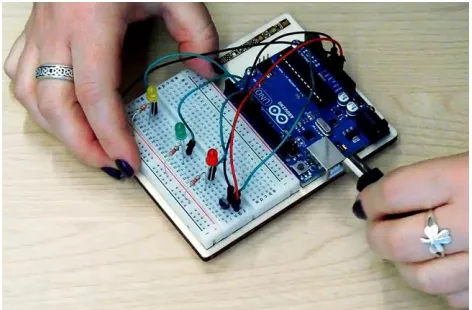
[image:2.612.321.557.514.669.2]There has been considerable work in end-user software engineering (EUSE) that aims to understand the problems
Figure 1. A participant constructing a prototype circuit in our study. The task involved connecting a temperature sensor to an Arduino and writing a program to read the
that users face in programming, in order to provide an empirical basis for the design of development environments and support tools [7,8,9,18,24,36]. There are development tools that aim to make physical computing development easier [17, 20], however, to date, there has been little research into the problems faced by end users as they develop physical computing artifacts, in order to provide appropriate help in overcoming the challenges they face.
Our work provides the first step in addressing this lack of knowledge and in establishing an empirical foundation for future tool design. We conducted an empirical study involving 20 participants who constructed and programmed a 'Love-O-Meter' (Figure 1)—a relatively simple interactive device that uses an Arduino microcontroller and three LEDs to visualize the readings of a temperature sensor when it is touched. We present an account of where participants' problems occurred, and describe the relationship between these problems and participants' background experience. We investigate how difficult these problems were to overcome, and the faults that led to task failure. We offer some initial suggestions about how end-user developers can be best supported in physical computing tasks. Our research questions were:
How many problems do users encounter, and where are they located? Are there aspects of developing physical computing devices that are particularly prone to problems?
How do users' backgrounds and experience affect the challenges they face in physical computing tasks?
What are the problems that can be easily overcome, and what problems prove insurmountable?
The contribution of our paper is to provide the first systematic investigation of the problems faced by end users in physical computing tasks, extending findings from end-user software engineering (EUSE) beyond programming to physical computing. Our results can inform the design of tools to support end-user developers overcome the physical computing challenges they commonly face.
In the remainder of the paper, we first give an overview of related work in end-user programming and physical computing. We then describe our study design and present the results of our analyses. Finally, we discuss implications for how users can be supported, and describe future work.
BACKGROUND
End-User Programming and Software Engineering
Previous research has investigated the difficulties faced by end-user programmers [35,27,9,24], in order to help overcome them. Much of this work focuses on simplifying programming languages or environments, for example, programming by demonstration [33,15] eases the effort of learning a new programming language. A different way to help users is through providing features built directly into the programming environment, in order to support problem-solving activities during programming. For example,
StratCel and WYSIWYT aimed to help end users test and debug spreadsheets [18,8], and this approach has also proven effective in programming web mashups [30], and supporting end users in debugging intelligent systems [29]. We draw inspiration from this work for end users developing physical computing prototypes, and are investigating the problems these end users face, with the aim of building appropriate support tools.
There are a number of different approaches to categorizing the programming problems end-user programmers face. One frequently used approach is to categorize end-user programming problems in terms of 'learning barriers' [27]. Learning barriers have been shown to occur when end users develop web mashups [10] and debug machine learning systems [29]. Another way is to focus on the causes of software errors [26], based on research in human error [37], that has suggested that errors are due to 'cognitive breakdowns' in which end users encounter problems applying skills, rules, or knowledge. Breakdowns can be investigated by classifying the action being performed, the interface the action is performed on, and the information being acted on. The data analysis in this study was informed by a focus on breakdowns.
Although there is some evidence of learning barriers occurring in programming environments for physical computing [5], very little research has investigated the problems that end users face when constructing physical computing devices that combine elements of both programming and electronics. The goal of our study was to address this by identifying these problems, as a first step towards developing support solutions that can help end users to overcome the common problems they face in physical computing.
Physical Computing Tools
Physical computing integrates computing with the physical world, often in the form of electronic devices or systems that interact with the environment via sensors and actuators [21]. These devices can take input from the world, through sensors that measure aspects of the environment, such as temperature, proximity, or light, and respond in some way, for example, though sound, motion or vibration. [4,23,16].
Developing a physical computing device typically involves coordinating the behavior of sensors and actuators by connecting them to a microcontroller and programming their behavior. Platforms like Arduino [3] aim to lower the barriers to entry to this type of activity, but creating electronic circuits and programming them still requires some knowledge and skill, and troubleshooting physical computing issues can be tricky.
program them using the Logo programming language. Phidgets [17] are 'physical widgets' that facilitate rapid prototyping with minimal electronics knowledge. Other systems, such as .NET Gadgeteer [45], also aim to make it easier for end-user developers by providing plug-and-play hardware components.
A different strand of research has focused on lowering the bar for programming, by providing visual programming environments for physical computing platforms, which are proposed as being easier for end users to master (for example, [20,34]).
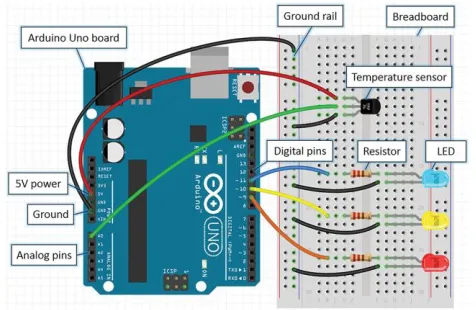
Very few support systems have been developed to help build and debug the simple circuits typically involved in physical computing. SHERLOCK [32] is an environment for teaching sophisticated electronics troubleshooting to fighter airplane engineers. Tools aimed at end-user developers include Fritzing [25], which allows users to graphically lay out circuits on a virtual breadboard (see Figure 2 for an annotated example), and Autodesk's 123D Circuits Electronics Lab web application [48], which combines virtual circuit construction with a code editor and a simulator, so that users can 'upload' their program to their virtual circuit and simulate run-time behavior.
However, there is very limited empirical evidence of what problems end-user developers face in physical computing tasks that can be used to inform the design of appropriate support tools. Our study addressed this issue.
STUDY SETUP
We conducted an empirical study, using a 'think-aloud' approach, in which participants undertook a naturalistic physical computing task. In order to analyze the nature of the problems they faced, we collected a rich set of data, including video transcripts, the artifacts that participants constructed, and information about participants' backgrounds and experience.
Participants
We recruited 20 adult participants (8 female, 12 male, mean age of 32 years) through local Maker communities and universities, targeting hobbyists with some experience of using the Arduino platform, but excluding professionals who develop physical computing artifacts for monetary gain. All participants received a £20 gift voucher as an incentive.
Physical Computing Development Task
We used an Arduino microcontroller in our study. Arduino has achieved wide adoption by many types of end-user developers, including hobbyists, and is currently the most popular physical computing platform. We chose the official Arduino UNO revision 3 as the development board—a commonly used starter board included in the official Arduino Starter Kit. As the development environment we used the official Arduino IDE (version 1.61 for Windows), running on a Microsoft Windows 7 desktop PC.
The task was a simplified version of project 3 in the official Arduino Starter Kit [50]. The physical computing device that the participants attempted to build was a 'Love-O-Meter': this uses three LEDs to visualize the values read from a temperature sensor, lighting up one LED at lower temperatures, two at medium temperatures and three at higher temperatures. The temperature can be increased by touching the sensor. Building this device involves connecting seven electronic components to a microcontroller and writing a short program to coordinate their behavior. Participants used a breadboard and jumper wires to build the electronic circuit and no soldering was involved in the task.
We now briefly describe the steps involved in successfully completing the task, so that the problems that participants in our study had when constructing the circuit and the program (see Results section, What Went Fatally Wrong?) are better understandable.
It is possible to first build the complete circuit and then write the program controlling it, or to decompose the task into smaller parts and complete them in turn, for example, first build the sensor circuit and write the code for reading the temperature values, and then move on to building and programming an LED circuit. Here we describe how to build the circuit first and then the associated program.
Building the circuit
This involves connecting the electronic components to the Arduino board. Figure 2 shows how the components could be wired up successfully.
[image:4.612.319.557.514.669.2]The temperature sensor (TMP36) [49] is an analog device that has three legs, each of which has to be correctly wired into an Arduino analog pin, ground and power in order for the sensor to operate correctly. Miswiring the connections to the sensor can result in unusual readings, or the sensor itself heating up to a high temperature. The Arduino analog pin readings are converted into digital values between 0 and 1023. No additional components are needed for the sensor
Figure 2. The simplest way to build the circuit for the study task. Each wire or resistor connects two locations in the
to work correctly. Participants can cause noticeable changes in the readings by touching it.
Each LED has two legs, and its positive leg (anode) needs to be connected to an Arduino digital output pin and its negative leg (cathode) connected to ground. Because it is a diode, reversing the signal and ground connections means the LED will not light up. A resistor of appropriate value should be wired either between the positive leg and the digital pin, or the negative leg and ground, to regulate electrical current to the LED. If the resistor value is too high, the LED will not light up. If no resistor is used, it may cause other problems, such as the LED burning out prematurely and even damaging the Arduino board. Additionally, we found that when resistors were not included in the circuit, the LEDs drew large currents from the Arduino, which in turn affected the temperature readings from the sensor.
Given that an Arduino UNO has only three ground pins but wiring all of the components into the circuit requires four connections to ground (one for the sensor and one for each of the three LEDs), it was necessary for participants to set up a ground rail on the breadboard that could be shared by the components.
Writing the program
An Arduino program has two main parts: a setup() function which executes only once when the program is first run, and a loop() function that then executes repeatedly at a very high speed. Variables such as which Arduino pins are being used are typically declared globally at the top of the program, outside of the setup() and loop() functions.
We first describe the programming steps involved in reading and displaying the temperature sensor values in the Arduino IDE and then describe the programming steps to control the LEDs.
Sensor program
The first step is to state which analog pin on the Arduino board is connected to the sensor, so that the temperature values can be read. In order to display the temperature values being sent to the Arduino in the monitor built into the IDE, it is then necessary to add a line of code to the setup() function, to set up serial communication between the Arduino and the computer. The rest of the program code goes in the loop() function. First, the analog pin that is connected to the temperature sensor has to be read, and the value ideally stored in a variable. Then, the current temperature value can be written to the Serial Monitor built into the Arduino IDE, where it can be viewed.
LED program
The first step is to state which digital pin on the Arduino board each of the LEDs is connected to. Each of these digital pins can then be used as a switch in the program to
turn the connected LED on or off. Each of the digital pin numbers used can be stored in global variables at the top of the program. In the setup() function, each digital pin connected to an LED has to be configured as an output pin, so it can be used to switch an LED on or off. In the loop() function, each LED can be switched on or off by reference to its pin.
Conditional statements are needed to switch on the appropriate number of LEDs to visualize the temperature read from the sensor. In order to write this code, a participant has to understand the range of temperature values that can be generated by holding the sensor between their fingers, what the sensor value is at room temperature, and determine appropriate temperature value thresholds that should be used to switch the LEDs on and off.
Procedure
During the session, participants first completed two background questionnaires that gathered information about their demographics, background and experience, and self-efficacy in physical computing. They then were given a task instruction sheet, giving a brief description of the goals that the artifact had to satisfy. They had 45 minutes to complete the task. We chose this length of time because this is the recommended time for project 3 in the Arduino Starter Kit, and attempts at building it unaided during a pilot study took approximately 30 minutes. Participants had access to the task instruction sheet that specified the artifact they had to build, an Arduino UNO microcontroller, a breadboard, a labeled kit of electronic components, a digital multimeter and the Arduino IDE. They were allowed to follow their usual working method, including using the help content and examples built into the Arduino IDE, searching online for sources of information and copying code snippets. As they were working, they were asked to think aloud. A facilitator helped the participants to become familiar with the task specification but did not assist in building the prototype or overcoming development problems. The facilitator only intervened to remind participants to think aloud (if they fell silent for approximately 10 seconds), or when there was a danger of physical harm to a participant. At the end of the task participants were asked to demonstrate their prototype.
Data Collection
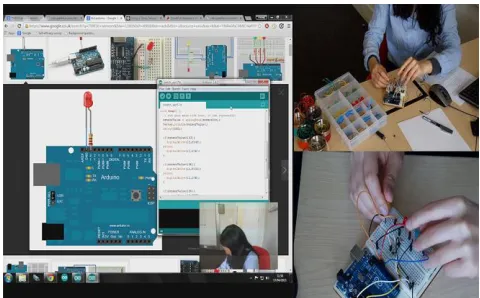
We video-recorded the participants during the task from multiple vantage points and also recorded screen activity using Morae Recorder software. We synchronized and merged these videos to a single, composite, split-screen video (Figure 3) per participant, for use in analysis. We used digital photographs and Fritzing breadboard diagrams [25] to capture circuit configuration, and saved all programs created or adapted by each participant.
Analysis
We first established whether each participant had successfully completed the task. The task was counted as completed when the prototype was shown to meet the specification given—the participant demonstrated the prototype at the end of the session, and after the session we examined the circuit and program for evidence that they were indeed correctly constructed.
We analyzed the split-screen video recordings of each session, for evidence of problems encountered by participants when they were doing the physical computing task. We transcribed key events from these videos and coded them, first distinguishing three different kinds of problems: obstacles (where participants hit hurdles to overcome), breakdowns (on evidence of errors in action or thinking) and bugs (on evidence of faults introduced).
Obstacles were coded in the following circumstances: 1) when participants stated that they did not know or understand something; 2) when they said that they needed to do something but there was evidence that they faced a problem doing it, for example, if a participant said that they needed to wire up the LEDs, and then searched online for information that showed them how to do this; 3) if a participant showed signs of confusion or frustration, for example, a puzzled expression on viewing sensor readings in the Serial Monitor. Hence, our obstacle code includes what previous research has termed 'information gaps' [24].
Inspired by previous classifications of errors [37,26], we also looked for evidence of breakdowns. In our analysis, we coded breakdowns when there was evidence that: 1) participants carried out a wrong action, that is, they made a slip or mistake, for example, mistyping a variable name or using an inappropriate command; 2) they made an incorrect assessment, for example, saying something was working when in fact it was not; 3) there were observed faults in their knowledge or reasoning, for example, stating something factually incorrect.
An obstacle might cause a breakdown but it could also be overcome without causing any further problem, for example, when a participant said that they did not understand the online tutorial page they were reading, but then simply closed it and instead found one that they did understand.
A breakdown could result in a bug, that is, a fault that a participant introduced through their actions or beliefs. For example, a breakdown in which a participant forgot to add a
semi-colon to the end of a variable declaration statement would lead to a bug in the program which needed to be fixed. On the other hand, adding extraneous code to the program, such as declaring a variable that is never used, is an example of a breakdown that does not lead to a bug. We coded as bugs all the individual faults created by the participant that needed to be solved. For example, if a participant forgot, in their program, to configure all three of the digital pins connected to the LEDs as outputs (using the pinMode() function), we coded this as three separate bugs.
Importantly, the participant might not have been aware that they had introduced a bug that needed solving; while some bugs provide clues that make it easy for a user to spot that there is a problem, other bugs can impact more subtly on the behavior of the prototype in a way that makes fault localization and diagnosis very difficult.
We then analyzed where each of these three problem types originated, either relating to the circuit, the program, or the development environment, similar to [26]. For example, if a breakdown occurred in which a participant used a wrong comparison operator in their code, it was assigned the 'program' location. If a participant encountered an obstacle in which they were unable to figure out where to find a particular function/option in the development environment, then the 'IDE' location code was assigned.
In some cases, problems straddled both program and circuit, for example, when a participant had difficulty understanding the sensor readings in the Serial Monitor (which are the result of interaction between the circuit and the program), misunderstood the relationship between the program and the circuit, or said that they did not know how to wire up and program a component. In these cases, we assigned the 'circuit+program' code to the observed problem.
[image:6.612.316.556.64.213.2]Having identified all the obstacles, breakdowns and bugs for each participant, we then analyzed whether they were overcome or not during the session.
Figure 3. Composite, split-screen video of physical computing task, showing onscreen activity, participant's face, overhead
RESULTS
We considered participants' expertise, its role in task success and the impact on how much they struggled. We then investigated the location of problems encountered and whether participants managed to overcome these problems. We finally examined sources of failures in detail and which kinds of activities were challenging for participants.
How Many Problems?
To be successful at a physical computing task, end-user developers need to be sufficiently proficient at programming and at building an electronic circuit but we would hardly expect them to be experts. Participants in our study rated their expertise in physical computing between complete beginner and expert on a 7-point scale (mean=3.60, SD=1.19), with their programming expertise (mean=4.40, SD=1.47) being slightly higher than their electronics expertise (mean=3.10, SD=1.33). Participants usually had more years of programming experience (mean=10.89, SD=7.53) than electronics experience (mean=6.75, SD=7.63) or physical computing development experience (mean=3.23, SD=2.03). Participants reported receiving some form of training or instruction in programming but mostly being self-taught in constructing circuits, which might explain this difference. Our study task involved the Arduino platform and our participants considered themselves reasonably knowledgeable in this environment (mean=3.75, SD=1.41) and relatively self-confident at tackling a task of moderate complexity (mean=69.70, SD=10.78).
However, only six of the 20 participants—P3, P5, P6, P7, P17, P18—successfully built a working prototype that met the specification given. We found no significant relationships between successful task completion and self-efficacy or self-rated expertise.
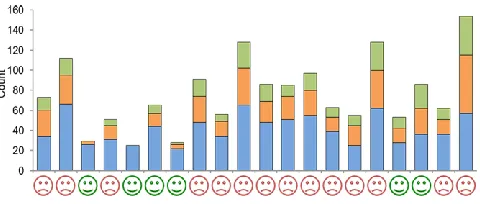
Every participant was impeded in their progress in completing the task in some way (Figure 4), through obstacles, breakdowns or bugs; most participants experienced all three types of problem. Participants encountered a mean of 41.60 obstacles (SD=14.17), 21.05 breakdowns (SD=13.4), and created 13.7 bugs (SD=9.85) over the 45 minutes they worked on the task. This means that participants struggled a great deal, even though the task was appropriate for their experience and background.
We then investigated whether task success was linked with how many problems were encountered. A Mann-Whitney test showed that the six participants who succeeded had significantly lower total numbers of obstacles (U=13.00, p=0.015) and breakdowns (U=10.00, p=0.006) than participants who did not succeed. Furthermore, although not significant (U=18.00, p=0.051), successful participants also marginally introduced fewer bugs. It appears that the successful participants were simply better at physical computing development—either knowing more, or doing fewer things wrong—than their unsuccessful counterparts.
Where Did Problems Occur?
We were interested in where participants' problems were located. Figure 5 shows the distribution of obstacles, breakdowns and bugs in the circuit, program, circuit+program and IDE.
The overwhelming majority of obstacles (49%) occurred in relation to the program (mean=20.40, SD=8.93), followed by 28% associated with circuit construction (mean=11.55, SD=6.36), while 20% of obstacles occurred in the interaction between the program and circuit (mean=8.25, SD=7.87). The same pattern also held for breakdowns: 52% occurred in the program (mean=10.95, SD=8.41), while 31% of breakdowns were circuit-related (mean=6.45, SD=5.97). This means that participants carried out more wrong actions, and made more incorrect assessments and factually incorrect statements when they were programming than when they were constructing the circuit. We also found that bugs introduced by participants related overwhelming to their program (66%) instead of their circuit (33%).
Considering that participants rated their programming expertise higher than their electronics expertise, we were surprised that they appeared to struggle more with program-related than circuit-program-related problems. We did not find any significant correlation between their electronics expertise and how many circuit-related obstacles, breakdowns or bugs they had in constructing the prototype, nor a relationship between their self-assessed programming expertise and their program-related obstacles, breakdowns or bugs. Although not significant, there was a marginal relationship between programming expertise and
program-Figure 5. Number of obstacles (blue), breakdowns (orange) and bugs (green) per location.
0 50 100 150 200 250 300 350 400
Circuit Program Circuit+
Program
IDE
Cou
n
[image:7.612.323.556.66.188.2]t
Figure 4. Number of obstacles (blue), breakdowns (orange) and bugs (green) per participant. Successful participants are
[image:7.612.61.301.576.678.2]related obstacles 0.431, p=0.058) and breakdowns (r=-0.400, p=0.081). Taken together, this means that in general participants were poor judges of how good they are at constructing physical computing prototypes.
Only very few obstacles (3%) stemmed from use of the IDE (mean=1.05, SD=1.39). This echoes findings from end-user programming which showed that users tend to have few information gaps about features of the programming environment and that the majority of problems arise due to issues in problem-solving on a strategic level, that is, knowing how to test or debug or what to do next [24].
It might be tempting to deduce that programming was the major challenge for participants in the task. However, the number of problems encountered and where they occurred does not show the severity of problems or whether they were successfully resolved. We now turn to our analysis of whether these problems could be overcome.
Were Problems Overcome?
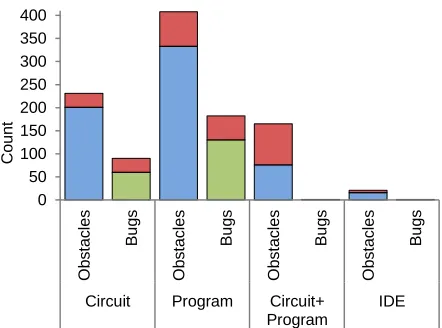
Some problems might be more easily overcome than others by end-user developers. For this analysis, we looked only at obstacles and bugs, since they represent faults which can be overcome, whereas breakdowns manifest as actions or spoken thoughts that cannot be 'undone'. Initially, it appeared that a large number of all obstacles and bugs were overcome by participants, wherever their location (Figure 6). However, when obstacles involved the interaction of the circuit with the program, less than half were resolved (46%), highlighting that these problems seemed to be particularly challenging.
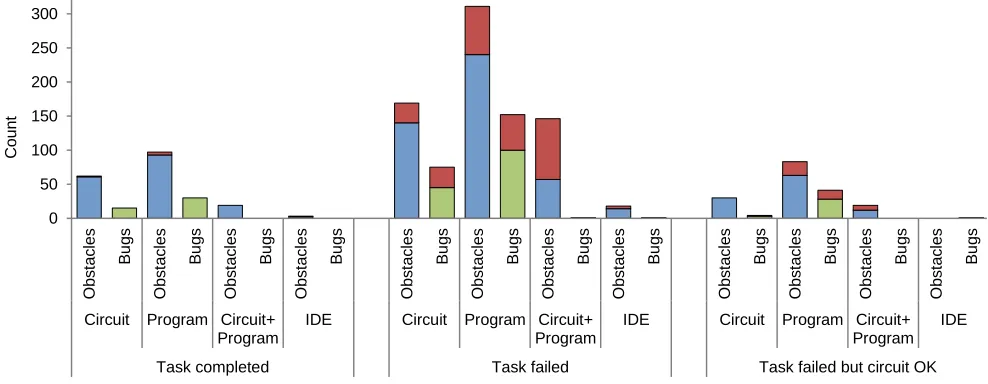
We then investigated differences between participants who were successful at completing the task and those who were unsuccessful (Figure 7). Successful participants overcame 97% of their obstacles and all of their bugs. Unsuccessful participants, on the other hand, only overcame 69% of their obstacles and 64% of their bugs. Three participants—P09, P16, P19—did not complete the task due to a fault in their program code, however, they all managed to construct the circuit correctly. These participants did much better than the rest of the unsuccessful participants, in both overcoming obstacles and resolving bugs. In particular, even unsuccessful participants who constructed a working circuit overcame 100% of their circuit-related obstacles and 75% of their circuit-related bugs, whereas the other unsuccessful participants only solved 79% and 59% of the same problem types, respectively. Unsuccessful participants with circuit problems also did much worse when the obstacles concerned the interaction between the circuit and the program: they overcame only 35% of 'circuit+program' obstacles, whereas participants who correctly constructed the electronic circuit overcame 63% of these.
It seems then that some types of obstacles and bugs prevented participants from completing the task. We wondered what activities caused these fatal problems, and we present the analysis in the next section.
What Went Fatally Wrong?
We now present a detailed analysis of what participants did which caused them to not complete the task, that is, breakdowns that led eventually to task failure or were very difficult to address. It should be noted that often it was not just one problem that caused task failure but rather a series of bugs were introduced that compounded the difficulty of overcoming them. We will compare the 'ideal' solutions (see Study Setup section, Physical Computing Development Task) with participants' actions.
Program construction
Three participants constructed the circuit correctly but had some faults in their program that prevented them from completing the task. Common faults included using the wrong temperature thresholds in the conditional statements, incorrect conditional logic, and numerous problems with variable declarations, assignment and referencing (compare Study Setup section, Writing the program). For example, participant P16 forgot to add a statement to read the sensor in their program and then referred to the wrong variable in their conditional statements. As a result, the participant saw temperature readings that always remained at 0, regardless of whether they touched the sensor. To remedy this issue, they copied in code, but this did not address the previous two bugs. To compound the issue, they forgot to change the variable names in the code they had copied in, so now these did not match the ones they were already using in their program. Challenges in learning to program have been explored extensively (for example, [31]), and it seems that many participants struggled with very basic and common programming activities.
Circuit construction
The most common fatal error that caused ten participants not to succeed in the task was some kind of fault in circuit construction. We looked in more detail at what went wrong in these cases.
[image:8.612.319.540.63.227.2]A surprisingly high number of breakdowns involved miswiring: incorrectly connecting circuit components. We
Figure 6. Total number of resolved obstacles (blue), resolved bugs (green) and unresolved obstacles and bugs (red).
0 50 100 150 200 250 300 350 400
Ob
s
ta
c
les
B
u
g
s
Ob
s
ta
c
les
B
u
g
s
Ob
s
ta
c
les
B
u
g
s
Ob
s
ta
c
les
B
u
g
s
Circuit Program Circuit+
Program
IDE
C
o
u
n
observed 87 of these miswiring breakdowns. All but one of the unsuccessful participants encountered these mistakes and for five participants—P01, P04, P08, P10, P11—this caused a fatal error that prevented them from completing the task successfully. The most common miswiring breakdown was connecting the legs of the temperature sensor or LEDs to the wrong types of Arduino pin (compare section Study Setup, Building the circuit). For example, participant P01 accidentally miswired the sensor very early in the task, resulting in unpredictable sensor readings. Deciding it was an "accuracy" problem, they searched online for ways to programmatically make the readings more reliable, and copied in unnecessary code, to no avail. Forum posts found online—none relevant to the bug—led them to make yet more changes to both their circuit and program, none of which addressed the original miswiring, and eventually they gave up: "It's the world. It's just unpredictable in the world. […] It's technically doing what I want it to do, but it's the world that's breaking, as in, I can't get it to get to the right temperature" (P01).
A particular case of miswiring—bad seating of the sensor or an LED into the breadboard—was observed for three participants. In one case, the participant did not realize that a badly seated sensor, not connected to the rest of the circuit, was the cause of the unpredictable sensor readings they experienced and the bug went unresolved, leading to task failure: "So why does the sensor don't work? [sic] It should be work. [sic] So it goes to zero. I didn't change anything with the sensor" (P04).
Another kind of circuit error that prevented task success involved five participants either not using resistors with the LEDs or adding extraneous resistors to the sensor (compare section Study Setup, Building the circuit). In this task, the missing resistors caused a very insidious problem because it affected the behavior of the temperature sensor and made readings very unpredictable: "I mean, it should work. The
problem is just that the sensor doesn't seem to be very responsive. Because it starts at 150 and when you put your hand there it went over 180, and never came back to 150" (P20). None of the five participants who did not use resistors with their LEDs ever fixed this bug. Instead, unable to determine the fault location in the circuit, three of these participants tried to fix the fault through extraneous program code.
We also noticed that four participants chose too high a value of resistor to use with the LEDs. For three participants this meant that the LEDs lit up but were dim, while one participant wired a single resistor of such a high value to all of their LEDs that two did not light up and the third only blinked intermittently. To address this they disconnected the resistor from two of the LEDs, causing the same insidious sensor readings problem mentioned in the previous paragraph—a problem they never resolved.
Testing
Testing a physical computing artifact is more complex than testing a program. In two instances, participants who had constructed their prototype correctly, touched their temperature sensor and the LEDs did not light up. In fact, they had cold fingers, that is, their test 'input' was bad. In one instance, this led a participant to believe there was a fault when there was not. In software, a more appropriate test strategy would be to use a variety of test inputs including edge cases, something that is sometimes difficult to do in physical computing prototype development.
Debugging
[image:9.612.60.554.502.694.2]Professional software development environments usually provide a debugger, which helps programmers to locate and fix faults, and end-user programming environments have started to do the same [8]. Unfortunately, physical computing does not have analogous support tools and thus it was sometimes difficult for participants in our study to identify what the problem was.
Figure 7. Total number of resolved obstacles (blue), resolved bugs (green) and unresolved obstacles and bugs (red) by task success. 0 50 100 150 200 250 300 O b s ta c le s B u g s Ob s ta c les B u g s O b s ta c le s B u g s Ob s ta c les B u g s Ob s ta c les B u g s Ob s ta c les B u g s Ob s ta c les B u g s Ob s ta c les B u g s Ob s ta c les B u g s Ob s ta c les B u g s Ob s ta c les B u g s Ob s ta c les B u g s
Circuit Program Circuit+
Program
IDE Circuit Program Circuit+
Program
IDE Circuit Program Circuit+
Program IDE
Task completed Task failed Task failed but circuit OK
C
o
u
n
One particular miswiring fault that four participants were able to identify and fix was when they erroneously reversed the power and ground connections of the temperature sensor. This meant that the component overheated, and as a result they burnt themselves momentarily when they touched it: although slightly uncomfortable, this helped them localize the fault to a particular part of the circuit.
We have already highlighted the insidious problem resulting from missing and extraneous resistors. The only way that participants were able to spot this problem was by noticing that the sensor readings were incorrect when viewing them in Arduino IDE. However, perhaps because their focus was on the programming environment at this point, they usually tried to debug this issue by making changes to their program code.
Summary
Why did it go so wrong for many of the participants? The study showed that problems in physical computing are to be expected, even for users who are eventually successful, but we also showed that problems resulting from faults in circuits were particularly hard to identify and remedy. Five participants did not even realize that a circuit-related error was preventing their prototype from working, and attempted to fix the perceived fault by changing their code. Obviously, that proved in vain, and also caused four of them to introduce more bugs into their program. This might also explain why we observed so many program-related obstacles, breakdown and bugs, and the high proportion of problems that were associated with the interaction of circuit and program; once participants started to incorrectly believe that the issue was in the program instead of the circuit, they often created further problems in this location. A major contributory factor here might be that testing and debugging physical computing prototypes are both very challenging and appropriate support tools are not currently available.
DISCUSSION
We believe that our findings can generalize beyond our simple task in an Arduino environment. The most common breakdown in our study—miswiring—can in fact occur during any activity that is part of constructing a physical component, even when setting up and configuring off-the-shelf devices, for example, setting up a home router and Wi-Fi network. Hence, our study holds important lessons for interactions between end users and other physical devices that possibly require less electronics and programming expertise.
How might we better support end users' physical computing activities? While software engineering has been brought to end-user programming [8], a similar approach is still lacking for end-user physical computing development. Thus, we propose tackling this in two ways: 1) providing tools that offer in-context support to improve the practice of creating, testing and debugging physical computing artifacts; and 2) better educating the physical computing end-user developer.
Tools for Good Physical Computing Practice
Currently, there are no development environments for physical computing that are as comprehensive as the professional ones available for writing software. What would such a development environment look like? There are already some encouraging approaches for end-user programmers that we could leverage for this domain. For example, the Idea Garden is a plug-in to existing development environments that offers novice programmers hints and strategies to try out, based on background analysis of what they are doing [9]. We can distinguish two areas where this kind of help would be useful for developing physical computing artifacts: first, supporting the construction of circuits; and secondly, helping to systematically test and debug them if needed.
Construction
Good software engineering practice is to decompose the program into modules and unit test these to incrementally build a working solution. In our study, we had one participant who, although less experienced, encountered fewer problems through such a careful, systematic approach and was successful in completing the task. She quickly broke the task down into simpler parts, then built and tested them individually. For example, she first wired up the temperature sensor and wrote the code to read its values, to ensure that they were understandable. She then wired up a single LED, added code for it and tested that it worked, before building the circuit for the other two LEDs and testing them. Finally, she combined the LED code and sensor code. We could imagine providing strategies and heuristics in a physical computing environment that encourage people to follow systematic development approaches, including encouraging users to develop unit tests or offering design patterns that might be appropriate.
Such a development environment for physical computing could also include a run-time simulator, such as the 123D Circuits Electronics Lab [48] described earlier. Once the virtual circuit and program work as desired, they could be reproduced with actual components and the code uploaded to a physical microcontroller. The virtual aspect would allow more targeted support to be made available during construction of a circuit, which would otherwise be very difficult to provide.
Testing and Debugging
existing troubleshooting checklists (such as [12,42]). Additional features could help end users test their circuits, by creatively considering possible input values, edge cases and testing strategies, akin to WYSIWYT and WYSIWYT/ML [8,19]. Approaches in formally verifying physical circuits [13] could also be useful in this respect.
Educating the Physical Computing End-User Developer
Physical computing is increasingly used within education to engage students in STEM subjects. In our study, participants' programming expertise was higher than their electronics expertise and they seemed to struggle more with circuit-related problems. Therefore, we suggest more focus on teaching concepts useful to circuit construction, testing and debugging. Given the prevalence of miswiring problems, end users should be encouraged to follow good electronic engineering practice, such as correct color coding conventions for wiring their circuits (for example, power is always red, ground black, and signals should have different colors for different components, as in Figure 2), and not crossing wires, if possible, as it makes it harder to debug a circuit. It would also be helpful to teach people how to use a multimeter, for example, to check for continuity or measure current. We provided one in our study sessions but only four participants used it.
Finally, it is still an open question how best to teach electronics subjects to end-user developers. Recent work has looked at how DIY practices can be supported by online tutorials [46]; the careful design of information to help end users understand components and tools used in these activities seems especially crucial.
Future Work
Our study has pointed to a number of open research questions that warrant further investigation. First, we did not look into how people managed to overcome their problems. We noticed that frequently participants simply looked up information, copied code from external sources or fixed bugs through trial-and-error, and future work could specifically focus on the problem-solving strategies of end-user physical computing developers. We have begun analyzing data from the study reported in this paper, to identify the strategies employed by the participants, and we look forward to sharing our findings.
Second, we would like to look deeper into what caused the problems for participants in terms of shortcomings in their knowledge or skills. Recent work [31] has looked into the problems that novice programmers face with a view to addressing specific aspects that prove particularly troublesome and a similar approach might be useful for physical computing. Similarly, a key skill in programming is abstraction, which might also affect physical computing tasks [44].
Finally, we hope to implement some of the support mechanisms we suggested in a suitable development
environment for physical computing and assess, in further studies with end-user developers, the benefits of doing so.
CONCLUSION
This paper reports the results of an empirical study exploring the problems encountered by end-user developers undertaking a physical computing task that involves both circuit construction and programming. We learned that:
All participants encountered problems, some more than others, however background factors such as self-efficacy and self-rated expertise did not predict whether they would complete the task, or the number and type of problems they experienced.
Most problems occurred in programming, however, the majority of task failures were due to circuit-related problems. Participants did not always realize there was a fault or error in their circuit and often incorrectly tried to fix the perceived problem through their program.
Miswiring and missing electronic components accounted for 80% of circuit-related task failures but participants had serious difficulties localizing these faults.
Our study showed that end-user developers would benefit from increased support and we suggested two main areas where they require help: constructing circuits correctly, and diagnosing errors and implementing appropriate fixes. This support can be provided by creating development environments that offer in-context advice during the construction process, and also by educating end-user developers in good practice.
Physical computing affords new possibilities to create artifacts that interact with the world in novel, useful and meaningful ways. Understanding how best to provide effective support will be an important step towards the democratization of physical computing, in which users will finally become developers.
ACKNOWLEDGEMENTS
We thank our study participants.
REFERENCES
1. Swamy Ananthanarayan, Nathan Lapinski, Katie Siek, and Michael Eisenberg. 2014. Towards the crafting of personal health technologies. In Proceedings of the 2014 conference on Designing interactive systems (DIS '14). ACM, New York, NY, USA, 587-596. http://dx.doi.org/10.1145/2598510.2598581
2. Rafael Ballagas, Meredith Ringel, Maureen Stone, and Jan Borchers. 2003. iStuff: a physical user interface toolkit for ubiquitous computing environments. In Proceedings of the SIGCHI Conference on Human Factors in Computing Systems (CHI '03). ACM, New York, NY, USA, 537-544.
http://dx.doi.org/10.1145/642611.642705
4. Jon Bird, Paul Marshall, and Yvonne Rogers. 2009. Low-fi skin vision: a case study in rapid prototyping a sensory substitution system. In Proceedings of the 23rd British HCI Group Annual Conference on People and Computers: Celebrating People and Technology (BCS-HCI '09). British Computer Society, Swinton, UK, UK, 55-64.
5. Tracey Booth and Simone Stumpf. 2013. End-user experiences of visual and textual programming environments for Arduino. In End-User Development, Yvonne Dittrich, Margaret Burnett, Anders Mørch and David Redmiles (eds.). Springer Berlin Heidelberg, 25–39. http://dx.doi.org/10.1007/978-3-642-38706-7_4
6. Leah Buechley, Mike Eisenberg, Jaime Catchen, and Ali Crockett. 2008. The LilyPad Arduino: using computational textiles to investigate engagement, aesthetics, and diversity in computer science education. In Proceedings of the SIGCHI Conference on Human Factors in Computing Systems (CHI '08). ACM, New York, NY, USA, 423-432.
http://dx.doi.org/10.1145/1357054.1357123
7. Margaret Burnett, Curtis Cook, Omkar Pendse, Gregg Rothermel, Jay Summet, and Chris Wallace. 2003. End-user software engineering with assertions in the spreadsheet paradigm. In Proceedings of the 25th International Conference on Software Engineering (ICSE '03). IEEE Computer Society, Washington, DC, USA, 93-103.
http://doi.org/10.1109/ICSE.2003.1201191
8. Margaret Burnett, Curtis Cook, and Gregg Rothermel. 2004. End-user software engineering. Commun. ACM 47, 9 (September 2004), 53-58.
http://dx.doi.org/10.1145/1015864.1015889
9. Jill Cao, Scott D. Fleming, Margaret Burnett, and Christopher Scaffidi. 2014. Idea Garden: Situated support for problem solving by end-user programmers. Interacting with Computers 27, 6 (November 2015): 640–660. http://doi.org/10.1093/iwc/iwu022
10. Jill Cao, Yann Riche, Susan Wiedenbeck, Margaret Burnett, and Valentina Grigoreanu. 2010. End-user mashup programming: through the design lens. In Proceedings of the SIGCHI Conference on Human Factors in Computing Systems (CHI '10). ACM, New York, NY, USA, 1009-1018.
http://dx.doi.org/10.1145/1753326.1753477
11. Deborah R. Compeau and Christopher A. Higgins. 1995. Computer self-efficacy: development of a measure and initial test. MIS Quarterly 19, 2: 189–211. http://doi.org/10.2307/249688
12. Brock Craft. 2013. Ten Troubleshooting Tips. In Arduino Projects for Dummies (1st edition). John Wiley & Sons, Ltd., Chichester, West Sussex, UK, 359–367.
13. Paul Curzon and Ian Leslie. 1996. Improving hardware designs whilst simplifying their proof. In Proceedings of the 3rd International Conference on Designing Correct Circuits (DCC '96), Mary Sheeran and Satnam Singh (Eds.). British Computer Society, Swinton, UK.
14. Irena Pletikosa Cvijikj and Florian Michahelles. 2011. The toolkit approach for end-user participation in the Internet of Things. In Architecting the Internet of Things, Dieter Uckelmann, Mark Harrison and Florian Michahelles (eds.). Springer Berlin Heidelberg, 65–96. http://doi.org/10.1007/978-3-642-19157-2_4
15. Allen Cypher, Mira Dontcheva, Tessa Lau, and Jeffrey Nichols. 2010. No Code Required: Giving Users Tools to Transform the Web. Morgan Kaufmann Publishers Inc., San Francisco, CA, USA.
16. Sarah Gallacher, Jenny O'Connor, Jon Bird, Yvonne Rogers, Licia Capra, Daniel Harrison, and Paul Marshall. 2015. Mood Squeezer: lightening up the workplace through playful and lightweight interactions. In Proceedings of the 18th ACM Conference on Computer Supported Cooperative Work & Social Computing (CSCW '15). ACM, New York, NY, USA, 891-902. http://dx.doi.org/10.1145/2675133.2675170
17. Saul Greenberg and Chester Fitchett. 2001. Phidgets: easy development of physical interfaces through physical widgets. In Proceedings of the 14th Annual ACM Symposium on User Interface Software and Technology (UIST '01). ACM, New York, NY, USA, 209-218. http://dx.doi.org/10.1145/502348.502388
18. Valentina I. Grigoreanu, Margaret M. Burnett, and George G. Robertson. 2010. A strategy-centric approach to the design of end-user debugging tools. In Proceedings of the SIGCHI Conference on Human Factors in Computing Systems (CHI '10). ACM, New York, NY, USA, 713-722.
http://dx.doi.org/10.1145/1753326.1753431
19. Alex Groce, Todd Kulesza, Chaoqiang Zhang, Shalini Shamasunder, Margaret Burnett, Weng-Keen Wong, Simone Stumpf, Shubhomoy Das, Amber Shinsel, Forrest Bice, and Kevin McIntosh. 2014. You are the only possible oracle: effective test selection for end users of interactive machine learning systems. IEEE Trans. Softw. Eng. 40, 3 (March 2014), 307-323. http://dx.doi.org/10.1109/TSE.2013.59
20. Björn Hartmann, Scott R. Klemmer, Michael Bernstein, Leith Abdulla, Brandon Burr, Avi
Robinson-Mosher, and Jennifer Gee. 2006. Reflective physical prototyping through integrated design, test, and analysis. In Proceedings of the 19th Annual ACM Symposium on User Interface Software and
Technology (UIST '06). ACM, New York, NY, USA, 299-308. http://dx.doi.org/10.1145/1166253.1166300
World with Computers. Course Technology Press, Boston, MA, United States.
22. Tom Jenkins and Ian Bogost. 2014. Designing for the Internet of Things: prototyping material interactions. In CHI '14 Extended Abstracts on Human Factors in Computing Systems (CHI EA '14). ACM, New York, NY, USA, 731-740.
http://dx.doi.org/10.1145/2559206.2578879
23. Vaiva Kalnikaite, Yvonne Rogers, Jon Bird, Nicolas Villar, Khaled Bachour, Stephen Payne, Peter M. Todd, Johannes Schöning, Antonio Krüger, and Stefan Kreitmayer. 2011. How to nudge in Situ: designing lambent devices to deliver salient information in supermarkets. In Proceedings of the 13th International Conference on Ubiquitous Computing (UbiComp '11). ACM, New York, NY, USA, 11-20.
http://dx.doi.org/10.1145/2030112.2030115
24. Cory Kissinger, Margaret Burnett, Simone Stumpf, Neeraja Subrahmaniyan, Laura Beckwith, Sherry Yang, and Mary Beth Rosson. 2006. Supporting end-user debugging: what do end-users want to know?. In Proceedings of the Working Conference on Advanced Visual Interfaces (AVI '06). ACM, New York, NY, USA, 135-142.
http://dx.doi.org/10.1145/1133265.1133293
25. André Knörig, Reto Wettach, and Jonathan Cohen. 2009. Fritzing: a tool for advancing electronic prototyping for designers. In Proceedings of the 3rd International Conference on Tangible and Embedded Interaction (TEI '09). ACM, New York, NY, USA, 351-358. http://dx.doi.org/10.1145/1517664.1517735
26. Andrew J. Ko and Brad A. Myers. 2005. A framework and methodology for studying the causes of software errors in programming systems. J. Vis. Lang. Comput. 16, 1-2 (February 2005), 41-84.
http://dx.doi.org/10.1016/j.jvlc.2004.08.003
27. Andrew J. Ko, Brad A. Myers, and Htet Htet Aung. 2004. Six Learning Barriers in End-User Programming Systems. In Proceedings of the 2004 IEEE Symposium on Visual Languages and Human-Centric Computing (VLHCC '04). IEEE Computer Society, Washington, DC, USA, 199-206.
http://dx.doi.org/10.1109/VLHCC.2004.47
28. Thomas Kubitza and Albrecht Schmidt. 2015. Towards a toolkit for the rapid creation of smart environments. In End-User Development, Paloma Díaz, Volkmar Pipek, Carmelo Ardito, Carlos Jensen, Ignacio Aedo and Alexander Boden (eds.). Springer International Publishing, 230–235. http://doi.org/10.1007/978-3-319-18425-8_21
29. Todd Kulesza, Simone Stumpf, Weng-Keen Wong, Margaret M. Burnett, Stephen Perona, Andrew Ko, and Ian Oberst. 2011. Why-oriented end-user debugging of naive Bayes text classification. ACM Trans. Interact.
Intell. Syst. 1, 1 (October 2011), 2:1–2:31. http://doi.org/10.1145/2030365.2030367
30. Sandeep Kaur Kuttal, Anita Sarma, and Gregg Rothermel. 2013. Debugging support for end user mashup programming. In Proceedings of the SIGCHI Conference on Human Factors in Computing Systems (CHI '13). ACM, New York, NY, USA, 1609-1618. http://dx.doi.org/10.1145/2470654.2466213
31. Michael J. Lee, Faezeh Bahmani, Irwin Kwan, et al. 2014. Principles of a debugging-first puzzle game for computing education. Proceedings of the 2014 IEEE Symposium on Visual Languages and Human-Centric Computing (VLHCC '14), IEEE Computer Society, 57–64. http://doi.org/10.1109/VLHCC.2014.6883023
32. Alan Lesgold, Susanne Lajoie, Marilyn Bunzo, and Gary Eggan. 1992. SHERLOCK: A coached practice environment for an electronics troubleshooting job. In Computer-Assisted Instruction and Intelligent Tutoring Systems: Shared Goals and Complementary
Approaches, Jill H. Larkin and Ruth W. Chabay (eds.). Lawrence Erlbaum Associates, Hillsdale, NJ, 201–238.
33. Henry Lieberman. 2001. Your Wish is My Command: Programming by Example. Morgan Kaufmann, San Francisco.
34. Amon Millner and Edward Baafi. 2011. Modkit: blending and extending approachable platforms for creating computer programs and interactive objects. In Proceedings of the 10th International Conference on Interaction Design and Children (IDC '11). ACM, New York, NY, USA, 250-253.
http://dx.doi.org/10.1145/1999030.1999074
35. John F. Pane and Brad A. Myers. 1996. Usability Issues in the Design of Novice Programming Systems. Carnegie Mellon University, School of Computer Science Technical Report CMU-CS-96-132, Pittsburgh, PA. Retrieved from
http://repository.cmu.edu/isr/820
36. John F. Pane and Brad A. Myers. 2006. More natural programming languages and environments. In End User Development, Henry Lieberman, Fabio Paternò and Volker Wulf (eds.). Springer Netherlands, 31–50. http://doi.org/10.1007/1-4020-5386-X_3
37. James Reason. 1990. Human Error. Cambridge University Press, Cambridge England ; New York. 38. M. Resnick, F. Martin, R. Sargent, and B. Silverman.
1996. Programmable Bricks: toys to think with. IBM Systems Journal 35, 3.4: 443–452.
http://doi.org/10.1147/sj.353.0443
39. Dries De Roeck, Karin Slegers, Johan Criel, Marc Godon, Laurence Claeys, Katriina Kilpi, and An Jacobs. 2012. I would DiYSE for it!: a manifesto for do-it-yourself internet-of-things creation. In
Human-Computer Interaction: Making Sense through Design (NordiCHI '12). ACM, New York, NY, USA, 170-179. http://dx.doi.org/10.1145/2399016.2399044
40. Yvonne Rogers, Jeni Paay, Margot Brereton, Kate L. Vaisutis, Gary Marsden, and Frank Vetere. 2014. Never too old: engaging retired people inventing the future with MaKey MaKey. In Proceedings of the SIGCHI Conference on Human Factors in Computing Systems (CHI '14). ACM, New York, NY, USA, 3913-3922. http://dx.doi.org/10.1145/2556288.2557184
41. Joshua G. Tanenbaum, Amanda M. Williams, Audrey Desjardins, and Karen Tanenbaum. 2013.
Democratizing technology: pleasure, utility and expressiveness in DIY and maker practice. In Proceedings of the SIGCHI Conference on Human Factors in Computing Systems (CHI '13). ACM, New York, NY, USA, 2603-2612.
http://dx.doi.org/10.1145/2470654.2481360
42. Chris Taylor. 2010. Beginner Troubleshooting - SparkFun Electronics. SparkFun. Retrieved September 23, 2015 from https://www.sparkfun.com/tutorials/226
43. Daniel Tetteroo, Iris Soute, and Panos Markopoulos. 2013. Five key challenges in end-user development for tangible and embodied interaction. In Proceedings of the 15th ACM International Conference on Multimodal Interaction (ICMI '13). ACM, New York, NY, USA, 247-254. http://dx.doi.org/10.1145/2522848.2522887
44. Blase Ur, Elyse McManus, Melwyn Pak Yong Ho, and Michael L. Littman. 2014. Practical trigger-action programming in the smart home. In Proceedings of the
SIGCHI Conference on Human Factors in Computing Systems (CHI '14). ACM, New York, NY, USA, 803-812. http://dx.doi.org/10.1145/2556288.2557420
45. Nicolas Villar, James Scott, and Steve Hodges. 2011. Prototyping with Microsoft .Net Gadgeteer.
Proceedings of the Fifth International Conference on Tangible, Embedded, and Embodied Interaction (TEI '11), ACM, New York, NY, USA, 377-380.
http://dx.doi.org/10.1145/1935701.1935790
46. Ron Wakkary, Markus Lorenz Schilling, Matthew A. Dalton, Sabrina Hauser, Audrey Desjardins, Xiao Zhang, and Henry W.J. Lin. 2015. Tutorial authorship and hybrid Designers: The Joy (and Frustration) of DIY Tutorials. In Proceedings of the SIGCHI
Conference on Human Factors in Computing Systems (CHI '15). ACM, New York, NY, USA, 609-618. http://dx.doi.org/10.1145/2702123.2702550
47. Maurice V. Wilkes. 1985. Memoirs of a Computer Pioneer. The MIT Press, Cambridge, MA, USA.
48. 123D Circuits Electronics Lab. Autodesk 123D Circuits. Retrieved July 12, 2015 from
https://123d.circuits.io/lab
49. TMP36 datasheet and product info | Voltage Output Temperature Sensors | Analog Devices. Retrieved September 21, 2015 from
http://www.analog.com/en/products/analog-to-digital-
converters/integrated-special-purpose-converters/integrated-temperature-sensors/tmp36.html