ASP.NET Bible
by mridula Parihar and et al. ISBN: 0764548166
Hungry Minds © 2002 (855 pages)
Learn the ins and outs of ASP.NET using Visual Basic and C# with this comprehesive reference tool.
Table of Contents
ASP.NET Bible Preface
Part I - ASP.NET Basics
Chapter 1 - Understanding the .NET Framework
Chapter 2 - Getting Started with ASP.NET
Chapter 3 - Building Forms with Web Controls
Chapter 4 - Using Rich Web Controls
Chapter 5 - Creating and Using Custom Controls
Chapter 6 - Validating User Input
Chapter 7 - Debugging ASP.NET Pages Part II - ASP.NET Database Programming
Chapter 8 - Introducing ADO.NET
Chapter 9 - Understanding Data Binding
Chapter 10 - Working with Data Grids
Chapter 11 - Using Templates
Chapter 12 - Using SQL Server with ASP.NET
Chapter 13 - Advanced Data Binding and XML Part III - Advanced ASP.NET
Chapter 14 - ASP.NET Application Configuration
Chapter 15 - Developing Business Objects
Chapter 16 - Building HTTP Handlers
Chapter 17 - Understanding Caching
Chapter 18 - Building Wireless Applications with ASP.NET Mobile Controls
Chapter 19 - ASP.NET Security
Chapter 20 - Localizing ASP.NET Applications
Chapter 21 - Deploying ASP.NET Applications Part IV - Building Web Services
Chapter 22 - Introduction to Web Services
Chapter 23 - Web Services Infrastructure
Chapter 24 - Understanding SOAP
Chapter 25 - Building a Web Service
Chapter 26 - Deploying and Publishing Web Services
Chapter 27 - Finding Web Services
Chapter 28 - Consuming Web Services Part V - Building ASP.NET Applications
Chapter 29 - ASP.NET Blackjack
Chapter 30 - Chatty Discussion Forum
Appendix A - Visual Basic Syntax
Appendix C - Visual Basic Object-Oriented Programming
Appendix D - C# Syntax
Appendix E - C# Classes
Appendix F - C# Components
Index
List of Figures List of Tables List of Sidebars
ASP.NET Bible
Mridula Parihar et al. Published by
Hungry Minds, Inc. 909 Third Avenue New York, NY 10022
www.hungryminds.com
Copyright © 2002 Hungry Minds, Inc. All rights reserved. No part of this book, including interior design, cover design, and icons, may be reproduced or transmitted in any form, by any means (electronic, photocopying, recording, or otherwise) without the prior written permission of the publisher.
Library of Congress Control Number: 2001093388
ISBN: 0-7645-4816-6
10 9 8 7 6 5 4 3 2 1
1B/SQ/QS/QS/IN
Distributed in the United States by Hungry Minds, Inc.
Distributed by CDG Books Canada Inc. for Canada; by Transworld Publishers Limited in the United Kingdom; by IDG Norge Books for Norway; by IDG Sweden Books for Sweden; by IDG Books Australia Publishing Corporation Pty. Ltd. for Australia and New Zealand; by TransQuest Publishers Pte Ltd. for Singapore, Malaysia, Thailand,
Indonesia, and Hong Kong; by Gotop Information Inc. for Taiwan; by ICG Muse, Inc. for Japan; by Intersoft for South Africa; by Eyrolles for France; by International Thomson Publishing for Germany, Austria, and Switzerland; by Distribuidora Cuspide for
Argentina; by LR International for Brazil; by Galileo Libros for Chile; by Ediciones ZETA S.C.R. Ltda. for Peru; by WS Computer Publishing Corporation, Inc., for the Philippines; by Contemporanea de Ediciones for Venezuela; by Express Computer Distributors for the Caribbean and West Indies; by Micronesia Media Distributor, Inc. for Micronesia; by Chips Computadoras S.A. de C.V. for Mexico; by Editorial Norma de Panama S.A. for Panama; by American Bookshops for Finland.
For general information on Hungry Minds' products and services please contact our Customer Care department within the U.S. at 800-762-2974, outside the U.S. at 317-572-3993 or fax 317-572-4002.
For sales inquiries and reseller information, including discounts, premium and bulk quantity sales, and foreign-language translations, please contact our Customer Care department at 800-434-3422, fax 317-572-4002 or write to Hungry Minds, Inc., Attn: Customer Care Department, 10475 Crosspoint Boulevard, Indianapolis, IN 46256.
For information on using Hungry Minds' products and services in the classroom or for ordering examination copies, pleas e contact our Educational Sales department at 800-434-2086 or fax 317-572-4005.
For press review copies, author interviews, or other publicity information, please contact our Public Relations department at 317-572-3168 or fax 317-572-4168.
For authorization to photocopy items for corporate, personal, or educational use, please contact Copyright Clearance Center, 222 Rosewood Drive, Danvers, MA 01923, or fax 978-750-4470.
LIMIT OF LIABILITY/DISCLAIMER OF WARRANTY: THE PUBLISHER AND AUTHOR HAVE USED THEIR BEST EFFORTS IN PREPARING THIS BOOK. THE PUBLISHER AND AUTHOR MAKE NO REPRESENTATIONS OR WARRANTIES WITH RESPECT TO THE ACCURACY OR COMPLETENESS OF THE CONTENTS OF THIS BOOK AND SPECIFICALLY DISCLAIM ANY IMPLIED WARRANTIES OF
MERCHANTABILITY OR FITNESS FOR A PARTICULAR PURPOSE. THERE ARE NO WARRANTIES WHICH EXTEND BEYOND THE DESCRIPTIONS CONTAINED IN THIS PARAGRAPH. NO WARRANTY MAY BE CREATED OR EXTENDED BY SALES REPRESENTATIVES OR WRITTEN SALES MATERIALS. THE ACCURACY AND COMPLETENESS OF THE INFORMATION PROVIDED HEREIN AND THE OPINIONS STATED HEREIN ARE NOT GUARANTEED OR WARRANTED TO PRODUCE ANY PARTICULAR RESULTS, AND THE ADVICE AND STRATEGIES CONTAINED HEREIN MAY NOT BE SUITABLE FOR EVERY INDIVIDUAL. NEITHER THE PUBLISHER NOR AUTHOR SHALL BE LIABLE FOR ANY LOSS OF PROFIT OR ANY OTHER COMMERCIAL DAMAGES, INCLUDING BUT NOT LIMITED TO SPECIAL, INCIDENTAL, CONSEQUENTIAL, OR OTHER DAMAGES.
Trademarks: Hungry Minds and the Hungry Minds logo are trademarks or registered trademarks of Hungry Minds, Inc. All other trademarks are the property of their respective owners. Hungry Minds, Inc., is not associated with any product or vendor mentioned in this book.
is a trade mark of Hungr y Minds, Inc. Credits
Acquisitions Editor Sharon Cox
Project Editor Sharon Nash
Development Editor Nancy D. Warner Technical Editor Michael MacDonald Copy Editor Bill McManus Editorial Manager Mary Beth Wakefield
Vice President and Executive Group Publisher Richard Swadley
Vice President and Publisher Joseph B. Wikert
Project Coordinator Bill Ramsey
Graphics and Production Specialists Sean Decker
Joyce Haughey Barry Offringa Betty Schutte
Quality Control Technician Laura Albert
David Faust John Greenough Andy Hollandbeck
Proofreading and Indexing TECHBOOKS Production Services About the Authors
Mridula Parihar has a master's degree in Applied Operations Research from Delhi University. She is a Microsoft Certified Solution Developer (MCSD) and has worked approximately 2½ years with NIIT Ltd. Mridula spent her first year in the Career Education Group (CEG) of NIIT, in which she taught NIIT students and was involved in scheduling and managing resources. For the past 1½ years, she has been working in the Knowledge Solutions Business (KSB) group of NIIT, in which she has had the
opportunity to work on varied technical projects. Mridula has been involved in design, development, testing, and implementation of instructor-led training courses. Her primary responsibilities include instructional review, technical review, and ensuring ISO
compliance. For the past six months, Mridula has been involved in textbook writing on varied technical subjects such as TCP/IP and .NET.
Essam Ahmed is an accomplished developer with more than 10 years of professional programming and design experience. Essam enjoys writing — his publications include
JScript .NET Programming (published October 2001 by Hungry Minds), more than 50 book reviews at codeguru.com, and various articles at asptoday.com and
thecodechannel.com. Essam's professional affiliations include the IEEE Computer Society (http://computer.org), the Association for Computing Machinery
(http://acm.org), and the Worldwide Institute of Software Architects
(www.wwisa.org), in which he is a practicing member. Essam was a speaker at VSLive 2001 in Sydney, Australia. Essam's Web site is www.designs2solutions.com. Jim Chandler is an independent consultant with extensive experience in architecting and developing custom, integrated software solutions for small to medium-sized
businesses in the Midwest. Before focusing his career on the Windows platform, Jim was a Graphics Partner at Digital Equipment Corporation, evangelizing X11 and Motif. Jim is also a co-author of the Visual Basic.NET Bible and an active member of the St. Louis .NET Users Group. He has delivered presentations on such topics as ASP.NET, XML, and Web services to the St. Louis developer community. His research interests include everything .NET as well as COM+ and developing mobile applications for the Pocket PC. Outside the daily challenges of developing applications and fulfilling his research
interests, Jim shares his spare time with his wife, Rhonda, and their two sons, Sam and Thomas.
Bill Hatfield is the best-selling author of several computer books, including ASP.NET For Dummies, two editions of Active Server Pages For Dummies (on Classic ASP),
Visual InterDev For Dummies, and Creating Cool VBScript Web Pages (all from Hungry Minds). He is also the editor of three monthly publications from Pinnacle Publishing on .NET technologies: C# Developer,.NET Developer, and ActiveWeb Developer. He's an independent corporate trainer and maintains a Web site (www.edgequest.com) dedicated to helping developers solve problems. He works from his home in
Indianapolis, Indiana, where he and his wife have celebrated the birth of their first child, Bryce Christopher. Of course, now that he has a real baby, he can stop dressing up the cat in little outfits.
Richard Lassan is a Senior Consultant with GA Sullivan in Nashville, TN. He is currently involved in learning and writing about .NE T. Richard can be reached at
technology in that time frame. Peter can be reached at [email protected] and is available for small to midsized consulting projects.
Dave Wanta has been working in Web development since the mid-1990s. His Microsoft-centric Web technology has led him to develop a number of large e-commerce and B2B applications. His love for ASP.NET has led him to build the largest online ASP.NET directory, at www.123aspx.com. You can usually find Dave online discussing ASP.NET topics at the lists found at www.aspfriends.com.
About the Series Editor
Michael Lane Thomas is an active development -community and computer-industry analyst who presently spends a great deal of time spreading the gospel of Microsoft .NET in his current role as a .NET technology evangelist for Microsoft. In working with over a half-dozen publishing companies, Michael has written numerous technical articles and written or contributed to almost 20 books on numerous technical topics, including Visual Basic, Visual C++, and .NET technologies. He is a prolific supporter of the Microsoft certification programs, having earned his MCSD, MCSE+I, MCT, MCP+SB, and MCDBA.
In addition to technical writing, Michael can also be heard over the airwaves from time to time, including two weekly radio programs on Entercom (www.entercom.com/) stations, most often in Kansas City on News Radio 980KMBZ (www.kmbz.com/). He can also occasionally be caught on the Internet doing an MSDN Webcast
(www.microsoft.com/usa/webcasts/) discussing .NET, the next generation of Web application technologies.
Michael started his journey through the technical ranks back in college at the University of Kansas, where he earned his stripes and a couple of degrees. After a brief stint as a technical and business consultant to Tokyo-based Global Online Japan, he returned to the States to climb the corporate ladder. He has held assorted roles, including those of IT manager, field engineer, trainer, independent consultant, and even a brief stint as Interim CTO of a successful dot-com, although he believes his current role as .NET evangelist for Microsoft is the best of the lot. He can be reached via e-mail at
First and foremost, I want to dedicate this book to my Supreme Guide who has always guided me in the right direction. Then, I would like to dedicate this book to my Mom and Dad, without whose support I could have never completed this book. My Mom and Dad have always been a constant source of energy and encouragement for me. Also, I must thank my brothers, Amit and Abhay, who have always given their constant support to me. — Mridula Parihar
For my sons, Vikranth and Siddharth — Essam Ahmed
I'd like to dedicate this book to my family, whose love and support mean everything to me. I love you all. And, finally, the answer to the question posed by my sons, Sam and Thomas, who asked: "Dad, will our name be in the book, too?" You bet! — Jim Chandler
To my lovely wife Melanie for the patience, kindness, and love she showsto our child every hour of every day. Bryce couldn't have picked abetter mom! — Bill Hatfield
To my parents, William and Eleanor, for always being there. — Rick Lassan
much and appreciate all that you do for me and all that you are to me. — Peter MacIntyre
To my Parents, Roy and Terry, and my Brother Bob for being the coolest brother someone could have. — Dave Wanta
Preface
Introduction of the Microsoft .NET platform has begun a new era in the field of
application development that will drive the next-generation Internet. ASP.NET, a part of the Microsoft .NET platform, is a revolutionary programming framework that enables the rapid development of enterprise-class Web applications. It provides the easiest and most scalable way to develop, deploy, and run Web applications that can target any browser or device. In fact, these features are only a few of several that make ASP.NET
developers' first choice for creating Web applications.
ASP.NET makes application development much easier than it was with classic ASP, and hence it has dramatically improved developers' productivity. ASP.NET enables you to provide richer functionality to your Web applications by writing the least amount of code. The best part is that ASP.NET enables you to select any of the available .NET
programming languages. So, unlike classic ASP, in which you had to depend on interpreted VBScript and JScript languages, ASP.NET provides a wide choice of programming languages.
In addition to the usual Web applications, ASP.NET allows you to create other types, which enables you to extend your applications' reach to new customers and business partners. For example, XML Web services enable sharing of data across the Internet regardless of the operating system and the programming language — this certainly widens the reach of your applications. Also, ASP.NET provides you with mobile controls that enable your applications to target a large number of mobile Web devices.
Deploying server applications has always been a pain for developers. With ASP.NET, however, developers do not need to worry on this front at all, because ASP.NET has dramatically simplified the deployment process. Deploying a Web application simply requires you to copy it to the Web server.
In addition to providing a rich developer experience, ASP.NET provide a rich user experience. ASP.NET Web applications are faster than the classic ASP applications. The reason is quite obvious. Unlike classic ASP, in which you relied only on interpreted languages, ASP.NET enables you to use compiled programming languages. Thus, ASP.NET applications do not require an explicit compilation step and, in turn, execute faster. Additionally, ASP.NET has rich caching and state-management features that add to the improved performance of ASP.NET Web applications. In addition to providing high performance and scalability, ASP.NET applications are highly reliable and secure. The greater reliability and security features enable your application users to build more confidence in using them.
This book seeks to provide to all Web-application developers a greater understanding of ASP.NET. This book covers ASP.NET from its basic features to its advanced features, such as application configuration, caching, security, localization, XML Web services, and deployment.
Icons Used in This Book
Each icon used in this book signifies a special meaning. Here's what each icon means: Note Note icons provide supplemental information about the subject at
hand but generally something that isn't quite the main idea. Notes are often used to elaborate on a detailed technical point.
obvious.
Caution Caution icons warn you of a potential problem or error.
Cross-Reference
Cross-Reference icons direct you to related information in another section or chapter.
How This Book Is Organized
The basic aim of this book is to provide Web-application developers with insight into ASP.NET features and to enable them to develop rich, secure, and reliable Web applications. The book begins by introducing the basic features of ASP.NET and then moves on to explore the advanced ASP.NET features.
This book is divided into five parts.
Part I: ASP.NET Basics
This part presents the salient features of the .NET Framework and introduces you to the relationship of the .NET Framework with ASP.NET. This part covers the basic features of ASP.NET, including the Web controls, Rich Web controls, and Validation controls. In addition, this part discusses how to create custom Web controls and to use various ASP.NET debugging techniques to debug Web applications.
Part II: ASP.NET Database Programming
This part provides an overview of the ADO.NET technology. It discusses how to use SQL Server with ASP.NET applications to access and manipulate server-side data. This part also covers data binding with ASP.NET server controls and discusses how to work with Data Grids. Also, it discusses working with XML. Finally, it presents you with Web-server control templates to customize the look and layout of server controls.
Part III: Advanced ASP.NET
This part covers the advanced features of ASP.NE T, such as application configuration, caching, and security. This part discusses how to develop business objects (the .NET components), build HTTP handlers, and develop wireless applications using mobile controls. It also discusses how to develop localized ASP.NET applications. Finally, this part presents you with the deployment of ASP.NET applications.
Part IV: Building Web Services
This part gives you an overview of Web services, the Web services infrastructure, and the Simple Object Access Protocol (SOAP). It then discusses how to build and deploy Web services. Finally, this part discusses how to find and consume Web services.
Part V: Building ASP.NET Applications
The Web services section covers the foundational technologies of Web services (such as XML and SOAP) as well as detailed information on how to develop, debug, and consume ASP.NET Web services using the Microsoft .NET Framework and ASP.NET.
Appendixes
Companion Web Site
This book provides a companion Web site from which you can download the code from various chapters. All the code listings reside in a single WinZip file that you can
download by going to www.hungryminds.com/extras and selecting the ASP.NET Bible link. After you download the file (ASPNETBible.zip), and if you have WinZip already on your system, you can open it and extract the contents by double-clicking. If you don't currently have WinZip, you can download an evaluation version from
www.winzip.com.
When extracting the files, use WinZip's default options (confirm that the Use Folder Names option is checked) and extract the ASPNETBible.zip file to a drive on your system that has about 3MB of available space. The extraction process creates a folder called ASPNETBible. As long as the Use Folder Names option is checked in the Extract dialog box, an entire folder structure is created within the ASPNETBible folder. You'll see folders arranged by chapter number, and some of those chapter folders will contain subfolders.
If you'd rather download just the code you need from a particular chapter — when you need it — simply click the separate chapter link on the Web site instead of downloading the entire WinZip file.
Acknowledgments
It's a great feeling to acknowledge the efforts and contributions of each one of those who were involved in the development of this book. I would like to acknowledge the time and effort put in by the teams at both ends, NIIT and Hungry Minds. At NIIT, I would like to convey my special thanks to Ms. Anita Sastry, the Project Manager, and Sunil Kumar Pathak, the Graphics Designer. Without their valuable contributions, this book wouldn't have been possible. Also, I would like to thank Namrata, Rashim, Meeta, Ashok, Nitin, and Yesh for their timely help. Thank you once again for giving a helping hand when it was needed the most.
At Hungry Minds, my special thanks go to the Acquisitions Editor, Sharon Cox, and the Project Editor, Sharon Nash, who gave me the opportunity to write this book. Also, I would like to acknowledge the Technical Editors, Ken Cox and Michael MacDonald, and the Copy Editor, Bill McManus, for their valuable input and constant support. Thank you all for your valuable contributions, without which this book wouldn't be possible. — Mridula Parihar
Tom Archer — for helping me get my writing career off the ground. Sharon Cox — a great acquisitions editor to work with! Sharon Nash — thanks for your patience. My family — for their ongoing support in all of my endeavors. — Essam Ahmed
I would like to thank Bill Evjen for giving me the opportunity to fulfill the lifelong goal of becoming a published author as well as his dedication to the St. Louis .NET Users group — it is an outstanding organization due in large part to his efforts. I would also like to thank Craig Smyth, whose support and encouragement have contributed much to the career success I enjoy today. I am also grateful to Bob Hundman at Novus International for allowing me to "disappear" when I needed to while writing for this book. And, of course, a special thank you to my wife, Rhonda, who was patient and supportive while I worked into the wee hours of many nights and during our family vacation in order to meet the book's deadlines. — Jim Chandler
Thanks to Chris Webb, Sharon Cox, Sharon Nash, and everyone else at Hungry Minds who helped put this together. You guys are great to work with! — Bill Hatfield
I would like to give thanks and praise to God above for giving me the talents and skills that it takes to be both a computer specialist and an author. Of course, the great people at Hungry Minds who gave me this opportunity need to be mentioned as well, namely Sharon Cox and Sharon Nash. Their attention to detail and occasional prodding are what helped make this project a success! — Peter MacIntyre
Part I:
ASP.NET Basics
Chapter List
Chapter 1: Understanding the .NET Framework Chapter 2: Getting Started with ASP.NET Chapter 3: Building Forms with Web Controls Chapter 4: Using Rich Web Controls
Chapter 5: Creating and Using Custom Controls Chapter 6: Validating User Input
Chapter 7: Debugging ASP.Net Pages
Chapter 1:
Understanding the .NET Framework
Overview
The Internet revolution of the late 1990s represented a dramatic shift in the way individuals and organizations communicate with each other. Traditional applications, such as word processors and accounting packages, are modeled as stand-alone applications: they offer users the capability to perform tasks using data stored on the system the application resides and executes on. Most new software, in contrast, is modeled based on a distributed computing model where applications collaborate to provide services and expose functionality to each other. As a result, the primary role of most new software is changing into supporting information exchange (through Web servers and browsers), collaboration (through e-mail and instant messaging), and individual expression (through Web logs, also known as Blogs, and e-zines — Web based magazines). Essentially, the basic role of software is changing from providing discrete functionality to providing services.
The .NET Framework represents a unified, object-oriented set of services and libraries that embrace the changing role of new network-centric and network-aware software. In fact, the .NET Framework is the first platform designed from the ground up with the Internet in mind.
This chapter introduces the .NET Framework in terms of the benefits it provides. I present some sample code in Visual C# .NET, Visual Basic .NET, Visual Basic 6.0, and Visual C++; don't worry if you're not familiar with these languages, since I describe in the discussion what each sample does.
Benefits of the .NET Framework
The .NET Framework offers a number of benefits to developers: § A consistent programming model
§ Direct support for security § Simplified development efforts
§ Easy application deployment and maintenance
Consistent programming model
Different programming languages offer different models for doing the same thing. For example, the following code demonstrates how to open a file and write a one-line message to it using Visual Basic 6.0:
Public Sub testFileAccess()
' Use native method of opening an writing to a file...
Dim outputFile As Long
outputFile = FreeFile
Open "c:\temp\test.txt" For Output As #outputFile
Print #outputFile, "Hello World!"
Close #outputFile
' Use the Microsoft Scripting Runtime to
' open and write to the file...
Dim fso As Object
Set fso = CreateObject("Scripting.FileSystemObject")
Dim outputText As TextStream
Set outputText = fso.CreateTextFile("c:\temp\test2.txt")
outputText.WriteLine "Hello World!"
outputText.Close
Set fso = Nothing
Exit Sub
handle_Error:
' Handle or report error here
End Sub
This code demonstrates that more than one technique is available to create and write to a new file. The first method uses Visual Basic's built-in support; the second method uses the Microsoft Scripting Runtime. C++ also offers more than one way of performing the same task, as shown in the following code:
#include <fstream>
#include <iostream>
#include <cstdlib>
#include <stdio.h>
using namespace std;
int main(int argc, char* argv[]) {
// Use the C Runtime Library (CRT)...
FILE *testFile;
if( (testFile = fopen( "c:\\temp\\test3.txt",
"wt" )) == NULL ) {
cout << "Could not open first test file!" << endl;
return 1; }
fclose(testFile);
// Use the Standard Template Library (STL)...
ofstream outputStream("c:\\temp\\test4.txt");
if(!outputStream) {
cout << "Could not open second test file!" << endl;
return(1);
}
outputStream << "Hello World!" << endl;
outputStream.close();
return 0;
}
What both code listings demonstrate is that when using different programming
languages, a disparity exists among the techniques that developers use to perform the same task. The difference in techniques comes from how different languages interact with and represent the underlying system that applications rely on, thereby increasing the amount of training that developers need. The following code demonstrates how to perform the same tasks in Visual Basic .NET and Visual C# .NE T.
Visual Basic .NET:Imports System.IO
Imports System.Text
Module Demo
Sub Main()
Dim outputFile As StreamWriter = _
New StreamWriter("c:\temp\test5.txt")
outputFile.WriteLine("Hello World!")
outputFile.Close()
End Sub
End Module
Visual C# .NET:
using System.IO;
using System.Text;
class Demo {
static void Main() {
StreamWriter outputFile =
new StreamWriter("c:\\temp\\test6.txt");
outputFile.WriteLine("Hello World!");
outputFile.Close();
}
The preceding code demonstrates, apart from slight syntactical differences, that the technique for writing to a file in either language is identical — both listings use the
unlike the Visual Basic and Visual C++ listings, which demonstrate that there's more than one way to do something within the same language, the preceding listings show that there's a unified means of accomplishing the same task by using the .NET Class Library.
The .NET Class Library is a key component of the .NET Framework — it is sometimes referred to as the Base Class Library (BCL). The .NET Class Library contains hundreds of classes you can use for tasks such as the following:
§ Processing XML
§ Working with data from multiple data sources § Debugging your code and working with event logs § Working with data streams and files
§ Managing the run-time environment
§ Developing Web services, components, and standard Windows applications § Working with application security
§ Working with directory services
The functionality that the .NET Class Library provides is available to all .NET languages, resulting in a consistent object model regardless of the programming language
developers use.
Direct support for security
Developing an application that resides on a user's desktop system and uses local resources is easy, from a security point of view, because security simply isn't a
consideration in this scenario. Security becomes much more important when you create applications that access data on remote systems or applications that perform privileged tasks on behalf of nonprivileged users, because systems may have to authenticate users, and encryption (scrambling to avoid eavesdropping) may be necessary to secure data communications.
Windows NT, Windows 2000, and Windows XP have a number of security features based on Access Control Lists (ACLs). An ACL contains a number of entries that specify which users may access, or are explicitly denied access, to resources such as files and printers. ACLs are a great way of protecting executable files (applications) from
unauthorized access, but they do not secure all parts of the file. The .NET Framework enables both developers and system administrators to specify method-level security. Developers (through easy-to-use programming language constructs called attributes) and systems administrators (by using administrative tools and byediting an application's configuration file) can configure an application's security so that only authorized users can invoke a component's methods.
The .NET Framework uses industry-standard protocols such as TCP/IP and means of communications such as the Extensible Markup Language (XML), Simple Object Access Protocol (SOAP, a standard application messaging protocol), and HTTP to facilitate distributed application communications. This makes distributed computing more secure, because .NET developers cooperate with network connectivity devices as opposed to attempting to work around their security restrictions.
Simplified development efforts
such as the contents of text boxes, between calls to the same ASP.NET page, thereby reducing the amount of code you need to write. Visual Studio .NET, which is tightly integrated with the .NET Framework, assists developers as they create ASP.NET and other applications by providing visual designers that facilitate visual drag and drop editing, making page layout and form layout a breeze.
Another aspect of creating applications is debugging. Developers sometimes make mistakes; systems don't behave as you expect them to, and unexpected conditions arise — all of these issues are collectively referred to as, using the affectionate term, "bugs." Tracking down bugs — known as "debugging" — quickly and effectively requires developers to be familiar with a variety of tools, sometimes available from a third party, and techniques — a combination of programming techniques and techniques for using a particular tool. The .NET Framework simplifies debugging with support for Runtime diagnostics.
Runtime diagnostics not only help you track down bugs but also help you determine how well your applications perform and assess the condition of your application. The .NET Framework provides three types of Runtime diagnostics:
§ Event logging
§ Performance counters § Tracing
Event logging
Windows 2000 and Windows XP have a feature called an Event Log _ a database containing information about important hardware or software events. The Event Log is useful for recording information about the status of your applications and provides systems administrators a means of diagnosing problems, since they can review Event Log entries using the Event Viewer (supplied with Windows and available in the Administrative Tools group in the Control Panel). There are three types of Event Log events:
§ Informational events: Usually contain basic information, such as an application starting or shutting down
§ Warning events: Usually provide information about unusual conditions that have the potential to become errors
§ Error events: Represent critical errors in an application that prevent it from executing normally
Events are stored in Event Logs — Windows supports three types of Event Logs: § Application: Contains messages that applications such as Microsoft SQL
Server log
§ System: Contains messages that device drivers and system services log. § Security: Contains system-generated messages about events that occur
when security auditing is enabled
The .NET Framework makes it easy to work with the Event Log as shown in the following code:
Imports System
Imports System.Diagnostics
Module eventLogDemo
Sub Main()
If Not EventLog.SourceExists("ASPnetBible") Then EventLog.CreateEventSource( _
Console.WriteLine( _
"Created new EventSource 'ASPnetBible'")
End If
Dim evLog As New EventLog()
evLog.Source = "ASPnetBible"
' Note: this listing does not show the ' complete message for brevity
evLog.WriteEntry( "...starting")
Console.WriteLine("Wrote 'starting'...")
evLog.WriteEntry("... exiting")
Console.WriteLine("Wrote 'exit'...")
End Sub
End Module
This code is a Visual Basic .NET console application that creates an Event Source called ASPnetBible and logs the application's starting and exiting events to the system's Application event log — although the listing doesn't show it, both messages are informational.
Performance counters
Performance counters are useful for monitoring the health and performance of an application. You can chart the value of performance counters using the Performance applet in the Administrative Tools folder of the systems Control Panel. The .NET Framework makes it easy for you to read the value of existing performance counters, such as the system's percent CPU Utilization, as well as create your own application-specific performance counters. The following code demonstrates how to work with performance counters in a simple Windows Forms application:
' Create a new performace counter
Dim counterCollection As New CounterCreationDataCollection()
Dim couterItem As New CounterCreationData()
counterName = "demoCounter"
perfCatName = "ASPnetBible"
couterItem.CounterName = counterName
couterItem.CounterType =
PerformanceCounterType.NumberOfItems32
counterCollection.Add(couterItem)
PerformanceCounterCategory.Create(perfCatName, _
"sample counter", counterCollection)
Dim perfCounter As PerformanceCounter perfCounter = New PerformanceCounter()
perfCounter.CategoryName = perfCatName
perfCounter.CounterName = counterName
perfCounter.ReadOnly = False
perfCounter.IncrementBy(50)
System.Threading.Thread.Sleep(2000)
perfCounter.IncrementBy(-50)
'...elsewhere in the application - Delete the sample counter
PerformanceCounterCategory.Delete(perfCatName)
This code demonstrates how to create a new performance counter category and counter using the CouterCreationDataCollection and CouterCreationData classes — the fragment shown is from the sample application's Load event handler. In the next section of the code, from a button's Click event handler, the code creates an instance of the sample performance counter, increments it, and waits two seconds before decrementing the counter. The last part of the code shows how to delete the performance counter when the form closes.
Tracing
Debugging an application by using the Visual Studio .NET debugger is a great way to track down problems; however, there are many scenarios in which things happen too quickly to follow interactively or in which you simply need to know the sequence of events that lead to a problem before the problem occurs.
Tracing is an alternative to using a debugger to step through each line of code as your application executes. You can configure ASP.NET tracing by using two methods: page-level tracing and application-page-level tracing. Both types of tracing provide similar results; however, the difference is in how you access the results for each approach. Page-level tracing provides trace details on the ASPX page when it completes executing, and application-level tracing stores the details of the trace in a file called (by default)
trace.acx, which is located in the same directory as the ASP.NET application — you can view the file by using your browser.
When you enable tracing, which is disabled by default, ASP.NET records detailed information about the page request, trace messages, control information, cookies, header information, the contents of any form fields, and a raw output of the contents of server variables (like CONTENT_TYPE and HTTP_REFERRER). Table 1-1 shows a fragment of a trace output from a simple ASP.NET page.
Table 1-1: Fragment of an ASP.NET Page Trace
Category Message From
First(s)
From Last(s)
aspx.page Begin Init
aspx.page End Init
0.000096 0.000096
aspx.page Begin
LoadViewStat e
0.000189 0.000092
aspx.page End
LoadViewStat e
0.000308 0.000119
aspx.page Begin
ProcessPostD ata
Table 1-1: Fragment of an ASP.NET Page Trace
Category Message From
First(s)
From Last(s)
aspx.page End
ProcessPostD ata
0.000551 0.000158
Page_Load
event handler started
0.000647 0.000096
Page_Load
event
handler exit
0.000729 0.000082
The last two entries in Table 1-1 are custom Trace messages written using the
Page.Trace.Write(...) method.
Easy application deployment and maintenance
Applications are often made up of several components: § Web pages
§ Windows forms-based components § Web services
§ Components housed in DLLs
The .NET Framework makes it possible to install applications that use some or all of these components without having to register DLLs (using regsvr32.exe) or to create Registration Database (also known as the system Registry) entries.
The .NET Framework makes it easy to deploy applications using zero-impact installation — often all that's required to install an application is to copy it into a directory along with the components it requires. This is possible because the .NET Framework handles the details of locating and loading components an application needs, even if you have several versions of the same component available on a single system. All of this is possible because the .NET Framework records extra information about an application's components — the extra information is called metadata. A component of the .NET Framework, the Class Loader, inspects an application's metadata and ensures that all of the components the application depends on are available on the system before the application begins to execute. This feature of the .NET Framework works to isolate applications from each other despite changes in system configuration, making it easier to install and upgrade applications.
Once an application is running on a system, it is sometimes necessary to change certain traits of the application, such as its security requirements, optional parameters, and even database connections. .NET Framework applications use a configuration model based on application-configuration files. A configuration file is a text file that contains XML elements that affect the behavior of an application. For example, an administrator can configure an application to use only a certain version of a component the application relies on, thereby ensuring consistent behavior regardless of how often the component is upgraded. The following code shows an ASP.NET's basic configuration file; the file is called web.config:
<configuration>
<system.web>
<pages
buffer="true"
enableSessionState="true" />
<appSettings>
</appSettings> </system.web>
</configuration>
This code shows that the ASP.NET application will have page buffering on (pages will be sent to clients only when the page is completely rendered), and that ASP.NET will track individual clients' session information (as shown in the pages tag). This code also demonstrates how to define a custom configuration key, called dsn — within the
appSettings section, which applications have access to through the TraceSwitch
class.
Elements of the .NET Framework
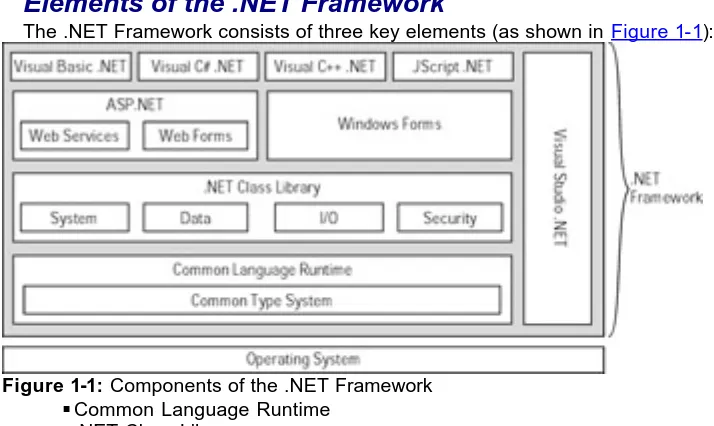
The .NET Framework consists of three key elements (as shown in Figure 1-1):
Figure 1-1: Components of the .NET Framework § Common Language Runtime
§ .NET Class Library § Unifying components
Common Language Runtime
The Common Language Runtime (CLR) is a layer between an application and the operating system it executes on. The CLR simplifies an application's design and reduces the amount of code developers need to write because it provides a variety of execution services that include memory management, thread management, component lifetime management, and default error handling. The key benefit of the CLR is that it
transparently provides these execution services to all applications, regardless of what programming language they're written in and without any additional effort on the part of the developer.
The CLR is also responsible for compiling code just before it executes. Instead of producing a binary representation of your code, as traditional compilers do, .NET compilers produce a representation of your code in a language common to the .NET Framework: Microsoft Intermediate Language (MSIL), often referred to as IL. When your code executes for the first time, the CLR invokes a special compiler called a Just In Time (JIT) compiler, which transforms the IL into executable instructions that are specific to the type and model of your system's processor. Because all .NET languages have the same compiled representation, they all have similar performance characteristics. This means that a program written in Visual Basic .NET can perform as well as the same program written in Visual C++ .NET. (C++ is the language of choice for developers who need the best possible performance a system can deliver.)
Common Type System
[image:17.596.89.446.221.434.2]the String data type maps to the CTS System.String class. Therefore, if a JScript .NET client needs to communicate with a component implemented in VB .NET, the client doesn't have to do any additional work to exchange information because it's using a type common to both JScript .NET and VB .NET. The CTS eliminates many interoperability problems that exist outside .NET.
.NET programming languages take advantage of the CTS by enabling developers to use their language's built-in data types — the .NET compilers convert the native data types' into their equivalent CTS types at compile time. Developers can also use CTS types directly in their code if they wish. Table 1-2 describes each standard CTS data type. Table 1-2: Common Type System Data Types
Complete Name Description
System.Byte
Unsigned 8-bit integer ranging in value from 0 to positive 255
System.Int16
Signed 16-bit integer capable of holding values from negative 32,768 to positive 32,767
System.Int32
Signed 32-bit integer having a range from negative 2,147,483,648 to positive
2,147,483,647
System.Int64
Signed 64-bit integer ranging from negative 9,223,372,036,854,755, 808 to positive
9,223,372,036,854,755, 807
System.Single
Single-precision 32-bit floating-point number
System.Double
Double-precision 64-bit floating-point number
System.Decimal
Signed 96-bit floating-point value with up to 28 digits on either side of the decimal
System.Char
16-bit Unicode character (unsigned values)
System.String
Sequence of Unicode characters with a capacity of about two billion characters
System.Object
32-bit address,
referencing an instance of a class
System.Boolean
You can use other non-CTS -compliant data types in your applications and components; you're free to use non-CTS-compliant data types, but they may not be available on other implementations of the .NET Framework for other operating systems (see Table 1-3). Table 1-3: Non-CTS-compliant Data Types
Complete Name Description
System.SByte Signed 8-bit integer
ranging from negative 128 to positive 127
System.UInt16 16-bit unsigned integer
ranging from 0 to positive 65,535
System.UInt32
32-bit unsigned integer ranging from 0 to positive 4,294,967,295
System.UInt64
64-bit unsigned integer ranging from 0 to positive 184,467,440,737,095,551, 615
.NET Class Library
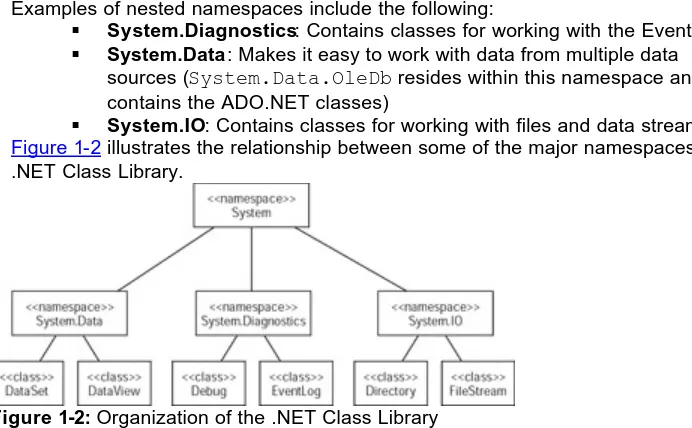
In an earlier section, "Consistent programming models across programming languages," the .NET Class Library was described as containing hundreds of classes that model the system and services it provides. To make the .NET Class Library easier to work with and understand, it's divided into namespaces. The root namespace of the .NET Class Library is called System, and it contains core classes and data types, such as Int32, Object,
Array, and Console. Secondary namespaces reside within the System namespace.
Examples of nested namespaces include the following:
§ System.Diagnostics: Contains classes for working with the Event Log § System.Data: Makes it easy to work with data from multiple data
sources (System.Data.OleDb resides within this namespace and contains the ADO.NET classes)
[image:19.596.95.441.432.646.2]§ System.IO: Contains classes for working with files and data streams Figure 1-2 illustrates the relationship between some of the major namespaces in the .NET Class Library.
Figure 1-2: Organization of the .NET Class Library
The benefits of using the .NET Class Library include a consistent set of services available to all .NET languages and simplified deployment, because the .NET Class Library is available on all implementations of the .NET Framework.
Unifying components
Until this point, this chapter has covered the low-level components of the .NET Framework. The unifying components, listed next, are the means by which you can access the services the .NET Framework provides:
§ Windows Forms § Visual Studio .NET
ASP.NET
ASP.NET introduces two major features: Web Forms and Web Services.
Web Forms
Developers not familiar with Web development can spend a great deal of time, for example, figuring out how to validate the e-mail address on a form. You can validate the information on a form by using a client-side script or a server-side script. Deciding which kind of script to use is complicated by the fact that each approach has its benefits and drawbacks, some of which aren't apparent unless you've done substantial design work. If you validate the form on the client by using client-side JScript code, you need to take into consideration the browser that your users may use to access the form. Not all browsers expose exactly the same representation of the document to programmatic interfaces. If you validate the form on the server, you need to be aware of the load that users might place on the server. The server has to validate the data and send the result back to the client. Web Forms simplify Web development to the point that it becomes as easy as dragging and dropping controls onto a designer (the surface that you use to edit a page) to design interactive Web applications that span from client to server.
Web Services
A Web service is an application that exposes a programmatic interface through standard access methods. Web Services are designed to be used by other applications and components and are not intended to be useful directly to human end users. Web Services make it easy to build applications that integrate features from remote sources. For example, you can write a Web Service that provides weather information for
subscribers of your service instead of having subscribers link to a page or parse through a file they download from your site. Clients can simply call a method on your Web Service as if they are calling a method on a component installed on their system — and have the weather information available in an easy-to-use format that they can integrate into their own applications or Web sites with no trouble.
Windows Forms
Windows Forms is the name of a unified set of classes that provides support for creating traditional desktop applications — applications that have a graphical user interface (GUI). Windows Forms make it easy to develop end-user applications using any .NET programming language. Furthermore, through Visual Studio .NET, developers can easily design forms by using drag-and-drop editing.
Visual Studio .NET
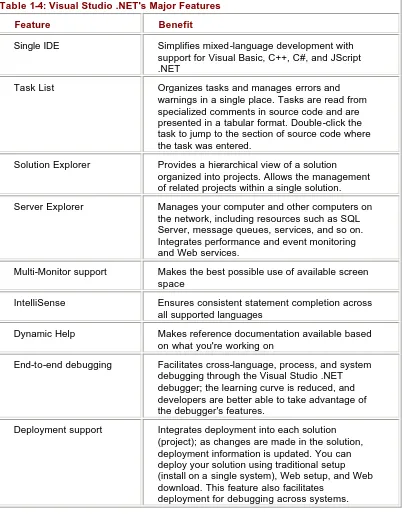
Visual Studio .NET fulfills the promise of a single development environment for all languages. Visual Studio .NET simplifies development in a mixed-language environment through features such as support for end-to-end debugging across all programming languages; visual designers for XML, HTML, data, and server-side code; and full IntelliSense support (statement completion). Visual Studio .NET replaces the Visual Basic 6, Visual C++, and Visual InterDev development environments.
Visual Studio .NET is able to provide this level of integration because it relies and builds on the facilities of the .NET Framework. Designers for Web forms and Windows Forms enhance developer productivity during the development cycle. Integration of deployment features enhances productivity during post-deployment debugging. Table 1-4
summarizes Visual Studio .NET's major features. Table 1-4: Visual Studio .NET's Major Features
Table 1-4: Visual Studio .NET's Major Features
Feature Benefit
Single IDE Simplifies mixed-language development with support for Visual Basic, C++, C#, and JScript .NET
Task List Organizes tasks and manages errors and warnings in a single place. Tasks are read from specialized comments in source code and are presented in a tabular format. Double-click the task to jump to the section of source code where the task was entered.
Solution Explorer Provides a hierarchical view of a solution organized into projects. Allows the management of related projects within a single solution.
Server Explorer Manages your computer and other computers on the network, including resources such as SQL Server, message queues, services, and so on. Integrates performance and event monitoring and Web services.
Multi-Monitor support Makes the best possible use of available screen space
IntelliSense Ensures consistent statement completion across all supported languages
Dynamic Help Makes reference documentation available based on what you're working on
End-to-end debugging Facilitates cross-language, process, and system debugging through the Visual Studio .NET debugger; the learning curve is reduced, and developers are better able to take advantage of the debugger's features.
Deployment support Integrates deployment into each solution (project); as changes are made in the solution, deployment information is updated. You can deploy your solution using traditional setup (install on a single system), Web setup, and Web download. This feature also facilitates
deployment for debugging across systems.
Summary
This chapter introduced you to the .NET Framework and its components in the context of the problems and the benefits the .NET Framework provides. The next chapter
Chapter 2:
Getting Started with ASP.NET
Overview
The Microsoft .NET Framework provides a powerful platform for the development of applications for both the desktop and the Internet. The .NE T Framework allows you to develop Internet applications with an ease that was never provided before. To develop Internet applications, the .NET Framework is equipped with ASP.NET. ASP.NET is a powerful programming framework for the development of enterprise-class Web applications.
This chapter introduces you to the .NET Framework and ASP.NET. You'll learn to set up the development environment for creating ASP.NET applications. You'll also learn how to create an ASP.NET application by using Visual Basic .NET and C#, and deploy the application.
Introducing the .NET Framework
Since 1995, Microsoft has been constantly making efforts to shift focus from the Windows -based platforms to the Internet. Microsoft introduced Active Server Pages (ASP) as an endeavor toward Internet programming. However, writing ASP script, an interpreted script, was a traditional way of programming as compared to the existing structured object-oriented programming. Moreover, it was very difficult to debug and maintain the unstructured ASP code. Definitely, you could combine the code written in structured object-oriented languages, such as Visual Basic, with ASP code. However, you could combine the VB code only as a component. Moreover, the software integration for the Web development was quite complicated and required an understanding of a host of technologies and integration issues on the part of the developers. Therefore, an architecture was needed that would allow the development of Web applications in a more structured and consistent manner.
Recently, Microsoft introduced the .NET Framework with a vision for developers to create globally distributed software with Internet functionality and interoperability. The .NET Framework includes multiple languages, class libraries, and a common execution platform. In addition, the .NET Framework includes protocols that allow developers to integrate software over the Internet and the .NET Enterprise Servers, such as SQL Server 2000, Commerce Server 2000, and BizTalk Server. Thus, the .NET Framework provides the richest built-in functionality for software integration ever provided by any platform. Also, with the .NET Framework, developing the Internet applications is as easy as developing desktop applications.
Figure 2-1: The .NET Framework
The top layer represents user and program interfaces, and includes Windows Forms, Web Forms, Web Services, and Application Services. Windows Forms provide a Win32-based user interface. Web Forms provide a Web-Win32-based user interface. Web Services are the most revolutionary program interfaces because they allow programs to communicate over the Internet. The Internet-based program interfaces, which include Web Forms and Web Services, are implemented by ASP.NET, which is a built-in component of the .NET Framework.
The middle layer represents the .NET Framework classes, which are universally
available across multiple languages. The usage of these classes is consistent across all languages included in the .NET Framework.
The base layer represents the common execution platform called the Common Language Runtime (CLR). This is the most important component of the .NET Framework. The CLR provides support for multiple languages and allows
cross-language inheritance. For example, you can inherit a class written in Visual Basic from a class written in Visual C++. Thus, with .NET, the choice of a programming language simply depends on the user's choice. With .NET, it is possible to create applications by using multiple languages. The multiple-language support is possible because the CLR provides a common system of data types. In addition, the CLR performs the memory management and monitors the complete life cycle of objects, while it tracks objects and handles garbage collection.
Visual Studio .NET (VS.NET) is the first release of the products based on the .NET Framework. It includes Visual Basic, Visual C++, and C#. VS.NET provides a common Integrated Development Environment (IDE) for all languages. Therefore, developers always work in a consistent environment irrespective of the language they use.
With that basic understanding of the .NET Framework, you are ready to look at the basic features of ASP.NET.
Introducing ASP.NET
ASP.NET, the next version of ASP, is a programming framework that is used to create enterprise-class Web applications. The enterprise-class Web applications are accessible on a global basis, leading to efficient information management. However, the advantages that ASP.NET offers make it more than just the next version of ASP.
What You See is What You Get (WYSIWYG) manner. Therefore, creating ASP.NET applications is much simpler.
Unlike the ASP runtime, ASP.NET uses the Common Language Runtime (CLR) provided by the .NET Framework. The CLR is the .NET runtime, which manages the execution of code. The CLR allows the objects, which are created in different languages, to interact with each other and hence removes the language barrier. CLR thus makes Web application development more efficient.
In addition to simplifying the designing of Web applications, the .NET CLR offers many advantages. Some of these advantages are listed as follows.
§Improved performance: The ASP.NET code is a compiled CLR code instead of an interpreted code. The CLR provides just-in-time compilation, native optimization, and caching. Here, it is important to note that compilation is a two-stage process in the .NET Framework. First, the code is compiled into the Microsoft Intermediate Language (MSIL). Then, at the execution time, the MSIL is compiled into native code. Only the portions of the code that are actually needed will be compiled into native code. This is called Just In Time compilation. These features lead to an overall improved performance of ASP.NET applications.
§Flexibility: The entire .NET class library can be accessed by ASP.NET applications. You can use the language that best applies to the type of functionality you want to implement, because ASP.NET is language independent.
§Configuration settings: The application-level configuration settings are stored in an Extensible Markup Language (XML) format. The XML format is a hierarchical text format, which is easy to read and write. This format makes it easy to apply new settings to applications without the aid of any local administration tools.
§Security: ASP.NET applications are secure and use a set of default
authorization and authentication schemes. However, you can modify these schemes according to the security needs of an application.
In addition to this list of advantages, the ASP.NET framework makes it easy to migrate from ASP applications.
Before you start with your first ASP.NET application, take a quick look at how to set up the development environment, described next.
Setting Up the Development Environment
ASP.NET is based on the CLR, class libraries, and other tools integrated with the Microsoft .NET Framework. Therefore, to develop and run the ASP.NET applications, you need to install the .NET Framework. The .NET Framework is available in two forms:
§ .NET Framework SDK (Software Development Kit) § Visual Studio .NET (VS.NET)
You can install the .NET Framework SDK or VS.NET on a machine that has one of the following operating systems:
§ Windows 2000 § Windows NT 4.0 § Windows Me § Windows 98
§ Windows XP Professional
To develop any Web application, you need Internet Information Server (IIS) configured on either the development machine (in the case of Windows 2000 or Windows NT 4.0) or another machine on the network. In the latter case, the .NET Framework must be
installed on the machine on which IIS is configured.
Note In the case of Windows 2000 Server, the IIS server is automatically installed.
In addition to installing IIS, you need to install SQL Server 7.0 or higher to develop ASP.NET database applications. You can install SQL Server on the development machine or any other machine on the network.
You can create ASP.NET applications by just installing the .NET Framework SDK and configuring an IIS server. In this case, you need to use a text editor, such as Notepad, to write the code. Therefore, if you do this, you'll have to work without the IDE and other integrated tools that come with VS.NET. Hence, installing VS.NET is recommended, to get the full benefit of the .NET features.
VS.NET Beta 2 comes with four CD-ROMs: § Windows Component Update CD § VS.NET CD1
§ VS.NET CD2 § VS.NET CD3
When you run the Setup program from VS.NET CD1, a dialog box appears that prompts you for the following three options:
§ Windows Component Update § Install Visual Studio .NET § Check for Service Releases
If you have not run the Setup program from the Windows Component Update CD, only the first of the preceding three options will be available. In this case, you need to insert the Windows Component Update CD in the CD-ROM drive of the machine and click the first link, Windows Component Update, to begin the update. This option updates
Windows with the components that are required to install .NET. Some of the components include Microsoft Windows Installer 2.0, Setup Runtime Files, and Microsoft Data Access Components 2.7. Then, follow the onscreen instructions. In the process, you'll need to reboot the machine several times. After the Windows Component Update is complete, you can use the second link to install VS.NET. After VS.NET is installed, you can click the third link to check for any updates.
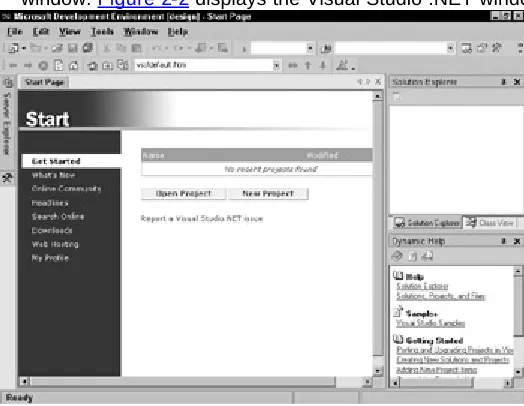
When you start Visual Studio .NET, the Start Page is displayed prominently in the window. Figure 2-2 displays the Visual Studio .NET window.
[image:25.596.90.352.535.738.2]The VS.NET window contains the Solution Explorer window to the right. This window displays the projects that are created. The Toolbox and Server Explorer windows can be seen hidden at the extreme left. When you point to the Toolbox or Server Explorer, the corresponding window opens. You use the Toolbox to create the user interface for an application. The Server Explorer window is used to add any Web server or database connection.
The main Start Page window is the central location from where you can perform several tasks, such as create a new project, open an existing project, and get the latest news and recent articles at the MSDN online library. The different options available on the Start Page and what they enable you to do are described as follows:
§Get Started: Create a new project or open an existing project. §What's New: Identify the new features of Visual Studio .NET.
§Online Community: Contact other developers online. To do this, you must have a newsgroup reader configured on your machine.
§Headlines: Get the latest news from the MSDN online library. §Search Online: Search the Web.
§Downloads: Get the latest product updates, SDK releases, and sample code from the Internet.
§Web Hosting: Post your Web applications and Web services created in Visual Studio .NET directly to the Internet.
§MyProfile: Set the IDE-specific preferences.
Creating an ASP.NET Application
After you've set up the development environment for ASP.NET, you can create your first ASP.NET Web application. You can create an ASP.NET Web application in one of the following ways:
§Use a text editor: In this method, you can write the code in a text editor, such as Notepad, and save the code as an ASPX file. You can save the ASPX file in the directory C:\inetpub\wwwroot. Then, to display the output of the Web page in Internet Explorer, you simply need to type
http://localhost/<filename>.aspx in the Address box. If the IIS server is installed on some other machine on the network, replace "localhost" with the name of the server. If you save the file in some other directory, you need to add the file to a virtual directory in the Default WebSite directory on the IIS server. You can also create your own virtual directory and add the file to it.
§Use the VS.NET IDE: In this method, you use the IDE of Visual Studio .NET to create a Web page in a WYSIWYG manner. Also, when you create a Web application, the application is automatically created on a Web server (IIS server). You do not need to create a separate virtual directory on the IIS server.
From the preceding discussion, it is obvious that the development of ASP.NET Web applications is much more convenient and efficient in Visual Studio .NET.
ASP.NET Web pages consist of HTML text and the code. The HTML text and the code can be separated in two different files. You can write the code in Visual Basic or C#. This separate file is called the code behind file. In this section, you'll create simple Web pages by using VB as well as C#.
Cross-Reference
For more information on code behind files, refer to Chapter 3.
Before you start creating a Web page, you should be familiar with basic ASP.NET syntax. At the top of the page, you must specify an @ Page directive to define page-specific attributes, such as language. The syntax is given as follows:
To specify the language as VB for any code output to be rendered on the page, use the following line of code:
<%@ Page Language = "VB" %>
This line indicates that any code in the block, <%%>, on the page is compiled by using VB.
To render the output on your page, you can use the Response.Write() method. For example, to display the text "hello" on a page, use the following code:
<% Response.Write("Hello") %>
Note The syntax used in the block, <% %>, must correspond to the language specified in the @ Page directive. Otherwise, an error is generated when you display the page in a Web browser.
You can use HTML tags in the argument passed to the Response.Write() method. For example, to display the text in bold, you use the following code:
<% Response.Write("<B> Hello </B>") %>
For dynamic processing of a page, such as the result of a user interaction, you need to write the code within the <Script> tag. The syntax of the <Script> tag is given as follows:
<Script runat="server" [language=codelanguage]>
code here
</Script>
In this syntax . . .
§runat="server" indicates that the code is executed at the server side. §[language=codelanguage] indicates the language that is used. You can
use VB, C#, or JScript .NET. The square brackets indicate that this attribute is optional. If you do not specify this attribute, the default language used is VB.
After gaining an understanding of the basic ASP.NET page syntax, you can now create a simple ASP.NET Web application. In the following sections, you'll create a simple Web application by using VB and C#. To do so, you'll use the VS.NET IDE.
Creating a Visual Basic Web Application
You can create an ASP.NET application using Visual Basic by creating a Visual Basic Web Application project. To do so, complete the following steps:
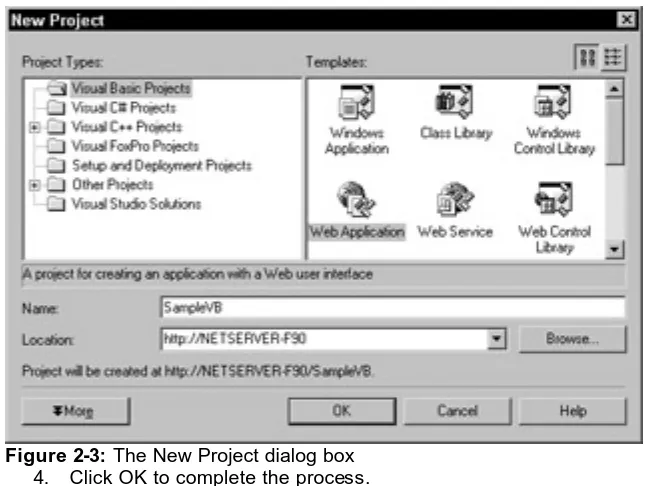
1. Select File → New → Project. The New Project dialog box appears. 2. Select Visual Basic Projects from the Project Types pane.
Figure 2-3: The New Project dialog box 4. Click OK to complete the process.
VS.NET displays the application, as shown in Figure 2-4. By default, the file WebForm1.aspx is selected and displayed. In addition to several other files,
WebForm1.vb is also created. You can write the page logic in this file. This file is the
code behind file.
Figure 2-4: The VS.NET window with a new project
The WebForm1.aspx file is displayed in Design mode by default. To view the file in HTML mode, click HTML at the bottom of the WebForm1.aspx file window.
As you can see in HTML view, the language to be used on the page is VB. Any HTML text or code (in the <%%> block) within the <Body></Body> block is rendered on the page when it is displayed in a Web browser.
[image:28.596.125.450.69.312.2] [image:28.596.91.443.353.624.2]