TE
AM
FL
Y
The Morgan Kaufmann Series in Data Management Systems
Series Editor:Jim Gray, Microsoft Research Designing Data-Intensive Web Applications
Stephano Ceri, Piero Fraternali, Aldo Bongio, Marco Brambilla, Sara Comai, and Maristella Matera
Mining the Web: Discovering Knowledge from Hypertext Data Soumen Chakrabarti
Advanced SQL:1999—Understanding Object-Relational and Other Advanced Features Jim Melton
Database Tuning: Principles, Experiments, and Troubleshooting Techniques Dennis Shasha and Philippe Bonnet
SQL:1999—Understanding Relational Language Components Jim Melton and Alan R. Simon
Information Visualization in Data Mining and Knowledge Discovery Edited by Usama Fayyad, Georges G. Grinstein, and Andreas Wierse
Transactional Information Systems: Theory, Algorithms, and Practice of Concurrency Control and Recovery
Gerhard Weikum and Gottfried Vossen Spatial Databases: With Application to GIS
Philippe Rigaux, Michel Scholl, and Agnes Voisard
Information Modeling and Relational Databases: From Conceptual Analysis to Logical Design Terry Halpin
Component Database Systems
Edited by Klaus R. Dittrich and Andreas Geppert
Managing Reference Data in Enterprise Databases: Binding Corporate Data to the Wider World Malcolm Chisholm
Data Mining: Concepts and Techniques Jiawei Han and Micheline Kamber
Understanding SQL and Java Together: A Guide to SQLJ, JDBC, and Related Technologies Jim Melton and Andrew Eisenberg
Database: Principles, Programming, and Performance, Second Edition Patrick and Elizabeth O’Neil
The Object Data Standard: ODMG 3.0
Edited by R. G. G. Cattell and Douglas K. Barry
Data on the Web: From Relations to Semistructured Data and XML Serge Abiteboul, Peter Buneman, and Dan Suciu
Data Mining: Practical Machine Learning Tools and Techniques with Java Implementations Ian Witten and Eibe Frank
Joe Celko’s SQL for Smarties: Advanced SQL Programming, Second Edition Joe Celko
Joe Celko’s Data and Databases: Concepts in Practice Joe Celko
Developing Time-Oriented Database Applications in SQL Richard T. Snodgrass
Web Farming for the Data Warehouse Richard D. Hackathorn
DESIGNING
DATA-INTENSIVE
WEB APPLICATIONS
STEFANO CERI
Politecnico di Milano
PIERO FRATERNALI
Politecnico di Milano
ALDO BONGIO
Web Ratio
MARCO BRAMBILLA
Politecnico di Milano
SARA COMAI
Politecnico di Milano
Senior Editor Lothlórien Homet Publishing Services Manager Edward Wade
Editorial Assistant Corina Derman
Project Management Matrix Productions, Inc.
Cover Design Ross Carron Design
Cover Image Getty Images
Text Design Frances Baca Design
Composition Omegatype Typography, Inc.
Copyeditor Jennifer Ashley
Proofreader Sean Tape
Indexer Jeanne Busemeyer
Interior Printer The Maple-Vail Book Manufacturing Group
Cover Printer Phoenix Color Corporation
Designations used by companies to distinguish their products are often claimed as trademarks or registered trademarks. In all instances in which Morgan Kaufmann Publishers is aware of a claim, the product names appear in initial capital or all capital letters. Readers, however, should contact the appropriate companies for more complete information regarding trademarks and registration.
Morgan Kaufmann Publishers An Imprint of Elsevier Science (USA) 340 Pine Street, Sixth Floor, San Francisco, CA 94104–3205 www.mkp.com
© 2003 by Elsevier Science (USA) All rights reserved
Printed in the United States of America
07 06 05 04 03 5 4 3 2 1
No part of this publication may be reproduced, stored in a retrieval system, or transmitted in any form or by any means—electronic, mechanical, photocopying, or otherwise—without the prior written permission of the publisher.
Library of Congress Control Number: 2002114096
ISBN: 1–55860–843–5
I confess, at the start, to a sense of being inadequate to the job of writing the fore-word to this book. I’m certainly not an academic. I developed my skills in indus-try and like to say I’m a simple counindus-try boy from Vermont. The authors of this book are dazzlingly bright, well-educated, and cosmopolitan, equally at home in Milano or at Stanford. I first met with the authors in 2000 while I was in the throes of building a startup, and they came and showed me a remarkably simple and elegant model for constructing data-centric applications. And as I watched it unfold in front of me, my entire working life flashed before my eyes. I’ve spent a third of that life helping build relational databases and tools for using them (OLAP, Reflex, Access, ODBC, SQL Server, Data Access Objects), another third helping build user interfaces and tools for constructing applications (VB, OLE controls, Form Designers, Quattro), and the final and most recent third on build-ing plumbbuild-ing and tools for usbuild-ing the Web and constructbuild-ing applications on the Web (Internet Explorer’s HTML engine, Active Server Pages, XML/XSLT/DOC/ XML Query, Web Services, and Web Logic Workshop). And there it was, built by a group of professors: a synthesis of all of these elements that reduced the prob-lem to something very nearly as simple and elegant as the relational calculus. I was both delighted and in awe.
The authors took on a huge challenge in putting together WebML. They en-deavored to create a formal language that could describe the entire range of user interfaces for traversing and viewing (and updating) data that might make sense. Some may be surprised that I don’t limit the statement above to “make sense for the Web,” but in point of fact, it is my belief that they wanted to have formalism for all data-centric user interfaces. This was, and is, an audacious goal. If success-ful, it can have the same effect on data-centric user interfaces that the relational calculus had on data access. In an age where the user interface will need to step up to its biggest challenge, namely being able to morph to fit different form fac-tors and user interface paradigms, this is perhaps peculiarly apposite.
Furthermore, each chapter takes care to spell-out how the formalisms thus developed can be encoded in UML, which enables a wide range of compatible au-thoring tools to be built that can collaborate at a very high level. The potentials for productivity, if this holds true, are enormous. Add in the standardization that all “operations units” express themselves as Web Services and it suddenly be-comes possible to have truly portable and interoperable Web sites where multiple
vii
F o r e w o r d
Adam Bosworth
sets of disparate developers can work seamlessly together in harmony and with great productivity. In short, I’m very excited by the potential.
So, how did they do?
Many of the problems we (industry) neversolved particularly well in prod-ucts heretofore (for example, building lists to select items for viewing), even with the richness of a GUI applications environment, are suddenly and elegantly re-solved through the “Index Units.” Access, PowerBuilder, and Delphi understood the idea of such building blocks (typically inelegantly called formsand known as units in WebML), but they never carefully formalized all the possible ways in which linkages between units could occur.
Another problem that has bedeviled the world of data-centric applications construction has been that of optional parameters. If the user selects a filtering value, such as cost range, then it should be used to filter the resulting set. But if not, then any price should be retrieved. Customers have gone through agony building the complex iflogic into SQL to handle the case of the parameter either being null (in which case there should be no predicate test) or not null (in which case there should be, especially when there are several possible limiting values). WebML’s concept of “optional predicates” using the “implied” keyword hides a remarkable amount of heavy lifting from the developer.
Probably the biggest problem never well-solved in the world of VB, Access, PowerBuilder, and Delphi was that of context. In the real world of applications, customers expect the applications to understand the context in which they are working. For example, traversing to a screen that lists employees from a depart-mental screen from a business unit screen will typically mean viewing the em-ployees for that department for that business unit. On the other hand, traversing from a Key Performers Screen to a Titles Screen to an employee’s screen would typ-ically mean viewing the key performers for that title. Simple, right? Obvious? It is rather tricky to implement, in fact, in such a normalized world. In WebML this is solved simply and elegantly using parametric selectors, contextual links, global parameters, and, occasionally, optional or “implicit” predicates. The multi-valued idea of passing in a set of legal values is exquisitely elegant. The defaults make simple and intuitive sense, thus removing a huge amount of work. Look carefully at Section 3.4 and consider how much work you can save.
All this reminds those of us in industry of a basic truth. It behooves us to work closely and constantly with those in academia because the result will be a level of cleanliness, formalism, and elegance without which the solutions often feel like pastiches or Band-Aids that are ultimately unsatisfactory. As the “father” of Access, I was, and am, abashed.
Having made the point so trenchantly in the area of data-centric user in-terface in general with units and links, WebML doesn’t rest on its laurels. It goes on to consider, in depth, the user interface paradigms that prevail specifically on the Web, and provides paradigms for higher-level components, pages (including home, default, and landmark ones), and areas. As with the formalism of their lan-guage for navigating through data, these formalisms both enable a huge range of possibilities and save a huge amount of developer work. The typical industry so-lution today, for example, for always including a link to the anchoring “home page” is to use a template for each page. But often the model is nested, and here the template model tends to break down because it is too static. WebML enables a graceful model for including these requisite navigation links without any painful plumbing on the programmer’s part. The same is true for nested pages, which neatly shows the rich types of user interface that can be assembled as eas-ily as I used to build buildings out of building blocks as a child. This is, of course, every developer’s dream. One of the nicer points of this model is that the devel-oper can always decide very cleanly how much should be done on one page (thus saving navigations) and how much should be cleanly separated across pages. The authors have thought extremely carefully about intra-page operations, not just inter-page ones and this is the stuff of good Web sites and good UI design.
What about actually getting work done? Does this model describe the actions that must be taken? Can real-world work be performed? Historically, our formalism for this has been code, or “built-in actions” in our user interface components. It has been very difficult to understand the actions in the overall context of chore-ography. What happens when the insertion of the customer fails versus when it succeeds? A nice pairing of two concepts, operations units with success links (OK) and failure links (KO)—proving either that the authors are boxing aficionados or have a sense of humor—has been used to cover an astonishing range of actions: Inserting, Deleting, Updating, invoking arbitrary code with the entire requisite context. My company, BEA, is particularly excited about this idea because it par-allels some work we’ve been doing in page navigation to help our customers bet-ter handle site layout and management and the early indications are extremely promising. This model of interleaving operations with user interface elements is extremely powerful. Add in an applications model for accessing the inputs and publishing the outputs (for which I believe Web Services will turn out to be ex-tremely well suited) and—voilà!—instant extensibility. At the same time, the basic predefined operations enable an enormous amount of standard work to be built with total interoperability and portability and, given suitable tools, built by the same sort of customers who use Access every day.
One way to think about WebML is as a spreadsheet for user interface. In essence, recalculation is used anytime an input is changed to “recompute” a page. Indeed, like spreadsheets, this process can be non-deterministic and even circular. Years ago I built a spreadsheet called Quattro. As with all spreadsheets, it had a com-plex calculation engine designed to resolve all expressions to their “correct values” wherever possible. The interaction between this declarative model of applications construction (so clearly understandable by tens or even hundreds of millions of customers) and that of procedural logic (so clearly required but understandable by only a million or so programmers) has always fascinated me. If, in fact, WebML en-ables the construction of data-centric user interfaces by the same volume of people who have been able to construct spreadsheets, this will be truly exciting.
Another, very different way to think about WebML is as a sort of super flow. Conceptually, these “operations” and rich transacted sequences and work-flows can be melded together to form overall sites and workwork-flows. It is as though the world of Site Description, Page Layout, and BPM had been seamlessly unified and simplified in the process. A long time ago, a company called Metaphor started down this road with a product called capsules. What has been built here is a roadmap to complete that journey, at least in the context of constructing data-centric user interfaces.
There are some hard issues that remain to be resolved:
1 How do you model a UI to reflect history? If, for example, the tabs for navigation should only appear as the user navigates into them, as many wizards do today, how would one accomplish this in WebML? Much of this can be handled with the use of global parameters, but the conditional display of elements used for navigation doesn’t seem to be covered.
2. How does the world of asynchrony interact with this model? There is a simple example of a credit card charge in Chapter 4 that assumes that it is OK to simply block and wait for approval/denial before returning the next page. Alas, we know that this is not always true.
3. How does the user interface gracefully morph to reflect the various roles that the user may hold? Chapter 7’s methodology and Section 9.4.4 seem to assume that there can be different site maps for each possible class of user. In practice, this often turns out to be unworkable and pages must morph to reflect the rights of the user, meaning that in some cases data and links will or will not be visible and data will or will not be modifi-able. To be clear, the model does support personalization, just not dynamic roles-based modification.
x Foreword
TE
AM
FL
Y
4. In a world where pages will be increasingly binding to applications data through Web services rather than directly to data through SQL, how does this model hold up? What changes are required?
5. As Google has so brilliantly shown, often the best way to create an index unit is through a simple text search ordered by linkages. This model cannot be expressed by relational databases in any reasonable manner. This isn’t really a limitation of WebML, but as database designers wake up to the obvious and start to build this in as a core competence, the WebML predicates will need to extend to describe this model for populat-ing a data set.
6. Will customers really use the formal design methodology carefully laid out in Chapters 7 through 10? It isn’t clear. Customers in the real world have a greater fondness for bottom-up implementation rather than top-down design, much to the despair and frustration of IT professionals everywhere. Yet, in the end, customers have learned to do data design, and ER and UML diagrams have become a staple of most large-scale com-panies. It is entirely possible that we will see the same here.
Overall, WebML is an audacious and impressive achievement. It holds to-gether elegantly and seems to be able to construct anything through suitable use of composition and the right building blocks. It is impressive that WEBML already has both a language and a visual design model worked out. The concerns above merely whet the appetite and suggest that this model will prove fruitful.
While I do suspect that the advent of Web services will alter this model in subtle but important ways, it is nevertheless one of the most promising directions I’ve seen. It may do for applications construction what SQL and ODBC/JDBC did for data access, or what Web services is now doing for applications-to-applications communication, namely providing a stable standards-based model that ulti-mately revolutionizes the industry and increases the number of people who can accomplish the goal by an order of magnitude or more. Bravo!
Part 1 TECHNOLOGY OVERVIEW
...
1
Technologies for Web Applications
...
3
Part 2 MODELS FOR DESIGNING WEB
APPLICATIONS
...
59
Data Model
...
61
Hypertext Model
...
77
Content Management Model
...
137
Advanced Hypertext Model
...
175
Part 3 DESIGN OF WEB APPLICATIONS
...
191
Overview of the Development Process
...
193
Requirements Specifications
...
203
Data Design
...
249
Hypertext Design
...
273
Part 4 IMPLEMENTATION OF WEB
APPLICATIONS
...
327
Architecture Design
...
329
Data Implementation
...
361
Hypertext Implementation
...
395
Advanced Hypertext Implementation
...
457
Tools for Model-Based Developent of Web
Applications
...
499
Appendix A Summary of WebML Elements
....
519
Appendix B WebML Syntax
...
525
Appendix C OCL Syntax
...
533
Appendix D Summary of WebML Elements
Implementation
...
537
References
...
543
Index
...
551
This book is about building data-intensive Web applications. By this term, we refer to Web sites for accessing and maintaining large amounts of structured data, typ-ically stored as records in a database management system. Today, data-intensive Web applications are the predominant kind of application found on the Web; sites for online trading and e-commerce, institutional Web sites of private and public organizations, digital libraries, corporate portals, community sites are all examples of data-intensive Web applications.
The development of a data-intensive Web application is a multi-disciplinary activity, which requires a variety of skills, necessary to address very heterogeneous tasks, like the design of data structures for storing content, the conception of hypertext interfaces for information browsing and content management, the creation of effective presentation styles, the assembly of robust and high-performance architectures, and the integration with legacy applications and external services. The development and maintenance of data-intensive Web ap-plications requires all the tools and techniques of software engineering, includ-ing a well-organized software development process, appropriate design concepts and notations, and guidelines on how to conduct the various activities.
By looking at the way in which data-intensive Web applications are built today and at the tools available to developers, one realizes soon that the software engineering principles and pragmatics are not exploited to their full potential. De-signers often construct Web applications by applying the best practices and meth-ods they have learned in developing other kinds of software systems, like enterprise information systems and object-oriented applications. Such practices work well for the “conventional” part of Web application development, for ex-ample, the design of the data structures and of the business logic at the back-end, but they do not address the specificity of a “Web” application, which is the de-livery of content and services using an hypertextual front-end. This gap is partic-ularly apparent in the design concepts and notations: when it comes to specifying the front-end of their Web application, development teams resort to rather rudi-mentary tools, like paper and pencil or HTML mock-ups. This situation, which we have frequently witnessed also in very large organizations well equipped with software engineering tools, demands for an adaptation of the software develop-ment process, capable of addressing the characterizing features of Web applica-tions. The Web application lifecycle should be built around a solid nucleus of
xxi
Web-centric concepts and notations, and supported by specific guidelines on how to put such concepts to work.
The contribution of this book is the proposal of a mix of concepts, nota-tions, and techniques for the construction of data-intensive Web applicanota-tions, which can be used by Web development teams to support all the activities of the application lifecycle, from analysis to deployment and evolution.
The proposed mix blends traditional ingredients well known to developers, like conceptual data design with the Entity-Relationship model and Use Case specification with UML, with new concepts and methods for the design of hy-pertexts, which are central to Web development. However, the value of the pro-posed approach is not in the individual ingredients, but in the definition of a systematic framework in which the activities of Web applications development can be organized according to the fundamental principles of software engineer-ing, and all tasks, including the more Web-centric ones, find the adequate sup-port in appropriate concepts, notations, and techniques.
The distinguishing feature of this development framework is the emphasis on conceptual modeling. Conceptual modeling has proven successful in many software fields; in database design, where the Entity-Relationship model offers a high-level and intuitive notation for communicating data requirements between designers and non-technical people, and is the base for creating high quality data-base schemas; in object-oriented applications, where notations like the Unified Modeling Language have considerably raised the level at which developers docu-ment and reason about their applications. We advocate that these benefits should apply also to the design of data-intensive Web applications, which should be spec-ified using a high-level, visual, and intuitive notation, easily communicable to non-technical users, and helpful to the application implementers.
Therefore, this book proposes a high-level modeling language for hypertext specification, called Web Modeling Language (WebML). In essence, WebML con-sists of simple visual concepts for expressing a hypertext as a set of pages made up of linked content units and operations, and for binding such content units and operations to the data they refer to.
WebML follows the style of well-known conceptual modeling languages like Entity-Relationship and UML: every concept has a graphical representation, and specifications are diagrams. Therefore, the reader should not worry about the need to learn yet another language. As for the Entity-Relationship constructs, also WebML diagrams could be represented using the UML syntax, possibly with some loss of conciseness, but not of expressive power.
However, we stress that concepts are more important than notations, and that the methods for applying concepts are even more important. Therefore, in
the book we guide the reader both in learning the needed modeling concepts, Entity-Relationship and WebML, and in applying such concepts to the specifica-tion and design of a Web applicaspecifica-tion, through such activities as requirements spec-ification, data design, and hypertext design. Moreover, despite the slant toward conceptual modeling, we also focus upon the many problems of implementing and deploying a data-intensive Web application. The first chapter and the last part of the book are entirely devoted to technological matters, and show to the inter-ested reader how to transform the conceptual design of a Web application into software components running on the current Web and database technologies, in-cluding HTTP, HTML, XML, XSL, relational databases and SQL, server side script-ing languages and tag libraries, application servers, and cachscript-ing architectures.
Last but not least, the book ends with a mention about CASE tools sup-porting the proposed lifecycle, because the benefits of applying conceptual mod-eling and a structured development process multiply, if adequate tools are available. All the proposed notations fit perfectly in the commercial tool suites popular among developers, like Entity-Relationship and UML editors and code generators. In particular, WebML can be easily supported, either by representing WebML diagrams using UML, or by exploiting WebML-aware tools, an example of which is presented in the last chapter of the book.
Book Organization and Chapter Summaries
The book is structured in four parts. The first part introduces the technological context in which development takes place; the second part presents the model-ing languages used in the book, Entity-Relationship and WebML; the third part defines the software development process; the fourth part focuses on the imple-mentation of data-intensive Web applications on top of modern Web-enabled architectures.
All chapters have a regular structure, with a motivational introduction that states the problem treated in the chapter, a central part that defines the proposed solution, and a conclusion, which summarizes the results. In the chapters de-voted to the development process, the design steps are applied to a running case, which is progressively followed from requirements analysis to implementation.
Part I, including Chapter 1, summarizes the technologies relevant to data-intensive Web application development.
Chapter 1 contains a broad overview of the fundamental technologies em-ployed in the construction of data-intensive Web applications. The chapter briefly illustrates the basic protocol and languages of the Web (HTTP, HTML, and client-side scripting and components); it focuses on XML, the new paradigm for content
structuring and exchange, and on its collateral standards for document transfor-mation (XSL and XQuery); then it discusses the second ingredient of data-inten-sive Web applications, relational databases, and the associated query language (SQL) and interoperability standards (ODBC and JDBC). Finally, it explains the architectures and languages for building dynamic Web pages, including Java servlets, server-side scripting languages such as ASP and JSP, tag libraries, and ap-plication server architectures. The chapter ends with the discussion of multi-device content publishing.
Part II, including Chapters 2–5, is dedicated to the presentation of the mod-eling languages used in the book.
Chapter 2 describes the primitives of the Entity-Relationship data modeling language. The fundamental elements of structure modeling are entities,defined as containers of data elements, and relationships,defined as semantic associations between entities. Entities have named properties, called attributes, with an asso-ciated type. Entities can be organized in generalization hierarchies, and relation-ships can be restricted by means of cardinality constraints. The chapter also shows how to specify attributes and relationships whose content can be determined from other data elements, by writing declarative expressions using the Object Constraint Language (OCL).
Chapter 3 describes the WebML hypertext modeling language, which is based on the notion of units, pages, and links. Unitsdescribe the elementary pieces of content to be displayed, pagesindicate how units should be assembled together, andlinksdescribe the connections between units and/or pages. Multiple hyper-texts, called site views,may be defined over the same content, to offer different viewpoints to different users. The modeling primitives are introduced gradually, using many examples inspired to frequently used hypertext configurations.
Chapter 4 describes the extension of the hypertext model for supporting content management functions, like the update of personal information, the filling of shopping carts, and so on. New constructs are introduced for repre-senting operations, which are either predefined or generic. Predefined opera-tions represent typical content management and utility funcopera-tions normally found in Web sites, like the creation, deletion, and modification of objects, the user’s login and logout, and the delivery of e-mail messages; generic operations represent black-box functions and enable the integration of WebML applications with external services.
Chapter 5 concentrates on clarifying the meaning of hypertexts with an ar-bitrary structure of pages, units, and links. The chapter also presents a simple but complete high-level procedure for computing the content of hypertext pages,
which highlights the operational semantics of WebML and paves the way for the discussion on how to implement hypertext constructs, which is the subject of Part IV of the book.
Part III, including Chapters 6–9, presents the development process of data-in-tensive Web applications.
Chapter 6 is an overview of the application lifecycle. It discusses the speci-fication, design, and implementation activities required to build a data-intensive Web application, by briefly describing the goals and tasks of each development phase.
Chapter 7 focuses on requirement analysis, an activity dedicated to the col-lection and specification of the application requirements, preliminary to the modeling and design phases. Requirements collection focuses on identifying users and groups, defining functional, data, and personalization requirements, as well as on nonfunctional requirements about presentation, usability, performance, availability, scalability, security, and maintainability. Functional requirements are formalized by means of UML use case diagrams; the core concepts and site views are expressed by means of a data dictionary and of site view maps; finally, visual style guidelines are expressed in the form of interface mock-ups.
Chapter 8 addresses the activity of data design and shows the particular flavor that this task assumes in the Web context. The data structure of Web applications often presents a regular organization, in which several intercon-nected sub-schemas can be recognized, each one centered on a “core entity” rep-resenting a fundamental business object. As a consequence, the design process assumes a regular shape too; it starts from the specification of the core concepts, which form the backbone of the data schema, and proceeds iteratively by adding four kinds of sub-schemas, which represent the internal components of core concepts, the interconnections for supporting navigation, the auxiliary objects for facilitating the access to the core content, and the concepts for supporting personalization.
Chapter 9 describes the hypertext design activities. Design proceeds in a top-down way: initially, a draft hypertext schema is obtained by partitioning each site view identified during requirements analysis into areas, and assigning a set of functions to each area, which support the browsing of core, access or intercon-nection objects, or content management operations. Then, the draft schema of each area is refined into a detailed schema, specified in WebML; in this phase, the designer establishes the actual units, links, operations, and pages of each site view. Hypertext design is facilitated by the usage of design patterns, which offer proved solutions to typical page configuration requirements.
Part IV, comprising Chapters 10–14, is dedicated to the implementation and de-ployment of data-intensive Web applications.
Chapter 10 concentrates on architecture design and is preliminary to the discussion of implementation. It reviews the reference architectures that can be used for building data-intensive Web applications and the criteria for choosing among the alternative options. The chapter specifically addresses the nonfunc-tional requirements of performance, security, availability, and scalability, and out-lines the design decisions and trade-offs that must be faced to ensure the required level of service. The chapter ends with a section devoted to performance evalua-tion and caching, two important aspects of the design of Web architectures.
Chapter 11 deals with the mapping of conceptual data schemas onto the physical data sources. Various alternative scenarios are discussed, with a different degree of reuse of the existing schemas and content. The chapter starts by pre-senting the standard mapping rules for transforming a given Entity-Relationship schema into a relational database schema. Then it addresses the implementation of the relational schema in the context of the corporate data infrastructure, a task that presents several design choices and trade-offs, related to the problems of schema integration, data integration, and replication management.
Chapter 12 describes how to encode WebML pages into server-side pro-grams. As a reference, the explanation adopts the Java Server Pages (JSP) scripting language and the JDBC database connection interface, but the discussion can be easily adapted to different platforms, such as the Microsoft’s .NET architecture or the PHP scripting language. The explanation of the implementation techniques starts with simple page configurations, yielding relatively straightforward JSP page templates, and then progresses to cover a wide spectrum of features of dynamic hypertext pages.
Chapter 13 presents a more sophisticated implementation strategy, ex-ploiting the Model View Controller (MVC) design pattern, which grants a well-balanced distribution of responsibility among the software components that collaborate to the page construction. In addition, the chapter illustrates other im-plementation techniques suited to large-scale applications, such as the definition of generic unit and operation services using XML descriptors, the development of distributed business objects with the Enterprise JavaBeans standard, and the cen-tralized management of presentation with the help of CSS and XSL rules.
Finally, Chapter 14 describes an example of CASE tool, called WebRatio Site Development Studio, supporting the design of data-intensive Web applications and the automatic generation of code from Entity Relationship and WebML spec-ifications. The chapter illustrates the architecture and functions of the tool, which covers the application lifecycle from data and hypertext design to their
imple-xxvi Preface
TE
AM
FL
Y
mentation. The annotated bibliography provides references to other tools sup-porting the specification and delivery of Web applications.
Several appendices complete the book; they summarize the elements of the WebML model, the syntax of WebML and of the Object Constraint Language, and the implementation techniques for transforming hypertext specifications into dynamic page templates and database queries.
Audience
This book has the ambitious objective of proposing a “paradigm shift” in the way Web applications are developed, rooted in the tradition of conceptual modeling and software engineering. It is directed not only to the IT specialists, but also to all the professionals involved in the construction of a Web application, an audi-ence as broad as the spectrum of problems faced by Web application developers. To address this target, we have made efforts to purge the book from any un-necessary formalism and academic discussion, and we have instead made inten-sive use of practical and motivating examples for explaining every new concept introduced to the reader. Therefore, the book should be approachable with lim-ited effort by readers with a general background of database systems, software de-velopment, and Web technologies. Throughout the chapters, modeling concepts are shown at work, applied to the description of popular, real-life Web sites. In the same way, development tasks are exemplified with the help of a running case, taken from a real industrial project. In our intention, this book should emphasize “showing” things, with the help of progressive examples, rather than “telling” how things should be done.
The book could also be used in computer science courses dealing with data-driven design methods, especially now that computer science schools and uni-versities are more and more orienting their curricula towards Web technologies and applications. Additional material for supporting professors in their lecturing and students in doing course work is available on the book’s online Web site (see below).
Online Resources
The book is associated with several online resources. The Web site http:// www.webml.org includes a variety of materials dedicated to model-driven Web development and to WebML, including examples of hypertext modeling, tech-nical and research papers, teaching materials, and resources for developers (for instance, stencils for the popular Microsoft Visio diagram editor, which can be
used to draw WebML diagrams quickly). In particular, the section http://www. webml.org/book is dedicated to this book. It contains the full text of the JSP pro-grams discussed in Chapters 12 and 13, and a number of exercises, some of which accompanied by solutions. An entry form in the Web site permits qualified in-structors to contact the authors, to obtain further high quality and up-to-date teaching materials.
The Web site http://www.webratio.com describes WebRatio Site Develop-ment Studio, the CASE tool presented in Chapter 14; an evaluation program is available for trying the software, and academic licenses are granted upon request to teachers willing to use the tool in their classrooms.
Background
The model-driven approach to Web application development at the base of this book is the result of more than five years of research at Politecnico di Milano, the largest Italian IT School, accompanied by an intense development activity in the industry. The first research prototype of a model-driven CASE tool for Web ap-plications, called AutoWeb, was designed by Piero Fraternali and Paolo Paolini between 1996 and 1998. The tool, operational since 1997, has been used to de-velop several Web applications, and has demonstrated the possibility of au-tomating the construction of data-intensive Web sites specified with a high level conceptual language.
WebML was conceived in the context of the Esprit project “Web-Based Intelligent Information Infrastructures” (W3I3, 1998–2000), supported by the European Community, with the participation of five partners (Politecnico di Milano and TXT e-solutions from Italy, KPN Research from Holland, Digia Inc. from Finland, Otto Versand from Germany); the project delivered a prototype de-velopment environment, called ToriiSoft. Since 1999, WebML has been used for the development of industrial Web applications, both inside research contracts with companies such as Microsoft and Cisco Systems, and in industrial projects with companies like TXT e-solutions and Acer Europe. In the fall 2001, a team of WebML designers and developers founded a start-up company with the goal of further developing, distributing, and marketing WebRatio Site Development Studio, a tool suite based on WebML.
Acknowledgments
We acknowledge the work and dedication of a huge number of developers, re-searchers, and students, who have contributed to the design of WebML and to the
subsequent development of AutoWeb, Toriisoft, and WebRatio. We would like to thank, among others, Fabio Surini, Nicola Testa, Paolo Cucco, Roberto Acerbis, Stefano Butti, Claudio Greppi, Carlo Conserva, Fulvio Ciapessoni, Giovanni Tof-fetti, Marco Tagliasacchi, Andrea Rangone, Paolo Paolini, Stefano Paraboschi, Ioana Manolescu, Andrea Maurino, Marco Guida, Giorgio Tornielli, Alvise Braga Illa, Wim Timmerman, Pekka Sivonen, Stefan Liesem, Ingo Klapper, Daniel Schwabe, and Graham Robson.
Special thanks to Adam Bosworth, who was one of the first people to ap-preciate our effort to “change the way in which people think of the Web devel-opment.” We owe to him many precious technical discussions, conducted on both sides of the Atlantic.
We thank Gianpiero Morbello, Massimo Manzari, and Emanuele Tosetti from Acer for permission to use the Acer-Euro application throughout Parts III and IV of the book.
Many thanks to the people of the CISCO IKF team, including Mike Kirk-wood, Shirley Wong, Deepa Gopinat, Seema Yazdani, and Irene Sklyar. These people really know what a “large” Web application is!
We are also deeply indebted to Prahm Mehra and Paolo Atzeni, who assisted us with extremely careful comments and annotations, which greatly helped us in the revision of the manuscript.
TECHNOLOGY OVERVIEW
Chapter 1
Technologies for Web Applications
1.1
Introduction
1.2
HTTP and HTML: The Foundation of Web Technology
1.3
XML: eXtensible Markup Language
1.4
SQL: The Structured Query Language for Relational Databases
1.5
Beyond HTTP: Building Web Pages on the Fly
Summary
Bibliographic Notes
1.1 Introduction
Web applications are complex systems, based on a variety of hardware and soft-ware components, protocols, languages, interfaces, and standards. This chapter proposes a “guided tour” through the ingredients that characterize Web applica-tions; the progression of arguments is such that every new development can be interpreted as the natural consequence of problems exhibited by previous tech-nological solutions. This approach may help you in consolidating within a clear reference framework some background knowledge you might have already, but perhaps not systematically organized.
The review starts with the basic technologies for building Web applications: HTTP—the resource transfer protocol—and HTML—the language for writing
Te c h n o l o g i e s f o r W e b
A p p l i c a t i o n s
hypertexts. The first section also describes client-side scripts and components that make a Web interface more interactive. HTTP and HTML alone enable the devel-opment of simple Web sites, but are insufficient for large and complex applica-tions; in particular, HTML is limited in the number and expressive power of its tags, which embed presentation features inside pages. However, the latest version of HTML (HTML 4), and specifically the introduction of cascading style sheets, moves in the direction of separating content from presentation, which is essen-tial for large scale applications.
The second section of this chapter presents the eXtensible Markup Language
(XML) as an evolution of the concepts proposed by HTML 4; it shows that XML is totally independent of “look and feel” aspects, and that presentation can be super-imposed on XML documents by means of the eXtensible Stylesheet Language (XSL), a technology comparable to cascading style sheets. We also explain the structure of
XML documents, originally represented by Document Type Definitions(DTDs) and
more recently by XML schema definitions (XSDs), and introduce the notion of an
XML document being well-formedand valid with respect to a DTD or XML schema.
While Sections 1.2 and 1.3 illustrate technologies not specifically related to intensive applications, the subsequent sections drill down into the data-intensive aspects. Section 1.4 briefly addresses data management with relational databases and the SQL language, two very consolidated technologies in use for over 30 years. An interesting aspect of the integration of relational databases into Web applications is the existence of interoperability standards, such as Open Database Connectivity (ODBC) and Java Database Connectivity (JDBC), which simplify the access to data repositories produced by different vendors, by provid-ing a uniform interface to developers.
Finally, Section 1.5 presents a broad spectrum of technologies specifically designed to support the dynamic construction of pages. We start by describing the Common Gateway Interface (CGI), as an extension of the HTTP protocol; then we discuss Java-based Web server extensions (the so-called servlet architecture) and server-side scripting (embodied in such languages as Java Server Pages [ JSP] and Active Server Pages [ASP]); next, we present tag libraries as an evolution of server-side scripting; and finally we focus on complex, three-tier architectures, introducing the notion of Web Application Servers, and briefly comparing the two popular architectures Java 2 Enterprise Edition and Microsoft .NET. The chap-ter closes with a discussion of the next challenge of Web applications: the pub-lishing of content for multiple devices with different rendition capabilities.
1.2 HTTP and HTML: The Foundation of Web Technology
We start the technology tour from the foundations, which lie in the HTTP pro-tocol and in the HTML markup language.
1.2.1
Accessing Remote Resources: The Hypertext Transfer Protocol
The fundamental technology at the origin of Web applications is the well-known HyperText Transfer Protocol(HTTP), an application-level protocol for allowing users to make requests of resources to remote servers. HTTP is the invention of Tim Berners-Lee and Robert Cailliau, two researchers working at CERN, the European Nuclear Research Centre (formerly, Centre European pour la Recherche Nucle-aire), located in Geneva, Switzerland. The origin of HTTP can be traced back to the World Wide Web (WWW) project, started in 1990 and aimed at building a dis-tributed hypermedia system for accessing with a simple interface documents, re-ports, images, and online help stored in servers spread over a TCP/IP network.
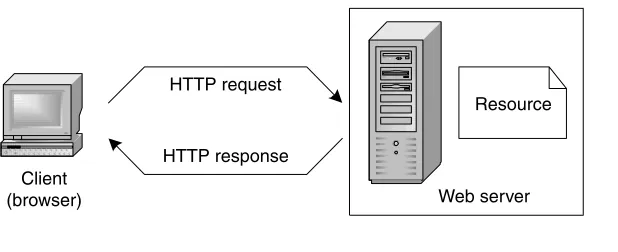
Technically speaking, HTTP is a client-server application protocol,which de-fines the rules by which a client program, called a browseror user agent, and a server program, called a Web server,may interact in order to exchange requests and responses. In HTTP terminology, the user agent sends a request for a given resource to the Web server, which is a process running continuously and listen-ing to requests comlisten-ing from the network; upon receivlisten-ing the request, the server locates or builds the resource and sends a response to the client (Figure 1.1). The basic resource requested by the client is an HTML page, which is a piece of text representing a multimedia hypertextual document. More generally, a request may address a file of any format stored in the Web server, or even the invocation of a program to be executed at the server side.
The HTTP protocol is conceived for exchanging resources distributed over the Internet and therefore exploits a standard resource addressing system. HTTP resources are identified by means of Uniform Resource Locators(URLs), which are structured strings of the format
http: // <host> [: <port>] [ <path> [? <query>]]
1.2 HTTP and HTML: The Foundation of Web Technology 5
HTTP request
HTTP response
Resource
Web server Client
[image:30.524.120.429.469.595.2](browser)
After the fixed prefix http://,1the URL contains the host name or IP address of the server, possibly followed by a port number (denoting the access to a specific server port), optionally followed by a pathname in the Web server file system pointing to the requested resource, optionally followed by a set of para-meters, called the query string.
For example, the URL http://www.theatlantic.com/unbound/flashbks/computer/ bushf.htm denotes the file named bushf.htm, stored in the directory named unbound/flashbks/computer/,in the file system managed by the Web server in-stalled in the host named www.theatlantic.com.
HTTP requestsare issued by the browser, either explicitly when the user types a URL in the “open page” command of the browser, or implicitly when the user clicks on an anchor within a page.
HTTP requests have a fixed format, which consists of three parts: a request line, some optional message headers, and the request body (also optional).
The request line is a formatted string, which consists of three parts; the HTTP method, the URL of the requested resource, and the protocol version. The most important HTTP methods are GET and POST, which respectively perform
The submission of a plain request for some resource to the Web server.
The submission of a request including sizeable user’s input (e.g., a long text or a file) to be processed by the server. In such a case, the user’s input is packaged as an attachment to the request, and constitutes the so-called request body.
For example, in order to display an HTML copy of the article “As You May Think,” by Vannevar Bush published by the Atlantic Monthly,the browser may send the following GET request to the Web server installed in the host www. theatlantic.com:
GET /unbound/flashbks/computer/bushf.htm HTTP/1.1
The request includes the name of the method (GET), the URL of the re-quested resource, and the version of the HTTP protocol. Methods GET and POST will be further discussed in Section 1.5.1, in the context of the CGI protocol.
After receiving and interpreting a request message, a server responds with an HTTP response message, which is structured in three parts: a status line, a set of optional headers, and a message body.
6 Chapter One: Technologies for Web Applications
1In a Web browser, the prefix may also refer to a different protocol (for instance, ftp://)
supported by the browser.
TE
AM
FL
Y
The status line consists of the protocol version followed by a numeric sta-tus code and its associated message (for example: HTTP/1.1 404 Not found).
Because the HTTP protocol has only two very generic request methods and one kind of response, several optional fields (called headers) can be added to re-quests and responses to convey auxiliary information that the browser and the Web server must exchange. There are four kinds of headers: general, request-specific, response-request-specific, and entity headers, as follows:
General headers are applicable both to requests and responses. For exam-ple, the Date header represents the date and time at which the request or response was originated.
Request headers apply specifically to requests and not to responses. For example, the Accept-Language header establishes the set of languages that are preferred by the user as a response to the request.
Response headers apply specifically to responses and not to requests. For instance, the WWW-Authenticate response-header field is used for access control; it is included in response messages having status code = 401 (which means “unauthorized”), emitted by the Web server when the user tries to access a resource stored in a password-protected domain.
Finally, entity headers apply to the content transferred in the body of the request or response.2For example, the Content-Length header specifies the number of bytes associated with the body of the request or response.
Since its origin, HTTP has been subject to a deep revision process, which has produced two versions of the protocol: HTTP/1.0, the pioneering version, and HTTP/1.1, the stable version, approved as Draft Standard by the Internet Engineer-ing Task Force(IETF) in July 1999.
Some important observations apply to HTTP, which are at the base of the evolution of Web application architectures:
HTTP is stateless:Each HTTP request is treated by the Web server as an atomic and independent call. There is no difference between a sequence of two requests by different users or by the same user. As a consequence, HTTP is not capable of maintaining any information between two
1.2 HTTP and HTML: The Foundation of Web Technology 7
2In the HTTP terminology, the word “entity” refers to the content transferred in the body
successive requests by the same user. In other words, there is not a notion of user session in HTTP. If the history of user interaction must be preserved, this feature must be implemented outside HTTP.
HTTP is pull-based:Interaction occurs only when the client calls the server. There is no way in which the server may call back the client. Therefore, notification of clients cannot be implemented using HTTP alone.
1.2.2
Writing Web Documents: The Hypertext Markup Language
The most popular resources requested on the Web are HTML pages. An HTML page is a textual file written in the Hypertext Markup Language,a language based on a document composition style known as “markup.”
Markup document processingis centered on the idea of inserting special to-kens, called tags,in textual documents, in order to delimit selected portions of the text and express some properties of such text portions, like font color and size. With markup, the rendering of the document is separate from the creation of its content, and is delegated to a processor, which receives in input the marked-up text and transforms it into a rendered document, by interpreting the meaning of tags (Figure 1.2). In the Web context, the editing of HTML documents is done by the content producer using any text editor, and the processing is performed by the browser.
Syntactically, HTML tags are symbols delimited by angle brackets, like <FONT>or<TABLE>. Most often tags are used in pairs, because they must delimit a portion of text. In this case the same tag has two variants, the start tag, posi-tioned at the beginning of the text to delimit, and the end tag, posiposi-tioned at the
8 Chapter One: Technologies for Web Applications
WebML.org Home Page
....
Content
<HTML> <HEAD> </HEAD> <BODY>
...
</BODY> </HTML>
Markup
+
=
Final rendition
end; the end tag has the same name of the start tag, but is preceded by a “/” character.
The primary use of HTML tags is to give a general structure to the docu-ment. The entire document is delimited by the <HTML>tag, and contains two major sections: the header, delimited by the <HEAD>tag, and the body, delimited by the <BODY>tag, as shown in Figure 1.3.
The header section includes information about the document, for example the<TITLE>tag, which specifies the document title used by the browser to name the window where the document is rendered, or the <META>tag, which can be used to list keywords for document indexing by search engines. The body section is where the actual content is placed. In the example in Figure 1.3, the body
1.2 HTTP and HTML: The Foundation of Web Technology 9
Figure 1.3 A simple HTML page and its rendition in the browser.
<HTML> <HEAD>
<TITLE>A Simple Document</TITLE>
<META name="keywords" content="HTML, tutorial"> </HEAD>
<BODY>
<P align="center"><FONT size="+6">Hello world!</FONT></P> </BODY>
contains just the text “Hello world!”, wrapped inside a paragraph and formatted with a larger font.
In the early versions of HTML, prior to HTML 4, the most common use of tags is to assign formatting properties to the text. The following example shows a portion of text delimited by the <B>(bold) tag, which sets the font style to bold:
The effect of inserting a bold tag pair <B> is to make the included text bold.</B>
The effect of inserting a bold tag pair is to make the included text bold.
Sometimes a tag must be able to express a property having many possible values, like the size or the color of the font. To this end, tags may have attributes,
which are label-value pairs. For example, the <FONT>tag has several attributes for
setting the font properties, such as size and face:
The attributes of the FONT tag <FONT size="+1" face="Arial"> assign various properties to the font</FONT>
The attributes of the FONT tag
assign various properties to the
font.
3Table 1.1 summarizes some of the HTML tags for text formatting.
The most popular features of HTML are the two tags <A>and<IMG>, which
are used to build multimedia hypertexts.
The anchor tag <A>delimits a portion of text, which is interpreted by the
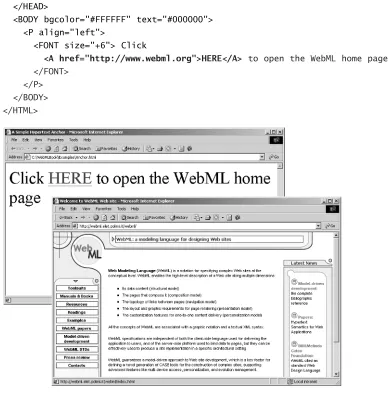
browser as the starting point (anchor, in the hypertext terminology) of a hyper-text reference. The hyper-text is rendered in a special way (for example, underlined and in a different color) and clicking on it makes the browser issue an HTTP request for a resource to be displayed. The URL of the new resource, which is the target
of the hypertext reference, is specified in the href attribute of the anchor tag, as
highlighted in the example in Figure 1.4 on page 12.
A possible use of the anchor tag, besides expressing a hypertext link, is to
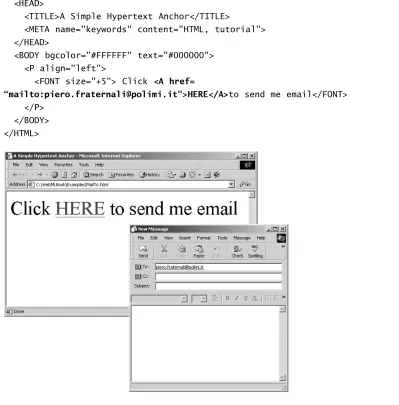
open the default mailer with a click. To achieve such an effect, the href attribute
specifies an e-mail address instead of an HTTP URL, as shown in Figure 1.5 on page 13.
10 Chapter One: Technologies for Web Applications
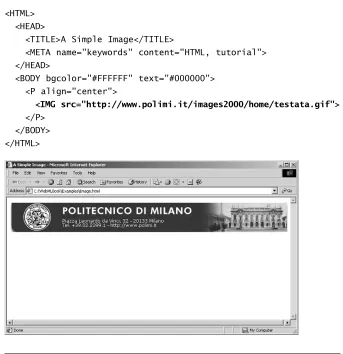
If the <A>tag introduces hypertext features into HTML, the <IMG>tag adds multimedia aspects. The <IMG>tag inserts an inline image into the document, the URL of which is specified using the srcattribute, as shown in Figure 1.6 on page 14.
When the browser renders the HTML page and encounters the <IMG>tag, it sends an additional HTTP request to the Web server for the file mentioned in thesrc attribute, and displays the image received by the Web server inside the HTML document.
Table 1.2 (page 14) illustrates the most common attributes of the <IMG>tag. The image tag can be nested into the anchor tag, to produce clickable images, which act as anchors of a hypertext reference.
1.2.3
Client-Side Scripting for Enhancing Page Interactivity
HTML was originally conceived for writing hypertexts. However, the develop-ment of interactive applications, for example applications supporting form-based data entry, requires additional capabilities, like the possibility of defining events produced by the interaction of the user with the HTML page, and procedures for reacting to such events.
1.2 HTTP and HTML: The Foundation of Web Technology 11
Table 1.1 HTML tags for text formatting.
Tag
<BODY>
<B> <I> <U> <PRE>
<FONT> <P>
<H1>
Attributes
bgcolor, background, text, link
size, color, face align
align
Meaning
Sets properties of the entire document, such as back-ground color, backback-ground image, text, and link color.
Sets the font style to bold.
Sets the font style to italic.
Sets the font style to underlined.
Tells the browser to render the text in a fixed-pitch font, to preserve whitespace, and not to wrap long lines.
Assigns font properties.
Delimits a paragraph and sets text horizontal alignment (left, center, right, justify).
Figure 1.4 HTML page containing a hypertext anchor.
<HTML> <HEAD>
<TITLE>A Simple Hypertext Anchor</TITLE>
<META name="keywords" content="HTML, tutorial"> </HEAD>
<BODY bgcolor="#FFFFFF" text="#000000"> <P align="left">
<FONT size="+6"> Click
<A href="http://www.webml.org">HERE</A> to open the WebML home page </FONT>
<HTML> <HEAD>
<TITLE>A Simple Hypertext Anchor</TITLE>
<META name="keywords" content="HTML, tutorial"> </HEAD>
<BODY bgcolor="#FFFFFF" text="#000000"> <P align="left">
<FONT size="+5"> Click <A href=
“mailto:[email protected]">HERE</A>to send me email</FONT> </P>
[image:38.524.65.464.112.517.2]</BODY> </HTML>
<HTML> <HEAD>
<TITLE>A Simple Image</TITLE>
<META name="keywords" content="HTML, tutorial"> </HEAD>
<BODY bgcolor="#FFFFFF" text="#000000"> <P align="center">
<IMG src="http://www.polimi.it/images2000/home/testata.gif">
[image:39.524.115.458.41.395.2]</P> </BODY> </HTML>
Figure 1.6 HTML page containing an image tag.
Table 1.2 Essential attributes of the IMG tag.
Attributes of the image tag Meaning
width, height The screen space reserved to the image, in pixels.
align The image alignment (top, middle, bottom, left,
right).
border Width of the image border in pixels.
HTML pages can be made more interactive by inserting into their code small programs, called client-side scripts,which are executed by the browser when the page is loaded or when the user produces some event.
The most popular languages for creating client-side scripts are JavaScript, by Netscape, and VisualBasic script, by Microsoft. Scripts are inserted inside a page using the <SCRIPT> tag, placed either in the head section of the HTML docu-ment, or in its body. Scripts in the head section are executed when they are ex-plicitly called, or when an event is triggered; scripts in the body section are executed when the HTML page is loaded.
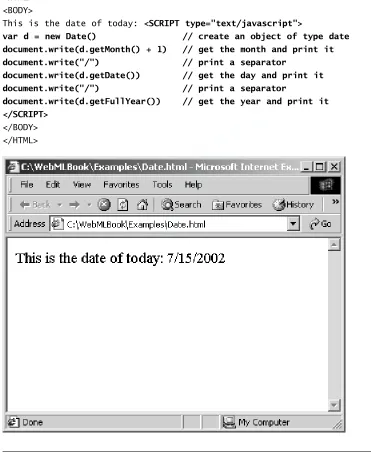
The example in Figure 1.7 uses JavaScript code to write the current date. The script is placed in the document body and is executed when the page is loaded in the browser. The instruction document.writein the <SCRIPT>tag makes the ar-gument of the write function (for example, the current year calculated by the function call d.getFullYear()) to be output in the document, in the position where the <SCRIPT>tag appears. The result of loading the page in the browser appears in Figure 1.7 on page 16.
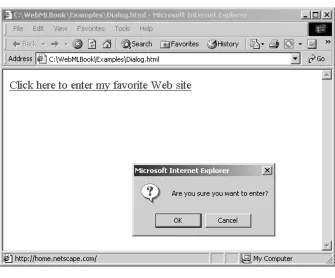
Client-side scripts can be activated after the occurrence of specific events. In this case, the scripts are placed in the head section of the document, and the event that triggers script execution is declared as an attribute of the appropriate HTML element. For example, the page in Figure 1.8 on page 17 contains the anchor text “Click here to enter my favorite Web site.” The anchor tag includes the declaration of the onClickevent, which is raised when the anchor text is clicked. The event triggers a JavaScript function named dialog, which opens a confirmation dialog box asking the user if he/she really wants to access the page linked to the anchor. Client-side scripting is particularly useful in conjunction with the <FORM> tag, an HTML element for constructing data entry forms. In this case, events can be attached to the form fields and may trigger functions for validating the user input, for example, for controlling the validity of a date. Forms are treated in Section 1.5.1.
1.2.4
Client-Side Components for Enhancing Client Functionality
Client-side scripting is not the only way to add interactive functions to an HTML page. A more powerful feature is offered by client-side components, which are executable objects plugged into the page. Examples of pluggable components include Java applets, Microsoft ActiveX controls, Macromedia Flash movies, and more.
Similarly to scripts, client-side components are executed by the brow-ser; unlike scripts, client-side components are full-fledged executable objects,
<HTML> <BODY>
This is the date of today: <SCRIPT type="text/javascript">
var d = new Date() // create an object of type date document.write(d.getMonth() + 1) // get the month and print it document.write("/") // print a separator
document.write(d.getDate()) // get the day and print it document.write("/") // print a separator
document.write(d.getFullYear()) // get the year and print it </SCRIPT>
[image:41.524.66.437.105.558.2]</BODY> </HTML>
Figure 1.7 Example of client-side scripting in JavaScript.
TE
AM
FL
Y
<HTML> <HEAD>
<SCRIPT type="text/javascript"> function dialog()
{if (confirm('Are you sure you want to enter?')) window.location.href='http://home.netscape.com/'} </SCRIPT>
</HEAD> <BODY>
<A href="http://home.netscape.com/" onClick="dialog()">
Click here to enter my favorite Web site</A> </BODY>
[image:42.524.120.455.273.551.2]</HTML>
programmed by a technically skilled developer using a language like Visual Basic or Java and stored in a Web server, wherefrom they are downloaded by the browser. For example, client-side components written in Java, also known as Java applets,can be downloaded from the network and run inside the browser; they may implement complex functions, like showing in real time a graph of stock quotations, but are prevented for security reasons from executing potentially dan-gerous instructions, like reading and writing files on the file system, and making network connections to hosts different from the one from which they have been downloaded.
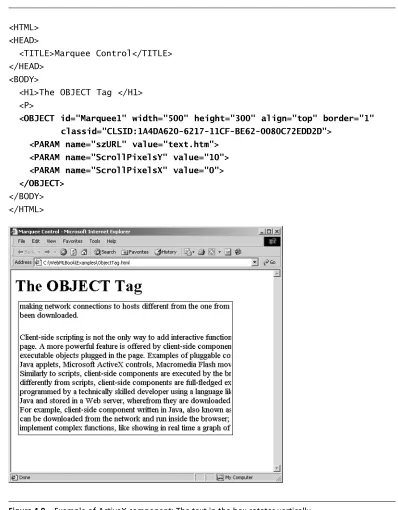
Client-side components are inserted into an HTML page using the <OBJECT> tag. For example, Figure 1.9 shows an HTML page containing an ActiveX component, a text rotator, which constructs an animation by taking an existing file and scrolling its content in a delimited portion of the screen. As shown in the code reported in Figure 1.9, the <OBJECT>tag used to insert the component in the HTML page is similar to the <IMG>tag, in the sense that it re-serves a certain amount of space in the page for the component, using the at-tributeswidthandheight.
Theclassidattribute is analogous to the src attribute of an image, in the sense that it references the actual object that implements the client-side compo-nent. The <OBJECT>tag also admits some initialization parameters, expressed by one or more nested <PARAM>tags. In the example of Figure 1.9, the client-side component scrolls the content of a Web page, whose URL is specified in the <PARAM>element named szURL, along the horizontal or vertical axis, according to the values of the ScrollPixelsXandScrollPixelsYparameters. Y=10 and X=0 result in scrolling a text vertically from top to bottom.
1.2.5
The Evolution of HTML: HTML 4 and Cascading Style Sheets
The HTML language has been subject to some criticism by the community of pro-fessional graphic designers, due to its fixed set of tags and limited graphic capa-bilities. Achieving sophisticated graphic effects with the standard HTML tags is hardly possible; on the other hand, introducing new tags in the language requires a worldwide standardization process, which may take several years.
In response to these problems, the World Wide Web Consortium (W3C), the governing body devoted to the Web standards, issued the latest version of the HTML language, called HTML 4, in December 1997. HTML 4 introduces several enhancements over the previous versions, including a better separation of docu-ment structure and presentation, improved support for accessibility of docudocu-ments and internationalization, and a better definition of complex constructs like
<HTML> <HEAD>
<TITLE>Marquee Control</TITLE> </HEAD>
<BODY>
<H1>The OBJECT Tag </H1> <P>
<OBJECT id="Marquee1" width="500" height="300" align="top" border="1" classid="CLSID:1A4DA620-6217-11CF-BE62-0080C72EDD2D">
<PARAM name="szURL" value="text.htm"> <PARAM name="ScrollPixelsY" value="10"> <PARAM name="ScrollPixelsX" value="0"> </OBJECT>
[image:44.524.60.458.75.585.2]</BODY> </HTML>
frames and tables. However, the most innovative feature of HTML 4 is the intro-duction of cascading style sheets(CSS), a new technique for defining the presenta-tion of HTML documents, separating the look and feel from markup and textual content.
A style sheet is a set of rules that tell a browser how to render a document. A rule is made of two parts: a selector, which specifies the HTML tag to which the style rule applies, and a style declaration, which expresses the style properties to be attached to the HTML tag mentioned in the selector. As an example, the fol-lowing code fragment defines the colorandfont-sizeproperties for the <H1> and<H2>tags:
<HEAD>
<TITLE>CSS Example</TITLE> <STYLE type="text/css">
H1 { font-size: 20pt; color: red } H2 { font-size: 18pt; color: blue } </STYLE>
</HEAD>
The CSS standard includes more than 60 rendition properties, which per-mit the designer to define the appearance of HTML documents in a much more precise way than with HTML 3.
In the above example, style rules are embedded in the document to which they apply, by means of the <STYLE>tag. The same effect can be obtained by storing the two style rules in a separate file, and by linking the HTML document to the style file, using the <LINK>tag in the document head. In the following example, the HTML document is linked to a style file named style.css:
<HEAD>
<TITLE>CSS Example</TITLE>
<LINK rel=StyleSheet href="style.css" type="text/css" > </HEAD>
Therelattribute in the <LINK>tag expresses the meaning of the link be-tween the document and the resource specified in the hrefattribute. The value StyleSheetdeclares that the external file must be used as a presentation style sheet.
Separating the presentation rules from the document content has an im-mediate advantage: if multiple documents share the same style rules, these rules can be placed in a single file and linked to all documents. As a consequence of this separation, updating the style rules requires modifying the single style file, instead of updating all documents.