T
IMELY.
PRACTICAL.
RELIABLE.
Douglas Schweitzer
Incident
Response
Wiley Technology Publishing
Timely. Practical. Reliable.
Your in-depth guide to detecting network breaches, uncovering evidence,
and preventing future attacks
You’ll learn how to:
• Recognize the telltale signs of an incident and take specific response measures
• Search for evidence by preparing operating systems, identifying network devices, and collecting data from memory
• Analyze and detect when malicious code enters the system and quickly locate hidden files
• Perform keyword searches, review browser history, and examine Web caches to retrieve and analyze clues • Create a forensics toolkit to
prop-erly collect and preserve evidence • Contain an incident by severing
network and Internet connections, and then eradicate any vulnerabili-ties you uncover
• Anticipate future attacks and monitor your system accordingly • Prevent espionage, insider
attacks, and inappropriate use of the network
• Develop policies and procedures to carefully audit the system
Whether it’s from malicious code sent through an e-mail or an unauthorized user accessing company files, your network is vulnerable to attack. Your response to such incidents is critical. With this comprehensive guide, Douglas Schweitzer arms you with the tools to reveal a security breach, gather evidence to report the crime, and con-duct audits to prevent future attacks. He also provides you with a firm understanding of the methodologies for incident response and computer forensics, Federal Computer Crime law information and evidence require-ments, legal issues, and how to work with law enforcement.
Visit our Web site at www.wiley.com/compbooks/
Incident R
esponse
Schweitzer ISBN: 0-7645-2636-7 INCLUDES CD-ROMDOUGLAS SCHWEITZERis an Internet security specialist and authority on malicious code and computer forensics. He is a Cisco Certified Network Associate and Certified Internet Webmaster Associate, and holds A+, Network+, and i-Net+ certifica-tions. Schweitzer is also the author of Internet Security Made Easyand Securing the Network from Malicious Code.
,!7IA7G4-fcgdgh!:p;o;p;K;K
*85555-IGFADh
Computer
Forensics
Toolkit
CD-ROM includes:• Helpful tools to capture and protect forensic data; search volumes, drives, and servers for evidence; and rebuild systems quickly after evidence has been obtained
Incident Response:
Incident Response:
Computer Forensics
Toolkit
Incident Response: Computer Forensics Toolkit Published by
Wiley Publishing, Inc. 10475 Crosspoint Boulevard Indianapolis, IN 46256 www.wiley.com
Copyright © 2003 by Wiley Publishing, Inc., Indianapolis, Indiana Published simultaneously in Canada
ISBN: 0-7645-2636-7
Manufactured in the United States of America
10 9 8 7 6 5 4 3 2 1
1O/RR/QU/QT/IN
No part of this publication may be reproduced, stored in a retrieval system or transmitted in any form or by any means, electronic, mechanical, photocopying, recording, scanning or otherwise, except as permitted under Sections 107 or 108 of the 1976 United States Copyright Act, without either the prior written permission of the Publisher, or authorization through payment of the appropriate per-copy fee to the Copyright Clearance Center, 222 Rosewood Drive, Danvers, MA 01923, (978) 750-8400, fax (978) 646-8700. Requests to the Publisher for permission should be addressed to the Legal Department, Wiley Publishing, Inc., 10475 Crosspoint Blvd., Indianapolis, IN 46256, (317) 572-3447, fax (317) 572-4447, E-Mail: [email protected].
Limit of Liability/Disclaimer of Warranty:While the publisher and author have used their best efforts in preparing this book, they make no representations or warranties with respect to the accuracy or completeness of the contents of this book and specifically disclaim any implied warranties of merchantability or fitness for a particular purpose. No warranty may be created or extended by sales representatives or written sales materials. The advice and strategies contained herein may not be suitable for your situation. You should consult with a professional where appropriate. Neither the publisher nor author shall be liable for any loss of profit or any other commercial damages, including but not limited to special, incidental, consequential, or other damages.
For general information on our other products and services or to obtain technical support, please contact our Customer Care Department within the U.S. at (800) 762-2974, outside the U.S. at (317) 572-3993 or fax (317) 572-4002.
Wiley also publishes its books in a variety of electronic formats. Some content that appears in print may not be available in electronic books.
Library of Congress Cataloging-in-Publication Data on file with the publisher.
About the Author
Credits
ACQUISITIONS EDITOR Katie Feltman
PROJECT EDITOR Mark Enochs
TECHNICAL EDITOR Russell Shumway
COPY EDITOR Maarten Reilingh
EDITORIAL MANAGER Mary Beth Wakefield
VICE PRESIDENT & EXECUTIVE GROUP PUBLISHER
Richard Swadley
VICE PRESIDENT AND EXECUTIVE PUBLISHER Bob Ipsen
EXECUTIVE EDITOR Carol Long
EXECUTIVE EDITORIAL DIRECTOR Mary Bednarek
PROJECT COORDINATORS Cindy Phipps, Bill Ramsey
GRAPHICS AND PRODUCTION SPECIALISTS Beth Brooks, Sean Decker,
LeAndra Johnson, Stephanie Jumper, Kristin McMullan, Heather Pope, Julia Trippetti
QUALITY CONTROL TECHNICIANS Carl W. Pierce, Robert Springer
PERMISSIONS EDITOR Laura Moss
MEDIA DEVELOPMENT SPECIALIST Travis Silvers
PROOFREADING Kim Cofer
Acknowledgments
This book would not have been possible without the combined efforts of some very talented peo-ple. I would first like to thank my agent, Carole McClendon of Waterside Productions for her assis-tance in again finding me a superb publisher. I would also like to thank the hard-working individuals at Wiley Publishing who helped to make this book a reality. Their enthusiasm and sup-port were a continued shot in the arm. In particular, I would like to thank Acquisitions Editor, Katie Feltman for her confidence in me and for helping me to shape and hone the initial outline for the book. I am also grateful to Project Editor, Mark Enochs for all his suggestions. I would like to say thank you to my wife and best friend, Monique, for without her help, this book would not have been possible. I tip my hat to Russ Shumway who, as my technical editor, did a superb job ensuring that all my facts were correct and who suggested a number of additions that kept this book technically sound. Thanks, as well, to my sons Deran and Alex for their enduring patience with me while I spent many long hours writing.
Contents at a Glance
Acknowledgments. . . ix
Introduction . . . xix
Chapter 1 Computer Forensics and Incident Response Essentials . . . 1
Chapter 2 Addressing Law Enforcement Considerations. . . 27
Chapter 3 Forensic Preparation and Preliminary Response . . . 45
Chapter 4 Windows Registry, Recycle Bin, and Data Storage. . . 69
Chapter 5 Analyzing and Detecting Malicious Code and Intruders . . . 91
Chapter 6 Retrieving and Analyzing Clues. . . 115
Chapter 7 Procedures for Collecting and Preserving Evidence. . . 135
Chapter 8 Incident Containment and Eradication of Vulnerabilities . . . 155
Chapter 9 Disaster Recovery and Follow-Up. . . 177
Chapter 10 Responding to Different Types of Incidents. . . 195
Chapter 11 Assessing System Security to Prevent Further Attacks . . . 215
Chapter 12 Pulling It All Together. . . 235
Appendix A What’s on the CD-ROM . . . 247
Appendix B Commonly Attacked Ports . . . 257
Appendix C Field Guidance on USA Patriot Act 2001 . . . 269
Appendix D Computer Records and the Federal Rules of Evidence . . . 281
Appendix E Glossary . . . 289
Contents
Acknowledgments. . . ix
Introduction . . . xix
Chapter 1 Computer Forensics and Incident Response Essentials. . . 1
Catching the Criminal: The Basics of Computer Forensics . . . . 2
Recognizing the Signs of an Incident . . . 5
Preparing for Incidents . . . 14
Developing a Computer Security Incident Response Capability. . . 16
The Computer Security Incident Response Team. . . 17
The Incident Reporting Process . . . 18
Assessment and Containment . . . 19
Recovery Operations. . . 20
Damage Analysis and Determination . . . 20
Shutdown Procedures while Preserving Evidence. . . 21
NIPC Recommendations for Victims. . . 24
Building an Incident Response/Forensic Toolkit . . . 25
Chapter Summary . . . 26
Chapter 2 Addressing Law Enforcement Considerations. . . 27
A Look at the Fourth Amendment. . . 28
A Brief Primer on the Freedom of Information Act . . . 30
Reporting Security Breaches to Law Enforcement. . . 30
Information Sharing Issues in Computer Crime Investigations . . . 33
The Role of the National Infrastructure Protection Center . . . 35
Understanding Disclosure and Discovery . . . 36
Disclosure of Contents . . . 37
Federal Computer Crimes and Laws . . . 38
The Computer Fraud and Abuse Act of 1986 . . . 39
Computer Fraud and Abuse Act of 1986 (US) 18 USC 1030. . . 39
The Computer Abuse Amendments Act of 1994 . . . 42
The USA Patriot Act of 2001 . . . 43
Chapter Summary . . . 44
Chapter 3 Forensic Preparation and Preliminary Response . . . 45
Preparing Operating Systems for Data Collection . . . 45
The Significance of Log Files. . . 46
Enabling Auditing and Logging on Windows NT. . . 47
A Quick Note about Auditing, Logging, and Log File Size. . . 49
Centralized Logging. . . 51
Time Synchronization . . . 52
Time-Stamping. . . 53
Identifying Network Devices . . . 54
Collecting Data from Memory . . . 55
Selecting the Appropriate Memory Dump Options. . . 57
Using Dumpchk.exe to View the Windows memory.dmp File . . . 58
Performing Memory Dump on Unix Systems. . . 58
Imaging Hard Drives . . . 59
Following the Chain-of-Custody for Evidence Collection . . . . 61
Business Continuity and Contingency Planning . . . 63
The IT Contingency-Planning Process . . . 63
Chapter Summary . . . 68
Chapter 4 Windows Registry, Recycle Bin, and Data Storage. . . 69
The Windows Registry . . . 70
Registry Structure . . . 70
Viewing and Editing the Registry. . . 71
Collecting Registry Data. . . 73
Registry Backup and Restore Procedures . . . 74
Registry Backup Programs (Shareware and Freeware). . . 78
Understanding Data Storage . . . 78
The Hard Disk . . . 78
The Floppy Disk. . . 79
The CD-ROM. . . 80
The Windows File Allocation Table . . . 81
The Windows New Technology File System . . . 82
The Windows Recycle Bin . . . 83
The Bin Is Empty, yet the Evidence Remains. . . 83
Tracking Deleted Files Through the Windows Recycle Bin. . . 84
Recovering Deleted Data in Windows . . . 85
Industrial-Strength Recovery Utility. . . 86
Unix/Linux Data Storage Using the ext2 File System . . . 87
File Deletion in ext2. . . 87
File Recovery in ext2. . . 87
Using e2undel. . . 88
Chapter Summary . . . 89
Chapter 5 Analyzing and Detecting Malicious Code and Intruders. . . 91
System Processes . . . 92
Detecting Abnormal System Processes. . . 92
Using the Windows Task Manager to View Running Processes . . . . 94
Default Processes in Windows NT, 2000, and XP . . . 96
Unusual or Hidden Files . . . 99
Viewing Hidden Files in Windows. . . 99
Viewing Hidden Files under Unix/Linux . . . 101
Rootkits and Backdoors . . . 102
Detecting the Presence of a Rootkit. . . 104
Detecting the Presence of a Backdoor. . . 106
Removing Rootkits and Trojans. . . 111
Detecting and Defending Against Network Sniffers . . . 112
Chapter Summary . . . 113
Chapter 6 Retrieving and Analyzing Clues. . . 115
Performing Keyword Searches . . . 116
Industrial Strength Keyword-Searching Programs . . . 116
Freeware Keyword Search Tools. . . 117
Using SectorSpyXP to Perform a Keyword Search. . . 118
General Guidelines for Hard Drive Examination. . . 120
Examining the Windows Swap File . . . 121
Locating the Windows Swap File. . . 121
Viewing the Contents of the Swap/Page File . . . 123
E-Mail as Evidence . . . 123
Locating E-Mail . . . 124
Retrieving Deleted E-Mail. . . 125
Recovering Evidence from the Web Browser . . . 126
Locating Browser History Evidence. . . 127
Locating Web Cache Evidence. . . 128
Print Spooler Files . . . 129
Locating Hidden Data . . . 130
Steganography. . . 130
Password-Protected Compressed Data. . . 131
Example Using Ultimate ZIP Cracker. . . 132
Chapter Summary . . . 133
Chapter 7 Procedures for Collecting and Preserving Evidence. . . 135
Postcompromise Evidence Collection . . . 135
Legal Requirements for Collecting Electronic Evidence. . . 136
Unix/Linux Login Banners. . . 137
The Order of Collection. . . 139
Understanding Volatility of Evidence . . . 140
Creating a Real-Mode Forensics Boot Disk . . . 141
The Skinny on the FAT . . . 142
Creating a Windows Real-Mode Boot Disk. . . 142
Creating a Linux Boot Disk. . . 143
Using Packet Sniffers to Gather Evidence. . . 144
Building a Forensic Toolkit . . . 146
The Coroner’s Toolkit (TCT) . . . 147
Using Grave-robber. . . 148
Running Grave-robber. . . 148
Following the Chain-of-Custody . . . 149
The Admissibility of Evidence . . . 150
Authentication. . . 151
The Frye Test. . . 152
The Best Evidence Rule. . . 152
The Permissible Time Period for Examining Seized Computers. . . . 153
Evidence Preservation. . . 153
Chapter Summary . . . 154
Chapter 8 Incident Containment and Eradication of Vulnerabilities. . . 155
Quarantine and Containment . . . 156
Determine the Risk of Continuing Operations. . . 156
Preserving Integrity . . . 157
Audit Mechanisms. . . 157
User-Detected Technical Vulnerabilities . . . 157
Vulnerability Reporting Form . . . 158
Severing Network and Internet Connections . . . 159
Network and File-Sharing Issues. . . 160
Configuring Windows File Sharing for Maximum Security. . . 161
Windows XP File Sharing . . . 162
Windows XP Simple File Sharing. . . 163
Creating Access Control Lists. . . 165
Disabling File and Print Sharing under Windows 95/98/Me . . . 167
Recognizing the Trust Model . . . 167
The Trust Model in Computer Operations. . . 168
User ID and Password Trust. . . 168
Operating System Trust. . . 169
The Trust Model and Identity Theft. . . 171
Computer Security Awareness. . . 171
Multimedia Documentation Strategies. . . 172
The Eradication Phase . . . 173
Harden Your Defenses. . . 173
Perform Analysis of Vulnerabilities. . . 173
Chapter Summary . . . 174
Chapter 9 Disaster Recovery and Follow-Up. . . 177
Disaster Recovery Planning . . . 179
Developing a Disaster Recovery Plan . . . 180
Sample Contingency Disaster Recovery Plan. . . 181
Electronic Recordkeeping . . . 183
Authentication of Electronic Records. . . 184
Electronic Records as Evidence. . . 185
Records Security. . . 185
The Uninterruptible Power Supply . . . 186
How UPS Works. . . 186
UPS Benefits. . . 187
Understanding Data Backup Procedures. . . 187
Creating a Backup Plan. . . 188
Data Backup Tools. . . 188
Post-Incident Monitoring and Analysis . . . 190
Anticipating Future Attacks. . . 191
Chapter Summary . . . 194
Chapter 10 Responding to Different Types of Incidents. . . 195
Responding to Hacker Incidents . . . 195
Identify the Hacker. . . 197
Active Hacker Incidents. . . 198
Monitoring Hacker Activity. . . 200
Previous Incidents . . . 201
Follow-Up. . . 201
Responding to Malicious Code Incidents . . . 201
Trojan Horses. . . 201
Internet Worms . . . 201
Isolate the System and Notify Appropriate Staff. . . 202
Contain the Virus, Worm, or Trojan Horse . . . 202
Inoculate the System. . . 202
Return Systems to Normal Operating Mode . . . 202
Handling Inappropriate Use. . . 202
Types of Harassment. . . 203
Incidents Involving Sexual Harassment . . . 203
Avoiding Sexual Harassment Lawsuits . . . 205
Guidelines for Developing a Sexual Harassment Policy . . . 206
Preventing Workers from Viewing Inappropriate Material . . . 208
Industrial Espionage . . . 210
Defending Against Insider Attacks. . . 211
Chapter Summary . . . 213
Chapter 11 Assessing System Security to Prevent Further Attacks. . . 215
Assessment of Security Policies and Procedures . . . 216
Developing Security Policy Checklists . . . 217
Policy Audit Checklist — Sample. . . 218
An Overview of the Computer Security Audit Process . . . 218
Auditing Workstations and Servers . . . 219
Analyzing Workstations. . . 220
Analyzing Network Servers . . . 220
How to Disable NetBIOS Null Sessions. . . 221
Penetration Testing . . . 223
In-House vs. Outsourcing. . . 224
Penetration-Testing Software for In-House Audits. . . 225
Third-Party Penetration Testing. . . 227
Health Insurance Portability and Accountability Act of 1996 (HIPAA). . . 228
HIPAA Compliance. . . 228
The Honeynet Project . . . 232
Chapter Summary . . . 232
Chapter 12 Pulling It All Together. . . 235
Analyzing Real-World Attacks . . . 236
Security Lessons Learned from Others . . . 238
Lessons Learned from the Code Red Worm. . . 239
Lessons Learned from Hackers. . . 240
Where to Go for Up-to-Date Information . . . 242
Future Trends in Security Technology . . . 244
Chapter Summary . . . 245
Appendix A What’s on the CD-ROM. . . 247
Appendix B Commonly Attacked Ports. . . 257
Appendix C Field Guidance on USA Patriot Act 2001 . . . 269
Appendix D Computer Records and the Federal Rules of Evidence. . . 281
Appendix E Glossary. . . 289
xix
Introduction
On May 14, 1999, 54-year-old Sharon Guthrie drowned in the bathtub of her Wolsey, South Dakota home. An autopsy revealed that 10 to 20 capsules containing Temazepan were present in her body. The sleeping pills had been prescribed for her husband, the Reverend William Guthrie, pastor of the First Presbyterian Church in Wolsey. Despite his denials of any wrongdoing in connection with the death of his wife, police remained unconvinced of his innocence. Lacking any hard evi-dence in the case, police decided to engage the services of computer forensics expert, Judd Robbins. Several of the church computers frequently used by Rev. Guthrie were seized and frozen. After several days of examining the minister’s files, Robbins eventually uncovered evidence that Guthrie had been searching the Internet for painless and surefire killing methods. Robbins also found detailed notes about sleeping pills and lethal household cleaning agents. On January 11, 2000, a 12-member jury convicted Guthrie of murder. Less than two weeks later, Circuit Judge Eugene Martin sentenced him to life imprisonment.
Computer Crime
Not every crime committed with a computer is a computer crime. If someone steals a telephone access code and makes a long-distance call, the code he has stolen is checked by a computer before the call is processed. Nevertheless, such a case is more appropriately treated as “toll fraud,” not computer crime. It would, however qualify as cyber crime if the code was obtained as a result of hacking into a computer system. Although this example appears straightforward, many cases are not so neatly categorized. A bank employee who steals money from a cash drawer is embezzling. A bank employee who writes a computer program to randomly steal very small amounts from numerous accounts may also be embezzling, yet committing (and prosecuting) this offense may require a working knowledge of the bank’s computer system. As a result, such a crime may rea-sonably be characterized as a computer offense.
According to the U.S. Department of Justice, computers generally play three distinct roles in a criminal case. First, a computer can be the target of an offense. This occurs when conduct is designed to take information without authorization from, or cause damage to, a computer or computer network. The Melissa and Explore.Zip.Worm viruses, along with hacks into the White House and other Web sites, are examples of this type of offense.
Second, a computer can be incidental to an offense yet still be significant in terms of law enforcement purposes. For example, drug traffickers may store transactional data (such as names, dates, and quantities) on computers, rather than in paper form.
What Is Computer Forensics?
According to computer forensic expert Judd Robbins, “Computer forensics is simply the applica-tion of computer investigaapplica-tion and analysis techniques in the interests of determining potential legal evidence.” The type of evidence gathered from a forensic examination can be useful in a wide variety of investigations:
✓ Civil litigations such as divorce, harassment, and discrimination cases
✓ Corporations seeking to acquire evidence in embezzlement, fraud, or intellectual property theft issues
✓ Individuals seeking evidence in age discrimination, wrongful termination, or sexual harassment claims
✓ Insurance company investigations where evidence is required relating to insurance fraud, wrongful death, workman’s compensation, and other cases involving insurance claims
Digital evidence may be sought in a wide array of computer-related crimes, and computer forensic examinations use a variety of methods for discovering data that resides in a computer sys-tem, or for recovering deleted, encrypted, or damaged file information. Any or all of this informa-tion can be of use in the processes of discovery, deposiinforma-tion, or litigainforma-tion.
The Importance of Incident Response
Analyzing the aftermath of a computer intrusion takes far longer than it takes a perpetrator to commit the crime. It is often the speed of the response that determines the outcome; and the more prepared an organization is when an incident first occurs, the quicker it can respond in the incident’s wake. With the ever-increasing use of information technology (IT), organizations around the globe are facing the challenge of protecting valuable resources from a never-ending onslaught of threats. Computers, and the networks that connect them, process, store, and trans-mit information that is crucial for successful day-to-day operations and are therefore inviting tar-gets for hackers and malicious code. The protection of critical IT resources requires not only adopting reasonable precautions for securing these systems and networks, but also the ability to respond quickly and efficiently when system and network security defenses have been breached.
Unfortunately, responding to computer security incidents is generally not an easy endeavor. Proper incident response requires technical knowledge, communication, and coordination among personnel in charge of the response process.
incident response teams and are better addressed by an organization’s business continuity (con-tingency) plans. For the purpose of incident response, therefore, the term incidentrefers to an adverse event that is related to information security.
Similarly, an event is any observable occurrence in a system and/or network. Examples of events include the system boot sequence, a system crash, and data packet flooding within a net-work. Events are important because they often provide an indication that an incident is occurring. In reality, events caused by human error (for example, unintentionally deleting a critical directory and all files contained therein) are the most costly and disruptive. Events related to computer security, however, are attracting an increasing amount of attention within the computing com-munity in general as well as within the federal government. Among other reasons, the unparal-leled growth of networking and the abundance of malicious code available to perpetrators have resulted in greatly exposing more systems to the threat of unauthorized remote access.
Types of Incidents
According to the Federal Computer Incident Response Center (FedCIRC), the term incident
encompasses the following general categories of adverse events:
✓ Malicious code attacks.Malicious code attacks include attacks by programs such as viruses, Trojan horse programs, worms, and scripts used by crackers/hackers to gain privileges, capture passwords, and/or modify audit logs to exclude unauthorized activity. Malicious code is particularly troublesome in that it is typically written in such a man-ner that it masquerades its presence, making it difficult to detect. Furthermore, self-replicating malicious code such as viruses and worms can replicate rapidly, thereby making containment especially challenging.
✓ Unauthorized access. Unauthorized access encompasses a range of incidents from improperly logging into a user’s account (for example, when a hacker logs in to a legiti-mate user’s account) to unauthorized access to files and directories stored on a system or storage media by obtaining superuser privileges. Unauthorized access may also entail accessing network data by planting an unauthorized sniffer program or device to capture all packets traversing the network at a particular point.
✓ Unauthorized utilization of services.It is not absolutely necessary to access another user’s account to perpetrate an attack on the system or network. An intruder may also obtain access to information or plant Trojan horse programs by misusing available ser-vices. Examples include using the network file system (NFS) to mount the file system of a remote server machine or interdomain access mechanisms in Windows NT to access files and directories in another organization’s domain.
✓ Disruption of service. Users rely on services provided by network and computing ser-vices. Those with malicious intent can disrupt these services in a variety of ways, includ-ing erasinclud-ing critical programs, mail spamminclud-ing (floodinclud-ing a user account with electronic mail), and altering system functionality by installing Trojan horse programs.
✓ Misuse.Misuse occurs when someone uses a computing system for other than official purposes, such as when a legitimate user uses a government computer to store personal tax records.
✓ Espionage. Espionage is stealing information to subvert the interests of a corporation or government. Many of the cases of unauthorized access to U.S. government systems during Operation Desert Storm and Operation Desert Shield were the manifestation of espionage activity against the United States.
✓ Hoaxes. Hoaxes occur when false information about incidents or vulnerabilities is spread. In early 1995, for example, several users with Internet access distributed infor-mation about a so-called Good Times Virus, even though the virus did not exist.
It is unfortunate that despite the implementation of sophisticated firewalls, powerful intrusion detection systems, and antivirus software, computers and the networks that connect them may still be penetrated by hackers, crackers, and malicious code. When the unthinkable happens, responding to incidents and events is paramount. Because law enforcement agencies have height-ened their interest in computer crimes, the capture and preservation of critical evidence via basic forensic methods are included in this book. Organizations require strategies for handling com-puter-security-related events effectively. Such strategy includes preparation, detection, and response. Adopting a hands-on approach, this book will arm readers with both the knowledge and the tools needed to mitigate risk and limit loss.
Who Should Read This Book?
While computer forensics is naturally of great concern to those in the law enforcement commu-nity, any computer user or owner who wants to understand how to acquire and handle potential digital evidence will benefit from reading this book. In addition, the incident response material presented in this book will be a tremendous advantage to network administrators, security per-sonnel, and even executive officers who find it increasingly difficult to keep their organizational networks free from the debilitating and costly effects of hackers and malicious code despite the implementation of powerful security measures.
How to Read This Book
Chapter 1
Computer Forensics and
Incident Response
Essentials
In This Chapter
✓ Catching the criminal: the basics of computer forensics ✓ Recognizing the signs of an incident
✓ The steps required to prepare for an incident ✓ Incident verification
✓ Preservation of key evidence ✓ Specific response measures ✓ Building a toolkit
THEHI-TECH REVOLUTIONSWEEPING THE GLOBEin communications and information technology has truly made the world a smaller place. With effects on both our personal and professional lives, the United States is now investing more resources into the advancement of information technol-ogy than into the management or manufacture of consumer goods. The Internet has become so popular that it is now more commonplace to receive an e-mail message than a conventionally sent letter in daily correspondence. Current estimates put the worldwide Internet population at over 580 million strong and growing.
In this ever-evolving age of information technology, the requirements of law enforcement are shifting, as well. Some conventional crimes, especially those concerning finance and commerce, continue to become ever more technologically sophisticated. Paper trails have given way to elec-tronic trails. Crimes relating to the theft and exploitation of data are detected daily. As evidenced in the murder of Sharon Guthrie, violent crime is also not immune to the use of the information technology. Remember, Rev. Guthrie was convicted based upon forensic evidence gleaned from his computer, namely the discovery of data indicating that he had visited Web sites that offered instructions for carrying out a murder using tranquilizers. It is not unheard of for those dealing in arms or drugs to store client names and contact information in databases on their computers.
Just as industry is gradually transforming from the manufacture of goods to the processing of information, criminal activity has to a great extent also converted from a largely physical dimen-sion to a cyber dimendimen-sion. Investigations once carried out in a more concrete, material manner now exist electronically, conducted online or through the examination of computer hardware and software.
Catching the Criminal: The Basics
of Computer Forensics
Computer forensics is the science of acquiring, retrieving, preserving, and presenting data that has been processed electronically and stored on computer media. Computer forensic science is a relatively new discipline that has the potential to greatly affect specific types of investigations and prosecutions. As a greater number of people now make use of computers, more and more infor-mation of all kinds is being stored on them. This includes inforinfor-mation that is of significant impor-tance to an organization’s clientele or that has a bearing on a civil or criminal case, such as evidence of financial fraud, embezzlement, wrongful employment termination, sexual harass-ment, theft, arson, workers compensation fraud, age or sex discrimination, child pornography, theft of trade secrets, or marital infidelity, to name a few.
Computer forensic science is different from the traditional forensic disciplines. To begin, the tools and techniques required are easily available to anyone seeking to conduct a computer foren-sic investigation. In contrast to traditional forenforen-sic analysis, there is commonly the requirement that computer examinations are performed at virtually any physical location, not just in a con-trolled environment. Rather than producing conclusions requiring expert interpretation, com-puter forensic science produces direct information and data that may play a significant role in the apprehension or conviction of cyber criminals.
The acquisition of digital evidence begins when information and/or physical items are collected or stored in anticipation of being examined. The term “evidence” implies that the collector of evi-dence is recognized by the courts and that the process of collecting is also understood to be a legal process, appropriate for evidence collection in the locality in which it is taking place. A data object or physical item only becomes evidence when so deemed by a law enforcement official or designee. The following are several important definitions the U.S. Federal Bureau of Investigation uses to delineate certain aspects of computer forensic science:
✓ Data objects.Objects or information of potential probative value that are associated with physical items. Data objects may occur in different file formats (for example, NTFS or FAT32) without alteration of the original information.
✓ Digital evidence.Information of probative value that is stored or transmitted in digital form.
✓ Physical items.Items on which data objects or information may be stored and/or through which data objects are transferred.
✓ Duplicate digital evidence.An accurate digital reproduction of all data objects contained on an original physical item.
No investigation involving the review of documents, either in a criminal or corporate setting, is complete without the inclusion of properly handled computer evidence. Computer forensics ensures the preservation and authentication of computer data, which is fragile by nature and can be easily altered, erased, or subjected to claims of tampering if it is not properly handled. Additionally, computer forensics facilitates the recovery and analysis of deleted files and other forms of compelling information that are normally invisible to the user.
Unlike paper evidence, computer evidence often exists in digital data stored on the computer’s storage media. The volume of information that can be stored on current computers is incredibly enormous. There are numerous types of storage media: floppy disks, hard disks, ZIP disks, magnetic tape, magneto-optical cartridges, CD-R, CD-RW, CD-ROM, DVD, as well as flash, CompactFlash, Smart Media, and Memory Stick storage devices.
A knowledgeable expert can facilitate the process of discovery by identifying other potential evi-dence that may later be included in legal proceedings. For example, during on-site premise inspections, in cases where computer disks are not actually seized or forensically copied, the forensics expert can quickly identify places to look, signs to look for, and point to additional, alter-native sources for relevant evidence. These may take the form of earlier versions of data files (such as memos or spreadsheets that still exist on the computer’s disk or on backup media) or as differ-ently formatted versions of data, either created or treated by other application programs (for example, word processing, spreadsheet, e-mail, timeline, scheduling, or graphic applications).
As the world continues to move forward in the information age, the need for proper forensic analysis and well-planned incident response continues to increase. During his September 5, 2001 speech, “The Legal Aspects of Infrastructure Protection,”at the INFOWARCON 2001 conference in Washington, D.C., Ronald Dick, Director of the National Infrastructure Protection Center, made the following statement:
The NIPC, on behalf of each of its partner agencies, is firmly committed to the fundamental proposi-tion that the investigaproposi-tion of cyber crimes and naproposi-tional security events must be achieved in a manner that protects the privacy rights of our citizens, which is an essential Constitutional right. We know that we can only be successful if we remain true to these core values.
However, there is reason for concern that cyber intruders are gaining the ability to remain anony-mous, regardless of their impact on human life and national security, and regardless of whether the government can make a showing that it should be able to get the information necessary to catch them. Quite simply, the balance described in the Constitution, which provides the government with the capacity to protect the public, is eroding. In its place, the privacy of criminals and foreign enemies is edging towards the absolute. If we continue down this path, no identifying information will be avail-able when the government shows up, as specifically contemplated in the Fourth Amendment, with a warrant issued “upon probable cause, supported by Oath or affirmation, and particularly describing the place to be searched, and the persons or things to be seized.”
As a result of this shifting in the balance between privacy, public safety, and national security, the list of victims is growing and the World Wide Web is being referred to as the Wild Wild West. As time goes on, I find that more and more of the individuals I meet have firsthand knowledge of computer
crime. Their own computers — not just computers of people they know — have been infected with a virus or worm, their company website has been defaced or its presence crippled by a denial of service attack, or their information systems have been infiltrated and their company’s proprietary data has fallen into the hands of an unidentified intruder. Indeed, as time passes, amongst those that actively use computers, I meet fewer and fewer organizations that have proven immune to these growing threats. And, I suspect that the people in this room, and the groups you represent, are no different. If you don’t think that you or your company has ever been affected by some form of cybercrime, either you just aren’t aware of it, or you are a lucky member of a rapidly narrowing class. An annual com-puter crime survey conducted jointly between the Comcom-puter Security Institute and the FBI bears this out. In 1996, when we asked systems administrators if anybody had gained unauthorized access to their computers, less than half, 42 percent, answered yes. Last year, when asked the same question, well over half of the respondents, a full 70 percent, answered yes. And there lies the irony to the pri-vacy debate. Law-abiding citizens are finding that their pripri-vacy is increasingly being intruded upon by criminals. Meanwhile, the criminals are gaining privacy. I’ve been the Director of the NIPC for a little over eight months now, having held a number of different management positions at the Center since arriving there in 1998. I have watched it grow and develop almost from its inception. Bear in mind that, just three years ago, infrastructure protection was relatively new ground for the Federal govern-ment. President Clinton issued Presidential Decision Directive 63 in May of 1998. It was a wake up call, which established a new framework for doing business. For the first time, the Federal govern-ment created an interagency entity, the National Infrastructure Protection Center — combining the United States law enforcement, military, and intelligence communities — to work directly with the private sector to achieve what many to this day say is impossible: The elimination of all vulnerabilities to our nation’s critical infrastructures. Eliminating all of these vulnerabilities, stated the President, would necessarily require “flexible, evolutionary approaches” spanning both the public and private sectors, and protecting both domestic and international security.
Mr. Dick’s concern that “Law-abiding citizens are finding that their privacy is increasingly being intruded upon by criminals while the criminals are gaining privacy” is echoed in both the public and private sectors. Nevertheless, apprehending cyber criminals and remaining within the confines of the law while doing so, remains imperative. Improper procedures in the gathering and handling of potential evidence may render that evidence inadmissible in a court of law. The USA Patriot Act of 2001 made significant changes to federal search and seizure laws.
For more on the USA Patriot Act of 2001, see Chapter 2 and Appendix C.
While it is beyond the scope of this book to turn the reader into a forensics expert, the proper gathering of computer evidence can confirm or dispel concerns about whether an illegal incident has occurred. Such detective work can also document computer and network vulnerabilities after an incident has been verified. In addition, you may wish to obtain additional training before attempting some of techniques outlined in this book.
x-r
Recognizing the Signs of an Incident
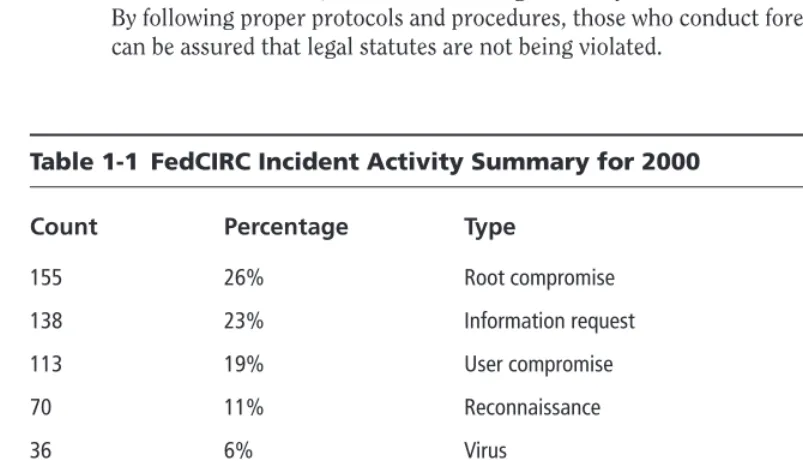
The nearly unrelenting stream of security-related incidents has affected millions of computer sys-tems and networks throughout the world and shows little sign of letting up. Table 1-1 shows a list of incidents that were reported to the Federal Computer Incident Response Center (FedCIRC) for the calendar year 2000. While incident response varies in approach depending upon each circum-stance, the goals in all cases are predominantly the same.
In nearly every case, the focus is severalfold:
✓ Recover quickly and efficiently from the security incident.
✓ Minimize the impact caused by loss or theft of information (classified or unclassified) or by the disruption of critical computing services when an incident has occurred. ✓ Respond systematically, following proven procedures that will dramatically decrease the
likelihood of reoccurrence.
✓ Balance operational and security requirements while remaining within a budgetary constraint.
[image:29.639.72.474.392.622.2]✓ Deal with legal issues in an efficient manner. A plethora of legal issues surrounds the computer security arena. For example, the U.S. Department of Justice (as well as some federal and state laws) has declared it illegal to carry out certain monitoring techniques. By following proper protocols and procedures, those who conduct forensic examinations can be assured that legal statutes are not being violated.
Table 1-1 FedCIRC Incident Activity Summary for 2000
Count Percentage Type
155 26% Root compromise
138 23% Information request
113 19% User compromise
70 11% Reconnaissance
36 6% Virus
35 5% Denial of service
24 4% Misuse of resources
24 4% False alarm
9 1% Unknown
7 1% Deception
It is the general consensus among computer security experts that the vast majority of puter crimes are neither detected nor reported. To a certain extent, this is because many com-puter crimes are not overtly obvious. To use a simple analogy, when an item (especially an important one) is stolen, the owner readily detects this because the item is missing. However, if a hacker steals computer data by copying it, the original data remains, and is still accessible to the owner. There is a variety of ways incidents can occur and various manners in which they impact an organization.
Some common types of computer incidents include the following:
✓ Employee misuse of systems (for example, violations of Internet use policies) ✓ Malicious code (for example, viruses, worms, or Trojan horse programs) ✓ Intrusions or hacking
✓ Unauthorized electronic monitoring (sniffers, keyloggers, and so on) ✓ Web site defacement or vandalism
✓ Unauthorized access to confidential information ✓ Automated scanning tools and probes
✓ Insider sabotage (via espionage or disgruntled employees)
Unfortunately, there are no blanket solutions to prevent incidents from occurring, and the lim-ited solutions that do exist are expensive and require an enormous amount of an organization’s resources. The option of using weak incident response methods (or no methods at all) is, however, even more expensive and only compounds the damage that incidents cause. What’s required is a long-term commitment to systematically prevent and respond to security incidents instead of just making short-term fixes for selected problems. Experience shows that most organizations do not think about how they will respond to a computer security incident until after they’ve been signif-icantly victimized by one. They have not assessed (nor anticipated) the business risk of not having in place formal incident-detection and response mechanisms.
When it is not known that an intrusion (or an intrusion attempt) has occurred, it is difficult, sometimes impossible, to determine later that your systems have been compromised. If the infor-mation necessary to detect an intrusion is not being collected and reviewed, the organization can-not determine what sensitive data, systems, and networks are being attacked and what breaches in confidentiality, integrity, or availability have occurred. As a result of an inadequate ability to detect the signs of intrusion, the following may occur:
✓ You will not be able to detect such signs in a timely manner due to the absence of neces-sary warning mechanisms and review procedures.
✓ You will not be able to determine the full extent of an intrusion and the damage it has caused. You will also be unable to tell whether you have completely removed the pres-ence of the intruder from your systems and networks. This will significantly impede, and even increase, your recovery time.
✓ Your organization may be subjected to legal action. Intruders can make use of systems they have compromised to launch attacks against other systems. If one of your systems is used in this fashion, you may be held liable for not exercising adequate due care with respect to security.
✓ Your organization may experience a tarnishing blow to its reputation. ✓ Your organization may suffer lost business opportunities.
Recognizing the signs of an incident while it is occurring is paramount to mitigating loss. Some signs that an incident has occurred are obvious. For example, a worker fails to scan a ques-tionable e-mail attachment for the presence of malicious code and, after opening an attachment, finds that his or her computer is no longer operating properly. In this example of a malicious code incident, it can be inferred that the e-mail attachment contained some sort of malicious code or script, which affected an application or operating system.
Other incidents, such as network intrusions, are often harder to detect. Hackers are always seeking novel ways to infiltrate networked computer systems. They may attempt to breach a net-work’s defenses from remote locations. In some cases, intruders resort to extreme measures, including attempts to physically infiltrate an organization to access information resources. Hackers often seek out vulnerabilities in the form of outdated or unpatched software.
Newly discovered vulnerabilities in operating systems, network services, and protocols are prime targets, and hackers usually take advantage of both. Intrusions and their resultant damage can be accomplished within seconds due to the development of powerful and sophisticated pro-grams. Freely available at underground hacker Web sites, hackers use these powerful programs to crack passwords, bypass firewalls, and rapidly penetrate systems. The common approach to detect-ing intrusions is as follows:
✓ Observe your systems for unexpected behavior or anything suspicious. ✓ Investigate anything you consider to be unusual.
✓ If your investigation finds something that isn’t explained by authorized activity, immedi-ately initiate your intrusion response procedures (response procedures are covered later in this chapter).
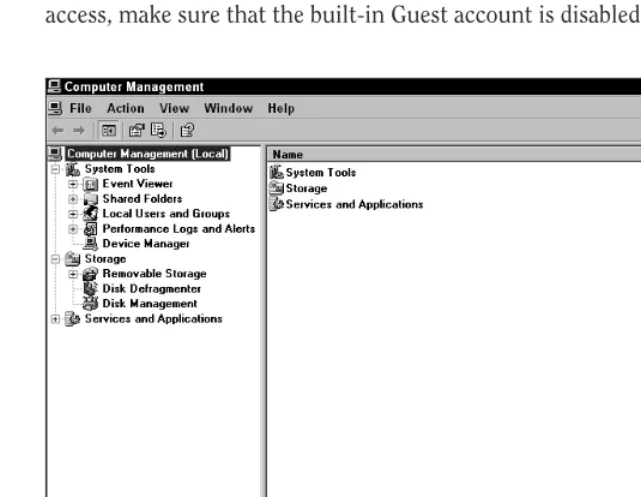
✓ Look for unusual or unauthorized user accounts or groups.There are several ways to do this. You can use the User Manager tool in Windows NT or the Computer Management tool in Windows XP (see Figure 1-1) or the net user, net group, and net localgroup
[image:32.639.91.412.142.390.2]commands at the command line (DOS prompt). If the system does not require guest access, make sure that the built-in Guest account is disabled.
Figure 1-1:The Computer Management utility under Windows XP Professional
Disabling the Guest Account in Windows XP
To disable the guest account in Windows XP, follow these steps:
1. Click on the Start button.
2. From the pop-up menu, select the Control Panel option. This opens the Control Panel window.
3. In the Control Panel window, select User Accounts.
4. In the User Accounts window, select the “Change an account” option, or click on the Guest Account icon (if available) at the bottom of the User Accounts window.
✓ Using the computer management tool, check all groups for invalid user membership.In Windows NT, 2000, and XP, several of the default groups give unique privileges to the members of those groups. For example, while members of the Network Configuration Operators have limited administrative privileges to manage configuration of networking features, members of the Administrators group have the power to alter nearly any facet of the operating system.
Besides the aforementioned built-in Windows management tool, another useful freeware audit-ing utility is DumpSec by SomarSoft. This security auditaudit-ing program for Windows NT dumps the permissions (DACLs) and audit settings (SACLs) for the file system, Registry, printers, and shares in a concise and easy-to-read format making any holes in system security more readily apparent. For additional information or to download a copy of DumpSec visit www.somarasoft.com.
✓ Check log files for connections from unusual locations or for any unusual activity. All versions of Windows NT have a built-in Event Viewer that allows you to check for unusual logon entries, failures of services, or abnormal system restarts. Keep in mind that if your firewall, Web server, or router writes logs to a different location than the compromised system; you need to examine these logs as well.
Configuring and examining log files are covered in detail in Chapter 3.
✓ Search for invalid user rights.To examine user rights use the User Manager tool under Policies→User Rights. There are more than two-dozen rights that can be assigned to users or groups. Normally the default configuration for these rights is secure. ✓ Check to see if unauthorized applications are running.There are several approaches
hackers can take to start a backdoor program, therefore you may need to take one or more of the following precautions:
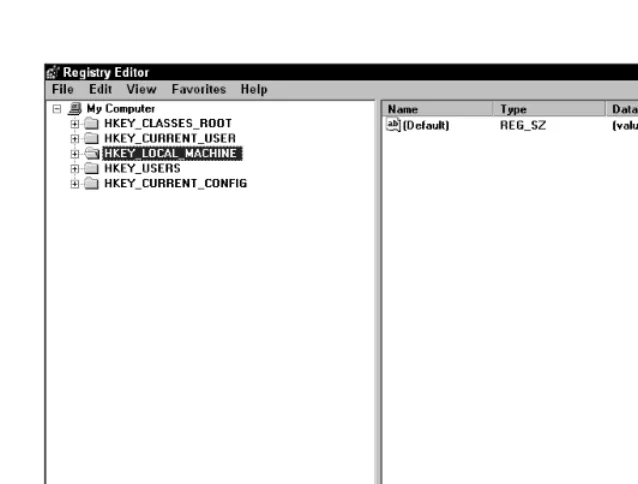
■ Examine the Windows Registry.All versions of Windows come with a built-in Registry Editor (see Figure 1-2) that can be easily accessed by typing regeditat the command prompt. Several of the most common locations from which applications start
through the Registry are illustrated in Table 1-2.
Registry structure is covered in detail in Chapter 4.
x-r
ef
x-r
ef
tip
■ Look for invalid services.Some backdoor programs install themselves as a service that automatically starts when Windows first loads. Services can then run as any user with the Logon as Service user right. Check services that are started automatically and be sure that they are indispensable. The services executable file should also be scanned with an antivirus program to ensure that it has not been replaced with a Trojan horse or backdoor program. Logon rights control how security personnel are allowed access to the computer. These rights apply whether the access is from a key-board or as a service that is activated when Windows loads. For each logon method, there exist two logon rights; one to permit logging on to the computer and another to deny logging on to the computer.
Backdoor programs allow hackers to access your computer while it is connected to the Internet. They can steal passwords, log keystrokes, and even crash your computer. The intruder first must trick a user into running the program on the user’s computer. This is usually accomplished by sending the file by e-mail message or via an instant messaging service.
caution
What’s Running on the System?
To observe which services are running on your Windows XP system, do the following:
1. From the Start menu, select Control Panel→Performance and Maintenance. 2. In the Performance and Maintenance window, select Administrative Tools.
3. Several icons appear; double-click Component Services.
4. Select Services Local from the drop-down list in the left pane. If you attempt to access Services too soon, you might encounter the message “Service Database is locked.” This message means that some services are still loading or initializ-ing in the background, so you can’t get to the list of services just yet. If you wait a few seconds, you’ll be able to bring up the dialog box.
In older versions of Windows NT there is another way to open this list:
1. From the Start menu, select Programs→Administrative Tools→Server Manager. 2. From Server Manager, select your computer, and then select the Computer→
Services menu item.
■ Monitor system startup folders.You can examine all the shortcuts by selecting Start→Programs→Startup. There are two different startup folders, one for the local user and one for all users. When a user logs on, all of the applications in both the All Users folder and in the user’s startup folder are started. Because of this it is important to check allof the startup folders for suspicious applications.
Figure 1-2:The Windows Registry Editor
Table 1-2 Common Program Startup Locations
HKEY_LOCAL_MACHINE\System\CurrentControlSet\Control\Session Manager\KnownDLLs
HKEY_LOCAL_MACHINE\System\ControlSet001\Control\Session Manager\KnownDLLs
HKEY_LOCAL_MACHINE\Software\Microsoft\Windows\Current Version\Run
HKEY_LOCAL_MACHINE\Software\Microsoft\Windows\Current Version\RunOnce
HKEY_LOCAL_MACHINE\Software\Microsoft\Windows\Current Version\RunOnceEx
HKEY_LOCAL_MACHINE\Software\Microsoft\Windows\CurrentVersion\RunServices
HKEY_LOCAL_MACHINE\Software\Microsoft\Windows NT\CurrentVersion\Windows (“run=” line)
Continued
Table 1-2 Common Program Startup Locations (Continued)
HKEY_CURRENT_USER\Software\Microsoft\Windows\Current Version\Run
HKEY_CURRENT_USER\Software\Microsoft\Windows\Current Version\RunOnce
HKEY_CURRENT_USER\Software\Microsoft\Windows\Current Version\RunOnceEx
HKEY_CURRENT_USER\Software\Microsoft\Windows\CurrentVersion\RunServices
HKEY_CURRENT_USER\Software\Microsoft\Windows NT\CurrentVersion\Windows (“run=” value)
[image:36.639.59.374.357.593.2]RegCleaner (see Figure 1-3), written by Jouni Vuorio, is a freeware program for Windows that is very useful in gathering important information about programs automatically launched at startup from the Windows Registry. If unwanted applications or services are present, this pro-gram also allows you to delete the appropriate Registry entry. Keep in mind that altering the Registry can be tricky. Deleting the wrong entry can render an application or the operating sys-tem unstable or inoperable. RegCleaner can be found at www.vtoy.fi/jv16/index .shtml.
Figure 1-3:RegCleaner by Jouni Vuorio
✓ Inspect network configurations for unauthorized entries.Look for invalid entries for set-tings like WINS, DNS, IP forwarding, and so on. These setset-tings can be checked using the Network Properties tool or by using the ipconfig /allcommand at the command (DOS) prompt.
✓ Check your systems program files for alterations.Compare the versions on your systems with copies that you know have not been altered, such as those from your original installation media. Be cautious of trusting backups; they too may contain Trojan horses. ✓ Check for unusual ports listening for connections from other hosts by using the
net-stat -ancommand at the command prompt.Powerful third-party port-scanning pro-grams like SuperScan by Foundstone, Inc. can also be used to scan for open or active TCP/UDP ports. SuperScan (see Figure 1-4) is a freeware program that can be found at
www.webattack.com.
[image:37.639.73.383.322.561.2]For a comprehensive list of ports, see Appendix B.
Figure 1-4:SuperScan by Foundstone, Inc. can scan for open or active TCP/UDP ports.
x-r
ef
Trojan horse programs are often engineered to mimic the same file size as the legitimate pro-gram they replace. As a result, just checking file properties and time-stamps associated with the applications is not sufficient for determining whether or not the legitimate programs have been replaced by a Trojan horse. A better alternative is to use Tripwire.
Tripwire is a Unix-based file-system-integrity-checking program that ensures the integrity of crit-ical system files and directories by identifying all changes made to them. By using Tripwire for intrusion detection and damage assessment, you will be able to keep track of system changes which in turn can speed up the recovery from a system compromise by reducing the number of files you must restore to repair the system.
Using antivirus software aids in the detection of computer viruses, backdoor programs, and Trojan horse programs. However, bear in mind that since malicious programs are being created continuously, it is important to always keep your antivirus software up to date.
Preparing for Incidents
Prior to the early 1990s, threats to computer security (besides human errors) were mainly physi-cal and environmental, consisting of physiphysi-cal damage and insider attacks, such as fire, water, or theft. These types of threats are understood fundamentally and are easily controlled through the use of traditional methods and contingency planning. Today, a new category of computer security threats has become equally as important to understand and control. These threats include trans-gressions by unauthorized intruders and users who exploit system vulnerabilities, computer viruses, worms, and Trojan horses. Several factors have contributed to the growing presence of these threats, such as the following:
✓ Society’s increased reliance on computers.Today, nearly every organization, both public and private, relies on computers and networks for communication. Because of this increased reliance, many agencies would suffer great losses to productivity should their systems become unavailable. Due to system complexity, reliance on computer systems often presents unanticipated risks and vulnerabilities.
✓ Malicious code.Computer viruses, Internet mail worms, and Trojan horses in particular, continue to wreak havoc in personal computer security. As bad as this problem is at pre-sent, malicious code difficulties will only get worse. This is primarily a result of the pro-liferation of personal computers (with minimal built-in security controls), LANs, and a blatant disregard for safe computing practices. The number of variants and copycats of viruses has also increased and shows no signs of abating.
✓ Wide area networks (WANs).The use of WANs, linking governments, businesses, and educational institutions, continues to grow. An efficient response to a computer security incident is important for agencies linked via large networks such as an intranet or the Internet. Because of their interconnectivity, a compromise of one computer can affect
other systems that are connected to the network but are located in different organiza-tions, resulting in possible legal or financial ramifications. Incident response teams are aware that intruder attempts to penetrate systems occur daily at numerous sites through-out the United States, yet many organizations remain unaware that their systems have been penetrated or have been used as springboards for attacks on other systems.
✓ Reduced barriers to hacking.Computing power is readily available, as is broadband con-nectivity. Hackers can download tools readily from the Internet, so relatively unskilled attackers can launch very sophisticated attacks.
Today, being prepared to handle a computer security incident has become a top priority for most system administrators. As businesses increase their online presence and their dependency on information systems’ assets, the number of computer incidents also rises. These organizations are finally recognizing their need to adapt their security positions accordingly. This is accom-plished in three stages.
First, organizations must develop and implement security plans and controls in a proactive effort. Second, they must work to ensure that their plans and controls are effective by continually reviewing and modifying them to guarantee that appropriate security is always in place. Finally, when controls are bypassed, either intentionally or unintentionally, organizations must be pre-pared to act quickly and effectively to minimize the impact of these lapses.
The prime objective of these security measures is to prevent an operational security problem from becoming a business problem that impacts revenue. Administrators and other users can obtain guidelines in this book to preplan a response to incidents and minimize any negative impact to a business. Waiting until an incident has occurred is naturally too late to begin planning how to address such an event. Incident response planning requires maintaining both administra-tive and technical roles. Each party must be familiar with the other’s role, responsibilities, and capabilities.
Many computer security programs are not effective in dealing with newer and less-understood classes of threats to security. Traditional responses, such as risk analysis, contingency planning, and computer security reviews, have not been adequate in controlling incidents and preventing large-scale damage. Anecdotes abound wherein security incidents grow worse or where they have not been eradicated from a system. Consequently, some organizations spend far too much time reacting to recurring incidents, sacrificing convenience and productivity. Fearing unknown threats, some institutions have misguidedly restricted access to their systems and networks. What is needed instead therefore is a fundamentally different form of computer security response, a response that is able to quickly detect and react to incidents in a manner that is both efficient and cost-effective.
A business should always make the effort to eradicate a security incident from the system imme-diately. For example, when companies fail to patch their e-mail programs for known and publi-cized flaws, they may get hit with a copycat virus that exploits the exact same flaw.
caution
Having a computer security incident response capability means that an organization is pre-pared to detect and counter computer security incidents in a skilled and efficient manner. Such a capability is a combination of technically skilled people, policies, and techniques with the aim of constituting a proactive approach to handling computer security incidents. Having an incident response capability with traditional computer security elements can provide organization-wide protection from damaging incidents, saving the organization valuable resources and permitting it to take better advantage of the latest computer technology. Many businesses, organizations, and government agencies have implemented incident response capabilities with great success, gener-ally focusing on the following areas:
✓ Efficient response.Efficiency is one of the most important aspects of a computer security incident response capability. Without an efficient capability, incident response is disorga-nized and ineffective, with the organization maintaining higher expenses and leaving vul-nerabilities open and unprotected. For example, uneducated responses to small outbreaks of computer viruses can actually make their effects far worse, resulting in hundreds of computers being infected by the response team itself. A proper computer security inci-dent response capability helps in the management of inciinci-dent response expenses that are otherwise difficult to track, makes risk assessment more accurate, and improves user training and awareness with regard to computer security. Conversely, an inefficient inci-dent response effort can perpetuate existing problems and even exacerbate them. ✓ Centralization.A security incident response capability must utilize centralized means
for reporting and handling incidents. While this undoubtedly increases efficiency, it also permits a more accurate assessment of the incidents, such as whether they are related (in order to more quickly avert possible widespread damage). By virtue of centralization, incident response capability expenses and overhead can be kept down, and duplication of effort can be reduced (possibly eliminated entirely). Organizations may find a significant cost savings as a result.
✓ Improved user awareness.The benefits of an incident response capability include enhanced user awareness of threats and knowledge of appropriate controls. An incident response capability will help an organization identify vulnerabilities and issue computer security alerts. Information regarding security awareness can be disseminated through-out the organization by using a variety of mechanisms such as a company intranet, sem-inars, and training workshops. Such information greatly improves the users’ ability to manage their systems efficiently and securely.
Developing a Computer Security
Incident Response Capability
personnel with the requisite technical skills. The following are additional necessary features for a computer security incident response capability:
✓ Structure.There is no single structure for a computer security incident response capa-bility. Depending on the organization’s needs, this capability can take many forms. While centralization often presents the most cost-effective structure, some organizations find that a more widely distributed structure, despite some inevitable overlap, fits in best with existing structures. Very small organizations may find it practical to share an inci-dent response capability with a larger organization. Hence, an inciinci-dent response capabil-ity structure will vary depending on a variety of factors. Centralized reporting and centralization of effort, however, generally helps decrease operating costs and improve efficiency and security.
✓ Alert mechanisms.The incident response capability should include the capacity to quickly reach all users by sending an alert to a central mailing list, or, alternatively, tele-phone voice mail, messages via pagers or memorandums, or management contact lists. ✓ Centralized reporting.Effective incident response depends upon an organization’s ability
to quickly and conveniently communicate. Effective communications mechanisms include a central telephone hotline monitored on a 24-hour basis, a central e-mail messaging address, or a pager/cell phone arrangement. Users are more inclined to contact their com-puter security incident response personnel if the organization has made the communica-tion straightforward (for example, users only have to remember one telephone number). ✓ Personnel.The organization should create a group of individuals that are responsible for
handling incidents: a computer incident response team. Computer security incident response personnel must diagnose and/or understand technical problems, thus technical knowledge is a primary requirement for team members. Superior communications skills are equally important. Computer security incidents can generate emotionally charged situations; a skilled communicator must know how to resolve technical problems with-out fueling negative emotions or further complicating the situation. In addition, inci-dent response personnel may spend much of their time communicating with affected users and managers, either directly or by preparing alert information, bulletins, and other guidance materials. It may be difficult, yet imperative, to find personnel who have the correct mix of technical, communications, and social skills.
The Computer Security Incident
Response Team
personnel will impact (and potentially compromise) the security efforts of the rest of the organi-zation as well as its customers.
To develop a complete incident response capability, all organizations need an incident response team. In the event of suspected computer crime or violations of user policies, the team should be engaged. Beforehand, the team should have written procedures for incident response, including what conditions warrant calling in local and/or federal law enforcement authorities. For example, inside violations of user policies may result in administrative actions such as employee suspen-sion or termination of employment, while other, more serious computer crimes may warrant that law enforcement be contacted.
In either case, the incident response team must protect evidence. For policy violations and administrative actions, the following procedures may be sufficient. However, for more serious computer crimes, law enforcement authorities may instruct the incident team to wait for their arrival before taking action.
The actions required for securing a suspected computer incident scene include
✓ Securing the scene
✓ Documenting and labeling evidence ✓ Transporting the evidence
✓ Shutting down the computer(s)
The Incident Reporting Process
As mentioned earlier in this chapter, all organizations need to establish and implement an inter-nal incident response capability. Intrusions are only one form of computer security incident. Remember, a computer security incident is any adverse event wherein some aspect of a computer system is threatened. This could include loss of data confidentiality, disruption of data integrity, and disruption or denial of service. The types of incidents are classified into low, medium, or high levels depending on their severity.
Low-level incidents are the least severe and should be resolved within one working day after the event occurs. These include
✓ Loss of passwords
✓ Suspected unauthorized sharing of accounts ✓ Misuse of computer hardware
✓ Unintentional computer actions ✓ Unsuccessful scans or probes