From the authors
Your W
eb Applica
tions
™
1 YEAR UPGRADE
BUYER PROTECTION PLAN
Your W
eb Applica
tions
From the authors
Jeff ForristalJulie Traxler Technical Editor
The Only Way to Stop a Hacker Is to Think Like One
• Step-by-Step Instructions for Developing Secure Web Applications
• Hundreds of Tools & Traps and Damage & Defense Sidebars
and Security Alerts!
s o l u t i o n s @ s y n g r e s s . c o m
With more than 1,500,000 copies of our MCSE, MCSD, CompTIA, and Cisco study guides in print, we continue to look for ways we can better serve the information needs of our readers. One way we do that is by listening.
Readers like yourself have been telling us they want an Internet-based ser-vice that would extend and enhance the value of our books. Based on reader feedback and our own strategic plan, we have created a Web site that we hope will exceed your expectations.
[email protected] is an interactive treasure trove of useful
infor-mation focusing on our book topics and related technologies. The site offers the following features:
■ One-year warranty against content obsolescence due to vendor
product upgrades. You can access online updates for any affected chapters.
■ “Ask the Author”™ customer query forms that enable you to post
questions to our authors and editors.
■ Exclusive monthly mailings in which our experts provide answers to
reader queries and clear explanations of complex material.
■ Regularly updated links to sites specially selected by our editors for
readers desiring additional reliable information on key topics.
Best of all, the book you’re now holding is your key to this amazing site. Just go to www.syngress.com/solutions, and keep this book handy when you register to verify your purchase.
Thank you for giving us the opportunity to serve your needs. And be sure to let us know if there’s anything else we can do to help you get the max-imum value from your investment. We’re listening.
The Only Way to Stop a Hacker Is to Think Like One
Your W
eb Applica
tions
™
1 YEAR UPGRADE
BUYER PROTECTION PLAN
Your W
eb Applica
Syngress Publishing, Inc., the author(s), and any person or firm involved in the writing, editing, or production (collectively “Makers”) of this book (“the Work”) do not guarantee or warrant the results to be obtained from the Work.
There is no guarantee of any kind, expressed or implied, regarding the Work or its contents.The Work is sold AS IS and WITHOUT WARRANTY.You may have other legal rights, which vary from state to state. In no event will Makers be liable to you for damages, including any loss of profits, lost savings, or other inci-dental or consequential damages arising out from the Work or its contents. Because some states do not allow the exclusion or limitation of liability for consequential or incidental damages, the above limitation may not apply to you.
You should always use reasonable case, including backup and other appropriate precautions, when working with computers, networks, data, and files.
Syngress Media®, Syngress®, and “Career Advancement Through Skill Enhancement®,”are registered trademarks of Syngress Media, Inc. “Ask the Author™,”“Ask the Author UPDATE™,”“Mission Critical™,” and “Hack Proofing™” are trademarks of Syngress Publishing, Inc. Brands and product names mentioned in this book are trademarks or service marks of their respective companies.
KEY SERIAL NUMBER
001 BN837R45G 002 AP9EEF4574 003 ZPHGJ264G8 004 BNJ3RG22TS 005 356YH8LLQ2 006 CF4H6J8MMX 007 22D56G7KM6 008 6B8MDD4G6Z 009 L9MNG542FR 010 BY45MQ98WA PUBLISHED BY Syngress Publishing, Inc. 800 Hingham Street Rockland, MA 02370
Hack Proofing Your Web Applications
Copyright © 2001 by Syngress Publishing, Inc. All rights reserved. Printed in the United States of America. Except as permitted under the Copyright Act of 1976, no part of this publication may be reproduced or dis-tributed in any form or by any means, or stored in a database or retrieval system, without the prior written permission of the publisher, with the exception that the program listings may be entered, stored, and executed in a computer system, but they may not be reproduced for publication.
Printed in the United States of America 1 2 3 4 5 6 7 8 9 0
ISBN: 1-928994-31-8
Technical edit by: Julie Traxler Freelance Editorial Manager: Maribeth Corona-Evans Technical review by: Robert Hansen and Kevin Ziese Copy edit by: Darren Meiss and Beth A. Roberts Co-Publisher: Richard Kristof Index by: Jennifer Coker
Developmental Editor: Kate Glennon Page Layout and Art by: Shannon Tozier Acquisitions Editor: Catherine B. Nolan Cover Design by: Michael Kavish
v
Acknowledgments
v
We would like to acknowledge the following people for their kindness and support in making this book possible.
Richard Kristof and Duncan Anderson of Global Knowledge, for their generous access to the IT industry’s best courses, instructors and training facilities.
Ralph Troupe, Rhonda St. John, and the team at Callisma for their invaluable insight into the challenges of designing, deploying and supporting world-class enterprise networks.
Karen Cross, Lance Tilford, Meaghan Cunningham, Kim Wylie, Harry Kirchner, Bill Richter, Kevin Votel, and Brittin Clark of Publishers Group West for sharing their incredible marketing experience and expertise.
Mary Ging, Caroline Hird, Simon Beale, Caroline Wheeler,Victoria Fuller, Jonathan Bunkell, and Klaus Beran of Harcourt International for making certain that our vision remains worldwide in scope.
Anneke Baeten, Annabel Dent, and Laurie Giles of Harcourt Australia for all their help.
David Buckland,Wendi Wong, Daniel Loh, Marie Chieng, Lucy Chong, Leslie Lim, Audrey Gan, and Joseph Chan of Transquest Publishers for the enthusiasm with which they receive our books.
Kwon Sung June at Acorn Publishing for his support.
Ethan Atkin at Cranbury International for his help in expanding the Syngress program.
vii
Contributors
Chris Broomes(MCSE, MCT, MCP+I, CCNA) is a Senior Network Analyst at DevonIT (www.devonitnet.com), a leading net-working services provider specializing in network security and VPN solutions. Chris has worked in the IT industry for over eight years and has a wide range of technical experience. Chris is Founder and
President of Infinite Solutions Group Inc. (www.infinitesols.com), a network consulting firm located in Lansdowne, PA that specializes in network design, integration, security services, technical writing, and training. Chris is currently pursuing the CCDA and CCNP certifica-tions while mastering the workings of Cisco and Netscreen VPN and security devices.
Jeff Forristalis the Lead Security Developer for Neohapsis, a
Chicago-based security solution/consulting firm. Apart from assisting in network security assessments and application security reviews (including source code review), Jeff is the driving force behind
Security Alert Consensus, a joint security alert newsletter published on a weekly basis by Neohapsis, Network Computing, and the SANS Institute.
Drew Simonis(CCNA) is a Security Consultant for Fiderus
viii
national insurance company. Drew helps customers of his current employer with network and application security assessments as well as assisting in ongoing development efforts. Drew is a member of
MENSA and holds several industry certifications, including IBM Certified Specialist, AIX 4.3 System Administration, AIX 4.3 Communications, Sun Microsystems Certified Solaris System Administrator, Sun Microsystems Certified Solaris Network Administrator, Checkpoint Certified Security Administrator, and Checkpoint Certified Security Engineer. He resides in Tampa, FL.
Brian Bagnall(Sun Certified Java Programmer and Developer) is co-author of the Sun Certified Programmer for Java 2 Study Guide. He is cur-rently the lead programmer at IdleWorks, a company located in
Western Canada. IdleWorks develops distributed processing solutions for large and medium-sized businesses with supercomputing needs. His background includes working for IBM developing client-side applica-tions. Brian is also a key programmer of Lejos, a Java software develop-ment kit for Lego Mindstorms. Brian would like to thank his family for their support, and especially his father Herb.
Michael Dinowitzhosts CF-Talk, the high-volume ColdFusion mailing list, out of House of Fusion.Com. He publishes and writes articles for the Fusion Authority Weekly News Alert (www.fusionau-thority.com/alert). Michael is the author of Fusebox: Methodology and Techniques (ColdFusion Edition) and is the co-author of the best-selling ColdFusion Web Application Construction Kit.Whether it’s researching the lowest levels of ColdFusion functionality or presenting to an audience, Michael’s passion for the language is clear. Outside of Allaire, there are few evangelists as dedicated to the spread of the lan-guage and the strengthening of the community.
ix
Administration (NASA). His extracurricular activities include main-taining Treachery.Net and serving as one of the founding staff mem-bers of Attrition.Org.
Joe Dulay(MCSD) is the Vice-President of Technology for the IT Age Corporation. IT Age Corporation is a project management and soft-ware development firm specializing in customer-oriented business enterprise and e-commerce solutions located in Atlanta, GA. His cur-rent responsibilities include managing the IT department, heading the technology steering committee, software architecture, e-commerce product management, and refining development processes and method-ologies.Though most of his responsibilities lay in the role of manager and architect, he is still an active participant of the research and devel-opment team. Joe holds a bachelor’s degree from the University of Wisconsin in computer science. His background includes positions as a Senior Developer at Siemens Energy and Automation, and as an inde-pendent contractor specializing in e-commerce development. Joe would like to thank his family for always being there to help him.
Michael Cross(MCSE, MCPS, MCP+I, CNA) is a Microsoft Certified System Engineer, Microsoft Certified Product Specialist, Microsoft Certified Professional + Internet, and a Certified Novell Administrator. Michael is the Network Administrator, Internet
Specialist, and a Programmer for the Niagara Regional Police Service. He is responsible for network security and administration, program-ming applications, and Webmaster of their Web site at www.nrps.com. He has consulted and assisted in computer-related/Internet criminal cases and is part of an Information Technology team that provides sup-port to a user base of over 800 civilian and uniform users.
x
in books and anthologies. Michael currently resides in St. Catharines, Ontario, Canada with his lovely fiancée Jennifer.
Edgar Danielyan(CCNA) is currently self-employed. Edgar has a diploma in company law from the British Institute of Legal Executives and is a certified paralegal from the University of Southern Colorado. He has been working as a Network Administrator and Manager of a top-level domain of Armenia. He has also worked for the United Nations, the Ministry of Defense, a national telco, a bank, and has been a partner in a law firm. He speaks four languages, likes good tea, and is a member of ACM, IEEE CS, USENIX, CIPS, ISOC, and IPG.
David G. Scarbroughis a Senior Developer with Education Networks of America where he is a lead member of the ColdFusion development team. He specializes in developing e-commerce sites. David has ColdFusion 4.5 Master Certification and is also experienced with HTML, JavaScript, PHP,Visual Basic, ActiveX, Flash 4.0, and SQL Server 7. He has also held positions as a Programmer and Computer Scientist. David graduated from Troy State University on Montgomery, AL with a bachelor of science in computer science. He lives in
xi
Julie Traxler is a Senior Software Tester for an Internet software com-pany. Julie has also worked for DecisionOne, EXE Technologies, and TV Guide in positions that include Project Manager, Business Analyst, and Technical Writer. As a systems analyst and designer, Julie establishes quality assurance procedures, builds QA teams, and implements testing processes.The testing plans she has developed include testing for func-tionality, usability, requirements, acceptance, release, regression, security, integrity, and performance.
Kevin Ziese is a Computer Scientist at Cisco Systems, Inc. Prior to joining Cisco he was a Senior Scientist and Founder of the
Wheelgroup Corporation, which was acquired by Cisco Systems in April of 1998. Prior to starting the Wheelgroup Corporation,
he was Chief of the Advanced Countermeasures Cell at the Air Force Information Warfare Center.
Robert Hansenis a self-taught computer expert residing in Northern California. Robert, known formerly as RSnake and currently as
RSenic, has been heavily involved in the hacking and security scene since the mid 1990s and continues to work closely with black and white hats alike. Robert has worked for a major banner advertising company as an Information Specialist and for several start-up compa-nies as Chief Operations Officer and Chief Security Officer. He has
Technical Editor and Contributor
xii
Contents
Foreword xxv
Chapter 1 Hacking Methodology 1
Introduction 2
Understanding the Terms 3
A Brief History of Hacking 4
Phone System Hacking 5
Computer Hacking 6
What Motivates a Hacker? 9
Ethical Hacking versus Malicious Hacking 10 Working with Security Professionals 11
Associated Risks with Hiring a Security
Professional 12
Understanding Current Attack Types 13 DoS/DDoS 13
Virus Hacking 16
Trojan Horses 18
Worms 21
Rogue Applets 22
Stealing 23
Credit Card Theft 24
Theft of Identity 26
Information Piracy 27
Recognizing Web Application Security Threats 28
Hidden Manipulation 29
Parameter Tampering 29
Cross-Site Scripting 29
Buffer Overflow 30
Cookie Poisoning 31
Understand how rogue applets can transmit bad code:
Preventing Break-Ins by Thinking Like a Hacker 31 Summary 35
Solutions Fast Track 36
Frequently Asked Questions 40
Chapter 2 How to Avoid Becoming
a “Code Grinder” 43
Introduction 44
What Is a Code Grinder? 45
Following the Rules 49
Thinking Creatively When Coding 50
Allowing for Thought 53
Modular Programming Done Correctly 53 Security from the Perspective of a Code Grinder 56
Coding in a Vacuum 58
Building Functional and Secure Web Applications 59
But My Code Is Functional! 66
There Is More to an Application than
Functionality 68 Let’s Make It Secure and Functional 71 Summary 76
Solutions Fast Track 77
Frequently Asked Questions 78
Chapter 3 Understanding the Risks
Associated with Mobile Code 81
Introduction 82 Recognizing the Impact of Mobile Code Attacks 83
Browser Attacks 83
Mail Client Attacks 84
Malicious Scripts or Macros 85
Identifying Common Forms of Mobile Code 86 Macro Languages:Visual Basic for
Applications (VBA) 87
Security Problems with VBA 89
Protecting against VBA Viruses 92 JavaScript 93 JavaScript Security Overview 94
Thinking Creatively When Coding
■ Be aware of outside
influences on your code, expect the unexpected!
■ Look for ways to
minimize your code; keep the functionality in as small a core as possible.
■ Review, review, review!
Security Problems 95
Exploiting Plug-In Commands 96
Web-Based E-Mail Attacks 96
Social Engineering 97
Lowering JavaScript Security Risks 97 VBScript 98
VBScript Security Overview 98
VBScript Security Problems 99
VBScript Security Precautions 101
Java Applets 101
Granting Additional Access to Applets 102 Security Problems with Java 103
Java Security Precautions 104
ActiveX Controls 105
ActiveX Security Overview 105
Security Problems with ActiveX 107 E-Mail Attachments and Downloaded
Executables 110
Back Orifice 2000 Trojan 111
Protecting Your System from Mobile Code
Attacks 115
Security Applications 115
ActiveX Manager 115
Back Orifice Detectors 115
Firewall Software 119
Web-Based Tools 119
Identifying Bad ActiveX Controls 119
Client Security Updates 120
Summary 121
Solutions Fast Track 122
Frequently Asked Questions 123
Chapter 4 Vulnerable CGI Scripts 125
Introduction 126 What Is a CGI Script, and What Does It Do? 127
Typical Uses of CGI Scripts 129
When Should You Use CGI? 135
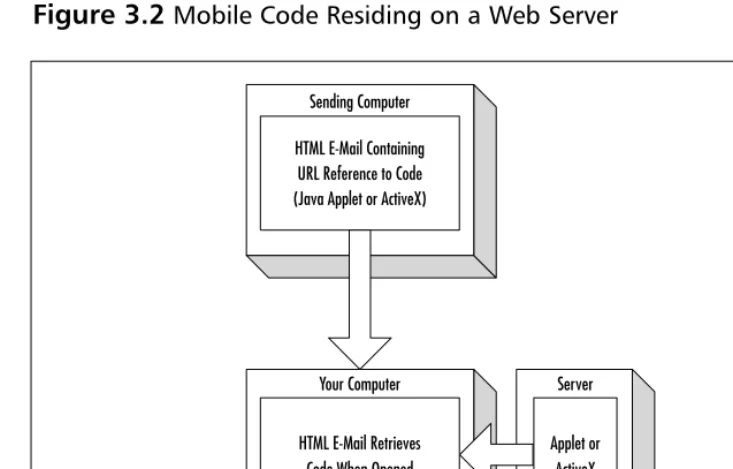
Understand how mobile code works for Java applets and ActiveX controls:
Mobile Code Residing on a Web Server
Sending Computer
HTML E-Mail Containing URL Reference to Code (Java Applet or ActiveX)
HTML E-Mail Retrieves Code When Opened
Server
CGI Script Hosting Issues 136 Break-Ins Resulting from Weak CGI Scripts 137 How to Write “Tighter” CGI Scripts 139
Searchable Index Commands 143
CGI Wrappers 144
Whisker 145 Languages for Writing CGI Scripts 149
Unix Shell 150
Perl 151 C/C++ 151
Visual Basic 152
Advantages of Using CGI Scripts 153
Rules for Writing Secure CGI Scripts 153
Storing CGI Scripts 157
Summary 161
Solutions Fast Track 161
Frequently Asked Questions 165
Chapter 5 Hacking Techniques and Tools 167
Introduction 168
A Hacker’s Goals 169
Minimize the Warning Signs 170
Maximize the Access 172
Damage, Damage, Damage 175
Turning the Tables 177
The Five Phases of Hacking 178
Creating an Attack Map 179
Building an Execution Plan 182
Establishing a Point of Entry 183
Continued and Further Access 184
The Attack 186
Social Engineering 188
Sensitive Information 188
E-Mail or Messaging Services 189
Telephones and Documents 191
Credentials 193 The Intentional “Back Door” Attack 195
Tools & Traps…Beware of User Input
Hard-Coding a Back Door Password 195 Exploiting Inherent Weaknesses in Code or
Programming Environments 198
The Tools of the Trade 199
Hex Editors 199
Debuggers 201 Disassemblers 202
Windows-Based Tools 202
Quick View 204
DOS-Based Tools 204
Summary 206
Solutions Fast Track 207
Frequently Asked Questions 211
Chapter 6 Code Auditing and
Reverse Engineering 215
Introduction 216 How to Efficiently Trace through a Program 216 Auditing and Reviewing Selected Programming
Languages 220
Reviewing Java 220
Reviewing Java Server Pages 221
Reviewing Active Server Pages 221 Reviewing Server Side Includes 222
Reviewing Python 222
Reviewing Tool Command Language 222 Reviewing Practical Extraction and
Reporting Language 222
Reviewing PHP: Hypertext Preprocessor 223
Reviewing C/C++ 223
Reviewing ColdFusion 224
Looking for Vulnerabilities 224
Getting the Data from the User 225
Looking for Buffer Overflows 226
The str* Family of Functions 227 The strn* Family of Functions 228 The *scanf Family of Functions 228
Answers All Your Questions About Hacking Techniques
Q: What should I do if I
stumble across a back door in my code base?
A: First and most
importantly, determine that it is a genuine back door. Segments of code often appear to have no authentication aspect and can do some rather powerful things, but nonetheless had proper
authentication
Other Functions Vulnerable to Buffer
Overflows 229 Checking the Output Given to the User 230 Format String Vulnerabilities 230
Cross-Site Scripting 232
Information Disclosure 234
Checking for File System Access/Interaction 235 Checking External Program and Code
Execution 238
Calling External Programs 239
Dynamic Code Execution 240
External Objects/Libraries 241
Checking Structured Query Language
(SQL)/Database Queries 242
Checking Networking and
Communication Streams 245
Pulling It All Together 247
Summary 248
Solutions Fast Track 248
Frequently Asked Questions 250
Chapter 7 Securing Your Java Code 253
Introduction 254 Overview of the Java Security Architecture 255
The Java Security Model 257
The Sandbox 259
Security and Java Applets 260
How Java Handles Security 264
Class Loaders 265
The Applet Class Loader 266
Adding Security to a Custom
Class Loader 266
Byte-Code Verifier 269
Java Protected Domains 275
Java Security Manager 276
Policy Files 277
The SecurityManager Class 284
How to Efficiently Trace through a Program
; Tracing a program’s execution from start to finish is too time-intensive.
; You can save time by instead going directly to problem areas.
; This approach allows you to skip benign application
Potential Weaknesses in Java 285 DoS Attack/Degradation of Service Attacks 285 Third-Party Trojan Horse Attacks 289 Coding Functional but Secure Java Applets 290
Message Digests 291
Digital Signatures 295
Generating a Key Pair 298
Obtaining and Verifying a Signature 301 Authentication 303
X.509 Certificate Format 305
Obtaining Digital Certificates 305 Protecting Security with JAR Signing 311 Encryption 315 Cryptix Installation Instructions 319 Sun Microsystems Recommendations
for Java Security 322
Privileged Code Guidelines 323
Java Code Guidelines 324
C Code Guidelines 325
Summary 326
Solutions Fast Track 327
Frequently Asked Questions 329
Chapter 8 Securing XML 331
Introduction 332
Defining XML 332
Logical Structure 334
Elements 335 Attributes 336
Well-Formed Documents 337
Valid Document 337
XML and XSL/DTD Documents 339
XSL Use of Templates 339
XSL Use of Patterns 340
DTD 344 Schemas 345 Creating Web Applications Using XML 347
Complete coverage of the Java Security Model:
■ Class loaders
■ Byte-code verification ■ Security managers ■ Digital signatures ■ Authentication using
certificates
■ JAR signing ■ Encryption
Damage & Defense: Debugging XSL
The Risks Associated with Using XML 352
Confidentiality Concerns 353
Securing XML 354
XML Encryption 355
XML Digital Signatures 362
Summary 366
Solutions Fast Track 367
Frequently Asked Questions 369
Chapter 9 Building Safe ActiveX
Internet Controls 371
Introduction 372 Dangers Associated with Using ActiveX 373 Avoiding Common ActiveX Vulnerabilities 375 Lessening the Impact of ActiveX
Vulnerabilities 378 Protection at the Network Level 379 Protection at the Client Level 379 Methodology for Writing Safe ActiveX Controls 382
Object Safety Settings 383
Securing ActiveX Controls 385
Control Signing 385
Using Microsoft Authenticode 387
Control Marking 389
Using Safety Settings 389
Using IObjectSafety 390
Marking the Control in the Windows
Registry 395 Summary 397
Solutions Fast Track 398
Frequently Asked Questions 400
Chapter 10 Securing ColdFusion 403
Introduction 404
How Does ColdFusion Work? 404
Utilizing the Benefit of Rapid Development 406
Understanding ColdFusion Markup
Language 408
Scalable Deployment 410
Open Integration 410
Preserving ColdFusion Security 411
Secure Development 414
CFINCLUDE 414 Queries 419
Uploaded Files 425
Denial of Service 425
Turning Off Tags 426
Secure Deployment 427
ColdFusion Application Processing 428 Checking for Existence of Data 428
Checking Data Types 430
Data Evaluation 433
Risks Associated with Using ColdFusion 435 Using Error Handling Programs 438
Monitor.cfm Example 441
Using Per-Session Tracking 444
Summary 447
Solutions Fast Track 448
Frequently Asked Questions 450
Chapter 11 Developing Security-Enabled
Applications 451
Introduction 452 The Benefits of Using Security-Enabled
Applications 453
Types of Security Used in Applications 454
Digital Signatures 455
Pretty Good Privacy 456
Secure Multipurpose Internet Mail Extension 459
Secure Sockets Layer 460
Server Authentication 462
Client Authentication 462
Digital Certificates 466
Write Secure ColdFusion Code:
When writing a ColdFusion application, you must look out for a number of tags that involve the movement of data in ways that can be attacked. In most cases, validating the data sent to a page will prevent them from being misused. In others, not allowing attributes to be set dynamically is the answer. For each tag we examine, another solution may be to just turn the tag off (an option controlled by the administration panel). Other tags can not be turned off and must be coded properly.
Reviewing the Basics of PKI 468
Certificate Services 471
iPlanet by Sun/Netscape 472
Using PKI to Secure Web Applications 472 Implementing PKI in Your Web Infrastructure 473 Microsoft Certificate Services 474
Netscape Certificate Server 478
Installation of Netscape Certificate Server 478
Administering Netscape CMS 483
PKI for Apache Server 486
PKI and Secure Software Toolkits 487 Testing Your Security Implementation 488 Summary 492
Solutions Fast Track 493
Frequently Asked Questions 497
Chapter 12 Cradle to Grave: Working
with a Security Plan 499
Introduction 500
Examining Your Code 501
Code Reviews 502
Peer-to-Peer Code Reviews 504
Being Aware of Code Vulnerabilities 508 Testing,Testing,Testing 510
Using Common Sense When Coding 512
Planning 513
Coding Standards 514
Header Comments 514
Variable Declaration Comments 515
The Tools 516
Rule-Based Analyzers 516
Debugging and Error Handling 517 Version Control and Source Code
Tracking 518
Creating a Security Plan 520
Security Planning at the Network Level 522 Security Planning at the Application Level 523
Set up a checklist of defects not easily detected through standard testing methods for working in a Java
environment:
■ Excessive copying of
strings—unnecessary copies of immutable objects
■ Failure to clone
returned objects
■ Unnecessary cloning ■ Copying arrays by hand ■ Copying the wrong
thing or making only a partial copy
■ Testing new for null ■ Using == instead of
.equals
■ The confusion of
nonatomic and atomic operations
■ The addition of
unnecessary catchblocks
■ Failure to implement
Security Planning at the Desktop Level 523 Web Application Security Process 524 Summary 527
Solutions Fast Track 528
Frequently Asked Questions 530
Appendix Hack Proofing Your Web
Applications Fast Track 533
Hack Proofing Your Web Applications encourages you to address security issues from the earliest stages of application development onward. Our premise is that there is too much at stake to wait for an audit (or worse, a customer) to find flaws or errors in your code.While we acknowledge that there is no way to completelyeliminate the risk of a malicious attack on your code, we firmly believe that by following the instructions and recommendations in this book, you will dramatically reduce both the likelihood of an attack as well as mitigate the extent of the damage should an attack occur.
This book covers in detail the following key points to successfully hack proof your Web applications:
■ A security process must researched, planned, designed, and written for your organization.The process should include a net-work security plan, an application security plan, and a desktop security plan. All developer, administrator, and quality assurance teams should participate in creating the plan and ultimately be aware of their role in the security process.
■ Testing is a fundamental component to application security. Security tests should be as true to a real attack as possible to establish the success or failure of the security measures chosen. Your defenses should take so much effort to penetrate that hackers will be discouraged by the time and effort required.
■ Developers must keep current on changes and/or enhancements to the toolsets that they are using.This is essential in develop-ment because of the fast pace at which technology changes. Oftentimes patches or new releases are available and yet are not used because of a lack of awareness or a time-consuming backlog prevents proper installation.
■ Developers,Webmasters, and network administrators must keep current on known security threats; this can be easily accom-plished by monitoring such Web sites as
www.SecurityFocus.com or www.cert.org.These sites offer not only a listing of current issues, but also a forum for developers to seek advice regarding security as well as solutions to regis-tered issues.
Security should be multilayered; it is by necessity complex, at all levels.What may work for one programming language may not work for another.The primary goal of this book is to make developers aware of security issues inherent in each programming platform and to provide sound programming solutions.
Chapter 4, “Vulnerable CGI Scripts,” explains the vulnerabilities of using external programs in a Web HTTP server. Chapter 5, “Hacking Techniques and Tools,” explores the different tools and technologies that a malicious hacker may use in a successful attack as well as the different types of attacks that may be attempted.
Chapter 6, “Code Auditing and Reverse Engineering,” by tracing source code in various languages back to user inputs where security breaches can occur, and begins the practical discussion of what actions developers can take to become aware of the vulnerabilities of their code. Chapters 7, 8, 9, and 10 explore the different types of security risks that are associated with individual languages—Java and JavaScript, XML, ActiveX, and ColdFusion. “Designing Security Enabled Applications,” Chapter 11, introduces the concepts of PGP, digital signatures,
certificate services, and PKI for the purpose of building visible security into your Web applications. Finally, Chapter 12, “Cradle to Grave: Working with a Security Plan,” provides guidelines for implementing code reviews as an insurance policy before implementing new code.
Hacking
Methodology
Solutions in this chapter:
■ A Brief History of Hacking
■ What Motivates a Hacker?
■ Understanding Current Attack Types
■ Recognizing Web Application Security
Threats
■ Preventing Break-Ins by Thinking Like
a Hacker
; Summary
; Solutions Fast Track
; Frequently Asked Questions
Introduction
You are probably familiar with the attacks of February 2000 on eBay, Yahoo, Amazon, as well as other major e-commerce and non–e-com-merce Web sites.Those attacks were all Distributed Denial of Service (DDoS) attacks, and all occurred at the server level.Those same attacks moved hacking to center stage in the IT community and in the press. With that spotlight comes an increased awareness by information secu-rity specialists, project managers, and other IT professionals. More and more companies are looking to tighten up security. As a result, hackers have become more creative and more talented, raising the bar on secu-rity from not only a network administration standpoint, but also from an applications development standpoint.
To go about creating a defense, you must try to approach an under-standing of where these attacks could originate, from whom, and why they would target you.You will learn in this book that your systems and applications can be targeted or chosen randomly, so your defense strategy must be as comprehensive as possible and under constant evaluation. If you can test and evaluate your programs by emulating attacks, you will be more capable of finding vulnerabilities before an uninvited guest does so.
Hackers range from inexperienced vandals—just showing off by defacing your site—to master hackers who will compromise your
databases for possible financial gain. All of them may attain some kind of public infamy.
Just say the name Kevin Mitnick to anyone in the Internet world, and they instantly recognize his name. Mitnick served years in prison for hacking crimes and became the media’s poster child for hackers every-where, while being viewed in the hacker community as the sacrificial lamb.
the computer for that matter. As we discuss later in this chapter, various types of code breaking and phone technology hacking were important precursors.
Throughout this book, you will be given development tools to assist you in hack proofing your Web applications.This book will give you a basic outline for approaches to secure site management, writing more secure code, implementing security plans, and helping you learn to think “like a hacker” to better protect your assets, which may include site availability, data privacy, data integrity, and site content.
Understanding the Terms
Let’s take a couple of minutes to be certain that you understand what it means when we talk about a hacker. Many different terms are used to describe a hacker, many of which have different connotations depending on who is describing whom.Take a look at The Jargon File
(http://info.astrian.net/jargon) to get a sense of how the community has developed its own vocabulary and culture.
Webster’s Dictionary appropriately defines hacking as a variety of things, including a destructive act that leaves something mangled or a clever way to circumvent a problem; a hacker can be someone who is enthusiastic about an activity. Similarly, in the IT world, not every “hacker” is malicious, and hacking isn’t always done to harm someone. Within the IT community, hackers can be classified by ethics and intent. One important defining issue is that of public full disclosure by a hacker once he or she discovers a vulnerability. Hackers may refer to themselves as white hat hackers, like the symbol of Hollywood’s “good guy” cow-boys, meaning that they are not necessarily malicious;black hat hackers are hackers who break into networks and systems for gain or with mali-cious intent. However, defining individuals by their sense of ethics is subjective and misleading—a distinction is also made for gray hat
code that they clearly do not understand (script kiddies) or who hack solely for the purpose of breaking into other people’s systems (crackers) are considered by skilled hackers to be no more than vandals.
In this book, when we refer to “hackers,” we are using it in a general sense to mean people who are tampering, uninvited, with your systems or applications—whatever their intent.
A Brief History of Hacking
Hacking in one sense began back in the 1940s and 1950s when amateur radio enthusiasts would tune in on police or military radio signals to listen in on what was going on. Most of the time these “neo-hackers” were simply curious “information junkies,” looking for interesting pieces of information about government or military activities.The thrill was in being privy to information channels that others were not and doing so undetected.
Hacking and technology married up as early as the late sixties, when Ma Bell’s early phone technology was easily exploited, and hackers dis-covered the ability to make free phone calls, which we discuss in the next section. As technology advanced, so did the hacking methods used.
It has been suggested that the term hacker, when used in reference to computer hacking, was first adopted by MIT’s computer culture. At the time, the word only referred to a gifted and enthusiastic programmer who was somewhat of a maverick or rebel.The original-thinking mem-bers of MIT’s Tech Model Railroad Club displayed just this trait when they rejected the original software that Digital Equipment Corporation shipped with the PDP-10 mainframe computer and created their own, called Incompatible Timesharing System (ITS). Many hackers were involved with MIT’s Artificial Intelligence (AI) Laboratory.
goals and common myths and even publish the work of hacker culture and communication standards (The Jargon File, mentioned earlier), which was developed as a collaboration across the net.
Phone System Hacking
A name that is synonymous with phone hacking is John Draper, who went by the alias Cap’n Crunch. Draper learned that a whistle given away in the popular children’s cereal perfectly reproduced a 2600 Hz tone, which he used to make free phone calls.
In the mid-1970s, Steve Wozniak and Steve Jobs—the very men who founded Apple Computer—worked with Draper, who had made quite an impression on them, building “Blue Boxes,” devices used to hack into phone systems. Jobs went by the nickname of “Berkley Blue” and
Wozniak went by “Oak Toebark.” Both men played a major role in the early days of phone hacking or phreaking.
Draper and other phone phreaks would participate in nightly “con-ference calls” to discuss holes they had discovered in the phone system. In order to participate in the call, you had to be able to do Dual Tone Multi-frequency (DTMF) dialing, which is what we now refer to as a Touchtone dialing.What the phreaker had to do was DTMF dial into the line via a blue box.
The box blasted a 2600 Hz tone after a call had been placed.That emulated the signal that the line recognized to mean that it was idle, so it would then wait for routing instructions.The phreaker would put a Key Pulse (KP) and a Start (ST) tone on either end of the number being called; this compromised the routing instructions and the call could be routed and billed as a toll-free call. Being able to access the special line was the basic equivalent to having root access into Bell Telephone.
But possibly the greatest example ever of hacking/phreaking for monetary reasons would be that of Kevin Poulsen to win radio contests. What Poulsen did was hack into Pacific Bells computers to cheat at phone contests that radio stations were having. In one such contest, Poulsen did some fancy work and blocked all phone lines so that he was every caller out of 102 callers. For that particular effort, Poulsen won a Porsche 944-S2 Cabriolet.
Poulsen did not just hack for monetary gain, though; he was also involved in hacking into FBI systems and is accused of hacking into other governmental agency computer systems as well. Poulsen hacked into the FBI systems to learn about their surveillance methods in an attempt to stay in front of the people who were trying to capture him. Poulsen was the first hacker to be indicted under U.S. espionage law.
Computer Hacking
As mentioned earlier, computer hacking began with the first networked computers back in the 1950s.The introduction of ARPANET in 1969, and NSFNet soon thereafter, increased the availability of computer net-works.The first four sites connected through ARPANET were The University of California at Los Angeles, Stanford, University of
California at Santa Barbara and the University of Utah.These four con-nected nodes unintentionally gave hackers the ability to collaborate in a much more organized manner. Prior to the ARPANET, hackers were able to communicate directly with one another only if they were actu-ally working in the same building.This was not all that uncommon of an occurrence, because most computer enthusiasts were congregating in university settings.
Stanford were at the forefront of the growing field of Artificial
Intelligence (AI).The computers used at universities, often the Digital Equipment Corporation’s (DEC) PDP series of minicomputers, were critical in the waves of popularity in AI. DEC, which pioneered com-mercial interactive computing and time-sharing operating systems, offered universities powerful, flexible machines that were fairly inexpen-sive for the time, which was reason enough for numerous schools to have them on campus.
ARPANET existed as a network of DEC machines for the majority of its life span.The most widely used of these machines was the PDP-10, which was originally released in 1967.The PDP-10 was the pre-ferred machine of hackers for almost 15 years.The operating system, TOPS-10, and its assembler, MACRO-10, are still thought of with great fondness. Although most universities took the same path as far as com-puting equipment was concerned, MIT ventured out on their own.Yes, they used the PDP-10s that virtually everybody else used, but they did not opt to use DEC’s software for the PDP-10. MIT decided to build an operating system to suit their own needs, which is where the
Incompatible Timesharing System operating system came into play. ITS went on to become the time-sharing system in longest continuous use. ITS was written in Assembler, but many ITS projects were written in the language of LISP. LISP was a far more powerful and flexible lan-guage than any other lanlan-guage of its time.The use of LISP was a major factor in the success of underground hacking projects happening at MIT.
By 1978, the only thing missing from the hacking world was a vir-tual meeting. If hackers couldn’t congregate in a common place, how would the best, most successful hackers ever meet? In 1978, Randy Sousa and Ward Christiansen created the first personal-computer bul-letin-board system (BBS).This system is still in operation today.This BBS was the missing link that hackers needed to unite on one frontier.
things started to change. ARPANET slowly started to become the Internet, and the popularity of the BBS exploded.
Near the end of the decade, Kevin Mitnick was convicted of his first computer crime. He was caught secretly monitoring the e-mail of MCI and DEC security officials and was sentenced to one year in prison. It was also during this same time period that the First National Bank of Chicago was the victim of a $70 million computer crime. Around the same time that all of this was taking place, the Legion of Doom (LOD) was forming.When one of the brightest members of this very exclusive club started a feud with another and was kicked out, he decided to start his own hacking group, the Masters of Deception (MOD).The ensuing battle between the two groups went on for almost two years before it was put to an end permanently by the authorities, and the MOD mem-bers ended up in jail.
In an attempt to put an end to any future shenanigans like the ones demonstrated between the LOD and the MOD, Congress passed a law in 1986 called the Federal Computer Fraud and Abuse Act. It was not too long after that law was passed by Congress that the government prosecuted the first big case of hacking. Robert Morris was convicted in 1988 for the Internet worm he created. Morris’s worm crashed over 6,000 Net-linked computers. Morris believed that the program he wrote was harmless, but instead it somehow got out of control. After that, hacking just seemed to take off like a rocket ship. People were being convicted or hunted left and right for fraudulent computer activity. It was just about the same time that Kevin Poulsen entered the scene and was indicted for phone tampering charges. He “avoided” the law suc-cessfully for 17 months before he was finally captured.
complacent. Companies that develop defense strategies will protect not only themselves from being the target of hackers, but also the con-sumers, because so many of the threats to Web applications involve the end user.
What Motivates a Hacker?
Notoriety, challenge, boredom, and revenge are just a few of the motiva-tions of a hacker. Hackers can begin the trade very innocently. Most often they are hacking to see what they can see or what they can do. They may not even realize the depth of what they are attempting to do. But as time goes on, and their skills increase, they begin to realize the potential of what they are doing.There is a misconception that hacking is done mostly for personal gain, but that is probably one of the least of the reasons.
More often than not, hackers are breaking into something so that they can say they did it.The knowledge a hacker amasses is a form of power and prestige, so notoriety and fame—among the hacker commu-nity—are important to most hackers. (Mainstream fame generally hap-pens after they’re in court!)
Another reason is that hacking is an intellectual challenge.
Discovering vulnerabilities, researching a mark, finding a hole nobody else could find—these are exercises for a technical mind.The draw that hacking has for programmers eager to accept a challenge is also evident in the number and popularity of organized competitions put on by hacker conferences and software companies.
Boredom is another big reason for hacking. Hackers may often just look around to see what sort of forbidden things they can access. Finding a target is often a result of happening across a vulnerability, not seeking it out in a particular place.
because a former employee may know the code and network intimately, among other forms of protected information. As an employer, the time to start worrying about someone hacking into your computer system is not after you let one of the network engineers or developers go.You should have a security plan in place long before that day ever arrives.
Ethical Hacking versus Malicious Hacking
Ask any developer if he has ever hacked. Ask yourself if you ever been a hacker.The answers will probably be yes.We have all hacked, at one time or another, for one reason or another. Administrators hack to find short-cuts around configuration obstacles. Security professionals attempt to wiggle their way into an application/database through unintentional (or even intentional) backdoors; they may even attempt to bring systems down in various ways. Security professionals hack into networks and applications because they are asked to; they are asked to find any weak-ness that they can and then disclose them to their employers.They are performing ethical hacking in which they have agreed to disclose all findings back to the employer, and they may have signed nondisclosure agreements to verify that they will NOT disclose this information to anyone else. But you don’t have to be a hired security professional to perform ethical hacking. Ethical hacking occurs anytime you are “testing the limits” of the code you have written or the code that has been written by a co-worker. Ethical hacking is done in an attempt to prevent malicious attacks from being successful.
Malicious hacking, on the other hand, is completed with no inten-tion of disclosing weaknesses that have been discovered and are
exploitable. Malicious hackers are more likely to exploit a weakness than they are to report the weakness to the necessary people, thus avoiding having a patch/fix created for the weakness.Their intrusions could lead to theft, a DDoS attack, defacing of a Web site, or any of the other attack forms that are listed throughout this chapter. Simply put, malicious hacking is done with the intent to cause harm.
of hacking. Is it ever truly okay for someone to scan your ports or poke around in some manner in search of an exploitable weakness? Whether the intent is to report the findings or to exploit them., if a company hasn’t directly requested attempts at an intrusion, then the “assistance” is unwelcome.
Working with Security Professionals
The latest trend in protection against an attack by an unsolicited hacker is to have a security professional on staff.This practice is sometimes referred to as “hiring a hacker,” and to management, it may appear to be a drastic defense against potential attacks. It is a perfectly logical and intelligent solution to an ever-growing problem in Web application development. Security professionals may be brought on as full-time employees, but oftentimes they are contracted to perform security audits, return results to the appropriate personnel, and make suggestions for improving the current security situation. In larger organizations, a security expert is more likely to be hired as a full-time employee, remaining on staff within the IT department.
Associated Risks with
Hiring a Security Professional
The benefits associated with bringing a security professional into an organization, however the individual received training, are obvious. A security professional will provide the edge that is needed to fix existing issues while providing the training, planning, and insight that can be used to prevent future vulnerabilities. Of course, no security professional will be able to protect your organization from every future attack.
There is a potential threat in what an outsider to an organization might do with potentially damaging information that is discovered. Essentially, how does a company protect themselves from the very person they have hired to help tighten security in the applications? The first step is to do research on how to find a trusted security professional.
To begin with, there should be an understanding of what this person will be tasked with accomplishing.Will they be doing line-by-line code reviews, working in a development role, or perhaps simply given the instructions “find our weaknesses?” Every situation will be different. Some companies may be detecting an intrusion or repeated assaults against their Web site and have an urgent need to find and close any backdoors. Other organizations may just feel a general threat based on recent attacks on other e-commerce sites, or they may have a fear of information piracy regarding a soon-to-be-released product.
Prior to any work being started, have a Nondisclosure Agreement (NDA) drawn up along with other policies and procedures that may deal directly with this new employee that are not covered in existing mate-rial. Set expectations from the beginning. Make it clear why they are being hired and what you expect to be accomplished. Open communi-cation is going to be critical for success. If you feel you will need to stand over this employee’s back and watch her work, then you have hired the wrong person.Trust is essential for this agreement to work.
time, your existing developers should be included in this process to fix the vulnerabilities that are discovered.The goal is to have your existing staff learn from the processes that are used by the security expert and eventually be able to find security holes proficiently on their own. If you can, limit the access given to the security expert. Is access needed to servers, document libraries, and databases? By defining what the goals are, you may be able to limit access in some of these areas.
Understanding Current Attack Types
Credit card theft, information piracy, and theft of identity are some of the main reasons that a malicious hacker may attempt to break into a network or database. Some attacks occur for no reason other than to create a damaging disruption, in a form of vandalism. DDoS attacks, Trojan horses, worms, viruses, and rogue applets are only some of the methods that hackers use to attack their target victims. Knowing what these attacks accomplish and how they work may aid a developer in preparing appropriate application security.
DoS/DDoS
According to CNN, the now famous DDoS attacks that occurred in February of 2000 came at an estimated cost of over one billion dollars. Although this estimate also includes the post-attack costs to tighten up security, the number is frighteningly large. It is also astounding when you consider that the majority of the sites taken down by the attacks were only down for one or two hours. In fact, the site that was done for the longest period of time (five hours) was Yahoo.
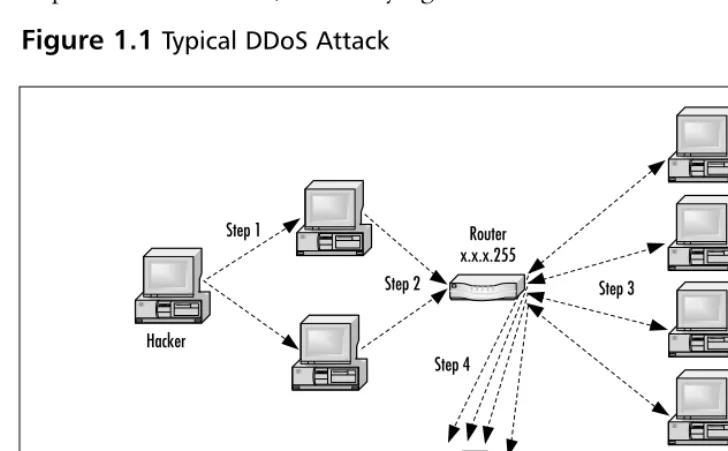
are the victim’s own computers) that are listening (around 250 max) asking for a response to the ICMP packet (Step 2).Those computers each respond to the victim’s source address x.x.x.123 through the router (Step 3). In the case of DDoS, there are many computers that have been commandeered that are sending many requests to the router, making the router do many times the work, and using the broadcast address to make other computers behind the router work against the victim computer (Step 4).This then overloads the victim in question and will eventually either cause it to crash, or more likely the router will no longer reliably be able to send and receive packets, so sessions will be unstable or impossible to establish, thus denying service.
[image:43.612.72.436.255.480.2]A recent example of a DoS/DDoS attack occurred in February of 2001, when Microsoft was brought to its knees. Many industry experts believe that the attack was timed to coincide with Microsoft’s launch of a $200 million ad campaign. Ironically, the ad campaign was focused on what Microsoft refers to as “Software for the agile business.”The attack by hackers was just one more sign to the Internet industry that hackers are very much able to control sites when they feel they have a point to prove.
Figure 1.1Typical DDoS Attack
Hacker
Victim Web server x.x.x.123
Router x.x.x.255 Step 1
The only reason a hacker would ever perform a DDoS attack is because the intent is to bring the site off-line.There is no other reason for hackers to perform this type of attack. It is malicious in intent, and the result is incredibly detrimental to any company that falls victim to such attack.Traditional DDoS attacks happen at the server level but can also occur at the application level with a buffer overflow attack, which in essence is a denial of service attack.
When the attacks of February 2000 occurred, Kevin Mitnick offered the following advice to companies faced with such attacks in the future: “I’d tell the people running the sites that were hit three things, all of which they may have done by now:
1. Use a network-monitoring tool to analyze the packets being sent to determine their source, purpose, and destination.
2. Place your machines on different subnetworks of the larger net-work in order to present multiple defenses.
3. Install software tools that use packet filtering on the router and firewall to reject any packets from known sources of denial-of-service traffic.”
S
ECURITYA
LERT!
It is possible to cause a denial of service on your own Web site due to a lack of planning by your company. Without proper load bal-ancing, service may be denied to legitimate users because of too many simultaneous requests on your server(s) for information.
Virus Hacking
A computer virus is defined as a self-replicating computer program that interferes with a computer’s hardware or operating system or application software.Viruses are designed to replicate and to elude detection. Like any other computer program, a virus must be executed to function (it must be loaded into the computer’s memory) and then the computer must follow the virus’s instructions.Those instructions are what is referred to as the payload of the virus.The payload may disrupt or change data files, display a message, or cause the operating system to malfunction.
Using that definition, let’s explore a little deeper into exactly what a virus does and what its potential dangers are.Viruses spread when the instructions (executable code) that run programs are exchanged from one computer to another. A virus can replicate by writing itself to floppy disks, hard drives, legitimate computer programs, or even across networks.The positive side of a virus is that a computer attached to an infected computer network or one that downloads an infected program does not necessarily become infected. Remember, the code has to actu-ally be executed before your machine can become infected. On the downside of that same scenario, chances are good that if you download a virus to your computer and do not execute it, the virus probably con-tains the logic to trick your operating system (OS) into running the viral program. Other viruses exist that have the ability to attach them-selves to otherwise legitimate programs.This could occur when pro-grams are created, opened, or even modified.When the program is run, so is the virus.
■ Parasitic Parasitic viruses infect executable files or programs in the computer.This type of virus typically leaves the contents of the host file unchanged but appends to the host in such a way that the virus code is executed first.
■ Bootstrap sector Bootstrap sector viruses live on the first portion of the hard disk, known as the boot sector (this also includes the floppy disk).This virus replaces either the programs that store information about the disk’s contents or the programs that start the computer.This type of virus is most commonly spread via the physical exchange of floppy disks.
■ Multi-partite Multi-partite viruses combine the functionality of the parasitic virus and the bootstrap sector viruses by
infecting either files or boot sectors.
■ Companion Instead of modifying an existing program, a com-panion virus creates a new program with the same name as an already existing legitimate program. It then tricks the OS into running the companion program.
■ Link Link viruses function by modifying the way the OS finds a program, tricking it into first running the virus and then the desired program.This virus is especially dangerous because entire directories can be infected. Any executable program accessed within the directory will trigger the virus.
■ Data file A data file virus can open, manipulate, and close data files. Data file viruses are written in macro languages and auto-matically execute when the legitimate program is opened.
End-User Virus Protection
As a user, you can prepare for a virus infection by creating backups of the legitimate original software and data files on a regular basis. These backups will help to restore your system should it ever be
Trojan Horses
A Trojan horse closely resembles a virus, but is actually in a category of its own.The Trojan horse is often referred to as the most elementary form of malicious code. A Trojan Horse is used in the same manner as it was in Homer’s Iliad; it is a program in which malicious code is con-tained inside of what appears to be harmless data or programming. It is most often disguised as something fun, such as a cool game.The mali-cious program is hidden, and when called to perform its functionality, can actually ruin your hard disk.
Now, not all Trojan horses are that malicious in content, but they can be, and that is usually the intent of the program: Seek and destroy to cause as much damage as possible. One saving grace of a Trojan horse, if there is one, is that it does not propagate itself from one computer to another. Self-replication is the charm of the worm.
A common way for you to become the victim of a Trojan horse is for someone to send you an e-mail with an attachment claiming to do something. It could be a screensaver or a computer game, or even some-thing as simple as a macro quiz.With the naked eye, it will most likely be transparent that anything has happened when the attachment is launched.The reality is that the Trojan has now been installed (or initial-ized) on your system.What makes this type of attack scary is that it con-tains the possibility that it may be a remote control program. After you have launched this attachment, anyone who uses the Trojan horse as a remote server can now connect to your computer. Hackers have advanced tools to determine what systems are running remote control Trojans. After this specially designed port scanner finds your system, all
necessary. By activating the write-protection notch on a floppy disk (after you have backed up the software and files) will help to pro-tect against a virus on your backup copy.
of your files are open for that hacker.Two common Trojan horse remote control programs are Back Orifice and NetBus.
Back Orifice consists of two key pieces: a client application and a server application.The way Back Orifice works is that the client applica-tion runs on one machine and the server applicaapplica-tion runs on a different machine.The client application connects to another machine using the server application. However, the only way for the server application of Back Orifice to be installed on a machine is to be deliberately installed. This means the hacker either has to install the server application on the target machine or trick the user of the target machine into doing so. Hence, the reason why this server application is commonly disguised as a Trojan horse. After the server application has been installed, the client machine can transfer files to and from the target machine, execute an application on the target machine, restart or lockup the target machine, and log keystrokes from the target machine. All of these operations are of value to a hacker.
The server application is a single executable file, just over 122 kilo-bytes in size.The application creates a copy of itself in the Windows system directory and adds a value containing its filename to the Windows registry under the key:
HKEY_LOCAL_MACHINE\SOFTWARE\Microsoft\Windows\CurrentVersion\ RunServices
The specific registry value that points to the server application is configurable. By doing so, the server application always starts whenever Windows starts, therefore is always functioning. One additional benefit of Back Orifice is that the application will not appear in the Windows task list, rendering it invisible to the naked eye.
In August of 2000, a new Trojan horse was discovered, known as the QAZ Trojan horse.This is the Trojan that was used to hack into
Microsoft’s network and allow the hackers to access source code.This particular Trojan spreads within a network of shared computer systems, infecting the Notepad.exe file.What makes this Trojan so malicious is that it will open port 7597 on your network, allowing a hacker to gain access at a later time through the infected computer. QAZ Trojan was originally spread through e-mail and/or IRC chat rooms; it eventually was spread through local area networks. If the user of an infected system opens Notepad, the virus is run. QAZ Trojan will look for individual systems that share a networked drive and then seek out the Windows folder and infect the Notepad.exe file on those systems.The first thing that QAZ Trojan does is to rename Notepad.exe to Note.com, and then the Trojan creates a virus-infected file Notepad.exe.This new
Notepad.exe has a length of 120,320 bytes. QAZ Trojan then rewrites the System Registry to load itself every time the computer is booted. If a network administrator was monitoring open ports, he may notice unusual traffic on TCP port 7597 if a hacker has connected to the infected computer.
Back Orifice Limitations
The Back Orifice Trojan horse server application will function only in Windows 95 or Windows 98. The server application does not work in Windows NT. Additionally, the target machine (the machine hosting the server application) must have TCP/IP network capabilities.
Possibly the two most critical limitations to the Back Orifice Trojan Horse are that the attacker must know the IP address of the target machine and that there cannot be a firewall between the target machine and the attacker. A firewall makes it virtually impossible for the two machines to communicate.
Worms
If you work with computers, you’re more than likely familiar with the “I Love You” virus or the “Melissa” virus. Both of these viruses are exam-ples of worms.The most recent worm attack—named the Anna
Kournikova worm—occurred in February of 2001.The Anna worm was an e-mail worm created by a 20-year-old Dutch man, who calls himself “OnTheFly.”The frightening thing about this latest attack using a worm was that the creator of the worm was not a long-time hacker; he was relatively new on the scene. OnTheFly used a toolkit known as VBS Worm Generator, which was created by a hacker known as (k) alamar. Toolkits are an increasingly popular method for creating worms.
What is a worm? A worm is a self-replicating program that does not alter files but resides in active memory and duplicates itself by means of computer networks.Worms use facilities of an operating system that are meant to be automatic and invisible to the user. It is common for worms to be noticed only when their uncontrolled replication consumes system resources, which then slows or halts other tasks. Some worms in exis-tence not only are self-replicating but also contain a malicious payload. Worms can be transmitted in one of two ways, either by e-mail or through an Internet chat room.The most famous worm, the “I Love You” bug, originated in May of 2000.The swiftness with which this bug moved caused more than a few network administrators to have
migraines.The “I Love You” bug was first detected in Europe and then in the United States.The initial analysis on the bug quickly determines that it is Visual Basic code that comes as an e-mail attachment named Love-Letter-For-You.txt.vbs (see Figure 1.2).When a user clicked on the attachment, the virus used Microsoft Outlook to send itself to everyone in the user’s address book.The virus then contacted one of four Web pages in the Philippines. From the contacted Web page, a Trojan Horse was then downloaded,WIN-BUGSFIX.EXE, which col-lected user names and passwords stored on the users system. It then sent all of the user names and passwords to an e-mail address.
As discussed earlier in the virus section of this chapter, a developer can’t really do anything to protect against a worm attack. Nor can they write tighter code to prevent a worm attack on their machines or those of the end-users.The most successful way to prevent a worm attack is awareness and knowledge. As a user, do not open e-mails from unknown sources and do not download attachments from sources that are not trusted.The prevention of worms is truly in the end-users’ hands. Network administrators should be ready to educate their users on the best ways to ensure that a worm does not self-replicate through the entire network.
Rogue Applets
Mobile code applications, in the form of Java applets, JavaScript, and ActiveX controls, are powerful tools for distributing information.They are also powerful tools for transmitting malicious code. Rogue applets do not replicate themselves or simply corrupt data as viruses do, but instead they are most often specific attacks designed to steal data or disable systems.
[image:51.612.169.339.86.258.2]As you will read in upcoming chapters within this book, Java and ActiveX have built-in security systems to help prevent against malicious mobile code. However, those built-in security features do not eliminate the threat of rogue applets. Users are “programmed” to believe that they
actually have to download something or open an attachment from e-mail for a virus to attack their machines.They usually are unaware of the threat of mobile code.Writing a piece of malicious mobile code is one of the easiest ways for a hacker to get inside of a company. For them, it sure beats having to hack in from the outside by methods that can sometimes take much longer before success is achieved.
The concept of mobile code is that a user’s system allows code sourced from a remote system to be executed on her system—because the source is not known, it is easy to conceive of the notion that the source may be untrusted. Mobile code has a number of low-level secu-rity concerns, all of which will be addressed in much greater detail throughout the book:
■ Access control Determines if the use of this code is permitted. ■ User authentication Used to identify and verify valid users. ■ Data integrity Ensures that the code is intact.
■ Nonrepudiation Acts like a contract for both the sender and the receiver, especially if there is a charge for the use of the code.
■ Data confidentiality Used to protect sensitive code. ■ Auditing Used to trace the uses of mobile code.
Rogue applets, as already stated, are examples of malicious mobile code. By understanding better how rogue applets work, and why they present a security threat to application development, you will be better armed to secure your Web applications.We discuss mobile code, Java, and ActiveX in detail in later chapters of the book.