RIT Scholar Works
Theses Thesis/Dissertation Collections
6-21-2011
Error sentinel: A Rule-based spreadsheet program
for intelligent data entry, error correction, and
curation
Kyle DeweyFollow this and additional works at:http://scholarworks.rit.edu/theses
This Thesis is brought to you for free and open access by the Thesis/Dissertation Collections at RIT Scholar Works. It has been accepted for inclusion in Theses by an authorized administrator of RIT Scholar Works. For more information, please [email protected].
Recommended Citation
Program for Intelligent Data Entry, Error
Correction, and Curation
Kyle Dewey
Master of Science Degree in Bioinformatics
Department of Biological Sciences - College of Science
Approved June 21, 2011
Approved by:
Dr. Michael V. Osier
Dr. Gary R. Skuse
Dr. Dina L. Newman
Abstract
Within the biological sciences, spreadsheets are commonly used as a data entry and
storage medium. While this practice is simple and generally well understood, the unrestrained
flexibility of the spreadsheet medium allows errors to accumulate and potentially propagate.
Such errors impede accurate analysis, hindering research. The underlying problem is that the
error correction facilities of typical spreadsheet programs are lackluster at best, if they exist at
all. For this reason, Error Sentinel was developed. Error Sentinel is a spreadsheet program with
programmable error correction facilities. These facilities allow users to define exactly what
clean data is, along with corrections for erroneous data. Such rules are specified via a custom
visual programming language. Once error correction rules are written, users inputting data need
not be familiar with the rules or even have programming skills in order to utilize them. Error
Sentinel can be used interactively like a typical spreadsheet program, or non-interactively as with
more traditional error correction techniques. To test Error Sentinel’s real-world capabilities, it
was successfully applied to the correction of the mtHaplogroups data set. This application has
shown that Error Sentinel requires far less time and code to perform error correction than with
previous methods. Benchmarking has shown that such gains are at only a modest cost in
performance. While Error Sentinel appears quite simplistic compared to typical spreadsheet
programs, its error correction facilities are robust, and it is fully capable of being applied to
Table of Contents
•
Introduction
...1
• Spreadsheets and Curation...1
• Motivation...14
• mtHaplogroups Curation...19
•
Materials and Methods
...24
•
Results
...31
• Ruleset Design Elements...31
• Error Sentinel...32
• Language Classification...39
• Dynamic Typing...40
• Strong Typing...44
• Paradigm...45
• Exceptions...48
• Turing Completeness...49
• Application to mtHaplogroups...50
• Benchmarks...52
• Profiling...57
•
Discussion
...59
• A “Functional” Language...59
• Typing Weaknesses...66
• Turing Completeness Consequences...69
• Performance and Efficiency...70
• Miscellaneous Design Flaws...92
• Miscellaneous Implementation Flaws...93
• Current State...97
• Applications...98
• Extensions and Future Work...98
•
References
...99
Introduction
Spreadsheets and Curation
Spreadsheets are commonly used within biology and bioinformatics to store and
represent data. Spreadsheets provide a simple, flexible way to represent structured data. Indeed,
the table structure spreadsheets are based on has been utilized throughout human history and has
major cognitive benefits (Nardi et al. 1990). By representing each item within a set as a row, and
each column as an attribute of a given item, it is possible to create an organized structure that is
simple to comprehend by both people and machines.
However, excessive flexibility can be more of a liability than an asset. For instance,
many spreadsheet programs will allow the user to enter in arbitrary information for any cell,
regardless of whether or not that information makes sense. Table 1 shows an example of this.
Name Age Favorite Color
Bob 25 Purple
Joe -10 Green
Jill 483.7 Notebook
Jack 22 Teal
Table 1 contains a number of errors that a general purpose spreadsheet program is unable
to catch. A negative age should not be possible for a person, though most programs will not
issue any sort of complaint to the user upon entering such an age. At the other end of the
spectrum, it seems unlikely that there is a person who is nearly 500 years old, and with a
fractional age on top of that. Outside of the age column, “Notebook” is clearly not a color.
Worse yet, depending on the application, “Teal” and “Green” may be considered to be the same
color, due to their similarities. While a spreadsheet program familiar with colors may be able to
perform the “Notebook” correction, such a program would not be able to simplify “Teal” to
“Green”. It is up to the user to find and correct such errors, which is time consuming and
ironically error prone in and of itself.
Though general purpose spreadsheet programs are generally flexible, there are cases
where the program will find something it believes is erroneous and correct it. Though such
corrections are typically proper, it is a substantial problem when they are undesired. For
instance, Microsoft Excel will recognize some gene names like “OCT1” as dates, and will
convert them to a more date-friendly representation like “1-Oct” (Zeeberg et al. 2004). Of
course, this behavior is incorrect. The change is automatic, instantaneous, and worst of all
completely silent; the user is not informed of such a change occurring. Within NCBI (http:// www.ncbi.nlm.nih.gov/), gene entries exist with names like “1-Oct”, showing that this type of error does happen in practice and causes real problems.
Beyond this specific example, spreadsheet errors are a major problem in multiple
disciplines (Panko 1998; Powell et al. 2007; Powell et al. 2008). The rate of errors seems
alarmingly high, though the rate of errors in spreadsheets is approximately the same as the rate of
errors seen in other thought-intensive tasks (Panko 1998). However, unlike with programming,
there is rarely policy in place to check and correct for such errors (Powell et al., 2008).
Additionally, there is a lack of information as to what such a policy should contain (Powell et al.
2007).
Clearly, something must be done to amend this situation. Though spreadsheet auditing
software does exist for this purpose, such software is hardly perfect (Powell et al. 2007). In
indicate errors or lead to errors. This heuristics-based behavior is much like the date conversion
problem as seen in Zeeberg et al. 2004: it is often correct, though nothing more. Additionally,
auditing tools are only intended to find errors, not to correct them.
The problem with both the spreadsheet and spreadsheet auditing programs is that they
have little to no understanding of what the input data is and what it is intended to represent. With
the example in Table 1, there is no way for the program to innately understand what an age or
color is, and so there is no way for it to verify this information. This is arguably preferable to a
program that can erroneously attach meaning to data, as shown in Zeeberg et al 2004.
I have experienced the problems regarding automatic correction (or the lack thereof)
firsthand. I participate in ongoing research with Dr. Newman and Dr. Osier regarding human
mitochondrial variations. Over time, a large number of unique variations has been observed by a
multitude of research groups, and these have been gathered into a single uniform data set. This
data set is represented as a spreadsheet, where each variation is a row, and each column
represents one piece of information about a given variation.
Over time, a number of errors have crept into this data set, requiring extensive curation to
fix. Many of these errors are somewhat systematic; given the pattern of a single error it is
possible to find other errors that match the pattern. For example, a common typographical error
is to have unnecessary spaces after an entry. To the human eye, such an error is often invisible.
However, to a computer, this is significant. The entries “X” and “X “ are not equal to each other,
though in reality they may be.
There are also certain oddities in the data set. Such are not technically errors, but they
to indicate that there is no value for a particular column. This is problematic in two ways. For
one, the dash itself is a value. As such, paradoxically, by specifying that there is no value, one
inadvertently specifies a value.
A deeper problem is that this “no value” value either holds no semantic information
whatsoever, or holds misleading semantic information, depending on interpretation. If the dash
is treated like a value, then it appears that all entries with dashes are related. This is incorrect. If
the dash is not treated like a value, then there is a “gap” in the information. While this is
technically correct, there are better approaches specific to this data set.
Clearly, these are problems that must be corrected in order to facilitate parsing by a
computer. Usually, a program is written that can find and correct a certain error or oddity. In the
case of a dash, the program would find each column that only contained a dash, and replace the
dash with a more specific “no value” value. Though this works, there are a number of
disadvantages to this approach:
• The resulting program can only find this kind of error. Besides this, the program is useless.
• Most of the program is not devoted to finding the error, but instead to doing housekeeping
work like opening and writing to files. Based on actual scripts written, such housekeeping
work accounts for between 72% and 91% of the actual code.
• In containing such housekeeping code, the program is not very robust. It is particularly
sensitive to changes in how the data is represented. For example, care must be taken regarding
the file format used to store the data.
• The section that does the actual correction tends to be very verbose. Though the phrase
amount of code to do exactly this in most general purpose programming languages. Based on
actual code, even the simplest errors required three lines on average. Additionally, assignment
statements account for almost all the error correction code, wherein the value of a column is
changed.
• It takes a sizable amount of time to write such a program, considering how simple the rule for
error correction is. This is unfortunately difficult to quantify, as no data was recorded
regarding how much time was spent developing the original error correction scripts. Based on
time stamps, it took two days to write code that corrected a total of nine minor errors.
• A fair amount of programming skill is necessary to write such code, along with prior
knowledge of the general purpose programming language used. Additionally, the original error
correction programs were never intended to be user-friendly, and assumed UNIX shell
experience for proper usage.
• The error correction phase occurs after the error has been put into the data set. Ideally, it
should be flagged as it is put in, and some sort of message should be given to the user who is
attempting to add erroneous data. This would prevent the error from being incorporated at all.
To address all these problems, a different approach must be taken. Error Sentinel
represents this new approach. Error Sentinel is able to find existing errors and prevent the
incorporation of new errors into a spreadsheet. Error Sentinel’s facilities are far more powerful
than any existing automatic correction facilities in other common spreadsheet programs, namely
Microsoft’s Excel, OpenOffice.org’s Calc, and Apple’s Numbers. Ideally, Error Sentinel can find
Being that data sets are vastly different, it is not feasible to make Error Sentinel
understand only a given data set. In the terms of a programmer, it is unacceptable to “hard code”
in the rules for error correction. Instead, Error Sentinel utilizes a special purpose programming
language.
The application of programming languages to spreadsheets is hardly original. In
Microsoft Excel, equations and formulas are written in a sort of simple functional language
(Jones et al. 2003). Though this language supports neither abstraction (subroutine definition) nor
recursion (defining a problem in terms of itself), its expression-oriented nature makes it a
member of the functional paradigm (Jones et al. 2003). Extensions to Microsoft Excel which are
based on logical programming languages have been written, for the purpose of imparting
deductive reasoning capabilities to the program (Cervesato 2007). Outside of Microsoft Excel,
spreadsheets have been married with Lisp in the C32 language, which is intended for the design
and implementation of GUI components (Myers 1991). Spreadsheets have even been used as a
programming paradigm in and of themselves (Burnett et al., 1998; Tukiainen 2001), as with the
Forms/3 visual programming language (Burnett et al., 1994; Burnett et al. 2001). There are even
further paradigm divisions within the spreadsheet paradigm, complete with information
regarding the difference in error rates between paradigms (Tukiainen 2001).
What separates Error Sentinel from these is that it is intended for the sole purpose of error
identification and correction. As such, these functions are easy to perform, where for other
spreadsheet languages such functions may be difficult to express, if not impossible.
The core of Error Sentinel consists of only two ideas: matching and replacing.
can match data, and other rules are written that can perform replacements on said data. Within
the language, these concepts are tied to entities known as matchers and replacers. Matchers and
replacers are only concerned with the actual data; they are not concerned with the internal format
of the data, the names of the underlying files that contain the data, etcetera. The end result is
error correction rules that are very short but still capture all of the necessary information to
process an error.
Though a great deal can be conveyed through this language, it is still possible to devise a
rule that is too complex for the language to handle. In such a case, Error Sentinel can be
extended, in a similar manner as presented in Myers 1991. It is possible to write the rule in a
more expressive general purpose language, and then bind it to the error correction language in
such a way that it seems to be part of the error correction language. In fact, the basic
functionality of Error Sentinel has been implemented this way. The more that is written in this
other language, the more feature rich the error correction language becomes.
The feasibility of using the matching and replacing concept for identifying and correcting
errors has been proven by an existing project, namely ErrorChecker.pl. The program was created
during research underneath Dr. Osier and Dr. Newman. This program accepts a basic language
Matcher Matcher Parameters
Replacer Replacer
Parameters
exact “-” exact previous_column
The rule shown in Table 2 is interpreted by the computer as follows: “Create a matcher by
the name ‘exact’, and give it the parameter ‘-’. To this matcher bind the replacer named ‘exact’,
and give it the the value of the previous column as a parameter.” To a human familiar with this
language, it reads “when a column containing exactly a ‘-’ is found, no more and no less, replace
it with the exact value of the previous column.” As shown, such a rule is understandable by both
a human and a computer, which is necessary for any computer programming language.
Note that there are a number of flaws with ErrorChecker.pl. It has been found to be very
difficult to express rules that are anything more than trivial. Very quickly, one must write custom
code in another language and incorporate it into the error correction language. If this happens
too frequently, then there is little purpose in using an error correction language; one ends up
writing lots of verbose code in another language, which would have happened if the error
correction language had not been used anyway.
Additionally, ErrorChecker.pl is not very flexible. Custom code can be added in, but that
is all that it can do. It cannot recombine existing code in many different ways, for two main
reasons. For one, matchers and replacers can only accept data as arguments, where the data is
either a value from the spreadsheet or a parameter (parameters are shown in Table 2). This
limitation is illustrated below in Figure 1. The second, though related, problem is that rules must
be specified in a strict, one matcher to one replacer manner. If data passed to the matcher
matches, then the corresponding replacer is executed on the given data. Behavior that is more
complicated than that is impossible to specify within the confines of this language.
Ideally, the expressive power of a language should be derived not from the primitives it
provides, but from the ways in which those primitives can be linked together. If there is
weakness in this linking, then one must put in a “word” for every idea that could ever be
conceived in the language, which is impossible. In these ways, ErrorChecker.pl is very limited
in regard to its intended purpose, though it does illustrate the feasibility of a language for error
correction based on matchers and replacers.
A few modifications have been performed on the language of ErrorChecker.pl to make it
usable for Error Sentinel. The first modification was to allow matchers and replacers to take
other matchers and replacers as parameters. This is shown visually below in Figure 2. This
allows for the behaviors of different modules to be combined in arbitrary ways. In fact, by this
Figure 1: graphical view of the arguments a matcher or replacer can take in the error
modification alone, it is possible to represent a rule of ErrorChecker.pl as a replacer that took one
matcher and one replacer as arguments. This can be seen below in Figure 3. The replacer itself
(shown in blue) would have very simple logic behind it: if the matcher (provided as a parameter,
shown in green) matches on the given data, then execute the given replacer (provided as a
parameter, shown in red) on the data. This shows the flexibility of Error Sentinel; one can
specify the behavior of ErrorChecker.pl’s language in Error Sentinel, but it is not possible to
specify the behavior of Error Sentinel in the language of ErrorChecker.pl.
With the ability to use matchers and replacers together comes additional complexity. It is
possible to create a deeply nested matcher (or replacer), one that takes another matcher as a
parameter, which internally takes yet another matcher as a parameter, and so on. Depending on
the situation, this same chain of matchers could appear in multiple places, with little or no
modification. Such repetition is time consuming and error prone, requiring the user to specify
the same construct of significant length many times.
This problem is encountered in Microsoft Excel, where the same formula may need to be
copied multiple times to achieve a goal (Jones et al. 2003). To solve this problem, Error Sentinel
allows for the quick and simple creation of functions. Functions allow for the encapsulation of
an idea or procedure into a single reusable unit. Functions reduce repetition and the problems
related to repetition.
An analogy to a function would be the verbal explanation of a step by step procedure to
100 people individually versus giving a written copy of the procedure to each of the 100 people.
With the explanation route, more time is spent per person, and one is likely to make a mistake in
the procedure's description due to fatigue. The end result is that several variations of the
procedure will have been described, though perhaps only one is fully correct. However, with the
copy route, everyone gets the same procedure, with far less effort. If the procedure is large, this
method could save an enormous amount of time.
Through this analogy, it should be clear that functions are a necessity, not a convenience,
with Error Sentinel. However, functions are somewhat of an advanced programming feature.
For many languages, proper usage of functions requires special training, training that the
common user simply does not have (Jones et al. 2003). Ideally, Error Sentinel should be
accessible to someone without a solid background in programming, so that the user base is as
large as possible. For instance, the language used in Microsoft Excel for defining equations is
intended for end users, not programmers (Jones et al. 2003; Nardi et al. 1990).
With accessibility in mind, Error Sentinel is based on visuals instead of on text.
Compared to traditional text-based languages, the common user can write code in a visual
programming language using far less time and with fewer errors (Blackwell 2001). Additionally,
visual programming languages can encourage the user to use abstractions like functions, leading
to better programs overall (Blackwell 2001).
The visual aspect of the program will take the form of a dataflow. Dataflows, as the
name suggests, show the flow of data through a program (Green et al. 1996). They look and
behave much like workflows. Note that dataflows are a separate entity from flowcharts.
Flowcharts are specialized for showing the flow of control in a program, whereas dataflows are
have proven to be useful only when control flow is complex, or when program text is unavailable
(Navarro-Prieto et al. 2001).
An example of a dataflow is shown below in Figure 4. Lines represent the flow of data
and boxes represent the modification of said data. This style is borrowed from the Spiegel
Visualization Framework’s visual programming language (Bischof et al. 2006). The “Exact”
matcher will say “Yes” if the given data matches with what it is checking for, and “No”
otherwise. The “Exact” replacer will merely say whatever it was told to say, in this case either
“Bar” or “Foo”, depending on the replacer. The “Conditional” replacer combines all previously
mentioned matchers and replacers, such that if the matcher says “Yes” one replacer is executed,
and if the matcher says “No” the other replacer is executed.
The function in Figure 4 represents an aggregate replacer named “fooBarSwitch”. It
changes all instances of “Foo” to “Bar”, and will change all instances of everything else to
“Foo”. This example illustrates some of the possible interactions between matchers and
replacers. Though it is simple, far more complex interactions are possible. This example also
shows how to create a function out of other matchers and replacers. Note that the function needs
only input data, and that the user does not have to be concerned with the internal components of
“fooBarSwitch” in order to use “fooBarSwitch”.
Motivation
The ultimate purpose of this work is to remove and correct errors in the aforementioned
mtHaplogroups data set. With an error-free data set in hand, it is possible for real, accurate
analysis to be performed using this data. Background information needed to understand the data
and what it can be used for follows.
The basic energy “currency” of cells is the molecule adenosine triphosphate (ATP). In
eukaryotic cells, the majority of ATP is produced by a specific organelle, namely the
mitochondrion (reviewed by Hatefi 1985 as cited by Tuppen et al. 2010). Without a steady
supply of sufficient ATP, cells cannot function and quickly die. To illustrate this point, cyanide’s
toxicity lies in its capability to effectively halt mitochondrion function, stopping ATP production
(Li et al. 2005).
Mitochondria are maternally inherited, and contain a genome that is independent of the
nuclear genome (Giles et al. 1980 as cited by Tuppen et al. 2010). The mitochondrial genome is
significantly smaller than the nuclear genome, being 16,569 basepairs in length (Andrews et al.
1999 as cited by Tuppen et al. 2010). There are a number of properties that make this genome
appealing for study. For one, the genome does not undergo recombination (reviewed by Tuppen
et al. 2010). This property, combined with the property of maternal inheritance, makes it easier
this is why the mitochondrial genome is frequently used in the study of ancient human
migrations (e.g. Sykes et al. 1995; Risch et al. 1996).
Another key property of the mitochondrial genome is that it mutates more frequently than
the nuclear genome (reviewed by Tuppen et al. 2010). As such, a multitude of mutations have
accumulated since humans initially evolved (Torroni et al. 1996). The ability to categorize and
track such mutations is another property that makes them appealing for the study of human
migrations (e.g. Sykes et al. 1995; Risch et al. 1996). Additionally, such mutations can be used
as human population markers. These mutations can be put into distinct groups, known as
haplogroups (Torroni et al. 1996). Haplogroups can be further subdivided into subhaplogroups.
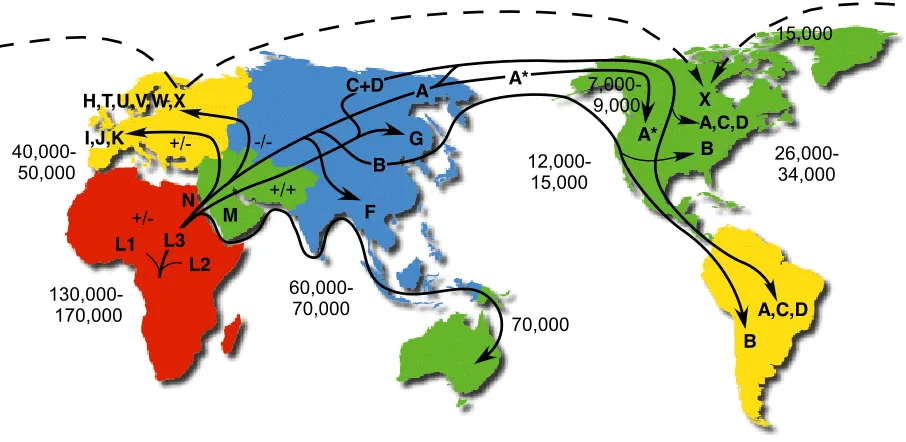
A diagram detailing haplogroups, their relationship to each other, and their relationship to human
migrations is shown below in Figure 5.
F G H,T,U,V,W,X I,J,K 12,000-15,000 15,000 26,000-34,000 7,000-9,000 130,000-170,000 60,000-70,000 40,000-50,000 +/-+/+ -/- +/-A* A B B X B A,C,D A* M A,C,D L3 L1 L2 C+D N 70,000
Mutation rate = 2.2 - 2.9 % / MYR Time estimates are YBP
+/-, +/+,or-/-= Dde I 10394 / Alu I 10397
*= Rsa I 16329
Human
mtDNA
Migrations
http://www.mitomap.org/pub/MITOMAP/MitomapFigures/WorldMigrations.pdf
[image:19.612.78.531.392.613.2]Copyright 2002!Mitomap.org
Figure 5: The various haplogroups and their relationships to each other. The paths are
representative of human migrations, and the numbers show how many years in the past the given migration is through to have occurred. Adapted from Ruiz-Pesini et al., 2007. Taken from http://
The mtHaplogroups data set holds a record of all known mitochondrial mutations,
henceforth referred to as polymorphisms. From an abstract level, the data records which
polymorphisms are associated with which haplogroups and subhaplogroups. Additional relevant
information is also stored, including what the particular polymorphisms do, if anything. A more
detailed look at the mtHaplogroups data structure is presented in the “mtHaplogroups Curation”
section. As to why this data is important, there are a vast number of applications for haplogroup
information. What follows is a relatively brief survey of the literature that utilizes haplogroups.
Cells often contain more than a single mitochondrion, and individual mitochondria
usually contain multiple copies of their genome (reviewed by Tuppen et al. 2010). This makes
mitochondrial DNA more abundant than nuclear DNA in cells, making mitochondrial DNA
attractive for forensics applications. In the forensic sciences, determining the haplogroup of each
suspect can be used to quickly eliminate suspects (e.g. Brandstatter et al. 2006; Medeiros et al.
2008).
As already mentioned, mitochondria are responsible for the majority of ATP production.
Additionally, the mitochondrial genome holds genetic information that is vital for performing
this task (reviewed Tuppen et al. 2010). With this in mind, it is no surprise that certain
mitochondrial polymorphisms have been shown to affect the levels of ATP produced (e.g.
Montiel-Sosa et al. 2006; Ruiz-Pesini et al., 2000). Moreover, certain haplogroups have been
associated with varying levels of ATP production. The mitochondria of individuals in
haplogroups T and U have been shown to produce less ATP than mitochondria of individuals in
haplogroups H (e.g. Montiel-Sosa et al. 2006; Ruiz-Pesini et al., 2000). This is presumably an
haplogroups T and U lose more energy to heat than mitochondria of haplogroup H (Montiel-Sosa
et al. 2006).
Beyond raw ATP production, there have been a large number of studies showing
associations between various disorders, mitochondrial polymorphisms, and haplogroups.
Leber’s hereditary optic neuropathy (LHON) was one of the first disorders to be linked to a
polymorphism in the mitochondrial genome (Wallace et al. 1988 as cited by Tuppen et al. 2010).
Affected individuals painlessly go blind sometime between the ages of 20 and 50 (reviewed by
Man et al. 2002). There are three different mitochondrial polymorphisms that have been shown
to cause the disorder (Hudson et al. 2007). Interestingly enough, the disorder shows incomplete
penetrance (Hudson et al. 2007), meaning that having the diseased allele does not guarantee that
an individual will be affected by the disease. It has been shown that the penetrance of LHON
depends both on what LHON-causing polymorphisms have been inherited and the
subhaplogroup an affected individual belongs to (Hudson et al. 2007). Specifically, members of
subhaplogroups J1c and J2b having LHON-causing polymorphisms are at elevated risk (Carelli
et al. 2006).
In addition to mitochondrial polymorphisms affecting vision, there are also
polymorphisms that affect hearing. It is well known that certain mitochondrial polymorphisms
can cause permanent deafness with the correct environmental triggers. For example, certain
antibiotics, including gentamicin, can cause deafness in individuals bearing a 1555A>G
polymorphism (Lu et al. 2010). In much the same way as LHON, this is not a guarantee. Also in
become deaf if exposed to these environmental triggers. Specifically, members of haplogroup D
bearing the polymorphism are at a greater risk (Lu et al. 2010).
Another hearing problem that has its roots at least partially in the mitochondrial genome
is that of age-related hearing loss (ARHL). Studies have found that individuals belonging to
haplogroups U and K are more prone to developing AHRL than individuals belonging to other
haplogroups (Manwaring et al. 2007).
Another disorder that that is related to mitochondria is that of Parkinson’s disease.
Mitochondria are intrinsically involved in the disorder (e.g. Bueler 2009; Schapira 2008), though
the majority of the genes that appear to be directly involved are not in the mitochondrial genome
(Bueler 2009). Certain haplogroups have been shown to confer resistance to Parkinson’s disease,
specifically haplogroup H (van der Walt et al. 2003). Additionally, certain mitochondrial
polymorphisms have been shown to increase the risk of developing Parkinson’s disease (Huerta
et al. 2005).
There have also been studies linking haplogroups to infarctions. Women of Japanese
descent who are also members of haplogroup A have been shown to be at increased risk for
atherothrombotic cerebral infarction, a type of stroke (Nishigaki et al. 2007). Another study has
found an increased risk of early-onset heart attack in male smokers belonging to haplogroup H
(Palacin et al. 2011).
A variety of studies have been performed showing links between different haplogroups
and cancer types. Women in haplogroup K have been shown to be at increased risk for breast
cancer, while women in haplogroup U are at decreased risk for breast cancer (Bai et al. 2007).
et al. 2006). Men in haplogroup U have been shown to be at increased risk for both prostate and
renal cancer (Booker et al. 2006), though a larger subsequent study showed that there is not a
correlation between haplogroup U and prostate cancer (Mueller et al. 2009). Subhaplogroups
D4a and D5 also seem to be risk factors for developing esophageal cancer in certain regions of
China (Li et al., 2010).
Some associations between Alzheimer’s disease and haplogroups have been made. It has
been found that men in haplogroup U are more likely to develop Alzheimer’s than men in
haplogroup H (van der Walt et al., 2004). In contrast, the same study found the opposite for
women: women in haplogroup U are less likely to develop Alzheimer’s than women in
haplogroup H (van der Walt et al., 2004). A separate study from a different group claimed that
there was no such association between haplogroup U and Alzheimer’s though the sample size
was considerably smaller; however the same study suggested that members of either haplogroup
H or V were at greater risk for developing Alzheimer’s (Maruszak et al. 2009).
Associations between autism and mitochondrial disorder have also been noted in the
literature (Oliveira et al. 2005), though larger subsequent studies were unable to find a
statistically significant connection between the two (Alvarez-Iglesias et al. 2011).
Altogether, it should be apparent that the characterization of mitochondrial
polymorphisms and haplogroups has real scientific value. However, this can only be done
properly when the accuracy of the data set is assured.
mtHaplogroups Curation
Data regarding polymorphisms relevant to mitochondrial haplogroups was previously
Newman’s lab. The raw data is stored in a single Excel spreadsheet, which is both simple and
convenient for data entry. Cleaned data is currently stored in a MySQL (http://www.mysql.com/) database available via the mtHaplogroups Web interface (https://momtong.rit.edu/cgi-bin/
haplogroups/haplogroups.cgi). Adding entries to the cleaned data through the interface is far more difficult than simply adding it to the spreadsheet, and such data must go through an
approval process. However, the data in this format is easy to browse and search.
At the time of writing, the spreadsheet held 4,348 rows and was arranged in ten columns.
Each row holds data relevant to a specific polymorphism. The names of those columns, along
with descriptions, are shown below in Table 3.
Column Number Column Name Column Description
1 Haplogroup Which haplogroup an entry belongs to
2 Subhaplogroup Which subhaplogroup an entry belongs to
3 Basepair The basepair in the reference sequence at which
the given polymorphism occurs
4 Reference Sequence
Allele
The allele listed in the reference sequence for the basepair in column 3
5 Variant Allele The new allele found at this position
6 Gene Locus The mitochondrial locus where the
polymorphism is found
7 Functional Change The effect that the variant in column 5 elicits. For example, if a variant causes a different amino acid to be coded, then both the reference amino acid and variant amino acid will be listed.
8 Source Literature citations to sources documenting the
polymorphism
Column Number Column Name Column Description
9 Monomorphic/
Polymorphic
Describes how specific this variant is to the haplogroup listed in column 1. A variant can be specific to one haplogroup, multiple
haplogroups, or to no particular haplogroup.
10 Comments Free text describing any other information that is
relevant to the given polymorphism
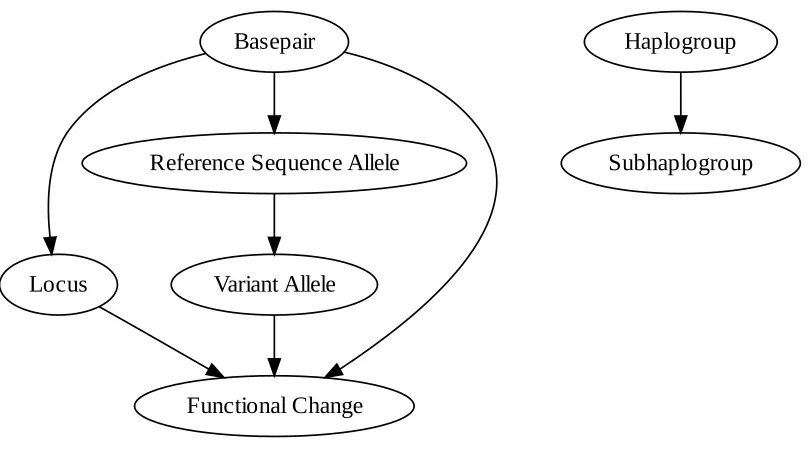
As shown, there are partial redundancies and interdependencies in the data. For example,
given only the basepair, one can unambiguously determine the reference allele if the reference
sequence is on hand. Similarly, the gene locus can usually be determined using only the
basepair. A graph showing dependencies and partial dependencies between columns is presented
!"#$%"&'
()*+#
,$-$'$.*$/0$1+$.*$/233$3$
4+.*5&)."3/67".8$ 9"'&".5/233$3$
:"%3)8')+%
0+;7"%3)8')+%
For curation purposes, these partial dependencies are extremely valuable. Such can be
used to automatically determine the consistency of data. For example, if the listed basepair is out
of range of the listed locus, then the row can be flagged as erroneous. That said, accurately
describing such dependencies in code can be difficult. To better illustrate this, the example of
determining the reference allele from the basepair will be used.
Without having the reference sequence available, the basepair is largely useless in
determining the reference allele. Using only the data, at best one could list what reference alleles
have been specified to exist at a single basepair. If there is only a single entry at a given
[image:26.612.106.510.101.329.2]basepair, then such a list is worthless. Even if there are multiple entires at the same basepair, this
Figure 6: The various dependencies between columns in the mtHaplogroups spreadsheet. Edges from source to destination are read as “can be used to determine”. Vertices that have no
is not particularly useful. For example, assume that at basepair 100, there are three listed
reference alleles: ‘A’, ‘A’, and ‘T’. One could take the route of consensus and choose ‘A’ as the
correct reference allele, but there is no guarantee this is correct. Additionally, all the listed
alleles could be wrong; the allele ‘C’ could very well be the correct reference allele at basepair
100.
In this case, additional information is required, namely the reference mitochondrial
genome sequence. As already mentioned, this reference sequence is currently 16,569 nucleotides
long (Andrews et al. 1999) This necessitates that the sequence is stored in a file external to the
error correction program. Additionally, this sequence has changed before (Andrews et al. 1999
as cited by Tuppen et al. 2010), which necessitates that it is possible to quickly and easily change
this information. For such a seemingly simple check, the maintenance of this additional
information adds an unfortunate bit of complication which is largely extraneous to the actual
error correction rule.
Ultimately, the solution to this problem was to hold the reference sequence in a relational
database along with other information that was relevant to error correction. In some cases, the
original relational mtHaplogroups database was simply modified to include additional
information. For example, columns were added to a preexisting table of mitochondrial loci
holding the starting and ending basepairs of individual loci. This solution allows for simple,
efficient querying of relevant information, in addition to keeping the related information close to
the dataset itself. Many of the relationships shown in Figure 6 can be verified with a single SQL
ErrorChecker.pl was the logical next step beyond holding error correction information
directly in the database. Although it only supported 4 matchers (8 considering negation) and 3
replacers, it did include a matcher and a replacer capable of relational database access. These
were used to perform the aforementioned reference allele and locus checks, in addition to some
verification on variant alleles. Thereafter it was very easy to add error checking routines, as long
as the check could be represented in SQL. Other checks, however, were more difficult to
express, largely due to ErrorChecker.pl’s restrictions on forming rules.
Materials and Methods
The Scala general purpose programming language was used for both the actual
spreadsheet portion and the core of the error checking language. Two programs came out of this:
one interactive, and the other non-interactive. Both versions use the same underlying suite of
features provided by the error checking language in order to accomplish their goals. In more
technical terms, the Model-View-Controller design pattern was used, and the interactive and
non-interactive versions were merely different Views and Controllers working on the same Model.
For the interactive version of the program, Java’s Swing library was used extensively. Of
special note is Swing’s JTable, which provides most of the necessary functionality of a basic
spreadsheet out of the box.
The error checking language, though primarily visual, is internally represented in XML
(http://www.w3schools.com/xml/default.asp). Preexisting parsers for XML exist. This is a lesson hard-learned from ErrorChecker.pl, where much of the code is devoted to parsing the error
correction language. Additionally, many of the problems of ErrorChecker.pl are due to ideas not
being able to be represented in its rigid syntax. This makes a much more expressive format like
To parse and write the XML, Scala’s built-in XML libraries were used extensively. In
Scala, SAX (http://sax.sourceforge.net/) is used internally to perform the initial parsing of input files. After this point, nodes are stored as a hierarchy of objects, in a form similar to the
document object model (DOM) (http://www.w3schools.com/dom/default.asp). Scala’s XML libraries support both reading in and writing out of XML. This is essential for the visual
programming component, which needed the ability to both read and write XML. The only
foreseen issue with the choice of Scala’s XML library is that it is inefficient for large files, as it
must store the entire contents of files in memory. This should not be a problem considering that
programs written in Error Sentinel are not expected to be prohibitively lengthy.
For the visual programming language, it is necessary to have a fair amount of software
that is dedicated to making dataflows. Originally, two preexisting solutions were noted that
could do this. The first was WireIt (http://javascript.neyric.com/wireit/), a library specifically designed for making the type of workflows often seen in visual programming languages. As the
library was written in JavaScript, not Java, the Mozilla Project’s Rhino (http://www.mozilla.org/ rhino/) would also have to be used. Rhino allows JavaScript to run on the JVM, just like Java.
Upon further investigation, it was found that this solution was inappropriate. For one,
having to use Rhino increased the complexity immensely. Additionally, WireIt still required
extensive modifications in order to provide all the functionality required. To top it all off, the
latest update to WireIt occurred well over a year ago as of this writing, and the project appears
dead.
modification to be useful. Additionally, the last update to it occurred in 2008, so the project is
almost certainly dead.
For these reasons, a custom library for making visual programming languages was
developed. The core components of the library are not specific to Sentinel, although there is a
significant amount of code written on top of these components that is Sentinel-specific. Having
to write this library was an unexpected hurdle, as it was nontrivial and it took a substantial
amount of precious time away from the main task.
Extensibility can be a double-edged sword when it comes to implementing the basic
functionality of the language, as it can become unclear as to what language to use (the core
language or otherwise) to implement something. This phenomenon is seen in other extensible
languages, most notably LISP, in which many basic core utilities are represented using a few
primitives provided by another language. To get an idea of what primitives must be coded
outside of the error correction language in Scala, the GNU Project’s implementation of Common
LISP (GCL, from http://www.gnu.org/software/gcl/) was referenced. The implementation features a variety of functions coded both in LISP and in C, where the C functions represent the
most basic primitives necessary for a fully functional language. The C functions show which
primitives are necessary in order to implement other things.
The majority of the C functions encountered were implemented as closely as possible in
Sentinel. Functions that were specific to LISP behaviors, such as looping and array creation,
were not implemented. Most of the intentionally unimplemented functions represent concepts
Beyond the functions adapted from GCL, several additional functions were added to the
core of the Error Sentinel language. Functions for regular expression matching were added,
namely Regex and NotRegex. The aforementioned functions utilize preexisting regular
expression routines in Java and Scala, found in java.util.regex and scala.util.matching,
respectively. These functions determine if a given datum does or does not match a given regular
expression.
Functions for relational database access were also added. These functions can be used to
both determine if an item exists in a database and to retrieve items from a database. These
functions are built on top of the abstraction layer provided by Java’s Database Connectivity
(JDBC), and so the database functions are theoretically applicable to any relational database for
which a JDBC driver has been written.
For the specific application of Error Sentinel to the mtHaplogroups data set, some data
was stored in a relational database. The actual data stored in the database is elaborated on in the
results section. The database used was SQLite3 (http://www.sqlite.org/), so chosen because of its simplicity and relatively good performance. The JDBC driver used to connect to the database
was SQLiteJDBC (http://www.zentus.com/sqlitejdbc/).
A variety of benchmarks were performed in an attempt to gauge the real-world
performance of both ErrorChecker.pl and Error Sentinel. For all of these benchmarks, five
sequential runs of the same program were performed on the same input. Multiple runs were used
in order to prime any caches that are out of direct control. Of these five runs, the most minimal
runtime was plotted. The minimum was used as opposed to the average because this value most
deterministic, theoretically each run should result in the exact same set of instructions being
executed in the exact same order. These instructions should all take the exact same amount of
time. As such, any time variations are due not to variability in the program, but rather other
programs interfering with the program being benchmarked (Kaminsky 2010).
The first of these benchmarks is the most realistic. It pits Error Sentinel against
ErrorChecker.pl, using the entire mtHaplogroups data set. For the actual error correction code,
the last ruleset written in ErrorChecker.pl was used. This ruleset was previously applied to the
data, and the current data shown at https://momtong.rit.edu/cgi-bin/haplogroups/haplogroups.cgi
was cleaned with it. It is too long to describe it completely, though it has been included as an
appendix. Without too much detail, it corrects certain typographical errors that were found to
exist in the dataset. It also converts citation information in a free text format to numerical IDs,
and it validates reference alleles, variant alleles, and loci with SQL database queries.
Being that Error Sentinel rules are directly incompatible with ErrorChecker.pl rules, a
small program was written to automatically perform the conversion, namely RuleConverter
(found in sentinel.utils.legacy). This program achieves a one-to-one transformation of
recognized ErrorChecker.pl rules to Error Sentinel rules. The remaining rules that were not
recognized by RuleConverter were implemented by hand in the same one-to-one fashion. Every
attempt was made to make the rulesets comparable. The resulting ruleset for both
ErrorChecker.pl and Error Sentinel contained 14 rules defining what good data looked like and
85 rules describing corrections for erroneous data. Testing has shown that both rulesets achieve
A modified version of this ruleset was also benchmarked. This modified ruleset was
identical except for checks that used SQL statements and relational databases, which were
removed. This was done because execution of such statements obviously takes a significant
amount of time, and this time is spent outside of the actual error correction frameworks. Instead
it is spent in the relational database drivers and the database itself, which is not the target of the
benchmark. This modified ruleset had the same 85 error correction rules, but 3 of the 14 good
data rules were removed.
In addition to this real world benchmark, another benchmark was performed using only a
single good data and error correction rule. The good data rule specifies that a subhaplogroup
cannot be a dash. The error correction rule will replace dashes in the subhaplogroup column
with the haplogroup column’s value. This is based on a subset of rules taken from the more
realistic benchmarking setup. This was chosen because it is simple to implement in other
languages and it requires values across more than a single column, namely the haplogroup.
This dash replacement setup was implemented in both ErrorChecker.pl and Error
Sentinel. In addition, single use programs were written in Scala, Java, and Perl that can perform
this error correction. These programs were used to try to measure how much of a performance
penalty is taken by using an error correction framework. These were also used to try to
determine how much overhead is simply due to the language chosen, since ErrorChecker.pl is
written in Perl and Error Sentinel is written in Scala.
A summation of all the benchmarking setups is shown below in Table 4. Henceforth,
Name Data Set Ruleset
Entire Full with Database Entire mtHaplogroups data The “real world” ruleset, featuring 14 good data rules and 85 error correction rules.
Entire Full without Database Entire mtHaplogroups data The “real world” ruleset, without database-based checks. This features 11 good data rules and 85 error correction rules.
Entire Dash Entire mtHaplogroups data The dash replacement ruleset, which replaces dashes in the subhaplogroup column with the value in the haplogroup column. This features a single good data rule and a single error correction rule.
Single Dash Single line of the
mtHaplogroups data. The line has a dash in the subhaplogroup column.
The same dash replacement ruleset used in “Entire Dash”, without modification.
Both ErrorChecker.pl and the non-interactive version of Error Sentinel were profiled in
an attempt to reveal any outstanding inefficiencies. For all profiling information, the “Entire Full
without Database” setup was used. For ErrorChecker.pl, this profiling was performed using the
Devel::NYTProf module (http://search.cpan.org/dist/Devel-NYTProf/lib/Devel/NYTProf.pm), retrieved from the Comprehensive Perl Archive Network (CPAN). All the defaults were used for
this profiling. For Error Sentinel, profiling data was generated using the Java Virtual Machine’s
built in Heap/CPU Profiling Tool (JVM HPROF). The CPU profiling method used was “times”.
“Times” records the absolute number of method calls that were made, along with the amount of
time spent on each call. The stack depth used for traces was 30.
Results
Ruleset Design Elements
Although the syntax and underlying implementation of rulesets is vastly different from
that of ErrorChecker.pl, there are still a number of commonalities. Matchers and replacers are
still the components that ultimately do work. As with ErrorChecker.pl, rulesets are broken down
into two separate sections, namely “good data” rules and “error correction” rules.
Good data rules describe what clean data looks like, and each rule consists of a single
matcher. There can be any number of good data rules. In order to be marked clean, input data
must match all good data rules. If no good data rules are listed, then the data is assumed to be
clean.
Error correction rules describe corrections that can be performed on erroneous data to
make such data clean. Each of these rules consists of a combination of one matcher and one
replacer. Unlike the good data rules, the order of error correction rules is important. When
input data fails one of the good data rules, it is passed through each of the error correction rules,
in an order defined by the user. If the input erroneous data matches the error correction rule’s
matcher, then the rule’s corresponding replacer is enacted. The resulting output of the enacted
replacer is treated as a correction. If data marked erroneous by the good data rules matches none
of the correction rules, then the data is flagged as being uncorrectable, at least by automatic
Error Sentinel
There are two versions of Error Sentinel that have been developed. The first is extremely
similar to ErrorChecker.pl, and is intended for largely the same purposes. This version is
text-based, and does not allow for interactive data entry. Using a provided ruleset, it scans input data.
This data is partitioned into one of two output spreadsheets, based upon the results of the ruleset.
One of these sheets is for cleaned data, and the other sheet is for uncorrectable data. All cells
marked clean by the good data rules are placed into the cleaned spreadsheet. Additionally, if
there is a valid error correction rule for an otherwise unclean cell, then the correction rule is
applied and the resulting correction written to the clean spreadsheet. If a cell has been marked as
erroneous by the good data rules and there are no matching correction rules, then the cell is
written to the spreadsheet for uncorrectable data. Additionally, any messages that are relevant to
why the data was marked as unclean and uncorrectable are written to a third output spreadsheet.
The second version of Error Sentinel developed is intended to look and behave much like
a typical spreadsheet program. It allows for interactive data entry, and the validity of input data
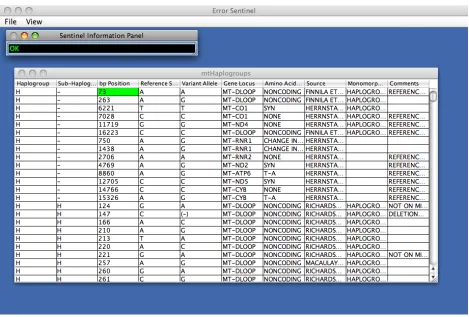
can be assessed on the fly based on a user-defined ruleset. An overall look at this interactive
In this interactive version, data marked as clean is shown in green. This can be seen with
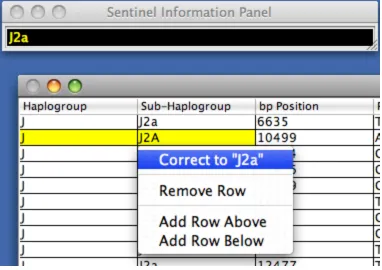
the selected cell in Figure 7. Data marked as unclean but with correction information available is
shown in yellow. The actual correction is shown in the “Sentinel Information Panel”, and also
can be seen when selecting the menu option to perform a correction. An example showing a
[image:37.612.72.541.68.385.2]selected cell with an available correction is shown below in Figure 8.
In the example shown in Figure 8, “J2A” is not a valid subhaplogroup, but “J2a” is. There is a
correction rule that can make this fix using the “GetDifferentCaseSubhaplogroup” replacer,
which is described later in the results. Note that the correction shown is intended to be a guide;
the user can select the ruleset-defined correction or specify an arbitrary correction. Such
behavior avoids the auto-correction problems seen in Zeeberg et al. (2004).
As for data marked unclean by the good data rules but without a matching error
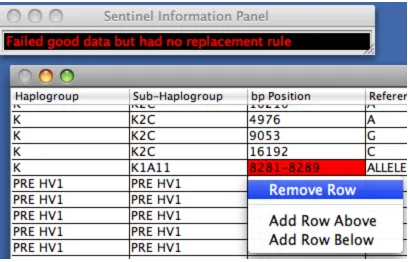
[image:38.612.117.499.73.343.2]correction rule, it is shown in red. This is shown below in Figure 9.
In the example shown in Figure 9, the column “bp Position” is supposed to contain only integers.
The value “8281-8289” clearly cannot be converted into a single integer, and so it has been
marked as erroneous. Additionally, there are no rules for making this sort of correction, and so it
has been shown in red. Note that although Error Sentinel has marked this data as erroneous, it
does not attempt to modify or remove the data in any way; it is still the user’s responsibility to
correct the error, and until then the error coexists with other data.
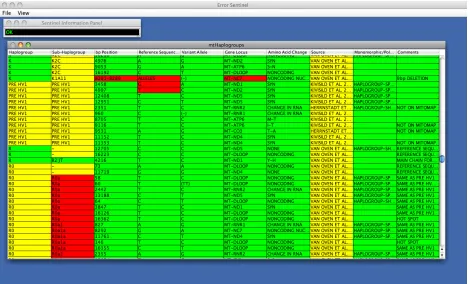
In addition to these basic features, the interactive version of Error Sentinel supports two
additional features of interest. The first of these allows for the colors of all cells to be shown at
once, as if each cell were somehow selected both individually but simultaneously. This feature is
accessible via “View->Show Cell Errors”. An example of this feature is shown below in Figure
[image:39.612.104.512.70.332.2]10.
Despite its usefulness, the “Show Cell Errors” command hides some important
information. Occasionally, direct execution of the error correction ruleset may not reveal all
problems in the data. For example, consider the relationship between the haplogroup and the
subhaplogroup shown in Figure 6. Depending on the particular ruleset, it may be possible for
one of these two to be marked differently than the other. The haplogroup could very well be
marked as clean but the subhaplogroup as unclean, or vice versa. Something similar to this
problem can be seen in Figure 10 for some of the later entries in the spreadsheet. The
haplogroup has been flagged as being correctable (yellow), but the subhaplogroup has been
flagged as unclean without a correction (red). Given the relationship between these two values
[image:40.612.73.543.72.356.2]in Figure 6, this is likely indicative of a larger problem. Indeed, this is the case for this example.
The haplogroup “R0”, which is the value of all the later yellow haplogroups in Figure 10, is no
longer considered valid in the data. Instead, it is referred to as “Pre HV1”. This change in the
haplogroup also demands a change in the subhaplogroup to preserve validity of the entry as a
whole. In short, a cell considered clean through direct execution of the error correction ruleset
could still be unclean if it is related to an unclean value.
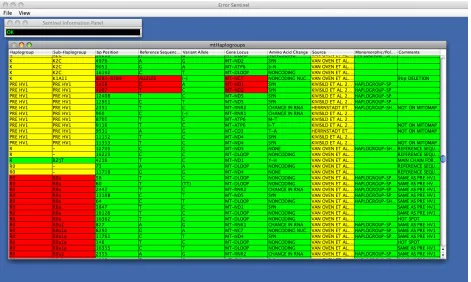
Because of this problem, there is also a modified version of the “Show Cell Errors”
command, namely the “Show Cell Errors with Parameters” command. This is accessible via
“View->Show Cell Errors with Parameters”. With this command, a cell dons the “worst” color
between itself and all related cells. For example, if the cell is marked clean, but it is associated
with an unclean cell, then the cell is also marked as unclean. The result of this command on the
As Figure 11 shows, additional cells have been marked as erroneous, including some
which were previously marked clean. The later haplogroup entries have all been marked as
uncorrectable, as their related subhaplogroups were uncorrectable. Additionally, the relationship
between the basepair and the reference allele shown in Figure 6 has been illustrated. Although
the basepairs for two of the entries were previously marked as clean, they are related to
erroneous reference sequence alleles, and so they have also been marked as erroneous and
uncorrectable.
Since the “Show Cell Errors with Parameters” may mark valid data as invalid, as with the
aforementioned basepairs, it is not intended to be used without discretion. It is intended to
[image:42.612.72.543.72.354.2]illustrate relationships between data, and potential consistency issues. A reasonable way of
thinking about the “Show Cell Errors with Parameters” is that it shows that data which has “at
most” the given problems, based on the ruleset. By contrast, “Show Cell Errors” shows data
with “at least” the given problems, based on the ruleset. The reality is somewhere in between,
and requires human intervention to solve. For this matter, Error Sentinel is not intended to
replace the user component, but rather assist the user in making corrections.
Language Classification
There are a large variety of different criteria which can be used to classify programming
languages. Additionally, given that the Error Sentinel language is a visual programming
language, there are even more criteria that can be considered than usual. To illustrate the sheer
volume of potential criteria, Burnett and Baker (1994) propose a system just for classifying
papers written about visual programming languages (VPLs). Kiper et al. (1997) identifies 18 key
criteria for evaluating VPLs, and uses them to evaluate the VPLs LabVIEW and ProGraph.
However, all of the proposed criteria are subjective in nature. For example, one of the criteria is
“Ease for programmers”. The author’s actual wording for this criterion is “Somewhat less easy”
for both LabVIEW and ProGraph.
Being that an objective classification using the proposed criteria in Kiper et al. (1997)
would require a sufficiently large case study, such will not be used. Additionally, given the large
volume of potential criteria just for programming languages in general, no attempt will be made
at an exhaustive list. Instead, evaluation criteria which are most useful for the application of
Dynamic Typing
In mathematics and computer science, the phrase “data type” refers to a set of values and
the valid operations that can be performed on those values (Sebesta 2007). Frequently, many
values have some concept of a type, even outside of programming languages. For instance,
consider the following four numbers: 1, -2, 3.5, and pi. 1 is a natural number, as natural numbers
include all positive integers and 0. -2 is not a natural number as it is negative, though is it still an
integer. 3.5 is a merely a rational number because of the decimal, and pi is an irrational number.
In and of itself, this kind of classification is not particularly useful. However, when the
applicable operations are included along with the values, the utility becomes apparent. For
example, consider the greatest common divisor (GCD). The GCD is applicable only to non-zero
integers. This is because it is relevant only to rational numbers which, be definition, have a
non-zero integer as a denominator. Additionally, the GCD returns a positive integer, again due to its
definition. It is not possible to get the GCD of two numbers when either one of the numbers is
irrational, as this would be nonsensical. In much the same way, it would be nonsensical to return
anything but a positive integer.
This is where typing comes into play. Formally, typing shows that finding the GCD with
pi as a parameter is not permitted. Applied to programming languages, any attempt to find the
GCD when a parameter is pi would result in a type error: the expected types differed from the
types used. Such errors are preferable to quietly using nonsensical data. For example, assembly
languages do not differentiate between integers, real numbers, or even code, which can result in
In general, there are two ways to perform typing: statically and dynamically (Sebesta
2007). In statically typed languages, type errors are found before the program is actually
executed. In dynamically typed languages, type errors are found as the program is executed.
There are a number of advantages and disadvantages to both strategies. For example, statically
checked code typically runs faster than dynamically checked code, as no type-checking overhead
occurs while the program is running. However, it is sometimes difficult to express ideas in
statically typed languages, as these potentially very abstract ideas must be represented with
concrete types (Sebesta 2007).
With this in mind, Error Sentinel is overall a dynamically typed language. It was felt that
static typing was too conforming for someone inexperienced with programming. Worse yet, it
adds another layer of complication, increasing the time needed to learn the language. There is,
however, a severe drawback to this dynamically typed approach. Code written in dynamically
typed languages is generally less robust than code written in statically typed languages (Sebesta
2007). Since errors are found as they occur, it is possible to have hidden bugs in code that just
need the right input types to be triggered.
Considering that Sentinel is a language specific for error correction, it was realized that
type errors could be useful for this purpose. For instance, if Sentinel reads in user data that it
expects to be an integer, but it is instead presented with a string, then this is indicative of an error
in the data itself. This check is done automatically and “for free” from the standpoint of a user;
the user does not have to explicitly perform these checks, as Sentinel implicitly must perform
An important point about data in a spreadsheet is that all data is seen as a bunch of
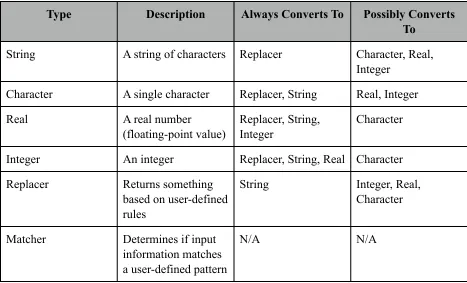
strings. As such, it must be possible to convert these strings from one type to another. The types
that Sentinel recognizes, along with the possible interconversions, are shown below in Table 5.
Type Description Always Converts To Possibly Converts
To
String A string of characters Replacer Character, Real,
Integer
Character A single character Replacer, String Real, Integer
Real A real number
(floating-point value)
Replacer, String, Integer
Character
Integer An integer Replacer, String, Real Character
Replacer Returns something
based on user-defined rules
String Integer, Real,
Character
Matcher Determines if input
information matches a user-defined pattern
N/A N/A
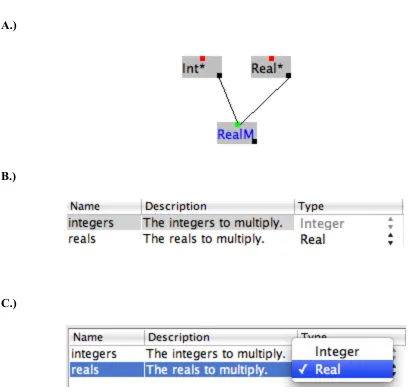
The type system of Sentinel is designed to be easy to learn, but unnecessary for basic
usage. During function creation, the VPL infers the types of inputs based on the input types of
the functions used within a function. This inference can be seen below in Figure 12. Although
the type inference mechanism prevents incorrect types from being passed to inner functions, it
[image:46.612.72.539.203.486.2]cannot predict additional semantic value that a user wants for a function.
A.)
B.)
C.)
As an example of additional semantic value, consider another example. Say a user wants
to multiply two numbers. One is a constant and the other is passed as input to a function. The
constant is a Real, so the user must use Real*, which multiplies real numbers. However, the user
[image:47.612.71.483.83.475.2]may only want an integer as a parameter. In this case, Sentinel’s type inference would choose
the weaker Real as the parameter type, which is not what the user desires. As shown in Figure
12C, the user can still change this type; the problem is that the default is not semantically correct
in this case.
It is expected that advanced users will take advantage of the typing system, adding
additional semantic value as described above. In this way, it may be possible to do basic error
correction without actual code.
Strong Typing
There is another important typing property of Error Sentinel that is important to mention.
Typing can be referred to as “strong” or “weak”, and the difference can be substantial.
Unfortunately, these two terms are poorly defined in the literature, if at all (Sebesta 2007). For
example, Madsen et al. (1990) defines weak typing as “...the type of an expression carries little
or no information.” The implied definition of strong typing from this definition of weak typing
is that an expression carries all typing information along with it. In contrast to this implied
definition, Berry et al. (1979) defines a strongly typed language as one in which “...each value
has a unique type.” Although these definitions share some overlap, they are different. For
example, the number “1” is both an integer and a real number. By the definition in Madsen et al.
(1990), this is perfectly fine. However, by the definition in Berry et al. (1979), this cannot be so;
ultimately, “1” must either be an integer or a real number. (Note that Berry et al. (1979) is
concerned with type equivalence, and would likely consider integers to be equivalent to real
numbers for certain operations, and vice-versa.)
Although it appears that the definition by Madsen et al. (1990) is more realistic by this
following: “Strong typing also implies that type checking can be performed during compilation,
but utilization of weak typing aspects has to be checked during run-time.” Considering this
quote, Madsen et al. (1990) considers strong typing to be largely equivalent to static typing, and